CHAPTER-FIVE
File Handling
&
Exception Handling In Python
By: Mikiale T.
1
Data File Handling
Hard
Disk
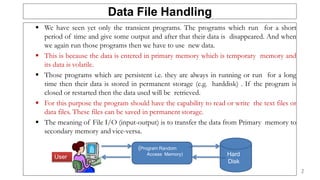
 We have seen yet only the transient programs. The programs which run for a short
period of time and give some output and after that their data is disappeared. And when
we again run those programs then we have to use new data.
 This is because the data is entered in primary memory which is temporary memory and
its data is volatile.
 Those programs which are persistent i.e. they are always in running or run for a long
time then their data is stored in permanent storage (e.g. harddisk) . If the program is
closed or restarted then the data used will be retrieved.
 For this purpose the program should have the capability to read or write the text files or
data files. These files can be saved in permanent storage.
 The meaning of File I/O (input-output) is to transfer the data from Primary memory to
secondary memory and vice-versa.
(Program Random
Access Memory)
User
2
Why the Files are used?
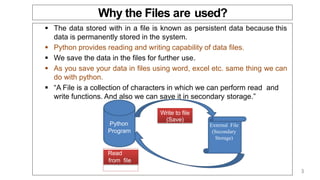
 The data stored with in a file is known as persistent data because this
data is permanently stored in the system.
 Python provides reading and writing capability of data files.
 We save the data in the files for further use.
 As you save your data in files using word, excel etc. same thing we can
do with python.
 “A File is a collection of characters in which we can perform read and
write functions. And also we can save it in secondary storage.”
Python
Program
External File
(Secondary
Storage)
Write to file
(Save)
Read
from file
(Load)
3
Data File Operations
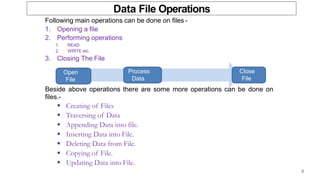
Following main operations can be done on files -
1. Opening a file
2. Performing operations
1. READ
2. WRITE etc.
3. Closing The File
Beside above operations there are some more operations can be done on
files.-
 Creating of Files
 Traversing of Data
 Appending Data into file.
 Inserting Data into File.
 Deleting Data from File.
 Copying of File.
 Updating Data into File.
Open
File
Process
Data
Close
File
4
File Types
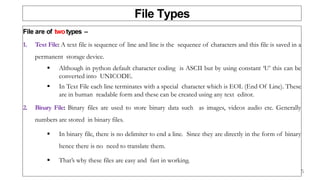
File are of twotypes –
1. Text File: A text file is sequence of line and line is the sequence of characters and this file is saved in a
permanent storage device.
 Although in python default character coding is ASCII but by using constant ‘U’ this can be
converted into UNICODE.
 In Text File each line terminates with a special character which is EOL (End Of Line). These
are in human readable form and these can be created using any text editor.
2. Binary File: Binary files are used to store binary data such as images, videos audio etc. Generally
numbers are stored in binary files.
 In binary file, there is no delimiter to end a line. Since they are directly in the form of binary
hence there is no need to translate them.
 That’s why these files are easy and fast in working.
5
Opening & Closing Files
 We need a file variable or file handle to work with files in Python.
 This file object can be created by using open( ) function or file( ) function.
 Open( ) function creates a file object, which is used later to access the file using
the functions related to file manipulation.
 Its syntax is following -
 <file_object>=open(<file_name>,<access_mode>)
 File accessing modes -
– read(r): To read the file
– write(w): to write to the file
– append(a): to Write at the end of file.
Python
Progra
m
External
File
(Second
a ry
Storage
)
Read from
file (Load)
6
File Handling
 File opening fileObject = open(file_name [, access_mode][, buffering])
Common access modes:
 “r” opens a file for reading only.
 “w” opens a file for writing only. Overwrites the file if the file exists.
Otherwise, it creates a new file.
 “a” opens a file for appending. If the file does not exist, it creates a new
file for writing.
 Closing a file fileObject.close()
The close() method flushes any unwritten information and closes the file object.
7
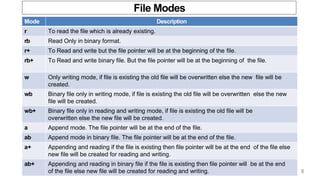
File Modes
Mode Description
r To read the file which is already existing.
rb Read Only in binary format.
r+ To Read and write but the file pointer will be at the beginning of the file.
rb+ To Read and write binary file. But the file pointer will be at the beginning of the file.
w Only writing mode, if file is existing the old file will be overwritten else the new file will be
created.
wb Binary file only in writing mode, if file is existing the old file will be overwritten else the new
file will be created.
wb+ Binary file only in reading and writing mode, if file is existing the old file will be
overwritten else the new file will be created.
a Append mode. The file pointer will be at the end of the file.
ab Append mode in binary file. The file pointer will be at the end of the file.
a+ Appending and reading if the file is existing then file pointer will be at the end of the file else
new file will be created for reading and writing.
ab+ Appending and reading in binary file if the file is existing then file pointer will be at the end
of the file else new file will be created for reading and writing. 8
File Handling
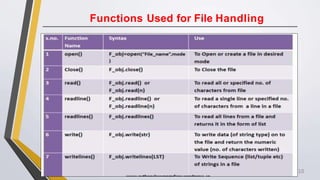
 Reading a file fileObject.read([count])
 The read() method reads the whole file at once.
 The readline() method reads one line each time from the file.
 The readlines() method reads all lines from the file in a list.
 Writing in a file fileObject.write(string)
The write() method writes any string to an open file.
9
Functions Used for File Handling
10
File Handling
 Python has several built-in modules and functions for handling files
 Reading and writing data to files using Python is pretty straightforward.
 To do this, you must first open files in the appropriate mode.
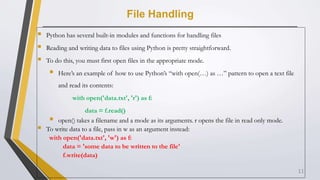
 Here’s an example of how to use Python’s “with open(…) as …” pattern to open a text file
and read its contents:
with open('data.txt', 'r') as f:
data = f.read()
 open() takes a filename and a mode as its arguments. r opens the file in read only mode.
 To write data to a file, pass in w as an argument instead:
with open('data.txt', 'w') as f:
data = 'some data to be written to the file'
f.write(data)
11
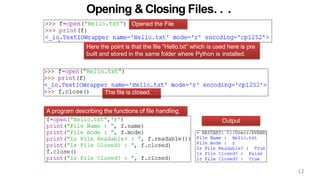
Opening & Closing Files. . .
Here the point is that the file “Hello.txt” which is used here is pre
built and stored in the same folder where Python is installed.
Opened the File
The file is closed.
Output
A program describing the functions of file handling.
12
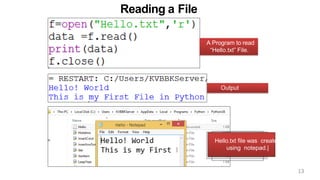
Reading a File
Output
A Program to read
“Hello.txt” File.
Hello.txt file was created
using notepad.|
13
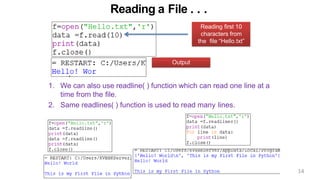
Reading a File . . .
Output
Reading first 10
characters from
the file “Hello.txt”
1. We can also use readline( ) function which can read one line at a
time from the file.
2. Same readlines( ) function is used to read many lines.
14
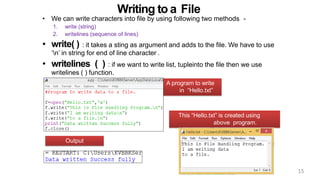
Writing to a File
Output
This “Hello.txt” is created using
above program.
• We can write characters into file by using following two methods -
1. write (string)
2. writelines (sequence of lines)
• write( ) : it takes a sting as argument and adds to the file. We have to use
‘n’ in string for end of line character .
• writelines ( ) : if we want to write list, tupleinto the file then we use
writelines ( ) function.
A program to write
in “Hello.txt”
15
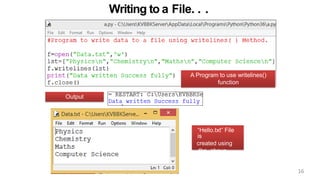
Writing to a File. . .
Output
A Program to use writelines()
function
“Hello.txt” File
is
created using
the above
program.
16
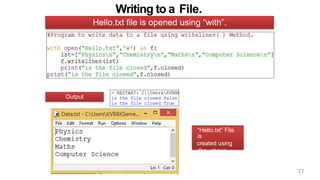
Writing to a File.
Output
Hello.txt file is opened using “with”.
“Hello.txt” File
is
created using
the above
program.
17
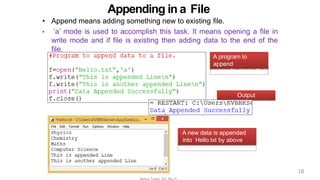
Appending in a File
Output
A program to
append
into a file “Hello.Txt”
A new data is appended
into Hello.txt by above
program.
• Append means adding something new to existing file.
• ‘a’ mode is used to accomplish this task. It means opening a file in
write mode and if file is existing then adding data to the end of the
file.
18
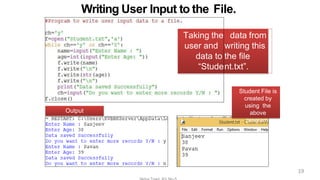
Writing User Input to the File.
Output
Taking the
user and
data to
“Stude
data from
writing this
the file
nt.txt”.
Student File is
created by
using the
above
program.
19
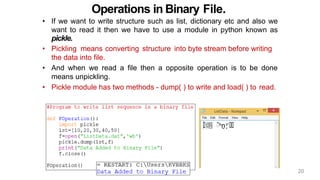
Operations in Binary File.
• If we want to write structure such as list, dictionary etc and also we
want to read it then we have to use a module in python known as
pickle.
• Pickling means converting structure into byte stream before writing
the data into file.
• And when we read a file then a opposite operation is to be done
means unpickling.
• Pickle module has two methods - dump( ) to write and load( ) to read.
20
Tkinter filedialog
 Python Tkinter (and TK) offer a set of dialogs that you can use when working with files. By using
these you don’t have to design standard dialogs your self.
 Example dialogs include an open file dialog, a save file dialog and many others.
 Besides file dialogs there are other standard dialogs, but in this article we will focus on file dialogs.
 File dialogs help you open, save files or directories.
 This is the type of dialog you get when you click file, open.
 This dialog comes out of the module, there’s no need to write all the code manually.
21
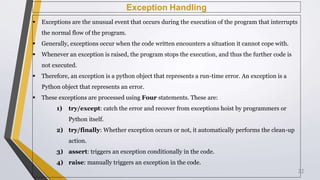
Exception Handling
 Exceptions are the unusual event that occurs during the execution of the program that interrupts
the normal flow of the program.
 Generally, exceptions occur when the code written encounters a situation it cannot cope with.
 Whenever an exception is raised, the program stops the execution, and thus the further code is
not executed.
 Therefore, an exception is a python object that represents a run-time error. An exception is a
Python object that represents an error.
 These exceptions are processed using Four statements. These are:
1) try/except: catch the error and recover from exceptions hoist by programmers or
Python itself.
2) try/finally: Whether exception occurs or not, it automatically performs the clean-up
action.
3) assert: triggers an exception conditionally in the code.
4) raise: manually triggers an exception in the code.
22
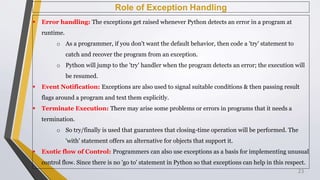
Role of Exception Handling
 Error handling: The exceptions get raised whenever Python detects an error in a program at
runtime.
o As a programmer, if you don't want the default behavior, then code a 'try' statement to
catch and recover the program from an exception.
o Python will jump to the 'try' handler when the program detects an error; the execution will
be resumed.
 Event Notification: Exceptions are also used to signal suitable conditions & then passing result
flags around a program and text them explicitly.
 Terminate Execution: There may arise some problems or errors in programs that it needs a
termination.
o So try/finally is used that guarantees that closing-time operation will be performed. The
'with' statement offers an alternative for objects that support it.
 Exotic flow of Control: Programmers can also use exceptions as a basis for implementing unusual
control flow. Since there is no 'go to' statement in Python so that exceptions can help in this respect.
23
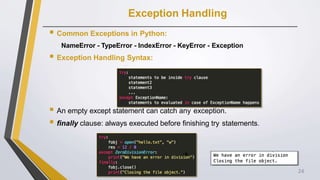
Exception Handling
 Common Exceptions in Python:
NameError - TypeError - IndexError - KeyError - Exception
 Exception Handling Syntax:
 An empty except statement can catch any exception.
 finally clause: always executed before finishing try statements.

24
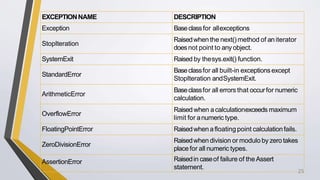
EXCEPTIONNAME DESCRIPTION
Exception Baseclassfor allexceptions
StopIteration
Raisedwhen the next()method of an iterator
doesnot point to any object.
SystemExit Raised by thesys.exit() function.
StandardError
Baseclassfor all built-in exceptionsexcept
StopIteration andSystemExit.
ArithmeticError
Baseclassfor all errors that occurfor numeric
calculation.
OverflowError
Raised when acalculationexceeds maximum
limit for anumeric type.
FloatingPointError Raisedwhen afloating point calculationfails.
ZeroDivisionError
Raisedwhen division or modulo by zero takes
placefor all numeric types.
AssertionError Raisedin caseof failure of the Assert
statement.
25
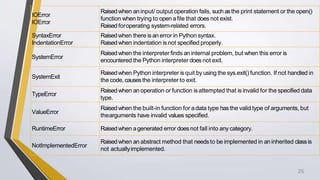
IOError
IOError
Raisedwhen an input/ output operation fails, such asthe print statement or the open()
function when trying to open afile that does not exist.
Raised foroperating system-related errors.
SyntaxError
IndentationError
Raisedwhen there is an error in Python syntax.
Raisedwhen indentation is not specified properly.
SystemError
Raisedwhen the interpreter finds an internal problem, but when this error is
encountered the Python interpreter does not exit.
SystemExit
Raisedwhen Python interpreter is quit by using the sys.exit() function. If not handled in
the code, causesthe interpreter to exit.
TypeError
Raisedwhen an operation or function is attempted that is invalid for the specified data
type.
ValueError
Raisedwhen the built-in function for adata type hasthe valid type of arguments, but
thearguments have invalid values specified.
RuntimeError Raisedwhen agenerated error does not fall into any category.
NotImplementedError
Raisedwhen an abstract method that needsto be implemented in an inherited classis
not actuallyimplemented.
26
Quiz 5%
1) Write a Python program to read a file line by line and store it into a list.
2) Define two functions which, respectively, input values for the elements of lists
of reals and output the list elements:
3) Write a function in python to read the content from a text file “file.txt" line by
line and display the same on screen.
4) Write a function display_words() in python to read lines from a text file
"story.txt", and display those words, which are less than 4 characters.
5) Write a function in python to read the content from a text file "software.txt" line
by line and display the same on screen.
27

Chapter - 5.pptx

  • 1.
  • 2.
    Data File Handling Hard Disk We have seen yet only the transient programs. The programs which run for a short period of time and give some output and after that their data is disappeared. And when we again run those programs then we have to use new data.  This is because the data is entered in primary memory which is temporary memory and its data is volatile.  Those programs which are persistent i.e. they are always in running or run for a long time then their data is stored in permanent storage (e.g. harddisk) . If the program is closed or restarted then the data used will be retrieved.  For this purpose the program should have the capability to read or write the text files or data files. These files can be saved in permanent storage.  The meaning of File I/O (input-output) is to transfer the data from Primary memory to secondary memory and vice-versa. (Program Random Access Memory) User 2
  • 3.
    Why the Filesare used?  The data stored with in a file is known as persistent data because this data is permanently stored in the system.  Python provides reading and writing capability of data files.  We save the data in the files for further use.  As you save your data in files using word, excel etc. same thing we can do with python.  “A File is a collection of characters in which we can perform read and write functions. And also we can save it in secondary storage.” Python Program External File (Secondary Storage) Write to file (Save) Read from file (Load) 3
  • 4.
    Data File Operations Followingmain operations can be done on files - 1. Opening a file 2. Performing operations 1. READ 2. WRITE etc. 3. Closing The File Beside above operations there are some more operations can be done on files.-  Creating of Files  Traversing of Data  Appending Data into file.  Inserting Data into File.  Deleting Data from File.  Copying of File.  Updating Data into File. Open File Process Data Close File 4
  • 5.
    File Types File areof twotypes – 1. Text File: A text file is sequence of line and line is the sequence of characters and this file is saved in a permanent storage device.  Although in python default character coding is ASCII but by using constant ‘U’ this can be converted into UNICODE.  In Text File each line terminates with a special character which is EOL (End Of Line). These are in human readable form and these can be created using any text editor. 2. Binary File: Binary files are used to store binary data such as images, videos audio etc. Generally numbers are stored in binary files.  In binary file, there is no delimiter to end a line. Since they are directly in the form of binary hence there is no need to translate them.  That’s why these files are easy and fast in working. 5
  • 6.
    Opening & ClosingFiles  We need a file variable or file handle to work with files in Python.  This file object can be created by using open( ) function or file( ) function.  Open( ) function creates a file object, which is used later to access the file using the functions related to file manipulation.  Its syntax is following -  <file_object>=open(<file_name>,<access_mode>)  File accessing modes - – read(r): To read the file – write(w): to write to the file – append(a): to Write at the end of file. Python Progra m External File (Second a ry Storage ) Read from file (Load) 6
  • 7.
    File Handling  Fileopening fileObject = open(file_name [, access_mode][, buffering]) Common access modes:  “r” opens a file for reading only.  “w” opens a file for writing only. Overwrites the file if the file exists. Otherwise, it creates a new file.  “a” opens a file for appending. If the file does not exist, it creates a new file for writing.  Closing a file fileObject.close() The close() method flushes any unwritten information and closes the file object. 7
  • 8.
    File Modes Mode Description rTo read the file which is already existing. rb Read Only in binary format. r+ To Read and write but the file pointer will be at the beginning of the file. rb+ To Read and write binary file. But the file pointer will be at the beginning of the file. w Only writing mode, if file is existing the old file will be overwritten else the new file will be created. wb Binary file only in writing mode, if file is existing the old file will be overwritten else the new file will be created. wb+ Binary file only in reading and writing mode, if file is existing the old file will be overwritten else the new file will be created. a Append mode. The file pointer will be at the end of the file. ab Append mode in binary file. The file pointer will be at the end of the file. a+ Appending and reading if the file is existing then file pointer will be at the end of the file else new file will be created for reading and writing. ab+ Appending and reading in binary file if the file is existing then file pointer will be at the end of the file else new file will be created for reading and writing. 8
  • 9.
    File Handling  Readinga file fileObject.read([count])  The read() method reads the whole file at once.  The readline() method reads one line each time from the file.  The readlines() method reads all lines from the file in a list.  Writing in a file fileObject.write(string) The write() method writes any string to an open file. 9
  • 10.
    Functions Used forFile Handling 10
  • 11.
    File Handling  Pythonhas several built-in modules and functions for handling files  Reading and writing data to files using Python is pretty straightforward.  To do this, you must first open files in the appropriate mode.  Here’s an example of how to use Python’s “with open(…) as …” pattern to open a text file and read its contents: with open('data.txt', 'r') as f: data = f.read()  open() takes a filename and a mode as its arguments. r opens the file in read only mode.  To write data to a file, pass in w as an argument instead: with open('data.txt', 'w') as f: data = 'some data to be written to the file' f.write(data) 11
  • 12.
    Opening & ClosingFiles. . . Here the point is that the file “Hello.txt” which is used here is pre built and stored in the same folder where Python is installed. Opened the File The file is closed. Output A program describing the functions of file handling. 12
  • 13.
    Reading a File Output AProgram to read “Hello.txt” File. Hello.txt file was created using notepad.| 13
  • 14.
    Reading a File. . . Output Reading first 10 characters from the file “Hello.txt” 1. We can also use readline( ) function which can read one line at a time from the file. 2. Same readlines( ) function is used to read many lines. 14
  • 15.
    Writing to aFile Output This “Hello.txt” is created using above program. • We can write characters into file by using following two methods - 1. write (string) 2. writelines (sequence of lines) • write( ) : it takes a sting as argument and adds to the file. We have to use ‘n’ in string for end of line character . • writelines ( ) : if we want to write list, tupleinto the file then we use writelines ( ) function. A program to write in “Hello.txt” 15
  • 16.
    Writing to aFile. . . Output A Program to use writelines() function “Hello.txt” File is created using the above program. 16
  • 17.
    Writing to aFile. Output Hello.txt file is opened using “with”. “Hello.txt” File is created using the above program. 17
  • 18.
    Appending in aFile Output A program to append into a file “Hello.Txt” A new data is appended into Hello.txt by above program. • Append means adding something new to existing file. • ‘a’ mode is used to accomplish this task. It means opening a file in write mode and if file is existing then adding data to the end of the file. 18
  • 19.
    Writing User Inputto the File. Output Taking the user and data to “Stude data from writing this the file nt.txt”. Student File is created by using the above program. 19
  • 20.
    Operations in BinaryFile. • If we want to write structure such as list, dictionary etc and also we want to read it then we have to use a module in python known as pickle. • Pickling means converting structure into byte stream before writing the data into file. • And when we read a file then a opposite operation is to be done means unpickling. • Pickle module has two methods - dump( ) to write and load( ) to read. 20
  • 21.
    Tkinter filedialog  PythonTkinter (and TK) offer a set of dialogs that you can use when working with files. By using these you don’t have to design standard dialogs your self.  Example dialogs include an open file dialog, a save file dialog and many others.  Besides file dialogs there are other standard dialogs, but in this article we will focus on file dialogs.  File dialogs help you open, save files or directories.  This is the type of dialog you get when you click file, open.  This dialog comes out of the module, there’s no need to write all the code manually. 21
  • 22.
    Exception Handling  Exceptionsare the unusual event that occurs during the execution of the program that interrupts the normal flow of the program.  Generally, exceptions occur when the code written encounters a situation it cannot cope with.  Whenever an exception is raised, the program stops the execution, and thus the further code is not executed.  Therefore, an exception is a python object that represents a run-time error. An exception is a Python object that represents an error.  These exceptions are processed using Four statements. These are: 1) try/except: catch the error and recover from exceptions hoist by programmers or Python itself. 2) try/finally: Whether exception occurs or not, it automatically performs the clean-up action. 3) assert: triggers an exception conditionally in the code. 4) raise: manually triggers an exception in the code. 22
  • 23.
    Role of ExceptionHandling  Error handling: The exceptions get raised whenever Python detects an error in a program at runtime. o As a programmer, if you don't want the default behavior, then code a 'try' statement to catch and recover the program from an exception. o Python will jump to the 'try' handler when the program detects an error; the execution will be resumed.  Event Notification: Exceptions are also used to signal suitable conditions & then passing result flags around a program and text them explicitly.  Terminate Execution: There may arise some problems or errors in programs that it needs a termination. o So try/finally is used that guarantees that closing-time operation will be performed. The 'with' statement offers an alternative for objects that support it.  Exotic flow of Control: Programmers can also use exceptions as a basis for implementing unusual control flow. Since there is no 'go to' statement in Python so that exceptions can help in this respect. 23
  • 24.
    Exception Handling  CommonExceptions in Python: NameError - TypeError - IndexError - KeyError - Exception  Exception Handling Syntax:  An empty except statement can catch any exception.  finally clause: always executed before finishing try statements.  24
  • 25.
    EXCEPTIONNAME DESCRIPTION Exception Baseclassforallexceptions StopIteration Raisedwhen the next()method of an iterator doesnot point to any object. SystemExit Raised by thesys.exit() function. StandardError Baseclassfor all built-in exceptionsexcept StopIteration andSystemExit. ArithmeticError Baseclassfor all errors that occurfor numeric calculation. OverflowError Raised when acalculationexceeds maximum limit for anumeric type. FloatingPointError Raisedwhen afloating point calculationfails. ZeroDivisionError Raisedwhen division or modulo by zero takes placefor all numeric types. AssertionError Raisedin caseof failure of the Assert statement. 25
  • 26.
    IOError IOError Raisedwhen an input/output operation fails, such asthe print statement or the open() function when trying to open afile that does not exist. Raised foroperating system-related errors. SyntaxError IndentationError Raisedwhen there is an error in Python syntax. Raisedwhen indentation is not specified properly. SystemError Raisedwhen the interpreter finds an internal problem, but when this error is encountered the Python interpreter does not exit. SystemExit Raisedwhen Python interpreter is quit by using the sys.exit() function. If not handled in the code, causesthe interpreter to exit. TypeError Raisedwhen an operation or function is attempted that is invalid for the specified data type. ValueError Raisedwhen the built-in function for adata type hasthe valid type of arguments, but thearguments have invalid values specified. RuntimeError Raisedwhen agenerated error does not fall into any category. NotImplementedError Raisedwhen an abstract method that needsto be implemented in an inherited classis not actuallyimplemented. 26
  • 27.
    Quiz 5% 1) Writea Python program to read a file line by line and store it into a list. 2) Define two functions which, respectively, input values for the elements of lists of reals and output the list elements: 3) Write a function in python to read the content from a text file “file.txt" line by line and display the same on screen. 4) Write a function display_words() in python to read lines from a text file "story.txt", and display those words, which are less than 4 characters. 5) Write a function in python to read the content from a text file "software.txt" line by line and display the same on screen. 27