10/7/2012
    FILE HANDALING
1


       G.vishnuprabhu
CONTENTS:


                                               10/7/2012
 File pointer and their manipulation
 Sequential input and output operations

 Adding content to a file


                                           2
10/7/2012
INTRODUCTION


               3
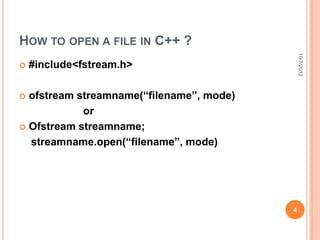
HOW TO OPEN A FILE IN C++ ?


                                              10/7/2012
   #include<fstream.h>

 ofstream streamname(“filename”, mode)
            or
 Ofstream streamname;

  streamname.open(“filename”, mode)


                                          4
   To create a file:

        #include<fstream.h>


                                                 10/7/2012
        main()
        {
               fstream file(“newdoc.txt”);
               file.close();
        }


                                             5
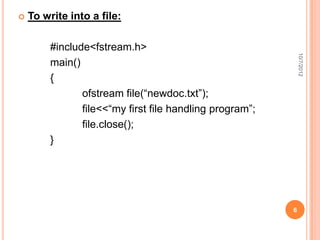
   To write into a file:

         #include<fstream.h>


                                                              10/7/2012
         main()
         {
                ofstream file(“newdoc.txt”);
                file<<“my first file handling program”;
                file.close();
         }


                                                          6
   To close a file:

     The file is closed implicitly when a destructor for


                                                               10/7/2012
    the corresponding object is called


         (Or)


         Obj.close()


                                                           7
10/7/2012
FILE POINTERS


                8
FILE POINTERS:


                                                          10/7/2012
   The c++ input and output system manages two int
    value associates with a file

   These are
        1)get pointer
        2)put pointer


                                                      9
OPENING IN A FILE IN DIFFERENT MODES


                                                                 10/7/2012
 Read      h    e     l        l   o   w    o     r     l   d
 only
               Input pointer


append     h    e     l        l   o   w o        r     l   d

                                           Output pointer


 writing


           Output pointer                                       10
10/7/2012
Get pointer                     Put pointer

   It specifies the location      It specifies the location
    in a file where the next        in a file where the next
    read operation will             write operation will
    occur                           occur


                                                                11
FUNCTIONS


             10/7/2012
 tellg()
 tellp()

 seekg()

 seekp()


            12
FILE POSITION POINTER


                                                              10/7/2012
   <istream> and <ostream> classes provide member
    functions for repositioning the file pointer (the byte
    number of the next byte in the file to be read or to
    be written.)

   These member functions are:
    seekg (seek get) for istream class
    seekp (seek put) for ostream class


                                                             13
EXAMPLES OF MOVING A FILE POINTER


                                                              10/7/2012
obj.seekg(0) –
                   repositions the file get pointer to the
                   beginning of the file
obj.seekg(0, ios:end) –
                    repositions the file get pointer to
                   the end of the file


                                                             14
obj.seekg(n, ios:beg) –
                   repositions the file
                   get pointer to the n-th byte of the


                                                            10/7/2012
                   file
obj.seekg(m, ios:end) –
                   repositions the file
                   get pointer to the m-th byte from the
                   end of file


The same operations can be performed with
<ostream> function member seekp.

                                                           15
MEMBER FUNCTIONS TELLG() AND TELLP().


                                                     10/7/2012
 Member   functions tellg and tellp are
  provided to return the current locations of
  the get and put pointers, respectively.
 long location = inClientFile.tellg();

 To move the pointer relative to the current
  location use ios:cur
 inClientFile.seekg(n, ios:cur) - moves the file
  get pointer n bytes forward.

                                                    16
10/7/2012
SEQUENTIAL INPUT AND OUTPUT OPERATIONS


                                         17
CREATING A SEQUENTIAL FILE


                                                          10/7/2012
// Create a sequential file
#include <iostream.h>
#include <fstream.h>
#include <stdlib.h>
int main()
{
    // ofstream constructor opens file
    ofstream outClientFile( "clients.dat", ios::out );


    if ( !outClientFile ) { // overloaded ! operator
        cerr << "File could not be opened" << endl;
        exit( 1 );   // prototype in stdlib.h
    }                                                    18
SEQUENTIAL FILE
cout << "Enter the account, name, and balance.n"


                                                     10/7/2012
     << "Enter end-of-file to end input.n? ";
  int account;
 char name[ 30 ];
 float balance;

    while ( cin >> account >> name >> balance ) {
      outClientFile << account << ' ' << name
               << ' ' << balance << 'n';
      cout << "? ";
    }

    return 0; // ofstream destructor closes file
}


                                                    19
UPDATING A SEQUENTIAL FILE


                                                         10/7/2012
 Data that is formatted and written to a sequential
  file cannot be modified easily without the risk of
  destroying other data in the file.
 If we want to modify a record of data, the new data
  may be longer than the old one and it could
  overwrite parts of the record following it.


                                                        20
PROBLEMS WITH SEQUENTIAL FILES


                                                         10/7/2012
 Sequential files are inappropriate for so-called
  “instant access” applications in which a particular
  record of information must be located immediately.
 These applications include banking systems, point-
  of-sale systems, airline reservation systems, (or
  any data-base system.)


                                                        21
RANDOM ACCESS FILES


                                                            10/7/2012
   Instant access is possible with random access files.

   Individual records of a random access file can be
    accessed directly (and quickly) without searching
    many other records.


                                                           22
EXAMPLE OF A PROGRAM THAT CREATES A
RANDOM ACCESS FILE


                                              10/7/2012
// Definition of struct clientData used in
// Figs. 14.11, 14.12, 14.14 and 14.15.
#ifndef CLNTDATA_H
#define CLNTDATA_H
struct clientData {
   int accountNumber;
   char lastName[ 15 ];
   char firstName[ 10 ];
   float balance;
};
#endif
                                             23
CREATING A RANDOM ACCESS FILE


                                                      10/7/2012
// Creating a randomly accessed file sequentially
#include <iostream.h>
#include <fstream.h>
#include <stdlib.h>
#include "clntdata.h"
int main()
{
    ofstream outCredit( "credit1.dat", ios::out);
if ( !outCredit ) {
      cerr << "File could not be opened." << endl;
      exit( 1 );
   }

                                                     24
CLIENTDATA BLANKCLIENT   = { 0, "", "", 0.0 };


                                                  10/7/2012
FOR ( INT I = 0; I < 100; I++ )
  OUTCREDIT.WRITE
       (REINTERPRET_CAST<CONST CHAR        *>(
&BLANKCLIENT ),
       SIZEOF( CLIENTDATA ) );
  RETURN 0;
}


                                                 25
<OSTREAM> MEMEBR FUNCTION WRITE


                                                              10/7/2012
   The <ostream> member function write outputs a
    fixed number of bytes beginning at a specific
    location in memory to the specific stream. When the
    stream is associated with a file, the data is written
    beginning at the location in the file specified by the
    “put” file pointer.


                                                             26
THE WRITE FUNCTION EXPECTS A FIRST
ARGUMENT OF TYPE CONST CHAR *,


                                      10/7/2012
HENCE WE USED THE
REINTERPRET_CAST <CONST CHAR *>
TO CONVERT THE ADDRESS OF THE
BLANKCLIENT TO A CONST CHAR *.
THE SECOND ARGUMENT OF WRITE IS
AN INTEGER OF TYPE SIZE_T
SPECIFYING THE NUMBER OF BYTES TO
WRITTEN. THUS THE SIZEOF(
                                     27
CLIENTDATA ).
WRITING DATA RANDOMLY TO A RANDOM FILE


                                                     10/7/2012
#include <iostream.h>
#include <fstream.h>
#include <stdlib.h>
#include "clntdata.h"
int main()
{
  ofstream outCredit( "credit.dat", ios::ate );

  if ( !outCredit ) {
     cerr << "File could not be opened." << endl;
     exit( 1 );
  }

                                                    28
10/7/2012
COUT<< "ENTER ACCOUNT NUMBER "
   << "(1 TO 100, 0 TO END INPUT)N? ";

CLIENTDATA CLIENT;
CIN >> CLIENT.ACCOUNTNUMBER;

WHILE ( CLIENT.ACCOUNTNUMBER > 0 &&
    CLIENT.ACCOUNTNUMBER <= 100 ) {
 COUT << "ENTER LASTNAME, FIRSTNAME, BALANCEN?   ";
 CIN >> CLIENT.LASTNAME >> CLIENT.FIRSTNAME
    >> CLIENT.BALANCE;


                                                       29
OUTCREDIT.SEEKP( ( CLIENT.ACCOUNTNUMBER       -1)*


                                                         10/7/2012
             SIZEOF( CLIENTDATA ) );
   OUTCREDIT.WRITE(
         REINTERPRET_CAST<CONST CHAR   *>( &CLIENT ),
         SIZEOF( CLIENTDATA ) );


        COUT << "ENTER ACCOUNT NUMBERN? ";
        CIN >> CLIENT.ACCOUNTNUMBER;
    }

    RETURN     0;
}
                                                        30
READING DATA FROM A RANDOM FILE


                                                     10/7/2012
#include <iostream.h>
#include <iomanip.h>
#include <fstream.h>
#include <stdlib.h>
#include "clntdata.h"
void outputLine( ostream&, const clientData & );
int main()
{
  ifstream inCredit( "credit.dat", ios::in );
  if ( !inCredit ) {
     cerr << "File could not be opened." << endl;
     exit( 1 );
  }                                                 31
COUT << SETIOSFLAGS( IOS::LEFT ) << SETW( 10 ) <<
"ACCOUNT"


                                                           10/7/2012
    << SETW( 16 ) << "LAST NAME" << SETW( 11 )
    << "FIRST NAME" << RESETIOSFLAGS( IOS::LEFT )
    << SETW( 10 ) << "BALANCE" << ENDL;

     CLIENTDATA CLIENT;


     INCREDIT.READ( REINTERPRET_CAST<CHAR   *>( &CLIENT
),
             SIZEOF( CLIENTDATA )   );


                                                          32
WHILE        ( INCREDIT && !INCREDIT.EOF() ) {


                                                                   10/7/2012
        IF   ( CLIENT.ACCOUNTNUMBER != 0 )
             OUTPUTLINE( COUT, CLIENT );

        INCREDIT.READ( REINTERPRET_CAST<CHAR     *>( &CLIENT ),
                 SIZEOF( CLIENTDATA ) );
    }

    RETURN       0;
}


                                                                  33
10/7/2012
VOID OUTPUTLINE( OSTREAM   &OUTPUT, CONST CLIENTDATA &C )
{
    OUTPUT<< SETIOSFLAGS( IOS::LEFT ) << SETW( 10 )
       << C.ACCOUNTNUMBER << SETW( 16 ) << C.LASTNAME
       << SETW( 11 ) << C.FIRSTNAME << SETW( 10 )
       << SETPRECISION( 2 ) << RESETIOSFLAGS( IOS::LEFT )
       << SETIOSFLAGS( IOS::FIXED | IOS::SHOWPOINT )
       << C.BALANCE << 'N';
}


                                                            34
10/7/2012
THANK YOU…!!!


                35

File handaling

  • 1.
    10/7/2012 FILE HANDALING 1 G.vishnuprabhu
  • 2.
    CONTENTS: 10/7/2012  File pointer and their manipulation  Sequential input and output operations  Adding content to a file 2
  • 3.
  • 4.
    HOW TO OPENA FILE IN C++ ? 10/7/2012  #include<fstream.h>  ofstream streamname(“filename”, mode) or  Ofstream streamname; streamname.open(“filename”, mode) 4
  • 5.
    To create a file: #include<fstream.h> 10/7/2012 main() { fstream file(“newdoc.txt”); file.close(); } 5
  • 6.
    To write into a file: #include<fstream.h> 10/7/2012 main() { ofstream file(“newdoc.txt”); file<<“my first file handling program”; file.close(); } 6
  • 7.
    To close a file: The file is closed implicitly when a destructor for 10/7/2012 the corresponding object is called (Or) Obj.close() 7
  • 8.
  • 9.
    FILE POINTERS: 10/7/2012  The c++ input and output system manages two int value associates with a file  These are 1)get pointer 2)put pointer 9
  • 10.
    OPENING IN AFILE IN DIFFERENT MODES 10/7/2012 Read h e l l o w o r l d only Input pointer append h e l l o w o r l d Output pointer writing Output pointer 10
  • 11.
    10/7/2012 Get pointer Put pointer  It specifies the location  It specifies the location in a file where the next in a file where the next read operation will write operation will occur occur 11
  • 12.
    FUNCTIONS 10/7/2012  tellg()  tellp()  seekg()  seekp() 12
  • 13.
    FILE POSITION POINTER 10/7/2012  <istream> and <ostream> classes provide member functions for repositioning the file pointer (the byte number of the next byte in the file to be read or to be written.)  These member functions are: seekg (seek get) for istream class seekp (seek put) for ostream class 13
  • 14.
    EXAMPLES OF MOVINGA FILE POINTER 10/7/2012 obj.seekg(0) – repositions the file get pointer to the beginning of the file obj.seekg(0, ios:end) – repositions the file get pointer to the end of the file 14
  • 15.
    obj.seekg(n, ios:beg) – repositions the file get pointer to the n-th byte of the 10/7/2012 file obj.seekg(m, ios:end) – repositions the file get pointer to the m-th byte from the end of file The same operations can be performed with <ostream> function member seekp. 15
  • 16.
    MEMBER FUNCTIONS TELLG()AND TELLP(). 10/7/2012  Member functions tellg and tellp are provided to return the current locations of the get and put pointers, respectively.  long location = inClientFile.tellg();  To move the pointer relative to the current location use ios:cur  inClientFile.seekg(n, ios:cur) - moves the file get pointer n bytes forward. 16
  • 17.
    10/7/2012 SEQUENTIAL INPUT ANDOUTPUT OPERATIONS 17
  • 18.
    CREATING A SEQUENTIALFILE 10/7/2012 // Create a sequential file #include <iostream.h> #include <fstream.h> #include <stdlib.h> int main() { // ofstream constructor opens file ofstream outClientFile( "clients.dat", ios::out ); if ( !outClientFile ) { // overloaded ! operator cerr << "File could not be opened" << endl; exit( 1 ); // prototype in stdlib.h } 18
  • 19.
    SEQUENTIAL FILE cout <<"Enter the account, name, and balance.n" 10/7/2012 << "Enter end-of-file to end input.n? "; int account; char name[ 30 ]; float balance; while ( cin >> account >> name >> balance ) { outClientFile << account << ' ' << name << ' ' << balance << 'n'; cout << "? "; } return 0; // ofstream destructor closes file } 19
  • 20.
    UPDATING A SEQUENTIALFILE 10/7/2012  Data that is formatted and written to a sequential file cannot be modified easily without the risk of destroying other data in the file.  If we want to modify a record of data, the new data may be longer than the old one and it could overwrite parts of the record following it. 20
  • 21.
    PROBLEMS WITH SEQUENTIALFILES 10/7/2012  Sequential files are inappropriate for so-called “instant access” applications in which a particular record of information must be located immediately.  These applications include banking systems, point- of-sale systems, airline reservation systems, (or any data-base system.) 21
  • 22.
    RANDOM ACCESS FILES 10/7/2012  Instant access is possible with random access files.  Individual records of a random access file can be accessed directly (and quickly) without searching many other records. 22
  • 23.
    EXAMPLE OF APROGRAM THAT CREATES A RANDOM ACCESS FILE 10/7/2012 // Definition of struct clientData used in // Figs. 14.11, 14.12, 14.14 and 14.15. #ifndef CLNTDATA_H #define CLNTDATA_H struct clientData { int accountNumber; char lastName[ 15 ]; char firstName[ 10 ]; float balance; }; #endif 23
  • 24.
    CREATING A RANDOMACCESS FILE 10/7/2012 // Creating a randomly accessed file sequentially #include <iostream.h> #include <fstream.h> #include <stdlib.h> #include "clntdata.h" int main() { ofstream outCredit( "credit1.dat", ios::out); if ( !outCredit ) { cerr << "File could not be opened." << endl; exit( 1 ); } 24
  • 25.
    CLIENTDATA BLANKCLIENT = { 0, "", "", 0.0 }; 10/7/2012 FOR ( INT I = 0; I < 100; I++ ) OUTCREDIT.WRITE (REINTERPRET_CAST<CONST CHAR *>( &BLANKCLIENT ), SIZEOF( CLIENTDATA ) ); RETURN 0; } 25
  • 26.
    <OSTREAM> MEMEBR FUNCTIONWRITE 10/7/2012  The <ostream> member function write outputs a fixed number of bytes beginning at a specific location in memory to the specific stream. When the stream is associated with a file, the data is written beginning at the location in the file specified by the “put” file pointer. 26
  • 27.
    THE WRITE FUNCTIONEXPECTS A FIRST ARGUMENT OF TYPE CONST CHAR *, 10/7/2012 HENCE WE USED THE REINTERPRET_CAST <CONST CHAR *> TO CONVERT THE ADDRESS OF THE BLANKCLIENT TO A CONST CHAR *. THE SECOND ARGUMENT OF WRITE IS AN INTEGER OF TYPE SIZE_T SPECIFYING THE NUMBER OF BYTES TO WRITTEN. THUS THE SIZEOF( 27 CLIENTDATA ).
  • 28.
    WRITING DATA RANDOMLYTO A RANDOM FILE 10/7/2012 #include <iostream.h> #include <fstream.h> #include <stdlib.h> #include "clntdata.h" int main() { ofstream outCredit( "credit.dat", ios::ate ); if ( !outCredit ) { cerr << "File could not be opened." << endl; exit( 1 ); } 28
  • 29.
    10/7/2012 COUT<< "ENTER ACCOUNTNUMBER " << "(1 TO 100, 0 TO END INPUT)N? "; CLIENTDATA CLIENT; CIN >> CLIENT.ACCOUNTNUMBER; WHILE ( CLIENT.ACCOUNTNUMBER > 0 && CLIENT.ACCOUNTNUMBER <= 100 ) { COUT << "ENTER LASTNAME, FIRSTNAME, BALANCEN? "; CIN >> CLIENT.LASTNAME >> CLIENT.FIRSTNAME >> CLIENT.BALANCE; 29
  • 30.
    OUTCREDIT.SEEKP( ( CLIENT.ACCOUNTNUMBER -1)* 10/7/2012 SIZEOF( CLIENTDATA ) ); OUTCREDIT.WRITE( REINTERPRET_CAST<CONST CHAR *>( &CLIENT ), SIZEOF( CLIENTDATA ) ); COUT << "ENTER ACCOUNT NUMBERN? "; CIN >> CLIENT.ACCOUNTNUMBER; } RETURN 0; } 30
  • 31.
    READING DATA FROMA RANDOM FILE 10/7/2012 #include <iostream.h> #include <iomanip.h> #include <fstream.h> #include <stdlib.h> #include "clntdata.h" void outputLine( ostream&, const clientData & ); int main() { ifstream inCredit( "credit.dat", ios::in ); if ( !inCredit ) { cerr << "File could not be opened." << endl; exit( 1 ); } 31
  • 32.
    COUT << SETIOSFLAGS(IOS::LEFT ) << SETW( 10 ) << "ACCOUNT" 10/7/2012 << SETW( 16 ) << "LAST NAME" << SETW( 11 ) << "FIRST NAME" << RESETIOSFLAGS( IOS::LEFT ) << SETW( 10 ) << "BALANCE" << ENDL; CLIENTDATA CLIENT; INCREDIT.READ( REINTERPRET_CAST<CHAR *>( &CLIENT ), SIZEOF( CLIENTDATA ) ); 32
  • 33.
    WHILE ( INCREDIT && !INCREDIT.EOF() ) { 10/7/2012 IF ( CLIENT.ACCOUNTNUMBER != 0 ) OUTPUTLINE( COUT, CLIENT ); INCREDIT.READ( REINTERPRET_CAST<CHAR *>( &CLIENT ), SIZEOF( CLIENTDATA ) ); } RETURN 0; } 33
  • 34.
    10/7/2012 VOID OUTPUTLINE( OSTREAM &OUTPUT, CONST CLIENTDATA &C ) { OUTPUT<< SETIOSFLAGS( IOS::LEFT ) << SETW( 10 ) << C.ACCOUNTNUMBER << SETW( 16 ) << C.LASTNAME << SETW( 11 ) << C.FIRSTNAME << SETW( 10 ) << SETPRECISION( 2 ) << RESETIOSFLAGS( IOS::LEFT ) << SETIOSFLAGS( IOS::FIXED | IOS::SHOWPOINT ) << C.BALANCE << 'N'; } 34
  • 35.