黃升煌 Mike Huang
使用 Passkeys 打造無密碼驗證服務
無密碼時代降臨!
About Me
• 黃升煌 Mike
• Angular GDE
• Microsoft MVP
• Awards
• 2018 iT 邦幫忙鐵人賽 冠軍
• 2019 iT 邦幫忙鐵人賽 優選
• 第 12 屆 iThome 鐵人賽 冠軍
https://github.com/wellwind
https://www.facebook.com/fullstackledder
https://fullstackladder.dev
Password
Sucks!!
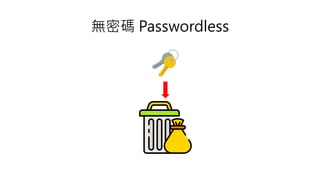
無密碼 Passwordless
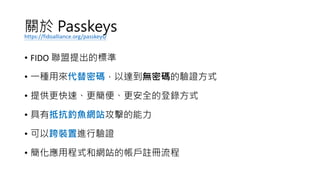
關於 Passkeys
• FIDO 聯盟提出的標準
• 一種用來代替密碼,以達到無密碼的驗證方式
• 提供更快速、更簡便、更安全的登錄方式
• 具有抵抗釣魚網站攻擊的能力
• 可以跨裝置進行驗證
• 簡化應用程式和網站的帳戶註冊流程
https://fidoalliance.org/passkeys/
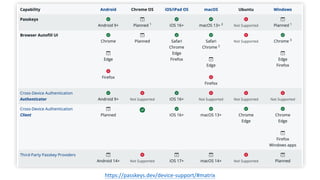
https://passkeys.dev/device-support/#matrix
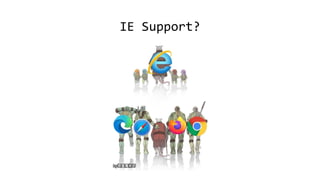
IE Support?
IE Support?
DEMO
Google Passkeys 註冊/登入
WebAuthn (Web Authentication)
• FIDO 聯盟與 W3C 聯合提出的驗證標準
• 利用非對稱金鑰的方式進行驗證
• 伺服器端只會儲存公鑰
• 私鑰儲存在使用者個人設備上,可透過生物特徵進行加密
• 私鑰會與網域綁定,避免釣魚網站攻擊
• Passkeys 透過 WebAuthn,同時加入跨裝置驗證的支援
• 需要作業系統支援
• 開發上只需要調整 WebAuthn API 的參數
https://webauthn.guide/
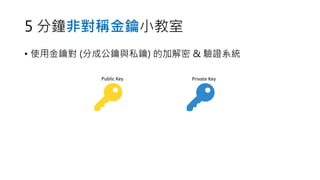
5 分鐘非對稱金鑰小教室
• 使用金鑰對 (分成公鑰與私鑰) 的加解密 & 驗證系統
Public Key Private Key
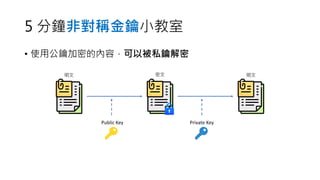
5 分鐘非對稱金鑰小教室
• 使用公鑰加密的內容,可以被私鑰解密
Public Key Private Key
明文 密文 明文
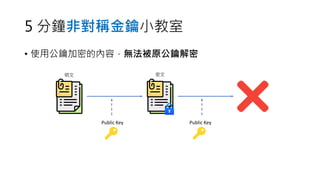
5 分鐘非對稱金鑰小教室
• 使用公鑰加密的內容,無法被原公鑰解密
Public Key Public Key
明文 密文
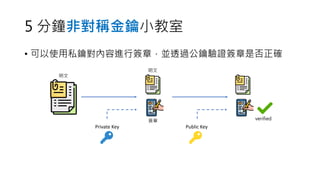
5 分鐘非對稱金鑰小教室
• 可以使用私鑰對內容進行簽章,並透過公鑰驗證簽章是否正確
Public Key
Private Key
明文
簽章
明文
verified
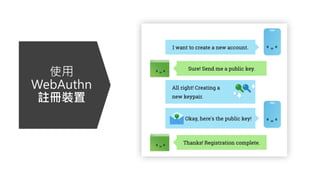
使用
WebAuthn
註冊裝置
const publicKeyCredentialCreationOptions = {
challenge: Uint8Array.from(
"challenge from server", (c) => c.charCodeAt(0)),
rp: {
name: "FullStackLadder",
id: "fullstackladder.dev",
},
user: {
id: Uint8Array.from("User Id", (c) => c.charCodeAt(0)),
name: "mike@fullstackladder.dev",
displayName: "Mike Huang",
},
pubKeyCredParams: [{ alg: -7, type: "public-key" }],
authenticatorSelection: {
authenticatorAttachment: "cross-platform"
},
timeout: 60000,
attestation: "direct",
};
const credential = await navigator.credentials.create({
publicKey: publicKeyCredentialCreationOptions,
});
使用 WebAuthn 註冊裝置
使用 WebAuthn 註冊裝置
從伺服器產生的隨機字串 (challenge)
避免重播攻擊 (replay attack)
SPEC
const publicKeyCredentialCreationOptions = {
challenge: Uint8Array.from(
"challenge from server", (c) => c.charCodeAt(0)),
rp: {
name: "FullStackLadder",
id: "fullstackladder.dev",
},
user: {
id: Uint8Array.from("User Id", (c) => c.charCodeAt(0)),
name: "mike@fullstackladder.dev",
displayName: "Mike Huang",
},
pubKeyCredParams: [{ alg: -7, type: "public-key" }],
authenticatorSelection: {
authenticatorAttachment: "cross-platform"
},
timeout: 60000,
attestation: "direct",
};
const credential = await navigator.credentials.create({
publicKey: publicKeyCredentialCreationOptions,
});
使用 WebAuthn 註冊裝置
relying party 資訊
通常也就是驗證伺服器的資訊
id 需要與網域名稱相符,避免釣魚網站攻擊
SPEC
const publicKeyCredentialCreationOptions = {
challenge: Uint8Array.from(
"challenge from server", (c) => c.charCodeAt(0)),
rp: {
name: "FullStackLadder",
id: "fullstackladder.dev",
},
user: {
id: Uint8Array.from("User Id", (c) => c.charCodeAt(0)),
name: "mike@fullstackladder.dev",
displayName: "Mike Huang",
},
pubKeyCredParams: [{ alg: -7, type: "public-key" }],
authenticatorSelection: {
authenticatorAttachment: "cross-platform"
},
timeout: 60000,
attestation: "direct",
};
const credential = await navigator.credentials.create({
publicKey: publicKeyCredentialCreationOptions,
});
使用 WebAuthn 註冊裝置
目前要註冊裝置的使用者資訊
SPEC
const publicKeyCredentialCreationOptions = {
challenge: Uint8Array.from(
"challenge from server", (c) => c.charCodeAt(0)),
rp: {
name: "FullStackLadder",
id: "fullstackladder.dev",
},
user: {
id: Uint8Array.from("User Id", (c) => c.charCodeAt(0)),
name: "mike@fullstackladder.dev",
displayName: "Mike Huang",
},
pubKeyCredParams: [{ alg: -7, type: "public-key" }],
authenticatorSelection: {
authenticatorAttachment: "cross-platform"
},
timeout: 60000,
attestation: "direct",
};
const credential = await navigator.credentials.create({
publicKey: publicKeyCredentialCreationOptions,
});
使用 WebAuthn 註冊裝置
指定允許使用的簽章演算法
SPEC
建議包含以下幾種演算法已達到最佳的支援
• -8 (Ed25519)
• -7 (ES256)
• -257 (RS256)
const publicKeyCredentialCreationOptions = {
challenge: Uint8Array.from(
"challenge from server", (c) => c.charCodeAt(0)),
rp: {
name: "FullStackLadder",
id: "fullstackladder.dev",
},
user: {
id: Uint8Array.from("User Id", (c) => c.charCodeAt(0)),
name: "mike@fullstackladder.dev",
displayName: "Mike Huang",
},
pubKeyCredParams: [{ alg: -7, type: "public-key" }],
authenticatorSelection: {
authenticatorAttachment: "cross-platform"
},
timeout: 60000,
attestation: "direct",
};
const credential = await navigator.credentials.create({
publicKey: publicKeyCredentialCreationOptions,
});
使用 WebAuthn 註冊裝置
(非必要) 用來限定可以使用的驗證器來源
SPEC
const publicKeyCredentialCreationOptions = {
challenge: Uint8Array.from(
"challenge from server", (c) => c.charCodeAt(0)),
rp: {
name: "FullStackLadder",
id: "fullstackladder.dev",
},
user: {
id: Uint8Array.from("User Id", (c) => c.charCodeAt(0)),
name: "mike@fullstackladder.dev",
displayName: "Mike Huang",
},
pubKeyCredParams: [{ alg: -7, type: "public-key" }],
authenticatorSelection: {
authenticatorAttachment: "cross-platform"
},
timeout: 60000,
attestation: "direct",
};
const credential = await navigator.credentials.create({
publicKey: publicKeyCredentialCreationOptions,
});
使用 WebAuthn 註冊裝置
註冊流程到期時間 (毫秒)
SPEC
const publicKeyCredentialCreationOptions = {
challenge: Uint8Array.from(
"challenge from server", (c) => c.charCodeAt(0)),
rp: {
name: "FullStackLadder",
id: "fullstackladder.dev",
},
user: {
id: Uint8Array.from("User Id", (c) => c.charCodeAt(0)),
name: "mike@fullstackladder.dev",
displayName: "Mike Huang",
},
pubKeyCredParams: [{ alg: -7, type: "public-key" }],
authenticatorSelection: {
authenticatorAttachment: "cross-platform"
},
timeout: 60000,
attestation: "direct",
};
const credential = await navigator.credentials.create({
publicKey: publicKeyCredentialCreationOptions,
});
使用 WebAuthn 註冊裝置
是否要回傳驗證器資訊給伺服器
SPEC
const publicKeyCredentialCreationOptions = {
challenge: Uint8Array.from(
"challenge from server", (c) => c.charCodeAt(0)),
rp: {
name: "FullStackLadder",
id: "fullstackladder.dev",
},
user: {
id: Uint8Array.from("User Id", (c) => c.charCodeAt(0)),
name: "mike@fullstackladder.dev",
displayName: "Mike Huang",
},
pubKeyCredParams: [{ alg: -7, type: "public-key" }],
authenticatorSelection: {
authenticatorAttachment: "cross-platform"
},
timeout: 60000,
attestation: "direct",
};
const credential = await navigator.credentials.create({
publicKey: publicKeyCredentialCreationOptions,
});
使用 WebAuthn 註冊裝置
產生裝置公鑰及相關認證資訊
const publicKeyCredentialCreationOptions = {
challenge: Uint8Array.from(
"challenge from server", (c) => c.charCodeAt(0)),
rp: {
name: "FullStackLadder",
id: "fullstackladder.dev",
},
user: {
id: Uint8Array.from("User Id", (c) => c.charCodeAt(0)),
name: "mike@fullstackladder.dev",
displayName: "Mike Huang",
},
pubKeyCredParams: [{ alg: -7, type: "public-key" }],
authenticatorSelection: {
authenticatorAttachment: "cross-platform"
},
timeout: 60000,
attestation: "direct",
};
const credential = await navigator.credentials.create({
publicKey: publicKeyCredentialCreationOptions,
});
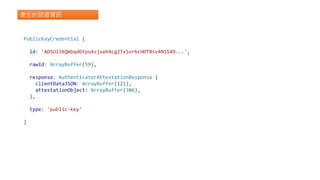
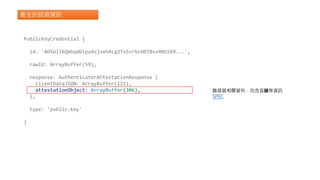
產生的認證資訊
PublicKeyCredential {
id: 'ADSUllKQmbqdGtpu4sjseh4cg2TxSvrbcHDTBsv4NSSX9...',
rawId: ArrayBuffer(59),
response: AuthenticatorAttestationResponse {
clientDataJSON: ArrayBuffer(121),
attestationObject: ArrayBuffer(306),
},
type: 'public-key'
}
產生的認證資訊
PublicKeyCredential {
id: 'ADSUllKQmbqdGtpu4sjseh4cg2TxSvrbcHDTBsv4NSSX9...',
rawId: ArrayBuffer(59),
response: AuthenticatorAttestationResponse {
clientDataJSON: ArrayBuffer(121),
attestationObject: ArrayBuffer(306),
},
type: 'public-key'
}
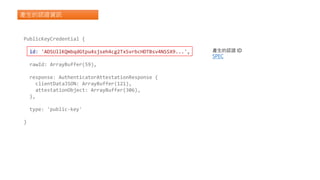
產生的認證 ID
SPEC
產生的認證資訊
PublicKeyCredential {
id: 'ADSUllKQmbqdGtpu4sjseh4cg2TxSvrbcHDTBsv4NSSX9...',
rawId: ArrayBuffer(59),
response: AuthenticatorAttestationResponse {
clientDataJSON: ArrayBuffer(121),
attestationObject: ArrayBuffer(306),
},
type: 'public-key'
}
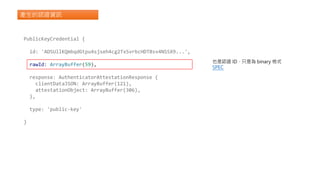
也是認證 ID,只是為 binary 格式
SPEC
產生的認證資訊
PublicKeyCredential {
id: 'ADSUllKQmbqdGtpu4sjseh4cg2TxSvrbcHDTBsv4NSSX9...',
rawId: ArrayBuffer(59),
response: AuthenticatorAttestationResponse {
clientDataJSON: ArrayBuffer(121),
attestationObject: ArrayBuffer(306),
},
type: 'public-key'
}
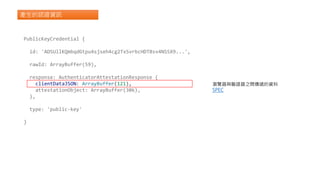
瀏覽器與驗證器之間傳遞的資料
SPEC
產生的認證資訊
PublicKeyCredential {
id: 'ADSUllKQmbqdGtpu4sjseh4cg2TxSvrbcHDTBsv4NSSX9...',
rawId: ArrayBuffer(59),
response: AuthenticatorAttestationResponse {
clientDataJSON: ArrayBuffer(121),
attestationObject: ArrayBuffer(306),
},
type: 'public-key'
}
驗證器相關資料,包含公鑰等資訊
SPEC
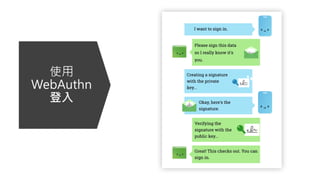
使用
WebAuthn
登入
const publicKeyCredentialRequestOptions = {
challenge: Uint8Array.from(
"challenge from server", (c) => c.charCodeAt(0)),
allowCredentials: [
{
id: Uint8Array.from(
"credential id", (c) => c.charCodeAt(0)),
type: "public-key",
transports: ["internal"],
},
],
timeout: 60000,
};
const assertion = await navigator.credentials.get({
publicKey: publicKeyCredentialRequestOptions,
});
使用 WebAuthn 驗證
const publicKeyCredentialRequestOptions = {
challenge: Uint8Array.from(
"challenge from server", (c) => c.charCodeAt(0)),
allowCredentials: [
{
id: Uint8Array.from(
"credential id", (c) => c.charCodeAt(0)),
type: "public-key",
transports: ["internal"],
},
],
timeout: 60000,
};
const assertion = await navigator.credentials.get({
publicKey: publicKeyCredentialRequestOptions,
});
使用 WebAuthn 驗證
(非必要) 允許使用的驗證資訊
可用來限定登入的裝置
SPEC
const publicKeyCredentialRequestOptions = {
challenge: Uint8Array.from(
"challenge from server", (c) => c.charCodeAt(0)),
allowCredentials: [
{
id: Uint8Array.from(
"credential id", (c) => c.charCodeAt(0)),
type: "public-key",
transports: ["internal"],
},
],
timeout: 60000,
};
const assertion = await navigator.credentials.get({
publicKey: publicKeyCredentialRequestOptions,
});
使用 WebAuthn 驗證
登入流程的到期時間 (毫秒)
SPEC
const publicKeyCredentialRequestOptions = {
challenge: Uint8Array.from(
"challenge from server", (c) => c.charCodeAt(0)),
allowCredentials: [
{
id: Uint8Array.from(
"credential id", (c) => c.charCodeAt(0)),
type: "public-key",
transports: ["internal"],
},
],
timeout: 60000,
};
const assertion = await navigator.credentials.get({
publicKey: publicKeyCredentialRequestOptions,
});
使用 WebAuthn 驗證
取得註冊的裝置資訊,以及相關簽章結果
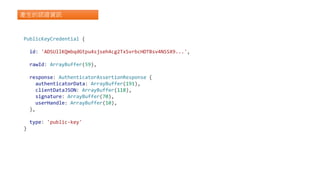
產生的認證資訊
PublicKeyCredential {
id: 'ADSUllKQmbqdGtpu4sjseh4cg2TxSvrbcHDTBsv4NSSX9...',
rawId: ArrayBuffer(59),
response: AuthenticatorAssertionResponse {
authenticatorData: ArrayBuffer(191),
clientDataJSON: ArrayBuffer(118),
signature: ArrayBuffer(70),
userHandle: ArrayBuffer(10),
},
type: 'public-key'
}
產生的認證資訊
PublicKeyCredential {
id: 'ADSUllKQmbqdGtpu4sjseh4cg2TxSvrbcHDTBsv4NSSX9...',
rawId: ArrayBuffer(59),
response: AuthenticatorAssertionResponse {
authenticatorData: ArrayBuffer(191),
clientDataJSON: ArrayBuffer(118),
signature: ArrayBuffer(70),
userHandle: ArrayBuffer(10),
},
type: 'public-key'
}
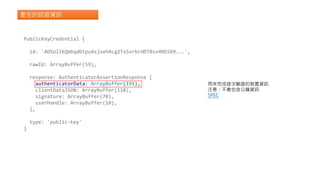
用來完成這次驗證的裝置資訊
注意:不會包含公鑰資訊
SPEC
產生的認證資訊
PublicKeyCredential {
id: 'ADSUllKQmbqdGtpu4sjseh4cg2TxSvrbcHDTBsv4NSSX9...',
rawId: ArrayBuffer(59),
response: AuthenticatorAssertionResponse {
authenticatorData: ArrayBuffer(191),
clientDataJSON: ArrayBuffer(118),
signature: ArrayBuffer(70),
userHandle: ArrayBuffer(10),
},
type: 'public-key'
}
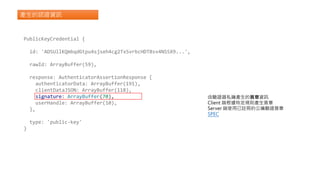
由驗證器私鑰產生的簽章資訊
Client 端根據特定規則產生簽章
Server 端使用已註冊的公鑰驗證簽章
SPEC
產生的認證資訊
PublicKeyCredential {
id: 'ADSUllKQmbqdGtpu4sjseh4cg2TxSvrbcHDTBsv4NSSX9...',
rawId: ArrayBuffer(59),
response: AuthenticatorAssertionResponse {
authenticatorData: ArrayBuffer(191),
clientDataJSON: ArrayBuffer(118),
signature: ArrayBuffer(70),
userHandle: ArrayBuffer(10),
},
type: 'public-key'
}
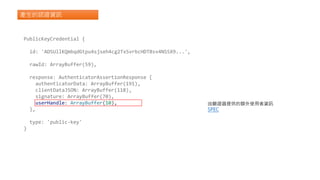
由驗證器提供的額外使用者資訊
SPEC
WebAuthn JavaScript Library
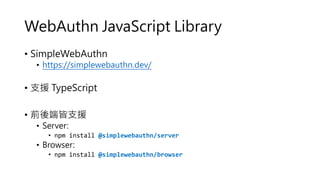
• SimpleWebAuthn
• https://simplewebauthn.dev/
• 支援 TypeScript
• 前後端皆支援
• Server:
• npm install @simplewebauthn/server
• Browser:
• npm install @simplewebauthn/browser
DEMO
用 SimpleWebAuthn 實作前後端 Passkeys
https://github.com/wellwind/webconf23-passkeys-demo
Resources
• Passkeys (Passkey Authentication)
• passkeys.com
• WebAuthn vs Passkeys
• SimpleWebAuthn
• [Google] 使用密碼金鑰進行無密碼登入
• 一起來了解 Web Authentication
• [影片]有 Google 帳號的人注意!這個功能請火速把它打開
Thank
You
https://github.com/wellwind
https://www.facebook.com/fullstackledder
https://fullstackladder.dev

使用 Passkeys 打造無密碼驗證服務

  • 1.
    黃升煌 Mike Huang 使用Passkeys 打造無密碼驗證服務 無密碼時代降臨!
  • 2.
    About Me • 黃升煌Mike • Angular GDE • Microsoft MVP • Awards • 2018 iT 邦幫忙鐵人賽 冠軍 • 2019 iT 邦幫忙鐵人賽 優選 • 第 12 屆 iThome 鐵人賽 冠軍 https://github.com/wellwind https://www.facebook.com/fullstackledder https://fullstackladder.dev
  • 3.
  • 5.
  • 6.
    關於 Passkeys • FIDO聯盟提出的標準 • 一種用來代替密碼,以達到無密碼的驗證方式 • 提供更快速、更簡便、更安全的登錄方式 • 具有抵抗釣魚網站攻擊的能力 • 可以跨裝置進行驗證 • 簡化應用程式和網站的帳戶註冊流程 https://fidoalliance.org/passkeys/
  • 7.
  • 8.
  • 9.
  • 10.
  • 11.
    WebAuthn (Web Authentication) •FIDO 聯盟與 W3C 聯合提出的驗證標準 • 利用非對稱金鑰的方式進行驗證 • 伺服器端只會儲存公鑰 • 私鑰儲存在使用者個人設備上,可透過生物特徵進行加密 • 私鑰會與網域綁定,避免釣魚網站攻擊 • Passkeys 透過 WebAuthn,同時加入跨裝置驗證的支援 • 需要作業系統支援 • 開發上只需要調整 WebAuthn API 的參數 https://webauthn.guide/
  • 12.
    5 分鐘非對稱金鑰小教室 • 使用金鑰對(分成公鑰與私鑰) 的加解密 & 驗證系統 Public Key Private Key
  • 13.
  • 14.
  • 15.
  • 16.
  • 17.
    const publicKeyCredentialCreationOptions ={ challenge: Uint8Array.from( "challenge from server", (c) => c.charCodeAt(0)), rp: { name: "FullStackLadder", id: "fullstackladder.dev", }, user: { id: Uint8Array.from("User Id", (c) => c.charCodeAt(0)), name: "mike@fullstackladder.dev", displayName: "Mike Huang", }, pubKeyCredParams: [{ alg: -7, type: "public-key" }], authenticatorSelection: { authenticatorAttachment: "cross-platform" }, timeout: 60000, attestation: "direct", }; const credential = await navigator.credentials.create({ publicKey: publicKeyCredentialCreationOptions, }); 使用 WebAuthn 註冊裝置
  • 18.
    使用 WebAuthn 註冊裝置 從伺服器產生的隨機字串(challenge) 避免重播攻擊 (replay attack) SPEC const publicKeyCredentialCreationOptions = { challenge: Uint8Array.from( "challenge from server", (c) => c.charCodeAt(0)), rp: { name: "FullStackLadder", id: "fullstackladder.dev", }, user: { id: Uint8Array.from("User Id", (c) => c.charCodeAt(0)), name: "mike@fullstackladder.dev", displayName: "Mike Huang", }, pubKeyCredParams: [{ alg: -7, type: "public-key" }], authenticatorSelection: { authenticatorAttachment: "cross-platform" }, timeout: 60000, attestation: "direct", }; const credential = await navigator.credentials.create({ publicKey: publicKeyCredentialCreationOptions, });
  • 19.
    使用 WebAuthn 註冊裝置 relyingparty 資訊 通常也就是驗證伺服器的資訊 id 需要與網域名稱相符,避免釣魚網站攻擊 SPEC const publicKeyCredentialCreationOptions = { challenge: Uint8Array.from( "challenge from server", (c) => c.charCodeAt(0)), rp: { name: "FullStackLadder", id: "fullstackladder.dev", }, user: { id: Uint8Array.from("User Id", (c) => c.charCodeAt(0)), name: "mike@fullstackladder.dev", displayName: "Mike Huang", }, pubKeyCredParams: [{ alg: -7, type: "public-key" }], authenticatorSelection: { authenticatorAttachment: "cross-platform" }, timeout: 60000, attestation: "direct", }; const credential = await navigator.credentials.create({ publicKey: publicKeyCredentialCreationOptions, });
  • 20.
    使用 WebAuthn 註冊裝置 目前要註冊裝置的使用者資訊 SPEC constpublicKeyCredentialCreationOptions = { challenge: Uint8Array.from( "challenge from server", (c) => c.charCodeAt(0)), rp: { name: "FullStackLadder", id: "fullstackladder.dev", }, user: { id: Uint8Array.from("User Id", (c) => c.charCodeAt(0)), name: "mike@fullstackladder.dev", displayName: "Mike Huang", }, pubKeyCredParams: [{ alg: -7, type: "public-key" }], authenticatorSelection: { authenticatorAttachment: "cross-platform" }, timeout: 60000, attestation: "direct", }; const credential = await navigator.credentials.create({ publicKey: publicKeyCredentialCreationOptions, });
  • 21.
    使用 WebAuthn 註冊裝置 指定允許使用的簽章演算法 SPEC 建議包含以下幾種演算法已達到最佳的支援 •-8 (Ed25519) • -7 (ES256) • -257 (RS256) const publicKeyCredentialCreationOptions = { challenge: Uint8Array.from( "challenge from server", (c) => c.charCodeAt(0)), rp: { name: "FullStackLadder", id: "fullstackladder.dev", }, user: { id: Uint8Array.from("User Id", (c) => c.charCodeAt(0)), name: "mike@fullstackladder.dev", displayName: "Mike Huang", }, pubKeyCredParams: [{ alg: -7, type: "public-key" }], authenticatorSelection: { authenticatorAttachment: "cross-platform" }, timeout: 60000, attestation: "direct", }; const credential = await navigator.credentials.create({ publicKey: publicKeyCredentialCreationOptions, });
  • 22.
    使用 WebAuthn 註冊裝置 (非必要)用來限定可以使用的驗證器來源 SPEC const publicKeyCredentialCreationOptions = { challenge: Uint8Array.from( "challenge from server", (c) => c.charCodeAt(0)), rp: { name: "FullStackLadder", id: "fullstackladder.dev", }, user: { id: Uint8Array.from("User Id", (c) => c.charCodeAt(0)), name: "mike@fullstackladder.dev", displayName: "Mike Huang", }, pubKeyCredParams: [{ alg: -7, type: "public-key" }], authenticatorSelection: { authenticatorAttachment: "cross-platform" }, timeout: 60000, attestation: "direct", }; const credential = await navigator.credentials.create({ publicKey: publicKeyCredentialCreationOptions, });
  • 23.
    使用 WebAuthn 註冊裝置 註冊流程到期時間(毫秒) SPEC const publicKeyCredentialCreationOptions = { challenge: Uint8Array.from( "challenge from server", (c) => c.charCodeAt(0)), rp: { name: "FullStackLadder", id: "fullstackladder.dev", }, user: { id: Uint8Array.from("User Id", (c) => c.charCodeAt(0)), name: "mike@fullstackladder.dev", displayName: "Mike Huang", }, pubKeyCredParams: [{ alg: -7, type: "public-key" }], authenticatorSelection: { authenticatorAttachment: "cross-platform" }, timeout: 60000, attestation: "direct", }; const credential = await navigator.credentials.create({ publicKey: publicKeyCredentialCreationOptions, });
  • 24.
    使用 WebAuthn 註冊裝置 是否要回傳驗證器資訊給伺服器 SPEC constpublicKeyCredentialCreationOptions = { challenge: Uint8Array.from( "challenge from server", (c) => c.charCodeAt(0)), rp: { name: "FullStackLadder", id: "fullstackladder.dev", }, user: { id: Uint8Array.from("User Id", (c) => c.charCodeAt(0)), name: "mike@fullstackladder.dev", displayName: "Mike Huang", }, pubKeyCredParams: [{ alg: -7, type: "public-key" }], authenticatorSelection: { authenticatorAttachment: "cross-platform" }, timeout: 60000, attestation: "direct", }; const credential = await navigator.credentials.create({ publicKey: publicKeyCredentialCreationOptions, });
  • 25.
    使用 WebAuthn 註冊裝置 產生裝置公鑰及相關認證資訊 constpublicKeyCredentialCreationOptions = { challenge: Uint8Array.from( "challenge from server", (c) => c.charCodeAt(0)), rp: { name: "FullStackLadder", id: "fullstackladder.dev", }, user: { id: Uint8Array.from("User Id", (c) => c.charCodeAt(0)), name: "mike@fullstackladder.dev", displayName: "Mike Huang", }, pubKeyCredParams: [{ alg: -7, type: "public-key" }], authenticatorSelection: { authenticatorAttachment: "cross-platform" }, timeout: 60000, attestation: "direct", }; const credential = await navigator.credentials.create({ publicKey: publicKeyCredentialCreationOptions, });
  • 26.
    產生的認證資訊 PublicKeyCredential { id: 'ADSUllKQmbqdGtpu4sjseh4cg2TxSvrbcHDTBsv4NSSX9...', rawId:ArrayBuffer(59), response: AuthenticatorAttestationResponse { clientDataJSON: ArrayBuffer(121), attestationObject: ArrayBuffer(306), }, type: 'public-key' }
  • 27.
    產生的認證資訊 PublicKeyCredential { id: 'ADSUllKQmbqdGtpu4sjseh4cg2TxSvrbcHDTBsv4NSSX9...', rawId:ArrayBuffer(59), response: AuthenticatorAttestationResponse { clientDataJSON: ArrayBuffer(121), attestationObject: ArrayBuffer(306), }, type: 'public-key' } 產生的認證 ID SPEC
  • 28.
    產生的認證資訊 PublicKeyCredential { id: 'ADSUllKQmbqdGtpu4sjseh4cg2TxSvrbcHDTBsv4NSSX9...', rawId:ArrayBuffer(59), response: AuthenticatorAttestationResponse { clientDataJSON: ArrayBuffer(121), attestationObject: ArrayBuffer(306), }, type: 'public-key' } 也是認證 ID,只是為 binary 格式 SPEC
  • 29.
    產生的認證資訊 PublicKeyCredential { id: 'ADSUllKQmbqdGtpu4sjseh4cg2TxSvrbcHDTBsv4NSSX9...', rawId:ArrayBuffer(59), response: AuthenticatorAttestationResponse { clientDataJSON: ArrayBuffer(121), attestationObject: ArrayBuffer(306), }, type: 'public-key' } 瀏覽器與驗證器之間傳遞的資料 SPEC
  • 30.
    產生的認證資訊 PublicKeyCredential { id: 'ADSUllKQmbqdGtpu4sjseh4cg2TxSvrbcHDTBsv4NSSX9...', rawId:ArrayBuffer(59), response: AuthenticatorAttestationResponse { clientDataJSON: ArrayBuffer(121), attestationObject: ArrayBuffer(306), }, type: 'public-key' } 驗證器相關資料,包含公鑰等資訊 SPEC
  • 31.
  • 32.
    const publicKeyCredentialRequestOptions ={ challenge: Uint8Array.from( "challenge from server", (c) => c.charCodeAt(0)), allowCredentials: [ { id: Uint8Array.from( "credential id", (c) => c.charCodeAt(0)), type: "public-key", transports: ["internal"], }, ], timeout: 60000, }; const assertion = await navigator.credentials.get({ publicKey: publicKeyCredentialRequestOptions, }); 使用 WebAuthn 驗證
  • 33.
    const publicKeyCredentialRequestOptions ={ challenge: Uint8Array.from( "challenge from server", (c) => c.charCodeAt(0)), allowCredentials: [ { id: Uint8Array.from( "credential id", (c) => c.charCodeAt(0)), type: "public-key", transports: ["internal"], }, ], timeout: 60000, }; const assertion = await navigator.credentials.get({ publicKey: publicKeyCredentialRequestOptions, }); 使用 WebAuthn 驗證 (非必要) 允許使用的驗證資訊 可用來限定登入的裝置 SPEC
  • 34.
    const publicKeyCredentialRequestOptions ={ challenge: Uint8Array.from( "challenge from server", (c) => c.charCodeAt(0)), allowCredentials: [ { id: Uint8Array.from( "credential id", (c) => c.charCodeAt(0)), type: "public-key", transports: ["internal"], }, ], timeout: 60000, }; const assertion = await navigator.credentials.get({ publicKey: publicKeyCredentialRequestOptions, }); 使用 WebAuthn 驗證 登入流程的到期時間 (毫秒) SPEC
  • 35.
    const publicKeyCredentialRequestOptions ={ challenge: Uint8Array.from( "challenge from server", (c) => c.charCodeAt(0)), allowCredentials: [ { id: Uint8Array.from( "credential id", (c) => c.charCodeAt(0)), type: "public-key", transports: ["internal"], }, ], timeout: 60000, }; const assertion = await navigator.credentials.get({ publicKey: publicKeyCredentialRequestOptions, }); 使用 WebAuthn 驗證 取得註冊的裝置資訊,以及相關簽章結果
  • 36.
    產生的認證資訊 PublicKeyCredential { id: 'ADSUllKQmbqdGtpu4sjseh4cg2TxSvrbcHDTBsv4NSSX9...', rawId:ArrayBuffer(59), response: AuthenticatorAssertionResponse { authenticatorData: ArrayBuffer(191), clientDataJSON: ArrayBuffer(118), signature: ArrayBuffer(70), userHandle: ArrayBuffer(10), }, type: 'public-key' }
  • 37.
    產生的認證資訊 PublicKeyCredential { id: 'ADSUllKQmbqdGtpu4sjseh4cg2TxSvrbcHDTBsv4NSSX9...', rawId:ArrayBuffer(59), response: AuthenticatorAssertionResponse { authenticatorData: ArrayBuffer(191), clientDataJSON: ArrayBuffer(118), signature: ArrayBuffer(70), userHandle: ArrayBuffer(10), }, type: 'public-key' } 用來完成這次驗證的裝置資訊 注意:不會包含公鑰資訊 SPEC
  • 38.
    產生的認證資訊 PublicKeyCredential { id: 'ADSUllKQmbqdGtpu4sjseh4cg2TxSvrbcHDTBsv4NSSX9...', rawId:ArrayBuffer(59), response: AuthenticatorAssertionResponse { authenticatorData: ArrayBuffer(191), clientDataJSON: ArrayBuffer(118), signature: ArrayBuffer(70), userHandle: ArrayBuffer(10), }, type: 'public-key' } 由驗證器私鑰產生的簽章資訊 Client 端根據特定規則產生簽章 Server 端使用已註冊的公鑰驗證簽章 SPEC
  • 39.
    產生的認證資訊 PublicKeyCredential { id: 'ADSUllKQmbqdGtpu4sjseh4cg2TxSvrbcHDTBsv4NSSX9...', rawId:ArrayBuffer(59), response: AuthenticatorAssertionResponse { authenticatorData: ArrayBuffer(191), clientDataJSON: ArrayBuffer(118), signature: ArrayBuffer(70), userHandle: ArrayBuffer(10), }, type: 'public-key' } 由驗證器提供的額外使用者資訊 SPEC
  • 40.
    WebAuthn JavaScript Library •SimpleWebAuthn • https://simplewebauthn.dev/ • 支援 TypeScript • 前後端皆支援 • Server: • npm install @simplewebauthn/server • Browser: • npm install @simplewebauthn/browser
  • 41.
    DEMO 用 SimpleWebAuthn 實作前後端Passkeys https://github.com/wellwind/webconf23-passkeys-demo
  • 42.
    Resources • Passkeys (PasskeyAuthentication) • passkeys.com • WebAuthn vs Passkeys • SimpleWebAuthn • [Google] 使用密碼金鑰進行無密碼登入 • 一起來了解 Web Authentication • [影片]有 Google 帳號的人注意!這個功能請火速把它打開
  • 43.