






People, shall we fetch? 🙋
@chiamaka
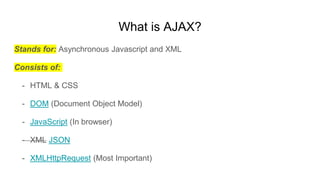
What is AJAX?
Stands for: Asynchronous Javascript and XML
Consists of:
- HTML & CSS
- DOM (Document Object Model)
- JavaScript (In browser)
- XML JSON
- XMLHttpRequest (Most Important)
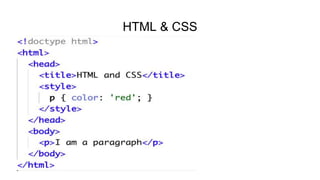
HTML & CSS
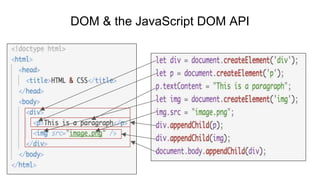
DOM & the JavaScript DOM API
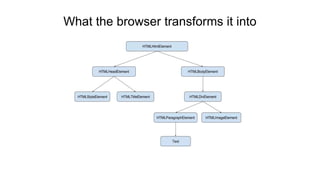
What the browser transforms it into
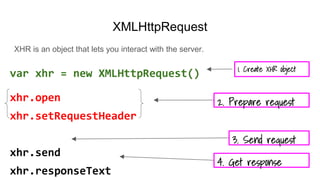
XMLHttpRequest
XHR is an object that lets you interact with the server.
var xhr = new XMLHttpRequest()
xhr.open
xhr.setRequestHeader
xhr.send
xhr.responseText
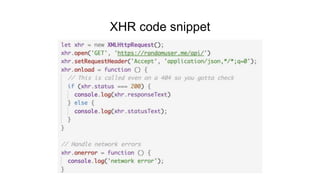
XHR code snippet
What is fetch?
fetch is a modern replacement for XHR.
Why does XHR need a replacement?
- Simpler and Cleaner API design
- It makes use of es6, Promises(eliminates callback hell)
- Lower level implementation. Access to the request/response primitives, no-
cors requests and access to low-level body stream
- Bonus reason: XHR has been deprecated in serviceworkers
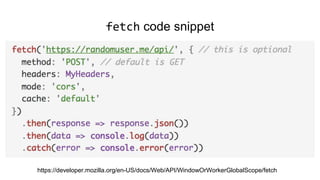
fetch code snippet
https://developer.mozilla.org/en-US/docs/Web/API/WindowOrWorkerGlobalScope/fetch
Demo
Some things you should know about fetch
1. You can’t abort/cancel a request unlike XHR
2. fetch() with `no-cors` mode on non-serviceworkers are disabled
Thank you 😁

Fetch API Talk

Editor's Notes

  • #4 Ajax allows for web apps to request data from a server asynchronously without having to reload the browser.
  • #5 HTML is the structure of the webpage. HTML is what you (the developer) write. CSS is the presentation of the webpage. For example, in the HTML document above, the rule between the <style> tag says text in <p> tags should be red.
  • #6 DOM is a programming interface for HTML & XML documents. DOM is a tree which represents the structure of the webpage. You can manipulate the DOM with its JavaScript API FYI, the DOM API is language agnostic
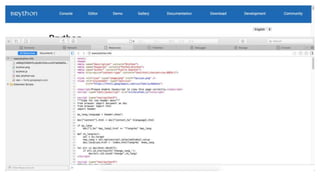
  • #8 Brython - A python3 implementation for client-side programming. This is just to show that DOM connects the web page with any scripting language NOT just JavaScript
  • #9 Usually the browser handles network requests without your help. For example, when someone clicks on <a href=”https://google.com”> link, the browsers initiates the network requests, gets a response or error, and transitions appropriately. With XHR, you’re able to control this process. You basically use the browser as a transport. You prepare a request (xhr.open, xhr.setRequestHeader), hand it over to the browser (xhr.send), get the response returned to you (xhr.responseText, etc) and do what you want with it. XHR.OPEN(METHOD, URL, ASYNC, USER, PASSWORD)
  • #11 XHR mashes up the request and response primitives meaning they can’t be used separately BUT it's different with fetch and this is particularly useful in service workers When you make a CORS request and the response doesn't have CORS header, it fails with XHR BUT with fetch, you can make a no-cors request XHR lacks streaming, the response buffers into memory BUT with fetch, you can get access to the low-level body streams For more info; https://jakearchibald.com/2015/thats-so-fetch/
  • #12  Body Mixins to extract a body provided by fetch: json() blob() formData() - this is mainly relevant with serviceworkers text() - returns USVString arrayBuffer()
  • #14 Support for fetch has become mainstream. If you find that you are building for a browser that doesn't support fetch, there is an awesome polyfill provided by Github so literally you have no excuse https://github.com/github/fetch
  • #15 This is because Promises are uncancellable and fetch is built on Promises No-cors mode is only allowed in Service workers for security reasons https://bugs.chromium.org/p/chromium/issues/detail?id=457157&q=fetch%20no-cors&colspec=ID%20Pri%20M%20Week%20ReleaseBlock%20Cr%20Status%20Owner%20Summary%20OS%20Modified