DYNAMIC LOOKUPTABLES
Represent hierarchies of data in an intuitive manner online and on mobile
Wednesday, May 21, 14
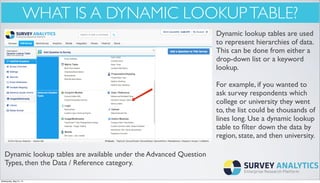
WHAT IS A DYNAMIC LOOKUPTABLE?
Dynamic lookup tables are used
to represent hierarchies of data.
This can be done from either a
drop-down list or a keyword
lookup.
For example, if you wanted to
ask survey respondents which
college or university they went
to, the list could be thousands of
lines long. Use a dynamic lookup
table to filter down the data by
region, state, and then university.
Dynamic lookup tables are available under the Advanced Question
Types, then the Data / Reference category.
Wednesday, May 21, 14
HOWTO ADD ITTOYOUR SURVEY
After clicking on Dynamic
Lookup Table to add to your
survey, you will see this page.
Here you can edit the
instructions for your user and
choose between drop down list
or keyword lookup. In this case,
we are showing drop down lists.
Manage the list by entering
information on each line
separated by a comma.
For example:
West,Wa
West,OR
West,CA
Wednesday, May 21, 14
HOW IT LOOKS
This is how the dynamic
lookup table will appear
when taking the survey
online.
You will see the
instructions and the first
drop down box.After
making your selection, the
next drop down box will
appear.
Wednesday, May 21, 14
HOW IT LOOKS
Wednesday, May 21, 14
SEARCH BY KEYWORD
Up until now we have
been demonstrating the
dynamic lookup table
with a drop down box.
You also have the option
of a keyword search to
look up options. Do this
by adding it on the edit
survey page.The image on
the left shows what it will
look like.Type in “W” to
bring up options.
Wednesday, May 21, 14
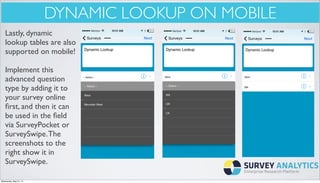
DYNAMIC LOOKUP ON MOBILE
Lastly, dynamic
lookup tables are also
supported on mobile!
Implement this
advanced question
type by adding it to
your survey online
first, and then it can
be used in the field
via SurveyPocket or
SurveySwipe.The
screenshots to the
right show it in
SurveySwipe.
Wednesday, May 21, 14

Feature Spotlight: Dynamic Lookup Tables

  • 1.
    DYNAMIC LOOKUPTABLES Represent hierarchiesof data in an intuitive manner online and on mobile Wednesday, May 21, 14
  • 2.
    WHAT IS ADYNAMIC LOOKUPTABLE? Dynamic lookup tables are used to represent hierarchies of data. This can be done from either a drop-down list or a keyword lookup. For example, if you wanted to ask survey respondents which college or university they went to, the list could be thousands of lines long. Use a dynamic lookup table to filter down the data by region, state, and then university. Dynamic lookup tables are available under the Advanced Question Types, then the Data / Reference category. Wednesday, May 21, 14
  • 3.
    HOWTO ADD ITTOYOURSURVEY After clicking on Dynamic Lookup Table to add to your survey, you will see this page. Here you can edit the instructions for your user and choose between drop down list or keyword lookup. In this case, we are showing drop down lists. Manage the list by entering information on each line separated by a comma. For example: West,Wa West,OR West,CA Wednesday, May 21, 14
  • 4.
    HOW IT LOOKS Thisis how the dynamic lookup table will appear when taking the survey online. You will see the instructions and the first drop down box.After making your selection, the next drop down box will appear. Wednesday, May 21, 14
  • 5.
  • 6.
    SEARCH BY KEYWORD Upuntil now we have been demonstrating the dynamic lookup table with a drop down box. You also have the option of a keyword search to look up options. Do this by adding it on the edit survey page.The image on the left shows what it will look like.Type in “W” to bring up options. Wednesday, May 21, 14
  • 7.
    DYNAMIC LOOKUP ONMOBILE Lastly, dynamic lookup tables are also supported on mobile! Implement this advanced question type by adding it to your survey online first, and then it can be used in the field via SurveyPocket or SurveySwipe.The screenshots to the right show it in SurveySwipe. Wednesday, May 21, 14