Product Highlights
•  Bring E! News to life (with hi-res photos, videos)
•  New immersive mobile experience
•  Brand customization
•  10X faster load than standard mobile web
•  Omniture, comScore analytics
•  RSS feed using content tagged as Top Stories*
Facebook Instant Articles
1	
  
Desktop Access: Facebook Console Manager using the Publisher tools tab under Instant Articles
Business Manager > Publishing Tools > Instant Articles
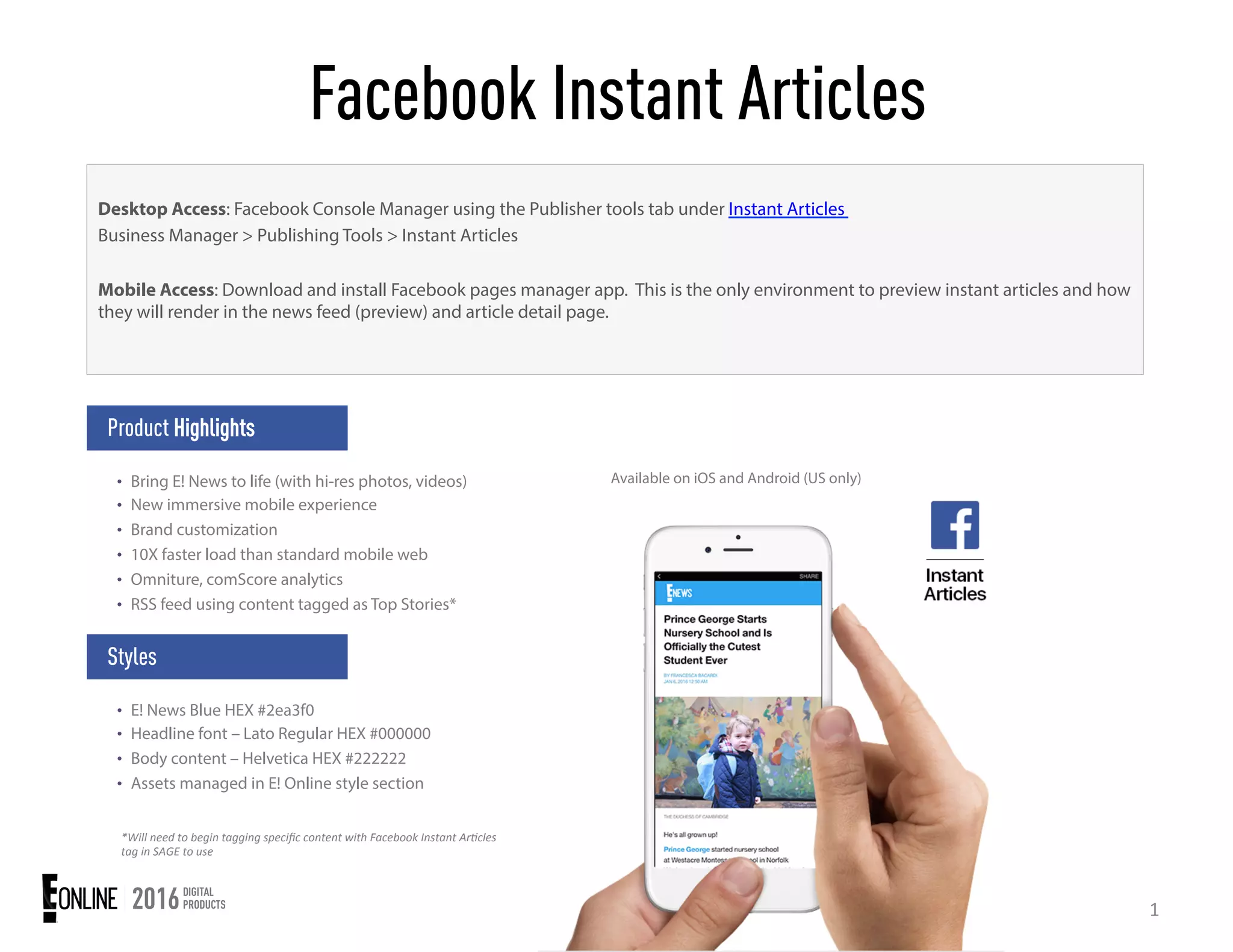
Mobile Access: Download and install Facebook pages manager app. This is the only environment to preview instant articles and how
they will render in the news feed (preview) and article detail page.
Styles
•  E! News Blue HEX #2ea3f0
•  Headline font – Lato Regular HEX #000000
•  Body content – Helvetica HEX #222222
•  Assets managed in E! Online style section
*Will	
  need	
  to	
  begin	
  tagging	
  specific	
  content	
  with	
  Facebook	
  Instant	
  Ar9cles	
  
tag	
  in	
  SAGE	
  to	
  use	
  
Available on iOS and Android (US only)
Workflow
2	
  
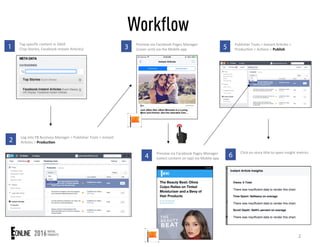
1 Tag	
  specific	
  content	
  in	
  SAGE	
  
(Top	
  Stories,	
  Facebook	
  Instant	
  Ar;cles)	
  
2 Log	
  into	
  FB	
  Business	
  Manager	
  >	
  Publisher	
  Tools	
  >	
  Instant	
  
Ar;cles	
  >	
  Produc'on	
  
3 Preview	
  via	
  Facebook	
  Pages	
  Manager	
  
(cover	
  unit)	
  via	
  the	
  Mobile	
  app	
  
4 Preview	
  via	
  Facebook	
  Pages	
  Manager	
  
(select	
  content	
  on	
  tap)	
  via	
  Mobile	
  app	
  
5 Publisher	
  Tools	
  >	
  Instant	
  Ar;cles	
  >	
  
Produc;on	
  >	
  Ac;ons	
  >	
  Publish	
  
6 Click	
  on	
  story	
  ;tle	
  to	
  open	
  insight	
  metrics	
  
Finished Product
3	
  
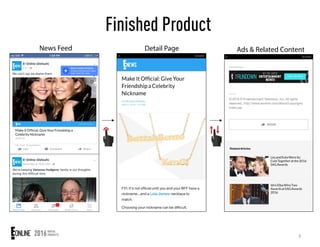
News Feed Detail Page Ads & Related Content

FBIA-Exec1

  • 1.
    Product Highlights •  BringE! News to life (with hi-res photos, videos) •  New immersive mobile experience •  Brand customization •  10X faster load than standard mobile web •  Omniture, comScore analytics •  RSS feed using content tagged as Top Stories* Facebook Instant Articles 1   Desktop Access: Facebook Console Manager using the Publisher tools tab under Instant Articles Business Manager > Publishing Tools > Instant Articles Mobile Access: Download and install Facebook pages manager app. This is the only environment to preview instant articles and how they will render in the news feed (preview) and article detail page. Styles •  E! News Blue HEX #2ea3f0 •  Headline font – Lato Regular HEX #000000 •  Body content – Helvetica HEX #222222 •  Assets managed in E! Online style section *Will  need  to  begin  tagging  specific  content  with  Facebook  Instant  Ar9cles   tag  in  SAGE  to  use   Available on iOS and Android (US only)
  • 2.
    Workflow 2   1 Tag  specific  content  in  SAGE   (Top  Stories,  Facebook  Instant  Ar;cles)   2 Log  into  FB  Business  Manager  >  Publisher  Tools  >  Instant   Ar;cles  >  Produc'on   3 Preview  via  Facebook  Pages  Manager   (cover  unit)  via  the  Mobile  app   4 Preview  via  Facebook  Pages  Manager   (select  content  on  tap)  via  Mobile  app   5 Publisher  Tools  >  Instant  Ar;cles  >   Produc;on  >  Ac;ons  >  Publish   6 Click  on  story  ;tle  to  open  insight  metrics  
  • 3.
    Finished Product 3   NewsFeed Detail Page Ads & Related Content