Ashutosh Modi | JIVEM Education | ashutosh.modi@gmail.com
How Teachers should use facebook to be socially respectable
What Facebook is…and what it is not
It is a medium to communicate
with multiple people
At a Time. Any Time. All the Time.
Whatever you post, like or comment on facebook
is accessible in public domain.
It is totally On Record.
And Sadly, You can only control to an extent,
who sees your activity on facebook.
What Facebook is…and what it is not
It is a Public Thing…not a Personal Thing.
Though you have friends on facebook,
but it is not a friend’s thing.
Modern society judges you as a person
with your facebook activity.
Photos You post Friends you have Pages You Like Your Comments
Facebook is your Social Image
How can you create and maintain a respectable social
image through facebook?
1. Privacy Settings : Who sees your activity on facebook?
2. Friending Policy : Whose friend requests you accept ?
3. Use of Pages & Groups : What pages you like and what groups you join?
4. Content Sharing : What content do you share on your timeline?
5. Posting Content : Your status updates, photo uploads and other content
6. Tagging : Who can tag you in their posts and photos. Who should you tag?
7. Facebook Apps : Your Daily horoscope, pic of the day, how smart are you etc.
Facebook is not a “Who has more friends” contest.
Its also not “Who gets more likes/comments” contest.
Its your social image. Nobody can harm your social image but You. Beware !!!
Privacy Settings
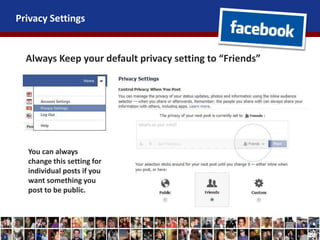
Always Keep your default privacy setting to “Friends”
You can always
change this setting for
individual posts if you
want something you
post to be public.
Friending Policy
Do not accept all friend requests you receive.
Specially NEVER add your students as friends or accept
their friend requests.
WHY ??
It crosses the line of professionalism
Creates a feeling of familiarity
Can create potential problems for both
Develops a feeling of equality instead of respect
Subscribe
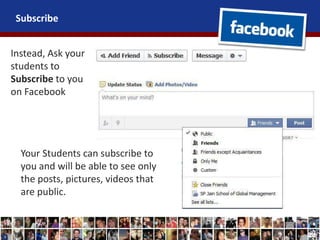
Instead, Ask your
students to
Subscribe to you
on Facebook
Your Students can subscribe to
you and will be able to see only
the posts, pictures, videos that
are public.
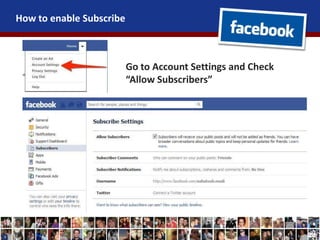
How to enable Subscribe
Go to Account Settings and Check
“Allow Subscribers”
Content Sharing
Sharing Means “Endorsing”
Things you should share –
1. Someone’s Achievement / good work (even if it’s a simple thank you
card from your student)
2. Support appeal for someone in need of help ( Like someone looking
for a job / participating in an online contest etc.)
3. Someone’s Feedback/appreciation about you / your friends /
relatives / organization.
4. Some exciting article / news story that others may be interested in.
5. Innovations within your profession.
6. Anything that you would love to tell everybody in a public gathering.
Always Give credit to the person who originally posted it, by tagging him/her in the share.
Content Sharing
Things You Should NEVER Share
1. Thought of the day / jokes / motivation speeches / posters( It is
really annoying for people)
2. Hate Content (Anti People / Anti Organization / Anti Religion)
3. Someone’s Intellectual Property
4. Confidential Organization information
5. Someone’s Personal Photographs.
6. Yours or anybody else’s social plans (Party / holiday etc)
7. Personal Conversation
8. Any information that might be misused by anyone else.
9. Anything that might be humiliating to anyone.
Posting Content
Don’t Post anything that you wont tell
your students in class.
- Your personal and family information
- Private photographs (Ex: Family function, holiday)
- Contact Information (Personal Mobile Number, Permanent Address)
- Other Private Information (Your Finances, bank account, insurance etc.)
- Anything that the students are not supposed to know.
- Anything that is below your dignity as a teacher.
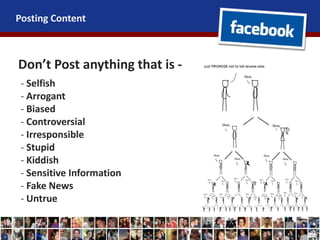
Posting Content
Don’t Post anything that is -
- Selfish
- Arrogant
- Biased
- Controversial
- Irresponsible
- Stupid
- Kiddish
- Sensitive Information
- Fake News
- Untrue
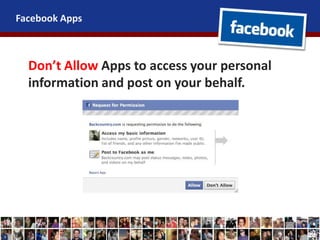
Facebook Apps
Don’t Allow Apps to access your personal
information and post on your behalf.
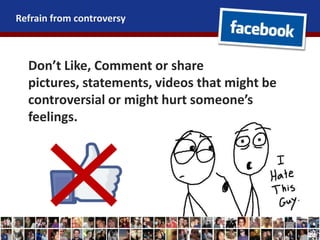
Refrain from controversy
Don’t Like, Comment or share
pictures, statements, videos that might be
controversial or might hurt someone’s
feelings.
Make a Positive Social Image
Be Responsible !
Be Respectable !
Happy
Socializing !
Copyrights with www.jivemeducation.com | All Trademarks owned by their respective owners

Facebook for Teachers

  • 1.
    Ashutosh Modi |JIVEM Education | ashutosh.modi@gmail.com How Teachers should use facebook to be socially respectable
  • 2.
    What Facebook is…andwhat it is not It is a medium to communicate with multiple people At a Time. Any Time. All the Time. Whatever you post, like or comment on facebook is accessible in public domain. It is totally On Record. And Sadly, You can only control to an extent, who sees your activity on facebook.
  • 3.
    What Facebook is…andwhat it is not It is a Public Thing…not a Personal Thing. Though you have friends on facebook, but it is not a friend’s thing. Modern society judges you as a person with your facebook activity. Photos You post Friends you have Pages You Like Your Comments
  • 4.
    Facebook is yourSocial Image How can you create and maintain a respectable social image through facebook? 1. Privacy Settings : Who sees your activity on facebook? 2. Friending Policy : Whose friend requests you accept ? 3. Use of Pages & Groups : What pages you like and what groups you join? 4. Content Sharing : What content do you share on your timeline? 5. Posting Content : Your status updates, photo uploads and other content 6. Tagging : Who can tag you in their posts and photos. Who should you tag? 7. Facebook Apps : Your Daily horoscope, pic of the day, how smart are you etc. Facebook is not a “Who has more friends” contest. Its also not “Who gets more likes/comments” contest. Its your social image. Nobody can harm your social image but You. Beware !!!
  • 5.
    Privacy Settings Always Keepyour default privacy setting to “Friends” You can always change this setting for individual posts if you want something you post to be public.
  • 6.
    Friending Policy Do notaccept all friend requests you receive. Specially NEVER add your students as friends or accept their friend requests. WHY ?? It crosses the line of professionalism Creates a feeling of familiarity Can create potential problems for both Develops a feeling of equality instead of respect
  • 7.
    Subscribe Instead, Ask your studentsto Subscribe to you on Facebook Your Students can subscribe to you and will be able to see only the posts, pictures, videos that are public.
  • 8.
    How to enableSubscribe Go to Account Settings and Check “Allow Subscribers”
  • 9.
    Content Sharing Sharing Means“Endorsing” Things you should share – 1. Someone’s Achievement / good work (even if it’s a simple thank you card from your student) 2. Support appeal for someone in need of help ( Like someone looking for a job / participating in an online contest etc.) 3. Someone’s Feedback/appreciation about you / your friends / relatives / organization. 4. Some exciting article / news story that others may be interested in. 5. Innovations within your profession. 6. Anything that you would love to tell everybody in a public gathering. Always Give credit to the person who originally posted it, by tagging him/her in the share.
  • 10.
    Content Sharing Things YouShould NEVER Share 1. Thought of the day / jokes / motivation speeches / posters( It is really annoying for people) 2. Hate Content (Anti People / Anti Organization / Anti Religion) 3. Someone’s Intellectual Property 4. Confidential Organization information 5. Someone’s Personal Photographs. 6. Yours or anybody else’s social plans (Party / holiday etc) 7. Personal Conversation 8. Any information that might be misused by anyone else. 9. Anything that might be humiliating to anyone.
  • 11.
    Posting Content Don’t Postanything that you wont tell your students in class. - Your personal and family information - Private photographs (Ex: Family function, holiday) - Contact Information (Personal Mobile Number, Permanent Address) - Other Private Information (Your Finances, bank account, insurance etc.) - Anything that the students are not supposed to know. - Anything that is below your dignity as a teacher.
  • 12.
    Posting Content Don’t Postanything that is - - Selfish - Arrogant - Biased - Controversial - Irresponsible - Stupid - Kiddish - Sensitive Information - Fake News - Untrue
  • 13.
    Facebook Apps Don’t AllowApps to access your personal information and post on your behalf.
  • 14.
    Refrain from controversy Don’tLike, Comment or share pictures, statements, videos that might be controversial or might hurt someone’s feelings.
  • 15.
    Make a PositiveSocial Image Be Responsible ! Be Respectable ! Happy Socializing ! Copyrights with www.jivemeducation.com | All Trademarks owned by their respective owners