
Facebook Changes – Fan PagesUpdateFebruary 10, 2011businessfanpages.net                                                                                    (919) 302-0552
effective 2-10-11Facebook has revamped our business fan pages to reflect some much needed changes.I hope to point out those changes to you in the next several slides.If you need further assistance, feel free to call me at (919) 302-0552.BusinessFanPages.netis your source for Facebook fan page development designing custom graphics and tabs, a landing page, contact form, and tips and tricks for your Facebook marketing success.“Meet your next customer on Facebook.”
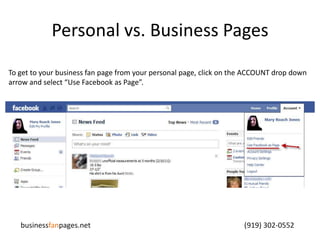
Personal vs. Business PagesTo get to your business fan page from your personal page, click on the ACCOUNT drop down arrow and select “Use Facebook as Page”.businessfanpages.net                                                                                    (919) 302-0552
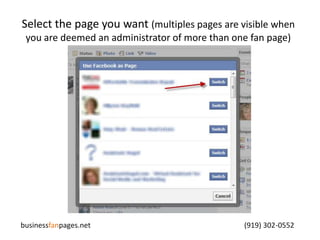
Select the page you want (multiples pages are visible when you are deemed an administrator of more than one fan page)businessfanpages.net                                                                                    (919) 302-0552
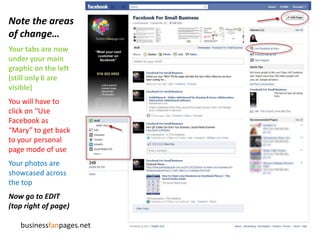
Note the areas of change…Your tabs are now under your main graphic on the left(still only 6 are visible)You will have to click on “Use Facebook as “Mary” to get back to your personal page mode of useYour photos are showcased across the topNow go to EDIT (top right of page)businessfanpages.net
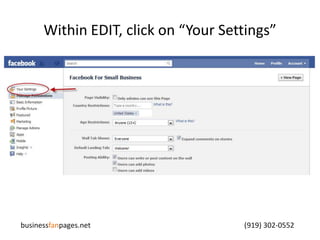
Within EDIT, click on “Your Settings”businessfanpages.net                                                                                    (919) 302-0552
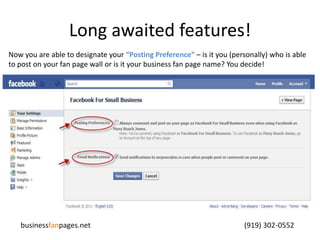
Long awaited features!Now you are able to designate your “Posting Preference”– is it you (personally) who is able to post on your fan page wall or is it your business fan page name? You decide!businessfanpages.net                                                                                    (919) 302-0552
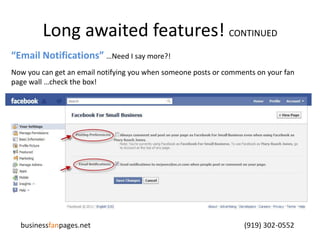
Long awaited features! CONTINUED“Email Notifications” …Need I say more?!Now you can get an email notifying you when someone posts or comments on your fan page wall …check the box!businessfanpages.net                                                                                    (919) 302-0552
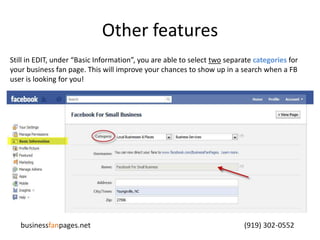
Other featuresStill in EDIT, under “Basic Information”, you are able to select two separate categories for your business fan page. This will improve your chances to show up in a search when a FB user is looking for you!businessfanpages.net                                                                                    (919) 302-0552
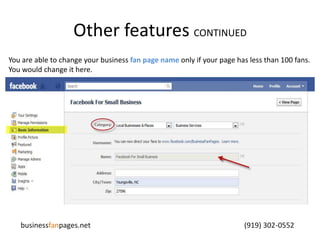
Other features CONTINUEDYou are able to change your business fan page name only if your page has less than 100 fans. You would change it here.businessfanpages.net                                                                                    (919) 302-0552
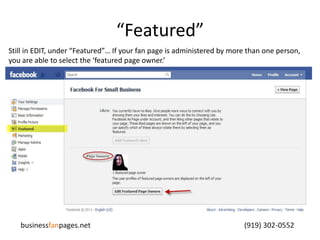
“Featured”Still in EDIT, under “Featured”… If your fan page is administered by more than one person, you are able to select the ‘featured page owner.’ businessfanpages.net                                                                                    (919) 302-0552
I hope this presentation answers some of your questions concerning the recent changes.You can find more Tips & Tricks for your business fan page on mine.facebook.com/BusinessFanPages

Facebook Changes to Fan Pages 02-10-11

  • 1.
    Facebook Changes –Fan PagesUpdateFebruary 10, 2011businessfanpages.net (919) 302-0552
  • 2.
    effective 2-10-11Facebook hasrevamped our business fan pages to reflect some much needed changes.I hope to point out those changes to you in the next several slides.If you need further assistance, feel free to call me at (919) 302-0552.BusinessFanPages.netis your source for Facebook fan page development designing custom graphics and tabs, a landing page, contact form, and tips and tricks for your Facebook marketing success.“Meet your next customer on Facebook.”
  • 3.
    Personal vs. BusinessPagesTo get to your business fan page from your personal page, click on the ACCOUNT drop down arrow and select “Use Facebook as Page”.businessfanpages.net (919) 302-0552
  • 4.
    Select the pageyou want (multiples pages are visible when you are deemed an administrator of more than one fan page)businessfanpages.net (919) 302-0552
  • 5.
    Note the areasof change…Your tabs are now under your main graphic on the left(still only 6 are visible)You will have to click on “Use Facebook as “Mary” to get back to your personal page mode of useYour photos are showcased across the topNow go to EDIT (top right of page)businessfanpages.net
  • 6.
    Within EDIT, clickon “Your Settings”businessfanpages.net (919) 302-0552
  • 7.
    Long awaited features!Nowyou are able to designate your “Posting Preference”– is it you (personally) who is able to post on your fan page wall or is it your business fan page name? You decide!businessfanpages.net (919) 302-0552
  • 8.
    Long awaited features!CONTINUED“Email Notifications” …Need I say more?!Now you can get an email notifying you when someone posts or comments on your fan page wall …check the box!businessfanpages.net (919) 302-0552
  • 9.
    Other featuresStill inEDIT, under “Basic Information”, you are able to select two separate categories for your business fan page. This will improve your chances to show up in a search when a FB user is looking for you!businessfanpages.net (919) 302-0552
  • 10.
    Other features CONTINUEDYouare able to change your business fan page name only if your page has less than 100 fans. You would change it here.businessfanpages.net (919) 302-0552
  • 11.
    “Featured”Still in EDIT,under “Featured”… If your fan page is administered by more than one person, you are able to select the ‘featured page owner.’ businessfanpages.net (919) 302-0552
  • 12.
    I hope thispresentation answers some of your questions concerning the recent changes.You can find more Tips & Tricks for your business fan page on mine.facebook.com/BusinessFanPages