LOGO
“ Add your company slogan ”
Accessing & Exploring
Knowledge
Lecturer NABEEL SALIH ALI
Contents
Alert Mechanism
Patent Search
Searching Skills
Academic Search Engines
Research Process
RESEARCH PROCESS
Identify Area Of Study
Literature Review
Research Methodology
Analysis and Results discussion
Conclusions and Recommendations
RESEARCH
PROCESS
RESEARCHER WITH ICT SKILLS
skills
for IT
Managing Research
Materials
Presenting Result
Structuring Research
Materials
Communicating and
Collaboration
Statistical Analysis
Software
Knowledge Disseminating
Other Related Tools
Accessing and Exploring
Knowledge
Academic Writing
Accessing and Exploring Knowledge
 Nowadays, by the merging of the internet and the
advancement of information technology, information
can be accessed at any time anywhere.
 Thus, it's up to the researcher to find and rearrange
the content to fit with their needs. Research materials
either in the form of paper proceeding, journal and
books is uploaded continuously on the internet.
 The “internet tool” will help researcher customize the
information that suited to their needs. This tool
always refers to the search engines and alert
mechanism while accessing and exploring the
information.
Accessing and Exploring Knowledge
A good researcher should know the characteristics and
the ability of the search engine used for finding their
research materials. Below is several tips use to
understand the search engine in a better way.
1. Using the search engine, it tells us about the
information sources where to locate the research
materials.
2. Type of materials will tell us the extensions of the
downloaded document. This gives the idea about the
reader/player of such document extensions such as
pdf, doc, ps and others. The example below shows
the readers for each extension:
Accessing and Exploring Knowledge
3. Types of retrieved documents will tell either the
documents are free from open access, subscription
based or for references only.
4. Topology of materials will gives us an idea about the
downloaded document for further reference notations.
The possible references could come from book, patent,
thesis, dissertation, journal articles or conference
proceeding.
5. The significance of the materials is also provided by the
search engines. The best example in this case is shown
by the number of the cited document for the
materials. Therefore, to search the research materials as
stated above, researcher need to be familiar with the
academic search engines.
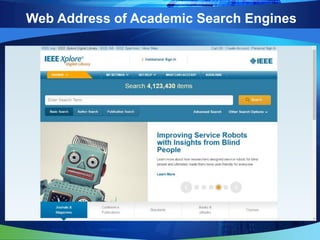
Web Address of Academic Search Engines
OnlineWeb AddressAcademic Engine
Freehttps://scholar.google.comGoogle Scholar
Subscribehttp://www.sciencedirect.comScience Direct
Subscribehttp://clarivate.com/product/web-of-
science/?utm_source=false&utm_medium=false&
utm_campaign=false
Web-of-Science
Subscribehttp://ieeexplore.ieee.org/Xplore/home.jspIEEE Xplore
-http://academic.research.microsoft.com/Academic (Microsoft)
Freehttps://doaj.org/Directory of Open Access
Journal (DOAJ)
Freehttp://sci-hub.cc/Russian Database
Freehttps://www.library.cornell.edu/CORNELL UNIVERSITY
LIBRARY
Freehttp://www.ndltd.org/resources/find-
etds?gclid=Cj0KEQiAwMLDBRDCh_r9sMvQ_88B
EiQA6zuAQxjOPpnPhBJ0T9myqePcx-
cvXFZTalowpWbs9-XUNwUaAqFj8P8HAQ
Network Digital Library for
Thesis and Dissertations
(NDLTD)
Web Address of Academic Search Engines
How to Search Well?
A
Please use the right keyword. Probably
you might use different keyword with
similar meanings
B
Know how to narrow or expand your
search
C
How to focus when you get too many
results
Accessing and Exploring Knowledge
 The researchers can continue their search with Google
Scholar by using the following tips:
A. Enter search keywords by priority example:
condition, monitoring, “condition monitoring”.
B. Only ten search terms allowed, while the rest will be
ignored.
C. General words like 'a', 'to', 'for', 'the' and others will
be ignored.
D. Use the + operator that the resulting results include the
word example: “condition monitoring”
+maintenance.
Accessing and Exploring Knowledge
E. Use the - operators so as to make the search results
do not include the word example: “condition
monitoring” –maintenance.
F. Use the phrase '' ” aims to search two keywords
simultaneously example: ''condition monitoring”.
G. Use the OR operator aims to discover either one of the
keyword in the search example: condition OR
monitoring.
H. Use the AND operator aims to find two keywords in the
title simultaneously example: condition AND
monitoring.
Accessing and Exploring Knowledge
I. Use the operator intitle: aims to search in a website
which contains specific keywords condition monitoring
example: intitle:”condition monitoring”.
J. Use the operator filetype: ppt aims to find only files
with "ppt" extension. Else such as doc, xls, pdf and
etc. example: “condition monitoring” filetype:ppt.
K. Use operator author: aims to search the author
named Nabeel example author:Nabeel.
L. Use custom range to find article publish in any
predefined year example Since 2013, Since 2012 or
Custom Range.
Patent Search
 Other approach to get idea about the research is
looking at the previous intellect property information.
This will give researcher an insight about what is going
on in a particular area especially while producing
product. For that purpose, here is several address, the
research can start with:
Patent Search
Use Alert Mechanism
 Alerts mechanism is a content change detection and
notification service, offered by search engine (provided
by Google Scholar, Scopus, etc.) that automatically
notifies users when new contents matches a set of
search terms selected by the user and stored by the
alert service. Normally, the notifications are sent
through email.
The process of Alert Mechanism
Find the keyword
Click to alert function
Enter your email
Create Alert
Mechanism
LOGO
“ Add your company slogan ”
NABEEL@uokufa.edu.iq

Exploring and accessing knowledge in Research

  • 1.
    LOGO “ Add yourcompany slogan ” Accessing & Exploring Knowledge Lecturer NABEEL SALIH ALI
  • 2.
    Contents Alert Mechanism Patent Search SearchingSkills Academic Search Engines Research Process
  • 3.
    RESEARCH PROCESS Identify AreaOf Study Literature Review Research Methodology Analysis and Results discussion Conclusions and Recommendations RESEARCH PROCESS
  • 4.
    RESEARCHER WITH ICTSKILLS skills for IT Managing Research Materials Presenting Result Structuring Research Materials Communicating and Collaboration Statistical Analysis Software Knowledge Disseminating Other Related Tools Accessing and Exploring Knowledge Academic Writing
  • 5.
    Accessing and ExploringKnowledge  Nowadays, by the merging of the internet and the advancement of information technology, information can be accessed at any time anywhere.  Thus, it's up to the researcher to find and rearrange the content to fit with their needs. Research materials either in the form of paper proceeding, journal and books is uploaded continuously on the internet.  The “internet tool” will help researcher customize the information that suited to their needs. This tool always refers to the search engines and alert mechanism while accessing and exploring the information.
  • 6.
    Accessing and ExploringKnowledge A good researcher should know the characteristics and the ability of the search engine used for finding their research materials. Below is several tips use to understand the search engine in a better way. 1. Using the search engine, it tells us about the information sources where to locate the research materials. 2. Type of materials will tell us the extensions of the downloaded document. This gives the idea about the reader/player of such document extensions such as pdf, doc, ps and others. The example below shows the readers for each extension:
  • 7.
    Accessing and ExploringKnowledge 3. Types of retrieved documents will tell either the documents are free from open access, subscription based or for references only. 4. Topology of materials will gives us an idea about the downloaded document for further reference notations. The possible references could come from book, patent, thesis, dissertation, journal articles or conference proceeding. 5. The significance of the materials is also provided by the search engines. The best example in this case is shown by the number of the cited document for the materials. Therefore, to search the research materials as stated above, researcher need to be familiar with the academic search engines.
  • 8.
    Web Address ofAcademic Search Engines OnlineWeb AddressAcademic Engine Freehttps://scholar.google.comGoogle Scholar Subscribehttp://www.sciencedirect.comScience Direct Subscribehttp://clarivate.com/product/web-of- science/?utm_source=false&utm_medium=false& utm_campaign=false Web-of-Science Subscribehttp://ieeexplore.ieee.org/Xplore/home.jspIEEE Xplore -http://academic.research.microsoft.com/Academic (Microsoft) Freehttps://doaj.org/Directory of Open Access Journal (DOAJ) Freehttp://sci-hub.cc/Russian Database Freehttps://www.library.cornell.edu/CORNELL UNIVERSITY LIBRARY Freehttp://www.ndltd.org/resources/find- etds?gclid=Cj0KEQiAwMLDBRDCh_r9sMvQ_88B EiQA6zuAQxjOPpnPhBJ0T9myqePcx- cvXFZTalowpWbs9-XUNwUaAqFj8P8HAQ Network Digital Library for Thesis and Dissertations (NDLTD)
  • 9.
    Web Address ofAcademic Search Engines
  • 10.
    Web Address ofAcademic Search Engines
  • 11.
    Web Address ofAcademic Search Engines
  • 12.
    Web Address ofAcademic Search Engines
  • 13.
    Web Address ofAcademic Search Engines
  • 14.
    Web Address ofAcademic Search Engines
  • 15.
    Web Address ofAcademic Search Engines
  • 16.
    Web Address ofAcademic Search Engines
  • 17.
    Web Address ofAcademic Search Engines
  • 18.
    Web Address ofAcademic Search Engines
  • 19.
    Web Address ofAcademic Search Engines
  • 20.
    How to SearchWell? A Please use the right keyword. Probably you might use different keyword with similar meanings B Know how to narrow or expand your search C How to focus when you get too many results
  • 21.
    Accessing and ExploringKnowledge  The researchers can continue their search with Google Scholar by using the following tips: A. Enter search keywords by priority example: condition, monitoring, “condition monitoring”. B. Only ten search terms allowed, while the rest will be ignored. C. General words like 'a', 'to', 'for', 'the' and others will be ignored. D. Use the + operator that the resulting results include the word example: “condition monitoring” +maintenance.
  • 22.
    Accessing and ExploringKnowledge E. Use the - operators so as to make the search results do not include the word example: “condition monitoring” –maintenance. F. Use the phrase '' ” aims to search two keywords simultaneously example: ''condition monitoring”. G. Use the OR operator aims to discover either one of the keyword in the search example: condition OR monitoring. H. Use the AND operator aims to find two keywords in the title simultaneously example: condition AND monitoring.
  • 23.
    Accessing and ExploringKnowledge I. Use the operator intitle: aims to search in a website which contains specific keywords condition monitoring example: intitle:”condition monitoring”. J. Use the operator filetype: ppt aims to find only files with "ppt" extension. Else such as doc, xls, pdf and etc. example: “condition monitoring” filetype:ppt. K. Use operator author: aims to search the author named Nabeel example author:Nabeel. L. Use custom range to find article publish in any predefined year example Since 2013, Since 2012 or Custom Range.
  • 24.
    Patent Search  Otherapproach to get idea about the research is looking at the previous intellect property information. This will give researcher an insight about what is going on in a particular area especially while producing product. For that purpose, here is several address, the research can start with:
  • 25.
  • 26.
    Use Alert Mechanism Alerts mechanism is a content change detection and notification service, offered by search engine (provided by Google Scholar, Scopus, etc.) that automatically notifies users when new contents matches a set of search terms selected by the user and stored by the alert service. Normally, the notifications are sent through email.
  • 27.
    The process ofAlert Mechanism Find the keyword Click to alert function Enter your email Create Alert Mechanism
  • 28.
    LOGO “ Add yourcompany slogan ” NABEEL@uokufa.edu.iq