Looks up avalue either from a one-row or one-column range or from an array.
Provided for backward compatibility
49. HLOOKUP
=HLOOKUP(lookup_value, table_array, row_index_num, [range_lookup])
5.
Looks for avalue in the top row of a table or array of values and return the value in
the same column from a row you specify
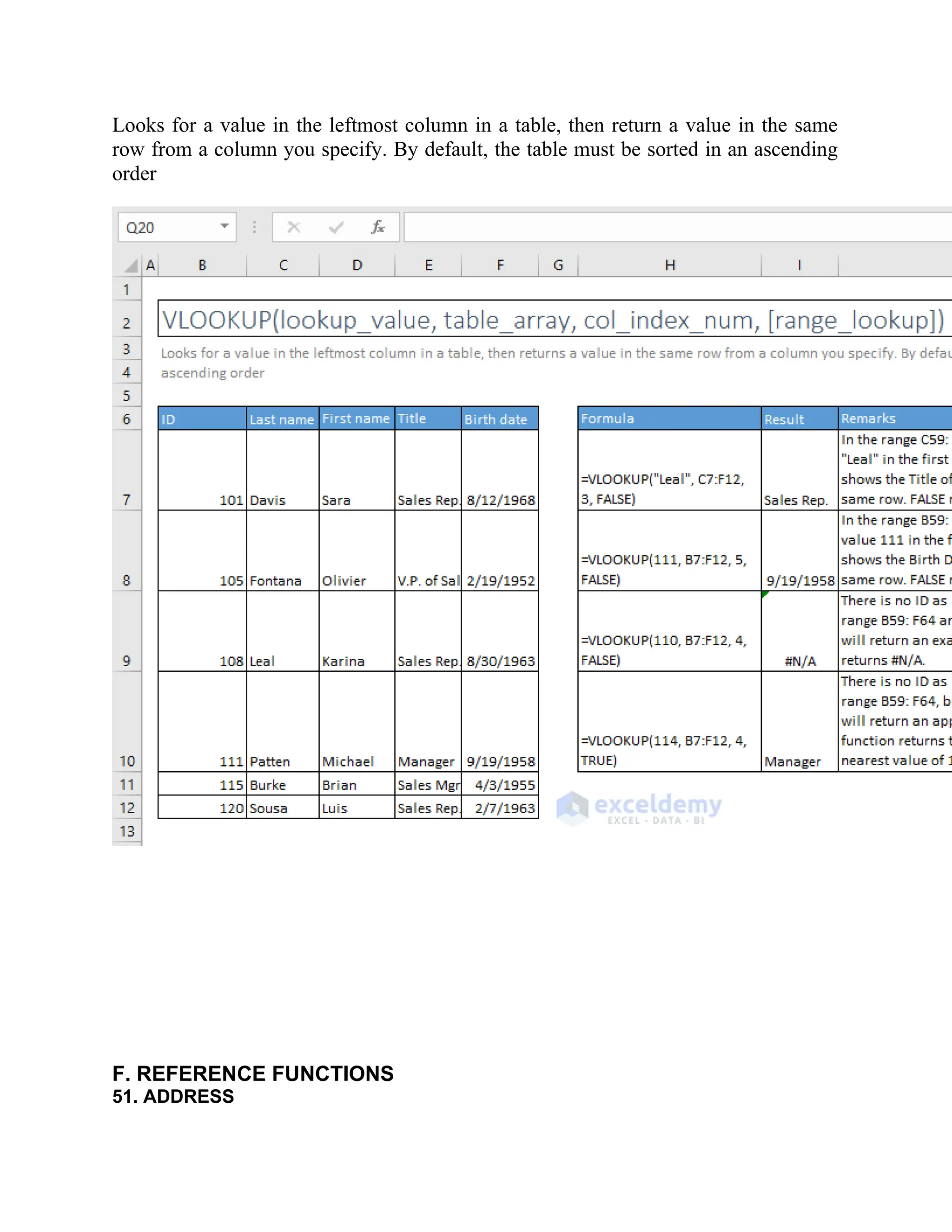
50. VLOOKUP
=VLOOKUP(lookup_value, table_array, col_index_num, [range_lookup])
6.
Looks for avalue in the leftmost column in a table, then return a value in the same
row from a column you specify. By default, the table must be sorted in an ascending
order
F. REFERENCE FUNCTIONS
51. ADDRESS
7.
=ADDRESS(row_num, column_num, [abs_num],[a1], [sheet_text])
Creates a cell reference as text, given specified row and column numbers
52. CHOOSE
=CHOOSE(index_num, value1, [value2], [value3], …)
Chooses a value or action to perform from a list of values, based on an index number
8.
53. INDEX
Array Form:=INDEX(array, row_num, [column_num])
Return the value of a specified cell or array of cells
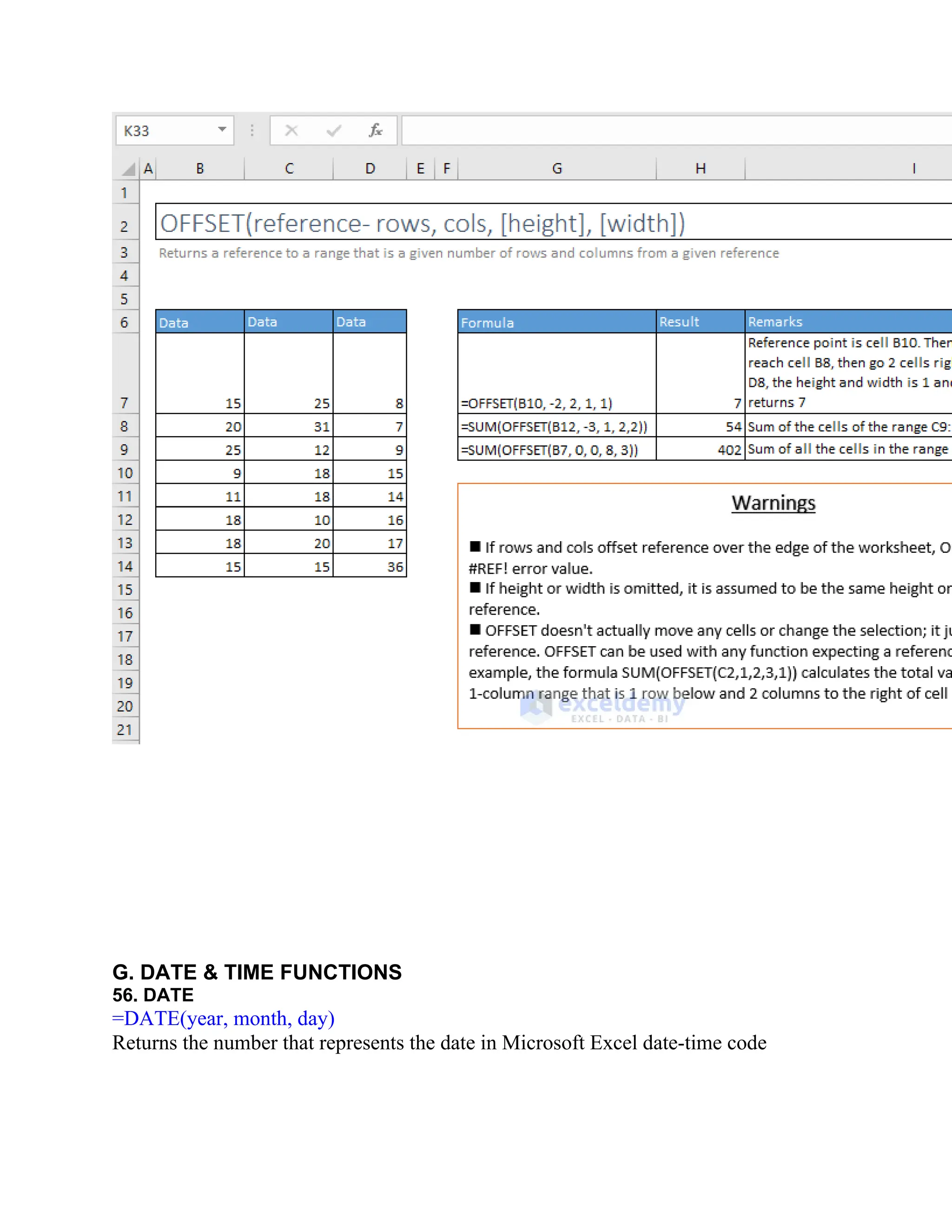
55. OFFSET
=OFFSET(reference- rows,cols, [height], [width])
Returns a reference to a range that is a given number of rows and columns from a
given reference
12.
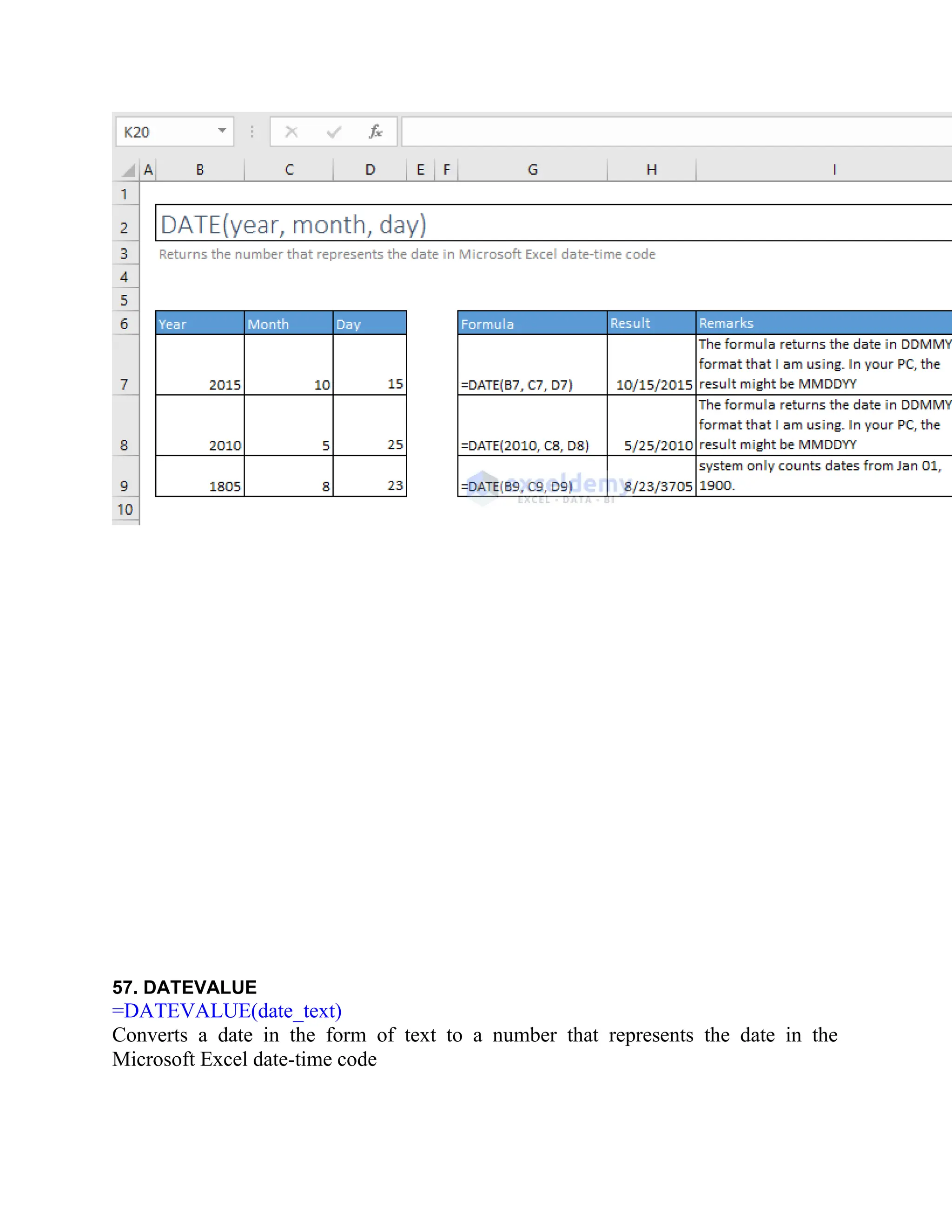
G. DATE &TIME FUNCTIONS
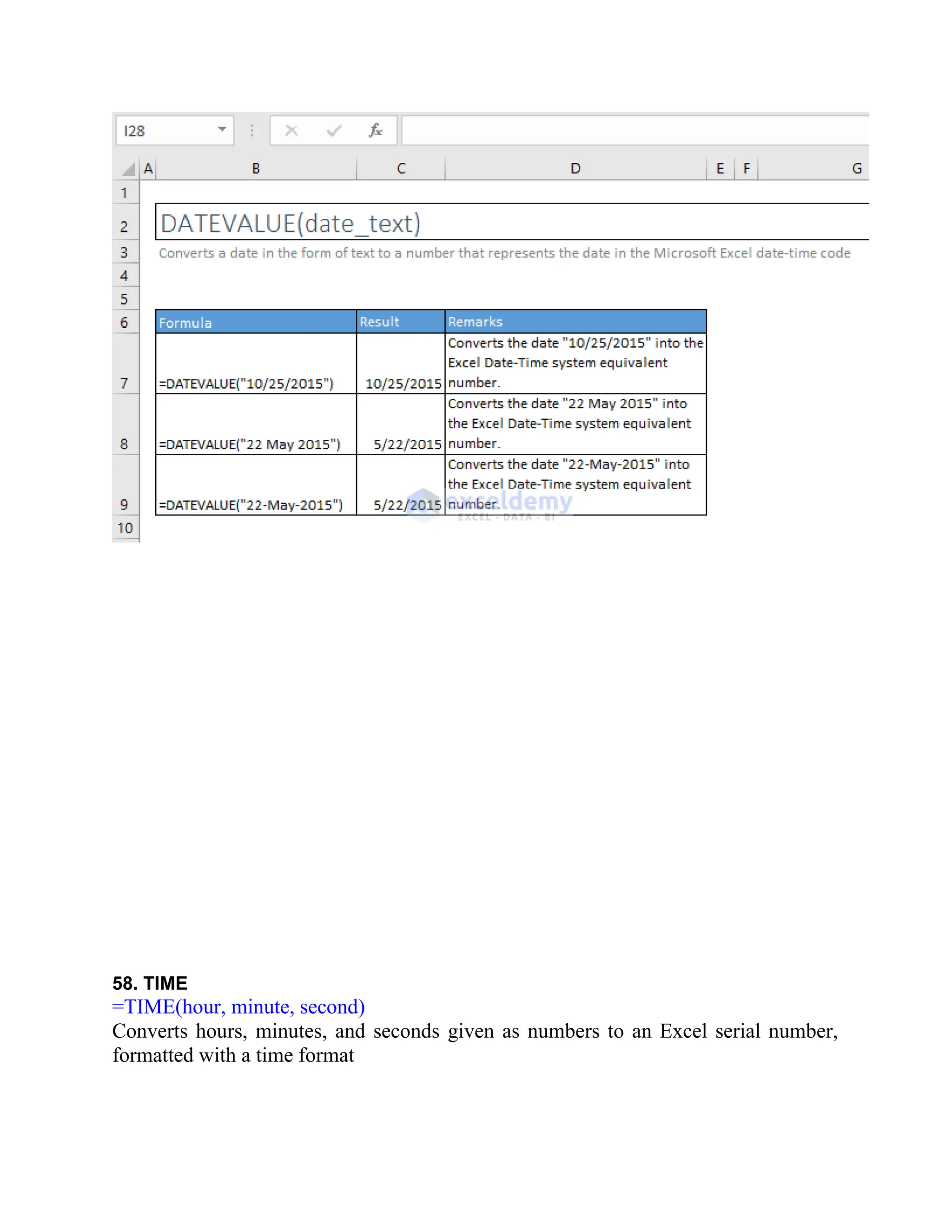
56. DATE
=DATE(year, month, day)
Returns the number that represents the date in Microsoft Excel date-time code
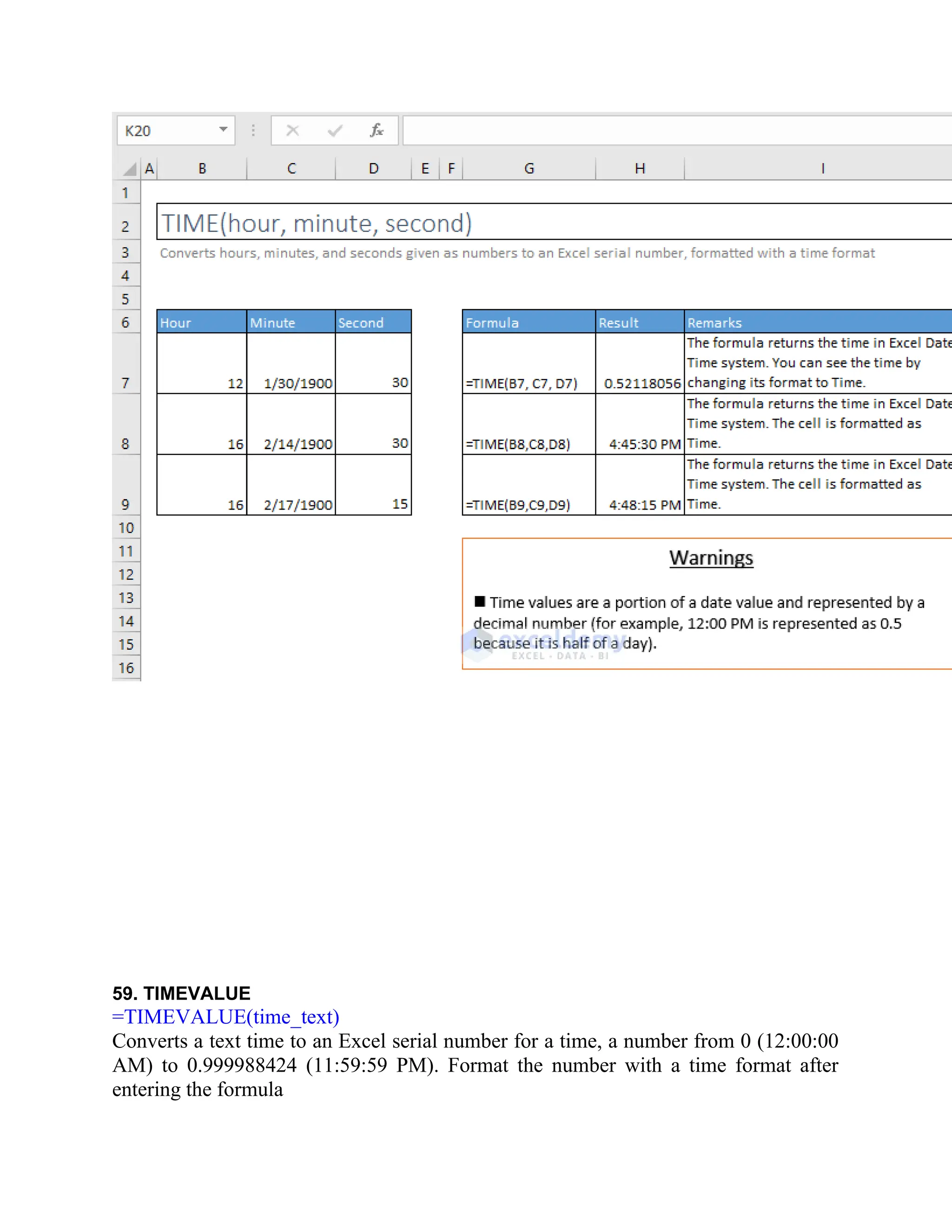
58. TIME
=TIME(hour, minute,second)
Converts hours, minutes, and seconds given as numbers to an Excel serial number,
formatted with a time format
15.
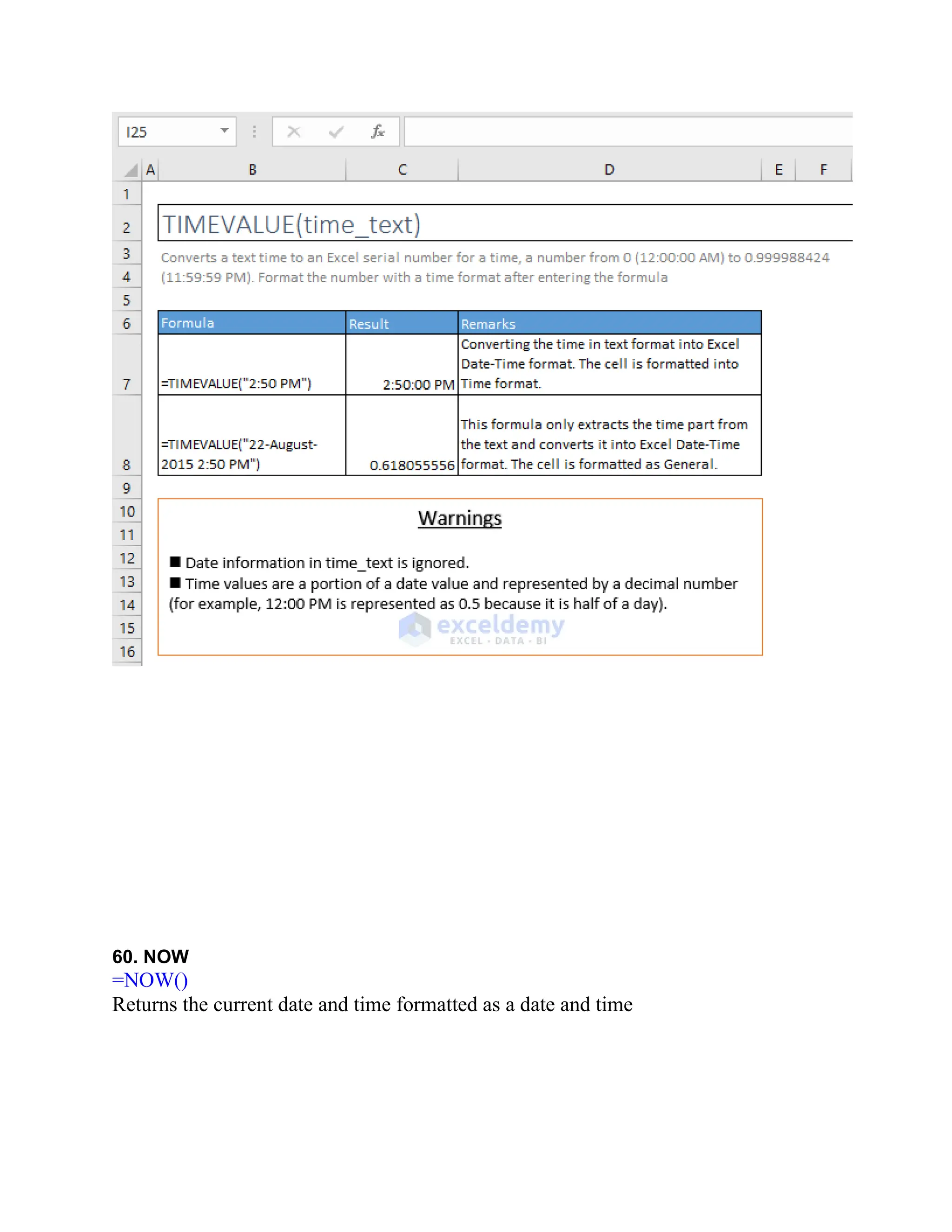
59. TIMEVALUE
=TIMEVALUE(time_text)
Converts atext time to an Excel serial number for a time, a number from 0 (12:00:00
AM) to 0.999988424 (11:59:59 PM). Format the number with a time format after
entering the formula
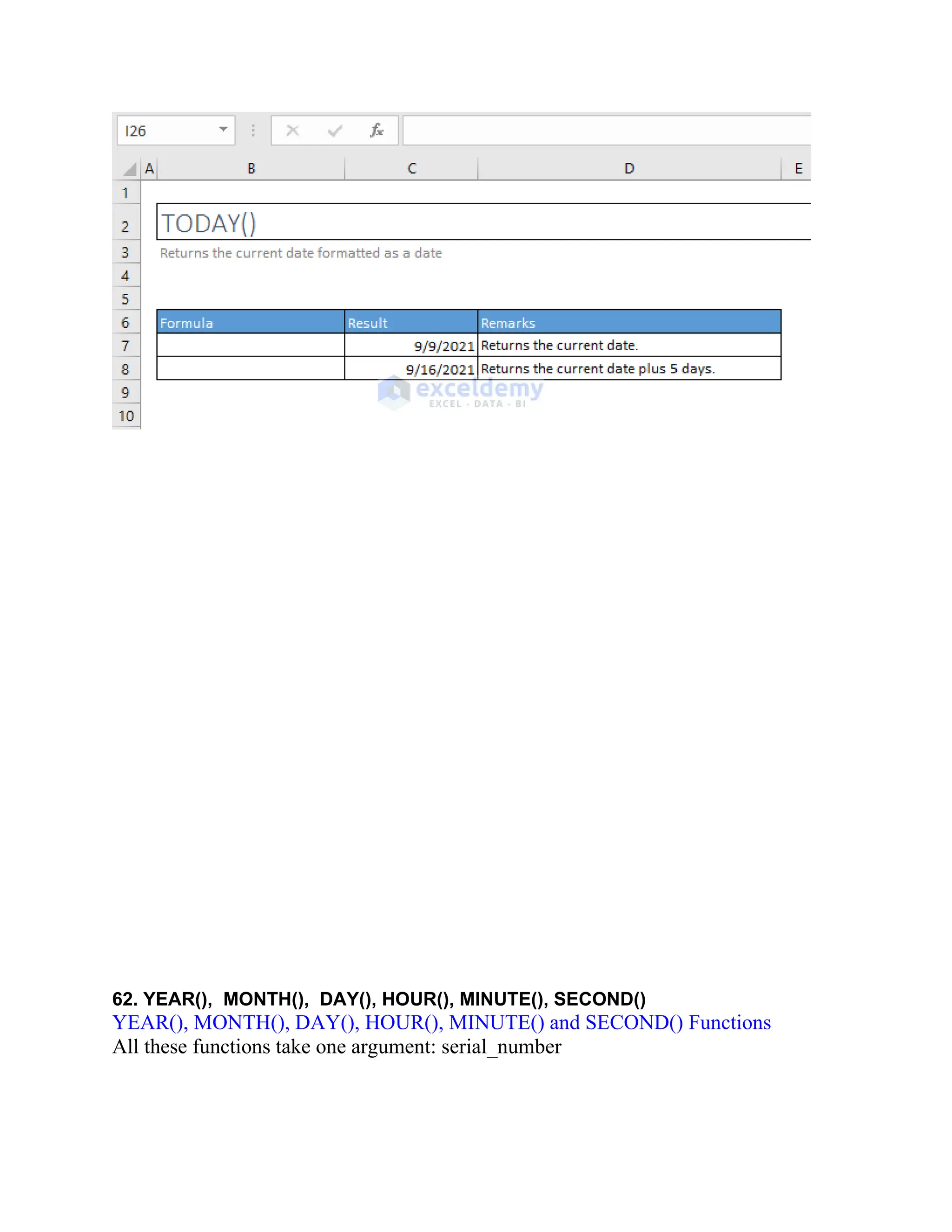
62. YEAR(), MONTH(),DAY(), HOUR(), MINUTE(), SECOND()
YEAR(), MONTH(), DAY(), HOUR(), MINUTE() and SECOND() Functions
All these functions take one argument: serial_number
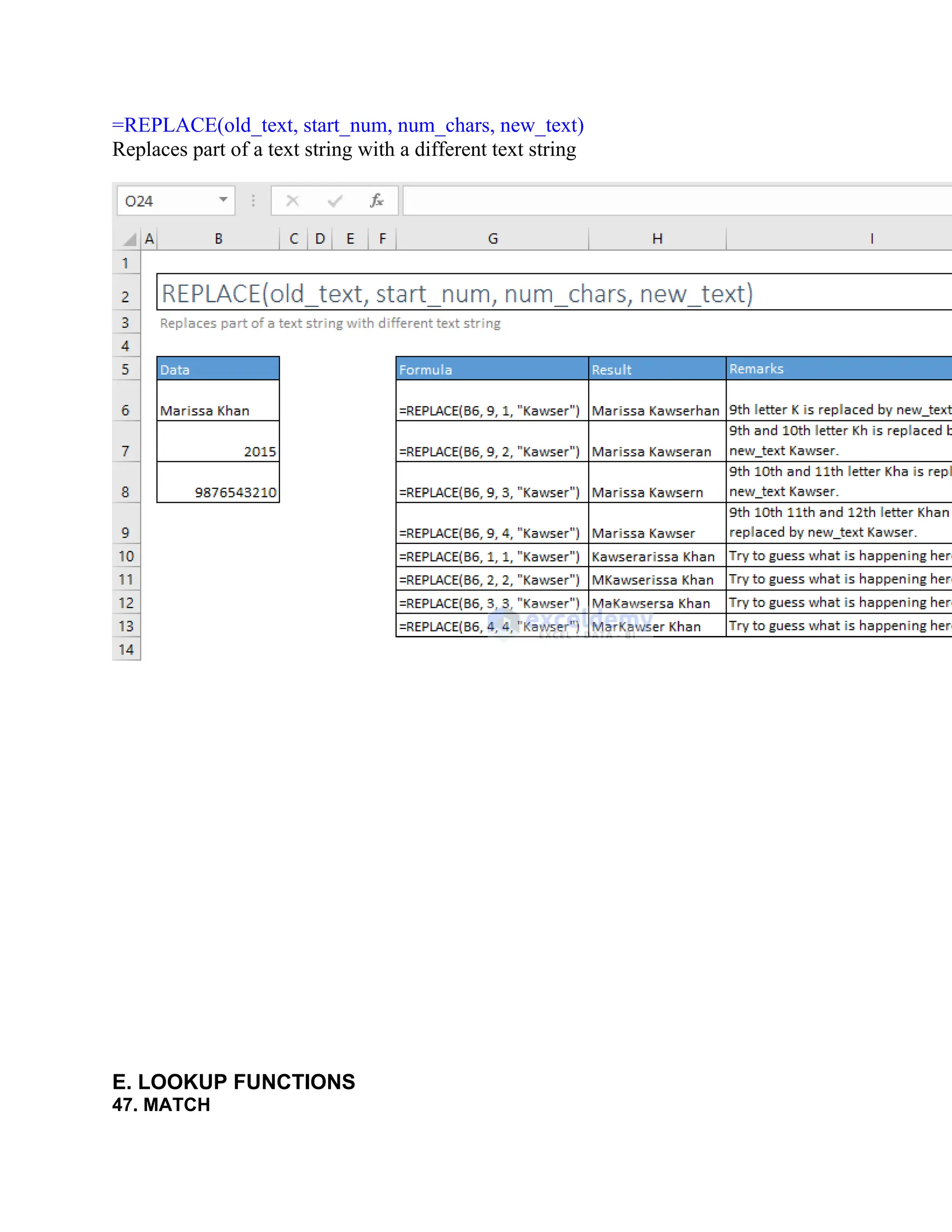
![45. SUBSTITUTE
=SUBSTITUTE(text, old_text, new_text, [instance_num])
Replaces existing text with new text in a text string
46. REPLACE](https://image.slidesharecdn.com/excelpractice-1-250414084542-941ee351/75/excel-practice-1-2-docx-excel-practice-1-2-excel-practice-1-2-1-2048.jpg)
![=MATCH(lookup_value, lookup_array, [match_type])
Returns the relative position of an item in an array that matches a specified value in a
specified order
48. LOOKUP
=LOOKUP(lookup_value, lookup_vector, [result_vector])](https://image.slidesharecdn.com/excelpractice-1-250414084542-941ee351/75/excel-practice-1-2-docx-excel-practice-1-2-excel-practice-1-2-3-2048.jpg)
![Looks up a value either from a one-row or one-column range or from an array.
Provided for backward compatibility
49. HLOOKUP
=HLOOKUP(lookup_value, table_array, row_index_num, [range_lookup])](https://image.slidesharecdn.com/excelpractice-1-250414084542-941ee351/75/excel-practice-1-2-docx-excel-practice-1-2-excel-practice-1-2-4-2048.jpg)
![Looks for a value in the top row of a table or array of values and return the value in
the same column from a row you specify
50. VLOOKUP
=VLOOKUP(lookup_value, table_array, col_index_num, [range_lookup])](https://image.slidesharecdn.com/excelpractice-1-250414084542-941ee351/75/excel-practice-1-2-docx-excel-practice-1-2-excel-practice-1-2-5-2048.jpg)
![=ADDRESS(row_num, column_num, [abs_num], [a1], [sheet_text])
Creates a cell reference as text, given specified row and column numbers
52. CHOOSE
=CHOOSE(index_num, value1, [value2], [value3], …)
Chooses a value or action to perform from a list of values, based on an index number](https://image.slidesharecdn.com/excelpractice-1-250414084542-941ee351/75/excel-practice-1-2-docx-excel-practice-1-2-excel-practice-1-2-7-2048.jpg)
![53. INDEX
Array Form: =INDEX(array, row_num, [column_num])
Return the value of a specified cell or array of cells](https://image.slidesharecdn.com/excelpractice-1-250414084542-941ee351/75/excel-practice-1-2-docx-excel-practice-1-2-excel-practice-1-2-8-2048.jpg)
![Reference Form: =INDEX(reference, row_num, [column_num], [area_num])
Returns a reference to specified cells](https://image.slidesharecdn.com/excelpractice-1-250414084542-941ee351/75/excel-practice-1-2-docx-excel-practice-1-2-excel-practice-1-2-9-2048.jpg)
![54. INDIRECT
=INDIRECT(ref_text, [a1])
Returns the reference specified by a text string](https://image.slidesharecdn.com/excelpractice-1-250414084542-941ee351/75/excel-practice-1-2-docx-excel-practice-1-2-excel-practice-1-2-10-2048.jpg)
![55. OFFSET
=OFFSET(reference- rows, cols, [height], [width])
Returns a reference to a range that is a given number of rows and columns from a
given reference](https://image.slidesharecdn.com/excelpractice-1-250414084542-941ee351/75/excel-practice-1-2-docx-excel-practice-1-2-excel-practice-1-2-11-2048.jpg)
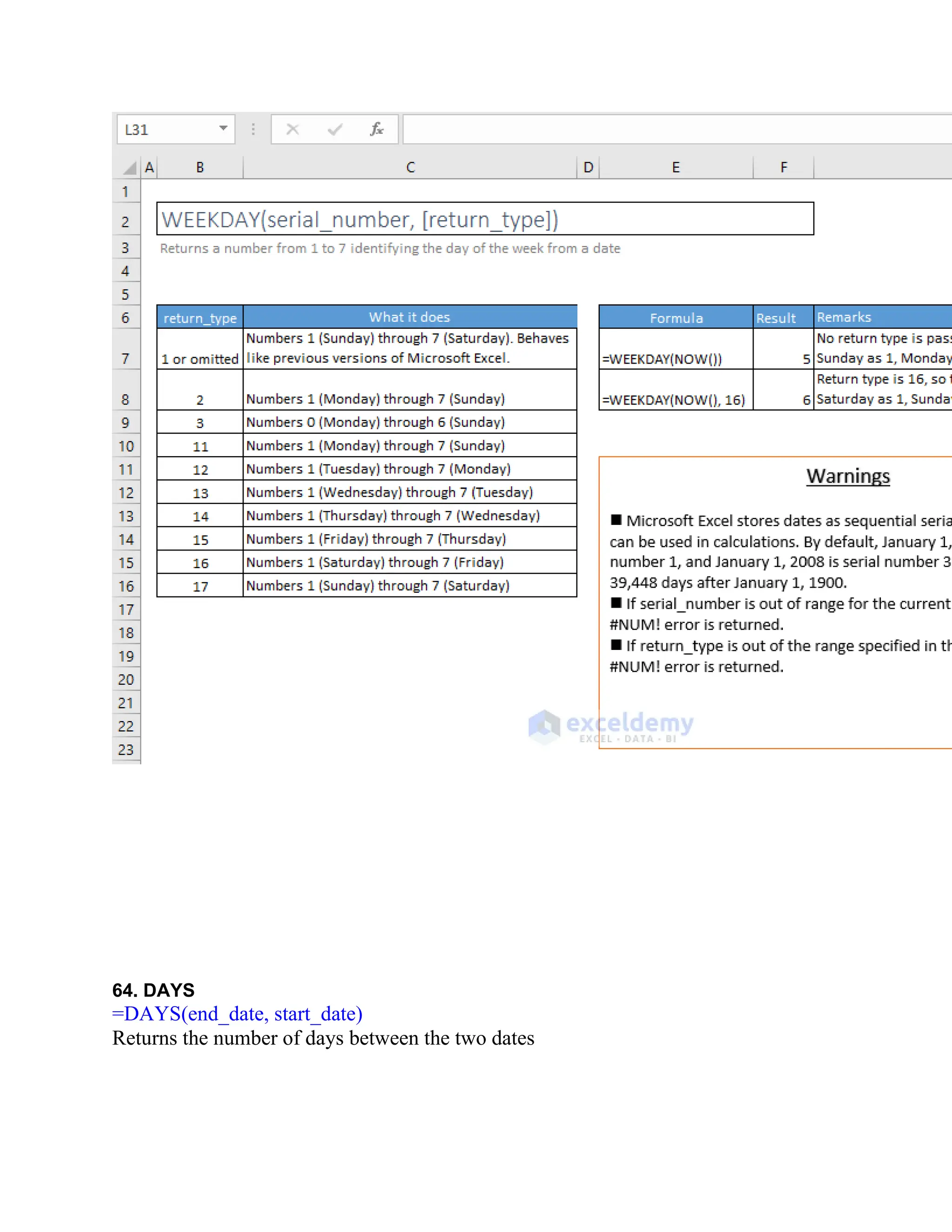
![63. WEEKDAY
=WEEKDAY(serial_number, [return_type])
Returns a number from 1 to 7 identifying the day of the week from a date](https://image.slidesharecdn.com/excelpractice-1-250414084542-941ee351/75/excel-practice-1-2-docx-excel-practice-1-2-excel-practice-1-2-19-2048.jpg)
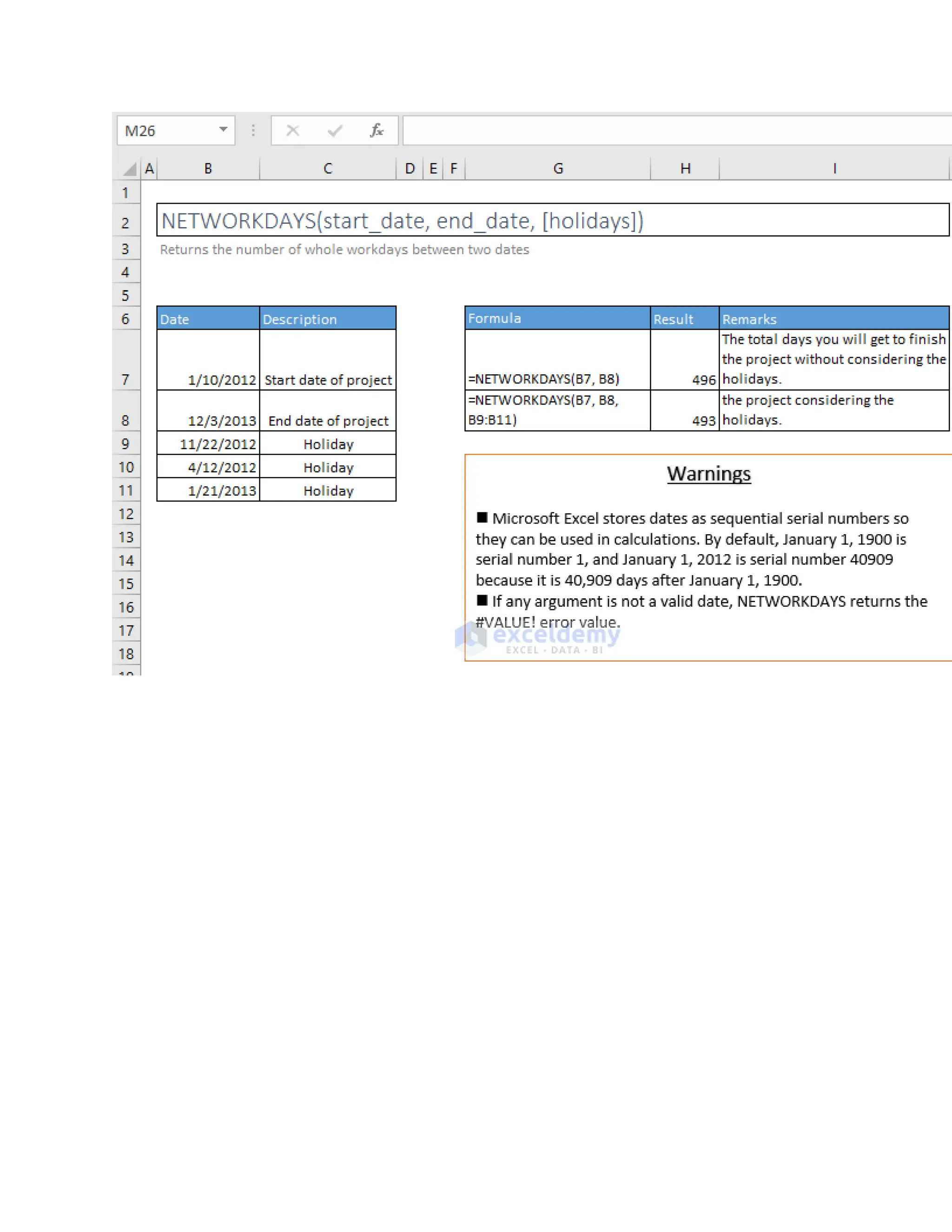
![65. NETWORKDAYS
=NETWORKDAYS(start_date, end_date, [holidays])
Returns the number of whole workdays between two dates](https://image.slidesharecdn.com/excelpractice-1-250414084542-941ee351/75/excel-practice-1-2-docx-excel-practice-1-2-excel-practice-1-2-21-2048.jpg)


![Etech. mitch. [autosaved]](https://cdn.slidesharecdn.com/ss_thumbnails/etech-190128010709-thumbnail.jpg?width=640&height=640&fit=bounds)


![Coded Agents – with UiPath SDK + LangGraph [Virtual Hands-on Workshop]](https://cdn.slidesharecdn.com/ss_thumbnails/codedagentsdeck-251215155422-5497c599-thumbnail.jpg?width=640&height=640&fit=bounds)


