66. WORKDAY
=WORKDAY(start_date, days, [holidays])
Returns the serial number of the date before or after a specified number of workdays
H. MISCELLANEOUS FUNCTIONS
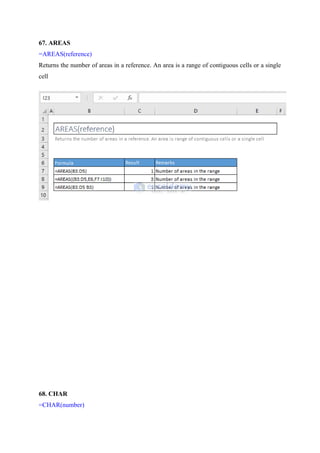
67. AREAS
=AREAS(reference)
Returns the number of areas in a reference. An area is a range of contiguous cells or a single
cell
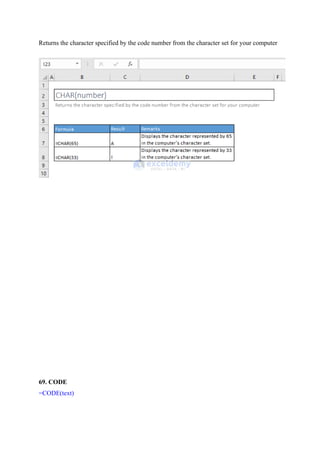
68. CHAR
=CHAR(number)
Returns the character specified by the code number from the character set for your computer
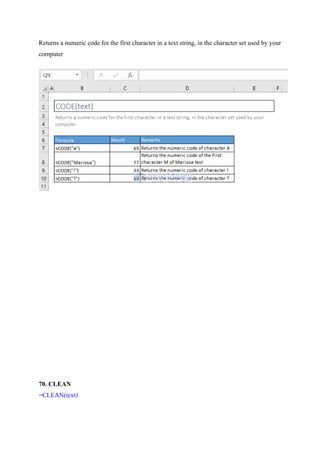
69. CODE
=CODE(text)
Returns a numeric code for the first character in a text string, in the character set used by your
computer
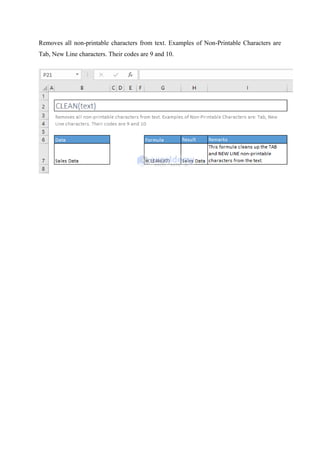
70. CLEAN
=CLEAN(text)
Removes all non-printable characters from text. Examples of Non-Printable Characters are
Tab, New Line characters. Their codes are 9 and 10.
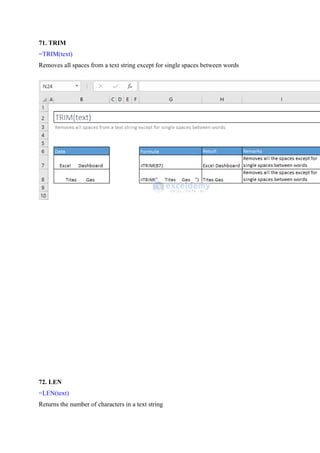
71. TRIM
=TRIM(text)
Removes all spaces from a text string except for single spaces between words
72. LEN
=LEN(text)
Returns the number of characters in a text string
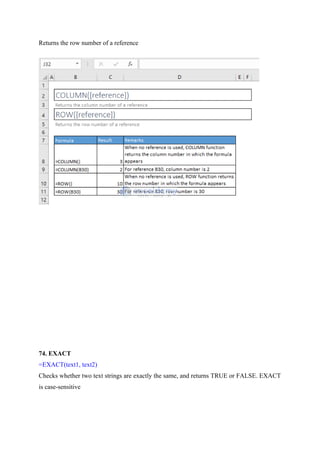
73. COLUMN() & ROW() Functions
=COLUMN([reference])
Returns the column number of a reference
=ROW([reference])
Returns the row number of a reference
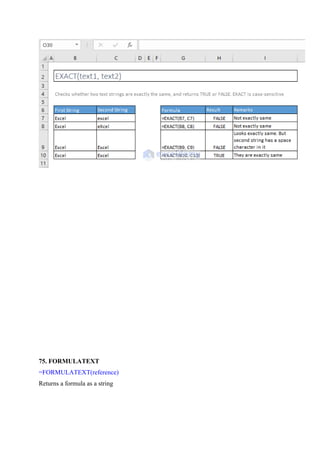
74. EXACT
=EXACT(text1, text2)
Checks whether two text strings are exactly the same, and returns TRUE or FALSE. EXACT
is case-sensitive
75. FORMULATEXT
=FORMULATEXT(reference)
Returns a formula as a string
76. LEFT(), RIGHT(), and MID() Functions
=LEFT(text, [num_chars])
Returns the specified number of characters from the start of a text string
=MID(text, start_num, num_chars)
Returns the characters from the middle of a text string, given a starting position and length
=RIGHT(text, [num_chars])
Returns the specified number of characters from the end of a text string
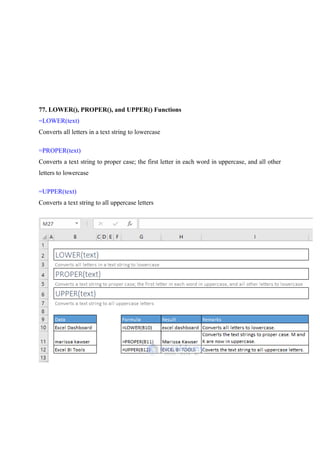
77. LOWER(), PROPER(), and UPPER() Functions
=LOWER(text)
Converts all letters in a text string to lowercase
=PROPER(text)
Converts a text string to proper case; the first letter in each word in uppercase, and all other
letters to lowercase
=UPPER(text)
Converts a text string to all uppercase letters
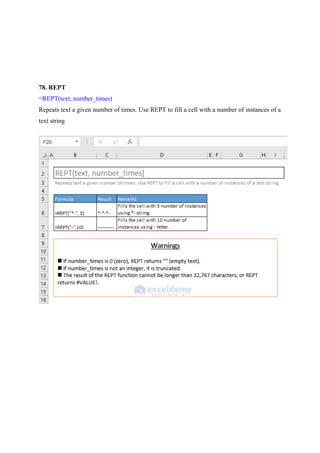
78. REPT
=REPT(text, number_times)
Repeats text a given number of times. Use REPT to fill a cell with a number of instances of a
text string
79. SHEET
=SHEET([value])
Returns the sheet number of the referenced sheet
80. SHEETS
=SHEETS([reference])
Returns the number of sheets in a reference
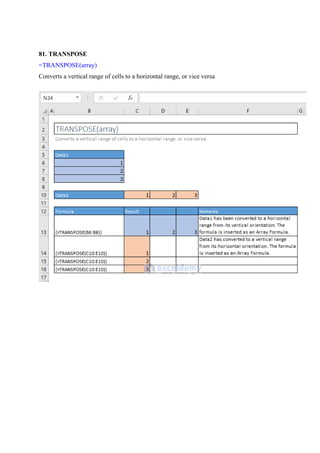
81. TRANSPOSE
=TRANSPOSE(array)
Converts a vertical range of cells to a horizontal range, or vice versa
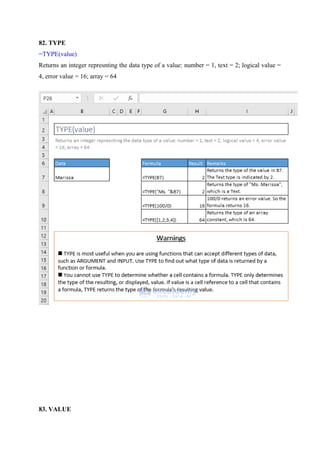
82. TYPE
=TYPE(value)
Returns an integer represnting the data type of a value: number = 1, text = 2; logical value =
4, error value = 16; array = 64
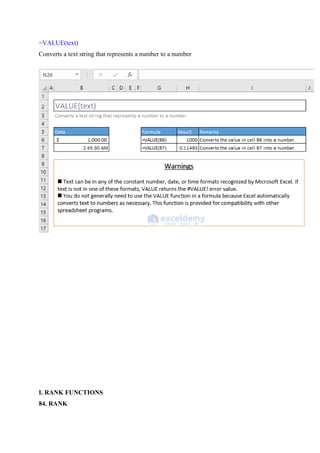
83. VALUE
=VALUE(text)
Converts a text string that represents a number to a number
I. RANK FUNCTIONS
84. RANK
=RANK(number, ref, [order])
This function is available for compatibility with Excel 2007 and others.
Returns the rank of a number in a list of numbers: its size relative to other values in the list
85. RANK.AVG
=RANK.AVG(number, ref, [order])
Returns the rank of a number in a list of numbers: its size relative to other values in the list; if
more than one value has the same rank, the average rank is returned
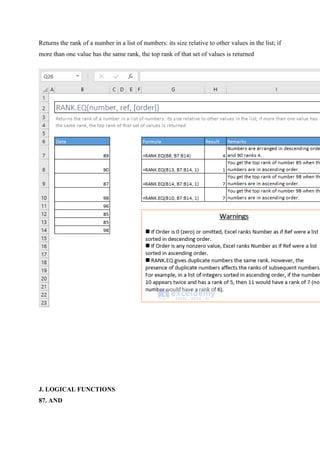
86. RANK.EQ
=RANK.EQ(number, ref, [order])
Returns the rank of a number in a list of numbers: its size relative to other values in the list; if
more than one value has the same rank, the top rank of that set of values is returned
J. LOGICAL FUNCTIONS
87. AND
=AND(logical1, [logical2], [logical3], [logical4], …)
Checks whether all arguments are TRUE, and returns TRUE when all arguments are TRUE
88. NOT
=NOT(logical)
Changes FALSE to TRUE, or TRUE to FALSE
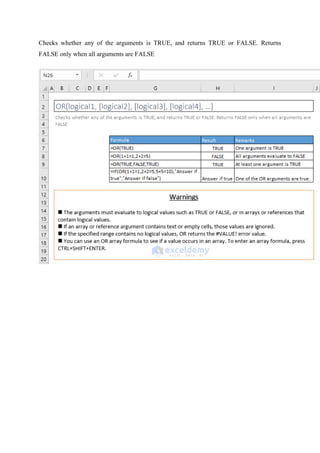
89. OR
=OR(logical1, [logical2], [logical3], [logical4], …)
Checks whether any of the arguments is TRUE, and returns TRUE or FALSE. Returns
FALSE only when all arguments are FALSE

excel practice-1.3.docx,excel practice-1.3

  • 1.
    66. WORKDAY =WORKDAY(start_date, days,[holidays]) Returns the serial number of the date before or after a specified number of workdays H. MISCELLANEOUS FUNCTIONS
  • 2.
    67. AREAS =AREAS(reference) Returns thenumber of areas in a reference. An area is a range of contiguous cells or a single cell 68. CHAR =CHAR(number)
  • 3.
    Returns the characterspecified by the code number from the character set for your computer 69. CODE =CODE(text)
  • 4.
    Returns a numericcode for the first character in a text string, in the character set used by your computer 70. CLEAN =CLEAN(text)
  • 5.
    Removes all non-printablecharacters from text. Examples of Non-Printable Characters are Tab, New Line characters. Their codes are 9 and 10.
  • 6.
    71. TRIM =TRIM(text) Removes allspaces from a text string except for single spaces between words 72. LEN =LEN(text) Returns the number of characters in a text string
  • 7.
    73. COLUMN() &ROW() Functions =COLUMN([reference]) Returns the column number of a reference =ROW([reference])
  • 8.
    Returns the rownumber of a reference 74. EXACT =EXACT(text1, text2) Checks whether two text strings are exactly the same, and returns TRUE or FALSE. EXACT is case-sensitive
  • 9.
  • 10.
    76. LEFT(), RIGHT(),and MID() Functions =LEFT(text, [num_chars]) Returns the specified number of characters from the start of a text string
  • 11.
    =MID(text, start_num, num_chars) Returnsthe characters from the middle of a text string, given a starting position and length =RIGHT(text, [num_chars]) Returns the specified number of characters from the end of a text string
  • 12.
    77. LOWER(), PROPER(),and UPPER() Functions =LOWER(text) Converts all letters in a text string to lowercase =PROPER(text) Converts a text string to proper case; the first letter in each word in uppercase, and all other letters to lowercase =UPPER(text) Converts a text string to all uppercase letters
  • 13.
    78. REPT =REPT(text, number_times) Repeatstext a given number of times. Use REPT to fill a cell with a number of instances of a text string
  • 14.
    79. SHEET =SHEET([value]) Returns thesheet number of the referenced sheet
  • 15.
    80. SHEETS =SHEETS([reference]) Returns thenumber of sheets in a reference
  • 16.
    81. TRANSPOSE =TRANSPOSE(array) Converts avertical range of cells to a horizontal range, or vice versa
  • 17.
    82. TYPE =TYPE(value) Returns aninteger represnting the data type of a value: number = 1, text = 2; logical value = 4, error value = 16; array = 64 83. VALUE
  • 18.
    =VALUE(text) Converts a textstring that represents a number to a number I. RANK FUNCTIONS 84. RANK
  • 19.
    =RANK(number, ref, [order]) Thisfunction is available for compatibility with Excel 2007 and others. Returns the rank of a number in a list of numbers: its size relative to other values in the list 85. RANK.AVG =RANK.AVG(number, ref, [order])
  • 20.
    Returns the rankof a number in a list of numbers: its size relative to other values in the list; if more than one value has the same rank, the average rank is returned 86. RANK.EQ =RANK.EQ(number, ref, [order])
  • 21.
    Returns the rankof a number in a list of numbers: its size relative to other values in the list; if more than one value has the same rank, the top rank of that set of values is returned J. LOGICAL FUNCTIONS 87. AND
  • 22.
    =AND(logical1, [logical2], [logical3],[logical4], …) Checks whether all arguments are TRUE, and returns TRUE when all arguments are TRUE 88. NOT =NOT(logical)
  • 23.
    Changes FALSE toTRUE, or TRUE to FALSE 89. OR =OR(logical1, [logical2], [logical3], [logical4], …)
  • 24.
    Checks whether anyof the arguments is TRUE, and returns TRUE or FALSE. Returns FALSE only when all arguments are FALSE