How To
Create Your Connected Event
This is how our partnership benefits our nonprofit clients. You can now…

•   Allow your event attendees to set up their own fundraising pages

•   Track your efforts from both platforms so you always know how much you have
    raised from registrations and fundraising

•   Combine your FirstGiving and Eventbrite contacts into one database
There are just a few very simple steps
that stand between you and this awesome functionality.

                 So let’s get started…
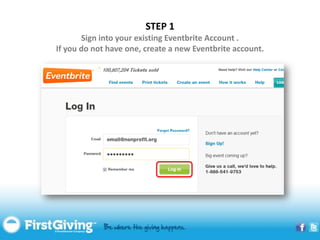
STEP 1
       Sign into your existing Eventbrite Account .
If you do not have one, create a new Eventbrite account.
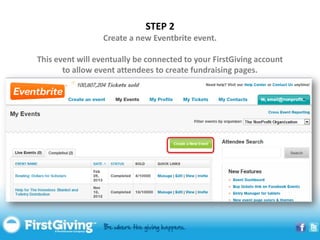
STEP 2
                  Create a new Eventbrite event.

This event will eventually be connected to your FirstGiving account
       to allow event attendees to create fundraising pages.
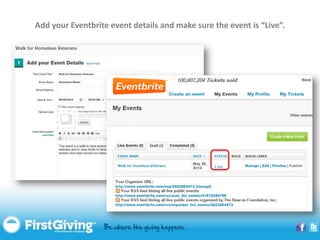
Add your Eventbrite event details and make sure the event is “Live”.
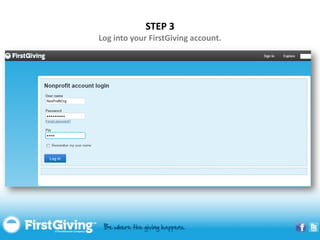
STEP 3
Log into your FirstGiving account.
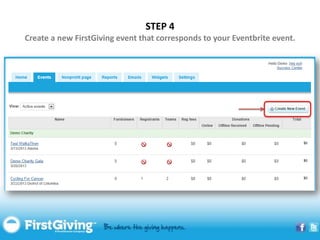
STEP 4
Create a new FirstGiving event that corresponds to your Eventbrite event.
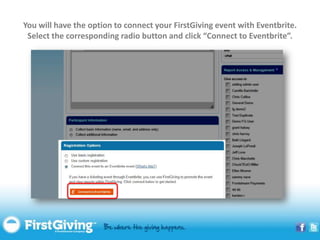
You will have the option to connect your FirstGiving event with Eventbrite.
 Select the corresponding radio button and click “Connect to Eventbrite”.
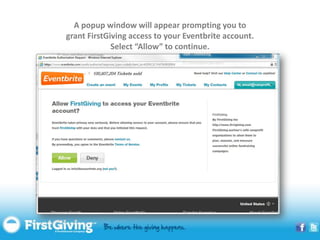
A popup window will appear prompting you to
grant FirstGiving access to your Eventbrite account.
             Select “Allow” to continue.
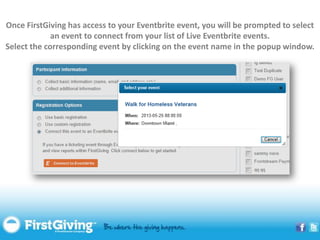
Once FirstGiving has access to your Eventbrite event, you will be prompted to select
             an event to connect from your list of Live Eventbrite events.
Select the corresponding event by clicking on the event name in the popup window.
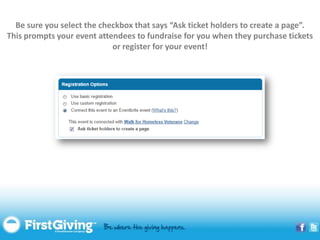
Be sure you select the checkbox that says “Ask ticket holders to create a page”.
This prompts your event attendees to fundraise for you when they purchase tickets
                            or register for your event!
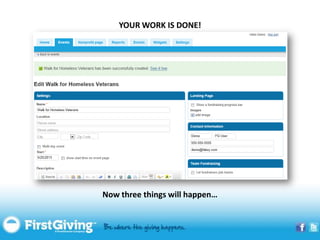
YOUR WORK IS DONE!


Now three things will happen…
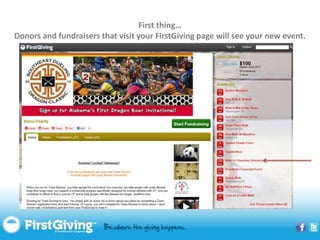
First thing…
Donors and fundraisers that visit your FirstGiving page will see your new event.
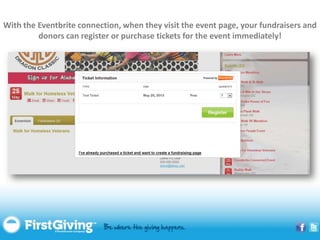
With the Eventbrite connection, when they visit the event page, your fundraisers and
         donors can register or purchase tickets for the event immediately!
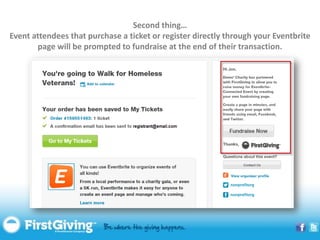
Second thing…
Event attendees that purchase a ticket or register directly through your Eventbrite
       page will be prompted to fundraise at the end of their transaction.
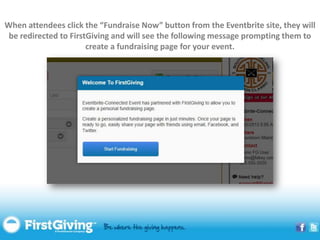
When attendees click the “Fundraise Now” button from the Eventbrite site, they will
 be redirected to FirstGiving and will see the following message prompting them to
                       create a fundraising page for your event.
Third…
Your event is a HUGE success and you are celebrated
    as the event planning rock star that you are!
Questions?


       Email Us!
Support@FirstGiving.com

       Call Us!
     877.365.2949

Eventbrite integration

  • 1.
    How To Create YourConnected Event
  • 2.
    This is howour partnership benefits our nonprofit clients. You can now… • Allow your event attendees to set up their own fundraising pages • Track your efforts from both platforms so you always know how much you have raised from registrations and fundraising • Combine your FirstGiving and Eventbrite contacts into one database
  • 3.
    There are justa few very simple steps that stand between you and this awesome functionality. So let’s get started…
  • 4.
    STEP 1 Sign into your existing Eventbrite Account . If you do not have one, create a new Eventbrite account.
  • 5.
    STEP 2 Create a new Eventbrite event. This event will eventually be connected to your FirstGiving account to allow event attendees to create fundraising pages.
  • 6.
    Add your Eventbriteevent details and make sure the event is “Live”.
  • 7.
    STEP 3 Log intoyour FirstGiving account.
  • 8.
    STEP 4 Create anew FirstGiving event that corresponds to your Eventbrite event.
  • 9.
    You will havethe option to connect your FirstGiving event with Eventbrite. Select the corresponding radio button and click “Connect to Eventbrite”.
  • 10.
    A popup windowwill appear prompting you to grant FirstGiving access to your Eventbrite account. Select “Allow” to continue.
  • 11.
    Once FirstGiving hasaccess to your Eventbrite event, you will be prompted to select an event to connect from your list of Live Eventbrite events. Select the corresponding event by clicking on the event name in the popup window.
  • 12.
    Be sure youselect the checkbox that says “Ask ticket holders to create a page”. This prompts your event attendees to fundraise for you when they purchase tickets or register for your event!
  • 13.
    YOUR WORK ISDONE! Now three things will happen…
  • 14.
    First thing… Donors andfundraisers that visit your FirstGiving page will see your new event.
  • 15.
    With the Eventbriteconnection, when they visit the event page, your fundraisers and donors can register or purchase tickets for the event immediately!
  • 16.
    Second thing… Event attendeesthat purchase a ticket or register directly through your Eventbrite page will be prompted to fundraise at the end of their transaction.
  • 17.
    When attendees clickthe “Fundraise Now” button from the Eventbrite site, they will be redirected to FirstGiving and will see the following message prompting them to create a fundraising page for your event.
  • 18.
    Third… Your event isa HUGE success and you are celebrated as the event planning rock star that you are!
  • 19.
    Questions? Email Us! Support@FirstGiving.com Call Us! 877.365.2949