Enterprise Resource Planning -ERP 
1
What is ERP? 
• The practice of consolidating an enterprise’s planning, 
manufacturing, sales and marketing efforts into one 
management system.1 
• Combines all databases across departments into a 
single database that can be accessed by all employees.2 
• ERP automates the tasks involved in performing a 
business process.1 
2
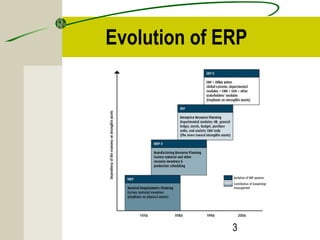
Evolution of ERP 
3
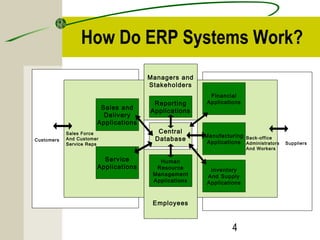
How Do ERP Systems Work? 
Customers Back-office 
4 
Managers and 
Stakeholders 
Reporting 
Applications 
Central 
Database 
Human 
Resource 
Management 
Applications 
Employees 
Financial 
Applications 
Manufacturing 
Applications 
Inventory 
And Supply 
Applications 
Human 
Resource 
Management 
Applications 
Sales and 
Delivery 
Applications 
Sales Force 
And Customer 
Service Reps 
Service 
Applications 
Administrators 
And Workers 
Suppliers
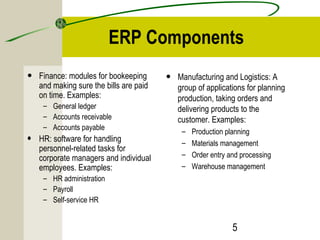
ERP Components 
5 
• Finance: modules for bookeeping 
and making sure the bills are paid 
on time. Examples: 
– General ledger 
– Accounts receivable 
– Accounts payable 
• HR: software for handling 
personnel-related tasks for 
corporate managers and individual 
employees. Examples: 
– HR administration 
– Payroll 
– Self-service HR 
• Manufacturing and Logistics: A 
group of applications for planning 
production, taking orders and 
delivering products to the 
customer. Examples: 
– Production planning 
– Materials management 
– Order entry and processing 
– Warehouse management
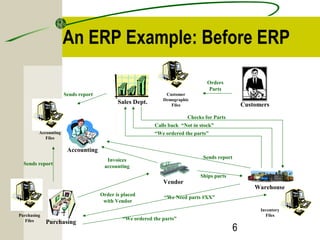
An ERP Example: Before ERP 
6 
Customers 
Customer 
Demographic 
Files Sales Dept. 
Vendor 
Orders 
Parts 
Accounting 
Accounting 
Files 
Purchasing 
Purchasing 
Files 
Invoices 
accounting 
Order is placed 
with Vendor 
Warehouse 
Inventory 
Files 
Checks for Parts 
Calls back “Not in stock” 
“We ordered the parts” 
“We Need parts #XX” 
“We ordered the parts” 
Sends report 
Sends report 
Sends report 
Ships parts
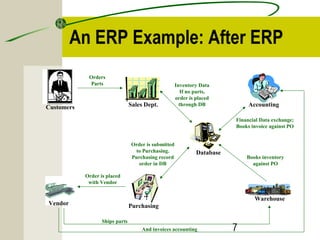
An ERP Example: After ERP 
7 
Database 
Customers Sales Dept. 
Purchasing 
Accounting 
Warehouse 
Vendor 
Inventory Data 
If no parts, 
order is placed 
through DB 
Orders 
Parts 
Order is submitted 
to Purchasing. 
Purchasing record 
order in DB 
Order is placed 
with Vendor 
And invoices accounting 
Financial Data exchange; 
Books invoice against PO 
Books inventory 
against PO 
Ships parts
8 
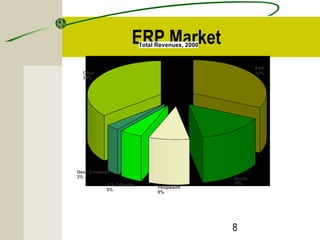
ERP Market 
SAP 
32% 
Oracle 
15% 
Peoplesoft 
9% 
Geac Computer 
3% 
J.D. Edwards 
5% 
Other 
36% 
Total Revenues, 2000
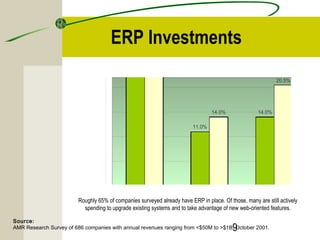
ERP SCM CRM 33.5% 
ERP Investments 
Source: 
AMR Research Survey of 686 companies with annual revenues ranging from <$50M to >$1B, October 2001. 
9 
11.0% 
14.0% 
31.0% 
14.0% 
20.5% 
Roughly 65% of companies surveyed already have ERP in place. Of those, many are still actively 
spending to upgrade existing systems and to take advantage of new web-oriented features.
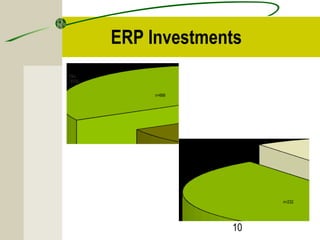
ERP Investments 
10 
No 
33% 
Have ERP today? 
n=666 
Don't know 
10% 
n=232
11 
Why ERP? 
3 Major Reasons: 
• To integrate financial data. 
• To standardize manufacturing processes. 
• To standardize HR information.
ERP Project and Time 
• Real transformational ERP efforts will usually run between 1 
to 3 years, on average. 
• Short implementations (3 to 6 months): 
– small companies, 
– implementation limited to a small area of the company, or 
– the company only used the financial pieces of the ERP system. 
• The important thing is not to focus on how long it will take 
but to understand why you need ERP and how you will use 
it to improve your business. 
12
Total Cost of Ownership of ERP 
Total cost of ownership (TCO) is a model developed by Gartner 
Group to analyze the direct and indirect costs of owning and using 
hardware and software. TCO essentially helps a company determine 
whether it wins or loses from specific technology implementations. 
• Metagroup study among 63 companies surveyed showed that: 
– the average TCO was $15 million (the highest was $300 million and 
lowest was $400k), 
– the average TCO per user was $53,320. 
13
Total Cost of Ownership of ERP 
14 
• It also found that: 
– it took 8 months after the system was in to see any benefits, 
– but that the median annual savings from the system was $1.6 
million per year.
Hidden Costs of ERP 
• Training 
• Integration and testing 
• Data conversion 
• Data analysis 
• Consultants 
• Replacing best and brightest staff after implementation 
• Implementation teams can never stop 
• Waiting for ROI 
• Post-ERP depression 
15
Benefits of ERP Systems 
• Improving integration, flexibility 
• Fewer errors 
• Improved speed and efficiency 
• More complete access to information 
• Lower total costs in the complete supply chain 
• Shorten throughput times 
• Sustained involvement and commitment of the top 
management 
16
Benefits of ERP Systems (cont’d) 
• Reduce stock to a minimum 
• Enlarge product assortment 
• Improve product quality 
• Provide more reliable delivery dates and higher 
service to the customer 
• Efficiently coordinate global demand, supply and 
production 
17
Risks with ERP Implementation 
• Expensive (can costs 100 thousands to millions 
of dollars) 
• Time-consuming (can take months to years) 
• Great risk for the organization 
• Transfer of Knowledge 
• Acceptance with the company 
18
19 
Best Practices and what ERP 
holds for the Future
ERP Implementation 
• Biggest IT project that most companies ever handle, 
• Changes the entire company, and 
• Has repercussions in all departments and divisions 
of the organization. 
• It is essential that all the key players understand the 
scope of the project. 
• This is an IT-Related Project. 
20
Best Practices of ERP Implementation 
• A Business Strategy aligned with Business Processes 
• Top-Down Project Support and commitment 
• Change Management 
• Extensive Education and Training 
• Data Clean up and Data Integrity 
• Implementation is viewed as an ongoing process 
21
Best Practices of ERP Implementation 
• A Business Strategy aligned with Business 
Processes 
– Business strategy that will give you a competitive advantage 
– Analyze and map your current business processes 
– Develop your objectives 
– Evaluate your business strategy and ERP plan before you 
commit to software acquisition and installation. 
22
Best Practices of ERP Implementation 
• Top-Down Project Support and commitment 
– CEO1 
23 
• support implementation costs 
• champion the project, and 
• demand full integration and cooperation. 
– Most knowledgeable and valuable staff
Best Practices of ERP Implementation 
24 
• Change Management 
– Changes in business procedures, responsibilities, 
work load.1 
– As a result, ERP implementations are times of high stress, 
long hours, and uncertainty. 
– Mid-level managers must 
• facilitate continual feedback from employees, 
• provide honest answers to their questions, and 
• help resolve their problems.
Best Practices of ERP Implementation 
25 
• Extensive Education and Training 
– General education about the ERP system for everyone. 
– Massive amount of end users training before and during 
implementation. 
– Follow-up training after the implementation. 
– 10 to 15% of total ERP implementation budget for training will 
give an organization an 80% chance of a successful 
implementation.
Best Practices of ERP Implementation 
• Data Clean up and Data Integrity 
– Clean-up data before cut-over.1 
– “Near enough is no longer good enough.”2 
– To command trust, the data in the system must be 
sufficiently available and accurate.3 
– Eliminate the old systems, including all informal 
systems.3 
26
Best Practices of ERP Implementation 
• Implementation is viewed as an ongoing process 
– Ongoing need for training and software support after 
implementation. 
– Ongoing need to keep in contact with all system 
users and monitor the use of the new system. 
– Ongoing process of learning and adaptation that 
continually evolves over time. 
27
ERP Implementation Phases 
4 Major Phases: 
• Concept/initiation 
• Development 
• Implementation 
• Closeout/Operation and maintenance 
28
29 
Conclusion 
• The benefits of a properly selected and implemented 
ERP system can be significant. 
– An average, 25 to 30% reduction on inventory costs; 25% 
reduction on raw material costs. 
– Lead-time for customers, production time, and production 
costs can be reduced. 
• BUT cost of implementing can be quite high and risks 
are great.
30 
End

ERP Solutions UK

  • 1.
  • 2.
    What is ERP? • The practice of consolidating an enterprise’s planning, manufacturing, sales and marketing efforts into one management system.1 • Combines all databases across departments into a single database that can be accessed by all employees.2 • ERP automates the tasks involved in performing a business process.1 2
  • 3.
  • 4.
    How Do ERPSystems Work? Customers Back-office 4 Managers and Stakeholders Reporting Applications Central Database Human Resource Management Applications Employees Financial Applications Manufacturing Applications Inventory And Supply Applications Human Resource Management Applications Sales and Delivery Applications Sales Force And Customer Service Reps Service Applications Administrators And Workers Suppliers
  • 5.
    ERP Components 5 • Finance: modules for bookeeping and making sure the bills are paid on time. Examples: – General ledger – Accounts receivable – Accounts payable • HR: software for handling personnel-related tasks for corporate managers and individual employees. Examples: – HR administration – Payroll – Self-service HR • Manufacturing and Logistics: A group of applications for planning production, taking orders and delivering products to the customer. Examples: – Production planning – Materials management – Order entry and processing – Warehouse management
  • 6.
    An ERP Example:Before ERP 6 Customers Customer Demographic Files Sales Dept. Vendor Orders Parts Accounting Accounting Files Purchasing Purchasing Files Invoices accounting Order is placed with Vendor Warehouse Inventory Files Checks for Parts Calls back “Not in stock” “We ordered the parts” “We Need parts #XX” “We ordered the parts” Sends report Sends report Sends report Ships parts
  • 7.
    An ERP Example:After ERP 7 Database Customers Sales Dept. Purchasing Accounting Warehouse Vendor Inventory Data If no parts, order is placed through DB Orders Parts Order is submitted to Purchasing. Purchasing record order in DB Order is placed with Vendor And invoices accounting Financial Data exchange; Books invoice against PO Books inventory against PO Ships parts
  • 8.
    8 ERP Market SAP 32% Oracle 15% Peoplesoft 9% Geac Computer 3% J.D. Edwards 5% Other 36% Total Revenues, 2000
  • 9.
    ERP SCM CRM33.5% ERP Investments Source: AMR Research Survey of 686 companies with annual revenues ranging from <$50M to >$1B, October 2001. 9 11.0% 14.0% 31.0% 14.0% 20.5% Roughly 65% of companies surveyed already have ERP in place. Of those, many are still actively spending to upgrade existing systems and to take advantage of new web-oriented features.
  • 10.
    ERP Investments 10 No 33% Have ERP today? n=666 Don't know 10% n=232
  • 11.
    11 Why ERP? 3 Major Reasons: • To integrate financial data. • To standardize manufacturing processes. • To standardize HR information.
  • 12.
    ERP Project andTime • Real transformational ERP efforts will usually run between 1 to 3 years, on average. • Short implementations (3 to 6 months): – small companies, – implementation limited to a small area of the company, or – the company only used the financial pieces of the ERP system. • The important thing is not to focus on how long it will take but to understand why you need ERP and how you will use it to improve your business. 12
  • 13.
    Total Cost ofOwnership of ERP Total cost of ownership (TCO) is a model developed by Gartner Group to analyze the direct and indirect costs of owning and using hardware and software. TCO essentially helps a company determine whether it wins or loses from specific technology implementations. • Metagroup study among 63 companies surveyed showed that: – the average TCO was $15 million (the highest was $300 million and lowest was $400k), – the average TCO per user was $53,320. 13
  • 14.
    Total Cost ofOwnership of ERP 14 • It also found that: – it took 8 months after the system was in to see any benefits, – but that the median annual savings from the system was $1.6 million per year.
  • 15.
    Hidden Costs ofERP • Training • Integration and testing • Data conversion • Data analysis • Consultants • Replacing best and brightest staff after implementation • Implementation teams can never stop • Waiting for ROI • Post-ERP depression 15
  • 16.
    Benefits of ERPSystems • Improving integration, flexibility • Fewer errors • Improved speed and efficiency • More complete access to information • Lower total costs in the complete supply chain • Shorten throughput times • Sustained involvement and commitment of the top management 16
  • 17.
    Benefits of ERPSystems (cont’d) • Reduce stock to a minimum • Enlarge product assortment • Improve product quality • Provide more reliable delivery dates and higher service to the customer • Efficiently coordinate global demand, supply and production 17
  • 18.
    Risks with ERPImplementation • Expensive (can costs 100 thousands to millions of dollars) • Time-consuming (can take months to years) • Great risk for the organization • Transfer of Knowledge • Acceptance with the company 18
  • 19.
    19 Best Practicesand what ERP holds for the Future
  • 20.
    ERP Implementation •Biggest IT project that most companies ever handle, • Changes the entire company, and • Has repercussions in all departments and divisions of the organization. • It is essential that all the key players understand the scope of the project. • This is an IT-Related Project. 20
  • 21.
    Best Practices ofERP Implementation • A Business Strategy aligned with Business Processes • Top-Down Project Support and commitment • Change Management • Extensive Education and Training • Data Clean up and Data Integrity • Implementation is viewed as an ongoing process 21
  • 22.
    Best Practices ofERP Implementation • A Business Strategy aligned with Business Processes – Business strategy that will give you a competitive advantage – Analyze and map your current business processes – Develop your objectives – Evaluate your business strategy and ERP plan before you commit to software acquisition and installation. 22
  • 23.
    Best Practices ofERP Implementation • Top-Down Project Support and commitment – CEO1 23 • support implementation costs • champion the project, and • demand full integration and cooperation. – Most knowledgeable and valuable staff
  • 24.
    Best Practices ofERP Implementation 24 • Change Management – Changes in business procedures, responsibilities, work load.1 – As a result, ERP implementations are times of high stress, long hours, and uncertainty. – Mid-level managers must • facilitate continual feedback from employees, • provide honest answers to their questions, and • help resolve their problems.
  • 25.
    Best Practices ofERP Implementation 25 • Extensive Education and Training – General education about the ERP system for everyone. – Massive amount of end users training before and during implementation. – Follow-up training after the implementation. – 10 to 15% of total ERP implementation budget for training will give an organization an 80% chance of a successful implementation.
  • 26.
    Best Practices ofERP Implementation • Data Clean up and Data Integrity – Clean-up data before cut-over.1 – “Near enough is no longer good enough.”2 – To command trust, the data in the system must be sufficiently available and accurate.3 – Eliminate the old systems, including all informal systems.3 26
  • 27.
    Best Practices ofERP Implementation • Implementation is viewed as an ongoing process – Ongoing need for training and software support after implementation. – Ongoing need to keep in contact with all system users and monitor the use of the new system. – Ongoing process of learning and adaptation that continually evolves over time. 27
  • 28.
    ERP Implementation Phases 4 Major Phases: • Concept/initiation • Development • Implementation • Closeout/Operation and maintenance 28
  • 29.
    29 Conclusion •The benefits of a properly selected and implemented ERP system can be significant. – An average, 25 to 30% reduction on inventory costs; 25% reduction on raw material costs. – Lead-time for customers, production time, and production costs can be reduced. • BUT cost of implementing can be quite high and risks are great.
  • 30.