Looki ng back at your
prel i mi nary t ask,
what do you f eel you
have l earnt i n t he
progressi on f romi t
t o t he f ul l product ?
By Jumana Ismail
Prel i mi nary Task
Vi deo
Mai n Task Vi deo
The pr el i mi nar y vi deo t ook 1
day t o f i l m wi t h l i mi t ed
knowl edge of ef f ect s of
camer a shot s, mi s-en-scene,
sound ef f ect s, and edi t i ng on
any movi e or cl i p.
The mai n t ask was f i l med over
a per i od of a week. I had much
mor e exper i ence on how t o use
al l t he t echni ques and knew
how t o appl y t hem whi l st
f i l mi ng my openi ng sequence.
Progression of planning in my main task
There was a big difference between my preliminary task and my main task in terms of planning as
during my main task, I planned everything in depth. This is clear as I have done in depth research
and planning in order to make a successful and professional opening sequence. My research and
planning consisted of:
-Writing out a treatment for my opening sequence
- The development of the Genre
- Top 5 directors in the genre
- Research on stock characters
- Sound track analysis
- Forms and conventions of Horror films
- Bbfc certification
Doing that research was very important as I was prepared enough to make my own opening
sequence, having the correct knowledge, in comparison to my preliminary task, in which I had
started it without any research and planning.
Additionally, I made my own story boards before filming in order to be prepared whilst filming and
have everything ready. This was very useful as I felt like all I had to do during filming was look at my
story board and film the same shots. Furthermore, I turned my story board into an animatic video
to see if I was able to see an animatic version of my opening sequence just by looking at that video.
Pr el i mi nar y Task
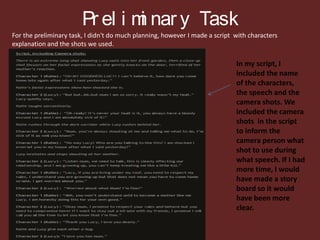
For the preliminary task, I didn't do much planning, however I made a script with characters
explanation and the shots we used.
In my script, I
included the name
of the characters,
the speech and the
camera shots. We
included the camera
shots in the script
to inform the
camera person what
shot to use during
what speech. If I had
more time, I would
have made a story
board so it would
have been more
clear.
Progression in Main Task
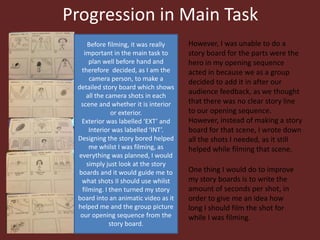
Before filming, it was really
important in the main task to
plan well before hand and
therefore decided, as I am the
camera person, to make a
detailed story board which shows
all the camera shots in each
scene and whether it is interior
or exterior.
Exterior was labelled ‘EXT’ and
Interior was labelled ‘INT’.
Designing the story bored helped
me whilst I was filming, as
everything was planned, I would
simply just look at the story
boards and it would guide me to
what shots II should use whilst
filming. I then turned my story
board into an animatic video as it
helped me and the group picture
our opening sequence from the
story board.
However, I was unable to do a
story board for the parts were the
hero in my opening sequence
acted in because we as a group
decided to add it in after our
audience feedback, as we thought
that there was no clear story line
to our opening sequence.
However, instead of making a story
board for that scene, I wrote down
all the shots I needed, as it still
helped while filming that scene.
One thing I would do to improve
my story boards is to write the
amount of seconds per shot, in
order to give me an idea how
long I should film the shot for
while I was filming.
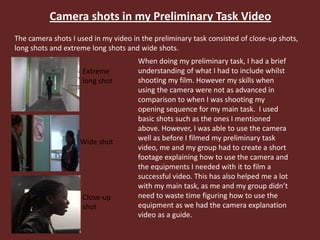
Camera shots in my Preliminary Task Video
The camera shots I used in my video in the preliminary task consisted of close-up shots,
long shots and extreme long shots and wide shots.
Extreme
long shot
Wide shot
Close-up
shot
When doing my preliminary task, I had a brief
understanding of what I had to include whilst
shooting my film. However my skills when
using the camera were not as advanced in
comparison to when I was shooting my
opening sequence for my main task. I used
basic shots such as the ones I mentioned
above. However, I was able to use the camera
well as before I filmed my preliminary task
video, me and my group had to create a short
footage explaining how to use the camera and
the equipments I needed with it to film a
successful video. This has also helped me a lot
with my main task, as me and my group didn’t
need to waste time figuring how to use the
equipment as we had the camera explanation
video as a guide.
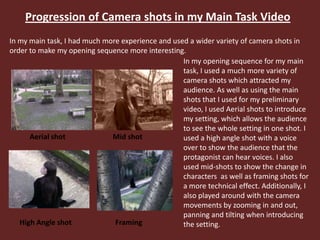
Progression of Camera shots in my Main Task Video
In my main task, I had much more experience and used a wider variety of camera shots in
order to make my opening sequence more interesting.
Aerial shot
High Angle shot
Mid shot
Framing
In my opening sequence for my main
task, I used a much more variety of
camera shots which attracted my
audience. As well as using the main
shots that I used for my preliminary
video, I used Aerial shots to introduce
my setting, which allows the audience
to see the whole setting in one shot. I
used a high angle shot with a voice
over to show the audience that the
protagonist can hear voices. I also
used mid-shots to show the change in
characters as well as framing shots for
a more technical effect. Additionally, I
also played around with the camera
movements by zooming in and out,
panning and tilting when introducing
the setting.
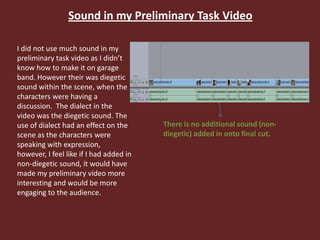
Sound in my Preliminary Task Video
I did not use much sound in my
preliminary task video as I didn’t
know how to make it on garage
band. However their was diegetic
sound within the scene, when the
characters were having a
discussion. The dialect in the
video was the diegetic sound. The
use of dialect had an effect on the
scene as the characters were
speaking with expression,
however, I feel like if I had added in
non-diegetic sound, it would have
made my preliminary video more
interesting and would be more
engaging to the audience.
There is no additional sound (non-
diegetic) added in onto final cut.
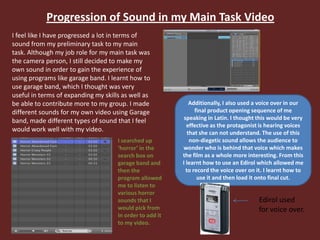
Progression of Sound in my Main Task Video
I feel like I have progressed a lot in terms of
sound from my preliminary task to my main
task. Although my job role for my main task was
the camera person, I still decided to make my
own sound in order to gain the experience of
using programs like garage band. I learnt how to
use garage band, which I thought was very
useful in terms of expanding my skills as well as
be able to contribute more to my group. I made
different sounds for my own video using Garage
band, made different types of sound that I feel
would work well with my video.
I searched up
‘horror’ in the
search box on
garage band and
then the
program allowed
me to listen to
various horror
sounds that I
would pick from
in order to add it
to my video.
Additionally, I also used a voice over in our
final product opening sequence of me
speaking in Latin. I thought this would be very
effective as the protagonist is hearing voices
that she can not understand. The use of this
non-diegetic sound allows the audience to
wonder who is behind that voice which makes
the film as a whole more interesting. From this
I learnt how to use an Edirol which allowed me
to record the voice over on it. I learnt how to
use it and then load it onto final cut.
Edirol used
for voice over.
Mis-en-scene in my Preliminary Task Video
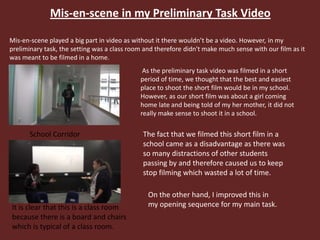
Mis-en-scene played a big part in video as without it there wouldn’t be a video. However, in my
preliminary task, the setting was a class room and therefore didn't make much sense with our film as it
was meant to be filmed in a home.
School Corridor
It is clear that this is a class room
because there is a board and chairs
which is typical of a class room.
As the preliminary task video was filmed in a short
period of time, we thought that the best and easiest
place to shoot the short film would be in my school.
However, as our short film was about a girl coming
home late and being told of my her mother, it did not
really make sense to shoot it in a school.
The fact that we filmed this short film in a
school came as a disadvantage as there was
so many distractions of other students
passing by and therefore caused us to keep
stop filming which wasted a lot of time.
On the other hand, I improved this in
my opening sequence for my main task.
Progression of Mis-en-scene in my Main Task Video
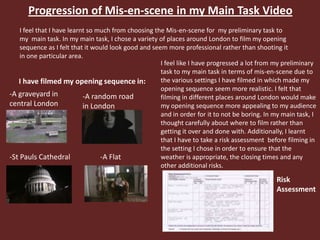
I feel that I have learnt so much from choosing the Mis-en-scene for my preliminary task to
my main task. In my main task, I chose a variety of places around London to film my opening
sequence as I felt that it would look good and seem more professional rather than shooting it
in one particular area.
-A random road
in London
I have filmed my opening sequence in:
-A graveyard in
central London
-St Pauls Cathedral -A Flat
I feel like I have progressed a lot from my preliminary
task to my main task in terms of mis-en-scene due to
the various settings I have filmed in which made my
opening sequence seem more realistic. I felt that
filming in different places around London would make
my opening sequence more appealing to my audience
and in order for it to not be boring. In my main task, I
thought carefully about where to film rather than
getting it over and done with. Additionally, I learnt
that I have to take a risk assessment before filming in
the setting I chose in order to ensure that the
weather is appropriate, the closing times and any
other additional risks.
Risk
Assessment
Editing in my Preliminary Task Video
As the preliminary task was done right at
the beginning of my course, I was still
getting used to editing. However, I learnt
how to use specific cuts and transition,
although I wish I was able to apply them
correctly to my short film. I also did not use
any effects . A reason why I may have not
used any effects could be due to the fact
that I filmed my preliminary task video in
one room, in comparison to my main task, I
used many effects to change scenes.etc.
Whilst editing my short film, I wasn’t very
experienced with final cut as it was right at
the beginning. I was able to put the film
together and cut out scenes that I didn’t
want to include. If I had added in effects
between different scenes, I think it would
have made a big difference.
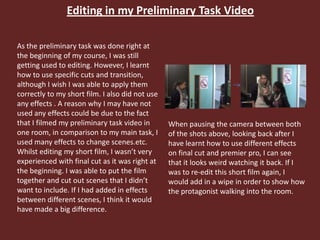
When pausing the camera between both
of the shots above, looking back after I
have learnt how to use different effects
on final cut and premier pro, I can see
that it looks weird watching it back. If I
was to re-edit this short film again, I
would add in a wipe in order to show how
the protagonist walking into the room.
Progression of Editing in my Main Task Video
I have learnt many skills in terms of editing throughout my progression to my main task. This is due to
the time period as Throughout my time I gained more experience using programs related to editing as
well as learning about them. I have learnt how to use final cut in depth, in order to edit my opening
sequence.
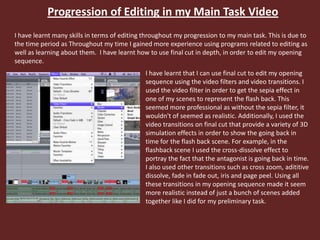
I have learnt that I can use final cut to edit my opening
sequence using the video filters and video transitions. I
used the video filter in order to get the sepia effect in
one of my scenes to represent the flash back. This
seemed more professional as without the sepia filter, it
wouldn't of seemed as realistic. Additionally, I used the
video transitions on final cut that provide a variety of 3D
simulation effects in order to show the going back in
time for the flash back scene. For example, in the
flashback scene I used the cross-dissolve effect to
portray the fact that the antagonist is going back in time.
I also used other transitions such as cross zoom, adititive
dissolve, fade in fade out, iris and page peel. Using all
these transitions in my opening sequence made it seem
more realistic instead of just a bunch of scenes added
together like I did for my preliminary task.
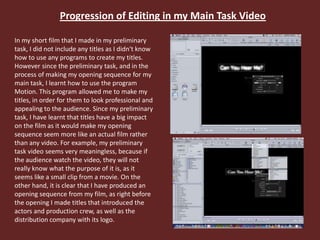
Progression of Editing in my Main Task Video
In my short film that I made in my preliminary
task, I did not include any titles as I didn't know
how to use any programs to create my titles.
However since the preliminary task, and in the
process of making my opening sequence for my
main task, I learnt how to use the program
Motion. This program allowed me to make my
titles, in order for them to look professional and
appealing to the audience. Since my preliminary
task, I have learnt that titles have a big impact
on the film as it would make my opening
sequence seem more like an actual film rather
than any video. For example, my preliminary
task video seems very meaningless, because if
the audience watch the video, they will not
really know what the purpose of it is, as it
seems like a small clip from a movie. On the
other hand, it is clear that I have produced an
opening sequence from my film, as right before
the opening I made titles that introduced the
actors and production crew, as well as the
distribution company with its logo.

Evaluation- Question 7. By Jumana Ismail

  • 1.
    Looki ng backat your prel i mi nary t ask, what do you f eel you have l earnt i n t he progressi on f romi t t o t he f ul l product ? By Jumana Ismail
  • 2.
    Prel i minary Task Vi deo Mai n Task Vi deo The pr el i mi nar y vi deo t ook 1 day t o f i l m wi t h l i mi t ed knowl edge of ef f ect s of camer a shot s, mi s-en-scene, sound ef f ect s, and edi t i ng on any movi e or cl i p. The mai n t ask was f i l med over a per i od of a week. I had much mor e exper i ence on how t o use al l t he t echni ques and knew how t o appl y t hem whi l st f i l mi ng my openi ng sequence.
  • 3.
    Progression of planningin my main task There was a big difference between my preliminary task and my main task in terms of planning as during my main task, I planned everything in depth. This is clear as I have done in depth research and planning in order to make a successful and professional opening sequence. My research and planning consisted of: -Writing out a treatment for my opening sequence - The development of the Genre - Top 5 directors in the genre - Research on stock characters - Sound track analysis - Forms and conventions of Horror films - Bbfc certification Doing that research was very important as I was prepared enough to make my own opening sequence, having the correct knowledge, in comparison to my preliminary task, in which I had started it without any research and planning. Additionally, I made my own story boards before filming in order to be prepared whilst filming and have everything ready. This was very useful as I felt like all I had to do during filming was look at my story board and film the same shots. Furthermore, I turned my story board into an animatic video to see if I was able to see an animatic version of my opening sequence just by looking at that video.
  • 4.
    Pr el imi nar y Task For the preliminary task, I didn't do much planning, however I made a script with characters explanation and the shots we used. In my script, I included the name of the characters, the speech and the camera shots. We included the camera shots in the script to inform the camera person what shot to use during what speech. If I had more time, I would have made a story board so it would have been more clear.
  • 5.
    Progression in MainTask Before filming, it was really important in the main task to plan well before hand and therefore decided, as I am the camera person, to make a detailed story board which shows all the camera shots in each scene and whether it is interior or exterior. Exterior was labelled ‘EXT’ and Interior was labelled ‘INT’. Designing the story bored helped me whilst I was filming, as everything was planned, I would simply just look at the story boards and it would guide me to what shots II should use whilst filming. I then turned my story board into an animatic video as it helped me and the group picture our opening sequence from the story board. However, I was unable to do a story board for the parts were the hero in my opening sequence acted in because we as a group decided to add it in after our audience feedback, as we thought that there was no clear story line to our opening sequence. However, instead of making a story board for that scene, I wrote down all the shots I needed, as it still helped while filming that scene. One thing I would do to improve my story boards is to write the amount of seconds per shot, in order to give me an idea how long I should film the shot for while I was filming.
  • 6.
    Camera shots inmy Preliminary Task Video The camera shots I used in my video in the preliminary task consisted of close-up shots, long shots and extreme long shots and wide shots. Extreme long shot Wide shot Close-up shot When doing my preliminary task, I had a brief understanding of what I had to include whilst shooting my film. However my skills when using the camera were not as advanced in comparison to when I was shooting my opening sequence for my main task. I used basic shots such as the ones I mentioned above. However, I was able to use the camera well as before I filmed my preliminary task video, me and my group had to create a short footage explaining how to use the camera and the equipments I needed with it to film a successful video. This has also helped me a lot with my main task, as me and my group didn’t need to waste time figuring how to use the equipment as we had the camera explanation video as a guide.
  • 7.
    Progression of Camerashots in my Main Task Video In my main task, I had much more experience and used a wider variety of camera shots in order to make my opening sequence more interesting. Aerial shot High Angle shot Mid shot Framing In my opening sequence for my main task, I used a much more variety of camera shots which attracted my audience. As well as using the main shots that I used for my preliminary video, I used Aerial shots to introduce my setting, which allows the audience to see the whole setting in one shot. I used a high angle shot with a voice over to show the audience that the protagonist can hear voices. I also used mid-shots to show the change in characters as well as framing shots for a more technical effect. Additionally, I also played around with the camera movements by zooming in and out, panning and tilting when introducing the setting.
  • 8.
    Sound in myPreliminary Task Video I did not use much sound in my preliminary task video as I didn’t know how to make it on garage band. However their was diegetic sound within the scene, when the characters were having a discussion. The dialect in the video was the diegetic sound. The use of dialect had an effect on the scene as the characters were speaking with expression, however, I feel like if I had added in non-diegetic sound, it would have made my preliminary video more interesting and would be more engaging to the audience. There is no additional sound (non- diegetic) added in onto final cut.
  • 9.
    Progression of Soundin my Main Task Video I feel like I have progressed a lot in terms of sound from my preliminary task to my main task. Although my job role for my main task was the camera person, I still decided to make my own sound in order to gain the experience of using programs like garage band. I learnt how to use garage band, which I thought was very useful in terms of expanding my skills as well as be able to contribute more to my group. I made different sounds for my own video using Garage band, made different types of sound that I feel would work well with my video. I searched up ‘horror’ in the search box on garage band and then the program allowed me to listen to various horror sounds that I would pick from in order to add it to my video. Additionally, I also used a voice over in our final product opening sequence of me speaking in Latin. I thought this would be very effective as the protagonist is hearing voices that she can not understand. The use of this non-diegetic sound allows the audience to wonder who is behind that voice which makes the film as a whole more interesting. From this I learnt how to use an Edirol which allowed me to record the voice over on it. I learnt how to use it and then load it onto final cut. Edirol used for voice over.
  • 10.
    Mis-en-scene in myPreliminary Task Video Mis-en-scene played a big part in video as without it there wouldn’t be a video. However, in my preliminary task, the setting was a class room and therefore didn't make much sense with our film as it was meant to be filmed in a home. School Corridor It is clear that this is a class room because there is a board and chairs which is typical of a class room. As the preliminary task video was filmed in a short period of time, we thought that the best and easiest place to shoot the short film would be in my school. However, as our short film was about a girl coming home late and being told of my her mother, it did not really make sense to shoot it in a school. The fact that we filmed this short film in a school came as a disadvantage as there was so many distractions of other students passing by and therefore caused us to keep stop filming which wasted a lot of time. On the other hand, I improved this in my opening sequence for my main task.
  • 11.
    Progression of Mis-en-scenein my Main Task Video I feel that I have learnt so much from choosing the Mis-en-scene for my preliminary task to my main task. In my main task, I chose a variety of places around London to film my opening sequence as I felt that it would look good and seem more professional rather than shooting it in one particular area. -A random road in London I have filmed my opening sequence in: -A graveyard in central London -St Pauls Cathedral -A Flat I feel like I have progressed a lot from my preliminary task to my main task in terms of mis-en-scene due to the various settings I have filmed in which made my opening sequence seem more realistic. I felt that filming in different places around London would make my opening sequence more appealing to my audience and in order for it to not be boring. In my main task, I thought carefully about where to film rather than getting it over and done with. Additionally, I learnt that I have to take a risk assessment before filming in the setting I chose in order to ensure that the weather is appropriate, the closing times and any other additional risks. Risk Assessment
  • 12.
    Editing in myPreliminary Task Video As the preliminary task was done right at the beginning of my course, I was still getting used to editing. However, I learnt how to use specific cuts and transition, although I wish I was able to apply them correctly to my short film. I also did not use any effects . A reason why I may have not used any effects could be due to the fact that I filmed my preliminary task video in one room, in comparison to my main task, I used many effects to change scenes.etc. Whilst editing my short film, I wasn’t very experienced with final cut as it was right at the beginning. I was able to put the film together and cut out scenes that I didn’t want to include. If I had added in effects between different scenes, I think it would have made a big difference. When pausing the camera between both of the shots above, looking back after I have learnt how to use different effects on final cut and premier pro, I can see that it looks weird watching it back. If I was to re-edit this short film again, I would add in a wipe in order to show how the protagonist walking into the room.
  • 13.
    Progression of Editingin my Main Task Video I have learnt many skills in terms of editing throughout my progression to my main task. This is due to the time period as Throughout my time I gained more experience using programs related to editing as well as learning about them. I have learnt how to use final cut in depth, in order to edit my opening sequence. I have learnt that I can use final cut to edit my opening sequence using the video filters and video transitions. I used the video filter in order to get the sepia effect in one of my scenes to represent the flash back. This seemed more professional as without the sepia filter, it wouldn't of seemed as realistic. Additionally, I used the video transitions on final cut that provide a variety of 3D simulation effects in order to show the going back in time for the flash back scene. For example, in the flashback scene I used the cross-dissolve effect to portray the fact that the antagonist is going back in time. I also used other transitions such as cross zoom, adititive dissolve, fade in fade out, iris and page peel. Using all these transitions in my opening sequence made it seem more realistic instead of just a bunch of scenes added together like I did for my preliminary task.
  • 14.
    Progression of Editingin my Main Task Video In my short film that I made in my preliminary task, I did not include any titles as I didn't know how to use any programs to create my titles. However since the preliminary task, and in the process of making my opening sequence for my main task, I learnt how to use the program Motion. This program allowed me to make my titles, in order for them to look professional and appealing to the audience. Since my preliminary task, I have learnt that titles have a big impact on the film as it would make my opening sequence seem more like an actual film rather than any video. For example, my preliminary task video seems very meaningless, because if the audience watch the video, they will not really know what the purpose of it is, as it seems like a small clip from a movie. On the other hand, it is clear that I have produced an opening sequence from my film, as right before the opening I made titles that introduced the actors and production crew, as well as the distribution company with its logo.