EVALUATION QUESTION 4
How did you use media technologies in the
construction and research, planning and evaluation
stages?
AS COURSEWORK
 For my AS coursework it was the first time I had come into contact with
a lot of the technologies that you need to make films and media related
products.
 These included Premiere Pro, a tripod, the internet and YouTube for
research, and a portable camera. Since the end of AS I have expanded
the amount of technologies even further, as my skills in the subject
have developed.
CONSTRUCTION : FILMING
 The main technology I used for filming was my camera, which is a
Canon E05 100D. This camera has a lot higher quality than the one I
used at AS so it really allowed me to develop my camera work and skills
as I could play around with the focus at certain points due to the longer
lens. I had to focus it manually and take care with all the new settings,
such as brightness, as I had not used a camera which had these options
before, increasing my skills.
 I also used a tripod again this year, as it was crucial my camera work
was steady for the narrative, and due to my practice with this as AS I
was able to set it up and manoeuvre much more efficiently this year.
CONSTRUCTION: EDITING
 The main technology I used for editing was premiere pro as this was
the software I decided to use for this part of the construction process.
Last year I edited my coursework alone but it was the first time that I
had ever used premiere pro properly. The skills I used where quite
basic, the most complex editing style being an overlay. This year, the
silent film narrative forced me to develop my editing skills much more
due to the fact I had to apply a filter and have a range of different
length shots, transitioning in different ways. I also had to edit to the
beat of the music and line up the audio for the lip syncing, thus making
the whole process more complex then just getting shots in order.
CONSTRUCTION : EDITING
 One of the main issues I had to combat during editing was some of the
over exposure of some of the shots, which I corrected in premiere pro
by going into video effects and adjusting the brightness and contrast to
make the shots more visible. This is the first time I have ever done any
form of correction to shots post production, giving me new skills that
would make the video look far more professional. I reduced the
exposure in some of the silent film shots and increased it a little in the
 Performance element to make sure the
 Whole video flowed together nicely.
CONSTRUCTION : EDITING
Another way I developed my Premiere pro skills was by discovering all the
short cuts, that sped up the process and allowed me to have more time to
go back and review the work I had done, where as last year I didn’t have
these, and the process was much longer so I had less time to go back and
improve my work. You can see that difference due to the fact that this
year I have 3 rough cuts, rather than the one I had at AS. The short cuts
that helped me the
Most were the ones for cutting and undoing because it saved me having
to manually click the buttons, which takes up a
Surprising amount of time.
CONSTRUCTION : EDITING
Another new skill I learnt on premiere pro this year was how to add layers
and make them blend in with the original footage. I had to do this to
apply the filter to the narrative aspects of the video as this was layered
over original footage. How I did this was using video effects again and
putting the settings to multiply, which is a useful skill to learn because I
can then apply this to future projects. Furthermore, in comparison and to
my As video, which was quite linear and straight forward to put together,
where as this year due to the filters and audio it was much more complex
to place all the footage together. The image to the right is a screenshot of
My video with the video effect applied to it.
CONSTRUCTION : EDITING
 I also used After Effects to create my video. I did this to apply the black
and white filter that became the basis for the rest of the filters to be
applied on top of. I used after effects as you can go through frame by
frame and apply the effect to make it far more precise and thus have a
more professional outcome. I had not used after effects at all before so
it was really stretching my skills to try and teach myself the steps to
create what I need as I was unfamiliar with the software. I used YouTube
videos to act as a tutorial to do this.
CONSTRUCTION : PHOTOSHOP
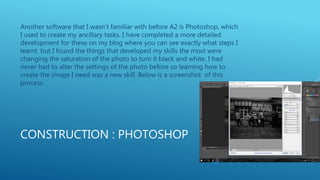
Another software that I wasn’t familiar with before A2 is Photoshop, which
I used to create my ancillary tasks. I have completed a more detailed
development for these on my blog where you can see exactly what steps I
learnt, but I found the things that developed my skills the most were
changing the saturation of the photo to turn it black and white. I had
never had to alter the settings of the photo before so learning how to
create the image I need was a new skill. Below is a screenshot of this
process.
CONSTRUCTION : PHOTOSHOP
 Another aspect of Photoshop that I found challenging was putting
more than one image in to the same cover for my CD Digipak. I wanted
to create an image of the bands 4 mugshots, and I found it quite
complex to try and alter the sizes to get these into perfect squares to
the size was equal. To aid me doing this I used guidelines in Photoshop,
as well as a template to make sure everything was in the correct
proportion to make a CD cover.
 Below is a screenshot of this.
CONSTRUCTION: PHOTOSHOP
 Another major skill I learnt by using Photoshop this year is how to make
a circle and make it into a CD against the rest of the cover. This
probably is the step I had the most difficulty with as I was unfamiliar
with how to go about it. However, through asking my friends who use
Photoshop regularly how to create the circle, to make the basis for the
CD, and then I placed the image back in and altered the opacity to
make it appear like a CD. Other, easier skills I learnt in Photoshop was
how to create titles and place them where I needed them, as this was
just adjusting fonts and sizes.
RESEARCH : INTERNET PLATFORMS.
 For my research I used a similar range of technologies as AS, but I used
them more to a higher standard to get a more thorough idea of how to
create a professional media product. I used a variety of internet
platforms to do this, such as YouTube so I could analyse other
professional and student made videos to give myself an idea of what
works and doesn’t for my coursework. I also used google images and
blogger to do the same for my ancillary tasks. Furthermore, I used
google chrome for facts and statistics during my research, especially
whilst creating a profile for a director as I needed to do lots of research
to find the information I needed.
RESEARCH : PHOTOSHOP
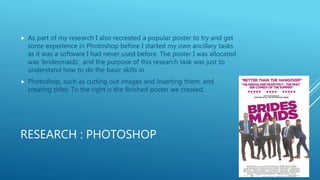
 As part of my research I also recreated a popular poster to try and get
some experience in Photoshop before I started my own ancillary tasks
as it was a software I had never used before. The poster I was allocated
was ‘bridesmaids’, and the purpose of this research task was just to
understand how to do the basic skills in
 Photoshop, such as cutting out images and inserting them; and
creating titles. To the right is the finished poster we created.
RESEARCH :I MOVIE
I also used I movie during my research as we created audience research
videos. This also used my camera and tripod, as we went into the local
town and interviewed different people to gain some audience feedback
about target audience. I used I movie to edit it as it is a simpler format to
premiere pro and to just slot bits of footage in to construct a collection of
responses was relatively easy, especially as I am familiar with the software
as I have a MacBook and used it to create a similar video my for AS
coursework.
PLANNING : INTERNET PLATFORMS
 I probably used the smallest variety of technologies for this aspect,
doing a similar thing to my AS coursework by using lots spider
diagrams and sketching to plan my ideas rather than different forms of
technology as I find this manual way of refining my ideas more useful.
However I still used google to gain photos of my locations to film in;
and shopping sites such as amazon to plan and purchase my costumes
and props for my video. I also used google chrome to plan further the
style of my music video to double check that every stage of my
planning conforms to the conventions I needed it to.
EVALUATION : PREMIERE PRO/FILMING
 I also used premiere pro in the evaluation stages of my coursework,
primarily for questions 1, 2 and 3; as I thought a video format would be
the best way to present the information I needed. This process was
much simpler than editing my actual coursework as it mainly was just
putting footage in order and cutting the clips to the right size to make
a coherent video, as well as adding some simple titles to identity what
question I was answering. I also used my Canon E05 100D to film this
footage on as well.
EVALUATION: OTHER TECHNOLOGIES
 The other forms of technologies I used for my evaluation was
PowerPoint ad slide share for this question, and I also used smart draw
to create a time line as part of my answer to question 1. I did this to
make my evaluation questions more interesting to watch/read, as there
is a larger variety of ways that the information is portrayed.
Furthermore, compared to my AS coursework, I think I made the videos
to a higher standard as I used premiere pro rather than I movie, and I
used more forms of technologies rather than just writing out my
answers on my blog.
OVERALL
 Overall I think the amount of technologies has increased in my A2
coursework, and I was able to use the technologies I used last year to a
higher standard, improving the general appearance of my coursework. I
think the area I could have improved the technologies I used is the
planning, as I didn’t use a versatile range as I did in other areas,
especially construction.

Evaluation question 4

  • 1.
    EVALUATION QUESTION 4 Howdid you use media technologies in the construction and research, planning and evaluation stages?
  • 2.
    AS COURSEWORK  Formy AS coursework it was the first time I had come into contact with a lot of the technologies that you need to make films and media related products.  These included Premiere Pro, a tripod, the internet and YouTube for research, and a portable camera. Since the end of AS I have expanded the amount of technologies even further, as my skills in the subject have developed.
  • 3.
    CONSTRUCTION : FILMING The main technology I used for filming was my camera, which is a Canon E05 100D. This camera has a lot higher quality than the one I used at AS so it really allowed me to develop my camera work and skills as I could play around with the focus at certain points due to the longer lens. I had to focus it manually and take care with all the new settings, such as brightness, as I had not used a camera which had these options before, increasing my skills.  I also used a tripod again this year, as it was crucial my camera work was steady for the narrative, and due to my practice with this as AS I was able to set it up and manoeuvre much more efficiently this year.
  • 4.
    CONSTRUCTION: EDITING  Themain technology I used for editing was premiere pro as this was the software I decided to use for this part of the construction process. Last year I edited my coursework alone but it was the first time that I had ever used premiere pro properly. The skills I used where quite basic, the most complex editing style being an overlay. This year, the silent film narrative forced me to develop my editing skills much more due to the fact I had to apply a filter and have a range of different length shots, transitioning in different ways. I also had to edit to the beat of the music and line up the audio for the lip syncing, thus making the whole process more complex then just getting shots in order.
  • 5.
    CONSTRUCTION : EDITING One of the main issues I had to combat during editing was some of the over exposure of some of the shots, which I corrected in premiere pro by going into video effects and adjusting the brightness and contrast to make the shots more visible. This is the first time I have ever done any form of correction to shots post production, giving me new skills that would make the video look far more professional. I reduced the exposure in some of the silent film shots and increased it a little in the  Performance element to make sure the  Whole video flowed together nicely.
  • 6.
    CONSTRUCTION : EDITING Anotherway I developed my Premiere pro skills was by discovering all the short cuts, that sped up the process and allowed me to have more time to go back and review the work I had done, where as last year I didn’t have these, and the process was much longer so I had less time to go back and improve my work. You can see that difference due to the fact that this year I have 3 rough cuts, rather than the one I had at AS. The short cuts that helped me the Most were the ones for cutting and undoing because it saved me having to manually click the buttons, which takes up a Surprising amount of time.
  • 7.
    CONSTRUCTION : EDITING Anothernew skill I learnt on premiere pro this year was how to add layers and make them blend in with the original footage. I had to do this to apply the filter to the narrative aspects of the video as this was layered over original footage. How I did this was using video effects again and putting the settings to multiply, which is a useful skill to learn because I can then apply this to future projects. Furthermore, in comparison and to my As video, which was quite linear and straight forward to put together, where as this year due to the filters and audio it was much more complex to place all the footage together. The image to the right is a screenshot of My video with the video effect applied to it.
  • 8.
    CONSTRUCTION : EDITING I also used After Effects to create my video. I did this to apply the black and white filter that became the basis for the rest of the filters to be applied on top of. I used after effects as you can go through frame by frame and apply the effect to make it far more precise and thus have a more professional outcome. I had not used after effects at all before so it was really stretching my skills to try and teach myself the steps to create what I need as I was unfamiliar with the software. I used YouTube videos to act as a tutorial to do this.
  • 9.
    CONSTRUCTION : PHOTOSHOP Anothersoftware that I wasn’t familiar with before A2 is Photoshop, which I used to create my ancillary tasks. I have completed a more detailed development for these on my blog where you can see exactly what steps I learnt, but I found the things that developed my skills the most were changing the saturation of the photo to turn it black and white. I had never had to alter the settings of the photo before so learning how to create the image I need was a new skill. Below is a screenshot of this process.
  • 10.
    CONSTRUCTION : PHOTOSHOP Another aspect of Photoshop that I found challenging was putting more than one image in to the same cover for my CD Digipak. I wanted to create an image of the bands 4 mugshots, and I found it quite complex to try and alter the sizes to get these into perfect squares to the size was equal. To aid me doing this I used guidelines in Photoshop, as well as a template to make sure everything was in the correct proportion to make a CD cover.  Below is a screenshot of this.
  • 11.
    CONSTRUCTION: PHOTOSHOP  Anothermajor skill I learnt by using Photoshop this year is how to make a circle and make it into a CD against the rest of the cover. This probably is the step I had the most difficulty with as I was unfamiliar with how to go about it. However, through asking my friends who use Photoshop regularly how to create the circle, to make the basis for the CD, and then I placed the image back in and altered the opacity to make it appear like a CD. Other, easier skills I learnt in Photoshop was how to create titles and place them where I needed them, as this was just adjusting fonts and sizes.
  • 12.
    RESEARCH : INTERNETPLATFORMS.  For my research I used a similar range of technologies as AS, but I used them more to a higher standard to get a more thorough idea of how to create a professional media product. I used a variety of internet platforms to do this, such as YouTube so I could analyse other professional and student made videos to give myself an idea of what works and doesn’t for my coursework. I also used google images and blogger to do the same for my ancillary tasks. Furthermore, I used google chrome for facts and statistics during my research, especially whilst creating a profile for a director as I needed to do lots of research to find the information I needed.
  • 13.
    RESEARCH : PHOTOSHOP As part of my research I also recreated a popular poster to try and get some experience in Photoshop before I started my own ancillary tasks as it was a software I had never used before. The poster I was allocated was ‘bridesmaids’, and the purpose of this research task was just to understand how to do the basic skills in  Photoshop, such as cutting out images and inserting them; and creating titles. To the right is the finished poster we created.
  • 14.
    RESEARCH :I MOVIE Ialso used I movie during my research as we created audience research videos. This also used my camera and tripod, as we went into the local town and interviewed different people to gain some audience feedback about target audience. I used I movie to edit it as it is a simpler format to premiere pro and to just slot bits of footage in to construct a collection of responses was relatively easy, especially as I am familiar with the software as I have a MacBook and used it to create a similar video my for AS coursework.
  • 15.
    PLANNING : INTERNETPLATFORMS  I probably used the smallest variety of technologies for this aspect, doing a similar thing to my AS coursework by using lots spider diagrams and sketching to plan my ideas rather than different forms of technology as I find this manual way of refining my ideas more useful. However I still used google to gain photos of my locations to film in; and shopping sites such as amazon to plan and purchase my costumes and props for my video. I also used google chrome to plan further the style of my music video to double check that every stage of my planning conforms to the conventions I needed it to.
  • 16.
    EVALUATION : PREMIEREPRO/FILMING  I also used premiere pro in the evaluation stages of my coursework, primarily for questions 1, 2 and 3; as I thought a video format would be the best way to present the information I needed. This process was much simpler than editing my actual coursework as it mainly was just putting footage in order and cutting the clips to the right size to make a coherent video, as well as adding some simple titles to identity what question I was answering. I also used my Canon E05 100D to film this footage on as well.
  • 17.
    EVALUATION: OTHER TECHNOLOGIES The other forms of technologies I used for my evaluation was PowerPoint ad slide share for this question, and I also used smart draw to create a time line as part of my answer to question 1. I did this to make my evaluation questions more interesting to watch/read, as there is a larger variety of ways that the information is portrayed. Furthermore, compared to my AS coursework, I think I made the videos to a higher standard as I used premiere pro rather than I movie, and I used more forms of technologies rather than just writing out my answers on my blog.
  • 18.
    OVERALL  Overall Ithink the amount of technologies has increased in my A2 coursework, and I was able to use the technologies I used last year to a higher standard, improving the general appearance of my coursework. I think the area I could have improved the technologies I used is the planning, as I didn’t use a versatile range as I did in other areas, especially construction.