Federal Office of Topography swisstopo
EuroGeographics
QKEN Dublin
Linked Data
24.05.2018, Stefan Flury
Federal Office of Topography swisstopo
Agenda
1. web of documents <-> web of data
2. Linked Data a short introduction
3. A kind of cookbook
Federal Office of Topography swisstopo
web of documents <-> web of data
3
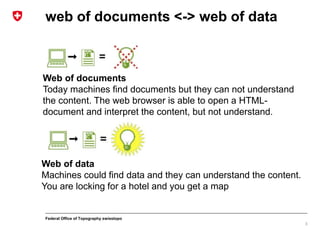
Web of documents
Today machines find documents but they can not understand
the content. The web browser is able to open a HTML-
document and interpret the content, but not understand.
Web of data
Machines could find data and they can understand the content.
You are locking for a hotel and you get a map
Federal Office of Topography swisstopo
Linked Data; a short introduction
The four rules [Tim Berners-Lee 2006-07-27]
1. Use URIs as names for things
«A resource can be anything that has identity» RFC 2396
URI = scheme ":" hier-part [ "?" query ] [ "#" fragment ]  RFC 3986
2. Use HTTP URIs so that people can look up those names.
https://ld.geo.admin.ch/transportation/stop/8571395
3. When someone looks up a URI, provide useful information,
using the standards (RDF*, SPARQL)
RDF  Resource
Description Framework
SPARQL  Query
language W3C-Standard
4. Include links to other URIs. so that they can discover
additional data.
Connect the data we have, into a web
4
Federal Office of Topography swisstopo
Linked Data; a short introduction
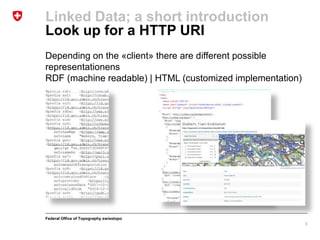
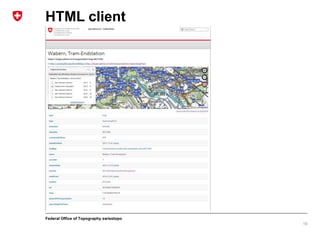
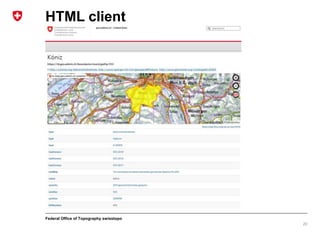
Look up for a HTTP URI
Depending on the «client» there are different possible
representationens
RDF (machine readable) | HTML (customized implementation)
5
Federal Office of Topography swisstopo
Linked Data; a short introduction
What is Resource Description Framework (RDF)?
• Standard model for data interchange
• This linking structure forms a directed, labeled graph
• To name the relationship between things  Semantic triple
What is a semantic triple?
subject–predicate–object
1. https://ld.geo.admin.ch/transportation/stop/8571395
2. geo:long
3. 7.45264305299276
Subject: our URI
Predicate: the ontology between subject an object based on a
vocabulary
Object: Longitude in WGS84
6
Rule 1
Rule 2
Federal Office of Topography swisstopo
Linked Data; a short introduction
Ontology / Vocabularies?
7
W3C says in their best practices Step#6 Use standard
vocabularies:
• Standardised vocabularies should be reused as much as
possible to facilitate inclusion and expansion of the web of
data
• Vocabularies MUST be documented
• Vocabularies SHOULD be described in more than one
language
• Vocabularies SHOULD be published by a trusted group or
organisation
• ……
geo:long is described in the class
https://www.w3.org/2003/01/geo/wgs84_pos in the property
longitude
Federal Office of Topography swisstopo
Linked Data; a short introduction
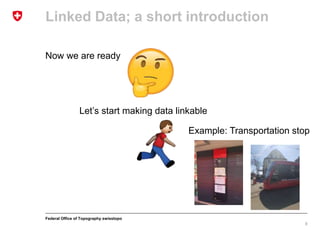
Now we are ready
8
Let’s start making data linkable
Example: Transportation stop
Federal Office of Topography swisstopo
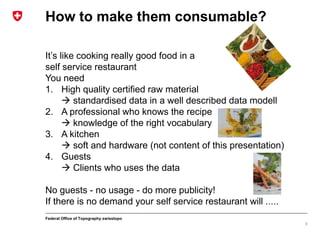
It’s like cooking really good food in a
self service restaurant
You need
1. High quality certified raw material
 standardised data in a well described data modell
2. A professional who knows the recipe
 knowledge of the right vocabulary
3. A kitchen
 soft and hardware (not content of this presentation)
4. Guests
 Clients who uses the data
No guests - no usage - do more publicity!
If there is no demand your self service restaurant will .....
How to make them consumable?
9
Federal Office of Topography swisstopo
Transportation stops go linkable
Find the data, metadata, data model …
10
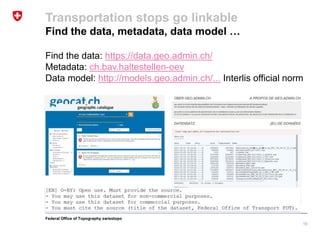
Find the data: https://data.geo.admin.ch/
Metadata: ch.bav.haltestellen-oev
Data model: http://models.geo.admin.ch/... Interlis official norm
Federal Office of Topography swisstopo
Transportation stops go linkable
Define your publishing model
11
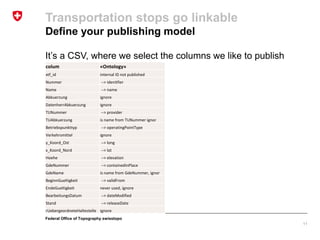
It’s a CSV, where we select the columns we like to publish
colum «Ontology»
xtf_id internal ID not published
Nummer --> idenitfier
Name --> name
Abkuerzung ignore
DatenherrAbkuerzung ignore
TUNummer --> provider
TUAbkuerzung is name from TUNummer ignor
Betriebspunkttyp --> operatingPointType
Verkehrsmittel ignore
y_Koord_Ost --> long
x_Koord_Nord --> lat
Hoehe --> elevation
GdeNummer --> containedInPlace
GdeName is name from GdeNummer, ignor
BeginnGueltigkeit --> validFrom
EndeGueltigkeit never used, ignore
BearbeitungsDatum --> dateModified
Stand --> releaseDate
rUebergeordneteHaltestelle ignore
Federal Office of Topography swisstopo
Transportation stops go linkable
Create RDF triples subject–predicate–object (rule 3)
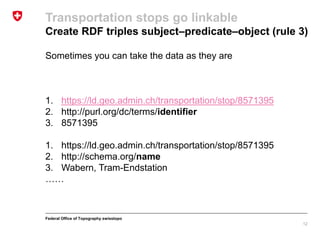
Sometimes you can take the data as they are
1. https://ld.geo.admin.ch/transportation/stop/8571395
2. http://purl.org/dc/terms/identifier
3. 8571395
1. https://ld.geo.admin.ch/transportation/stop/8571395
2. http://schema.org/name
3. Wabern, Tram-Endstation
……
12
Federal Office of Topography swisstopo
Transportation stops go linkable
Create RDF triples subject–predicate–object (rule 3)
Sometimes you have to calculate the value. In this example
from our local reference system (LV95 EPSG 2056) to WGS84
1. https://ld.geo.admin.ch/transportation/stop/8571395
2. https://www.w3.org/2003/01/geo/wgs84_pos#long
3. 7.45264305299276
1. https://ld.geo.admin.ch/transportation/stop/8571395
2. https://www.w3.org/2003/01/geo/wgs84_pos#lat
3. 46.9280273599974
…….
Calculate value
2601067[LV95] to 7.452[WGS84]
119743[LV95] to 46.928[WGS84]
13
Federal Office of Topography swisstopo
Transportation stops go linkable
Create RDF triples subject–predicate–object (rule 3)
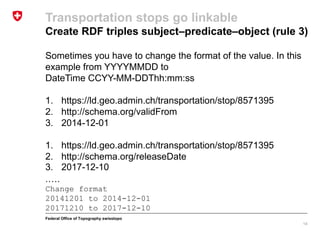
Sometimes you have to change the format of the value. In this
example from YYYYMMDD to
DateTime CCYY-MM-DDThh:mm:ss
1. https://ld.geo.admin.ch/transportation/stop/8571395
2. http://schema.org/validFrom
3. 2014-12-01
1. https://ld.geo.admin.ch/transportation/stop/8571395
2. http://schema.org/releaseDate
3. 2017-12-10
.….
Change format
20141201 to 2014-12-01
20171210 to 2017-12-10
14
Federal Office of Topography swisstopo
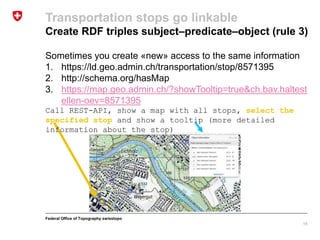
Sometimes you create «new» access to the same information
1. https://ld.geo.admin.ch/transportation/stop/8571395
2. http://schema.org/hasMap
3. https://map.geo.admin.ch/?showTooltip=true&ch.bav.haltest
ellen-oev=8571395
Call REST-API, show a map with all stops, select the
specified stop and show a tooltip (more detailed
information about the stop)
Transportation stops go linkable
Create RDF triples subject–predicate–object (rule 3)
15
Federal Office of Topography swisstopo
1. https://ld.geo.admin.ch/transportation/stop/8571395
2. http://schema.org/sameAs
3. http://api3.geo.admin.ch/rest/services/api/MapServer/ch.ba
v.haltestellen-oev/8571395?geometryFormat=geojson
Call REST-API and returns all properties to an
specified stop as geojson
{"feature": {"layerBodId": "ch.bav.haltestellen-oev", "featureId":
8571395, "id": 8571395, "geometry": {"type": "MultiPoint",
"coordinates": [[601066.9624702379, 197436.96865385302]]}, "bbox":
[601066.9624702379, 197436.96865385302, 601066.9624702379,
197436.96865385302], "layerName": "u00f6V-Haltestellen", "type":
"Feature", "properties": {"verkehrsmittel": "Bus_Tram", "name":
"Wabern, Tram-Endstation", "tuabkuerzung": "PAG", "label": "Wabern,
Tram-Endstation", "betriebspunkttyp": "Haltestelle", "abkuerzung":
null}}}
Transportation stops go linkable
Create RDF triples subject–predicate–object (rule 3)
16
Federal Office of Topography swisstopo
Transportation stops go linkable
Create RDF triples subject–predicate–object (rule 3)
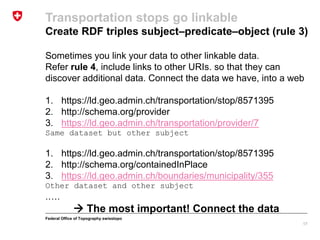
Sometimes you link your data to other linkable data.
Refer rule 4, include links to other URIs. so that they can
discover additional data. Connect the data we have, into a web
1. https://ld.geo.admin.ch/transportation/stop/8571395
2. http://schema.org/provider
3. https://ld.geo.admin.ch/transportation/provider/7
Same dataset but other subject
1. https://ld.geo.admin.ch/transportation/stop/8571395
2. http://schema.org/containedInPlace
3. https://ld.geo.admin.ch/boundaries/municipality/355
Other dataset and other subject
.….
 The most important! Connect the data
17
Federal Office of Topography swisstopo
Transportation stops go linkable
And now?
• Store the triples in a triple store
• Twitter, post an announce your service sell it
If you implement a solution for HTML clients like web browsers,
humans understand your data better and more easily.
If you use standardised and common vocabulary, RDF clients /
machines can use your data.
If you describe your data well, search engines can browse your
data and use them automatically.
18
Federal Office of Topography swisstopo
HTML client
19
Federal Office of Topography swisstopo
HTML client
20

EuroGeographics Linked Data by geo.admin.ch /swisstopo

  • 1.
    Federal Office ofTopography swisstopo EuroGeographics QKEN Dublin Linked Data 24.05.2018, Stefan Flury
  • 2.
    Federal Office ofTopography swisstopo Agenda 1. web of documents <-> web of data 2. Linked Data a short introduction 3. A kind of cookbook
  • 3.
    Federal Office ofTopography swisstopo web of documents <-> web of data 3 Web of documents Today machines find documents but they can not understand the content. The web browser is able to open a HTML- document and interpret the content, but not understand. Web of data Machines could find data and they can understand the content. You are locking for a hotel and you get a map
  • 4.
    Federal Office ofTopography swisstopo Linked Data; a short introduction The four rules [Tim Berners-Lee 2006-07-27] 1. Use URIs as names for things «A resource can be anything that has identity» RFC 2396 URI = scheme ":" hier-part [ "?" query ] [ "#" fragment ]  RFC 3986 2. Use HTTP URIs so that people can look up those names. https://ld.geo.admin.ch/transportation/stop/8571395 3. When someone looks up a URI, provide useful information, using the standards (RDF*, SPARQL) RDF  Resource Description Framework SPARQL  Query language W3C-Standard 4. Include links to other URIs. so that they can discover additional data. Connect the data we have, into a web 4
  • 5.
    Federal Office ofTopography swisstopo Linked Data; a short introduction Look up for a HTTP URI Depending on the «client» there are different possible representationens RDF (machine readable) | HTML (customized implementation) 5
  • 6.
    Federal Office ofTopography swisstopo Linked Data; a short introduction What is Resource Description Framework (RDF)? • Standard model for data interchange • This linking structure forms a directed, labeled graph • To name the relationship between things  Semantic triple What is a semantic triple? subject–predicate–object 1. https://ld.geo.admin.ch/transportation/stop/8571395 2. geo:long 3. 7.45264305299276 Subject: our URI Predicate: the ontology between subject an object based on a vocabulary Object: Longitude in WGS84 6 Rule 1 Rule 2
  • 7.
    Federal Office ofTopography swisstopo Linked Data; a short introduction Ontology / Vocabularies? 7 W3C says in their best practices Step#6 Use standard vocabularies: • Standardised vocabularies should be reused as much as possible to facilitate inclusion and expansion of the web of data • Vocabularies MUST be documented • Vocabularies SHOULD be described in more than one language • Vocabularies SHOULD be published by a trusted group or organisation • …… geo:long is described in the class https://www.w3.org/2003/01/geo/wgs84_pos in the property longitude
  • 8.
    Federal Office ofTopography swisstopo Linked Data; a short introduction Now we are ready 8 Let’s start making data linkable Example: Transportation stop
  • 9.
    Federal Office ofTopography swisstopo It’s like cooking really good food in a self service restaurant You need 1. High quality certified raw material  standardised data in a well described data modell 2. A professional who knows the recipe  knowledge of the right vocabulary 3. A kitchen  soft and hardware (not content of this presentation) 4. Guests  Clients who uses the data No guests - no usage - do more publicity! If there is no demand your self service restaurant will ..... How to make them consumable? 9
  • 10.
    Federal Office ofTopography swisstopo Transportation stops go linkable Find the data, metadata, data model … 10 Find the data: https://data.geo.admin.ch/ Metadata: ch.bav.haltestellen-oev Data model: http://models.geo.admin.ch/... Interlis official norm
  • 11.
    Federal Office ofTopography swisstopo Transportation stops go linkable Define your publishing model 11 It’s a CSV, where we select the columns we like to publish colum «Ontology» xtf_id internal ID not published Nummer --> idenitfier Name --> name Abkuerzung ignore DatenherrAbkuerzung ignore TUNummer --> provider TUAbkuerzung is name from TUNummer ignor Betriebspunkttyp --> operatingPointType Verkehrsmittel ignore y_Koord_Ost --> long x_Koord_Nord --> lat Hoehe --> elevation GdeNummer --> containedInPlace GdeName is name from GdeNummer, ignor BeginnGueltigkeit --> validFrom EndeGueltigkeit never used, ignore BearbeitungsDatum --> dateModified Stand --> releaseDate rUebergeordneteHaltestelle ignore
  • 12.
    Federal Office ofTopography swisstopo Transportation stops go linkable Create RDF triples subject–predicate–object (rule 3) Sometimes you can take the data as they are 1. https://ld.geo.admin.ch/transportation/stop/8571395 2. http://purl.org/dc/terms/identifier 3. 8571395 1. https://ld.geo.admin.ch/transportation/stop/8571395 2. http://schema.org/name 3. Wabern, Tram-Endstation …… 12
  • 13.
    Federal Office ofTopography swisstopo Transportation stops go linkable Create RDF triples subject–predicate–object (rule 3) Sometimes you have to calculate the value. In this example from our local reference system (LV95 EPSG 2056) to WGS84 1. https://ld.geo.admin.ch/transportation/stop/8571395 2. https://www.w3.org/2003/01/geo/wgs84_pos#long 3. 7.45264305299276 1. https://ld.geo.admin.ch/transportation/stop/8571395 2. https://www.w3.org/2003/01/geo/wgs84_pos#lat 3. 46.9280273599974 ……. Calculate value 2601067[LV95] to 7.452[WGS84] 119743[LV95] to 46.928[WGS84] 13
  • 14.
    Federal Office ofTopography swisstopo Transportation stops go linkable Create RDF triples subject–predicate–object (rule 3) Sometimes you have to change the format of the value. In this example from YYYYMMDD to DateTime CCYY-MM-DDThh:mm:ss 1. https://ld.geo.admin.ch/transportation/stop/8571395 2. http://schema.org/validFrom 3. 2014-12-01 1. https://ld.geo.admin.ch/transportation/stop/8571395 2. http://schema.org/releaseDate 3. 2017-12-10 .…. Change format 20141201 to 2014-12-01 20171210 to 2017-12-10 14
  • 15.
    Federal Office ofTopography swisstopo Sometimes you create «new» access to the same information 1. https://ld.geo.admin.ch/transportation/stop/8571395 2. http://schema.org/hasMap 3. https://map.geo.admin.ch/?showTooltip=true&ch.bav.haltest ellen-oev=8571395 Call REST-API, show a map with all stops, select the specified stop and show a tooltip (more detailed information about the stop) Transportation stops go linkable Create RDF triples subject–predicate–object (rule 3) 15
  • 16.
    Federal Office ofTopography swisstopo 1. https://ld.geo.admin.ch/transportation/stop/8571395 2. http://schema.org/sameAs 3. http://api3.geo.admin.ch/rest/services/api/MapServer/ch.ba v.haltestellen-oev/8571395?geometryFormat=geojson Call REST-API and returns all properties to an specified stop as geojson {"feature": {"layerBodId": "ch.bav.haltestellen-oev", "featureId": 8571395, "id": 8571395, "geometry": {"type": "MultiPoint", "coordinates": [[601066.9624702379, 197436.96865385302]]}, "bbox": [601066.9624702379, 197436.96865385302, 601066.9624702379, 197436.96865385302], "layerName": "u00f6V-Haltestellen", "type": "Feature", "properties": {"verkehrsmittel": "Bus_Tram", "name": "Wabern, Tram-Endstation", "tuabkuerzung": "PAG", "label": "Wabern, Tram-Endstation", "betriebspunkttyp": "Haltestelle", "abkuerzung": null}}} Transportation stops go linkable Create RDF triples subject–predicate–object (rule 3) 16
  • 17.
    Federal Office ofTopography swisstopo Transportation stops go linkable Create RDF triples subject–predicate–object (rule 3) Sometimes you link your data to other linkable data. Refer rule 4, include links to other URIs. so that they can discover additional data. Connect the data we have, into a web 1. https://ld.geo.admin.ch/transportation/stop/8571395 2. http://schema.org/provider 3. https://ld.geo.admin.ch/transportation/provider/7 Same dataset but other subject 1. https://ld.geo.admin.ch/transportation/stop/8571395 2. http://schema.org/containedInPlace 3. https://ld.geo.admin.ch/boundaries/municipality/355 Other dataset and other subject .….  The most important! Connect the data 17
  • 18.
    Federal Office ofTopography swisstopo Transportation stops go linkable And now? • Store the triples in a triple store • Twitter, post an announce your service sell it If you implement a solution for HTML clients like web browsers, humans understand your data better and more easily. If you use standardised and common vocabulary, RDF clients / machines can use your data. If you describe your data well, search engines can browse your data and use them automatically. 18
  • 19.
    Federal Office ofTopography swisstopo HTML client 19
  • 20.
    Federal Office ofTopography swisstopo HTML client 20