INDUSTRIAL TRAINING LAB REPORT
ON
ETHICAL HACKING
To
Department of Computer Science & Engineering, Bachelor of
Technology
Department of Computer Science and Engineering
Compucom Institute of Technology and Management, Sitapura, Jaipur
Rajasthan Technical University,Kota
Submitted To: Submitted By:
Mr. Gaurav Das AKHILESH PATEL
(DepartmentIncharge) Roll No.:17ECICS002
ACKNOWLEDGEMENT
“Gratitudeisnot a thing of expression; it is more matterof feeling."
There is always a sense of gratitude which one express
towards others for their help and supervision in achieving
the goals. This formal piece of acknowledgement is an
attempt to express the feeling of gratitude towards people
who helpful me in successfully completing of my training
I would like to express my deep gratitude to Mr. Gaurav
Das Sir and Geeta Tiwari Mam, for their constant co-
operation. They both were always there for guidance and
valuable suggestion throughout the pursuance of this
research project.
I would also like to place a appreciation to all the
respondents and group members whose responses and
coordination were of utmost importance for the project.
Above all no words can express my feelings to my parents,
friends all those persons who supported me during my
project. I am also thankful to all the respondents whose
cooperation & support has helped me a lot in collecting
necessary information
TABLE OF CONTENT
CHAPTER 1: INTRODUCTION TO ETHICAL HACKING
1.1 INTRODUCTION
1.2 ETHICAL HACKING TERMINOLOGY
1.3 HACKER
1.3.1 TYPES OF HACKERS
1.3.2 ETHICAL HACKERS VERSUS CRACKER
1.4 THE JOB ROLE OF AN ETHICAL HACKER
1.4.1 WHAT DO ETHICAL HACKERS DO?
1.4.2 AN ETHICAL HACKER’S SKILL SET
1.5 APPLICATION OF ETHICAL HACKING
1.6 IP ADDRESS NAT
1.7 PROXY AND PROTOCOLS
1.8 NETWORK TERMINOLOGIES
CHAPTER 2 INFORMATION GATHERING
2.1 FOOTPRINT
2.2 SEARCH ENGINE
2.2.1 SEARCH ENGINE METHOD
2.3 WEB SERVERS
2.3.1 WEB SERVER ARCHITECTURE
CHAPTER 3 : INTRODUCTION TO WEB VAPT, OWASP AND SQL
3.1 VAPT
3.2 OWASP
3.3 INTRODUCTION TO SQL AND DATABASE
3.4 Authentication bypass using SQL injection
3.4.1 GET BASED SQL INJECTION
3.4.2 POST BASED SQL INJECTION
3.5 AUTOMATING SQL INJECTION
CHAPTER 4 : BYPASSING CLIENT SIDE WEB APPLICATION FILTER
4.1 WHAT IS WEB APPLICATION FILTER?
4.2 TYPES OF FILTER
4.2.1 CLIENT-SIDE FILTER
4.2.2 SERVER SIDE FILTER
CHAPTER 5 : CLIENT SIDE ATTACKS
5.1 COOKIES
5.2 SESSIONS
5.3 DOM
5.4 CROSS SITE SCRIPTING (XSS)
5.4.1 TEMPORARY CROSS SITE SCRIPTING (XSS)
5.4.2 PERMANENT CROSS SITE SCRIPTING (XSS)
5.6 BRUTE FORCING
CHAPTER 6 : IDENTIFYING SECURITY MISCONFIGURATION AND EXPOLITING OUTDATED WEB
AAPPLICATIONS
6.1 COMMON SECURITY MISCONFIGURATION
6.2 SERVER ADMINISTRATOR
6.3 PROBLEM COMMON SECURITY MISCONFIGURATION
6.4 TYPE OF SERVER MISCONFIGUATION
6.5 CSM
CHAPTER 8 :
8.1 REPORT GENERATION
8.2 FUNDAMENTAL CONCEPT OF DOCUMENTING A VULNERABILITIES
8.3 COMPONENT OF VAPT REPORT
8.4 CATEGORIES OF VULNERABILITIES:
8.5 IMPROPER INPUT SANITIZATION
8.6 IMPROPER OUTPUT SANITIZATION
CHAPTER 1 : INTRODUCTION TO ETHICAL HACKING
1.1 INTRODUCTION
The Internet is still growing and e-commerce is on its advance. More and more computers get
connected to the Internet, wireless devices and networks are booming and sooner or later, nearly
every electronic device may have its own IP address. The complexity of networks is increasing,the
software on devices gets more complicated and user friendly.
Therefore, Security is a hot topic and quite some effort is spend in securing services, systems and
networks. On the internet, there is a silent war going on between the good and the bad guys.between
the ones who are trying hard to keep information secured and the ones who are trying to get prhibited
access to this information. Securing an information technology environment does not just consist of a
bunch of actions which can be taken and then everything can be forgotten.There is no fire and forget
solution - security is a never ending process.
“Ethical hacking describes the process of attacking and penetrating computer systems and
networks to
Discover and point out potential security weaknesses for a client which is responsible for the
attacked
Information technology environment1.”
1.2 ETHICAL HACKING TERMINOLOGY
Being able to understand and define terminology is an important part of a CEH’s responsibility.This
terminology is how security professionals acting as ethical hackers communicate. In this section,
we’ll discuss a number of terms used in ethical hacking as:
Threat : An environment or situation that could lead to a potential breach of security. Ethical
Hackers look for and prioritize threats when performing a security analysis.
Exploit : A piece of software or technology that takes advantage of a bug, glitch, or vulnerability
,Leading to unauthorized access, privilege escalation, or denial of service on a computer system.
Hackers are looking for exploits in computer systems to open the door to an initial Attack.
Vulnerability : The existence of a software flaw, logic design, or implementation error that can Lead
to an unexpected and undesirable event executing bad or damaging instructions to the System.
Target of Evaluation : A system, program, or network that is the subject of a security Analysis or
attack. Ethical hackers are usually concerned with high-value TOEs, systems that Contain sensitive
information such as account numbers, passwords, Social Security numbers or other confidential data.
Attack : An attack occurs when a system is compromised based on vulnerability. Many attacks are
perpetuated via an exploit.
There are two primary methods of delivering exploits to computer systems:
o Remote : The exploit is sent over a network and exploits security vulnerabilities without any
prior Access to the vulnerable system. Hacking attacks against corporate computer systems
or networks Initiated from the outside world are considered remote.
o Local : The exploit is delivered directly to the computer system or network, which requires
prior Access to the vulnerable system to increase privileges.
Information security policies should be created in such a way that only those who need access to
information should be allowed access and they should have the lowest level of access to perform
their job function.
1.3 HACKER
In the computer security context, a hacker is someone who seeks and exploits weaknesses in a
Computer or computer network. Hackers may be motivated by a multitude of reasons, such as profit,
protest, or challenge.
1.3.1 TYPES OF HACKERS
Hackers can be divided into three groups :
WHITE HATS
White hats are the good guys, the ethical hackers who use their hacking skills for defensive Purposes.
White-hat hackers are usually security professionals with knowledge of hacking and the hacker tool
set and who use this knowledge to locate weaknesses and implement Countermeasures.
Black Hats
Black hats are the bad guys: the malicious hackers or crackers who use their skills for illegal or
malicious purposes. They break into or otherwise violate the system integrity of remote systems, with
malicious intent.
Gray Hats
Gray hats are hackers who may work offensively or defensively, depending on the situation. This is
the dividing line between hacker and cracker. Gray-hat hackers may just be interested in Hacking
tools and technologies and are not malicious black hats.
1.4 THE JOB ROLE OF AN ETHICAL HACKER
Ethical hackers are employed to protect networks and computers from attacks from unethical hackers
who illegally penetrate computers to access private and sensitive information. Though they possess
technical skills to those of an unethical hacker, an ethical hacker utilizes these skills for protection.
1.4.1 WHAT DO ETHICAL HACKERS DO?
The purpose of ethical hacker is usually the same as that of crackers: they’re trying to determine
what an intruder can see on a targeted network or system, and what the hacker can do with that
information. This process of testing the security of a system or network is known as a penetration
test, or pen test.
Many ethical hackers detect malicious hacker activity as part of the security team of an organization
tasked with defending against malicious hacking activity. When hired, an ethical hacker asks the
organization what is to be protected, from whom, and what resources the company is willing to
expend in order to gain protection. A penetration test plan can then be built around the data that
needs to be protected and potential risks.
1.5 APPLICATION OF ETHICAL HACKING
Network security Encryption and decryption
Reverse engineering Forensic
Web application security
1.6 NETWORK COMPONENTS
IP Address : IP (Internet Protocol) Address is an address of your network hardware. It helps in
connecting your computer to other devices on your network and all over the world. An IP Address is
made up of numbers or characters.
An example of an IP address would be: 192.168.02.58
Network Address Translation : NAT stands for network address translation. It's a way to map
multiple local private addresses to a public one before transferring the information.
PROXY : A proxy server, also known as a "proxy" or "application-level gateway", is a computer that
acts as a gateway between a local network (for example, all the computers at one company or in
one building) and a larger-scale network such as the internet. Proxy servers provide increased
performance and security.
Virtual Private Network : Virtual Private Network (VPN) gives you online privacy and
anonymity by creating a private network from a public internet connection.
Protocol : A network protocol is an established set of rules that determine how data is
transmitted between different devices in the same network. Essentially, it allows connected
devices to communicate with each other, regardless of any differences in their internal
processes, structure or design.
Different Types of Networking Protocols.
1. HTTP or HTTPs : This stands for Hypertext Transfer Protocol or Hypertext Transfer Protocol
(secure). The secure version is encrypted, meaning that we are going to encrypt all the data as we
send it from the client to the server.
2. FTP (File Transfer Protocol) : The FTP allows us to transfer files from a client to a server or from
a server to a client.
3. Email Protocols (POP3, IMAP, SMTP)
4. TCP (Transmission Control Protocol) and UDP (User Datagram Protocol)
CHAPTER 2 : INFORMATION GATHERING
2.1 INFORMATION GATHERING
Gathering as much information about the target as possible and organizing it in a structured
manner so that it can be utilized later in the vulnerability assessment and penetration testing
phase.
RECONNAISSANCE: It is the process of analyzing all this information gathered and utilising it to
understand the target.
WHO IS THE TRAGET ?
Target is the web application that need to be tested.
What kind of INFORMATION ?
The information we gather is called digital footprints.
2.2 DIGITAL FOOTPRINTS : are the footprints are the traces left online while a person uses a
internet such as IP address , likes on a post, chats on facebook, preferences in a shopping site and
many more things.
2.2 SEARCH ENGINE : A Search engine is a software system that is designed to carry out web
searches, which means to search the World Wide Web in a systematic way
Search engine method
- POST is a request method supported by HTTP used by the World Wide Web. By design, the
POST request method requests that a web server accepts the data enclosed in the body of
the request message, most likely for storing it. It is often used when uploading a file or
when submitting a completed web form.
-
- The GET method sends the encoded user information appended to the page request. The
page and the encoded information are separated by the character
- The GET method produces a long string that appears in your server logs, in the browser's
Location: box.
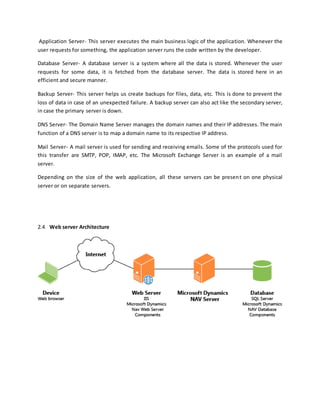
2.3 Web servers Web servers can be of various types. Each one has a specific function, and
hence a specific configuration. Let us read about some of the most common web servers.
Application Server- This server executes the main business logic of the application. Whenever the
user requests for something, the application server runs the code written by the developer.
Database Server- A database server is a system where all the data is stored. Whenever the user
requests for some data, it is fetched from the database server. The data is stored here in an
efficient and secure manner.
Backup Server- This server helps us create backups for files, data, etc. This is done to prevent the
loss of data in case of an unexpected failure. A backup server can also act like the secondary server,
in case the primary server is down.
DNS Server- The Domain Name Server manages the domain names and their IP addresses. The main
function of a DNS server is to map a domain name to its respective IP address.
Mail Server- A mail server is used for sending and receiving emails. Some of the protocols used for
this transfer are SMTP, POP, IMAP, etc. The Microsoft Exchange Server is an example of a mail
server.
Depending on the size of the web application, all these servers can be present on one physical
server or on separate servers.
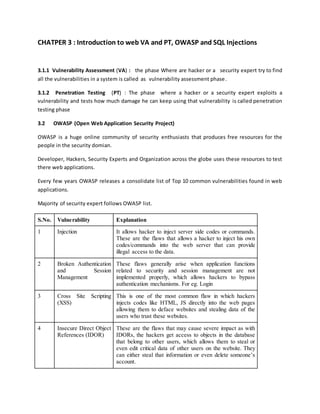
2.4 Web server Architecture
CHATPER 3 : Introduction to web VA and PT, OWASP and SQL Injections
3.1.1 Vulnerability Assessment (VA) : the phase Where are hacker or a security expert try to find
all the vulnerabilities in a system is called as vulnerability assessment phase.
3.1.2 Penetration Testing (PT) : The phase where a hacker or a security expert exploits a
vulnerability and tests how much damage he can keep using that vulnerability is called penetration
testing phase
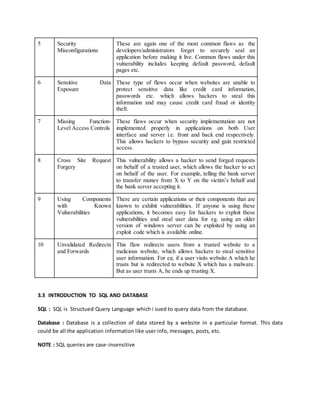
3.2 OWASP (Open Web Application Security Project)
OWASP is a huge online community of security enthusiasts that produces free resources for the
people in the security domian.
Developer, Hackers, Security Experts and Organization across the globe uses these resources to test
there web applications.
Every few years OWASP releases a consolidate list of Top 10 common vulnerabilities found in web
applications.
Majority of security expert follows OWASP list.
S.No. Vulnerability Explanation
1 Injection It allows hacker to inject server side codes or commands.
These are the flaws that allows a hacker to inject his own
codes/commands into the web server that can provide
illegal access to the data.
2 Broken Authentication
and Session
Management
These flaws generally arise when application functions
related to security and session management are not
implemented properly, which allows hackers to bypass
authentication mechanisms. For eg. Login
3 Cross Site Scripting
(XSS)
This is one of the most common flaw in which hackers
injects codes like HTML, JS directly into the web pages
allowing them to deface websites and stealing data of the
users who trust these websites.
4 Insecure Direct Object
References (IDOR)
These are the flaws that may cause severe impact as with
IDORs, the hackers get access to objects in the database
that belong to other users, which allows them to steal or
even edit critical data of other users on the website. They
can either steal that information or even delete someone’s
account.
5 Security
Misconfigurations
These are again one of the most common flaws as the
developers/administrators forget to securely seal an
application before making it live. Common flaws under this
vulnerability includes keeping default password, default
pages etc.
6 Sensitive Data
Exposure
These type of flaws occur when websites are unable to
protect sensitive data like credit card information,
passwords etc. which allows hackers to steal this
information and may cause credit card fraud or identity
theft.
7 Missing Function-
Level Access Controls
These flaws occur when security implementation are not
implemented properly in applications on both User
interface and server i.e. front and back end respectively.
This allows hackers to bypass security and gain restricted
access.
8 Cross Site Request
Forgery
This vulnerability allows a hacker to send forged requests
on behalf of a trusted user, which allows the hacker to act
on behalf of the user. For example, telling the bank server
to transfer money from X to Y on the victim’s behalf and
the bank server accepting it.
9 Using Components
with Known
Vulnerabilities
There are certain applications or their components that are
known to exhibit vulnerabilities. If anyone is using these
applications, it becomes easy for hackers to exploit these
vulnerabilities and steal user data for eg. using an older
version of windows server can be exploited by using an
exploit code which is available online.
10 Unvalidated Redirects
and Forwards
This flaw redirects users from a trusted website to a
malicious website, which allows hackers to steal sensitive
user information. For eg. if a user visits website A which he
trusts but is redirected to website X which has a malware.
But as user trusts A, he ends up trusting X.
3.3 INTRODUCTION TO SQL AND DATABASE
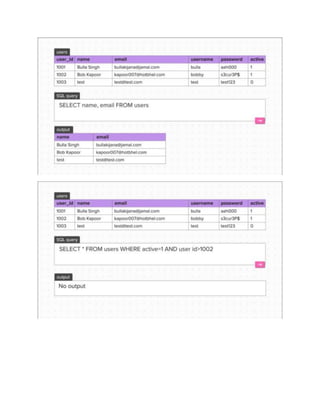
SQL : SQL is Structued Query Language which i sued to query data from the database.
Database : Database is a collection of data stored by a website in a particular format. This data
could be all the application information like user info, messages, posts, etc.
NOTE : SQL queries are case-insensitive
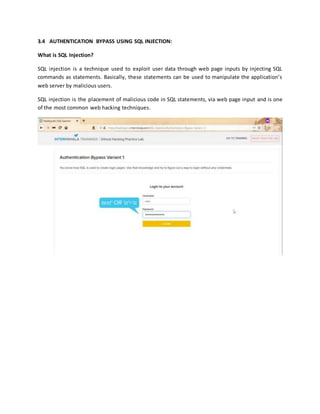
3.4 AUTHENTICATION BYPASS USING SQL INJECTION:
What is SQL Injection?
SQL injection is a technique used to exploit user data through web page inputs by injecting SQL
commands as statements. Basically, these statements can be used to manipulate the application’s
web server by malicious users.
SQL injection is the placement of malicious code in SQL statements, via web page input and is one
of the most common web hacking techniques.
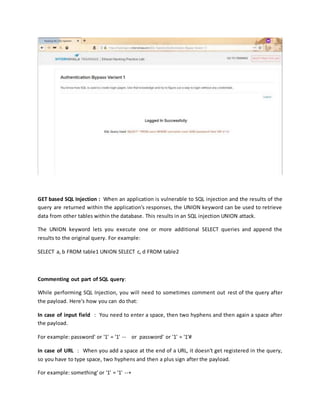
GET based SQL Injection : When an application is vulnerable to SQL injection and the results of the
query are returned within the application's responses, the UNION keyword can be used to retrieve
data from other tables within the database. This results in an SQL injection UNION attack.
The UNION keyword lets you execute one or more additional SELECT queries and append the
results to the original query. For example:
SELECT a, b FROM table1 UNION SELECT c, d FROM table2
Commenting out part of SQL query:
While performing SQL Injection, you will need to sometimes comment out rest of the query after
the payload. Here's how you can do that:
In case of input field : You need to enter a space, then two hyphens and then again a space after
the payload.
For example: password' or '1' = '1' -- or password' or '1' = '1'#
In case of URL : When you add a space at the end of a URL, it doesn't get registered in the query,
so you have to type space, two hyphens and then a plus sign after the payload.
For example: something' or '1' = '1' --+
Note : UNION SELECT username, password FROM users--+
Note : --+ in the end is used to comment out the remaining single quote ( ' ) in the query
POST BASE SQL INJECTION To perform the POST request sql injections you will need your own
installation of sqlmap . Our online sql scanner is only configured to test GET request based
injections.
Burp Suit : Burp suite is a local proxy server that you can run on your on workstation and
configuration your browser to send all the traffic through it.
SQL Map : SQL Map is a Python based tool that was built to check if parameter in a http request
for vulnerabilities to SQL injection GET and POST based.
Manual testing for SQL injection requires a lot of effort with little guarantee that you'll
find every vulnerability. Fortunately, there is a better way.
Testing your own systems for SQL injection vulnerabilities in an automated fashion is a two-
step process. Here's what you need to do:
Step 1: Scan for vulnerabilities
First, you must scan your site with a Web application vulnerability scanner to see if any
input filtering or other SQL injection-specific holes exist.
Step 2: Begin SQL injection
Once you determine whether or not your target system is vulnerable to SQL injection, your
next step is to carry out the SQL injection process and determine just what can be gleaned
from the database.
Tools for automating the actual SQL injection process is HP's SQL Injector (which comes
with WebInspect).
Second is c use Absinthe
CHAPTER 4 : BYPASSING CLIENT SIDE WEB APPLICATION FILTER
By design, filtering is part of the application, meaning that the web application is protecting
itself by preventing malicious requests from being successful.
TYPES OF FILTER
Client Side Filter : These filters ensure that the input given by the user is in the correct format.
Basically, this filter validates the input, and then it is forwarded to the server-side. For example: If
you don’t put ‘@’ in your email id, or if u don’t click on terms and conditions if you insert alphabets
in phone no. field, you are prompted to enter valid inputs.
What is Client-Side Filter Bypass ?
Many websites lack client-side filter checks, so it becomes easy to bypass that. But, our bypass will
only be successful if there is no server-side filter check either. First, let’s dig a little bit about the
client-side filter bypass.
Prerequisites: The basic knowledge of Burp suite or any proxy.
Steps to Bypass The Filters
Step 1: Enter the correct data in the correct format in the field.
Step 2: Open Burp suite and turn the intercept on.
Step 3: Click on the REGISTER button in the form.
Step 5: Let’s delete the ‘&terms=true’ and also %40 (which denotes ‘@’ of an email id) from the
Burp Suite.
Step 6: Turn off the intercept and see the magic.
2 Server Side Filters These are the types of filter checks present in the server. When the user
types an input, the input is forwarded to the server for validation. If the data entered by user is
valid, the input is accepted else error is thrown depending on the input.
CHAPTER 5 CLIENT SIDE ATTACKS
5.1 COOKIES : Cookies are text files with small pieces of data, like a username and password that
are used to identify your computer as you use a computer network. ... Data stored in a cookie is
created by the server upon your connection. This data is labeled with an ID unique to you and your
computer.
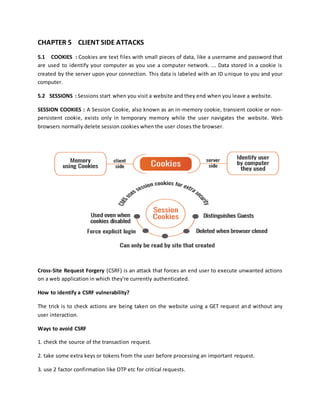
5.2 SESSIONS : Sessions start when you visit a website and they end when you leave a website.
SESSION COOKIES : A Session Cookie, also known as an in-memory cookie, transient cookie or non-
persistent cookie, exists only in temporary memory while the user navigates the website. Web
browsers normally delete session cookies when the user closes the browser.
Cross-Site Request Forgery (CSRF) is an attack that forces an end user to execute unwanted actions
on a web application in which they're currently authenticated.
How to identify a CSRF vulnerability?
The trick is to check actions are being taken on the website using a GET request and without any
user interaction.
Ways to avoid CSRF
1. check the source of the transaction request.
2. take some extra keys or tokens from the user before processing an important request.
3. use 2 factor confirmation like OTP etc for critical requests.
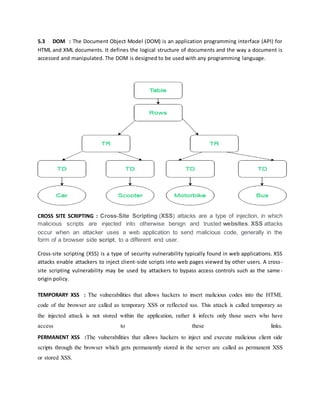
5.3 DOM : The Document Object Model (DOM) is an application programming interface (API) for
HTML and XML documents. It defines the logical structure of documents and the way a document is
accessed and manipulated. The DOM is designed to be used with any programming language.
CROSS SITE SCRIPTING : Cross-Site Scripting (XSS) attacks are a type of injection, in which
malicious scripts are injected into otherwise benign and trusted websites. XSS attacks
occur when an attacker uses a web application to send malicious code, generally in the
form of a browser side script, to a different end user.
Cross-site scripting (XSS) is a type of security vulnerability typically found in web applications. XSS
attacks enable attackers to inject client-side scripts into web pages viewed by other users. A cross-
site scripting vulnerability may be used by attackers to bypass access controls such as the same -
origin policy.
TEMPORARY XSS : The vulnerabilities that allows hackers to insert malicious codes into the HTML
code of the browser are called as temporary XSS or reflected xss. This attack is called temporary as
the injected attack is not stored within the application, rather it infects only those users who have
access to these links.
PERMANENT XSS :The vulnerabilities that allows hackers to inject and execute malicious client side
scripts through the browser which gets permanently stored in the server are called as permanent XSS
or stored XSS.
CHAPTER 6 IDENTIFYING SECURITY MISCONFIGURATION AND EXPOLITING
OUTDATED WEB AAPPLICATIONS
6.1 COMMON SECURITY MISCONFIGURATION : Vulnerability that occur due to improper server
security and these vulnerability are called as server as misconfiguration flaws.
6.2 SERVER ADMINISTRATOR : Server Admin is a person who manage the server of a website he is
generally responsible for Application server, Domain server configuration, Service an software
running on the server, Updating the server.
6. 3 Problem Common Security Misconfiguration
Type of Server Misconfiguration
1) Descriptive error message and default debug file
2) Default or weak password
3) Components with know vulnerabilities
1 ) Descriptive Error messages
These messages are error messages which reveals critical information about website or server
architecture.
Most of the applications are supposed to reveal full description of an error when an error occur this
helps developer in rectifying the error.
The problem starts when a developer doesn't turn the descriptive error messages off.
This problem can be avoided by simply turning the debug messages off.
To search for default file we just have to enter the name of default file just after the wewbsite's URL
as these files stored in the base direcotry of the websites.
Names of Few Default Files:
1. Robots.txt - One can find this file in the base directory of a website. This file is used by server
administrators to disallow search engines like Google, Bing, etc. to record certain pages/folders as it
may contain interesting folders and files which a developer is trying to hide.
2. Phpinfo.php - This file is a common debug file in PHP applications that contains huge amount of
information regarding the server.
3. Users.xml - This file generally contains usernames and passwords which hackers may exploit.
4. Backup.sql - This default file is crucial as it may contain complete database backup.
5. Config.bak - This may be a configuration file that stores passwords and keys.
6. error_log / error.log - This file contains all error logs of the server which can reveal vulnerabilities
to hackers.
7. server-status and server-info - These are common Apache page that contains server information.
8. manager/html - This default url takes you to Tomcat login page that can further disclose sensitive
server information.
9. phpmyadmin - It is the login page for PHPmyadmin - a software used for managing SQL
databases from the website. Exploiting a database can compromise all the data inside it.
2) Default or weak password : When the system admin uses a simple or easy to guess password
then the hacker can tr and sometimes guesses the correct password.
How to guess password: Try to fetch information about software or company name or service
name used and then google it and we can retrieve some commonly used usename and password.
3) Components with know Vulnerabilities : As some compaines uses third party modules for their
software like as Uber uses paytm as payment gateway to process the transaction, Linux as
operating system, McAfee as anti-virus software, mySQL for Database and might uses google maps
for navigation.
So here we can find out the vulnerabilities of all these third party software and services used by
uber and then try to exploit those vulnerabilities in order to gain access in uber.
3 main reason why using third party tools is a problem :
1. The software does not belong to the application so it is difficult to know if it has a vulnerability.
2. Even if the organisation using 3rd party tools knows about the vulnerabilities in it, they cannot
patch it themselves.
3. If a hacker finds a bug in a 3rd party tool, it puts thousands of applications at risk.using them is a
necessity.
white hat hackers community around the world deals with this problem actively and as soon as they
find a bug in any application they let the vendor know about it and help the vendor in fixing it.
Ways of fingerprinting Components:
 HTTP Header
 HTML Source Code - Include JS, CSS files, Developer comments etc.
 Banners and Titles.
 Favicons
 Fingerprinting tools like Nikto, Builtwith, Nmap etc.
 Default files lie README.html readme.txt CHNAGELOG.txt.
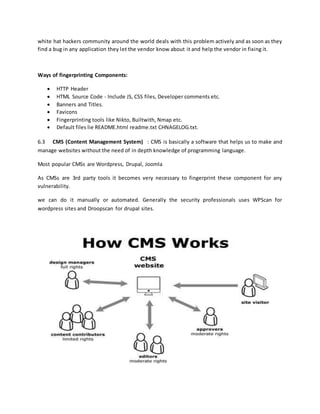
6.3 CMS (Content Management System) : CMS is basically a software that helps us to make and
manage websites without the need of in depth knowledge of programming language.
Most popular CMSs are Wordpress, Drupal, Joomla
As CMSs are 3rd party tools it becomes very necessary to fingerprint these component for any
vulnerability.
we can do it manually or automated. Generally the security professionals uses WPScan for
wordpress sites and Droopscan for drupal sites.
CHAPTER 7 : DOCUMENTING AND REPORTIING VULNERABILITIES
7.1 REPORT GENERATION : We cannot write and explain everything we did while finding
vulnerabilities in the web application.
To make this document understandable we need screenshots and proper notes about all the
procedures we followed and the command we used as well as videos of the procedures whenever
necessary.
As the developer needs to see the vulnerabilities himself so that he can understand better and work
on fixing it. Also the head or the one who hires th ethical hacker need to assess the impact level of a
vulnerability in order to prioritize the most dangerous vulnerabilities.
This report is known as Proof of Concept (POC).
7.2 FUNDAMENTAL CONCEPT OF DOCUMENTING A VULNERABILITIES:
Use snipping tools in windows to take an Screenshot.
For Mac - shift+cooamd+4
For Linux - shift +prtSc
7.3 COMPONENT OF VAPT REPORT:
Title Page
Stats Status of the application - Summary
Index - Serial Number, Critically, Vulnerability Name, Count.
Vulnerability Information (for each vulnerability).
* Vulnerability Description and Endpoint
* Observation and PoC
* Exploitation
* Business Impact
* Patches and Recommendations
* References
End Point
7.4 CATEGORIES OF VULNERABILITIES:
Critical vulnerability => Red (17)
Server vulnerability => Orange (15)
Moderate vulnerability => yellow (2)
Low level vulnerability => Green (2)
7.5 What is Improper Input Sanitization?
Hacker exploits the web application by injecting malicious commands, codes, tokens, etc. and the
application parses and executes this data entered by the user without sanitizing.
How to fix Improper Input Sanitization:
Sanitize input after receiving it from the user. Use appropriate server side filters.
7.6 What is improper output Sanitization?
Hacker exploits the web application by injecting malicious commands, codes, tokens, etc. and the
application injects this data without sanitizing which allows hackers to control the output
HTTP/HTML response.
How to fix Improper Output Sanitization:
Sanitize output before inserting it into HTTP/HTML response. Encode all special characters.
CERTIFICATE

ethical hacking report

  • 1.
    INDUSTRIAL TRAINING LABREPORT ON ETHICAL HACKING To Department of Computer Science & Engineering, Bachelor of Technology Department of Computer Science and Engineering Compucom Institute of Technology and Management, Sitapura, Jaipur Rajasthan Technical University,Kota Submitted To: Submitted By: Mr. Gaurav Das AKHILESH PATEL (DepartmentIncharge) Roll No.:17ECICS002
  • 2.
    ACKNOWLEDGEMENT “Gratitudeisnot a thingof expression; it is more matterof feeling." There is always a sense of gratitude which one express towards others for their help and supervision in achieving the goals. This formal piece of acknowledgement is an attempt to express the feeling of gratitude towards people who helpful me in successfully completing of my training I would like to express my deep gratitude to Mr. Gaurav Das Sir and Geeta Tiwari Mam, for their constant co- operation. They both were always there for guidance and valuable suggestion throughout the pursuance of this research project. I would also like to place a appreciation to all the respondents and group members whose responses and coordination were of utmost importance for the project. Above all no words can express my feelings to my parents, friends all those persons who supported me during my project. I am also thankful to all the respondents whose cooperation & support has helped me a lot in collecting necessary information
  • 3.
    TABLE OF CONTENT CHAPTER1: INTRODUCTION TO ETHICAL HACKING 1.1 INTRODUCTION 1.2 ETHICAL HACKING TERMINOLOGY 1.3 HACKER 1.3.1 TYPES OF HACKERS 1.3.2 ETHICAL HACKERS VERSUS CRACKER 1.4 THE JOB ROLE OF AN ETHICAL HACKER 1.4.1 WHAT DO ETHICAL HACKERS DO? 1.4.2 AN ETHICAL HACKER’S SKILL SET 1.5 APPLICATION OF ETHICAL HACKING 1.6 IP ADDRESS NAT 1.7 PROXY AND PROTOCOLS 1.8 NETWORK TERMINOLOGIES CHAPTER 2 INFORMATION GATHERING 2.1 FOOTPRINT 2.2 SEARCH ENGINE 2.2.1 SEARCH ENGINE METHOD 2.3 WEB SERVERS 2.3.1 WEB SERVER ARCHITECTURE CHAPTER 3 : INTRODUCTION TO WEB VAPT, OWASP AND SQL 3.1 VAPT 3.2 OWASP
  • 4.
    3.3 INTRODUCTION TOSQL AND DATABASE 3.4 Authentication bypass using SQL injection 3.4.1 GET BASED SQL INJECTION 3.4.2 POST BASED SQL INJECTION 3.5 AUTOMATING SQL INJECTION CHAPTER 4 : BYPASSING CLIENT SIDE WEB APPLICATION FILTER 4.1 WHAT IS WEB APPLICATION FILTER? 4.2 TYPES OF FILTER 4.2.1 CLIENT-SIDE FILTER 4.2.2 SERVER SIDE FILTER CHAPTER 5 : CLIENT SIDE ATTACKS 5.1 COOKIES 5.2 SESSIONS 5.3 DOM 5.4 CROSS SITE SCRIPTING (XSS) 5.4.1 TEMPORARY CROSS SITE SCRIPTING (XSS) 5.4.2 PERMANENT CROSS SITE SCRIPTING (XSS) 5.6 BRUTE FORCING CHAPTER 6 : IDENTIFYING SECURITY MISCONFIGURATION AND EXPOLITING OUTDATED WEB AAPPLICATIONS 6.1 COMMON SECURITY MISCONFIGURATION 6.2 SERVER ADMINISTRATOR 6.3 PROBLEM COMMON SECURITY MISCONFIGURATION
  • 5.
    6.4 TYPE OFSERVER MISCONFIGUATION 6.5 CSM CHAPTER 8 : 8.1 REPORT GENERATION 8.2 FUNDAMENTAL CONCEPT OF DOCUMENTING A VULNERABILITIES 8.3 COMPONENT OF VAPT REPORT 8.4 CATEGORIES OF VULNERABILITIES: 8.5 IMPROPER INPUT SANITIZATION 8.6 IMPROPER OUTPUT SANITIZATION
  • 6.
    CHAPTER 1 :INTRODUCTION TO ETHICAL HACKING 1.1 INTRODUCTION The Internet is still growing and e-commerce is on its advance. More and more computers get connected to the Internet, wireless devices and networks are booming and sooner or later, nearly every electronic device may have its own IP address. The complexity of networks is increasing,the software on devices gets more complicated and user friendly. Therefore, Security is a hot topic and quite some effort is spend in securing services, systems and networks. On the internet, there is a silent war going on between the good and the bad guys.between the ones who are trying hard to keep information secured and the ones who are trying to get prhibited access to this information. Securing an information technology environment does not just consist of a bunch of actions which can be taken and then everything can be forgotten.There is no fire and forget solution - security is a never ending process. “Ethical hacking describes the process of attacking and penetrating computer systems and networks to Discover and point out potential security weaknesses for a client which is responsible for the attacked Information technology environment1.” 1.2 ETHICAL HACKING TERMINOLOGY Being able to understand and define terminology is an important part of a CEH’s responsibility.This terminology is how security professionals acting as ethical hackers communicate. In this section, we’ll discuss a number of terms used in ethical hacking as: Threat : An environment or situation that could lead to a potential breach of security. Ethical Hackers look for and prioritize threats when performing a security analysis. Exploit : A piece of software or technology that takes advantage of a bug, glitch, or vulnerability ,Leading to unauthorized access, privilege escalation, or denial of service on a computer system. Hackers are looking for exploits in computer systems to open the door to an initial Attack. Vulnerability : The existence of a software flaw, logic design, or implementation error that can Lead to an unexpected and undesirable event executing bad or damaging instructions to the System. Target of Evaluation : A system, program, or network that is the subject of a security Analysis or attack. Ethical hackers are usually concerned with high-value TOEs, systems that Contain sensitive information such as account numbers, passwords, Social Security numbers or other confidential data. Attack : An attack occurs when a system is compromised based on vulnerability. Many attacks are perpetuated via an exploit. There are two primary methods of delivering exploits to computer systems: o Remote : The exploit is sent over a network and exploits security vulnerabilities without any prior Access to the vulnerable system. Hacking attacks against corporate computer systems or networks Initiated from the outside world are considered remote.
  • 7.
    o Local :The exploit is delivered directly to the computer system or network, which requires prior Access to the vulnerable system to increase privileges. Information security policies should be created in such a way that only those who need access to information should be allowed access and they should have the lowest level of access to perform their job function. 1.3 HACKER In the computer security context, a hacker is someone who seeks and exploits weaknesses in a Computer or computer network. Hackers may be motivated by a multitude of reasons, such as profit, protest, or challenge. 1.3.1 TYPES OF HACKERS Hackers can be divided into three groups : WHITE HATS White hats are the good guys, the ethical hackers who use their hacking skills for defensive Purposes. White-hat hackers are usually security professionals with knowledge of hacking and the hacker tool set and who use this knowledge to locate weaknesses and implement Countermeasures. Black Hats Black hats are the bad guys: the malicious hackers or crackers who use their skills for illegal or malicious purposes. They break into or otherwise violate the system integrity of remote systems, with malicious intent. Gray Hats Gray hats are hackers who may work offensively or defensively, depending on the situation. This is the dividing line between hacker and cracker. Gray-hat hackers may just be interested in Hacking tools and technologies and are not malicious black hats. 1.4 THE JOB ROLE OF AN ETHICAL HACKER Ethical hackers are employed to protect networks and computers from attacks from unethical hackers who illegally penetrate computers to access private and sensitive information. Though they possess technical skills to those of an unethical hacker, an ethical hacker utilizes these skills for protection. 1.4.1 WHAT DO ETHICAL HACKERS DO? The purpose of ethical hacker is usually the same as that of crackers: they’re trying to determine what an intruder can see on a targeted network or system, and what the hacker can do with that information. This process of testing the security of a system or network is known as a penetration test, or pen test. Many ethical hackers detect malicious hacker activity as part of the security team of an organization tasked with defending against malicious hacking activity. When hired, an ethical hacker asks the organization what is to be protected, from whom, and what resources the company is willing to expend in order to gain protection. A penetration test plan can then be built around the data that needs to be protected and potential risks.
  • 8.
    1.5 APPLICATION OFETHICAL HACKING Network security Encryption and decryption Reverse engineering Forensic Web application security 1.6 NETWORK COMPONENTS IP Address : IP (Internet Protocol) Address is an address of your network hardware. It helps in connecting your computer to other devices on your network and all over the world. An IP Address is made up of numbers or characters. An example of an IP address would be: 192.168.02.58 Network Address Translation : NAT stands for network address translation. It's a way to map multiple local private addresses to a public one before transferring the information. PROXY : A proxy server, also known as a "proxy" or "application-level gateway", is a computer that acts as a gateway between a local network (for example, all the computers at one company or in one building) and a larger-scale network such as the internet. Proxy servers provide increased performance and security. Virtual Private Network : Virtual Private Network (VPN) gives you online privacy and anonymity by creating a private network from a public internet connection. Protocol : A network protocol is an established set of rules that determine how data is transmitted between different devices in the same network. Essentially, it allows connected devices to communicate with each other, regardless of any differences in their internal processes, structure or design. Different Types of Networking Protocols. 1. HTTP or HTTPs : This stands for Hypertext Transfer Protocol or Hypertext Transfer Protocol (secure). The secure version is encrypted, meaning that we are going to encrypt all the data as we send it from the client to the server. 2. FTP (File Transfer Protocol) : The FTP allows us to transfer files from a client to a server or from a server to a client. 3. Email Protocols (POP3, IMAP, SMTP) 4. TCP (Transmission Control Protocol) and UDP (User Datagram Protocol)
  • 9.
    CHAPTER 2 :INFORMATION GATHERING 2.1 INFORMATION GATHERING Gathering as much information about the target as possible and organizing it in a structured manner so that it can be utilized later in the vulnerability assessment and penetration testing phase. RECONNAISSANCE: It is the process of analyzing all this information gathered and utilising it to understand the target. WHO IS THE TRAGET ? Target is the web application that need to be tested. What kind of INFORMATION ? The information we gather is called digital footprints. 2.2 DIGITAL FOOTPRINTS : are the footprints are the traces left online while a person uses a internet such as IP address , likes on a post, chats on facebook, preferences in a shopping site and many more things. 2.2 SEARCH ENGINE : A Search engine is a software system that is designed to carry out web searches, which means to search the World Wide Web in a systematic way Search engine method - POST is a request method supported by HTTP used by the World Wide Web. By design, the POST request method requests that a web server accepts the data enclosed in the body of the request message, most likely for storing it. It is often used when uploading a file or when submitting a completed web form. - - The GET method sends the encoded user information appended to the page request. The page and the encoded information are separated by the character - The GET method produces a long string that appears in your server logs, in the browser's Location: box. 2.3 Web servers Web servers can be of various types. Each one has a specific function, and hence a specific configuration. Let us read about some of the most common web servers.
  • 10.
    Application Server- Thisserver executes the main business logic of the application. Whenever the user requests for something, the application server runs the code written by the developer. Database Server- A database server is a system where all the data is stored. Whenever the user requests for some data, it is fetched from the database server. The data is stored here in an efficient and secure manner. Backup Server- This server helps us create backups for files, data, etc. This is done to prevent the loss of data in case of an unexpected failure. A backup server can also act like the secondary server, in case the primary server is down. DNS Server- The Domain Name Server manages the domain names and their IP addresses. The main function of a DNS server is to map a domain name to its respective IP address. Mail Server- A mail server is used for sending and receiving emails. Some of the protocols used for this transfer are SMTP, POP, IMAP, etc. The Microsoft Exchange Server is an example of a mail server. Depending on the size of the web application, all these servers can be present on one physical server or on separate servers. 2.4 Web server Architecture
  • 11.
    CHATPER 3 :Introduction to web VA and PT, OWASP and SQL Injections 3.1.1 Vulnerability Assessment (VA) : the phase Where are hacker or a security expert try to find all the vulnerabilities in a system is called as vulnerability assessment phase. 3.1.2 Penetration Testing (PT) : The phase where a hacker or a security expert exploits a vulnerability and tests how much damage he can keep using that vulnerability is called penetration testing phase 3.2 OWASP (Open Web Application Security Project) OWASP is a huge online community of security enthusiasts that produces free resources for the people in the security domian. Developer, Hackers, Security Experts and Organization across the globe uses these resources to test there web applications. Every few years OWASP releases a consolidate list of Top 10 common vulnerabilities found in web applications. Majority of security expert follows OWASP list. S.No. Vulnerability Explanation 1 Injection It allows hacker to inject server side codes or commands. These are the flaws that allows a hacker to inject his own codes/commands into the web server that can provide illegal access to the data. 2 Broken Authentication and Session Management These flaws generally arise when application functions related to security and session management are not implemented properly, which allows hackers to bypass authentication mechanisms. For eg. Login 3 Cross Site Scripting (XSS) This is one of the most common flaw in which hackers injects codes like HTML, JS directly into the web pages allowing them to deface websites and stealing data of the users who trust these websites. 4 Insecure Direct Object References (IDOR) These are the flaws that may cause severe impact as with IDORs, the hackers get access to objects in the database that belong to other users, which allows them to steal or even edit critical data of other users on the website. They can either steal that information or even delete someone’s account.
  • 12.
    5 Security Misconfigurations These areagain one of the most common flaws as the developers/administrators forget to securely seal an application before making it live. Common flaws under this vulnerability includes keeping default password, default pages etc. 6 Sensitive Data Exposure These type of flaws occur when websites are unable to protect sensitive data like credit card information, passwords etc. which allows hackers to steal this information and may cause credit card fraud or identity theft. 7 Missing Function- Level Access Controls These flaws occur when security implementation are not implemented properly in applications on both User interface and server i.e. front and back end respectively. This allows hackers to bypass security and gain restricted access. 8 Cross Site Request Forgery This vulnerability allows a hacker to send forged requests on behalf of a trusted user, which allows the hacker to act on behalf of the user. For example, telling the bank server to transfer money from X to Y on the victim’s behalf and the bank server accepting it. 9 Using Components with Known Vulnerabilities There are certain applications or their components that are known to exhibit vulnerabilities. If anyone is using these applications, it becomes easy for hackers to exploit these vulnerabilities and steal user data for eg. using an older version of windows server can be exploited by using an exploit code which is available online. 10 Unvalidated Redirects and Forwards This flaw redirects users from a trusted website to a malicious website, which allows hackers to steal sensitive user information. For eg. if a user visits website A which he trusts but is redirected to website X which has a malware. But as user trusts A, he ends up trusting X. 3.3 INTRODUCTION TO SQL AND DATABASE SQL : SQL is Structued Query Language which i sued to query data from the database. Database : Database is a collection of data stored by a website in a particular format. This data could be all the application information like user info, messages, posts, etc. NOTE : SQL queries are case-insensitive
  • 14.
    3.4 AUTHENTICATION BYPASSUSING SQL INJECTION: What is SQL Injection? SQL injection is a technique used to exploit user data through web page inputs by injecting SQL commands as statements. Basically, these statements can be used to manipulate the application’s web server by malicious users. SQL injection is the placement of malicious code in SQL statements, via web page input and is one of the most common web hacking techniques.
  • 15.
    GET based SQLInjection : When an application is vulnerable to SQL injection and the results of the query are returned within the application's responses, the UNION keyword can be used to retrieve data from other tables within the database. This results in an SQL injection UNION attack. The UNION keyword lets you execute one or more additional SELECT queries and append the results to the original query. For example: SELECT a, b FROM table1 UNION SELECT c, d FROM table2 Commenting out part of SQL query: While performing SQL Injection, you will need to sometimes comment out rest of the query after the payload. Here's how you can do that: In case of input field : You need to enter a space, then two hyphens and then again a space after the payload. For example: password' or '1' = '1' -- or password' or '1' = '1'# In case of URL : When you add a space at the end of a URL, it doesn't get registered in the query, so you have to type space, two hyphens and then a plus sign after the payload. For example: something' or '1' = '1' --+
  • 16.
    Note : UNIONSELECT username, password FROM users--+ Note : --+ in the end is used to comment out the remaining single quote ( ' ) in the query POST BASE SQL INJECTION To perform the POST request sql injections you will need your own installation of sqlmap . Our online sql scanner is only configured to test GET request based injections. Burp Suit : Burp suite is a local proxy server that you can run on your on workstation and configuration your browser to send all the traffic through it. SQL Map : SQL Map is a Python based tool that was built to check if parameter in a http request for vulnerabilities to SQL injection GET and POST based. Manual testing for SQL injection requires a lot of effort with little guarantee that you'll find every vulnerability. Fortunately, there is a better way. Testing your own systems for SQL injection vulnerabilities in an automated fashion is a two- step process. Here's what you need to do: Step 1: Scan for vulnerabilities First, you must scan your site with a Web application vulnerability scanner to see if any input filtering or other SQL injection-specific holes exist. Step 2: Begin SQL injection Once you determine whether or not your target system is vulnerable to SQL injection, your next step is to carry out the SQL injection process and determine just what can be gleaned from the database. Tools for automating the actual SQL injection process is HP's SQL Injector (which comes with WebInspect). Second is c use Absinthe
  • 17.
    CHAPTER 4 :BYPASSING CLIENT SIDE WEB APPLICATION FILTER By design, filtering is part of the application, meaning that the web application is protecting itself by preventing malicious requests from being successful. TYPES OF FILTER Client Side Filter : These filters ensure that the input given by the user is in the correct format. Basically, this filter validates the input, and then it is forwarded to the server-side. For example: If you don’t put ‘@’ in your email id, or if u don’t click on terms and conditions if you insert alphabets in phone no. field, you are prompted to enter valid inputs. What is Client-Side Filter Bypass ? Many websites lack client-side filter checks, so it becomes easy to bypass that. But, our bypass will only be successful if there is no server-side filter check either. First, let’s dig a little bit about the client-side filter bypass. Prerequisites: The basic knowledge of Burp suite or any proxy. Steps to Bypass The Filters Step 1: Enter the correct data in the correct format in the field. Step 2: Open Burp suite and turn the intercept on. Step 3: Click on the REGISTER button in the form. Step 5: Let’s delete the ‘&terms=true’ and also %40 (which denotes ‘@’ of an email id) from the Burp Suite. Step 6: Turn off the intercept and see the magic. 2 Server Side Filters These are the types of filter checks present in the server. When the user types an input, the input is forwarded to the server for validation. If the data entered by user is valid, the input is accepted else error is thrown depending on the input.
  • 18.
    CHAPTER 5 CLIENTSIDE ATTACKS 5.1 COOKIES : Cookies are text files with small pieces of data, like a username and password that are used to identify your computer as you use a computer network. ... Data stored in a cookie is created by the server upon your connection. This data is labeled with an ID unique to you and your computer. 5.2 SESSIONS : Sessions start when you visit a website and they end when you leave a website. SESSION COOKIES : A Session Cookie, also known as an in-memory cookie, transient cookie or non- persistent cookie, exists only in temporary memory while the user navigates the website. Web browsers normally delete session cookies when the user closes the browser. Cross-Site Request Forgery (CSRF) is an attack that forces an end user to execute unwanted actions on a web application in which they're currently authenticated. How to identify a CSRF vulnerability? The trick is to check actions are being taken on the website using a GET request and without any user interaction. Ways to avoid CSRF 1. check the source of the transaction request. 2. take some extra keys or tokens from the user before processing an important request. 3. use 2 factor confirmation like OTP etc for critical requests.
  • 19.
    5.3 DOM :The Document Object Model (DOM) is an application programming interface (API) for HTML and XML documents. It defines the logical structure of documents and the way a document is accessed and manipulated. The DOM is designed to be used with any programming language. CROSS SITE SCRIPTING : Cross-Site Scripting (XSS) attacks are a type of injection, in which malicious scripts are injected into otherwise benign and trusted websites. XSS attacks occur when an attacker uses a web application to send malicious code, generally in the form of a browser side script, to a different end user. Cross-site scripting (XSS) is a type of security vulnerability typically found in web applications. XSS attacks enable attackers to inject client-side scripts into web pages viewed by other users. A cross- site scripting vulnerability may be used by attackers to bypass access controls such as the same - origin policy. TEMPORARY XSS : The vulnerabilities that allows hackers to insert malicious codes into the HTML code of the browser are called as temporary XSS or reflected xss. This attack is called temporary as the injected attack is not stored within the application, rather it infects only those users who have access to these links. PERMANENT XSS :The vulnerabilities that allows hackers to inject and execute malicious client side scripts through the browser which gets permanently stored in the server are called as permanent XSS or stored XSS.
  • 20.
    CHAPTER 6 IDENTIFYINGSECURITY MISCONFIGURATION AND EXPOLITING OUTDATED WEB AAPPLICATIONS 6.1 COMMON SECURITY MISCONFIGURATION : Vulnerability that occur due to improper server security and these vulnerability are called as server as misconfiguration flaws. 6.2 SERVER ADMINISTRATOR : Server Admin is a person who manage the server of a website he is generally responsible for Application server, Domain server configuration, Service an software running on the server, Updating the server. 6. 3 Problem Common Security Misconfiguration Type of Server Misconfiguration 1) Descriptive error message and default debug file 2) Default or weak password 3) Components with know vulnerabilities 1 ) Descriptive Error messages These messages are error messages which reveals critical information about website or server architecture. Most of the applications are supposed to reveal full description of an error when an error occur this helps developer in rectifying the error. The problem starts when a developer doesn't turn the descriptive error messages off. This problem can be avoided by simply turning the debug messages off. To search for default file we just have to enter the name of default file just after the wewbsite's URL as these files stored in the base direcotry of the websites. Names of Few Default Files: 1. Robots.txt - One can find this file in the base directory of a website. This file is used by server administrators to disallow search engines like Google, Bing, etc. to record certain pages/folders as it may contain interesting folders and files which a developer is trying to hide.
  • 21.
    2. Phpinfo.php -This file is a common debug file in PHP applications that contains huge amount of information regarding the server. 3. Users.xml - This file generally contains usernames and passwords which hackers may exploit. 4. Backup.sql - This default file is crucial as it may contain complete database backup. 5. Config.bak - This may be a configuration file that stores passwords and keys. 6. error_log / error.log - This file contains all error logs of the server which can reveal vulnerabilities to hackers. 7. server-status and server-info - These are common Apache page that contains server information. 8. manager/html - This default url takes you to Tomcat login page that can further disclose sensitive server information. 9. phpmyadmin - It is the login page for PHPmyadmin - a software used for managing SQL databases from the website. Exploiting a database can compromise all the data inside it. 2) Default or weak password : When the system admin uses a simple or easy to guess password then the hacker can tr and sometimes guesses the correct password. How to guess password: Try to fetch information about software or company name or service name used and then google it and we can retrieve some commonly used usename and password. 3) Components with know Vulnerabilities : As some compaines uses third party modules for their software like as Uber uses paytm as payment gateway to process the transaction, Linux as operating system, McAfee as anti-virus software, mySQL for Database and might uses google maps for navigation. So here we can find out the vulnerabilities of all these third party software and services used by uber and then try to exploit those vulnerabilities in order to gain access in uber. 3 main reason why using third party tools is a problem : 1. The software does not belong to the application so it is difficult to know if it has a vulnerability. 2. Even if the organisation using 3rd party tools knows about the vulnerabilities in it, they cannot patch it themselves. 3. If a hacker finds a bug in a 3rd party tool, it puts thousands of applications at risk.using them is a necessity.
  • 22.
    white hat hackerscommunity around the world deals with this problem actively and as soon as they find a bug in any application they let the vendor know about it and help the vendor in fixing it. Ways of fingerprinting Components:  HTTP Header  HTML Source Code - Include JS, CSS files, Developer comments etc.  Banners and Titles.  Favicons  Fingerprinting tools like Nikto, Builtwith, Nmap etc.  Default files lie README.html readme.txt CHNAGELOG.txt. 6.3 CMS (Content Management System) : CMS is basically a software that helps us to make and manage websites without the need of in depth knowledge of programming language. Most popular CMSs are Wordpress, Drupal, Joomla As CMSs are 3rd party tools it becomes very necessary to fingerprint these component for any vulnerability. we can do it manually or automated. Generally the security professionals uses WPScan for wordpress sites and Droopscan for drupal sites.
  • 23.
    CHAPTER 7 :DOCUMENTING AND REPORTIING VULNERABILITIES 7.1 REPORT GENERATION : We cannot write and explain everything we did while finding vulnerabilities in the web application. To make this document understandable we need screenshots and proper notes about all the procedures we followed and the command we used as well as videos of the procedures whenever necessary. As the developer needs to see the vulnerabilities himself so that he can understand better and work on fixing it. Also the head or the one who hires th ethical hacker need to assess the impact level of a vulnerability in order to prioritize the most dangerous vulnerabilities. This report is known as Proof of Concept (POC). 7.2 FUNDAMENTAL CONCEPT OF DOCUMENTING A VULNERABILITIES: Use snipping tools in windows to take an Screenshot. For Mac - shift+cooamd+4 For Linux - shift +prtSc 7.3 COMPONENT OF VAPT REPORT: Title Page Stats Status of the application - Summary Index - Serial Number, Critically, Vulnerability Name, Count. Vulnerability Information (for each vulnerability). * Vulnerability Description and Endpoint * Observation and PoC * Exploitation * Business Impact * Patches and Recommendations * References End Point
  • 24.
    7.4 CATEGORIES OFVULNERABILITIES: Critical vulnerability => Red (17) Server vulnerability => Orange (15) Moderate vulnerability => yellow (2) Low level vulnerability => Green (2) 7.5 What is Improper Input Sanitization? Hacker exploits the web application by injecting malicious commands, codes, tokens, etc. and the application parses and executes this data entered by the user without sanitizing. How to fix Improper Input Sanitization: Sanitize input after receiving it from the user. Use appropriate server side filters. 7.6 What is improper output Sanitization? Hacker exploits the web application by injecting malicious commands, codes, tokens, etc. and the application injects this data without sanitizing which allows hackers to control the output HTTP/HTML response. How to fix Improper Output Sanitization: Sanitize output before inserting it into HTTP/HTML response. Encode all special characters.
  • 25.