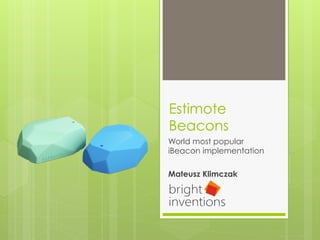
Estimote
Beacons
World most popular
iBeacon implementation
Mateusz Klimczak
Agenda
›  iBeacons
›  Bluetooth Low Energy
›  Estimote Beacons
›  Potential uses
›  Potential problems
›  Alternatives to Estimote
›  Development – get started
What is iBeacon?
›  Apple Trademark for an indoor
positioning system
›  Extends Location Services in iOS
›  Your device alert apps when you approach
or leave a location with an iBeacon
›  Designed for building location/context-
aware applications
What iBeacon is not?
›  iBeacon is not a device nor is it a software
application
›  iBeacon is nothing more than a set of
services (APIs) that operate between
operating system (OS) and apps
iBeacons characteristics
›  Almost all of the logic for iBeacon is done
by the supporting application on the
device
›  The only role of the iBeacon is to advertise
to the phones of its own existence at the
physical location
›  iBeacon do not actively push out
notifications nor track nearby users - the
application on the phone must handle
that logic
iBeacon compability
›  Compatible with Bluetooth Low Energy
(BLE) devices:
›  iOS7: iPhone 4S+, iPad 3+, iPad Mini 1+,
iPod Touch 5+
›  Android 4.3+
›  Mac computers with OS X Mavericks (10.9)
iOS 7.1 boost
›  The biggest improvement is the ability of
the operating system to detect iBeacons
even when an iBeacon-compatible app is
shut down
›  Earlier it was possible only when
application was working in background
›  The functionality persist even when the
device is rebooted
Bluethooth low energy
›  Bluetooth 4.0 – nothing like his older brother
›  Compared to „Classic” Bluetooth, BLE is
intended to provide considerably reduced
power consumption while maintaining a
similar communication range
›  Originally introduced under the name
Wibree by Nokia in 2006. It was merge into
the main Bluetooth standard in 2010
›  AKA Bluetooth Smart
iBeacon (BLE) vs NFC
iBeacon (BLE) NFC
Range Up to 100 m (Estimote
handles up to 70 m)
Up to 20 cm (optimal
range is < 4cm)
Price $5 - $35 per beacon $0.10 - $0.60 per tag
Passive mode No Yes
Apple support Yes No
iBeacon (BLE) vs NFC
›  While BLE and NFC are both wireless
communication technologies, each is
designed to serve different need and
functions
›  But since Apple is not supporting NFC
(and probably will never do) iBeacons
may be the only way to implement
mobile payments…
Estimote Beacon
›  Small, wireless device which broadcast
tiny radio signals to smart devices
›  Smartphones that are in range are able to
'hear' these signals and estimate their
location, as well as to communicate with
the beacon
›  Developed by Polish startup from Cracow
›  More than 20k developers worldwide
Estimote construction
›  Built-in:
›  2.4 GHz Bluetooth Low Energy radio
›  Thermometer
›  Accelerometer
›  Sticky back side (Gecko)
›  Silicon cover
›  Lithium battery
Potential uses
›  Micromarketing
›  Payments
›  Sport
›  Transport
›  Loyalty programs
›  Virtual guides
›  And many others – it is limited only by our
imagination
Potential uses by Estimote
Another potential use
Everytap
›  Loyalty program invented by PituPitu
›  Earn points for buying products in
restaurants, clubs, pubs, etc.
›  Spend these points to get free ones!
›  All you need to do after transaction ist o put
your phone next to barman's Estimote
Beacon (NFC like)
Potential problems
›  Risk of spamming users
›  Security threads (more about it later)
›  Bluetooth must be turned on
›  Mobile app required
›  Distance estimation is poor
›  From iOS7.1 occurs a problem - sometimes
iBeacons just stop being visible until we
restart the device – so we are very
platform dependent
Security problems
›  Unprotected read/write!
›  Everything that our Beacon broadcast
can be read by anyone and anyone can
write to our Beacon!
›  This makes it barely usable in production
›  Estimote announced that they will
implement security measures in the
beginning of January… few weeks ago
they released SDK 2.0 and there is still
nothing
Alternatives
›  Kontakt.io
›  Also from Cracow
›  Boni
›  Roximity iBeacon
›  And many more
›  Various development states
Why is Estimote most popular?
›  Contacts
›  One of first companies to produce
beacons
›  Attractive appearance, marketing, etc.
Developer kit
›  99$ for 3 beacons
Development – configuration
1.  Get SDK – using CocoaPods!
›  Dependency manager for objective-c
›  How to use:
https://github.com/CocoaPods/CocoaPods
›  Searching for Pods:
http://cocoapods.org/
Development – configuration
2.  Add required frameworks to your project
›  CoreBluetooth.framework
›  CoreLocation.framework
›  SystemConfiguration.framework
Development – configuration
3.  Add Background Modes in your project
Capabilities:
›  Uses Bluetooth LE accessories
›  Acts as a Bluetooth LE accessory
›  Background fetch
›  Remote notifications
Development – lets code!
›  Implement ESTBeaconManagerDelegate
›  Add ESTBeaconManager
›  Add ESTBeaconRegion
Development – lets code!
›  Initialize beacon manager
›  Initialize beacon region
›  Start ranging beacons in region
Development – lets code!
›  Implement beaconManager
didRangeBeacons inRegion method
›  Handle your beacons!
Development – lets code!
›  Do not forget to stop looking for beacons
when you no longer need them
The end
›  Thank you for your attention!
›  Any questions?

[CocoaHeads Tricity] Estimote Beacons - world most popular iBeacon implementation

  • 1.
    Estimote Beacons World most popular iBeaconimplementation Mateusz Klimczak
  • 2.
    Agenda ›  iBeacons ›  BluetoothLow Energy ›  Estimote Beacons ›  Potential uses ›  Potential problems ›  Alternatives to Estimote ›  Development – get started
  • 3.
    What is iBeacon? › Apple Trademark for an indoor positioning system ›  Extends Location Services in iOS ›  Your device alert apps when you approach or leave a location with an iBeacon ›  Designed for building location/context- aware applications
  • 4.
    What iBeacon isnot? ›  iBeacon is not a device nor is it a software application ›  iBeacon is nothing more than a set of services (APIs) that operate between operating system (OS) and apps
  • 5.
    iBeacons characteristics ›  Almostall of the logic for iBeacon is done by the supporting application on the device ›  The only role of the iBeacon is to advertise to the phones of its own existence at the physical location ›  iBeacon do not actively push out notifications nor track nearby users - the application on the phone must handle that logic
  • 6.
    iBeacon compability ›  Compatiblewith Bluetooth Low Energy (BLE) devices: ›  iOS7: iPhone 4S+, iPad 3+, iPad Mini 1+, iPod Touch 5+ ›  Android 4.3+ ›  Mac computers with OS X Mavericks (10.9)
  • 7.
    iOS 7.1 boost › The biggest improvement is the ability of the operating system to detect iBeacons even when an iBeacon-compatible app is shut down ›  Earlier it was possible only when application was working in background ›  The functionality persist even when the device is rebooted
  • 8.
    Bluethooth low energy › Bluetooth 4.0 – nothing like his older brother ›  Compared to „Classic” Bluetooth, BLE is intended to provide considerably reduced power consumption while maintaining a similar communication range ›  Originally introduced under the name Wibree by Nokia in 2006. It was merge into the main Bluetooth standard in 2010 ›  AKA Bluetooth Smart
  • 9.
    iBeacon (BLE) vsNFC iBeacon (BLE) NFC Range Up to 100 m (Estimote handles up to 70 m) Up to 20 cm (optimal range is < 4cm) Price $5 - $35 per beacon $0.10 - $0.60 per tag Passive mode No Yes Apple support Yes No
  • 10.
  • 11.
    iBeacon (BLE) vsNFC ›  While BLE and NFC are both wireless communication technologies, each is designed to serve different need and functions ›  But since Apple is not supporting NFC (and probably will never do) iBeacons may be the only way to implement mobile payments…
  • 12.
    Estimote Beacon ›  Small,wireless device which broadcast tiny radio signals to smart devices ›  Smartphones that are in range are able to 'hear' these signals and estimate their location, as well as to communicate with the beacon ›  Developed by Polish startup from Cracow ›  More than 20k developers worldwide
  • 13.
    Estimote construction ›  Built-in: › 2.4 GHz Bluetooth Low Energy radio ›  Thermometer ›  Accelerometer ›  Sticky back side (Gecko) ›  Silicon cover ›  Lithium battery
  • 14.
    Potential uses ›  Micromarketing › Payments ›  Sport ›  Transport ›  Loyalty programs ›  Virtual guides ›  And many others – it is limited only by our imagination
  • 15.
  • 16.
  • 17.
    Everytap ›  Loyalty programinvented by PituPitu ›  Earn points for buying products in restaurants, clubs, pubs, etc. ›  Spend these points to get free ones! ›  All you need to do after transaction ist o put your phone next to barman's Estimote Beacon (NFC like)
  • 18.
    Potential problems ›  Riskof spamming users ›  Security threads (more about it later) ›  Bluetooth must be turned on ›  Mobile app required ›  Distance estimation is poor ›  From iOS7.1 occurs a problem - sometimes iBeacons just stop being visible until we restart the device – so we are very platform dependent
  • 19.
    Security problems ›  Unprotectedread/write! ›  Everything that our Beacon broadcast can be read by anyone and anyone can write to our Beacon! ›  This makes it barely usable in production ›  Estimote announced that they will implement security measures in the beginning of January… few weeks ago they released SDK 2.0 and there is still nothing
  • 20.
    Alternatives ›  Kontakt.io ›  Alsofrom Cracow ›  Boni ›  Roximity iBeacon ›  And many more ›  Various development states
  • 21.
    Why is Estimotemost popular? ›  Contacts ›  One of first companies to produce beacons ›  Attractive appearance, marketing, etc.
  • 22.
  • 23.
    Development – configuration 1. Get SDK – using CocoaPods! ›  Dependency manager for objective-c ›  How to use: https://github.com/CocoaPods/CocoaPods ›  Searching for Pods: http://cocoapods.org/
  • 24.
    Development – configuration 2. Add required frameworks to your project ›  CoreBluetooth.framework ›  CoreLocation.framework ›  SystemConfiguration.framework
  • 25.
    Development – configuration 3. Add Background Modes in your project Capabilities: ›  Uses Bluetooth LE accessories ›  Acts as a Bluetooth LE accessory ›  Background fetch ›  Remote notifications
  • 26.
    Development – letscode! ›  Implement ESTBeaconManagerDelegate ›  Add ESTBeaconManager ›  Add ESTBeaconRegion
  • 27.
    Development – letscode! ›  Initialize beacon manager ›  Initialize beacon region ›  Start ranging beacons in region
  • 28.
    Development – letscode! ›  Implement beaconManager didRangeBeacons inRegion method ›  Handle your beacons!
  • 29.
    Development – letscode! ›  Do not forget to stop looking for beacons when you no longer need them
  • 30.
    The end ›  Thankyou for your attention! ›  Any questions?