K to 12 BASIC EDUCATION CURRICULUM
SENIOR HIGH SCHOOL – APPLIED TRACK SUBJECT
EMPOWERMENT TECHNOLOGIES
1ST
SEMESTER: SY 2024- 2025
SYLLABUS
TEACHER: Louiegene T. Donato
CONTACT DETAILS: louiegene.donato@deped.gov.ph
RATIONALE:
This is a required course and is taken during the first semester of Grade 11. Students taking this are needed to adapt to certain technologies in order not to be
left behind, to nurture talents and to acquire different sets of important skills that will be needed in the academe or in the industry. This subject will empower them
to their chosen career or course in college.
COURSE DESCRIPTION:
Information and communication technologies as a tool for curating, contextualizing, collaborating, and creating content and experiences for learning in the
professional tracks.
STUDENT LEARNING OUTCOMES:
This course covers the topics: (1) Information and Communication Technology, (2) Online Safety, Security, Ethics, and Etiquette, (3) Online Search and
Research Skills, (4) Advance Word Processing Skill, (5) Advance Presentation Skill, (6) Advance Spreadsheet Skill, (7) Imaging and Design for the Environment (8)
Collaborative ICT Development, (9) Interactive Multimedia, (10) ICT as a Platform for Change, (11) Developing ICT Project for Social Change, (12) Publishing and
Sustaining for ICT Project
POWER STANDARD:
The legal utilization of available and appropriate web applications and computer software that will meet the requirement.
Unit Topic Week Learning Outcomes Objectives Assessment Learning Activities and
Resources
1 – Information and
Communication Technology
Week 1 The learners will be able to
compare, and contrast
varied online platforms.
The learners will be able differentiate
the generation of Web 1.0, 2.0 and 3.0.
The learners can distinguish the type of
Web 2.0 application to best achieve
specific class objectives or address
situational challenges
The learners will able to start basic
online marketing for their
Entrepreneurial subject utilizing
Facebook page and other social media
Activity to identify
which sector has
the biggest impact
of effect of ICT in
the Philippines and
important
applications that
helped them in
their life.
Recitation from
activity and lesson
synthesis
• PowerPoint
presentation
discussing the
introduction to
ICT.
• Joining Facebook
Group
• Online Quiz #1
• Deliverable #1
(Encoded
Activity)
2 – Online Safety, Security,
Ethics, and Etiquette
Week 2 The learners should be able
to apply online safety and
security standards and
practice this in the use of
ICTs.
The learners should be able to:
• Consider one and other’s safety
when sharing information using
the internet
• Determine and avoid the dangers
of the internet
• Protect their selves of possible
internet dangers like installing
anti-virus
• The learners should be able to:
• Consider one and other’s
reputation when using the
internet
• Be responsible in use of social
networking sites
Share an
experience that you
have always tend to
do but later did you
discover that it is
not a standard of
online safety,
security, ethics, and
etiquette.
Recitation from
activity
• PowerPoint
presentation
discussing safety,
security, ethics
and etiquettes in
ICT.
• Online Quiz #2
• Deliverable #2
(Encoded
Activity)
3 – Online Search and
Research Skills
The learners will be able to
use Internet as a tool for
credible research
The learners will learn many ways in
doing online search and utilize Google
Web Search Features
The learners will be able to list the
alternative search engines besides
Google.
Perform
contextualize
search on diffirent
Google Tool.
Do a case digest of
from performing a
contextualize
search.
• PowerPoint
Presentation
• Online Quiz #3
• Deliverable #3
(Google Tool Case
Digest)
4 – Advance Word
Processing Skill
Week 3 The learners should be able
to use Microsoft Word /
PowerPoint / Excel as a
productivity tool for
document / presentation /
spreadsheet efficiently and
effectively by maximizing
its advance application
techniques.
The learners should be able to:
• Effectively use MS Word
features in sending out letters
and adding graphics.
• The learners can make use of
Mail and Merge feature in s
• Apply basic page layout like
Border, page set-up and
watermark.
Microsoft Word
Activity that will
cover basic and
advance feature of
the software
• PowerPoint
Presentation on
review on the
basic and advance
word processing
features.
• Online Quiz #4
• Deliverable #4
(Microsoft Word
Activity)
5 – Advance Presentation
Skill
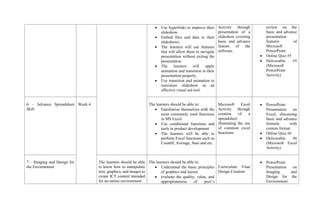
The learners should be able to: Microsoft
PowerPoint
• PowerPoint
Presentation on
• Use hyperlinks to improve their
slideshow.
• Embed files and data to their
slideshows.
• The learners will use features
that will allow them to navigate
presentation without exiting the
presentation
• The learners will apply
animation and transition in their
presentation properly.
• Use transition and animation to
maximize slideshow as an
effective visual aid tool.
Activity through
presentation of a
slideshow covering
basic and advance
feature of the
software.
review on the
basic and advance
presentation
features of
Microsoft
PowerPoint.
• Online Quiz #5
• Deliverable #5
(Microsoft
PowerPoint
Activity)
6 – Advance Spreadsheet
Skill
Week 4 The learners should be able to:
• Familiarize themselves with the
most commonly used functions
in MS Excel
• Use conditional functions and
tools in product development
• The learners will be able to
perform Excel functions such as
CountIf, Average, Sum and etc.
Microsoft Excel
Activity through
creation of a
spreadsheet
illustrating the use
of common excel
functions.
• PowerPoint
Presentation on
Excel, discussing
basic and advance
formula with
custom format.
• Online Quiz #6
• Deliverable #6
(Microsoft Excel
Activity)
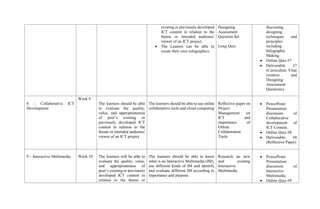
7 – Imaging and Design for
the Environment
The learners should be able
to know how to manipulate
text, graphics, and images to
create ICT content intended
for an online environment
The learners should be able to:
• Understand the basic principles
of graphics and layout.
• evaluate the quality, value, and
appropriateness of peer’s
Curriculum Vitae
Design Creation
• PowerPoint
Presentation on
Imaging and
Design for the
Environment
existing or previously developed
ICT content in relation to the
theme or intended audience/
viewer of an ICT project
• The Leaners can be able to
create their own infographics.
Designing
Assessment
Question Set
Long Quiz
discussing
designing
techniques and
principles
including
Infographic
Making.
• Online Quiz #7
• Deliverable #7
(Curriculum Vitae
creation and
Designing
Assessment
Questions)
8 – Collaborative ICT
Development
Week 9
The learners should be able
to evaluate the quality,
value, and appropriateness
of peer’s existing or
previously developed ICT
content in relation to the
theme or intended audience/
viewer of an ICT project
The learners should be able to use online
collaborative tools and cloud computing
Reflective paper on
Project
Management on
ICT and
importance of
Online
Collaboration
Tools
• PowerPoint
Presentation
discussion of
Collaborative
development of
ICT Content.
• Online Quiz #8
• Deliverable #8
(Reflective Paper)
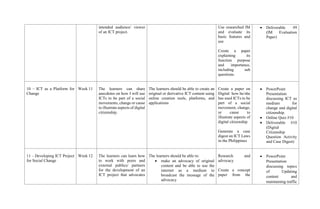
9 – Interactive Multimedia Week 10 The learners will be able to
evaluate the quality, value,
and appropriateness of
peer’s existing or previously
developed ICT content in
relation to the theme or
The learners should be able to know
what is an Interactive Multimedia (IM),
use different kinds of IM and identify
and evaluate different IM according to
importance and purpose.
Research an new
and existing
Interactive
Multimedia
• PowerPoint
Presentation
discussion of
Interactive
Multimedia.
• Online Quiz #9
intended audience/ viewer
of an ICT project.
Use researched IM
and evaluate its
basic features and
use
Create a paper
explaining its
function purpose
and importance,
including sub
questions.
• Deliverable #9
(IM Evaluation
Paper)
10 – ICT as a Platform for
Change
Week 11 The learners can share
anecdotes on how I will use
ICTs to be part of a social
movements, change or cause
to illustrate aspects of digital
citizenship.
The learners should be able to create an
original or derivative ICT content using
online creation tools, platforms, and
applications
Create a paper on
Digital how he/she
has used ICTs to be
part of a social
movement, change,
or cause to
illustrate aspects of
digital citizenship
Generate a case
digest on ICT Laws
in the Philippines
• PowerPoint
Presentation
discussing ICT as
medium for
change and digital
citizenship.
• Online Quiz #10
• Deliverable #10
(Digital
Citizenship
Question Activity
and Case Digest)
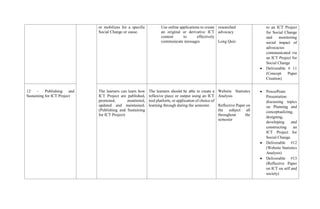
11 – Developing ICT Project
for Social Change
Week 12 The learners can learn how
to work with peers and
external publics/ partners
for the development of an
ICT project that advocates
The learners should be able to:
• make an advocacy of original
content and be able to use the
internet as a medium to
broadcast the message of the
advocacy
Research and
advocacy
Create a concept
paper from the
• PowerPoint
Presentation
discussing topics
of Updating
content and
maintaining traffic
or mobilizes for a specific
Social Change or cause.
Use online applications to create
an original or derivative ICT
content to effectively
communicate messages
researched
advocacy
Long Quiz
to an ICT Project
for Social Change
and monitoring
social impact of
advocacies
communicated via
an ICT Project for
Social Change
• Deliverable # 11
(Concept Paper
Creation)
12 – Publishing and
Sustaining for ICT Project
The learners can learn how
ICT Project are published,
promoted, monitored,
updated and maintained.
(Publishing and Sustaining
for ICT Project)
The learners should be able to create a
reflexive piece or output using an ICT
tool platform, or application of choice of
learning through during the semester.
Website Statistics
Analysis
Reflective Paper on
the subject all
throughout the
semester
• PowerPoint
Presentation
discussing topics
on Planning and
conceptualizing,
designing,
developing and
constructing an
ICT Project for
Social Change.
• Deliverable #12
(Website Statistics
Analysis)
• Deliverable #13
(Reflective Paper
on ICT on self and
society)

empowerment technologies syllabus grade 11

  • 1.
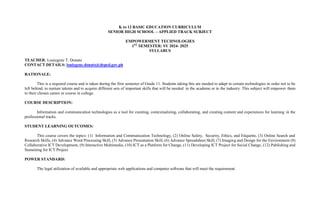
    K to 12BASIC EDUCATION CURRICULUM SENIOR HIGH SCHOOL – APPLIED TRACK SUBJECT EMPOWERMENT TECHNOLOGIES 1ST SEMESTER: SY 2024- 2025 SYLLABUS TEACHER: Louiegene T. Donato CONTACT DETAILS: louiegene.donato@deped.gov.ph RATIONALE: This is a required course and is taken during the first semester of Grade 11. Students taking this are needed to adapt to certain technologies in order not to be left behind, to nurture talents and to acquire different sets of important skills that will be needed in the academe or in the industry. This subject will empower them to their chosen career or course in college. COURSE DESCRIPTION: Information and communication technologies as a tool for curating, contextualizing, collaborating, and creating content and experiences for learning in the professional tracks. STUDENT LEARNING OUTCOMES: This course covers the topics: (1) Information and Communication Technology, (2) Online Safety, Security, Ethics, and Etiquette, (3) Online Search and Research Skills, (4) Advance Word Processing Skill, (5) Advance Presentation Skill, (6) Advance Spreadsheet Skill, (7) Imaging and Design for the Environment (8) Collaborative ICT Development, (9) Interactive Multimedia, (10) ICT as a Platform for Change, (11) Developing ICT Project for Social Change, (12) Publishing and Sustaining for ICT Project POWER STANDARD: The legal utilization of available and appropriate web applications and computer software that will meet the requirement.
  • 2.
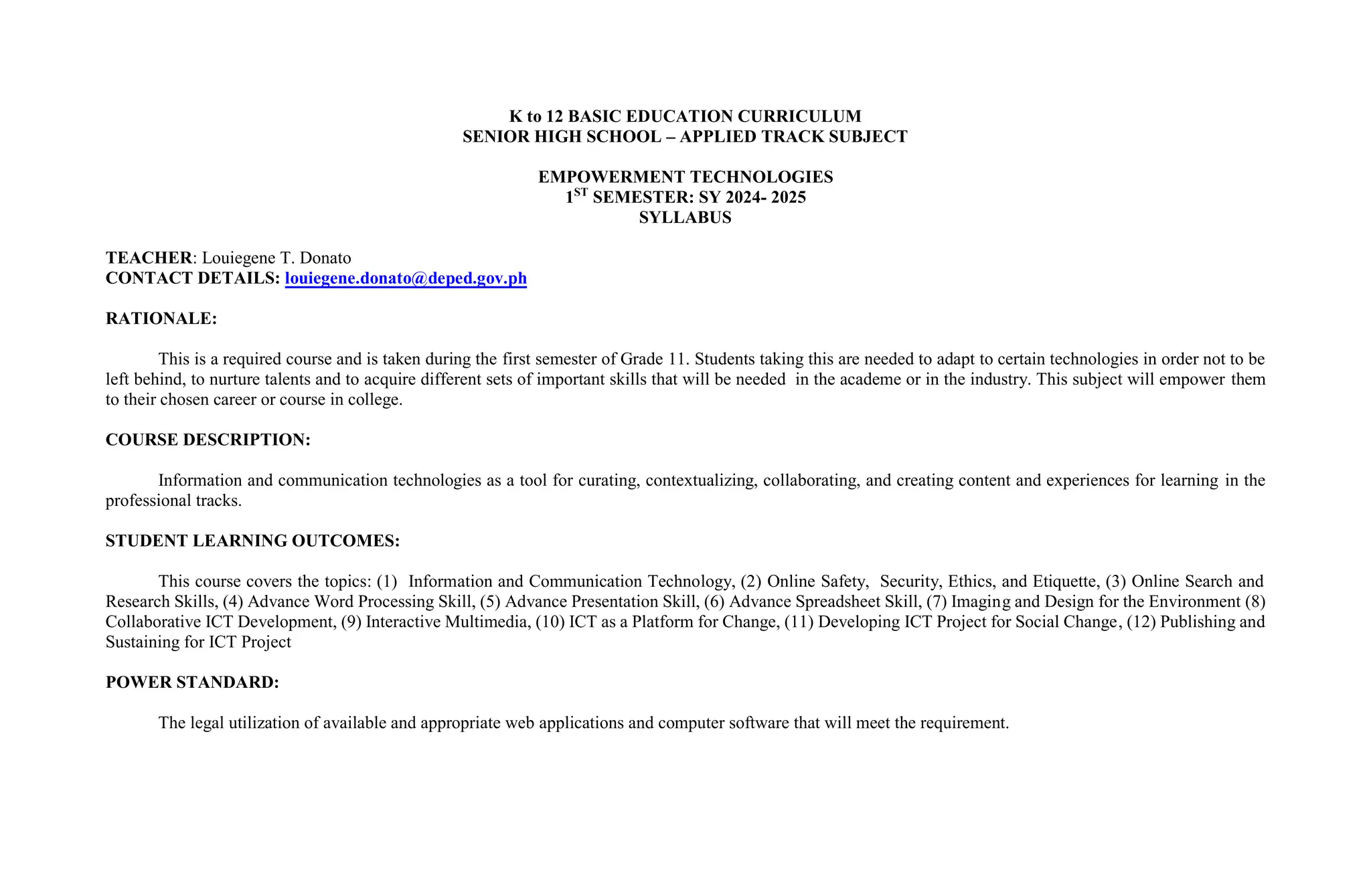
    Unit Topic WeekLearning Outcomes Objectives Assessment Learning Activities and Resources 1 – Information and Communication Technology Week 1 The learners will be able to compare, and contrast varied online platforms. The learners will be able differentiate the generation of Web 1.0, 2.0 and 3.0. The learners can distinguish the type of Web 2.0 application to best achieve specific class objectives or address situational challenges The learners will able to start basic online marketing for their Entrepreneurial subject utilizing Facebook page and other social media Activity to identify which sector has the biggest impact of effect of ICT in the Philippines and important applications that helped them in their life. Recitation from activity and lesson synthesis • PowerPoint presentation discussing the introduction to ICT. • Joining Facebook Group • Online Quiz #1 • Deliverable #1 (Encoded Activity) 2 – Online Safety, Security, Ethics, and Etiquette Week 2 The learners should be able to apply online safety and security standards and practice this in the use of ICTs. The learners should be able to: • Consider one and other’s safety when sharing information using the internet • Determine and avoid the dangers of the internet • Protect their selves of possible internet dangers like installing anti-virus • The learners should be able to: • Consider one and other’s reputation when using the internet • Be responsible in use of social networking sites Share an experience that you have always tend to do but later did you discover that it is not a standard of online safety, security, ethics, and etiquette. Recitation from activity • PowerPoint presentation discussing safety, security, ethics and etiquettes in ICT. • Online Quiz #2 • Deliverable #2 (Encoded Activity)
  • 3.
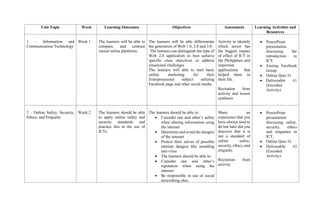
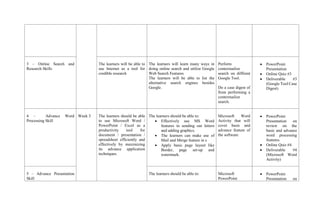
    3 – OnlineSearch and Research Skills The learners will be able to use Internet as a tool for credible research The learners will learn many ways in doing online search and utilize Google Web Search Features The learners will be able to list the alternative search engines besides Google. Perform contextualize search on diffirent Google Tool. Do a case digest of from performing a contextualize search. • PowerPoint Presentation • Online Quiz #3 • Deliverable #3 (Google Tool Case Digest) 4 – Advance Word Processing Skill Week 3 The learners should be able to use Microsoft Word / PowerPoint / Excel as a productivity tool for document / presentation / spreadsheet efficiently and effectively by maximizing its advance application techniques. The learners should be able to: • Effectively use MS Word features in sending out letters and adding graphics. • The learners can make use of Mail and Merge feature in s • Apply basic page layout like Border, page set-up and watermark. Microsoft Word Activity that will cover basic and advance feature of the software • PowerPoint Presentation on review on the basic and advance word processing features. • Online Quiz #4 • Deliverable #4 (Microsoft Word Activity) 5 – Advance Presentation Skill The learners should be able to: Microsoft PowerPoint • PowerPoint Presentation on
  • 4.
    • Use hyperlinksto improve their slideshow. • Embed files and data to their slideshows. • The learners will use features that will allow them to navigate presentation without exiting the presentation • The learners will apply animation and transition in their presentation properly. • Use transition and animation to maximize slideshow as an effective visual aid tool. Activity through presentation of a slideshow covering basic and advance feature of the software. review on the basic and advance presentation features of Microsoft PowerPoint. • Online Quiz #5 • Deliverable #5 (Microsoft PowerPoint Activity) 6 – Advance Spreadsheet Skill Week 4 The learners should be able to: • Familiarize themselves with the most commonly used functions in MS Excel • Use conditional functions and tools in product development • The learners will be able to perform Excel functions such as CountIf, Average, Sum and etc. Microsoft Excel Activity through creation of a spreadsheet illustrating the use of common excel functions. • PowerPoint Presentation on Excel, discussing basic and advance formula with custom format. • Online Quiz #6 • Deliverable #6 (Microsoft Excel Activity) 7 – Imaging and Design for the Environment The learners should be able to know how to manipulate text, graphics, and images to create ICT content intended for an online environment The learners should be able to: • Understand the basic principles of graphics and layout. • evaluate the quality, value, and appropriateness of peer’s Curriculum Vitae Design Creation • PowerPoint Presentation on Imaging and Design for the Environment
  • 5.
    existing or previouslydeveloped ICT content in relation to the theme or intended audience/ viewer of an ICT project • The Leaners can be able to create their own infographics. Designing Assessment Question Set Long Quiz discussing designing techniques and principles including Infographic Making. • Online Quiz #7 • Deliverable #7 (Curriculum Vitae creation and Designing Assessment Questions) 8 – Collaborative ICT Development Week 9 The learners should be able to evaluate the quality, value, and appropriateness of peer’s existing or previously developed ICT content in relation to the theme or intended audience/ viewer of an ICT project The learners should be able to use online collaborative tools and cloud computing Reflective paper on Project Management on ICT and importance of Online Collaboration Tools • PowerPoint Presentation discussion of Collaborative development of ICT Content. • Online Quiz #8 • Deliverable #8 (Reflective Paper) 9 – Interactive Multimedia Week 10 The learners will be able to evaluate the quality, value, and appropriateness of peer’s existing or previously developed ICT content in relation to the theme or The learners should be able to know what is an Interactive Multimedia (IM), use different kinds of IM and identify and evaluate different IM according to importance and purpose. Research an new and existing Interactive Multimedia • PowerPoint Presentation discussion of Interactive Multimedia. • Online Quiz #9
  • 6.
    intended audience/ viewer ofan ICT project. Use researched IM and evaluate its basic features and use Create a paper explaining its function purpose and importance, including sub questions. • Deliverable #9 (IM Evaluation Paper) 10 – ICT as a Platform for Change Week 11 The learners can share anecdotes on how I will use ICTs to be part of a social movements, change or cause to illustrate aspects of digital citizenship. The learners should be able to create an original or derivative ICT content using online creation tools, platforms, and applications Create a paper on Digital how he/she has used ICTs to be part of a social movement, change, or cause to illustrate aspects of digital citizenship Generate a case digest on ICT Laws in the Philippines • PowerPoint Presentation discussing ICT as medium for change and digital citizenship. • Online Quiz #10 • Deliverable #10 (Digital Citizenship Question Activity and Case Digest) 11 – Developing ICT Project for Social Change Week 12 The learners can learn how to work with peers and external publics/ partners for the development of an ICT project that advocates The learners should be able to: • make an advocacy of original content and be able to use the internet as a medium to broadcast the message of the advocacy Research and advocacy Create a concept paper from the • PowerPoint Presentation discussing topics of Updating content and maintaining traffic
  • 7.
    or mobilizes fora specific Social Change or cause. Use online applications to create an original or derivative ICT content to effectively communicate messages researched advocacy Long Quiz to an ICT Project for Social Change and monitoring social impact of advocacies communicated via an ICT Project for Social Change • Deliverable # 11 (Concept Paper Creation) 12 – Publishing and Sustaining for ICT Project The learners can learn how ICT Project are published, promoted, monitored, updated and maintained. (Publishing and Sustaining for ICT Project) The learners should be able to create a reflexive piece or output using an ICT tool platform, or application of choice of learning through during the semester. Website Statistics Analysis Reflective Paper on the subject all throughout the semester • PowerPoint Presentation discussing topics on Planning and conceptualizing, designing, developing and constructing an ICT Project for Social Change. • Deliverable #12 (Website Statistics Analysis) • Deliverable #13 (Reflective Paper on ICT on self and society)