Barracuda Email Protection
Confidentia
Telling the Story
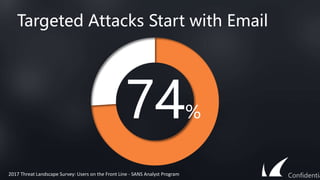
Targeted Attacks Start with Email
74%
2017 Threat Landscape Survey: Users on the Front Line - SANS Analyst Program Confidentia
Confidentia
Spam
and
Malwar
e
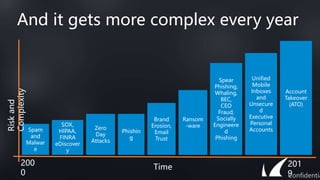
And it gets more complex every year
Risk
and
Complexity
Time
SOX,
HIPAA,
FINRA
eDiscover
y
Zero
Day
Attacks
Phishin
g
Brand
Erosion,
Email
Trust
Ransom
-ware
Spear
Phishing,
Whaling,
BEC,
CEO
Fraud,
Socially
Engineere
d
Phishing
Unified
Mobile
Inboxes
and
Unsecure
d
Executive
Personal
Accounts
200
0
201
9
Confidentia
Account
Takeover
(ATO)
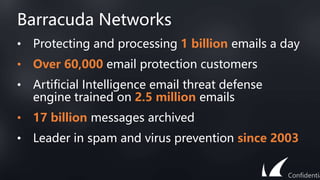
Barracuda Networks
• Protecting and processing 1 billion emails a day
• Over 60,000 email protection customers
• Artificial Intelligence email threat defense
engine trained on 2.5 million emails
• 17 billion messages archived
• Leader in spam and virus prevention since 2003
Confidentia
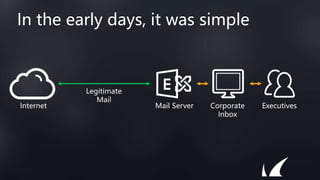
In the early days, it was simple
Mail Server Corporate
Inbox
Executives
Internet
Legitimate
Mail
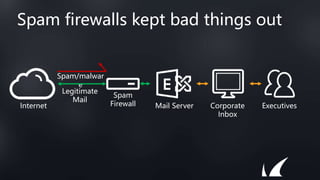
Spam/malwar
e
Spam firewalls kept bad things out
Spam
Firewall Mail Server Corporate
Inbox
Executives
Internet
Legitimate
Mail
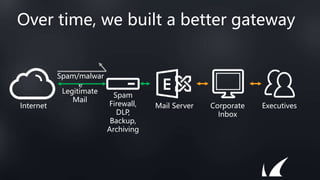
Over time, we built a better gateway
Spam/malwar
e
Spam
Firewall,
DLP,
Backup,
Archiving
Mail Server Corporate
Inbox
Executives
Internet
Legitimate
Mail
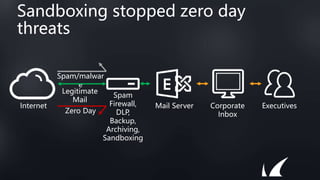
Sandboxing stopped zero day
threats
Spam/malwar
e
Spam
Firewall,
DLP,
Backup,
Archiving,
Sandboxing
Mail Server Corporate
Inbox
Executives
Internet
Legitimate
Mail
Zero Day
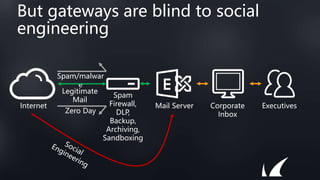
But gateways are blind to social
engineering
Spam/malwar
e
Spam
Firewall,
DLP,
Backup,
Archiving,
Sandboxing
Mail Server Corporate
Inbox
Executives
Internet
Legitimate
Mail
Zero Day
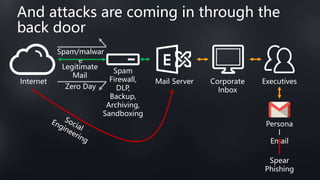
And attacks are coming in through the
back door
Persona
l
Email
Spear
Phishing
Spam/malwar
e
Spam
Firewall,
DLP,
Backup,
Archiving,
Sandboxing
Mail Server Corporate
Inbox
Executives
Internet
Legitimate
Mail
Zero Day
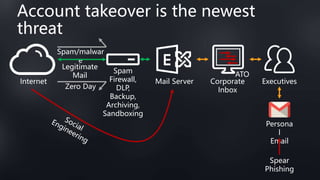
Account takeover is the newest
threat
Persona
l
Email
Spear
Phishing
Spam/malwar
e
Spam
Firewall,
DLP,
Backup,
Archiving,
Sandboxing
Mail Server Corporate
Inbox
Executives
Internet
Legitimate
Mail
Zero Day
ATO
Securing the gateway is still
necessary, but no longer sufficient
Confidentia
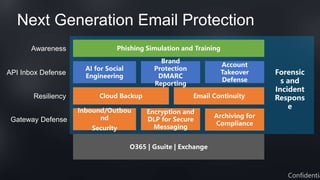
Next Generation Email Protection
O365 | Gsuite | Exchange
Inbound/Outbou
nd
Security
Encryption and
DLP for Secure
Messaging
Archiving for
Compliance
Gateway Defense
Phishing Simulation and Training
Awareness
Cloud Backup
Resiliency Email Continuity
Confidentia
API Inbox Defense
AI for Social
Engineering
Brand
Protection
DMARC
Reporting
Account
Takeover
Defense
Forensic
s and
Incident
Respons
e
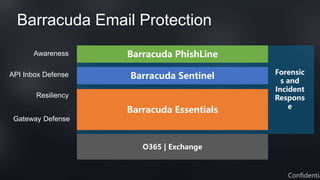
Barracuda Email Protection
O365 | Exchange
Barracuda Essentials
Barracuda Sentinel
Barracuda PhishLine
Gateway Defense
Resiliency
API Inbox Defense
Awareness
Confidentia
Forensic
s and
Incident
Respons
e
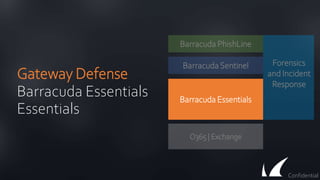
Gateway Defense
Barracuda Essentials
Essentials
O365 | Exchange
Barracuda Essentials
BarracudaSentinel
Barracuda PhishLine
Confidential
Forensics
and Incident
Response
Barracuda Essentials
• Office 365, on-premises and hybrid
• Simple quoting/bundling
• Per user licensing
• Web-based management
Comprehensive security, archiving, and backup solution
Confidentia
Advanced Email Security
• Inbound/Outbound Scanning
• Email Continuity
• Secure Messaging (Encryption,
DLP)
Easy-to-Use, Cloud-Based Email Security
Confidentia
Prevent Advanced Threats
• Multi layered threat protection
• Optimized for speed and efficacy
• Global threat intelligence network
Barracuda Advanced Threat Protection
Confidentia
Compliance Archiving
• Immutable journaled archiving
• eDiscovery search, hold, and export
• Mobile access
Cloud-based archiving for compliance and eDiscovery
Confidentia
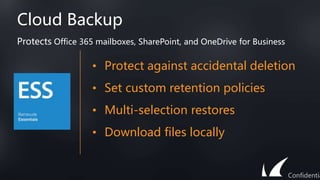
Cloud Backup
• Protect against accidental deletion
• Set custom retention policies
• Multi-selection restores
• Download files locally
Protects Office 365 mailboxes, SharePoint, and OneDrive for Business
Confidentia
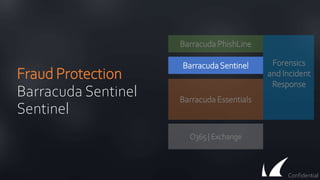
Fraud Protection
Barracuda Sentinel
Sentinel
O365 | Exchange
Barracuda Essentials
BarracudaSentinel
Barracuda PhishLine
Confidential
Forensics
and Incident
Response
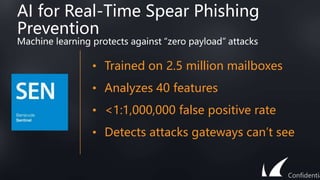
AI for Real-Time Spear Phishing
Prevention
• Trained on 2.5 million mailboxes
• Analyzes 40 features
• <1:1,000,000 false positive rate
• Detects attacks gateways can’t see
Machine learning protects against “zero payload” attacks
Confidentia
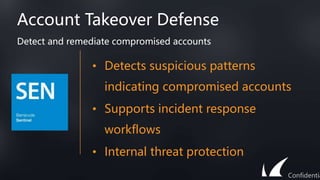
Account Takeover Defense
• Detects suspicious patterns
indicating compromised accounts
• Supports incident response
workflows
• Internal threat protection
Detect and remediate compromised accounts
Confidentia
Brand Fraud Prevention with DMARC
Reporting
• Rich reporting into brand usage
• Allows rapid remediation of
misuse
• Stops brand erosion
• Helps email deliverability and
trust
Instant visibility into brand use and misuse
Confidentia
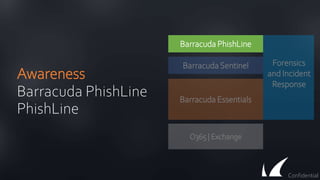
Awareness
Barracuda PhishLine
PhishLine
O365 | Exchange
Barracuda Essentials
BarracudaSentinel
Barracuda PhishLine
Confidential
Forensics
and Incident
Response
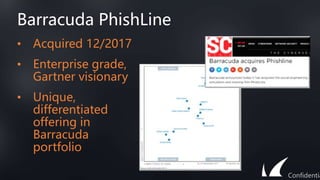
Barracuda PhishLine
• Acquired 12/2017
• Enterprise grade,
Gartner visionary
• Unique,
differentiated
offering in
Barracuda
portfolio
Confidentia
Phishing Simulation
Test and train high risk users
Confidentia
• Turns users from liability to strength
• Pre-built templates for quick time to
value
• Assess risk in a non-threatening
manner
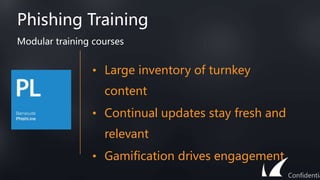
Phishing Training
Modular training courses
Confidentia
• Large inventory of turnkey
content
• Continual updates stay fresh and
relevant
• Gamification drives engagement
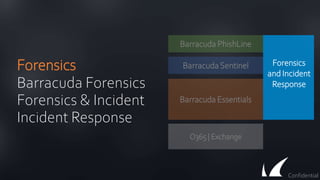
Forensics
Barracuda Forensics
Forensics & Incident
Incident Response
O365 | Exchange
Barracuda Essentials
BarracudaSentinel
Confidential
Forensics
and Incident
Response
Barracuda PhishLine
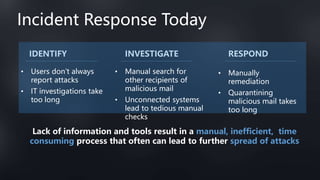
Incident Response Today
• Users don’t always
report attacks
• IT investigations take
too long
• Manual search for
other recipients of
malicious mail
• Unconnected systems
lead to tedious manual
checks
• Manually
remediation
• Quarantining
malicious mail takes
too long
Lack of information and tools result in a manual, inefficient, time
consuming process that often can lead to further spread of attacks
IDENTIFY INVESTIGATE RESPOND
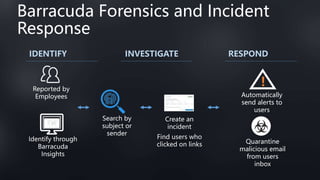
Barracuda Forensics and Incident
Response
Identify through
Barracuda
Insights
Reported by
Employees
!
Automatically
send alerts to
users
Quarantine
malicious email
from users
inbox
IDENTIFY INVESTIGATE RESPOND
Search by
subject or
sender
Create an
incident
Find users who
clicked on links
Barracuda Forensics and Incident
Response
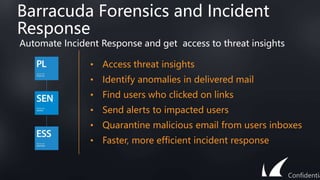
• Access threat insights
• Identify anomalies in delivered mail
• Find users who clicked on links
• Send alerts to impacted users
• Quarantine malicious email from users inboxes
• Faster, more efficient incident response
Automate Incident Response and get access to threat insights
Confidentia
Proven Success
Confidentia
Worldwide Adoption
BEDFORD
BOROUGH COUNCIL
Mid Cheshire Hospitals
NHS Foundation Trust
Confidentia
Case Study – Regional Airline
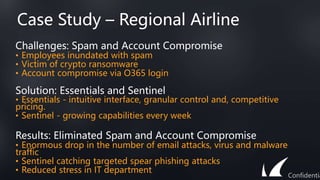
Challenges: Spam and Account Compromise
• Employees inundated with spam
• Victim of crypto ransomware
• Account compromise via O365 login
Solution: Essentials and Sentinel
• Essentials - intuitive interface, granular control and, competitive
pricing.
• Sentinel - growing capabilities every week
Results: Eliminated Spam and Account Compromise
• Enormous drop in the number of email attacks, virus and malware
traffic
• Sentinel catching targeted spear phishing attacks
• Reduced stress in IT department
Confidentia
Case Study – Private Insurance
Company
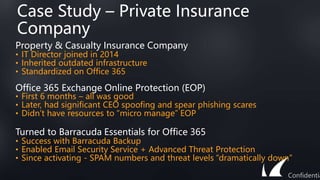
Property & Casualty Insurance Company
• IT Director joined in 2014
• Inherited outdated infrastructure
• Standardized on Office 365
Office 365 Exchange Online Protection (EOP)
• First 6 months – all was good
• Later, had significant CEO spoofing and spear phishing scares
• Didn’t have resources to “micro manage” EOP
Turned to Barracuda Essentials for Office 365
• Success with Barracuda Backup
• Enabled Email Security Service + Advanced Threat Protection
• Since activating - SPAM numbers and threat levels “dramatically down”
Confidentia
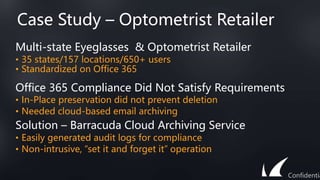
Case Study – Optometrist Retailer
Multi-state Eyeglasses & Optometrist Retailer
• 35 states/157 locations/650+ users
• Standardized on Office 365
Office 365 Compliance Did Not Satisfy Requirements
• In-Place preservation did not prevent deletion
• Needed cloud-based email archiving
Solution – Barracuda Cloud Archiving Service
• Easily generated audit logs for compliance
• Non-intrusive, “set it and forget it” operation
Confidentia
Next Steps
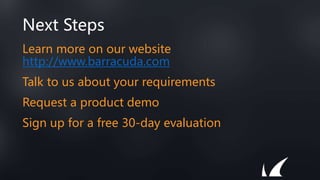
Learn more on our website
http://www.barracuda.com
Talk to us about your requirements
Request a product demo
Sign up for a free 30-day evaluation
Thank You
Confidentia

Email_Security Gateway.pptx

  • 1.
  • 2.
  • 3.
    Targeted Attacks Startwith Email 74% 2017 Threat Landscape Survey: Users on the Front Line - SANS Analyst Program Confidentia
  • 4.
  • 5.
    Spam and Malwar e And it getsmore complex every year Risk and Complexity Time SOX, HIPAA, FINRA eDiscover y Zero Day Attacks Phishin g Brand Erosion, Email Trust Ransom -ware Spear Phishing, Whaling, BEC, CEO Fraud, Socially Engineere d Phishing Unified Mobile Inboxes and Unsecure d Executive Personal Accounts 200 0 201 9 Confidentia Account Takeover (ATO)
  • 6.
    Barracuda Networks • Protectingand processing 1 billion emails a day • Over 60,000 email protection customers • Artificial Intelligence email threat defense engine trained on 2.5 million emails • 17 billion messages archived • Leader in spam and virus prevention since 2003 Confidentia
  • 7.
    In the earlydays, it was simple Mail Server Corporate Inbox Executives Internet Legitimate Mail
  • 8.
    Spam/malwar e Spam firewalls keptbad things out Spam Firewall Mail Server Corporate Inbox Executives Internet Legitimate Mail
  • 9.
    Over time, webuilt a better gateway Spam/malwar e Spam Firewall, DLP, Backup, Archiving Mail Server Corporate Inbox Executives Internet Legitimate Mail
  • 10.
    Sandboxing stopped zeroday threats Spam/malwar e Spam Firewall, DLP, Backup, Archiving, Sandboxing Mail Server Corporate Inbox Executives Internet Legitimate Mail Zero Day
  • 11.
    But gateways areblind to social engineering Spam/malwar e Spam Firewall, DLP, Backup, Archiving, Sandboxing Mail Server Corporate Inbox Executives Internet Legitimate Mail Zero Day
  • 12.
    And attacks arecoming in through the back door Persona l Email Spear Phishing Spam/malwar e Spam Firewall, DLP, Backup, Archiving, Sandboxing Mail Server Corporate Inbox Executives Internet Legitimate Mail Zero Day
  • 13.
    Account takeover isthe newest threat Persona l Email Spear Phishing Spam/malwar e Spam Firewall, DLP, Backup, Archiving, Sandboxing Mail Server Corporate Inbox Executives Internet Legitimate Mail Zero Day ATO
  • 14.
    Securing the gatewayis still necessary, but no longer sufficient Confidentia
  • 15.
    Next Generation EmailProtection O365 | Gsuite | Exchange Inbound/Outbou nd Security Encryption and DLP for Secure Messaging Archiving for Compliance Gateway Defense Phishing Simulation and Training Awareness Cloud Backup Resiliency Email Continuity Confidentia API Inbox Defense AI for Social Engineering Brand Protection DMARC Reporting Account Takeover Defense Forensic s and Incident Respons e
  • 16.
    Barracuda Email Protection O365| Exchange Barracuda Essentials Barracuda Sentinel Barracuda PhishLine Gateway Defense Resiliency API Inbox Defense Awareness Confidentia Forensic s and Incident Respons e
  • 17.
    Gateway Defense Barracuda Essentials Essentials O365| Exchange Barracuda Essentials BarracudaSentinel Barracuda PhishLine Confidential Forensics and Incident Response
  • 18.
    Barracuda Essentials • Office365, on-premises and hybrid • Simple quoting/bundling • Per user licensing • Web-based management Comprehensive security, archiving, and backup solution Confidentia
  • 19.
    Advanced Email Security •Inbound/Outbound Scanning • Email Continuity • Secure Messaging (Encryption, DLP) Easy-to-Use, Cloud-Based Email Security Confidentia
  • 20.
    Prevent Advanced Threats •Multi layered threat protection • Optimized for speed and efficacy • Global threat intelligence network Barracuda Advanced Threat Protection Confidentia
  • 21.
    Compliance Archiving • Immutablejournaled archiving • eDiscovery search, hold, and export • Mobile access Cloud-based archiving for compliance and eDiscovery Confidentia
  • 22.
    Cloud Backup • Protectagainst accidental deletion • Set custom retention policies • Multi-selection restores • Download files locally Protects Office 365 mailboxes, SharePoint, and OneDrive for Business Confidentia
  • 23.
    Fraud Protection Barracuda Sentinel Sentinel O365| Exchange Barracuda Essentials BarracudaSentinel Barracuda PhishLine Confidential Forensics and Incident Response
  • 24.
    AI for Real-TimeSpear Phishing Prevention • Trained on 2.5 million mailboxes • Analyzes 40 features • <1:1,000,000 false positive rate • Detects attacks gateways can’t see Machine learning protects against “zero payload” attacks Confidentia
  • 25.
    Account Takeover Defense •Detects suspicious patterns indicating compromised accounts • Supports incident response workflows • Internal threat protection Detect and remediate compromised accounts Confidentia
  • 26.
    Brand Fraud Preventionwith DMARC Reporting • Rich reporting into brand usage • Allows rapid remediation of misuse • Stops brand erosion • Helps email deliverability and trust Instant visibility into brand use and misuse Confidentia
  • 27.
    Awareness Barracuda PhishLine PhishLine O365 |Exchange Barracuda Essentials BarracudaSentinel Barracuda PhishLine Confidential Forensics and Incident Response
  • 28.
    Barracuda PhishLine • Acquired12/2017 • Enterprise grade, Gartner visionary • Unique, differentiated offering in Barracuda portfolio Confidentia
  • 29.
    Phishing Simulation Test andtrain high risk users Confidentia • Turns users from liability to strength • Pre-built templates for quick time to value • Assess risk in a non-threatening manner
  • 30.
    Phishing Training Modular trainingcourses Confidentia • Large inventory of turnkey content • Continual updates stay fresh and relevant • Gamification drives engagement
  • 31.
    Forensics Barracuda Forensics Forensics &Incident Incident Response O365 | Exchange Barracuda Essentials BarracudaSentinel Confidential Forensics and Incident Response Barracuda PhishLine
  • 32.
    Incident Response Today •Users don’t always report attacks • IT investigations take too long • Manual search for other recipients of malicious mail • Unconnected systems lead to tedious manual checks • Manually remediation • Quarantining malicious mail takes too long Lack of information and tools result in a manual, inefficient, time consuming process that often can lead to further spread of attacks IDENTIFY INVESTIGATE RESPOND
  • 33.
    Barracuda Forensics andIncident Response Identify through Barracuda Insights Reported by Employees ! Automatically send alerts to users Quarantine malicious email from users inbox IDENTIFY INVESTIGATE RESPOND Search by subject or sender Create an incident Find users who clicked on links
  • 34.
    Barracuda Forensics andIncident Response • Access threat insights • Identify anomalies in delivered mail • Find users who clicked on links • Send alerts to impacted users • Quarantine malicious email from users inboxes • Faster, more efficient incident response Automate Incident Response and get access to threat insights Confidentia
  • 35.
  • 36.
    Worldwide Adoption BEDFORD BOROUGH COUNCIL MidCheshire Hospitals NHS Foundation Trust Confidentia
  • 37.
    Case Study –Regional Airline Challenges: Spam and Account Compromise • Employees inundated with spam • Victim of crypto ransomware • Account compromise via O365 login Solution: Essentials and Sentinel • Essentials - intuitive interface, granular control and, competitive pricing. • Sentinel - growing capabilities every week Results: Eliminated Spam and Account Compromise • Enormous drop in the number of email attacks, virus and malware traffic • Sentinel catching targeted spear phishing attacks • Reduced stress in IT department Confidentia
  • 38.
    Case Study –Private Insurance Company Property & Casualty Insurance Company • IT Director joined in 2014 • Inherited outdated infrastructure • Standardized on Office 365 Office 365 Exchange Online Protection (EOP) • First 6 months – all was good • Later, had significant CEO spoofing and spear phishing scares • Didn’t have resources to “micro manage” EOP Turned to Barracuda Essentials for Office 365 • Success with Barracuda Backup • Enabled Email Security Service + Advanced Threat Protection • Since activating - SPAM numbers and threat levels “dramatically down” Confidentia
  • 39.
    Case Study –Optometrist Retailer Multi-state Eyeglasses & Optometrist Retailer • 35 states/157 locations/650+ users • Standardized on Office 365 Office 365 Compliance Did Not Satisfy Requirements • In-Place preservation did not prevent deletion • Needed cloud-based email archiving Solution – Barracuda Cloud Archiving Service • Easily generated audit logs for compliance • Non-intrusive, “set it and forget it” operation Confidentia
  • 40.
    Next Steps Learn moreon our website http://www.barracuda.com Talk to us about your requirements Request a product demo Sign up for a free 30-day evaluation
  • 41.

Editor's Notes

  • #2 This deck provides a high level overview of the current state of email borne risk and our defenses against them I’ll walk you through a summary of the threat landscape and take a look at how our defenses have evolved over time We will examine today’s most pressing email threats, and why traditional defenses were never built to stop them Finally, we’ll examine what a best practices, layered defense strategy against these threats looks like and look at some success stories
  • #4 It’s become a security industry cliché that email is the number one threat vector. Here’s a recent data point. In the 2017 Threat Landscape Survey: Users on the Front Line, conducted by the SANS Analyst Program, for the Top Threat Vectors - 74% of the threats entered as an email attachment or link. https://www.sans.org/reading-room/whitepapers/threats/2017-threat-landscape-survey-users-front-line-37910 Other studies and estimates have put this percentage as high as 90% or more. Clearly email is a huge source of risk for modern organizations. Let’s take a look at some recent examples to unpack the reasons why
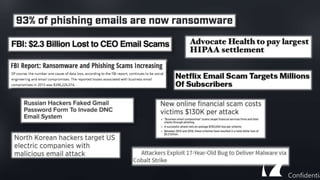
  • #5 Almost everyday we hear about a new phishing/spam/malware/ ransomware attack. Here are some examples pulled from the headlines These threats are a constant worry for small, medium and large organizations across all industries. From volumetric spam to regulatory compliance issues to CEO impersonation or “business email compromise” attacks email remains a target
  • #6 [NOTE: this slide is intentionally a bit of an oversimplification. If you get someone who nitpicks the order or phrasing, just say “you’re absolutely right. This is an oversimplification that’s here to make a point”] In fact, things seem to be getting more complicated and risky over time This makes sense – as our defenses get better, the adversary exhaust the low hanging fruit and have to turn to more sophisticated attacks In the early days, it was a “spray and pray” approach – cast a wide net and prey on a large volume of unsophisticated targets In the wake of Enron, regulations started to crack down on computing controls, and stringent regulations like SOX and HIPAA looked at email as a source of compliance risk The bad guys realized that antivirus was doing an ok job stopping run of the mill spam and malware, so they started writing custom, “zero day” attacks that could evade traditional email They realized that humans are the weakest link in the security defense chain and started launching phishing attacks As phishing attacks used corporate brands, companies found that they lost customer trust and had more trouble engaging customers through email Ransomware was an innovation that helped criminals more easily monetize their activity And continuing with the theme of ease of monetization, attackers started using social engineering to convince executives to wire funds or disclose sensitive information And as corporate defenses got better, the bad guys have started phishing executioves through unsecured personal accounts. With the rise of unified inboxes, it’s not always clear whether an email is from a personal or corporate account, which helps them succeed
  • #7 At Barracuda, we’ve been on the front lines of the battle since 2003 and we know a few things about email
  • #8 So to give a little more context to the threat landscape, let’s look at the evolution of our defenses. In the early days it was simple – legitimate mail would come across the internet, land in a mail server, get delivered into an inbox and users would send and receive
  • #9 In the early 2000’s, spam and malware started being sent via email more frequently Barracuda pioneered the spam firewall, which let legitimate mail through but stopped spam and malware
  • #10 As threats evolved, we improved on the spam firewall, which became the modern email gateway We included things like data loss prevention and encryption to stop leakage of sensitive information Backup and archiving, which don’t actually sit on the gateway, provided important capabilities to recover from accidental deletion and to archive mail for compliance or storage purposes
  • #11 With the rise of zero day threats – threats that were new or custom and therefore couldn’t be caught by backwards looking signatures – the industry needed a new approach Sandboxing is a technique that doesn’t rely on having seen a specific attack before. It puts a potentially malicious message into a virtual environment to see if it does anything nefarious
  • #12 But both traditional gateway security and advanced threat protection techniques like sandboxing both rely on spotting a malicious payload These defenses look for a piece of malware – either a bad attachment with a virus or a link to a malicious website Social engineering attacks don’t contain links or attachments – they try to trick users into doing something To a gateway, a social engineering, business email compromise or CEO fraud attack looks just like any other piece of email
  • #13 As if that weren’t bad enough, the bad guys have realized that executives frequently access both work and personal email from a unified inbox Think about a mobile device that has an inbox that combines email from corporate and personal accounts – a distracted employee might not even know which account each email came from The unsecured personal email account is a soft entry point into the executive inbox, and as a result phishing attacks through the back door can be brutally effective
  • #14 But the nastiest emerging threat we are seeing is the rise of account takeover (ATO) In these attacks, the adversary gains login information and uses legitimate email accounts to send and receive mail from within the domain These email aren’t spoofed – they really are from who they say they are from To make matters worse, internal emails never even cross the gateway. So a gateway solution can’t even see the emails – much less recognize they are illegitimate
  • #15 In the early 2000’s, the network security perimeter collapsed – it became important to secure data wherever it lived on the network We are at a similar moment for email security Securing the gateway is still necessary, but the threats have moved beyond the gateway. It’s no longer sufficient.
  • #16 So what does a modern email protection stack look like? It all starts with the mailbox. Whether you’re on a cloud service like Office 365 or Gsuite, on prem or in a hybrid configuration, the defenses are the same The gateway is as important as ever, so make sure you have inbound and outbound security deployed, including traditional signature defenses and advanced techniques like sandboxing. Secure yourself against accidental and malicious data loss with encryption and DLP and archive important emails for compliance and/or storage reasons On top of that, ensure resiliency with backup to recover from accidental or malicious deletion of data and a continuity service to ensure that critical emails can get sent during an outage To stop attacks that bypass the gateway, artificial intelligence can predict how likely an email is to be to or from the person it purports to be from And the DMARC standard is useful to make sure that bad actors aren’t send sending spam and phishing attacks using your domain and brand Account takeover is an emerging problem, where legitimate accounts are taken over and used to spread bad things. We stop those too. As the last line of defense against email that comes in through personal accounts, it’s critical to turn your users from a liability into a control. Phishing simulation and training makes your executives resilient. Finally, Barracuda Forensics and Incident Response automates incidence response and provides remediation options to address issues faster and more efficiently. Admins can send alerts, quarantine malicious emails and use threat insights for proactive threat detection.
  • #17 In fact, we’ve built our product portfolio to support that layered approach to security Barracuda Essentials provides gateway defenses and resiliency Barracuda Sentinel stops brand hijacking and catches social engineering attacks using artificial intelligence And Barracuda PhishLine provides the last line of defense – training your employees to spot and thwart phishing attacks on unsecured personal accounts The approach is totally modular, letting you layer in defense where you need a boost, or use all three components for the ultimate in protection
  • #18 So let’s take a look at the portfolio – starting with gateway defense from Barracuda Essentials
  • #19 Essentials is a cloud-based solution including multi-layer email security with advanced threat protection, compliance archiving, and Office 365 cloud backup. Essentials is for Office 365, On-Premises and hybrid deployments and as well for other Cloud Email Services like GSuite. Whatever the customer environment – Essentials fits all configurations. Essentials is an easy to deploy Software-as-a-Service solution leveraging our expertise in Security and Data Protection. . Essentials is available on a per-user license basis, has a simple pricing model and is easy to use for administrators and end-users
  • #20 ESS’s main function is to protect your email from spam and viruses, however, it has some other great features as well. This includes email continuity for emergency failover, which basically means that whether you are on prem or in the cloud and your system fails, you can failover onto Barracuda in the interim until we can get you back up. Think about it like you’re driving to work and your car breaks down. You still need to get to work, but you have a flat tire. Instead of waiting on the side of the road, you call an Uber. Barracuda will get you where you need to go until we can get you back up and running on your own. This is not to say that your system will ever shut down, but things like natural disasters and hacking do occur. The other interesting function is DLP and encryption protection. We like to say that ESS keeps all of the bad stuff out while DLP and encryption keeps all of the good stuff in. Imagine you work at a hospital and you need to send sensitive patient information out to other places. You want to ensure that information does not fall into the wrong hands. The last thing I want to mention is ATP. If an email pops up in a mailbox and it seems suspicious or maybe the link or the attachment or something in the email was flagged, it will be remote detonated to the sandbox where it can be opened in a safe environment. This is to ensure that your computer and your files will not be harmed. While email is one of the biggest infiltration points into a company, it is not the only point. In addition to email, companies can be hacked from their web, web apps, network and even their mobile devices. If a threat is flagged in their email, that information will be shared with all of the other threat vectors to secure all of the threat vectors.
  • #21 To stop advanced zero day threats and polymorphic malware, we offer Advanced Threat Protection. There is a need to protect against all of the threats, across all of the threat vectors on all of the attack surfaces. Barracuda has created a multi-layered threat detection system that has been optimized to be used in the cloud. ATP stops attacks whether they’ve been in the wild or years or it’s being seen for the first time – without relying on signatures
  • #22 Barracuda’s compliance archiving will preserve records in their actual form ensuring they haven’t been tampered with. Its main function is to archive for compliance and eDiscovery and compliance is just a fancy word for records retention. Well what does that mean? Let’s say you work at a law firm and you need to have all of your documents readily accessible that date back 7 years. With compliance, we not only retain your information, we also ensure that it is preserved in it original state meaning that no one has tampered with it or deleted it. With eDiscovery, not only do we retain and preserve your information, we make it searchable. When you’re looking for that email from 3 years ago, we make it easier to find that needle in the haystack. Sometimes natural disasters and hacking can cause a companies system to go down. In the event that it does go down, cloud archiving makes it possible to access your information even in a mail server outage.
  • #23 With Barracuda backup, the power is in the hands of the customers. They have the power to choose how they want to backup, how often and how quickly they would be able to access those documents. With backup, you can set custom retention policies, you can choose to do automatic or manual backup and even conduct multi selection restores. This component of essentials really gives that control back to the administrator. Backup is especially important to protect against malicious deletion. You can retain deleted information much longer than O365, giving you peace of mind
  • #24 Now let’s look at our fraud prevention layer, Barracuda Sentinel
  • #25 Barracuda Sentinel uses artificial intelligence to stop spear phishing attacks without a payload (malicious attachment) that gateway defenses miss Sentinel does that by applying machine learning techniques to build a model of what a “good” email from a specific user is likely to look like The artificial intelligence was trained on over 2.5 million mailboxes, and it analyzes over 40 features – things like sender, time of day sent, etc Unlike rules and policy based approaches, Sentinel is incredibly accurate – with a false positive rate less than 1 in a million. That means that important emails get through when they’re supposed to, while spear phishing attacks get stopped in their tracks
  • #26 The second third component of Sentinel is…
  • #27 The second component of Sentinel is brand fraud prevention Sentinel leverages a standard called DMARC (Domain-based Message Authentication Reporting and Conformance), which builds on two previous standards SPF (sender policy framework) and DKIM (domain keys identified mail) to make sure email is from who it’s supposed to be from The real value behind DMARC is in REPORTING – it helps you understand who is using your domain, and by extension your brand There may be legitimate third parties sending email on your behalf – for instance, a marketing email tool. But the reporting gives you rich insight into who is using your brand so you can set DMARC to enforce rules appropriately, and stop people from misusing your email domain All of that means better engagement with customers and the ability to stop brand erosion
  • #28 The final piece of the puzzle is Barracuda PhishLine – your last line of defense against hard to detect phishing attacks that come in through unsecured channels
  • #29 PhishLine is a recent addition to the Barracuda family, acquired at the end of 2017 It’s an enterprise grade solution, recognized by Gartner as a visionary player in the space
  • #30 PhishLine offers power simulation capabilities, that let you test and train high risk users By reinforcing behavior, you turn your users from a liability into strength in resisting carefully crafted and difficult to detect attacks PhishLine comes with customizable pre-built templates, which means fast time to value and relevant content based on industry trends and best practices And finally, simulation allows you to assess your risk in a relatively transparent and non-threatening manner
  • #31 The second component of PhishLine is modular training courses PhishLine comes with a large inventory of turnkey content, which means your employees get the relevant training they need quickly PhishLine comes with monthly updates so that your content is always fresh and relevant – with minimal effort on you behalf And finally, clever gamification gets your users involved and motivated and engaged
  • #32 The final piece of the puzzle is Barracuda PhishLine – your last line of defense against hard to detect phishing attacks that come in through unsecured channels
  • #33 User don’t always report attacks. And any independent investigation that is carried out by an IT could take too long. If suspicious email is identified, admins need to search through mail serves in case anyone else within organization received the same message. Most organizations will receive tens of thousands email every day – looking for malicious email is a long, tedious process. Let’s say IT identified 100 users that received the same email – they now have to contact all of these users to make sure that they do not open and remove malicious message from the inbox. Most of the time this process is manual and ineffective as it’s hard to get attention of every user.   Lack of information and tools result in a manual, inefficient, time consuming process that often can lead to further spread of attacks.
  • #34 So how can Barracuda’s Forensics and Incident Response help. You users will continue to report incidents as they come in. In addition to that you can also use insights from Forensics and Incident response to find anomalies in delivered mail and speed up your own investigations. For example, admins can access a visual report that shows where email is coming from, what countries it originates from. If most of their business and email comes from North America and they notice a couple of email originating from Nigeria, they can quickly review and determine if email is legitimate.   Once malicious email is identified, admins can use Barracuda to quickly search through their email servers to identify other messages from the same sender of with same subject line. The search will return all associated emails and users that received them. This takes only a few seconds and saves a lot valuable time. Once all malicious emails where identified admins can create incidents and move to remediation.   Remediation is very fast and easy. With a couple of clicks admins can automatically send alerts to all impacted users. And quarantine messages directly from users’ inbox.
  • #35 No email defense can protect against every email threat one hundred percent of the time When email attacks get through Forensics and Incident Response help to address and clean up. Process that is usually manual and takes time is now automated Admins can send alters to users who received malicious email They can also remove and quarantine malicious messages directly from user’s inbox Use insights to identify anomalies in delivered email to detect email attacks that bypassed emails security Create new incidents based on the findings Faster, more efficient, and more effective way to deal with incident response
  • #37 We have a portfolio of customers ranging from small and medium businesses to Fortune 1000 companies that span all industry verticals. Barracuda Networks’ success is due in part to the diversity of data contributions from the more than 150,000 customers worldwide that count on Barracuda Networks products. Below is a sample of Barracuda Networks’ expansive customer portfolio. -- Everyone using email, no matter what industry, no matter what region, no matter what size.
  • #38 A regional airline in the US had a problem – its employees were getting too much spam, they had been a victim of ransomware and account compromise They turned to Barracuda for a solution – a combination of Essentials to lock down inbound and outbound mail and a chance to be an early adopter of Sentinel to help with spear phishing The results were dramatic – email attacks dropped rapidly. Everyone slept better at night.
  • #39  Took over as IT Director at beginning 2014 When arrived system dated.  Previous director was not an early adopter. Was also hodge/podge.  Diversified across different vendors av/backup/etc. Met with Exec team to modernize and based on cost/trouble with Exchange…decided to go to O365 Everything was good for about 6 months with EOP…things were fine but as time progressed noticed more and more things slipped through. Being Financial Services had some scares from CEO Spoofing, Spear Phishing, etc. Did some research to find what could supplement native MSFT features. When modernized implemented Barracuda Backup.  Had previous experience with Barracuda and trusted the product. Did a demo and almost instantly saw a difference.  Wasn’t overly expensive. Since activating SPAM numbers, threat levels dramatically down.  No complaints, everything works as expected, good support. Loves that doesn’t have to micromanage security, can just set it and forget it. Wanted to focus attention on other things than managing spam policies. Uses archiving as rainy day insurance policy and can quickly find emails when needed. E3 for executives, E1 for rest of staff     Deployed Essentials w/Compliance in March 2016
  • #41 The first step you should take is to really understand and acknowledge the changing email threat landscape. This means understanding that attacks are no longer in your face and easy to detect, but instead are now hiding in the shadows and these attacks could be happening in the background without any detection. Once you are aware of these sophisticated and evolving threats you can then determine the impact of these threats on your company, which brings us to the next step. This step is really determining the current shape of your company. Do you currently have solutions in place to handle these sophisticated attacks? Do you have a backup plan if things go wrong? And if you don’t, what could you risk losing? This step means understanding the impact that an attack could have on your employees’ jobs, your company’s bottom line and more importantly, the company’s reputation. After acknowledging the changing threat landscape and determining the impact than an attack could have on your company, the last step is deploying solutions to avoid these attacks. By deploying the solutions in essentials, you are ensuring that your company is secure and that data is archived and backed up so that in case something were to happen, your company would be covered. Now that we have you thinking of the importance of changing your mindset from “that is never going to happen to me” to “it could very well happen, but I will be prepared when it does” there are a few immediate steps that you can take. The first is to talk to us about your requirements, and ask us to do a demo of the product. The second is to consider starting a free 30 day trial. Essentials as well as all other Barracuda products come with a free 30 day trial and this is extremely important because this means that you can see these products working in your own environment before you decide to purchase.