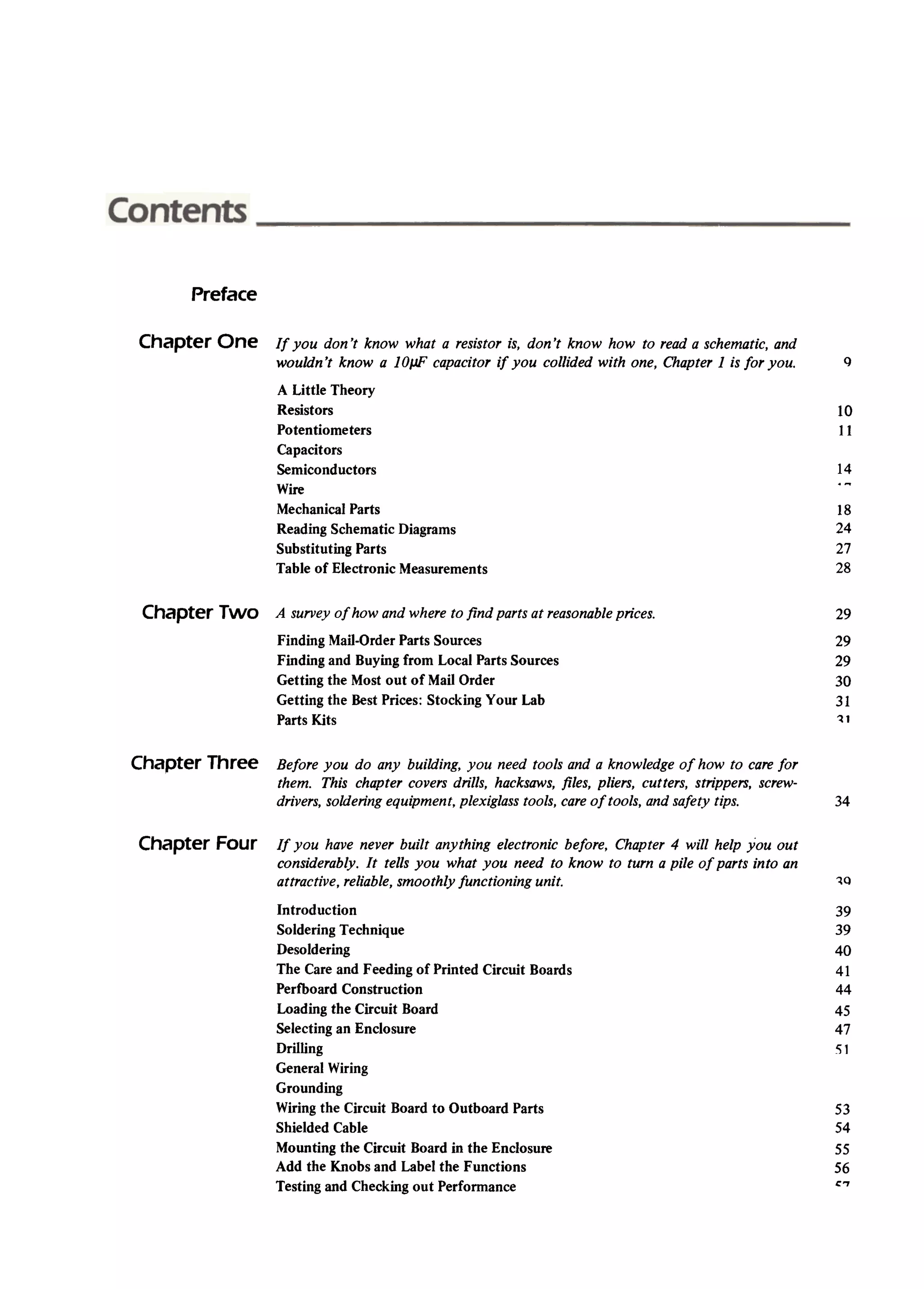
Preface
ChapterOne If you don't know what a resistoris, don't know how to reada schematic,and
wouldn't knowa 10JJFcapacitorif you collided with one, Chapter1 is for you. <)
10
11
14
A Little Theory
Resistors
Potentiometers
Capacitors
Semiconductors
Wire
MechanicalParts
ReadingSchematicDiagrams
SubstitutingParts
TableoCElectronicMeasurements
18
24
27
28
ChapterTwo 29
29
29
30
31
~1
A surveyo[ howandwhereto /ind partsat reasonableprices.
FindingMail-OrderPartsSources
FindingandBuyingfrom LocalPartsSources
Gettingthe Mostout of Mail Order
Gettingthe DestPrices:StockingYour Lab
PartsKits
Chapter Three Beforeyou do any building, you needtoo/sand a know/edgeof how to carefor
them. This chaptercoversdril/s, hacksaws,fi/es, p/iers, cutters, strippers,screw-
drivers,so/deringequipment,p/exig/asstoo/s,careoftoo/s, andsafetytips. 34
ChapterFour II you haveneverbuilt anything electronicbelore, Chapter 4 will help you out
considerably.It tells you what you needto know to tum a pile ol parts into an
attractive,reliable,smoothlylunctioning unit. 1Q
39
39
40
41
44
45
47
51
53
54
55
56
,7
Introduction
SoIdeñng Technique
Desoidering
The Careand Feeding of Pñnted Circuit Boards
Perfboard Construction
Loading the Circuit Board
Se³ectingan EncIosure
Dñ³ling
Genera³Wiñng
Grounding
Wiñng the Circuit Board to Outboard Parts
ShieIded rabie
Mounting the Circuit Board in the Enc³osure
Add the Knobs and Labe³ the Functions
Testing and Checking out Performance
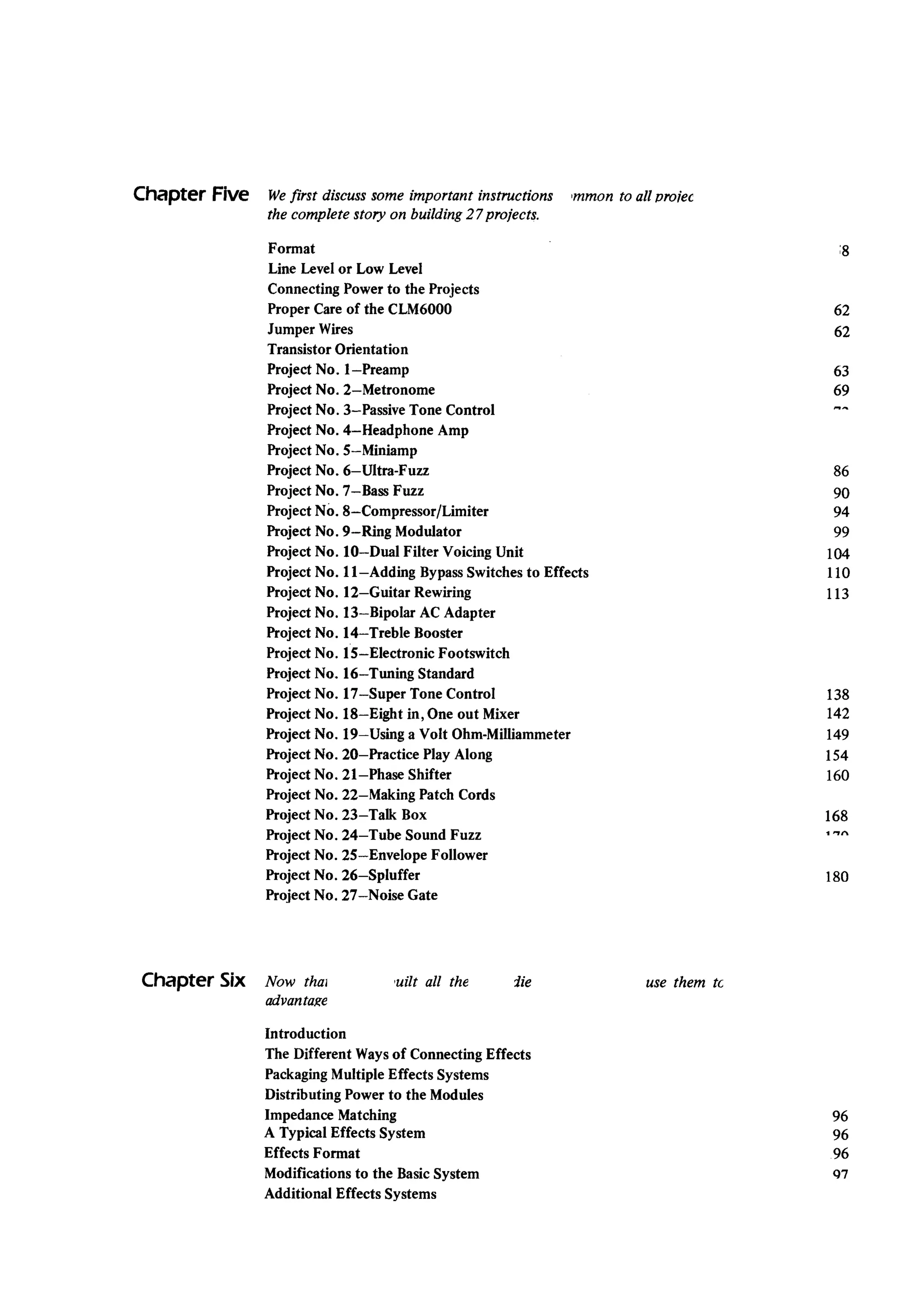
ChapterFive Wefirst discusssomeimportant instructions
thecompletestory on building27projects.
'mmonto a/l vro;ec
:8
62
62
63
69
_¥
86
90
94
99
104
110
113
138
142
149
154
160
168
"'7"
Format
Line Levelor Low Level
ConnectingPowerto the Projects
ProperCareof theCLM6000
JumperWires
TransistorOrientation
ProjectNo. I-Preamp
ProjectNo. 2-Metronome
ProjectNo. 3-PassiveToneControl
ProjectNo. 4-HeadphoneAmp
ProjectNo. S-Miniamp
ProjectNo. 6-Ultra-Fuzz
ProjectNo. 7-BassFuzz
ProjectNo. 8-Compressor/Limiter
ProjectNo. 9-Ring Modulator
ProjectNo. lO-Dual Filter VoicingUnit
ProjectNo. II-Adding BypassSwitchesto Effects
ProjectNo. 12-Guitar Rewiring
ProjectNo. 13-Bipolar AC Adapter
ProjectNo. 14-Treble Booster
ProjectNo. IS-Electronic Footswitch
ProjectNo..16-Tuning Standard
ProjectNo. 17-Super ToneControl
ProjectNo. 18-Eight in, Oneout Mixer
ProjectNo. 19-Using aVolt Ohm-Milliammeter
ProjectNo. 20-PracticePlayAlong
ProjectNo. 21-PhaseShifter
ProjectNo. 22-Making PatchCords
ProjectNo. 23- Talk Box
ProjectNo. 24-Tube SoundFuzz
ProjectNo. 2S-EnvelopeFolIower
ProjectNo. 26-Spluffer
ProjectNo. 27-Noise Gate
180
Chapter Six Now thal
advanta~e
i¿e'uilt al! the usethem tc
96
96
96
Q7
Introduction
The Different Waysof Connecting Effects
PackagingMultiple Effects Systems
Distributing rower to the Modules
Impedance Matching
A Typical Effects System
Effects Format
Modifications to the BasicSystem
Additional Effects Systems
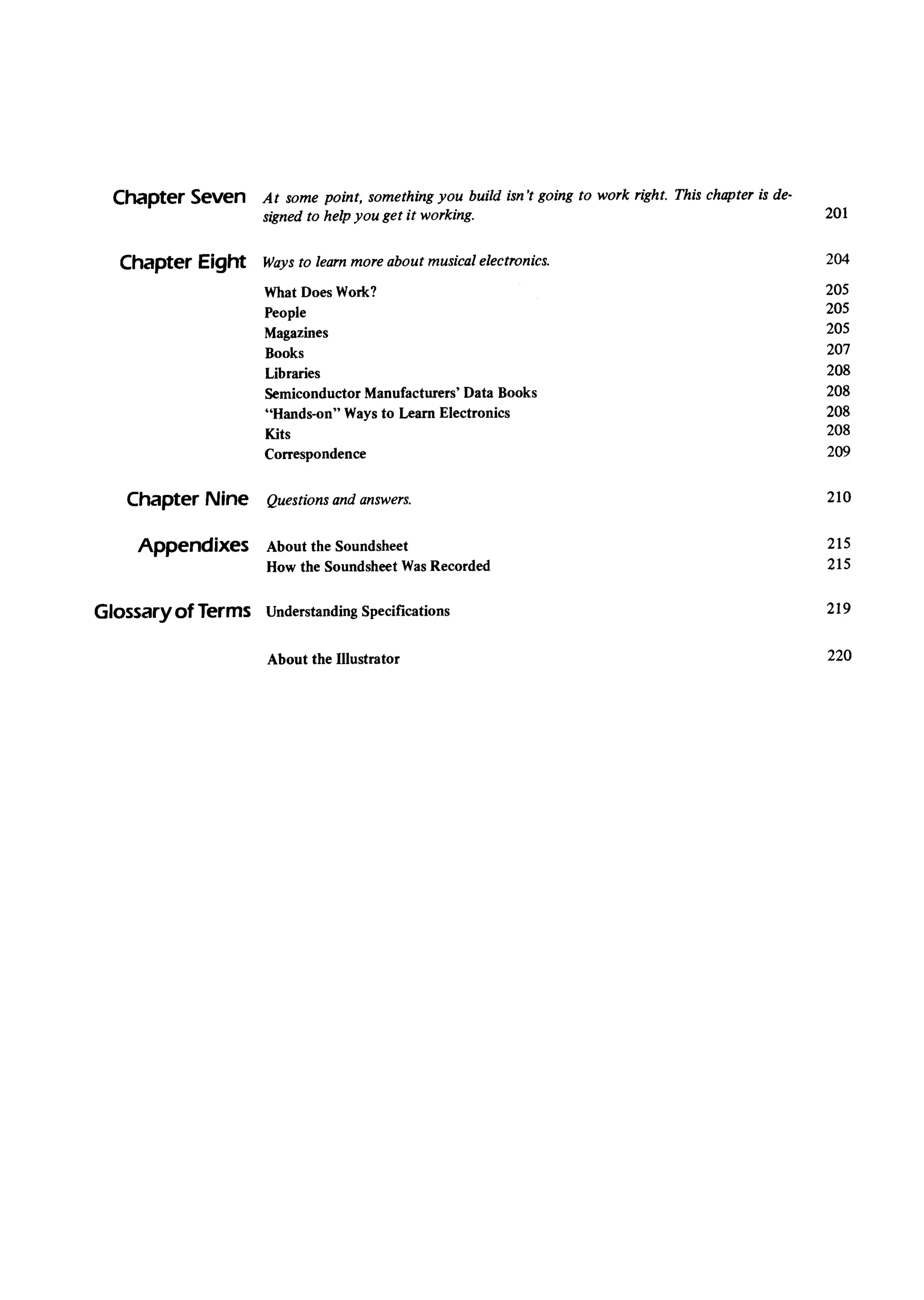
Chapter Seven At somepoint, somethingyou build isn't going to work right. Thischapteris de-
signedto helpyou Ketit working. 201
Chapter Eight 204Waysto learn more about musical electronics.
205
205
205
207
208
208
208
208
209
WhatDoesWork?
People
Magazines
Books
Libraries
SemiconductorManufacturers'DataBooks
"Hands-on"Waysto LearnElectronics
Kits
Correspondence
ChapterNine 210Questions and answers.
Appendixes 215
215
About the Soundsheet
How the SoundsheetWasRecorded
219Glossaryot Terms UnderstandingSpecifications
220About the lIIustrator
As of this date,tensof thousandsof musicians-manywilli no prior experiencein electronics
-have takencontrol of their sound,by buildingelectronicmodifiersfrom the fust edition of
this book. Beginnersshouldbe happy to know that the instructionalmaterialfrom the fust
edition hasbeen left intact, and in somecaseshasbeenexpanded.Thosewho havethor-
oughly absorbedthe information in the fust edition will bepleasedto find anumberof new
andimprovedprojects,aswell asadditionalinformation on creatingpedalboardsandmulti-
ple effects systems,explanationson the theory of operation of the variousprojects,and
warg to modify them for customizedperformance.So,while this newedition wasstill ex-
presslywritten willi beginnersin mind, I believethereisenoughadditionalmaterialto hold
the musician'sinterest evenafter he or shehaspassedthe introductory stageof leaming
aboutthis art.
Oneof the questionsI consistentlyhearis,"But caDI really build this stuff, eventhough
I know nothing about electronics?"The answeris yes.My files arefilled with lettersfrom
people who expressamazementand delight at havingbuilt a high-t.echnologydevice,by
themselves,without aDYproblems.If they cando i³, if I caDdo it (rememberI wasODcea
beginnertoo!), thenyou caDdo i³.
Why do it yourself? Perhapsa better questionis why not do it yourself.Whileyou gen-
erally savemoneycomparedwilli buying a commerciallyavailabledevice,you algohavethe
satisfactionof creatingsomethingwith your owo two hands,andyou leamenoughabout
the project in the processof building it so that you caDmodify it to suityour exactneeds.
A lesstangible,but perhapsmoreiroportant,advantageis the increasein self-confidencethat
comesfrom knowing that you caDmake senseout of all thosewiresand parts,and tum
them into a useful, working project. I've known numerouspeoplewho thought they'd
neverunderstandthis stuff; but whenthey do, they feelalittle better aboutthemselvesand
their abilitiesbecauseof i³.
It took longerto rewritethisbook thanit did to write it in the fust place,mostlybecause
I wantedthe projectsto beequalto-and, if possible,superiorto-other, comparabledevices
availableon the market.Thishasmeantthat generally,the projectsaresomewhatmorecom-
plex than thosepresentedin the fust book;however,overtheyearsI've foundthat anybody
who caDsuccessfullybuild a project with one IC and ten other partscaDalgosuccessfully
build aprojectwith two ICsandtwenty otherparts.Therearestill anumberof introductory
projects,essentiallyunchangedfrom the fust edition, for thosewho preferto startorf with
somethingreally simple.
In ciosing,I'd like to thank severalpeoplewho otherwisemight not get the recognition
they deserve.First is VestaCopestakes,aconstantsourceofinspiration andavery fiDeillus-
tratorjphotographer;Jiro Crockett, publisherof Guitar Player magazine,who fust recog-
nizedtheneedfor abook like this; Bill Godbout,for histechnicalassistance;BruceMycroft,
for laying out the circuit boardsso I could spendall my time writing; andthe peopleat
MusicSales(my publisher),who didn't hassIeme or tfY to speedmeup whenI kept asking
for more time to makethis manuscriptasgoodasI couldpossiblymakeit. Finally (savethe
best until last), thanks to all the peoplewho enjoyedthe fust edition of this book-your
support andyour commentsarethe reasonwhy this revisededition exists.May your proj-
ectsalwayskeepworking!
...
If you don't know what a resistor is,
don't know how to reJd a schematic,
and wouldn't knowa 1°/.LFcapacitorif
you collidedwith one, Chapter 1 is for
you.
ALIttle Theory rather than just dealing with the number of electrons
going down a conductor. With OUTautomobile analogy,
voltage would be equivalent to the speedof the car in
mph. A condition in a circuit where there is no voltage
present is referred to as ground, or minimum possible
intensity (zero volts-the volt, abbreviated V, measures
voltage). There are still just as many electrons hanging
around; but they have no intensity, and don't do any-
thing. A moce intense level of activity trans1atesinto
higher voltage.
What provides this intensity? Well, in electrical circuits
you need an area that Iacks electrons and wants to ac-
quire some, and an ar-êathat has a surplus of electrons.
(The best example of this is a battery: one terminal is
loaded with electrons just waiting to get out and do
their number, whereas the other terminal is begging to
have eIectrons come in.) The intensity with which the
electrons want to get from one end to the other is .the
voltage. The medium through which the electrons make
their joumey from one areato another is the conductor.
This brings us to resistance. The reasonfor resistance
is that when the electrons tfY to get from one areato the
other through the conductor, they are always trying to
move as quickly as they caD, and you have to control
them in some way. AlI conductors represent a certain
amount of resistance, since no conductor is 100 percent
efficient. To control eIectron flow in a predictable man-
ner, you use resistors; these are electrical parts similar to
conductors, but which resist to a greater or lesserextent
the flow of current. Putting one in line with a conductor
is like putting up a 50-mph ZOfiein the middle of a high-
way: the energy Ievel decreases,yielding a moce con-
trolle d flow. The resisting ability of a resistorisexpressed
in ohms (named after GeorgSimon Ohm, aGermanphysi-
cist of the 1800s and abbreviated by the Greek letter
omega, Q), and caD cover a wide range. Ten million
If you really want to get into theory, libraries,book
stores,and electronic storesall havebooksabout basic
electronics.But for now, let's simply take a quick look
at four important concepts:voltage,current, resistance,
andcapacitance.You don't really haveto understandit
all just ret; the important thing is to get a feel for the
language.
Electricity is all about the motion of electrons.Elec-
transareall overthe placeascomponentpartsof atoms,
but whenthey'relocatedinsidethe atomsof certainma-
terialsknown asconductors(like wiTe,or othermetals),
you canplay gameswith ³bem.Actually, themotion of
electronsin a conductoris a lot like traffic flow downa
freeway.WiTeis sort of afreewayfor electrons;electrons
arelike little cars.If a bunch of carsaresitting in the
middleof a highwayout of gas,not muchishappening.
But give³bemalittle energy,direct ³bem(i.e., star to the
right, passon the left, stopat redlights),andyou'vegot
anactivefreeway.Samewilli electrons:give³bemsame
energy,tell ³bem what to do, and you've got an active
conductor,which is the first steptoward an activecir-
cuit. The oppositeof a conductoris calledaninsulator,.
ratherthan encouragingthe flow of electrons,it inhibits
the flow, muchasremovinga sectionof highwayguaran-
teesthat no carsaregoingto be travelingoverthat par-
ticularsection.
Current is analogousto the number of carsgoing
down the road. Just as bumper-to-bumpercars mean
heavytraffic, bumper-to-bumperelectron flow is con-
sideredheavycurrent.Themeasurementunit for current
is the ampere(amp or A for short), namedafter the
FrenchscientistAndr~MarieAmpere.
Voltageis a somewhatmaTeelusivephenomenonto
explain. It relates to the intensity of electron flow,
9
(or, how much it canvary from its statedvalue)of the
resistor. A silver band indicates³O%accuracy;a go³d
band,5%.The other threebandsrepresentthe value,in
ohms.of the resistor.
Figure1.:
ohms will tum an electrical stream into a trickle, where-
as 4 n won't slow things down much at all (that's why
speakershave a law resistancevalue; you want as many
electrons aspossible to go through the speakerand move
the paper cone back and forth to make things laud).
A close relative of resistanceis impedance. Impedance
is a measurement that's useful in analyzing the perform-
ance of audio circuits; just as resistance tells you some-
thing about how electrical current flows through a cir-
cuit, impedance tell syou how audio signalsflow through
a circuit. To completely understand impedance takes
some doing, since we're dealing with a pretty complex
subject; sa, aside from same additional information on
impedance in the section, "Understanding Specifications:
Glossary of Terms" at the end of this book, we won't
delve into this any further.
There's one other word that needsexamination while
we're talking about theory: capacitance.Capacitors stare
energy as their primary talent; they are made of twa
metal plates, separated by a thin insulator. Connecting a
voltage sourceto theseplates createsan electric field bet-
ween ³bem. Storing energy in this field is called charging
a capacitor, whereasdrawing the energyout (say,through
a conductor or resistor) is called discharging. This charge-
discharge action allows a current to flow, even though
the plates are insulated. Due to this property of a capaci-
tor to react to altemating (charging and discharging) cur-
rent, or AC, capacitors are frequently used to block di-
rect current (DC, the kind that stays steady, like from a
battery) but let altemating audio-type signals through.
More capacitance indicates more energy storage capabi-
lity.
Reslstors
By far, the most common resistor you'll encounter is
the carbon-composition type (so called because it's
mostly made up of carbon materials), shown in Figure
l-l. They ale smalI [6-12 mm (1/4 -1/2") long, by
3.6 mm (1/8 -1/4") wide], brown or tan cylinders with
.colored bands going around them. If you take a look in-
side any electronic equipment, you'll seea whole bunch
of resistors. In some cases,you'll seemetal-film resistors
as opposed to the standard carbon composition type.
These ale usually somewhat smaller than carbon types,
and ale lighter in color.
The most striking feature of a resistor is the four
color bands. These bands form a code which indicates
the approximate value of the resistor. The reason I sar
"approximate value" is becauseprecise resistancevalues
ale generally not that critical in electronic circuits (re-
member the speedZOfieanalogy given earlier: very rarely
do you seea 33.7-mph speedlimit, since 35 mph is close
enough). One of the bands will be either gold or silver;
this one, called the fourth band, indicates the tolerance
Eachnumberfrom zeroto nine is assigneda color: O
= black, l = brown, 2 = red, 3 = orange,4 = yellow, 5 =
green,6 = bIlle, 7 = violet, 8 = gray,9 = wbite. Now,the
first bandis the first digit of the resistorvalue,the sec-
and band is the seconddigit of the resistorvalue,and
the third bandis thenumberot zerosthat follow thefirst
twa digits.
Sa, if you havea resistorthat reads"blue-gray-red-
silver," that meansthe first digit is bIlle, or 6; the sec-
and digit is gray, or 8; and the red band meansthat
twa zerosfollow the first twa digits. Putting it alI to-
gether,you get 6-8-00,or 6800n. Thesilverbandindi-
catesthat the real-worldvalueiswithin 10%of 6800n.
Another example: brown-black-green7g01d.This de-
codesto first digit l, seconddigit O,and five zeros.So
you have1-0-00000,or 1,000,000n The'gold bandin-
dicatesthat the realvalueis within 5%of 1,000,000n.
To simplify matters,therearecertainstandardresis-
tor values.The first two digits of any 10%tolerancere-
sistorwill be oneof the followingcombinations:10, 12,
15, 18,22,27,33,39,47,56,68,82. Fore~ample,you
won't run acrossa 19,000n, 10%resistor,nor will you
seea 350 n one, becausethe first twa digits are not
standard10%values.
Sothat electronicspeopledon't spendalargeportion
of their time drawingzerosin resistorvalues,there are
twa commonlyusedabbreviations:kand M. k standsfor
a thousand,and M a million-a 22,000 n resistor,for
example,is commonlycalleda22k resistor.A 1,000,000
n resistoris called a 1M resistor,a 2,200,000n resis-
tor is calleda 2.2M resistor.The abbreviationk wasde-
rived from the somewhatlonger kilohm, which you'll
sometimesseein print; you'll also sometimesseemeg-
ohmor Meginsteadof the simplerM.
Schematicsfrom Europe,andmostotherpartsof the
world, abbreviateresistorsvaluesalit tle differently from
10
Americanschematics;when a resistorvalueincludesa
decimalpoint (i.e., 2.7k, 1.2M), the kor Mis inserted
wherethe decimalpoint would normally appear.Here
are sameexamplesof Americannomenclatureand the
metricequivalents:
Ameñcan Metric
2.7k 2k7
4.7k 4k7
2.2M 2M2
5.6M 5M6
Figure1-2
1/4W resistor
1/2W resistor
==:(
1W resistor
. .
,i. 7K 1% """('
metal film, precisionresistor
@ ~
10W power resistor
If thereis no decimalpoint in the resistorvalue,then
the metric and Americandesignationsarethe same( n
isusedin both Americanandmetric systems).
In addition to the statedvaluein ohms,anothercon-
cero of resistorsis how muchheat they caDhandle.In
the processof slowingdown electricalenergy,the dis-
sipatedenergybas to go somewhere-itgenerallytums
iG³obeat. Resistorsare rated in watts (abbreviatedW),
the unit of power, in regardto their ability to handle
beat.For example,a 2WresistorcaDhandlemorepower
than a IW type. However,the projects in this book
aren't involvedwith heavycurrents,sowe'll mostly be
usingI/4W resistors.Thesehavethe advantageof being
physically smallerthan I/2W resistors,the other most
populartype. You caDalwaysusea Iargerwattageresis-
tor than the one specifiedif there'sroom,but neveruse
a smallerresistor.An underratedresistorcaDoverheat,
thuschangingits valueandpossiblydamagingthe circuit
to whichit connects.
Figure 1-2 Showssameother types of resistorsyou
mayrun acrossin electronicdevicesfrom time to time,
suchaspowerresistors(not just IW - sometimes10-or
2aWin berty power supplies);precisionresistors(where
you need an exact resistancevalue,and 5% tolerance
isn't goodenough);andmetal film (low noise)resistors.
Metalfilm resistorsaregreatfor audioprojects,but they
caDcostplenty. Sometimesyou caDpick up metal film
resistorssurplusfor a fraction of the originalcost;which
is worth i³. Otherwise,stick to the commoncarboncom-
positiontype.
Figure1.3
Potentlometers
Potentiometers(or pots, asthey're commonlycalled)
'd.temembersof the resistorfamUy,exceptthat they are
variableresistors.As you CaDseein Figure1-3,apoten-
tiometeris just a circular resistanceelementwith aslid-
ing conductorcalledawipergoingacrossit. A pot serves
the samefunctionin electricalcircuitsthat a faucetdoes
in plumbing,namely,to regulatecurrentf1ow.Themost
commonexampleof apot is thevolumecontrol on your
ampor radio.
1
sometimesoneor maTepotentiometerelementsarecom-
bined,producingatwo-or-more-sectiongangedpot. Pots
caDalgo comewith an on-orf switch mountedon the
back.Miniaturepots for set-and-forget-typeapplications
calledtrimpots algoexist. Theseareelectricallyequiva-
lent to regularpots, but arephysicallytiny andnot de-
signedfor continuouœhandling.Theyusuallymountwilli
othercomponentson aprinted circuit board.
Good pots areunfortunately bard to obtain in smalI
quantitiesat law cost.Adequatepots arefairly easyto
find. Some pots aresealedEromthe outsideair; thispre-
ventsdust and pollution Eromcoatingtheresistanceele-
ment and giving scratchynoises,aswell asproducinga
maTereliable device.Most commonpots,however,are
not hermeticallysealedand aresubjectto long-termde-
terioration. Therefore,when you usepots in a project
always make SUTethey are accessibleand removable.
You'll beg³adyou did a rewyearson downthe road.
You'll note that thereareactually iwo variableresis-
tors in apot; asthe resistancebetweenterminalsl and2
getssmallerdueto movingthe slidingconductortoward
terminall, theresistancebetweenterminais2 and3 gets
larger.Movingthe wiper in the oppositedirection pro-
ducesoppositeresults.Sometimesyou needto useboth
resistanceelements,but manytimesyou'll only useone.
If you connectup terminals2 and 3 or l and 2 only,
you havewhat is calledarheostat.However,to simplify
matterswe'nreferto anythingthat's avariableresistance
controlasapot.
Oneother characteristicof pots, taper, might cause
someconfusion.The taper of a pot is anotherword for
the rate at which the resistanceelementchanges.The
mostcommontaper is linear,which meansthat thereis
a linear changein resistancethat occurswhenyou move
the pot - turning it halfway giveshalf the resistance,a
quarterof the war givesaquarterof the resistance,two-
thirds of the war givestwo-thirds the resistance,andso
on. A log taper pot, however,hasits resistanceincrease
logarithmicanyfrom one end to the other. This means
that turning the pot up halfway coversonly about 10%
of thepot'stotal resistance;turningthepot up two-thirds
of the war coversabout40%of the total resistance;and
asyou getpastthis point, eachdegleeof rotation of the
control continuesto coveraprogressivelygreateramount
of resistance.The reasonfor producinga control that
fonowsalogarithmiccharacteristicisbecausethehuman
ear itself respondsto soundsin a logarithmic fashion;
that is, for a soundto appearto steadilyincreasein vol-
ume,you haveto actuanyincreasethe soundin progres-
sivelylargeramounts-or logarithmically,in mathemati-
calterms(seeFigure1-4).Asaresult,in volumecontrols
it is frequentlymaTedesirableto havealogarithmicresis-
tance changeto compensatefor the characteristicsof
humanears.Electricallyspeaking,however,alineartaper
pot (whichiseasierto find) win do thejob just aswenas
alog pot, althoughthe actionmightnot feelasgood.
Figure1-5
Clockwise[rom upperleft-handcorner:adual-sec-
tion gangedpot, a single-sectionrotary pot, a rota-
ry pot with anon-off switchmountedon theback,
aminiaturetrimpot, anda linearslidepot.
Figure14
A volumechangelike this (a) soundslike this (h)
toyour ear.
Capacitors
Thereare three main characteristicsthat interestus
asfar ascapacitors("caps" for short)areconcerned:the
value(amountof capacitance),theworkingvoltage(how
muchvoltagethe capacitorcanwithstand),andthe size.
Capacitorsvary widely in size(unlike resistors,thereis
no "standard" capacitorpackage),and for samesmaller
projectsit's a goodideato makeSUTethat the capacitor
you needcanfit in thebox that you'vegat.
A capacitor'svalueis expressedin larads, with one
complication.A faradis a wholelot of capacitance-far
too much to be usuablein many electronic circuits.
Therefore,capacitorsare usually rated in microfarads
(abbreviated,uF; in older literature, the abbreviations
mld and mi are sometimesused),a microfaradbeing
one-mi³lionth of a farad (0.000001 farads). Thereare
even some very low capacitancecapacitorsthat are
valuedin micromicrofarads(a mi³lionth of a millionth
Potentiometerscomein avarietyof styles(seeFigure
1-5.'Themostcommonisthe singlerotarypot, although
lint'Jf slide pots are gainingin popularity, especiallyin
imported consumerelctronic equipment. Additionally,
12
of a farad-pretty tiny!) Severalyearsagothis wasab-
breviatedasW, but nowadaysthe prefix pico usual1y
rep1acesthe prefix micromicro, and pico is certain1y
shorterand easierto dealwith. Apicofarad abbreviates
as pF. Don't be confused-a pF is the sameasa JJIlF,
just amoremodernname.
As in the caseof resistors,schematicsin most other
partsof the wor1ddesignatecapacitorvaluesin adiffer-
ent way from Americanschematics.First of an,in addi-
tion to the .uf and pF, theseschematicsfrequent1yuse
the term nanofarad (abbreviatednF). A nanofaradis
equiva1entto 0.000000001farads.HereareSOfiecom-
moncapacitorva1ues,expressedin.uF, pF, anduF:
0.001.uF = 1,000pF = 1nF
0.01.uF = 10,000pF = 10nF
0.1.uF = 100,000pF = 100nF
it's almost impossible to rut a decimal point in the wrong
place accidentally, as the metric nomenclature strives to
avoid the use of decimal points altogether. Another ad-
vantage of the metric system is that you don't end up
with big numbers-an otherwise clumsy 3900 pF becomes
3n9 in metric, which is much maTeconcise.
Working voltage simply meansthe voltage up to which
a capacitor will wark reliably. If a capacitor is rated, at,
say, 35V and you connect it to a point in the circuit
willi 40V, you will get a warm capacitor or a nonfunc-
tioning one very shortly. Except for highly unusual
cases,you can always use a capacitor willi a working
voltage higher than the one specified. It is not uncom-
mon to have capacitors rated at lODY or maTein a cir-
cuit powered by a 9V battery, simply because one
rated at IOOV may be easierto find or cheaperthan one
rated at 9V. In most any circuit, as long as the capaci-
tors have a higher working voltage than the voltage of
the rower supply feeding the circuit, you're covered.
Size is inconsequential to proper electrical operation,
but in terms of packaging it can get you into trouble.
Capacitor size (as a rough rule of thumb) increaseswith
either higher capacitance or maTe working voltage. If
you're putting a circuit in a smalI box, a IOOOjlFcapac-
itor rated at IOV might fit perfectly, but one rated at
lODY may be bigger than the box itself. For this reason
catalogsfrequently specify capacitor dimensions right
along willi working voltage and capacitance.
There are twa basic types of capacitors we'll be using:
disc types and electrolytics (see Figure 1-6). Disc capaci-
tors alI look pretty much the same-a round, fairly fiat
ceramic blob of variable size willi twa wires coming out
of it. They generally have fairly high working voltages
When a capacit0r value includes a decimal point (i.e.,
1.2 J,tF,4.7 pF, 2.2 nF), the 11,p, or n is inserted where
the decimal p0int would normally appear. Here are sOfie
examples of American nomenclature and the metric
equivalents:
American
1500pF
4.7.uF
O.22.uF
6.8pF
Metric
In5'
4Jl7
220nF
6p8
Wbilethe metric systemof nomenclaturemayappeal
mOlecomplexat first, in actuality it is amOleefficient,
andlessambiguous,wayto designateresistorandcapaci-
tor values.One advantageof the metric systemis that
Figure1-6
radia! mounting electrolytic capacitor
(negativeor minus leadmarked)
dipped mylar capacitor
tantalum capacitor
mylar capacitor
polystyrene capacitor
~ l]~~J2I~,F
papercapacitor
13
SemIconductors(ratings of 500Y ale commonon smallervalues),but
limited amounts of capacitance.Most discs can't get
muchmocethan.2.uF packedinto ³bem;abovethat,
they get impossiblybig. Common disccapacitorvalues
ale 0.001, 0.005, 0.01, 0.05, 0.1, and 0.2.uF. Disc
capacitorscan evengive very smalIvalueslike 10 pF.
Theseale about 6.2 mm (1/4") in diameter,whereas
sometimeslike a 0.2.uFdisc can be about 2.5 cm (1")
round.
Unlikethe disctypes,e/ectro/yticcapacitorsale tubu-
lar, and haveeither axia/ or radia/mounting.They algo
haveone other quality: they ale polarized.This means
that electrolytic capacitorshavea plus(+) andminus(-)
end,just like abattery, andlike abattery,iryDu hookup
the plus and minus backwardsit won't wark right. On
most capacitors,only oneleadis markedfor polarity-
importedcapacitorsusuallymarkthe minusend,Ameri-
can ones generally indicate the plus (why, I don't
know). Although resistorsand disc capacitorsaren't
polarized,many other electronicparts ale, andit's im-
portant to hook the endsup correctly.Oneof the moce
commonerrorsencounteredin building electronicstuff
is to miss the polarity of an electrolytic capacitor,a
transistor,or what haveyou; sobecareful.
A lot of capacitancecanbe squeezedinto anelectro-
lytic-they may go up to 40,000.uFor moce.For audio
wark requiring smalIamountsof power,though,you'll
rarelyuseacapacitorlargerthan 1OOO.uF.
Onecharacteristicworth mentioningaboutelectrolyt-
icsisthat they age,becauseinsidethebody is achemical
that can eventuallydcy up. This takesanywhereflam
severalyearsto many decades.Althoughthiswon't bea
problemfor most experimenters,if you expectto usea
pieceof equipmentfor many,manyyears,let the elec-
trolytics beaccessiblefor replacementshouldonedeteri-
orate.
Thereale other typesof capacitorsyou'll encounter.
Papercapacitorsale tubular, and fairly large;they have
the samecapacitancelangeasdiscsandale algOnonpo-
larized.They ale not much in voguethesedaysbecause
they ageandhavebeenreplacedby my/ar types,which
look similar to paper types, have many of the same
characteristics,but last longer. For smalIand slabIeca-
pacitancevalues(in the pF range),you'll encounterpo/y-
styrenetypes.Theseale tubular, verysmalI,andusually
plastic and silvery. The premium capacitorsfor large
capacitancevaluesale tanta/um types; theseale quite
expensiveunlesspurchasedsurplus.They ale very reli-
ableandperformwell in critical circuits.
The final type of capacitorwe'll coveris the variab/e
kind. Theseale seldomusedin audio circuits,because
you can't make variablecapacitorswith lots of capaci-
lance, and audio circuits generallyrequirelargecapaci-
tancevalues.Thevariablecapacitoris to capsasthepot
isto resistors.
In addition to conductors and insulators, there is a
third class of material that exhibits properties of both.
Under SOfieconditions, it acts asan insulator, and under
other conditions it's a conductor. This phenomenon is
called semiconducting-hence the name semiconductor-
and allows a variable control over electron f1ow, forming
the cornerstone of modern electronics. Semiconductors
are calledactive components. Unlike resistors,capacitors,
and other passive components, active components can
(under the right conditions) rut out more than is rut in.
This is called Kain. AlI the projects in this book rely on
SOfie kind of amplifier, which is the term used for a cir-
cuit that givesgain.
You can consider semiconductors the heart of any cir-
cuit; like a human heart, they can work for a long time
if handled properly, but they can algo fail if abused.Ap-
propriate cautions are included in particular projects,
but certain precautions apply to alI semiconductor de-
vices. First, don't overheat them during soldering, as
they can be damaged by excessheat. Anything reason-
able is all right-they aren't as fragile as some people
think-but you do need to take care. Most semiconduc-
tors may be rut into matching sockets, completely elim-
inating the need for soldering. Second,be careful not to
apply either excessvoltage or voltage of the wrong polar-
ity to asemiconductor. Wrong-polarity voltage, for exam-
ple, means connecting the plus end of the battery to the
minus terminal on the circuit rather than the plus (or
positive) one. Although many of the circuits in this book
are protected against improper polarity by two diodes,
the problem still crops up in experimenting.
The simplest kind of semiconductor we'll be using is
called the diode (Figure 1-7). A diode is really basic; it
can't amplify, but its talent is being able to act as an
electronic switch. If the diode points in one way, only
positive voltages can pass through. If it's pointed the
other way, only negative voltagescan get through. If it's
in a circuit which is AC (voltages in both positive and
negative quadrants), one half of the AC will be lopped
orf. The protection circuit for improper polarity I just
mentioned is shown in Figure 1-8.Pointing the diodes as
shown effectively blocks a reverse-polarity voltage from
entering into the circuit.
Diodes come in two basic types: signal diodes and
power diodes. Signal diodes are usually small cylinders,
sort of like resistors, but made out of g³assand sporting
only one band. This band is called the cathode and indi-
cates polarity of the diode the way a (+) and (-) identify
battery polarity.
Power diodes are somewhat larger, although you will
find smalI ones (about the size of a 1/4W resistor) com-
monly available in 1- to 4A ratings. They will workjust
as well in the projects as signal diodes, but signaldiodes
14
power diode
rSlthnc³p
can handle a moderate amount of power (certainly mOle
than we need for the various projects), and cost less.
Diodes ale rated according to two characteristics:
voltage-handling and current-handling ability. It's com-
mon practice to use a diode that's considerably over-
rated, because the cost difference isn't that much and
the reliability can be higher.
Figure 1-9 shows several examples of my favorite
kind of diode, which is different flOro all the others; the
light-emitting diode. This relatively recent addition to
the diode family emits light when you feed it a couple of
volt s (howabout that). Right now, the most commonly
available color is red, but you can also get green,yellow,
orange, and two-color types for a somewhat higher plice.
Light-emitting diodes (or LEDs for short) neverbum out,
for alI practical purposes,under normai use;it's estimated
that in 100 years, the only change you would detect
would be a slight loss of brilliance. Additionally, because
LEDs don't have a skinny little filament like a regular
light bulb, they're immune to vibration and shock. How-
ever, they can be destroyed if too much current goes
thr"ugh them. Also, because (like any other diode)
they ale polarized, if hooked up backwards they won't
light.
signal diode
(+)-(+)
when pointed this way, only
(+) voltages can {law through
)-(-
when painted this way, anly
(-) valtages can {law thraugh
(+)..:)
blocks positive voltage Figure1-9
LEDsin severaldifferent casestyles.
-):)
blocks negative voltage
Figure1-8
Reverse-polarityprotection circuit.
LEDsgenerallyhavea flat spot on the caseor dot of
paint to indicatethe cathode;however,this isnot always
consistentflOromanufacturerto manufacturer.Tocheck
polarity, I generallyusealittle tester,asshowin Figure
l-ID, comprisinga 9V batteryand resistor.Hook up the
LED; if it lights, the terminal connectingto thebattery
(+) is the anode,and the wire connectingto the resistor
is the cathode.If it doesn'tlight, switch the LED leads
around. If switchingaround the leadsdoesn't produce
somelight, you haveeitheradeadbatteryor adeadLED.
A mOlecomplexsemiconductordeviceis the transis-
tor. A transistorhasthreeterminais:oneis the collector,
one the base,and onetheemitter. Electronsaleemitted
via one terminal and collected on another terminal.
while the third terminal actsasacontrol element.Tran-
sistorscomein avarietyof casetypes,flOrosmalI,epoxy-
plastic types (see Figure 1-11) to large, metal-cased
models(powertransistors).
~(+)
if battery is hooked up
correctly, diodeslet
. the voltagethrough
.
volt
meter
15
Figure 1-10
LED tester.
as they ale a hassIeto work with, ale mole expensive
(exceptin surplus),andale usedmostly by peoplelike
NASA where the thingshaveto work on the dark side
of the moon. For those of us stillon earth, however,
DIPswill do just fine (refer to Figure 1-12for illustra-
tionsofthe different packages).
Figure1-12
The leftmost IC is mounted in an 8-pin minidip
package,the center IC in a TO-5round package,
and the rightmostIC in a 14-pindippackage.
Figure 1-11
11zetransistoron the lelt is in a metal case;the
oneon theright isin anepoxy-plasticcase.
~
i
Ii
Wewon't beusingmanytransistors,however,because
technology bas made the singletransistor obsoletein
many applications.Instead,a bunch of transistors,di-
odes,and other materialsthat mimic the f~nctions of
resistorsandcapacitorsaredepositedon asinglecrystal.
line basecalleda substrateto perform a completefunc-
tion, suchasamplify. Thesesophisticatedsemiconductor
devicesare calledintegratedcircuits (ICs). You canfind
almostany electronicfunction in an IC, from computer
memory cells to a duallow-noiseaudiopreamplifierto
tone generators-evenmedium-powerhi.fi amplifiers,
electronicgaincontrols,octavedividers. . . all kindsof
things. ICs are commonly packagedin three types of
cases:llatpack, DIP (dual in-line package),and,for lack
of a better term, round.I advisepassingup llatpack ICs,
Other IC packagesale in use, but we will only be using
either DIP or round types in the projects.
There ale twa major families of ICs, linear and digi-
tal. Digital ICs ale used in computers, calculators, digital
clocks, and other decision-making or number-counting
circuits. The tuning standard (Project No. 16), which is a
variation on a counting circuit, usesdigital ICs; so does
the electronic footswitch (project No. 15), which basto
make decisions (should I switch the effect in or out?)
However, most of the projects feature linear ICs.
Linear ICs amplify, oscillate, ftlter, and do other interest-
ing things. AlI audio equipment is based on linear cir-
cuitry, and the audio modifiers in this book ale no ex-
ception.
By far the most popular linear IC is the operational
amplifier, popularly calIed an op amp. This is simply a
high-quality amplifier, capable of large amounts of gain,
predictable behavior, law noise, and good frequency re-
sponse. Since it's very difficult to get alI desirable char-
acteristics packed into one op amp, there ale many dif-
ferent op amps to choose flam. Same specialize in law
noise at the expense of other characteristics, same haye
really good frequency response but lots of noise, same
ale designed solely to be blow-out proof, same ale de-
signed for low-budget applications, and so on. We'lI
mostly be using either low-noise- or extended-frequency-
responseunits.
Same people get confused over the numbering sys-
tem for ICs. ICs typically have 8 to 28 terminal s, each of
which is assigneda number for identification purposes.
The numbers ale assignedin the folIowing m-anner:look-
ing at the IC, you will seesame kind of notch, dat, or
other identifying maIk at one end of the IC. With this
notch pointing up, as in Figure 1-13, the pin in the ex-
16
trefie upperleft-handcomersis pin I. Thepin belowit
is pin 2; continue counting until you reachthe end of
the row. At this point, jump overto the bottom of the
next row andcontinuecounting,but this time count up.
The highestnumberpin is thereforein the upperright-
bandcomer.
RoundICshavesomekind of tab,which indicatesthe
highest-numberedpin. Looking at the IC from the bot-
tom (or, the sidewherethe leadscomeout), the pin to
the immediateright of the tab is pin l. Continuecount-
ing clockwiseuntil you reachthe tab,which isthehigh-
est-numberedpin.
Peopleoften becomeconfusedoverIC nomenclature
aswell asthe pin numberingscheme.Whena company
inventsan IC, it assignsthat part acertainnumber-say,
741-and then addsa prefix that standsfor thenameof
the company.Whenother companiesproducethe same
part, they in tum add their own prefix to the number;
Figure 1-13
Identifying IC pins.
notch

dat
"
for example,an LM741 is madeby NationalSemicon-
ductor, an MC741by Motorola, a jlA741 by FairchiId,
an RC741by Raytheon,andsoon, An additionalsuffix
may be addedto indicatethe type of packagingusedfor
the IC, so that a 741 in a plasticcasewould bea 741P,
andthe samepart in aceramiccasewouldbea741C.
Finally, the prefix or suffix maybemodifiedto indi-
ca³ecertain additionalaspectsof the IC's performance.
An RC4739is a Raytheonpart designedfor commercial
use;anRM4739is a Raytheonpart designedfor military
use. Military parts are generallycapableof operating
over a wider temperaturerange,andmeetcertainhigh-
reliability requirements set up by the government.
However, they are considerablymore expensivethan
consumergradeparts,and arenot cost-effectivefor aur
applications.
By the way,manysemiconductorvendorsdo not buy
parts from just one manufacturer,sinceseveralmanu-
facturersoften makeidentical parts.Sa,ratherthan in-
dicate that they havean RC741or an LM741 in stock,
they'll just saythey havea 741 anddropthe prefix and
suffix. In this case,you can assumeyou're buying a
plastic-packageddeviceintended for consumerapplica-
tions.
A coupleof peoplehaveaskedme why other parts
arenecessaryif ICsarea completefunctional unit. The
answeris twofold: certainpartsaredifficult to fabricate
on an IC; and ICsareusuallysetup asgeneral-purpose
devices.Otherpartsdo thingslike determinethe amount
of gain,currentdrain,andfrequencyresponse.
Wire
'manufacturer
(in this case,
it's National
Semiconductor)
IC identitication
number
You'd think the subject of WiTe(see Figure 1-14)
wou1dbe simp1e-it is, but willi same complications.
The simplestkind of wiTeis barewire-a solid, fairly
thick pieceof carrer (or maTelikely thesedays,cop-
per alloy), which can take electronsfrom oneplaceto
another. This kind of wiTeis popularly referredto as
buss(or hus) wire.
The next step up in complexity is insulatedwire-
wiTecoveredwith a plastic sleevingor insulatorwhich
keepsit from shorting out to any other wires.Next is
stranded wire-many thin bare wires coveredwith a
plastic sleevingthat insulatesthe entire bunchof wires
and holds them together. StrandedwiTehasthe advan-
tageof being sturdier if the wiTegetspushedarounda
lot; if you pushsolidwiTearoundtoo much,it canbend
andbreak.
Thesethreetypesofwire arewhatyou'll usefor most
point-to-point wiring in the projects.Onehandyfeature
of insulatedwiTeis that the insulation comesin dif-
ferentcolorsto facilitatecolor-coding.
4
round package type
(bottom view)
7
014
013
.,- P 12
~ 011
010
09
1 .
dip package type
(top view) 2 I
3
3 I.J-J
00
O
4 .
S
Gaugeis the propertenn for wiTediameter;the best
range for wiTe in these circuits is from #22 (largest prac-
tical) to #28 (smallest practical). The larger the gauge
number. the thinner the wiTe.
Figure 1-14
Wire types.
:=::=:::::~
'" =
bale wire
~v
:::::::
r ::::::::::::::::::,
bare wire with insulation (or solid-cole wire)
:::::::
strandedwire
~
~
Low-capacitanceshieldedcableis a type of shielded
cabledesignedspecificallyfor audioapplications.With-
out gettingtoo technical,sufficeit to sarthat allshielded
cable exhibits a certain arnount of capacitance.Under
someconditions this capacitancereducesthe treble re-
sponseof an instrumentsuchasguitar, especiallyif the
cableis longer than a rew meters(yards).For OUTpro-
jects, it certainly doesn't hurt to uselow-capacitance
cable,but it's not reallynecessary;regularshieldedcable
will do the job just finf, sincemost of the cablelengths
will beunder 15cm(6") or so.
Thlistedpair is similar to shieldedcable;by usinga
pair of wires, twisting them, and connectingone to
ground,the other oneis somewhatshielded.Thoughnot
aseffectiveasthewrappedtype, it's still usefulfor maur
applications.A type of wicewe won't beusing,but you
sef a lot, is magnetwire. This is extremelythin copper
wice,coveredwith a lacquertypeof insulation,whichis
usedfor windingcoilssuchasguitarpickupsandspeaker
coils.
Coi! cableI usuallymistrust,unlessit wasmadefor
Bell Telephone.The inexpensiveimported coil cords
commonly sefUarf shielded,but the shieldis a flimsy
kind of cloth with copper depositedon it in all the
sampiesI've lookedat.
Thelasttype ofwire weneedto checkoutiszip cord.
This is the brownish kind of wice found usually on
toasters,larnps,radios,and other applicancesthat plug
into the wall. Zip cord is two heavilyinsulatedconduc-
tors designedto carry a reasonableamountof current.
It's useful for speakerwires and power supply wires.
One fact many peopledon't know: the two different
conductorsof zip cord arf coded.Usually,one sideof
the conductor'sinsulationis ridged,while theinsulation
on the other sideis smooth.Whilethereisno real"stan-
dard" on the subject, most people using zip cord as
speakerwice usethe ridgedconductorfor the hot lead
andthe smoothconductorfor thegroundlead.
..,/~
two-conductor cable
zip cord
shielded cable ;>;'
Mechanical Parts
The next part of the wire world worth looking into is
Gable,which we'llloosely define as more than one insu-
lated wire inside a plastic sheath. Most musicians are
familiar with shielded Gable,the kind of wire usedin gui-
tar cords. Shielded cable bas one (and sometimes more)
insulated conductor, wrapped or covered by same form
of conductive' shield. This shield is usually same kind
of conductive foil or crisscrossing pattern of very fine
wires. By connecting the shield to a ground point, the
wires which it wraps around are lesssusceptible to stray
hum or radio signals.The wire inside the shield is referred
to as hot compared to the shield, which is grounded (no
volts-remember?). Sometimes shielding is not required,
in which casethe cable is simply referred to asmultiple-
conductor cable.
Knobs. Everybody knows what a knob isoWhat you
may not know is that there are different methods to hold
knobs onto pot and switch shafts. Cheap knobs simply
rut grooves on the inside plastic wall which mate with
matching grooves on the pot shaft. Types willi a set-
screw in the back are somewhat better, but the best are
the kind with iwo setscrews,placed ninety degreesapaTio
This dual retaining action holds the knob on its shaft
tightly and securely. Sometimes the setscrewsuse stan-
dard screwdriver slots, and sometimes hex nuts. To take
orf a knob willi hex nuts requires a iDol called an Allen
wrench. Chances are, though, that you won't run into
these too often, ashex nuts generally are indicative of a
high-priced knob.
8
Switches.Switchesgenerallycompleteor interrupt a
circuit. Figure 1-15 shows a simpleloggieswitch sche-
matically.With the switch closed,a conductorconnects
wiresA and B; willi the switch open,A andB aleeffec-
tively insulatedfrom eachother. Most on-orf switches
ale of this type. Theyale calledsingle-pole,single-throw
switches(or SPST)becauseone wiTe,the pole, canbe
switched to one other wiTe(the throw). A single-pole,
double-throw type (SPDT) can switch a wiTe to two
other wires (Figure 1-16).A double-pole,double-throw
switch, (Figure 1-17) can switch eachof two wires to
two other wires. A toggle switchbaseachof the poles
and throws brought out to a solderterminal,usuallyin
a logical way, and comesin regularor miniature sizes.
Figure1-17
DPDTswitch (schematicized):as2 connectsto l,
B connectsto A; when2 connectsto 3,B connects
loCo
1
r3
A Lc
Figure 1-15
SPSTswitch.
Figure 1-18 showswhich terminalsconnecttogether
whenyou pushthe switch togg³ein different directions
for a miniature togg³eswitch.Notethat pushingthe tog-
g³eup connectsthemiddle andlaweTterminalstogether,
while pushingthe toggledown connectsthe middleand
upper terminals together. Also, note that any DPDT
switch can be usedasan SPDT,DPST,or SPSTswitch
by simplynot usingalI the availableterminals.
conductor
wire A --J o wireB
closedSPSTswitch
wire A <f"~ O wire B
open SPSTswitch
Figure1-18
The temzinaisconnecting together for the two
loggie positions o[ a typicai miniature SPDT
switch.
Figure1-16
SPDT switch: wire C can connectto eitherwireA
or wireB.
wiTe A O
Figure 1-19 showsa number of switches.The slide
switch is lessexpensive(but also somewhatflimsier)
than toggletypes.I tend to avoidthem becausethey're
hard to mount, and their non-airtight construction
tendsto pick up dustanddirt.
Pushbutton switchesperform a switching function
whenyou pushdown on a button. Sometimestheseare
avaiiablein a sturdy case(asshownin thephoto) that's
suitablefor footswitching.Unlike ordinarypushbuttons,
19
Figure1-19
Dipswitches ale not really intended as front panel
switches;they have the samerelationshipto regular
switchesastrimpotshaveto regularpotentiometers.
It's sometimesimportant to know the currentrating
of the switch, as well as the switchingconfiguration.
Most togg³eswitchescan safelyhandle2 or 3A of cur-
rent at 12SV,which meansthat they cancontrol a fair
amount of juice (about 2S.0W).For us, aDYswitch can
handlethe voltageswe'll be dealingwith; however,dip-
switchesale not ever suitablefor switching IISV AC.
Figure 1-20
Single-pole,five-throw (SP5T) rotary switch.
footswitchesdo not haveamomentaryaction,but asus-
tainedaction.This meansthat pushingthe button ODce
tlips the switch oneway, andpushingit againtlips the
switch the other way. There'smore material on foot-
switchesin Project No. 11, and Project No. 15 shows
youhow to replacethe comparativelyrareandexpensive
DPDT footswitch willi a more common (availablein
hardwarestores,for example),lessexpensiveSPSTtype.
More complicatedswitchingrequiresarotary switch.
This bas phenolic or ceramic wafers with terminals
broughtout for the polesandthrows.Usuallythemech-
anismworks similarlyto the onedetailedin Figure1-20,
with a detentmechanismhookedup sothat the rotary
switch clicksasyou tum it aroundandthe variouscon-
ductors line up. Single-pole,6-throw (SP6T), double-
pole, 12-throw(2P12T),andotherexoticswitchingcom-
binationsarepossible.
Willi rotary switchesand SOfieother switch types,
which terminalsconnecttogetherin variousswitchposi-
tions may not be entirely obvious.To fmd out, usea
continuity testeror ohmmeter(seeProject No. 19) to
check for continuity (a completed circuit, in other
words) betweenthe various switch terminals; make a
note of which terminals connecttogether in various
switchpositions.
Dur fina³ switchtypeis thedipswitch.Theonein the
photo containssevenminiatureon-orfswitchesin a case
not muchbiggerthan a conventional14-pinIC; in fact,
dipswitchesaresize-compatiblewith standardICsockets.
20
Figure 1-21
Four commonly used batteries. The little one in
the front is an "AA" celi; the large one on the left
is a "D" celi; the one standing up in the middle is a
"C" celi; and the one on the righ t is a 9 V transistor
radio battery, suitable for use in mony of our pro-
jects.
Batteñes. Batteñes come in different sizes,voltages,
and current-producing capacitieso Figure 1-21 shows
faul available types. The transistor radio battery is the
kind most often used in accessoriesfor the electronic
musician; it combines smalI size willi a fair number of
volts, and a moderate amount of current-generating
capability. "AA" cells, commonly called "penlite" cells,
produce the least amount of ampere-hours (amount of
current for a given amount of time). "D" celIs ale the
most powerfulo However, combining severalbatteries to-
gether in series (Figure 1-22) increasesthe current-gen-
erating capacity, as well as increasing the available vol-
tageoGiven that one "AA" battery will produce loSY,
then twa batteries will give 3Y, six will give9Y and soono
Figure 1-22
Combiningthree 1.5V batteriesin seriesto yield
4.5Y:
~~~==:=:~=}+----~.,~
Batteries are algo made from different chemical com-
pounds, which give different rower capacities.The sim-
plest and shortest-lived type is the carbon-zinc battery.
Alkaline cells give a longer life, although for circuits
willi low current drain there is lit tle (if any) economic
advantageto using them; alkaline batteries are most use-
ful in circuits requiring a fair amount of juice. Another
kind of battery is the mercury battery, although 1
wouldn't recommend it for most musical uses.It main-
tains a fairly constant output voltage until the end of its
relatively long life, at which point the output voltage
drops rapidly. For this feature, you have to par a whole
lot, and it just doesn't seem to be worth it (especially
considering the ecological aspectsof throwaway mercury
batteries).
You will notice that there ale devices on the market
which claim to recharge carbon-zinc batteries. Actually,
a lot of controversy surrounds chargingbatteries-does it
really work and isit dangerous?The answerto both ques-
tions is yes. You caDrecharge carbon-zinc batteries (as
long as they aren't too far gone) to close-to-new condi-
tion; however, if left to charge for an extended time,
they caD explode, sending battery acid out in various
random directions. For this reason, most professional
electronics people frown on rechargingbatteries.lfyou're
liable to forget about charging a battery for a couple of
days, 1suggestnot doing it.
Nickel-cadmium batteries, as opposed to carbon-zinc
ones, ale designed to be rechargeable. They require a
special charging unit, which rechargesthem safely at a
fixed, slow rate. It is possible to get nickel-cadmium-
type "AA," "C," and "D" cells, but rechargeablenickel-
cadmium transistor radio batteries ale still quite fale.
For batteries, you've got to have battery holders.
Electronics stores carry plastic or aluminum holders for
"AA," "C," and "D" cells; some caDhol d up to six or
even ten batteries of a kind. When holders ale for mole
than one battery, they ale alwayshooked up in seriesto
increase the voltage. A useful hint to know (since 9V
battery holders ale difficult to find) is that a 9V battery
wil fit in a "C" cell holder.
Nine-volt batteries have a special connector which
you've probably seen inside commercial modifiers or
transistor radios. These snaponto the end of the battery
and have two leads coming out, one black and one red.
The black lead stands for minus (-) and the red for plus
(+); mOle on them in Chapter 4.
A piece of slightly esoteric knowledge: by placing
your tongue across the two terminals of a 9V battery,
you can determine its freshness.A good 9V battery will
give you a healthy, salty-tasting bite. The sharper the
bite, the better the battery. With alittle experience, you
caDtastejust how good a battery iso
Something else to consider is that batteries age;this
characteristic is called shelf life, meaning that should a
battery have a shelf life of two years, evenwithout useit
will be dead artel that time period. Therefore, avoid
buying batteries at places that don't do a brisk trade in
them. Many batteries ale date-coded, so if you can fig-
Ule out the code, bur asnewabattery aspossible.
Finally, remember that batteries just don't work if
they're cold. If you bring in a battery from a vehicle
parked outside in the cold, you'll have to wait until
the battery warms up before it will give proper perform-
ance.
Solder Lugs. Solder lugs (shown in Figure 1-25)
mount to a metal chassiswith a screwthroughoneend;
the other hole is for attachingwiresandmakingsolder
connections.Other types fit around the bushingsof
potentiometers,and havesomethingto solderwiresto
at the other end (Figure 1-26).Actually, you caDcalI
anything that is metal and designedto havewires sol-
deredto it asolderlug;for example,apotentiometerbas
three terminaiswhich canbe thought of assolderlugs.
Grommets.Grommets(like the onesin Figure 1-23)
arelittle rubberor plasticdoughnuts.Theyareinstalled
in pass-throughholes for wires in metal paneIs,princi-
pally to keepthe wire's insulationfrom scrapingagainst
the sharp metal that often surroundsa dri11edhole.
You'll seethat most AC line cordspassthrough grom-
metson their war to the electronicinnardsof whatever
they'repowering.
Figure1-23
Figure1-25
Figure 1-26
This photo shows three standard lockwashers for
potentiometers, as wen as a lockwasher with a sol-
der ³ug attached.
Nuts and Bolts. The mostpopularsizesfor electronic
wark are4.40 and6-32.lt's agood ideato bur nutsand
bolts in assortments,sothat you alwayshavehardware
around.Screwlengthsofinterest will be9.3 mm (3/8"),
6.2 mm (1/4"), and21.8mm (7/8"). The6.32typesare
alittle heavierduty, and good for mounting stuff like
transformersandpaneis.The4-40sizeisgoodfor attach.
ing solder lugs, mounting circuit boards, and holding
downterminalstrips.
Lockwashers.Lockwashersgo betweena nut andthe
surfacebeing screwedthrough (seeFigure 1-24).Lock-
washershold the screwtightly andkeepit flam becom-
ingundoneby vibration or other sinisterforces.
Figure 1-24a and 1-24b
(a) Threedifferent sty/esof /ockwashers,'(b) how
a /ockwashermountsbetweenthenut andchassis.
22
The terminaIscoming out of switchescaDalsobe thought
of as solder lugs. On SOfie switches and other parts,
you'II seescrew terminaIs (Figure 1-27). Wrapping a wiTe
around the screw and tightening it down is just not asre-
liable assoldering, so I generaIly either avoid these or re-
movethe screwsand solder anyway.
Figure1-29
Figure 1-27
How to recognizescrewterminaisso thatyou can
avoidthem.
terminals Quarter-InchTelephoneJacks.You'lI find 1/4" tele-
phonejacks(seeFigure1-30)on your guitarandat your
ampinputs. ThesecaDbe either stereoor mono. In the
caseof mono, there ale two soldertabs; stereojacks
have three solder tabs, correspondingto the two hot
terminaIsandground.You caDclassifyjacksasclosedor
open.Au openjack islike the onesjust described-jacks,
plain and simple.A closedjack meansthat somekind of
switching action is involved. A good exampleof this
switchingaction is when you plug an earphonejoto a
transistorradio and the speakergoesoff-you're actual-
ly switchingthe speakeron andorf with thejack.
TenninalStrips.Picturedin Figure 1-28,thesethings
ale basicallya bunch of insulatedsolderlugsto which
you caDconnectwires;one of the terminaIswill havea
screwhold for attachingto ametalchassis.Thislug then
becomesyour chassisgroundconnection.
Figure 1-28
Figure1-30
The jack on the left isa stereo type; theone on the
right is a mono open-circuit type.
Quarter-Inch Telephone Plugs. Commonly called
phoneplugs(not to beconfusedwith RCAphonoplugs,
thekind usedon hi-fi equipment).Like switches,solder-
terminaltypes are preferableto screw-terminaItypes.
The mono plug bas iwo connections,one for hot and
onefor ground-the hot is thetir, andthegroundis the
shield.The stereokind bas iwo hot conductorsand a
ground(seeFigure1-29).Thebody ofthe plugis usual.
Iy made of plastic or metal-the metal oneslagi far
longer,andI defmitely recommend³bem.
Figure 1-31 showsa mono closed-circuitjack both
pictorially and schematically.TerminalA is the ground
or shieldterminal, C is the hot terminal, and B is the
~
Figure1-31 mono closed-circuit jack Transformers.Figure 1-32 showsa couple of trans-
formers, one audio transformerand one power trans-
former. Powertransformersconvertthe AC comingout
of your wall to a lower voltage.SinceIISV will often
frr semiconductors,the transformer stepsdown that
IISV to 6, 12, 15, or someother low voltage.Trans-
formers can either be center-tappedor not; a non-
center-tappedmodel can only work in certain power
supply designs,whereasa center-tappedone will work
in any kind of supply.Sincewe only useapowertrans-
former in ProjectNo. 13,we'lI specifythe properkind
to useat that time.
Cases.Most cases(or chassis)ale madeof metal for
two reasons:one,metalis a conductor,sothe casemay
be treatedasabiggroundarea;two, metalis far stronger
than plastic or phenolic,the other popularchoicesfor
cases.Your best bet is to stick to the aluminumtype;
steeleatsthroughdrilI bits like crazy,requiresmOleef-
fort to drill, and basinferior shieldingpropertiescom-
paredto aluminum.
with plug not inserted,terminais
B and C short together
c- /-"I::::::::: B
insertingaplug breaksthe
connection betweenB and C
, ./'":=~ o C
L..'=:; B
switch.Bnormallypressesagainstthehot terminalwhen
no plug is present,but inserting a plug pushesthe hot
terminal awayfrom the switch part. With stereojacks,
either one or both hot terminalscan havea switching
actionbuilt-in.
Wheneveryou use a closed-circuitjack, make suce
you're solderingto the appropriatetabs.Mistakingthe
hot terminal for the switch will probably keepthe de-
vicefrom working properly. Thereis atestto avoidthis
kind of mistake called a continuity test, describedin
ProjectNo. 19.
Figure1-32
The transJormeron the leJt is a miniatureaudio
type, which we usein ProjectNo. 3. Theone on
the right is a power transJormersuitableJor step-
pingdown 117VACto 12VAC.
Readlng Schematlc Dlagrams -
Now you know what kinds of partswe'll beworking
with, what they look like, and what their important
characteristicsare. Before we finish, we should talk
aboutrelatingthesepartsto schematicdiagrams.
Schematicsare nothing more than shorthandwiring
diagrams.Instead of drawinga wire, you draw a line.
Whenconnectionsgo to ground,rather than drawinga
line connectingalI the groundpoints together,you sim-
ply attach a ground symbol to whateverneedsto be
grounded.Eachpart is identified by its owo symbol,ex-
cert for integrated circuits. Figure 1-33showsthe sche-
matic equivalentsfor the parts and wiring connections
we've talked about. You'll notice that there ale some-
times two symbolsgivenfor a part-a preferredand an
alternate. The preferredare what I use,but the alter-
natesarecommontoo, sinceschematicsarenot ali stan-
dardized.
Integrated circuits have nearly as maDYschematic
representationsas there are ICs, but we'll usethe two
popular approachesshown in Figure 1-34. The first
illustration showsthe outline of a 741 IC, looking at it
from the top (that is, the surfacewilli the notch or dot).
This method showsall the pins of the IC, alongwith
their pin numbers.Frequently it is not necessaryto
showall the IC pins,sinceSOfiepins arenot of interest
in maDYapplications,andSOfiearen'tevenconnectedto
anythinginsidethe IC. In fact, if you look through the
projectsand notice unconnectedIC pins, don't worry;
it's standardpracticeto useonly thepinsyou need.One
advantageto showingICsin the "skeletonoutline" form
is that it's easyto visualizethe actualwiring, sincethe
schematicsymbollookslike the IC itself.
24
-L
--8.-- push-button switch
t connecting wires
---}
alternative version
~~ nonconnectingwires
I
1~ alternativeversion---'
~
-³~
battery
~
--³ several batteries
~
1- (board)ground
,."".
~ (chassis)ground
~
~
r
-
L--1 transformer
~"--
~--= c(
L~ speakerand
U U headphones
~
Figure1-34
(a) Typicalsymbolfor the 741,an integratedcir-
cuit containing an op amp (the little triangle).
Pins2 and 3 are inputs; 4 and 7go to thepower
supply; 1 and 5 are necessaryfor applications
which are not of interest to us cu"ently; pin 8
doesn't connect to anything intemally, and is
consideredan "nc" (no connection). (b) Here's
another way to show a 741 op amp. For ex-
amplesof both styles,seesomeof the project's
schematics.
Any pinsnot indicatedon theschematicmaybeignored.
The pins on digital ICsale numberedjust like thenum-
beringschemefor op ampICsshownin Figure1-34.
Since there is no standardwar to show ICs sche-
matically. both methodsdescribedabovewill beusedto
familiarize you with the variouswarg the electronics
world drawsthem.
.35Figure
(a)
(a)
(similar to top viewot
[C, but not necessarily
to scale)
(b)
(b)
(>
eachop amp =144136
The secondillustration showshow to look at a 741
IC schematically.Sincethe 741is anop amp,weusethe
symbolfor an op ampasshownin Figure1-33,andput
pin numbersnextto theleadscomingout ofthe op amp.
y ou'11notice that the power leads,pins 4 and 7, are
showncoming out of the top and bottom of the op
amp triangle. You'll also note that pins l, 5, and S,
which areof no importanceto liS,arenot shownin this
method.
A lot of the ICsweuse,however,arecomplexdevices
containingmore than one op amp:anexampleof thisis
the 4136 IC, which containsfour opampsinonepackage
willi fourteenpins. In this case,wecanstill drawaskel-
eton outline (Figure l-35a) but it's frequentlylesscum-
bersomefrom adrafting standpointto showa complex
IC in the secondmethod of Figure l-35b. The power
supply connectionlines could come out of any of the
op amps;ar, one supplyline could go into oneop amp,
and the other supply line into a different op' amp, as
shown.The reasonwhy it doesn'tmatterwhichop amp
showsthe power connectionsis becausewilli multiple
op amp devices,the power lines arecommonto all op
amps.ProjectsNo. 10, No. 11, andNo. 17 offer exam-
pIesof how to showcomplexICsschematically.
Digital ICs do not havetheir own symbol,soin the
caseof theseICswhatwe'll do is simplydrawabox that
representsthe IC, and numberthe pll connections(see
the ProjectNo. 16 schematicfor an exampleof this).
26
Substltutlng Parts
SubstitutingICs. A rew peoplehavebad difficulty
findingsomeof the op ampsI like to use,particularly
the4739 dualop amp.Actually, therealemanysources
thatcarrythe4739,4136,andother ICsusedin thepro-
jects;thousandsof peoplehavefound theseparts with-
out trouble,sohopefully you won't haveany problems
either.Thereasonwhy I've chosenthesepartsovermoce
general-purposeop amps is becausethey ale low in
noise,virtually impossibleto destroy, andinexpensive.
However,in instanceswhereyou aren'ttoo picky about
noise,general-purposeop ampssuchasthe4558dualop
arnp(a very common IC) can substitute for the 4739.
Referto Figure 1-36, which showsthe pinout of the
4558and4739, and follow the directionsbelowto sub-
stituteoneop ampfor the other.
Figure1-36
5558
WiTethe connectionsthat norrnallygoto pin 13of
the4739to pin 7 of the4558.
WiTethe connectionsthat norrnally go to pin 14 of
the4739to pin Sof the4558.
As you caDsee,whatwe'vedoneis comparedthe pin-
outs of the two parts,and whensomethinggoesto, sar
the (-) input ofop ampA ofthe 4739,weinsteadwiTeit
to the (-) input of op ampA of the 4558. . . andcarry
this procedurethrough until all pins (inputs, outputs,
powersupply,etc.) ale accountedfor andconnectedto
the appropriatepins on !he substituteop amp.Remem-
ber that pins 2, 3,4, 10, 11, and 12ofthe 4739do not
connectto anythingintemally.
Severalyearsago,a part calledthe 739 wasmanu-
factured,of which the4739isanimprovedversion.How-
ever,the 739 is not suitablefor usein OUTcircuitsbe-
causeit requiresseveralextra partsnot includedin the
schematicor on the circuit board.Attemptingto usethis
part will produceunsatisfactoryresults.
To substitutefor !he 4136, you can useeither two
555Ssor four 741s.The procedurefor substitutingfor
the 4136 is the same-Iook at !he pinout, identify the
terrninals,and make !he appropriatewiring changesto
accommodatethe different pinout of the substituteIC.
ampA output ll.
ampA (-) input[:
ampA (+) input~
negative supplyl!-
Al positive supply
ZJampB output
~ ampB (-) input
51 ampB (+) input
4739
Substituting resistors and capacitors. Although these
circuits work best with the parts values indicated, those
experienced in electronics will no doubt be able to make
changesto use their parts on band without affecting the
performance of the unit. It's often suitable to use parts
that ale close in value to the ones required. For exam-
ple, if you want a 1.2,uF capacitor and you only have a
1.0,uF type, don't WOlTYabout the difference. Remem-
ber that capacitors ale generally not that precisein value;
so a 1.0,uF capacitor could actually have a true value
that's any where Erom 0.8,uF to 1.2,uFand still be with-
in t 20% tolerance. Likewise, if you need a 100k resistor
and can only get 90k or I10k, don't WOlTYabout i³;
there will be little, if any, difference in overall perform-
ance. Frequently the most important property of resis-
tors is how well they ale matched, not whether they
have precise values. So if two resistors of the samevalue
ale specified, don't change one without changing the
other.
However, do keep in mind that the circuits in this
book have been extensively tested over a period of years
and ale specifically optimized to work with the parts
indicated. Unlessyou ale awale of the consequencesof
what you ale doing, tfY to usethe specified parts when-
ever possible.
WiTethe connectionsthat norma11ygoto pin l of the
4739to pin 1 of the4458.
WiTethe connectionsthat normallygoto pin 5 of the
4739to pin 3 of the4558.
WiTethe connectionsthat norma11ygoto pin 6 of the
4739to pin 2 of the4558.
WiTethe connectionsthat norma11ygoto pin 7 of the
4739to pin 4 of the4558.
WiTethe connectionsthat norma11ygoto pin 8 of the
4739to pin 6 of the 4558.
WiTethe connectionsthat normallygoto pin 9 of the
4739to pin 5of the4558.
27
TABLE OF ELECTRONICMEASUREMENTS
Foryour convenience,ibis tablesummarizeselectronic
UT:~t~of measurementandtheir abbreviations.
Ampere(A) - unit of currentmeasurement
MicroAmpere(,l!A) = .000001A
Mi11iAmpere(mA) = .001A
Farad(F) - unit of capacitancemeasurement
MicroFarad(}LF) = .00000l F
NanoFarad(nF) = .000000001 For .001 .tlF
PicoFarad(PF) = .000000000001For
.000001,uf or .001nF
Hertz(Hz) - unit of frequencymeasurement
KiloHertz (kHz) = 1,000Hz
MegaHertz(MHz) = 1,000,000Hz
Ohm(il) - unit of resistanceorimpedancemeasurement
KilOhm (kil) = 1,000il
MegOhm(Mil) = 1,000,000il
(Inactualpractice,the Greekletter Omega(n) iso/ten
imitted. Thus,1OOknbecomes100k.)
Volt (V) - unit of voltagemeasurement
MicroVolt (pA) = .000001 V
MilliVolt (mV) = .001V
Watt(W)- unit of powermeasurement
MicroWatt (,uW) = .000001 W
MilliWatt (mW) = .001W
KiloWatt (kW) = 1,000W
?R
A surveyot how andwhereto findparts
at reasonableprices.
Oneof the biggeststumbling blocks for electronic
and electronichobbyistsis finding the parts
to build aproject.However,thisneednot bea
task;in fact, all the partsin this book areavail-
..of sources.You canobtainpartsby
, or from retail electronicsdealers(I generallyusea
my partsneeds).
~ - -~: Parts Sources
Go down to your library or newsstand and check out
magazinespublished expressly for electron-
~ Radio-Electronics, 73,
ScienceElectronics are the most commonly avail-
Look in the back section of these magazines,and
seenumerous ads for mail-order hobbyist supply
These ads generally include a partial listing of
and pñces, as well as giving instructions on how
a catalogue.Many'times this just involves circl-
a number on a leader service card bound into the
; a rew weeks later, the catalogue will arrive at
door. In most cases, mail-order companies have
prices and a wideT selection of parts than local
they sell consumerequipment,suchasstereos,calcula-
tors, and burg³ar alarms,as well asparts. Although a
rew storeshavetheir own sourcesof supply for com-
ponents,most dealersdistribute "hobbyist" partslines
offered by various component manufacturers.While
therearequite arewpartslines,probablythe mostcom-
prehensivecarried by local storesis the Calectroline,
manufacturedby GC Electronics,which includesresis-
tors, potentiometers, semiconductors, transformers,
speakers,knobs, and a bunch of other things, like
preassembledmodules.It alsobasprinted circuit board
kits, cases(both metal andplastic),andbatteryholders.
Many storeswill carry mOlethan oneline, socheckout
what'savailable.
A variation on the independentlocal retailer is the
chainstore.Probablythemostfamiliarof theseis Radio
Shack,with storesall overthe U.S.A.andotherpartsof
the world. Radio Shack carriesits own line of parts,
which is roughly comparableto the Calectroline except
that there is mOleemphasison semiconductors.In re-
cent yearsRadioShackbasstarted stockingSOfieparts
that ale very usefulto electronicmusicians-maybebe-
causeof all the peoplewho havethis book and have
stoppedinto their local RadioShackto look for parts.
In addition to Radio Shack,there ale chainsof a
mOleregionalnature,suchasLafayetteElectronicsand
OlsonElectronics.Again,the Yellow Pageswilllet you
know what'saround.
Onepoint to rememberaboutretail storesis that you
can usually ask questionsabout parts and electronics
without getting funny looks. Frequentlythe personon
the other sideof the counter, and sometimeseventhe
manager,will know lessabout electronicsthan you will
artel you've read this book, but they may be able to
tum you on to eithersomebodyin the storewho knows
what he's talking about, or to a regularcustomerwho
knowsaboutelectronicmatters.
this case, your best tool is the Yellow Pages sec-
phone directory. The subject headings you
. are "Electronic Equipment and Supplies- Dealers"
"Electronic Equipment and Supplies-Wholesale."
are the retail stores, and they want your
or smalI. The prices are gen-
close to list prices because the volume they do is
in comparison with wholesale firms. Frequent1y
29
in styling,defects,businessfailure, andsoon). Sothere
is a defmite "let the bUreTbeware"implied in dealing
with surplus storesoThis is not necessarilybecauseof
anydishonesty;rather,thesestoresdon't havetime to go
through all their parts,andthey leaveit up to the cus-
tomer to determinewhether or not the part is suited
for the intended application.Most of the time, surplus
storeswill cheerfullytake backany part you fmd to be
improper, but others don't, andyou can't really blame
themoPeoplefrequently will get an exotic part, blow it
up thrbughlack of knowledge,andblamethe stoleo
Now that all these wamingsale out of the way,
let's examine the benefits of surplus outletsoFirst of
all, the plice is right, but most important, the partsare
frequently difficult to obtain elsewhereandale of good
qualityo A part which may be obsoletefor the space
programmay be perfect for the experimentêr,andthe
savingis substantial.Also, companies will sometimesgo
out of businessand sell their inventory for peanutsto
surplusdealersto minimizetheir losses.This savinggets
passedon to rOll. Additionally, the peopleat surplus
storesalefar mole likely to knowaboutelectronicsthan
the peopleat retaiI stores,sincetheir verylivelihoodde-
pendson beingableto examineabatchof partsandde-
termine whether it's somethingon which peoplewould
wantto spendmoney.
An emergencypartssource,althoughlimitedin scope,
is your local TV repair shop (again,the Yellow Pages
ale a greathelp). Becausethey alenot in businessto sell
parts,they don't havemany onhandfor experimenters,
andif you do requestsomething,it will sellfor list pliceo
This is only fair, becausethey haveto make a living
somehowand can't afford to depletetheir partsstock
unIessthey makesomethingfrom i³. But therehavebeen
many timeswhen I neededa rew feet of solder,or are-
sistor,anda TV repairplacehashaditoSoalthoughit's a
last resort, it's still worth checkingout, andyou might
meet someinteresting and knowledgeablepeoplethat
war (you mayaIsomeetagrouchor two).
Getting the Most out ot Mail Order -
Very rew townshaveenoughelectronicsexperiment-
ersto supporta largeelectronicsretail store;you'II tend
to find theseonly in largermetropolitanareas,andeven
then they may not be ableto offer a wide selectionof
parts.As a result,manyhobbyistshavecometo rely on
mail-ordershoppingasan alternativeto buying through
retail outlets-particularly for locatingICs,whichcanbe
very difficult to find locally, even from distributors.
Mail-ordercompaniesdo not dependon walk-intrade,so
anyonewho livesneara mailbox is a prospectiveclient.
Peoplegenerallyhave two reservationsabout mail-
order houses.The first is that you haveto wait for the
order to be processedand sentbackto rOll, which can
Wholesale stores are a different matter. They are set
up to serve the industrial and/oc TV repair market, and
are used to catering to professionals. They don't like to
be bothered willi somebody who walks in andjust wants
one capacitor, although there are exceptions. If you can
go joto a wholesale place and specify exactly what you
want and act like you know what you're doing, they11
be moce inclined to deal with rOll. Remember, though,
that these places are set up for the professional and that
the employees have neither the time nor the inclination
to do any thinking for rOll. If you're lucky, there will be
a wholesale outlet in your community that also bas an
over-the-counter section for nonindustrial users. Here,
the counter people are moce likely to know about
electronics, and if you are polite and look greenenough,
nine times out of ten they'll tfY to help you willi aDY
questions.
One war to be welcomed at wholesale stores is to
obtain a resalenumber. Wholesalersinterpret resalenum-
bers as an indication of a sincere and professional inter-
est in electronics, and somewholesale outlets won't even
let you through the door unlessyou've got one. The state
you live in issuesresalenumbers, which alIows the profes-
sional manufacturer or distributor to avoid paying sales
tax on the parts he burs, sincethe parts will be resold as
part of a finished product and salestax will be colIected
on that. If you intend to make anything for sale, a re-
salenumber is a valid permit to obtain. However, certain
lega³ obligations mus! be complied with. First, some
stateswill require a deposit; for smalI businesses,though,
this deposit is nominal. Next, if you selI something to
somebody you mus! colIect the prevailing sales tax, and
you are obligated to send to your state the sales taxes
you 've colIected on a regular basis. FinalIy, if you bur
parts for your owo use and not for resale,you mus! de-
clare them as taxable and par the sales tax. Further in-
formation on resale numbers is obtainable from your
county government (see YelIow Pagesunder "Govern-
ment Offices-Sales Tax").
Another branch of the wholesale tree is the electron-
ics distributor. These exist mostly to servethe industrial
market; they expect orders that require hundreds or
even thousands of parts, and carry products from specif-
ic companies. If you're lucky, there will be one in your
area that bas an over-the-counter section. Unfortunately
this practicc is on the decline, as over-the-counter vol-
ume is smalI compared to industrial volume and not
worth the effort to the distributor.
Surplus electronics stores also deserve a look. Some
surplus stores selI a wide selection of realIy high-quality
parts at extremely good prices; others selI trash and re-
jects without giving you any real cash advantage. Re-
member that the reason why something is in a surplus
store in the first place is because the original buyer
didn't want it, due to aDY number of reasons (change
30
tfY your patience when you're hot to get started on a
project. Second, there have been many casesof mail.
order fraud (few involving electronics suppliers, how-
ever), and people ale suspicious about sending orf large
amounts of money to some post orfice bOK halfway
acrossthe country. Luckily, though, these reservations
ale not really justified. Sometimes it does take time to
get a part, but I have dealt with dozens of mail-order
suppliersand the averageturnaround time bas been uno
der a week. Many of these companies have toll.free or
24-hour answeringservicesto take credit card or COD OT.
ders,and this can speedup the turnaround time to two or
three days-not bad at all. There have been caseswhere
it has taken two weeks to a month to filI a back order,
but that can just as easily happen when dealing with a
retaiI stole if it doesn't have what you want in stock.
As far as fraud goes, I've certainly bad companies
messup an order from time to time, but theseproblems
ale invariably due to human error rather than malevo-
straighten out aDYproblems. If a company has adver-
tised in a magazine for mOle than six months or SD,you
canbe pretty SUTethat it is a realiable operation. If I'm
unsureof some new place, I'n sendin a smalI order for a
couple of parts; how wen they processthe order will ten
me whether or not I want to order from them again.
To get the best results from mail-order companies,
you should fonowa rew procedures. First, put your
name and addresson the order itself-simply including
it on the envelope return address isn't good enough.
Companiesget really frustrated when they have a check,
a list of parts, and no address. Second, keep aDYcorre-
spondenceseparatefrom orders if you want your order
processedas quickly as possible. Third, avoid COD, asit
costsyou mOle money, and will also delay your order.
Fourth, if you have trouble with a company, write them.
Even the best mail-order houses cannot avoid an occa-
sionalgoof; they have no war of knowing there's a prob-
lem unIessyou ten them. Last of all, if you're asking for
advice,technical help, or something beyond a simple re-
questfor plice lists or catalogues,include aself-addressed
stampedenvelope. This encouragesa prompt (and often
friendlier) response.
37~ if you buy 10, or 30~ ifyou buy 100. Resistorscan
cost up to 15~ each at the retail level; but if you buy
100 at a time, the price goes down to 1.5~ each-one-
tenth asmuch. If you buy just 10resistorsat retail prices,
you 've paid for 100 resistors at quantity prices . . . so
you might as welI get the 100, and have 90 "free" resis-
tors left over for use in future projects. You '11note that
certain parts crop up with regularity in the various pro-
jects (like lOk pots, 2jJF capacitors, I N400 I diodes,
RC4739 ICs, and the like); this is daneon purposeso
that you can buy parts in quantity and savesome bucks.
Another way to stock your lab is to scrutinize the ads
in the back of electronics magazines.One company
might maketa great buy on capacitors, and offer £bemat
a laweT price than the competition for a period of a rew
months. Anothe~omp1V1Y might have law prices on
resistors, wbiJe another specializes in ICs. Keep your
eyesopenfor bargains-onceI ordereda "surprise pack-
age" of lOrotary switches that cost me lessthan I switch
norrnally does, and ended up getting 4 useful switches
out of the assortment. You can definitely come out
aheadon this kind of thing.
There is one caveat, though. Many companies offer
semiconductors which are labelIed "untested." Theseare
sold at rock-hallom prices because most of the time
they wark marginally, if at all. Although experimenters
can have run with untested parts, it's best if you steer
clear of anything marked "untested" unIess you know
how to test for functionality.
Table I shows sametypical high and law priceson
electronic components-but remember that component
prices fluctuate radically. When economic conditions are
good, semiconductormakersselI their stuff as fast as
they can make i£, and prices are high. But assoon asany
kind of recessionhits, prices end up being artificially law
becausethere isn't enough customer demand. Of course,
raw material costs, balance-of-trade situations, inflation,
and a number of other factors ultimately influence the
cost of the parts you use. When you buy this book, we
may be in either feast or famine; look upon the prices
given as guides, not maxims.
Parts Klts
As a convenienceto the readersof this book, PAlA
Electronics(seeaddressin TableII) basagreedto stock
complete parts kits for the majority of the book pro-
jects aswell ascircuit boardsfor theseprojects.Each
parts kit includes a legendedcircuit board, resistors,
capacitors,semiconductors,pots, and requiredsockets,
and in somecases,switchesandconnectors.In caseof
difficulty, PAlA maintainsa repairservice.For further
information and current pricing, write or calI (405)
843-9626to requestthe currentcatalog.
Getting the Best Prlces: Stocklng Your Lab
If you're only buying parts for a couple of projects,
then retail stores are certainly the most convenient war
to shop; but the lowest prices usually come from indus-
trial distributors and mail-order houses (especially on
large orders). One of the best ways to keep parts costs
down is through quantity buying. If you caDlocate fel-
low enthusiasts in your area and pool orders, you can
make substantial savings. For example, a single phone
jack might cost 454, but the samepart may go down to
31
There are,of course,manyothersourcesfor purchas-
ing individual components.TableII is apartiallisting of
prominent mail-ordersuppliers;while this list doesnot
necessarilyconstitute endorsement,!'ve bad no prob-
lemsorderingfloro any of thesecompaniesin the past.
Whenyou havenothing to do SOfierainy day,write a
batch of letters to the variouscompaniesand request
their catalogues-you'll find out what's availableand
for how much.
.TABLE lo Representative Prices(SU.S.
law price
(quantity price)
high plice
(list)component
.015
.02
.so
2.50
.05
.10
.20
.50-1
.10
.30
.07
.10
.15
1.10
.75
1.20
.30
.40
.00
1/4W,10%resistors,carboncomptype .15
1/4W, 5%resistors,carboncomptype .20
potentiometers(consumergrade) 2.00
potentiometers(professionalgrade) 5.00
disccapacitors(under0.01,uF) .25
disccapacitors(over0.01,uF) .35
electrolytic capacitors(under 100,uF) .50
electrolytic capacitors(over 100,uF) 1.00-2.00
LEDs .35
741 operationalamplifier .75
smalIdiodes .30
powerdiodes .49
knobs .60
switches(toggle,miniature) 2.95
switches(toggle,regular) 1.75
switches(rotary) 2.00
jacks(mono, closedcircuit) .65
jacks(stereo) .75
casesaredifficult to locate;pricesvary from $2to $10typically
32
TABLE II. PartialList of Mail-OrderHouses
International ComponentsCorporation-PO Box 1837,
Columbia,MO 65201. Semiconductorsand other com-
ponents.
International. Electronics Unlimited-225 Broadway,
Jackson,CA 95642.Semiconductorsandotherparts.
Jameco Electronics-1355 Shoreway Road, Belmont,
CA 94002.Manysemiconductors,components,kits.
MeshnaElectronics-Box 62, E. Lynn, MA 01904. In-
terestingsurplusequipment,samecomponents,things.
MouserElectronics-11511WoodsideAvenue,Lakeside,
CA 92040. Broad-lineindustrial distributor; mostly im-
ported parts. Pots, resistors, capacitors, connectors.
Fairly largeminimumorderrequired.
Newark Electronics-500 N. Pulaski Rd., Chicago,I£
60624. Broad-lineindustrial distributor; gearedtowards
servicingindustrialaccounts.
OlsonElectronics-260 S.ForgeSt.,Arkron, OH44327.
Generalelectronics,hi-fi, radio stuff, parts, and soon.
PAlA Electronics-l020 W. WilshireBlvd.,Oklahoma
City, OK 73116.PAlA offers a broadline ofmusic-
ally orientedkits, andprovidespartskits andcircuit
boardsfor the projectsin thisbook.
Po³y Paks-Box 942, Lynnfield, MA 01940. Semicon-
ductors, surplus, readouts,hobby stuff, assortments.
QuestElectronics-POBox4430,SantaClara,CA95054.
Semiconductors,components,kits.
Radio Shack-not mail order,b'utcarriesa line of elec-
tronic parts.Variouslocations;checkthe Yellow Pages.
Solid Sta³eSales-Box74, Somerville,MA 02143.Com-
ponents,semiconductors,somesurplus.
Allied Electronics-401 East 8th St., Fort Worth, TX
76102. Broad-1ineindustrial distributor; not necessarily
inexpensive.Partscan usuallybe orderedthrough local
RadioShackstores.Incidentally, Allied s~ocksthe CLM
6000opto-isolatorusedin sameof theseprojects.
Ancrona Corporation-Box 2208, Culver City, CA
90230. Mostly semiconductor oriented; components,
otheritems.
AP Products Inc.-Box 110, Painesville,OH 44077.
Makersof experimenters'breadboards,which are fan-
tasticlittle toys that makeit easyto prototype projects
without soldering.Check it out ifyou like to experiment.
Burstein-Applebee-3199Mercier St., KansasCity, MO
64111. Broad-linedistributor of componentsand elec-
tronic products.
Digital ResearchParts-PO Box 401247, Garland,TX
75040.Carriessameparts,modules,surplus,etc.
Delta Electronics-Box 1,Lynn,MA 01903.Parts,equip-
ment,transformers,interestingsurplusthings.
Digi-Key-Box 667,Thief RiverFalls,MN 56701.Capac-
itors, semiconductors,resistors,diodes,otheritems.
Electronic Distributors, Inc.-4900 N. EIston Ave.,
Chicago,IL 60630.Generalelectronics,parts,tools,test
equipment.
GCElectronics-Rockford, IL 61101. Manufacturersthe
Calectroline of parts; write for info on nearbydealers
carryingthis line.
Integrated Circuits Uitlimited- 7889 Clairemont Mesa,
SanDiego,CA 92111. Semiconductorsand sameparts.
11
Before you do any building, you need
tools and a knowledge of how to care
for them. This chapter covers drills,
hacksaws,files,pliers,cutters,strippers,
screwdrivers,solderingequipment,plexi-
glasstools,careof tools,and safety tips.
The partscostof electronicprojectsisn't too high-in
fact, ODceyou learn the ropesof parts buying, you'll
find that you canduplicateequipmentthat sellsfor hun-
dredsof dollarswith one-fifth the cashoutlay. However,
you will haveto bur sometools; this isaninitial invest-
ment which will par for itself if you plan to get into
music and electronics.Luckily, no really expensiveor
hard-to-findtools are necessary.A basichand tool set
caDcostaround $60, which isn't really too muchwhen
spreadovera rewprojects.Besides,someof them(like a
vise)you mayalreadyhavelying around.Let'scheckout
what's most useful, and someprices. Rememberthat
prices givenare approximate,and caDvary widely de-
pendinguponthe vendorandquality.
Thebiggestexpenditureis a gooddrill. I recommend
the kind that caDtake a 3/8" bit. Thoughsl.ightlymoce
expensivethan the 1/4" kind, 3/8" is a commonelec-
tronic dimension, and a 3/8" drilI usually implies a
heavyduty machine.Another neededfeatureis variable
speed.SomevariablespeeddrilIs can evenreversethe
drill bit direction or rotation at the flick of a switch.
This featureisn't realIy necessary,but if you've got the
bucksyou might find it usefulsometime. Do makesuce
that your drilI has a smooth variable speedaction,
though,from minimumto maximumspeed.You canex-
pectto par anywherefrom $25to $45for a drilI.
To go alongwilli your drilI, you'll alsoneeda setof
bits. TypicalIy you caDget a set of averagesmalIbits
(from 1/16" up to 1/4") for around$4.Theywon't last
forever,but if you're only drilIing aluminumandplastic
they'lI drilI a lot of holesbeforethey poop out. If you
don't want a fulI set, you caDget by with three bits:
1/16" (for drilIing pilot holes -see Chapter4); 1/8";
and 9/64" or 5/32". You'lI alsoneedthe 3/8" bit men-
tioned earlier, and uniessyou're content to do a lot of
filing, a 1/2" bit. Unfortunately thesebigbits aresome-
what costly ($5 or so). If you're strappedfor cash,just
get a 3/8" bit and enlarge the hole it makes with a file
or tapered reamer if you need something bigger. Tapered
reamersaren't too expensiveand are useful for deburring
or enlarging previously drined holes (more about debur-
ring shortly). A 1/2" diameter model is preferable to a
1" type.
Your fina³ piece of drining equipment is a center
punch. The purpose of this device is to punch a smalI
dimple (indentation) in metal or plastic by tapping it
with a hammer on the nonpointed side. This dimple
keeps the drin bit centered during its first rew revolu-
tions. You caDget by with a nail in a pinch, but a real
center punch is far more accurate.
y ou'n also need a hacksaw, principally for cutting
potentiometer and rotary switch shafts to length. Al-
most any kind will do, but Us.ea blade with fairly fiDe
cutting teeth. While you're at it, get a spareblade-you'n
need it at SOfieunexpected later moment.
While we're still talking about metal-working equip-
ment, you'n also want a rew files. In addition to the hole-
enlarging ability mentioned previously, when you drin
holes in metal lit tle burrs are left around the perimeter
of the hole; you caDuse a file to get rid of these. You
only really need two files: a rat's tai³ file, and a half-
round type. Don't get big ones, since electronics work
involves tight spacesmost of the time.
For dealingwith wiTe,bending components, and other
light assembly work, you'n need needlenosepliers, diag-
onal cutters, and a wire-stripping tool for removing in-
su1ation. These run around $1 apiecefor averagequality
units; check the jaws for accurate alignment and smooth
action before buying anything, no matter how little or
how much the item may cost. Fancy automatic wiTe
strippers are available for about $8, but unless you're
doing small-scale production you'n find they're more
trouble than they're worth.
Next, your tool repertoire should include a medium-
34
and a Phillips-headscrewdriver,aswell
- ~. smalIjewelers'screwdrivers,lewelers'screw-
aleusuallyavailable(imported kind) for around
Theseale bandy for the setscrewsin knobs,
many other talents in the fields of poking,
~
algOwant a smalIcrescentwrenchfor tighten-
potsandscrewsand,althoughit isn't really
apair of visegrips,which is awonderfultool
. To round out your selecti'onof mechanical
-vise.
to solderingequipment.First i³em is a 25 to
pencil(soldering"iron" may imply a big
will probablybum out thoselittle ICs)and
tips. Look around for somethingwith a
smalItip, asyou'll saveyourself a lot of hassIein
-" that way.And get samesolder,too, but
underany circumstancespurchaseacid-coresol-
won't wark on electrical stuff, and caDeven
i³. Thekind you wantis 60/40 rosin-coresolder
the "multi-core" type). The "60/40" refers
. of metalsin the solder.Thinnersolderis
use,andcostsabout$15apoundat industrial
outlets.My favoritetype is ErsinMulti-Core.
find thin solder,the standardkind at Radio
additionto' soldering,you might algOwant a de-
tool. They comein all shapes,complexities,
costs,but the simplestkind is a squeezebulb
of timesI useplexig³assfor paneIs,and you
to work with it too. Plexig³asslooksneat,as
- fairly soft andeasyto work, but thereare
of specialtools you will need.Oneis a plexi-
. You canuseahacksaw,
J9 zipsthroughcutting big piecesand costs
$2, completewith instructions. Also, special
plexig³assdrill bits are required. Theseare available from
authorized plastics distributors (again, the Yellow Pages
will tell you where to look), and are tapered to make
drilling easy. Ordinary drill bits bigger than 1/8" or so
will tend to tear the plexiglass, producing nasty looking
holes that look like SOfie vicious animal was at work. I
use one 3/S" and one 1/2" plexig³assbit; for sma1lersize
holes I use a 1/8" standard bit and enlarge it willi a file
or a tapered reamer.
Finally you need a tool for testing called a Volt-Ohm-
Milliameter, or more simply, VOM (see Project No. 19
for instrtictions on how to useone). This little devicehas
a meter which allows you to read amounts of resistance,
amounts of volts, and current (not at the same time,
though). You can pick up one for anywhere from $5 to
$40; for most purposes the inexpensive type will do just
fiDe, so you might aswell opt for one under $20.
There are a few genera³ rules for taking care of tools.
nrst, if any of them come with instructions, read them.
Your drill will come with instructions about lubrication,
proper handling, and so on. Theseinstructions should be
followed, as should aDYdirections that come willi your
soldering iron or VOM. Second, never use a tool for a
purpose other than the one for which it was intended.
Screwdrivers make lousy chisels, for example, and sol-
dering irons are not available to little brothers or sisters
for woodbuming.
Drill bits respond well to sharpening at regular inter-
vals, and you may want to pick up an oilstone to keep
them happy. Also, never useplexiglassbit son aDYmate-
rial other than plexig³assunIessyou have an urge to run
out and bur a new bit.
Needlenosepliers are for fiDe work and wirebending.
Don't use them on big klunky jobs where you should be
using vise grips or the like, or you'll knock the jaws out
of alignment and have to get a new set of pliers. The
samegoesfor diagonal cutters; they're for cutting fme to
1
chassis
punch
~
-::..;.;::.-
.-,,', i---,
I 
6
drill bit electric drill
~
rat-tail file
CI::::»)
half-round file
:::::::-
35
~
needlenosepliers
.?
~hacksaw with blade
~u'~
~
~6
plexiglassscorer
'~~:::=::~:~=j ;---~=~~::
~~~=~~r===:Jwire strippers(manua³) ===::(=:====:(((==3==:~=~:::::::::'
standard
soldering pencil

 --
~ ~:~~=====~rechargeable
soldering iron
(charger not shown)

J
7/
?o;
J ~,~~~~~~~~~=r;:~~~
pIexigIassdrlIIbit
0/
11:=-"=~~ :::x===:c
jeweersscrewdriver
""-J v
crescent wrench
3 -=~
Phi1lins-head screwdriver
E::~~:::::~==::=~:~:~;~~;;;;;;;;:::~' ,"I 
. Rr',."urrlriv~r
/'
/./ /
7),-
Weller soldering irt>n
willi temperature-
controlled tip
'"Jt
(~ ~ L
vi~~
/spongefor keeping
tip clean
~7
thing requiringathree-wirecord.Theoneon thebottom
is ground,andthree-wireAC stuff is far saferthanstick-
ing on a three-to-two adapter and pluggingthat into
your wall. If you don't havea three-wireoutlet, usean
adapterbut take the wiTe coming out of the adapter
and connectit to the screwplateon your AC outlet, as
in Figure3-4. The screwshouldgo to groundandeffec-
tively doesthe samething asthegroundwiTeof athree-
wiTeoutlet. If you absolutelymustuseatwo-wiresetup,
eventhoughyou shouldn't, don't standon wet concrete
barefoot,okay?You'll zapyourselfuniessthedrill ispro-
perly insulated(most new onesale, but watch out for
SOfieolderones).
Whenyou drill, don't hold the object you're drilling
with your hands!Hold it with'avise,orvisegrips,orany-
thing suitable-shouldthe drill bit slipor skid,you want
it attackingtheviseandnot your hand.
Don't solderwith shortson if you're sitting down.
Sometimesthe rosin spits out andhits you on the leg;
not really bad,but not run either.Becarefulwhereyou
lay down your solderingiron-don't pul it whereit tan
bum through its AC cord (this happens-don't laugh!).
And watch for touchingthe wrong end of the iron. Be
careful, these things are hot (around 600-700° Faren-
heit).
After this stary talk, I shouldprobablymentionthat
I haveret to do anythingseriousto myself,but alot of
that is becauseI listened to all the safety tips when I
started.BecarefulanduseSOfiecommonsense,andyou
won't haveany trouble. Handsarepreciousto themusi-
ciao,andevenasmalIamountof carewill keepthemun-
scarredandunscathed.
"
~ Figure34
Adaptingthree-prongplug to twa-holeoutlet.
3R
Jtyou have never built anything elec-
tronic betore, Chapter 4 will help you
out considerably.It tellsyou what you
needto know to turn a pileot partsinto
anattractive,reliable,smoothlytunction-
ing unit.
SoIdering Technlque
processof building aDYelectronic device CaDbe
-into severallogical steps.Doing these steps
savesa considerable amount of time, and pro-
results. One step of planning caD savetwa
--_o.
l: Gather together any required parts, hard-
: Fabricatea circuit boardon which to mount
3: Mount the various components on your cir-
- solder them in place.
: Select an enclosure capable of containing the
-. board, pots, jacks, switches, batteries, and the
It's better to have too large an enclosure than too
~, asworkingin acrampedspacecanbe
5: Drill holesin the enclosureandprepareparts
thechassis;for exarnple,pot shaftsmay
6: WiTethecircuitboardto theoutboardparts.
7: Securelymount the circuit board in the
Sometimesit's best to plan for this (attaching
brackets,drilling h6les in the chassiswhere the
-- shouldmount) beforecompletingstep6.
Step8: Addknobsandlabel thevariouscontrolsand
9: Testthe thingout for properoperation,then
describeeach of thesestepsin detail in tJlis
; actually,we've already gone over step l, so
- start. But beforegoingany further,
-.-~_.- the subjectof soldering,asthis isper-
the most important part of putting togetherany
Proper solderingis vital to the successof your proj-
ects;a greatnumber,perhapsthe majority, of problems
with projectsaredue to poor solderinghabits.Hereare
four important pointsto considerwhensoldering:
l. Usethe right tools. Don't useironsover60watts,
and don't useacid-coresolderunderanycircumstances.
The only acceptablesolder is rosin-coresolder that's
expresslydesignedfor electronicwark. SeeChapter3
for additional information on choosinga solderingiron
andsolder.
2. Keep your solderingiron lip in good condition.
The cardinalTuleof tip careisto not let your iron sit in
a warmed-upcondition without havinga thin layer of
solder on the tip; otherwise,the tip will oxidize and
wark lessefficiently. Here'show I recommendgetting
your iron readyfor soldering:
-Wrap a tum of solderaroundthe tip of your iron
before pluggingit in or tuming it on. This way, when
the tip comesup to temperatureit will me³³the solder
and form the protectivelayer of solderwetalkedabout
earlier.
-Have a dampto slightly wet spongesitting next to
your iron (in a coffeecanlid, ashtray, or the like).Ju~
before soldering,wipe the tip acrossthe spongeto re-
move any excesssolder from the tip; this producesa
cleantip that createsbetterheattransferfor faster,maTe
efficient soldering.Whenyou're about to put the iron
asideafter solderingsameconnections,do not cleanorf
the tip fust; only cleanthe tip just before solderinga
connection.
3. Make surethesurfacesyou 'II besolderingtogether
are clean.For example,if you makeyour own circuit
boards,you'll fmd that copper forms a layer of oxida-
tion whenexposedto the air; thislayermakesit difficult
39
to makea goodsolderbond. The remedyin this caseis
to lightly Tubthe boardwith fiDesteelwool. Component
leadscaDalsobecomedirty or oxidized; usea rubber
eraser,light sandpaper,or steelwool to cleanorf the dirt.
4. Heat up the areato be solderedbeforefeedingin
the solder. Don't just usethe point of the iron's tip to
solder;usethe wholetip to beatthesurfacesto bejoined,
asshownin Figure4-1. After heatingup thejoint for a
coupleof seconds,feedin somesolder andkeeptheiron
Figure 4-1
Figure 4-2 showsa variety of solderconnections-
what you shouldstrivefor andwhat you shouldavoid.
Note that a good connectionlooks smooth,round, and
shiny;poor solderconnectionslook dulI, tend to balIup,
and areoften grainyin appearance.Onething'sfor SUTe:
If you canpull the leadout of its solder connection,the
connectionis no good. A good connectionelectrically
is agoodconnectionmechanically.
Now that you understandthe basicsof soldering,
here's a simple project to extend the life of your tip
considerablyand saveelectricity at thesametime.It isa
solderingheatcontrol, which canput your iron onstand-
by sothat it doesn'twark at maximumjuice all thetime.
It works on the sameprinciple as thoselight dimmer
switchesthat give a bright and law position; but note
that this deviceis not designedto wark with soldering
irons that use a transformer or electronic controlling
circuitry, andcandamagethem.
Figure 4-3 showsschematicallyhow a solderingiron
plugs into the wall. Figure 4-4 showsthe solderheat
control, which consistsof a diode (a IN4003 or any
heavier-dutydiode will wark just fine) and a switch.
CIosingthe switch appliesfulI power to the iron; open-
ing the switch diverts power through the diode,which
cuts down the juice going to the iron and thus reduces
the heat.
You'll find when experimentingthat therearf lotsof
times when you'll solder for severalminutes straight,
then quit for 10 to 15 minutes.That'swhento usethe
reducedpower.After you flick the switch to fulI juice,
it takesonly a rew secondsfor the iron to reachmaxi-
mumheatagain.
DesoIdering
From time to time your problemwill be not howto
solder a componenton to the board, but how to uno
solder it. This could happenif you wishedto convert
an effect from low level to line levelby changinga re-
sistor, or neededto replacea defective(or incorrectly
inserted) part. Before attempting to removethe part,
removeasmuch solder aspossiblefrom the conneption
usingone of the methodsdescribedbelow;then,r~move
the part by gently pulling on its leadswith a pair of
in position until the solderllows freelyoverthe connec-
tion. The heatingprocesscantake differing amountsof
time, dependingon the type of connection. Circuit
board connectionsusually require very little heat; alI
you haveto heat up, after alI, is a thin strip of copper
anda componentlead.Jacks,on the otherhand,require
a fair amountof heat;when they'remountedih ametal
chassis,solderingto the groundtab requiressubstantial
heat, asthe chassistends to draw heat awayfrom the
jack. Finally, do not disturb the connectionasyou re-
movethe iron. Leavethe iron on for an additionalsec-
ond or so after the solder is llowing freely, then re.
movethe iron from the connêction.Do not disturb the
connection in the process,or the solidity of the joint
will suffer as a result. Should this happen,reheatthe
connectionwhile feedingin abit moresolder.
Oneof the main problemswilli solderjoints is acold
joint, where not enoughheat wasappliedto makethe
solderllow smoothly. AIso, the rosin insidethe solder
(which smellsalittle like muskincense)cleansdirt and
greasefrom the connections;if it isn't brought up to
temperature,then the connection isn't going to get
. properlycleaned,which canalsogiveabadjoint.
not enoughheat;aLsodirty Lead too much SD/der
too little solder
40
Figure4-2
Correctsa/derconnection.
2. Sa/derwicks.Thesearepiecesof braidedwire that
areespeciallydesignedto suckup solder.To useasolder
wick, you heatthe solderconnectionwhile holding the
wick up againstthat connection;the wick removesvir-
tually all of the solderby capillaryaction.You thencut
orf this sectionof the braid after the solderhascooled,
therebyexposingmore of the wick for desoideringyour
next connection.
iron plugs into the wall
soldering iron
The Care and Feedlng
ot Prlnted Clrcult Boards
a soldering iron heat control. Observegood
practices, since you 're dealing with
Make alI connections inside a metal
certain a11connections are we11in-
-
About twenty yearsago,printed circuit boardswere
ararity; now, they are everywhere.Paradoxically,al-
thoUgh they make assemblygo much faster,they still
require a time-consumingproduction process.For this
reason,maDYgiant electronicmanufacturershavetheir
circuit boards"madeby firms that specializein PCboard
manufacture,rather than dealwith the problemthem-
selves.
The projectsin this book are relatively simple,and
as such require simple boards.* Those of you with a
little electronicexperiencecaDprobably wiTethe proj-
ectsup on perf boardwithout aDYtrouble at alI, saving
yourself the trouble of making a circuit board. How-
ever,if you're soinclined,makingcircuit boardscaDbe
kind of run, especiallyif you're new at the game.The
basicprocessgoesasfoliows: You startout with apiece
of insulatorthat's fiat, about 1.6mm(1/16") thick, and
hascopper bondedto one side(sometimesboth sides,
but forget about that for this book). 80,whatyou have
is an insulator coveredby a big copperconductor,and
that's calied a blank circuit board. Now, coppermay
be etched away and dissolvedby a not-too-dangerous
chemicalcalied ferric chloride, which we'll cali ferric
for short. If you take a blank circuit boardlike the one
mentioned above-insulator with copperon one side-
and throw it into a tank of ferric, within about45 min-
utes there won't be aDYcopperleft on the board. 80
by selectivelyetchingaway.at the blank board,you caD
createareasof insulators(etchedareas)and conductors
(unetched areas).These conductorsare called traces,
andtake the placeof wiresin acircuit. By drilling hole
in the finished board, you caDinsert componentlea
through the board, havingthe leadscomeout on t e
coppersideof the board;by solderingtheseleadst the
traces, you've got a completed circuit, as shown in
Figure 4-5. The catch to the whole processis how to
avoidetchingawaythe partsof the copperyou want to
keep.
~ ~
-'
.../
~ ~
soldering iron
pliers.If the part still won't comeout, re-
more solder;in extremecases,pull out the
applyingheat to the connectionto loosen
evenmore. Try to keepheat to a minimum
damageto the part or the circuit board,
..-_: that desoIderingtakes more care than
be patient. Here are iwo popular.warg to
solder:
J'-_....~squeezebulb with Teflon tipoIt works
You squeezethe air out of thebulb first, heat
that needsto beremoved,hold the Teflon
the solderblob, andlei theair backin the
the molten solderwith it. Theseareinex-
easyto use,but one drawbackis that you
- cleanout the bulb by unscrewingit
tip, and cleanout the tip itself with a solid
°The long dimension of each circuit board should be exactly 4.5
inches in order to fit in the Vector-Pak enclosure mentioned in a
later chapter.
41
Figure4-5
copper
1) blank circuit board, copper
clad on one side
3) etch away unwanted copper, drill
holes, strip away resist to expose
copper underneath
!":-::::=:~~ cs::~ "'"
/~3~
5) cut off excesslead length
bend wires down
~ .
6) solder leads to circuit board for
completed circuit
42
. war to dealwith this problem
- -- piecesof tapedown directly on the
dunk the board into a ferric hafu. The
any solution from getting to the copper,
- is a lackof ability to do finework,
thicker ink
is to use a resist pen. These are like
; in fact, you can even use some stock
this method, you lay ink
copper, let it dry, then toss the board in
The dried ink keeps the etchant from
- But there's
too, since the ink bas to be on really
sitting in the bath for twenty to
some of it can we ar away and expose
starts to etch.
in this case, enamel
, the kind for model
in little glass bottles). Get yourself
brush, and paint on where you want the
be. The enamel is very effective against
you throw the board into the etch hafu,
of getting the enam-
you can solder to the copper. I've
a variety of noxious and harmful chemicals
fast, like ethyl acetate or toluene. You
paint thinner. Saturate alittle steel wool
of your choice and strip orf the paint.
board dries, give a light fina! polish (you
to take orf too much copper) with some
and you're ready to go. I recommend
gloves during the whole process; what-
paint also seems to have it in for
- fast.
use any of the first three methods, a rew
- One, keep the copper clean. Sometimes a
will resist the ferric chloride and give un-
Two, keep dust and sticky surfaces away
circuit board. One refinement I heart-
is using predrilled copperclad board. The
P; "P" means that there is a hole every
arranged in a grid fashion. Since IC pins
2.5 mm (0.1") spacing between leads,
with.
perfectionists in the crowd, here's how
board manufacturers do theirs. The
boards are marle using photographic tech-
. - -
sprayedwith photoresist. Applying
pression of the negative patiem forms in the layer of
photoresist. Then, you immediately throw the board
into a developing bath, where developer combines with
the photoresist to form a protective coating, thus pro-
tecting the desired copper traces. Finally, just like in all,
the previous methods, you put the board in ferric chlo-
ride, watch the copper etch away, strip the photoresist
that's left on the circuit board by using a stripping solu-
tion, and lightly scour willi steel woal to keep the cop-
per clean and free of greasefor soldering. As a matter of
common practice, it's a good idea to steel woal any
printed circuit board (with exposed copper) lightly just
before mounting and soldering parts.
If you want to do things photographically, the first
step is to come up with a negative. Photocopy places,
blueprint stores, and other photography-oriented shops
can produce a negative for you if you take them the
printed circuit patiem given for each of the projects
in this book. This is another casefor the Yellow Pages.
The price is usually not too steep, but chances.are a
friend with a darkroom can do a satisfactory job for
much less.The GC Electronics Printed Circuit Handbook,
which you can find at stores that stock the Calectro line,
gives further details on PC boards using photographic
techniques. This little book tums you on to the most
important things about PC boards, like making sure the
developer is not put in a plastic tray, and soon.
No matter which method you choose to make PC
boards, the etching process remains pretty much the
same. Use plastic, rubber, or glass trays (dishwashing
trays do just fine; so do small plastic garbagecans), as
the ferric will eat away at a metal one.Next, ferric works
best at higher temperatures, but don't over heat it or
you'll get same nasty fumes. It's best to etch outside,
becauseof the ventilation and the warming action of the
sun. If you live in a cola part of the world, you might
be better orf doing your etching inside a basement or
attic as long as it's reasonably well ventilated, and sus-
pending a light bulb over the ferric to warm it up a bit.
While etching, it's a good idea to agitate the etch so-
lution as much as possible. The idea is to put in just
enough ferric to keep the board covered, then jostling
the plastic tray (or what-have-you) so that fresh ferric
continually washes over the copper. This hastens the
etching process,and the board tendsto etch more evenly.
Although ferric won't bum your skin ifyou come in-
to contact with i³, you will acquire a brown stain that's
hard to get rid oC. Ferric can algo permanently stain
clothes, aswell asmodify the color of small Curryanimals.
Wear rubber gloves and an apron, and etch somewhere
away from any activity.
After the etching process is all over and there's no
more unwanted copper on the board, it's a good idea to
put the board in a plastic bucket of cold water for at
- -
board.That way, whenyou place
theboardandexposeit to light, anim-
43
Figure4-6
leasta minute. This washesorf any excessferric, while
the cold stopsthe etchingactiontotally. After removing
the boardfrom the cold water, drr it orf andcheckfor
any flaws or unetchedareasbeforestñppingthe resist.
In samecasesthe etchant will etch awaya pieceof
the trace.Should this happen,you canuseawire bñdge
to reconnectthe traceasshownin Figure4-6.
Manyelectronicstorescarry lit tle kits for makingPC
boards that come with detailed instructions. If you
want to get into making circuit boards,I strong³ysug-
gest your getting one of thesestarterkits and getting
your chaps together with a rew practiceboards.Just
rememberto take your time, follow the directions,and
resign yourself to the almost certain knowledgethat
your fust boardwill beatotal disaster.Your third, how-
ever,will probably be quite good-no missingresist,no
incomplete etching, sharpedgeson the traces,and all
the other qualities that make a trouble-freeand good-
lookingcircuit board.
on a piece of perjboard. Perfboard is similar to predrilled
copperclad board, except that there is no copper depos-
ited on the board. The basic idea is to mount the parts
on one side of the board, stick the leads through the
holes, and run wires on the noncomponent side of the
board to connect the various leads together. In fact,
often you caD simply use the leads coming out of tl)e
parts to connect over to other parts. Figure 4-7 shows
the back side of a board (the tube fuzz, Project No. 24)
wired up on a piece of perfboard.
The little connectors called miero flea elips are anat-
ural adjunct to perfboard wiring. These fit into the
l mm (0.042") holes in pattern P boards, and arehandy
when you want to attach a wire from, say, a pot or jack
to something fragile like an LED. Rather than risk the
mechanical instability of simply wiring to a part that
may have delicate leads,you solder the delicate leadto a
somewhat lessfragile tlea clip and then connect awire to
that. Figures 4-8 should rut this whole matter across.
It takes a while to get the hang of tlea clipjperfboard
construction, since this method requires some pretty
detailed work and a nice thin soldering pencil. But if
you're doing just one board at a time it's the fastest
war to go-l've used perfboard wiring with great success
over the years.
Perfboard Constructlon
There are alternativesto usingconventiona1circuit
boards;one of the most popular is to wiTeup circuits
44
Figure4-7
Figure4-8
Qoseup of vectorboard and micro jlea clip. The
distancebetweenholeson the vectorboard is2.5mm
(0.1"), making it idea³ for mounting integrated
circuits, since their leads are 2.5mm apart. Leads
[rom components can also go through the holes,
whichare 1.68mm (0.042") in diamater.
00000000
0000000
000000
0000
000
() j
thin layer of SOfie substancethat melts when sufficient
beat is applied. SD, artel you've wrapped a rew tums
around the component lead, you beat up the connection
with a soldering iron and feed in SOfie solder. The beat
melts the insulation, and voila--instant soldered connec-
-tion. Luckily, the insulation melts only in the immediate
vicinity of the conn
In circuits where you nee onnect a number of
points together, the wiring pencil is a v
timesaving technique. However, this method does re-
quire a bit of practice, mostly becauseyou need to use
a relatively hot soldering iron in order to melt the in.
sulation. (I have a Weller soldering station where you can
change the tip to vary the temperature; wbite I use the
600. tip for genera³ circuit board wiring, I use a 700.
tip when using the wire pencil.) The trick is to apply
enough beat to adequately melt the insulation, but not
apply so much that you damageany of the components.
For further information on the use of the wiring pencil,
refer to instructions included with each unit. . . or ask
someone behind the counter of your loca³ electronics
emporium to tell you what it's all about.
You might have heard about a technique called wire-
wrapping. Wbite it may appeal usefu³, in practice wire-
wrapping is really most suitab³e for digital, high-density
circuits that use lots of ICs and very rew other com-
ponents. So until you get into building your owo com.
puter, I doubt if you'll find wire-wrapping to.ovaluable a
technique to rut together the projects presented in this
book.
Loadlng the Clrcult Board -
If you've made your owo circuit board, lightly steel
woal the roi³ side of the board to prepare the copper for
soldering. A bright, shiny board will be easier to solder
and creates a better so³derjoint. If you're using circuit
boards Erom the Godbout parts kits, theseshould not be
steel wooled, as the copper basbeen coveredwith athin
layer of solder to facilitate so³dering. Also, note that
these boards ale legended-this means that the compo-
nent side of the board indicates which parts ale supposed
to go where.
Begin the loading process by mounting the resistors
and diodes flrst. Bend the leads at right anglesto make
insertion into the holes of the PC board alittle easier,
and insert ali components Erom the noncopper-clad (ar
nonfoil) side of the board. These parts should bug the
board as closely as possible when loaded; for example,
the resistors should mount flush against the board as
~~'³I  ~ l??~! ~!~'³I%~{ f%l!~ d,-9,~~ ~ b~
left "floating" as shown in the lower drawing. Next,
bend the leads down against the copper side and solder
them. Cut orf any excesslead length so that it doesn't
short against the other copper traces and pads; algo,
make gUleyour solder blob hasn't bridged acrossto any
Another war to speedup perfboard wiring is through
the useof a wiring pencil. This tool, made by a-couple
of different manufacturers, is generally available at
electronic supply houses; it dispenses extremely thin
wiTethrough a pencil-like tir. You wrap a rew turns of
thiswiTearound a component lead, then feed out same
mOlewiTe and run this.wire over to the reKt corn1orert
lead. You wrap a rew turns around this lead, and then
proceed to the next connection. Becausethis is insulated
wire, you canlet it drapeover other parts and leadswith-
out worrying about creating a short circuit. But what
makesthis insuiation unique is that it is composed of a
45
~
other traces.Ihis is calleda sD/derbridgeandis amem-
ber of the short-circuit family! Avoid solderbridgesif
you wantyour projectto wark right.
Figure 4-9
resistor
though. Not only does it make repairsand upgrading
easier,but one of the prime causesof IC failure is ex-
cessivesolderingheat, anda socketeliminatesthis pos-
sibility.
Mount the capacitorsnext artel the resistors,diodes,
and socket ale on the board.Capacitorsale not overly
sensitiveto heat, but solderthem fairly rapidly with a
goodsolderjoint.
Sincecapacitorscomein varying sizes,SOfiecircuit
boardshaveextra holesdrilled to accommodatediffer-
ent sized parts. For example,Figure 4-11 showsiwo
warg of mounting a capacitorin its designatedspace.
Figure 4-lla showshow a radiallead capacitormounts
in the board; figure 4-llb showshow to mount an
axial lead type. In either case,make SUTeyou get the
polarity right.
"-"
solder t ~connections circuit
board
Next, put in your IC socket;note that the socket
will havean indentation or mark to indicatethe pll l
camer of the socket.At this point alot of peoplearen't
goingto want to spendtheextramoneyfor asocket,so
I should mention an altemative: the Molex connector
for ICs, which is a strip of little connectorterminais
(seeFigure 4-10). You cut orf twa stripsof sevenpins
eachfor a fourteen-pinIC, and put them in the appro-
priate holeson the board. (You may needto hold the
stripstemporarilyin placefrom the top sidewith mask-
ing tape;that way,whenyou rup the board over to sol-
der the pins they won't fan out). After you've soldered
the pins to the board, break orf the little connecting
stripsthat hold the pins together,andyou haveawork-
ing socket.Although it's alittle more difficult to insert
IC pins into a Molex connector,thelaw costmakesthis
an attractivealtemative.Do makesureyou useasocket,
Figure4-11b
Figure4-10
""" ~
'~
regular 4-pin socketregular8-pin socket
46
particularly usefulif you planto getreallyinvólvedwith
electronics,but it certainly isn't the most portablesys-
tem. Rack paneIs,incidentally, are availablein a wide
variety of colors, and a choiceof either steelor alumi-
num. Stick with aluminum! Steel is really a hassIeto
wark on.
One of my favorite packagingmethodsis to usea
plain, unfinishedchassisbox asin Figure4.14, and cut
a plexig³asspanelfor the top. The chassiscaDbe either
spray painted or coveredwith sameinterestingcontact
paper.In caseyou haven'tseenwhat'shappeningrecent-
ly with contact paper, you may be surprised;there's
shiny, glossy,and patterned stuff, not just the phony
woodgrainsand tlowersI alwaysremembered.Anyway,
this methodworksbestfor mountingseverallittlethings
in onebox. That way, you havea compromisebetween
Figure4-15
the previousiwo methods.You still havea portableboK,
but it containsavarietyof functionsthat you mightnot
beableto fit in oneof the smaller,commercialboxes.
Another method is a crossbetweenthe last oneand
rack mounting. It involvesmaking smalIplastic paneis
and mounting them on samekind of woodenor metal
bOK(Figure4-15). If different sigilalprocessorsale put
on different paneis,you still havethe advantageof mod-
ularity, but on asomewhatlooserlevelthanrackmount-
ing.Also,you canmakeeachpaneladifferent color,and
that'salwaysrun to look at.
U you do decide to get into plexiglasstechniques,
thereale a rewhintsyou shouldknow.Whenpurchasing
plexiglassflam your distributor, askif they haveascrap
pile of odds and ends.Oftentimeswhen cutting plexi-
g³assfor customersthere will be little stripsandpieces
leCiover-theseget thrown into a scrappile, whereyou
canpick themup for afraction of the regularcost(stores
usually chargeby the pound). You canfind clear,col-
ored, or translucent,but stick to plexiglassin 3.1 mm
(1/8") thicknesses.The thicker stuff looks nice, but
many timescomponentswon't mount throughanything
thicker than 3..1mm; thinner stuff, on the other hand,
isn't strongenough.
You may cut plexiglasswith a hacksaw,but that's
the bard way. An easierway is to usethe plexiglass
scorermentionedin Chapter 3. You lay downthepiece
of plexiglasson afiat surface,getastraightedge(prefer.
ably metal), and run the scoreralongthe cut-lineuntil
you've made a significantgroovein the plastic.Then,
put the cut-line on top of a dowel (Figure 4-16) and
apply pressureto both sidesuntil the cut-line fractures
with a snappingsound.You can't cut reallysmalipieces
ibis way,but in all othercasesit's atimesaver.
The fmal packagingmethod we'll look at is the
Vector-Pakmodulecage;for an ideaof what this looks
like, refer to the first photo in Chapter6.Modulecages
ale algOmadeby Bud and some other companies,but
chancesale the Vector-typewill be easierfor you to or-
derlocally.
Thebackboneof the systemisalarge,rack-mountable
structure called a module cage.It will typically hold
eight to ten moduleswith identically sizedfront paneis;
mOleexpensiveversionsallow you to usemoduleswith
differently sizedfront paneis.Eachmodulemaybere.
moved for easy servicing,is completely enclosedfor
shieldingpurposes,andhasiwo paneis(front andback)
on which you canmount controls,switches,jacks,and
the like. Figure4-17showsaphoto of acompletedmad.
ule, but without the sidepaneisin placesothat youcan
seethe circuit board containedwithin. Thetop andbot.
tom of the module ale a flXeddistanceapartandhave
groovesthat hold 1he circuit board in place-whichis
why all the circuit boardsin this book havea common
~
48
Figure4-18dimension for height. Figure 4-18 shows how a board
fits in thesegrooves; notice the smalI card stop.installed
in the groove to keep the board flam slipping around
(theseale provided with the Vector-Pak). Although the
Vector company provides instructions on how to assem-
ble thesemodules willi each enclosure, the basic assem-
bly order is asfollows:
l. Open up the blister package for eachmodule, and
savethe associatedhardware in a saJe place. Losing a
screwon your workshop tloor can be a real drag.
2. Drill the front panel to accommodate the various
controlsand switches, then dril1 the back panel to accom-
49
Figure4-20
Project No. 9
modatejacks and a powerconnector(seeFigure4-19).
I installeda grommet in the rear panel throughwhich
the powerwiresexit. Becareful;potsneedto bemount-
edquite preciselyon the panelin order to avoidhaving
the terminaIsshort out againstthe metal walls of the
module.In somecases,you may haveto bend the pot
lugsupwardto preventthis from happening.Figure4-20
showsa typical template,in this casefor the ring mod-
ulator (project No. 9). Note that the pots mount with
their terminaIs facing to the right (viewed from the
front) to preventshortingproblems.
3. Mount pots and jacks on the front panel(Figure
4-21).
+ RlSI
Figure4-19
+ RIO
+ Rll
Figure4-21
in/out
switch
++
SI
into placeto completethe module structure.Note that
thesesidepaneishaveoneend with asmallindentation;
ibis indentationbutts up againstthe backpanelto keep
the paneIsfrom falling out should the unit be tilted
backwards(say, during transportation).If the indenta-
tion isn't sufficiently pronounced,usea center punch
andhammerto pushit outwardsalittle further.
For thosewho want a truly professional,heavy-duty
enclosurewithout havingto actually machineit them-
selves,commercialmodule cagesareanexcellentwar to
go. Just think twice, and double-checkeverything,be-
fore you actuallydo anydrilling to preventanexpensive
mistake . . . and make SUTeyou understandhow the
thing goestogetherbefore you eventhink about plug-
gingin anelectricdrill or solderingiron.
4. Center the loaded circuit board in the bottom
plategroove,and usetwo of the card(circuit board)re-
tainersprovidedto hold the boardin place.!'ve found
the best war to hold the card retainersin placeis to
tar them ii1to the grooveusinga hammerand center
punch.
5. Assemblethe front and back paneis,alongwilli
the top and bottom plates,usingeight of the provided
screws.The circuit board should naw be held securely
in place.
6. WiTethe panelpartsto theboard.Leaveabout0.5
cm(3/8") extraslackwhenwiring to the backpanel.
7. Whenwiring is complete,temporarily removethe
four screwsholding the back panel in place.Slide the
twa side paneisinto place and screw the back panel
50
Drllllng after drilling; eventuallythe tubesoundfuzzwasmount-
edin this'box.
Wementioneddrilling plexiglassin the last chapter.
Here are somedetails.Whendrilling holesup to about
4.7 mm (3/16"), start with the smallestbit you'vegot
and graduallyenlargethe hole, usinga largerbit each
time until you get the right size. For holes between
4.7 mm (3/16") and 9.3 mm (3/8"), a taperedreamer
works well' for enlarging.For holes between9.3 mm
(3/8") and 12.5mm (1/2"), drill a smalIpilot hole 3.1
mm (1/8") or so, then use the specialplexiglassbits
you get at plexiglassdistributors. The reasonfor alI
thesespecialcautionsis that plexiglassis strong,but it
is brittle; drill a coupleof holesin a pieceof scrapand
get the feel before embarkingon drilling an important
panel.
Before we get orf the subjectof drilling, there'sa
fine point worth mentioning.On many rotary switches
andpots you'll seea little tab (Figure4-23).By drilling
a hole for this little tab in the chassisnext to the big
(shaft) hole, you can lock the switchinto place,giving
The drilling processusesatemplateto indicatewhere
the holesale to bedrilled, anda centerpunchto makea
smalIindentationthe drill bit canfollow.
The easiestwar to make a template is with graph
paper, becausethat war you know that the holes ale
correctly lined up in termsof right ang³esandthe like.
After you've marlethe template,tape it to the chassis
(usemaskingtape so you don't leavea residueand/ol
pull orf the finish), supportthebackof the panelwith a
pieceof wood, and usethe centerpunchon eachof the
hole guides.Whenusingthe centerpunch on plexiglass,
don't hit too bardor the plexig³assmaycrack.On metal,
you cantap alittle harder,but don't do it bardenough
to deform the metal around it. All you want is a neat
lit tle spaceto center the drill bit during the first rew
turnsof the drill.
You now havethe holes punched.Take orf the tem-
plate, but keep it around. Some friend will seeyour
gadgetand want you to build one for bim; if you've
alreadygot the template,you havea headstart. Next,
drill your holes.Metal is lesscritical thanplexig³ass,but
silil, if you're drilling ahole over6.2mm (1/4"), it pars
to drill a 1.6 mm (1/16") pilot hole first, then usethe
big bit. Otherwise,the bit may "walk," evenwith the
center-punchedguide. Keeping the drill as vertical as
possible,start it up at a fairly low speed(you do havea
variable speeddrill, right?) to make sure you're cen-
tered jn the right place;when the drill starts to pene-
trate into the metal, speedup, but back orf whenyou
feel you're reachingthe end. Ortentimes,the bit will
start to grabwhenyou reachthe end.Keepon drilling,
but Ternemberthe safetycaution of earlier:Don't ho³d
the thing to be dri³³edwith your hand! It's bard to ex-
plain exactlywhy on paper,but if you everendup willi
the drill grabbing onto a chassisand twirling it round
and round at 2500 RPM, you'll seethe logic of the
statement.After you drill all your holes, usea file t0
cleanorf any burrs. Figure 4-22 showsa metal chassis
Figure4-22
Figure4-23
e
hole for tab
51
it a far more securefeel. This usuallyisn't necessaryfor
pots becauseyou're not putting much torque on a pot
anyway (I just bend the tab off to one side),but for
rotary switchestheextralittle holeisamust.
Whileyou're in a metal-workingfrarneof mind,it's a
good time to cut pot and switch shaftsto length,unless
you were lucky enoUghto pick up sofie surpluspots
that were alreadycut. Proper techniqueis to ho³d the
shaft in a vise(Figure 4-24) and cut willi a hacksaw.
Neverho³d the body of the pot/switch! Becareful,also,
to leaveenoUghshaft length to fit comfortably into
whateverknobsyou'vechosen.
Figure 4-25
Connecting wires to solder te~inals.
Figure 4-24
Proper shaft-cuttingtechnique.
Figure 4-26
Connectingpad "G" to agroundlug
General WIring
~I
~I
Figure4-27
Wiring connects the circuit board, or guts of the
project, to outer (or outboard) parts like pots, jacks,
batteries, and switches. As such, much of your proj-
ect's successdepends on good wiring practice. I strongly
suggest using stranded-not solid-wire, because it is
more flexible. The thickness of the wire is assigned a
number, called the gauge of the wire; for wiring up
your projects, no. 24 to no. 26 gaugeis just about opti-
mum.
The first consideration when wiring with insulated
wire is removing the insulation. Use a t.'Iire-stripping tool
to remove about 6 mm (1/4") of insulation. Removing
too much can lead to accidental shorts; removing too
little can make for a poor connection, as excessinsula-
tion melts into the solder. When using wire strippers,
be careful not to cut or nick the wire itself, or you'n
end up with a weakened connection.
When wiring to a solder ³ug, you can either poke your
wire through the terminal and solder, or wrap the wire
around the lug and then solder. The former method is the
easiest but not the strongest, since it depends on the
strength of the solder to securely hold your wire in
place. The ³atter method works best on terminais where
you have many wires joining together; an extra-strong
mechanical connection keeps the first wire firmly in
place as other wires connect to the terminal (see Fig-
ure 4-25). This strong mechanical connection can be a
hassIe,though, if you need to remove the wire for same
reagan(like a wiring error or modification). In anyevent,
remember to use good soldering techniques, take your
time, and check your wark asyou go along to catch any
possibleerrors.
~?
GroundJng ³ug and the pot casewill be shielded(Figure 4-27).If
you run out of or can't locate theselit tle lugs,a rew
turnsofwire aroundthebushingwill do thejob.
WIring the Clrcult Board
to Outboard Parts
There ale iwo basicwarg to do this kind of wiring.
In some cases,you'll want to fust attach wires to the
board, then mount the board in the enclosure,andfi.
nally connectthe wires to the outboard parts. In this
instance,you'll want to make Stile you haveallowed
enoughlead length to actually reachthe variousout.
board parts. The alternativemethod is to mount the
circuit board in the enclosure,andthen wiTethe board
to the outboardparts.Whenyou're building your proj.
ect, it shouldbe immediatelyobviouswhichapproachis
bestfor rOll. However,do leavealittle slackin thewir.
ing betweenthe board and the outboard parts; other-
wise,if you find you needto add a wiTeyou forgot, or
make a changeon the circuit board,you'll havea hard
time getting at the circuit board, sincetight wireswill
tend to anchorit in position.OnereasonI like mounting
projectsin the Vector-Pakmoduleis that both sidesof
the board ale readily accessible,andeasyto wiTeto the
variouspots,jacks,andswitches.
Before you beginwiring, you needto mount alt the
outboardpartsin theenclosureyou're usingasshownin
Figure4.28.Tightenall nutsasfumly aspossible,sothat
jacks wón't loosenEromrepeatedpluggingand unplug.
ging,andpots don't comelooseasyou twiddlethem.li
Figure 4-28
Let's look at the schematicfor ProjectNo.l. There's
ahithertounmentionedschematicsymbol,~ ' which
standsfor chassisground, and right naw is a good time
to examineits ramifications.Therearemany subtleties
involvedin proper grounding;the subjectis reallyrather
complex,but sufficeit to sar that samegroundingtech-
niques promote more stable circuits than others.The
kind of methodwe'reusingis thestarsystemof ground-
ingoWith this method, you mount a solderlug in your
chassisor panel,and calI this lug chassisground, or the
ground that connectsto the chassis.(We'll talk about
plexi~lass,which is a specialcase,shortly.) Anyway,
whenyou seethe symbol for chassisground,you run a
wire from the point markedchassisgroundto the chassis
groundsolderlug. You'll alsonotice that alIprojectcir-
cuit boardshavea point (technical name:sa/derpad or
just pad) marked G; this standsfor ground, and must
alsohaveawire cgnnectingit to chassisground.
So what's the reasonfor the other ground symbol
( ~ )? Many of the parts on a circuit board~round
togetherat the circuit board. Sincethesepoints don't
go directly to chassisground, but rather to a ground
point on thecircuit boardwhich thenconnectsto chassis
ground,we useadifferent symbol.We'll calIthis symbol
boardKround,eventhoughno oneelsedoes.To sumup,
when you seethe board ground symbol ( ~ ), it
meansthat that point connectsto the groundtraceon
the board, which ultimately connectsto a pad on the
circuit board labeledG. Whenyou seea chassisground
symbol( m ), it meansthat that point wiresdirectly to
the chassisground solderlug.Figure4-26showsahypo-
theticalcircuit which getsthe point across.
When dealingwith metal cases,putting in a chassis
ground lug groundsanything connectedto that lug or
touchingthe chassis.Therefore,any pot or switchcases
that touch the chassisautomaticallybecomegrounded,
shielding the insides.You may notice that since the
ground terminals of jacks also touch the chassis,it's
technically unnecessaryto run a groundwire from the
jack ground to the chassisground.Do it anyway! Fre-
quently jacks comeloose,andwhenthey do, theground
contact may becomeintermittant. A wire preventsthis
problem.
Plexi~lassis an insulator (except for sametypes of
mirrored-backplexiglass),soyou must run everychassis
groundpoint to the chassisgroundsolderlug.Withplexi-
g³assthe pot andswitchcasesno longertouchground,so
you havea light shieldingproblem.You cansolveit by
usingsamesolderinglugs mentionedin ChapterI that
fit over pot bushings.That way, when you mount the
pot, you havea soldering³ug in firm contactwith the
pot's case.Run awire from this ³ugto the chassisground
53
Figure4-29ayou do a lot of construction, you'll fmd it easierto invest
in a socket wrench set instead of tightening all the nuts
with a crescentwrench or pliers. I also advice using lock-
washerson all pots, asthis helps secure³bem in place.
Let's consider the actual process of wiring from the
circuit board to the outboard parts.
You'll notice on the schematics that there are little
letters that identify wires coming from outboard parts
like battery connectors and jacks. These lettered termi-
nals connect to like-lettered pads on the board via a
length of wice. For example, if the positive supply line
connects to the (+) point of the board, then you would
connect that supply wice to the circuit board pad labeled
(+). Another example: If a line on the schematic goes
from a pot terminal to, say, a pad labeled B, then you
would run a wice from th-atpot terminal to pad B on the
circuit board. There are a rew standard letters and sym-
bols we'll use: G means the circuit board ground point,
(+) standsfor the positive supply voltage point, (-) stands
for the negative supply voltage point, I meansinput, and
O means output. Other than these, the selection of let-
ters and symbols is moce or less arbitrary. Figure 4-29A
shows a piece of perfboard cut to fit in its enclosure;
Figure 4-29B shows a wired tube sound fuzz.
Since it's annoying to wice up a pot the wrong war
and have to shift wires around, I thought it might avoid
some confusion to number the pot termin aIs.With the
pot shaft pointing away from you as shown in Figure
4-30, looking at the back of the pot, the terminal on
the left is 3, the middle one is 2, and the right band one
is l. Sharp-eyed readers might note that this is the exact
reverseof the numbering schemeused in the last edition
of this book; there's a reason for that. At the time of
writing the first edition, I didn't know that there was an
industry standard war of numbering pot terminals, so I
made up my owo numbering scheme.The new pot ter-
minal numbering presented hece is now in step with the
fest of the world.
Figure4-29b
Shlelded Cable Figure4-30
To preventpickup of spurioussignaIs,we'lI specify
sheildedcable when connectingup SOfiepoints on a
board. Preparingshieldedcable is difficult. First, cut
through the outer insulation layer to get to the shield,
usualIya bunchof ultra-fine wires.Peelthe shieldback
out of the war (a time-consumingprocess),to expose
anotherinsulatedwiTe,which isthehot connector.Strip
SOfieof the insulationorf this, andyou're readyto go
artel you figureout how to fashionthe shieldinto some-
thingsuitablefor solderingto aground³ug.
I've comeup with aJazywar of dealingwith shielded
cablethat 111passon to you, serializedin Figure4-31.
Be carefu1not to overheatthe shield when soldering
54
Figure 4-31a
Unstrippedshieldedcable.
remove outer insulation
Mountlng the Clrcult Board
In the Enclosure
Let's examine three popular methods of PC board
mounting, shown in Figure 4-32: vertical mounting
method using L-brackets and screws;the horizontal
spacersand long screwstechnique;and hot gluewith
insulators.
Figure4-31b
Shieldedwiresolderedto monojackproperly.
~
~
~
""'push bach braid to exposeinner conductor
~
~
strip 114" ot insulationtrom endot the inner
conductor
wrap bare wire around braid, then solder,
being careful not to overheat
In method one, you canmount the boardfirst, and
then connecthookup wiresto its pads-the othermeth-
odsrequireconnectinghookup wiresto thepadsbefore
mounting the board itself, which requiresextra lengths
of wiTe.One way around the problem is to insertf1ea
clips into the holeson the PCboard that connectwith
the pads;that way, you cansolderto the top sideof the
clip (Figure4-33).
The advantageof methodoneissimplicity; the draw-
backis a lack of mechanicalstrength.Another problem
might-be finding smalIL-brackets,althoughmanyelec-
tronic storescarry them. Method twa is sturdiest,but it
takesmaTewark, andyou haveto find spacers(although
the barrei end of a Bic pen, when cut into spacer-size
cylinders,doesagoodjob of spacingwhenyour supplier
isout of stock).
Method threeis quick and secure,but requiresa hot
giuegun.This is a tool that heatsup little sticksof glue
to liquify them. The hot, liquid gluethen exitsthrough
a thin nozzle in the glue gun tipo Whenthe gluecools
(about a 30-secondprocess),you're left with a strong
band.By theway, theymeanhot glue-don't touch.
To use this method on a metal chassis,first glue a
block of styrofoam,cardboard,or sameother insulator
your ground WiTeto i³, or you may short out to the in-
ner connector by melting through its insulation.
InstalI the prepared shielded cable as fol1ows. The
shield never connects at both ends; which is just aswell
because that war you don't have to prepare a shield
twice. The ground wiTe at oneend connects to the ground
terminal of the input (or output) jack; the hot wiTe from
this sameend connects to the hot of the input or output
jack. The hot wiTeon the other end goesto point/, point
O, or a footswitch, whichever is appropriate.
We'll indicate where to use shielded cable in the con-
struction tips section of each project. However, it will be
55
("Figure4-32
method three
method twa
'" method one ~ insulator circuit board
I"""³"'
circuit board
~~~ 
-
I
*:, !'"I
,

<
"~-,,
p
.w
glue
spacers
chassis
~q,
~I
"~
~I...
³
<$:>
~I
...
~I..
Figure 4-33to the chassis.Then, put SOfiehot glueon the bottom
of the circuit board and on the top of the insulator
block, presstogether, and you havea mountedcircuit
board.Whenusingplexiglass,the bottom insulatorisn't
needed,asyou're alreadyg³uingto an insulator.WhileI
don't think this is asgood (or asneat) a method for
mountingcircuit boardsasusingang³ebracketsor spac-
ers,for prototypes and similar applicationsit doesthe
job. Onehint, though: testthemodulebeforemounting
it in this manner.Oncethe hot g³uedries,removingthe
modulewill beasticky andpossiblydifficult process.
Add the Knobs and Label the Functions
proper electricaloperationof the circuit.Do it anyway!
You'd be amazedhow easyit is to forget which is the
input jack andwhich is the output jack if you go away
from your gadget for even a week. The fastest and
cheapestwar to label is with a Dymo labelmakerde-
vice. However,it doesn't look asgood as someof the
other methodsyou can use.A popular approachis to
use dry transferlettering and apply it directly on the
Putting the knobs on shouldn't require an explana-
tion. One note of caution, though-use the correct-size
screwdriver on setscrews(i.e., the biggestjeweler's screw-
driver that flis). If the screwdriver is too smalI, there will
be a tendency to bite and deform the screw, which nine
times out of ten will not be made of the strongest metal
in the world.
As far as labeling is concerned, you will have a ten-
dency not to do any labeling, since it doesn't affect the
56
For example, when I first prototyped Project No. 10, I
was disappointed in the sound; however, that wasbefore
I bad mounted the pots in an enclosure, added knobs,
and rut on labeIs. After doing these things, I started
really getting into the various sonic possibilities that this
unit could offer-and the mOle I used it, the mOle I
liked it. You'd think I'd know better artel alI theseyears;
artel all, every musician should know that you have to
practice your instrument in order to get good at playing
it. When you rut a special effects box in your signal
path, you've just added mOle potential to your instru-
ment, and it takes practice to realize that extra potential
to the fullest . . . no exceptions.
chassis.Transferlettering sheetsareavailableat art sup-
ply stores;ask to seea dcy transfer lettering catalog.
The catalogwill alsoexplainhow to put the stuff on in
greaterdetail than I careto. After transferringthe let-
ters onto the chassis,spraya coat of clearacrylic over
³bemfor protection.
Although this is a popular war to letter, there are
SOfieproblems.First, instantletteringdoesn'tlike going
on metal; it's designedto go on paper,or other slightly
textured surfaces.Second, the acrylic spray doesn't
realIy protect very welI againstdeepscratches,which I
guaranteeyou'lI get.
To get aroundtheseproblems,I've developedasome-
what different labelingprocesswhich stilI usesinstant
lettering.Figure4-34graphioollyshowsthevarioussteps.
First, choosean appropriate color of adhesive-backed
contactpaper,and transfer your lettering to i³. Then,
get a piece of clear adhesivecontact paper and cover
over the letters you've just done. This givesexcellent
protection for the letters, and adds a subtle kind of
matte finish. Next, cut out the contactpapersandwich
you've just created,peel the backingorf the sheetof
contact on which you did the original lettering, and
pressthe whole sandwichon your panel.If you don't
get it centeredquite right the first time, carefully peel.
it orf and reposition.You can't do this too manytimes,
though,asthe adhesivewilllose its stickingpower.
Before we get into the constructionprojects them-
selves,I have a rew words about the importance of
aesthetics.You'lI seea lot of electronic experimenters
who throw togethera bunch of partsin a chassis,label
it with a commerciallabelmaker,and forget about i³.
Many times it will work just aswen asif it wececare-
fully done, but the extra time spenton beautiful pack-
agingis welI worth i³. Music, after all, is an about cre-
ativity andbeauty-carry that into your electronics,too.
Aside from the inspirational valueof playingwith a
beautiful piece of equipment, it's also worth moce.
Often the differencebetweena superiorguitar and an
ordinary model is workmanship,plated hardware,deli-
ca³einlays,andchoicewoods.Naturally,you'I³ playjust
aswen on an axethat doesn'thavebeautifulinlays,but
there is a great deal of satisfactionto be derivedfrom
playing a beautiful instrument. . . andevenmocesatis-
faction andconfidenceif you're the onewho 'Canpoint
to it andsay,"I madethat."
1) choose your piece of backing contactpaper;
outline the label, then transfer your lettering
-3
/' Y
2) cover with clear contactpaper
,
Testlng and Checklng out Performance
It takestime to understandhow to effectively usea
specialeffectsbox; asa result,you shouldn't expectto
irnmediatelyobtain the bestresultsassoonasyou plug
in and tum on power.Instead,you shouIdallow your-
seJfa period of tirne to becomefamiliarwilli thevarious
controlsto leam exactly what they can,andcannot,do.
IvI .
3) cut out label, take off adhesive backing, and
affix to equipment
",.,
We first discusssameimportantinstruc-
tians common to al/ prajects,and then
give the campletestory on building 27
prajects.
Constructiontips: Whatto look out for whenbuild-
ingthe project.
Usingthe project: How to get the most out of your
device.
Modifications:Tellshow to customizethe devicefor
specificneedsandapplications.
In caseof difficulty: Attempts to pinpoint themajor
sourcesof erraTparticular to a givenproject in caseit
doesn't wark. Usethis sectionin conjunctionwith the
chapter on trouble-shooting,which describesgenera³
trouble-shootingtechniques.
Specifications:A descriptionof the devicein techni-
cal language;will no doubt confusea beginneror twa,
but shouldbe interestingto the aficionados.For maTe
information on how thesespecswerederived,seechap-
ter 9.
Before we start building the projects, we need to dis-
cuss SOfie additiona³ information that pertains to the
projects as a who³e. Rather than repeat the sameinfor-
mation over and over again in the text for eachproject,
we'³³ simp³y group it together here for easy reference.
It's agood idea to review theseinstructions, aswe³³ asthe
materia³ presented in Chapter 4, before building any
project.
Pleasenote: Beginners should be aware that much of
the information written about each device (particularly
the sectionson specitications and how the projectworks)
is intended for the useofmore advancedexperimenters.
It is not necessaryfor you to understand this materia³ in
order to successfu³³y build and use these projects;
rather than spend another 20 pages exp³aining such
things as why a V AC RMS is different from a VAC pk-
pk, we'³³ just assumethat any beginners will be happy
enough just to have a working unit-³eave the technica³
stuff for another day. Those of you who have a basic
"fee³" for what specificiations mean, but wou³d ³ike
SOfieadditiona³ information can refer to this glossary at
the end of this book. Fair enough?
lIne Level or Low Level
Format
Eachproject bas a similar format, andgenerally groups
information into the following sections:
Defmition: Describes the function of the device as
concisely aspossible.
Background: Expands on the definition to provide
additional information conceming the project.
Features: Describes what's neat about the project
from a technical standpoint. Not necessarily intended
for beginners.
Level of difficulty: Gives you a rough idea of which
projects are more difficult than others; classifiesthem as
beginner. intermediate, or advanced.
Many of the specialeffects devicesin this book (fuzz,
ring modulator, compressor, etc.) may be optimized for
use with either low-levelor lin e-level systems.The follow-
ing should help you decide which is appropriate for your
given application.
There are two major familie s of audio signalsin the
world, low-Ievel and line-level. Line-level signals are
strong, high-level signals;most professional audio equip-
ment-mixing consoles, tape recorders, hi-fi rower amps,
etc.-is designedto work with line level signals.
There is one exception to the line level signal stan-
dard, though: guitars and guitar amplification systems.
Since the signals coming out of guitars are low in level,
guitar amps are designed specifically to work with these
low-level signals.
If you intend to use these effects willi a low-level in-
strument like guitar, and then expect to feed the output
58
Either of thesemethodsworks fine, but there'san-
other option that savesthe costof aswitchandis some-
timesmOlefoolproof. I'm gUleyou'veseencommercially
availableeffectsboxeswhereplugginga cord into the
devicetums it on, and unpluggingthe cord tums it orf;
here'show this type of switchingcircuit works.
In Chapter l, we looked at stereojacks that havea
ground tab and two hot tabs. Figure 5-4 showshow a
stereo plug insertsinto a stereojack; eachof the hot
leadsof the plugmatchesup with correspondinghot ter-
minalson thejack. Butnowlet'slookat FigureS-S,which
showswhat happenswhenyou plug a monopluginto a
stereojack. The tip of the plugconnectsto onehot jack
terminal; the shieldof the plugconnectsto the shieldof
thejack, andthe otherhot terminalof thejack connects
to groundthrough thesleeveofthe plug.So,by connect-
ing the (-) endof a9V battery to the soldertab that con-
nectsto the short contact arm of the jack, we havea
primitive on-orf switch.Pluggingin shortsthebattery (-)
to ground,completingthe circuit; removingtheplugre-
Probablythe easiestwar to add an on-orf switchis
willi a DPDTswitch.WewiTeit up to interrupt both of
the batterylinesgoingto ground,asshownin Figure5-2.
Many peoplehaveaskedwhetherthey couldwiTeup the
on-orf switchingasshownin Figure5-3,to avoidusinga
DPDT switch in favor of a lessexpensiveSPSTtype.
This will not work; even with the switch turned off,
you're still drawingpowerfrom thebatteries.
Notice that you could just as easily use a DPST
switch, although these are less common than DPDT
types. However,you will often run joto pots that have
DPSTswitcheson the back;so,you might wish to wiTe
up this switch sothat turning a particularcontrol fully
counterclockwiseturns orf thepower.
Figure5-2
G --
+
+

on-off switch
~
ground³ug
60
Figure5-3
Figure5-4
Figure5-5
groundterminal~
terminal B
sults in adisconnected battery. To simplify matters, we'lI
calI the tab that connects to the short contact arm ter-
minal B, and the tab that connects to the long contact
afro, or tip, asterminal A.
For circuits requiring iwo batteries, it's a simple mat-
ter to use the stereojack switching technique at both the
input and output. That way, the input jack can tum on
the positive supply, and the output jack can tum on the
negative supply. Just remember to unplug your cords
when you 're fmished playing, and the power will be
tumed off for longest battery life.
By the way, you don't necessarilyhave to use9V tran-
sistor radio batteries, as these do have a somewhat lim-
ited current capability. If you want to get mOle time be-
tween battery changes, use six penlight celIs to replace
one battery and another six penlight celIs to replacethe
other. The batteries (if only powering one or iwo pro-
jects) should lagi almost as long as their shelf life (i.e.,
how long they would lagi if just sitting on the shelf
doing nothing). Figure 5-6 showshow to hook them up.
r- '-'
. I
terminalA --~
this arm shortsto ground;"
thus anything connectedto
terminal B connectsto ground
Figure5-6
DPSTon-off switch +9V
'~:'8 {~==~~=~=J[~~~=~==~~M=~~~====}[=~~~~=~
'~--~~~~~~:=~~==M~~~~~=~~==[~~==~~~~~~~~
1.5V "AA" batteries -9V~
11
minute betweenthe time you solderthe LED leadsand
the time you solderthe photocellleads.In the projects,
the LED leadsmount directly into the board,while the
photocellleadsalebent overin orderto fit into theother
indicatedholeson the board. Figure5.7bshowshow to
match the CLM6000leadsup with the legendon the
componentsideof the board. .
One fina³ point about power connections:Most of
the circuit boardsnot only havea pair of on-boardpo-
larity reversaldiodesasdiscussedin Chapterl, but also
havea pair of electrolytic or tantalum capacitorscon-
nectedfrom eachsupplyline to ground.Thesealecalled
bypassingcapacitors,and accomplishseveralfunctions.
With battery operation,thesecapacitorsmaintainacon-
stani power supplyimpedanceasthe batteriesage;they
alsopreventinteraction betweenmodulesif you're pow-
eringmany modulesfrom the samesupply,andif you're
usingan AC adapterthat has ripple (hum), properby-
passingwill minimizethe problem.
Jumper Wlres
In SOfiecases,it may be necessaryto addajumper
wire to the circuit board. Although it is preferableto
designcircuit boardsthat don't needjumpers,sometimes
it's just not possibleto haveone trace meet up willi
anothertrace;so,we cheata bit andrun awiTeoverthe
top (componentside) of the board to connectthe two
tracestogether.Jumperwiresale indicatedon thecom-
ponent layout diagramwilli a line designatedwith the
letter J. Usea pieceof insulatedwiTeto implementthis
jumper. Notethat the circuit will not work if thejumper
is not in place;soif a board doesn'twork the fust time
you tfY it out, reviewthe componentlayout andmake
SUTeyou're not overlookinganeeded,jumper.
Pro per Care ot the CLM6000
This part comprisesan LED andwide-rangephotore-
sistor in a single, light-tight package. A photoresistor is
like a resistor, except that its value depends upon how
much light shines on it. Willi little light, it bas a high re-
sistance (10M and more); with lots of light, the resis-
tance becomes smalI (less than l ,OOOn).The LED cre-
ates the different light changesin responseto differing
amounts of current tlowing through it; sa, you can think
of the opto-isolator as being electrically equivalent to a
variable resistor. By the way, note that opto-isolators
designedfor digitallogic circuits (such asthe MCT-2 and
similar types) will not wark in this application.
The CLM6000 bas four leads, twa for the LED and
twa for the photoresistor. The twa photoresistor leads
are long and skinny and come out of one end of the
CLM6000, whereas the twa LED leads are shorter and
stubbier, and protrude from the opposite:end of the part.
The cathode lead of the LED is indicated by a lit tle dat
painted on the packagenext to the lead(seeFigure 5-7a).
Figure5-7a
dot indicates cathode (banded end) ot LED Translstor Orlentatlon
Unfortunate:y,transistorsarenot alwaysenclosedin
standardizedca~es.On the variouscircuit boardcompo-
nent layouts iliown in Chapter 5, look carefullyfor the
emitter, base,and collector lead designations(abbrevi-
ated e, b, and c) for eachtransistorused,and match
theseup with the e, b, and c designationsembossedor
printed on the transistorcase.Evenif theseletters are
not shownon the case,there shouldbe an accompany-
ing sheet with any transistor you bur that indicates
which lead is which. Note that while the circuit board
componentlayoutsindicatea fiat sideanda roundside
for the transistorcase,thisdoesnot universallyco"elate
to ali transistors.Without exception,matchup the e,b,
and c designationsto insure that the transistoris cor-
rectly oriented. An improperly oriented transistorwill
sabotageyour circuit, sobecareful.
EDleads<1
photoresistor leads
It's important to carefully Go³ewhich lead iswhich, since
a circuit willi an improperly installed CLM6000 will not
work.
Both the photoresistor and LED inside the CLM6000
are sensitive to beat, so solder quickly and leave about a
fi?
Project No. 1
PREAMP
Deflnltton: A preamp increasesthe level ot a signal.
ForexampJe,a preampwith a gain ot 10cantake a IV
input signaland turn it into a 10Voutput signa/.
Figure 5-8
Here is the preamp, mounted in a Vector-Pak card
module prior to installation in the pedalboard. The
switch on the left is the clean/dirty switch; the one
on the right is the in/out or bypass switch (see
Project No. 23 for details on how to wire this in-
to the preamp). The input jack is on the front, but
ali other connectors mount on the rear. In order to
conserve panel space, the VU meter has been
omitted [rom this module.
Background:
Some signals that emanate from devices ale very low in
level, such as the weak signals coming out of the guitar
pickups or microphones. On the other hond. some de-
vices (tape recorders, hi-fi power amps, studio consoles,
and others) want to receiveline-level, or high-level signals.
A preamp can .take a low-level signal and convert it into
a high-level signal that is more suitable for interfacing
with professional equipment. Advantages include a "ful-
ler" sound and better noise performance compared to
usinga nonpreamped signal.
. Choice of three outputs: low-impedanceunbal-
anced,invertingor noninverting,for usewith gui-
tar arnps,sametape recorders,hi-fi poweramps,
etc.; and low-impedancebalanced,for use willi
professionalstudioequipment
. Built-in VU meteramp
. Separategain control and master volume con-
troI to optimizesignal-to-noiseratio
. Low-noiseandlow-distortioncharacteristics
. Operatesfrom"!:9 to tl8V OC
. Driveslong cableswithout signallossor degraded
frequencyresponse
. ReplaceshassIe-pranestudio direct boxes when
recordingdirectinto studiomixingboards
. Buffered,low-Ieveloutput availableat padA
Features
. High-inputimpedanceretainsthe fidelity of instru-
mentswith high-outputimpedancessuchasguitar
. Choice of "clean" (standardpreamp)or "dirty"
modes.The dirty modesimulatesthe soundof an
overdrivenamplifier Level of Difficulty: Beginner to intermediate.
63
ConstructionsTips
Becausethis circuit is capableof highgain,certainleads
mustbe shielded,andalI wiring shouldbe kepi asshort
and direct aspossible.Input and output leadsshouldbe
physically separatedfrom eachother by at least 1 cm
(3/8") to preventstraysignalcoupling.
Useshieldedcablefor the following connections:
JI to padI; padC to R6; SI to padE.
LEDsDl and D2 shouldnot light up. They aleused
onlv to createdistortion in thedirty mode.
Using the Preamp
studio patch bar patching points; professionaItape
recorderinputs; SOfiestudio effect inputs; andprofes-
sionaI-quaIitymixers.
UseJ2 for applicationssimilarto J3,but wherephase
is unimportant.Usingthis output will giveslight1ybetter
noiseperformancecomparedto J3.
. Third, decidewhether you want a cleanor dirty
sound.If clean,set SI to clean.Withthemastervolume
about one-fourthof the war up, feedyour loudestinput
signaIinto the preamp.Tum theKaincontrol clockwise
until you reachthe maximumlevelthat still givesadis-
tortionlesssound.Trim the mastervolumeto the desired
output level(usuaIlyOdBwhenfeedingsomethinglike a
taperecorder).
If dirty, set SI to dirty. Adjust the gaincontrol for
the desiredamount of distortion (clockwise=moredis-
tortion), then trim mastervolumefor the desiredoutput
level.
Another war to obtainadirty sound,evenwith SI in
the cleanposition, is to overloadalow-levelinput (such
asa typicaIguitarampinput) with thehigh-levelpreamp
output. For this application,adjustthe gainandmaster
volume controls for whateveryou feel givesthe best
soundquaIity.
. First, plug your instrument or microphone into Jl.
The preamp input accepts unbalanced output devices,
which usually terminate in 1/4" phone plugs.To connect
balanced line devices,which usually terminate in a three-
wire XLR connector or more rarely in a 1/4" stereo
phone plug, you will need to add an additional matching
transformer. SeeFigure 5.9.
. Second, determine which output jack to use for
patching the preamp into your setup.
UseJ3 for feeding deviceswith unbalanced, high-lev-
el inputs. These include power amps such as BGW,
Clown and McIntosh; most consumer and semipro tape
recording equipment; budget PA mixers; line level studio
effects; most synthesizer modules; and synthesizer
"extemal input" jacks.
Use J4 for feeding devices willi balanced, high-level
inputs. These include studio mic preamp inputs; most
Figure 5-9
How to adapt a balanced, low-impedance micro-
phone to the preamp input usinga matching trans-
former. The cara connecting the microphone to
the adapter is usually a three-conductor type with
XLR connectors at each end; the cord from adap-
ter to preamp is a standard cord with 1/4" phone
plugs at each end. The transformer is called a
"high-impedance unbalanced to low-impedance
balanced" type, and is available at mony musie
stores and pro audio shopsfor around $15 to $20.
Hookingup the VU meteramp: By monitoringthe out-
pot of the preampwith the VU meter,you may adjust
the mastervolume sothat your output signalis consis-
tently aroundthe O-dBpoint. For max.imumversatility,
the meter amplifier input is brought out separatelyto
pad M so that you may monitor different points along
the signalchainif desired.
To monitor the output of the preamp,connectpad
Mto padP.
To monitor severaleffects,referto Figure5-10.
If you don't wish to usethe meter,simplyignoreter-
minalsM andN. Themeterdoesnot needto beusedfor
the preampto work correctly.
The function of pad A: Theoutput signalappearingat
pad A is a bufferedequivalentof the signalappearingat
the input, andmay be connectedup to ajack in afash-
ion sirnilar to Jl. Useit for feedingeffectsthat ale de-
signedto wark only with 10w-Ievelinputs. This option
will not berequiredif you aleusingthe preampsolelyin
conjunction willi other projectspresentedin this book.
64
ModificationsFigure5-10
This diagramshowsthepreamp,compressor,and
super tone control, with their inputs and OUfputs
brought out to separatejacks.J'veomitted other
connections-powersupplies,pots,etc.-forclarity.
PadM connectsto arotary switch which selects
the part of the signalchain we wish to monitor.
Position 1 monitorsthepreampoutput,2 thecom-
pressoroutput, and 3 the supertone control out-
puf.
. The preampresponseist IdBfrom 40Hzto 10kHz
(1kHz = 1000Hz).You may removeCI andC2 to ex-
tend the responseto 20kHz if you'vebeencarefuIwilli
your wiring (no Iong, sloppy Iead lengths,or inputs
drapedoveroutputs).
. If the preamphastoo muchgainfor your needs,
changeRIO to 220k. If too little gain,changeRIO to
1M.
. If you will only be usingthe preampwith guitar,
and if that guitar doesnot includebuilt-in electronics,
you may replaceC3 with a wiTejumper for improved
noiseperformance.
. Theremay be instanceswhereyou don't needall
the versatility of the presentdesign.Let's sayyou're a
guitarist,andall you want is a preampto overloadyour
guitar ampinput-and that's all. In this case,simplyplug
your guitar into Jl, your ampinto 12,andyou're ready
to go. You don't needJ3, J4, R3-R5,R8, Rll, C4,C7,
or C8;thesemayberemovedfrom theboard,ordesigned
out altogether.The clean/dirty switch aswell asR6 and
R7will still becompletelyfunctional.
In Caseof Difficulty
. Distortion, evenin cleanmode: Tum down Kain
control until distortion goesaway,andtum up master
volumeto compensate.
. Intemal feedback,squeals,or other oscillations:
Checklead layout. Useshieldedwireswhereindicated.
MakeSUTeCl andC2arein place.
. "Uneven"soundingdistortionin dirty mode:Veri-
fy that Dl andD2 haven'tbeenoverheatedor damaged
duringthe solderingprocess.
Specifications
Currentconsumption:tS mA. @-!9VDCsupplyvoltage
Frequencyresponse(cleanmode,CI & C2= 5pF):
tl dB,40Hz-10kHz
t2dB, 40Hz-20kHz
Frequencyresponse(cleanmode,CI & C2omitted):
tl dB,40Hz-20kHz
Output headroom,cleanmode: greaterthan IOV pk-pk
Maximuminput before clipping, cleanmode, R6 fully
clockwise:IOOmVpk-pk
Outputheadroom,dirty mode:3V pk-pk
Maximum input,berom:cli~Riilg,dirty mode, R6 fully
clockwise:15'mWp*,"pJ(;
*mA = millamperes;:.1mA'=iJ:OO³A.
tmv = millivolts; lmV= O.OO³V.
m = one thousandth.
65
66
Figure5-12
Figure5-11
Componentlayoutforthepreamp.
Artworkforthefoilsideofthecircuitboard,shown
1to1.
..
x
How it Works
IC2A is a buffer stagethat loadstheinput signaldownaslittle aspossible;
capacitorCI promotesstabilityand helpsminimizeradiofrequencyinter-
ference.From hele, the signalcoup1esthroughC5 into the gaincontrol.
This variesthe amount of signalthat goesto IC1A, which is setup asa
high-gainstage.With R6 up fulI and SI in the c/eanposition,the signalis
amplified 100 times(p1entyof gain,evenfor 10w-Ievelsignals).Willi SI in
the dirty position, LEDs Dl and D2 shunt acrossthis high-gainstageto
clip the signaland createdistortion. Under theseconditions,tuming up
R6 doesn't make the signallouder, but insteadmakesit mOledistorted.
The next step alongthe signalpath is through C6 to R7, the master
vo/umecontrol. This signalgoesdirectly to J2, the inverting output. The
output of IC1A algogoesinto IC1B, which sirnp1yinvertsthe signalagain
to produce a noninverting output, and feedsthis signalinto J3. Sincea
balancedoutput requiresboth inverting andnoninvertingsignals,the in-
vertingoutput of IC1A and the noninvertingoutput of IC1Bfeedthe bal-
ancedoutput connector.
IC2B is the meteramp.It basical1ypresentsa minimum of loadingto
whateversignalconnectsto pad M, and then couplesinto the VU meter
throui!;hCB.
~'7
ProjectNo. PARTSLIST
Resistors(ali are1/4W,10%tolerance,exceptasnoted)
Rl lk
R2 4.7k
R3-RS lOk
R6 lOk audiotaperpot-controls gain
R7 lOk audiotaperpot-controls mastervolume
R8 lOOk
R9, RIO 470k
Rll 1M
Capacitors(ratedat matethan 10V for -i9V,matethan 15Vfor t15V)
CI, C2 5pF ceramicdisc
C3 O.lilF (mylar preferred,discacceptable)
C4 O.22ilF(mylar preferred,discacceptable)
C5 2ilF, electrolyticor tant¹lum
C6-C10 1OilF,electrolyticor tantalum
Semiconductors
ICI, IC2
Dl, D2
D3.D4
RC4739 or XR4739duallow-noiseop arnp
RedLED
lN4001 or equivalentsilicondiode
MechanicalParts
Jl.J3
J4
SI
VU
Misc.
Opencircuit 1/4" monophonejack
Optiona1XLR connector
SPSTswitch-selectscleanjdirty mode
VU meter
Case,knobs,iwo 14-pinIC sockets,circuit board
solder,wiTe,etc.
68
No.2.
METRONOME
DeflnltJon: A metronome is a devicethat markstime
tor musicianswho wish to practice against a stable
tempo. It emitsa seriesot rhythmic clicks;the tempo ot
(a)
Figure5-14
(aj I don't recommendyou build your projects
like this. But in this instance,I neededa metro-
nomeon 24-hournotice and built it in aretrigera-
tor dish. (bj A closeupot the metronomecircuit
board.
-
~
Levelof Difficulty: BeginnerBackground:
77aditionally, metronomes ale mechanical devices,pow-
ered by a wound spring. Eventually the spring winds
down, which means the metronome requires periodic re-
winding. This electronic equivalent will run for aslong as
the battery lasts, i[ desired.
ConstructionTips
This is a simple,noncritical circuit willi few intercon-
nections,andnospecialprecautionsarerequired.
For power, use a separate9V battery or 9V AC
adapter. As a genera³role, projects using a speaker
shouldhavetheir own rower supply.Figure5-15shows
how to addarower on-off switch.
Usingthe Metronome
Tum on the powerandadjustthe tempocontrol for the
desiredtempo.
Features
. CaDgo fasterthanmechanicalmetronomes
. Timingisvirtually independentof supplyvoltage
. Includes optional amplifier feed for high-volume
applications
. Lowcost
. Runsfromsingle9Vtransistorradiobattery
~
. To changethe metronome rangefrom 60-1500
bpm (beatsper minute) to 120-3000bpm, changeCI
and C2 to l.uF. To changeto 30-750 bpm, changeCI
andC2to 5.uF.
Figure5-15
Adding an on-off switch to the metronome.An
SPSTloggieswitchissatisfactory;betteryet, usea
pot for R3 that kasan on-off switch mountedon
its back.
on-off switch
metronorne
board
(remainder
omitted
for
clarity)
In CaseoCDiCficuIty
. Metronorne doesn't wark: Check wiring and bat-
tery voItage.
. Metronorne won't start: Check poIarities oCCI
andC2,battery voItage.
. ICl getshot to the touch duringoperation:
ShortedC4.+
9V battery
Specifications
Currentconsumption:12mAaverage,top speed.
Range:Approximately 1.25Hz (60-1500 bpm).Suggestedapplications include providing a steady
beatfor jammingwilli friendswhenthereisno drummer,
and providing a click track for recordingwark. In this
application,the metronomeis recordedon one track of
a multitrack recorder,and all subsequentpartsale laid
down to the tempo setby the metronome.After all the
other tracks ale filled, the metronome track may be
erasedto makeroom for onemOleoverdub.
Figure 5-16
Add the parts indicated with (*) for an amplijier
feed; plug into a standard guitar amp or PA. The
speakeron-off switch is optional.
Modifications
. For the loudest possible click, use a large and effi-
cieni speakerfor SPKR. Smaller speakersgiveamore sub-
dued click.
. If you need a really loud signal, add the amp feed
circuitry shown in Figure 5-16.
jack*
output
I  /' ,-
to amp V
.-(G)
lk*
--'V",
metronorne board
(remainder omitted
for clarity)
lOk*,~
~
I'-<S)~ ..'.-~ -
speaker an-
aff sw;tch*
SPKR
~
70
FigureS-17
Artwork for thefai! sideof circuit board,shown
to l.
e
@
e
...~<D
-..IG::i)
<DE>
C3
v=v
8m
Figure 5-18
Component layout for the metronome.
-""01.
c!!::9
8
SOI
a"'"
Ol
@.-
e
@
0
8m-
C4
G S B A +
71
Figure 5-19
Metronome schematic.
Howit Works -
The 555 is an integratedcircuit developedspecificallyfor industrial con-
troI applications.It cangiveveryprecisetimed functions,andCaDalsode-
liver a fair amountof power-enoughto driveaspeakerto mOlethanaudi-
ble volume. In this particular circuit, tying pins 2 and 6 togetherforces
the 555 to oscillateandthereforegeneratea continuousstreamof pulses,
which feedinto the speakerthroughC4.C3addsbypassingacrossthe sup-
ply lines,while diode Dl providespolarity-reversalprotectionin caseyou
hook up the battery incorrectly.
ProjectNo. 2 PARTSLIST
Resistors(alI ale 1/4W,10%toleranceexceptasnoted)
RI
R2
R3
1.5K
47k
1Mlineartaperpot-controls tempo
Capacitors(ratedat IOY or more)
2JjF,electrolyticor tantalum
l OOJjF,electrolyticor tantalum
Cl,C2
C3,C4
Semiconductors
ICl
Dl
NE555, LM555, RC555, or equivalent timer
IN4001 or equivalent silicon diode
Mechanical Parts
SPKR
Misc.
8n speaker
Case,knob, 8-pinsocket,circuit bóard,solder,on-off
switch,etc.
72
PASSIVE TON E CONTROL
Defln'tlon: Thepassivetone control changesthe tonal
quality ot an instrument by putting a ~ or dip in
response,at variousplacesin the midrangeareaot the
audio spectrum. It is called "passive" becauseit re-
quires no sourceot power tor operation.
(b)
Figure 5-20
(a) Passive tone control mounted in a small box.
(b) The insideso[ this project.
Background:
Thisprofect usesan electroniccomponentcalledan in-
ductor. In most modem circuits, inductorshavebeen
eliminatedin favor of op amp circuits that simulatethe
propertiesof an inductor. Nonetheless,for manyyears
inductor/capacitorcombinationswere the backboneof
audioji'ltering circuits; and thesamecombinationforms
thebasisof thisproject, too.
Features
. No powerrequired
. No semiconductornoise
. Choiceof 10different notch frequencies
. Adjustablenotch depth
. Very low cost
. Easyto mountinsideguitarorkeyboardinstrument
ConstructionTips
I usedasmalI,transistorradiotransformerto implement
TI (availablefrom MouserElectronics;seepartslist for
specs).Any other transformerwith the samespecswill
do. With this type oftransformer, onesidewill becalled
theprimary (usuallyindicatedwith aprinted designation
like theletter "P"), andtheothersidethesecondary.We
usetheprimarywiresonly andleavethe secondarywires
unconnected.
If you can't find a suitabletransformer,obtain twa
standard2.5- to 3-henry(a henry, abbreviatedH, isthe
unit of inductance).Connectoneof theseinductorsbe-
tweenpadsF andH on the circuit board(inductorshave
only twa connections,soyou can't gowrong),andcon-
nectthe otheronebetweenpadsH andJ.
KeepTl out of the war of strongAC fields,like those
generatedby powertransformers,asinductorscanpick
uphum.
Shieldthe wires goingfrom pad I andO to the twa
jacks.Level oCDiCficu³ty: Beginner.
~.
UsingthePassiveToneControl
Plugyour instrumentinto Jl, andpatch J2 to an amp.
Tum the depth control fun clockwise,S2 to [uli coil,
play your instrument, and rotate the[requencyswitch
throughout its lange. Eachposition shouldgive a dif-
ferent sound.Experimentwith the depthcontrol asyou
listen. Now, repeatthe sameseries of experimentswilli
SI in thehalf coil position.
This circuit givesa lot mOleflexibi³ity thanthe stan-
dard treble-cuttone fIlter found on most guitars,ret it
doesnot addnoiseor requirebatteriesthat couldfai³at
embarrassingmoments.
Modifications
. Bassplayersmay "tune" this circuit oneoctave
laweTby doublingthe valuesof Cl -C5.
. One of SI's positionsis unconnected,which cuts
the inductor/capacitor combination out of the audio
palli andeliminatesthe needfor a bypassswitch. If de-
sired,this unconnectedswitch position could alsocon-
nect to anothertuning capacitor(say,O.OO5.uF)instead.
. You may elminatethe depth control by shorting
padJ to ground.
In Caseof Difficulty
. Volumelassthroughthe circuit: Thereis nothing
you can do about this, sincea little bit of lassis the
tradeoff for not including any activecircuits or rower
supply. Feedingthe passivetone control output to a
devicewilli a high-impedanceinput minimizesthis lass.
. ChangingSI has little effect: Make SUTeTl is
hooked up correctly. Check all ground connections.
. Hum: Changethe orientation of the transformer
or inductor awayfrom AC fields.Checkall groundcon-
nections.
How it Works
Inductor Tl and the capacitor selectedby SI make up what is known asa
resonant circuit, which will pass same frequencies but not pthers. For ex-
ample. if the inductor/capacitor combination bas a resonant frequency of
1000Hz, then it will pass 1000Hz signals;however, signalsthat ale laweT
or higher in frequency will not passthrough the inductor/capacitor combi-
nation.
Looking at the schematic, we can simplify it and seethat basically what
we have is the inductor/capacitor: combination draped acrossthe signalline
to ground. If, for example, this combination bas a 1000Hz resonant fre-
quency, then a 1000Hz signal passedthrough the tone control will go
directly to ground (since the inductor/capacitor combination can easily
pass this signal), so it will not make its war to the output and we won't
beaT it. 'Other signals above and below 1000Hz will be rejected by the
tuned circuit and not go to ground, so they are free to continue on to the
output.
Changing the resonant frequency (by changing either SI or S2) alters
the ton al effect by shunting other frequency bands to ground. In practice,
a filter like ibis is not ideally selective; gO,willi a resonant frequency of
1000Hz, although it willlet through 1000Hz signalsthe most easily, it will
also let through signals close to that frequency by lesseramounts. This is
considered a broad notch in frequency response, as opposed to a steep
notch in the response.Steepnotches are difficult to create, but luckily for
us, broad notches ale mOle musically useful when modifying instruments
than steepnotches in virtually all applications.
74
Specifications
Currentconsumption:OmA
Resonantfrequencychart(alI frequenciesin Hz):
Switchposition(SI) S2half coil S2fulI coil
I 1015 540
2 755 380
3 560 240
4 430 170
5 260 107
Headroomtl5V
Figure 5-21
Artwark for thefa il sideof theboard,shown1 to 1.
o o
e o o -8m
o o
Figure 5-22
ComjJonent layout for the passivetone control.
8m
.-
oc
e
..J H F E D C B A o
75
I
NC = no connection
ProjectNo. 3 PARTSLIST
Resistors
Rl
R2
47k, 1/4W,lO%tolerance
SOklineartaperpot-controls depth
Capacitors(rated IOV or more;mylar preferred,discacceptable)
CI O.OIIJF
C2 O.O21JF-
C3 O.OSIJF
C4 O.11JF
CS O.221JF
Inductor
Tl 5-to 6-Hcenter-tappedinductor (seetext).
Mechanical Parts
Jl,J2
SI
S2
Misc.
Open circuit 1/4" phone jack
SP6Trotary switch
SPDT toggle switch
Knobs, case,circuit board, wire, solder, etc
*Tl is available flam Mouser Electronics (seeChapter 2), stock number 42TM.
019. Its specsale: primary impedance, lOk at 1Hz; seccondaryimpedance,
600n at 1kHz. Primary OC resistance,600n; secondary OC resistance, lODU
Calectro also makesan equivalent audio driver transformer; the part number is
Dl-?ll.
76
HEADPHONEAMP
Figure5-24 "'"-'"
Theheadphoneampmountedin asmaliLMB chas-
sis.R3 is a panelpot insteadoj trimpot, asdes-
cribed under modifications.Thetwo 9V batteries
areheld in a battery holder originally intendedto
housetwo size"D" cells.
Levelof Difficulty: BeginnerBackground:
Thisproject tradesoff power in order to provide high-
fidelity sound at loud, but not ear-shattering,volume
levels.If you needmorepower or want to drivea loud-
speaker,skipaheadto Projt'ctNo. 5 Construction Tips
1hi~ is; a' m(!)de1!ategilm circuit" and requires a rew sim-
we precautions.
If you design.YOUTown circuit bo~rd, make SUTethat
pins 3,4, 5" 10, 1t"and 1'2'contact asmuclt ground area
as:po~siDl~;:thi~ hel~, 1<1:1to dismpate any heat it gener-
ates while operating. You cannot! b³ow!up ICI ifit over-
heats, as it will simply shut itself orf until it cools back
down.
Mount Rl, CI, and C3 as close to the IC pins aspos-
sible.
Keep the input and output leads separatedby at least
1 cm (3/8") to avoid unwanted feedback.
Figure 5-25 showshow to hook up power to the head-
phone amp.
Features
. Portable;requiresonly two 9V batteriesfor opera'-
tion-practice in your vanon the wayto agig
. Low powerfor longbattery life
. Dual inputs and dualheadphoneoutputs for jam-
mingwith a friend
. Trimpot-adjustableoutput level
. Allows practicein apartmentsandhotelswithout
disturbingothers
. Tuneupon stagethroughheadphoneswithout any-
onenoticing
. Low-cost,noncriticalconstruction
77
Deflnltlon: A smalihi-fi audio amp that amplitiesthe
output ot an instrument to alevel capableot driving a
ot headphones.
Figure5-25
How to hook up two 9V batteriesto createa t18V
supplyoThe on-o!! switch is optional; you could
also use the input jack switching trick discussed
earlier in Chapter 50
9 Vbattery

Usingthe HeadphoneAmp
Startoff by pluggingyour instrumentinto Jl, anda set
of phonesinto J3. Tum on power,play, and adjustR3
for the desiredlevel.
If you're usingtwo setsof headphones,they should
be of the samemake and model to preventlevel mis-
matchesbetweenphones.
Modifications
. AlthoughR3is shownasatrimpot, youmightwant
to useastandardpot mountedon the front panelto con-
troI volumeasshownin Figure5-24.To do this, remove
R3 and run threewiresfrom the trimpot padsout to the
panelpot.
. Theheadphoneampwill alsowork from tl2V OC
(car battery voltage)and tl5V (found in most synthe-
sizersystems).If smalIspaceisamustandyou mustuse
a single 9V battery, National Semiconductormakes
specialLM380s,designatedpart no. SL61097,that ale
guaranteedto work downto +BVOC.
. This circuit is designedto acceptlow-Ievelsignals.
If you encounterdistortion on the peaksof your play-
ing, and the batteriesale known to be good,then you
ale overdrivingthe amp.To remedy,either lower R4to
47k (or evenlessif necessary)or add a volumecontrol
similar to the arrangementshownin ProjectNo. 5. For
this project, the wiper of the pot would go to an input
pad(padH or I) on the amp.
. For slighlymOlepower,short out R2. The trade-
orf ismOlenoisein your headphones.
In Caseof Difficulty
. Distortion: Check battery voltage; otherwise,
changeR4asmentionedundermodifications.
. 380 overheats:Add mOlegroundareato pads3, 4,
5,10,11,and12.
. 380 still overheats:Eliminate socket and solder
380directly to board.
78
Specifications
Quiescentcurrentconsumption:lamA typical
Typicalmaximumcurrentconsumption:lOOmA
Frequency response@ 250mW output: tldB, 40Hz-
20kHz
Maximuminput beforeclipping: 1.7Vpk-pk
Powerinto 8nload @1kHz,R2 = lon: 250mW
Power into 8n load @ 1kHz, R2 = on: greaterthan
500mW
AlI measurementstaken with (+) = l5V, R3 at max-
imum output
Figure 5-26
Artwork for thefoi³ sideof the circuit board, shown
l to l.
Figure 5-27
Component layout for the headphone amp.
7q
Figure 5-28
Headphone amp schematic.
ProjectNo. 4 PARTSLIST
Resistors(alI are1/4W,10%tolerance,exceptasnoted)
Rl 3.3n
R2 lOn
R3 250n trimpot-controls output leveltrirn
R4 lOOk
R5,R6 470k
Capacitors(ratedat mocethan20Y)
CI
C2
C3,
C5
C6
lOOpF(polystyrenepreferred,discacceptable)
O.OlllF,ceramicdisc
O.lllF, ceramicdisc
1OIlF,electrolyticor tantalum MechanicalParts
2501lF, electrolytic T' T
Jl,J2
J3,J4
Misc.Semiconductors
ICI
Dl
LM380audiopowerop amp
IN4001or equivalentsilicondiode
Opencircuit 1/4" monophonejack
Opencircuit 1/4" stereophonejack
Case,knobs,14-pinIC socket,
circuit board,rower sup-
ply (seetext), solder,wiTe,etc.
80
C4
(a)
MINlAMP
Deflnltlon: A portable, low-power audioampcapable
ot driving a loudspeakerto moderatevolume levels.
Figure5-29
(a) I already have a couple of smalI practice amps,
so I built this one in a plastic enclosure for mini-
mum weight. It sounds pretty good, although
you 'II Ket better hass response with a wood cabinet.
(b) A closeup of the loaded circuit board.
(b)
Background:
Largeamplifiers are not neededfor ali occasions:mini-
ampswill sufficefor practicingand many recordingap-
plications. Theyareusuallyphysicallysmaliandbattery
poweredfor portability.
Levelof Difficulty: Beginnerto intermediate
ConstructionTips
Becausethis circuit hand1esmorepowerthanotherbook
projects,certainprecautionsshouldbe folIowed.
Shieldthe wires going from the input jacksto both
controls, and from the controlsto pads A and B. Keep
output leadsphysically separatedfrom the input wires
and the areaof the boardwherethe input wirestermi-
nate.
For bestresults,build the miniampinto its owncase
and give it its own power supply.I recommendusinga
battery holder capableof holding eight "C" cells; for
smallestsize,useeight "AA" cells.Either of thesecom-
binationsproduces12V.
ThejlA706 usesanonstandardpackage.Thelit tle dot
on the top of most ICsthat normally indicatespin l is
Features
. SingleIC design,no output transformerrequired
. Switch-seIectabIespeakeror headphoneoutputs
. Operatesflam +I2V DC battery pack or car bat.
tery
. ReasonabIefrequencyresponseand distortion
characteristics
. Suitablefor recordingwark:
-SmalI size alIows for unusualmiking schemes
(seeUsingtheMiniamp in theStudio)
-Simplicity of repairandmaintenance
-Low output power minimizesIeakagebetween
instruments,simplifiesbaffling requirements
-May be overdrivento simuIatelargeamp sound
without IargeamppowerIevels
-Dual, individualIy mixable inputs for jarnming
with anotherplayer
Figure 5-30
Top view o! the ,tL4706. A dot on the bottom o!
theIC indicatespin 14.
A smalI speakerbaffIe makesan excellentenclosure
for the miniampandbatteries.Stuff with acousticalpad-
ding for besthassresponse,but keeptheareaaroundthe
IC heatsinkelearofpadding.
If you expectto play at the loudestpossiblevolume
level of which this ampis capablefor extendedpeñods
of time, gluea beat sink to the top of ICI with a ther-
mally conductive silicone glue (availableat hardware
stores).Figure5-34 showsthe heat sink attachedto the
IC.
1
2
3
4
5
6
7
Figure 5-34
Heat sink mounted on top o[ the IJA706.
on the bottom of the jlA706 andindicatespin 14.The
top of the IC bas a metal strip that aidsin dissipating
beatfrom the IC. (Seefigure5-30).
The volume of the miniamp is highly dependenton
the speakerit drives.Paradoxically,high-cost/high-quali-
ty carradiospeakerswill usuallyproducefar lessvolume
than the inexpensivespeakersyou find in table radios
and the like. Efficient musicalinstrumentspeakers(8"
to 15") typically provide the loudest sound pressure
levels.
Figure 5-31
Artwork for the foil side of the circuit board,
shown1 to 1.
82
Usingthe Miniamp,Genera³Instructions
. Check a11connectionsthoroughly before applying
power.Plugone or twa instrumentsinto the inputs, se-
lect speakeror headphoneoutput, then adjust volume
controlsto suit.
. If you beaTexcessivenoiseor squealing,or if ICl
getsextremelyhot immediatelyartel tum-on, shutdown
powerand determinethe sourceof the difficulty. Other-
wise,play away.
. You may power twa setsof headphoneswithout
problems;however,theseshould be of the samemake
andmodel.
Usingthe Miniampin the Studio
. There should be no hum (except for stray hum
picked up through the instrument being amplified),
sincethe ampisbattery powered.
. The smalI size allows maRYunusualmic place-
mentsto alter the tonal quality of the miniamp'ssound.
Herealesome. . .
- Boost bossby miking closeto speaker.Cut bossby
movingmic further away.
-Create phase changesby placing amp on floor;
hangmic about 20 cm (8") abovethe floor, pointing
at the floor, about 8-40 cm (4-16") from the amp.
Movingthe height of the mic in relation to thefloor
changesthe soundby creatingphaseshifts.
-Point ampat wall; alsopoint mic at wall to pick up
the retlectedampsound.
-Reduce treble by placing a pieceof thin cardboard
betweenthe speakerandmic.
-Boost midrange,and createresonances,by placing
amp and mic inside a large cardboardbox willi the
mic pointingawayfrom a directline willi the speaker.
Changesizeof box, cut holesin box, or changemic/
amppositioningto varythe effect.
Figure 5-32
Component layout lor the miniamp.
~
C11 A4.
.R1
@~
e
@)
~
C6
C2( )
C3 c==)
" -' -RS-
C 1c:::> .A5
'~n' "R3-
.P1. R2
s GBADCH+
83
In Caseof DifficuIty
. Distortion: Back orf on input controls. Check
rower supply voltagewhile playing through amp; if it
dropsmuchbelow 9V or gO,the batteriesneedto bere-
placed.
. Low volume:Usemoreefficient speaker.
. Oscillations, excessivenoise: Check lead layout
andshielding,referringto ConstructionTipssection.
. ICl overheatsor bums out: Increasebeatsinking.
. Resonances,buzzes:Checkenclosurefor tightness.
MakeSUTeall joints aregluedtogetherwell andarepre-
ferablycaulked.
Modifications
. ReducingClI to 250jlF tradesorf hassresponse
for longerbattery life. Thishasaneg³igibleeffect on the
sound,sincemost smalI speakerswill not respondeffi-
ciently to low hassfrequenciesanyway.
. For more power, you may use10 "C" celIs con-
nectedin seriesto createa +15V supply. In this case,
aheatsinkfor ICI will bemandatory.
. Lowering the valuesof R2 and R3 (typically to
lOn) trades off more headphonevolume for slightly
morenoise.RaisingR2 andR3 (typically to 56 or B2n)
tradesoff lessvolumefor lessnoise.
Specifications(takenwith 12Vbattery pack)
Quiescentcurrentconsumption:typically 15mA
Typicalmaximumcurrentconsumptionwhile playing:
175mA@800mWout
Frequencyresponse:t2dB, 100Hz-10kHz
Maximuminput beforeclipping@1kHz: 250mV pk-pk
Maximumpowerinto SS"2@1kHz:approximatelyIW
Figure 5-33
Miniamp schematic
R4
Howit Works
The biggesttradeoff in a miniamp is battery life vs.output power;mOle
power meansdecreasedbattery life. The chosenoutput power,approxi-
mately l W,seemslike the best compromisebetweenoutput level and
powerconsumption.
ICI is an audiopower op amp,andis similarto a regularop ampex-
cept that it hasbeen optimized to providelargeamountsof output cur-
rent. Signalscouplein flam the iwo inputsvia R6/R7 andC4/CS.CI adds
stability and discouragesradio frequency interference.RS, located be-
tweeDpin 8 of ICI andground,setsthe overalloperatinglevelof the amp.
Thevariousother capacitorsassociatedwith the op ampprovidefrequency
shapingand/oTbypassingto improvestabilityand powersupplyrejection.
Theoutput couplesinto the speakerthroughClI; C6is,again,designed
to promote stability (power ampsdo not like feedinginductiveloadssuch
asspeakers).Switch SI allowsyou to chooseheadphonesor speaker,but
not both. R2 and R3 cut down on the signalgoingto the phonesin order
to attenuatethe noisecomingout of the ampalittle bit, andto bringthe
output level down to somethingreasonablefor OUTears.Use8- to 16-Q
headphonesfor bestresults,althoughmost any type will wark satisfacto-
rily.
ProjectNo. SPARTSLIST
Resistors(alI are1/4W,10%tolerance,exceptasnoted)
Rl-R3 33n
R4 4?n
R5 270n
R6, R7 100k
R8 470k
R9 1Maudioor lineartaperpot-controls channelllevel
RIO 1Maudioor lineartaperpot-controls channe121evel
Capacitors(ratedat ~2V or mocefor +12Vsupplyexceptasnoted)
CI
C2
C3
C4
C7
C8
CI
CI
20pF,ceramicdisc
390pF(polystyrenepreferred,discacceptable)
O.OlJjF(mylar preferred,discacceptable)
O.22JjF,mylar or ceramic
l OOJjF, electrolyticor tantalum
1OOJjF,electrolyticor tantalum,6V or more
220JjF,electrolytic
1OOOJjF,electro³ytic
Semiconductors
FairchildJJ.A706or TBA641B audio amplifier
MechanicalParts
J1,J2
J3,J4
SI
Misc.
Opencircuit 1/4" monophonejack
Opencircuit 1/4" stereophonejack
SPDTtoggleswitch-selectsspeaker/headphones
Case,knobs, 14-pin IC socket,circuit board, 12V bat
tery pack,solder,wiTe,loudspeaker,etc.
85
-C6
,C9
o
l
ProjectNo.6
Ul TRA-FUZZ
Deflnltlon: Converts input waveform into a square-
wave output, thereby producing a smooth and har-
monically intense fuzz effect. Built-in triggering cir-
cuitry shuts off the unit between notes for lowest
noise.
Figure 5-35
Ultra-fuzz mounted in smali Radio Shack box.
Levelof Difficulty: Beginnerto interrnediate
Construction Tips
This is a high-gaincircuit, sokeepallleads asshortand
direct aspossible.
Separateinput and output leadsby at least I cm
(1/2").
Shieldthe wiresfrom pad I to JI, andfrom padB to
R4
Background
Most fuzzes are basedon the principle of controlled dis-
tortion, usually by overloading same type of amplifier
circuitry. The ultra-fuzz is a wavefonn conversion device
that actually transfonns the wavefonn rather than sim-
ply adding distortion to an existing wavefonn. While de-
signedfor single-note lines, there are occasional instances
where playing twa or more notes works well with this
fuzz.
A tradeoff in the design of this fuzz eliminates noise
at the expense of a somewhat abrupt decay (not un-
like the sound of a signalprocessed through anoise gate).
However, with practice and proper adjustment of the
sensitivity control, this is generally not a hinderance.
Usingthe Ultra-Fuzz
Plugyour instrumentinto the input, and patchthe out-
puf to your amp.Keepthe levelcontrol very law while
experimenting,asthis unit producesalot of output and
canoverloadmostamps.
Important: Guitaristsshouldusethe bassor rhythm
pickup willi this fuzz, preferablywilli the tafie control
tumed all the way down (minimum high frequencies).
. The center of the sensitivity control is the most
sensitivesetting. At this centerposition, you will prob-
ably beaTnasty soundslike static, popping, or noise.
While not playing(preferablymute your instrumentby
tuming down its volume control), tum the control in
either direction until the noise/staticjust goesaway.
Playfor a while to familiarizeyourselfwith the trigger-
ing action, then experimentsamemaTewilli the sensi-
tivity control until you find the settingthat is mostap-
propriateto your playing.
Features
. SingleIC construction
. Variablesensitivity(independentof supplyvoltage)
. Operatesfrom"t5 to "t18V
. Choiceof line-levelor low-leveloperation setby
twa components
. Highoutput
. Inherentnoisegateaction
. Distinctive,"synthesizedsounding"fuzzeffect
. Excellent sustain characteristicsfor single-note
leadlines
86
Figure5-36
11zeupperdrawingshowsan audiowave[ormsup-
erimposedon the thresho/d/eve/setby the sensi-
tivity contro/. 11ze/ower drawing showsthe out-
puf /eve/o[ comparatorIClB. Whentheaudiosig-
naJexceedsthe thresho/d/eve/,the output o[ the
comparatorgoesto its maximum/eve/;when the
audio signa/sinks be/ow the thresho/d/eve/,the
output o[ the comparatorgoes to its miminum
/eve/.I[ the audio signa/isa/waysbe/owthe thres-
ho³d(which happensa[ter the signa/decayspasta
certainpoint), then IClB givesno output andthe
out puf o[ the[uzz ismuted.
. Someplayersmay get bestresultsby tuming the
sensitivity control clockwise from center; others will
find that counterclockwisefrom centerworks best.Try
both possibilities.
. If at first the ultra-fuzz seemsdifficult to "tame,"
don't get discouraged.As with anythingdifferent from
the norm, you shouldallow yourselfa sufficient period
of familiarzation.
Specifications
Currentconsumption:t5mA
Frequencyresponse(input =0.1V pk-pk): tldB,40Hz-
20kHzwilli CI=47pfand R8=100k.
Minimumsignalrequiredfor fulI triggering@500Hz:less
than 10mVpk-pk with R4 nearcenter.
Maximumoutput signal:10Vpk-pk
Output waveform:square
Modifications
. For line-leveloperation,CI=470pF andR8=IOOk.
. For low-leveloperation,CI=47pFandR8=IM.
Theseiwo componentsho³d the ker to obtainingthe
bestpossib³esound.For a better understandingof their
functions,seeHow it Works.
. To pad down the output ³eve³(you might fmd it
too "hot"), add a 47k resistorbetweenpad O and R5,
terminal3.
Figure 5-37
Artworkforthefoilsideoftheboard, shown] to].
.o
e
.
87
Figure 5.38
Component layout for the ultra-fuzz,
Figure 5.39
Ultra-fuzz schematic.
SENSITIVITY
88
Howit Works
The input signalcouplesinto the circuit through capacitorC3andseesa
100kinput impedance(R7). The gainof ICIA is the ratio of R8/R7. In-
creasingthe valueof R8increasesthe sensitivityof this stage.CI is ahigh-
frequencyfllter that rolls orf high frequenciesto preventinstability, In-
creasingthe value of CI givesa "smooth" soundwilli guitar by filtering
out energyabovethe fundamentalfrequencyof thenote.
The output of ICIA couplesthrough C2 and RI into ICIB. ICIB is an
electroniccircuit calleda comparator.It comparesthe audiosignalto the
settingof the sensitivitycontrol. Referringto Figure5-36,ifthe audioex-
ceedsthis setting,ICIB givesan output; if the audio falls below this set-
ting, then ICIB turns orf. The output of the comparatorcouplesthrough
C6andtheoutput control into your ampor the next effect.
ResistorsR2 and R3, alongwith diodesD3 and D4, setup g simple
voltagereferencefor the sensitivitypot. Theselimit the thresholdvoltages
to about+0.7V at the extremeclockwiserotation, andabout-0.7V at the
extremecounterclockwiserotation. DiodesDl andD2 arepolarity reversal
protectiondiodes,while C4andC5addpowersupplydecoupling.
ProjectNo. 6 PARTSLIST
Resistors(alI arel/4W, 10%tolerance,exceptasnoted)
RI.
R4
R5
R6,
R8
lOk
lOk lineartaperpot-controls sensitivity
lOk audiotaperpot-controls output level
lOOk
100k(line level),1M(low level)
Capacitors(ratedat mocethan IOV for -!9Vpowersupply)
CI 470pF(line level),47pF(low level)
C2 O.l,uF(mylarpreferred,discacceptable)
C3 O.22,uF(mylar preferred,discacceptable)
C4-C6 IO,uF,eJectrolyticor tantalum
Semiconductors
ICl
DI-D4
RC4739 or XR4739dualIow-noiseop amp
IN4001 or equivalent silicon diode
Mechanical parts
J1,12
Misc.
Open circuit 1/4" mono phone jack
Knobs, case,14-pin IC socket, circuit board, wiTe,solder,
etc.
~9
R3
R7
BASS FUZZ
Def/n/t/on: A fuzz (distortion circuit) designed specifi.
(al'y for bass.
~
Figure5-40
The bassfuzz mountedin a Radio Shackchassis.
Note the footswitch addedto the unit to co~tro/
the in/out switchingfunction; this deviceis most
effectivewhenusedsparing/y.
Background:
Fuzzesdesignedfor guitaraddmanyhigh-frequencyhar-
monicsto the hasssound.So,althoughtheoriginalhass
note is still presentat thefuzz output, it isreducedto a
fraction of the total signal,with theharmonicsaddingan
artificial brightness.Thisrobssame"bottom" tram the
hasssound.Thiscircuit includesa conventionalfuzzing
stage,followed by a simplefilter that reducesthe high-
frequencycontent to achieveamorenaturalhasssound.
Using the HassFuzz
. Plug your instrument into Jl and patch J2 to your
amp. Tum the OUfput control fuIly counterclockwise
and the intensity control halfway up.
. PlayandadjustOUfputto suit.
. Adjust intensity for desiredfuzz effect; readjust
the output control to compensatefor levelchangeswhiIe
settingtheintensity control.
. Experiment willi the two different switch posi-
tions to find the tone mostappropriateto your playing.
Features
. Switch-selectedchoiceof two fl1terresponses
. Line-levelor 10w-leveloperation
. Variableintensity control
. Operatesfrom "tSto "t18V
. Low noise,low cost
. Usablewith guitar, piano,etc., to giveamutedor
"rhythm" fuzz sound
Modifjcations
. Toofuzzy: ChangeRl to 47k.
. Not fuzzy enough:IncreaseR5 to 470k or even
1M
Levelof Difficulty: Beginner
ConstructionTips
Thisis a noncritical project, aslong asyou keepthein-
put and output leadsseparatedby about l cm (1/2")
andshieldthewiregoingto padI on theboard.
. Lesshigh-frequencyresponsewith SI closed:In-
creaseC2to 0.005ar O.OIIJF.
. Lesshigh-frequency responsefor both switch posi-
tions: Increase CI to 0.001 ar 0.005IJF, and C2 to
0.002 ar O.OIIJF.
. More high-frequency response: Decrease CI to
IOpF.
90
In Caseof DifficuIty
. Gritty or unevenfuzz sound:Checkthat LEDsale
polarized properly. Make SUTethey have not been
bumedout wbitesoldering.
. Intensity control basno effect: Checkvalueof RI.
. Noisy output but no instrument sound: Check
ICIA. Checkinput wiring.
. Feedbackjsqueals:Check lead layout. InstalI
shieldedwiTebetweenJI and pad I. Make SUTeCI is
properlysolderedin place.
Sp~ifications
Currentconsumption:-:t4mA
Maximum input before clipping~ 400Hz (R2 up fulI):
5mV pk-pk
Maximumavailableoutput voltage:2.5V pk-pk
Frequency-responsecurves:seeFigure541
Figure 5-41
Frequency responseofthe bassfuzz for both settings
otS1.
"eque
How it Works
The input signalcouplesinto an invertingbuffer stagevia C3, and seesa
IOOkor soinput impedancerepresentedby R4. Thisbuffer stagecouples
into the fuzzingstagethrough C4, RI, and R2. D3 and D4 limit thegain
of the op amp;asthe signallevelincreases,D3 and D4 start conducting,
which soft-clipsthe signalandcausesafuzzeffect. Notethat the LEDsdo
not light up. They ale usedinsteadof conventionaldiodesbecausethey
clip at ahigherlevel,thusgivingusmOleoveralloutput.
CI limits the high-frequencyresponseof the op amp, which is what
eliminatestheharmonicsto givethe bassfuzzits distinctivelybassysound.
ShuntingC2 in parallelwilli CI reducesthehigh-frequencyresponseeven
mOle.DiodesDl and D2 ale polarity reversalprotectiondiodes,while C6
and C7 add power supply decouplingjbypassing.The output of the fuzz
couplesthrough C5 to R3, the output control, and then appearsat the
outputjack.
91
Figure 5-43
Component layout for the bassfuzz
ProjectNo. 7 PARTSLIST
'4W Oo/GResistors (alI ale
Rl
R2
R3
R4
RS
Rh
:xceptasnoted)
lak
lak audiotaperpot-controls intensity
lak audiotaperpot-controls output
IOOk
220k
1M
norethan lOV for -t9V.morethan 15Vfor t15V)
270pF(polystyrenepreferred.discacceptable)
O.OOlllF(polystyrenepreferred.discacceptable)
O.221lF(mylar preferred.discacceptable)
1OIlF.electrolyticor tantalum
Capacitors (rated a
CI
C2
C3
C4.(
Semiconductors
ICl
Dl,D2
D3.D4
RC4739 or XR4739dual
IN4001 or equivalentsilic
General-purposeredLED
ow-noise op arnp
IDdiode
Mechanical Parts
Jl,12
SI
Misc.
14"monophonejack
:ontro1slone
:ircuit board. 14-pin socket,wire
Open circuit 11
SPSTswitch-c
Knobs, case, c
etc.
olde'
Q~
COM PRESSORj LIMITER
Defln'tlon: A compressorreducesthe dynamic range
ot asignalby attenuating peaksand amplityingvalleys.
A limiter only restrictsthe peaksot a signal.This unit
combineselementsot both.
Figure 5-45
Compressor mounted in a Vector-Pak card module
prior to installation in the pedalboard project (No.
23).
Levelof Difficulty: lntermediateBackground:
Compressionand limiting have been usedfor mony years
in studios, radio stations, commercials, communications,
and mony other applications. Dynamic range reduction
prevents overloading oftapes, thus minimizingdistortion:
increasesthe apparent sustain of stringed (percussive) in-
struments; and improves intelligibility with speechand
PA systems. Whenplay ing guitar through a compressor,
for example, single-note lines or fuli six-string chords
sound equally loud.
ConstructionTips;
While not an extremely critical circuit, pleasenote the
followingprecautions.
This project usesa CLM6000opto-isolator.Referto
the Genera³lnstructions sectionat the beginningof this
chapterbefore attempting to solderthis part in place.
Keep all wiring asshort and direct aspossible,espe-
cially thosewires goingto Jl, R6, and R7. Keepinput
and output leadsat least 1 cm (1/2") awayfrom each
other.
Shieldthe wiresgoingfrom pad D to R7, tenninal2,
andfrom padA to R6,tenninals3 and2.
Usingthe Compressor
In many ways,compressorsale at their bestwhenused
subtly. Usethe minimum amountof compressionneces-
sary to get the effect you want. Guitar playersshould
note that a compressoronly increasesthe apparentsus-
tain of a guitar; i.e., it cannotmakea stringvibrateany
~onger,but insteadamplifiesthe stringmoreasit decays.
. Pluginstrumentinto Jl andpatchJ2 to your amp.
Startwith both controlsful1ycounterclockwise.
Features
. Fastattack,s³owdecayresponse
. 10:1compressionratio over50-dBrange(seeSpec-
ifications)
. Also functions ascompressingpreampfor convert-
ing low-Ievelsigna1sto compressed,high-Ievelsig-
na1s
. Choiceof line-Ievelor low-Ieveloperation setby
singleresistor
. Operatesfromt9 to t15V
. Separatecompressionandoutputcontrols
. Suitableforrecordingorstageuse
. Excellentfrequencyresponsecharacteristics
94
Modifications
. For line-leveloperation,recommendedR8=220k
. For low-leveloperation,R8=lM
. For maximum sustain,use 1M for R8, evenwilli
line-levelsigna1s.The tradeoff is mOlenoise,especially
when precededwilli other electronicdevicesor when
usedin conjunctionwilli an instrumentthat basabuilt-
in instrumentpreamp.
. Running the compressorat t15V increasesthe
amountof sustainslightly.
. Tum up output for a preamping effect. At extreme
clockwise positions you may encounter distortion. Re-
turn control to about halfway before proceeding to next
step.
. Tum up compressionuntil you notice a drop in
level.Thelevel drop correspondsto the amountof gain
reduction introduced by the compressor.Increaseout-
put to compensatefor this drop. Subtler instrument
soundsshouldnaw bemOleprominent.
. With extreme clockwisesettingsof the compres-
sion control, the soundwill getnoisyandpossiblyrough-
sounding.Avoid overcompression.
. For absolute minimum noise, do not use any
electronic devices(fuzzes,etc.) before the compressor.
With moderateamountsof compression,includingalow
noise preampin the signalchainbeforethe compressor
will introducean acceptablylaw amountof noise.How-
ever,in most casesthe compressorshouldcomefirst in
the signalchain.
In Caseof DifficuIty
. Noise: Reducecompressioncontrol. Feedinstru-
mentdirectly into compressor.
. Distortion: Reduceoutput control. If distortion
persists,reducecompressioncontrol, andreturn output
to original setting(or until distortionoccurs).MakeSUTe
you aren'toverloadingyour amp.
. No compressionaction: First, remember that
compressorsalenot supposedto addmuchcolorationto
the sound; comparecompressedsound willi bypassed
soundto determinewhetherthe unit isn't compressing.
If compressionstill isn't evident,check 011for proper
orientation andinstallation.CheckIC2.Checkcompres-
sioncontrol setting.
Figure5-46
Compressioncurve, R8=lM. WhenR8=220k the
curveisn't asdramatic,but I still recommendthis
valuefor line-levelapplicationsto keepthe noise
levelacceptable.
Specifications
Currentconsumption:t5mA
Frequencyresponse(any settingof compressionor out-
put control): tldB, 50Hz- 20kHz
Output headroom:14Vpk-pk
Compressionratio: 50dBchangein input levelyields
5dBchangein output level;60dBchangein input level
yields lOdBchangein output level(R8=lM)
Compressioncurve:seeFigure5-46
95
Figure 5-47
Artwork for the foil side of the circuit board,
shown1 to 1.
How it Works
To fulIy understand how ibis project works, reread the section in the be-
ginning of ibis chapter on how the CLM6000 opto-isolator works.
The input couples into ICIA through C3 and R9. R8 sets the maxi-
mum gain of ibis op amp stage,but the overall gain is variable becauseof
the photoresistor connected in paraIle! with R8. More light on the photo-
resistor reduces the gain of ibis stage:lesslight givesmore gain.
The output of ICIA takes iwo different paths, one towards ICIB and
the other towards IC2. We'lI Iook at IC2 flrst. This op amp is a high-speed,
uncompensated op amp whose frequency responseis .lirnited by C2. The
signal from ICIA couples into IC2 through C4, compression control R7,
and R5. The output of IC2 then dñves the LED half of the CLM6000, so
the LED bñghtness corresponds to the loudness of the signal from your in-
strument. As more signal goes into IC2, the LED gets bñghter, which re-
duces the gain of IC1A and sendslesssignal to IC2. Thus, asthe in'put sig-
fial increases, the compressor is constant1y trying to tum itself down,
which is what keeps the signal output mOle or lessconstant in the face of
widely varying input voltages. This action takes place so fagi you don't
beaTthe effect as something choppy, but rather asa smooth, compressing
effect. R7 determines the amount of signallevel going into IC2. Letting
mOle signal through tums on the LED that much sooner, resulting in gaju
reduction at lower signallevels for more compression.
Because we've cut the gain of IClA down via the above-mentioned
compression action, we need to add someampliflcation to bñng the signal
level back up again at the output. This is ICIB's function. R6 setsthe gain;
CI limits the high-frequeocy respooseof this stageto prevent instability.
The output floro this amp couples through C6 to J2, the output jack. R3
tñes to keep C6 tied to ground; ibis prevents you from heañng a loud pop
when you plugsomething into the output.
Dl and D2 ale polañty reversalprotection diodes, while C7 and C8 add
rower supply bypassing and decoupling.
96
Figure548
Componentlayoutfor thecompressor.
97
ProjectNo. 8 PARTSLIST
Resistors(a11ale 1/4W,10%tolerance,exceptasnoted)
Rl 1.5k
R2 8.2k
R3 lOk
R4, R5 47k
R6 100kaudiotaperpot-controls output
R7 100kaudiotaperpot-controls compression
R3 220k(line level),1M(low level)
R9 220k
RIO 1M
Capacitors(ratedat morethan 10Vfor -!;9Vpowersupply)
CI, C2 2OpF(polystyrenepreferred,discacceptable)
C3 O.22J}F(mylar preferred,discacceptable)
C4 2J}F,electrolyticor tantalum
C5-C8 l OJ}F,electrolyticor tantalum
Semiconductors
ICl
IC2
D1,D2
011
RC4739or XR4739 duallow-noiseop amp
LM201uncompensatedop amp(substitutes:LM301
LM748)
IN4001or equivalentsilicondiode
CLM6000opto-isolator(manufacturedby Clairex)
Mechanical Parts
J1,J2
Misc.
Opencircuit 1/4" monophonejack
Knobs, case,circuit board, 14-pin IC socket,8-pin IC
socket,wire, solder,etc.
98
(a)
RING MODULATOR
Deflnltlon: Accepts~ ditterentinputsignals;output
gives sum and ditterence ot the twa signals(without
either original signal).Example:An input trequencyot
220Hz in conjunction wit h another input trequencyot
600Hz produces ~ notes at the output-820Hz (the
sum)and 380Hz (the ditterence).
(b)
Figure5-50
(a) The ring modulator mounted in a Vector-Pak
card module. The various effects loop jacks ale
located on the back along with the other connec-
tors. (b) A closeup of the ring modulator circuit
board.
Background:
Ring modulatorshavemonyapplications,includingones
involving radio communications.Musically, they have
beenusedfor monyyearsby musiciansfrom Stockhau-
sen,to JanHammer,to Devo.Thefact that ring modula-
tors producemathematicallyrelatedsoundsrather than
harmonically related soundshaspreventedtheir wide-
spreadacceptancein popular musie,but for producing
atonal effectsandpercussiveandgonglikesounds,orfor
addinga complexharmoniestructure to an instrument,
the ring modulator is very useful. Technicallyspeaking,
thisproject isn't a ring modulatorbut a balancedmodu-
lator, whichiseasierto construct.Thesoundis essential-
ly thesame.
Features
. Lawcost
. On-board square-waveoscillator, tunable from 100
Hz to 2kHz, feeds one input of th,ering modulator
(your instrument provides the other input)
. On-board two-input mixer provides blend of
straight (unprocessed)and ring-modulatedsounds
. Input overvoltageprotection for IC2allowsfor in-
creasedsustain
. Set-and-forgetcarrier oscillator rejection trimpot
. Pre-mixereffects loop included in straightsignal
path
. Choiceofline-levelor 10w-Ieveloperation,andsus-
tain characteristics,setwith singleresistor
. Operatesfrom -!9VLeveI of DifficuIty: Intermediate
99
Construction Tips
Thisis a relativelynoncriticalcircuit, andno specialpre-
cautionsalerequired.
Shieldthe wiTegoingflam padI to Jl.
R7isatrimpot andnot apanelpot.
For best results,follow the circuit board layout as
closelyaspossible,evenif you ale wiring on a pieceof
perfboard.
Modifications
. ResistorR12programsthe ringmodulatorfor line-
level or 10w-Ieveloperation,and alsosetsthe "sustain"
of the unit. Increasedsustainwilli a percussiveinstru-
ment, such as guitar or piano, simulatesthe effect of
compressingthe input signal.Therefore,for a sustain-
ing, fuzz-like sound, selectthis resistorfor maximum
sustain.For a mOlepercussive,bell-likesound,selectfor
minimumsustain.
Une-Ieveloperation,minimumsustain:R12=330k
Une-Ieveloperation,maximumsustain:R12=100k
Low-Ieveloperation,minimumsustain:R12=100k
Low-Ieveloperation,maximumsustain:R12=33k
The aboveale suggestedvalues;however,R12canbe
anywherein the langeof 33k to 1M if you wish to ex-
perimentfurther.
. For pedalcontrol of the carrierfrequency,mount
R15 in a footpedal.It may be necessaryto run shielded
wires from padsA and B to Rl S for long cableruns.
. To lower the frequencyrangeof the internaloscil-
lator by 1 octave,increaseC2 to 0.11JF.To raisethein-
ternal oscillatorlangeby an octave,decreaseC2to 0.02
IJF.
Calibration
. Initially set straight level fu1ly counterclockwise,
carrier frequency halfway, and ring level fully
clockwise.
. Patch the output to an amp. Leave the input un-
connected for nów.
. Apply power
. You will hear a tone; carefully adjust R7 for the
minimum amount of tone. This should occur near the
trimpot's midrotation point.
Using the Ring Modulator
Plug your instrument into Jl and patch J2 (output) to
your amp. Start willi all controls counterclockwise.
. Check ring modulator channel: Tum the ring level
control clockwise to hear the ring-modulated effect ex-
clusively. Varying the frequency control in his mode
changesthe internat oscillator frequency and therefore
changes the "harmony" that tracks along with your
instrument. The tone switch selectsa bright, fuzzy sound
when open, and amellower, bassiersound when closed.
. Blending ring modulator and straight channels:
Turning the straight level control clockwise addsin same
of the unprocessed instrument sound along willi the
ring-modu1atedsound. This helps to "tame" the atonality
of the ring modulator effect and removes same of the
metallic sounding quality associatedwilli ring modulators.
. Using the effects loop: This loop allows for patch-
ing of external effects boxes in the straight signal palli.
Example: To mix ring modu1ated and fuzzed sounds,
patch from J3 (send) to the fuzz, or any other effect,
input. Then patch the fuzz, or any other effect, output
to J4 (receive).
. For bestresults,do not think of the ringmodula-
tor asaharmonizingdevice,but ratherassomethingthat
lendsa harmonicallycomplex,atonal quality to asignal.
Example:Pluckingshort, muted tones on a guitar will
sound bell- or chime-like when processedthrough the
ring modulator; drumsacquirea more complextimbre;
and electric pianos produce very otherworldly sounds
whenringmodulated.
. If cIosing SI results in too muted a sound, change
C3 to O.11lFor evenO.O51lF.
. Increase the overall ring modulator gain by raising
the value of R14; decreasethe gain by lowering the value
of R14. Doubling its value doubles the gain, and halving
its value halves the gain.
. Due to the internat structure of the 565, it is not
possible to substitute a triangle- or sine-waveoscillator
in place of the on-board square-waveoscillator.
. Operation is optimized for -t9V. Do not run on
higher supply voltages, unlessRl and R2 ale increasedin
value so that the voltage on pll 1 of IC2 is in the lange
of -5 to -6V and the voltage on pin 10 of IC2 is +5 to
-³6V. '
In Caseof Difficulty
. No straight channel sound: Make sure J3, and par-
ticularly J4, ale wired correctly (seeChapter 1, section
on jacks).
. Effects loop doesn't work: Seeabove. Also, while
all book projects ale compatible willi the effects loop,
somecommercially available effects may not be.
. If a 2.5k trimpot is not available for R7, usea 5k
trimpot and changeR4 to 3.3k.
. Excessive carrier feedthrough: Check supply vol-
tage. Make sure Rl, R2, C7, and C9 ale the exact values
given in the parts list. Check instrument feeding the ring
modulator for hum (this can causestrange-soundingprob-
lems, especially when R12 is set for high sustainvalues).
Check all ground connections. Readjust R7.
. Effect is "unusable" in musical contexts: The
proper use of this device is not something that is intui-
tively obvious, so allow yourself a period of time to be-
come familiar willi its operating characteristics and dis-
tinctive sound. Experiment willi different settings of the
frequency control and straight level controI.
100
Figure S-51
Artwork for the foiZ side of the circuit boarl
shown1 to 1.
Figure 5-52
Component layout for the ring modulator.
*8ignals above this level will not damagethe circuit, but
increasethe apparent amount of sustain.
tThis represents an averagedfrequency response.At cer-
tain frequencies, cancellations can occur that changethe
response drastically (but only at a single frequency).
With 82 closed, high-frequency responsestarts rolling orf
around l kHz.
Specifications
Currentconsumption:tllmA
Maximumrecommendedinput level:.lessthan 3V pk-pk.
Frequencyresponse(SI open)t: tldB, 40Hz-20kHz
Maximumavailableoutput, ring modulator channel:3V
pk-pkminimum
Maximumheadroom,straightchannel:10Vpk-pk
Carrierfrequency(typical) 100Hz-2kHz
Carrierrejection(RI5=On, R7 adjustedfor minimum
feedthrough):-40dBtypical
101
102
r- How it Works I
ProjectNo. 9 PARTSLIST
Resistors(ali are1/4W,10%tolerance,exceptasnoted)
Rl,
R3
R4
R5
R6
R7
R8
R9
Rl(
RIJ
Rl~
Rl~
RI¥
Rl~
Rll
390n
lk
5.6k
6.8k
2.2k
2.5k trimpot-controls carriernull trim
4.7k
lOk
lOk audiotaperpot-controls ring level
lOk audiotaperpot-controls straightlevel
33k, lOOk,or 330k(seemodifications)
33k
47k
50klineartaperpot-controls oscillator[requency
lOOk
Capacitors(ratedat morethan IOV for t9V operation)
CI
C2
C3-C5
C6
C7,C8
C9
O.OOIp.Fceramic disc
O.OSJ}.F(mylar preferred,discacceptable)
O.22J}.F(mylar preferred,discacceptable)
2J}.F,electrolytic or tantalum
l OJ}.F,electrolytic or tantalum
SOJ}.F,electrolytic or tantalum
Semiconductors
ICI
IC2
DI-D4
RC4739or XR4739duallow-noiseop amp
NE565or LM565phase-Iockedloop
IN400l or equivalentsilicondiode
Mechanical Parts
JI-J3
J4
SI
Misc.
Opencircuit 1/4" monophonejack
Closedcircuit 1/4" monophonejack
SPSTtoggleswitch-controls tone
Knobs,case,circuit board,twa 14-pinIC sockets,wice
solder,etc.
103
,R2
)
l
)
I
~
I
i. R17
Project No. 1 O
DUAL FILTERVOlCING UNIT
Deflnltlon: Combines a preamp, two variable
bandpassfilters,and a three-input mixerin one unit tor
tlexibletone-shaping capabilities.
(a)
~(b)
Background
Some combinations o[ e[[ects work very well together;
for example, rwo filters in parallel allow you greater con-
troi over [requency response than a single filter. This
project is like a "minipedalboard" where severalprojects
work together to create a wide variety o[ sounds.
Features
. Multiple module configuration, yet only requires 1
IC
. Acceptsline-levelor low-levelinputs
. On-board mixer allows blend offi1tered and straight
voices
. Providessufficient output levelto allow overdrive
of instrument amplifiers; also includes internal
overdrive(fuzz) capability
. Operatesfrom "tSto "t18VLevelof Difficulty: Interntediate
104
Dualbandpassfllters aretunableovera10:1range,
and staggeredto cover twa different frequency
ranges.
Configurable as wa.wa, or wafreversewa, foot
pedal
ran simulatethe soundof old ampswhenrecord-
ing direct
Adds responseanomaliesto purely electronic in-
struments
Constructions Tips
Despitethenumberof connectionsandcontrols,this isa
relativelynoncritical circuit.
Keepthe input and output leadsseparatedby aleast
1 cm(1/2").
Shieldthe wiTegoingEromJI to pad lon the board.
Useshort, direct wiring when connectingthe board
padsto RII- Rl5 andespeciallyR21.
Following the control layout shownin Figure 5-54
resultsin the shortest averagelead lengthswhen con-
nectingboardpadsto outboardcomponents.
Using the Dual Filter Voicing Unit
It takes sametime to get fully acquainted with the func-
tions of the various controls, and how to use³bem to get
a specific sound. Spend time practicing to get the most
out of this unit.
. Set all controls fully counterclockwise, then plug
your instrument into J1 and patch J2 to your amp. Ap-
ply power, then play; there should be no output. If
there is, recheck all control settings.
. Check straight channel: Tum the straight level
control clockwise to hear the instrument's unmodified
sound. Next, tum the overdrive control clockwise; the
overall volume should increase to the point where you
will have to tum down the straight level to compensate
for the extra volume boost. Extreme clockwise settings
of the overdrive control produce fuzz (especially willi
line-level signals).
. Check filter l channel: Set all controls fully
counterclockwise. Tum freq 1 level clockwise for a
muted, flltered sound; adjust freq 1 for the desired
tonality. Rapictly turning the control should give a wa.
wa effect. Experiment willi different settings of the
overdrive control to overdrive filter 1.
. Check fllter 2 channel: Return ali controls to fuli
counterclockwise. Tum freq 2 level clockwise to listen
to the second fllter channel; this channel is tuned to a
higher frequency rangethan channel1. Adjust freq 2 for
the desired tonality. Experiment willi different settings
of the overdrive control to overdrive filter 2.
. Check blend of straight and filtered sounds: Try
various combinations of settings for the freq Ilevel,
freq 2 level, and straight level controls. Suggestedorder
for setting a sound:
l. Adjust straight level for a comfortable listening
level.
2. Adjust overdrive to add distortion or a volume
boost. Y-ou may have to readjust the straight level
to compensatefor the extra boost.
3. Add in fllter channel l by turning up freq Ilevel.
and adjusting freq l for the right sound.
4. Add in fllter channel 2 by turning up freq 2 level,
and adjusting freq 2 for the right sound.
Figure 5-55
B/ock diagram ot the dual fi/ter voicing unit.
filter
channel1
(IC1B)
input
preamp
(IClA)
output
mixer
(IC10)
filter
channe12
(ICIC)
J2Jl
outputinput
straight
channel
105
Modifications
. C4 and C5 tune f11ter 1, while C2 and C3 tune f11-
ter 2 (refer toSpeci[ications for the frequency rangesof
these f11ters).Bassplayers may double the valuesofboth
sets of capacitors to tune the unit down one octave, or
quadrople the values of both sets of capacitors to tune
the unit down two octaves.Decreasingthe value of these
capacitorstunes these filters higher. When expeñmenting
willi different f11tertunings, make SUTeC4=C5 and C2=
C3.
In Caseof Difficulty
. Distorted sound: Back orf on overdrive control;
back off on RI3-RI5. Increase power supply voltage.
. Not enough filter level: Lower R6 and RIO to
4.7k.
. Hum: Shieldwiresgoingfrom pad C to R2I, and
from padsA and D to RII and RI2. Checkorientation
of instrument willi respectto transformers,amps,AC
lines,etc.
. Excessivenoise: Placethe dual fIlter voicingunit
[irst in the signalchain,after the instrument.
. Rl7 and Rl8 determine the sharpness,or reso-
Dance,of the fllters. For a sharpersound,increasethese
to aroundIOOkormore.Thiswill affectthe tuningrange
of thefllter somewhat. Specifications
Currentconsumption:t7mA
Straightchannelmaximuminput beforeclipping,
R21=IM: 250mV pk-pk
R21=O!2:6V pk-pk
(Filter channelsclip at somewhatlowerinput levels)
Filter 1 frequencylange: "t3dB,250-2500Hz
tl.5dB,250-1500Hz
. The overdrivecontrol is designedmOle for over-
drivingconventionalampsthen actuallyactingasa fuzz
tone,althoughfuzz effectsalepossible.For afuzzieref-
fect, drop the power supplyvoltagedownto t5V or go.
. For the cleanestpossiblesound,usetl5 or t18V.
. For a wa-wapedal,mount a dual-gangedlOk pot
in a foot pedal.ReplaceRII willi onepot andreplace
Rl2 with the other(useshieldedcab³ebetweenthe foot
peda³ and padsA and D). For a wa/reversewa pedal,
change C2 and C3 to O.O5jlFso that both ftlters ale
tuned to the samelange. ReplaceRII and R12 willi
a du~-gangedpot in a peda³asdescribedabove,but this
time reversethe connectionsgoingto terminalsl and3
of RII. Willi this wiring, pushingthe peda³down will
causeftlter l andftlter 2 to sweepin oppositedirections.
. The dual filter voicingunit is an excellentproces-
SOffor ³ow-³evelinstrumentssuchasguitar. For stand-
aloneusewilli stock guitars,short out C6 and remove
Rl9 from the circuit boardfor minimumnoiseandmax-
imum input impedance.Next best option, shouldthat
causeprob³ems:ChangeC6 to O.O5jlFandR19to 470k
or 1M.
Filter IQ: Approximately1.1
Filter 2 frequencyrange:t1dB, 1200Hz-12kHz
Filier 2Q: Approximately 1.1
Figure 5-56
Artwork [ar the [oil side o[ the drcuit board,
shownl to l.
0
@
e
...~<D
~@
<DE>
<3
Fi?
8m
o .
106
How it Works
ICIA is apreampstagewhosegain(contro11edby R21)is variableflam X2
to X4S. ICIB and ICIC ma³e up the twa fllters, and ICID is the output
mixer. Theinput signalcouplesinto ICIA throughC6,andseesanapprox-
imate 120k input impedanceacrossR19. Thegainof this stageis deter-
mined by the ratio of R20 to R21 + R16; thus, asthe resistanceof R21
becomessmal/er,the gain mcreases.This producesthe overdriveeffect.
CapacitorCI helpsto preservestability willi high-gainsettingsof R21.
The output of ICIA couplesthrough C9/R13 into the output mixer
(ICI D), through C7/R9 into filter l, and through C8/R8 into filter 2.
With filter l, capacitorsC4 and CSsetthe generalfrequencyrange,with
RII setting the specificresonantfrequency.C2 and C3 set the general
frequencylange for fllter 2, willi Rl2 settingthe specificresonantfre-
quency.
The output of ICIB couplesthroughCIO,R14,andRIO to the output
mixer; the output of ICIC couplesClI, RIS, andR6to the output rnixer.
Onetrick usedin this mixer to keepa11the signalsin phaseis to mix the
straight signalinto the noninvertinginput via Rl3 and R7 while the in-
vertedflltered signalsterminatein the invertinginput.
The output of ICID couplesthroughCl2 into the outputjack. Resistor
RSties to Cl2 to groundto minimize "popping" whenplugginginto J2.
Dl and D2 providepolarity reversalprotection; Cl3 andCl4 add power
supplydecoupling.
Figure S-57
Component /ayout for the dual fi/ter voicing unit.
107
Figure 5-58
Dual filter voicing unit schematic.
IrFREQ l
108
ProjectNo. 10PARTSLIST
Resistors(all are1/4W,10%tolerance,exceptasnoted)
Rl, R2 33!2
R3 4.7k
R4-RlO lak
Rll lak lineartaperpot-controlsfilter frequencyl
R12 lak lineartaperpot-controls filter frequency2
R13 lak audiotaperpot-controls straightlevel
R14 lak audiotaperpot-controlsfilter Ilevel
R15 lak audiotaperpot-controls filter 2level
R16 22k
R17,R18 47k
R19 l20k
R20 1M
R2l 1Mlineartaperpot-controls overdrive
Capacitors(ratedat morethan IOV for "!"9V)
CI IOpF,ceramicdisc
C2,C3 O.OIJ)F(mylar preferred,discacceptable)
C4,CS O.OSJ)F(mylarpreferred,discacceptable)
C6 O.22J)F(mylar preferred,discacceptable)
C7-ClI 2J)F,electrolyticor tantalum
CI2-CI4 IOJ)F,electrolyticor tantalum
Semiconductors
ICl
Dl.D2
RC4136 or XR4136quadlow-noiseop amp
IN400 l or equivalent silicon diode
Mechanical Parts
J1,J2
Misc.
Opencircuit 1/4" monophonejack
Knobs, case,circuit board, 14-pin socket,wiTe,solder
etc.
109
ProjectNo.11
ADDING BYPASSSWITCHES
TO EFFECTS
DeflnJtlon: Many playersdo not wish to usean ettect
ali the time, but only in speciticsectionsot a piece.A
bypassor in/out switch allowsyou to choosebetween
the straight and moditied sounds.Fuzztones, wa-wa
pedals,and many other ettects usually include bypass
switches.
Background Figure5-59
The upperdrawingshowsa project whoseoutput
padconnectsdirectly to theoutput jack; thelower
drawing showsa project whoseoutput pad passes
through an output level control before reaching
the output jack. (In both cases,powersupplyand
otherconnectionsarenot shownforclarity.)Break-
ing the connectionsbetweenthejacksand the et-
fects, wheremarkedwith an "X," allowsyou to
adda bypassswitch.
The variousmodification devicesin this book haveno
provisiongivenfor switchingtheeffect in andout of cir-
cuit, sincethere are manypossiblewaysto accomplish
the bypassingfunction. Rather thanincludingbypassing
circuitry for eachproject, this sectiontreatsthesubject
ascompletelyaspossibleto allowyou to choosewhich-
ever approachbest suitsyour purposes.Thereis addi-
tionalinformationon addingimprovedbypassingto com-
merciallyavailableeffects.
Features
. Requiresno power,addsno noise
. Doesnot degradesigna!quality
. Minima!clickingor poppingduringswitching
. Simpleinstallation
. Suitablefor footswitch control
Level of DifficuIty: Beginner
Adding Bypassingto Book Projects
AlI effects projects have an input jack that goesto the
circuit board, and an output jack that either goesto the
circuit board or to an output IeveI controI (see Figure
S-59). To add true bypassing, we need to break the con-
nections indicated willi an "X" on Figure 5-59, and then
add a DPDT switch asshown in Figure 5-60.
Willi SI in position A, the signal from the input jack
goes directIy to the input of the effect; meanwhile, the
output of the effect (either from the circuit board or the
IeveI controI) goes to the output jack. Willi SI in posi-
tion B, the input jack signal flows directly to the output
jack, bypassingthe effect compIeteIy.
10
Figure $-60
With SI in position A, the effect is in the audio
signal path. With SI in position H, the effect is by-
passedand out of the signalpath.
input I I output
jack Sla lB I I Bl Slb jack
nectionsale againbrokenin the sameplaces asfor the
previous modification (right at the input and output
jacks), and ale wired up to the switch asshownin Fig-
Ule5-63.
Adding Bypassingto CommerciallyAvailableEffects
Someeffectsboxesdetract from the quality of a signal
evenwhenthey are(supposedly)switchedout ofthe sig-
fial palli. Before we get into the cure, let's investigate
why thishappens.
Many commercial effects, in order to keep costs
down, switch the effect in and out throu.ll;³lthe useof
an SPDTswitch asshownin Figure5-61.In positionA,
the switch connectsto the output of the effect andyou
beaTthe modified instrument sound.In position B, you
beaTthe soundof the instrument itse1f-but note that
the instrumentis still connectedto the input of the ef-
fect, which affectsyour signalby shuntingsomeof the
signal'spowerto ground.
Additional effectsonly serveto compoundthe prob-
lem, as shown in Figure 5-62. When the effects are
switchedout, the instrumentis not just shuntedby the
input of one effect, but by severaleffectinputs-each of
which lowersthe input impedanceevenfurther andcon-
tributesto the degradationof theoverallsound.
Figure5-61
Eventhoughtheeffect is theoretically"bypassed,'
note that the instrument still connectsto the in
puf of theeffect.
Figure5-63
Here'show to convertan effect to tnie bypassing.
Beginby unscrewingtheSPDTfootswitchfrom its
case,and screwin the DPDTreplacement. I'd also
advisemakinga sketchof the original wiring,just
in caseyou rnn into somekind of problem and
needto convertbackto the original wiring.Next,
follow the stepsbelow while carefully observing
the pin numberswe'vearbitrarily assignedto the
tenninalsof theDPDTswitch.
1. Disconnectthe wire goingfrom the output
jack to SI at the SI end, and connectit to S2,
tenninal2.
2. Tracethe wirecoming[rom SI that worksits
way back to the input of the effect. Cut thiswire
at theeffectinput end.
3. Unsolderthe remainingwire going to SI.
Connectit to S2,tenninal3.
4. Disconnectthe wire going to the effect'sin-
puf jack at the jack and connectthis end to S2,
tenninal 6.
5. Run a wire [rom the input jack (the same
tenninal we disconnecteda wire from last step)
to tenninal5 of S2.
6. Connecttenninals1 and4 togetheron S2.
7. Checkthe bypassingswitch to mate sureit
iswiredcorrectlv.
Figure5-62
Whileboth effect 1 and effect 2 aresupposedto
be bypassed,note that the instrument still con-
nectsto the inputs of both effects. Thisoften has
a detrimental effect on the soundof the instru-
ment.
SI jack
~--Y lswitch
One partial solution is to add a buffer board (see
Project No. 26) betweenthe instrument and chain of
effects.Thebuffer convertstherelativelyhigh-impedance
output of a guitar pickup to a relativelylow-impedance
output that is far lessaffectedby the shuntingactionof
the effect's input stage.The input of the effect is still
drapedacrossthe signalline,though,soabetter solution
is to use a DPDT switch to accomplishthe switching
function aswe did for the book projects.Basically,we
replacethe SPDTswitchwilli a DPDT switch. Thecon-
bot tom view,
DPDTswitch
1
EliminatingClicksandPops
Switching an effect between the straight and modi-
fied modesshouldproduceno clicks or popsinthe out-
put aslaRgasyou alenot playingyour instrumentwhen
you do the switching.If you ale playing,you may get
minor popsthat ale unavoidable.Shouldpoppingoccur
evenwhenyou aren'tplaying,you mayneedto addiwo
"tie down" resistors to the DPDT bypassswitch as
shownin Figure5-64.
For a11book projects, the IOOkresistorwill not be
necessary,andthe 1Mresistorwill only be requiredun-
dersameconditions.On commerciallyavailableprojects,
you may needto add one or both resistorsto minimize
popping.
If you're interest.edin the theory bebind why tbis
eliminatespops,rememberthat most effectshavecoup-
ling capacitorsat their inputsandoutputs.Whenthe end
of the capacitoris disconnected,that endcaRbuild up a
voltage charge.Switching the effect "in" depositsthe
capacitor'schargeon the signalline,creatingapop.The
tie down resistor holds the free end of this coupling
capacitor at ground (zero voltage)level; SD,no charge
canbuild up to causepops.
off type. This meansthat you pushit oDceto switchthe
effect in, andpushit againto bypassthe effect.
Unfortunately, heavy-duty DPDT push-onjpush-off
footswitchesarenot too easyto find. Asof this writing,
Musician'sSupply(pO Box 1440,El Cajon,CA 92022)
and Burstein-Applebee(3199 Mercier Street, Kansas
City, MO64111)carrysuitabletypes.
Another problemwith footswitchesis that sincethey
carry an audio signal,you musiuseshieldedcableon all
connectionsgoing to the footswitch. If the effectsboK
mounts in a floor unit along willi the switch there
should be no real problem,but if you want to run the
footswitch remotely from the effect you'll needto use
quiteabit of shieldedcable.
An alternativeto mechanicalswitching is the elec-
tronic footswitch project (No. 15) in ibis book. It not
only usesan easy-to-fmdSPSTpush-onjpush-offswitch
(availableat auto supply, hardware, and electronics
stores),but all the audio switchinghappensat the ef-
fect itself, which meansthat no audio passesthrough
the SPSTfootswitch sincethe footswitchistheremerely
to instruct the circuitry what to do. Finally, anLED in-
dicateswhetherthe effectis on or orf, which caDbevery
helpful. However,now we run into the problemofhav-
ing to spendadditionalmoneyandeffort on buildingan
electroniccircuit . . . so the electronicfootswitchisnot
without its complications,althoughfrom a convenience
point ofview it's bardto beat.
Asacompromise,I'd suggestusingtoggleswitchesfor
those projects that you don't switch in and out too
often, andelectronicfootswitchesfor thoseprojectsthat
you switchin andout alot.
WhatTypeof Switchis Bestto Use?
A miniature togg³eswitch is the simplestwar to do in/
out switching.Togg³eswitchesareeasyto find andeasy
to mount on aneffectsbox front panel.
Footswitchesare for thosewho seldomhavea band
free for flicking switches.You mustuseapush-onjpush-
Pigure5-64
Tie-downresistorsaddedto the circuit ol Figure5-
63. Project No. 15, the electroniclootswitch, in-
cludes tie-down resistorsaspart ol the switching
circuit.
112
GUITARREWIRING
Introduction
Figure 5-65
Phase relationship ot the signals coming out ot a
guitar pickup.
samesignal,
180 degrees
out of phase
pickup
coil(s
The art of rewiringguitarscouldeasilytakeup abook in
itself, for anumberof reasons:
. There are many possiblewaysto modify the wir-
ing of a guitar; same are more musically useful than
others, or more applicableto one style of music than
another.
. Different guitarslendthemselvesto differentmodi-
fications.For example,agoodStratocastermodification
would not necessarilyapply to a LesPaul,becausethe
Strat hasthree pickupscomparedto the LesPaul'stwa
pickups. Humbucking pickups offer severalmodifica-
tion options not availablewilli sing³e-coilpickups,and
tappedpickupsallow for another,entirely different, set
of modifications.
. Sinceyou're working with a musicalinstrument,
you haveto wark very carefully. If you blow up some-
thing like atreblebooster,you canchalkit up to experi-
encewithout too manyregrets. . . but rut a file gashin
your prizedguitar,andyou'll feelawholelot worse.
Rather than tfY to cover all possiblebases,then,
we'll examinethe basicprinciplesof guitarrewiringand
a specific example of how to modify the ubiquitous
FenderTelecaster.This information will hopefully give
you a feel for how to go about adaptingwhat we'll be
coveringto your own specificinstrumentandneeds.
Figure 5-66
How to listen to two different signalsfrom the gui-
tar pickup.
PickupBasics
A pickup basicallycomprisesa coil (ornumberofcoils)
of fine wire housedin a metalor plasticcase.With ordi-
nary, high-impedancepickups(found on themajority of
guitars),twa wirestrail out from the case.
Plucking a string inducesa signalinto the coil(s); a
varying voltage-the electrical equivalent of the note
being plucked-appearsat one end of the coil, and a
counterpartsignal180 degreesout of phasewith respect
to the first signalappearsat the otherend(seeFigure5-
65). One side of the coil generallygoesto ground,and
the other lead(the "hot" lead)goesto the pickup selec-
tor or other electronics(seeFigure5-66).However,we
alsohavethe option of usinga switchto listento either
. . . or the 180.
degrees-out-of
phase signal.
11
end of the coli, and thereforehavea choiceof pickup
outputs; Figure 5-67 showsa switching circuit using a
DPDT switch that allowsyou to listen to either the in-
phaseor 180-degree-out-of-phasesignalgeneratedby the
coli.
phase,you havea peakedmidrangeresponsethat givesa
kind of honky-tonk guitarsound.
Sa, with a twa pickup guitarwe naw havesix basic
soundsto choosefrom: treble pickup only, hasspickup
onty, both pickupsin paralleIwith the trebIepickupout
of phase,both pickupsin paralleIwilli the treblepickup
in phase,both pickupsin serieswith treblein phase,and
both pickupsin serieswilli trebIeout of phase.AlI these
different combinationshavetheir specificusesandchar-
acteristicsounds.
Figure 5-67
UsingaDPDT switchgivesyou in-phaseandout-o[-
]JhaseO]Jtions.
Figure 5-68
11-10pickups in paraliel, with a phaseswitcher con-
nectedto the treblepickup.
Interestingly, though, the ear is not sensitiveto
phasechanges.In other words, whether we listen to
the signalspresentat one end or the other end of the
pickup, they soundthe same-eventhoughthey are180-
degrees-out-of-phasewilli each other. 80, why bother
to changethephase?Becauseifyou haveatwo-or-more-
pickup guitar, by listening to more than one pickup
while changingthe phaseof one of them, cancellations
andreinforcementsoccurbetweenthe two pickupsthat
produceinterestingchangesin the overallsound.
Figure 5-69
Thlo pickups in series,with a phase switcher con-
nected to the treble pickup.
ConstructionsTips
Now, this probably doesn'tsoundlike too difficult a
wiring job, especiallythe out-of-phasewiring switch,
but there's big catch. Most pickupshavetwo leads
coming out of them, but unfortunately for os, they
often take the form of a pieceof shieldedcablewith
the groundpart connectedto ametalshieldof casing
(seeFigure5-70a).Attemptingto reversethe wiresto
throw the pickup out of phasemeansthat the whole
pickup plate or shield becomes"hot," which CaD
causehum andgenerallyactlike anantennafor noise.
What we need to do is electrically disconnectthe
pickup leadsfrom thecaseandwire thepickup shield
or plate to ground a/ter going through the magic
CombiningPickups
Let's saywe havea guitar with hassand treblepickups,
andthat the treblepickuphasanout-of-phaseoption. If
we listen to anty the treble pickup and flick the phase
switch, there is no audible difference.But if we select
thehassandtreblepickupsat the sametime, asshownin
Figure5-68(this is the middlepositionon mostselector
switches).we get twa distinct sounds,dependingon the
treble pickup'sphasesetting.Thein-phasepositiongives
the regularsoundof both pickupstogether;the out-of-
phasepositiongivescancellationeffectsbetweenthe twa
pickupsto createathin, bright sound.
The aforementionedsituation had the pickups con-
nected in para/le/. Although this configuration is very
common,it isnot the anty wayto combinetwa pickups.
Figure5-69 showshow to connectthem in series,and
by changingthe treble pickup phase,you can acquire
twa additional sounds.Willi the treble in phase,your
output becomesmuch hotter comparedwith a parallel
connection,andthe responseisveryfull bodied-sort of
like an acoustic guitar sound.With the treble out of
4
separatelyfrom the coil leads,so simply addinga
DPDTswitch in the two "hot" coillines in amanner
similar to that shownin Figure5-67doesthe phase
reversaljob.
phasechangeswitch (seeFigureS-70b).Willi some
pickups, it's easyto removethe coil lead from the
shield ground; willi others, it's almost impossible.
I hope your pickupsfalI joto the former categoryif
you want to tfY this modification. If thingslook too
difficult, don't messaroundor getin overyour head.
Pickupsarequite fragile,andit's easyto damagethe
tiny wiresusedfor the coil.
After isolating the pickup terminals from the
shield, removethe shieldedcablecoming from the
pickup coil, sinceyou don't want the shield to be-
comehot whenyou flip the phaseswitch.Eitheruse
two wires twisted light1y aroundeachother, or bet-
ter ret, usea piece of shieldedcablefor eachlead
going to the phase switch, and another piece of
shieldedcable to connect the output of the phase
switchto the fest of the guitar'selectronics.
Low-impedancepickups will often have a bal-
anced configuration, which simplifies matters con-
siderably. The ground line is already brought out
Modifyingthe FenderTelecaster
That pretty much sumsup the backgroundinformation
we need to know about rewiring pickups. Now, let's
}ook at a specificexampleof how to rewireaguitar.
Figure5-7} showsa Telecasterrewiringthat usesthe
stock Fenderpickups;however,you will needtwo addi-
tional parts, one of wruch is a five-position pickup
switch.Whileoriginallydesignedfor Stratocasterguitars,
the five-positionswitch isequallyapplicableto the Tele-
caster.This switch is madeby severalcompaniesthat
specializein replacementpartsfor guitars.You will algO
need a DPDT switch to accomplishthe phasereversal
function.
aur first stepis to separatethe treblepickupground
wice from the treble pickup groundplate/bridgeassem-
bly. With the Tele,thisis aparticularlyeasyjob: Simply
removethe strings,and then unscrewthe treblepickup
plate assembly.Now take a good look at the underside
of thepickup. Thecoil connectionsto the pickupshould
be obvious;one of the ³bem is "hot," while the other
Figure 5-70
How to reconnect the pickup plate or metal
cover to avoid picking up hum.
(a)
hot
ground
(b)
115
stock shouldyou everdecideto return to the standard
wiring.
If you wish to replaceyour stock pickupswith "hot
rod" pickups in the abovemodification, tfY to locate
pickupsthat aretappedat thehalfwaypoint of the coil.
This will allow you to get the original "Fender sound"
alongwith the louder, hot-rod sound.To add a switch
that choosesbetweenthe fulI coil and tapped coil (or
half coil) modes,refer to Figure5-72.You mayaddone
of theseswitchesfor eachpickupif desired.
Fina³Comments
I've purposely kepi this section rather genera³(some
might sar vague!)in orderto discouragethosewho don't
havea lot of experiencefrom destroyingtheir guitars.
On the other hand, I believethat enoughinformation
hasbeenpresentedto allow thosewilli sameelectronic
experienceto do samerudimentary,but very effective,
guitar rewirings.Humbuckersare anothermatter alto-
gether; while there ale many modifications you can
make to humbucking pickups, humbuckersare more
fragile and difficult to wark with . .. sa,I've limited
this sectionto sing³e-coilpickupmodifications.You can
also treat the humbuckeras a sing³e-coilpickup com-
posedof twa smallercoils if you want to tfY the series/
parallelandin-phase/out-of-phaseswitchingtricks. Good
luck willi your experiments.
jumpersto the pickup plate assemblyvia a short length
of wiTe.rut this groundjumper, wiTetwa newpickup
coilleadsto the phasereversalswitch,andrun aseparate
groundwiTefrom the pickup plate to thegroundtab of
the output jack. To add sameshielding,I wrappedibis
groundwiTearoundthe twa coilleads. Sa,both pickup
coil leadsfor the treble pickup should naw be discon-
nectedfrom ground and connectedto the phasereversal
switch, but. the pickup plate and tailpiece should sti1l
connectto groundviaa separatewiTe.
Next, you needto replacethe old Telepickup selec-
tor switchwith the new five-positionswitch,andrewire
the whole messaccordingto the schematic.Note that
willi the five-positionswitch, in position 1 (treble pick-
up only) the wiper of the switch connectsto contactA
only; in position 2 (both pickupsin paralIel)the wiper
connectsto both contactsA and B; in position 3 (hass
pickup only) the wiper connectsto contact B only; in
position 4 (basspickup willi treble cut) the wiper con-
nectsto both B and C; andin position 5 (both pickups
in series), the wiper connectsto contactC only. S2pro-
vides the in-phase/out-of-phasechoice for the treble
pickup.
Sinceposition 4 giveshasspickup willi treble cut, I
decidedthat a tone control wasn'tall that necessary(I
usuallyonly usethe tone control willi the hasspickup,
anyway). Sa, S2 can mount in the hole normal1yre-
servedfor the tone control, which meansyou caDadd
ibis modification without changingyour guitar from
Figure5-72
Usingan SPDTswitch to choosebetweenthefuli
coil and halfcoil soundsavailable[rom tapped
pickups.
hot
ground
116
BIPOLAR AC ADAPTER
Deflnltlon: A bipolar supply provides rwo power
sourcesthat are equal and of opposing polarities.This
supplygivesapproximately::t:9V OC,andissuitablefor
powering projects presented in this book as we// as
for powering many commercia//yavailableeffects.
Figure 5-73
The AC adapter mounted in an LMB chassis,with
several power jacks for feeding other pieces of
equipment.
Background
Whilemost projects in this book may be battery-pow-
ered,batteriesare the leastcost-effectiveway to power
your projects. A supplylike this costslessthan $20 to
build,' think of how mony alkaline batteriesthat will
buy, andyou'll seethat an AC adapteris the only way
to go. Batteriesarealsomuch more likely to fail at un-
expectedmoments.
Levelof DifficuIty: Beginnerto intermediate
Features
. Providesenoughcurrentto poweralIbookprojects
(except those that usespeakers)simultaneous1y,
with reservecapacityleft over
. Simplifiedconstructiondueto IC regulation
. Short-proof and protected againstthermal over-
load
. Immune to brownout conditions; maintains fulI
regulation willi a t200mA load down to 90V AC
. Lessthan 10mV output variationbetweenno-load
and.t200mAload
. Poweron indicator LEDs
. On-boardbeatsinking
. Extremelylow ripple,hum,andoutput noise
ConstructionTips
CAUTION! Thisproject usesAC housecu"ent. Make
sucethewiresgoingflam the line cordto the fuseholder
and transformerale well insulated,and kept well away
flam thechassis.Mount all terminalstrips,circuit board,
jacks, etc., very securelyto preventvibration and me.
chanical"hum."
The regulatorsrequire heat sinking.A beat sink is a
pieceof metal that attachesto the IC packageto help
dissipatebeat and thereby prevent overheating.Figure
5.74 showshow to mount the beat sink betweenthe
regulatorandboard,usinganut, screw,andlockwasher.
Optional: Smeara thin coatingof beat sink compound
on thesideof the regulatorthat facesthebeatsink.
Avoid mounting the heat sinks too closely to the
electrolytic capacitors for best results.
Use heavy-gaugewiTe (no. 20 or no. 22) for common
(ground) connections and power supply line connections.
Connecting the ground points for each regulator, the fll-
ter caps, and the center tap of the transformer to a com-
mon ground point (as shown in the schematic) is the
best way to ground things with this supply.
It is vital to hook the transformer up co"ectly. In alI
probability, your transformer will have five wires coming
out of it. Two of them will be black (or perhaps, one
black and one white); these ale called the prim ary leads
and connect to the AC line. The other ones will be twa
of one color, and the third will be a different color (for
exarnple, twa reds and a yellow). The twa like-colored
leads connect to pads A and B on the circuit board,
while the odd color connects to pad CT (which, not
surprising³y, standsfor center tap).
Before plugging in, check everything over carefully-
especially the diodes and electrolytic capacitors. With
most other projects a wiñng erraT won't cause some-
thing to bum to a cñsp, but with this project that is a
possibility. Don't plug in until you're satisfied that all is
well.
Figure 5-74
How to mount the heat sink between the regulator
and circuit board.
screw
Usingthe BipolarAC Adapter
. When building the AC adapter into a casewith
other projects,simply run wiresfrom the power supply
(+) to the (+) padson the circuit boards,the powersup-
ply (-) to the (-) padson the circuit boards,andconnect
the power supplygroundandpoint G from eachboard
to a commongroundpoint. Whenusingthe ACadapter
aspart of a modular system,refer to figure 5-75.The
supply output is paralieledamongseveralstereo 1/4"
phone jacks. Connect the power supply connections
for eachproject to a matchingstereojack, and supply
powerto the project through athree-conductor(stereo)
cord. To minimize the overall number of stereocords
required,you mayattach the powersupplyconnections
from severalprojectsto a singlestereojack, which then
connects through a singlecord to the supply'sjack.
Other three-conductorconnectors(seeProject No. 23)
ale suitableif you don't wishto usestandardstereojacks.
. Whenpluggingthe adapterin both LEDs should
immediatelylight up. If not, shut down powerimmedi-
ate/yandreferto the "In Caseof Difficulty" section.
. Voltmeter checkout:Connectthe voltmeter(-) or
black probe to pad G and the (+) or red probeto pad
(+) on the supply; the meter shouldread+8.7V, t5%.
Now, connectthe (+) probeto pad G and the (-) probe
to the supply (-); the meter shouldread-8.7V, t5%. If
during testing anything smokes,belchesfire, or shows
other signsof distress,shut down the supplyuntil you
find out whatiswrong. ,;:
heat sink
@ lockwasher
118
Figure5-75
You may connect as many output jacks asyou
wish to the power supply, but makesurethatyou
wire themup in a consistent[ashion.Eachproject
hasan associatedpowerjack, that canbepatched
into the AC adaptervia a stereo(three-conductori
patchcord.
In Caseof Difficulty Modifications
. If youwish
tween the fuse al
Figure5.76.
:h, wiTeit be.
'asshownin
. No voltage,either side: Check fuse.Checktrans.
former wiring. Checkthat LEDsanddiodesareproperly
polarized,andhavenot beenoverheatedduringsoldering.
. No positivevoltage:Checkpolarity ofD5, D7, D9,
andDll.
. No negati'.- voltage. Check ,olarity of D6, D8
DIO, andD12.
. Filter
ldd an on-off swit
ransformerprima~
. A three-wireAC plug is recommended,althoug³
iwo-wiTeAC plug is acceptable.To connectathree-wi
plug, connect the third wiTe (ground) to a comm4
groundpoint on the chassis.
Checkcapacitors g~ olaritv of (waffi1
Figure 5-76
Adding an (
ter.
andC
?n-o[[ switch to the AC adaj)ptio~
. Excessivelyhigh positive voltage output: Check
for shortedD7.
. Excessivelyhigh negativevoltage output: Check
for shortedD8.
. Supplyshutsorf underconstantuse:Increaseheat
sinkingon ICl andIC2.
. Supply works OK, but doesn't seemto provide
power to effect: Checkwiring betweensupply and ef-
fect. If usingstereocord to transferpower, checkcord
andcheckwiring of stereojacks.
19
Specifications:
Recommendedcontinous output current (maximum):
t250mA
Recommendedintermittent output current(maximum):
t60OmA
Line regulation(output variation with AC input varied
between 85 and 135V AC, with t200mA supply
load): lessthan IOmV
Load regulation (output variation [rom no load to
t200mAload): lessthan5mV
Residualnoise/hum at output: O.5mVpk-pk no load,
2mVpk-pk willi t20OmAload
How it Works
This supply is basedon a pair of IC regulators. When you feed unregulated
but fIltered DC into the regulator, it magically delivers tightly regulated
and virtually hum-free DC at its output. Regulators are available in various
fixed voltages for either positive or negative regulation; typical choices are
5,6,8, 12, 15, 18, and 24V. However, I've never seena 9V regulator, so
we need to add a rew parts to a stock 8V regulator to persuadeit to give
out a nomina³ 9V.
We start orf willi a 20-24V AC center-tapped transformer. By feeding
the transformer secondary through a full-wave rectifier (DI-D4), we ob-
tain a DC voltage. The twa large fIlter capacitors smooth out the OC to
minimize ripple and hum; they also improve the stability of the supply.
The voltage at each capacitor musi be at least 3V or sohigher than the de-
sired output voltage to properly feed the regulators. Since this voltage will
depend on the current load, we usecapacitors rated at 25 or more volts to
accommodate light or no-load conditions.
The section that gives us +9V is built around regulator ICI, a 7808 reg-
ulator. Adding a diode between the ground pin of the IC and the circuit
ground raisesthe output voltage up an additional O.7V, giving us +8.7V OC
at the output-almost exactly what you'd get from a bartery. The DII/RI
combination assuresthat enough current will flow through the diode to in-
sure that it will act asa stable reference. DII simultaneously indicates that
the +9V section of the supply is working. The diod e strapped acrossthe in-
put and output of the 7808 protects the chip if the output voltage should
exceed the input (which caDhappen if CI is accidentally shorted to ground
during operation-say, by a slipped test probe). The diode at the output of
this supply insures that only positive voltages appear at the output of the
supply; aDYnegative voltagesshunt to ground through the diode.
The -9V regulator section is very sirni1arto the +9V section, but usesan
equivalent negative regulator, the 7908. Again we musi changethe operat-
ing voltage, and again we use a diode/LED/resistor combination to do the
job. The remaining diodes perform protective functions, but are oriented
different1y becausewe are dealing with a negative regulator.
1'70
{the circuit
Figure 5-78
Component layout for the AC adapter. Note that
the diodes are designated "CR" instead of "D" for
this project.
8m
~u ~', ~
o
r;;;:-a;
E~~u
uu
--
,6-,6-
~N
~~
Uu
~
0+C1
C2
n+
oCRII
Rl
.-ICR5
G
N
D
CT ~~
uu
...1 CR6
R2
CR12
o(
J1.L
oo
1.
Figure 5-79
AC adapter schematic.
a11 diodes are 1N4001 or equiva1ent
-,Dl
Da
L
ProjectNo. 13PARTSLIST
Resistors(ali are1/4W,10%tolerance)
RI, R2 lk
Capacitors
CI, C2
C3,C4
I OOOj1F,electrolytic, 2SVor more
IO-SOj1F,electrolytic or tantalum, IOV or more
Semiconductors
iJ.A7808or LM7808 positive8V regulator
iJ.A7908or LM7908negative8V regulator
IN4001or equivalentpowerdiodes
LEDs(your choiceof color)
ICI
IC2
DI-
DII
Mechanical Parts
Tl
FI
(2)
Misc.
24V AC center-tapped transformer, lA or mOle
l/4A slow-blow fuse and fuse holder
heat sinks (TO-220 style)
Circuit board, chassis,wiTe,solder, terminal strips for con.
necting wires, etc.
122
DIO
,D12
ProjectNo. 1
TREBLE BOOSTER
Deflnltlon: Boosts the high trequency contralot a
signalto g;ve a brighter, crispersound.
-
FigureS-80
Thetreble boostermountedin asmalimetalchas-
sis.Thebatteriesareheld in placewith a pieceol
loam.
Background
ThetrebIeboosterwasoneofthe earIiesteffectsoffered
to musicians;but due to its normaIIyhighnoiseIevel,it
wasn't too wideIy accepted.This modem versionuses
Iow-noisecircuitry to boost trebIewhiIe contributing a
minimaiamountofnoise.
Features
. Une-Ievelor 10w-Ieveloperation
. Allows instruments to cut through at laweTvol-
umelevels
. Compensatesfor lack of highfrequenciesin other
partsof anamplificationsystem
. Applicableto guitar,keyboards,hass,vocals
. SingleIC construction
. Easilvmodified for customresponse
ConstructionTips
Shield the wice going to pad I; separatethe input and
output leadsby at least1cm(1/2").
Mount CI, C2, C6, and C7 ascloselyaspossibleto
the IC socket.
Keep the wires going flam padsA and B to R4 as
shortaspossible.
Usingthe TrebleBooster
. Plugyour instrumentinto Jl andpatchJ2 to your
amp.
. Adjustthegaincontrolfor thedesiredvolumelevel.
. CAUTION: Many peoplefind prolongedexposure
to high-frequencysoundsvery irritating. High frequen-
ciesalsotend to dulI the ear'sresponseoveraperiodof
time; at the very worst,they cancausephysicalpain.Be
judicious in the useof this box-too much of a good
thing cantum into abadthing.
. If the treble boostercuts out too much straight
sound,useasplitter willi a two-channelampin thefol-
10wingmanner:Levelof Difficulty: Beginner
123
In Caseof Difficulty
. No treble-boostingaction: Checkwiring. CheckC3
for short.
. Distortion:Backoffongaincontrol.
-Split the output of your instrumentwith a Y cord
or "Spluffer" (projectNo. 26).
-Run one split into one ampchannel;run the other
split to the treble booster input. Patch the treble
boosteroutput to the secondampchannel.
-Channel 2 leveladjuststhe amountoftreble-boosted
sound;channell level adjuststhe amountof straight
sound. Adjust for proper balance.This technique
worksparticularly well for hass,aschannel2 accents
harmonicsandpick sounds,while channell givesthe
hass"bottom."
Specifications
Currentconsumption:t3mA
Maximuminput before clipping, R4=Oo, @20kHz: 6Y
pk-pk
Maximuminput beforeclipping,R4=10k,@500Hz:4Y
pk-pk
1kHz:2.5Y pk-pk
5kHz: 1.8Ypk-pk
20 kHz: 1.5Ypk-pk
Maximumavailableoutput: 10Ypk-pk
Frequencyresponse(OdBsignalinput): seeFigure5-81.
Modifications
. DecreaseC3 to roll orf evenmore hass.Increase
C3to increasethe hassresponse.
. To get more gainor fuzzthehighfrequencies,use
a SOkpot for R4.
. For lowestnoise,referto "How it Works."
Figure5-81
Frequency response curve for the treble booster
with a OdEinput.
25 250 500 lk
"equenc
2k 16k
Figure 5-82
Artwork for the foil side of the circuit board shown
1 to 1.
oo
8m-e
@
e
-..~<D
~8
<DE)
<3
t;=j?
oo
124
Figure 5-83
Component layout for the treble booster.
125
r- How it Works .
Figure 5-84
Treble booster schematic.
GArN
Project No. 14 PARTS LIST
Resistors(alI arel /4W, 10%tolerance,exceptasnoted)
RI, R2 lk
R3 lOk
R4 lOk lineartaperpot-controls Kain
R5 100k(5%preferred)
Capacitors(ratedat mOlethan 10Vfor t9V, mOlethan 15Vfor t15V)
CI 75pF,ceramicdisc
C2,C3 1000pF(polystyrenepreferred,discacceptable)
C4-C7 1OIlF,electrolyticor tantalum
Semiconductors
ICl
Dl.D2
NE5534, LM1556, LM201, LM748, LM741 or equiva-
lent op amp
IN4001 or equivalentsilicondiode
Mechanical Parts
J1,J2
Misc.
Opencircuit 1/4" monophonejack
Case,knob, 8-pinsocket,circuit board,wire, solder,etc
126
No.15
ELECTRONIC FOOTSWITCH
FigureS-8S
The electronic footswitch mounted in a Vector-
Pak module. The side paneis have been removed
to show the inside construction.
Background
WhileDPDTfootswitchesmakeexcellentbypassswitches
for controlling one or two projects,for multiple device
setups("pedalboards")theyhaveseveraldrawbacks(dif
ficult to control remotely, no statusindicator to show
whether the project is in the signalpath or not, wires
going to the switch must be shielded,and soon). This
project solves those problems, while offering several
uniqueadvantages.
ferent effectsyou would need24 shieldedwires.
With the Electronic Footswitchyou only need7
unshieldedwiresto controlthe samenumberof er.
fects (I for each pad A on the variousswitch
boards,and a separatecommonlead for pad B).
Levelof Difficulty: Intermediateto advanced
Construction Tips
This circuit usesa CMOS integrated circuit designedfor
computer applications. CMOS is an acronym that refers
to the internal electrical structure of theseICs,which offer
the benefits of low power consumption, uncritical opera-
tion, and tolerance of a wide lange of supply voltages.
CMOS ICs ale tolerant of abuse, with one very im-
portant exception: They hate static electricity charges.
Simply putting a CMOS IC in a plastic bag on a dcy day
can generate thousands of volts (!) of static charges,
which can get into the IC via its pins and damagethe in-
ternal structure. BE SURE TO OBSERVE THE FOL-
LOWING PRECAUTIONS WHEN HANDLING CMOS
ICs:
~
Features
. LED statusindicator showswhethereffectisin or
out
. Compatiblewith t9V supplies
. Switcheslow- or high-Ievelsignals
. Very law noise,hum, distortion, andcrosstalk
. Ideal for pedalboardand remote control applica-
tions
. Slow make/fastbreak switchingaction minimizes
popsandclicks
. Wiresleadingto footswitchneednot beshielded
. Simplifiescontrol of multiple projects(Example:
A mechanicalDPDT footswitch requiresat least4
wiresfor eachswitch;therefore,to switch six dif-
127
Deflnltlon: RepJacesa OPOTbypassswitch (seeproj-
ect No. ) J)with an eJectronicswitching network, con-
trolled by an easy-to-find and inexpensive SPST
footswitch.
So, how do we useibis to controI an effect?Figure
5-87 showsthe basicscheme.If SI and S3 are cIosed
while S2 is open,then the signalflows into and out of
the effect. However,if SI and S3areopenwhile S2is
cIosed,then the signalgoingto the effect is interrupted
andthe effect isbypassed.Weneedto algOincludeSOfie
circuitry to makesurethat the switchesopenand close
in the right sequence;ibis is discussedmore fully under
theHow it Workssection.
Figure 5-87
Simp/ified b/ock diagram ol the switching system.
As shown,theswitchesarebypassingtheellect.
52
. StoreCMOSICs in aluminumfoil or similarcon-
ductivesubstancewith all pinstouchingthe foil.
. Avoid excessivehandling.Leavethe IC tucked
away until absolutely needed.
. USE SOCKETS.Soldering irons, and soldering
gunsin particular,build up electricfields that canharm
the IC. If you MUST solder,unplugyour iron immedi-
ately before solderingthe IC pins. The iron will retain
enoughbeat to solder,althoughit technicallyisn't on.
RechargeableDC-operatedsolderingirons are also ac-
ceptable.
. Makesurepower to the circuit boardis off before
instaliingor removinga CMOSIC.
Additionally, you cannot substitute for the 4016-
type IC specifiedin this project. Whilesomeswitching
ICs are consideredasidentical plug-inreplacementsfor
the 4016 (4066 and 4116, amongothers),they will not
work in our circuit.
Finally, make sure that the transistorleadsare in-
stalledcorrectly on the board.The E, B, andCdesigna-
tions embossedar printed on the transistor should
match up willi the E, B, and C designationson the cir-
cuit board.
Principlesot ElectronicSwitching
The 4016 quad switch IC containsfour miniatureelec-
tronically controlled switches;eachoneis anSPSTtype.
With a mechanicalswitch, the operator usually selects
whetherit's openor closedby pushinga button or op-
erating a toggle. Willi an electronic switch, since we
can't get inside the IC and switch the electronsaround
with OUThands,we introduce a new concept-a control
terminalfor the switch(seeFigure5-86).Applying avol-
tageequalto the positivesupplyclosesthe switch,while
applyingavoltageequalto thenegativesupplyopensthe
switch.Pretty tricky.
Figure 5-86
The CMOS switch is tunctionally equivalent to a
mechanical switch, with the exception ot the con-
troI terminal. When a negative voltage connects to
the control terminal, the switch is open; a positive
voltage closesthe switch.
-",-/ I
Usingthe ElectronicFootswitch
. Look overProjectNo. 11(bypassswitching)to re-
freshyour memoryof how effect switchingissupposed
to work. ORcethat's clear,then test out the electronic
footswitch.
. Plug your instrument into 1l and patch 12 into
your amplifier. Now, take the effect you wish to COD.
troI; plug its input into 13 ("to effect input") andplug
its output into 14("from effectoutput").
. Next, provide power to the electronicfootswitch
board.If you're controlling a projectthat usest9V,sim-
ply ³ap power from the effect'spowersupply.Notethat
this moduleis not designedto work with voltageshigher
than t9V; if you're usingsomethinglike tl5V synthe-
sizersupply,I'd advisebuilding a separatet9V unit for
the footswitches.
. With pads A and B left unconnected,the effect
should be out of the signalpath and you shouldbeat
your regularinstrumentsound.ConnectingA and B to-
gether puts the effect in the signalpath, without any
loud clicks or other problems.Note that LED Dl is an
integralpart of the circuit andmust beincludedfor the
footswitchto work properly.
. You may build the electronic footswitch in the
samecaseas one of the other projects in this book,
which eliminatesthe needfor 13 and14. As an illustra-
tion of how to do this, Figure 5.88 showshow to
control a typical effect (in this case,the ringmodulator)
with the electronic footswitch. You may connectthe
footswitch to other projects in a similar manner. If
you're controlling a project mounted in a Vector.Pak
enclosure,thereisusuallyenoughroomto slidethe foot-
switch circuit board in next to the effect circuit board.
control
terminal
our symbol
for the
CMOSswitch
128
In Caseof DifficultyControUingMultiple Effects
Many times,you'lI want to haveyour effectscontrolsat
arm level, with the footswitcheson the floor. Suppose
you want to control faul effects with individuaI elec-
tronic footswitches;Figure5-89 showshow you would
run thewiresdownto aseparate,remotefootswitchbox.
SincepadB on eachboardconnectsdirectly to the nega-
tive power supplyline, connectingthe footswitch com-
mon line to any pad B or to the -9V line comingfrom
the powersupplyconnectsto the padB on everyboard.
. Incorrect switchingaction: Checkpolaritiesof all
diodes,includingthe LED.
. Bypassmarle doesn't wark, but effect in marle
workscorrectly: CheckDl.
. Squealsoccurwhile switching:CheckD2-D5.
Specifications
Currentconsumption,effect out: t8mA
Currentconsumption,effect in: tI8mA
Feedthroughat 1kHz betweenpads I and O, effect in
mode:-75dB
Maximuminput signalbeforeclipping:t7V pk-pk
Switchfrequencyresponse:tIdB, 40Hz-20kHz
Modifications
. A 4016 with a "B" suffix (suchasCD4016B)indi-
catesthat the part can withstand t9Vo If you usethis
type of IC, you mayreplaceD6-Dll with wiTejumperso
. For use with power supplies of t7oSV or lower,
replace D6-Dll with wiTejumperso
Figure5-88
How to connectthe electronicfootswitch directly
to a project insteadof usingpatch cords.Notice
that mostof theconnectionsto both projectshave
been eliminated for clarity; we're only talking
about the audio signalpaths here.If the project
you 're controlling has no output control, then
connectpad Odirectly to footswitch padP.
Figure5-89
Controllingmultiple footswitches.We'reassuming
here that the LEDs are mountedat the effect it-
sel[rather thanat the footswitch, however,if you
wish to have LEDs at the footswitch itsel[ you
may run line L down to thefootswitch box.Also,
althoughthe control/inesgenerallyareimmuneto
hum, it doesn'thurt to connectthecaseof there-
matefootswitch box to chassisground.
129
Figure 5-90
Artwork for the [oil side o[ the circuit board,
shownl to l.
. .
8m-
.
130
Figure 5-91
Component layout for the electronic footswitch.
ICi
~
~R6
J G A L B + o p
Figure 5-92
Electronic footswitch schematic.
31
ProjectNo. 15PARTSLIST
Resistors(alI ale I/4W, 10%tolerance,exceptasnoted)
RI I.5k
R2-R4 2.2k
R5, R6 22k
R7-R9 IOOk
Capacitors(ratedat mOlethan IOV)
CI O.I,uF, ceramic
C2, C3 2,uF,electrolyticor tantalum
Semiconductors
lC1
Dl
D2-D5
D6-D11
Q1
CD40l6 quadanalogCMOSswitch
redLED
l N9l4, IN400l, or equivalentsilicondiode
lN400l or equivalentsilicondiode
2N3904or equivalentgeneral-purposeNPNtransistor
MechanicalParts
11-14
PSI
Misc.
Opencircuit 1/4" monophonejack
SPSTpush-on/push-offfootswitch (availableat many
hardwarestoresandautosupplyhouses)
14-pinIC socket,circuit board,wire, solder,etc.
TUN'NG STANDARD
~
'.
Figure5-93 "-..
The tuning standard mounted in anLMB enclosure.
This enclosure has the speakergrille holes already
drilled in place. In order to eliminate the needfor
a separateon-o[[ switch, I usedalevel control pot
that had a DPST switch mounted on the back and
switched the batteries with that.
132
Deflnltlon: Generates ali 12 notes ot the even-
temperedchromaticscale,over a tive-octaverange,
with extremeaccuracy.
Background
Tuning forks are accurate tuning references, but lack vol-
ume and cannot generale a continous tone. Strobe tuners
and frequency counters are often expensive,and subject
to "jitter." This tuning standard is accurate and relative-
Iy inexpensive, and generates alI the notes needed to
tune up a variety of instruments at reasonable volume
levels/rom the internal speaker.
Using the Tuning Standard
. Tum on power, then tum up control R9;
shouldhear a tone comingthrough the speaker(if
shut down power and determinethe sourceor the I
lem).
not
Irob
. Thelowestnoteselectable
Irogressesupwardsin half-toneSI
S2 is
until
e sca1(
nmetr
i³
Features
0.01%or better accuracyfor eachnote
Mu1ti-octavelange allows for intonation adjust-
ments on guitars, tuning checkson synthesizers
andotherkeyboards,andtuning of hassguitars
Built-in speakeroutput (with levelcontrol)
Optional output jack (with associatedvolumecon-
troI) canfeedamplifier inputs whenmOlevolume
is required
Simplifies and speedsup tuning of all fretted in-
struments
Battery-poweredfor portableoperation
. WhenS2 selectsA, with the octaveswitchin the
middlepositionthat A is anA 440Hz.
. Tuneby selectingthe desirednote on the standard
and playing the samenote on your instrument.Adjust
the instrument'stuning until the two notesale exactly
the samepitch.
. For louder volumelevels,patchJl to anampand
adjustthelevelwilli RIO.
. To put a1uningtone on tape,patchJl to the tape
recorder'sinput and record about 20 or 30 secondsof
tone. This will give you a referenceto tune to during
future overdubsessions.
. Sincethe tuning standardgeneratesall notesof a
scale,guitarists may check the intonation of a guitar
neck and synthesizerplayersmay checkthe intonation
of a keyboardto checkits accuracy.Don't besurprised
if there ale slight discrepancies(it's impossiblefor an
even-temperedscale,suchasa guitar fretboardscale,to
Levelof DifficuIty: Interrnediateto advaJed Figure 5-94
How to connect up 12 penlight batteries tl
a suitable supply for the tuning standard.
:-reate
toConstructionsTips
. This project usesCMas ICs; be sure to reread the
instructions on handling CMaS ICs included in the "Con-
struction Tips" section of Project No. 15.
. Wewill beusingapart in this projectcalledacrys-
tal that is not mentionedin Chapterl. This part looks
like a miniaturesardinetin, bastwo leadsstickingout of
it, and acts as a stabletuning reference.The two leads
ale nonpolarized(i.e., either leadcango in eitherdesig-
nated board hole), but crystals ale heat-sensitive-so
makeyour solderconnectionsasquickly aspossible.
. Plug the ICs into their socketsafter the wiring is
completedbut beforeyou applypowerto theunit.
. Usea printed circuit board;a sloppylayout could
causeproblemsdueto the high frequenciesinvolved.
. As mentionedin ProjectNo. 5, deviceswilli built-
in speakerstend to draw a lot of current. For battery
power,use12 penlight("AA" type) cells-6 in seriesfor
+9V, and 6 in seriesfor -9V (seeFigure 5-94). Com-
mercial battery holders are availablethat hold 6 pen-
light batteñesper holder. Nine-volt transistorradio bat-
teñesare not acceptableasthey cannotsupplyenough
current. An AC power supplysuchasProjectNo. 13 is
also fiDe, althoughof courseyou sacñficeportability.
Note that this project is not designedto wark with a
t 15Vsupply.
133
Figure 5-95
Artwork for the [oil side o[ the circuit board,
shown1 to 1.
In Caseof DifficuIty
. Auxiliary output works, but speaker doesn't:
Check Ql; replace if bad. Check R91evel and associated
wiring.
. Notesmissingasyou gothroughS2:Check wiring
goingto S2.
be perfectly in tufie at aIltimes),but the correlationbe-
tweeDthe standard'snotes and theinstrument'snotes
shouldbepretty closeo
. This standardis not necessarilysatisfactory for
tuning a standardacousticpiano, unIessyou know how
to "stretch" the notesproperlyo
. Undernormal usagethe batteriesshouldlastquite
a wbiJe;however,the negativesupplybattery packdoes
not supplyasmuchcurrentduringoperationastheposi-
tive supply packoTherefore, the negativesuppy bat-
terieswilllast longerthan the positivesupplybatterieso
Specifications
Current consumption: t30mA (minimum speakerout
put); +100,-30mA (maximumspeakeroutput)
Range:65.4Hz(C2)to 1975Hz(B belowC7)
Auxiliary output 1evel:5V pk-pkminimumModifications
. Thetuning standardcanrun from t6V DC if you
wishto minimize the numberof batteries(althoughthe
speakeroutput levelwill drop).Usethe samewiring asif
you wereinstallinga t9V supplyexceptreplaceD1-D6
with wirejumpers.
. If you don't plan on using the speakeroutput,
you mayeliminateR6, R7, R9, Ql, andleavepadsSand
T unconnected.
. An additionalnote, C an octaveaboveS2'slowest
note,isavailablefrom pin 15of IC3.
. Bassplayerswho wish to add an additional range
oneoctavebelow the lowest rangealreadyavailablecan
usea six-positionswitch for SI, andwire the sixth posi-
lian to pin 4 of IC3. The lowest C availablethen be-
comesCI, or 32.7Hz.
134
Figure 5-96
Component layout for the tuning standard.
-
12 1
--
23456 7 8 9 10
IC2I
1:
M
I 10
~M I
a: a:
cD
o
:!
8m
I '
I I ~
L{)ClO
oc oc I
I
~ I
oc In
I o
:y:
@
-X1
I :I I I
'-'-00(0
~ocrcr M.-
a:L---I*
IC3 CI:
LHA~CMEDGI< Ts + F J -
Howit Works~
ICl A and ICl B form anoscillatorthat resonatesat Xl's frequency,which
in this caseis lMHz. (A fine point: notethat althoughICl iscomposedof
NOR gates,I've drawn thesegatesasinverterson the schematicbecause
that is their function.) ThisprecisionlMHz signalthen feedsIC2,whichis
an organchip calleda "top octavedivider." It generatesalIthenotesof a
scaleby taking the ultrahigh referencefrequencyand dividing it down
electronicallyto createascaleof notesin the audiorange.Thevariousout-
puts from IC2 feedS2,which choosesthe desirednote; this then goesto
IC3,which dividesthis notesdownin octaves.SI selectsthedesiredoctave
rangefor the note. The signalproceedsdown twa different pathsafter
leavingSI; one is a direct out that passesthrough RIO to JI. The other
feedsa transistor driver that is capableof driving a speakerto moderate
volume. ResistorsRI-RS limit the current passingthrough QI to a safe
valueto preventdestroyingthe transistor.The reaganfor usinganumber
of resistorslike this is sothat the power dissipationissharedby the resis-
tors,eliminatingthe needfor asingle,high-powerresistor.
135
Figure 5-97
Tuning standard schematic.
1~(';
Iloted):cept
RI-R:
R6,R
R8
R9
RIO
RII
RI2
R13
8,2n
lk
lOk
lOk audioor liru
lOk audioor liru
lOk
1M
2.2M
artaperpot-controls speakerlevel
artaperpot-controls ampoutput 11
apacitors(ratedat mOlethan 15V
1OpF , disc ceramic
lO.uF.electrolvticor tantalum
Semiconductors
ICI
IC2
IC3
DI-D6
QI
Xl
CD4001CMOSquadNORgate
MK50240(Mostek)top octavedivider
CD4024binary counter
lN4001 or equivalentsilicondiode
2N3904or equivalentgenera³purposeNPNtransistol
1.OOO-MHzseriesmarlecrvstal
MechanicalParts
SI
S2
SP
Jl
Mi:
SP5T rotary switch
SP12T rotary switch
8f21oudspeaker
Open circuit 1/4" mono phone jac
Circuit board, one 16-pin socket
sockets,wiTe,solder. knobs. etc
'4-pinmd twc
17
KR
SC.
SUPERTONE CONTROL
Deflnltlon: Offers f/exiblecontro( over tone by creat-
ing several different responseoptions. law pass re-
sponse boosts law frequencies,and attenuates high
frequencies;high passresponseboosts high frequen-
cies, and attenuates law frequencies; bandpass re-
sponse boosts a specific frequency range; and ~
responseattenuatesa specificfrequency.
Figure5-98
I mountedthis particularproject in apanelfor in-
clusion in the pedalboardproject (No. 23). The
text for this project tells how the superlanecon-
troi wasmodified to fil into theavailablespace.
'-4
~
i..i'f,
~
Construction TipsBackground
The "state variable"filter is a type of filter usedin sev-
eralsynthesizersto control timbre;thiscircuit isa varia-
tion of the state-variablefilter that hasbeenoptimized
for tone control purposes.It offers considerablymore
sonicjlexibility than the tone controlsfound on most
instrumentsandamplifiers.
. Follow standard cautions about keeping lead
lengthsshort, and shieldingthe leadgoingfrom the in-
put to padI.
. Pleasenote that there are many connectionsbe-
tweeDthe boardandextemalparts,andthey all mustbe
correct for the unit to work properly. Doublecheckall
wiring carefullybeforeapplyingpower.
GettingAcquaintedwith the SuperToneControl
. Plugyour instrumentinto JI andpatchJ2 to your
amp.Start with the resonanceselectswitch on law, the
resonancecontrol fully counterclockwise,alIlevel con-
trols fulIy counterclockwise,andthefrequencycontrol
abouthalfwayup.
. Play andtum up the law passcontrol; ibis brings
up the hasschannelof the filter. Tum thelow passcon-
troI down, andtum up the highpasscontrol; ibis brings
up the treble channelof the filter. Return thehighpass
control to fulI counterclockwise,andibis time bringup
the bandpasscontrol to beaTthe midrangechannelof
the filter.
Features
. SingleIC construction
. OperatesflOro!5 to "tl8V DC
. Variableresonancecontrol changes"sharpness"of
the sound
. Easilyresettableto fiat response
. Low-pass,high-pass,the bandpassoutputs ale in.
dividually mixablevia an onboardmixer to create
highly complexresponses
. Usefulasrecordingstudioor PA equalizer
. Operatesat low levelor line level
. Highly cost-effective
Levelof Difficulty: Beginnerto intermediate
138
Another application of the SuperTone Control in-
volvesPA wark and the control of feedback.If a mic
starts feedingback, put the fIlter in the notch position
(with a fair amountof resonance)andvarythe frequen-
cy control until the feedbackgoesaway,which it often
will. Although this fIltering doesaffect whateversignal
you're putting through the PA, the differenceis not all
that noticeable-andit's a differenceyou'll probablybe
willing to tolerate when the altemativeis a nasty feed-
backs<Jueal!
. After gettinga feel for thesevariousresponses,re-
peatthe abovestepsbut this time experimentwith vary-
ing the frequencycontrol.
. Next, repeatthe aboveexperimentsbut vary the
miK of the low pass,high pass,and bandpasscontrols
whilevaryingthe frequencycontrol.
. Finally, experiment with different settingsof the
resonanceselectswitchandresonancecontrols.
. NOTE: The first time I checkedout my prototype
SuperToneControl,it took mequite SOfietime beforeI
startedgettingmusicallyusefulresultsout of this device.
There are so many controls and options that it's very
easyto get ug³y soundsaswell aspleasingones . . . if
any project in thisbook requirespracticeto obtainopti-
mum results,it's this one. SD,take your time while ex-
perimenting,and think about what you're doing asyou
play with the variouscontrols; this will make it much
easierfor you to reconstructyour favorite settingsin
the future.
Modifications
. To makethe frequencycontrol respondto the dy-
namicsof theinput signal,seeProjectNo. 25.
. While this circuit is optimizedto coverthe audio
range,it can be usedfor control voltageprocessingin
modular synthesizersystemsby replacingcapacitorsC4
and C5 willi wire jumpers, and usinglargecapacitors
(1-20,uF)for C2 and C3. C2 andC3 shouldbe equalin
value.
Usingthe SuperToneControl
Start orf with alI controls set to the midposition or
thereabouts(resonanceselectswitch on low), and care.
fully analyzethe soundyou wish to modify. If it lacks
bottom, for example,tum up the law passcontrol and
adjust thefrequency control until the soundis "right."
If, on the other hand, the bottom is too heavy,tum
down the low passcontrol a bit and againadjust the
frequencycontrol to taste.Tumingup thehighpasscon.
troI addsbrightness,while tuming it downtakesSOfieof
the brightnessaway. Increasingthe bandpass channel
addsdefinition to a sound;again,adjustthe frequency
control for the mostdesirableeffect. Don't overlookthe
importanceof thenotch positionOowpassandhighpass
up, bandpassalI the way down) to attenuateresonances
that occurin instruments.
For moreoverallgain,increaseR
In Caseof Difficulty
. "Tinny" sound: Reduce resonancecontroI, or
changeSI to low position.
. Distortion: Reduce resonancecontroI or reducein-
put signalIeveI; check power suppIy.
. Oscillations or squeals: Check Iead Iayout; shieId
wires going to the resonancecontroI.
. No output: CheckR7.R9 leveIs;checkthat the
frequencycontroI is operatingat ahigh(or low) enough
frequencyto passthe input signal.
Figure 5-99
Artwork Jor the Joi³ side ot the circuit board,
shownl to l.
+ c A DHBLMF J K o E G
139
Figure 5-100
Component layout for the Super Tone Control
Figure 5-101
Super Tone Controi schematic
r
1
Specifications:
Currentconsumption:t7mA
Filter range;50Hz-15kHzminimum
Maximuminput before clipping@1kHz;minimumreso.
flance;8V pk-pk
Maximuminput beforeclipping@1kHz;maximumreso.
flance:100mVpk-pk
Maximumavailableoutput; 10Vpk-pk
140
Howit Works
ICIA is basicallya mixer that mixesthe input signaland feedbackfrom
the output of the fllter (viaRI5). It alsoacceptsfeedbackfrom ICI B;this
feedbackincreasesthe overallresonanceof the filter.
ICI B and ICI C arecalledintegrators(in mathematicalterms),or fllters
(in audioterms).RI6A/C2 andRI6B/C3 form apair of tunedcircuitsthat
determinethe tuningofthe fllter. ICID is anothermixer;this onesumsto-
getherthe variousresponses(low pass,high pass,andbandpass).RII is
selectedto givesomegainthroughthe fllter. C6/D2andC7/DI addpower
supplydecoupling.
4W.I0 tolerance.exce asnoted)
RI, R2
R3-R6
R7
R8
R9
RIO
RII,
RI1-RI
RI6
lk
:aper
taper
taper
.Is bandpas
lis hiKh TJas,
Jk
Jkaudi,
Dkaudi
Jk audi
33k
lOOk
Dual-ganged lOk
quency (any dl
will wark, alth
and R19 will ni
1M linear taper pc
33!2
[rE
,')01
:aper p
~ ~~. t
Rtl wlth higher valu
to be increased)
:ontrolsresonanct~R17
R18,R19
ovCapacitors (rated at ³r+9V ;V)
C2,(
C4
C5-(
acceptable
68pF (polystyrene preferred,
O.OIIJF, mylar
O.221JF(mylar preferred, disc
IOIJF, electrolytic or tantalull
Semiconductors
RC4136or XR413<
lN4001 or equivale
.v-noise
diode
Jiil
;w
ICI
Dl. D
MechanicalParts
11,J2
SI
Misc.
Opencircuit 1/4" monophonejack
SPSTswitch-controls resonancehi/lo select
Knobs, case,14-pin IC socket,circuit board
der.wiTe.etc.
141
Project No. 18-
EIGHT IN, ONE OUT MIXER
Deflnltlon: Electrically combines several different
input signalsinto a compositeoutput signal.
Figure5-102
Mixer module mounted in the Vector-Pak enclo-
sure . Note that only [Dur mixer inputs are used,
and that the master ouput controi has been
eliminated to conservepanel space.
Background
"Eight-in, one-out" re[ersto the[act that thismixer can
acceptup to 8 inputs (expandableto 16), and combine
them into one output. Thismasteroutput canthengo
into aPA,guitaramp,headphoneamp,or whatever.
ConstructionTips
This is one projectthat is soversatilethat it's impossible
to giveany recommendedtype of packaging.You might
want to include the mixer, alongwith severalpreamps
andthelike,in alargeconsolesuitablefor studiouse.ar,
you might just need a simpletwo-input mixer to com-
bine a coupleof effectsbox outputs, in which casethis
project could be built into the sameenclosureasthe ef-
fects. On the other hand, just having one of these
mountedin a smalIbox is usefulto havearound(mixers
are pretty universaldevices).So, read the text for this
project thoroughly to get an ideaof the manymodifica-
tions you can make to this deviceto customizeit to
your needs;then decideon the most suitableform of
packaging.Othertips:
. Shield the wires goingfrom the mixer input pots
to input pads 1-8 if these leadsexceedabout 5 cm
(2"). Note that there is an extra hole neareachboard
input padfor attachingthe shield.
. Shield the wiTebetween pad A and the master
output control.
Features
. Suitablefor pedalboard,homerecording,andPA
applications
. Operatesflam tS to t 18VOC
. Handlesline levelsignals
. Choice of three outputs: low-impedanceunbal-
anced,inverting or noninverting,for usewith gui-
tar amps,sametape recorders,hi-fi poweramps,
etc.;andlow-impedancebalanced,for usewith pro-
fessionalstudioequipment.
. Expandableto 16inputs
. Lownoise,distortion,andcrosstalk
. SingleICconstruction
. Includesmasteroutputcontrol
Levelof DifficuIty: Beginnerto intermediate ..
142
~
I'
Using the Mixer
Pleasenote that for lowestnoisethis mixer is designed
to acceptline level signalsonly. Its relativelylaw input
impedance(lOk for eachofthe eightinputs)meansthat
attempting to plug a devicewith a high output impe-
dance(such asa stockguitar,microphone,or evensame
effects boxes)into the mixer will audibly degradethe
sound.As a result,makeSUTethat anything feedingthe
mixer is either buffered or going through one of the
other book projects, and is preferably running at line
level. This insures optimum signal transfer into the
mixer.
Another basicTulewhenmixing is to keepthe indivi-
dual channelcontrols up as high as possible,and the
master output control as law as possible,for the best
signal-to-noiseratio.
Finally, before attempting to use the mixer deter-
mine which output is most suited to your application.
UseJ10 for feedingdeviceswith unbalanced,high-level
inputs. Theseinclude rower ampssuchasBGW,Crown,
McIntosh,and the like; budgetPA mixers;mostsemipro
and consumertape recordingequipment;line level stu-
dio effects; most synthesizermodules;and synthesizer
external-inputjacks. UseJ11 for feedingdeviceswith
balanced,high-level inputs. Theseinclude studio mic
preampinputs, most studio patchbar patchingpoints,
professional tape recorder inputs, samestudio effects in-
puts, and professional-level rnixers. Use J9 for applica-
tions similar to JIO, but where phaseis unimportant. Us-
ing this output will give slightly better noiseperformance
compared to JIO.
Here are same typical mixer applications:
. Combining outputs oj eJJects. As mentioned in
Project No. 23, effects may be combined either in series
or in paralleI. Figure 5-103 showshow a keyboard player
might combine same effects into the mixer (note that
we're only using three of the mixer's inputs; you CaD
simply ignore the other inputs). By tuming up channel
l, you beaT the phase-shifted piano sound. Tuming up
channel 2 gives you the piano sound through the Super
Tone Control, while tuming up channel 3 givesyou the
straight piano sound. You may combine theseindividual
elements in any proportion you want. One possible
sound combination: tum the straight channel up most of
the way, with alittle phase shifter added in the back-
ground along willi a lit tle extra treble (provided by the
Super Tone Control). As shown, the preamp output
feeds the inputs of three separateeffects; however, be-
cause all of these projects have been designed to wark
efficiently together, you do not need to use something
like Project No. 26 to do the splitting. Any simple Y
cord or similar passivesignal splitter will do the job.
R14
~I(~~r {i) m;xer
board
R15 ;'
.,~~~.I ( 2)
Figure5-103
How to combine effects in paraliel. Remember
that the various lines stand for parch cords-in
other words,the output of thephaseshifterplugs
into thejack associatedwith channell, theoutput
of the SuperToneControl plugsinto thejack as-
sociatedwith input 2, and sa on. Theoutput of
the instrument feeding the effects splits to the
variousinputsthrougha Yadapterar multiple box
(seetext). However,if thevariouseffectsandmixer
boardarebeingbuilt into a singleunit, parchcords
may be eliminatedby wiring the output of an er
fect directly to the mixer channeljader. Finally,
note thatfor clarity, only thepertinentconnections
to the mixer are shown; ali the other padsare
wiredup asdescribedelsewherein the text.
R16
"'"
shorthand symbol
for channel fader
43
output from
instrument-
Figure5-104
Run the outputs[rom your taperecorderinto the
mixer inputs, andyou've got a way to mix down
your multitrack tapes.Note that most of the
mixerconnectionsareomittedfor claritv.
8Monaural recording rnixer. Most home recording
machine outputs can plug directly into the mixer. Fig-
ure 5-104 shows an example using four of the mixer's
inputs. After recording on all four tracks, we can com-
bine them into a monaural output suitable for sendingto
a monitor amp or mixdown recorder. Additional effects
may be patched between the tape outputs and the mixer
inputs (tone controls, phase shifter, etc.). Many readers
have built home recording setups based around this
mixer; for maTe information on studio mixers, seemy
Borne Recording for Musicians book, which covers the
subject in much greater detail.
Another mixer trick allows you to generate maTe
than four tracks from a four-track recorder. Let's say
you have recorded signalson tracks 1,2, and 3. You can
combine these three tracks through the mixer and send
the mixer output to track 4. After getting the correct
mix, record the signals from tracks 1-3 on to track 4.
This allows you to erasethe materialon tracks 1-3, thus
leaving room for three maTe tracks of new material
since your original tracks reside (in mixed form) in track
4.
. PAlmie mixer. Figure5-105showsatypical PA or
recordingapplicationfor multiple microphones.Wecan
feed a high-impedance,unbalancedmic output directly
into the prearnp(project No. l) and then feedthe pre-
amp output into one of the mixer inputs . . . in this
case,input 2. The preampis necessaryin order to keep
the noisedown, and the signallevelup. Ifyou havelow-
impedance,balancedline microphonesinstead of the
high-impedancetypes, don't waTry; find a suitable
low-impedanceandbalancedto high-impedanceandun-
balancedadapterandconnectit up asshownfor input l.
Any low-Ievelsignalwill needto go through something
like the premap,althoughmanYhigh-Ievelinstruments
can feed the mixer directly. Don't forget that you can
plug other effects in the signalpath betweenthe signal
sourceandmixer inputs.
Figure5-105
Usingthe mixerasa mic or PA mixer.Again,most
ol the mixer connectionsareomitted lor c/arity;
and again, either patch the variousmodu/esto-
getherwith cords,or il thepreampsandmixerare
built into oneunit, maketheconnectionsdirect/y.
144
I'
Modifications turning up both knobs. You can even pan (spatially
change the sound) by turning up one knob at first, then
fading out that knob while turning up the other one.
The sound will appear to move from one channel to the
other.
(please note that ibis is not an entirely satisfactory
way of implementing a mixer; the most popular ap-
proach is to have one knob [called a panpot] that de-
termines the stereo placement, while another knob con-
trols the overall level. There aremany ways to implement
panpots, SOfie of which require more gain in the mixer,
SOfie of which add noise, SOfieofwhich require bard to
find parts, and so on. Many people wrote in after the
first edition of the book was published and askedhow to
add panpots to ibis mixer; unfortunately, a true stereo
mixer with panpots that retains excellent performance is
not a trivia! design chore, and needs to be designedas
part of a complete system. So, ifyou want to go stereo,
!' d suggestgoingwilli the schemeshown in Figure 5-107.
Other than that, you're on your own; there just isnt't
enough spacehere to discusshow to make a spiffy stereo
mixer. )
. Fewer inputs: WiTe up only as many channels as
you need; for example, if you need a four-input mixer,
then ignore pads 5-8.
. More inputs: Figure 5-106 showshow to add 8 ex-
tra inputs to create a l6-in, l-out mixer. AlI you need is
one jack, one pot, one resistor, and one capacitor for
each extra channel.
. Extra output channel: This creates an eight-in,
two-out (stereo) mixer. Duplicate the eight-in, one-out
setup you already have-that is, another set of pots,
another mixer board, and so on. Figure 5-107 shows
that by paralIeling the mixer pots together at each chan-
nel, you can feed one mix into one output bussor chan-
nel, and a different mix into the second output buss.
By considering one output buss the right channel buss,
and the other output buss the left channel buss, you
have a stereo setup. You can put a signal into the left
channel by turning up one knob, into the right channel
by turning up the other knob, or into both channelsby
to point
A on
mixer
board
Figure 5-106
Expanding to 16 channels. Ali inputs are wired up
the sameway, so only three o[ them areshown. ne
the ends o[ the 10k resistors together as shown,
and run this line to pad A on the mixer board. Try
to keep this lead as short aspossible; shielding it
wouldn 't be a bad idea at ali.
y-input
jack , lO:F lOk I
-.!J (:--""",-.J
lOk
audio pot
145
In Caseof Difficulty
. Noise: Increasechannellevel pots and decrease
masteroutput. Increasestrengthof input signalvia pre-
ampor similardevice.
. "Thin" instrumentsoundwhenfeedingmixer: In-
strument probably bas a high-output impedance.Add
buffer board (project No. 26) or preamp (if gain is re-
quired)betweeninstrumentoutput andmixer input.
. Not enough "headroom" for recording applica-
tions: Use!15 to !18V supply.
. Distortion:Reducemasteroutput or channelin-
rut pots.
. Havinga mixer with two independentoutputs is
also useful when you want a separatemixer for main
and monitor ampsystems.Onemixer output cango to
the monitor system,with the other output goingto the
main amp. Another lessobvioususeis to considerthe
secondchannelas a reverbline, as shownin Figure5-
108.Treat mixer A asa straightmono mixer;then con-
nect a reverbunit input to the output of mixer B, and
connect the reverb output to one channel(let's say
channel8) of mixer A. By tuming up channel8 in mixer
A, you hearthereverbline. andselectwhich channelyou
wish to have "reverbed" by tuming up the appropriate
pot on mixer B. For example,ifyou wantto put reverb
on channelsl, 4, and 5, then tum up fadersl, 4, and5
on mixer B. This feedsthesesignalsinto the reverbunit,
andtuming up channel8 on mono mixer A allowsyou
to hearthe reverbeffect. This techniqueworkswith ef-
fectsother than reverbsuchastapeecho,phasing,f1ang-
ing,andsoon.
. If you needto conservespace,you mayeliminate
R22by jumperingpadsA andB with a lOk resistor.
. Increasinginput impedance:Forapplicationswhere
lOk is too low an input impedance,you may increase
the input impedanceto 100k by replacingalI lOk resis-
tors with 100k resistors,all lOk pots willi 100k pots,
andchangingCl-C8 to 0.22J!Fcapacitors.
Specifications:
Currentconsumption:t5mA
Gain:Unity
Frequencyresponse:tO.5dB,20Hz-20kHz
Maximum availableoutput, noninverting output: IOV
pk-pk
Maximuminput befloreclipping: IOV pk-pk
Maximumavailableoutput into 600Q load,noninverting
output: 4V pk-pkminimum.
Figure S-107
Here we're !,³singtwa mixer boards to create twa
output busses,useful for stereo mixing and other
applications. J1 connects to twa input level con-
trols sa that tum ing up one controi puls the input
signal in the right channel, while tum ing up the
other controi puls the input in the left channel.
Tuming up both pars puls the input signal into
both channels.
Figure S-108
This setup is similar to the previous figure, except
that the second channel feeds a reverb unit. The
reverb mixer board combines the signals to be re-
verberated; its OUfput feeds directly into the re-
verb unit. Turning up R21 on the main mixer
board allowsvou to hear the reverb output.
146
...
FigureS-III
Mixer schematic.
How it Works
Op amps were origina11ydesignedto perform mathematicaloperations,
andoneof the operationsthey do bestis addition . . . andthat isexactly
what this mixer is alI about: addingsigna1stogether.IClA is a summing
amp,one of the applicationsmostsuitedto op amps,andit sumstogether
the variousinputs. R22 determinesthe masteroutput level(requiredfor
doingfadeoutsand the like). Theoutput ofIClA couplesinto J9 andalso
into IC1B, which simply inverts the signa1sothat the mixer caDoffer a
noninvertingoutput. The outputs af thesetwa op ampsalsofeedJ11 to
givea balancedoutput.Dl/ClI andD2/C12addpowersupplydecoupling.
148
.,
ProjectNo. 18PARTSLIST
Resistors(ali ale 1/4W,100;1
Rl, R2 lk
R3.R13 lak
R14.R2l lak audiotaperpot-controls channellevels
R22 lak audiotaperpot-controls masteroutput level
:olerance,except asnoted)
Capacitors(ratedat morethan 10V for t9V, morethan 15Vfor t15V
CI-CI2 10,uF,electrolytic or tantalum
Semiconductors
IC
DJ
RC4739or XR4739 duallow-noiseop amp
11'.;[4001or equivalentsilicondiodeD2
Mechanical Parts
1-J10 Open circuit 1/4" mono phone jack
OptionaI XLR femaIe connector
Knobs, 14-pin IC socket, solder, wir~
Jll
Misc :8,circuit board. etc
USING A VOLT
OHM-MILLlAMMET
How to UseaVolt-Ohm-Milliammeterfor Musical
Applications
Thevolt-ohm-milliammeter(or VOMfor short)is acom-
mon, inexpensivetest instrumentfor electronicwork. A
rew yearsago,therewasonly onetype ofVOM; Figure
5-112 showsa picture of this type, called an analog
VOM which has a meter and pointer, just like the VU
meterson taperecorders.Different voltagesdet1ectthe
pointer by different amounts,andyou canreadthenu-
mericalvaluesof the voltageon the meter'scalibrated
scale. Recently, though, the same technology that
brought us calculatorsand microcomputershascreated
the digital volt-ohm-milliammeter,or simply DYM for
short (Figure 5-113). Instead of a pointer and meter
scale,there are a bunchof digits,just like a calculator;
thesedigits displaythevoltageundertest.Digitalmeters
Figure 5-112
Two different types of analog VOMs. The larger
one is designedfor bench work, while the smaller
is meant for portable serviceapplications.
149
Figure 5-113
A typical compact digital VOM.
be one ground jack, and that's easy to deal with; the
black probe plugs in there. The other jacks are for the
"hot" probe, and their functions vary considerably from
model to model. Plugging the hot probe into the jack
labeled "ohms" will allow you to take resistancemeas-
urement; plugging into the one labeled "DCV" sets the
meter up to measure DC volts; and so on. Other jacks
might be included for measuring exceptionany high vol-
tages, AC voltages, etc. In aDY event, the instructions
provided with any meter will explain these different
jacks-the important thing to remember is that if you 're
plugged into the wron g jack, you'n end up willi inac-
curate readings.
. Ohms Adjust Control. Most DVMs don't need one
of these, but the analog types do. This is a control that
allows the ohms scaleto be calibrated when you initiany
set up the meter. Since the ohms scale (and only the
ohms scale) usesan internal battery, as the battery ages
you'n have to readjust this control. You may also have
to readjust as you change from range to range, which
leadsus right into the next section.
. Multiposition Range Switch. The highest voltage a
meter caDmeasureis around 1000V. But what happens
if you want to measure,sar 2.5V? On a meter scalethat
goes from Oto 1000, that amount of voltage would hard-
ly causethe meter to budge at an, and in aDYcasewould
be very hard to read. As a result, it's much better to be
able to change the sensitivity of the meter for measuring
different voltages. For measuring law voltages, a O to
IV range would be useful. For measuring something like
a 9V transistor radio battery, a Oto IV rangewould bem-
sufficient and a Oto 10V rangewould be moce practical.
For measurmg even larger voltages,then a Oto lOOV or
even aOto l OOOVrange,would be useful. SD,you'n havea
Now we run mto a snag, however; smce there is a
limited amount of spaceon the face of the meter, there
haveseyeraladvantages:they are more tolerant of me.
chanicalabuse,they arelessambiguousto read,andthey
are often more compact.However,they are algomore
expensive. . . but I'm surethat in time the DYM will
eventuallyreplacethe analogmeter.
Anyway, no matter which type you use,they both
havecertaincommoncharacteristics.Theseare:
. TestProbes.The test probesconnectthe meterto
the circuit you want to measure.Onewill becolor coded
black (for negative),and the other will be color coded
red (for positive).If you're measuringa positive(+) OC
voltage,the black probe connectto groundand the red
probe connectsto the test point. If you're measuringa
negative(-) DCvoltage,the redprobeconnectsto ground
and the black probe connectsto the test point. Don't
know whetherwhat you're measuringis positiveor neg-
ative?Thenjust arbitrarily hook up the probes;if the
meter deflectsto the right, you havethemhookedup
correctly. If you accidentallyreversethe probeswilli an
analogVOM, chancesare you won't damagethe meter
(most have overload protection), but the pointer will
deflect to the left and not give you a correct reading.
Willi DYMs,anoverloador reversedprobeconditionwill
trigger same type of indicator to let you know that
there'ssomethingstrangegoingon.
Beforewe get orf testprobes,though,rememberthat
VOMs caDalsomeasureresistance,AC voltage,and DC
current; when measuringresistanceor AC voltages,it
generallydoesn'tmatterwhichprobeyou use.Measuring
current consumptionis a whole other subject-we'll get
into that later.
. TestProbeJacks.Any voltmeterwill haveanum-
ber of jacks;pluggingthe probesinto differentjackssets
up the meter for different functions.Therewill usually
150
I
isn't enoughroomto plint aseparatescalefor eachlange.
Sothe bestshort cut is to simplylabelthe scaleOto 10.
In the O to I V lange,you mentally dividethe reading
by 10 to arrive at the correct voltage;for example,if
the meter readsS, then in the O to I V langethe true
readingis O.SV. If you're switched to the O to 10V
lange,then whateverthe meter readsis the actualvol-
tage.But if you're switchedto the O to 100V lange,a
readingof S would be multiplied by 10 so that the
readingwould be SOV.Getting the hangof this?Here's
onemOleexample.In the O to 1000Vlange,a Sreading
translatesasSOOV.It's alIbasicallyaquestionofmoving
the decimalpoint around,like you learnedaboutin math
class.
Resistancemeasurementsalso have various ranges.
Onelangemightmultiply theresistancereadingby 1000,
or by 10,000,or whatever;again,eitherthe meteror the
instructionswill explain this. However,the ohmsscale
will be different flam the volts scale . . . and to avoid
confusion,it will usually be printed on the meterin a
ditTerentcolor.
That pretty much coverswhat you'll find on a basic
voltmeter.Theremay be additional scalesfor measuring
AC voltsor specialoptionsthat aparticularmeteroffers,
but again,this variesa lot andyour bestbet is to study
anyaccompanyingmanua³thoroughly.
By the way, don't feel bad if it takesyou a while to
get the hangof convertingflam the meterreadingto the
voltagereading.It confusedthe heck out of meat fust,
but the whole thing becomesreallyobviousartel alittle
while.
Takin2Careof Yonr Meter
Sofie analogmeters will have an "off' position that
dampsthe meter movementto preventthe pointer from
swinging around wildly while you're transporting the
VOM from place to place.As one who basdamageda
meter that didn't havean"off' switchby takingit for a
fide in a friend'sPorsche,I'd advisefinding onewith the
dampingoption.
Another tip that's alwaysgoodpracticewhenmaking
any measurementsis to start orf with the highestrange
availableon the meter(i.e., theleastsensitiverange),then
switch down to more sensitiverangesto actually meas-
ure the voltage.Otherwise,if your meteris setto a IV
scaleand you tfY to measurel OOV,the pointer will
swingviolently to the right-so muchsothat the pointer
may bend, making the thing uselessfor further meas-
urements.Many metersareoverloadprotected,but it's
bestto play it safe.
Whenusing the resistancescale,don't let the probes
touch eachother for extendedperiodsof time, asthis
wearsdown the battery. For best results,if you don't
havean "off' position, switch to a voltagescalewhen
the meterisnot in use.
the VOM. Theseexampleswill assumeyou haveanana-
log meter, sinceibis requiressomewhatmorecomplex
procedures.Thoseof you whohaveDVMswill nodoubt
be ableto translatetheseinstructionssothat they apply
to your meter.
. Measuring9V Batteries.Manyeffectsuse9V, tran-
sistor-radio-typebatteries,andwill not giveoptimumre-
suIts whenthe battery wearsdown.Whenyou checkthe
battery, makesureit is connectedto the circuit that it'
powersandthat thecircuit is turnedon (usuallyby plug-
gingmonocordsinto the input andoutputjacks,or viaa
switch). A battery may read 9V when not connected,
but drop to an unacceptablevoltageunderthe load of
thecircuit.
Setthe selectorswitch to a relativelylow-voltageOC
range,like O-l OV;then connectthe redprobeto the (+)
end of the battery and the black probeto the (-) endof
the battery. Thepointer of the meter shoulddeflectto
the right. If the pointer deflectsdownwardto the leCi,
reversethe probesand make SUTeyou havethem con-
nectedup correctly. If you're switchedinto aO to 10V
range,you can then read the battery voltagedirectly
from the DC volts scale.A new 9V battery will read
from 8 to l OV,wbiJeabadonewill readanywherefrom
about 7V on down. For readingother DC voltages,
changethe selectorto the appropriatescaleandgoto it.
. Making Continuity Measurements(short circuitl
open circuit). To do this we needto usethe resistance
(ohms)scale.First, makesutetheprobesalein the right
jacks, then touch the iwo probestogether.Thepointer
should swingover to the right (unlike measuringvolts,
wherea rightwarddeflectionmeansmore volts, a right-
ward deflectionof the pointer meansfewer ohms).If it
doesn't, chancesale either you don't havea battery in
the VOM or the battery is dead. . . of course,nowyou
haveawar to testit. After touchingtheyrobes together,
adjustthe ohmsadjustcontrol for a on reading.If this
is not possible,you needa new battery. By the way,
many VOMs comewith a battery, but the battery will
invariably be a real cheapie.Get an alkalinebattery to
replacethe originalone;it willlast alot longer,andnot
leakalI overtheplaceif it getstoo old.
. Checking Speakersfor Bumed-Out Voice roi³.
Set selectorswitch to the lowest resistancerange(like
R x l or R x 10.If in the R x l scale,readthe resistance
directly from the meter;if in the R x 10scale,multiply
all readingsby 10).With the speakerdisconnectedfrom
its amp, connectthe iwo probesto the speaker'siwo
terminals.This shouldindicatea very low resistance,on
the order of a rew ohms. If the meter doesn'tbudge,
make SUTeyou're making a good connectionwith the
speaker.If the pointer still doesn't move, the speaker
coil isopenandneedsto berepaired.
. Checking Pickups for Open and Short Circuit
Conditions.With the samesettingsasbeforeandwith the
pickup out of circuit, touch bothprobesto thetwo pick-
up wires with the pickupsout of circuit. If the pointer
indicateson, your pickuphasashortin it. If thepointer
doesn'tmove,switch to a higherresistancescale(like R
x 1000)and seeif you get a reading.If thepointerstill
doesn't move, your pickup bas an open circuit and
probablyhasabreakin the windingsomewhere.
Musical Applications
Ok . . . naw that we havealI those basics out of the
way, let's look assametypical musicalapplicationsfor
5
. CheckingPatchCords.With the samemeter set-
tingsasfor the speakercoil test,touch oneprobeto the
tir of the plug on theendof acordandthe other probe
to the tir of the other plug. This should indicateOn,
showingconduction flam one end of the cord to the
other end. Then, touch one probe to the shield or
groundof oneplug, andthe otherprobeto the shieldor
ground of the other plug. This shouldalsoindicateOn
to show that the groundson eachof the endsconnect
together.Finally, touch one probe to the lip and one
probe to the ground of the sameplug. Thisshouldindi-
catea very high resistance;in fact, the pointer shouldn't
really move at alI. Note that if your probesale making
good contactwilli the cord connectionsbut thepointer
swingserratically, then that probablymeansyour cord
isintermittent (or "crackly") andshouldbefixed.
. CheckingString Grounding.Manypeoplefeel that
guitar stringsshouldnot be groundedin the interestsof
safety,althoughthis does increasethe chanceof your
pickups picking up noise under certain conditions. To
check whether your strings ale grounded,touch one
probeto the groundof the guitar'soutputjack andthe
other to your strings.If the meter readson, the strings
ale grounded.To ungroundthem, find the wiTegoing
from a ground point on the guitar to the bridge, tai!-
piece,or other conductivepart connectedto the strings,
and removei³. Guitarist/inventorDanArmstrongrecom-
mends replacing the wire with a O.ljJF disc ceramic
capacitorrated at 250V or moreto swampout humbut
still provideisolation.
. MeasuringCurrentConsurnption.Current,you will
remember,is measuredin aunit calledtheampere;how-
ever, somethinglike an effects box will draw current
that's measuredin much smallerunits, suchasthe milli-
ampere.Refer to your selectorswitch, and you'll see
somescalescalibrated in mA; you usually read these
from one of the voltagescales.So, let's sayyour scale
goesfrom Oto 10, and your selectorswitchsays1OmA.
That meansyou can read the current consumption,in
milliamperes,directly from the faceof themeter.If the
selectorswitch says100mA,multiply all meterreadings
by 10 . . . you get the idea.Currentis measuredby put-
ting the VOM in seriesbetweena power sourceandthe
devicebeing powered,aswe'll seein the next two ex-
amples.
. MeasuringEffectsBox CurrentConsurnption.Start
orf with the selectorswitch set to the highestcurrent
rangein order to protect the meter.Then,with the ej-
leci turnedon, disconnectone of thebattery terminals
from its battery connector.ConnectoneVOM probeto
the disconnectedbattery terminal, andthe other probe
to the disconnectedbattery connectorterminal. If the
meter deflectsdownward,reversethe two probes;if the
deflectionisveryslight,switchto amoresensitiverange.
Carefully note the rangeyou're switchedto, then read
the currentin milliamperes.If there aretwo batteriesin
Figure5-114
How to measurecu"ent of the book projects.(a)
Thevo/tmeter(setfor cu"ent measurements)con-
nectedin serieswith the /eadgoingfrom theposi-
tive supp/yto theproject's (+) pad. Thismeasures
the cu"ent drawn [rom the positive supp/y. (b)
The meter measuringthe cu"ent drawn[rom the
negativesupp/y.If the positivecu"ent readingis,
say,lOmA, and thenegativecu"ent readingisa/so
lOmA, then the project is said to havea cu"ent
consumptionoftlOmA.
(a) (b)
project board
(other connections
not shown).
-<=) G}-
project board
(other connections
inot shown)
-o ~
~
to positive
supply
to negative
supply to negative
supply
to positive
supply
152
~
a bipolar arrangement,measurethe current drawnfrom
eachbattery and add thesefigurestogetherto arriveat
the total consumption.IncidentaIly,you may note that
changingcontrol settingsor altering your playing style
can causeminor changesin the current consumption.
Never attempt to measurethe AC current drawn by
somethingby connectingyour VOM in serieswith the
ACline; you'll regretit.
Figure5-114 showshow to measurethe currentcon-
sumptionof the vañousbook projects.
A Fina!Note
For many years,the only pieceof test equipmentI bad
wasa VOM, andit did agoodjob of tellingmewhatwas
happeningin variouscircuits. Bestof ali, you can get
VOMsthat ale smalienoughandinexpensiveenoughso
that you canafford to keeponein your instrumentcase.
You can bet it will comein bandy someday(like the
time I wonderedwhy my ampwasn'tputting out, and
found that theline voltagewasabout85V AC).
MeasuringACVoltages
Uke the ohms scale,the AC voltagescaledoesn't dif-
ferentiatebetweenthe black and red probes.Onething,
though: Whenyou're measuringhigh AC voltages,Iike
the kind that comeout ofwall outlets,BEVERY CARE-
FUL!! Those probes ale carrying the fulI l15V AC,
and ale just asdangerousas an exposedline cord. So
makeStileyou aren'tstandingin apool ofwater, or on a
conductivesurface,when you're makingmeasurements
. . . and spend as lit tle time as possiblemaking the
measurementto minimize the chancesof mistakesor
slippedprobes.
. Measuringthe Voltage at AC Outlets. With the
scaleset on the highestAC scale,carefully insert the
probesinto an AC out1et.Checkthe readingon the face
of the meter,then multiply by the appropriateamount
asindicatedby the selectorswitch. For example,ifyou
havea 1 to lOscale, and the selectorswitch says"AC
V x 100," then a line voltageof 115V AC would read
1.15on themeterface.
. Checkingfor Leakage.Sometimesyou can have
AC leakagein equipmentwhich is responsiblefor those
nasty shocksyou can get wbiJetouching guitar strings
and a microphoneat the sametime. First of all, hope-
fully you've ungroundedyour guitarstringsaccordingto
the directions givenearlierto minimize your chanceof
shock, but you could still be in trouble if you touch
your mic standand guitar output jack at the sametime.
To check for leakage,rut your selectorswitch on a
medium-highACvoltagelangeandconnectoneprobeto
your jack and the other probe to your microphone.If
the meterbudgesatall, you'vegotleakage.Evenacouple
of volts can be nasty, soif you encounterthis leakage,
either changepolarity switchesand plug orientations
until the problemgoesaway(andifyour equipmentbas
three-wireAC connectors,don't cheat), or connecta
large-diameterwire betweenyour amp ground and the
PA amp ground. In an extremecase,connectthis wire
betweensomethinglike your foot pedal and the mic
stand.Theproblemof AC leakagecanbecompoundedif
you havea defectivepieceof equipment,which could
makethe situation potentially lethal.MakeSOleali your
equipmentis fused,in casetrying to groundsomething
to somethingelsecausesa directshortor otherproblem
dueto equipmentmalfunction.By the way,you canalso
checkwhether the fuse is good by usingthe resistance
scaletechniquesmentionedearlier.
Human bodies ale most susceptibleto shockwhen
tired and wet, and that's what happenswhenyou're on
the roadin front of hot lights.Sa,pleasebecareful.
153
PRACTICE PLAY ALONG
FigureS-llS
--"'
The Practice Play Along mounted in a smali metal
box with the cover removed. The left channel pot
has a DPST switch mounted on the back to tum
the batteries on and off
Background
Playing along with recordsor the radio is an excellent
way to build your musicalexpertise,both in terms o[
eartrainingand improvisation;the PPAallowsfor play-
ing without the needo[ another,separateampfor your
instrument. Incidentally, for repeatedpracticing, tapes
or FM radio work best.Playing recordsoverand over
again wearsthem out much [aster than playing them
onceevery24 hours(the "restperiod" recommendedby
somehi-fi purists).
Features ~
. SingleIC construction
. Operatesfrom -tSto -t18VDC
. Converts standardhi-fi amp into an instrument
ampif desired
. Placesinstrumentanywherein thestereofield(left,
right, or in between)
. Set-and-forgetgain trimpot accommodatesinstru-
mentswith awidevarietyof output levels.
. Useyour hi-fi ampto practicethroughheadphones
. Interfaceswith virtually any hi-fi ampor receiver
. High-input impedancefor accuratereproduction
of instrumentswith highoutput impedancesLevelof Difficulty: Beginnerto intermediate
154
Defln'tlon: When used with a typical stereo hi-fi
amplifieror receiver,this project mixesthe soundof any
electrifiedinstrumentin with whatever you're listening
to (record,tape,FM,etc.)sothat you can"play along"
and hear the resultson speakersor headphones.
ConstructionTips
Sincethere are only a handful of parts andthe circuit
runsat low gain,you don't haveto par too muchatten-
tion to lead layout. However,if the leadsconnecting
to padsI, B, C, F, andH aremorethan about 12cm (5")
long,you might want to shieldthem.
Patchingthe PPAinto Your System
. With cassettedeck only (seeFigure5-116): Con-
nect the tape recorderoutputs to J2 andJ4, then con-
nect J3 and J5 to the tapeinput on your amplifier.Set
the amp selectorswitch for tape,then with the volume
on your amp at a minimum, apply power to the PPA.
Finally, plugyour instrumentinto the input.
Figure5-116
How to practice with somethinglike a tape re-
corder.Don't forget to makesurethat the ampli-
fier sourceselectorissetto tape.
. Interfacing via the amp's lope output jacks (see
Figure5-117): Patchthe lope output connectionsfrom
your ampto J2 andJ4;this way,anysourceselectedby
the amp (tuner, phono, etc.) feedsthe PPA input. To
listen to the PPAoutput, connectJ3 andJ5 to the lope
monitor jacks of the amplifier. Thereis usuallya front
panelswitch associatedwith this function; willi the lope
mon switch in the out position, you will hearwhatever
signalsourcehasbeenselected.But when the lopemon
switch is in the in position, you'll be listening to the
PPA. For moce information on the war a lope mon
switchworks,referto the manua³for your amp.
Figure5-117
Here'show to hook the PPA into a standardhi-fi
amp so that you canplay alongwith FM, lope,or
phono. Selectyour signalsourcewith the amp's
selectorswitch, thenpush the tapemonbutton in
sothatyou canhearthePPA output.
155
CheckingOut the PPA
Now that it's hookedup andyour instrumentis pIugged
into the input of the PPA, tum on power to the PPA
first, then tum on the fest of your system.Usten to
somethingIike FM radio (and if necessary, depressthe
tapemon switch).You shouldbeatthe soundof the FM.
Tum up RIO while playing your instrument;its sound
shouldappealmixed willi the FM in the Ieft channeI.
Turningup RIt mixesyour instrumentin willi the right
channeI.If your instrument's voIumedoesn'tmatchthe
sourcesignalIeveI,adjustR2 for the bestpossibIematch.
Howto UseYour Hi-Fi asanInstrumentAmp
. Referring to Figure 5-118, ignore J2 and J4; con-
nect J3 and J5 to the auxiliary or aux input on your
amp. Set the amp's source selector switch to aux, plug in
your instrument with the amp voIume turned down, and
adjust RIO and RII to suit. You"ll probabIy be quite
surprised to hear what your axesoundslike going through
a really cIean system. . . and most hi-fi systemsare very
cIean compared with the averageinstrument amplifier.
Figure 5-118
In this application, the PPA interfaces your instru-
ment to a standard hi-fi amp. Leave /2 and /4 un-
connected, and set the amplifier selector switch to
aux. In this application, the tape mon switch
should not be engaged.
amplifierPPA
-~ l eft
-UJ spkr
right
spkrr{(
. CAUTION: Hi-fi speakers,unlessthey areof the
superhigh power variety, arenot designedto handlethe
typesof signalsthat emanatefrom "live" musicalinstru-
ments. For example,adding somethinglike a fUlI to
your guitar will increasetheharmoniccontent,andthus
the higher overtones,by a significantamount-possibly
to the point whereyour tweeterwould ceaseto tweet.
So,be sparingwilli thevolume.You canalwaysusehead-
phonesto keep the overallnoiselevel downwhile still
mmnavnl1T~elfthe i1J11~innDfabig sound.
In Caseof Difficulty
. No sound from instrument: CheckPPAlevel set-
tings(RIO andRII).
. Neither the signalselectedby the amp, nor the
instrument, is audibIe: Check for improper patching;
makesuretapemonitor switchis correctlyseton amp.
. Distorted input signal:ReduceR2. Reduceinput
levelvia RIO andRII.
. Speakerscrackle: Check for intermittent patch
cord; tum downvolume(you maybebIowingatweeter).
Modifications
. Not enoughgain, evenwilli R2 up al1the war:
ChangeR2 to a lOk trimpot or lower Rl to about220Q
to takecaleof instrumentswilli verylow outputs.
. Lower noise: If you usea stock,nonpreamplified
guitar willi the PPA, you may replaceCl with a wiTe
;llmnpr tn minimize the nnise contributed by ICID.
Specifications
Currentconsumption:t7mA
Instrumentinput, maximuminput beforeclipping, R2=
O,channel~evelcontrolsfulI up: 8V pk-pk
Instrumentinput, maximuminput beforeclipping,R2=
Sk,channellevelcontrolsfun up: 600mVpk-pk
Instrumentinput frequencyresponse:-³:ldB,40Hz-20kHz
Channelinputs, maximum input before clipping: 10V
pk-pk
Channelinputs frequencyresponse:tldB, 40Hz-20kHz
1 C.::
Figure 5-119
Artwork for the fo;1 side of the c;rcu;t board,
shown1 to 1.
Figure 5-120
Component layout for the PPA.
157
How it Works
ICID is a buffer stagethat protectsthe instrumentsigna1from subsequent
loading.ICI C is a gainstagethat amplifieslow-levelsigna1sup to compati-
bility with the line-levelsigna1sfound in hi-fi equipment.In practice,these
two stagescould havebeencombinedinto onestage,but sincethis circuit
requiresat least three op amps,I useda quadop ampandbad an extra
ampleft over. . .hencethe separategainstage.
From hele the signa1couplesinto two two-input mixers,one for the
left channeland one for the right channel.RIO andRII inject the desired
amountof instrumentsoundinto themixer, while thesigna1sfrom thehi-fi
ale mixed in at unity gain.1fthehi-fi outputsalerelativelyhighimpedance
theremight be SOfievolumelosswhenusingthe PPA;this canbecompen-
satedfor ifnecessaryby turningup the ampvolumeabit.
The outputs of the two mixerscoupIeinto the output jacksthroughC7
and C8. RI2 and RI3 tie the endsof thesecapacitorsto groundto mini-
mizepoppingwhenplugginginto thePPA.
ProjectNo. 20 PARTSLIST
Resistors(alI ale 1/4W,10%tolerance,exceptasnoted)
Rl 470Q
R2 5k trimpot-trims input gain
R3-R9 lak
RIO lak audiotaperpot-controls lelt channellevel
Rll lak audiotaperpot-controls right channellevel
R12, R13 lOOk
R14 1M
Capacitors(ratedat mOlethan 10Vfor t9V, mOlethan l5V for t15V)
CI O.l,uF,discceramic
C2-C8 2pF,electrolytic or tantalum
C9,ClO 10pF,electrolyticor tantalum
Semiconductors
ICI
DI,D2
RC4136or XR4136quadlow-noiseop arnp
IN4001 or equivalentsilicondiode
Mechanicalsparts
Jl
J2-J5
Misc.
Opencircuit 1/4" monophonejack
RCAphonojack
Circuit board, 14-pinIC socket,solder,wire,case,knobs,
etc.
159
Project No. 21
PHASE SHIFTER
Def/nltlon: Imparts an ethereal, animated timbre to
electrifiedinstrumentsor voice (referto soundsheetJ.
Figure
5-122
The phase shifter mounted in a metal enclosure.
An in/out footswitch is in the lower left-hand cor-
ner of the box, between the input and output
jacks.
Background
Phase shifters were originally introduced in the early
'70s to fili the need for an effects box, suitable for on-
stage use, that simulated the sauna of tape "jlanging"
(for mony years, the flanging sound wasonly obtainable
in recording studios using sophisticated equipment). In
the late '70s, the flanger (a new type of device basedon
time-delay technology) gave on even closer approxima-
tion of the flanging sound. However, flangers do have
certain drawbacks such as greater expense, higher noise
levels, and poor high-frequency response; as a result,
they have not replacedphase shifters, but rather, flangers
and phase shifters naw coexist asequally valid and musi-
cal/y useful effects.
Le'el of Difficulty: Advanced
Features
. Une-Ievel or 10w-Ieveloperation set with single
resistor
. Resonancecontrol adds"sharpness"to the phase.
shiftedsound
. Add/subtract switch gives two different phase
shifter timbres
. Switchablevibratooption
. On.board LFO (Iow.frequency oscillator) bas ad-
justable frequency and offset controls
. Easily adaptedto envelopecontrol (seeProject
No. 25)
. Low-noiseoperation(-80dBtypical belowfulI out-
put)
. Vañableintensity
160
ModificationsConstruction Tips
. This project usesfour CLM6000 opto-isolators.
Pleasereferto the Generallnstntctions sectionat the be-
ginningof this chapterbeforeattemptingto solderthese
parts into place.Suggestion:Mount all four opto-isola-
tors on the board at the sametime, and solder l lead
from eachpart sequentiallyuntil a1l16leadsaresoldered.
This is preferableto solderingall 4 leadsof one CLM-
6000 andthen movingon to the next part, asit reduces
thebeatbuild-up for anygivenpart.
. Lower noise:Someofthe phaseshifter'snoiseout-
put lies outsidethe audio band; to getrid of it, adda
270 to 300pF capacitorin paralleiwilli R19.Thiswill
makeno audibledifference.
. More control over the LFO speed:ChangeC9.A
larger value givesslower speeds,while a smallervalue
givesfaster speeds.A further refinement is to add a
switchthat selectsbetweena coupleof differentcapaci-
tor values(seeFigure5-123).
. Lessresonanceat low frequencies:ReduceC7's
value.
. Forlow-leveloperation,R2=470k.For line-Ievelin-
puts,R2=200k.
. To makethe sweeplangenarrower,reduceR28to
24k or 22k.
Figure 5-123
How to switch between two different LFO capaci-
tors. Connect the wires [rom thesecomponents to
C9'spads, asindicated on the illustration.
. Lead layout is important. The leadsgoing from
R23 to padsK and L shouldbe routed awayfrom the
wiresgoingto padsI, A-E, andQ-T, andalsoawayfrom
C6. This minimizesthe chancesof the audio circuitry
pickingup any"ticking" soundsfrom the oscillator.
. Shieldthe wiresconnectingto padsI, B, andD.
. Due to the relatively heavy current consumption
of this device,an AC adapteris recommended.Other-
wise,usealkalinebatteries.
. Double-check all connections before applying
power.
In Caseof DifficuIty
. Distortion: Back off on resonancecontrol or at-
tenuateinput signal.
. Sweepis irregular (hits low point, stops,then
startssweepingup again):Tum R22 further clockwise
until sweepis regular.
. Weakvibrato sound: Make sute intensity control
is fulI up. S2shouldbein theaddposition.
. Clickingsoundin output: Carefullyreviewthe sec-
tion on lead layout and shieldingunder Construction
Tips.In extremecases,C6canpick up clickingfrom the
wiresconnectingto padsK andL. If routingthesewires
awayfrom C6still doesn'tsolvethe problem,wrapsome
wite tightly aroundthe capacitorandgroundoneend.
This createsa shield that completely elirninatesthe
Using the PhaseShifter
. Begin checkout with S1in the pha.~eposition, S2 in
the add position, R22-R24 at their midpoints, and R25
and R26 runy counterclockwise. Plug your instrument
into J1, patch J2 to your amplifier, and apply power to
the phaseshifter.
. You should naw hear the unmodified soundof
your instrument asyou play; tuming up the intensity
control adds phase-shiftedsound in willi the straight
sound.If you advanceR26 too far, the phase-shiftef-
fect will becomelessapparentand soundmorelike vi-
brato. Suggestion:Adjust R26 for the most intense
(not necessarilythe loudest) phase-shiftedsound,and
then use the output control to adjustthe overalllevel.
. Experiment willi R22 (offset) and R23 (f"re-
quency). R23 varies the rate of the phaser'ssweep,
while R22 variesthe rangeof the sweep.At s³owsweep
speeds,R22 will need to be tumed further clockwise
comparedwith its settingat fastersweepspeeds.
. Tum up R25 and experiment willi different reso-
Dance effects; at extreme clockwise settings, you'n hear
awhistlingsound.
. Return R24 to its fun counterclockwiseposition,
andchangeSI to vibrato. Thiseffectismostpronounced
at relatively fast sweepspeeds.Adjust offset for the
mostnatura!sound.
. Fina!ly, changeSI back to phaseand change82
to subtract. Experiment againwilli the different con-
trols; the subtract soundresemblesa wa-wa,while the
addsoundgivesthetraditiona! phasingsound.
Gettingtheidea!combinationof resonance,intensity,
LFO frequency,and offset may take alittle time . . .
but theexperimentationisworth it if you expectto get
themostout of thisdevice.
16
problem. You should be able to dressthe leads so that
there is no audible clicking at all in the audio output.
. Loud whistling sound: Backorf on the resonance
control.
. Weak phasing sound: Control misadjusted,or
bumed-out CLM6000. To test the CLM6000s,adjust
R23 for a medium-speedsweep,and clip an ohmmeter
acrossthe photoresistorleadsof eachCLM6000.If the
meter pointer swingsbackand forth at the samespeed
asthe LFO (usethe R x 100or R x 1000range),the
CLM6000is good.If the pointer doesn'tmoveartel re-
peatedtests,the CLM6000shouldbe replaced.Do not
listen to the phaseshifter output asyou perform this
test, as clipping the ohmmeterleadsto the photoresis-
tor leadscausesapop.
Specifications
Currentconsumption:tl5mA
Numberof notchesin passband:2
Maximuminput beforeclipping:
R32=470k 1.IV pk-pk
R32=220k 2.2V pk-pk
Maximumavailableoutput: IOVpk-pk
LFO waveform:triangle
LFO frequencyrange:O.2-8Hz
SignaJ-to-noiseratio: greater than -70dB under least
favorablecontra} settings(typically -80dBin norma!
use)
162
164
Project No. 21 PARTS LIST
Resistors(alI are1/4W,10%tolerance,exceptasnoted)
RI-R5 200n
R6, R7 2.2k
R8 6.8k
R9-R21 lOk
R22 lOk lineartaperpot-controls LFO offset
R23 lOk lineartaperpot-controls LFO frequency
R24 lOk audiotaperpot-controls output
R25 lOk lineartaperpot-controls resonance
R26 lOk audiotaperpot-controls intensity
R27 15k
R28  27k
R29 47k
R30,R31 fOOk
R32 220k (line level),470k {low level)
R33-R36 470k
R37,R38 33n
Capacitors(ratedat mOlethan IOY)
CI O.OOI/lF,discceramic
C2-CS O.OI/lF(mylar preferred,discacceptable)
C6,C7 O.22/lF(mylar preferred,discacceptable)
C8 2/lF, electrolyticor tantalum
C9-CII lO/lF, electrolyticor tantalum
Semiconductors
ICl
IC2, IC3
011-014
RC4136OT XR4136quadlow-noiseOparnp
RC4739 OTXR4739 dua11ow-noiseOparnp'
CLM6000 opto-isolatoT (Clairex)
Mechanical Parts
Jl,J2
SI
82
Misc.
Open circuit 1/4" mono phone jack
SPSTtoggle switch-se1ects vibratojphase
SPDT toggle switch-selects addjsubtract
Case,cucuit board, three 14-pin IC sockets,knobs, solder,
wire, etc.
1h~
No.22
MAKING PATCHCORDS
Figure5-128
Figure5-127
Background
While often neglected,patch cords ale an important part
of your system. Cords that snop, crackle, or break down
can wreck an otherwise good performance; so, it pays to
puf together the very best cords you can, and to keep
the cordsyou already have in good repair.
4. Attach the end of the cableto oneplug (Figure5-
129). Sameplugshavea little hole in the groundlug;
you can feed the tinned braid through this hole. Then
connectthe inner conductorof the cableto thehot lug
of the plug. Pull gent1yon the braid until the cordrests
in betweenthe twa strainrelief clampson thesideof the
groundlug.
5. Solder the inner conductor to the hot lug of the
plug, solderthe braidto thegroundlugof theplug, then
crimp the strain relief around the cord (Figure5-130).
Therearetwa thingsto watchout for duñngthispart of
the operation: first, that the braid doesn'tmelt through
the insulationto the inner conductor;second,that you
let the whole assemblycool down beforecñmpingthe
strain relief into placearoundthe cord. Otherwise,you
might foTcethe braidto meltthroughtheinnerconductor
insulation,causinga short. Don't cñmp the strainrelief
too tight1y,but makeSUTeit doeshold the cordfmnly in
place.
6. Screwthe plug coverin place(Figure5-131).This
photo shows the plug with an insulating cardboard
sleevein placebefore the coveris screwedon. If your
plug doesn'thavea cardboardsleeve,then wrap a rew
turns of electñcaltape around the guts of the plug to
keep it from shortingagainstthe metal cover.If you're
usingplugswilli plasticcovers,you don't haveto waTry
about shortsagainstthe plug guts;but you do haveto
waTry about someonesteppingon the coverandcrack-
ing it. Whenfmished,the plug shouldlook like Figure
5-132.
How to Make a Patch Cord
1. Choose the shielded wire Jor your cord. There are
many low-capacitance cables designed specificaIly for
audio use: TEAC, for example, sellsits wire through pro
audio dealers.AdditionaIly, musiestoresoften carry cable
for "do.it-yourself' cord makers.
2. Strip both ends ot the cord (Figure 5-127). This
photo shows the outer insulation removed, the braid
pulled away from the center conductor, andabout 50mm
(1/4") of insulation retnoved from the inner wjre to ~x-
pose the center conductor. Be especiaIly careful not to
nick the shield as you strip away the outer layer of in-
sulation.
3. Tin thecenterconductorandshield(Figure 5-128).
Twist the strands of the center conductor together, and
melt alittle solder anto these strands to hold ³bem to-
gether. Ukewise, twist the braid carefully and melt same
solder anto the braid to hold its strands together. When
tinning the shield, make sure it doesn't get hot enough
to melt through the inner conductor insulation.
~
166 -
Def/nIt/on: Patchcords connect the inputs and out-
puts ot various ettects together in order to complete
the audio signalpath.
7. Now attach the other plug in place. First, however,
make SUTeyou place the plug cover on the cord (and
oriented willi the open part facing away flOro the plug
you've already installed) before you do any soldering.
It's embarrassingto wiTea plug in place, only to find out
that you have to take it orf again in order to screw the
coverin place. . . you'll seewhat I mean the first couple
of times you make a cord. Finally, check the continuity
of the cord (and check for shorts) using an ohmmeter, as
describedin Project No. 19.
Don't expect to make a perfect cord the first time
out; while the processappearssimple,makinga sturdy,
well-solderedcord takes a bit of practice.You rnight
want to start out your cord-makingcareerby repairing
an old cordto getyour chopstogether,andthenmoving
on to themOleadvancedstuff.
Figure5-129
Figure5-130
Figure5-131
Figure5-132
167
:!'
TALK BOX
DeflnJtJon: Impartsa "talking" quality to thesoundot
musicalinstruments;used on many recordsto give a
"talking guitar" or "talking keyboard" sound.
~
- I
I
~
)
I~(~, >,
)/ Figure 5-133-""'"
General talk box setup. Instrument signal travels
to smali amp, leeds horn, gets coupled through
lUbe into mouth, and comes out ol mouth into
PA microphone. "'
~'"
( )~
to P.A. '-,... 'to guitar amp
Background
Figure 5-133 showssignalleaving the instrument and split-
ring through a Y-cara or splitter box into twa independent
channels. One of these channels goes to the main-stage
amp for an unmodified guitar sauna, while the other
channel feeds a smali amp (in the l to laW range).
This amp feeds a horn driver type of loudspeaker, but
with the horn removed-either by unscrewing it [rom the
driver or by sawing it orf The output of this horn
couples acoustically into a jlexible plastic tube that
carries the sauna up to the musicians's mouth. By insert-
ing the tube loosely between your molars and making
wordswith your mouth, the instrument seemsto "talk"
by taking on the filtering characteristics ofyour mouth.
Biting down on the tube stops the sauna [rom coming
into your mouth. By positioning your mouth in [ront of
a microphone, this talking instrnment effect then comes
out through the PA. Since the signal coming out ofyour
mouth is relatively weak, it's usually necessaryto crank
up the PA mic level considerably for a good sauna.
Features
. Extremelysimpleconstruction.
. Givesm~ny of the soundsobtainablewilli a Vo.
coderatkafraction ofthe pñce.
Level of DifficuIty: Beginner
Construction Tips
. Figure 5-134 showsasplitter box that you can
build in a smalImetal case.Pushingthe footswitch de-
termineswhetheryour signalfeedsthe talk box ampor
regularamp.
. Usea low-powerampfor the talk box amp(such
as Project No. 5). Sofie peopleclaim that too high a
volumelevel could rattle your teeth around,soplay it
safe.If you don't get enoughvolume,tum up the PA
mic-don't increasethe wattagelevel of your talk box
amp.
168
Usingthe Talk Box
Feedyour instrument to the talk box amp, andlisten
to the soundcoming out of the end of the tubing. If
thereis no sound,recheckyour setup.If al1iswell,put
the end of the tubingin your mouth andstartto getthe
feelof thetalk box.
You'll find that it is not easyto makeaninstrument
"talk"; in fact, it requiresagreatdealof practicejust to
make any soundsthat ale intelligible. It is mucheasier
to start(Jutby doingwa-wa-typesounds,whichbuildsup
your technique.Sincethe letter "s" doesn'tcomeacross
too well willi a talk box, you might want to cheatabit
and make "s" soundsdirectly into the mic with your
mouth to coverup for the lack of responsecomingout
of the tube. You might alsofmd it easierto usethe talk
box if you add compression(project No. 8) or fuzz
(Project No. 24) to your instrument before goinginto
the talk box. Thisis especiallytrue for guitar,asthe in-
creasedsustaingivesyou mOlesoundto play willi at the
mouth endof things.
. The horn driver isn't too critical. I used a Radio
Shack horn tweeter for my first talk box experiment,
and it worked just fme; a midrange horn worked even
better by giving a wider frequency response. Caution:
Most horns include (or recommend that you include)
a blocking capacitor to attenuate low frequencies (see
Pigure5-135). Since horn s ale designed to handle mid-
and upper-range frequencies, too much bass puts a
strain on the driver; the blocking capacitor takes cale of
this. Willi really low-power arnps(1W or so) the blocking
capacitormay not be necessary,sinceyou're not generat-
ing enoughpower-even in the bass lange-to causeany
damage.If you have any doubts, err on the conservative
sideand include a blocking cap. A smaller value restricts
bassto a greaterextent.
. Finding plastic tubing: Most hardware stores and
plastic supply houses carry flexible plastic tubing. Speci-
fy the nontoxic variety; artel all, you ale going to be
putting ~e thing in your mouth. As far as size goes,
smal1er-diarnetertubing is easier to stick in your mouth,
but doesn't let through as much sound; larger tubing is
louder, but harder to deal willi. A 1.5 cm (5/8") outside
diameterseemsto be the best compromise.
. Coupling the horn driver to the tubing: If the
driver is on1yalittle wider than the tubing, stick the end
of the tubing in boiling water to soften it up, then push
it overthe end of the driver. As it hardens, it will tighten
in place. Another approach is to use two or mOle sec-
tions of tubing to give a telescoping mounting (see Fig-
Ule 5-136). If all else fails, you can always mount the
driver in a box, drill a hole in the box, and stick the tub-
ing into the box . . . not a very elegant or airtight solu-
tion, but a workable one nonetheless.
In Caseof Difficulty
Very little CaDgo wrong willi the talk box. Ifyou don't
get any output from the tube, then either the amp isn't
working, the driver isn't working, or the splitter isn't
working. Test each one individually until you find the
sourceof the problem.
Figure5-134
Splitter box; the footswitch routes the input to two
different outputs. Build it in a smalI metal enclo-
sure. Figure 5-136
I slipped a plastic container over the midrange
horn, and cut a hole through one end ot the con-
tainer; the tubing goes into this hole and picks up
sound tram the driver. You could also slip the tub-
ing inside progressively larger piecesot tubing, un-
til the inside diameter ot the tubing was large
enough to fil over the horn driver.
Figure 5-135
Adding a blocking capacitor.
blocking
capacitor
11
tram
amplifier
horn
driver
-
169
~
TUBE SOUND FUZZ
Deflnltlon: Recreatesthe types ot distortion normally
associatedwith tubes,but with a solid-statedesigntor
low current consumption,compactness,and reliability.
Figore5-137 1
The Tube Sound Fuzz mounted in a small box for
onstageuse.
Background
Musiciansin general,andguitarists in particular, prefer
the soundof lube amps to the soundof conventional
transistoramps.However,tubeshavecertain disadvan-
tages(fragility, sensitivity to mechanicalvibration and
shock,needfor high-voltagepowersupplies,highcurrent
consumption,and changein soundasthey age),'there-
Jare,transistorampsareoften usedwherereliableoper-
ation isparamount.
Luckily, however,thereis amemberofthe transistor
family called the field effect transistor(FET) that hap-
pensto distort in very muchthesamemannerasatube.
Thisfuzz takesadvantageofthe FET'sdistortion charac-
teristicstoyield a tube-typedistortion sound.
Levelof Difficulty: Beginnerto intermediate
Features
. Low.levelor line-leveloperation
. Low noisecomparedwith conventionalfuzzes
. Rhythmjlead switch giveslaw levelsof distortion
for playingchords,andhighlevelsof distortion for
playingleadlines.
ContructionTips
. This project usesCMas ICs;be sureto rereadthe
instructionson handingCMaSICsinc1udedin the "Con-
structionTips" sectionofProject No. 15.
. Plugthe IC into its socketafter a11wiring is com-
p1etebut beforeyou app1ypowerto the unit.
. Separateinput and output leadsby at 1eastl cm
(1/2").
170
. ShieIdthe input Iead. If the wires connectingto
SI andR5 exceed7.2 cm (3"), useshieIdedcabIefor
thesealgo.
. EventhOUghsectionsICIC-ICl F appearto have
no influenceon the operationof the circuit, be SUTeto
wiTethemup exactly as shown.Leavethe outputs of
thesesectionsunconnected.
. Keepall wiring asshortanddirectaspossibIe.
Modifications
. De-emphasizedlow-frequency response:Reduce
the value of C4 to O.O5slFor evenO.O2slF.This gives
you nice,biting lead lines for guitarwithout havingthe
hassstringsmuddy things up too much when you hit
them.
. De-emphasizedhigh-frequencyresponse:Increase
the value of C2. A valueof 50pF startsrolling orf the
highfrequenciesat approximately4000Hz.
. Less intense fuzz effect: Une-level signalsmay
producetoo fuzzy a soundfor some tastes.In this case,
increaseR3 to 220k or even470k.
In Caseof DifficuIty
. Excessive current consumption (eats batteries):
Same 4049s draw moce current than others. If you have
a couple fo 4049s around, tfY plugging in different chips
(tum orf power while changing chips!!) and reading the
current consumption willi a meter (seeProject No. 19).
Choosethe chip willi the 10westcurrent consumption.
. Oscillations or squeals: Check lead layout. Check
that C6 is correctly polarized. Increase the value of C2
to 20 or 3OpF.
Usingthe Tube Sound Fuzz
This fuzz works best willi line levels; however, it will
also work very well willi low-Ievel inputs. Willi SI in
the rhythm position, R5 compensates for differences in
input signallevels.
. Plug your instrument into JI and patch J2 to your
amp. Although most people associatefuzzeswilli guitars,
this unit also works well willi electric pianos and other
keyboards.
. Willi SI in the rhythm position, vary R5's position.
You should obtain more intense fuzz effects asyou tum
this control clockwise. Try playing some "chunky,"
R&B types of riffs; adjust R5 until you get that old tube
amptype of sound.
. To increase the fuzz beyond the options offered
by R5, changeSI to the lead position.
. By tuming R7 up fulI, you can probably overload
the input of your amp and thereby create additional
distortion.
. To increase the intensity of the fuzz still further,
patch a compressor(Project No. 8) between your instru-
ment andthe fuzz input.
Figure 5-138
Artwork for the foil side of the circuit board,
shown1to 1.
..
e 8m-
..
171
"
*Sincethis unit doesn'thardclip, thesefiguresrepresent
wheredistortion startsincreasingrapidly. If you observe
a sinewavegoing through the fuzz and slowly tum up
the level of the sinewave,it will becomeincreasing³y
distorted.With very largeinput levels,the output wave.
form isa squarewavewith gentlyroundedcomers.
Specifications
Currentconsumption:t7mA (dependson the individual
4049)
Maximum input before clipping, SI in lead position*:
15mV
Maximuminput before clipping,SI in rhythm position,
R5=0*: 150mV
Figure 5-139
Component /ayout for the lube sauna fuzz.
C2 C3
nl~
IC1
C1
C:=)
~ ~
~
~
+- I
csO
. I .
MNCD
".~~
8m
-R1- C4
O~6 e
o + c; I A B C
How it Works
ICI is a 4049hex CMOSinverter/bufferthat wasneverreallyintendedfor
audio use.It's a digital IC (the type usedin computers),andis generally
groupedwilli Iots of other digital ICs to impIementsametype of digital
function (microcomputer,industrial control, and so on). But asit sohap-
pens,eachinverterof the IC maybemodifiedto run asalinear(audio)IC,
and becausetheseinvertersale basedon FET circuitry, distorting them
givesatube-typedistortion sound.
The input couplesthrough R3 and C4 into the first stageof the fuzz,
IC1A. This basicallyamplifiesthe input signalalot, andmayor maynot
add samedistortion, dependingon the settingof SI/RS. However,evenif
this stagedoesn't add distortion, the greatly amplified signallevel will
overloadthe secondstage(ICIB) andcausedistortion in that stage.CI and
C2 are designedto discourageoscillation in the first and secondstages,
respectively;C2 also helps cut out same of the superhighfrequencies
generatedby the fuzz. Mter leavingthe secondstage,the output signal
couplesthroughCSinto output control R7.
How a musicianreactsto a fuzz is highly subjective,perhapsmOleso
thanwilli anyother type of effect. Nonetheless,this fuzzhaspleasedhard-
to-pleasemusicians. . . it distortsin averysmoothmanner,doesn'tsound
gritty or harsh,and is very quiet (I measuredthe noisespecin the lead
position as -S8dB,which is pretty remarkablefor a fuzz device!).One
prominentmanufacturerhasevenbasedthe designof one of its products
aroundthis circuit; 1hopeyou enjoyit asmuchasotherpeoplehave,and
that you fmd it asusefulas1have.
172
ENVELOPE FOLLOWER
Deflnltlon: Accepts an audio signal at its inpuL but
producesaOCvoltage at itsoutput that isproportional
to the volume level of your playing. When used ~
conjunction with other projects.the envelopefolIower
synchronizesthe effect of that project to the dynamics
of your playing. The way the envelope foliower ac-
complishesthis synchronization is by listening to the
dynamics of your playing. The louder you play. the
more voltage it produces;when you play softer. the
envelope folIower puts out lessvoltage. By using this
voltage to control effects that have been specifically
designedto respondto a controlling voltage. you can
control that effect with the dynamicsof your playing.
Background
First, we need to clarify a common misconception. The
first time I saw an envelope foliower (EF for short) was
on a big Moog modular synthesizer in the~60s,and for ali
I know the envelope foliower predates the particular
Moog module I played with. However, the envelopefol-
lower is not an effect, but rather a meansof controlling
an effect. For example, in on amplifier the envelopefol-
lower would control the Kain; in a filter, the resonant
frequency; in a phase shifter, the amount ofphase shift,'
and soon.
One of the most popular applications for the envelope
foliower is to control a filter (or wa-wa) type of effect.
By making the filter responsive to the dynamics ofyour
playing, playing louder is equivalent to pushing down on
the pedal normally found on a wa-wa,'play ing softer is
like pulling up on the pedal, thereby giving an automatic
wa-wa sound that is synchronized exactly to your play-
ing. There are several commercially available effects
boxes that combine an envelope follower and filter to-
gether in the same enclosure. Musicians generally call
these "envelope followers," although you can perhaps
see why that term is misleading. . . a more accurate
term would be "envelope-follower-controlled filter,"
or moresimply, "envelope-controlledfilter. " The reason
why l'm being picky with the terminology is that en-
velope followers are by no means limited to controlling
filters, which mony musicians e"oneously believe is the
case.
Features
. SingleIC construction
. Operatinglange (low or line-level)set with twa
resistors
. On-boarddualopto-isolators
. ControlsProjectNo. 17for automaticwa-waeffect
. ControlsProjectNo. 21 to makethe phaseshifter
respondto the dynamicsof your playinginstead
ofto the internalLFO
. Convertsthe noisegateinto agatethat followsthe
dynamicsof your playing (asopposedto beingan
on-orf device)
. Controls the internal oscillator frequencyof the
ringmodulator
. Controlssomecommerciallyavailableeffects
Levelof Difficuity: Advanced
Construction Tips
. Read the entire project text thoroughly-paying
special attention to the modifications section-before
you evenbeginto warm up your solderingiron. There
ale many important points that needto be considered,
and I'm sureyou will want to get thingsright the first
time around.
. Thewire goingto padI shouldbeshielded.
74
a t9V DC supply. Plugyour instrumentinto Jl of the
envelopefollower, then run anothercordEromJ2to the
input of the phaseshifter.Patchthe output of thephase
shifter into your amp.We'reassumingthat R7 is wired
correctlyto theenvelopefollower andthat you'vefound
someplaceonthe phaseshifterchassisto mountthispot.
. Next, locatethe jumper that connectspadsN and
p on thephaseshifter;cut thisjumper,andwite padPof
the EF to pad P of the phaseshifter (ignorepadN on
the shifter). By addingswitch SI asshownin Figure5-
141,you may control the phaseshifterby the EF or the
intemal LFO.
. Now set Rll and R7 fully counterclockwise,and
start playing.As you tum R7 clockwise,thereshouldbe
a brief sectionof the rotation wherenothinghappensto
the sound; then, at somepoint, the phase-shifteffect
will becomenoticeable.Tuming R7 further clockwise
will raisetheresonantfrequencyofthe phase-shifteffect.
. Return R7 to the point wherethe phasereffect
just startedto becomenoticeable.Continueplayingand
tum up Rl1. At somepoint, you will hear the phase-
shift effect being controlled by your playing. . . the
louder you play, the higherthe phaseshifter rises.Con-
tinue experimentingto get a feel for how Rll works,
then experimentwith different settingsof R7 to get a
feeJfor that coJltrolalgo.
CAlffION: It takes sometime to really becomea
whiz at adjustingthe controls.Don't beimpatientifyou
canhelp it; realizethat everyonetakesa long time to
perfectenvelope-followereffects.
. Becarefulwhensolderingthe CLM6000s;referto
thegenera³instructionsat the beginningof this chapter
for adviceonhowto properlyhandletheseparts.
. D3'spolarity is crucial;makesuceyou getit right,
ortheenvelopefollower will not wark.
. Suggestion:Mount the envelopefollower inside
the sameenclosureas the effect it's controlling, since
this modulereally doesn't lend itself to a modular ap-
proach.Additionally, you'll no doubt want to usedif-
ferentenvelopefollower settingsfor different effects.If
youneedto conservepanelspaceor cut downon "knob
clutter,"considermakingR7 atrimpot.
UsingtheEnvelopeFollower
Getreadyfor somedetailedreading,'causehele we go
. . . lots of words that wiU hopefully makeeverything
Controlling the Super Tone Controi
. Hook up the power connectionsasdescñbedin
the phasermodification, plug your instrument into Jl
on the envelopefollower, plug J2 into the input of the
tafie control, andpatchthe output to your amp.
. Locatethe wire that goesflam padD of the super
tafie control (STC for short) board to R16A, terminal
2; disconnectit at the R16A end, and reconnectthis
wire to padD on the EF. Next, takethewire goingflam
pad H of the STCto R16A terminal 3, disconnectit
flam R16A, and reconnectit to padE on the EF.Note
that a wire shouldstill connectpad H of the STCwith
terminal3 of R9,thehigh-passlevelcontrol.
. Locate the wire going flam pad E of the STCto
R16B terminal 2; disconnectit flam R16B,andrecon-
nect it to pad J on the EF board.Next, take the wire
going flam pad B of the STCto R16Bterminal 3, dis-
connectit flam R16B,andreconnectit to padK on the
EF. Note that awire shouldstill connectpadB to termi-
nal 3 of R8 andto terminal3 of R17.You maynaw re-
moveR16if required.
. As in thecaseof thephaser,startyourexperiments
with Rll and R7 fully counterclockwise.As you tum
R7 clockwise, there will againbe a deadspacewhere
nothing happens,and then the fIlter frequency will
start to ñse as R7 is tumed mOleandmole clockwise.
Now, retum this controI to the point wherethe sound
first startedchanging.Tum up Rll andyou shouldhear
anautomaticwa-waeffect-
clear.
Controlling the PhaseShifter
. Begin by locating the power and ground leads
goingto the shifter, and tap power for the envelope fol-
lower from these leads. NOTE: The EF works best from
175"
. Adjust RII to match your picking style so that
your maximum volumegivesthe highestfIlter resonant
frequency.If the fIlter sweepsover too wide a lange,
you can raisethe lowest part of the sweepby turning
up R7, and lower the top excursionof the sweepby
turningdown RII.
ControllingtheNoiseGate
. Removethe CLM6000flam the noisegateboard;
then,usethispart for 011 on the EFboard.
. Run twa wires flam pads D and E on the EF
board to the twa holes on the noisegateboardwhere
the photoceIlleadsofthe CLM6000(thelong,thin ones)
alesolderedto theboard.
. Hook up power to the EF, plug your cordsinto
the vañousjacks, andyou're readyto go.Adjust R7just
below the point whereyou startheañngyour signal,and
adjustRl1 to suit.
Controlling the Ring Modulator
. Disconnectthe wires going to R15from the ring
modulatorboard,andattachiwo wiresfrom D andE on
the EP board to padsA and B on the ring modulator
board (in essence,we're replacingthe pot willi the pho-
toresistorsectionof the CLM6000;leavethe other con-
nectionsgoingto padA intact).
. Hook up power,plug in cordsasdescribedin the
previoussections,adjust R7 for the lowest desiredcar-
rier frequency,then adjust RII for the highestdesired
carrier frequency when you're playing at maximum
volume.
ControllingCommercialEffects
Examinethe effect's pot that you want to contro}willi
the EF, and determinewhetherit's hookedup asatwo-
terminal, or three-terminal,contra} (seeFigure5-142).
If it's athree-wirecontra},you're out of }uck-the mow-
fication will not be easyto make.But if it's a two-wire
job, run thosetwo wires to padsD and E on the EF
board, and you're setfor enve}opecontro} onceyou've
madea1lappropriateconnectionsto the EF board.
Modifications
. Sincethe EF respondsto your particu1arstyle of
playing,and sinceeverybodybasadifferent style,it fol-
lows that it would be of greatadvantageto allow usto
adapt the EF ascloselyto OUTstyle aspossible.If you
fmd that you have the sensitivity control just barely
crackedopen in order to get the effect you want, then
the EF is too sensitive.To adjust,lower the valuesof
R9 andR1O-say,to 100k.If, on the otherband,the EF
just isn't sensitiveenoughandyou're asoft player,then
raisethe valuesof R9 and R10-try 470k for starters,
andgo higherif necessary.Rememberto alwayschaRge
theseresistorstogetherasapair,andto keepboth values
e¹ual.
. Eliminating J1 and J2: In the previousexamples
on usingthe EF, we talked about plugginginto the EF
and then pluggingthe EF into the effect. However,if
you look carefully at the EF schematicyou'll notethat
J1 and J2 ale simply tied together sothat the EF can
"tap off" your signal.You coqldjust aseasilyconnect
lug 3 of R11 directly to thehot leadof theinput jack on
the effect you're contro11ing,therebyeliminatingJ1 and
J2in the EF section.
. R11 is a 1M control; it presentsa minimum of
loading on the EF's input signal.Unfortunately, if you
usea 741op ampfor IC1, changingR11will alsoappear
to affect the setting of R7-not much, but enoughso
that you might fmd it annoying.To remedythis, use
anLF356 or similarFET input op ampfor IC1.
. Altering the EF's decaytime: Asyou play the EF,
you'll note that it bas a pretty rapid attack time (i.e.,
when you strike anote, the responseis pretty fast);
but if you suddentlymute your instrument, thereis a
certain amount of decaytime. IncreasingC4 increases
the decaytime, while decreasingits valuedecreasesthe
decaytime. Too fast a responsetime producesanerrac-
tic or buzzing type of sound; too long a decaytime
makesthe EF respondto the dynamicsof your playing
in a "mushy" kind of war (which in somecasescanbe
pleasing).You might want to includeaswitchto choose
betweena coup1eof different valuesof C4 if you feel
limited by havingasingle,fixed decaytime.
. Other modificationsinvo1vemoney-savingoptions.
When connectingthe EF to the phaseshifter project,
neither 011 or 012 is necessary,andmay be eliminated
flOro the board alongwilli R2-R4. For contro11ingPro-
ject No. 17,R5isnot required.For contro11ingthe noise
gate or ring modulator, 012 and R3 ale not needed.
Sinceopto-isolatorsare expensive,there is no point in
havingonesitting on the boardun1essyou reallyneedit
in the circuit.
Figure5-142
If terminal2 connectsto either terminal] or ter-
minal 3, the controi may be envelope-controlled
by the envelopefollower. If the three-pottermi-
nals connectto separatewires, then it cannotbe
controlledby theenvelopefollower.
1,/", ::...
'2
176
In Caseof Difficulty
. If the EF appearsto not work properIy,your first
stepis to carefully check ali control settings.If R7 or
RII is incorrectly adjusted,probIemscanlangefrom no
output at a1lto an output that doesn'trespondto the
dynamicsof your pIaying.
. Tuming up RII doesn't causechanges,but R7
worksproperIy:CheckD3'spolarity.
. Neither RII nor R7 works properIy: CheckICI.
Checkopto-isoIator LED polarity (they must be in-
stalled properly).Check powersuppIyconnections.
Howit Works --
ICI amplifiesthe audio input signal,then feedsthis output to D3. This
diode only passesthe positive peaksof the signal,thereby tuming the
audiosignalinto a OCvoltage.CapacitorC4addsfuteringto the signalto
smooththe rectified audiointo a DC voltage. . . its function is similarto
the futer capacitorfound on powersupplies.
This voltagegoesto iwo differentplaces.Oneplaceis padP,which can
connectto the LEDinsideof aCLM6000to makethe photoresistorchange
in synchronizationto your playing. The EF can drive up to four CLM-
6000swilli no problem,makingit idea³for usewith ProjectNo. 21. The
envelope-foIlowingvoltagealsogoesthrough R2-R4 into 011 and 012.
The photoresistor portions of theseparts can then be usedto replace
variableresistorson non-envelope-controIledeffects to makethem enve-
lope-controIled.
CI protects againstoscillation or excessivehigh-frequencyresponse,
while R7.injectsa variablebiasvoltageinto ICI to allow for biasingthe
LEDs in the opto-isolatorsto a "just on" condition. This allowsRll to
havethe maximumamountof sweeprange.
Figure 5-143
Artwork for the [oi1 side o[ the circuit boord,
shown1 to 1.
oo
e 8m-
.o
177
,
Figure 5-144
Component layout for the Envelope FolIower.
Figure 5-145
Envelope FolIower schematic.
II
78
ProjectNo. 2SPARTSLIST
Resistors(alI ale 1/4W,10%tolerance,exceptasnoted)
RI 47Q
R2, R3 200n
R4, RS 2.2k
R6 8.2k
R7 lOk lineartaperpot-controls sweep/calibrate
R8 22k
R9, RIO 220k(seetext)
Rll 1Mlinearor audiotaperpot-controls sensitivity
Capacitors(ratedat maTethan IOV for +9V operation)
CI IOpF,ceramicdisc
C2,C3 IOIJF,electrolytic or tantalum
C4 391JF,electrolytic or tantalum(seetext)
Semiconductors
ICl
Dl-D3
011
LM741or LF356 (seetext)
IN4001or equivalentsilicondiode
CLM6000opto-isolator(Clairex)
Mechanical Parts
J1,J2
Misc.
.
Opencircuit 1/4" monophonejack
Circuit board, 8-pin IC socket,knobs,wiTe,solder,etc.
No.
SPLUFFER
;s a comb;ned dual sp/;tter/
f.'-:
~Figure5-146
The spluffer mounted in a smali metal box. I
electedto switchpoweron andoff by usingstereo
jacks for the input and oufput l, asdescribedin
the beginningof this chapter under GeneralIn-
structions.
³
LeveloCDifficulty: Beginner
Background
TheSpluffer is not a "glamor" project; it doesn't mate
your axesoundlite jlying SQucersor anythinglite that.
However,its buffering action cancleanup the Soundof
a guitar going througha choinof commercialiyavailable
effects, and its signal-splittingcapabilitiescanprovide
numerousutilitarian functions.
ConstructionTips
. "Cx" is a 5pF ceramicdisccapacitor,or a home-
marle"gimmick" capacitor(seeFigure5-147).To make
!his part yourself, cut iwo piecesof solid(not stranded)
no. 22 or no. 20gau$ewiTeabout2.5cm (l ") long;then
cut about 60 mm (1/4") of insulation off one end of
each piece.Twist the unstrippedendsof the iwo wires
together tightly, and keep twisting until you reachthe
iwo stripped ends; then solder the iwo strippedends
into the circuit board,just like anormalcapacitor.
. Keep any cords going betweenyour instrument
and Jl as short aspossiblewilli a high-impedance-out-
puf instrument(suchasguitar). AlI cordshaveacertain
tendencyto diminish the high-frequencyresponseof a
guitar'ssignal(somemOlethan others);usingthe short-
estpossiblelengthminimizesthis problem.
. The war you hook up pads A -F will vary, depend-
ing upon which spluffer function you wish to implement.
Read the next section over carefuIIy before starting con-
struction to get an idea of the various possibilities.
Features
. Operatesat10w or line 1eve1
. High-impedanceinput preservesthe fidelity of in-
strumentswilli high-impedanceoutputs
. Dual independent 10w-impedance outputs provide
10ts of drive capacity for driving effects or chains
of effects
. Configu~b1easpedal-controIIedpanpot
. Low noiseanddistortion
. OperatesEromtS to t 18VOC
. Optionalcontro1for the two signalsplits
180
Def/n/t/on: A "sp/uffer'
active buffer,
. As an active splitter to feed twa amps,twa tape
channels,or twa whateversfrom your instrument;Add
anotheroutput jack to padF asshownin Figure5-149.
Both outputs arecompletelyindependentof eachother.
You CaDthink of this configurationasa "superY cord"
wherepluggingsomethinginto the output splitsthe sig-
nal into twa different paths; for example,one splitter
output could feedan amp,whiIe the other output pro-
vides a direct feed to a recordingstudio consoleor PA
mixer. Willi hass,an exceIlentsplitter applicationis to
feed one output through achain of effects willi the
other split goingdirectly into anamp(seeFigure5-150).
This war the hassplayer caDadd effects to the hass
sound without losing aDYof the essentialhass"bot-
tom" sound. Varying the gain of the amp channels
variesthe balancebetweenthesetwa sounds,or willi a
singlechannelamp you could blendboth outputsinto
a mixer (projectNo. 18)andthenfeedthemixer output
to the amp.
Figure 5-147
Here'swhat the gimmick capacitor should look
like. Thispart must comprisetwa separatepieces
o[ wire,andthesetwa piecesshouldnot beshorted
outat anypoint alongtheir length.
I:Q
'
~
"M
Figure 5-149
The Spluffer transfonned into an active splitter.
Power and ground connections are omitted for
clarity.. ignore pads A, B, E, and D.
Usingthe Spluffer
. As a buffer for guitar: SeePigule 5-148. Some
amplifieror effectsinputs canload down the output of
the guitar,reducingthe output leveland degradingthe
frequencyresponse.A buffer suchasthis circuit places
averylight loadon the guitar,while simultaneouslypro-
vidingamOlepowerful drive capability than a standard
guitarpickup to subsequentboxes.Note that buffering
doesnot necessarilyprovide mOlevolume; rather, it's
designedto providebetterfidelity.
Figure 5-148
TheSp/ufferas buffer. Power supp/yandground
connections are omitted for c/arity ," ignore padsA,
B, D, E, and F.
Figure 5-150
In this application, a bassfeeds the spluffer; one
OUfput goes through a line of effects, the other
directly to the amp. Varying the amp's channel
level controls varies the balance between the two
channels.
effects line amplifier
181
,
Figure 5-151
Footswitch selecting the spluffer oufputs. SI and
S2 mount in a remote footswitch box,. the ground
lead that works back to pad G on the board should
connect to the footswitch box, thereby shielding
the switch cases.The input and power connections
are omitted for clarity.
Specifications
Currentconsumption:t7mA
Maximumavailableoutput: IOY pk-pk
Maximuminput beforeclipping: IOYpk-pk
Frequencyresponse:tU.5dB, 40Hz-20kHz
Signa1-to-noiseratio (worstcase):
-75dBbelowOdB
-90dBbelowmaximumoutput
,w;tcl
-,
~
Figure5-152
How to configure theSpluffer as a panpot.Note
that the dual-gangedpot tenninalsarewiredin re-
verse,so that whenone is up fuli, the other is ali
the way down. Rememberthat the variousground
leadsend up connectingto pad G on the circuit
board (or that ali ground leads,includingpad G,
connect to a common ground lug that bolts to
whatevermetalenclosurehousesthe spluffer).In-
puf, ground, and power supply connectionsare
omitted for clarity and hook up asshownin the
schematic.
. As a footswitch-controlled signal splitter: Make
the changesshowo in Figure 5-151; this time, pads F and
C go unused. Note, however, that the wires going from
pads A and D to the switches must be shielded cable or
you will probably pick up hum. One footswitch controls
one channel, wliile the other footswitch controls the
other channel. This is useful for those of you willi two-
channel amps, as you CaDset up one channel for one
type of sound and the other channel for a completely
different sound. You CaDthen use the footswitches to
selectone, the other, or both channels.
. As a panpot: Follow the connection diagram
shown in Figure 5-152. Use a lOk dual-ganged linear
taper pot. ResistorsR3 and R4 changethe pot's taper to
optimize the panning effect. If you mount the lOk pot in a
footpedal you CaDhave pedal-controlled panning, but as
willi the footswitch-controlled setup mentioned above,
the wires going to this pot must be shielded or you'll
pick up hum.
Modifications
. If you intend to usethe spluffer willi guitaronly,
you maylaweTthe noiselevel evenfurther by replacing
CI willi awirejumper.
. Cx providesprotection againstradio interference.
It maybeelirninatedfor better high-frequencyresponse,
however,this makesno audibledifference.
82
Figure5-153
Artwork for thefoil sideof thecircuit board,
shownl to l.
o o
e -em-
- -
B A - C I G
- - -
F + D E
o o
Figure 5-154
Component layout for the spluffer.
183
,
ProjectNo. 26 PARTSLIST
Resistors(alI ale 1!4W,10%tolerance,exceptasnoted)
Rl, R2 470n
R3, R4 2.2k
R5, R6 470k
R7 1M
Capacitors(ratedat mOlethan 10Vfor t9V, mOlethan 1SVfor t 1SV)
Cx SpF,cerarnicdiscor "gimrnick" capacitor(seetext)
CI O.OSIJF(mylar preferred,discacceptable)
C2,C3 2IJF,electrolytic or tantalum
C4.CS 10IJF,electrolyticor tantalum
Semiconductors
ICl
Dl.D2
RC4739or XR4739duallow-noiseop amp
IN4001 or equivalentsilicondiode
Mechanical Parts
Jl
Misc.
Opencircuit 1/4" monophonejack
Circuit board, 14-pinIC socket,solder,wire,etc
OptionalParts(dependon application;seetext)
lOk dual-gangedlineartaperpot-controlspanning
(2) SPSTfootswitches-control channelin/out switching
(2) Opencircuit 1/4" monophonejacksfor dualoutputs
84
project No. 27
NOISE GATE
Deflnltlon: Whenever a musicalsignal goesthrough
an effect, it tends to maskany systemnoise;the noise
becomes noticeable only when the musician is ~
playing. A noisegale squelchesthe audio line when-
ever there is no musicalsignal present,thereby elimi-
nating residualnoise.
Figure 5-157
Block diagram o[ the noisegale.
Figure5-156 -
Thenoisegate mounted in a Vector-Pak module.
Figure 5-158
The lelt drawing shows the input to the noisegale,.
note that the noise gale threshold is setjust above
the noise level. The drawing on the right shows the
noise gale output; anything below the threshold is
deleted,including the noise.
Background
A noise gore eon-and cannot-do certain things. The
noisegoreis not a panaceafor noise problems, and is not
a noisereduction system like the dbx or Dolby systems.
Paradoxically, it is most effective with signalsthat don't
contain a lot of noise; in other words, a noise gore is ex-
cellent for making a reasonably quiet signal into a noise-
lesssignal, but it cannot take an extremely noisy signal
and clean it up without also altering the sound you want
to hearalong with the noise.
Basically, the noise gore is an audio "gate" controlled
by level-sensitive trigger circuitry (see Figure 5-157).
Thisgate has twa states: on and off. Normally, the gore
is off or closed. This means that any noise contributed
by previous stagesis simply cut orf tram the audio sig-
nal, as if there was a disconnected switch in the signal
path right where the noise gore resides.However, when-
evera signal occurs at the input of the gore that exceeds
the level specijied by the threshold controi, then the
gateopensand lets the signal through.
Figure 5-158 shows how the noise gore processesa
signal,such asa decaying guitar or piano note, that also
includesa certain amount of noise. By setting the thres-
ho³d level just above the noise level, then the gore only
opens when the input signal (plus noise) exceeds this
~
185
,
~~
UsingtheNoiseGate
As usual,plugin your inputsandoutputs.I wouldn'tad-
vise plugginga low-level instrument directly into the
noise gate; that's not really what it's intendedfor. In
most applications,the noisegateshouldbeprecededby
anothereffect, taperecorderoutput, echounit output,
or thelike.
level. SD, when you're not playing, the noise remains be-
low the threshold level and keeps the Kare closed. This
prevents the noise[rom making it through the noiseKare,
and givesus a mercifully quiet sound.
However, there are some limitations. The more noise
a signal contains, the higher you 7/ have to set the thres-
hold control-and the more signal you7/ remove along
with the noise. Another problem is that not alI instru-
ments havea nice, smooth.,predictable decay curve. As a
result, towards the end of a note the signallevel may dip
below the threshold (cIosing the gafel, then rise above
the threshold again (opening the gafel, and finally fan
back below the threshold again. This produces a "chat-
tering" effect that is not very pleasant or musical. As I
said at the beginning, the noiseKareis not a panacea;but
it can be tremendously helpful . . . which you7/ find
out for yoursel[ should you build one.
. Start orf with S3 (the reduction œwitch)in posi-
tion 1, R16 runy counterclockwise, and SI on interna1.
With the controls set in this manner, .you should hear
your signal asif the noise gate wasn't in the circuit at all.
. Change S3 to position 5 while not playing your in-
strument. One of twa things will happen: Either the
noise will drop out, which means that the noise is less
than the minimum possible threshold R16 is capableof
resolving. More likely, the signal will still sound asif the
noise gate is not affecting the circuit. If you still hear
the noise, slowly advance Rl6 until the noisejust drops
out.
Features
. Works willi 1ine-levelsignalsand samelow-level
signals
. Operatesfrom t9 to t 15VOC
. Variablereduction
. Extemal triggeringoption for specialeffects and
synchronization
. Fastattack,slowdecay
. Variablesensitivity
. Excellentnoiseanddistortion characteristics
Levelof Difficulty: Advanced
. Next, play a note on your instrument.Whenyou
play, the gate should open and let your instrument's
soundthrough;whenyou stopplaying,the noiseshould
drop out. If the noisedoesn'tdrop out whenyou stop
playing,advanceR16just alittle bit further.
. S3 determineshow much the noise is reduced
comparedto the signal.Position 6 givesthe maximum
amount of reduction; willi this setting,the noisegate
actsalmostlike anon-orf switch.In position5,thenoise
is reducedby a smalleramount;eachsuccessiveswitch
position givesa little lessreduction,until positionl by-
passesthe effect of the noisegate.Thereasonfor vary-
ing the amount of reductionis that the act of gatinga
signalon and orf impartsa certaindegreeof unnatural-
nessto the sound.By givingthe option to gatethe sig-
Dalflam on to "slightly" orf or "most1y"orf, the gating
actionsoundslesssevere.
. SI allowsthe noisegateto be usedfor specja³ef-
fects,andthe resultsCaDbe quitedramatic.By switching
SI to theexternalposition,thegatingactionisnolonger
controlIedby the input signal,but by whateverinput is
pluggedinto J2. Here'sapatchthat demonstratesanap-
plication of this switch:Plugthe output of anautomatic
electronicrhythm machine(electronicdrumset)into J2.
Now, plug an instrument(guitar,piano,whatever)into
Jl and fool aroundwilli R16. At samesettingof this
control, you'll fmd that the gateopensand cIosesin
precisesynchronizationwilli the drum unit. Willi S3in
position 6, the instrumentwill comethroughooly when
the drum unit hits a "drum." Lesseramountsof reduc-
tion will allow the instrumentsoundto leakthroughbe-
tweeDdrumbeats.
. Another specja³effect, this time not using the
extemal triggeringcapability, againinvolvesthe useof
percussiveinstrume¹ts (like drums). When miking
drums,you CaDpassthe drum output througha noise
gateandintentionally setthe thresholdto anunrealistic-
ally high level.This will removemuchofthe drum'sde-
cay,givinga "clipped" soundthat will alsohaveno ap-
parent leakagefrom any of the other drums.Settinga
very high thresholdlevelwilli guitarwill tum the guitar
Construction Tips
. This is another project that usesthe CI.M6000
opto-isolator,somakesureyou readthe cautionsat the
beginningof ibis chapter on how to handlethe part
properly.
. The transistorsarebeat sensitive(solderquickly),
andmusi be oñentedcorrectly for the project to work.
Identify the letters "E," "B," and "C" embossedor
pñnted on the transistor'scase,andmatchthemup with
thelettersshownon the partslayout designation.
. Shieldthe wires going to pad M, J2, padT, and
padK.
. CapacitorCx is a gimmick capacitor,fabñcatedin
exactly the samemanner asthe gimmick capacitorde-
scñbedin Project No. 26. If you don't want to usea
gimmickcapacitor,thenuseastandard5pF discceramic
asa substitute.The only differencewill be a slightlack
of sensitivityof the noisegatetriggerathigh frequencies
(i.e., lO-20kHz). For all practicalpurposesthis lack of
sensitivitymay be ignored, sincevery rew soundscon-
tain alot of energyin the 10to 20kHzrange.
186
into a muchmore percussiveinstrumentby cutting the
sustainshort; in fact, just about any instrumentcanbe
mademorepercussivethrough properapplicationof the
noisegate.
In Caseof Difficulty
. If the noisegate doesn't function properly, flIst
checkthat a1lthe controlsaleproperlyset.
. If the noisegateneither opensnor cIosescorrect-
ly, look fortroubles willi IC2,Ql, Q2,andtheCI..M6000.
Specifications
Currentconsumption:tIOrnA
Frequencyresponse:tO.5dB,40Hz-20kHz
Maximuminput beforeclipping: IOVpk-pk
Thresho1dsensitivity,R16at minimum:
1kHz: 12mVpk-pk
10kHz: 40mV pk-pk
20kHz: 60mVpk-pk
Thresho1dsensitivity,R16 at maxirnum:
3V pk-pk at anyfrequency
Modifications
. Sincethe noise gatemay end up beingusedwilli
commerciallyavailableeffects,SOfieof which mayneed
to feeda devicewilli ahighinput impedance,I've delib.
eratelymade the input impedanceof the noise gate
ratherhigh. If you're going to be gatingthe output ot
oneof theeffectspresentedin the book, you canchange
Rl5 to lOk andCI to 2JJFfor slightly lower noise.
. If the idea of a noisereduction switch seemstoo
complex,you canreplaceit willi a noisereductioncon-
troI asshownin Figure 5-159. I'd recomrnendusinga
pot willi anon-orfswitchsothat you candisconnectthe
potfromthecircuitwhentheabsolutemaxirnumarnount
of reductionis desired.
. For de'tailson tuming the noisegateinto apseudo
voltage-controlIedarnplifier,referto ProjectNo. 25.
500k
pot- 2switch
Figure 5-159
Replacing83 with a 500k pot. The switch can
mount on the backof thepot, sathat tumingoff
the switch givesthe maximum amount of reduc-
non. Ignore pads C - F when implementingthis
modification.
..
.;,
0
Howit Works
~
ICIA buffersthe input, andthe output ofthis buffer splitsinto two paths.
Onepalli passesthrough the CLM6000,which is the actualelementused
to "gate" the signal.Whenthe gateis open,the signalendsup appearingat
the output of ICIB, andpassingthroughto the output viaC5.
The circuitry that controls the CLM6000 is rather involved,but also
rather interesting.The secondsignalsplit comingEromthe'buffer we re-
ferredto abovegoesto comparatorIC2, which is hookedup in amanner
sirni1arto the ultra-fuzz (project No. 6). Whenthe thresholdsetby R16is
exceeded,IC2 tums whateversignalappearsat its input into squarewaves.
Ql generatesareplicaofthe comparatoroutput squarewaveat its emitter,
while the col1ectorproducesthe samesignal-but reversedin phaseby 180
degrees.Both squarewavesalethencoupledthroughC2andC3?andhave
their negativeportions cut orf by diodesD3 andD4. Thesepositivesquare
wavesale then summedvia RIO and Rll, and tum on Q2. This pulls
currentthroughthe CLM6000,thusclosingthe gate.
Whenthe signalappearingat the comparatordropsbelowthe threshold
levelsetby R16,the output ofthe comparatorrevertsto asteady-stateOC
voltageinsteadof asquarewave.Undertheseconditions,C2andC3block
any DCvoltageEromreachingQ2,which tums offthe transistorandthere-
fole closesthe gate.Figure5-160showsthe waveformsat variouspoints
throughout the circuit to help you visuallzehow this triggeringmethod
works.
...
Figure 5.162
Componentlayoutfor thenoisegate.
189
ProjectNo. 27 PARTSLIST
Resistors(aUare1!4W,10%tolerance,exceptasnoted)
Rl-R3 2.7k
R4, R5 lOk
R6 22k
R7, R8 47k
R9-Rll 82k
R12, R13 100k
R14 470k
R15 1M
R16 lOk lineartaperpot-controls threshold
Capacitors(ratedat mocethan 10Vfor t9V, mocethan 15Vfor t 15)
CI O.O5pF(my1arpreferred,discaccep.table)
C2,C3 O:1pF(mylar preferred,discacceptable)
C4-C6 2pF, e1ectro1yticor tantalum
C7,C8 IOpF,e1ectrolyticor tantalum
Cx "Gimrnick" capacitor(seetext)
Semiconductors
Dl
ICI
IC2
011
QI,
IN4001or equivalentsilicondiode
RC4739or XR4739duallow-noiseop amp
LM301,LM201,or LM748op amp
CLM6000opto-isolator(Clairex)
2N3904or equivalentgeneraI-purposeNPNtransistor
MechanicalParts
JI-J3
SI
S2
Misc.
Opencircuit 1/4" monophonejack
SPDTtoggleswitch-selectsintemal or extemaltriggering
SP6Trotary switch-selectsreduction(seetext)
Circuit board,14-pinIC socket,8-pinsocket,wire,
solder,knobs,enclosure,etc.
190
-D4
,Q2
Naw that yau've built al!thesegaadies,
here's haw to use them to maximum
advantage.
Introductlon The D/fferent Ways
of Connecting Effects
Figure6.1showsatypicalseriesconnectionof effects.
Figure6-1
~
Wheneffects were first introduced, most musicians
oneor two boxes-usually a fuzz box of some
and a wa-wapedal.Timeshavecertainly changed;
now seestagesetupsthat haveliterally dozensof
However,expandingthe numberof effectsin a
basnot occurredwithout someproblems-noise,
battery replacement,10ssof soundwhenmany
--- --- --- ---~.
Asa result,the most logicalwar to treat effectsis to
them into a well-integrated,flexible packaging
which is often referred to as a "pedalboard"
or not foot pedalsareactually present).This
that effects can be run from a commonpower
savingbatteries;long patch cordscanbe elimi-
improvingthe sound;anddifferent switchingor
featurescan be addedto suit the needsof
Note that theinstrumentplugsinto the input of effect l;
effect l's output plugsinto effect 2's input; effect 2's
output plugsinto effect 3's input; andeffect 3'soutput
goesto an amplifier. You could easilyexpandthenum-
ber of effectssothat you bad, say,9 or 10 effectsin a
series.
Most pedalboardsuse seriesconnectionsof effects.
However,you may also connecteffectsin parallel(see
Figure 6-2). Here we split the instrument signalthree
Again,though,thereis a snag.As oCthis writing, no
Figure6-2~. -
someon line levels;there ale many
.. - -
~ suchasguitar; and soon. As aresult,
pedalboardsetupsstill don't perforrn aswell as
-
But, he1pis on the war: Al1of the signal-processing
in this book havebeen specifica11ydesignedto
togetherin a harrnoniousand compatib1eway-
creatingnoise, 10ss,or similar prob1ems.This
them eminent1ysuited for mu1tip1eeffects sys-
asfot stand-aloneuse.Sincemanyreaders
to rut togethereffectssystems,this
- waysof com-
effects, technical and packagingconsiderations,
typical app1ications.
out
different ways-into the inputsof effects1,2, and3.We
thenmix the outputsof thethreeeffectstogether,giving
usthe paralIeledsoundof the threeeffects.Thisconnec-
tion is alittle morecomplexthansenesconnections,be-
causewe needan additionaloutput mixer.Nonetheless,
191
~
:"
which you might like, someofwhich you mightnot like
" . . and what's more, somepeoplemay not like the
soundsyou like, and vice-versa.So really, in the fina³
analysisthe "right" war to connecteffectsis purely a
matterof personalpreference.Experimentaround;that's
why thesethingshavejacks andpatch cords. . .sothat
you cancheckout different sounds.Restassuredthat it's
virtually impossibleto damageany of thesedevicesby
plugging somethingin the "wrong way"; there is no
wrong way, just warg that give lesspleasingsoundsto
vour ears.
Packaging MuJtlpJe Effects Systems
There are many possible ways to packagetheseboxes
together. You cali wiTe twa or three projects together in
one box, and eliminate the input and output jacks by
connecting the output of one effect directly into the in-
rut of another effect. For example, consider the fuzz
super module for guitarists shown in Figure 6-5.
adding the mixer is a smalI price to par for the increase
in sanic f1exibility.
Another war to connect effects together is in seriesj
paraliel. Figure 6.3 shows one example, where we have
severalseries chains of effects connected in parallel with
each other. Figure 6-4 shows a moce compIex arrange-
ment, but one which is still a variation on basic series
and parallel connections. A series effect splits into a
number of parelIel effects, whose outputs are mixed to-
gether; the mixer output then goes through another
serieseffect.
As you can imagine, thesevarious combinationaI pos-
sibilities represent an aImost unlimited way of connect-
ing effects together for acustomized sound. In fact,may-
be the number of possibilities is just too great, because
peopIe are often confused about how to hook up their
effects for best results. Should a compressor go before,
after, or in parallel with a fuzz? Should a filter folIowa
phase shifter? Where doesan envelope folI ower fit in the
system?And so on.
Actually, there is no ideaI answer.Different combina-
tions of different units make different sounds. same of
1q?
'i-~~-³~ ~-~
Thereaganfor placingtheseeffectsin this particula
orderis asfollows. Thecompressorincreasesthe sustair
of the instrument,which presentsamaTeuniform signa
to thefuzz,therebycreatingasmootherfuzzsound.Th~
supertone control then tailors the overalltimbre. Th~
importantpoint is that theseareno longerthreeseparate
effects;they are three stagesor submodulesof a single
effect, which resemblesa conventiona1fuzz but gives
youmuchmaTecontrolover the sound.
However,ance you create a module like this, you
eliminatethe chanceto experimentwith the different
submodules.For example,precedingthe fuzz with the
tonecontrol canalgogivesameinterestingresults;ifyou
filter out the hassbefore goinginto the fuzz, then the
treble stringswill be fuzzedmaTethan the hassstrings.
If you want to gofor maximumversatility,your best
choiceis to constructa modularsystemof effects.With
amodularsystem,you haveseveraleffectswith their in-
dividualinput and output jacks brought out to a front
panel,rear panel, or separatepatchbay. Then,you as-
semblethe sound you want by patching the various
modulestogetherwith patch cords-just like putting to-
gethersomethingwith building blocks, except you're
playingwith audiobuildingblocks.
If webadwiredthe fuzzsupermodulewe describeda
rew sentencesagowith separateinput and output jacks
for eachmodule,andwe wantedthe order of effectsto
be compressor.fuzz-tonecontrol, we'd patch the instru-
mentinto theinput of the compressor,the output of the
compr'e)sorto the input of the fuzz, and the output of
the fuzli. to the input of the tafie control. Wantto tfY
putting the tafie control beforethe fuzz?SuTe. . . just
changethe patch cordsaroundsothat the output of the
compressorfeedsthe input of the tafie control, andthe
output of the tonecontrol feedsthe fuzz.
Theargumentsagainstamodularsystemarebasically
twa fa³d: l) You haveto make patch cords,and2) it
takestime whenplayinglive to setup different patches.
In responseto the fust argument,I'd sar that theextra
versatility you gain with a modular systenjmaTethan
pars you back for any effort investedin makingpatch
cords.Also, the war theseeffectsarf designed,adding
patch cords does not degradethe soundunIessthose
patch cords are REALL Y long (like 30 feet or so)-an<
it ishighly unlikely you'd havean effects system that big
The secondargument hasits merits, but really, there'i
no reason why you CaD't patch things together in a con
figuration specifically designed for live use.In the studio
you always have the option to rearrange the patches
We'll cover an effects system that fulfills this function
towards the end ofthis chapter.
Of all the methods of packaging discussedin Chaptel
4, I think the Vector-Pak module is probably the most
rugged and versatile way to create multiple effects sys.
tems. While SOfie compromises have to be made, I feel
the benefits of using the Vector-Pak system outweigh
any disadvantages.The benefits are:
l. Modules are easily removable for servicing, modifi-
cation, calibration, and so on.
2. The front panel is ideally suited for placement of
controls, whereas the back panel is perfect for in-
stalling patch points and power connectors.
3. The printed circuit boards are held firmly in place
by card guides, and all circuitry is completely
shielded.
4. Modules are standardized in terms of size and in-
terchangeable.For example, ifyou come up with a
better fuzz module, you can pull out the old one
and tfY out the new one in a matter of seconds.
5. The module cageis professional-looking and rack-
mountable.
The disadvantagesthat I've found are:
l. Cost. To package 10 modules in a Vector-Pak en-
closure costs $160 as of this writing-not cheap by any
standards. However, if you put each effect in a lit tle $7
or $8 chassisyou'd still be out $80, without the benefits
of modular construction, card guides, rack mounting,
etc. I figure the cost of the Vector-Pak box CaDbe justi-
fied by the savingsyou derive by building the effects in
the first place (at least, that was a good enough reason
for me!).
2. Lack ot panel space.ance you commit yourself to
building your modules in a particular size Vector-Pak,
then you commit yourselfto a common front panel size.
I should add that other Vector-P:lk~ :lr~ IIVllilllhlp whprp
1Q~
.:'
pin, andthe (-) line connectsto thebottom pll. Plugging
the ma³econnectorfrom aDYmodule into the "power
grid" connectsit directly to the powersupply.
Figure 6-7a
Thlo wire ends are twisted together, and soldered
to the connector male pin.
you can usemoduleswith varying front panelwidths,
but thesemore flexible enclosuresarealgomore expen-
sive.As a resultof working with fixed panelspace,de-
viceshaving sevenknobs are expectedto take up the
samepanelspaceasdevicesusingonly one or two con-
trols. I did havesometrouble trying to fit certaindevices
like the supertonecontrol andphaseshifterin the given
panel space,but worked out a way of dealingwith it
(describedlater).
This is by no meansthe onIy way of creatingan ef-
fects system;the other packagingmethodsdescribedin
Chapter4 for effects are certainly applicable.But I've
found that overall,the Vector-Pakisrugged,easyto use,
andvery flexible; at that price,it shouldbe. Figure6-6
showsa completedeffectssystemmountedin aVector-
Pakmodule.
Figure 6-6 Figure 6-7b
Push the pin into the connector until it clicks firm-
ly into place.
-
Figure 6-7c
A connector with all three power wires setin place.
D'strlbutlng Power to the Modu'es
Usingbatterieswith aneffectssystemcanproveto be
pretty cumbersome;an AC adapter(project No. 13) is
real1ythe only way to go.
We'vealreadydiscussedhow to distributepowerto a
numberof separateeffects,usingstereoplugsandjacks,
in the text for ProjectNo. 13.However,with theVectoro
Pak enclosureI usea somewhatdifferent (andlessex-
pensive)wayto hook up power.
First, I biOUghtthreepowerleadsout of thebackof
each modJle (of which one connectsto the circuit
board's [+] pad, another to the board's [o] pad, and a
third that connectsto the commongroundpoint of the
effect), and soldered³bemto a three-wirefiale connec-
tor madeby Molex. Incidentally,if the electronicsstare
in your areaonly basfour- or five-wireconnectors,then
just usethreeof the connectorsandleavethe otherones
unused.
I then madeup a power cord with multiple female
connectors;the processis serializedin Figure6-7.The
(+) line from the power supplyconnectsto the top pin
of eachconnector,the ground connectsto the middle
.194
~
Figure6-7d
11zepower grld connectormating with a module
connector.
Figure 6-7e
Thisphoto shows the back o[ the Vector-Pak mod-
ule, with the power grid connected to ali the mod-
ules. Note the extra slack in the wire to allow [ar
easy removal and servicing o[ individual modules.
ing the power supply inside the Vector-Pakenclosure;
rather,build it in aseparatebox. If a powersupplydies,
alI your effects are out of commission. . . so always
carry a back up supply,andmakeit aseasyto replace
as possible.(Of course,accordingto Murphy's Law, a
powersupplywill only go bad on you ifyou don't have
areplacementbandy!).
That basically takes care of getting power to the
variousmodules.LeavesomeextrawiTein betweencon-
nectorswhen solderingup the power grid line so that
you can pull a module out far enoughto work on it,
without havingto unplug any of the other powercon-
nectorsfrom theothermodules.
TheeasieStwayto wiTeup this rower gridis to twist
two strippedwiTeendstogetherandsolderthemto a fe-
malepin, then insertthat pin into the nylon femalecon-
nectorshell.Next, twist theendof oneof thesewiresto-
getherwith anotherwiTe,solderthe combinedwiresinto
anotherfemalepin, andinsertthat pin into the next fe-
maleconnectorshell. Continue on in this fashionuntil
you'vewired up alI the connectorsrequiredby your sys-
tem.Incidentally,I'd stronglyadviseusingthreediffer-
ent wiTecolors for the three different supply lines to
avoidconfusion.
Another three-wireconnector(or stereoplug) plugs
directlyinto therower supply.I would not adyjsebuild-
195
:"
Impedance Matchlng
A lot of peoplecomplainthat their pedaIboardsdon't
work right becausethey're having impedancematching
problems with their effects, i.e., one box isn't strong
enoughto drive anotherbox, or onebox loadsa previ-
ouseffect and degradesthesound,or somesimilarprob-
lem.
Luckily for us,though,with anyeffectssystembased
on the modulesin this book you don't haveto think
about impedanceproblems at alI. The output of anyef-
fect candrivethe inputsof at least5 (andusually10)ef-
fects.Also, all of the effectsarehigh impedancein/law
impedanceout for optimum signaltransfer (you don't
haveto know what that meanstechnically;in termsof
performanceit meansthat you canfeedthe output of
any effect into the input of any other effect andevery-
thing will wark outjust right).Also,becauseyou're using
the total bypassswitchingsystemtalked about in Pro-
ject No. 11 (or theelectronicversionin ProjectNo. 15),
you won't notice any signallosswhenall the effectsare
switchedout. Sa,combineeffectsin any orderyou like
-series,paralIel,or series/parallel-anddon't worry about
athing.
Effects Format
Figure 6-8 shows the block diagram of a multiple er.
fects system designed morê or less for gujtar. I madê
several design decisions based on this format. . . for
example, notê that there arê a rew caseswhere we want
to have one output feeding several inputs (such as the
compressor output feeding both the ring modulator and
mixer, or the fuzz feeding three effect inputs). This im-
plies that each module should have a number of output
jacks, all connected in parallel (seeFigure 6-9), for feed.
ing different effect inputs if desired. Since each Vector-
Pak module has room for faul jacks (five if you mount
them closely together), there is usually room for an in-
rut jack and at least a couple of output jacks. Having
these additional outputs comes in handy when experi-
menting with parallel connections. You could alsomount
three parallel jacks together in a metal box to make a
splitter or mlciltiple box.
As to the reasoning behind placing effects in this
particular order, my first consideration was to have a
lin~ level system not only to keep noise to a minimum,
but to also make it compatible with recording gear and
synthesizers. This meant that early in the signal chain I
needed something that would bring a low-level instru-
ment (such as guitar) up to line level. As a result, the
first effect is the preamp (project No. l) for bringing a
low-level signal up to line level without changing the
sound. The second effect is the compressor(project No.
8), set to work with low-level signals; this effect CaD
bring a low-level signal up to a compressedline level sig-
nal.
A Typlcal Effects System
We're naw going to discuss one possible effects sys-
tem in depth rather than gloss over a bunch of different
versions. Hopefully by digging in as deeply as possible
into one specific way of connecting effects, you'llleam
enough to carry on successfully willi your own experi-
ments. You might ask why not set the compressorto accept
line level signals, and always leavethe preamp in the sig-
fial path to drive i³. Well, remember that a compressor
brings up the noise of any effect preceding i³. So, when I
Figure6-8
-J nois.
r gat.
~ lectroIc foot-
switch
from
module
output
Figure 6-9
196
rate modulesothat I could useit anywhereI wantedin
the signalchain.I usuallyuseit to control the fuzz,or to
shut orf oneof theparalleleffectslines.HadI wantedto
designthis systemfor live use,I would haveincluded
maDYmOleelectronicfootswitches,andbulli theminto
themodulesthey werecontrolling(thereisenoughroom
in most of the modules for two, and sometimesthree,
circuit boards).
compressedsound,I punchin the com.
I want a line level unprocessedsound,I
.. .but I don't punchthemboth in
thesefust twa effects,all the remainingboxes
. for line level operation. I placed the ring
before the fuzz becausethe ring modulator
very complexsoundthat makesfor unusual
-
) threesignalpaths,twoof
to separatetone controls (project No. 17),
theremainingsplit goesto an envelope-controlled
No. 21 andNo. 25). SinceI gen-
Modlflcatlons to the Basic System
One of the bestaspectsof building your own equip-
ment is that you canmodify it to suityour exactneeds
(hopefully, the sectionon modificationsincludedwith
eachproject will get you started in the right direction).
Followingis a descriptionof thevariousmodificationsI
madeto makethe systemmore suited to my particular
needs,both in termsof performanceandpackaging.
-- - - -
the envelopefolIower in the samemod-
shifter.Theoutputsof the threeparaJ-
-
of the compressor.Thisparticularcom-
-- --- . allowsyou a lot of control overtim-
for example,you can punch in the fuzz, useone
control to mix in somemidrangeusingthe
. control, andusethe othertonecontrol to
additionalhassusingthe low-passlevelcon-
.. ~.;gatefollows themixer to getrid of anyresid.
noise.As it tums out, though,the noiseisn't really
.' . . . I seldomfeel the needto usethe
asa noisegate,but do usethe externa1trigger
Preamp. Pirst, I left off the VU meter becausethis
system almost always terminates in a tape recorder . . . .
so the recorder's meter is just fme for setting levels. I
also added a bypass switch between the input jack and
noninverting output jack to quickly cut the preamp out
of the signal palli if desired. As far aspatch points go, I
put the input jack on the front for easyaccess.The back
panel includes twa output jacks (inverting output and
noninverting output), the meter amp output, and the
meter ampinput Gustin caseI needto usethe meter amp).
Compressor. The compressor is essentially unmodi-
fied. There is an input jack, along willi three paralleled
output jacks, on the back panel. I might add another
switch to change the operation from law level to line
level, just to cover all possible situations.
in the systemisthe electronicfoot-
No. 15). SinceI designedthis systemfor
built the electronicfootswitch into a sepa-
Tube/Ultra-Fuzz.SinceI figuredI wouldn't be using
iwo fuzzesat the sametime, the tubefuzzandultra-fuzz
ale mountedin the samemodule,willi aswitchto select
betweenone or the other fuzz. Figure6-10 showsthe
switchingschematic;the output controlcontrolsthe out-
put for both fuzzes.The bypassswitch cutswhichever
fozzis selectedin or out of circuit.
Figure 6-10
How to switch between the ultra-fuzz and tube
soundfuzz. 81 is thebypassswitchfor cutting the
fuzz out of the signalpath; 82 selectseither the
tubefuzz ar ultra-fuzz.Note that the twa fuzzes
nowsharea commonoufput contra!
(
Input SI.
ly
, S2b
1
t ::;
, Slb
'2 -4U}PU
~~ y'
I output
Illevel~ntrol ~
11
J. (
"
..
197
"
~
Ring mooulator. The ring modulator is unmodified,
willi one exception: I left out the effectsloop jacks to
makeroom for threeparalIeledoutputjacksandonein-
putiack.
Envelope-controUedphaseshifter. This is another
modulethat requiredextensivemodificationsto fit in the
Vector-Pakenclos;lre.First, I didn't needthe frequency
of offset controlsassociatedwith theLFO,sinceI wasn't
includingthe LFO. Also,I didn't needthevibrato/phase
switch,sincethe vibrato modeisnot veryeffectivewith
envelope control. However, I kept the add/subtract
switchandresonancecontrols.
I endedup mounting the sensitivityand sweepcon-
trols for the envelopefolIower,alongwith the resonance
control from the phaseshifter, on the module'sfront
panel; however, there was not enoughroom for the
phaseshifter'sintensity or output controls.I decidedto
compromise and tum these controls into trimpots,
mounted inside the module itself. I set the intensity
controi for the most intensesetting,and trimmed the
output for unity gainwhen I toggledthe bypassswitch
backand forth. In practice,I haven'treallymissedthese
two controlsall that much; they'reuseful,but not man-
datoryin asystemscontext.
The rearpanelhasoneinput jack, two paralieledout-
put jacks,and an input jack for theenvelopefolIower.I
usuallypatch the envelopefolIowerinput to one of the
paralleledoutput jacksofthe compressor;whenthecom-
pressoris punchedin, then theenvelopecontrol signalis
alsocompressed.Whenthe compressorispunchedout of
circuit and the preampis in the signalline, thenthe en-
velopecontrolsignalisnot compressed.In theory,acom-
pressedsignalfeedingthe envelopefolIowerdoesn'tgive
asmuch control range-andthis theoryholdsup in prac-
tice. However,sinceI'm not inclinedtowardsusingmas-
siveamountsof compression,the differencebetweenthe
two typesof envelopecontrol is not that great,andcan
actualIy be used to advantagein somecircumstances.
This goesto showoncemore that practiceisnot always
predictablefrom theory; you mustcheck it out yourself
by experimentationto know for SUTe.
Super tone control. Here'swhere I ran into a real
problem:TheVector-PakenclosureI chose(with 13-cm-
high (5Y4")paneIs] on1ybas room for four knobs,but
the supertone control basfive controls,aswitch,andin
samesituationsa bypassswitch.Herealethe tradeoffsI
made.
First to be eliminated wasthe bypassswitch. Since
the supertone controlsareparaIleledwith the unproces-
sedsignal,to hearthe unprocessedsignalI don't bypass
the tafie controls,but tum down their associatedmixer
inFu³ controls and tum up the straight signal'smixer
control.
Next, I decidedthat I badto keepthe threelevelcon-
trols and frequencycontrol as front panelcontrols,so
that meantthe resonancecontrol badto go.Asi³ sohap-
pensI'm not a really big fan of high-resonancesettings
anyway;however,I didn't want to belimited to a single
resonancesettingeither. SD,I selectedavolumecontrol
for R9 with apush-on/pull-offSPSTswitchmountedon
the backof the pot. In one position,padB connectsdi-
rectly to pad C-ibis givesa low-resonancesound.Add-
ing a 47k resistorin betweenthesepoints introducesa
moderateamount of resonance(seeFigure 6-11). For
additionalresonanceoptions,you could alsoreplaceR7
andR8 with pots that haveintegralSPSTswitchingand
switchthreedifferent resistorsin andout. Althoughhav-
ing twa resonancepositionssatisfiesmy presentneeds,I
generallyuse fllters for equalization(control of tone)
rather than asan effect; thosewho like to get unusual
soundsout of their filters would probablymisshavinga
resonancecontrol muchmOlethanI do.
On the back panel, eachtone control basone inFu³
jack andthreeoutputjacks.
Electronic Footswitch.This modulewasmodified in
a rew ways. For one, I addeda panelbypassswitchin
parallelwith the footswitch to aIlow for panelor foot
control of themodule.I aIsoaddedaparallelsetof jacks
on the back panel for the input, effect input, output,
andeffect output jacks.Whenusingtheelectronicfoot-
switch willi someother modulein the effectssystem,I
do alI my patchingon the backpanel.Whenusingthe
electronicfootswitch willi outboardmodules,or to con-
troI somethingthat'sseparatefrom ibis particulareffects
system.I generallypatchinto the front setof jacksbe-
causeit's moreconvenient.
Figure6-1
Mixer. Again,an essentiallyunmodifiedmodule,but
with onIy four of theeightpossibleinputsconnectedup
to the mixer board.The back panelincludesinput jacks
for the four channelsplus a jack for the noninverting
output.
Noise gate. Unmodified from the text. The back
panelincludesaninput jack, iwo paralleledoutputjacks,
andthe externa1triggerjack.
198
point of mentioningthesevariousmodifications
you caDpreciselyduplicatemy particular
troI. A preampbringsthemic output up to line level;the
compressorsmoothsout loud volume peaksand pro-
ducesa moreconsistentsound.The compressoroutput
splits into two super tone controls and an envelope-
controlledphaseshifter. For the leastgimmickyresults,
usesubtleenvelopecontrol on the phaseshifterandmix
it in lower than the the outputs of the two filters. An
additional feed from the compressoroutput could algo
terminatein the mixer sothat you canmix in unproc-
essedline-Ievelsound,alongwith the variousprocessed
sounds.Finally, a noise gate mutes the microphone
whenyou're not singingto giveacleanersound.
J__J'-"',~-'--v'~'~---~
fits your needs); rather, the point is that adding a
" caDhelp create a personalized
we'vecoveredone systemfor guitar in de.
for a variety of instruments. Again, remember
suggestions and not ru}es; for examp}e,
one system description notes that phase shift-
in series sound good with string synthe-
same patch a}so sounds just great with guitars.
. two phase shifters in the guitar
We}l, at some point you've got to draw the line
that's the beauty of a modular system: when I
-- ~--phase shifter, I caDpatch it into the ef-
system on a temporary basis. I can't emphasize
EffectsSystemfor Miked Drumsor ElectronicDrum
Sets(Figure 6-13). In mafiJ casesyou'll needa pre-
ampto boostthemicrophoneor electronicdrum output
up to line level.The preampoutput splitsinto the ring
modulator (this module addscomplexharmonicsthat
sound particularly good with drums),an envelope-fol-
lower-controlledsupertone control (addsnice filtering
effects that are synchronizedto the drums), and a
straight path for feedingunprocessedsound into the
mixer. The mixer feedsan envelope-controlledphase
shifter; the envelopefolIower input ³apsorf the preamp
output. The phaseshifter can also sound good when
added in paralIel with the ring modulator and super
tonecontrol.
andthat only occursthrough a processof experi-
. and through careful analysisof your needs.
Systemfor Microphones(Figure 6-12).This
for sophisticatedtofiecon-
Figure6-12
input
--+output
Figure6-13
input --+output
199
,
gives a particularly nice sound-phase shifters seem to
like seriesand parallel connections. Sincewe've put a rew
noisy effects in this system, an optional noise gate can
help keep things quiet when you aren't playing.
Low-Level Effects Systemfor Guitar (Figure 6-14). Re-
member to modify the compressor, tube fuzz, and phase
shifter for low-level operation if you want to usethis set-
up. The compressor adds sustain to the guitar; the fuzz
adds a raunchy, distorted sound; the phase shifter adds
ambiance effects; and the super tone control allows
precisetimbral adjustments. Effects Systemfor Electñc Pianos(Figure 6-17). Again,
a preamp brings the piano output up to line level; it may
not be required willi some of the newer electronic pianos
that deliver line-level outputs. The preamp feeds a ring
modulator, which adds unusual overtones to the piano
sound. Due to the percussive nature of an electronic
piano, envelope control is a very appropriate way to
control aDYsubsequenteffects; in this case,we've shown
an envelope-follower-controlled super tone control. The
phase shifter can be either envelope controlled, or syn-
chronized to its own built-in low-frequency oscillator.
Adding an additional phase shifter, again either LFO or
envelope controlled, after the first phase shifter creates
a more complex sound that is very pleasing.
Two EffectsSystemsfor ComboOrgan/StringSynthe-
sizer (Figure 6-15 and 6-16). In the first system,a
preampbringsthe instrumentup to linelevelif necessary,
and feedsiwo series/parallelchains;the iwo paralIeled
tone controls allow you to adjust the tone with great
precision,and the iwo paralIeledphaseshifters give a
more "diffused" phasing effect than a single phase
shifter.
The secondsystemis similar,but mixesthe outputs
of the super tone controls together. We also have a
straight (unprocessed)line going into the mixer. The
mixer feedstwa phaseshiftersconnectedin series,which
Figure6-14
input outpu1
Figure6-15
input
Figure6-16
Figure6-17
outputnput
200
At samepoint,somethingyou buildisn't
going to wark right. Thischapterisde-
signedto helpyou get it working.
At SOfie point, something that you assemblewon't
work. Although this may seemlike a problem (and it is),
in finding the solution your knowledge of electronics
will grow considerably. Don't get discouraged; persever-
ancefurthers, asthey say.
Troubleshooting is a combination of logic, intui-
tion, and the process of elimination. You go flOro the
most probabIe causeof difficulty to the least probabIe,
andif you're inexperienced, this can take a while. Ex-
perienceis the key to fast repairs, but using your know-
ledge is the ker to the solution. Two ground rules I
should mention: First, go over things with a friend, if
possible.Not only ale two heads better than one, but
frequently you can acquire a mental block about an
error that someone not intimately involved with the
project can immediately recognize. Second, if you're
getting tired or frustrated, stop. Coming back with a
refreshed outlook may solve a problem in minutes,
whereas hours of frustration actually leads you fur-
ther away floro the answer. Take it flOro me-don't
work on something if the vibes aren't right. Go into it
like the educational puzzle it really iso
Luckily, there ale a batch of tools to help with the
job, flOro voltmeters to complex oscilloscopes which
actually allow you to "see" the circuit action, like a TV
screen. But the most useful tools ale your brain and
your senses.
Your eyescome first. The initial step in troubleshoot-
ing occurs before you tfY anything out, by making a
thorough visual examination of the completed project.
Trace all the wiring against the schematic, checking the
solder connections asyou go along. Make SUTeyou didn't
leave any wires out, or have any unaccounted for. On
circuit boards, check for solder bridges between traces,
cracks in the circuit board, or poor solder connections.
Remember,electronsaren't very big, andjust alittle
sliverof metalin the wrong placecanbeashortcircuit.
Checkthe parts,too. Are the polarizedpartsoriented
properly? Are the valuescorrect?Onehint to keepin
mind: you may have misreadthe resistorcolor code,
mistakingorangefor red, or wbite for gray.So if you
haveany doubt, checkthe resistorbeforewiring it into
the circuit (youll find out how later on). Haveyou
wired the jack terminalsup correctly?Whenyou put the
completecircuit board in its case,doesanythingshort
out to the chassis?
By far, the most commoncauseof erraTishumaner-
for andpoor solderingtechniques.Rarelycanyou trace
a nonfunctioning circuit to a bad part. What'sworse,
sometimes,by overlookingasimpleerror,you canthink
there's somethingreally wrong willi a circuit andstart
testing the daylightsout of it. Testingcancauseprob-
lems,too. If a test probe flam your voltmeter slipsand
you shortsomethingtogetheraccidentally,you havetwa
headaches:the original one, and the malfunction you
just causedtrying to tlx the first problem.
Watch your teœtprocedures.Don't probe around
sloppily; don't apply powermOlethanyou haveto with
a nonfunctioningcircuit; andif you start to seesmoke,
a part overheating,or same other symptom of grass
failure, shut the thing down immediatelyand scanthe
wiring.
Sometimes,though,evensharpeyesandakeenmind
won't find the erraT,humanor otherwise.I don't know
why, but peopletend to make the samemistakeover
and overagain,andnot seethemistake.Testequipment
can help show up that mistakein a very obviousand
readablemanner,aswell asgiveyou abetterunderstand-
ing of the circuit's action.
The most basicpieceof test equipmentis the VOM,
201
ing procedures with a VOM, which are outlined helowo
Semiconductors.This is the type of part voted"most
likely to fail." Checkby pulling the questionablepart
out of its socketand putting in oneknown to begood.
Resisto1'S.Theseseldom,if ever,fail; andwhenthey
do, it will usually be something obvious such asthe body
of the resistorbeingcrackedduringinsertion,or perhaps
a leadbeingpulledout of the body. However,therehave
beencaseswherethe color codeon the resistorbasbeen
smearedor the colors havechanged,and for thesein.
stances you'll needto check the resistancevaluewith a
VOM. MakeStileyou checkthe resistorin questionbe-
Joreyou solderit into the circuit, asotherpartsmayin-
fluenceits valuewhen the resistoris solderedin place.
Whenmeasuringohms willi a VOM, first switch to the
desiredlange,then short the probestogetherandadjust
the zero ohms control until the meterreadsexactlyO.
Then, attach probesto the resistorin question.By the
way, soldering a resistor will temporarily changeits
valueunti1the body of the resistorcoolsback to room
temperature.
DiscCapacitors.Again,theseneedto becheckedout.
of.circuit. First, short out the capacitorby touchinga
pieceof wire to both leadsat thesametime(this removes
aDYchargealreadypresentin the capacitor).Next, con-
nect the VOMleadsto thecap;the metermayreadDoili.
ing at all (infinite ohms),or theremay beamomentary
deflection. If the meter readsa low valueof ohms,the
capacitoris leaky; if it readson, the capacitoris shot
and shouldbe thrown out. After aDYinitial deflection,a
capacitorshouldreadlike anopencircuit.
Electrolytic Capacitors. Again, short out the capaci-
tor first. Since big capacitors can give quite a spark when
shorted, it's best to use a 10011 resistor from the plus
end to the minus end of the capacitor as a discharge
palli. This is also better for the capacitor. Then, touch
the ohmmeter probes to the capacitor leads; the meter
should swing over to the low-ohms area, then slowly
wark its way back to a higher and higher value.
Batteries and Power Supply Voltages. We've already
covered how to test batteries in Project No. 19; and it
goeswithout saying that if your power supply isn't wark.
ing correctly, then there's no war the project is going to
wark properly. So before you check anything, check out
the power supply voltages. By the way, if you bur a
quantity of batteries, stick them in the refrigerator-it
helps keep them fresh.
which we discussedat length in Project No. 19. In addi-
tion to that information, there ale severalbooks on the
market that explain VOM applications. For those who
want to get involved willi mOle sophisticated test equip-
ment, the oscilloscope is the answer.You caDsometimes
find one used or surplus for under $50, although the
multi-thousand-dollar types ale a beauty to behold. The
scope is the king of test equipment, and allows you to
measure voltage and frequency and actually "see" the
waveforms of various instruments and signals . . . as
well as how a particular circuit processesthese wave-
forms. Unfortunately, a complete explanation on the
workings and applications of the oscilloscope is beyond
the scope of this book; but asis the casewith the VOM,
there ale many fiDe books available that give a clear idea
of how to best usethis instrument.
Back to test procedure. You've already checked the
project over thoroughly, and applied the power, but no-
thing happened. Check it over again,mOle carefully this
time. I cannot emphasize enough that baffling problems
ale often causedby the most obvious mistakes. Believe
me,1 know.
But suppose nothing ob~ous seemswrong. Hook up
the power again, and check for abnormal warmth, or
other dramatic symptoms. Nothing? Well, that's good. If
there's smoke, shut things down. Now, analyze what's
happening. Maybe you don't have the controls set right.
For example, you may have wired up the volume control
in reverse,and what you think is fulI volume is actually
no volume. Change the controls a bit and seeif that im-
proves matters. If you hear something-anything-it
means that there's a good chance it's a minor problem,
like a misplaced part, or perhaps an incorrectly wired
jack. If absolutely nothing happens, then the problem
is major and obvious-a dead battery, a short, something
big. Paradoxically, these ale the easiest to f1X. It's the
lit tle aberrations that drive you crazy.
If the circuit board is still nonfunctional, it's time to
get out the VOM. Scrutinize the schematic. Trace IC
pins back until they meet other components. Measure
their voltages, and use all the logical powers you have to
isolate the problem. If something seemsto connect to a
battery, why is it not reading? Is a short shunting the
voltage to ground? Is there a component that's missing?
Try to see the logic and flow of the circuit, and why
there might be a problem associated with a particular
pll of the IC or component.
After your measurements,you may come to the con-
clusion that the problem is a component. Proper proce-
duTe is to isolate the most probabIe cause of failure,
and substitute a part known to be good, while checking
the removed part for aDYabnormalities. If you pull out a
capacitor and it crumbles in your hand, put a new one in
and that should do it. Certain parts require specific test- Diodesand LEDs. Touch one probe to one end of
202
the diode or LED, then reversethe probes. One of the
readingsshould have been close to inifinite ohms, and
the other one should have been relatively low (say, un-
derlOk). If both readings ale the same,the diode is no
good.Figure 1-20 in Chapter I shows an alternate LED
tester,which helps to determine which of the LED leads
goesto positive and which goesto ground.
Flnal Comments ~-
Much time andeffort hasbeenspentdevelopingthese
projects,andif you build themusingthe indicatedparts
and constructiontechniques,you will be rewardedwilli
awell-workingunit. Probablythe biggestenemyworking
againstthe successfulcompletion of a project is not a
defectivepart, but ahumanerror-1 can'temphasizethat
enough.Impatiencein particularhasprobablysabotaged
maTeprojectsthanaDYother factor;if you rushthrough
the wiring, don't take time to solderproperly,or fail to
familiarizeyourselfwith the unit beforetrying to useit
on stage,you are jeopardizing your odds for success.
Oneof my fearsconcemingthis book is that someone
will build a project carelessly,andratherthannot wark
at all, it will wark in aninferior fashion-andthebuilder
will therefore think that I don't know what I'm doing
or, worseret, loseconfidencein hisor heTownabilities.
Sufficeit to sar that theseprojectsshouldgiveperform-
ance equal to, and in samecasesbetter than, what's
availablecommercially.So if somethingdoesn't sound
like it doeson the soundsheet,checkoverwhat you've
dane, and rereadsameof the introductory materialin
caseyou'vemissedapossiblycrucialpoint. Thereshould
neverbe a casewhere"the project doesn'twork." May.
be an IC doesn'twark, or maybea solderconnectionis
bad,or maybethere'sa smalIbreakin aconnectingwiTe;
but the project will wark if properlyassembled.Try not
to becomediscouragedby the processof troubleshoot-
ing, and neverget down on yourselfif you discoverthe
sourceof the problem was same stupid mistake . . .
everybodymakesthem.
Jacks.WhenI first goi into electronics,I bad aterri-
bletime figuring out how to identify the terrninalson
stereojacks,or which soldertabswent with which con-
tacts.A VOMsolvesthat. Touchoneprobeto the solder
tab,andcheckthe twa contactswith the other probe
(meterseton the ohmsscale).Whenyou getaDn read-
ing(indicatingcontinuity), that's the one.Look at Fig-
Ule7-1.Thissametechniquealsoworksfor stereoplugs,
whichcan also be confusing.Checkingfor continuity
canalsotell you which terrninalsof a switch connect
togetherfor different switch positions(whenthe switch
mechanismisinsideamonolithic blackbody, ibis canbe
goodto know).
Anothertopic that comesunder repairtechniquesis
contactcleaner,achemicalspraythat often cancurethe
problemof ascratchypot. Justspraythe contactcleaner
in thebackofthe pot soit getsto the resistanceelement,
thenwark the pot back and forth to spreadthe contact
cleaneraround.
Onething I didn't emphasizebeforeis that it is pos-
sibleto destroy semiconductordevices.PeoplecalI ibis
"blowing them up," but the phraseis meantmetaphor-
ically.(Once,however,I bad a light dimmerhookedup
incorrectly acrossthe AC line, and the SCR [another
electroniccomponent) insideit actually split down the
midd1e,sendingboth halvesflying aroundthe roomwith
greatforce.) Chancesalethat noneof the stuff in heleis
goingto put on muchof alight showif you blow it, but
be careful especially with projects involving house
current.
Figure7-1
Touch one VOM probe to A, and the other probe
to terminais B and C. When the meter reads zero
ohms, you 've shown the continuity between the
two tabs.
A
c
B
203
Waysto learnmoreabout musicalelec-
tronics.
One of the most common questionsI'm askedis,
"WherecanI learnmOleaboutthis stuff!" Unfortunate-
ly, the answeris not simple.Most of my learningcame
togetherin a haphazardwar overa numberof yearsby
combining articlesI read, suggestionsfrom other elec-
tronics people,andtrial anderror.You'll haveto follow
a lessthanoptimumpalli in orderto getfurther alongin
the world of musicalelectronics;the field is new,and
thereisn't a lot availableon the subject.Electronicmu-
sic books (about synthesizers,tape manipulations,and
the like) ale starting to comeinto their own, but rew
books recognizethe validity of combining electronic
processorswilli traditional instruments.
This may soundlike a discouragingsituation,but if
you take a closerlook, thingsaren'tquite asbadasthey
seem.For one thing, there ismuchmaterialavailableon
generalelectronics;it's a smalIstepfrom learningabout
electronicsto figuringout how to applycircuitsto musi-
cal ends.Next, there is mOleliterature availableevery
dar on synthesizertechnology.Someof it isn't usefulif
you're a traditional musician,but much of it is applica-
ble.
ductor manufacturers.But before we look at these
sourcesin depth, let's considerSOfiewarg that aren't
that great for leaminghow to apply electronicknow-
ledgeto music.
Don't expect to leam about musicalelectronicsin
collegeengineeñngcourses.Except for a rew forward-
thinking schools,engineeñngand aft courses(suchas
music) are segregated.To obtain a specific degree
(which seemsto be the reasonwhy maDYpeoplegoto
college),you generallyundertake a fixed and formu-
lated set of coursesthat lead towardsthat degree;UD.
fortunately, this doesn't alwayscontñbute to a well-
rounded education.I don't meanfor this to soundlike
a generalindictment againstcolleges;it's just that maDY
of the skills involvedin creatingelectronicmusic device~
are not the skills traditionally associatedwith engineer-
ingoFor example,when trying to decidewhat type of
tone control soundsbest, havinga good ear will help
you more than, say,knowing calculus.It hasbeenmy
expeñencethat a musicianwith a minimal amount of
electronicknowledgecaDoften createmore useful(and
musicallyvalid) devicesthan someonewith a Ph.D.in
physics;on the other hand, the musicianis probablya
completeklutz whenit comesto applyinginfraredspec-
trometry! While asan engineeñngstudentyou may be.
comeproficient in designinghydroelectñcdams,instru.
mentation amps,power supplies,and other circuits,lit-
tle (if any) of your expeñencewill involvehands-on,
hardware-oñentedpracticalknowledgeconcemingmusic
andelectronics.But interestingly,maDYcollegesarenow
usingthis book in their musiccourses;SD,perhapstimes
arechangingfor the better.
Also don't expect to leam musicalelectronicsfrom
mail-ordersources.Theseare generallyjob- and career.
oñented and deal with subjectslike getting an FCCli-
cense,becominga TV repairman,and fix.ingCB trans-
Finally, there will probably be a snowballingeffect
in regardto electronicsand music. As more andmore
musiciansfind out that it's not difficult to leam the
basic of electronic theory and construction, there will
be more communicationson the subject.Musicianswill
swap schematicsas weII as licks. By getting involved
now, at the ground floor, you1l be that much ahead
whenit comesto makingmusicalsenseout of radicaIly
changingtechnology. And, more and more musicians
are finding out that electronicsis more accessiblethan
they thought.
In my own experienceof leaming about musical
electronics,I've relied on five major sourcesof informa-
tion: people,magazines,books, libraries, and semicon-
204
really knowstheir stuff, look for answersindependently
or get a consensus.Advice CaDbe helpful; however,I
haveseensamekits that bad nothingwrongwilli them
except for a bad solderjoint until an "expert" tried to
troubleshootit andmademattersfar worse.But if you
know someonewho CaDbe a partner in leaming,then
you've got it made.I owe a lot to the peoplewhowere,
andare,kind enoughto sharewhatthey know willi me.
mitters. Although somebasicelectñcity correspondence
coursesmay be helpful, you'lI usuaIly be better orf
leamingfrom other sources.
What Does Wark?
The first thing you have to recognize is that the re-
sponsibility for your education falls totally on your
shoulders. There are rew books and fewer authoñties,
and in any event we still know very little about the
nature of sound and how it affects the human body and
psyche. 80, your education is going to have to be a do-it-
yourself proposition. If you really want to learn, you
need motivation, tenacity, interest, cuñosity, and pa-
tience; there are no magic short cuts or formulas. It has
taken me over twenty years to get where I am now, and
Istiii feel that I'm just starting to get a handle on this
whole subject.
ance you decide to undertake your education, you'lI
find that there are a number of options you can pursue.
Theseinclude . . .
Magaz/nes - --
Virtually all industñal countñeshavemagazinesde-
voted to electronicshobbyists, suchasElektor for the
United Kingdom,Haut-Parleurin France,andElectron-
ics Australia.Many of thesepublicationsrecognizethat
a substantialportion of their audienceis interestedin
music,and publish musicalor music-relatedstoñesand
projects;you can get quite an educationin electronics
just by subscñbingto a rewof the vañousavailablepeñ-
odicals.If you can't afford subscñptions,manylibrañes
take a number of publicationsdevotedto electronics,
and sameevensubscñbeto mOleesoteñcjoumals such
asElectronotes.
Another reaganto read magazinesis that they keep
you postedon what'shappening.For example,if same
companycomesup with a fasterway to makepñnted
circuit boardsin the halle, chancesaleyou'll seeit first
in a magazinead. By readingthe ads,you can fmd
what'savailable,flam whom, andfor how much.
Belowale sameof the magazineswhich I wouldrec-
ommend.A possibleproblemisthat manyof thesemag-
azinesassumethat you know somethingaboutelectron-
ics; astechnologybecomesmOlesophisticated,lessand
lesseditorial sraceis devotedto the beginner.But even
if the wordsaren't all that clear,keepreadingandthey
soonwill be. Like leaminga foreignlanguage,the only
way to leam about electronicsis to immerseyourselfin
it.
Write to the addressesbelowfor subscriptionrates,as
thesechangeoften dueto fluctuatingpaperandprinting
costs,and to posta³rates.Finalnote aboutmagazines:if
you want to seemore articleson electronicmusicand
processingin the variouspublicamons,write them and
makeyour wishesknown.Editorsdo readfettersandact
on them.Justarewlettersof approvalactuailystandfor
thousandsof happyreaders.
(Note: An asterisknext to the title indicatesthat I con-
tribute articleson a regularor semiregularbasisto the
magazine.)
People
Nothing increasesknowledgeas fast, or inspiresas
thoroughlY, as mutual brainpicking with similarly in-
clinedmusicians.The problem,of course,ishow to fmd
thesepeople.One method that works is to take out a
classifiedad in one of the smallerelectronicmusicpub-
lications and ask if there are any like-mindedmusical
electronicsenthusiastsin your area.Another placeto
find peopleis in schoolsand collegeswith experimental
music departments.Put your name up on a buIletin
board or hang around the music classrooms.Another
advantageof music schoolsis that their librariesoften
contain boQks and magazinesabout electronic music
andsynthesizers.
Vet anotherway to meetpeopleis at conventionsand
tradeshows.If you live neara largecity, thereareexhi-
bits of hi-fi equipmentfrom time to time, and some-
timesthereareaudioconventionswhich coveraudioand
relatedfieldslike electronicmusic.Oneof the bestones
I know about is the Audio EngineeringSociety(AES)
convention.Theceyou canseethelatestin studioequip-
ment,soundsynthesistechnology,andthelike. Thereis
an admissionchargefor thesekinds of affairs, but it's
wellworth i³.
There is one waming about learning from other
people, though. Sometimes,you'Il find that alittle
knowledgeis adangerousthing-and someonewho really
doesn'tknow that much about musicalelectronicswill
feel qualified to expound on it just becausehe or sile
knows how to fix toasters.Therefore,unlesssomeone
The Audio Amateur (p.O. Box 576,Peterborough..NH
03458).Thisisamagazinefor thehard-coreaudioen-
thusiastsof this world. Audio peopleandmusicians
205
,
standableto peoplewho don't haveextensivetechni.
calbackgrounds.
areconstantlyrunninginto eachother,andthis is one
of the meetinggrounds;leamaboutbigamps,transis-
tors, unusualspeakers,howto groundthingsproperly,
andother interestingsubjects.They alsohaveaparts
companyon the sidewhich provideshard-to-findhi-
fi parts. Not really for beginners,but highly recom-
mended,andgenerallyfun to read.
Popular Electronics. (I Park Avenue,New York, NY
10016). This is the wor1d's1argestcircu1ationelec-
tronics magazine.It features a mix of construction
projects, co1umns,andads.It's a greatplaceto win-
dow shop,check out prices,get addressesfor cata-
logues,and find out what'snewandwhat'savailable.
There'sa representativeamountof musicalconstruc-
tion projects,andoccasionallyyou'll fmd featurear-
ticIes on musicalequipmentandhi-fi. You canoften
get a subscription through magazinesubscription
clearinghouses,but it's also availableat newsstands
andis carriedby mostlibraries.
ContemporaryKeyboard* (20605Lanzaneo,Cupertino,
CA 95014). CK is to keyboardswhat Guitar Player
(seebelow) is to guitars;in fact, they areboth pub-
lishedby the samecompany.CK includesa column
on synthesizertechnique, and occasionalfeature
articlesof interestto electronicmusicians.
DB- The SoundEngineeringMagazine(1120 GId Coun-
try Road,Plainview,NY 11803).Just what the title
saysit isoConcemsitself willi mixers,studios,elec-
tronic music,microphones,andthelike. Alittle mOle
technicalthan somethinglike ModemRecording,but
it's aimingfor amOletechnicalaudience.
Radio-Electronics. (200 Park Avenue South, New York,
NY 10003). This is another large circulation maga-
zine that bas been active for many years. While cater-
ing a bit mOle to technicians and service people, it
nonetheless bas published many articles oriented
towards musical electronics. Again, ibis is anexcellent
place to window shop, readads,and find parts sources.
Radio-Electronics, Popular Electronics, and many
other magazines have a leader service number plan,
whereby you can circle an appropriate number on a
card in the back of the magazineto receive free liter-
ature about new products.
Elektor (Elektor House, 10 Longport St., Cantebury CTI
IPE, Kent, United Kingdom). This magazine isn't
widely distributed in the United States, wmch is a
shame-this classy little magazine is almost all con-
struction, and usually includes an article per issuein-
volving musical electronics. If you're really interested
in electronic construction-including "paranormal"
electronic devices and games-write them and see
what you can do about getting a subscription. Recording Engineer/producer (Box 2287, Hollywood,
CA 90028). This is a controlled-circulation trade
magazine, meaning that it's sent free to qualified
recording engineers and producers-all others pay.
Although it's a specialized magazine, it does contain
maDY articles of interest to musicians who work in
recording studios. It also strikes a balance between
the technical and musical side of things, a quality
often lacking in publications that deal with music and
technology.
Elementary Electronics(380 Lexington Avenue,New
York, NY 10017). A generalmagazinefor beginner
a{ld intermediatelevel hobbyists.A typical issuein-
cludesarticleson computers,CB,hi-fi, basictheory,
andoccasiona11y,amusicproject.Mostofthe projects
are inexpensiveand don't assumegreat amountsof
prior knowledge.
Guitar Player* (20605 Lanzaneo, Cupertino, CA 95014).
The People at GP recognize that electronics is just as
much a part of music these days asstrings and picks;
they act according³y by publishing feature articles on
effects boxes, guitar cords, do-it-yourself projects,
and the like, as well asmy column on guitar-oriented
electronics.
73 Magazh,e (peterborough, NH 03458). This is a maga-
zine primarily for bam radio operators, who are a
breed apart. However, each issueis loaded with con.
struction articles, aswell asoccasiona1pieceson theo.
ry that are written specifically for beginner and inter-
mediate level readers. Of course, if you're into musi-
cal technology and were to subscribe to only one
magazine, ibis wouldn't be it; but should you want to
branch out into other electronic worlds, ibis is a good
place to look.
Modem Recording*(14 Vanderventer,Port Washington,
NY 11050).Containsinterviews,constructionarticles,
equipmentreviews,recordreviews,andgenera³infor-
mation that applies to recording and music. This
publication is very responsiveto its readership,and
managesto makesamepretty complexconceptsun-
The following twa publications aredevoted exclusively to
musical electronics. They sometimes don't come out
according to schedule, and are maTelabors of love than
-206
moneymakersfor their publishers.Nonetheless,they
continue to surviveand remain on the leadingedgeof
musicaltechnology.
Don has also written the CMOS Cookbook to famiI-
iarize people willi CMOSlogic circuits and how to use
them, as well asthe 1TL Cookbook, which performs
the samefunction for TTL logic circuit's.
Electronotes. (1 PheasantLane, Ithaca, NY 14850).
This is the longest-runningpublication devoted to
electronic music;many synthesizermodulesthat are
commonplacetoday werefirst presentedin the pages
of this modest,but highly respected,subscñber-sup-
ported newsletter. While not totally for beginners
(proficiency in maili and electronicsis assumedfor
manyarticles),it containsawealthof information for
the electronicmusicenthusiast-especiallythoseinto
keyboardsynthesizers.
Audio Cyclopedia(by Howard Tremaine;publishedby
HowardW. Sams). Containsover1700pagesof ques-
tion-and-answer-typemateria!on almostanythingin-
volvingaudio.WhiJedatedin samewarg,thisisnone-
thelessthe recognizedreferencebook for audio.The
answerto anythingyou wantisprobab1yin hele,but
finding it canbequite anoperation.It's goodto have
aroundand run to browsethrough-if you canafford
i³.
Electric Guitar Amplifier Handbook(by JackDarr;pub-
lished by Howard W. Sams).While mostly oriented
towardstheservicingof musicalinstrumentamplifiers,
this book containsschematicsof a numberof guitar
ampsand info on the basicsof amplifiedmusicsys.
tems.
Polyphony* (p.O. Box 20305, Oklahoma City, OK
73156). This wasthe fust publication to treat com-
puter-controlled synthesisin practical, understand-
ableterms;it alsorunsa lot of material on bornere-
cording. The fest of the magazine covers new prod-
ucts and construction, and includesreviews,letters,
occasionaltheory articles,and interviews.As the edi-
tor of Polyphony, I often find it possibleto include
articles concerningmodifications to projects from
thisbook.
Home Recording for Musicians (by Craig Anderton; pub-
lished by Music Sales,33 West60th Street, New York,
NY 10023). This book is intended to demystify the
art of recording high-quality tapes at borne, and is
written in a style similar to that of this book ( I think
of it as a companion volume). The introductory sec-
tions on audio basics should be of great help to read-
ers of this book who want to delve further into dBs,
sound, and the like. There is alsoinformation on how
to build au inexpensive, high-performance mixing
board.
Books
Books ale another valuable reference source. There
aren't that maDYbooks available on both music and elec-
tronics, but there ale maDYexceIlent books available on
the subject of genera³ electronics. They lange from be-
ginner level to advanced, from simple project books to
complete programmed-learning theory texts. Perhapsthe
most useful type of book is the cookbook, so called be-
causeit contains lots of schematics and practical infor-
mation with a minimum of maili and jargon. While it's
impossible to list a1lbooks of interest, hele ale some of
the "greatest hits":
The Byte Book of ComputerMusic(Byte Publicatons,
70 Main Street,Peterborough,NH 03458). If you're
into music and computers,this book combinesse-
lected articles from past issuesof Byte magazine
along willi new material written specificallyfor in-
clusionin this book.
IC Op Amp Cookbook (by Walter Jung; publishedby
HowardW.Sams& Co.,4300West62ndSt.,Indiana-
polis, IN 46268). Everything you ever wanted to
know about op arnps,in a surprising³ynonintimidat-
ing format. There'salgOa spinoff from this book en-
titled Audio OpAmp Applications,whichis asma1ler
versionof the OpAmp Cookbookand containsonly
material pertinentto audioapplications.
Radio Shack carries a number of well-written books
that teach basic electronic principles. These include the
Semiconductor Applications Handbook, Understanding
Solid-Stare Electronics, Understanding Microprocessors,
Practical Electronics (volumes 1 and 2), and several
others.
For maTe technically minded people, Rider Books (a
division of Hayden Book Co., 50 Essex St., Rochelle
Park, N.J. 07662), Prentice-Hall, Inc. (Eng³ewood Cliffs,
N.J. 07632). and McGraw-Hill (1221 Avenue of the
Americas, New York, NY 10020) al1 publish engineer-
level books on various phasesof electronics. By naw you
should be getting an idea of what's available; again,10ok

Active Fi1ter Cookbook (by Don Lancaster;published
by Howard W. Sams).Explainshow to designactive
filters (with aminimumof maili) usingopamps.While
somewhatspecialized,thoseofyou whoneedto leam
aboutfilters will find this book usefulandinteresting.
in the ads in electronic magazinesfor information on
what's new, and check out the library and technical
book storesto find mOlebooks that will add to your
knowledge.
NationaI Serniconductor,2900 SemiconductorDrive,
SantaClara,CA 95051
Raytheon Semiconductor,350 El1isStreet, Mountain
View, CA 94040
RCASolidSta³e,Box 3200,Somerville,NI 08876
Signetics,811 E. ArquesAvenue,Sunnyvale,CA 94086lIbrarles
'Hands-on" Ways to Learn Electronlcs
I can't understand why so maDYpeople overlook li-
braries as a source of knowledge; but naw that you've
been warned, you won't have to make that mistake. I
can't tell you how maDYhours I've spent in engineering
libraries located in schools I've never even attended . . .
but that's another story. Anyway, libraries not only have
books but magazinesand a listing of periodicals, so that
you CaDfind out what's going on in the great, wide
world out there. One suggestion:Supposeyou and a cou-
ple of friends want to subscribe to a magazine like Gui-
tar Player, but don't have the bucks. Well, if each of you
contributes one-third of the subscription price and then
donate that subscription to the library, not only will it
arrive every month for you and your friends to look at,
but it will alsobe there for the useof others in your com-
munity . . . and you'll be doing a good deed at the same
time.
Semlconductor Manufacturers' Data Books
These are books publishedby semiconductormanu-
facturers,availableboth from mail-ordersuppliersand
stores.Data books list the characteristicsof different
parts-how much voltageyou caDgive³bembeforethey
blow up, samerepresentativecircuits usingthe device,
test rigs for determining optimum performance,and
other data of useto engineers.Thesebookshelp when
you wantto getinto designingcircuitsandneedto know
just how muchgainsomethingcaDput out whenrunning
fulI blast, or how much power you caDdraw from a
miniampbeforeit turnsinto charcoal.
While we're on the subjectof semiconductormanu-
facturers,I shouldmention that if you haveabardtime
fmding sameof the partsin this book, you caDalways
wrlite to a manufacturerand askwherethe nearestdis-
tnoutor isoFor example, I specify a lot of Raytheon
parts becausein my opinion they're good parts, and
they're readily availablewherelam. If you haveabard
time locating a Raytheon distributor, write ³bem and
askwhereyoucangettheir parts.Thisappliesto all man-
ufacturers;I only choseRaytheon asan example.Be-
law are sameof the addressesof semiconductormanu-
facturers.
Book learning isn't all there is to knowledge; there's
algOthe need for practical experience to which you can
relate this theory. Towards this end, check out the "100-
in-l" lab kits. Electronic stores such as Radio Shack of-
ten carry miniature electronic "labs" which allow you to
perform around a hundred or so electronic experiments
-fOli know, little amplifiers, wirelessmicrophones, light
bulb switches, tone makers, that sort of thing. Theseare
aimed at high school sciencefair types, but are eminent-
ly suitable for anyone wanting to learn basic electronics.
They cost around $20 to $50, which really isn't too
bad; I learned a lot from one of these . . . it taught me
more in four weeks than I learned in one year of college.
Another possibility is the "solderless breadboard,"
made by a number of manufacturers and available both
from stores and via mail order. By getting one of these
and a number of parts, you can build up circuits without
soldering-thus, you can use the same parts over and
over again. These solderless breadboards (also called
prototype boards) have a grid of holes that connect to-
gether electrically; thus, plugging a lead from a capaci-
tor and a lead from a resistor into adjacently connected
holes hooks them together electrically to make a com-
pleted circuit. In many ways, this is the grown-up exten-
sion of the 100-in-I-type kit mentioned above.Get your-
self a fistful of ICs, resistors, capacitors, a couple ofbat-
teries andjacks, somewiTe, and you are ready to go.
Prototype boards aren't cheap (anywhere from $5 to
$80 and up), but they're worth every penny, both in
terms of ,knowledge gained and in parts that aren't des-
triOyed. For my persona³ setup, I have a couple of these
prototype boards bolted on to a metal chassis, along
willi someextras,like a couple of power supplies,a head-
phone amp, signal generator, and a batch of pots and
switches. I can breadboard just about anything that uses
15 ICs or less, which gives a lot of latitude. The total
cost cameto under $100.
Klts
If you would like arelativelypainlessintroduction to
electronics,you mightwant to checkout sofie of the of-
feringsof variouskit manufacturers.Therearethreema-
jor kit makers:SouthwestTechnicalProductsCorpora-
tion (219 W.Rhapsody,SanAntonio, TX 78216),PAlA
Electronics(Box 14359. OklahomaCity, OK 73114),
208
and Heathkit (Benton Harbor, MI 49022). SWTPC of.
fers same musical kits, such as amplifiers, reverb units,
ana mixers. Their speciality is hi.fi equipment at fair
prices. Though the kits aren't made for novices, if you
have read this book and successfully built a project or
twa, you probably won't run iG³Oany problems. PAlA is
a company that is highly music-oriented. They have a
complete line of synthesizer module kits, maDYof which
are applicable to guitar and other electrified instruments.
Their kits are inexpensive, but still give a good amount
of performance for the law price. They naw offer com-
plete instruments as well. Fina11y,Heathkit is the giant
of the kit manufacturers. They have color TV sets, test
equipment, same ultra-sophisticated projects, and same
really simple stuff. One advantageto building a Heathkit
is that the instructions assumeyou are a tota³ beginner,
and guide you every step of the way (i.e. hold this end
of the soldering iron). As a result, if you want an intro-
duction to electronics and have no one to help you, their
instructions are about as complete as you're going to
get. However, they don't have that maDYmusical kits:
their music line comprises organs, guitar amps, a mixer,
and sameaccessories.
of the world, or music-just don't let the questions pile
up too high, or I won't be able to answeraDYofthem.
4. Do not ask for custom designs,schematics,reprints
of past articles I've written, how to modify or lepili
commercially available equipment (write the company
directly), or recommendations concerning equipment. It
is not possible for me to answerthesetypes of questions.
Fina1ly, writing me a letter is somewhat like playing a
game of chance, since you never know when the payoff
will occur. I've answered someletters in two days,while
others have taken nine months. I tfY my best to be
prompt in answering, but if a letter is difficult to answer
or exceptionally lengthy, I throw it in a big pile of simi-
lal letters . . . eventually I get around to answering
them -all in a mOle or less random order. Those letters
that ale easy to deal with generally get dealt with the
fastest.
I debated whether to include a section on how to
correspond willi me in this edition, sinceI'm getting a lot
of mail and it does take my time away from playing
music, or playing in the lab for that matter. But the fact
remains that you people out there ale a constant source
of inspiration, ideas, suggestions, and encouragement;
and I don't want to give up the processofknowing you,
even if it is only through the mail. Ilisten very carefuIly
to what you have to sar (your letters were what told me
what should be included in this updated edition, for ex-
ample), and I deeply appreciate comments both pro and
COD.Write me c/o Music Sales,33 West 60th Street, New
York, NY 10023.
Correspondence
One subject I'd like to mention in cIosing is the sub-
ject of correspondence. When I wñte an article, I fre-
quently get letters flOro people (it works, it doesn't
work, designme a mixer, and so on). This is a part ofthe
writing process that I enjoy-a chance to closethe feed-
back loop willi the people for whom these articles were
intended. However, while in the past I have answered
every letter that included a self-addressed,stamped en-
velope, my present volume of mail is making it difficult
to continue this practice. So that we can keep this op-
eration going, you're going to have to follow the rules
below in order to get a response.
l. Almost half my mail asks questions already an-
swered elsewhere in the book. Needlessto say, answer-
ing these is really quite unproductive becauseI end up
referñng the wñter of the letter back to the book any-
way. Don't ask me where to fmd an RC4739 or a CLM
6000-that's what Chapter 2 is al1about. Wñte only if
you're SUTethe mateñal hasn't already been covered in
the book.
2. Include a self-addressed,stamped envelope. No ex-
ceptions. People in countries outside the U.S. who don't
have accessto U.S. stamps can purchasean International
Reply Coupon at their local post orfice, providing that
their country is a member of the Universal Postal Union
Gustabout every country is).
3. Keep your questions short and to the point, and
preferably typewñtten for legibility. You can feel free to
make comments, ramble on about yourself, your views
209
Ouestionsand answers.
Overthe yearssincethe first edition of this book was
printed, I'vereceivedmanyIettersaskingquestionsabout
the projects, about finding parts, about electronicsin
general,abouthow to find a careerin musicalelectron-
ics, and so on; here are answersto sameof the most-
askedqueries.
and mole; and if they don't make a profit in a1lthis
mess,the stole will neverbe ableto expandor bur new
tors to keep up willi the competition. This means
that the stolewill eventuallygodownthe tubes.I'm not
sayingthis setupis good or bad;but that's the war it iso
Most companiesand storesale too busyworryingabout
survival and the competition to cook up elaborate
schemeson how to lip orf musicians.Besides,mafly of
thesebusinessesalerun by musiciansthemselves;I think
compassionis often mOle appropriatethan criticism.
Q.I know you've beenwriting about musicalelec-
tronicslor a numberol years,but I havejust gotten into
thefield recentlyand would lite to find copiesol some
ol your olderarticles.WhatshouldI do?
Q. I have a 9 V battery eliminator sold by a local elec-
tronics store to power my projects. Although it works
with most e[[ects, with some o[ them I Ket really bad
hum problems. What should I do?
A. Add same additional filtering, as shown in Figure
9-1. This should reduce the hum. More capacitance will
reduce the hum further, aswill maTeresistance;but add-
ing maTeresistancedecreasesthe available voltage.
A. Magazinesoften have limited numbers of back is-
suesavailable; other than that, the library is an excellent
source of information . . . they may even have a copy-
ing machine available.
Figure9-1
Q.J'm usinga product that useslotso[ 741s,whichl
notice you don't use becausethey tend to be noisier
than sameother parts.l'd like to upgradetheper[onn-
ancesomewhat;canyou recommenda replacementop
amp?
A. The TLO71from TexasInstrumentsis billed asa
low-noise (18nVjroot Hz), low-distortion (0.01%har-
monic), high-slew-rate,plug-in-compensatedreplacement
for the 741.It drawsaboutthe sameor lesscurrentthan
a 741, sono power supplymodificationsshouldbenec-
essary.The LF351 and LF356 from National Semicon-
ductor are also suitable. Note, however,that in SOfie
circuitsthe improvementin performancewill not be a1l
that noticeable.
Q. Store-bought effects cost so much more than your
projects. Aren 't we being ripped off?
A. In the vast majority of cases,no. First, the manu-
facturer must pay labor, cover defective parts, testing,
servicing, the distributor's cut, payroll taxes, advertising,
business taxes, social security payments, and probably
an accountant to figure out just how to pay those taxes
. . . plus an occasional attorney's fee. Then the stores
must add on a certain amount to cover insurance, bur-
glar alarm systems, employees, taxes, repairs, fIXtures,
210
tor so that you get a readablesignalamplitude,sar l V
peak-to-peak.MakesuTethat while you're doingthisyou
aren'toverloadingthe effectwilli too strongasignal,orit
may throw orf your readings.Next, insertapot (hooked
up like a rheostat)betweenthe signalgeneratoroutput
andeffectinput. Adjust thepot until theoutput signalis
exactlyone-halfthe reak-ta-reak voltageof the reading
takenwithout the potentiometerin circuit. Removethe
pot, andmeasureits valuewith theVOM. Theresistance
of the pot is approximatelyequal to the input impe-
danceof the device at 1kHz.At other frequencies,the
readingmight varysomewhat.
Q. Whydon't you includemore noisespecsfor your
projects?Also, I'd lite to know how your stulI stacks
up againstprofessional equipment. Do your projects
resultin professional-qualityunits?
A. You've really askedtwo questions,sowe'!l cover
both. Why no noise specs,willi a rew exceptions?For
one thing, I really don't havesophisticatedenoughtest
equipmentto makedefinitivenoiseanddistortion meas-
urements;but perhapsmore importantIy, there is no
standardizedwar of deriving specsfor musicalequip-
ment, which makes comparisonsbetween products
producedby different manufacturersvirtually meaning-
less.(How maDYtimeshaveyou seenaSINspecgivenas
somethinglike "-86 dB"? Whatis that supposedto mean
. . . -86dB below the maximum availableoutput? ar
belowa nomina³O-dRlevel?ar maybe-86dBbelowthe
noiselevel producedat Grand Central Station at 5:15
P.M. on a Friday? You tell me.) So,until there is SOfie
standardizedwar to take measurements,I can either
play the samespecsmanshipgamesasSOfieother com-
panies to makemy stuff look great,or givewhat I feel
are more honest specs,which, comparedwilli SOfieof
the overinflatedspecson the market, would appearto
.indicatea unit that's not all that good.At the moment,
neither alternative really seemssatisfactory;but I will
sar that I am very sensitiveto evenlittIe bits of noise,
and aJIthe projectspassmy persona³standardsfor truly
low noiseoperation.
Are theseprojects professionalquality? In a word,
yes.Many studiosandmusicianswho could chooseaDY
availableeffect often opt for mine; then there arethe
readerswho replacetheir commerciallyavailableequip-
ment with my units. That should be sayingsomething
right there.
Finally, to tle the two questions together . . . specs
don't guaranteea professionalunit, performancedoes.
Every project in this book basbeentestedandusedin
the studio, and hopefully representsthe best compro-
mise between high quality and reasonablecost (and
availableparts). At the very least,you get more than
your money'sworth; at the verybest,you getsomething
that's unique and offers exceptional performance.I
don't write somethingup unlessI'm satisfiedwilli i³, and
asmaDYpeoplewill tell you, I'm not easilysatisfied!
Q. How can I measure the input impedance of an
effect?
A. Here's a method that givesreasonably accurate re-
sults. You will need an oscilloscope, a signa1generator
with a law output impedance, a VOM or DYM, and
same variable resistors (pots). Set the generator for
1kHz, and feed it into the effect while observing the out-
rut of the effect on the scope.Tum up the signa1genera-
Q.l'd like to mount the preamp(ProjectNo. 1) in
my guitar. How do you recommendgoing about this?
A. First of all, I suggestyou consultProjectNo. l's
sectionon modificationsand removeany partsnot per-
tinent to your needs.This will allow you to fit thepre-
ampinto the smallestpossiblespace.You will algohave
to figureout how to put twa batteriesinsideyour guitar,
and how to switch them on andorf. RadioShackcar-
ries a 1/4"phonejack (stock #274-277)with twa inde-
pendentbuilt-in switchesthat closewheneveryou insert
a plug-this is idea³ for switchingtwa batterieson and
orf. If spacelimits you to a singlebattery (seenext ques-
tion), you will have to usea pot willi a switchon the
back, or a separateon-orf switch,in order to interrupt
the battery's(+) or (-) line.
While I have installed electronic devicesinsidethe
guitarsand bassesof variousfriends,I prefernot to use
activeelectronicsin my own guitarsandbasses.Firstof
all, any electronicdevicegeneratesnoise,soattempting
to usea compressorartel aguitarwith abuilt-in preamp
will produce mOle noise than simply compressingthe
original signal,and then amplifying it to a greaterlevel.
SinceI tendto usequite a reweffectsandnoiseis cumu-
lative, any war to gain a couplemOle dB of signal-to-
noise ratio is welcome . . . and that rules out active
guitar electronics.Additionally, the scienceof electron-
ics is constantlyevolving,but agoodguitaris forever.As
a result, I wouldn't want to commit afavoriteguitarto
using a particular circuit, as I will no doubt want to
upgradethat circuit in the future. Finally, I don't like to
replacebatteries; and running power to the guitar up
through the guitar cord usually requiressamekind of
specja³cord or connector,whichI don't feelisasuitable
alternative.
On the plus side, for playerswho don't usea lot of
effects. a built-in preampcanprovidethe punchneces-
saryto driveprofessionalpower amps,or overloadregu-
lal guitar ampsfor a sustained,fuzzy, rock 'n' roll kind
of sound. On-board preampscan algogive improved
fidelity, as they usually buffer the guitar from subse-
211
quent stagesthat can degradethe overallsound;under
theseconditions,the guitarwill feelmoreresponsiveand
sound "crispero" 80 while active preampsand the like
can definitely be put to gooduseby someplayers,for
others the best approachis a separatemodu1arsystem
that canbeeasilymodified or upgraded.
spareop ampsectionavailable.
I would not recommendtrying to power the phase
shifter, envelopefolIower, or aDYother unit that draws
a fair amount of current with a singlebattery. And if
you do usea singlebattery for poweringaproject,you'll
needto includeaseparateon-orf switch,sincethe stereo
jack power "switch" (describedin the fust part of
Chapter5) will not wark with single-batteryconfigura-
tions.
Q. l'd like to build sameo! your projects, and sell
them to Jriendsto helpfinance my partsbuying. Would
you object to this?
A. Well, all projects presentedin this book ale in-
tended for private, noncornmercialuse;andwhile I be-
lieve that they are a1loriginaland free from patent in-
fringement, I cannot guaranteethat making thesefor
profit might not infringe on somebody'spatent some-
whereofwhich I amunaware.Whilebuildingacoupleof
projectson the sidefor friendscertainlywouldn't bother
me, it couldbother anypersonwho claimsto owo apat-
ent on which you might be infringing. But, remember
I'm no lawyer,soifyou want additionalinformation be-
yond the above,consultanattorney.
Q. Most o[ your projects usetwo hatteries,hut I'd
like to power them[rom only onehattery. Whatshould
Ido?
A. First, you shouldunderstandthat without excep-
tion usingthe powersupplyrecommendedfor eachproj-
ect will givethe bestresults.A project poweredfrom a
singlebattery, for example,will not be ableto giveade-
quate headroom(the ability to withstandstrongsignals
without distorting) with 1ine-Ievelsignals;this lack of
headroomalgOmeansa lowering of the signal-to-noise
ratio throughouta system.
However,if you're only poweringone or twa effects
andneedto mount ³bemin your guitar,or evenifyou're
using one or twa floor boxes and don't want to go
through the hassIeof building an AC adapter,there are
twa simplewarg to deriveabipolar supplyfrom a single
9V battery. The drawing in Figure 9-2a shows the
simplestmethod; you should tfY it first, becausenine
times out of ten it will do the job just fiDe.Makesure
the resistorsarefairly well matched;5%units areprefer-
ableto 10%types.Also, sinceeachproject includeson-
board power supply 1inebypasscapacitors,the capaci-
tors shownwill probably not be necessary. . . a1though
it neverhurts to add ³bem. Figure9-2b showsan alter-
nate method suited to projects drawing up to about
:!:1OmAof current or so.,Again,the resistorsshouldbe
addedto the circuit regardlessof whetheror not the in-
dividualprojectshavebypasscapacitors.Theop ampcan
be a simple741 type, or half of a 4739 if you havea
Q.How manyprojectswill thepowersupplyhandle?
A. Lots! As statedin the specs,the supplywill pro-
videup to about.t20OmA(actually,that's quite a bit on
the conservativeside). To deterrnine whether you're
pushingthe powersupply,look up the currentconsump-
tion figure for eachprojectandtata! themtogether.For
example,if one project drawst4mA, another:!:lOmA,
and another::!:20mA,then you're drawing:!:34mAtata!
flam the supply-which, whensubtractedfrom:!:200mA,
leavesyou willi :!:166mAof reservecapacity.
Figure9-2bFigure9-2a
212
Q. I ean't find the parts usedin your projeetsany-
where!
A. I keep getting letters like this, but if you follow
the advicepresentedin Chapter2 andresignyourselfto
the fact that not all partswill be availablelocally (you
may haveto order sameby mail), you canlocateany
part usedin this book. I've goneout of my war not to
useunusual,expensive,or limited-supplypartsin anyof
theseprojects.
you've beenobserving,andeducatingyourself,theywill
like whatyou do.
Wantto do designwork?Startorf asaproducttester
or quality control person. Pind out what things go
wrong, what doesn't work, and what does.Moveyour
war up, and what you leam duringthe courseof your
advancementwill comein handymorethanonceduring
yourtrip.
4. Perseveranceis the ker. You can'~giveup,evenif
you make mistakes,even during the year where you
make$2500andit's only your mate'spart-timejob that
allowsboth of you to eat. The fateshaveastrangewar
of working, but at the leastexpectedmomentsomeone
will calIup with ajob, or someonewill haveheardabout
you from someoneelse.. .you gettheidea..
In many respects,your teachersareright. You have
to be educated,but you caneducateyourself;you have
to havea good ear, but good earsare madeaswell as
bom; and experienceand connectionsdon't hurt. But,
you arethe onewho gathersexperienceby your actions,
andthoseactionscreateconnections.Havefaith in your-
self, be honestin your dealingswith people,and rely
on yourself-no one is goingto do your work for you.
Oh yes, and expectthingsto realIystart happeningfor
you about ten yearsafter you start your careerin ear-
fiest. If you can't wait that long, I'd adviselooking for
somethingmoresecure.
Q. Are you aware that your metric equivalencecalcu-
/ations aren't too accurate?
A. Yes,but that's on purpose.Let's sar you wantto
strip orf a certainamountof insulationfrom a pieceof
wiTe;in fact, you decidethat about a half inch is right.
To convert a half inch to metric, you rememberthat
there are2.54 centimetersto theinch,andthereforethe
amount of insulation you needto removeis 1.27 cm.
But in reality, there'sno needto be that preciseabout
somethingas trivial as removinga bit of insulation;so,
I've elected to usually round things orf-in this case,
1.27cmroundsorf to 1cm.
Q.I'm fascinatedwith musicalelectronics,andwould
like to tum it into a career.However,talkingwith arew
instroctorsat my schoolmakesit soundlike my chances
are slim to none . . . they say I have to go to audio
school,havea superbear,gainplenty of experience,and
evenhavegoodconnections.Any answers?
A. Of course,thereareno universalanswers;but per-
hapsthe following four pointswill behelpful.
l. Decidewhat you want to do. It caDbe a list that
includes91 different things,but evolveaplan.
2. Educateyourself. Read,learn,and usereal equip-
ment in real situations.If you're seriousabout beinga
recordingengineer,you'd better at least havea four-
track studioin your borneto tfY out newtechniquesand
developyour "chops." This requiresmoney; it is the
capital required to start your business.Work two jobs,
figure out a supplementalgig,take out aloan,whatever
it takesaslong asit's ethical-but no matter how you
look at it, you're goingto needsomebucksto gatherto-
getherthe tools you're goingto beworkingwilli. Really
want to get into circuit design?Buy databooks,parts,
some breadboards, an old scope . . . and do it. Don't
dependsolelyon academiciansto educateyou in atotal-
ly satisfactorymanner; collegesoften run on different
rulesfrom thosein the realworld. If you haveaunique
talent to offer or if you caDdo somebodysomegood,
they aren't goingto complainbecauseyou don't havea
certainpieceof paper.
3. Start at the bottom if necessary,but start.Wantto
be a recordingengineer?Offer to work part time at ri-
diculouslylow wagesasa setup,cleanup,and "gofor"
personat the studio. Go out and get the coffee,or the
pizza; but when you're not, observeeverythinglike a
hawk. Learnhow to align the machine,how to cleanit,
how to be a diplomat shouldthe musiciansstartarguing
willi eachother,-all that stuff. Learnaboutgoodmicro-
phone placement by watching a pro. At somepoint
you11becomea tape operator,and thenperhapscollab-
orate on a mix or two when your talents are needed.
And then one dar the regularengineerwill get sick, or
get offered a better payingjob somewh.:reelse,andthe
studiowill needan engineer. . . andyou're on. If they
like what you do, you'll do the next session;and if
Q. You mention designing the various effects to a con-
sistent set of standards. Whatare thesestandards?
A. While I don't claim that any of these standardsis
perfect, I do feel that adopting the various points men-
tioned below insure a greater compatibility between dif-
ferent effects. This results in quieter operation, aswell as
the ability to connect the effects in numerous warg (see
Chapter 6).
Operatinglevels.As mentionedearlier,all effectsare
optimizedto work with line-levelsignals.Themain rea-
sonfor doingthis is that therearemaDYline-levelsignal
213
sourcesused in music, flam tape recorderinputs/out-
puts, to synthesizers,to pro-levelmixers,to guitarswilli
on-boardelectronicpreamps.Besides,it is a simplemat-
ter to add a preampor buffer stageartel a stock,low-
level guitar to changeit into a line-Ieveloutput instru-
ment. Line levelsalgOhelp to increasethe signal-to-noise
ratio through a system,which is a very important con-
sideration.However,recognizingthat manyusersoflow-
levelinstrumentswill still not want to adda preampto
their system,wheneverpossibleI madeeachdeviceeasi-
ly modified for 10w-Ieveloperation (this generallyin-
volveschangingoneor twa resistors).
nals (compressors,etc.) havethe capability of putting
out muchmoresignalthanisput in.
Output impedance.Lessthan lOk (preferably l k, ar
aslaw aspossible)seemedlike the bestwayto go.That
way, with a IOOkstandardinput impedancethe output
of oneeffect coulddrivetheinputsofat leastfiveeffects
paralIeledtogether.
Q.Bow did you derivethespecs?
A. I don't havethe most sophisticatedtest benchin
the walId, soI tend to givevery conservativespecsthat
the variousunits caneasilymeet.For example,manyef-
fectshavetheir maximumavailableoutput listedasIOV
peak-to-peak-but in reality, it's mate like 12 or 13V.
Also, all specsale takenat i9V unIesssameother supply
is indicated;willi t15V, sameof the specsalemuchbet-
ter, andconversely,t5V operationdegradesthe perform-
ance to a certain extent. Input signalsale assumedto
comeflam a devicewilli an output impedanceof essen-
tially O~ andoutput signalsaleassumedto feedinto a
device that offers essentiallyno loading (although in
practice,output levelswill remain constantevenif the
loadis aslow asa rewthousandohms).
Phaseresponse.It is vital that the signalcomingout
of an effectsbox is noninvertedcomparedto the input;
otherwise,putting effectsboxesin paralleIcancausean-
noyingresponsecancellation.
Input impedance.This requireda compromise.As a
genera³fule, high input impedances(like 1M) give the
minimum loading on an instrument, but giveshigher
noiselevelsthan lower input impedances(such aslOk
or sa). Sa, I settledon an input impedanceof lOOkor
greater-not aslight loadingas1M, not asquiet as lOk,
but anacceptablecompromisebetweenthetwa extremes.
Same of the projects have higher input impedances
(suchasthe splufferandpreamp,which shouldgenerally
present the minimum possible amount of loading).
Q.Do you plan on puttmg out abook with moread-
vancedprojects like jlangers, analogdelay lmes, and
synthesizermodules?
A. I hope to continue writing books for aslong as
there ale peopleto readthem and publishersto publish
them; an"advanced"ElectronicProjectsfor Musiciansis
somethingI'd like to do very much, aswell asbookson
synthesizersandguitarhot-rodding.
Gainthroughtheeffect. I specifiedalldevicesasbeing
able to put out maTesignalthan is put in by at leasta
factor of twa, willi samekind of output control avail.
able to trim back to unity gain. Therearetimeswhen
you want a volumeboost when switchinganeffect into
the signalpalli; a gain of twa is generallyenough.De.
vices which convert low-level signalsinto high-levelsig-
214
To show the varietyof soundsavailableflOro aneffect,
in mafiJ casesI repeated a rhythmic figure over and over
again, willi the first rew bals showing one effect setting,
the next rew bals another effect setting, and so on. This
required lots of punching in and punching out, which is
impossible to do while playing. In order to overcome
this problem, I developed a remote footswitch especially
for this application that allowed for "no-hands" punch-
ins and punch-outs. (There's an article on how to build
this remote footswitch in the July 1980 issueof Modem
Recording magazine.)
The fina³ tape turned out to be waJ too long, so I goi
busy with asplicing block and splicingtape.Eventually
the tape goi whittled down to under 6 minutes; artel
leadering, I ended up with a 1stgeneration master flOro
which the soundsheetwas duplicated.
There is no narration on the tape other than an an-
nouncement of the project number before each demon-
stration. Following is additional information on the vari-
ous soundspresented in the soundsheet.
About the Soundsheet
The soundsheetis a vital part of this book: it demon-
stratesthe soundsof most of the projectssothat you
candecidewhich onesyou'd like to buiId, andalsopro.
vides a point of referenceso that you can determine
whether the effect you've buiIt is functioning properly.
Unfortunately, dueto the time limitations of the sound-
sheet,I could only show a fraction of eachproject's
capabiIities;and SOfieprojectsbad to beleft out entire-
ly. Maybenext book, we'll includeanLP. . .
In any event, if you havea tape recorderI strong³y
suggestthat you tapethe soundsheet.WhiIesoundsheets
are fairly sturdy, they are not as10ng-Iastingasa con-
ventional record; making a tape allows you to go over
certainsectionsrepeated1yif you want to catchthe sub-
tletiesof aparticularsound.
For bestresults,placea conventional12" LP on your
tumtable first and then placethe soundsheeton top of
the LP. If the soundsheetslips asyou play it, placea
pennynearthe centerof the recordspindle.Usuallythis
addsenoughweightto preventslippage;if it doesn't, add
anickeIinstead.
l (Preamp)The first four measuresshow the clean
soundof the preamp;the next iwo measuresillustrate
the dirty soundof the preampwilli the gaincontrol up
abouthalfway; andthelagiiwo measuresshowthe dirty
soundof the preampwith maximumgain.
How the Soundsheet Was Recorded
In order to preserit the sounds of the effects as ac-
curately as possible, all projects except No. 23 were
recorded direct (no intervening microphones or ampli-
fiers) on to .tracks l and 3 of a TEAC A-3340S four
track recorder. Tracks 2 and 4 were used for narration
and synchronization purposes while recording, and were
later erased.The basic studio setup is identical to the one
profiled in Chapter 9 of Borne Recording for Musicians.
3 (PassiveTone Control) Each strummed chord shows
a different setting of SI. The first five soundshave S2 in
the fulI coil setting, while the last two use the 1/2 coil
setting.
6 (Ultra Fozz) As mentioned in the text, this trig-
gered fuzz fades out in a somewhat unusual way: when
the signal drops belowa certain point, the fuzz effect
215
a standardof comparisonat both the beginningandend
of this segment.
cuts out completely. 80, asyou listen to this cut, par
particularattention to the war in whichthe fuzz decays
at theendof thelastnote.
14 (Treble Booster) First you hear straight guitar,
then treble boosted guitar. I usedthe footswitching tech-
niques described in project No. 11 to switch the booster
in and out.
7 (BassFozz) The intensity control is setabouthalf-
way,andthe tone control is off.
8 (Compressor) This cut shows how the compressor
evens out dynamic lange, and was a1l dane in "real-
time" willi no punching or splicing.
The first guitar figure is without compression; I then
cut in the compressor using project No. 15 and played
the same figure. Note that the compressor output con-
troI has been adjusted to match exactly the levels be-
tween the compressedandnon-compressed sounds.Next,
I switched the compressor back out again and played
same harmonics. I then cut the compressor in ance mOle,
and played the sameharmonics in the exact sameway.
Note how much louder the compressed harmonics ale
than the preceding non-compressed ones-this illustrates
how low-Ievel signals ale brought up to maintain a uni-
form dynamic lange. After playing the harmonics, I
then strummed a chord as hard as I could. As you can
hear, there is very lit tle difference in level between the
harmonics and the strummed chord. By being careful
not to overcompress, the noise performance is still ex-
cellent.
17 (Super Tone Control) In order to show the dif-
ferent effects of the fllter controls, I usedthe "Organtua"
organ again as a signal source since it produces a com-
plex signal with lots of harmonics.
This cut starts orf by sweepingthe frequency control
from low to high in the lowpass mode with no reso-
nance. This is followed by an identical sweep in the
bandpass mode, then a sweep in the highpass mode, a
sweep in the notch mode, and finally a sweep in the
lowpass mode with a moderate amount of resonance.
Note that there are no spacesbetween the sweeps, so
listen carefully for the point at which each upward
sweepbegins.
After the organ section there are a number of differ-
ent guitar sounds. These use various mixes of the low-
pass, bandpass, and highpass controls; the frequency
control is set to a different frequency for each sound.
9 (Ring Modulator) The first leadline is ring modu-
lated soundonly, wbiJethe secondlead line bassame
straightsignalmixed in willi the ring modulatedsound.
10 (Dual Tone Filter) This cut fust usesthe "Organ-
tua" organ as a signal source, then seguesinto guitar.
The fust iwo chord figures show the unmodified organ
sound. Figures 3-6 show different flltered sounds. Fig-
ure 7 adds overdrive to the filtering. The music then
punches into guitar, which demonstrates three different
"fuzzed" sounds using the unit's overdrive and flltering
capabilities.
21 (phase Shifter) In the flrst faul measures,the speed
control is set for the slowest speed and there is no reso-
nance. The next faul measureshave the same settings,
but with greatly increasedresonance.The next twa meas-
ures show the fastest possible speed (with same reso-
Dance), while the next twa measureshave the sameset-
tings but willi S2 in the "subtract" marle for the f1fst
time. The fina! strummed chord that ciosesout the cut
showsthe vibrato capability ofthis project.
After demonstrating various phased guitar sounds,
ibis section closeswilli a brief example of phaseshifted
"Stringz and Thingz" string synthesizer (set for no in-
terna! modu1ation or flanging).
12 (Guitar Rewiring) The fust twa tonic-flatted 7th
progressions use the hass and treb1e pickups in a stan-
dard paralle1 configuration. The next twa progressions
have the treb1epickup out of phase;note how the sound
bas a mOle pronounced midrange and less overal11evel.
The next twa progressionshave the twa pickups in series.
This gives a boomier sound and a great increase in level
(no attempt was made to compensate for level changes
while recording to give the most accurate indication of
re1ativelevels). The next twa progressions algOhave the
pickups in series, but willi the treble pickup out of
phase. The cut [mally closes out with the sameparal1el
pickup sound used at the beginning, in order to provide
23 (Talk Box) I used a tiny 1W amplifier to drive the
speaker, and patched a fuzz in front of the amp to give a
raunchier sound.
24 (Tube SoundFozz) The first part showshow the
fozz soundswith rhythm guitar. Note that asthe goitar
chordsarehit moceandmoceforcefully, the distortion
increasessmoothly in intensity. This givesa senseof
dynamicsmissingfrom most fuzzes.The secondpart
showshow the fozz soundsin the "lead" position;note
how the plucked harmonicscomeout soundingsharp
anddefined.
216
levels were not boosted when the spluffer was added . . .
it really does ma³e that much difference! If the guitar is
loaded down by a 47k or IOOk input impedance, the
spluffer still makes a difference although it is not quite
asnoticeable.
25 (Envelope FoUower) Most people know what an
envelope folIowed fllter sounds like, since there are
many commercial products (Mutron III et al) using this
particular effects combination. Envelope followed phase
shifters are maTe rare, so I usedthe envelope follower in
conjunction willi project no. 21. The phasingeffect fol-
lows the dynamics of the signal quite c1osely,and adds
"motion" to the sound-especiaIly during the rhythmi-
caIly chorded part.
27 (Noise Gate) Since the sound of a noise gate gat-
ing out noise is not very interesting, I elected to show
the external triggering function instead. In ibis instance,
a "Dr. Rhythm" electronic drum set drives the external
input, thereby imparting a rhythmic quality to the gui-
tar part being red through the noise gate circuitry.
26 (Spluffer) The cut begins with the sound of a gui-
tar being loaded down by a lOk input impedance; asyou
can hear, the sound is muddy and lacks any kind of
presence.By cutting in the spluffer, note how the sound
becomes bright and sparkling. Incidentally, the record
That'sit for the soundsheet;I hopeyou enjoy listening
to i³.
217
tion from themean.
Headroom: The dynamicrangeof agivendevice.A unit
willi 5V of headroom can handle up to a 5V pk-pk sig-
fial without adding distortion.
UnderstandingSpecifications
AC Volts,peak-to-peak(abbreviatedVpk-pk): Expres-
sesthe strengthof an audio signal.This is usuallymea.
suredby observingthe signalon acalibratedoscilloscope
scale,andmeasuringthe voltagedifferencebetweenthe
most-positiveandmost-negativesignalpeaks.
AC Volts,RMS: An alternatemethodof measuringthe
strengthof audiosignals,particularlysinewaves.
CIipping: A form of distortion where a signalcannot
increasebeyonda certainlevel,and is thereforeclipped
at that level.
Cu~nt consumption: Indicatesthe amount of energy
consumedby an effeæt,and is expressedin either am-
peresor watts (or sma1lerunits, suchasmilliamperesor
milliwatts).
DeciBel(abbreviateddB): A unit of ratio measurement
applied to the ratio of twa audio signa1s.Whenrefer-
encedto AC peak-to-peakvoltages,6 dB representsa2:l
ratio. Therefore,if a signalis 6dB louder than another
signal,it bastwice the peak-to-peakvo1tage.If it is6dB
softer, it bashal[ the peak-to-peakvo1tage.li it is 12dB
10uder,it bas faul times the peak-to-peakvoltage. . .
18dB, eight times the peak-to-peakvo1tage.20dB rep-
resentsa 10:1 change,40dB a 100:1 change,60dB a
1000:1change,and80dBa 10,000:1change.
Frequencyresponse:Expresseshow a deviceresponds
to different audio frequencies,and the deviation that
one might expectwithin a givenlange.For example,a
frequencyresponsespecificationof "100Hz to 20kHz,
:t3dB" meansthat in the langeof 100Hzto 20kHz,the
responsewill deviateno mate than 3dB in either direc-
Impedancematching: Traditiona1ly,for optimumpower
transfer the output impedanceof oneeffect shouldbe
matchedto (equalto) the input impedanceof the next
effect. However, with most modern circuitry voltage
transfer is mpre important than powertransfer.An in-
dustry fule of thumb is that the output impedanceof a
given deviceshould be l/10th the valueof the input
impedanceof the devicethat it isfeeding.
Input impedance:All effects havea certainamountof
resistancefrom the effect input to ground.Whenthis
resistanceappliesto an audio signal,it is referredto as
impedance;sinceit connectsto ground,it shuntssome
of the audiosignalawayfrom theeffectinput toground.
A low input impedanceshuntsmore signalto ground
than a high input impedance,and, thereforepresents
more of a load to precedingstagesthan a high input
impedance.However,high input impredancestendto be
more proneto noiseandhum pickup,somostaudiosys-
tems only usehigh impedancestageswhereabsolutely
necessary.For guitañsts,it is very important that the
guitar feed a high impedancestagebefore feedingany
low impedancestages,since guitar pickups are very
susceptibleto loadingfrom low impedancestages.
Maximum available OUlput: The greatestamount of
signal level that a device can produce at its output,
as~umingthat it is not beingloadedby a subsequent
input. Light or moderateloading will not affect the
maximumavailableoutput in mostcases.
219
Maximum input beforeclipping: Themaximumamount
of signalthat canbe appliedto a unit beforedistortion
occurs.
Output impedance:AlI effects havea finite but mea-
surableamount of resistancein serieswith their out-
puts. A devicewith a law output impedancehasgreater
drive capability than onewith ahighoutput impedance;
for example,a devicewith a law output impedancecan
easily drive a subsequentdevicewith a high input im-
pedance,whereasadevicewith ahighoutput impedance
hasdifficulty driving a subsequentdevicewith alaw in-
put impedance.
Phase:A non-invertingeffect with respectto phaseis
one wherea positiveinput signalgivesapositiveoutput
signal;an inverting effect givesa negativeoutput signal
for apositiveinput signal.
Signal-to-noiseratio (abbreviatedSIN): Expressedin
dB, this measurementspecifiesthe ratio of a signalto
a given amount of noise. If the signalpk-pk voltage
is 1000 times greaterthan the noise(a 1000:1 ratio),
the signal-to.noiseratio is 60dB.
About the /Ilustrator
Vesta Copestakes' interest in visual art began when
she was a child, and in 1970, when shemet Craig Ander-
ton, hel talents tumed to e1ectronic il1ustrations and
photography. She is currently the head of CAVE Grafix,
a Califomia ad agency,and enjoys playing the saxophone
and restoring Volkswagens.
220
- - -' ' TO --
YOUR OWN
THECOMPLETEGUIDETO
INDEPENDENTRECORDING
by DIANESWARDRAPAPORT
EVERY ASPECTOF A RECORDINGPROJ-
ECT IS COVERED IN THIS UNIOUE
GUIDE: SETTING UPA STUDIO, FINDING
MUSICIANS, MIXING AND EDITING A
RECORD, PRESSINGTHE RECORD,AND
DESIGNING THE COVER. PLUS INFOR-
MATlON ON COPYRIGHTS, LICENSING
AND ROYALTIES, AND HINTS ON SALES,
PROMOTlON AND ADVERTISING.
by FREDMillER
AT LAST THERE IS A BOOK FOR PRO-
DUCERS, ARRANGERS, VO<;:ALISTS, AND
MUSICIANS OF ALL KINDS WHO WISH TO
RECORD THEIR TALENTS. THIS UNIOUE
GUIDE COVERS ALL ASPECTSOF
ACHIEVING A SUCCESSFUL RECORDING,
FRO,M THE BASIC OF ORGANIZING A
SESSIONTO THE COMPLEXITTESOF
OPERATING DIGITAL EOUIPMENT. THE
MANY PHOTOGRAPHS ILLUSTRATE IN-
BOARDAND OUTBOARDRECORDING
EOUIPMENT, MICROPHONES, STUDIO
EOUIPMENT, INCLUDING BAFFLES,
AMPS,KEYBOARDS,AND MUCHMORE.
by CRAIG ANDERTON
EVERYTHING ONE NEEDS TO KNOW TO
MAKE GOOD, CLEAN, PROFESSIONAL-
SaUNOING DEMOS AT HOME, USING
AFFORDABLE EOUIPMENT, IS IN THIS
BOOK. IT COVERS TAPE DECKS, MIKES,
STUDIO EOUIPMENT, TAPE, AUDIO
THEOR~ NOISE REDUCTION, ACOUSTICS,
AND STUDIO ENVIRONMENT. THERE
ARE CLEAR DIAGRAMS AND SIMPLE
ILLUSTRATIONS, PLUS A DEMONSTRA-
TlON RECORD.
FIX YOUR AXE
trom the editors ot GUITARPLAYER
THIS BOOKCOVERSEASYGUITAR RE-
PAIRS .ilNYONE CAN DO AT HOMEWITH-
OUT EXPENSIVE TOOLS OR SPEClAL
KNOWLEDGE. ALONG WITH HELPFUL
PHOTOS AND ILLUSTRATIONS, THERE
ARE USEFUL LISTS OF MANUFACTUR-
ERS AND SUPPLy HOUSES,A GLOSSARY,
BIBLIOGRAPHY, AND EVEN A LIST OF
WOODSUSED IN GUITAR MAKING.
~
.
ROCK GU ITARI STS
trom the editors ot GUITARPLAYER
A SPECIALL y COMPI LED EDITION
OF ARTICLES AND INTERVIEWS, THIS
BOOK FEATURES THE STARS OF THE
ROCK WORLD: JEFF BECK, ERIC CLAP-
TON, DUANEALLMAN,JOHNNY WINTER,
PETER TOWNSHEND, JERRY GARCIA,
CHUCK BERRY, AND MANY OTHERS.
IT'S FILLED WITH PHOTOS, TIPS, OPIN-
IONS, AND INSIDE STUFF.
trom the editors ot GUITARPLAVER
THIS COLLECTION OF EXCLUSIVE
INTERVIEWS WITH THE WORLD/S TOP
ROCK GUITARISTS INCLUDES HENDRIX,
PAGE, ZAPrA³ McLAUGHLIN, AND MANY
OTHERS. AN ENCYCLOPEDIA OF ROCK
GUITAR CRAMMED WITH PHOTOS; IN-
SIDE INFORMATION ON THE SUPER-
STARS, THE INSTRUMENTS THEY PLAY,
AND THE EOUIPMENT THEY USE 80TH
ON STAGE AND IN THE STUDIO.
Electronic projects for musicians

Electronic projects for musicians

  • 2.
    Preface ChapterOne If youdon't know what a resistoris, don't know how to reada schematic,and wouldn't knowa 10JJFcapacitorif you collided with one, Chapter1 is for you. <) 10 11 14 A Little Theory Resistors Potentiometers Capacitors Semiconductors Wire MechanicalParts ReadingSchematicDiagrams SubstitutingParts TableoCElectronicMeasurements 18 24 27 28 ChapterTwo 29 29 29 30 31 ~1 A surveyo[ howandwhereto /ind partsat reasonableprices. FindingMail-OrderPartsSources FindingandBuyingfrom LocalPartsSources Gettingthe Mostout of Mail Order Gettingthe DestPrices:StockingYour Lab PartsKits Chapter Three Beforeyou do any building, you needtoo/sand a know/edgeof how to carefor them. This chaptercoversdril/s, hacksaws,fi/es, p/iers, cutters, strippers,screw- drivers,so/deringequipment,p/exig/asstoo/s,careoftoo/s, andsafetytips. 34 ChapterFour II you haveneverbuilt anything electronicbelore, Chapter 4 will help you out considerably.It tells you what you needto know to tum a pile ol parts into an attractive,reliable,smoothlylunctioning unit. 1Q 39 39 40 41 44 45 47 51 53 54 55 56 ,7 Introduction SoIdeñng Technique Desoidering The Careand Feeding of Pñnted Circuit Boards Perfboard Construction Loading the Circuit Board Se³ectingan EncIosure Dñ³ling Genera³Wiñng Grounding Wiñng the Circuit Board to Outboard Parts ShieIded rabie Mounting the Circuit Board in the Enc³osure Add the Knobs and Labe³ the Functions Testing and Checking out Performance
  • 3.
    ChapterFive Wefirst discusssomeimportantinstructions thecompletestory on building27projects. 'mmonto a/l vro;ec :8 62 62 63 69 _¥ 86 90 94 99 104 110 113 138 142 149 154 160 168 "'7" Format Line Levelor Low Level ConnectingPowerto the Projects ProperCareof theCLM6000 JumperWires TransistorOrientation ProjectNo. I-Preamp ProjectNo. 2-Metronome ProjectNo. 3-PassiveToneControl ProjectNo. 4-HeadphoneAmp ProjectNo. S-Miniamp ProjectNo. 6-Ultra-Fuzz ProjectNo. 7-BassFuzz ProjectNo. 8-Compressor/Limiter ProjectNo. 9-Ring Modulator ProjectNo. lO-Dual Filter VoicingUnit ProjectNo. II-Adding BypassSwitchesto Effects ProjectNo. 12-Guitar Rewiring ProjectNo. 13-Bipolar AC Adapter ProjectNo. 14-Treble Booster ProjectNo. IS-Electronic Footswitch ProjectNo..16-Tuning Standard ProjectNo. 17-Super ToneControl ProjectNo. 18-Eight in, Oneout Mixer ProjectNo. 19-Using aVolt Ohm-Milliammeter ProjectNo. 20-PracticePlayAlong ProjectNo. 21-PhaseShifter ProjectNo. 22-Making PatchCords ProjectNo. 23- Talk Box ProjectNo. 24-Tube SoundFuzz ProjectNo. 2S-EnvelopeFolIower ProjectNo. 26-Spluffer ProjectNo. 27-Noise Gate 180 Chapter Six Now thal advanta~e i¿e'uilt al! the usethem tc 96 96 96 Q7 Introduction The Different Waysof Connecting Effects PackagingMultiple Effects Systems Distributing rower to the Modules Impedance Matching A Typical Effects System Effects Format Modifications to the BasicSystem Additional Effects Systems
  • 4.
    Chapter Seven Atsomepoint, somethingyou build isn't going to work right. Thischapteris de- signedto helpyou Ketit working. 201 Chapter Eight 204Waysto learn more about musical electronics. 205 205 205 207 208 208 208 208 209 WhatDoesWork? People Magazines Books Libraries SemiconductorManufacturers'DataBooks "Hands-on"Waysto LearnElectronics Kits Correspondence ChapterNine 210Questions and answers. Appendixes 215 215 About the Soundsheet How the SoundsheetWasRecorded 219Glossaryot Terms UnderstandingSpecifications 220About the lIIustrator
  • 5.
    As of thisdate,tensof thousandsof musicians-manywilli no prior experiencein electronics -have takencontrol of their sound,by buildingelectronicmodifiersfrom the fust edition of this book. Beginnersshouldbe happy to know that the instructionalmaterialfrom the fust edition hasbeen left intact, and in somecaseshasbeenexpanded.Thosewho havethor- oughly absorbedthe information in the fust edition will bepleasedto find anumberof new andimprovedprojects,aswell asadditionalinformation on creatingpedalboardsandmulti- ple effects systems,explanationson the theory of operation of the variousprojects,and warg to modify them for customizedperformance.So,while this newedition wasstill ex- presslywritten willi beginnersin mind, I believethereisenoughadditionalmaterialto hold the musician'sinterest evenafter he or shehaspassedthe introductory stageof leaming aboutthis art. Oneof the questionsI consistentlyhearis,"But caDI really build this stuff, eventhough I know nothing about electronics?"The answeris yes.My files arefilled with lettersfrom people who expressamazementand delight at havingbuilt a high-t.echnologydevice,by themselves,without aDYproblems.If they cando i³, if I caDdo it (rememberI wasODcea beginnertoo!), thenyou caDdo i³. Why do it yourself? Perhapsa better questionis why not do it yourself.Whileyou gen- erally savemoneycomparedwilli buying a commerciallyavailabledevice,you algohavethe satisfactionof creatingsomethingwith your owo two hands,andyou leamenoughabout the project in the processof building it so that you caDmodify it to suityour exactneeds. A lesstangible,but perhapsmoreiroportant,advantageis the increasein self-confidencethat comesfrom knowing that you caDmake senseout of all thosewiresand parts,and tum them into a useful, working project. I've known numerouspeoplewho thought they'd neverunderstandthis stuff; but whenthey do, they feelalittle better aboutthemselvesand their abilitiesbecauseof i³. It took longerto rewritethisbook thanit did to write it in the fust place,mostlybecause I wantedthe projectsto beequalto-and, if possible,superiorto-other, comparabledevices availableon the market.Thishasmeantthat generally,the projectsaresomewhatmorecom- plex than thosepresentedin the fust book;however,overtheyearsI've foundthat anybody who caDsuccessfullybuild a project with one IC and ten other partscaDalgosuccessfully build aprojectwith two ICsandtwenty otherparts.Therearestill anumberof introductory projects,essentiallyunchangedfrom the fust edition, for thosewho preferto startorf with somethingreally simple. In ciosing,I'd like to thank severalpeoplewho otherwisemight not get the recognition they deserve.First is VestaCopestakes,aconstantsourceofinspiration andavery fiDeillus- tratorjphotographer;Jiro Crockett, publisherof Guitar Player magazine,who fust recog- nizedtheneedfor abook like this; Bill Godbout,for histechnicalassistance;BruceMycroft, for laying out the circuit boardsso I could spendall my time writing; andthe peopleat MusicSales(my publisher),who didn't hassIeme or tfY to speedmeup whenI kept asking for more time to makethis manuscriptasgoodasI couldpossiblymakeit. Finally (savethe best until last), thanks to all the peoplewho enjoyedthe fust edition of this book-your support andyour commentsarethe reasonwhy this revisededition exists.May your proj- ectsalwayskeepworking! ...
  • 6.
    If you don'tknow what a resistor is, don't know how to reJd a schematic, and wouldn't knowa 1°/.LFcapacitorif you collidedwith one, Chapter 1 is for you. ALIttle Theory rather than just dealing with the number of electrons going down a conductor. With OUTautomobile analogy, voltage would be equivalent to the speedof the car in mph. A condition in a circuit where there is no voltage present is referred to as ground, or minimum possible intensity (zero volts-the volt, abbreviated V, measures voltage). There are still just as many electrons hanging around; but they have no intensity, and don't do any- thing. A moce intense level of activity trans1atesinto higher voltage. What provides this intensity? Well, in electrical circuits you need an area that Iacks electrons and wants to ac- quire some, and an ar-êathat has a surplus of electrons. (The best example of this is a battery: one terminal is loaded with electrons just waiting to get out and do their number, whereas the other terminal is begging to have eIectrons come in.) The intensity with which the electrons want to get from one end to the other is .the voltage. The medium through which the electrons make their joumey from one areato another is the conductor. This brings us to resistance. The reasonfor resistance is that when the electrons tfY to get from one areato the other through the conductor, they are always trying to move as quickly as they caD, and you have to control them in some way. AlI conductors represent a certain amount of resistance, since no conductor is 100 percent efficient. To control eIectron flow in a predictable man- ner, you use resistors; these are electrical parts similar to conductors, but which resist to a greater or lesserextent the flow of current. Putting one in line with a conductor is like putting up a 50-mph ZOfiein the middle of a high- way: the energy Ievel decreases,yielding a moce con- trolle d flow. The resisting ability of a resistorisexpressed in ohms (named after GeorgSimon Ohm, aGermanphysi- cist of the 1800s and abbreviated by the Greek letter omega, Q), and caD cover a wide range. Ten million If you really want to get into theory, libraries,book stores,and electronic storesall havebooksabout basic electronics.But for now, let's simply take a quick look at four important concepts:voltage,current, resistance, andcapacitance.You don't really haveto understandit all just ret; the important thing is to get a feel for the language. Electricity is all about the motion of electrons.Elec- transareall overthe placeascomponentpartsof atoms, but whenthey'relocatedinsidethe atomsof certainma- terialsknown asconductors(like wiTe,or othermetals), you canplay gameswith ³bem.Actually, themotion of electronsin a conductoris a lot like traffic flow downa freeway.WiTeis sort of afreewayfor electrons;electrons arelike little cars.If a bunch of carsaresitting in the middleof a highwayout of gas,not muchishappening. But give³bemalittle energy,direct ³bem(i.e., star to the right, passon the left, stopat redlights),andyou'vegot anactivefreeway.Samewilli electrons:give³bemsame energy,tell ³bem what to do, and you've got an active conductor,which is the first steptoward an activecir- cuit. The oppositeof a conductoris calledaninsulator,. ratherthan encouragingthe flow of electrons,it inhibits the flow, muchasremovinga sectionof highwayguaran- teesthat no carsaregoingto be travelingoverthat par- ticularsection. Current is analogousto the number of carsgoing down the road. Just as bumper-to-bumpercars mean heavytraffic, bumper-to-bumperelectron flow is con- sideredheavycurrent.Themeasurementunit for current is the ampere(amp or A for short), namedafter the FrenchscientistAndr~MarieAmpere. Voltageis a somewhatmaTeelusivephenomenonto explain. It relates to the intensity of electron flow, 9
  • 7.
    (or, how muchit canvary from its statedvalue)of the resistor. A silver band indicates³O%accuracy;a go³d band,5%.The other threebandsrepresentthe value,in ohms.of the resistor. Figure1.: ohms will tum an electrical stream into a trickle, where- as 4 n won't slow things down much at all (that's why speakershave a law resistancevalue; you want as many electrons aspossible to go through the speakerand move the paper cone back and forth to make things laud). A close relative of resistanceis impedance. Impedance is a measurement that's useful in analyzing the perform- ance of audio circuits; just as resistance tells you some- thing about how electrical current flows through a cir- cuit, impedance tell syou how audio signalsflow through a circuit. To completely understand impedance takes some doing, since we're dealing with a pretty complex subject; sa, aside from same additional information on impedance in the section, "Understanding Specifications: Glossary of Terms" at the end of this book, we won't delve into this any further. There's one other word that needsexamination while we're talking about theory: capacitance.Capacitors stare energy as their primary talent; they are made of twa metal plates, separated by a thin insulator. Connecting a voltage sourceto theseplates createsan electric field bet- ween ³bem. Storing energy in this field is called charging a capacitor, whereasdrawing the energyout (say,through a conductor or resistor) is called discharging. This charge- discharge action allows a current to flow, even though the plates are insulated. Due to this property of a capaci- tor to react to altemating (charging and discharging) cur- rent, or AC, capacitors are frequently used to block di- rect current (DC, the kind that stays steady, like from a battery) but let altemating audio-type signals through. More capacitance indicates more energy storage capabi- lity. Reslstors By far, the most common resistor you'll encounter is the carbon-composition type (so called because it's mostly made up of carbon materials), shown in Figure l-l. They ale smalI [6-12 mm (1/4 -1/2") long, by 3.6 mm (1/8 -1/4") wide], brown or tan cylinders with .colored bands going around them. If you take a look in- side any electronic equipment, you'll seea whole bunch of resistors. In some cases,you'll seemetal-film resistors as opposed to the standard carbon composition type. These ale usually somewhat smaller than carbon types, and ale lighter in color. The most striking feature of a resistor is the four color bands. These bands form a code which indicates the approximate value of the resistor. The reason I sar "approximate value" is becauseprecise resistancevalues ale generally not that critical in electronic circuits (re- member the speedZOfieanalogy given earlier: very rarely do you seea 33.7-mph speedlimit, since 35 mph is close enough). One of the bands will be either gold or silver; this one, called the fourth band, indicates the tolerance Eachnumberfrom zeroto nine is assigneda color: O = black, l = brown, 2 = red, 3 = orange,4 = yellow, 5 = green,6 = bIlle, 7 = violet, 8 = gray,9 = wbite. Now,the first bandis the first digit of the resistorvalue,the sec- and band is the seconddigit of the resistorvalue,and the third bandis thenumberot zerosthat follow thefirst twa digits. Sa, if you havea resistorthat reads"blue-gray-red- silver," that meansthe first digit is bIlle, or 6; the sec- and digit is gray, or 8; and the red band meansthat twa zerosfollow the first twa digits. Putting it alI to- gether,you get 6-8-00,or 6800n. Thesilverbandindi- catesthat the real-worldvalueiswithin 10%of 6800n. Another example: brown-black-green7g01d.This de- codesto first digit l, seconddigit O,and five zeros.So you have1-0-00000,or 1,000,000n The'gold bandin- dicatesthat the realvalueis within 5%of 1,000,000n. To simplify matters,therearecertainstandardresis- tor values.The first two digits of any 10%tolerancere- sistorwill be oneof the followingcombinations:10, 12, 15, 18,22,27,33,39,47,56,68,82. Fore~ample,you won't run acrossa 19,000n, 10%resistor,nor will you seea 350 n one, becausethe first twa digits are not standard10%values. Sothat electronicspeopledon't spendalargeportion of their time drawingzerosin resistorvalues,there are twa commonlyusedabbreviations:kand M. k standsfor a thousand,and M a million-a 22,000 n resistor,for example,is commonlycalleda22k resistor.A 1,000,000 n resistoris called a 1M resistor,a 2,200,000n resis- tor is calleda 2.2M resistor.The abbreviationk wasde- rived from the somewhatlonger kilohm, which you'll sometimesseein print; you'll also sometimesseemeg- ohmor Meginsteadof the simplerM. Schematicsfrom Europe,andmostotherpartsof the world, abbreviateresistorsvaluesalit tle differently from 10
  • 8.
    Americanschematics;when a resistorvalueincludesa decimalpoint(i.e., 2.7k, 1.2M), the kor Mis inserted wherethe decimalpoint would normally appear.Here are sameexamplesof Americannomenclatureand the metricequivalents: Ameñcan Metric 2.7k 2k7 4.7k 4k7 2.2M 2M2 5.6M 5M6 Figure1-2 1/4W resistor 1/2W resistor ==:( 1W resistor . . ,i. 7K 1% """(' metal film, precisionresistor @ ~ 10W power resistor If thereis no decimalpoint in the resistorvalue,then the metric and Americandesignationsarethe same( n isusedin both Americanandmetric systems). In addition to the statedvaluein ohms,anothercon- cero of resistorsis how muchheat they caDhandle.In the processof slowingdown electricalenergy,the dis- sipatedenergybas to go somewhere-itgenerallytums iG³obeat. Resistorsare rated in watts (abbreviatedW), the unit of power, in regardto their ability to handle beat.For example,a 2WresistorcaDhandlemorepower than a IW type. However,the projects in this book aren't involvedwith heavycurrents,sowe'll mostly be usingI/4W resistors.Thesehavethe advantageof being physically smallerthan I/2W resistors,the other most populartype. You caDalwaysusea Iargerwattageresis- tor than the one specifiedif there'sroom,but neveruse a smallerresistor.An underratedresistorcaDoverheat, thuschangingits valueandpossiblydamagingthe circuit to whichit connects. Figure 1-2 Showssameother types of resistorsyou mayrun acrossin electronicdevicesfrom time to time, suchaspowerresistors(not just IW - sometimes10-or 2aWin berty power supplies);precisionresistors(where you need an exact resistancevalue,and 5% tolerance isn't goodenough);andmetal film (low noise)resistors. Metalfilm resistorsaregreatfor audioprojects,but they caDcostplenty. Sometimesyou caDpick up metal film resistorssurplusfor a fraction of the originalcost;which is worth i³. Otherwise,stick to the commoncarboncom- positiontype. Figure1.3 Potentlometers Potentiometers(or pots, asthey're commonlycalled) 'd.temembersof the resistorfamUy,exceptthat they are variableresistors.As you CaDseein Figure1-3,apoten- tiometeris just a circular resistanceelementwith aslid- ing conductorcalledawipergoingacrossit. A pot serves the samefunctionin electricalcircuitsthat a faucetdoes in plumbing,namely,to regulatecurrentf1ow.Themost commonexampleof apot is thevolumecontrol on your ampor radio. 1
  • 9.
    sometimesoneor maTepotentiometerelementsarecom- bined,producingatwo-or-more-sectiongangedpot. Pots caDalgocomewith an on-orf switch mountedon the back.Miniaturepots for set-and-forget-typeapplications calledtrimpots algoexist. Theseareelectricallyequiva- lent to regularpots, but arephysicallytiny andnot de- signedfor continuouœhandling.Theyusuallymountwilli othercomponentson aprinted circuit board. Good pots areunfortunately bard to obtain in smalI quantitiesat law cost.Adequatepots arefairly easyto find. Some pots aresealedEromthe outsideair; thispre- ventsdust and pollution Eromcoatingtheresistanceele- ment and giving scratchynoises,aswell asproducinga maTereliable device.Most commonpots,however,are not hermeticallysealedand aresubjectto long-termde- terioration. Therefore,when you usepots in a project always make SUTethey are accessibleand removable. You'll beg³adyou did a rewyearson downthe road. You'll note that thereareactually iwo variableresis- tors in apot; asthe resistancebetweenterminalsl and2 getssmallerdueto movingthe slidingconductortoward terminall, theresistancebetweenterminais2 and3 gets larger.Movingthe wiper in the oppositedirection pro- ducesoppositeresults.Sometimesyou needto useboth resistanceelements,but manytimesyou'll only useone. If you connectup terminals2 and 3 or l and 2 only, you havewhat is calledarheostat.However,to simplify matterswe'nreferto anythingthat's avariableresistance controlasapot. Oneother characteristicof pots, taper, might cause someconfusion.The taper of a pot is anotherword for the rate at which the resistanceelementchanges.The mostcommontaper is linear,which meansthat thereis a linear changein resistancethat occurswhenyou move the pot - turning it halfway giveshalf the resistance,a quarterof the war givesaquarterof the resistance,two- thirds of the war givestwo-thirds the resistance,andso on. A log taper pot, however,hasits resistanceincrease logarithmicanyfrom one end to the other. This means that turning the pot up halfway coversonly about 10% of thepot'stotal resistance;turningthepot up two-thirds of the war coversabout40%of the total resistance;and asyou getpastthis point, eachdegleeof rotation of the control continuesto coveraprogressivelygreateramount of resistance.The reasonfor producinga control that fonowsalogarithmiccharacteristicisbecausethehuman ear itself respondsto soundsin a logarithmic fashion; that is, for a soundto appearto steadilyincreasein vol- ume,you haveto actuanyincreasethe soundin progres- sivelylargeramounts-or logarithmically,in mathemati- calterms(seeFigure1-4).Asaresult,in volumecontrols it is frequentlymaTedesirableto havealogarithmicresis- tance changeto compensatefor the characteristicsof humanears.Electricallyspeaking,however,alineartaper pot (whichiseasierto find) win do thejob just aswenas alog pot, althoughthe actionmightnot feelasgood. Figure1-5 Clockwise[rom upperleft-handcorner:adual-sec- tion gangedpot, a single-sectionrotary pot, a rota- ry pot with anon-off switchmountedon theback, aminiaturetrimpot, anda linearslidepot. Figure14 A volumechangelike this (a) soundslike this (h) toyour ear. Capacitors Thereare three main characteristicsthat interestus asfar ascapacitors("caps" for short)areconcerned:the value(amountof capacitance),theworkingvoltage(how muchvoltagethe capacitorcanwithstand),andthe size. Capacitorsvary widely in size(unlike resistors,thereis no "standard" capacitorpackage),and for samesmaller projectsit's a goodideato makeSUTethat the capacitor you needcanfit in thebox that you'vegat. A capacitor'svalueis expressedin larads, with one complication.A faradis a wholelot of capacitance-far too much to be usuablein many electronic circuits. Therefore,capacitorsare usually rated in microfarads (abbreviated,uF; in older literature, the abbreviations mld and mi are sometimesused),a microfaradbeing one-mi³lionth of a farad (0.000001 farads). Thereare even some very low capacitancecapacitorsthat are valuedin micromicrofarads(a mi³lionth of a millionth Potentiometerscomein avarietyof styles(seeFigure 1-5.'Themostcommonisthe singlerotarypot, although lint'Jf slide pots are gainingin popularity, especiallyin imported consumerelctronic equipment. Additionally, 12
  • 10.
    of a farad-prettytiny!) Severalyearsagothis wasab- breviatedasW, but nowadaysthe prefix pico usual1y rep1acesthe prefix micromicro, and pico is certain1y shorterand easierto dealwith. Apicofarad abbreviates as pF. Don't be confused-a pF is the sameasa JJIlF, just amoremodernname. As in the caseof resistors,schematicsin most other partsof the wor1ddesignatecapacitorvaluesin adiffer- ent way from Americanschematics.First of an,in addi- tion to the .uf and pF, theseschematicsfrequent1yuse the term nanofarad (abbreviatednF). A nanofaradis equiva1entto 0.000000001farads.HereareSOfiecom- moncapacitorva1ues,expressedin.uF, pF, anduF: 0.001.uF = 1,000pF = 1nF 0.01.uF = 10,000pF = 10nF 0.1.uF = 100,000pF = 100nF it's almost impossible to rut a decimal point in the wrong place accidentally, as the metric nomenclature strives to avoid the use of decimal points altogether. Another ad- vantage of the metric system is that you don't end up with big numbers-an otherwise clumsy 3900 pF becomes 3n9 in metric, which is much maTeconcise. Working voltage simply meansthe voltage up to which a capacitor will wark reliably. If a capacitor is rated, at, say, 35V and you connect it to a point in the circuit willi 40V, you will get a warm capacitor or a nonfunc- tioning one very shortly. Except for highly unusual cases,you can always use a capacitor willi a working voltage higher than the one specified. It is not uncom- mon to have capacitors rated at lODY or maTein a cir- cuit powered by a 9V battery, simply because one rated at IOOV may be easierto find or cheaperthan one rated at 9V. In most any circuit, as long as the capaci- tors have a higher working voltage than the voltage of the rower supply feeding the circuit, you're covered. Size is inconsequential to proper electrical operation, but in terms of packaging it can get you into trouble. Capacitor size (as a rough rule of thumb) increaseswith either higher capacitance or maTe working voltage. If you're putting a circuit in a smalI box, a IOOOjlFcapac- itor rated at IOV might fit perfectly, but one rated at lODY may be bigger than the box itself. For this reason catalogsfrequently specify capacitor dimensions right along willi working voltage and capacitance. There are twa basic types of capacitors we'll be using: disc types and electrolytics (see Figure 1-6). Disc capaci- tors alI look pretty much the same-a round, fairly fiat ceramic blob of variable size willi twa wires coming out of it. They generally have fairly high working voltages When a capacit0r value includes a decimal point (i.e., 1.2 J,tF,4.7 pF, 2.2 nF), the 11,p, or n is inserted where the decimal p0int would normally appear. Here are sOfie examples of American nomenclature and the metric equivalents: American 1500pF 4.7.uF O.22.uF 6.8pF Metric In5' 4Jl7 220nF 6p8 Wbilethe metric systemof nomenclaturemayappeal mOlecomplexat first, in actuality it is amOleefficient, andlessambiguous,wayto designateresistorandcapaci- tor values.One advantageof the metric systemis that Figure1-6 radia! mounting electrolytic capacitor (negativeor minus leadmarked) dipped mylar capacitor tantalum capacitor mylar capacitor polystyrene capacitor ~ l]~~J2I~,F papercapacitor 13
  • 11.
    SemIconductors(ratings of 500Yale commonon smallervalues),but limited amounts of capacitance.Most discs can't get muchmocethan.2.uF packedinto ³bem;abovethat, they get impossiblybig. Common disccapacitorvalues ale 0.001, 0.005, 0.01, 0.05, 0.1, and 0.2.uF. Disc capacitorscan evengive very smalIvalueslike 10 pF. Theseale about 6.2 mm (1/4") in diameter,whereas sometimeslike a 0.2.uFdisc can be about 2.5 cm (1") round. Unlikethe disctypes,e/ectro/yticcapacitorsale tubu- lar, and haveeither axia/ or radia/mounting.They algo haveone other quality: they ale polarized.This means that electrolytic capacitorshavea plus(+) andminus(-) end,just like abattery, andlike abattery,iryDu hookup the plus and minus backwardsit won't wark right. On most capacitors,only oneleadis markedfor polarity- importedcapacitorsusuallymarkthe minusend,Ameri- can ones generally indicate the plus (why, I don't know). Although resistorsand disc capacitorsaren't polarized,many other electronicparts ale, andit's im- portant to hook the endsup correctly.Oneof the moce commonerrorsencounteredin building electronicstuff is to miss the polarity of an electrolytic capacitor,a transistor,or what haveyou; sobecareful. A lot of capacitancecanbe squeezedinto anelectro- lytic-they may go up to 40,000.uFor moce.For audio wark requiring smalIamountsof power,though,you'll rarelyuseacapacitorlargerthan 1OOO.uF. Onecharacteristicworth mentioningaboutelectrolyt- icsisthat they age,becauseinsidethebody is achemical that can eventuallydcy up. This takesanywhereflam severalyearsto many decades.Althoughthiswon't bea problemfor most experimenters,if you expectto usea pieceof equipmentfor many,manyyears,let the elec- trolytics beaccessiblefor replacementshouldonedeteri- orate. Thereale other typesof capacitorsyou'll encounter. Papercapacitorsale tubular, and fairly large;they have the samecapacitancelangeasdiscsandale algOnonpo- larized.They ale not much in voguethesedaysbecause they ageandhavebeenreplacedby my/ar types,which look similar to paper types, have many of the same characteristics,but last longer. For smalIand slabIeca- pacitancevalues(in the pF range),you'll encounterpo/y- styrenetypes.Theseale tubular, verysmalI,andusually plastic and silvery. The premium capacitorsfor large capacitancevaluesale tanta/um types; theseale quite expensiveunlesspurchasedsurplus.They ale very reli- ableandperformwell in critical circuits. The final type of capacitorwe'll coveris the variab/e kind. Theseale seldomusedin audio circuits,because you can't make variablecapacitorswith lots of capaci- lance, and audio circuits generallyrequirelargecapaci- tancevalues.Thevariablecapacitoris to capsasthepot isto resistors. In addition to conductors and insulators, there is a third class of material that exhibits properties of both. Under SOfieconditions, it acts asan insulator, and under other conditions it's a conductor. This phenomenon is called semiconducting-hence the name semiconductor- and allows a variable control over electron f1ow, forming the cornerstone of modern electronics. Semiconductors are calledactive components. Unlike resistors,capacitors, and other passive components, active components can (under the right conditions) rut out more than is rut in. This is called Kain. AlI the projects in this book rely on SOfie kind of amplifier, which is the term used for a cir- cuit that givesgain. You can consider semiconductors the heart of any cir- cuit; like a human heart, they can work for a long time if handled properly, but they can algo fail if abused.Ap- propriate cautions are included in particular projects, but certain precautions apply to alI semiconductor de- vices. First, don't overheat them during soldering, as they can be damaged by excessheat. Anything reason- able is all right-they aren't as fragile as some people think-but you do need to take care. Most semiconduc- tors may be rut into matching sockets, completely elim- inating the need for soldering. Second,be careful not to apply either excessvoltage or voltage of the wrong polar- ity to asemiconductor. Wrong-polarity voltage, for exam- ple, means connecting the plus end of the battery to the minus terminal on the circuit rather than the plus (or positive) one. Although many of the circuits in this book are protected against improper polarity by two diodes, the problem still crops up in experimenting. The simplest kind of semiconductor we'll be using is called the diode (Figure 1-7). A diode is really basic; it can't amplify, but its talent is being able to act as an electronic switch. If the diode points in one way, only positive voltages can pass through. If it's pointed the other way, only negative voltagescan get through. If it's in a circuit which is AC (voltages in both positive and negative quadrants), one half of the AC will be lopped orf. The protection circuit for improper polarity I just mentioned is shown in Figure 1-8.Pointing the diodes as shown effectively blocks a reverse-polarity voltage from entering into the circuit. Diodes come in two basic types: signal diodes and power diodes. Signal diodes are usually small cylinders, sort of like resistors, but made out of g³assand sporting only one band. This band is called the cathode and indi- cates polarity of the diode the way a (+) and (-) identify battery polarity. Power diodes are somewhat larger, although you will find smalI ones (about the size of a 1/4W resistor) com- monly available in 1- to 4A ratings. They will workjust as well in the projects as signal diodes, but signaldiodes 14
  • 12.
    power diode rSlthnc³p can handlea moderate amount of power (certainly mOle than we need for the various projects), and cost less. Diodes ale rated according to two characteristics: voltage-handling and current-handling ability. It's com- mon practice to use a diode that's considerably over- rated, because the cost difference isn't that much and the reliability can be higher. Figure 1-9 shows several examples of my favorite kind of diode, which is different flOro all the others; the light-emitting diode. This relatively recent addition to the diode family emits light when you feed it a couple of volt s (howabout that). Right now, the most commonly available color is red, but you can also get green,yellow, orange, and two-color types for a somewhat higher plice. Light-emitting diodes (or LEDs for short) neverbum out, for alI practical purposes,under normai use;it's estimated that in 100 years, the only change you would detect would be a slight loss of brilliance. Additionally, because LEDs don't have a skinny little filament like a regular light bulb, they're immune to vibration and shock. How- ever, they can be destroyed if too much current goes thr"ugh them. Also, because (like any other diode) they ale polarized, if hooked up backwards they won't light. signal diode (+)-(+) when pointed this way, only (+) voltages can {law through )-(- when painted this way, anly (-) valtages can {law thraugh (+)..:) blocks positive voltage Figure1-9 LEDsin severaldifferent casestyles. -):) blocks negative voltage Figure1-8 Reverse-polarityprotection circuit. LEDsgenerallyhavea flat spot on the caseor dot of paint to indicatethe cathode;however,this isnot always consistentflOromanufacturerto manufacturer.Tocheck polarity, I generallyusealittle tester,asshowin Figure l-ID, comprisinga 9V batteryand resistor.Hook up the LED; if it lights, the terminal connectingto thebattery (+) is the anode,and the wire connectingto the resistor is the cathode.If it doesn'tlight, switch the LED leads around. If switchingaround the leadsdoesn't produce somelight, you haveeitheradeadbatteryor adeadLED. A mOlecomplexsemiconductordeviceis the transis- tor. A transistorhasthreeterminais:oneis the collector, one the base,and onetheemitter. Electronsaleemitted via one terminal and collected on another terminal. while the third terminal actsasacontrol element.Tran- sistorscomein avarietyof casetypes,flOrosmalI,epoxy- plastic types (see Figure 1-11) to large, metal-cased models(powertransistors). ~(+) if battery is hooked up correctly, diodeslet . the voltagethrough . volt meter 15
  • 13.
    Figure 1-10 LED tester. asthey ale a hassIeto work with, ale mole expensive (exceptin surplus),andale usedmostly by peoplelike NASA where the thingshaveto work on the dark side of the moon. For those of us stillon earth, however, DIPswill do just fine (refer to Figure 1-12for illustra- tionsofthe different packages). Figure1-12 The leftmost IC is mounted in an 8-pin minidip package,the center IC in a TO-5round package, and the rightmostIC in a 14-pindippackage. Figure 1-11 11zetransistoron the lelt is in a metal case;the oneon theright isin anepoxy-plasticcase. ~ i Ii Wewon't beusingmanytransistors,however,because technology bas made the singletransistor obsoletein many applications.Instead,a bunch of transistors,di- odes,and other materialsthat mimic the f~nctions of resistorsandcapacitorsaredepositedon asinglecrystal. line basecalleda substrateto perform a completefunc- tion, suchasamplify. Thesesophisticatedsemiconductor devicesare calledintegratedcircuits (ICs). You canfind almostany electronicfunction in an IC, from computer memory cells to a duallow-noiseaudiopreamplifierto tone generators-evenmedium-powerhi.fi amplifiers, electronicgaincontrols,octavedividers. . . all kindsof things. ICs are commonly packagedin three types of cases:llatpack, DIP (dual in-line package),and,for lack of a better term, round.I advisepassingup llatpack ICs, Other IC packagesale in use, but we will only be using either DIP or round types in the projects. There ale twa major families of ICs, linear and digi- tal. Digital ICs ale used in computers, calculators, digital clocks, and other decision-making or number-counting circuits. The tuning standard (Project No. 16), which is a variation on a counting circuit, usesdigital ICs; so does the electronic footswitch (project No. 15), which basto make decisions (should I switch the effect in or out?) However, most of the projects feature linear ICs. Linear ICs amplify, oscillate, ftlter, and do other interest- ing things. AlI audio equipment is based on linear cir- cuitry, and the audio modifiers in this book ale no ex- ception. By far the most popular linear IC is the operational amplifier, popularly calIed an op amp. This is simply a high-quality amplifier, capable of large amounts of gain, predictable behavior, law noise, and good frequency re- sponse. Since it's very difficult to get alI desirable char- acteristics packed into one op amp, there ale many dif- ferent op amps to choose flam. Same specialize in law noise at the expense of other characteristics, same haye really good frequency response but lots of noise, same ale designed solely to be blow-out proof, same ale de- signed for low-budget applications, and so on. We'lI mostly be using either low-noise- or extended-frequency- responseunits. Same people get confused over the numbering sys- tem for ICs. ICs typically have 8 to 28 terminal s, each of which is assigneda number for identification purposes. The numbers ale assignedin the folIowing m-anner:look- ing at the IC, you will seesame kind of notch, dat, or other identifying maIk at one end of the IC. With this notch pointing up, as in Figure 1-13, the pin in the ex- 16
  • 14.
    trefie upperleft-handcomersis pinI. Thepin belowit is pin 2; continue counting until you reachthe end of the row. At this point, jump overto the bottom of the next row andcontinuecounting,but this time count up. The highestnumberpin is thereforein the upperright- bandcomer. RoundICshavesomekind of tab,which indicatesthe highest-numberedpin. Looking at the IC from the bot- tom (or, the sidewherethe leadscomeout), the pin to the immediateright of the tab is pin l. Continuecount- ing clockwiseuntil you reachthe tab,which isthehigh- est-numberedpin. Peopleoften becomeconfusedoverIC nomenclature aswell asthe pin numberingscheme.Whena company inventsan IC, it assignsthat part acertainnumber-say, 741-and then addsa prefix that standsfor thenameof the company.Whenother companiesproducethe same part, they in tum add their own prefix to the number; Figure 1-13 Identifying IC pins. notch dat " for example,an LM741 is madeby NationalSemicon- ductor, an MC741by Motorola, a jlA741 by FairchiId, an RC741by Raytheon,andsoon, An additionalsuffix may be addedto indicatethe type of packagingusedfor the IC, so that a 741 in a plasticcasewould bea 741P, andthe samepart in aceramiccasewouldbea741C. Finally, the prefix or suffix maybemodifiedto indi- ca³ecertain additionalaspectsof the IC's performance. An RC4739is a Raytheonpart designedfor commercial use;anRM4739is a Raytheonpart designedfor military use. Military parts are generallycapableof operating over a wider temperaturerange,andmeetcertainhigh- reliability requirements set up by the government. However, they are considerablymore expensivethan consumergradeparts,and arenot cost-effectivefor aur applications. By the way,manysemiconductorvendorsdo not buy parts from just one manufacturer,sinceseveralmanu- facturersoften makeidentical parts.Sa,ratherthan in- dicate that they havean RC741or an LM741 in stock, they'll just saythey havea 741 anddropthe prefix and suffix. In this case,you can assumeyou're buying a plastic-packageddeviceintended for consumerapplica- tions. A coupleof peoplehaveaskedme why other parts arenecessaryif ICsarea completefunctional unit. The answeris twofold: certainpartsaredifficult to fabricate on an IC; and ICsareusuallysetup asgeneral-purpose devices.Otherpartsdo thingslike determinethe amount of gain,currentdrain,andfrequencyresponse. Wire 'manufacturer (in this case, it's National Semiconductor) IC identitication number You'd think the subject of WiTe(see Figure 1-14) wou1dbe simp1e-it is, but willi same complications. The simplestkind of wiTeis barewire-a solid, fairly thick pieceof carrer (or maTelikely thesedays,cop- per alloy), which can take electronsfrom oneplaceto another. This kind of wiTeis popularly referredto as buss(or hus) wire. The next step up in complexity is insulatedwire- wiTecoveredwith a plastic sleevingor insulatorwhich keepsit from shorting out to any other wires.Next is stranded wire-many thin bare wires coveredwith a plastic sleevingthat insulatesthe entire bunchof wires and holds them together. StrandedwiTehasthe advan- tageof being sturdier if the wiTegetspushedarounda lot; if you pushsolidwiTearoundtoo much,it canbend andbreak. Thesethreetypesofwire arewhatyou'll usefor most point-to-point wiring in the projects.Onehandyfeature of insulatedwiTeis that the insulation comesin dif- ferentcolorsto facilitatecolor-coding. 4 round package type (bottom view) 7 014 013 .,- P 12 ~ 011 010 09 1 . dip package type (top view) 2 I 3 3 I.J-J 00 O 4 . S
  • 15.
    Gaugeis the propertennfor wiTediameter;the best range for wiTe in these circuits is from #22 (largest prac- tical) to #28 (smallest practical). The larger the gauge number. the thinner the wiTe. Figure 1-14 Wire types. :=::=:::::~ '" = bale wire ~v ::::::: r ::::::::::::::::::, bare wire with insulation (or solid-cole wire) ::::::: strandedwire ~ ~ Low-capacitanceshieldedcableis a type of shielded cabledesignedspecificallyfor audioapplications.With- out gettingtoo technical,sufficeit to sarthat allshielded cable exhibits a certain arnount of capacitance.Under someconditions this capacitancereducesthe treble re- sponseof an instrumentsuchasguitar, especiallyif the cableis longer than a rew meters(yards).For OUTpro- jects, it certainly doesn't hurt to uselow-capacitance cable,but it's not reallynecessary;regularshieldedcable will do the job just finf, sincemost of the cablelengths will beunder 15cm(6") or so. Thlistedpair is similar to shieldedcable;by usinga pair of wires, twisting them, and connectingone to ground,the other oneis somewhatshielded.Thoughnot aseffectiveasthewrappedtype, it's still usefulfor maur applications.A type of wicewe won't beusing,but you sef a lot, is magnetwire. This is extremelythin copper wice,coveredwith a lacquertypeof insulation,whichis usedfor windingcoilssuchasguitarpickupsandspeaker coils. Coi! cableI usuallymistrust,unlessit wasmadefor Bell Telephone.The inexpensiveimported coil cords commonly sefUarf shielded,but the shieldis a flimsy kind of cloth with copper depositedon it in all the sampiesI've lookedat. Thelasttype ofwire weneedto checkoutiszip cord. This is the brownish kind of wice found usually on toasters,larnps,radios,and other applicancesthat plug into the wall. Zip cord is two heavilyinsulatedconduc- tors designedto carry a reasonableamountof current. It's useful for speakerwires and power supply wires. One fact many peopledon't know: the two different conductorsof zip cord arf coded.Usually,one sideof the conductor'sinsulationis ridged,while theinsulation on the other sideis smooth.Whilethereisno real"stan- dard" on the subject, most people using zip cord as speakerwice usethe ridgedconductorfor the hot lead andthe smoothconductorfor thegroundlead. ..,/~ two-conductor cable zip cord shielded cable ;>;' Mechanical Parts The next part of the wire world worth looking into is Gable,which we'llloosely define as more than one insu- lated wire inside a plastic sheath. Most musicians are familiar with shielded Gable,the kind of wire usedin gui- tar cords. Shielded cable bas one (and sometimes more) insulated conductor, wrapped or covered by same form of conductive' shield. This shield is usually same kind of conductive foil or crisscrossing pattern of very fine wires. By connecting the shield to a ground point, the wires which it wraps around are lesssusceptible to stray hum or radio signals.The wire inside the shield is referred to as hot compared to the shield, which is grounded (no volts-remember?). Sometimes shielding is not required, in which casethe cable is simply referred to asmultiple- conductor cable. Knobs. Everybody knows what a knob isoWhat you may not know is that there are different methods to hold knobs onto pot and switch shafts. Cheap knobs simply rut grooves on the inside plastic wall which mate with matching grooves on the pot shaft. Types willi a set- screw in the back are somewhat better, but the best are the kind with iwo setscrews,placed ninety degreesapaTio This dual retaining action holds the knob on its shaft tightly and securely. Sometimes the setscrewsuse stan- dard screwdriver slots, and sometimes hex nuts. To take orf a knob willi hex nuts requires a iDol called an Allen wrench. Chances are, though, that you won't run into these too often, ashex nuts generally are indicative of a high-priced knob. 8
  • 16.
    Switches.Switchesgenerallycompleteor interrupt a circuit.Figure 1-15 shows a simpleloggieswitch sche- matically.With the switch closed,a conductorconnects wiresA and B; willi the switch open,A andB aleeffec- tively insulatedfrom eachother. Most on-orf switches ale of this type. Theyale calledsingle-pole,single-throw switches(or SPST)becauseone wiTe,the pole, canbe switched to one other wiTe(the throw). A single-pole, double-throw type (SPDT) can switch a wiTe to two other wires (Figure 1-16).A double-pole,double-throw switch, (Figure 1-17) can switch eachof two wires to two other wires. A toggle switchbaseachof the poles and throws brought out to a solderterminal,usuallyin a logical way, and comesin regularor miniature sizes. Figure1-17 DPDTswitch (schematicized):as2 connectsto l, B connectsto A; when2 connectsto 3,B connects loCo 1 r3 A Lc Figure 1-15 SPSTswitch. Figure 1-18 showswhich terminalsconnecttogether whenyou pushthe switch togg³ein different directions for a miniature togg³eswitch.Notethat pushingthe tog- g³eup connectsthemiddle andlaweTterminalstogether, while pushingthe toggledown connectsthe middleand upper terminals together. Also, note that any DPDT switch can be usedasan SPDT,DPST,or SPSTswitch by simplynot usingalI the availableterminals. conductor wire A --J o wireB closedSPSTswitch wire A <f"~ O wire B open SPSTswitch Figure1-18 The temzinaisconnecting together for the two loggie positions o[ a typicai miniature SPDT switch. Figure1-16 SPDT switch: wire C can connectto eitherwireA or wireB. wiTe A O Figure 1-19 showsa number of switches.The slide switch is lessexpensive(but also somewhatflimsier) than toggletypes.I tend to avoidthem becausethey're hard to mount, and their non-airtight construction tendsto pick up dustanddirt. Pushbutton switchesperform a switching function whenyou pushdown on a button. Sometimestheseare avaiiablein a sturdy case(asshownin thephoto) that's suitablefor footswitching.Unlike ordinarypushbuttons, 19
  • 17.
    Figure1-19 Dipswitches ale notreally intended as front panel switches;they have the samerelationshipto regular switchesastrimpotshaveto regularpotentiometers. It's sometimesimportant to know the currentrating of the switch, as well as the switchingconfiguration. Most togg³eswitchescan safelyhandle2 or 3A of cur- rent at 12SV,which meansthat they cancontrol a fair amount of juice (about 2S.0W).For us, aDYswitch can handlethe voltageswe'll be dealingwith; however,dip- switchesale not ever suitablefor switching IISV AC. Figure 1-20 Single-pole,five-throw (SP5T) rotary switch. footswitchesdo not haveamomentaryaction,but asus- tainedaction.This meansthat pushingthe button ODce tlips the switch oneway, andpushingit againtlips the switch the other way. There'smore material on foot- switchesin Project No. 11, and Project No. 15 shows youhow to replacethe comparativelyrareandexpensive DPDT footswitch willi a more common (availablein hardwarestores,for example),lessexpensiveSPSTtype. More complicatedswitchingrequiresarotary switch. This bas phenolic or ceramic wafers with terminals broughtout for the polesandthrows.Usuallythemech- anismworks similarlyto the onedetailedin Figure1-20, with a detentmechanismhookedup sothat the rotary switch clicksasyou tum it aroundandthe variouscon- ductors line up. Single-pole,6-throw (SP6T), double- pole, 12-throw(2P12T),andotherexoticswitchingcom- binationsarepossible. Willi rotary switchesand SOfieother switch types, which terminalsconnecttogetherin variousswitchposi- tions may not be entirely obvious.To fmd out, usea continuity testeror ohmmeter(seeProject No. 19) to check for continuity (a completed circuit, in other words) betweenthe various switch terminals; make a note of which terminals connecttogether in various switchpositions. Dur fina³ switchtypeis thedipswitch.Theonein the photo containssevenminiatureon-orfswitchesin a case not muchbiggerthan a conventional14-pinIC; in fact, dipswitchesaresize-compatiblewith standardICsockets. 20
  • 18.
    Figure 1-21 Four commonlyused batteries. The little one in the front is an "AA" celi; the large one on the left is a "D" celi; the one standing up in the middle is a "C" celi; and the one on the righ t is a 9 V transistor radio battery, suitable for use in mony of our pro- jects. Batteñes. Batteñes come in different sizes,voltages, and current-producing capacitieso Figure 1-21 shows faul available types. The transistor radio battery is the kind most often used in accessoriesfor the electronic musician; it combines smalI size willi a fair number of volts, and a moderate amount of current-generating capability. "AA" cells, commonly called "penlite" cells, produce the least amount of ampere-hours (amount of current for a given amount of time). "D" celIs ale the most powerfulo However, combining severalbatteries to- gether in series (Figure 1-22) increasesthe current-gen- erating capacity, as well as increasing the available vol- tageoGiven that one "AA" battery will produce loSY, then twa batteries will give 3Y, six will give9Y and soono Figure 1-22 Combiningthree 1.5V batteriesin seriesto yield 4.5Y: ~~~==:=:~=}+----~.,~ Batteries are algo made from different chemical com- pounds, which give different rower capacities.The sim- plest and shortest-lived type is the carbon-zinc battery. Alkaline cells give a longer life, although for circuits willi low current drain there is lit tle (if any) economic advantageto using them; alkaline batteries are most use- ful in circuits requiring a fair amount of juice. Another kind of battery is the mercury battery, although 1 wouldn't recommend it for most musical uses.It main- tains a fairly constant output voltage until the end of its relatively long life, at which point the output voltage drops rapidly. For this feature, you have to par a whole lot, and it just doesn't seem to be worth it (especially considering the ecological aspectsof throwaway mercury batteries). You will notice that there ale devices on the market which claim to recharge carbon-zinc batteries. Actually, a lot of controversy surrounds chargingbatteries-does it really work and isit dangerous?The answerto both ques- tions is yes. You caDrecharge carbon-zinc batteries (as long as they aren't too far gone) to close-to-new condi- tion; however, if left to charge for an extended time, they caD explode, sending battery acid out in various random directions. For this reason, most professional electronics people frown on rechargingbatteries.lfyou're liable to forget about charging a battery for a couple of days, 1suggestnot doing it. Nickel-cadmium batteries, as opposed to carbon-zinc ones, ale designed to be rechargeable. They require a special charging unit, which rechargesthem safely at a fixed, slow rate. It is possible to get nickel-cadmium- type "AA," "C," and "D" cells, but rechargeablenickel- cadmium transistor radio batteries ale still quite fale. For batteries, you've got to have battery holders. Electronics stores carry plastic or aluminum holders for "AA," "C," and "D" cells; some caDhol d up to six or even ten batteries of a kind. When holders ale for mole than one battery, they ale alwayshooked up in seriesto increase the voltage. A useful hint to know (since 9V battery holders ale difficult to find) is that a 9V battery wil fit in a "C" cell holder. Nine-volt batteries have a special connector which you've probably seen inside commercial modifiers or transistor radios. These snaponto the end of the battery and have two leads coming out, one black and one red. The black lead stands for minus (-) and the red for plus (+); mOle on them in Chapter 4. A piece of slightly esoteric knowledge: by placing your tongue across the two terminals of a 9V battery, you can determine its freshness.A good 9V battery will give you a healthy, salty-tasting bite. The sharper the bite, the better the battery. With alittle experience, you caDtastejust how good a battery iso Something else to consider is that batteries age;this characteristic is called shelf life, meaning that should a battery have a shelf life of two years, evenwithout useit will be dead artel that time period. Therefore, avoid buying batteries at places that don't do a brisk trade in them. Many batteries ale date-coded, so if you can fig- Ule out the code, bur asnewabattery aspossible. Finally, remember that batteries just don't work if they're cold. If you bring in a battery from a vehicle parked outside in the cold, you'll have to wait until the battery warms up before it will give proper perform- ance.
  • 19.
    Solder Lugs. Solderlugs (shown in Figure 1-25) mount to a metal chassiswith a screwthroughoneend; the other hole is for attachingwiresandmakingsolder connections.Other types fit around the bushingsof potentiometers,and havesomethingto solderwiresto at the other end (Figure 1-26).Actually, you caDcalI anything that is metal and designedto havewires sol- deredto it asolderlug;for example,apotentiometerbas three terminaiswhich canbe thought of assolderlugs. Grommets.Grommets(like the onesin Figure 1-23) arelittle rubberor plasticdoughnuts.Theyareinstalled in pass-throughholes for wires in metal paneIs,princi- pally to keepthe wire's insulationfrom scrapingagainst the sharp metal that often surroundsa dri11edhole. You'll seethat most AC line cordspassthrough grom- metson their war to the electronicinnardsof whatever they'repowering. Figure1-23 Figure1-25 Figure 1-26 This photo shows three standard lockwashers for potentiometers, as wen as a lockwasher with a sol- der ³ug attached. Nuts and Bolts. The mostpopularsizesfor electronic wark are4.40 and6-32.lt's agood ideato bur nutsand bolts in assortments,sothat you alwayshavehardware around.Screwlengthsofinterest will be9.3 mm (3/8"), 6.2 mm (1/4"), and21.8mm (7/8"). The6.32typesare alittle heavierduty, and good for mounting stuff like transformersandpaneis.The4-40sizeisgoodfor attach. ing solder lugs, mounting circuit boards, and holding downterminalstrips. Lockwashers.Lockwashersgo betweena nut andthe surfacebeing screwedthrough (seeFigure 1-24).Lock- washershold the screwtightly andkeepit flam becom- ingundoneby vibration or other sinisterforces. Figure 1-24a and 1-24b (a) Threedifferent sty/esof /ockwashers,'(b) how a /ockwashermountsbetweenthenut andchassis. 22
  • 20.
    The terminaIscoming outof switchescaDalsobe thought of as solder lugs. On SOfie switches and other parts, you'II seescrew terminaIs (Figure 1-27). Wrapping a wiTe around the screw and tightening it down is just not asre- liable assoldering, so I generaIly either avoid these or re- movethe screwsand solder anyway. Figure1-29 Figure 1-27 How to recognizescrewterminaisso thatyou can avoidthem. terminals Quarter-InchTelephoneJacks.You'lI find 1/4" tele- phonejacks(seeFigure1-30)on your guitarandat your ampinputs. ThesecaDbe either stereoor mono. In the caseof mono, there ale two soldertabs; stereojacks have three solder tabs, correspondingto the two hot terminaIsandground.You caDclassifyjacksasclosedor open.Au openjack islike the onesjust described-jacks, plain and simple.A closedjack meansthat somekind of switching action is involved. A good exampleof this switchingaction is when you plug an earphonejoto a transistorradio and the speakergoesoff-you're actual- ly switchingthe speakeron andorf with thejack. TenninalStrips.Picturedin Figure 1-28,thesethings ale basicallya bunch of insulatedsolderlugsto which you caDconnectwires;one of the terminaIswill havea screwhold for attachingto ametalchassis.Thislug then becomesyour chassisgroundconnection. Figure 1-28 Figure1-30 The jack on the left isa stereo type; theone on the right is a mono open-circuit type. Quarter-Inch Telephone Plugs. Commonly called phoneplugs(not to beconfusedwith RCAphonoplugs, thekind usedon hi-fi equipment).Like switches,solder- terminaltypes are preferableto screw-terminaItypes. The mono plug bas iwo connections,one for hot and onefor ground-the hot is thetir, andthegroundis the shield.The stereokind bas iwo hot conductorsand a ground(seeFigure1-29).Thebody ofthe plugis usual. Iy made of plastic or metal-the metal oneslagi far longer,andI defmitely recommend³bem. Figure 1-31 showsa mono closed-circuitjack both pictorially and schematically.TerminalA is the ground or shieldterminal, C is the hot terminal, and B is the ~
  • 21.
    Figure1-31 mono closed-circuitjack Transformers.Figure 1-32 showsa couple of trans- formers, one audio transformerand one power trans- former. Powertransformersconvertthe AC comingout of your wall to a lower voltage.SinceIISV will often frr semiconductors,the transformer stepsdown that IISV to 6, 12, 15, or someother low voltage.Trans- formers can either be center-tappedor not; a non- center-tappedmodel can only work in certain power supply designs,whereasa center-tappedone will work in any kind of supply.Sincewe only useapowertrans- former in ProjectNo. 13,we'lI specifythe properkind to useat that time. Cases.Most cases(or chassis)ale madeof metal for two reasons:one,metalis a conductor,sothe casemay be treatedasabiggroundarea;two, metalis far stronger than plastic or phenolic,the other popularchoicesfor cases.Your best bet is to stick to the aluminumtype; steeleatsthroughdrilI bits like crazy,requiresmOleef- fort to drill, and basinferior shieldingpropertiescom- paredto aluminum. with plug not inserted,terminais B and C short together c- /-"I::::::::: B insertingaplug breaksthe connection betweenB and C , ./'":=~ o C L..'=:; B switch.Bnormallypressesagainstthehot terminalwhen no plug is present,but inserting a plug pushesthe hot terminal awayfrom the switch part. With stereojacks, either one or both hot terminalscan havea switching actionbuilt-in. Wheneveryou use a closed-circuitjack, make suce you're solderingto the appropriatetabs.Mistakingthe hot terminal for the switch will probably keepthe de- vicefrom working properly. Thereis atestto avoidthis kind of mistake called a continuity test, describedin ProjectNo. 19. Figure1-32 The transJormeron the leJt is a miniatureaudio type, which we usein ProjectNo. 3. Theone on the right is a power transJormersuitableJor step- pingdown 117VACto 12VAC. Readlng Schematlc Dlagrams - Now you know what kinds of partswe'll beworking with, what they look like, and what their important characteristicsare. Before we finish, we should talk aboutrelatingthesepartsto schematicdiagrams. Schematicsare nothing more than shorthandwiring diagrams.Instead of drawinga wire, you draw a line. Whenconnectionsgo to ground,rather than drawinga line connectingalI the groundpoints together,you sim- ply attach a ground symbol to whateverneedsto be grounded.Eachpart is identified by its owo symbol,ex- cert for integrated circuits. Figure 1-33showsthe sche- matic equivalentsfor the parts and wiring connections we've talked about. You'll notice that there ale some- times two symbolsgivenfor a part-a preferredand an alternate. The preferredare what I use,but the alter- natesarecommontoo, sinceschematicsarenot ali stan- dardized. Integrated circuits have nearly as maDYschematic representationsas there are ICs, but we'll usethe two popular approachesshown in Figure 1-34. The first illustration showsthe outline of a 741 IC, looking at it from the top (that is, the surfacewilli the notch or dot). This method showsall the pins of the IC, alongwith their pin numbers.Frequently it is not necessaryto showall the IC pins,sinceSOfiepins arenot of interest in maDYapplications,andSOfiearen'tevenconnectedto anythinginsidethe IC. In fact, if you look through the projectsand notice unconnectedIC pins, don't worry; it's standardpracticeto useonly thepinsyou need.One advantageto showingICsin the "skeletonoutline" form is that it's easyto visualizethe actualwiring, sincethe schematicsymbollookslike the IC itself. 24
  • 22.
    -L --8.-- push-button switch tconnecting wires ---} alternative version ~~ nonconnectingwires I 1~ alternativeversion---' ~ -³~ battery ~ --³ several batteries ~ 1- (board)ground ,."". ~ (chassis)ground ~ ~ r - L--1 transformer ~"-- ~--= c( L~ speakerand U U headphones ~
  • 23.
    Figure1-34 (a) Typicalsymbolfor the741,an integratedcir- cuit containing an op amp (the little triangle). Pins2 and 3 are inputs; 4 and 7go to thepower supply; 1 and 5 are necessaryfor applications which are not of interest to us cu"ently; pin 8 doesn't connect to anything intemally, and is consideredan "nc" (no connection). (b) Here's another way to show a 741 op amp. For ex- amplesof both styles,seesomeof the project's schematics. Any pinsnot indicatedon theschematicmaybeignored. The pins on digital ICsale numberedjust like thenum- beringschemefor op ampICsshownin Figure1-34. Since there is no standardwar to show ICs sche- matically. both methodsdescribedabovewill beusedto familiarize you with the variouswarg the electronics world drawsthem. .35Figure (a) (a) (similar to top viewot [C, but not necessarily to scale) (b) (b) (> eachop amp =144136 The secondillustration showshow to look at a 741 IC schematically.Sincethe 741is anop amp,weusethe symbolfor an op ampasshownin Figure1-33,andput pin numbersnextto theleadscomingout ofthe op amp. y ou'11notice that the power leads,pins 4 and 7, are showncoming out of the top and bottom of the op amp triangle. You'll also note that pins l, 5, and S, which areof no importanceto liS,arenot shownin this method. A lot of the ICsweuse,however,arecomplexdevices containingmore than one op amp:anexampleof thisis the 4136 IC, which containsfour opampsinonepackage willi fourteenpins. In this case,wecanstill drawaskel- eton outline (Figure l-35a) but it's frequentlylesscum- bersomefrom adrafting standpointto showa complex IC in the secondmethod of Figure l-35b. The power supply connectionlines could come out of any of the op amps;ar, one supplyline could go into oneop amp, and the other supply line into a different op' amp, as shown.The reasonwhy it doesn'tmatterwhichop amp showsthe power connectionsis becausewilli multiple op amp devices,the power lines arecommonto all op amps.ProjectsNo. 10, No. 11, andNo. 17 offer exam- pIesof how to showcomplexICsschematically. Digital ICs do not havetheir own symbol,soin the caseof theseICswhatwe'll do is simplydrawabox that representsthe IC, and numberthe pll connections(see the ProjectNo. 16 schematicfor an exampleof this). 26
  • 24.
    Substltutlng Parts SubstitutingICs. Arew peoplehavebad difficulty findingsomeof the op ampsI like to use,particularly the4739 dualop amp.Actually, therealemanysources thatcarrythe4739,4136,andother ICsusedin thepro- jects;thousandsof peoplehavefound theseparts with- out trouble,sohopefully you won't haveany problems either.Thereasonwhy I've chosenthesepartsovermoce general-purposeop amps is becausethey ale low in noise,virtually impossibleto destroy, andinexpensive. However,in instanceswhereyou aren'ttoo picky about noise,general-purposeop ampssuchasthe4558dualop arnp(a very common IC) can substitute for the 4739. Referto Figure 1-36, which showsthe pinout of the 4558and4739, and follow the directionsbelowto sub- stituteoneop ampfor the other. Figure1-36 5558 WiTethe connectionsthat norrnallygoto pin 13of the4739to pin 7 of the4558. WiTethe connectionsthat norrnally go to pin 14 of the4739to pin Sof the4558. As you caDsee,whatwe'vedoneis comparedthe pin- outs of the two parts,and whensomethinggoesto, sar the (-) input ofop ampA ofthe 4739,weinsteadwiTeit to the (-) input of op ampA of the 4558. . . andcarry this procedurethrough until all pins (inputs, outputs, powersupply,etc.) ale accountedfor andconnectedto the appropriatepins on !he substituteop amp.Remem- ber that pins 2, 3,4, 10, 11, and 12ofthe 4739do not connectto anythingintemally. Severalyearsago,a part calledthe 739 wasmanu- factured,of which the4739isanimprovedversion.How- ever,the 739 is not suitablefor usein OUTcircuitsbe- causeit requiresseveralextra partsnot includedin the schematicor on the circuit board.Attemptingto usethis part will produceunsatisfactoryresults. To substitutefor !he 4136, you can useeither two 555Ssor four 741s.The procedurefor substitutingfor the 4136 is the same-Iook at !he pinout, identify the terrninals,and make !he appropriatewiring changesto accommodatethe different pinout of the substituteIC. ampA output ll. ampA (-) input[: ampA (+) input~ negative supplyl!- Al positive supply ZJampB output ~ ampB (-) input 51 ampB (+) input 4739 Substituting resistors and capacitors. Although these circuits work best with the parts values indicated, those experienced in electronics will no doubt be able to make changesto use their parts on band without affecting the performance of the unit. It's often suitable to use parts that ale close in value to the ones required. For exam- ple, if you want a 1.2,uF capacitor and you only have a 1.0,uF type, don't WOlTYabout the difference. Remem- ber that capacitors ale generally not that precisein value; so a 1.0,uF capacitor could actually have a true value that's any where Erom 0.8,uF to 1.2,uFand still be with- in t 20% tolerance. Likewise, if you need a 100k resistor and can only get 90k or I10k, don't WOlTYabout i³; there will be little, if any, difference in overall perform- ance. Frequently the most important property of resis- tors is how well they ale matched, not whether they have precise values. So if two resistors of the samevalue ale specified, don't change one without changing the other. However, do keep in mind that the circuits in this book have been extensively tested over a period of years and ale specifically optimized to work with the parts indicated. Unlessyou ale awale of the consequencesof what you ale doing, tfY to usethe specified parts when- ever possible. WiTethe connectionsthat norma11ygoto pin l of the 4739to pin 1 of the4458. WiTethe connectionsthat normallygoto pin 5 of the 4739to pin 3 of the4558. WiTethe connectionsthat norma11ygoto pin 6 of the 4739to pin 2 of the4558. WiTethe connectionsthat norma11ygoto pin 7 of the 4739to pin 4 of the4558. WiTethe connectionsthat norma11ygoto pin 8 of the 4739to pin 6 of the 4558. WiTethe connectionsthat normallygoto pin 9 of the 4739to pin 5of the4558. 27
  • 25.
    TABLE OF ELECTRONICMEASUREMENTS Foryourconvenience,ibis tablesummarizeselectronic UT:~t~of measurementandtheir abbreviations. Ampere(A) - unit of currentmeasurement MicroAmpere(,l!A) = .000001A Mi11iAmpere(mA) = .001A Farad(F) - unit of capacitancemeasurement MicroFarad(}LF) = .00000l F NanoFarad(nF) = .000000001 For .001 .tlF PicoFarad(PF) = .000000000001For .000001,uf or .001nF Hertz(Hz) - unit of frequencymeasurement KiloHertz (kHz) = 1,000Hz MegaHertz(MHz) = 1,000,000Hz Ohm(il) - unit of resistanceorimpedancemeasurement KilOhm (kil) = 1,000il MegOhm(Mil) = 1,000,000il (Inactualpractice,the Greekletter Omega(n) iso/ten imitted. Thus,1OOknbecomes100k.) Volt (V) - unit of voltagemeasurement MicroVolt (pA) = .000001 V MilliVolt (mV) = .001V Watt(W)- unit of powermeasurement MicroWatt (,uW) = .000001 W MilliWatt (mW) = .001W KiloWatt (kW) = 1,000W ?R
  • 26.
    A surveyot howandwhereto findparts at reasonableprices. Oneof the biggeststumbling blocks for electronic and electronichobbyistsis finding the parts to build aproject.However,thisneednot bea task;in fact, all the partsin this book areavail- ..of sources.You canobtainpartsby , or from retail electronicsdealers(I generallyusea my partsneeds). ~ - -~: Parts Sources Go down to your library or newsstand and check out magazinespublished expressly for electron- ~ Radio-Electronics, 73, ScienceElectronics are the most commonly avail- Look in the back section of these magazines,and seenumerous ads for mail-order hobbyist supply These ads generally include a partial listing of and pñces, as well as giving instructions on how a catalogue.Many'times this just involves circl- a number on a leader service card bound into the ; a rew weeks later, the catalogue will arrive at door. In most cases, mail-order companies have prices and a wideT selection of parts than local they sell consumerequipment,suchasstereos,calcula- tors, and burg³ar alarms,as well asparts. Although a rew storeshavetheir own sourcesof supply for com- ponents,most dealersdistribute "hobbyist" partslines offered by various component manufacturers.While therearequite arewpartslines,probablythe mostcom- prehensivecarried by local storesis the Calectroline, manufacturedby GC Electronics,which includesresis- tors, potentiometers, semiconductors, transformers, speakers,knobs, and a bunch of other things, like preassembledmodules.It alsobasprinted circuit board kits, cases(both metal andplastic),andbatteryholders. Many storeswill carry mOlethan oneline, socheckout what'savailable. A variation on the independentlocal retailer is the chainstore.Probablythemostfamiliarof theseis Radio Shack,with storesall overthe U.S.A.andotherpartsof the world. Radio Shack carriesits own line of parts, which is roughly comparableto the Calectroline except that there is mOleemphasison semiconductors.In re- cent yearsRadioShackbasstarted stockingSOfieparts that ale very usefulto electronicmusicians-maybebe- causeof all the peoplewho havethis book and have stoppedinto their local RadioShackto look for parts. In addition to Radio Shack,there ale chainsof a mOleregionalnature,suchasLafayetteElectronicsand OlsonElectronics.Again,the Yellow Pageswilllet you know what'saround. Onepoint to rememberaboutretail storesis that you can usually ask questionsabout parts and electronics without getting funny looks. Frequentlythe personon the other sideof the counter, and sometimeseventhe manager,will know lessabout electronicsthan you will artel you've read this book, but they may be able to tum you on to eithersomebodyin the storewho knows what he's talking about, or to a regularcustomerwho knowsaboutelectronicmatters. this case, your best tool is the Yellow Pages sec- phone directory. The subject headings you . are "Electronic Equipment and Supplies- Dealers" "Electronic Equipment and Supplies-Wholesale." are the retail stores, and they want your or smalI. The prices are gen- close to list prices because the volume they do is in comparison with wholesale firms. Frequent1y 29
  • 27.
    in styling,defects,businessfailure, andsoon).Sothere is a defmite "let the bUreTbeware"implied in dealing with surplus storesoThis is not necessarilybecauseof anydishonesty;rather,thesestoresdon't havetime to go through all their parts,andthey leaveit up to the cus- tomer to determinewhether or not the part is suited for the intended application.Most of the time, surplus storeswill cheerfullytake backany part you fmd to be improper, but others don't, andyou can't really blame themoPeoplefrequently will get an exotic part, blow it up thrbughlack of knowledge,andblamethe stoleo Now that all these wamingsale out of the way, let's examine the benefits of surplus outletsoFirst of all, the plice is right, but most important, the partsare frequently difficult to obtain elsewhereandale of good qualityo A part which may be obsoletefor the space programmay be perfect for the experimentêr,andthe savingis substantial.Also, companies will sometimesgo out of businessand sell their inventory for peanutsto surplusdealersto minimizetheir losses.This savinggets passedon to rOll. Additionally, the peopleat surplus storesalefar mole likely to knowaboutelectronicsthan the peopleat retaiI stores,sincetheir verylivelihoodde- pendson beingableto examineabatchof partsandde- termine whether it's somethingon which peoplewould wantto spendmoney. An emergencypartssource,althoughlimitedin scope, is your local TV repair shop (again,the Yellow Pages ale a greathelp). Becausethey alenot in businessto sell parts,they don't havemany onhandfor experimenters, andif you do requestsomething,it will sellfor list pliceo This is only fair, becausethey haveto make a living somehowand can't afford to depletetheir partsstock unIessthey makesomethingfrom i³. But therehavebeen many timeswhen I neededa rew feet of solder,or are- sistor,anda TV repairplacehashaditoSoalthoughit's a last resort, it's still worth checkingout, andyou might meet someinteresting and knowledgeablepeoplethat war (you mayaIsomeetagrouchor two). Getting the Most out ot Mail Order - Very rew townshaveenoughelectronicsexperiment- ersto supporta largeelectronicsretail store;you'II tend to find theseonly in largermetropolitanareas,andeven then they may not be ableto offer a wide selectionof parts.As a result,manyhobbyistshavecometo rely on mail-ordershoppingasan alternativeto buying through retail outlets-particularly for locatingICs,whichcanbe very difficult to find locally, even from distributors. Mail-ordercompaniesdo not dependon walk-intrade,so anyonewho livesneara mailbox is a prospectiveclient. Peoplegenerallyhave two reservationsabout mail- order houses.The first is that you haveto wait for the order to be processedand sentbackto rOll, which can Wholesale stores are a different matter. They are set up to serve the industrial and/oc TV repair market, and are used to catering to professionals. They don't like to be bothered willi somebody who walks in andjust wants one capacitor, although there are exceptions. If you can go joto a wholesale place and specify exactly what you want and act like you know what you're doing, they11 be moce inclined to deal with rOll. Remember, though, that these places are set up for the professional and that the employees have neither the time nor the inclination to do any thinking for rOll. If you're lucky, there will be a wholesale outlet in your community that also bas an over-the-counter section for nonindustrial users. Here, the counter people are moce likely to know about electronics, and if you are polite and look greenenough, nine times out of ten they'll tfY to help you willi aDY questions. One war to be welcomed at wholesale stores is to obtain a resalenumber. Wholesalersinterpret resalenum- bers as an indication of a sincere and professional inter- est in electronics, and somewholesale outlets won't even let you through the door unlessyou've got one. The state you live in issuesresalenumbers, which alIows the profes- sional manufacturer or distributor to avoid paying sales tax on the parts he burs, sincethe parts will be resold as part of a finished product and salestax will be colIected on that. If you intend to make anything for sale, a re- salenumber is a valid permit to obtain. However, certain lega³ obligations mus! be complied with. First, some stateswill require a deposit; for smalI businesses,though, this deposit is nominal. Next, if you selI something to somebody you mus! colIect the prevailing sales tax, and you are obligated to send to your state the sales taxes you 've colIected on a regular basis. FinalIy, if you bur parts for your owo use and not for resale,you mus! de- clare them as taxable and par the sales tax. Further in- formation on resale numbers is obtainable from your county government (see YelIow Pagesunder "Govern- ment Offices-Sales Tax"). Another branch of the wholesale tree is the electron- ics distributor. These exist mostly to servethe industrial market; they expect orders that require hundreds or even thousands of parts, and carry products from specif- ic companies. If you're lucky, there will be one in your area that bas an over-the-counter section. Unfortunately this practicc is on the decline, as over-the-counter vol- ume is smalI compared to industrial volume and not worth the effort to the distributor. Surplus electronics stores also deserve a look. Some surplus stores selI a wide selection of realIy high-quality parts at extremely good prices; others selI trash and re- jects without giving you any real cash advantage. Re- member that the reason why something is in a surplus store in the first place is because the original buyer didn't want it, due to aDY number of reasons (change 30
  • 28.
    tfY your patiencewhen you're hot to get started on a project. Second, there have been many casesof mail. order fraud (few involving electronics suppliers, how- ever), and people ale suspicious about sending orf large amounts of money to some post orfice bOK halfway acrossthe country. Luckily, though, these reservations ale not really justified. Sometimes it does take time to get a part, but I have dealt with dozens of mail-order suppliersand the averageturnaround time bas been uno der a week. Many of these companies have toll.free or 24-hour answeringservicesto take credit card or COD OT. ders,and this can speedup the turnaround time to two or three days-not bad at all. There have been caseswhere it has taken two weeks to a month to filI a back order, but that can just as easily happen when dealing with a retaiI stole if it doesn't have what you want in stock. As far as fraud goes, I've certainly bad companies messup an order from time to time, but theseproblems ale invariably due to human error rather than malevo- straighten out aDYproblems. If a company has adver- tised in a magazine for mOle than six months or SD,you canbe pretty SUTethat it is a realiable operation. If I'm unsureof some new place, I'n sendin a smalI order for a couple of parts; how wen they processthe order will ten me whether or not I want to order from them again. To get the best results from mail-order companies, you should fonowa rew procedures. First, put your name and addresson the order itself-simply including it on the envelope return address isn't good enough. Companiesget really frustrated when they have a check, a list of parts, and no address. Second, keep aDYcorre- spondenceseparatefrom orders if you want your order processedas quickly as possible. Third, avoid COD, asit costsyou mOle money, and will also delay your order. Fourth, if you have trouble with a company, write them. Even the best mail-order houses cannot avoid an occa- sionalgoof; they have no war of knowing there's a prob- lem unIessyou ten them. Last of all, if you're asking for advice,technical help, or something beyond a simple re- questfor plice lists or catalogues,include aself-addressed stampedenvelope. This encouragesa prompt (and often friendlier) response. 37~ if you buy 10, or 30~ ifyou buy 100. Resistorscan cost up to 15~ each at the retail level; but if you buy 100 at a time, the price goes down to 1.5~ each-one- tenth asmuch. If you buy just 10resistorsat retail prices, you 've paid for 100 resistors at quantity prices . . . so you might as welI get the 100, and have 90 "free" resis- tors left over for use in future projects. You '11note that certain parts crop up with regularity in the various pro- jects (like lOk pots, 2jJF capacitors, I N400 I diodes, RC4739 ICs, and the like); this is daneon purposeso that you can buy parts in quantity and savesome bucks. Another way to stock your lab is to scrutinize the ads in the back of electronics magazines.One company might maketa great buy on capacitors, and offer £bemat a laweT price than the competition for a period of a rew months. Anothe~omp1V1Y might have law prices on resistors, wbiJe another specializes in ICs. Keep your eyesopenfor bargains-onceI ordereda "surprise pack- age" of lOrotary switches that cost me lessthan I switch norrnally does, and ended up getting 4 useful switches out of the assortment. You can definitely come out aheadon this kind of thing. There is one caveat, though. Many companies offer semiconductors which are labelIed "untested." Theseare sold at rock-hallom prices because most of the time they wark marginally, if at all. Although experimenters can have run with untested parts, it's best if you steer clear of anything marked "untested" unIess you know how to test for functionality. Table I shows sametypical high and law priceson electronic components-but remember that component prices fluctuate radically. When economic conditions are good, semiconductormakersselI their stuff as fast as they can make i£, and prices are high. But assoon asany kind of recessionhits, prices end up being artificially law becausethere isn't enough customer demand. Of course, raw material costs, balance-of-trade situations, inflation, and a number of other factors ultimately influence the cost of the parts you use. When you buy this book, we may be in either feast or famine; look upon the prices given as guides, not maxims. Parts Klts As a convenienceto the readersof this book, PAlA Electronics(seeaddressin TableII) basagreedto stock complete parts kits for the majority of the book pro- jects aswell ascircuit boardsfor theseprojects.Each parts kit includes a legendedcircuit board, resistors, capacitors,semiconductors,pots, and requiredsockets, and in somecases,switchesandconnectors.In caseof difficulty, PAlA maintainsa repairservice.For further information and current pricing, write or calI (405) 843-9626to requestthe currentcatalog. Getting the Best Prlces: Stocklng Your Lab If you're only buying parts for a couple of projects, then retail stores are certainly the most convenient war to shop; but the lowest prices usually come from indus- trial distributors and mail-order houses (especially on large orders). One of the best ways to keep parts costs down is through quantity buying. If you caDlocate fel- low enthusiasts in your area and pool orders, you can make substantial savings. For example, a single phone jack might cost 454, but the samepart may go down to 31
  • 29.
    There are,of course,manyothersourcesforpurchas- ing individual components.TableII is apartiallisting of prominent mail-ordersuppliers;while this list doesnot necessarilyconstitute endorsement,!'ve bad no prob- lemsorderingfloro any of thesecompaniesin the past. Whenyou havenothing to do SOfierainy day,write a batch of letters to the variouscompaniesand request their catalogues-you'll find out what's availableand for how much. .TABLE lo Representative Prices(SU.S. law price (quantity price) high plice (list)component .015 .02 .so 2.50 .05 .10 .20 .50-1 .10 .30 .07 .10 .15 1.10 .75 1.20 .30 .40 .00 1/4W,10%resistors,carboncomptype .15 1/4W, 5%resistors,carboncomptype .20 potentiometers(consumergrade) 2.00 potentiometers(professionalgrade) 5.00 disccapacitors(under0.01,uF) .25 disccapacitors(over0.01,uF) .35 electrolytic capacitors(under 100,uF) .50 electrolytic capacitors(over 100,uF) 1.00-2.00 LEDs .35 741 operationalamplifier .75 smalIdiodes .30 powerdiodes .49 knobs .60 switches(toggle,miniature) 2.95 switches(toggle,regular) 1.75 switches(rotary) 2.00 jacks(mono, closedcircuit) .65 jacks(stereo) .75 casesaredifficult to locate;pricesvary from $2to $10typically 32
  • 30.
    TABLE II. PartialListof Mail-OrderHouses International ComponentsCorporation-PO Box 1837, Columbia,MO 65201. Semiconductorsand other com- ponents. International. Electronics Unlimited-225 Broadway, Jackson,CA 95642.Semiconductorsandotherparts. Jameco Electronics-1355 Shoreway Road, Belmont, CA 94002.Manysemiconductors,components,kits. MeshnaElectronics-Box 62, E. Lynn, MA 01904. In- terestingsurplusequipment,samecomponents,things. MouserElectronics-11511WoodsideAvenue,Lakeside, CA 92040. Broad-lineindustrial distributor; mostly im- ported parts. Pots, resistors, capacitors, connectors. Fairly largeminimumorderrequired. Newark Electronics-500 N. Pulaski Rd., Chicago,I£ 60624. Broad-lineindustrial distributor; gearedtowards servicingindustrialaccounts. OlsonElectronics-260 S.ForgeSt.,Arkron, OH44327. Generalelectronics,hi-fi, radio stuff, parts, and soon. PAlA Electronics-l020 W. WilshireBlvd.,Oklahoma City, OK 73116.PAlA offers a broadline ofmusic- ally orientedkits, andprovidespartskits andcircuit boardsfor the projectsin thisbook. Po³y Paks-Box 942, Lynnfield, MA 01940. Semicon- ductors, surplus, readouts,hobby stuff, assortments. QuestElectronics-POBox4430,SantaClara,CA95054. Semiconductors,components,kits. Radio Shack-not mail order,b'utcarriesa line of elec- tronic parts.Variouslocations;checkthe Yellow Pages. Solid Sta³eSales-Box74, Somerville,MA 02143.Com- ponents,semiconductors,somesurplus. Allied Electronics-401 East 8th St., Fort Worth, TX 76102. Broad-1ineindustrial distributor; not necessarily inexpensive.Partscan usuallybe orderedthrough local RadioShackstores.Incidentally, Allied s~ocksthe CLM 6000opto-isolatorusedin sameof theseprojects. Ancrona Corporation-Box 2208, Culver City, CA 90230. Mostly semiconductor oriented; components, otheritems. AP Products Inc.-Box 110, Painesville,OH 44077. Makersof experimenters'breadboards,which are fan- tasticlittle toys that makeit easyto prototype projects without soldering.Check it out ifyou like to experiment. Burstein-Applebee-3199Mercier St., KansasCity, MO 64111. Broad-linedistributor of componentsand elec- tronic products. Digital ResearchParts-PO Box 401247, Garland,TX 75040.Carriessameparts,modules,surplus,etc. Delta Electronics-Box 1,Lynn,MA 01903.Parts,equip- ment,transformers,interestingsurplusthings. Digi-Key-Box 667,Thief RiverFalls,MN 56701.Capac- itors, semiconductors,resistors,diodes,otheritems. Electronic Distributors, Inc.-4900 N. EIston Ave., Chicago,IL 60630.Generalelectronics,parts,tools,test equipment. GCElectronics-Rockford, IL 61101. Manufacturersthe Calectroline of parts; write for info on nearbydealers carryingthis line. Integrated Circuits Uitlimited- 7889 Clairemont Mesa, SanDiego,CA 92111. Semiconductorsand sameparts. 11
  • 31.
    Before you doany building, you need tools and a knowledge of how to care for them. This chapter covers drills, hacksaws,files,pliers,cutters,strippers, screwdrivers,solderingequipment,plexi- glasstools,careof tools,and safety tips. The partscostof electronicprojectsisn't too high-in fact, ODceyou learn the ropesof parts buying, you'll find that you canduplicateequipmentthat sellsfor hun- dredsof dollarswith one-fifth the cashoutlay. However, you will haveto bur sometools; this isaninitial invest- ment which will par for itself if you plan to get into music and electronics.Luckily, no really expensiveor hard-to-findtools are necessary.A basichand tool set caDcostaround $60, which isn't really too muchwhen spreadovera rewprojects.Besides,someof them(like a vise)you mayalreadyhavelying around.Let'scheckout what's most useful, and someprices. Rememberthat prices givenare approximate,and caDvary widely de- pendinguponthe vendorandquality. Thebiggestexpenditureis a gooddrill. I recommend the kind that caDtake a 3/8" bit. Thoughsl.ightlymoce expensivethan the 1/4" kind, 3/8" is a commonelec- tronic dimension, and a 3/8" drilI usually implies a heavyduty machine.Another neededfeatureis variable speed.SomevariablespeeddrilIs can evenreversethe drill bit direction or rotation at the flick of a switch. This featureisn't realIy necessary,but if you've got the bucksyou might find it usefulsometime. Do makesuce that your drilI has a smooth variable speedaction, though,from minimumto maximumspeed.You canex- pectto par anywherefrom $25to $45for a drilI. To go alongwilli your drilI, you'll alsoneeda setof bits. TypicalIy you caDget a set of averagesmalIbits (from 1/16" up to 1/4") for around$4.Theywon't last forever,but if you're only drilIing aluminumandplastic they'lI drilI a lot of holesbeforethey poop out. If you don't want a fulI set, you caDget by with three bits: 1/16" (for drilIing pilot holes -see Chapter4); 1/8"; and 9/64" or 5/32". You'lI alsoneedthe 3/8" bit men- tioned earlier, and uniessyou're content to do a lot of filing, a 1/2" bit. Unfortunately thesebigbits aresome- what costly ($5 or so). If you're strappedfor cash,just get a 3/8" bit and enlarge the hole it makes with a file or tapered reamer if you need something bigger. Tapered reamersaren't too expensiveand are useful for deburring or enlarging previously drined holes (more about debur- ring shortly). A 1/2" diameter model is preferable to a 1" type. Your fina³ piece of drining equipment is a center punch. The purpose of this device is to punch a smalI dimple (indentation) in metal or plastic by tapping it with a hammer on the nonpointed side. This dimple keeps the drin bit centered during its first rew revolu- tions. You caDget by with a nail in a pinch, but a real center punch is far more accurate. y ou'n also need a hacksaw, principally for cutting potentiometer and rotary switch shafts to length. Al- most any kind will do, but Us.ea blade with fairly fiDe cutting teeth. While you're at it, get a spareblade-you'n need it at SOfieunexpected later moment. While we're still talking about metal-working equip- ment, you'n also want a rew files. In addition to the hole- enlarging ability mentioned previously, when you drin holes in metal lit tle burrs are left around the perimeter of the hole; you caDuse a file to get rid of these. You only really need two files: a rat's tai³ file, and a half- round type. Don't get big ones, since electronics work involves tight spacesmost of the time. For dealingwith wiTe,bending components, and other light assembly work, you'n need needlenosepliers, diag- onal cutters, and a wire-stripping tool for removing in- su1ation. These run around $1 apiecefor averagequality units; check the jaws for accurate alignment and smooth action before buying anything, no matter how little or how much the item may cost. Fancy automatic wiTe strippers are available for about $8, but unless you're doing small-scale production you'n find they're more trouble than they're worth. Next, your tool repertoire should include a medium- 34
  • 32.
    and a Phillips-headscrewdriver,aswell -~. smalIjewelers'screwdrivers,lewelers'screw- aleusuallyavailable(imported kind) for around Theseale bandy for the setscrewsin knobs, many other talents in the fields of poking, ~ algOwant a smalIcrescentwrenchfor tighten- potsandscrewsand,althoughit isn't really apair of visegrips,which is awonderfultool . To round out your selecti'onof mechanical -vise. to solderingequipment.First i³em is a 25 to pencil(soldering"iron" may imply a big will probablybum out thoselittle ICs)and tips. Look around for somethingwith a smalItip, asyou'll saveyourself a lot of hassIein -" that way.And get samesolder,too, but underany circumstancespurchaseacid-coresol- won't wark on electrical stuff, and caDeven i³. Thekind you wantis 60/40 rosin-coresolder the "multi-core" type). The "60/40" refers . of metalsin the solder.Thinnersolderis use,andcostsabout$15apoundat industrial outlets.My favoritetype is ErsinMulti-Core. find thin solder,the standardkind at Radio additionto' soldering,you might algOwant a de- tool. They comein all shapes,complexities, costs,but the simplestkind is a squeezebulb of timesI useplexig³assfor paneIs,and you to work with it too. Plexig³asslooksneat,as - fairly soft andeasyto work, but thereare of specialtools you will need.Oneis a plexi- . You canuseahacksaw, J9 zipsthroughcutting big piecesand costs $2, completewith instructions. Also, special plexig³assdrill bits are required. Theseare available from authorized plastics distributors (again, the Yellow Pages will tell you where to look), and are tapered to make drilling easy. Ordinary drill bits bigger than 1/8" or so will tend to tear the plexiglass, producing nasty looking holes that look like SOfie vicious animal was at work. I use one 3/S" and one 1/2" plexig³assbit; for sma1lersize holes I use a 1/8" standard bit and enlarge it willi a file or a tapered reamer. Finally you need a tool for testing called a Volt-Ohm- Milliameter, or more simply, VOM (see Project No. 19 for instrtictions on how to useone). This little devicehas a meter which allows you to read amounts of resistance, amounts of volts, and current (not at the same time, though). You can pick up one for anywhere from $5 to $40; for most purposes the inexpensive type will do just fiDe, so you might aswell opt for one under $20. There are a few genera³ rules for taking care of tools. nrst, if any of them come with instructions, read them. Your drill will come with instructions about lubrication, proper handling, and so on. Theseinstructions should be followed, as should aDYdirections that come willi your soldering iron or VOM. Second, never use a tool for a purpose other than the one for which it was intended. Screwdrivers make lousy chisels, for example, and sol- dering irons are not available to little brothers or sisters for woodbuming. Drill bits respond well to sharpening at regular inter- vals, and you may want to pick up an oilstone to keep them happy. Also, never useplexiglassbit son aDYmate- rial other than plexig³assunIessyou have an urge to run out and bur a new bit. Needlenosepliers are for fiDe work and wirebending. Don't use them on big klunky jobs where you should be using vise grips or the like, or you'll knock the jaws out of alignment and have to get a new set of pliers. The samegoesfor diagonal cutters; they're for cutting fme to 1 chassis punch ~ -::..;.;::.- .-,,', i---, I 6 drill bit electric drill ~ rat-tail file CI::::») half-round file :::::::- 35
  • 33.
  • 34.
    plexiglassscorer '~~:::=::~:~=j ;---~=~~:: ~~~=~~r===:Jwire strippers(manua³)===::(=:====:(((==3==:~=~:::::::::' standard soldering pencil -- ~ ~:~~=====~rechargeable soldering iron (charger not shown) J 7/ ?o; J ~,~~~~~~~~~=r;:~~~ pIexigIassdrlIIbit 0/ 11:=-"=~~ :::x===:c jeweersscrewdriver ""-J v crescent wrench 3 -=~ Phi1lins-head screwdriver E::~~:::::~==::=~:~:~;~~;;;;;;;;:::~' ,"I . Rr',."urrlriv~r /' /./ / 7),- Weller soldering irt>n willi temperature- controlled tip '"Jt (~ ~ L vi~~ /spongefor keeping tip clean ~7
  • 35.
    thing requiringathree-wirecord.Theoneon thebottom isground,andthree-wireAC stuff is far saferthanstick- ing on a three-to-two adapter and pluggingthat into your wall. If you don't havea three-wireoutlet, usean adapterbut take the wiTe coming out of the adapter and connectit to the screwplateon your AC outlet, as in Figure3-4. The screwshouldgo to groundandeffec- tively doesthe samething asthegroundwiTeof athree- wiTeoutlet. If you absolutelymustuseatwo-wiresetup, eventhoughyou shouldn't, don't standon wet concrete barefoot,okay?You'll zapyourselfuniessthedrill ispro- perly insulated(most new onesale, but watch out for SOfieolderones). Whenyou drill, don't hold the object you're drilling with your hands!Hold it with'avise,orvisegrips,orany- thing suitable-shouldthe drill bit slipor skid,you want it attackingtheviseandnot your hand. Don't solderwith shortson if you're sitting down. Sometimesthe rosin spits out andhits you on the leg; not really bad,but not run either.Becarefulwhereyou lay down your solderingiron-don't pul it whereit tan bum through its AC cord (this happens-don't laugh!). And watch for touchingthe wrong end of the iron. Be careful, these things are hot (around 600-700° Faren- heit). After this stary talk, I shouldprobablymentionthat I haveret to do anythingseriousto myself,but alot of that is becauseI listened to all the safety tips when I started.BecarefulanduseSOfiecommonsense,andyou won't haveany trouble. Handsarepreciousto themusi- ciao,andevenasmalIamountof carewill keepthemun- scarredandunscathed. " ~ Figure34 Adaptingthree-prongplug to twa-holeoutlet. 3R
  • 36.
    Jtyou have neverbuilt anything elec- tronic betore, Chapter 4 will help you out considerably.It tellsyou what you needto know to turn a pileot partsinto anattractive,reliable,smoothlytunction- ing unit. SoIdering Technlque processof building aDYelectronic device CaDbe -into severallogical steps.Doing these steps savesa considerable amount of time, and pro- results. One step of planning caD savetwa --_o. l: Gather together any required parts, hard- : Fabricatea circuit boardon which to mount 3: Mount the various components on your cir- - solder them in place. : Select an enclosure capable of containing the -. board, pots, jacks, switches, batteries, and the It's better to have too large an enclosure than too ~, asworkingin acrampedspacecanbe 5: Drill holesin the enclosureandprepareparts thechassis;for exarnple,pot shaftsmay 6: WiTethecircuitboardto theoutboardparts. 7: Securelymount the circuit board in the Sometimesit's best to plan for this (attaching brackets,drilling h6les in the chassiswhere the -- shouldmount) beforecompletingstep6. Step8: Addknobsandlabel thevariouscontrolsand 9: Testthe thingout for properoperation,then describeeach of thesestepsin detail in tJlis ; actually,we've already gone over step l, so - start. But beforegoingany further, -.-~_.- the subjectof soldering,asthis isper- the most important part of putting togetherany Proper solderingis vital to the successof your proj- ects;a greatnumber,perhapsthe majority, of problems with projectsaredue to poor solderinghabits.Hereare four important pointsto considerwhensoldering: l. Usethe right tools. Don't useironsover60watts, and don't useacid-coresolderunderanycircumstances. The only acceptablesolder is rosin-coresolder that's expresslydesignedfor electronicwark. SeeChapter3 for additional information on choosinga solderingiron andsolder. 2. Keep your solderingiron lip in good condition. The cardinalTuleof tip careisto not let your iron sit in a warmed-upcondition without havinga thin layer of solder on the tip; otherwise,the tip will oxidize and wark lessefficiently. Here'show I recommendgetting your iron readyfor soldering: -Wrap a tum of solderaroundthe tip of your iron before pluggingit in or tuming it on. This way, when the tip comesup to temperatureit will me³³the solder and form the protectivelayer of solderwetalkedabout earlier. -Have a dampto slightly wet spongesitting next to your iron (in a coffeecanlid, ashtray, or the like).Ju~ before soldering,wipe the tip acrossthe spongeto re- move any excesssolder from the tip; this producesa cleantip that createsbetterheattransferfor faster,maTe efficient soldering.Whenyou're about to put the iron asideafter solderingsameconnections,do not cleanorf the tip fust; only cleanthe tip just before solderinga connection. 3. Make surethesurfacesyou 'II besolderingtogether are clean.For example,if you makeyour own circuit boards,you'll fmd that copper forms a layer of oxida- tion whenexposedto the air; thislayermakesit difficult 39
  • 37.
    to makea goodsolderbond.The remedyin this caseis to lightly Tubthe boardwith fiDesteelwool. Component leadscaDalsobecomedirty or oxidized; usea rubber eraser,light sandpaper,or steelwool to cleanorf the dirt. 4. Heat up the areato be solderedbeforefeedingin the solder. Don't just usethe point of the iron's tip to solder;usethe wholetip to beatthesurfacesto bejoined, asshownin Figure4-1. After heatingup thejoint for a coupleof seconds,feedin somesolder andkeeptheiron Figure 4-1 Figure 4-2 showsa variety of solderconnections- what you shouldstrivefor andwhat you shouldavoid. Note that a good connectionlooks smooth,round, and shiny;poor solderconnectionslook dulI, tend to balIup, and areoften grainyin appearance.Onething'sfor SUTe: If you canpull the leadout of its solder connection,the connectionis no good. A good connectionelectrically is agoodconnectionmechanically. Now that you understandthe basicsof soldering, here's a simple project to extend the life of your tip considerablyand saveelectricity at thesametime.It isa solderingheatcontrol, which canput your iron onstand- by sothat it doesn'twark at maximumjuice all thetime. It works on the sameprinciple as thoselight dimmer switchesthat give a bright and law position; but note that this deviceis not designedto wark with soldering irons that use a transformer or electronic controlling circuitry, andcandamagethem. Figure 4-3 showsschematicallyhow a solderingiron plugs into the wall. Figure 4-4 showsthe solderheat control, which consistsof a diode (a IN4003 or any heavier-dutydiode will wark just fine) and a switch. CIosingthe switch appliesfulI power to the iron; open- ing the switch diverts power through the diode,which cuts down the juice going to the iron and thus reduces the heat. You'll find when experimentingthat therearf lotsof times when you'll solder for severalminutes straight, then quit for 10 to 15 minutes.That'swhento usethe reducedpower.After you flick the switch to fulI juice, it takesonly a rew secondsfor the iron to reachmaxi- mumheatagain. DesoIdering From time to time your problemwill be not howto solder a componenton to the board, but how to uno solder it. This could happenif you wishedto convert an effect from low level to line levelby changinga re- sistor, or neededto replacea defective(or incorrectly inserted) part. Before attempting to removethe part, removeasmuch solder aspossiblefrom the conneption usingone of the methodsdescribedbelow;then,r~move the part by gently pulling on its leadswith a pair of in position until the solderllows freelyoverthe connec- tion. The heatingprocesscantake differing amountsof time, dependingon the type of connection. Circuit board connectionsusually require very little heat; alI you haveto heat up, after alI, is a thin strip of copper anda componentlead.Jacks,on the otherhand,require a fair amountof heat;when they'remountedih ametal chassis,solderingto the groundtab requiressubstantial heat, asthe chassistends to draw heat awayfrom the jack. Finally, do not disturb the connectionasyou re- movethe iron. Leavethe iron on for an additionalsec- ond or so after the solder is llowing freely, then re. movethe iron from the connêction.Do not disturb the connection in the process,or the solidity of the joint will suffer as a result. Should this happen,reheatthe connectionwhile feedingin abit moresolder. Oneof the main problemswilli solderjoints is acold joint, where not enoughheat wasappliedto makethe solderllow smoothly. AIso, the rosin insidethe solder (which smellsalittle like muskincense)cleansdirt and greasefrom the connections;if it isn't brought up to temperature,then the connection isn't going to get . properlycleaned,which canalsogiveabadjoint. not enoughheat;aLsodirty Lead too much SD/der too little solder 40 Figure4-2 Correctsa/derconnection.
  • 38.
    2. Sa/derwicks.Thesearepiecesof braidedwirethat areespeciallydesignedto suckup solder.To useasolder wick, you heatthe solderconnectionwhile holding the wick up againstthat connection;the wick removesvir- tually all of the solderby capillaryaction.You thencut orf this sectionof the braid after the solderhascooled, therebyexposingmore of the wick for desoideringyour next connection. iron plugs into the wall soldering iron The Care and Feedlng ot Prlnted Clrcult Boards a soldering iron heat control. Observegood practices, since you 're dealing with Make alI connections inside a metal certain a11connections are we11in- - About twenty yearsago,printed circuit boardswere ararity; now, they are everywhere.Paradoxically,al- thoUgh they make assemblygo much faster,they still require a time-consumingproduction process.For this reason,maDYgiant electronicmanufacturershavetheir circuit boards"madeby firms that specializein PCboard manufacture,rather than dealwith the problemthem- selves. The projectsin this book are relatively simple,and as such require simple boards.* Those of you with a little electronicexperiencecaDprobably wiTethe proj- ectsup on perf boardwithout aDYtrouble at alI, saving yourself the trouble of making a circuit board. How- ever,if you're soinclined,makingcircuit boardscaDbe kind of run, especiallyif you're new at the game.The basicprocessgoesasfoliows: You startout with apiece of insulatorthat's fiat, about 1.6mm(1/16") thick, and hascopper bondedto one side(sometimesboth sides, but forget about that for this book). 80,whatyou have is an insulator coveredby a big copperconductor,and that's calied a blank circuit board. Now, coppermay be etched away and dissolvedby a not-too-dangerous chemicalcalied ferric chloride, which we'll cali ferric for short. If you take a blank circuit boardlike the one mentioned above-insulator with copperon one side- and throw it into a tank of ferric, within about45 min- utes there won't be aDYcopperleft on the board. 80 by selectivelyetchingaway.at the blank board,you caD createareasof insulators(etchedareas)and conductors (unetched areas).These conductorsare called traces, andtake the placeof wiresin acircuit. By drilling hole in the finished board, you caDinsert componentlea through the board, havingthe leadscomeout on t e coppersideof the board;by solderingtheseleadst the traces, you've got a completed circuit, as shown in Figure 4-5. The catch to the whole processis how to avoidetchingawaythe partsof the copperyou want to keep. ~ ~ -' .../ ~ ~ soldering iron pliers.If the part still won't comeout, re- more solder;in extremecases,pull out the applyingheat to the connectionto loosen evenmore. Try to keepheat to a minimum damageto the part or the circuit board, ..-_: that desoIderingtakes more care than be patient. Here are iwo popular.warg to solder: J'-_....~squeezebulb with Teflon tipoIt works You squeezethe air out of thebulb first, heat that needsto beremoved,hold the Teflon the solderblob, andlei theair backin the the molten solderwith it. Theseareinex- easyto use,but one drawbackis that you - cleanout the bulb by unscrewingit tip, and cleanout the tip itself with a solid °The long dimension of each circuit board should be exactly 4.5 inches in order to fit in the Vector-Pak enclosure mentioned in a later chapter. 41
  • 39.
    Figure4-5 copper 1) blank circuitboard, copper clad on one side 3) etch away unwanted copper, drill holes, strip away resist to expose copper underneath !":-::::=:~~ cs::~ "'" /~3~ 5) cut off excesslead length bend wires down ~ . 6) solder leads to circuit board for completed circuit 42
  • 40.
    . war todealwith this problem - -- piecesof tapedown directly on the dunk the board into a ferric hafu. The any solution from getting to the copper, - is a lackof ability to do finework, thicker ink is to use a resist pen. These are like ; in fact, you can even use some stock this method, you lay ink copper, let it dry, then toss the board in The dried ink keeps the etchant from - But there's too, since the ink bas to be on really sitting in the bath for twenty to some of it can we ar away and expose starts to etch. in this case, enamel , the kind for model in little glass bottles). Get yourself brush, and paint on where you want the be. The enamel is very effective against you throw the board into the etch hafu, of getting the enam- you can solder to the copper. I've a variety of noxious and harmful chemicals fast, like ethyl acetate or toluene. You paint thinner. Saturate alittle steel wool of your choice and strip orf the paint. board dries, give a light fina! polish (you to take orf too much copper) with some and you're ready to go. I recommend gloves during the whole process; what- paint also seems to have it in for - fast. use any of the first three methods, a rew - One, keep the copper clean. Sometimes a will resist the ferric chloride and give un- Two, keep dust and sticky surfaces away circuit board. One refinement I heart- is using predrilled copperclad board. The P; "P" means that there is a hole every arranged in a grid fashion. Since IC pins 2.5 mm (0.1") spacing between leads, with. perfectionists in the crowd, here's how board manufacturers do theirs. The boards are marle using photographic tech- . - - sprayedwith photoresist. Applying pression of the negative patiem forms in the layer of photoresist. Then, you immediately throw the board into a developing bath, where developer combines with the photoresist to form a protective coating, thus pro- tecting the desired copper traces. Finally, just like in all, the previous methods, you put the board in ferric chlo- ride, watch the copper etch away, strip the photoresist that's left on the circuit board by using a stripping solu- tion, and lightly scour willi steel woal to keep the cop- per clean and free of greasefor soldering. As a matter of common practice, it's a good idea to steel woal any printed circuit board (with exposed copper) lightly just before mounting and soldering parts. If you want to do things photographically, the first step is to come up with a negative. Photocopy places, blueprint stores, and other photography-oriented shops can produce a negative for you if you take them the printed circuit patiem given for each of the projects in this book. This is another casefor the Yellow Pages. The price is usually not too steep, but chances.are a friend with a darkroom can do a satisfactory job for much less.The GC Electronics Printed Circuit Handbook, which you can find at stores that stock the Calectro line, gives further details on PC boards using photographic techniques. This little book tums you on to the most important things about PC boards, like making sure the developer is not put in a plastic tray, and soon. No matter which method you choose to make PC boards, the etching process remains pretty much the same. Use plastic, rubber, or glass trays (dishwashing trays do just fine; so do small plastic garbagecans), as the ferric will eat away at a metal one.Next, ferric works best at higher temperatures, but don't over heat it or you'll get same nasty fumes. It's best to etch outside, becauseof the ventilation and the warming action of the sun. If you live in a cola part of the world, you might be better orf doing your etching inside a basement or attic as long as it's reasonably well ventilated, and sus- pending a light bulb over the ferric to warm it up a bit. While etching, it's a good idea to agitate the etch so- lution as much as possible. The idea is to put in just enough ferric to keep the board covered, then jostling the plastic tray (or what-have-you) so that fresh ferric continually washes over the copper. This hastens the etching process,and the board tendsto etch more evenly. Although ferric won't bum your skin ifyou come in- to contact with i³, you will acquire a brown stain that's hard to get rid oC. Ferric can algo permanently stain clothes, aswell asmodify the color of small Curryanimals. Wear rubber gloves and an apron, and etch somewhere away from any activity. After the etching process is all over and there's no more unwanted copper on the board, it's a good idea to put the board in a plastic bucket of cold water for at - - board.That way, whenyou place theboardandexposeit to light, anim- 43
  • 41.
    Figure4-6 leasta minute. Thiswashesorf any excessferric, while the cold stopsthe etchingactiontotally. After removing the boardfrom the cold water, drr it orf andcheckfor any flaws or unetchedareasbeforestñppingthe resist. In samecasesthe etchant will etch awaya pieceof the trace.Should this happen,you canuseawire bñdge to reconnectthe traceasshownin Figure4-6. Manyelectronicstorescarry lit tle kits for makingPC boards that come with detailed instructions. If you want to get into making circuit boards,I strong³ysug- gest your getting one of thesestarterkits and getting your chaps together with a rew practiceboards.Just rememberto take your time, follow the directions,and resign yourself to the almost certain knowledgethat your fust boardwill beatotal disaster.Your third, how- ever,will probably be quite good-no missingresist,no incomplete etching, sharpedgeson the traces,and all the other qualities that make a trouble-freeand good- lookingcircuit board. on a piece of perjboard. Perfboard is similar to predrilled copperclad board, except that there is no copper depos- ited on the board. The basic idea is to mount the parts on one side of the board, stick the leads through the holes, and run wires on the noncomponent side of the board to connect the various leads together. In fact, often you caD simply use the leads coming out of tl)e parts to connect over to other parts. Figure 4-7 shows the back side of a board (the tube fuzz, Project No. 24) wired up on a piece of perfboard. The little connectors called miero flea elips are anat- ural adjunct to perfboard wiring. These fit into the l mm (0.042") holes in pattern P boards, and arehandy when you want to attach a wire from, say, a pot or jack to something fragile like an LED. Rather than risk the mechanical instability of simply wiring to a part that may have delicate leads,you solder the delicate leadto a somewhat lessfragile tlea clip and then connect awire to that. Figures 4-8 should rut this whole matter across. It takes a while to get the hang of tlea clipjperfboard construction, since this method requires some pretty detailed work and a nice thin soldering pencil. But if you're doing just one board at a time it's the fastest war to go-l've used perfboard wiring with great success over the years. Perfboard Constructlon There are alternativesto usingconventiona1circuit boards;one of the most popular is to wiTeup circuits 44
  • 42.
    Figure4-7 Figure4-8 Qoseup of vectorboardand micro jlea clip. The distancebetweenholeson the vectorboard is2.5mm (0.1"), making it idea³ for mounting integrated circuits, since their leads are 2.5mm apart. Leads [rom components can also go through the holes, whichare 1.68mm (0.042") in diamater. 00000000 0000000 000000 0000 000 () j thin layer of SOfie substancethat melts when sufficient beat is applied. SD, artel you've wrapped a rew tums around the component lead, you beat up the connection with a soldering iron and feed in SOfie solder. The beat melts the insulation, and voila--instant soldered connec- -tion. Luckily, the insulation melts only in the immediate vicinity of the conn In circuits where you nee onnect a number of points together, the wiring pencil is a v timesaving technique. However, this method does re- quire a bit of practice, mostly becauseyou need to use a relatively hot soldering iron in order to melt the in. sulation. (I have a Weller soldering station where you can change the tip to vary the temperature; wbite I use the 600. tip for genera³ circuit board wiring, I use a 700. tip when using the wire pencil.) The trick is to apply enough beat to adequately melt the insulation, but not apply so much that you damageany of the components. For further information on the use of the wiring pencil, refer to instructions included with each unit. . . or ask someone behind the counter of your loca³ electronics emporium to tell you what it's all about. You might have heard about a technique called wire- wrapping. Wbite it may appeal usefu³, in practice wire- wrapping is really most suitab³e for digital, high-density circuits that use lots of ICs and very rew other com- ponents. So until you get into building your owo com. puter, I doubt if you'll find wire-wrapping to.ovaluable a technique to rut together the projects presented in this book. Loadlng the Clrcult Board - If you've made your owo circuit board, lightly steel woal the roi³ side of the board to prepare the copper for soldering. A bright, shiny board will be easier to solder and creates a better so³derjoint. If you're using circuit boards Erom the Godbout parts kits, theseshould not be steel wooled, as the copper basbeen coveredwith athin layer of solder to facilitate so³dering. Also, note that these boards ale legended-this means that the compo- nent side of the board indicates which parts ale supposed to go where. Begin the loading process by mounting the resistors and diodes flrst. Bend the leads at right anglesto make insertion into the holes of the PC board alittle easier, and insert ali components Erom the noncopper-clad (ar nonfoil) side of the board. These parts should bug the board as closely as possible when loaded; for example, the resistors should mount flush against the board as ~~'³I ~ l??~! ~!~'³I%~{ f%l!~ d,-9,~~ ~ b~ left "floating" as shown in the lower drawing. Next, bend the leads down against the copper side and solder them. Cut orf any excesslead length so that it doesn't short against the other copper traces and pads; algo, make gUleyour solder blob hasn't bridged acrossto any Another war to speedup perfboard wiring is through the useof a wiring pencil. This tool, made by a-couple of different manufacturers, is generally available at electronic supply houses; it dispenses extremely thin wiTethrough a pencil-like tir. You wrap a rew turns of thiswiTearound a component lead, then feed out same mOlewiTe and run this.wire over to the reKt corn1orert lead. You wrap a rew turns around this lead, and then proceed to the next connection. Becausethis is insulated wire, you canlet it drapeover other parts and leadswith- out worrying about creating a short circuit. But what makesthis insuiation unique is that it is composed of a 45 ~
  • 43.
    other traces.Ihis iscalleda sD/derbridgeandis amem- ber of the short-circuit family! Avoid solderbridgesif you wantyour projectto wark right. Figure 4-9 resistor though. Not only does it make repairsand upgrading easier,but one of the prime causesof IC failure is ex- cessivesolderingheat, anda socketeliminatesthis pos- sibility. Mount the capacitorsnext artel the resistors,diodes, and socket ale on the board.Capacitorsale not overly sensitiveto heat, but solderthem fairly rapidly with a goodsolderjoint. Sincecapacitorscomein varying sizes,SOfiecircuit boardshaveextra holesdrilled to accommodatediffer- ent sized parts. For example,Figure 4-11 showsiwo warg of mounting a capacitorin its designatedspace. Figure 4-lla showshow a radiallead capacitormounts in the board; figure 4-llb showshow to mount an axial lead type. In either case,make SUTeyou get the polarity right. "-" solder t ~connections circuit board Next, put in your IC socket;note that the socket will havean indentation or mark to indicatethe pll l camer of the socket.At this point alot of peoplearen't goingto want to spendtheextramoneyfor asocket,so I should mention an altemative: the Molex connector for ICs, which is a strip of little connectorterminais (seeFigure 4-10). You cut orf twa stripsof sevenpins eachfor a fourteen-pinIC, and put them in the appro- priate holeson the board. (You may needto hold the stripstemporarilyin placefrom the top sidewith mask- ing tape;that way,whenyou rup the board over to sol- der the pins they won't fan out). After you've soldered the pins to the board, break orf the little connecting stripsthat hold the pins together,andyou haveawork- ing socket.Although it's alittle more difficult to insert IC pins into a Molex connector,thelaw costmakesthis an attractivealtemative.Do makesureyou useasocket, Figure4-11b Figure4-10 """ ~ '~ regular 4-pin socketregular8-pin socket 46
  • 45.
    particularly usefulif youplanto getreallyinvólvedwith electronics,but it certainly isn't the most portablesys- tem. Rack paneIs,incidentally, are availablein a wide variety of colors, and a choiceof either steelor alumi- num. Stick with aluminum! Steel is really a hassIeto wark on. One of my favorite packagingmethodsis to usea plain, unfinishedchassisbox asin Figure4.14, and cut a plexig³asspanelfor the top. The chassiscaDbe either spray painted or coveredwith sameinterestingcontact paper.In caseyou haven'tseenwhat'shappeningrecent- ly with contact paper, you may be surprised;there's shiny, glossy,and patterned stuff, not just the phony woodgrainsand tlowersI alwaysremembered.Anyway, this methodworksbestfor mountingseverallittlethings in onebox. That way, you havea compromisebetween Figure4-15 the previousiwo methods.You still havea portableboK, but it containsavarietyof functionsthat you mightnot beableto fit in oneof the smaller,commercialboxes. Another method is a crossbetweenthe last oneand rack mounting. It involvesmaking smalIplastic paneis and mounting them on samekind of woodenor metal bOK(Figure4-15). If different sigilalprocessorsale put on different paneis,you still havethe advantageof mod- ularity, but on asomewhatlooserlevelthanrackmount- ing.Also,you canmakeeachpaneladifferent color,and that'salwaysrun to look at. U you do decide to get into plexiglasstechniques, thereale a rewhintsyou shouldknow.Whenpurchasing plexiglassflam your distributor, askif they haveascrap pile of odds and ends.Oftentimeswhen cutting plexi- g³assfor customersthere will be little stripsandpieces leCiover-theseget thrown into a scrappile, whereyou canpick themup for afraction of the regularcost(stores usually chargeby the pound). You canfind clear,col- ored, or translucent,but stick to plexiglassin 3.1 mm (1/8") thicknesses.The thicker stuff looks nice, but many timescomponentswon't mount throughanything thicker than 3..1mm; thinner stuff, on the other hand, isn't strongenough. You may cut plexiglasswith a hacksaw,but that's the bard way. An easierway is to usethe plexiglass scorermentionedin Chapter 3. You lay downthepiece of plexiglasson afiat surface,getastraightedge(prefer. ably metal), and run the scoreralongthe cut-lineuntil you've made a significantgroovein the plastic.Then, put the cut-line on top of a dowel (Figure 4-16) and apply pressureto both sidesuntil the cut-line fractures with a snappingsound.You can't cut reallysmalipieces ibis way,but in all othercasesit's atimesaver. The fmal packagingmethod we'll look at is the Vector-Pakmodulecage;for an ideaof what this looks like, refer to the first photo in Chapter6.Modulecages ale algOmadeby Bud and some other companies,but chancesale the Vector-typewill be easierfor you to or- derlocally. Thebackboneof the systemisalarge,rack-mountable structure called a module cage.It will typically hold eight to ten moduleswith identically sizedfront paneis; mOleexpensiveversionsallow you to usemoduleswith differently sizedfront paneis.Eachmodulemaybere. moved for easy servicing,is completely enclosedfor shieldingpurposes,andhasiwo paneis(front andback) on which you canmount controls,switches,jacks,and the like. Figure4-17showsaphoto of acompletedmad. ule, but without the sidepaneisin placesothat youcan seethe circuit board containedwithin. Thetop andbot. tom of the module ale a flXeddistanceapartandhave groovesthat hold 1he circuit board in place-whichis why all the circuit boardsin this book havea common ~ 48
  • 46.
    Figure4-18dimension for height.Figure 4-18 shows how a board fits in thesegrooves; notice the smalI card stop.installed in the groove to keep the board flam slipping around (theseale provided with the Vector-Pak). Although the Vector company provides instructions on how to assem- ble thesemodules willi each enclosure, the basic assem- bly order is asfollows: l. Open up the blister package for eachmodule, and savethe associatedhardware in a saJe place. Losing a screwon your workshop tloor can be a real drag. 2. Drill the front panel to accommodate the various controlsand switches, then dril1 the back panel to accom- 49
  • 47.
    Figure4-20 Project No. 9 modatejacksand a powerconnector(seeFigure4-19). I installeda grommet in the rear panel throughwhich the powerwiresexit. Becareful;potsneedto bemount- edquite preciselyon the panelin order to avoidhaving the terminaIsshort out againstthe metal walls of the module.In somecases,you may haveto bend the pot lugsupwardto preventthis from happening.Figure4-20 showsa typical template,in this casefor the ring mod- ulator (project No. 9). Note that the pots mount with their terminaIs facing to the right (viewed from the front) to preventshortingproblems. 3. Mount pots and jacks on the front panel(Figure 4-21). + RlSI Figure4-19 + RIO + Rll Figure4-21 in/out switch ++ SI into placeto completethe module structure.Note that thesesidepaneishaveoneend with asmallindentation; ibis indentationbutts up againstthe backpanelto keep the paneIsfrom falling out should the unit be tilted backwards(say, during transportation).If the indenta- tion isn't sufficiently pronounced,usea center punch andhammerto pushit outwardsalittle further. For thosewho want a truly professional,heavy-duty enclosurewithout havingto actually machineit them- selves,commercialmodule cagesareanexcellentwar to go. Just think twice, and double-checkeverything,be- fore you actuallydo anydrilling to preventanexpensive mistake . . . and make SUTeyou understandhow the thing goestogetherbefore you eventhink about plug- gingin anelectricdrill or solderingiron. 4. Center the loaded circuit board in the bottom plategroove,and usetwo of the card(circuit board)re- tainersprovidedto hold the boardin place.!'ve found the best war to hold the card retainersin placeis to tar them ii1to the grooveusinga hammerand center punch. 5. Assemblethe front and back paneis,alongwilli the top and bottom plates,usingeight of the provided screws.The circuit board should naw be held securely in place. 6. WiTethe panelpartsto theboard.Leaveabout0.5 cm(3/8") extraslackwhenwiring to the backpanel. 7. Whenwiring is complete,temporarily removethe four screwsholding the back panel in place.Slide the twa side paneisinto place and screw the back panel 50
  • 48.
    Drllllng after drilling;eventuallythe tubesoundfuzzwasmount- edin this'box. Wementioneddrilling plexiglassin the last chapter. Here are somedetails.Whendrilling holesup to about 4.7 mm (3/16"), start with the smallestbit you'vegot and graduallyenlargethe hole, usinga largerbit each time until you get the right size. For holes between 4.7 mm (3/16") and 9.3 mm (3/8"), a taperedreamer works well' for enlarging.For holes between9.3 mm (3/8") and 12.5mm (1/2"), drill a smalIpilot hole 3.1 mm (1/8") or so, then use the specialplexiglassbits you get at plexiglassdistributors. The reasonfor alI thesespecialcautionsis that plexiglassis strong,but it is brittle; drill a coupleof holesin a pieceof scrapand get the feel before embarkingon drilling an important panel. Before we get orf the subjectof drilling, there'sa fine point worth mentioning.On many rotary switches andpots you'll seea little tab (Figure4-23).By drilling a hole for this little tab in the chassisnext to the big (shaft) hole, you can lock the switchinto place,giving The drilling processusesatemplateto indicatewhere the holesale to bedrilled, anda centerpunchto makea smalIindentationthe drill bit canfollow. The easiestwar to make a template is with graph paper, becausethat war you know that the holes ale correctly lined up in termsof right ang³esandthe like. After you've marlethe template,tape it to the chassis (usemaskingtape so you don't leavea residueand/ol pull orf the finish), supportthebackof the panelwith a pieceof wood, and usethe centerpunchon eachof the hole guides.Whenusingthe centerpunch on plexiglass, don't hit too bardor the plexig³assmaycrack.On metal, you cantap alittle harder,but don't do it bardenough to deform the metal around it. All you want is a neat lit tle spaceto center the drill bit during the first rew turnsof the drill. You now havethe holes punched.Take orf the tem- plate, but keep it around. Some friend will seeyour gadgetand want you to build one for bim; if you've alreadygot the template,you havea headstart. Next, drill your holes.Metal is lesscritical thanplexig³ass,but silil, if you're drilling ahole over6.2mm (1/4"), it pars to drill a 1.6 mm (1/16") pilot hole first, then usethe big bit. Otherwise,the bit may "walk," evenwith the center-punchedguide. Keeping the drill as vertical as possible,start it up at a fairly low speed(you do havea variable speeddrill, right?) to make sure you're cen- tered jn the right place;when the drill starts to pene- trate into the metal, speedup, but back orf whenyou feel you're reachingthe end. Ortentimes,the bit will start to grabwhenyou reachthe end.Keepon drilling, but Ternemberthe safetycaution of earlier:Don't ho³d the thing to be dri³³edwith your hand! It's bard to ex- plain exactlywhy on paper,but if you everendup willi the drill grabbing onto a chassisand twirling it round and round at 2500 RPM, you'll seethe logic of the statement.After you drill all your holes, usea file t0 cleanorf any burrs. Figure 4-22 showsa metal chassis Figure4-22 Figure4-23 e hole for tab 51 it a far more securefeel. This usuallyisn't necessaryfor pots becauseyou're not putting much torque on a pot anyway (I just bend the tab off to one side),but for rotary switchestheextralittle holeisamust. Whileyou're in a metal-workingfrarneof mind,it's a good time to cut pot and switch shaftsto length,unless
  • 49.
    you were luckyenoUghto pick up sofie surpluspots that were alreadycut. Proper techniqueis to ho³d the shaft in a vise(Figure 4-24) and cut willi a hacksaw. Neverho³d the body of the pot/switch! Becareful,also, to leaveenoUghshaft length to fit comfortably into whateverknobsyou'vechosen. Figure 4-25 Connecting wires to solder te~inals. Figure 4-24 Proper shaft-cuttingtechnique. Figure 4-26 Connectingpad "G" to agroundlug General WIring ~I ~I Figure4-27 Wiring connects the circuit board, or guts of the project, to outer (or outboard) parts like pots, jacks, batteries, and switches. As such, much of your proj- ect's successdepends on good wiring practice. I strongly suggest using stranded-not solid-wire, because it is more flexible. The thickness of the wire is assigned a number, called the gauge of the wire; for wiring up your projects, no. 24 to no. 26 gaugeis just about opti- mum. The first consideration when wiring with insulated wire is removing the insulation. Use a t.'Iire-stripping tool to remove about 6 mm (1/4") of insulation. Removing too much can lead to accidental shorts; removing too little can make for a poor connection, as excessinsula- tion melts into the solder. When using wire strippers, be careful not to cut or nick the wire itself, or you'n end up with a weakened connection. When wiring to a solder ³ug, you can either poke your wire through the terminal and solder, or wrap the wire around the lug and then solder. The former method is the easiest but not the strongest, since it depends on the strength of the solder to securely hold your wire in place. The ³atter method works best on terminais where you have many wires joining together; an extra-strong mechanical connection keeps the first wire firmly in place as other wires connect to the terminal (see Fig- ure 4-25). This strong mechanical connection can be a hassIe,though, if you need to remove the wire for same reagan(like a wiring error or modification). In anyevent, remember to use good soldering techniques, take your time, and check your wark asyou go along to catch any possibleerrors. ~?
  • 50.
    GroundJng ³ug andthe pot casewill be shielded(Figure 4-27).If you run out of or can't locate theselit tle lugs,a rew turnsofwire aroundthebushingwill do thejob. WIring the Clrcult Board to Outboard Parts There ale iwo basicwarg to do this kind of wiring. In some cases,you'll want to fust attach wires to the board, then mount the board in the enclosure,andfi. nally connectthe wires to the outboard parts. In this instance,you'll want to make Stile you haveallowed enoughlead length to actually reachthe variousout. board parts. The alternativemethod is to mount the circuit board in the enclosure,andthen wiTethe board to the outboardparts.Whenyou're building your proj. ect, it shouldbe immediatelyobviouswhichapproachis bestfor rOll. However,do leavealittle slackin thewir. ing betweenthe board and the outboard parts; other- wise,if you find you needto add a wiTeyou forgot, or make a changeon the circuit board,you'll havea hard time getting at the circuit board, sincetight wireswill tend to anchorit in position.OnereasonI like mounting projectsin the Vector-Pakmoduleis that both sidesof the board ale readily accessible,andeasyto wiTeto the variouspots,jacks,andswitches. Before you beginwiring, you needto mount alt the outboardpartsin theenclosureyou're usingasshownin Figure4.28.Tightenall nutsasfumly aspossible,sothat jacks wón't loosenEromrepeatedpluggingand unplug. ging,andpots don't comelooseasyou twiddlethem.li Figure 4-28 Let's look at the schematicfor ProjectNo.l. There's ahithertounmentionedschematicsymbol,~ ' which standsfor chassisground, and right naw is a good time to examineits ramifications.Therearemany subtleties involvedin proper grounding;the subjectis reallyrather complex,but sufficeit to sar that samegroundingtech- niques promote more stable circuits than others.The kind of methodwe'reusingis thestarsystemof ground- ingoWith this method, you mount a solderlug in your chassisor panel,and calI this lug chassisground, or the ground that connectsto the chassis.(We'll talk about plexi~lass,which is a specialcase,shortly.) Anyway, whenyou seethe symbol for chassisground,you run a wire from the point markedchassisgroundto the chassis groundsolderlug. You'll alsonotice that alIprojectcir- cuit boardshavea point (technical name:sa/derpad or just pad) marked G; this standsfor ground, and must alsohaveawire cgnnectingit to chassisground. So what's the reasonfor the other ground symbol ( ~ )? Many of the parts on a circuit board~round togetherat the circuit board. Sincethesepoints don't go directly to chassisground, but rather to a ground point on thecircuit boardwhich thenconnectsto chassis ground,we useadifferent symbol.We'll calIthis symbol boardKround,eventhoughno oneelsedoes.To sumup, when you seethe board ground symbol ( ~ ), it meansthat that point connectsto the groundtraceon the board, which ultimately connectsto a pad on the circuit board labeledG. Whenyou seea chassisground symbol( m ), it meansthat that point wiresdirectly to the chassisground solderlug.Figure4-26showsahypo- theticalcircuit which getsthe point across. When dealingwith metal cases,putting in a chassis ground lug groundsanything connectedto that lug or touchingthe chassis.Therefore,any pot or switchcases that touch the chassisautomaticallybecomegrounded, shielding the insides.You may notice that since the ground terminals of jacks also touch the chassis,it's technically unnecessaryto run a groundwire from the jack ground to the chassisground.Do it anyway! Fre- quently jacks comeloose,andwhenthey do, theground contact may becomeintermittant. A wire preventsthis problem. Plexi~lassis an insulator (except for sametypes of mirrored-backplexiglass),soyou must run everychassis groundpoint to the chassisgroundsolderlug.Withplexi- g³assthe pot andswitchcasesno longertouchground,so you havea light shieldingproblem.You cansolveit by usingsamesolderinglugs mentionedin ChapterI that fit over pot bushings.That way, when you mount the pot, you havea soldering³ug in firm contactwith the pot's case.Run awire from this ³ugto the chassisground 53
  • 51.
    Figure4-29ayou do alot of construction, you'll fmd it easierto invest in a socket wrench set instead of tightening all the nuts with a crescentwrench or pliers. I also advice using lock- washerson all pots, asthis helps secure³bem in place. Let's consider the actual process of wiring from the circuit board to the outboard parts. You'll notice on the schematics that there are little letters that identify wires coming from outboard parts like battery connectors and jacks. These lettered termi- nals connect to like-lettered pads on the board via a length of wice. For example, if the positive supply line connects to the (+) point of the board, then you would connect that supply wice to the circuit board pad labeled (+). Another example: If a line on the schematic goes from a pot terminal to, say, a pad labeled B, then you would run a wice from th-atpot terminal to pad B on the circuit board. There are a rew standard letters and sym- bols we'll use: G means the circuit board ground point, (+) standsfor the positive supply voltage point, (-) stands for the negative supply voltage point, I meansinput, and O means output. Other than these, the selection of let- ters and symbols is moce or less arbitrary. Figure 4-29A shows a piece of perfboard cut to fit in its enclosure; Figure 4-29B shows a wired tube sound fuzz. Since it's annoying to wice up a pot the wrong war and have to shift wires around, I thought it might avoid some confusion to number the pot termin aIs.With the pot shaft pointing away from you as shown in Figure 4-30, looking at the back of the pot, the terminal on the left is 3, the middle one is 2, and the right band one is l. Sharp-eyed readers might note that this is the exact reverseof the numbering schemeused in the last edition of this book; there's a reason for that. At the time of writing the first edition, I didn't know that there was an industry standard war of numbering pot terminals, so I made up my owo numbering scheme.The new pot ter- minal numbering presented hece is now in step with the fest of the world. Figure4-29b Shlelded Cable Figure4-30 To preventpickup of spurioussignaIs,we'lI specify sheildedcable when connectingup SOfiepoints on a board. Preparingshieldedcable is difficult. First, cut through the outer insulation layer to get to the shield, usualIya bunchof ultra-fine wires.Peelthe shieldback out of the war (a time-consumingprocess),to expose anotherinsulatedwiTe,which isthehot connector.Strip SOfieof the insulationorf this, andyou're readyto go artel you figureout how to fashionthe shieldinto some- thingsuitablefor solderingto aground³ug. I've comeup with aJazywar of dealingwith shielded cablethat 111passon to you, serializedin Figure4-31. Be carefu1not to overheatthe shield when soldering 54
  • 52.
    Figure 4-31a Unstrippedshieldedcable. remove outerinsulation Mountlng the Clrcult Board In the Enclosure Let's examine three popular methods of PC board mounting, shown in Figure 4-32: vertical mounting method using L-brackets and screws;the horizontal spacersand long screwstechnique;and hot gluewith insulators. Figure4-31b Shieldedwiresolderedto monojackproperly. ~ ~ ~ ""'push bach braid to exposeinner conductor ~ ~ strip 114" ot insulationtrom endot the inner conductor wrap bare wire around braid, then solder, being careful not to overheat In method one, you canmount the boardfirst, and then connecthookup wiresto its pads-the othermeth- odsrequireconnectinghookup wiresto thepadsbefore mounting the board itself, which requiresextra lengths of wiTe.One way around the problem is to insertf1ea clips into the holeson the PCboard that connectwith the pads;that way, you cansolderto the top sideof the clip (Figure4-33). The advantageof methodoneissimplicity; the draw- backis a lack of mechanicalstrength.Another problem might-be finding smalIL-brackets,althoughmanyelec- tronic storescarry them. Method twa is sturdiest,but it takesmaTewark, andyou haveto find spacers(although the barrei end of a Bic pen, when cut into spacer-size cylinders,doesagoodjob of spacingwhenyour supplier isout of stock). Method threeis quick and secure,but requiresa hot giuegun.This is a tool that heatsup little sticksof glue to liquify them. The hot, liquid gluethen exitsthrough a thin nozzle in the glue gun tipo Whenthe gluecools (about a 30-secondprocess),you're left with a strong band.By theway, theymeanhot glue-don't touch. To use this method on a metal chassis,first glue a block of styrofoam,cardboard,or sameother insulator your ground WiTeto i³, or you may short out to the in- ner connector by melting through its insulation. InstalI the prepared shielded cable as fol1ows. The shield never connects at both ends; which is just aswell because that war you don't have to prepare a shield twice. The ground wiTe at oneend connects to the ground terminal of the input (or output) jack; the hot wiTe from this sameend connects to the hot of the input or output jack. The hot wiTeon the other end goesto point/, point O, or a footswitch, whichever is appropriate. We'll indicate where to use shielded cable in the con- struction tips section of each project. However, it will be 55
  • 53.
    ("Figure4-32 method three method twa '"method one ~ insulator circuit board I"""³"' circuit board ~~~ - I *:, !'"I , < "~-,, p .w glue spacers chassis ~q, ~I "~ ~I... ³ <$:> ~I ... ~I.. Figure 4-33to the chassis.Then, put SOfiehot glueon the bottom of the circuit board and on the top of the insulator block, presstogether, and you havea mountedcircuit board.Whenusingplexiglass,the bottom insulatorisn't needed,asyou're alreadyg³uingto an insulator.WhileI don't think this is asgood (or asneat) a method for mountingcircuit boardsasusingang³ebracketsor spac- ers,for prototypes and similar applicationsit doesthe job. Onehint, though: testthemodulebeforemounting it in this manner.Oncethe hot g³uedries,removingthe modulewill beasticky andpossiblydifficult process. Add the Knobs and Label the Functions proper electricaloperationof the circuit.Do it anyway! You'd be amazedhow easyit is to forget which is the input jack andwhich is the output jack if you go away from your gadget for even a week. The fastest and cheapestwar to label is with a Dymo labelmakerde- vice. However,it doesn't look asgood as someof the other methodsyou can use.A popular approachis to use dry transferlettering and apply it directly on the Putting the knobs on shouldn't require an explana- tion. One note of caution, though-use the correct-size screwdriver on setscrews(i.e., the biggestjeweler's screw- driver that flis). If the screwdriver is too smalI, there will be a tendency to bite and deform the screw, which nine times out of ten will not be made of the strongest metal in the world. As far as labeling is concerned, you will have a ten- dency not to do any labeling, since it doesn't affect the 56
  • 54.
    For example, whenI first prototyped Project No. 10, I was disappointed in the sound; however, that wasbefore I bad mounted the pots in an enclosure, added knobs, and rut on labeIs. After doing these things, I started really getting into the various sonic possibilities that this unit could offer-and the mOle I used it, the mOle I liked it. You'd think I'd know better artel alI theseyears; artel all, every musician should know that you have to practice your instrument in order to get good at playing it. When you rut a special effects box in your signal path, you've just added mOle potential to your instru- ment, and it takes practice to realize that extra potential to the fullest . . . no exceptions. chassis.Transferlettering sheetsareavailableat art sup- ply stores;ask to seea dcy transfer lettering catalog. The catalogwill alsoexplainhow to put the stuff on in greaterdetail than I careto. After transferringthe let- ters onto the chassis,spraya coat of clearacrylic over ³bemfor protection. Although this is a popular war to letter, there are SOfieproblems.First, instantletteringdoesn'tlike going on metal; it's designedto go on paper,or other slightly textured surfaces.Second, the acrylic spray doesn't realIy protect very welI againstdeepscratches,which I guaranteeyou'lI get. To get aroundtheseproblems,I've developedasome- what different labelingprocesswhich stilI usesinstant lettering.Figure4-34graphioollyshowsthevarioussteps. First, choosean appropriate color of adhesive-backed contactpaper,and transfer your lettering to i³. Then, get a piece of clear adhesivecontact paper and cover over the letters you've just done. This givesexcellent protection for the letters, and adds a subtle kind of matte finish. Next, cut out the contactpapersandwich you've just created,peel the backingorf the sheetof contact on which you did the original lettering, and pressthe whole sandwichon your panel.If you don't get it centeredquite right the first time, carefully peel. it orf and reposition.You can't do this too manytimes, though,asthe adhesivewilllose its stickingpower. Before we get into the constructionprojects them- selves,I have a rew words about the importance of aesthetics.You'lI seea lot of electronic experimenters who throw togethera bunch of partsin a chassis,label it with a commerciallabelmaker,and forget about i³. Many times it will work just aswen asif it wececare- fully done, but the extra time spenton beautiful pack- agingis welI worth i³. Music, after all, is an about cre- ativity andbeauty-carry that into your electronics,too. Aside from the inspirational valueof playingwith a beautiful piece of equipment, it's also worth moce. Often the differencebetweena superiorguitar and an ordinary model is workmanship,plated hardware,deli- ca³einlays,andchoicewoods.Naturally,you'I³ playjust aswen on an axethat doesn'thavebeautifulinlays,but there is a great deal of satisfactionto be derivedfrom playing a beautiful instrument. . . andevenmocesatis- faction andconfidenceif you're the onewho 'Canpoint to it andsay,"I madethat." 1) choose your piece of backing contactpaper; outline the label, then transfer your lettering -3 /' Y 2) cover with clear contactpaper , Testlng and Checklng out Performance It takestime to understandhow to effectively usea specialeffectsbox; asa result,you shouldn't expectto irnmediatelyobtain the bestresultsassoonasyou plug in and tum on power.Instead,you shouIdallow your- seJfa period of tirne to becomefamiliarwilli thevarious controlsto leam exactly what they can,andcannot,do. IvI . 3) cut out label, take off adhesive backing, and affix to equipment ",.,
  • 55.
    We first discusssameimportantinstruc- tianscommon to al/ prajects,and then give the campletestory on building 27 prajects. Constructiontips: Whatto look out for whenbuild- ingthe project. Usingthe project: How to get the most out of your device. Modifications:Tellshow to customizethe devicefor specificneedsandapplications. In caseof difficulty: Attempts to pinpoint themajor sourcesof erraTparticular to a givenproject in caseit doesn't wark. Usethis sectionin conjunctionwith the chapter on trouble-shooting,which describesgenera³ trouble-shootingtechniques. Specifications:A descriptionof the devicein techni- cal language;will no doubt confusea beginneror twa, but shouldbe interestingto the aficionados.For maTe information on how thesespecswerederived,seechap- ter 9. Before we start building the projects, we need to dis- cuss SOfie additiona³ information that pertains to the projects as a who³e. Rather than repeat the sameinfor- mation over and over again in the text for eachproject, we'³³ simp³y group it together here for easy reference. It's agood idea to review theseinstructions, aswe³³ asthe materia³ presented in Chapter 4, before building any project. Pleasenote: Beginners should be aware that much of the information written about each device (particularly the sectionson specitications and how the projectworks) is intended for the useofmore advancedexperimenters. It is not necessaryfor you to understand this materia³ in order to successfu³³y build and use these projects; rather than spend another 20 pages exp³aining such things as why a V AC RMS is different from a VAC pk- pk, we'³³ just assumethat any beginners will be happy enough just to have a working unit-³eave the technica³ stuff for another day. Those of you who have a basic "fee³" for what specificiations mean, but wou³d ³ike SOfieadditiona³ information can refer to this glossary at the end of this book. Fair enough? lIne Level or Low Level Format Eachproject bas a similar format, andgenerally groups information into the following sections: Defmition: Describes the function of the device as concisely aspossible. Background: Expands on the definition to provide additional information conceming the project. Features: Describes what's neat about the project from a technical standpoint. Not necessarily intended for beginners. Level of difficulty: Gives you a rough idea of which projects are more difficult than others; classifiesthem as beginner. intermediate, or advanced. Many of the specialeffects devicesin this book (fuzz, ring modulator, compressor, etc.) may be optimized for use with either low-levelor lin e-level systems.The follow- ing should help you decide which is appropriate for your given application. There are two major familie s of audio signalsin the world, low-Ievel and line-level. Line-level signals are strong, high-level signals;most professional audio equip- ment-mixing consoles, tape recorders, hi-fi rower amps, etc.-is designedto work with line level signals. There is one exception to the line level signal stan- dard, though: guitars and guitar amplification systems. Since the signals coming out of guitars are low in level, guitar amps are designed specifically to work with these low-level signals. If you intend to use these effects willi a low-level in- strument like guitar, and then expect to feed the output 58
  • 57.
    Either of thesemethodsworksfine, but there'san- other option that savesthe costof aswitchandis some- timesmOlefoolproof. I'm gUleyou'veseencommercially availableeffectsboxeswhereplugginga cord into the devicetums it on, and unpluggingthe cord tums it orf; here'show this type of switchingcircuit works. In Chapter l, we looked at stereojacks that havea ground tab and two hot tabs. Figure 5-4 showshow a stereo plug insertsinto a stereojack; eachof the hot leadsof the plugmatchesup with correspondinghot ter- minalson thejack. Butnowlet'slookat FigureS-S,which showswhat happenswhenyou plug a monopluginto a stereojack. The tip of the plugconnectsto onehot jack terminal; the shieldof the plugconnectsto the shieldof thejack, andthe otherhot terminalof thejack connects to groundthrough thesleeveofthe plug.So,by connect- ing the (-) endof a9V battery to the soldertab that con- nectsto the short contact arm of the jack, we havea primitive on-orf switch.Pluggingin shortsthebattery (-) to ground,completingthe circuit; removingtheplugre- Probablythe easiestwar to add an on-orf switchis willi a DPDTswitch.WewiTeit up to interrupt both of the batterylinesgoingto ground,asshownin Figure5-2. Many peoplehaveaskedwhetherthey couldwiTeup the on-orf switchingasshownin Figure5-3,to avoidusinga DPDT switch in favor of a lessexpensiveSPSTtype. This will not work; even with the switch turned off, you're still drawingpowerfrom thebatteries. Notice that you could just as easily use a DPST switch, although these are less common than DPDT types. However,you will often run joto pots that have DPSTswitcheson the back;so,you might wish to wiTe up this switch sothat turning a particularcontrol fully counterclockwiseturns orf thepower. Figure5-2 G -- + + on-off switch ~ ground³ug 60
  • 58.
    Figure5-3 Figure5-4 Figure5-5 groundterminal~ terminal B sults inadisconnected battery. To simplify matters, we'lI calI the tab that connects to the short contact arm ter- minal B, and the tab that connects to the long contact afro, or tip, asterminal A. For circuits requiring iwo batteries, it's a simple mat- ter to use the stereojack switching technique at both the input and output. That way, the input jack can tum on the positive supply, and the output jack can tum on the negative supply. Just remember to unplug your cords when you 're fmished playing, and the power will be tumed off for longest battery life. By the way, you don't necessarilyhave to use9V tran- sistor radio batteries, as these do have a somewhat lim- ited current capability. If you want to get mOle time be- tween battery changes, use six penlight celIs to replace one battery and another six penlight celIs to replacethe other. The batteries (if only powering one or iwo pro- jects) should lagi almost as long as their shelf life (i.e., how long they would lagi if just sitting on the shelf doing nothing). Figure 5-6 showshow to hook them up. r- '-' . I terminalA --~ this arm shortsto ground;" thus anything connectedto terminal B connectsto ground Figure5-6 DPSTon-off switch +9V '~:'8 {~==~~=~=J[~~~=~==~~M=~~~====}[=~~~~=~ '~--~~~~~~:=~~==M~~~~~=~~==[~~==~~~~~~~~ 1.5V "AA" batteries -9V~ 11
  • 59.
    minute betweenthe timeyou solderthe LED leadsand the time you solderthe photocellleads.In the projects, the LED leadsmount directly into the board,while the photocellleadsalebent overin orderto fit into theother indicatedholeson the board. Figure5.7bshowshow to match the CLM6000leadsup with the legendon the componentsideof the board. . One fina³ point about power connections:Most of the circuit boardsnot only havea pair of on-boardpo- larity reversaldiodesasdiscussedin Chapterl, but also havea pair of electrolytic or tantalum capacitorscon- nectedfrom eachsupplyline to ground.Thesealecalled bypassingcapacitors,and accomplishseveralfunctions. With battery operation,thesecapacitorsmaintainacon- stani power supplyimpedanceasthe batteriesage;they alsopreventinteraction betweenmodulesif you're pow- eringmany modulesfrom the samesupply,andif you're usingan AC adapterthat has ripple (hum), properby- passingwill minimizethe problem. Jumper Wlres In SOfiecases,it may be necessaryto addajumper wire to the circuit board. Although it is preferableto designcircuit boardsthat don't needjumpers,sometimes it's just not possibleto haveone trace meet up willi anothertrace;so,we cheata bit andrun awiTeoverthe top (componentside) of the board to connectthe two tracestogether.Jumperwiresale indicatedon thecom- ponent layout diagramwilli a line designatedwith the letter J. Usea pieceof insulatedwiTeto implementthis jumper. Notethat the circuit will not work if thejumper is not in place;soif a board doesn'twork the fust time you tfY it out, reviewthe componentlayout andmake SUTeyou're not overlookinganeeded,jumper. Pro per Care ot the CLM6000 This part comprisesan LED andwide-rangephotore- sistor in a single, light-tight package. A photoresistor is like a resistor, except that its value depends upon how much light shines on it. Willi little light, it bas a high re- sistance (10M and more); with lots of light, the resis- tance becomes smalI (less than l ,OOOn).The LED cre- ates the different light changesin responseto differing amounts of current tlowing through it; sa, you can think of the opto-isolator as being electrically equivalent to a variable resistor. By the way, note that opto-isolators designedfor digitallogic circuits (such asthe MCT-2 and similar types) will not wark in this application. The CLM6000 bas four leads, twa for the LED and twa for the photoresistor. The twa photoresistor leads are long and skinny and come out of one end of the CLM6000, whereas the twa LED leads are shorter and stubbier, and protrude from the opposite:end of the part. The cathode lead of the LED is indicated by a lit tle dat painted on the packagenext to the lead(seeFigure 5-7a). Figure5-7a dot indicates cathode (banded end) ot LED Translstor Orlentatlon Unfortunate:y,transistorsarenot alwaysenclosedin standardizedca~es.On the variouscircuit boardcompo- nent layouts iliown in Chapter 5, look carefullyfor the emitter, base,and collector lead designations(abbrevi- ated e, b, and c) for eachtransistorused,and match theseup with the e, b, and c designationsembossedor printed on the transistorcase.Evenif theseletters are not shownon the case,there shouldbe an accompany- ing sheet with any transistor you bur that indicates which lead is which. Note that while the circuit board componentlayoutsindicatea fiat sideanda roundside for the transistorcase,thisdoesnot universallyco"elate to ali transistors.Without exception,matchup the e,b, and c designationsto insure that the transistoris cor- rectly oriented. An improperly oriented transistorwill sabotageyour circuit, sobecareful. EDleads<1 photoresistor leads It's important to carefully Go³ewhich lead iswhich, since a circuit willi an improperly installed CLM6000 will not work. Both the photoresistor and LED inside the CLM6000 are sensitive to beat, so solder quickly and leave about a fi?
  • 60.
    Project No. 1 PREAMP Deflnltton:A preamp increasesthe level ot a signal. ForexampJe,a preampwith a gain ot 10cantake a IV input signaland turn it into a 10Voutput signa/. Figure 5-8 Here is the preamp, mounted in a Vector-Pak card module prior to installation in the pedalboard. The switch on the left is the clean/dirty switch; the one on the right is the in/out or bypass switch (see Project No. 23 for details on how to wire this in- to the preamp). The input jack is on the front, but ali other connectors mount on the rear. In order to conserve panel space, the VU meter has been omitted [rom this module. Background: Some signals that emanate from devices ale very low in level, such as the weak signals coming out of the guitar pickups or microphones. On the other hond. some de- vices (tape recorders, hi-fi power amps, studio consoles, and others) want to receiveline-level, or high-level signals. A preamp can .take a low-level signal and convert it into a high-level signal that is more suitable for interfacing with professional equipment. Advantages include a "ful- ler" sound and better noise performance compared to usinga nonpreamped signal. . Choice of three outputs: low-impedanceunbal- anced,invertingor noninverting,for usewith gui- tar arnps,sametape recorders,hi-fi poweramps, etc.; and low-impedancebalanced,for use willi professionalstudioequipment . Built-in VU meteramp . Separategain control and master volume con- troI to optimizesignal-to-noiseratio . Low-noiseandlow-distortioncharacteristics . Operatesfrom"!:9 to tl8V OC . Driveslong cableswithout signallossor degraded frequencyresponse . ReplaceshassIe-pranestudio direct boxes when recordingdirectinto studiomixingboards . Buffered,low-Ieveloutput availableat padA Features . High-inputimpedanceretainsthe fidelity of instru- mentswith high-outputimpedancessuchasguitar . Choice of "clean" (standardpreamp)or "dirty" modes.The dirty modesimulatesthe soundof an overdrivenamplifier Level of Difficulty: Beginner to intermediate. 63
  • 61.
    ConstructionsTips Becausethis circuit iscapableof highgain,certainleads mustbe shielded,andalI wiring shouldbe kepi asshort and direct aspossible.Input and output leadsshouldbe physically separatedfrom eachother by at least 1 cm (3/8") to preventstraysignalcoupling. Useshieldedcablefor the following connections: JI to padI; padC to R6; SI to padE. LEDsDl and D2 shouldnot light up. They aleused onlv to createdistortion in thedirty mode. Using the Preamp studio patch bar patching points; professionaItape recorderinputs; SOfiestudio effect inputs; andprofes- sionaI-quaIitymixers. UseJ2 for applicationssimilarto J3,but wherephase is unimportant.Usingthis output will giveslight1ybetter noiseperformancecomparedto J3. . Third, decidewhether you want a cleanor dirty sound.If clean,set SI to clean.Withthemastervolume about one-fourthof the war up, feedyour loudestinput signaIinto the preamp.Tum theKaincontrol clockwise until you reachthe maximumlevelthat still givesadis- tortionlesssound.Trim the mastervolumeto the desired output level(usuaIlyOdBwhenfeedingsomethinglike a taperecorder). If dirty, set SI to dirty. Adjust the gaincontrol for the desiredamount of distortion (clockwise=moredis- tortion), then trim mastervolumefor the desiredoutput level. Another war to obtainadirty sound,evenwith SI in the cleanposition, is to overloadalow-levelinput (such asa typicaIguitarampinput) with thehigh-levelpreamp output. For this application,adjustthe gainandmaster volume controls for whateveryou feel givesthe best soundquaIity. . First, plug your instrument or microphone into Jl. The preamp input accepts unbalanced output devices, which usually terminate in 1/4" phone plugs.To connect balanced line devices,which usually terminate in a three- wire XLR connector or more rarely in a 1/4" stereo phone plug, you will need to add an additional matching transformer. SeeFigure 5.9. . Second, determine which output jack to use for patching the preamp into your setup. UseJ3 for feeding deviceswith unbalanced, high-lev- el inputs. These include power amps such as BGW, Clown and McIntosh; most consumer and semipro tape recording equipment; budget PA mixers; line level studio effects; most synthesizer modules; and synthesizer "extemal input" jacks. Use J4 for feeding devices willi balanced, high-level inputs. These include studio mic preamp inputs; most Figure 5-9 How to adapt a balanced, low-impedance micro- phone to the preamp input usinga matching trans- former. The cara connecting the microphone to the adapter is usually a three-conductor type with XLR connectors at each end; the cord from adap- ter to preamp is a standard cord with 1/4" phone plugs at each end. The transformer is called a "high-impedance unbalanced to low-impedance balanced" type, and is available at mony musie stores and pro audio shopsfor around $15 to $20. Hookingup the VU meteramp: By monitoringthe out- pot of the preampwith the VU meter,you may adjust the mastervolume sothat your output signalis consis- tently aroundthe O-dBpoint. For max.imumversatility, the meter amplifier input is brought out separatelyto pad M so that you may monitor different points along the signalchainif desired. To monitor the output of the preamp,connectpad Mto padP. To monitor severaleffects,referto Figure5-10. If you don't wish to usethe meter,simplyignoreter- minalsM andN. Themeterdoesnot needto beusedfor the preampto work correctly. The function of pad A: Theoutput signalappearingat pad A is a bufferedequivalentof the signalappearingat the input, andmay be connectedup to ajack in afash- ion sirnilar to Jl. Useit for feedingeffectsthat ale de- signedto wark only with 10w-Ievelinputs. This option will not berequiredif you aleusingthe preampsolelyin conjunction willi other projectspresentedin this book. 64
  • 62.
    ModificationsFigure5-10 This diagramshowsthepreamp,compressor,and super tonecontrol, with their inputs and OUfputs brought out to separatejacks.J'veomitted other connections-powersupplies,pots,etc.-forclarity. PadM connectsto arotary switch which selects the part of the signalchain we wish to monitor. Position 1 monitorsthepreampoutput,2 thecom- pressoroutput, and 3 the supertone control out- puf. . The preampresponseist IdBfrom 40Hzto 10kHz (1kHz = 1000Hz).You may removeCI andC2 to ex- tend the responseto 20kHz if you'vebeencarefuIwilli your wiring (no Iong, sloppy Iead lengths,or inputs drapedoveroutputs). . If the preamphastoo muchgainfor your needs, changeRIO to 220k. If too little gain,changeRIO to 1M. . If you will only be usingthe preampwith guitar, and if that guitar doesnot includebuilt-in electronics, you may replaceC3 with a wiTejumper for improved noiseperformance. . Theremay be instanceswhereyou don't needall the versatility of the presentdesign.Let's sayyou're a guitarist,andall you want is a preampto overloadyour guitar ampinput-and that's all. In this case,simplyplug your guitar into Jl, your ampinto 12,andyou're ready to go. You don't needJ3, J4, R3-R5,R8, Rll, C4,C7, or C8;thesemayberemovedfrom theboard,ordesigned out altogether.The clean/dirty switch aswell asR6 and R7will still becompletelyfunctional. In Caseof Difficulty . Distortion, evenin cleanmode: Tum down Kain control until distortion goesaway,andtum up master volumeto compensate. . Intemal feedback,squeals,or other oscillations: Checklead layout. Useshieldedwireswhereindicated. MakeSUTeCl andC2arein place. . "Uneven"soundingdistortionin dirty mode:Veri- fy that Dl andD2 haven'tbeenoverheatedor damaged duringthe solderingprocess. Specifications Currentconsumption:tS mA. @-!9VDCsupplyvoltage Frequencyresponse(cleanmode,CI & C2= 5pF): tl dB,40Hz-10kHz t2dB, 40Hz-20kHz Frequencyresponse(cleanmode,CI & C2omitted): tl dB,40Hz-20kHz Output headroom,cleanmode: greaterthan IOV pk-pk Maximuminput before clipping, cleanmode, R6 fully clockwise:IOOmVpk-pk Outputheadroom,dirty mode:3V pk-pk Maximum input,berom:cli~Riilg,dirty mode, R6 fully clockwise:15'mWp*,"pJ(; *mA = millamperes;:.1mA'=iJ:OO³A. tmv = millivolts; lmV= O.OO³V. m = one thousandth. 65
  • 63.
  • 64.
    .. x How it Works IC2Ais a buffer stagethat loadstheinput signaldownaslittle aspossible; capacitorCI promotesstabilityand helpsminimizeradiofrequencyinter- ference.From hele, the signalcoup1esthroughC5 into the gaincontrol. This variesthe amount of signalthat goesto IC1A, which is setup asa high-gainstage.With R6 up fulI and SI in the c/eanposition,the signalis amplified 100 times(p1entyof gain,evenfor 10w-Ievelsignals).Willi SI in the dirty position, LEDs Dl and D2 shunt acrossthis high-gainstageto clip the signaland createdistortion. Under theseconditions,tuming up R6 doesn't make the signallouder, but insteadmakesit mOledistorted. The next step alongthe signalpath is through C6 to R7, the master vo/umecontrol. This signalgoesdirectly to J2, the inverting output. The output of IC1A algogoesinto IC1B, which sirnp1yinvertsthe signalagain to produce a noninverting output, and feedsthis signalinto J3. Sincea balancedoutput requiresboth inverting andnoninvertingsignals,the in- vertingoutput of IC1A and the noninvertingoutput of IC1Bfeedthe bal- ancedoutput connector. IC2B is the meteramp.It basical1ypresentsa minimum of loadingto whateversignalconnectsto pad M, and then couplesinto the VU meter throui!;hCB. ~'7
  • 65.
    ProjectNo. PARTSLIST Resistors(ali are1/4W,10%tolerance,exceptasnoted) Rllk R2 4.7k R3-RS lOk R6 lOk audiotaperpot-controls gain R7 lOk audiotaperpot-controls mastervolume R8 lOOk R9, RIO 470k Rll 1M Capacitors(ratedat matethan 10V for -i9V,matethan 15Vfor t15V) CI, C2 5pF ceramicdisc C3 O.lilF (mylar preferred,discacceptable) C4 O.22ilF(mylar preferred,discacceptable) C5 2ilF, electrolyticor tant¹lum C6-C10 1OilF,electrolyticor tantalum Semiconductors ICI, IC2 Dl, D2 D3.D4 RC4739 or XR4739duallow-noiseop arnp RedLED lN4001 or equivalentsilicondiode MechanicalParts Jl.J3 J4 SI VU Misc. Opencircuit 1/4" monophonejack Optiona1XLR connector SPSTswitch-selectscleanjdirty mode VU meter Case,knobs,iwo 14-pinIC sockets,circuit board solder,wiTe,etc. 68
  • 66.
    No.2. METRONOME DeflnltJon: A metronomeis a devicethat markstime tor musicianswho wish to practice against a stable tempo. It emitsa seriesot rhythmic clicks;the tempo ot (a) Figure5-14 (aj I don't recommendyou build your projects like this. But in this instance,I neededa metro- nomeon 24-hournotice and built it in aretrigera- tor dish. (bj A closeupot the metronomecircuit board. - ~ Levelof Difficulty: BeginnerBackground: 77aditionally, metronomes ale mechanical devices,pow- ered by a wound spring. Eventually the spring winds down, which means the metronome requires periodic re- winding. This electronic equivalent will run for aslong as the battery lasts, i[ desired. ConstructionTips This is a simple,noncritical circuit willi few intercon- nections,andnospecialprecautionsarerequired. For power, use a separate9V battery or 9V AC adapter. As a genera³role, projects using a speaker shouldhavetheir own rower supply.Figure5-15shows how to addarower on-off switch. Usingthe Metronome Tum on the powerandadjustthe tempocontrol for the desiredtempo. Features . CaDgo fasterthanmechanicalmetronomes . Timingisvirtually independentof supplyvoltage . Includes optional amplifier feed for high-volume applications . Lowcost . Runsfromsingle9Vtransistorradiobattery ~
  • 67.
    . To changethemetronome rangefrom 60-1500 bpm (beatsper minute) to 120-3000bpm, changeCI and C2 to l.uF. To changeto 30-750 bpm, changeCI andC2to 5.uF. Figure5-15 Adding an on-off switch to the metronome.An SPSTloggieswitchissatisfactory;betteryet, usea pot for R3 that kasan on-off switch mountedon its back. on-off switch metronorne board (remainder omitted for clarity) In CaseoCDiCficuIty . Metronorne doesn't wark: Check wiring and bat- tery voItage. . Metronorne won't start: Check poIarities oCCI andC2,battery voItage. . ICl getshot to the touch duringoperation: ShortedC4.+ 9V battery Specifications Currentconsumption:12mAaverage,top speed. Range:Approximately 1.25Hz (60-1500 bpm).Suggestedapplications include providing a steady beatfor jammingwilli friendswhenthereisno drummer, and providing a click track for recordingwark. In this application,the metronomeis recordedon one track of a multitrack recorder,and all subsequentpartsale laid down to the tempo setby the metronome.After all the other tracks ale filled, the metronome track may be erasedto makeroom for onemOleoverdub. Figure 5-16 Add the parts indicated with (*) for an amplijier feed; plug into a standard guitar amp or PA. The speakeron-off switch is optional. Modifications . For the loudest possible click, use a large and effi- cieni speakerfor SPKR. Smaller speakersgiveamore sub- dued click. . If you need a really loud signal, add the amp feed circuitry shown in Figure 5-16. jack* output I /' ,- to amp V .-(G) lk* --'V", metronorne board (remainder omitted for clarity) lOk*,~ ~ I'-<S)~ ..'.-~ - speaker an- aff sw;tch* SPKR ~ 70
  • 68.
    FigureS-17 Artwork for thefai!sideof circuit board,shown to l. e @ e ...~<D -..IG::i) <DE> C3 v=v 8m Figure 5-18 Component layout for the metronome. -""01. c!!::9 8 SOI a"'" Ol @.- e @ 0 8m- C4 G S B A + 71
  • 69.
    Figure 5-19 Metronome schematic. HowitWorks - The 555 is an integratedcircuit developedspecificallyfor industrial con- troI applications.It cangiveveryprecisetimed functions,andCaDalsode- liver a fair amountof power-enoughto driveaspeakerto mOlethanaudi- ble volume. In this particular circuit, tying pins 2 and 6 togetherforces the 555 to oscillateandthereforegeneratea continuousstreamof pulses, which feedinto the speakerthroughC4.C3addsbypassingacrossthe sup- ply lines,while diode Dl providespolarity-reversalprotectionin caseyou hook up the battery incorrectly. ProjectNo. 2 PARTSLIST Resistors(alI ale 1/4W,10%toleranceexceptasnoted) RI R2 R3 1.5K 47k 1Mlineartaperpot-controls tempo Capacitors(ratedat IOY or more) 2JjF,electrolyticor tantalum l OOJjF,electrolyticor tantalum Cl,C2 C3,C4 Semiconductors ICl Dl NE555, LM555, RC555, or equivalent timer IN4001 or equivalent silicon diode Mechanical Parts SPKR Misc. 8n speaker Case,knob, 8-pinsocket,circuit bóard,solder,on-off switch,etc. 72
  • 70.
    PASSIVE TON ECONTROL Defln'tlon: Thepassivetone control changesthe tonal quality ot an instrument by putting a ~ or dip in response,at variousplacesin the midrangeareaot the audio spectrum. It is called "passive" becauseit re- quires no sourceot power tor operation. (b) Figure 5-20 (a) Passive tone control mounted in a small box. (b) The insideso[ this project. Background: Thisprofect usesan electroniccomponentcalledan in- ductor. In most modem circuits, inductorshavebeen eliminatedin favor of op amp circuits that simulatethe propertiesof an inductor. Nonetheless,for manyyears inductor/capacitorcombinationswere the backboneof audioji'ltering circuits; and thesamecombinationforms thebasisof thisproject, too. Features . No powerrequired . No semiconductornoise . Choiceof 10different notch frequencies . Adjustablenotch depth . Very low cost . Easyto mountinsideguitarorkeyboardinstrument ConstructionTips I usedasmalI,transistorradiotransformerto implement TI (availablefrom MouserElectronics;seepartslist for specs).Any other transformerwith the samespecswill do. With this type oftransformer, onesidewill becalled theprimary (usuallyindicatedwith aprinted designation like theletter "P"), andtheothersidethesecondary.We usetheprimarywiresonly andleavethe secondarywires unconnected. If you can't find a suitabletransformer,obtain twa standard2.5- to 3-henry(a henry, abbreviatedH, isthe unit of inductance).Connectoneof theseinductorsbe- tweenpadsF andH on the circuit board(inductorshave only twa connections,soyou can't gowrong),andcon- nectthe otheronebetweenpadsH andJ. KeepTl out of the war of strongAC fields,like those generatedby powertransformers,asinductorscanpick uphum. Shieldthe wires goingfrom pad I andO to the twa jacks.Level oCDiCficu³ty: Beginner. ~.
  • 71.
    UsingthePassiveToneControl Plugyour instrumentinto Jl,andpatch J2 to an amp. Tum the depth control fun clockwise,S2 to [uli coil, play your instrument, and rotate the[requencyswitch throughout its lange. Eachposition shouldgive a dif- ferent sound.Experimentwith the depthcontrol asyou listen. Now, repeatthe sameseries of experimentswilli SI in thehalf coil position. This circuit givesa lot mOleflexibi³ity thanthe stan- dard treble-cuttone fIlter found on most guitars,ret it doesnot addnoiseor requirebatteriesthat couldfai³at embarrassingmoments. Modifications . Bassplayersmay "tune" this circuit oneoctave laweTby doublingthe valuesof Cl -C5. . One of SI's positionsis unconnected,which cuts the inductor/capacitor combination out of the audio palli andeliminatesthe needfor a bypassswitch. If de- sired,this unconnectedswitch position could alsocon- nect to anothertuning capacitor(say,O.OO5.uF)instead. . You may elminatethe depth control by shorting padJ to ground. In Caseof Difficulty . Volumelassthroughthe circuit: Thereis nothing you can do about this, sincea little bit of lassis the tradeoff for not including any activecircuits or rower supply. Feedingthe passivetone control output to a devicewilli a high-impedanceinput minimizesthis lass. . ChangingSI has little effect: Make SUTeTl is hooked up correctly. Check all ground connections. . Hum: Changethe orientation of the transformer or inductor awayfrom AC fields.Checkall groundcon- nections. How it Works Inductor Tl and the capacitor selectedby SI make up what is known asa resonant circuit, which will pass same frequencies but not pthers. For ex- ample. if the inductor/capacitor combination bas a resonant frequency of 1000Hz, then it will pass 1000Hz signals;however, signalsthat ale laweT or higher in frequency will not passthrough the inductor/capacitor combi- nation. Looking at the schematic, we can simplify it and seethat basically what we have is the inductor/capacitor: combination draped acrossthe signalline to ground. If, for example, this combination bas a 1000Hz resonant fre- quency, then a 1000Hz signal passedthrough the tone control will go directly to ground (since the inductor/capacitor combination can easily pass this signal), so it will not make its war to the output and we won't beaT it. 'Other signals above and below 1000Hz will be rejected by the tuned circuit and not go to ground, so they are free to continue on to the output. Changing the resonant frequency (by changing either SI or S2) alters the ton al effect by shunting other frequency bands to ground. In practice, a filter like ibis is not ideally selective; gO,willi a resonant frequency of 1000Hz, although it willlet through 1000Hz signalsthe most easily, it will also let through signals close to that frequency by lesseramounts. This is considered a broad notch in frequency response, as opposed to a steep notch in the response.Steepnotches are difficult to create, but luckily for us, broad notches ale mOle musically useful when modifying instruments than steepnotches in virtually all applications. 74
  • 72.
    Specifications Currentconsumption:OmA Resonantfrequencychart(alI frequenciesin Hz): Switchposition(SI)S2half coil S2fulI coil I 1015 540 2 755 380 3 560 240 4 430 170 5 260 107 Headroomtl5V Figure 5-21 Artwark for thefa il sideof theboard,shown1 to 1. o o e o o -8m o o Figure 5-22 ComjJonent layout for the passivetone control. 8m .- oc e ..J H F E D C B A o 75
  • 73.
    I NC = noconnection ProjectNo. 3 PARTSLIST Resistors Rl R2 47k, 1/4W,lO%tolerance SOklineartaperpot-controls depth Capacitors(rated IOV or more;mylar preferred,discacceptable) CI O.OIIJF C2 O.O21JF- C3 O.OSIJF C4 O.11JF CS O.221JF Inductor Tl 5-to 6-Hcenter-tappedinductor (seetext). Mechanical Parts Jl,J2 SI S2 Misc. Open circuit 1/4" phone jack SP6Trotary switch SPDT toggle switch Knobs, case,circuit board, wire, solder, etc *Tl is available flam Mouser Electronics (seeChapter 2), stock number 42TM. 019. Its specsale: primary impedance, lOk at 1Hz; seccondaryimpedance, 600n at 1kHz. Primary OC resistance,600n; secondary OC resistance, lODU Calectro also makesan equivalent audio driver transformer; the part number is Dl-?ll. 76
  • 74.
    HEADPHONEAMP Figure5-24 "'"-'" Theheadphoneampmountedin asmaliLMBchas- sis.R3 is a panelpot insteadoj trimpot, asdes- cribed under modifications.Thetwo 9V batteries areheld in a battery holder originally intendedto housetwo size"D" cells. Levelof Difficulty: BeginnerBackground: Thisproject tradesoff power in order to provide high- fidelity sound at loud, but not ear-shattering,volume levels.If you needmorepower or want to drivea loud- speaker,skipaheadto Projt'ctNo. 5 Construction Tips 1hi~ is; a' m(!)de1!ategilm circuit" and requires a rew sim- we precautions. If you design.YOUTown circuit bo~rd, make SUTethat pins 3,4, 5" 10, 1t"and 1'2'contact asmuclt ground area as:po~siDl~;:thi~ hel~, 1<1:1to dismpate any heat it gener- ates while operating. You cannot! b³ow!up ICI ifit over- heats, as it will simply shut itself orf until it cools back down. Mount Rl, CI, and C3 as close to the IC pins aspos- sible. Keep the input and output leads separatedby at least 1 cm (3/8") to avoid unwanted feedback. Figure 5-25 showshow to hook up power to the head- phone amp. Features . Portable;requiresonly two 9V batteriesfor opera'- tion-practice in your vanon the wayto agig . Low powerfor longbattery life . Dual inputs and dualheadphoneoutputs for jam- mingwith a friend . Trimpot-adjustableoutput level . Allows practicein apartmentsandhotelswithout disturbingothers . Tuneupon stagethroughheadphoneswithout any- onenoticing . Low-cost,noncriticalconstruction 77 Deflnltlon: A smalihi-fi audio amp that amplitiesthe output ot an instrument to alevel capableot driving a ot headphones.
  • 75.
    Figure5-25 How to hookup two 9V batteriesto createa t18V supplyoThe on-o!! switch is optional; you could also use the input jack switching trick discussed earlier in Chapter 50 9 Vbattery Usingthe HeadphoneAmp Startoff by pluggingyour instrumentinto Jl, anda set of phonesinto J3. Tum on power,play, and adjustR3 for the desiredlevel. If you're usingtwo setsof headphones,they should be of the samemake and model to preventlevel mis- matchesbetweenphones. Modifications . AlthoughR3is shownasatrimpot, youmightwant to useastandardpot mountedon the front panelto con- troI volumeasshownin Figure5-24.To do this, remove R3 and run threewiresfrom the trimpot padsout to the panelpot. . Theheadphoneampwill alsowork from tl2V OC (car battery voltage)and tl5V (found in most synthe- sizersystems).If smalIspaceisamustandyou mustuse a single 9V battery, National Semiconductormakes specialLM380s,designatedpart no. SL61097,that ale guaranteedto work downto +BVOC. . This circuit is designedto acceptlow-Ievelsignals. If you encounterdistortion on the peaksof your play- ing, and the batteriesale known to be good,then you ale overdrivingthe amp.To remedy,either lower R4to 47k (or evenlessif necessary)or add a volumecontrol similar to the arrangementshownin ProjectNo. 5. For this project, the wiper of the pot would go to an input pad(padH or I) on the amp. . For slighlymOlepower,short out R2. The trade- orf ismOlenoisein your headphones. In Caseof Difficulty . Distortion: Check battery voltage; otherwise, changeR4asmentionedundermodifications. . 380 overheats:Add mOlegroundareato pads3, 4, 5,10,11,and12. . 380 still overheats:Eliminate socket and solder 380directly to board. 78
  • 76.
    Specifications Quiescentcurrentconsumption:lamA typical Typicalmaximumcurrentconsumption:lOOmA Frequency response@250mW output: tldB, 40Hz- 20kHz Maximuminput beforeclipping: 1.7Vpk-pk Powerinto 8nload @1kHz,R2 = lon: 250mW Power into 8n load @ 1kHz, R2 = on: greaterthan 500mW AlI measurementstaken with (+) = l5V, R3 at max- imum output Figure 5-26 Artwork for thefoi³ sideof the circuit board, shown l to l. Figure 5-27 Component layout for the headphone amp. 7q
  • 77.
    Figure 5-28 Headphone ampschematic. ProjectNo. 4 PARTSLIST Resistors(alI are1/4W,10%tolerance,exceptasnoted) Rl 3.3n R2 lOn R3 250n trimpot-controls output leveltrirn R4 lOOk R5,R6 470k Capacitors(ratedat mocethan20Y) CI C2 C3, C5 C6 lOOpF(polystyrenepreferred,discacceptable) O.OlllF,ceramicdisc O.lllF, ceramicdisc 1OIlF,electrolyticor tantalum MechanicalParts 2501lF, electrolytic T' T Jl,J2 J3,J4 Misc.Semiconductors ICI Dl LM380audiopowerop amp IN4001or equivalentsilicondiode Opencircuit 1/4" monophonejack Opencircuit 1/4" stereophonejack Case,knobs,14-pinIC socket, circuit board,rower sup- ply (seetext), solder,wiTe,etc. 80 C4
  • 78.
    (a) MINlAMP Deflnltlon: A portable,low-power audioampcapable ot driving a loudspeakerto moderatevolume levels. Figure5-29 (a) I already have a couple of smalI practice amps, so I built this one in a plastic enclosure for mini- mum weight. It sounds pretty good, although you 'II Ket better hass response with a wood cabinet. (b) A closeup of the loaded circuit board. (b) Background: Largeamplifiers are not neededfor ali occasions:mini- ampswill sufficefor practicingand many recordingap- plications. Theyareusuallyphysicallysmaliandbattery poweredfor portability. Levelof Difficulty: Beginnerto intermediate ConstructionTips Becausethis circuit hand1esmorepowerthanotherbook projects,certainprecautionsshouldbe folIowed. Shieldthe wires going from the input jacksto both controls, and from the controlsto pads A and B. Keep output leadsphysically separatedfrom the input wires and the areaof the boardwherethe input wirestermi- nate. For bestresults,build the miniampinto its owncase and give it its own power supply.I recommendusinga battery holder capableof holding eight "C" cells; for smallestsize,useeight "AA" cells.Either of thesecom- binationsproduces12V. ThejlA706 usesanonstandardpackage.Thelit tle dot on the top of most ICsthat normally indicatespin l is Features . SingleIC design,no output transformerrequired . Switch-seIectabIespeakeror headphoneoutputs . Operatesflam +I2V DC battery pack or car bat. tery . ReasonabIefrequencyresponseand distortion characteristics . Suitablefor recordingwark: -SmalI size alIows for unusualmiking schemes (seeUsingtheMiniamp in theStudio) -Simplicity of repairandmaintenance -Low output power minimizesIeakagebetween instruments,simplifiesbaffling requirements -May be overdrivento simuIatelargeamp sound without IargeamppowerIevels -Dual, individualIy mixable inputs for jarnming with anotherplayer
  • 79.
    Figure 5-30 Top viewo! the ,tL4706. A dot on the bottom o! theIC indicatespin 14. A smalI speakerbaffIe makesan excellentenclosure for the miniampandbatteries.Stuff with acousticalpad- ding for besthassresponse,but keeptheareaaroundthe IC heatsinkelearofpadding. If you expectto play at the loudestpossiblevolume level of which this ampis capablefor extendedpeñods of time, gluea beat sink to the top of ICI with a ther- mally conductive silicone glue (availableat hardware stores).Figure5-34 showsthe heat sink attachedto the IC. 1 2 3 4 5 6 7 Figure 5-34 Heat sink mounted on top o[ the IJA706. on the bottom of the jlA706 andindicatespin 14.The top of the IC bas a metal strip that aidsin dissipating beatfrom the IC. (Seefigure5-30). The volume of the miniamp is highly dependenton the speakerit drives.Paradoxically,high-cost/high-quali- ty carradiospeakerswill usuallyproducefar lessvolume than the inexpensivespeakersyou find in table radios and the like. Efficient musicalinstrumentspeakers(8" to 15") typically provide the loudest sound pressure levels. Figure 5-31 Artwork for the foil side of the circuit board, shown1 to 1. 82
  • 80.
    Usingthe Miniamp,Genera³Instructions . Checka11connectionsthoroughly before applying power.Plugone or twa instrumentsinto the inputs, se- lect speakeror headphoneoutput, then adjust volume controlsto suit. . If you beaTexcessivenoiseor squealing,or if ICl getsextremelyhot immediatelyartel tum-on, shutdown powerand determinethe sourceof the difficulty. Other- wise,play away. . You may power twa setsof headphoneswithout problems;however,theseshould be of the samemake andmodel. Usingthe Miniampin the Studio . There should be no hum (except for stray hum picked up through the instrument being amplified), sincethe ampisbattery powered. . The smalI size allows maRYunusualmic place- mentsto alter the tonal quality of the miniamp'ssound. Herealesome. . . - Boost bossby miking closeto speaker.Cut bossby movingmic further away. -Create phase changesby placing amp on floor; hangmic about 20 cm (8") abovethe floor, pointing at the floor, about 8-40 cm (4-16") from the amp. Movingthe height of the mic in relation to thefloor changesthe soundby creatingphaseshifts. -Point ampat wall; alsopoint mic at wall to pick up the retlectedampsound. -Reduce treble by placing a pieceof thin cardboard betweenthe speakerandmic. -Boost midrange,and createresonances,by placing amp and mic inside a large cardboardbox willi the mic pointingawayfrom a directline willi the speaker. Changesizeof box, cut holesin box, or changemic/ amppositioningto varythe effect. Figure 5-32 Component layout lor the miniamp. ~ C11 A4. .R1 @~ e @) ~ C6 C2( ) C3 c==) " -' -RS- C 1c:::> .A5 '~n' "R3- .P1. R2 s GBADCH+ 83
  • 81.
    In Caseof DifficuIty .Distortion: Back orf on input controls. Check rower supply voltagewhile playing through amp; if it dropsmuchbelow 9V or gO,the batteriesneedto bere- placed. . Low volume:Usemoreefficient speaker. . Oscillations, excessivenoise: Check lead layout andshielding,referringto ConstructionTipssection. . ICl overheatsor bums out: Increasebeatsinking. . Resonances,buzzes:Checkenclosurefor tightness. MakeSUTeall joints aregluedtogetherwell andarepre- ferablycaulked. Modifications . ReducingClI to 250jlF tradesorf hassresponse for longerbattery life. Thishasaneg³igibleeffect on the sound,sincemost smalI speakerswill not respondeffi- ciently to low hassfrequenciesanyway. . For more power, you may use10 "C" celIs con- nectedin seriesto createa +15V supply. In this case, aheatsinkfor ICI will bemandatory. . Lowering the valuesof R2 and R3 (typically to lOn) trades off more headphonevolume for slightly morenoise.RaisingR2 andR3 (typically to 56 or B2n) tradesoff lessvolumefor lessnoise. Specifications(takenwith 12Vbattery pack) Quiescentcurrentconsumption:typically 15mA Typicalmaximumcurrentconsumptionwhile playing: 175mA@800mWout Frequencyresponse:t2dB, 100Hz-10kHz Maximuminput beforeclipping@1kHz: 250mV pk-pk Maximumpowerinto SS"2@1kHz:approximatelyIW Figure 5-33 Miniamp schematic R4
  • 82.
    Howit Works The biggesttradeoffin a miniamp is battery life vs.output power;mOle power meansdecreasedbattery life. The chosenoutput power,approxi- mately l W,seemslike the best compromisebetweenoutput level and powerconsumption. ICI is an audiopower op amp,andis similarto a regularop ampex- cept that it hasbeen optimized to providelargeamountsof output cur- rent. Signalscouplein flam the iwo inputsvia R6/R7 andC4/CS.CI adds stability and discouragesradio frequency interference.RS, located be- tweeDpin 8 of ICI andground,setsthe overalloperatinglevelof the amp. Thevariousother capacitorsassociatedwith the op ampprovidefrequency shapingand/oTbypassingto improvestabilityand powersupplyrejection. Theoutput couplesinto the speakerthroughClI; C6is,again,designed to promote stability (power ampsdo not like feedinginductiveloadssuch asspeakers).Switch SI allowsyou to chooseheadphonesor speaker,but not both. R2 and R3 cut down on the signalgoingto the phonesin order to attenuatethe noisecomingout of the ampalittle bit, andto bringthe output level down to somethingreasonablefor OUTears.Use8- to 16-Q headphonesfor bestresults,althoughmost any type will wark satisfacto- rily. ProjectNo. SPARTSLIST Resistors(alI are1/4W,10%tolerance,exceptasnoted) Rl-R3 33n R4 4?n R5 270n R6, R7 100k R8 470k R9 1Maudioor lineartaperpot-controls channelllevel RIO 1Maudioor lineartaperpot-controls channe121evel Capacitors(ratedat ~2V or mocefor +12Vsupplyexceptasnoted) CI C2 C3 C4 C7 C8 CI CI 20pF,ceramicdisc 390pF(polystyrenepreferred,discacceptable) O.OlJjF(mylar preferred,discacceptable) O.22JjF,mylar or ceramic l OOJjF, electrolyticor tantalum 1OOJjF,electrolyticor tantalum,6V or more 220JjF,electrolytic 1OOOJjF,electro³ytic Semiconductors FairchildJJ.A706or TBA641B audio amplifier MechanicalParts J1,J2 J3,J4 SI Misc. Opencircuit 1/4" monophonejack Opencircuit 1/4" stereophonejack SPDTtoggleswitch-selectsspeaker/headphones Case,knobs, 14-pin IC socket,circuit board, 12V bat tery pack,solder,wiTe,loudspeaker,etc. 85 -C6 ,C9 o l
  • 83.
    ProjectNo.6 Ul TRA-FUZZ Deflnltlon: Convertsinput waveform into a square- wave output, thereby producing a smooth and har- monically intense fuzz effect. Built-in triggering cir- cuitry shuts off the unit between notes for lowest noise. Figure 5-35 Ultra-fuzz mounted in smali Radio Shack box. Levelof Difficulty: Beginnerto interrnediate Construction Tips This is a high-gaincircuit, sokeepallleads asshortand direct aspossible. Separateinput and output leadsby at least I cm (1/2"). Shieldthe wiresfrom pad I to JI, andfrom padB to R4 Background Most fuzzes are basedon the principle of controlled dis- tortion, usually by overloading same type of amplifier circuitry. The ultra-fuzz is a wavefonn conversion device that actually transfonns the wavefonn rather than sim- ply adding distortion to an existing wavefonn. While de- signedfor single-note lines, there are occasional instances where playing twa or more notes works well with this fuzz. A tradeoff in the design of this fuzz eliminates noise at the expense of a somewhat abrupt decay (not un- like the sound of a signalprocessed through anoise gate). However, with practice and proper adjustment of the sensitivity control, this is generally not a hinderance. Usingthe Ultra-Fuzz Plugyour instrumentinto the input, and patchthe out- puf to your amp.Keepthe levelcontrol very law while experimenting,asthis unit producesalot of output and canoverloadmostamps. Important: Guitaristsshouldusethe bassor rhythm pickup willi this fuzz, preferablywilli the tafie control tumed all the way down (minimum high frequencies). . The center of the sensitivity control is the most sensitivesetting. At this centerposition, you will prob- ably beaTnasty soundslike static, popping, or noise. While not playing(preferablymute your instrumentby tuming down its volume control), tum the control in either direction until the noise/staticjust goesaway. Playfor a while to familiarizeyourselfwith the trigger- ing action, then experimentsamemaTewilli the sensi- tivity control until you find the settingthat is mostap- propriateto your playing. Features . SingleIC construction . Variablesensitivity(independentof supplyvoltage) . Operatesfrom"t5 to "t18V . Choiceof line-levelor low-leveloperation setby twa components . Highoutput . Inherentnoisegateaction . Distinctive,"synthesizedsounding"fuzzeffect . Excellent sustain characteristicsfor single-note leadlines 86
  • 84.
    Figure5-36 11zeupperdrawingshowsan audiowave[ormsup- erimposedon thethresho/d/eve/setby the sensi- tivity contro/. 11ze/ower drawing showsthe out- puf /eve/o[ comparatorIClB. Whentheaudiosig- naJexceedsthe thresho/d/eve/,the output o[ the comparatorgoesto its maximum/eve/;when the audio signa/sinks be/ow the thresho/d/eve/,the output o[ the comparatorgoes to its miminum /eve/.I[ the audio signa/isa/waysbe/owthe thres- ho³d(which happensa[ter the signa/decayspasta certainpoint), then IClB givesno output andthe out puf o[ the[uzz ismuted. . Someplayersmay get bestresultsby tuming the sensitivity control clockwise from center; others will find that counterclockwisefrom centerworks best.Try both possibilities. . If at first the ultra-fuzz seemsdifficult to "tame," don't get discouraged.As with anythingdifferent from the norm, you shouldallow yourselfa sufficient period of familiarzation. Specifications Currentconsumption:t5mA Frequencyresponse(input =0.1V pk-pk): tldB,40Hz- 20kHzwilli CI=47pfand R8=100k. Minimumsignalrequiredfor fulI triggering@500Hz:less than 10mVpk-pk with R4 nearcenter. Maximumoutput signal:10Vpk-pk Output waveform:square Modifications . For line-leveloperation,CI=470pF andR8=IOOk. . For low-leveloperation,CI=47pFandR8=IM. Theseiwo componentsho³d the ker to obtainingthe bestpossib³esound.For a better understandingof their functions,seeHow it Works. . To pad down the output ³eve³(you might fmd it too "hot"), add a 47k resistorbetweenpad O and R5, terminal3. Figure 5-37 Artworkforthefoilsideoftheboard, shown] to]. .o e . 87
  • 85.
    Figure 5.38 Component layoutfor the ultra-fuzz, Figure 5.39 Ultra-fuzz schematic. SENSITIVITY 88
  • 86.
    Howit Works The inputsignalcouplesinto the circuit through capacitorC3andseesa 100kinput impedance(R7). The gainof ICIA is the ratio of R8/R7. In- creasingthe valueof R8increasesthe sensitivityof this stage.CI is ahigh- frequencyfllter that rolls orf high frequenciesto preventinstability, In- creasingthe value of CI givesa "smooth" soundwilli guitar by filtering out energyabovethe fundamentalfrequencyof thenote. The output of ICIA couplesthrough C2 and RI into ICIB. ICIB is an electroniccircuit calleda comparator.It comparesthe audiosignalto the settingof the sensitivitycontrol. Referringto Figure5-36,ifthe audioex- ceedsthis setting,ICIB givesan output; if the audio falls below this set- ting, then ICIB turns orf. The output of the comparatorcouplesthrough C6andtheoutput control into your ampor the next effect. ResistorsR2 and R3, alongwith diodesD3 and D4, setup g simple voltagereferencefor the sensitivitypot. Theselimit the thresholdvoltages to about+0.7V at the extremeclockwiserotation, andabout-0.7V at the extremecounterclockwiserotation. DiodesDl andD2 arepolarity reversal protectiondiodes,while C4andC5addpowersupplydecoupling. ProjectNo. 6 PARTSLIST Resistors(alI arel/4W, 10%tolerance,exceptasnoted) RI. R4 R5 R6, R8 lOk lOk lineartaperpot-controls sensitivity lOk audiotaperpot-controls output level lOOk 100k(line level),1M(low level) Capacitors(ratedat mocethan IOV for -!9Vpowersupply) CI 470pF(line level),47pF(low level) C2 O.l,uF(mylarpreferred,discacceptable) C3 O.22,uF(mylar preferred,discacceptable) C4-C6 IO,uF,eJectrolyticor tantalum Semiconductors ICl DI-D4 RC4739 or XR4739dualIow-noiseop amp IN4001 or equivalent silicon diode Mechanical parts J1,12 Misc. Open circuit 1/4" mono phone jack Knobs, case,14-pin IC socket, circuit board, wiTe,solder, etc. ~9 R3 R7
  • 87.
    BASS FUZZ Def/n/t/on: Afuzz (distortion circuit) designed specifi. (al'y for bass. ~ Figure5-40 The bassfuzz mountedin a Radio Shackchassis. Note the footswitch addedto the unit to co~tro/ the in/out switchingfunction; this deviceis most effectivewhenusedsparing/y. Background: Fuzzesdesignedfor guitaraddmanyhigh-frequencyhar- monicsto the hasssound.So,althoughtheoriginalhass note is still presentat thefuzz output, it isreducedto a fraction of the total signal,with theharmonicsaddingan artificial brightness.Thisrobssame"bottom" tram the hasssound.Thiscircuit includesa conventionalfuzzing stage,followed by a simplefilter that reducesthe high- frequencycontent to achieveamorenaturalhasssound. Using the HassFuzz . Plug your instrument into Jl and patch J2 to your amp. Tum the OUfput control fuIly counterclockwise and the intensity control halfway up. . PlayandadjustOUfputto suit. . Adjust intensity for desiredfuzz effect; readjust the output control to compensatefor levelchangeswhiIe settingtheintensity control. . Experiment willi the two different switch posi- tions to find the tone mostappropriateto your playing. Features . Switch-selectedchoiceof two fl1terresponses . Line-levelor 10w-leveloperation . Variableintensity control . Operatesfrom "tSto "t18V . Low noise,low cost . Usablewith guitar, piano,etc., to giveamutedor "rhythm" fuzz sound Modifjcations . Toofuzzy: ChangeRl to 47k. . Not fuzzy enough:IncreaseR5 to 470k or even 1M Levelof Difficulty: Beginner ConstructionTips Thisis a noncritical project, aslong asyou keepthein- put and output leadsseparatedby about l cm (1/2") andshieldthewiregoingto padI on theboard. . Lesshigh-frequencyresponsewith SI closed:In- creaseC2to 0.005ar O.OIIJF. . Lesshigh-frequency responsefor both switch posi- tions: Increase CI to 0.001 ar 0.005IJF, and C2 to 0.002 ar O.OIIJF. . More high-frequency response: Decrease CI to IOpF. 90
  • 88.
    In Caseof DifficuIty .Gritty or unevenfuzz sound:Checkthat LEDsale polarized properly. Make SUTethey have not been bumedout wbitesoldering. . Intensity control basno effect: Checkvalueof RI. . Noisy output but no instrument sound: Check ICIA. Checkinput wiring. . Feedbackjsqueals:Check lead layout. InstalI shieldedwiTebetweenJI and pad I. Make SUTeCI is properlysolderedin place. Sp~ifications Currentconsumption:-:t4mA Maximum input before clipping~ 400Hz (R2 up fulI): 5mV pk-pk Maximumavailableoutput voltage:2.5V pk-pk Frequency-responsecurves:seeFigure541 Figure 5-41 Frequency responseofthe bassfuzz for both settings otS1. "eque How it Works The input signalcouplesinto an invertingbuffer stagevia C3, and seesa IOOkor soinput impedancerepresentedby R4. Thisbuffer stagecouples into the fuzzingstagethrough C4, RI, and R2. D3 and D4 limit thegain of the op amp;asthe signallevelincreases,D3 and D4 start conducting, which soft-clipsthe signalandcausesafuzzeffect. Notethat the LEDsdo not light up. They ale usedinsteadof conventionaldiodesbecausethey clip at ahigherlevel,thusgivingusmOleoveralloutput. CI limits the high-frequencyresponseof the op amp, which is what eliminatestheharmonicsto givethe bassfuzzits distinctivelybassysound. ShuntingC2 in parallelwilli CI reducesthehigh-frequencyresponseeven mOle.DiodesDl and D2 ale polarity reversalprotectiondiodes,while C6 and C7 add power supply decouplingjbypassing.The output of the fuzz couplesthrough C5 to R3, the output control, and then appearsat the outputjack. 91
  • 90.
    Figure 5-43 Component layoutfor the bassfuzz ProjectNo. 7 PARTSLIST '4W Oo/GResistors (alI ale Rl R2 R3 R4 RS Rh :xceptasnoted) lak lak audiotaperpot-controls intensity lak audiotaperpot-controls output IOOk 220k 1M norethan lOV for -t9V.morethan 15Vfor t15V) 270pF(polystyrenepreferred.discacceptable) O.OOlllF(polystyrenepreferred.discacceptable) O.221lF(mylar preferred.discacceptable) 1OIlF.electrolyticor tantalum Capacitors (rated a CI C2 C3 C4.( Semiconductors ICl Dl,D2 D3.D4 RC4739 or XR4739dual IN4001 or equivalentsilic General-purposeredLED ow-noise op arnp IDdiode Mechanical Parts Jl,12 SI Misc. 14"monophonejack :ontro1slone :ircuit board. 14-pin socket,wire Open circuit 11 SPSTswitch-c Knobs, case, c etc. olde' Q~
  • 91.
    COM PRESSORj LIMITER Defln'tlon:A compressorreducesthe dynamic range ot asignalby attenuating peaksand amplityingvalleys. A limiter only restrictsthe peaksot a signal.This unit combineselementsot both. Figure 5-45 Compressor mounted in a Vector-Pak card module prior to installation in the pedalboard project (No. 23). Levelof Difficulty: lntermediateBackground: Compressionand limiting have been usedfor mony years in studios, radio stations, commercials, communications, and mony other applications. Dynamic range reduction prevents overloading oftapes, thus minimizingdistortion: increasesthe apparent sustain of stringed (percussive) in- struments; and improves intelligibility with speechand PA systems. Whenplay ing guitar through a compressor, for example, single-note lines or fuli six-string chords sound equally loud. ConstructionTips; While not an extremely critical circuit, pleasenote the followingprecautions. This project usesa CLM6000opto-isolator.Referto the Genera³lnstructions sectionat the beginningof this chapterbefore attempting to solderthis part in place. Keep all wiring asshort and direct aspossible,espe- cially thosewires goingto Jl, R6, and R7. Keepinput and output leadsat least 1 cm (1/2") awayfrom each other. Shieldthe wiresgoingfrom pad D to R7, tenninal2, andfrom padA to R6,tenninals3 and2. Usingthe Compressor In many ways,compressorsale at their bestwhenused subtly. Usethe minimum amountof compressionneces- sary to get the effect you want. Guitar playersshould note that a compressoronly increasesthe apparentsus- tain of a guitar; i.e., it cannotmakea stringvibrateany ~onger,but insteadamplifiesthe stringmoreasit decays. . Pluginstrumentinto Jl andpatchJ2 to your amp. Startwith both controlsful1ycounterclockwise. Features . Fastattack,s³owdecayresponse . 10:1compressionratio over50-dBrange(seeSpec- ifications) . Also functions ascompressingpreampfor convert- ing low-Ievelsigna1sto compressed,high-Ievelsig- na1s . Choiceof line-Ievelor low-Ieveloperation setby singleresistor . Operatesfromt9 to t15V . Separatecompressionandoutputcontrols . Suitableforrecordingorstageuse . Excellentfrequencyresponsecharacteristics 94
  • 92.
    Modifications . For line-leveloperation,recommendedR8=220k .For low-leveloperation,R8=lM . For maximum sustain,use 1M for R8, evenwilli line-levelsigna1s.The tradeoff is mOlenoise,especially when precededwilli other electronicdevicesor when usedin conjunctionwilli an instrumentthat basabuilt- in instrumentpreamp. . Running the compressorat t15V increasesthe amountof sustainslightly. . Tum up output for a preamping effect. At extreme clockwise positions you may encounter distortion. Re- turn control to about halfway before proceeding to next step. . Tum up compressionuntil you notice a drop in level.Thelevel drop correspondsto the amountof gain reduction introduced by the compressor.Increaseout- put to compensatefor this drop. Subtler instrument soundsshouldnaw bemOleprominent. . With extreme clockwisesettingsof the compres- sion control, the soundwill getnoisyandpossiblyrough- sounding.Avoid overcompression. . For absolute minimum noise, do not use any electronic devices(fuzzes,etc.) before the compressor. With moderateamountsof compression,includingalow noise preampin the signalchainbeforethe compressor will introducean acceptablylaw amountof noise.How- ever,in most casesthe compressorshouldcomefirst in the signalchain. In Caseof DifficuIty . Noise: Reducecompressioncontrol. Feedinstru- mentdirectly into compressor. . Distortion: Reduceoutput control. If distortion persists,reducecompressioncontrol, andreturn output to original setting(or until distortionoccurs).MakeSUTe you aren'toverloadingyour amp. . No compressionaction: First, remember that compressorsalenot supposedto addmuchcolorationto the sound; comparecompressedsound willi bypassed soundto determinewhetherthe unit isn't compressing. If compressionstill isn't evident,check 011for proper orientation andinstallation.CheckIC2.Checkcompres- sioncontrol setting. Figure5-46 Compressioncurve, R8=lM. WhenR8=220k the curveisn't asdramatic,but I still recommendthis valuefor line-levelapplicationsto keepthe noise levelacceptable. Specifications Currentconsumption:t5mA Frequencyresponse(any settingof compressionor out- put control): tldB, 50Hz- 20kHz Output headroom:14Vpk-pk Compressionratio: 50dBchangein input levelyields 5dBchangein output level;60dBchangein input level yields lOdBchangein output level(R8=lM) Compressioncurve:seeFigure5-46 95
  • 93.
    Figure 5-47 Artwork forthe foil side of the circuit board, shown1 to 1. How it Works To fulIy understand how ibis project works, reread the section in the be- ginning of ibis chapter on how the CLM6000 opto-isolator works. The input couples into ICIA through C3 and R9. R8 sets the maxi- mum gain of ibis op amp stage,but the overall gain is variable becauseof the photoresistor connected in paraIle! with R8. More light on the photo- resistor reduces the gain of ibis stage:lesslight givesmore gain. The output of ICIA takes iwo different paths, one towards ICIB and the other towards IC2. We'lI Iook at IC2 flrst. This op amp is a high-speed, uncompensated op amp whose frequency responseis .lirnited by C2. The signal from ICIA couples into IC2 through C4, compression control R7, and R5. The output of IC2 then dñves the LED half of the CLM6000, so the LED bñghtness corresponds to the loudness of the signal from your in- strument. As more signal goes into IC2, the LED gets bñghter, which re- duces the gain of IC1A and sendslesssignal to IC2. Thus, asthe in'put sig- fial increases, the compressor is constant1y trying to tum itself down, which is what keeps the signal output mOle or lessconstant in the face of widely varying input voltages. This action takes place so fagi you don't beaTthe effect as something choppy, but rather asa smooth, compressing effect. R7 determines the amount of signallevel going into IC2. Letting mOle signal through tums on the LED that much sooner, resulting in gaju reduction at lower signallevels for more compression. Because we've cut the gain of IClA down via the above-mentioned compression action, we need to add someampliflcation to bñng the signal level back up again at the output. This is ICIB's function. R6 setsthe gain; CI limits the high-frequeocy respooseof this stageto prevent instability. The output floro this amp couples through C6 to J2, the output jack. R3 tñes to keep C6 tied to ground; ibis prevents you from heañng a loud pop when you plugsomething into the output. Dl and D2 ale polañty reversalprotection diodes, while C7 and C8 add rower supply bypassing and decoupling. 96
  • 94.
  • 95.
    ProjectNo. 8 PARTSLIST Resistors(a11ale1/4W,10%tolerance,exceptasnoted) Rl 1.5k R2 8.2k R3 lOk R4, R5 47k R6 100kaudiotaperpot-controls output R7 100kaudiotaperpot-controls compression R3 220k(line level),1M(low level) R9 220k RIO 1M Capacitors(ratedat morethan 10Vfor -!;9Vpowersupply) CI, C2 2OpF(polystyrenepreferred,discacceptable) C3 O.22J}F(mylar preferred,discacceptable) C4 2J}F,electrolyticor tantalum C5-C8 l OJ}F,electrolyticor tantalum Semiconductors ICl IC2 D1,D2 011 RC4739or XR4739 duallow-noiseop amp LM201uncompensatedop amp(substitutes:LM301 LM748) IN4001or equivalentsilicondiode CLM6000opto-isolator(manufacturedby Clairex) Mechanical Parts J1,J2 Misc. Opencircuit 1/4" monophonejack Knobs, case,circuit board, 14-pin IC socket,8-pin IC socket,wire, solder,etc. 98
  • 96.
    (a) RING MODULATOR Deflnltlon: Accepts~ditterentinputsignals;output gives sum and ditterence ot the twa signals(without either original signal).Example:An input trequencyot 220Hz in conjunction wit h another input trequencyot 600Hz produces ~ notes at the output-820Hz (the sum)and 380Hz (the ditterence). (b) Figure5-50 (a) The ring modulator mounted in a Vector-Pak card module. The various effects loop jacks ale located on the back along with the other connec- tors. (b) A closeup of the ring modulator circuit board. Background: Ring modulatorshavemonyapplications,includingones involving radio communications.Musically, they have beenusedfor monyyearsby musiciansfrom Stockhau- sen,to JanHammer,to Devo.Thefact that ring modula- tors producemathematicallyrelatedsoundsrather than harmonically related soundshaspreventedtheir wide- spreadacceptancein popular musie,but for producing atonal effectsandpercussiveandgonglikesounds,orfor addinga complexharmoniestructure to an instrument, the ring modulator is very useful. Technicallyspeaking, thisproject isn't a ring modulatorbut a balancedmodu- lator, whichiseasierto construct.Thesoundis essential- ly thesame. Features . Lawcost . On-board square-waveoscillator, tunable from 100 Hz to 2kHz, feeds one input of th,ering modulator (your instrument provides the other input) . On-board two-input mixer provides blend of straight (unprocessed)and ring-modulatedsounds . Input overvoltageprotection for IC2allowsfor in- creasedsustain . Set-and-forgetcarrier oscillator rejection trimpot . Pre-mixereffects loop included in straightsignal path . Choiceofline-levelor 10w-Ieveloperation,andsus- tain characteristics,setwith singleresistor . Operatesfrom -!9VLeveI of DifficuIty: Intermediate 99
  • 97.
    Construction Tips Thisis arelativelynoncriticalcircuit, andno specialpre- cautionsalerequired. Shieldthe wiTegoingflam padI to Jl. R7isatrimpot andnot apanelpot. For best results,follow the circuit board layout as closelyaspossible,evenif you ale wiring on a pieceof perfboard. Modifications . ResistorR12programsthe ringmodulatorfor line- level or 10w-Ieveloperation,and alsosetsthe "sustain" of the unit. Increasedsustainwilli a percussiveinstru- ment, such as guitar or piano, simulatesthe effect of compressingthe input signal.Therefore,for a sustain- ing, fuzz-like sound, selectthis resistorfor maximum sustain.For a mOlepercussive,bell-likesound,selectfor minimumsustain. Une-Ieveloperation,minimumsustain:R12=330k Une-Ieveloperation,maximumsustain:R12=100k Low-Ieveloperation,minimumsustain:R12=100k Low-Ieveloperation,maximumsustain:R12=33k The aboveale suggestedvalues;however,R12canbe anywherein the langeof 33k to 1M if you wish to ex- perimentfurther. . For pedalcontrol of the carrierfrequency,mount R15 in a footpedal.It may be necessaryto run shielded wires from padsA and B to Rl S for long cableruns. . To lower the frequencyrangeof the internaloscil- lator by 1 octave,increaseC2 to 0.11JF.To raisethein- ternal oscillatorlangeby an octave,decreaseC2to 0.02 IJF. Calibration . Initially set straight level fu1ly counterclockwise, carrier frequency halfway, and ring level fully clockwise. . Patch the output to an amp. Leave the input un- connected for nów. . Apply power . You will hear a tone; carefully adjust R7 for the minimum amount of tone. This should occur near the trimpot's midrotation point. Using the Ring Modulator Plug your instrument into Jl and patch J2 (output) to your amp. Start willi all controls counterclockwise. . Check ring modulator channel: Tum the ring level control clockwise to hear the ring-modulated effect ex- clusively. Varying the frequency control in his mode changesthe internat oscillator frequency and therefore changes the "harmony" that tracks along with your instrument. The tone switch selectsa bright, fuzzy sound when open, and amellower, bassiersound when closed. . Blending ring modulator and straight channels: Turning the straight level control clockwise addsin same of the unprocessed instrument sound along willi the ring-modu1atedsound. This helps to "tame" the atonality of the ring modulator effect and removes same of the metallic sounding quality associatedwilli ring modulators. . Using the effects loop: This loop allows for patch- ing of external effects boxes in the straight signal palli. Example: To mix ring modu1ated and fuzzed sounds, patch from J3 (send) to the fuzz, or any other effect, input. Then patch the fuzz, or any other effect, output to J4 (receive). . For bestresults,do not think of the ringmodula- tor asaharmonizingdevice,but ratherassomethingthat lendsa harmonicallycomplex,atonal quality to asignal. Example:Pluckingshort, muted tones on a guitar will sound bell- or chime-like when processedthrough the ring modulator; drumsacquirea more complextimbre; and electric pianos produce very otherworldly sounds whenringmodulated. . If cIosing SI results in too muted a sound, change C3 to O.11lFor evenO.O51lF. . Increase the overall ring modulator gain by raising the value of R14; decreasethe gain by lowering the value of R14. Doubling its value doubles the gain, and halving its value halves the gain. . Due to the internat structure of the 565, it is not possible to substitute a triangle- or sine-waveoscillator in place of the on-board square-waveoscillator. . Operation is optimized for -t9V. Do not run on higher supply voltages, unlessRl and R2 ale increasedin value so that the voltage on pll 1 of IC2 is in the lange of -5 to -6V and the voltage on pin 10 of IC2 is +5 to -³6V. ' In Caseof Difficulty . No straight channel sound: Make sure J3, and par- ticularly J4, ale wired correctly (seeChapter 1, section on jacks). . Effects loop doesn't work: Seeabove. Also, while all book projects ale compatible willi the effects loop, somecommercially available effects may not be. . If a 2.5k trimpot is not available for R7, usea 5k trimpot and changeR4 to 3.3k. . Excessive carrier feedthrough: Check supply vol- tage. Make sure Rl, R2, C7, and C9 ale the exact values given in the parts list. Check instrument feeding the ring modulator for hum (this can causestrange-soundingprob- lems, especially when R12 is set for high sustainvalues). Check all ground connections. Readjust R7. . Effect is "unusable" in musical contexts: The proper use of this device is not something that is intui- tively obvious, so allow yourself a period of time to be- come familiar willi its operating characteristics and dis- tinctive sound. Experiment willi different settings of the frequency control and straight level controI. 100
  • 98.
    Figure S-51 Artwork forthe foiZ side of the circuit boarl shown1 to 1. Figure 5-52 Component layout for the ring modulator. *8ignals above this level will not damagethe circuit, but increasethe apparent amount of sustain. tThis represents an averagedfrequency response.At cer- tain frequencies, cancellations can occur that changethe response drastically (but only at a single frequency). With 82 closed, high-frequency responsestarts rolling orf around l kHz. Specifications Currentconsumption:tllmA Maximumrecommendedinput level:.lessthan 3V pk-pk. Frequencyresponse(SI open)t: tldB, 40Hz-20kHz Maximumavailableoutput, ring modulator channel:3V pk-pkminimum Maximumheadroom,straightchannel:10Vpk-pk Carrierfrequency(typical) 100Hz-2kHz Carrierrejection(RI5=On, R7 adjustedfor minimum feedthrough):-40dBtypical 101
  • 99.
  • 100.
    ProjectNo. 9 PARTSLIST Resistors(aliare1/4W,10%tolerance,exceptasnoted) Rl, R3 R4 R5 R6 R7 R8 R9 Rl( RIJ Rl~ Rl~ RI¥ Rl~ Rll 390n lk 5.6k 6.8k 2.2k 2.5k trimpot-controls carriernull trim 4.7k lOk lOk audiotaperpot-controls ring level lOk audiotaperpot-controls straightlevel 33k, lOOk,or 330k(seemodifications) 33k 47k 50klineartaperpot-controls oscillator[requency lOOk Capacitors(ratedat morethan IOV for t9V operation) CI C2 C3-C5 C6 C7,C8 C9 O.OOIp.Fceramic disc O.OSJ}.F(mylar preferred,discacceptable) O.22J}.F(mylar preferred,discacceptable) 2J}.F,electrolytic or tantalum l OJ}.F,electrolytic or tantalum SOJ}.F,electrolytic or tantalum Semiconductors ICI IC2 DI-D4 RC4739or XR4739duallow-noiseop amp NE565or LM565phase-Iockedloop IN400l or equivalentsilicondiode Mechanical Parts JI-J3 J4 SI Misc. Opencircuit 1/4" monophonejack Closedcircuit 1/4" monophonejack SPSTtoggleswitch-controls tone Knobs,case,circuit board,twa 14-pinIC sockets,wice solder,etc. 103 ,R2 ) l ) I ~ I i. R17
  • 101.
    Project No. 1O DUAL FILTERVOlCING UNIT Deflnltlon: Combines a preamp, two variable bandpassfilters,and a three-input mixerin one unit tor tlexibletone-shaping capabilities. (a) ~(b) Background Some combinations o[ e[[ects work very well together; for example, rwo filters in parallel allow you greater con- troi over [requency response than a single filter. This project is like a "minipedalboard" where severalprojects work together to create a wide variety o[ sounds. Features . Multiple module configuration, yet only requires 1 IC . Acceptsline-levelor low-levelinputs . On-board mixer allows blend offi1tered and straight voices . Providessufficient output levelto allow overdrive of instrument amplifiers; also includes internal overdrive(fuzz) capability . Operatesfrom "tSto "t18VLevelof Difficulty: Interntediate 104
  • 102.
    Dualbandpassfllters aretunableovera10:1range, and staggeredtocover twa different frequency ranges. Configurable as wa.wa, or wafreversewa, foot pedal ran simulatethe soundof old ampswhenrecord- ing direct Adds responseanomaliesto purely electronic in- struments Constructions Tips Despitethenumberof connectionsandcontrols,this isa relativelynoncritical circuit. Keepthe input and output leadsseparatedby aleast 1 cm(1/2"). Shieldthe wiTegoingEromJI to pad lon the board. Useshort, direct wiring when connectingthe board padsto RII- Rl5 andespeciallyR21. Following the control layout shownin Figure 5-54 resultsin the shortest averagelead lengthswhen con- nectingboardpadsto outboardcomponents. Using the Dual Filter Voicing Unit It takes sametime to get fully acquainted with the func- tions of the various controls, and how to use³bem to get a specific sound. Spend time practicing to get the most out of this unit. . Set all controls fully counterclockwise, then plug your instrument into J1 and patch J2 to your amp. Ap- ply power, then play; there should be no output. If there is, recheck all control settings. . Check straight channel: Tum the straight level control clockwise to hear the instrument's unmodified sound. Next, tum the overdrive control clockwise; the overall volume should increase to the point where you will have to tum down the straight level to compensate for the extra volume boost. Extreme clockwise settings of the overdrive control produce fuzz (especially willi line-level signals). . Check filter l channel: Set all controls fully counterclockwise. Tum freq 1 level clockwise for a muted, flltered sound; adjust freq 1 for the desired tonality. Rapictly turning the control should give a wa. wa effect. Experiment willi different settings of the overdrive control to overdrive filter 1. . Check fllter 2 channel: Return ali controls to fuli counterclockwise. Tum freq 2 level clockwise to listen to the second fllter channel; this channel is tuned to a higher frequency rangethan channel1. Adjust freq 2 for the desired tonality. Experiment willi different settings of the overdrive control to overdrive filter 2. . Check blend of straight and filtered sounds: Try various combinations of settings for the freq Ilevel, freq 2 level, and straight level controls. Suggestedorder for setting a sound: l. Adjust straight level for a comfortable listening level. 2. Adjust overdrive to add distortion or a volume boost. Y-ou may have to readjust the straight level to compensatefor the extra boost. 3. Add in fllter channel l by turning up freq Ilevel. and adjusting freq l for the right sound. 4. Add in fllter channel 2 by turning up freq 2 level, and adjusting freq 2 for the right sound. Figure 5-55 B/ock diagram ot the dual fi/ter voicing unit. filter channel1 (IC1B) input preamp (IClA) output mixer (IC10) filter channe12 (ICIC) J2Jl outputinput straight channel 105
  • 103.
    Modifications . C4 andC5 tune f11ter 1, while C2 and C3 tune f11- ter 2 (refer toSpeci[ications for the frequency rangesof these f11ters).Bassplayers may double the valuesofboth sets of capacitors to tune the unit down one octave, or quadrople the values of both sets of capacitors to tune the unit down two octaves.Decreasingthe value of these capacitorstunes these filters higher. When expeñmenting willi different f11tertunings, make SUTeC4=C5 and C2= C3. In Caseof Difficulty . Distorted sound: Back orf on overdrive control; back off on RI3-RI5. Increase power supply voltage. . Not enough filter level: Lower R6 and RIO to 4.7k. . Hum: Shieldwiresgoingfrom pad C to R2I, and from padsA and D to RII and RI2. Checkorientation of instrument willi respectto transformers,amps,AC lines,etc. . Excessivenoise: Placethe dual fIlter voicingunit [irst in the signalchain,after the instrument. . Rl7 and Rl8 determine the sharpness,or reso- Dance,of the fllters. For a sharpersound,increasethese to aroundIOOkormore.Thiswill affectthe tuningrange of thefllter somewhat. Specifications Currentconsumption:t7mA Straightchannelmaximuminput beforeclipping, R21=IM: 250mV pk-pk R21=O!2:6V pk-pk (Filter channelsclip at somewhatlowerinput levels) Filter 1 frequencylange: "t3dB,250-2500Hz tl.5dB,250-1500Hz . The overdrivecontrol is designedmOle for over- drivingconventionalampsthen actuallyactingasa fuzz tone,althoughfuzz effectsalepossible.For afuzzieref- fect, drop the power supplyvoltagedownto t5V or go. . For the cleanestpossiblesound,usetl5 or t18V. . For a wa-wapedal,mount a dual-gangedlOk pot in a foot pedal.ReplaceRII willi onepot andreplace Rl2 with the other(useshieldedcab³ebetweenthe foot peda³ and padsA and D). For a wa/reversewa pedal, change C2 and C3 to O.O5jlFso that both ftlters ale tuned to the samelange. ReplaceRII and R12 willi a du~-gangedpot in a peda³asdescribedabove,but this time reversethe connectionsgoingto terminalsl and3 of RII. Willi this wiring, pushingthe peda³down will causeftlter l andftlter 2 to sweepin oppositedirections. . The dual filter voicingunit is an excellentproces- SOffor ³ow-³evelinstrumentssuchasguitar. For stand- aloneusewilli stock guitars,short out C6 and remove Rl9 from the circuit boardfor minimumnoiseandmax- imum input impedance.Next best option, shouldthat causeprob³ems:ChangeC6 to O.O5jlFandR19to 470k or 1M. Filter IQ: Approximately1.1 Filter 2 frequencyrange:t1dB, 1200Hz-12kHz Filier 2Q: Approximately 1.1 Figure 5-56 Artwork [ar the [oil side o[ the drcuit board, shownl to l. 0 @ e ...~<D ~@ <DE> <3 Fi? 8m o . 106
  • 104.
    How it Works ICIAis apreampstagewhosegain(contro11edby R21)is variableflam X2 to X4S. ICIB and ICIC ma³e up the twa fllters, and ICID is the output mixer. Theinput signalcouplesinto ICIA throughC6,andseesanapprox- imate 120k input impedanceacrossR19. Thegainof this stageis deter- mined by the ratio of R20 to R21 + R16; thus, asthe resistanceof R21 becomessmal/er,the gain mcreases.This producesthe overdriveeffect. CapacitorCI helpsto preservestability willi high-gainsettingsof R21. The output of ICIA couplesthrough C9/R13 into the output mixer (ICI D), through C7/R9 into filter l, and through C8/R8 into filter 2. With filter l, capacitorsC4 and CSsetthe generalfrequencyrange,with RII setting the specificresonantfrequency.C2 and C3 set the general frequencylange for fllter 2, willi Rl2 settingthe specificresonantfre- quency. The output of ICIB couplesthroughCIO,R14,andRIO to the output mixer; the output of ICIC couplesClI, RIS, andR6to the output rnixer. Onetrick usedin this mixer to keepa11the signalsin phaseis to mix the straight signalinto the noninvertinginput via Rl3 and R7 while the in- vertedflltered signalsterminatein the invertinginput. The output of ICID couplesthroughCl2 into the outputjack. Resistor RSties to Cl2 to groundto minimize "popping" whenplugginginto J2. Dl and D2 providepolarity reversalprotection; Cl3 andCl4 add power supplydecoupling. Figure S-57 Component /ayout for the dual fi/ter voicing unit. 107
  • 105.
    Figure 5-58 Dual filtervoicing unit schematic. IrFREQ l 108
  • 106.
    ProjectNo. 10PARTSLIST Resistors(all are1/4W,10%tolerance,exceptasnoted) Rl,R2 33!2 R3 4.7k R4-RlO lak Rll lak lineartaperpot-controlsfilter frequencyl R12 lak lineartaperpot-controls filter frequency2 R13 lak audiotaperpot-controls straightlevel R14 lak audiotaperpot-controlsfilter Ilevel R15 lak audiotaperpot-controls filter 2level R16 22k R17,R18 47k R19 l20k R20 1M R2l 1Mlineartaperpot-controls overdrive Capacitors(ratedat morethan IOV for "!"9V) CI IOpF,ceramicdisc C2,C3 O.OIJ)F(mylar preferred,discacceptable) C4,CS O.OSJ)F(mylarpreferred,discacceptable) C6 O.22J)F(mylar preferred,discacceptable) C7-ClI 2J)F,electrolyticor tantalum CI2-CI4 IOJ)F,electrolyticor tantalum Semiconductors ICl Dl.D2 RC4136 or XR4136quadlow-noiseop amp IN400 l or equivalent silicon diode Mechanical Parts J1,J2 Misc. Opencircuit 1/4" monophonejack Knobs, case,circuit board, 14-pin socket,wiTe,solder etc. 109
  • 107.
    ProjectNo.11 ADDING BYPASSSWITCHES TO EFFECTS DeflnJtlon:Many playersdo not wish to usean ettect ali the time, but only in speciticsectionsot a piece.A bypassor in/out switch allowsyou to choosebetween the straight and moditied sounds.Fuzztones, wa-wa pedals,and many other ettects usually include bypass switches. Background Figure5-59 The upperdrawingshowsa project whoseoutput padconnectsdirectly to theoutput jack; thelower drawing showsa project whoseoutput pad passes through an output level control before reaching the output jack. (In both cases,powersupplyand otherconnectionsarenot shownforclarity.)Break- ing the connectionsbetweenthejacksand the et- fects, wheremarkedwith an "X," allowsyou to adda bypassswitch. The variousmodification devicesin this book haveno provisiongivenfor switchingtheeffect in andout of cir- cuit, sincethere are manypossiblewaysto accomplish the bypassingfunction. Rather thanincludingbypassing circuitry for eachproject, this sectiontreatsthesubject ascompletelyaspossibleto allowyou to choosewhich- ever approachbest suitsyour purposes.Thereis addi- tionalinformationon addingimprovedbypassingto com- merciallyavailableeffects. Features . Requiresno power,addsno noise . Doesnot degradesigna!quality . Minima!clickingor poppingduringswitching . Simpleinstallation . Suitablefor footswitch control Level of DifficuIty: Beginner Adding Bypassingto Book Projects AlI effects projects have an input jack that goesto the circuit board, and an output jack that either goesto the circuit board or to an output IeveI controI (see Figure S-59). To add true bypassing, we need to break the con- nections indicated willi an "X" on Figure 5-59, and then add a DPDT switch asshown in Figure 5-60. Willi SI in position A, the signal from the input jack goes directIy to the input of the effect; meanwhile, the output of the effect (either from the circuit board or the IeveI controI) goes to the output jack. Willi SI in posi- tion B, the input jack signal flows directly to the output jack, bypassingthe effect compIeteIy. 10 Figure $-60 With SI in position A, the effect is in the audio signal path. With SI in position H, the effect is by- passedand out of the signalpath. input I I output jack Sla lB I I Bl Slb jack
  • 108.
    nectionsale againbrokenin thesameplaces asfor the previous modification (right at the input and output jacks), and ale wired up to the switch asshownin Fig- Ule5-63. Adding Bypassingto CommerciallyAvailableEffects Someeffectsboxesdetract from the quality of a signal evenwhenthey are(supposedly)switchedout ofthe sig- fial palli. Before we get into the cure, let's investigate why thishappens. Many commercial effects, in order to keep costs down, switch the effect in and out throu.ll;³lthe useof an SPDTswitch asshownin Figure5-61.In positionA, the switch connectsto the output of the effect andyou beaTthe modified instrument sound.In position B, you beaTthe soundof the instrument itse1f-but note that the instrumentis still connectedto the input of the ef- fect, which affectsyour signalby shuntingsomeof the signal'spowerto ground. Additional effectsonly serveto compoundthe prob- lem, as shown in Figure 5-62. When the effects are switchedout, the instrumentis not just shuntedby the input of one effect, but by severaleffectinputs-each of which lowersthe input impedanceevenfurther andcon- tributesto the degradationof theoverallsound. Figure5-61 Eventhoughtheeffect is theoretically"bypassed,' note that the instrument still connectsto the in puf of theeffect. Figure5-63 Here'show to convertan effect to tnie bypassing. Beginby unscrewingtheSPDTfootswitchfrom its case,and screwin the DPDTreplacement. I'd also advisemakinga sketchof the original wiring,just in caseyou rnn into somekind of problem and needto convertbackto the original wiring.Next, follow the stepsbelow while carefully observing the pin numberswe'vearbitrarily assignedto the tenninalsof theDPDTswitch. 1. Disconnectthe wire goingfrom the output jack to SI at the SI end, and connectit to S2, tenninal2. 2. Tracethe wirecoming[rom SI that worksits way back to the input of the effect. Cut thiswire at theeffectinput end. 3. Unsolderthe remainingwire going to SI. Connectit to S2,tenninal3. 4. Disconnectthe wire going to the effect'sin- puf jack at the jack and connectthis end to S2, tenninal 6. 5. Run a wire [rom the input jack (the same tenninal we disconnecteda wire from last step) to tenninal5 of S2. 6. Connecttenninals1 and4 togetheron S2. 7. Checkthe bypassingswitch to mate sureit iswiredcorrectlv. Figure5-62 Whileboth effect 1 and effect 2 aresupposedto be bypassed,note that the instrument still con- nectsto the inputs of both effects. Thisoften has a detrimental effect on the soundof the instru- ment. SI jack ~--Y lswitch One partial solution is to add a buffer board (see Project No. 26) betweenthe instrument and chain of effects.Thebuffer convertstherelativelyhigh-impedance output of a guitar pickup to a relativelylow-impedance output that is far lessaffectedby the shuntingactionof the effect's input stage.The input of the effect is still drapedacrossthe signalline,though,soabetter solution is to use a DPDT switch to accomplishthe switching function aswe did for the book projects.Basically,we replacethe SPDTswitchwilli a DPDT switch. Thecon- bot tom view, DPDTswitch 1
  • 109.
    EliminatingClicksandPops Switching an effectbetween the straight and modi- fied modesshouldproduceno clicks or popsinthe out- put aslaRgasyou alenot playingyour instrumentwhen you do the switching.If you ale playing,you may get minor popsthat ale unavoidable.Shouldpoppingoccur evenwhenyou aren'tplaying,you mayneedto addiwo "tie down" resistors to the DPDT bypassswitch as shownin Figure5-64. For a11book projects, the IOOkresistorwill not be necessary,andthe 1Mresistorwill only be requiredun- dersameconditions.On commerciallyavailableprojects, you may needto add one or both resistorsto minimize popping. If you're interest.edin the theory bebind why tbis eliminatespops,rememberthat most effectshavecoup- ling capacitorsat their inputsandoutputs.Whenthe end of the capacitoris disconnected,that endcaRbuild up a voltage charge.Switching the effect "in" depositsthe capacitor'schargeon the signalline,creatingapop.The tie down resistor holds the free end of this coupling capacitor at ground (zero voltage)level; SD,no charge canbuild up to causepops. off type. This meansthat you pushit oDceto switchthe effect in, andpushit againto bypassthe effect. Unfortunately, heavy-duty DPDT push-onjpush-off footswitchesarenot too easyto find. Asof this writing, Musician'sSupply(pO Box 1440,El Cajon,CA 92022) and Burstein-Applebee(3199 Mercier Street, Kansas City, MO64111)carrysuitabletypes. Another problemwith footswitchesis that sincethey carry an audio signal,you musiuseshieldedcableon all connectionsgoing to the footswitch. If the effectsboK mounts in a floor unit along willi the switch there should be no real problem,but if you want to run the footswitch remotely from the effect you'll needto use quiteabit of shieldedcable. An alternativeto mechanicalswitching is the elec- tronic footswitch project (No. 15) in ibis book. It not only usesan easy-to-fmdSPSTpush-onjpush-offswitch (availableat auto supply, hardware, and electronics stores),but all the audio switchinghappensat the ef- fect itself, which meansthat no audio passesthrough the SPSTfootswitch sincethe footswitchistheremerely to instruct the circuitry what to do. Finally, anLED in- dicateswhetherthe effectis on or orf, which caDbevery helpful. However,now we run into the problemofhav- ing to spendadditionalmoneyandeffort on buildingan electroniccircuit . . . so the electronicfootswitchisnot without its complications,althoughfrom a convenience point ofview it's bardto beat. Asacompromise,I'd suggestusingtoggleswitchesfor those projects that you don't switch in and out too often, andelectronicfootswitchesfor thoseprojectsthat you switchin andout alot. WhatTypeof Switchis Bestto Use? A miniature togg³eswitch is the simplestwar to do in/ out switching.Togg³eswitchesareeasyto find andeasy to mount on aneffectsbox front panel. Footswitchesare for thosewho seldomhavea band free for flicking switches.You mustuseapush-onjpush- Pigure5-64 Tie-downresistorsaddedto the circuit ol Figure5- 63. Project No. 15, the electroniclootswitch, in- cludes tie-down resistorsaspart ol the switching circuit. 112
  • 110.
    GUITARREWIRING Introduction Figure 5-65 Phase relationshipot the signals coming out ot a guitar pickup. samesignal, 180 degrees out of phase pickup coil(s The art of rewiringguitarscouldeasilytakeup abook in itself, for anumberof reasons: . There are many possiblewaysto modify the wir- ing of a guitar; same are more musically useful than others, or more applicableto one style of music than another. . Different guitarslendthemselvesto differentmodi- fications.For example,agoodStratocastermodification would not necessarilyapply to a LesPaul,becausethe Strat hasthree pickupscomparedto the LesPaul'stwa pickups. Humbucking pickups offer severalmodifica- tion options not availablewilli sing³e-coilpickups,and tappedpickupsallow for another,entirely different, set of modifications. . Sinceyou're working with a musicalinstrument, you haveto wark very carefully. If you blow up some- thing like atreblebooster,you canchalkit up to experi- encewithout too manyregrets. . . but rut a file gashin your prizedguitar,andyou'll feelawholelot worse. Rather than tfY to cover all possiblebases,then, we'll examinethe basicprinciplesof guitarrewiringand a specific example of how to modify the ubiquitous FenderTelecaster.This information will hopefully give you a feel for how to go about adaptingwhat we'll be coveringto your own specificinstrumentandneeds. Figure 5-66 How to listen to two different signalsfrom the gui- tar pickup. PickupBasics A pickup basicallycomprisesa coil (ornumberofcoils) of fine wire housedin a metalor plasticcase.With ordi- nary, high-impedancepickups(found on themajority of guitars),twa wirestrail out from the case. Plucking a string inducesa signalinto the coil(s); a varying voltage-the electrical equivalent of the note being plucked-appearsat one end of the coil, and a counterpartsignal180 degreesout of phasewith respect to the first signalappearsat the otherend(seeFigure5- 65). One side of the coil generallygoesto ground,and the other lead(the "hot" lead)goesto the pickup selec- tor or other electronics(seeFigure5-66).However,we alsohavethe option of usinga switchto listento either . . . or the 180. degrees-out-of phase signal. 11
  • 111.
    end of thecoli, and thereforehavea choiceof pickup outputs; Figure 5-67 showsa switching circuit using a DPDT switch that allowsyou to listen to either the in- phaseor 180-degree-out-of-phasesignalgeneratedby the coli. phase,you havea peakedmidrangeresponsethat givesa kind of honky-tonk guitarsound. Sa, with a twa pickup guitarwe naw havesix basic soundsto choosefrom: treble pickup only, hasspickup onty, both pickupsin paralleIwith the trebIepickupout of phase,both pickupsin paralleIwilli the treblepickup in phase,both pickupsin serieswith treblein phase,and both pickupsin serieswilli trebIeout of phase.AlI these different combinationshavetheir specificusesandchar- acteristicsounds. Figure 5-67 UsingaDPDT switchgivesyou in-phaseandout-o[- ]JhaseO]Jtions. Figure 5-68 11-10pickups in paraliel, with a phaseswitcher con- nectedto the treblepickup. Interestingly, though, the ear is not sensitiveto phasechanges.In other words, whether we listen to the signalspresentat one end or the other end of the pickup, they soundthe same-eventhoughthey are180- degrees-out-of-phasewilli each other. 80, why bother to changethephase?Becauseifyou haveatwo-or-more- pickup guitar, by listening to more than one pickup while changingthe phaseof one of them, cancellations andreinforcementsoccurbetweenthe two pickupsthat produceinterestingchangesin the overallsound. Figure 5-69 Thlo pickups in series,with a phase switcher con- nected to the treble pickup. ConstructionsTips Now, this probably doesn'tsoundlike too difficult a wiring job, especiallythe out-of-phasewiring switch, but there's big catch. Most pickupshavetwo leads coming out of them, but unfortunately for os, they often take the form of a pieceof shieldedcablewith the groundpart connectedto ametalshieldof casing (seeFigure5-70a).Attemptingto reversethe wiresto throw the pickup out of phasemeansthat the whole pickup plate or shield becomes"hot," which CaD causehum andgenerallyactlike anantennafor noise. What we need to do is electrically disconnectthe pickup leadsfrom thecaseandwire thepickup shield or plate to ground a/ter going through the magic CombiningPickups Let's saywe havea guitar with hassand treblepickups, andthat the treblepickuphasanout-of-phaseoption. If we listen to anty the treble pickup and flick the phase switch, there is no audible difference.But if we select thehassandtreblepickupsat the sametime, asshownin Figure5-68(this is the middlepositionon mostselector switches).we get twa distinct sounds,dependingon the treble pickup'sphasesetting.Thein-phasepositiongives the regularsoundof both pickupstogether;the out-of- phasepositiongivescancellationeffectsbetweenthe twa pickupsto createathin, bright sound. The aforementionedsituation had the pickups con- nected in para/le/. Although this configuration is very common,it isnot the anty wayto combinetwa pickups. Figure5-69 showshow to connectthem in series,and by changingthe treble pickup phase,you can acquire twa additional sounds.Willi the treble in phase,your output becomesmuch hotter comparedwith a parallel connection,andthe responseisveryfull bodied-sort of like an acoustic guitar sound.With the treble out of 4
  • 112.
    separatelyfrom the coilleads,so simply addinga DPDTswitch in the two "hot" coillines in amanner similar to that shownin Figure5-67doesthe phase reversaljob. phasechangeswitch (seeFigureS-70b).Willi some pickups, it's easyto removethe coil lead from the shield ground; willi others, it's almost impossible. I hope your pickupsfalI joto the former categoryif you want to tfY this modification. If thingslook too difficult, don't messaroundor getin overyour head. Pickupsarequite fragile,andit's easyto damagethe tiny wiresusedfor the coil. After isolating the pickup terminals from the shield, removethe shieldedcablecoming from the pickup coil, sinceyou don't want the shield to be- comehot whenyou flip the phaseswitch.Eitheruse two wires twisted light1y aroundeachother, or bet- ter ret, usea piece of shieldedcablefor eachlead going to the phase switch, and another piece of shieldedcable to connect the output of the phase switchto the fest of the guitar'selectronics. Low-impedancepickups will often have a bal- anced configuration, which simplifies matters con- siderably. The ground line is already brought out Modifyingthe FenderTelecaster That pretty much sumsup the backgroundinformation we need to know about rewiring pickups. Now, let's }ook at a specificexampleof how to rewireaguitar. Figure5-7} showsa Telecasterrewiringthat usesthe stock Fenderpickups;however,you will needtwo addi- tional parts, one of wruch is a five-position pickup switch.Whileoriginallydesignedfor Stratocasterguitars, the five-positionswitch isequallyapplicableto the Tele- caster.This switch is madeby severalcompaniesthat specializein replacementpartsfor guitars.You will algO need a DPDT switch to accomplishthe phasereversal function. aur first stepis to separatethe treblepickupground wice from the treble pickup groundplate/bridgeassem- bly. With the Tele,thisis aparticularlyeasyjob: Simply removethe strings,and then unscrewthe treblepickup plate assembly.Now take a good look at the underside of thepickup. Thecoil connectionsto the pickupshould be obvious;one of the ³bem is "hot," while the other Figure 5-70 How to reconnect the pickup plate or metal cover to avoid picking up hum. (a) hot ground (b) 115
  • 113.
    stock shouldyou everdecidetoreturn to the standard wiring. If you wish to replaceyour stock pickupswith "hot rod" pickups in the abovemodification, tfY to locate pickupsthat aretappedat thehalfwaypoint of the coil. This will allow you to get the original "Fender sound" alongwith the louder, hot-rod sound.To add a switch that choosesbetweenthe fulI coil and tapped coil (or half coil) modes,refer to Figure5-72.You mayaddone of theseswitchesfor eachpickupif desired. Fina³Comments I've purposely kepi this section rather genera³(some might sar vague!)in orderto discouragethosewho don't havea lot of experiencefrom destroyingtheir guitars. On the other hand, I believethat enoughinformation hasbeenpresentedto allow thosewilli sameelectronic experienceto do samerudimentary,but very effective, guitar rewirings.Humbuckersare anothermatter alto- gether; while there ale many modifications you can make to humbucking pickups, humbuckersare more fragile and difficult to wark with . .. sa,I've limited this sectionto sing³e-coilpickupmodifications.You can also treat the humbuckeras a sing³e-coilpickup com- posedof twa smallercoils if you want to tfY the series/ parallelandin-phase/out-of-phaseswitchingtricks. Good luck willi your experiments. jumpersto the pickup plate assemblyvia a short length of wiTe.rut this groundjumper, wiTetwa newpickup coilleadsto the phasereversalswitch,andrun aseparate groundwiTefrom the pickup plate to thegroundtab of the output jack. To add sameshielding,I wrappedibis groundwiTearoundthe twa coilleads. Sa,both pickup coil leadsfor the treble pickup should naw be discon- nectedfrom ground and connectedto the phasereversal switch, but. the pickup plate and tailpiece should sti1l connectto groundviaa separatewiTe. Next, you needto replacethe old Telepickup selec- tor switchwith the new five-positionswitch,andrewire the whole messaccordingto the schematic.Note that willi the five-positionswitch, in position 1 (treble pick- up only) the wiper of the switch connectsto contactA only; in position 2 (both pickupsin paralIel)the wiper connectsto both contactsA and B; in position 3 (hass pickup only) the wiper connectsto contact B only; in position 4 (basspickup willi treble cut) the wiper con- nectsto both B and C; andin position 5 (both pickups in series), the wiper connectsto contactC only. S2pro- vides the in-phase/out-of-phasechoice for the treble pickup. Sinceposition 4 giveshasspickup willi treble cut, I decidedthat a tone control wasn'tall that necessary(I usuallyonly usethe tone control willi the hasspickup, anyway). Sa, S2 can mount in the hole normal1yre- servedfor the tone control, which meansyou caDadd ibis modification without changingyour guitar from Figure5-72 Usingan SPDTswitch to choosebetweenthefuli coil and halfcoil soundsavailable[rom tapped pickups. hot ground 116
  • 114.
    BIPOLAR AC ADAPTER Deflnltlon:A bipolar supply provides rwo power sourcesthat are equal and of opposing polarities.This supplygivesapproximately::t:9V OC,andissuitablefor powering projects presented in this book as we// as for powering many commercia//yavailableeffects. Figure 5-73 The AC adapter mounted in an LMB chassis,with several power jacks for feeding other pieces of equipment. Background Whilemost projects in this book may be battery-pow- ered,batteriesare the leastcost-effectiveway to power your projects. A supplylike this costslessthan $20 to build,' think of how mony alkaline batteriesthat will buy, andyou'll seethat an AC adapteris the only way to go. Batteriesarealsomuch more likely to fail at un- expectedmoments. Levelof DifficuIty: Beginnerto intermediate Features . Providesenoughcurrentto poweralIbookprojects (except those that usespeakers)simultaneous1y, with reservecapacityleft over . Simplifiedconstructiondueto IC regulation . Short-proof and protected againstthermal over- load . Immune to brownout conditions; maintains fulI regulation willi a t200mA load down to 90V AC . Lessthan 10mV output variationbetweenno-load and.t200mAload . Poweron indicator LEDs . On-boardbeatsinking . Extremelylow ripple,hum,andoutput noise
  • 115.
    ConstructionTips CAUTION! Thisproject usesAChousecu"ent. Make sucethewiresgoingflam the line cordto the fuseholder and transformerale well insulated,and kept well away flam thechassis.Mount all terminalstrips,circuit board, jacks, etc., very securelyto preventvibration and me. chanical"hum." The regulatorsrequire heat sinking.A beat sink is a pieceof metal that attachesto the IC packageto help dissipatebeat and thereby prevent overheating.Figure 5.74 showshow to mount the beat sink betweenthe regulatorandboard,usinganut, screw,andlockwasher. Optional: Smeara thin coatingof beat sink compound on thesideof the regulatorthat facesthebeatsink. Avoid mounting the heat sinks too closely to the electrolytic capacitors for best results. Use heavy-gaugewiTe (no. 20 or no. 22) for common (ground) connections and power supply line connections. Connecting the ground points for each regulator, the fll- ter caps, and the center tap of the transformer to a com- mon ground point (as shown in the schematic) is the best way to ground things with this supply. It is vital to hook the transformer up co"ectly. In alI probability, your transformer will have five wires coming out of it. Two of them will be black (or perhaps, one black and one white); these ale called the prim ary leads and connect to the AC line. The other ones will be twa of one color, and the third will be a different color (for exarnple, twa reds and a yellow). The twa like-colored leads connect to pads A and B on the circuit board, while the odd color connects to pad CT (which, not surprising³y, standsfor center tap). Before plugging in, check everything over carefully- especially the diodes and electrolytic capacitors. With most other projects a wiñng erraT won't cause some- thing to bum to a cñsp, but with this project that is a possibility. Don't plug in until you're satisfied that all is well. Figure 5-74 How to mount the heat sink between the regulator and circuit board. screw Usingthe BipolarAC Adapter . When building the AC adapter into a casewith other projects,simply run wiresfrom the power supply (+) to the (+) padson the circuit boards,the powersup- ply (-) to the (-) padson the circuit boards,andconnect the power supplygroundandpoint G from eachboard to a commongroundpoint. Whenusingthe ACadapter aspart of a modular system,refer to figure 5-75.The supply output is paralieledamongseveralstereo 1/4" phone jacks. Connect the power supply connections for eachproject to a matchingstereojack, and supply powerto the project through athree-conductor(stereo) cord. To minimize the overall number of stereocords required,you mayattach the powersupplyconnections from severalprojectsto a singlestereojack, which then connects through a singlecord to the supply'sjack. Other three-conductorconnectors(seeProject No. 23) ale suitableif you don't wishto usestandardstereojacks. . Whenpluggingthe adapterin both LEDs should immediatelylight up. If not, shut down powerimmedi- ate/yandreferto the "In Caseof Difficulty" section. . Voltmeter checkout:Connectthe voltmeter(-) or black probe to pad G and the (+) or red probeto pad (+) on the supply; the meter shouldread+8.7V, t5%. Now, connectthe (+) probeto pad G and the (-) probe to the supply (-); the meter shouldread-8.7V, t5%. If during testing anything smokes,belchesfire, or shows other signsof distress,shut down the supplyuntil you find out whatiswrong. ,;: heat sink @ lockwasher 118
  • 116.
    Figure5-75 You may connectas many output jacks asyou wish to the power supply, but makesurethatyou wire themup in a consistent[ashion.Eachproject hasan associatedpowerjack, that canbepatched into the AC adaptervia a stereo(three-conductori patchcord. In Caseof Difficulty Modifications . If youwish tween the fuse al Figure5.76. :h, wiTeit be. 'asshownin . No voltage,either side: Check fuse.Checktrans. former wiring. Checkthat LEDsanddiodesareproperly polarized,andhavenot beenoverheatedduringsoldering. . No positivevoltage:Checkpolarity ofD5, D7, D9, andDll. . No negati'.- voltage. Check ,olarity of D6, D8 DIO, andD12. . Filter ldd an on-off swit ransformerprima~ . A three-wireAC plug is recommended,althoug³ iwo-wiTeAC plug is acceptable.To connectathree-wi plug, connect the third wiTe (ground) to a comm4 groundpoint on the chassis. Checkcapacitors g~ olaritv of (waffi1 Figure 5-76 Adding an ( ter. andC ?n-o[[ switch to the AC adaj)ptio~ . Excessivelyhigh positive voltage output: Check for shortedD7. . Excessivelyhigh negativevoltage output: Check for shortedD8. . Supplyshutsorf underconstantuse:Increaseheat sinkingon ICl andIC2. . Supply works OK, but doesn't seemto provide power to effect: Checkwiring betweensupply and ef- fect. If usingstereocord to transferpower, checkcord andcheckwiring of stereojacks. 19
  • 117.
    Specifications: Recommendedcontinous output current(maximum): t250mA Recommendedintermittent output current(maximum): t60OmA Line regulation(output variation with AC input varied between 85 and 135V AC, with t200mA supply load): lessthan IOmV Load regulation (output variation [rom no load to t200mAload): lessthan5mV Residualnoise/hum at output: O.5mVpk-pk no load, 2mVpk-pk willi t20OmAload How it Works This supply is basedon a pair of IC regulators. When you feed unregulated but fIltered DC into the regulator, it magically delivers tightly regulated and virtually hum-free DC at its output. Regulators are available in various fixed voltages for either positive or negative regulation; typical choices are 5,6,8, 12, 15, 18, and 24V. However, I've never seena 9V regulator, so we need to add a rew parts to a stock 8V regulator to persuadeit to give out a nomina³ 9V. We start orf willi a 20-24V AC center-tapped transformer. By feeding the transformer secondary through a full-wave rectifier (DI-D4), we ob- tain a DC voltage. The twa large fIlter capacitors smooth out the OC to minimize ripple and hum; they also improve the stability of the supply. The voltage at each capacitor musi be at least 3V or sohigher than the de- sired output voltage to properly feed the regulators. Since this voltage will depend on the current load, we usecapacitors rated at 25 or more volts to accommodate light or no-load conditions. The section that gives us +9V is built around regulator ICI, a 7808 reg- ulator. Adding a diode between the ground pin of the IC and the circuit ground raisesthe output voltage up an additional O.7V, giving us +8.7V OC at the output-almost exactly what you'd get from a bartery. The DII/RI combination assuresthat enough current will flow through the diode to in- sure that it will act asa stable reference. DII simultaneously indicates that the +9V section of the supply is working. The diod e strapped acrossthe in- put and output of the 7808 protects the chip if the output voltage should exceed the input (which caDhappen if CI is accidentally shorted to ground during operation-say, by a slipped test probe). The diode at the output of this supply insures that only positive voltages appear at the output of the supply; aDYnegative voltagesshunt to ground through the diode. The -9V regulator section is very sirni1arto the +9V section, but usesan equivalent negative regulator, the 7908. Again we musi changethe operat- ing voltage, and again we use a diode/LED/resistor combination to do the job. The remaining diodes perform protective functions, but are oriented different1y becausewe are dealing with a negative regulator. 1'70
  • 118.
    {the circuit Figure 5-78 Componentlayout for the AC adapter. Note that the diodes are designated "CR" instead of "D" for this project. 8m ~u ~', ~ o r;;;:-a; E~~u uu -- ,6-,6- ~N ~~ Uu ~ 0+C1 C2 n+ oCRII Rl .-ICR5 G N D CT ~~ uu ...1 CR6 R2 CR12 o( J1.L oo 1.
  • 119.
    Figure 5-79 AC adapterschematic. a11 diodes are 1N4001 or equiva1ent -,Dl Da L ProjectNo. 13PARTSLIST Resistors(ali are1/4W,10%tolerance) RI, R2 lk Capacitors CI, C2 C3,C4 I OOOj1F,electrolytic, 2SVor more IO-SOj1F,electrolytic or tantalum, IOV or more Semiconductors iJ.A7808or LM7808 positive8V regulator iJ.A7908or LM7908negative8V regulator IN4001or equivalentpowerdiodes LEDs(your choiceof color) ICI IC2 DI- DII Mechanical Parts Tl FI (2) Misc. 24V AC center-tapped transformer, lA or mOle l/4A slow-blow fuse and fuse holder heat sinks (TO-220 style) Circuit board, chassis,wiTe,solder, terminal strips for con. necting wires, etc. 122 DIO ,D12
  • 120.
    ProjectNo. 1 TREBLE BOOSTER Deflnltlon:Boosts the high trequency contralot a signalto g;ve a brighter, crispersound. - FigureS-80 Thetreble boostermountedin asmalimetalchas- sis.Thebatteriesareheld in placewith a pieceol loam. Background ThetrebIeboosterwasoneofthe earIiesteffectsoffered to musicians;but due to its normaIIyhighnoiseIevel,it wasn't too wideIy accepted.This modem versionuses Iow-noisecircuitry to boost trebIewhiIe contributing a minimaiamountofnoise. Features . Une-Ievelor 10w-Ieveloperation . Allows instruments to cut through at laweTvol- umelevels . Compensatesfor lack of highfrequenciesin other partsof anamplificationsystem . Applicableto guitar,keyboards,hass,vocals . SingleIC construction . Easilvmodified for customresponse ConstructionTips Shield the wice going to pad I; separatethe input and output leadsby at least1cm(1/2"). Mount CI, C2, C6, and C7 ascloselyaspossibleto the IC socket. Keep the wires going flam padsA and B to R4 as shortaspossible. Usingthe TrebleBooster . Plugyour instrumentinto Jl andpatchJ2 to your amp. . Adjustthegaincontrolfor thedesiredvolumelevel. . CAUTION: Many peoplefind prolongedexposure to high-frequencysoundsvery irritating. High frequen- ciesalsotend to dulI the ear'sresponseoveraperiodof time; at the very worst,they cancausephysicalpain.Be judicious in the useof this box-too much of a good thing cantum into abadthing. . If the treble boostercuts out too much straight sound,useasplitter willi a two-channelampin thefol- 10wingmanner:Levelof Difficulty: Beginner 123
  • 121.
    In Caseof Difficulty .No treble-boostingaction: Checkwiring. CheckC3 for short. . Distortion:Backoffongaincontrol. -Split the output of your instrumentwith a Y cord or "Spluffer" (projectNo. 26). -Run one split into one ampchannel;run the other split to the treble booster input. Patch the treble boosteroutput to the secondampchannel. -Channel 2 leveladjuststhe amountoftreble-boosted sound;channell level adjuststhe amountof straight sound. Adjust for proper balance.This technique worksparticularly well for hass,aschannel2 accents harmonicsandpick sounds,while channell givesthe hass"bottom." Specifications Currentconsumption:t3mA Maximuminput before clipping, R4=Oo, @20kHz: 6Y pk-pk Maximuminput beforeclipping,R4=10k,@500Hz:4Y pk-pk 1kHz:2.5Y pk-pk 5kHz: 1.8Ypk-pk 20 kHz: 1.5Ypk-pk Maximumavailableoutput: 10Ypk-pk Frequencyresponse(OdBsignalinput): seeFigure5-81. Modifications . DecreaseC3 to roll orf evenmore hass.Increase C3to increasethe hassresponse. . To get more gainor fuzzthehighfrequencies,use a SOkpot for R4. . For lowestnoise,referto "How it Works." Figure5-81 Frequency response curve for the treble booster with a OdEinput. 25 250 500 lk "equenc 2k 16k Figure 5-82 Artwork for the foil side of the circuit board shown 1 to 1. oo 8m-e @ e -..~<D ~8 <DE) <3 t;=j? oo 124
  • 122.
    Figure 5-83 Component layoutfor the treble booster. 125 r- How it Works .
  • 123.
    Figure 5-84 Treble boosterschematic. GArN Project No. 14 PARTS LIST Resistors(alI arel /4W, 10%tolerance,exceptasnoted) RI, R2 lk R3 lOk R4 lOk lineartaperpot-controls Kain R5 100k(5%preferred) Capacitors(ratedat mOlethan 10Vfor t9V, mOlethan 15Vfor t15V) CI 75pF,ceramicdisc C2,C3 1000pF(polystyrenepreferred,discacceptable) C4-C7 1OIlF,electrolyticor tantalum Semiconductors ICl Dl.D2 NE5534, LM1556, LM201, LM748, LM741 or equiva- lent op amp IN4001 or equivalentsilicondiode Mechanical Parts J1,J2 Misc. Opencircuit 1/4" monophonejack Case,knob, 8-pinsocket,circuit board,wire, solder,etc 126
  • 124.
    No.15 ELECTRONIC FOOTSWITCH FigureS-8S The electronicfootswitch mounted in a Vector- Pak module. The side paneis have been removed to show the inside construction. Background WhileDPDTfootswitchesmakeexcellentbypassswitches for controlling one or two projects,for multiple device setups("pedalboards")theyhaveseveraldrawbacks(dif ficult to control remotely, no statusindicator to show whether the project is in the signalpath or not, wires going to the switch must be shielded,and soon). This project solves those problems, while offering several uniqueadvantages. ferent effectsyou would need24 shieldedwires. With the Electronic Footswitchyou only need7 unshieldedwiresto controlthe samenumberof er. fects (I for each pad A on the variousswitch boards,and a separatecommonlead for pad B). Levelof Difficulty: Intermediateto advanced Construction Tips This circuit usesa CMOS integrated circuit designedfor computer applications. CMOS is an acronym that refers to the internal electrical structure of theseICs,which offer the benefits of low power consumption, uncritical opera- tion, and tolerance of a wide lange of supply voltages. CMOS ICs ale tolerant of abuse, with one very im- portant exception: They hate static electricity charges. Simply putting a CMOS IC in a plastic bag on a dcy day can generate thousands of volts (!) of static charges, which can get into the IC via its pins and damagethe in- ternal structure. BE SURE TO OBSERVE THE FOL- LOWING PRECAUTIONS WHEN HANDLING CMOS ICs: ~ Features . LED statusindicator showswhethereffectisin or out . Compatiblewith t9V supplies . Switcheslow- or high-Ievelsignals . Very law noise,hum, distortion, andcrosstalk . Ideal for pedalboardand remote control applica- tions . Slow make/fastbreak switchingaction minimizes popsandclicks . Wiresleadingto footswitchneednot beshielded . Simplifiescontrol of multiple projects(Example: A mechanicalDPDT footswitch requiresat least4 wiresfor eachswitch;therefore,to switch six dif- 127 Deflnltlon: RepJacesa OPOTbypassswitch (seeproj- ect No. ) J)with an eJectronicswitching network, con- trolled by an easy-to-find and inexpensive SPST footswitch.
  • 125.
    So, how dowe useibis to controI an effect?Figure 5-87 showsthe basicscheme.If SI and S3 are cIosed while S2 is open,then the signalflows into and out of the effect. However,if SI and S3areopenwhile S2is cIosed,then the signalgoingto the effect is interrupted andthe effect isbypassed.Weneedto algOincludeSOfie circuitry to makesurethat the switchesopenand close in the right sequence;ibis is discussedmore fully under theHow it Workssection. Figure 5-87 Simp/ified b/ock diagram ol the switching system. As shown,theswitchesarebypassingtheellect. 52 . StoreCMOSICs in aluminumfoil or similarcon- ductivesubstancewith all pinstouchingthe foil. . Avoid excessivehandling.Leavethe IC tucked away until absolutely needed. . USE SOCKETS.Soldering irons, and soldering gunsin particular,build up electricfields that canharm the IC. If you MUST solder,unplugyour iron immedi- ately before solderingthe IC pins. The iron will retain enoughbeat to solder,althoughit technicallyisn't on. RechargeableDC-operatedsolderingirons are also ac- ceptable. . Makesurepower to the circuit boardis off before instaliingor removinga CMOSIC. Additionally, you cannot substitute for the 4016- type IC specifiedin this project. Whilesomeswitching ICs are consideredasidentical plug-inreplacementsfor the 4016 (4066 and 4116, amongothers),they will not work in our circuit. Finally, make sure that the transistorleadsare in- stalledcorrectly on the board.The E, B, andCdesigna- tions embossedar printed on the transistor should match up willi the E, B, and C designationson the cir- cuit board. Principlesot ElectronicSwitching The 4016 quad switch IC containsfour miniatureelec- tronically controlled switches;eachoneis anSPSTtype. With a mechanicalswitch, the operator usually selects whetherit's openor closedby pushinga button or op- erating a toggle. Willi an electronic switch, since we can't get inside the IC and switch the electronsaround with OUThands,we introduce a new concept-a control terminalfor the switch(seeFigure5-86).Applying avol- tageequalto the positivesupplyclosesthe switch,while applyingavoltageequalto thenegativesupplyopensthe switch.Pretty tricky. Figure 5-86 The CMOS switch is tunctionally equivalent to a mechanical switch, with the exception ot the con- troI terminal. When a negative voltage connects to the control terminal, the switch is open; a positive voltage closesthe switch. -",-/ I Usingthe ElectronicFootswitch . Look overProjectNo. 11(bypassswitching)to re- freshyour memoryof how effect switchingissupposed to work. ORcethat's clear,then test out the electronic footswitch. . Plug your instrument into 1l and patch 12 into your amplifier. Now, take the effect you wish to COD. troI; plug its input into 13 ("to effect input") andplug its output into 14("from effectoutput"). . Next, provide power to the electronicfootswitch board.If you're controlling a projectthat usest9V,sim- ply ³ap power from the effect'spowersupply.Notethat this moduleis not designedto work with voltageshigher than t9V; if you're usingsomethinglike tl5V synthe- sizersupply,I'd advisebuilding a separatet9V unit for the footswitches. . With pads A and B left unconnected,the effect should be out of the signalpath and you shouldbeat your regularinstrumentsound.ConnectingA and B to- gether puts the effect in the signalpath, without any loud clicks or other problems.Note that LED Dl is an integralpart of the circuit andmust beincludedfor the footswitchto work properly. . You may build the electronic footswitch in the samecaseas one of the other projects in this book, which eliminatesthe needfor 13 and14. As an illustra- tion of how to do this, Figure 5.88 showshow to control a typical effect (in this case,the ringmodulator) with the electronic footswitch. You may connectthe footswitch to other projects in a similar manner. If you're controlling a project mounted in a Vector.Pak enclosure,thereisusuallyenoughroomto slidethe foot- switch circuit board in next to the effect circuit board. control terminal our symbol for the CMOSswitch 128
  • 126.
    In Caseof DifficultyControUingMultipleEffects Many times,you'lI want to haveyour effectscontrolsat arm level, with the footswitcheson the floor. Suppose you want to control faul effects with individuaI elec- tronic footswitches;Figure5-89 showshow you would run thewiresdownto aseparate,remotefootswitchbox. SincepadB on eachboardconnectsdirectly to the nega- tive power supplyline, connectingthe footswitch com- mon line to any pad B or to the -9V line comingfrom the powersupplyconnectsto the padB on everyboard. . Incorrect switchingaction: Checkpolaritiesof all diodes,includingthe LED. . Bypassmarle doesn't wark, but effect in marle workscorrectly: CheckDl. . Squealsoccurwhile switching:CheckD2-D5. Specifications Currentconsumption,effect out: t8mA Currentconsumption,effect in: tI8mA Feedthroughat 1kHz betweenpads I and O, effect in mode:-75dB Maximuminput signalbeforeclipping:t7V pk-pk Switchfrequencyresponse:tIdB, 40Hz-20kHz Modifications . A 4016 with a "B" suffix (suchasCD4016B)indi- catesthat the part can withstand t9Vo If you usethis type of IC, you mayreplaceD6-Dll with wiTejumperso . For use with power supplies of t7oSV or lower, replace D6-Dll with wiTejumperso Figure5-88 How to connectthe electronicfootswitch directly to a project insteadof usingpatch cords.Notice that mostof theconnectionsto both projectshave been eliminated for clarity; we're only talking about the audio signalpaths here.If the project you 're controlling has no output control, then connectpad Odirectly to footswitch padP. Figure5-89 Controllingmultiple footswitches.We'reassuming here that the LEDs are mountedat the effect it- sel[rather thanat the footswitch, however,if you wish to have LEDs at the footswitch itsel[ you may run line L down to thefootswitch box.Also, althoughthe control/inesgenerallyareimmuneto hum, it doesn'thurt to connectthecaseof there- matefootswitch box to chassisground. 129
  • 127.
    Figure 5-90 Artwork forthe [oil side o[ the circuit board, shownl to l. . . 8m- . 130
  • 128.
    Figure 5-91 Component layoutfor the electronic footswitch. ICi ~ ~R6 J G A L B + o p Figure 5-92 Electronic footswitch schematic. 31
  • 129.
    ProjectNo. 15PARTSLIST Resistors(alI aleI/4W, 10%tolerance,exceptasnoted) RI I.5k R2-R4 2.2k R5, R6 22k R7-R9 IOOk Capacitors(ratedat mOlethan IOV) CI O.I,uF, ceramic C2, C3 2,uF,electrolyticor tantalum Semiconductors lC1 Dl D2-D5 D6-D11 Q1 CD40l6 quadanalogCMOSswitch redLED l N9l4, IN400l, or equivalentsilicondiode lN400l or equivalentsilicondiode 2N3904or equivalentgeneral-purposeNPNtransistor MechanicalParts 11-14 PSI Misc. Opencircuit 1/4" monophonejack SPSTpush-on/push-offfootswitch (availableat many hardwarestoresandautosupplyhouses) 14-pinIC socket,circuit board,wire, solder,etc. TUN'NG STANDARD ~ '. Figure5-93 "-.. The tuning standard mounted in anLMB enclosure. This enclosure has the speakergrille holes already drilled in place. In order to eliminate the needfor a separateon-o[[ switch, I usedalevel control pot that had a DPST switch mounted on the back and switched the batteries with that. 132 Deflnltlon: Generates ali 12 notes ot the even- temperedchromaticscale,over a tive-octaverange, with extremeaccuracy.
  • 130.
    Background Tuning forks areaccurate tuning references, but lack vol- ume and cannot generale a continous tone. Strobe tuners and frequency counters are often expensive,and subject to "jitter." This tuning standard is accurate and relative- Iy inexpensive, and generates alI the notes needed to tune up a variety of instruments at reasonable volume levels/rom the internal speaker. Using the Tuning Standard . Tum on power, then tum up control R9; shouldhear a tone comingthrough the speaker(if shut down power and determinethe sourceor the I lem). not Irob . Thelowestnoteselectable Irogressesupwardsin half-toneSI S2 is until e sca1( nmetr i³ Features 0.01%or better accuracyfor eachnote Mu1ti-octavelange allows for intonation adjust- ments on guitars, tuning checkson synthesizers andotherkeyboards,andtuning of hassguitars Built-in speakeroutput (with levelcontrol) Optional output jack (with associatedvolumecon- troI) canfeedamplifier inputs whenmOlevolume is required Simplifies and speedsup tuning of all fretted in- struments Battery-poweredfor portableoperation . WhenS2 selectsA, with the octaveswitchin the middlepositionthat A is anA 440Hz. . Tuneby selectingthe desirednote on the standard and playing the samenote on your instrument.Adjust the instrument'stuning until the two notesale exactly the samepitch. . For louder volumelevels,patchJl to anampand adjustthelevelwilli RIO. . To put a1uningtone on tape,patchJl to the tape recorder'sinput and record about 20 or 30 secondsof tone. This will give you a referenceto tune to during future overdubsessions. . Sincethe tuning standardgeneratesall notesof a scale,guitarists may check the intonation of a guitar neck and synthesizerplayersmay checkthe intonation of a keyboardto checkits accuracy.Don't besurprised if there ale slight discrepancies(it's impossiblefor an even-temperedscale,suchasa guitar fretboardscale,to Levelof DifficuIty: Interrnediateto advaJed Figure 5-94 How to connect up 12 penlight batteries tl a suitable supply for the tuning standard. :-reate toConstructionsTips . This project usesCMas ICs; be sure to reread the instructions on handling CMaS ICs included in the "Con- struction Tips" section of Project No. 15. . Wewill beusingapart in this projectcalledacrys- tal that is not mentionedin Chapterl. This part looks like a miniaturesardinetin, bastwo leadsstickingout of it, and acts as a stabletuning reference.The two leads ale nonpolarized(i.e., either leadcango in eitherdesig- nated board hole), but crystals ale heat-sensitive-so makeyour solderconnectionsasquickly aspossible. . Plug the ICs into their socketsafter the wiring is completedbut beforeyou applypowerto theunit. . Usea printed circuit board;a sloppylayout could causeproblemsdueto the high frequenciesinvolved. . As mentionedin ProjectNo. 5, deviceswilli built- in speakerstend to draw a lot of current. For battery power,use12 penlight("AA" type) cells-6 in seriesfor +9V, and 6 in seriesfor -9V (seeFigure 5-94). Com- mercial battery holders are availablethat hold 6 pen- light batteñesper holder. Nine-volt transistorradio bat- teñesare not acceptableasthey cannotsupplyenough current. An AC power supplysuchasProjectNo. 13 is also fiDe, althoughof courseyou sacñficeportability. Note that this project is not designedto wark with a t 15Vsupply. 133
  • 131.
    Figure 5-95 Artwork forthe [oil side o[ the circuit board, shown1 to 1. In Caseof DifficuIty . Auxiliary output works, but speaker doesn't: Check Ql; replace if bad. Check R91evel and associated wiring. . Notesmissingasyou gothroughS2:Check wiring goingto S2. be perfectly in tufie at aIltimes),but the correlationbe- tweeDthe standard'snotes and theinstrument'snotes shouldbepretty closeo . This standardis not necessarilysatisfactory for tuning a standardacousticpiano, unIessyou know how to "stretch" the notesproperlyo . Undernormal usagethe batteriesshouldlastquite a wbiJe;however,the negativesupplybattery packdoes not supplyasmuchcurrentduringoperationastheposi- tive supply packoTherefore, the negativesuppy bat- terieswilllast longerthan the positivesupplybatterieso Specifications Current consumption: t30mA (minimum speakerout put); +100,-30mA (maximumspeakeroutput) Range:65.4Hz(C2)to 1975Hz(B belowC7) Auxiliary output 1evel:5V pk-pkminimumModifications . Thetuning standardcanrun from t6V DC if you wishto minimize the numberof batteries(althoughthe speakeroutput levelwill drop).Usethe samewiring asif you wereinstallinga t9V supplyexceptreplaceD1-D6 with wirejumpers. . If you don't plan on using the speakeroutput, you mayeliminateR6, R7, R9, Ql, andleavepadsSand T unconnected. . An additionalnote, C an octaveaboveS2'slowest note,isavailablefrom pin 15of IC3. . Bassplayerswho wish to add an additional range oneoctavebelow the lowest rangealreadyavailablecan usea six-positionswitch for SI, andwire the sixth posi- lian to pin 4 of IC3. The lowest C availablethen be- comesCI, or 32.7Hz. 134
  • 132.
    Figure 5-96 Component layoutfor the tuning standard. - 12 1 -- 23456 7 8 9 10 IC2I 1: M I 10 ~M I a: a: cD o :! 8m I ' I I ~ L{)ClO oc oc I I ~ I oc In I o :y: @ -X1 I :I I I '-'-00(0 ~ocrcr M.- a:L---I* IC3 CI: LHA~CMEDGI< Ts + F J - Howit Works~ ICl A and ICl B form anoscillatorthat resonatesat Xl's frequency,which in this caseis lMHz. (A fine point: notethat althoughICl iscomposedof NOR gates,I've drawn thesegatesasinverterson the schematicbecause that is their function.) ThisprecisionlMHz signalthen feedsIC2,whichis an organchip calleda "top octavedivider." It generatesalIthenotesof a scaleby taking the ultrahigh referencefrequencyand dividing it down electronicallyto createascaleof notesin the audiorange.Thevariousout- puts from IC2 feedS2,which choosesthe desirednote; this then goesto IC3,which dividesthis notesdownin octaves.SI selectsthedesiredoctave rangefor the note. The signalproceedsdown twa different pathsafter leavingSI; one is a direct out that passesthrough RIO to JI. The other feedsa transistor driver that is capableof driving a speakerto moderate volume. ResistorsRI-RS limit the current passingthrough QI to a safe valueto preventdestroyingthe transistor.The reaganfor usinganumber of resistorslike this is sothat the power dissipationissharedby the resis- tors,eliminatingthe needfor asingle,high-powerresistor. 135
  • 133.
  • 134.
    Iloted):cept RI-R: R6,R R8 R9 RIO RII RI2 R13 8,2n lk lOk lOk audioor liru lOkaudioor liru lOk 1M 2.2M artaperpot-controls speakerlevel artaperpot-controls ampoutput 11 apacitors(ratedat mOlethan 15V 1OpF , disc ceramic lO.uF.electrolvticor tantalum Semiconductors ICI IC2 IC3 DI-D6 QI Xl CD4001CMOSquadNORgate MK50240(Mostek)top octavedivider CD4024binary counter lN4001 or equivalentsilicondiode 2N3904or equivalentgenera³purposeNPNtransistol 1.OOO-MHzseriesmarlecrvstal MechanicalParts SI S2 SP Jl Mi: SP5T rotary switch SP12T rotary switch 8f21oudspeaker Open circuit 1/4" mono phone jac Circuit board, one 16-pin socket sockets,wiTe,solder. knobs. etc '4-pinmd twc 17 KR SC.
  • 135.
    SUPERTONE CONTROL Deflnltlon: Offersf/exiblecontro( over tone by creat- ing several different responseoptions. law pass re- sponse boosts law frequencies,and attenuates high frequencies;high passresponseboosts high frequen- cies, and attenuates law frequencies; bandpass re- sponse boosts a specific frequency range; and ~ responseattenuatesa specificfrequency. Figure5-98 I mountedthis particularproject in apanelfor in- clusion in the pedalboardproject (No. 23). The text for this project tells how the superlanecon- troi wasmodified to fil into theavailablespace. '-4 ~ i..i'f, ~ Construction TipsBackground The "state variable"filter is a type of filter usedin sev- eralsynthesizersto control timbre;thiscircuit isa varia- tion of the state-variablefilter that hasbeenoptimized for tone control purposes.It offers considerablymore sonicjlexibility than the tone controlsfound on most instrumentsandamplifiers. . Follow standard cautions about keeping lead lengthsshort, and shieldingthe leadgoingfrom the in- put to padI. . Pleasenote that there are many connectionsbe- tweeDthe boardandextemalparts,andthey all mustbe correct for the unit to work properly. Doublecheckall wiring carefullybeforeapplyingpower. GettingAcquaintedwith the SuperToneControl . Plugyour instrumentinto JI andpatchJ2 to your amp.Start with the resonanceselectswitch on law, the resonancecontrol fully counterclockwise,alIlevel con- trols fulIy counterclockwise,andthefrequencycontrol abouthalfwayup. . Play andtum up the law passcontrol; ibis brings up the hasschannelof the filter. Tum thelow passcon- troI down, andtum up the highpasscontrol; ibis brings up the treble channelof the filter. Return thehighpass control to fulI counterclockwise,andibis time bringup the bandpasscontrol to beaTthe midrangechannelof the filter. Features . SingleIC construction . OperatesflOro!5 to "tl8V DC . Variableresonancecontrol changes"sharpness"of the sound . Easilyresettableto fiat response . Low-pass,high-pass,the bandpassoutputs ale in. dividually mixablevia an onboardmixer to create highly complexresponses . Usefulasrecordingstudioor PA equalizer . Operatesat low levelor line level . Highly cost-effective Levelof Difficulty: Beginnerto intermediate 138
  • 136.
    Another application ofthe SuperTone Control in- volvesPA wark and the control of feedback.If a mic starts feedingback, put the fIlter in the notch position (with a fair amountof resonance)andvarythe frequen- cy control until the feedbackgoesaway,which it often will. Although this fIltering doesaffect whateversignal you're putting through the PA, the differenceis not all that noticeable-andit's a differenceyou'll probablybe willing to tolerate when the altemativeis a nasty feed- backs<Jueal! . After gettinga feel for thesevariousresponses,re- peatthe abovestepsbut this time experimentwith vary- ing the frequencycontrol. . Next, repeatthe aboveexperimentsbut vary the miK of the low pass,high pass,and bandpasscontrols whilevaryingthe frequencycontrol. . Finally, experiment with different settingsof the resonanceselectswitchandresonancecontrols. . NOTE: The first time I checkedout my prototype SuperToneControl,it took mequite SOfietime beforeI startedgettingmusicallyusefulresultsout of this device. There are so many controls and options that it's very easyto get ug³y soundsaswell aspleasingones . . . if any project in thisbook requirespracticeto obtainopti- mum results,it's this one. SD,take your time while ex- perimenting,and think about what you're doing asyou play with the variouscontrols; this will make it much easierfor you to reconstructyour favorite settingsin the future. Modifications . To makethe frequencycontrol respondto the dy- namicsof theinput signal,seeProjectNo. 25. . While this circuit is optimizedto coverthe audio range,it can be usedfor control voltageprocessingin modular synthesizersystemsby replacingcapacitorsC4 and C5 willi wire jumpers, and usinglargecapacitors (1-20,uF)for C2 and C3. C2 andC3 shouldbe equalin value. Usingthe SuperToneControl Start orf with alI controls set to the midposition or thereabouts(resonanceselectswitch on low), and care. fully analyzethe soundyou wish to modify. If it lacks bottom, for example,tum up the law passcontrol and adjust thefrequency control until the soundis "right." If, on the other hand, the bottom is too heavy,tum down the low passcontrol a bit and againadjust the frequencycontrol to taste.Tumingup thehighpasscon. troI addsbrightness,while tuming it downtakesSOfieof the brightnessaway. Increasingthe bandpass channel addsdefinition to a sound;again,adjustthe frequency control for the mostdesirableeffect. Don't overlookthe importanceof thenotch positionOowpassandhighpass up, bandpassalI the way down) to attenuateresonances that occurin instruments. For moreoverallgain,increaseR In Caseof Difficulty . "Tinny" sound: Reduce resonancecontroI, or changeSI to low position. . Distortion: Reduce resonancecontroI or reducein- put signalIeveI; check power suppIy. . Oscillations or squeals: Check Iead Iayout; shieId wires going to the resonancecontroI. . No output: CheckR7.R9 leveIs;checkthat the frequencycontroI is operatingat ahigh(or low) enough frequencyto passthe input signal. Figure 5-99 Artwork Jor the Joi³ side ot the circuit board, shownl to l. + c A DHBLMF J K o E G 139
  • 137.
    Figure 5-100 Component layoutfor the Super Tone Control Figure 5-101 Super Tone Controi schematic r 1 Specifications: Currentconsumption:t7mA Filter range;50Hz-15kHzminimum Maximuminput before clipping@1kHz;minimumreso. flance;8V pk-pk Maximuminput beforeclipping@1kHz;maximumreso. flance:100mVpk-pk Maximumavailableoutput; 10Vpk-pk 140
  • 138.
    Howit Works ICIA isbasicallya mixer that mixesthe input signaland feedbackfrom the output of the fllter (viaRI5). It alsoacceptsfeedbackfrom ICI B;this feedbackincreasesthe overallresonanceof the filter. ICI B and ICI C arecalledintegrators(in mathematicalterms),or fllters (in audioterms).RI6A/C2 andRI6B/C3 form apair of tunedcircuitsthat determinethe tuningofthe fllter. ICID is anothermixer;this onesumsto- getherthe variousresponses(low pass,high pass,andbandpass).RII is selectedto givesomegainthroughthe fllter. C6/D2andC7/DI addpower supplydecoupling. 4W.I0 tolerance.exce asnoted) RI, R2 R3-R6 R7 R8 R9 RIO RII, RI1-RI RI6 lk :aper taper taper .Is bandpas lis hiKh TJas, Jk Jkaudi, Dkaudi Jk audi 33k lOOk Dual-ganged lOk quency (any dl will wark, alth and R19 will ni 1M linear taper pc 33!2 [rE ,')01 :aper p ~ ~~. t Rtl wlth higher valu to be increased) :ontrolsresonanct~R17 R18,R19 ovCapacitors (rated at ³r+9V ;V) C2,( C4 C5-( acceptable 68pF (polystyrene preferred, O.OIIJF, mylar O.221JF(mylar preferred, disc IOIJF, electrolytic or tantalull Semiconductors RC4136or XR413< lN4001 or equivale .v-noise diode Jiil ;w ICI Dl. D MechanicalParts 11,J2 SI Misc. Opencircuit 1/4" monophonejack SPSTswitch-controls resonancehi/lo select Knobs, case,14-pin IC socket,circuit board der.wiTe.etc. 141
  • 139.
    Project No. 18- EIGHTIN, ONE OUT MIXER Deflnltlon: Electrically combines several different input signalsinto a compositeoutput signal. Figure5-102 Mixer module mounted in the Vector-Pak enclo- sure . Note that only [Dur mixer inputs are used, and that the master ouput controi has been eliminated to conservepanel space. Background "Eight-in, one-out" re[ersto the[act that thismixer can acceptup to 8 inputs (expandableto 16), and combine them into one output. Thismasteroutput canthengo into aPA,guitaramp,headphoneamp,or whatever. ConstructionTips This is one projectthat is soversatilethat it's impossible to giveany recommendedtype of packaging.You might want to include the mixer, alongwith severalpreamps andthelike,in alargeconsolesuitablefor studiouse.ar, you might just need a simpletwo-input mixer to com- bine a coupleof effectsbox outputs, in which casethis project could be built into the sameenclosureasthe ef- fects. On the other hand, just having one of these mountedin a smalIbox is usefulto havearound(mixers are pretty universaldevices).So, read the text for this project thoroughly to get an ideaof the manymodifica- tions you can make to this deviceto customizeit to your needs;then decideon the most suitableform of packaging.Othertips: . Shield the wires goingfrom the mixer input pots to input pads 1-8 if these leadsexceedabout 5 cm (2"). Note that there is an extra hole neareachboard input padfor attachingthe shield. . Shield the wiTebetween pad A and the master output control. Features . Suitablefor pedalboard,homerecording,andPA applications . Operatesflam tS to t 18VOC . Handlesline levelsignals . Choice of three outputs: low-impedanceunbal- anced,inverting or noninverting,for usewith gui- tar amps,sametape recorders,hi-fi poweramps, etc.;andlow-impedancebalanced,for usewith pro- fessionalstudioequipment. . Expandableto 16inputs . Lownoise,distortion,andcrosstalk . SingleICconstruction . Includesmasteroutputcontrol Levelof DifficuIty: Beginnerto intermediate .. 142 ~ I'
  • 140.
    Using the Mixer Pleasenotethat for lowestnoisethis mixer is designed to acceptline level signalsonly. Its relativelylaw input impedance(lOk for eachofthe eightinputs)meansthat attempting to plug a devicewith a high output impe- dance(such asa stockguitar,microphone,or evensame effects boxes)into the mixer will audibly degradethe sound.As a result,makeSUTethat anything feedingthe mixer is either buffered or going through one of the other book projects, and is preferably running at line level. This insures optimum signal transfer into the mixer. Another basicTulewhenmixing is to keepthe indivi- dual channelcontrols up as high as possible,and the master output control as law as possible,for the best signal-to-noiseratio. Finally, before attempting to use the mixer deter- mine which output is most suited to your application. UseJ10 for feedingdeviceswith unbalanced,high-level inputs. Theseinclude rower ampssuchasBGW,Crown, McIntosh,and the like; budgetPA mixers;mostsemipro and consumertape recordingequipment;line level stu- dio effects; most synthesizermodules;and synthesizer external-inputjacks. UseJ11 for feedingdeviceswith balanced,high-level inputs. Theseinclude studio mic preampinputs, most studio patchbar patchingpoints, professional tape recorder inputs, samestudio effects in- puts, and professional-level rnixers. Use J9 for applica- tions similar to JIO, but where phaseis unimportant. Us- ing this output will give slightly better noiseperformance compared to JIO. Here are same typical mixer applications: . Combining outputs oj eJJects. As mentioned in Project No. 23, effects may be combined either in series or in paralleI. Figure 5-103 showshow a keyboard player might combine same effects into the mixer (note that we're only using three of the mixer's inputs; you CaD simply ignore the other inputs). By tuming up channel l, you beaT the phase-shifted piano sound. Tuming up channel 2 gives you the piano sound through the Super Tone Control, while tuming up channel 3 givesyou the straight piano sound. You may combine theseindividual elements in any proportion you want. One possible sound combination: tum the straight channel up most of the way, with alittle phase shifter added in the back- ground along willi a lit tle extra treble (provided by the Super Tone Control). As shown, the preamp output feeds the inputs of three separateeffects; however, be- cause all of these projects have been designed to wark efficiently together, you do not need to use something like Project No. 26 to do the splitting. Any simple Y cord or similar passivesignal splitter will do the job. R14 ~I(~~r {i) m;xer board R15 ;' .,~~~.I ( 2) Figure5-103 How to combine effects in paraliel. Remember that the various lines stand for parch cords-in other words,the output of thephaseshifterplugs into thejack associatedwith channell, theoutput of the SuperToneControl plugsinto thejack as- sociatedwith input 2, and sa on. Theoutput of the instrument feeding the effects splits to the variousinputsthrougha Yadapterar multiple box (seetext). However,if thevariouseffectsandmixer boardarebeingbuilt into a singleunit, parchcords may be eliminatedby wiring the output of an er fect directly to the mixer channeljader. Finally, note thatfor clarity, only thepertinentconnections to the mixer are shown; ali the other padsare wiredup asdescribedelsewherein the text. R16 "'" shorthand symbol for channel fader 43 output from instrument-
  • 141.
    Figure5-104 Run the outputs[romyour taperecorderinto the mixer inputs, andyou've got a way to mix down your multitrack tapes.Note that most of the mixerconnectionsareomittedfor claritv. 8Monaural recording rnixer. Most home recording machine outputs can plug directly into the mixer. Fig- ure 5-104 shows an example using four of the mixer's inputs. After recording on all four tracks, we can com- bine them into a monaural output suitable for sendingto a monitor amp or mixdown recorder. Additional effects may be patched between the tape outputs and the mixer inputs (tone controls, phase shifter, etc.). Many readers have built home recording setups based around this mixer; for maTe information on studio mixers, seemy Borne Recording for Musicians book, which covers the subject in much greater detail. Another mixer trick allows you to generate maTe than four tracks from a four-track recorder. Let's say you have recorded signalson tracks 1,2, and 3. You can combine these three tracks through the mixer and send the mixer output to track 4. After getting the correct mix, record the signals from tracks 1-3 on to track 4. This allows you to erasethe materialon tracks 1-3, thus leaving room for three maTe tracks of new material since your original tracks reside (in mixed form) in track 4. . PAlmie mixer. Figure5-105showsatypical PA or recordingapplicationfor multiple microphones.Wecan feed a high-impedance,unbalancedmic output directly into the prearnp(project No. l) and then feedthe pre- amp output into one of the mixer inputs . . . in this case,input 2. The preampis necessaryin order to keep the noisedown, and the signallevelup. Ifyou havelow- impedance,balancedline microphonesinstead of the high-impedancetypes, don't waTry; find a suitable low-impedanceandbalancedto high-impedanceandun- balancedadapterandconnectit up asshownfor input l. Any low-Ievelsignalwill needto go through something like the premap,althoughmanYhigh-Ievelinstruments can feed the mixer directly. Don't forget that you can plug other effects in the signalpath betweenthe signal sourceandmixer inputs. Figure5-105 Usingthe mixerasa mic or PA mixer.Again,most ol the mixer connectionsareomitted lor c/arity; and again, either patch the variousmodu/esto- getherwith cords,or il thepreampsandmixerare built into oneunit, maketheconnectionsdirect/y. 144 I'
  • 142.
    Modifications turning upboth knobs. You can even pan (spatially change the sound) by turning up one knob at first, then fading out that knob while turning up the other one. The sound will appear to move from one channel to the other. (please note that ibis is not an entirely satisfactory way of implementing a mixer; the most popular ap- proach is to have one knob [called a panpot] that de- termines the stereo placement, while another knob con- trols the overall level. There aremany ways to implement panpots, SOfie of which require more gain in the mixer, SOfie of which add noise, SOfieofwhich require bard to find parts, and so on. Many people wrote in after the first edition of the book was published and askedhow to add panpots to ibis mixer; unfortunately, a true stereo mixer with panpots that retains excellent performance is not a trivia! design chore, and needs to be designedas part of a complete system. So, ifyou want to go stereo, !' d suggestgoingwilli the schemeshown in Figure 5-107. Other than that, you're on your own; there just isnt't enough spacehere to discusshow to make a spiffy stereo mixer. ) . Fewer inputs: WiTe up only as many channels as you need; for example, if you need a four-input mixer, then ignore pads 5-8. . More inputs: Figure 5-106 showshow to add 8 ex- tra inputs to create a l6-in, l-out mixer. AlI you need is one jack, one pot, one resistor, and one capacitor for each extra channel. . Extra output channel: This creates an eight-in, two-out (stereo) mixer. Duplicate the eight-in, one-out setup you already have-that is, another set of pots, another mixer board, and so on. Figure 5-107 shows that by paralIeling the mixer pots together at each chan- nel, you can feed one mix into one output bussor chan- nel, and a different mix into the second output buss. By considering one output buss the right channel buss, and the other output buss the left channel buss, you have a stereo setup. You can put a signal into the left channel by turning up one knob, into the right channel by turning up the other knob, or into both channelsby to point A on mixer board Figure 5-106 Expanding to 16 channels. Ali inputs are wired up the sameway, so only three o[ them areshown. ne the ends o[ the 10k resistors together as shown, and run this line to pad A on the mixer board. Try to keep this lead as short aspossible; shielding it wouldn 't be a bad idea at ali. y-input jack , lO:F lOk I -.!J (:--""",-.J lOk audio pot 145
  • 143.
    In Caseof Difficulty .Noise: Increasechannellevel pots and decrease masteroutput. Increasestrengthof input signalvia pre- ampor similardevice. . "Thin" instrumentsoundwhenfeedingmixer: In- strument probably bas a high-output impedance.Add buffer board (project No. 26) or preamp (if gain is re- quired)betweeninstrumentoutput andmixer input. . Not enough "headroom" for recording applica- tions: Use!15 to !18V supply. . Distortion:Reducemasteroutput or channelin- rut pots. . Havinga mixer with two independentoutputs is also useful when you want a separatemixer for main and monitor ampsystems.Onemixer output cango to the monitor system,with the other output goingto the main amp. Another lessobvioususeis to considerthe secondchannelas a reverbline, as shownin Figure5- 108.Treat mixer A asa straightmono mixer;then con- nect a reverbunit input to the output of mixer B, and connect the reverb output to one channel(let's say channel8) of mixer A. By tuming up channel8 in mixer A, you hearthereverbline. andselectwhich channelyou wish to have "reverbed" by tuming up the appropriate pot on mixer B. For example,ifyou wantto put reverb on channelsl, 4, and 5, then tum up fadersl, 4, and5 on mixer B. This feedsthesesignalsinto the reverbunit, andtuming up channel8 on mono mixer A allowsyou to hearthe reverbeffect. This techniqueworkswith ef- fectsother than reverbsuchastapeecho,phasing,f1ang- ing,andsoon. . If you needto conservespace,you mayeliminate R22by jumperingpadsA andB with a lOk resistor. . Increasinginput impedance:Forapplicationswhere lOk is too low an input impedance,you may increase the input impedanceto 100k by replacingalI lOk resis- tors with 100k resistors,all lOk pots willi 100k pots, andchangingCl-C8 to 0.22J!Fcapacitors. Specifications: Currentconsumption:t5mA Gain:Unity Frequencyresponse:tO.5dB,20Hz-20kHz Maximum availableoutput, noninverting output: IOV pk-pk Maximuminput befloreclipping: IOV pk-pk Maximumavailableoutput into 600Q load,noninverting output: 4V pk-pkminimum. Figure S-107 Here we're !,³singtwa mixer boards to create twa output busses,useful for stereo mixing and other applications. J1 connects to twa input level con- trols sa that tum ing up one controi puls the input signal in the right channel, while tum ing up the other controi puls the input in the left channel. Tuming up both pars puls the input signal into both channels. Figure S-108 This setup is similar to the previous figure, except that the second channel feeds a reverb unit. The reverb mixer board combines the signals to be re- verberated; its OUfput feeds directly into the re- verb unit. Turning up R21 on the main mixer board allowsvou to hear the reverb output. 146 ...
  • 145.
    FigureS-III Mixer schematic. How itWorks Op amps were origina11ydesignedto perform mathematicaloperations, andoneof the operationsthey do bestis addition . . . andthat isexactly what this mixer is alI about: addingsigna1stogether.IClA is a summing amp,one of the applicationsmostsuitedto op amps,andit sumstogether the variousinputs. R22 determinesthe masteroutput level(requiredfor doingfadeoutsand the like). Theoutput ofIClA couplesinto J9 andalso into IC1B, which simply inverts the signa1sothat the mixer caDoffer a noninvertingoutput. The outputs af thesetwa op ampsalsofeedJ11 to givea balancedoutput.Dl/ClI andD2/C12addpowersupplydecoupling. 148 .,
  • 146.
    ProjectNo. 18PARTSLIST Resistors(ali ale1/4W,100;1 Rl, R2 lk R3.R13 lak R14.R2l lak audiotaperpot-controls channellevels R22 lak audiotaperpot-controls masteroutput level :olerance,except asnoted) Capacitors(ratedat morethan 10V for t9V, morethan 15Vfor t15V CI-CI2 10,uF,electrolytic or tantalum Semiconductors IC DJ RC4739or XR4739 duallow-noiseop amp 11'.;[4001or equivalentsilicondiodeD2 Mechanical Parts 1-J10 Open circuit 1/4" mono phone jack OptionaI XLR femaIe connector Knobs, 14-pin IC socket, solder, wir~ Jll Misc :8,circuit board. etc USING A VOLT OHM-MILLlAMMET How to UseaVolt-Ohm-Milliammeterfor Musical Applications Thevolt-ohm-milliammeter(or VOMfor short)is acom- mon, inexpensivetest instrumentfor electronicwork. A rew yearsago,therewasonly onetype ofVOM; Figure 5-112 showsa picture of this type, called an analog VOM which has a meter and pointer, just like the VU meterson taperecorders.Different voltagesdet1ectthe pointer by different amounts,andyou canreadthenu- mericalvaluesof the voltageon the meter'scalibrated scale. Recently, though, the same technology that brought us calculatorsand microcomputershascreated the digital volt-ohm-milliammeter,or simply DYM for short (Figure 5-113). Instead of a pointer and meter scale,there are a bunchof digits,just like a calculator; thesedigits displaythevoltageundertest.Digitalmeters Figure 5-112 Two different types of analog VOMs. The larger one is designedfor bench work, while the smaller is meant for portable serviceapplications. 149
  • 147.
    Figure 5-113 A typicalcompact digital VOM. be one ground jack, and that's easy to deal with; the black probe plugs in there. The other jacks are for the "hot" probe, and their functions vary considerably from model to model. Plugging the hot probe into the jack labeled "ohms" will allow you to take resistancemeas- urement; plugging into the one labeled "DCV" sets the meter up to measure DC volts; and so on. Other jacks might be included for measuring exceptionany high vol- tages, AC voltages, etc. In aDY event, the instructions provided with any meter will explain these different jacks-the important thing to remember is that if you 're plugged into the wron g jack, you'n end up willi inac- curate readings. . Ohms Adjust Control. Most DVMs don't need one of these, but the analog types do. This is a control that allows the ohms scaleto be calibrated when you initiany set up the meter. Since the ohms scale (and only the ohms scale) usesan internal battery, as the battery ages you'n have to readjust this control. You may also have to readjust as you change from range to range, which leadsus right into the next section. . Multiposition Range Switch. The highest voltage a meter caDmeasureis around 1000V. But what happens if you want to measure,sar 2.5V? On a meter scalethat goes from Oto 1000, that amount of voltage would hard- ly causethe meter to budge at an, and in aDYcasewould be very hard to read. As a result, it's much better to be able to change the sensitivity of the meter for measuring different voltages. For measuring law voltages, a O to IV range would be useful. For measuring something like a 9V transistor radio battery, a Oto IV rangewould bem- sufficient and a Oto 10V rangewould be moce practical. For measurmg even larger voltages,then a Oto lOOV or even aOto l OOOVrange,would be useful. SD,you'n havea Now we run mto a snag, however; smce there is a limited amount of spaceon the face of the meter, there haveseyeraladvantages:they are more tolerant of me. chanicalabuse,they arelessambiguousto read,andthey are often more compact.However,they are algomore expensive. . . but I'm surethat in time the DYM will eventuallyreplacethe analogmeter. Anyway, no matter which type you use,they both havecertaincommoncharacteristics.Theseare: . TestProbes.The test probesconnectthe meterto the circuit you want to measure.Onewill becolor coded black (for negative),and the other will be color coded red (for positive).If you're measuringa positive(+) OC voltage,the black probe connectto groundand the red probe connectsto the test point. If you're measuringa negative(-) DCvoltage,the redprobeconnectsto ground and the black probe connectsto the test point. Don't know whetherwhat you're measuringis positiveor neg- ative?Thenjust arbitrarily hook up the probes;if the meter deflectsto the right, you havethemhookedup correctly. If you accidentallyreversethe probeswilli an analogVOM, chancesare you won't damagethe meter (most have overload protection), but the pointer will deflect to the left and not give you a correct reading. Willi DYMs,anoverloador reversedprobeconditionwill trigger same type of indicator to let you know that there'ssomethingstrangegoingon. Beforewe get orf testprobes,though,rememberthat VOMs caDalsomeasureresistance,AC voltage,and DC current; when measuringresistanceor AC voltages,it generallydoesn'tmatterwhichprobeyou use.Measuring current consumptionis a whole other subject-we'll get into that later. . TestProbeJacks.Any voltmeterwill haveanum- ber of jacks;pluggingthe probesinto differentjackssets up the meter for different functions.Therewill usually 150 I
  • 148.
    isn't enoughroomto plintaseparatescalefor eachlange. Sothe bestshort cut is to simplylabelthe scaleOto 10. In the O to I V lange,you mentally dividethe reading by 10 to arrive at the correct voltage;for example,if the meter readsS, then in the O to I V langethe true readingis O.SV. If you're switched to the O to 10V lange,then whateverthe meter readsis the actualvol- tage.But if you're switchedto the O to 100V lange,a readingof S would be multiplied by 10 so that the readingwould be SOV.Getting the hangof this?Here's onemOleexample.In the O to 1000Vlange,a Sreading translatesasSOOV.It's alIbasicallyaquestionofmoving the decimalpoint around,like you learnedaboutin math class. Resistancemeasurementsalso have various ranges. Onelangemightmultiply theresistancereadingby 1000, or by 10,000,or whatever;again,eitherthe meteror the instructionswill explain this. However,the ohmsscale will be different flam the volts scale . . . and to avoid confusion,it will usually be printed on the meterin a ditTerentcolor. That pretty much coverswhat you'll find on a basic voltmeter.Theremay be additional scalesfor measuring AC voltsor specialoptionsthat aparticularmeteroffers, but again,this variesa lot andyour bestbet is to study anyaccompanyingmanua³thoroughly. By the way, don't feel bad if it takesyou a while to get the hangof convertingflam the meterreadingto the voltagereading.It confusedthe heck out of meat fust, but the whole thing becomesreallyobviousartel alittle while. Takin2Careof Yonr Meter Sofie analogmeters will have an "off' position that dampsthe meter movementto preventthe pointer from swinging around wildly while you're transporting the VOM from place to place.As one who basdamageda meter that didn't havean"off' switchby takingit for a fide in a friend'sPorsche,I'd advisefinding onewith the dampingoption. Another tip that's alwaysgoodpracticewhenmaking any measurementsis to start orf with the highestrange availableon the meter(i.e., theleastsensitiverange),then switch down to more sensitiverangesto actually meas- ure the voltage.Otherwise,if your meteris setto a IV scaleand you tfY to measurel OOV,the pointer will swingviolently to the right-so muchsothat the pointer may bend, making the thing uselessfor further meas- urements.Many metersareoverloadprotected,but it's bestto play it safe. Whenusing the resistancescale,don't let the probes touch eachother for extendedperiodsof time, asthis wearsdown the battery. For best results,if you don't havean "off' position, switch to a voltagescalewhen the meterisnot in use. the VOM. Theseexampleswill assumeyou haveanana- log meter, sinceibis requiressomewhatmorecomplex procedures.Thoseof you whohaveDVMswill nodoubt be ableto translatetheseinstructionssothat they apply to your meter. . Measuring9V Batteries.Manyeffectsuse9V, tran- sistor-radio-typebatteries,andwill not giveoptimumre- suIts whenthe battery wearsdown.Whenyou checkthe battery, makesureit is connectedto the circuit that it' powersandthat thecircuit is turnedon (usuallyby plug- gingmonocordsinto the input andoutputjacks,or viaa switch). A battery may read 9V when not connected, but drop to an unacceptablevoltageunderthe load of thecircuit. Setthe selectorswitch to a relativelylow-voltageOC range,like O-l OV;then connectthe redprobeto the (+) end of the battery and the black probeto the (-) endof the battery. Thepointer of the meter shoulddeflectto the right. If the pointer deflectsdownwardto the leCi, reversethe probesand make SUTeyou havethem con- nectedup correctly. If you're switchedinto aO to 10V range,you can then read the battery voltagedirectly from the DC volts scale.A new 9V battery will read from 8 to l OV,wbiJeabadonewill readanywherefrom about 7V on down. For readingother DC voltages, changethe selectorto the appropriatescaleandgoto it. . Making Continuity Measurements(short circuitl open circuit). To do this we needto usethe resistance (ohms)scale.First, makesutetheprobesalein the right jacks, then touch the iwo probestogether.Thepointer should swingover to the right (unlike measuringvolts, wherea rightwarddeflectionmeansmore volts, a right- ward deflectionof the pointer meansfewer ohms).If it doesn't, chancesale either you don't havea battery in the VOM or the battery is dead. . . of course,nowyou haveawar to testit. After touchingtheyrobes together, adjustthe ohmsadjustcontrol for a on reading.If this is not possible,you needa new battery. By the way, many VOMs comewith a battery, but the battery will invariably be a real cheapie.Get an alkalinebattery to replacethe originalone;it willlast alot longer,andnot leakalI overtheplaceif it getstoo old. . Checking Speakersfor Bumed-Out Voice roi³. Set selectorswitch to the lowest resistancerange(like R x l or R x 10.If in the R x l scale,readthe resistance directly from the meter;if in the R x 10scale,multiply all readingsby 10).With the speakerdisconnectedfrom its amp, connectthe iwo probesto the speaker'siwo terminals.This shouldindicatea very low resistance,on the order of a rew ohms. If the meter doesn'tbudge, make SUTeyou're making a good connectionwith the speaker.If the pointer still doesn't move, the speaker coil isopenandneedsto berepaired. . Checking Pickups for Open and Short Circuit Conditions.With the samesettingsasbeforeandwith the pickup out of circuit, touch bothprobesto thetwo pick- up wires with the pickupsout of circuit. If the pointer indicateson, your pickuphasashortin it. If thepointer doesn'tmove,switch to a higherresistancescale(like R x 1000)and seeif you get a reading.If thepointerstill doesn't move, your pickup bas an open circuit and probablyhasabreakin the windingsomewhere. Musical Applications Ok . . . naw that we havealI those basics out of the way, let's look assametypical musicalapplicationsfor 5
  • 149.
    . CheckingPatchCords.With thesamemeter set- tingsasfor the speakercoil test,touch oneprobeto the tir of the plug on theendof acordandthe other probe to the tir of the other plug. This should indicateOn, showingconduction flam one end of the cord to the other end. Then, touch one probe to the shield or groundof oneplug, andthe otherprobeto the shieldor ground of the other plug. This shouldalsoindicateOn to show that the groundson eachof the endsconnect together.Finally, touch one probe to the lip and one probe to the ground of the sameplug. Thisshouldindi- catea very high resistance;in fact, the pointer shouldn't really move at alI. Note that if your probesale making good contactwilli the cord connectionsbut thepointer swingserratically, then that probablymeansyour cord isintermittent (or "crackly") andshouldbefixed. . CheckingString Grounding.Manypeoplefeel that guitar stringsshouldnot be groundedin the interestsof safety,althoughthis does increasethe chanceof your pickups picking up noise under certain conditions. To check whether your strings ale grounded,touch one probeto the groundof the guitar'soutputjack andthe other to your strings.If the meter readson, the strings ale grounded.To ungroundthem, find the wiTegoing from a ground point on the guitar to the bridge, tai!- piece,or other conductivepart connectedto the strings, and removei³. Guitarist/inventorDanArmstrongrecom- mends replacing the wire with a O.ljJF disc ceramic capacitorrated at 250V or moreto swampout humbut still provideisolation. . MeasuringCurrentConsurnption.Current,you will remember,is measuredin aunit calledtheampere;how- ever, somethinglike an effects box will draw current that's measuredin much smallerunits, suchasthe milli- ampere.Refer to your selectorswitch, and you'll see somescalescalibrated in mA; you usually read these from one of the voltagescales.So, let's sayyour scale goesfrom Oto 10, and your selectorswitchsays1OmA. That meansyou can read the current consumption,in milliamperes,directly from the faceof themeter.If the selectorswitch says100mA,multiply all meterreadings by 10 . . . you get the idea.Currentis measuredby put- ting the VOM in seriesbetweena power sourceandthe devicebeing powered,aswe'll seein the next two ex- amples. . MeasuringEffectsBox CurrentConsurnption.Start orf with the selectorswitch set to the highestcurrent rangein order to protect the meter.Then,with the ej- leci turnedon, disconnectone of thebattery terminals from its battery connector.ConnectoneVOM probeto the disconnectedbattery terminal, andthe other probe to the disconnectedbattery connectorterminal. If the meter deflectsdownward,reversethe two probes;if the deflectionisveryslight,switchto amoresensitiverange. Carefully note the rangeyou're switchedto, then read the currentin milliamperes.If there aretwo batteriesin Figure5-114 How to measurecu"ent of the book projects.(a) Thevo/tmeter(setfor cu"ent measurements)con- nectedin serieswith the /eadgoingfrom theposi- tive supp/yto theproject's (+) pad. Thismeasures the cu"ent drawn [rom the positive supp/y. (b) The meter measuringthe cu"ent drawn[rom the negativesupp/y.If the positivecu"ent readingis, say,lOmA, and thenegativecu"ent readingisa/so lOmA, then the project is said to havea cu"ent consumptionoftlOmA. (a) (b) project board (other connections not shown). -<=) G}- project board (other connections inot shown) -o ~ ~ to positive supply to negative supply to negative supply to positive supply 152 ~
  • 150.
    a bipolar arrangement,measurethecurrent drawnfrom eachbattery and add thesefigurestogetherto arriveat the total consumption.IncidentaIly,you may note that changingcontrol settingsor altering your playing style can causeminor changesin the current consumption. Never attempt to measurethe AC current drawn by somethingby connectingyour VOM in serieswith the ACline; you'll regretit. Figure5-114 showshow to measurethe currentcon- sumptionof the vañousbook projects. A Fina!Note For many years,the only pieceof test equipmentI bad wasa VOM, andit did agoodjob of tellingmewhatwas happeningin variouscircuits. Bestof ali, you can get VOMsthat ale smalienoughandinexpensiveenoughso that you canafford to keeponein your instrumentcase. You can bet it will comein bandy someday(like the time I wonderedwhy my ampwasn'tputting out, and found that theline voltagewasabout85V AC). MeasuringACVoltages Uke the ohms scale,the AC voltagescaledoesn't dif- ferentiatebetweenthe black and red probes.Onething, though: Whenyou're measuringhigh AC voltages,Iike the kind that comeout ofwall outlets,BEVERY CARE- FUL!! Those probes ale carrying the fulI l15V AC, and ale just asdangerousas an exposedline cord. So makeStileyou aren'tstandingin apool ofwater, or on a conductivesurface,when you're makingmeasurements . . . and spend as lit tle time as possiblemaking the measurementto minimize the chancesof mistakesor slippedprobes. . Measuringthe Voltage at AC Outlets. With the scaleset on the highestAC scale,carefully insert the probesinto an AC out1et.Checkthe readingon the face of the meter,then multiply by the appropriateamount asindicatedby the selectorswitch. For example,ifyou havea 1 to lOscale, and the selectorswitch says"AC V x 100," then a line voltageof 115V AC would read 1.15on themeterface. . Checkingfor Leakage.Sometimesyou can have AC leakagein equipmentwhich is responsiblefor those nasty shocksyou can get wbiJetouching guitar strings and a microphoneat the sametime. First of all, hope- fully you've ungroundedyour guitarstringsaccordingto the directions givenearlierto minimize your chanceof shock, but you could still be in trouble if you touch your mic standand guitar output jack at the sametime. To check for leakage,rut your selectorswitch on a medium-highACvoltagelangeandconnectoneprobeto your jack and the other probe to your microphone.If the meterbudgesatall, you'vegotleakage.Evenacouple of volts can be nasty, soif you encounterthis leakage, either changepolarity switchesand plug orientations until the problemgoesaway(andifyour equipmentbas three-wireAC connectors,don't cheat), or connecta large-diameterwire betweenyour amp ground and the PA amp ground. In an extremecase,connectthis wire betweensomethinglike your foot pedal and the mic stand.Theproblemof AC leakagecanbecompoundedif you havea defectivepieceof equipment,which could makethe situation potentially lethal.MakeSOleali your equipmentis fused,in casetrying to groundsomething to somethingelsecausesa directshortor otherproblem dueto equipmentmalfunction.By the way,you canalso checkwhether the fuse is good by usingthe resistance scaletechniquesmentionedearlier. Human bodies ale most susceptibleto shockwhen tired and wet, and that's what happenswhenyou're on the roadin front of hot lights.Sa,pleasebecareful. 153
  • 151.
    PRACTICE PLAY ALONG FigureS-llS --"' ThePractice Play Along mounted in a smali metal box with the cover removed. The left channel pot has a DPST switch mounted on the back to tum the batteries on and off Background Playing along with recordsor the radio is an excellent way to build your musicalexpertise,both in terms o[ eartrainingand improvisation;the PPAallowsfor play- ing without the needo[ another,separateampfor your instrument. Incidentally, for repeatedpracticing, tapes or FM radio work best.Playing recordsoverand over again wearsthem out much [aster than playing them onceevery24 hours(the "restperiod" recommendedby somehi-fi purists). Features ~ . SingleIC construction . Operatesfrom -tSto -t18VDC . Converts standardhi-fi amp into an instrument ampif desired . Placesinstrumentanywherein thestereofield(left, right, or in between) . Set-and-forgetgain trimpot accommodatesinstru- mentswith awidevarietyof output levels. . Useyour hi-fi ampto practicethroughheadphones . Interfaceswith virtually any hi-fi ampor receiver . High-input impedancefor accuratereproduction of instrumentswith highoutput impedancesLevelof Difficulty: Beginnerto intermediate 154 Defln'tlon: When used with a typical stereo hi-fi amplifieror receiver,this project mixesthe soundof any electrifiedinstrumentin with whatever you're listening to (record,tape,FM,etc.)sothat you can"play along" and hear the resultson speakersor headphones.
  • 152.
    ConstructionTips Sincethere are onlya handful of parts andthe circuit runsat low gain,you don't haveto par too muchatten- tion to lead layout. However,if the leadsconnecting to padsI, B, C, F, andH aremorethan about 12cm (5") long,you might want to shieldthem. Patchingthe PPAinto Your System . With cassettedeck only (seeFigure5-116): Con- nect the tape recorderoutputs to J2 andJ4, then con- nect J3 and J5 to the tapeinput on your amplifier.Set the amp selectorswitch for tape,then with the volume on your amp at a minimum, apply power to the PPA. Finally, plugyour instrumentinto the input. Figure5-116 How to practice with somethinglike a tape re- corder.Don't forget to makesurethat the ampli- fier sourceselectorissetto tape. . Interfacing via the amp's lope output jacks (see Figure5-117): Patchthe lope output connectionsfrom your ampto J2 andJ4;this way,anysourceselectedby the amp (tuner, phono, etc.) feedsthe PPA input. To listen to the PPAoutput, connectJ3 andJ5 to the lope monitor jacks of the amplifier. Thereis usuallya front panelswitch associatedwith this function; willi the lope mon switch in the out position, you will hearwhatever signalsourcehasbeenselected.But when the lopemon switch is in the in position, you'll be listening to the PPA. For moce information on the war a lope mon switchworks,referto the manua³for your amp. Figure5-117 Here'show to hook the PPA into a standardhi-fi amp so that you canplay alongwith FM, lope,or phono. Selectyour signalsourcewith the amp's selectorswitch, thenpush the tapemonbutton in sothatyou canhearthePPA output. 155
  • 153.
    CheckingOut the PPA Nowthat it's hookedup andyour instrumentis pIugged into the input of the PPA, tum on power to the PPA first, then tum on the fest of your system.Usten to somethingIike FM radio (and if necessary, depressthe tapemon switch).You shouldbeatthe soundof the FM. Tum up RIO while playing your instrument;its sound shouldappealmixed willi the FM in the Ieft channeI. Turningup RIt mixesyour instrumentin willi the right channeI.If your instrument's voIumedoesn'tmatchthe sourcesignalIeveI,adjustR2 for the bestpossibIematch. Howto UseYour Hi-Fi asanInstrumentAmp . Referring to Figure 5-118, ignore J2 and J4; con- nect J3 and J5 to the auxiliary or aux input on your amp. Set the amp's source selector switch to aux, plug in your instrument with the amp voIume turned down, and adjust RIO and RII to suit. You"ll probabIy be quite surprised to hear what your axesoundslike going through a really cIean system. . . and most hi-fi systemsare very cIean compared with the averageinstrument amplifier. Figure 5-118 In this application, the PPA interfaces your instru- ment to a standard hi-fi amp. Leave /2 and /4 un- connected, and set the amplifier selector switch to aux. In this application, the tape mon switch should not be engaged. amplifierPPA -~ l eft -UJ spkr right spkrr{( . CAUTION: Hi-fi speakers,unlessthey areof the superhigh power variety, arenot designedto handlethe typesof signalsthat emanatefrom "live" musicalinstru- ments. For example,adding somethinglike a fUlI to your guitar will increasetheharmoniccontent,andthus the higher overtones,by a significantamount-possibly to the point whereyour tweeterwould ceaseto tweet. So,be sparingwilli thevolume.You canalwaysusehead- phonesto keep the overallnoiselevel downwhile still mmnavnl1T~elfthe i1J11~innDfabig sound. In Caseof Difficulty . No sound from instrument: CheckPPAlevel set- tings(RIO andRII). . Neither the signalselectedby the amp, nor the instrument, is audibIe: Check for improper patching; makesuretapemonitor switchis correctlyseton amp. . Distorted input signal:ReduceR2. Reduceinput levelvia RIO andRII. . Speakerscrackle: Check for intermittent patch cord; tum downvolume(you maybebIowingatweeter). Modifications . Not enoughgain, evenwilli R2 up al1the war: ChangeR2 to a lOk trimpot or lower Rl to about220Q to takecaleof instrumentswilli verylow outputs. . Lower noise: If you usea stock,nonpreamplified guitar willi the PPA, you may replaceCl with a wiTe ;llmnpr tn minimize the nnise contributed by ICID. Specifications Currentconsumption:t7mA Instrumentinput, maximuminput beforeclipping, R2= O,channel~evelcontrolsfulI up: 8V pk-pk Instrumentinput, maximuminput beforeclipping,R2= Sk,channellevelcontrolsfun up: 600mVpk-pk Instrumentinput frequencyresponse:-³:ldB,40Hz-20kHz Channelinputs, maximum input before clipping: 10V pk-pk Channelinputs frequencyresponse:tldB, 40Hz-20kHz 1 C.::
  • 154.
    Figure 5-119 Artwork forthe fo;1 side of the c;rcu;t board, shown1 to 1. Figure 5-120 Component layout for the PPA. 157
  • 155.
    How it Works ICIDis a buffer stagethat protectsthe instrumentsigna1from subsequent loading.ICI C is a gainstagethat amplifieslow-levelsigna1sup to compati- bility with the line-levelsigna1sfound in hi-fi equipment.In practice,these two stagescould havebeencombinedinto onestage,but sincethis circuit requiresat least three op amps,I useda quadop ampandbad an extra ampleft over. . .hencethe separategainstage. From hele the signa1couplesinto two two-input mixers,one for the left channeland one for the right channel.RIO andRII inject the desired amountof instrumentsoundinto themixer, while thesigna1sfrom thehi-fi ale mixed in at unity gain.1fthehi-fi outputsalerelativelyhighimpedance theremight be SOfievolumelosswhenusingthe PPA;this canbecompen- satedfor ifnecessaryby turningup the ampvolumeabit. The outputs of the two mixerscoupIeinto the output jacksthroughC7 and C8. RI2 and RI3 tie the endsof thesecapacitorsto groundto mini- mizepoppingwhenplugginginto thePPA. ProjectNo. 20 PARTSLIST Resistors(alI ale 1/4W,10%tolerance,exceptasnoted) Rl 470Q R2 5k trimpot-trims input gain R3-R9 lak RIO lak audiotaperpot-controls lelt channellevel Rll lak audiotaperpot-controls right channellevel R12, R13 lOOk R14 1M Capacitors(ratedat mOlethan 10Vfor t9V, mOlethan l5V for t15V) CI O.l,uF,discceramic C2-C8 2pF,electrolytic or tantalum C9,ClO 10pF,electrolyticor tantalum Semiconductors ICI DI,D2 RC4136or XR4136quadlow-noiseop arnp IN4001 or equivalentsilicondiode Mechanicalsparts Jl J2-J5 Misc. Opencircuit 1/4" monophonejack RCAphonojack Circuit board, 14-pinIC socket,solder,wire,case,knobs, etc. 159
  • 156.
    Project No. 21 PHASESHIFTER Def/nltlon: Imparts an ethereal, animated timbre to electrifiedinstrumentsor voice (referto soundsheetJ. Figure 5-122 The phase shifter mounted in a metal enclosure. An in/out footswitch is in the lower left-hand cor- ner of the box, between the input and output jacks. Background Phase shifters were originally introduced in the early '70s to fili the need for an effects box, suitable for on- stage use, that simulated the sauna of tape "jlanging" (for mony years, the flanging sound wasonly obtainable in recording studios using sophisticated equipment). In the late '70s, the flanger (a new type of device basedon time-delay technology) gave on even closer approxima- tion of the flanging sound. However, flangers do have certain drawbacks such as greater expense, higher noise levels, and poor high-frequency response; as a result, they have not replacedphase shifters, but rather, flangers and phase shifters naw coexist asequally valid and musi- cal/y useful effects. Le'el of Difficulty: Advanced Features . Une-Ievel or 10w-Ieveloperation set with single resistor . Resonancecontrol adds"sharpness"to the phase. shiftedsound . Add/subtract switch gives two different phase shifter timbres . Switchablevibratooption . On.board LFO (Iow.frequency oscillator) bas ad- justable frequency and offset controls . Easily adaptedto envelopecontrol (seeProject No. 25) . Low-noiseoperation(-80dBtypical belowfulI out- put) . Vañableintensity 160
  • 157.
    ModificationsConstruction Tips . Thisproject usesfour CLM6000 opto-isolators. Pleasereferto the Generallnstntctions sectionat the be- ginningof this chapterbeforeattemptingto solderthese parts into place.Suggestion:Mount all four opto-isola- tors on the board at the sametime, and solder l lead from eachpart sequentiallyuntil a1l16leadsaresoldered. This is preferableto solderingall 4 leadsof one CLM- 6000 andthen movingon to the next part, asit reduces thebeatbuild-up for anygivenpart. . Lower noise:Someofthe phaseshifter'snoiseout- put lies outsidethe audio band; to getrid of it, adda 270 to 300pF capacitorin paralleiwilli R19.Thiswill makeno audibledifference. . More control over the LFO speed:ChangeC9.A larger value givesslower speeds,while a smallervalue givesfaster speeds.A further refinement is to add a switchthat selectsbetweena coupleof differentcapaci- tor values(seeFigure5-123). . Lessresonanceat low frequencies:ReduceC7's value. . Forlow-leveloperation,R2=470k.For line-Ievelin- puts,R2=200k. . To makethe sweeplangenarrower,reduceR28to 24k or 22k. Figure 5-123 How to switch between two different LFO capaci- tors. Connect the wires [rom thesecomponents to C9'spads, asindicated on the illustration. . Lead layout is important. The leadsgoing from R23 to padsK and L shouldbe routed awayfrom the wiresgoingto padsI, A-E, andQ-T, andalsoawayfrom C6. This minimizesthe chancesof the audio circuitry pickingup any"ticking" soundsfrom the oscillator. . Shieldthe wiresconnectingto padsI, B, andD. . Due to the relatively heavy current consumption of this device,an AC adapteris recommended.Other- wise,usealkalinebatteries. . Double-check all connections before applying power. In Caseof DifficuIty . Distortion: Back off on resonancecontrol or at- tenuateinput signal. . Sweepis irregular (hits low point, stops,then startssweepingup again):Tum R22 further clockwise until sweepis regular. . Weakvibrato sound: Make sute intensity control is fulI up. S2shouldbein theaddposition. . Clickingsoundin output: Carefullyreviewthe sec- tion on lead layout and shieldingunder Construction Tips.In extremecases,C6canpick up clickingfrom the wiresconnectingto padsK andL. If routingthesewires awayfrom C6still doesn'tsolvethe problem,wrapsome wite tightly aroundthe capacitorandgroundoneend. This createsa shield that completely elirninatesthe Using the PhaseShifter . Begin checkout with S1in the pha.~eposition, S2 in the add position, R22-R24 at their midpoints, and R25 and R26 runy counterclockwise. Plug your instrument into J1, patch J2 to your amplifier, and apply power to the phaseshifter. . You should naw hear the unmodified soundof your instrument asyou play; tuming up the intensity control adds phase-shiftedsound in willi the straight sound.If you advanceR26 too far, the phase-shiftef- fect will becomelessapparentand soundmorelike vi- brato. Suggestion:Adjust R26 for the most intense (not necessarilythe loudest) phase-shiftedsound,and then use the output control to adjustthe overalllevel. . Experiment willi R22 (offset) and R23 (f"re- quency). R23 varies the rate of the phaser'ssweep, while R22 variesthe rangeof the sweep.At s³owsweep speeds,R22 will need to be tumed further clockwise comparedwith its settingat fastersweepspeeds. . Tum up R25 and experiment willi different reso- Dance effects; at extreme clockwise settings, you'n hear awhistlingsound. . Return R24 to its fun counterclockwiseposition, andchangeSI to vibrato. Thiseffectismostpronounced at relatively fast sweepspeeds.Adjust offset for the mostnatura!sound. . Fina!ly, changeSI back to phaseand change82 to subtract. Experiment againwilli the different con- trols; the subtract soundresemblesa wa-wa,while the addsoundgivesthetraditiona! phasingsound. Gettingtheidea!combinationof resonance,intensity, LFO frequency,and offset may take alittle time . . . but theexperimentationisworth it if you expectto get themostout of thisdevice. 16
  • 158.
    problem. You shouldbe able to dressthe leads so that there is no audible clicking at all in the audio output. . Loud whistling sound: Backorf on the resonance control. . Weak phasing sound: Control misadjusted,or bumed-out CLM6000. To test the CLM6000s,adjust R23 for a medium-speedsweep,and clip an ohmmeter acrossthe photoresistorleadsof eachCLM6000.If the meter pointer swingsbackand forth at the samespeed asthe LFO (usethe R x 100or R x 1000range),the CLM6000is good.If the pointer doesn'tmoveartel re- peatedtests,the CLM6000shouldbe replaced.Do not listen to the phaseshifter output asyou perform this test, as clipping the ohmmeterleadsto the photoresis- tor leadscausesapop. Specifications Currentconsumption:tl5mA Numberof notchesin passband:2 Maximuminput beforeclipping: R32=470k 1.IV pk-pk R32=220k 2.2V pk-pk Maximumavailableoutput: IOVpk-pk LFO waveform:triangle LFO frequencyrange:O.2-8Hz SignaJ-to-noiseratio: greater than -70dB under least favorablecontra} settings(typically -80dBin norma! use) 162
  • 160.
  • 161.
    Project No. 21PARTS LIST Resistors(alI are1/4W,10%tolerance,exceptasnoted) RI-R5 200n R6, R7 2.2k R8 6.8k R9-R21 lOk R22 lOk lineartaperpot-controls LFO offset R23 lOk lineartaperpot-controls LFO frequency R24 lOk audiotaperpot-controls output R25 lOk lineartaperpot-controls resonance R26 lOk audiotaperpot-controls intensity R27 15k R28 27k R29 47k R30,R31 fOOk R32 220k (line level),470k {low level) R33-R36 470k R37,R38 33n Capacitors(ratedat mOlethan IOY) CI O.OOI/lF,discceramic C2-CS O.OI/lF(mylar preferred,discacceptable) C6,C7 O.22/lF(mylar preferred,discacceptable) C8 2/lF, electrolyticor tantalum C9-CII lO/lF, electrolyticor tantalum Semiconductors ICl IC2, IC3 011-014 RC4136OT XR4136quadlow-noiseOparnp RC4739 OTXR4739 dua11ow-noiseOparnp' CLM6000 opto-isolatoT (Clairex) Mechanical Parts Jl,J2 SI 82 Misc. Open circuit 1/4" mono phone jack SPSTtoggle switch-se1ects vibratojphase SPDT toggle switch-selects addjsubtract Case,cucuit board, three 14-pin IC sockets,knobs, solder, wire, etc. 1h~
  • 162.
    No.22 MAKING PATCHCORDS Figure5-128 Figure5-127 Background While oftenneglected,patch cords ale an important part of your system. Cords that snop, crackle, or break down can wreck an otherwise good performance; so, it pays to puf together the very best cords you can, and to keep the cordsyou already have in good repair. 4. Attach the end of the cableto oneplug (Figure5- 129). Sameplugshavea little hole in the groundlug; you can feed the tinned braid through this hole. Then connectthe inner conductorof the cableto thehot lug of the plug. Pull gent1yon the braid until the cordrests in betweenthe twa strainrelief clampson thesideof the groundlug. 5. Solder the inner conductor to the hot lug of the plug, solderthe braidto thegroundlugof theplug, then crimp the strain relief around the cord (Figure5-130). Therearetwa thingsto watchout for duñngthispart of the operation: first, that the braid doesn'tmelt through the insulationto the inner conductor;second,that you let the whole assemblycool down beforecñmpingthe strain relief into placearoundthe cord. Otherwise,you might foTcethe braidto meltthroughtheinnerconductor insulation,causinga short. Don't cñmp the strainrelief too tight1y,but makeSUTeit doeshold the cordfmnly in place. 6. Screwthe plug coverin place(Figure5-131).This photo shows the plug with an insulating cardboard sleevein placebefore the coveris screwedon. If your plug doesn'thavea cardboardsleeve,then wrap a rew turns of electñcaltape around the guts of the plug to keep it from shortingagainstthe metal cover.If you're usingplugswilli plasticcovers,you don't haveto waTry about shortsagainstthe plug guts;but you do haveto waTry about someonesteppingon the coverandcrack- ing it. Whenfmished,the plug shouldlook like Figure 5-132. How to Make a Patch Cord 1. Choose the shielded wire Jor your cord. There are many low-capacitance cables designed specificaIly for audio use: TEAC, for example, sellsits wire through pro audio dealers.AdditionaIly, musiestoresoften carry cable for "do.it-yourself' cord makers. 2. Strip both ends ot the cord (Figure 5-127). This photo shows the outer insulation removed, the braid pulled away from the center conductor, andabout 50mm (1/4") of insulation retnoved from the inner wjre to ~x- pose the center conductor. Be especiaIly careful not to nick the shield as you strip away the outer layer of in- sulation. 3. Tin thecenterconductorandshield(Figure 5-128). Twist the strands of the center conductor together, and melt alittle solder anto these strands to hold ³bem to- gether. Ukewise, twist the braid carefully and melt same solder anto the braid to hold its strands together. When tinning the shield, make sure it doesn't get hot enough to melt through the inner conductor insulation. ~ 166 - Def/nIt/on: Patchcords connect the inputs and out- puts ot various ettects together in order to complete the audio signalpath.
  • 163.
    7. Now attachthe other plug in place. First, however, make SUTeyou place the plug cover on the cord (and oriented willi the open part facing away flOro the plug you've already installed) before you do any soldering. It's embarrassingto wiTea plug in place, only to find out that you have to take it orf again in order to screw the coverin place. . . you'll seewhat I mean the first couple of times you make a cord. Finally, check the continuity of the cord (and check for shorts) using an ohmmeter, as describedin Project No. 19. Don't expect to make a perfect cord the first time out; while the processappearssimple,makinga sturdy, well-solderedcord takes a bit of practice.You rnight want to start out your cord-makingcareerby repairing an old cordto getyour chopstogether,andthenmoving on to themOleadvancedstuff. Figure5-129 Figure5-130 Figure5-131 Figure5-132 167 :!'
  • 164.
    TALK BOX DeflnJtJon: Impartsa"talking" quality to thesoundot musicalinstruments;used on many recordsto give a "talking guitar" or "talking keyboard" sound. ~ - I I ~ ) I~(~, >, )/ Figure 5-133-""'" General talk box setup. Instrument signal travels to smali amp, leeds horn, gets coupled through lUbe into mouth, and comes out ol mouth into PA microphone. "' ~'" ( )~ to P.A. '-,... 'to guitar amp Background Figure 5-133 showssignalleaving the instrument and split- ring through a Y-cara or splitter box into twa independent channels. One of these channels goes to the main-stage amp for an unmodified guitar sauna, while the other channel feeds a smali amp (in the l to laW range). This amp feeds a horn driver type of loudspeaker, but with the horn removed-either by unscrewing it [rom the driver or by sawing it orf The output of this horn couples acoustically into a jlexible plastic tube that carries the sauna up to the musicians's mouth. By insert- ing the tube loosely between your molars and making wordswith your mouth, the instrument seemsto "talk" by taking on the filtering characteristics ofyour mouth. Biting down on the tube stops the sauna [rom coming into your mouth. By positioning your mouth in [ront of a microphone, this talking instrnment effect then comes out through the PA. Since the signal coming out ofyour mouth is relatively weak, it's usually necessaryto crank up the PA mic level considerably for a good sauna. Features . Extremelysimpleconstruction. . Givesm~ny of the soundsobtainablewilli a Vo. coderatkafraction ofthe pñce. Level of DifficuIty: Beginner Construction Tips . Figure 5-134 showsasplitter box that you can build in a smalImetal case.Pushingthe footswitch de- termineswhetheryour signalfeedsthe talk box ampor regularamp. . Usea low-powerampfor the talk box amp(such as Project No. 5). Sofie peopleclaim that too high a volumelevel could rattle your teeth around,soplay it safe.If you don't get enoughvolume,tum up the PA mic-don't increasethe wattagelevel of your talk box amp. 168
  • 165.
    Usingthe Talk Box Feedyourinstrument to the talk box amp, andlisten to the soundcoming out of the end of the tubing. If thereis no sound,recheckyour setup.If al1iswell,put the end of the tubingin your mouth andstartto getthe feelof thetalk box. You'll find that it is not easyto makeaninstrument "talk"; in fact, it requiresagreatdealof practicejust to make any soundsthat ale intelligible. It is mucheasier to start(Jutby doingwa-wa-typesounds,whichbuildsup your technique.Sincethe letter "s" doesn'tcomeacross too well willi a talk box, you might want to cheatabit and make "s" soundsdirectly into the mic with your mouth to coverup for the lack of responsecomingout of the tube. You might alsofmd it easierto usethe talk box if you add compression(project No. 8) or fuzz (Project No. 24) to your instrument before goinginto the talk box. Thisis especiallytrue for guitar,asthe in- creasedsustaingivesyou mOlesoundto play willi at the mouth endof things. . The horn driver isn't too critical. I used a Radio Shack horn tweeter for my first talk box experiment, and it worked just fme; a midrange horn worked even better by giving a wider frequency response. Caution: Most horns include (or recommend that you include) a blocking capacitor to attenuate low frequencies (see Pigure5-135). Since horn s ale designed to handle mid- and upper-range frequencies, too much bass puts a strain on the driver; the blocking capacitor takes cale of this. Willi really low-power arnps(1W or so) the blocking capacitormay not be necessary,sinceyou're not generat- ing enoughpower-even in the bass lange-to causeany damage.If you have any doubts, err on the conservative sideand include a blocking cap. A smaller value restricts bassto a greaterextent. . Finding plastic tubing: Most hardware stores and plastic supply houses carry flexible plastic tubing. Speci- fy the nontoxic variety; artel all, you ale going to be putting ~e thing in your mouth. As far as size goes, smal1er-diarnetertubing is easier to stick in your mouth, but doesn't let through as much sound; larger tubing is louder, but harder to deal willi. A 1.5 cm (5/8") outside diameterseemsto be the best compromise. . Coupling the horn driver to the tubing: If the driver is on1yalittle wider than the tubing, stick the end of the tubing in boiling water to soften it up, then push it overthe end of the driver. As it hardens, it will tighten in place. Another approach is to use two or mOle sec- tions of tubing to give a telescoping mounting (see Fig- Ule 5-136). If all else fails, you can always mount the driver in a box, drill a hole in the box, and stick the tub- ing into the box . . . not a very elegant or airtight solu- tion, but a workable one nonetheless. In Caseof Difficulty Very little CaDgo wrong willi the talk box. Ifyou don't get any output from the tube, then either the amp isn't working, the driver isn't working, or the splitter isn't working. Test each one individually until you find the sourceof the problem. Figure5-134 Splitter box; the footswitch routes the input to two different outputs. Build it in a smalI metal enclo- sure. Figure 5-136 I slipped a plastic container over the midrange horn, and cut a hole through one end ot the con- tainer; the tubing goes into this hole and picks up sound tram the driver. You could also slip the tub- ing inside progressively larger piecesot tubing, un- til the inside diameter ot the tubing was large enough to fil over the horn driver. Figure 5-135 Adding a blocking capacitor. blocking capacitor 11 tram amplifier horn driver - 169 ~
  • 166.
    TUBE SOUND FUZZ Deflnltlon:Recreatesthe types ot distortion normally associatedwith tubes,but with a solid-statedesigntor low current consumption,compactness,and reliability. Figore5-137 1 The Tube Sound Fuzz mounted in a small box for onstageuse. Background Musiciansin general,andguitarists in particular, prefer the soundof lube amps to the soundof conventional transistoramps.However,tubeshavecertain disadvan- tages(fragility, sensitivity to mechanicalvibration and shock,needfor high-voltagepowersupplies,highcurrent consumption,and changein soundasthey age),'there- Jare,transistorampsareoften usedwherereliableoper- ation isparamount. Luckily, however,thereis amemberofthe transistor family called the field effect transistor(FET) that hap- pensto distort in very muchthesamemannerasatube. Thisfuzz takesadvantageofthe FET'sdistortion charac- teristicstoyield a tube-typedistortion sound. Levelof Difficulty: Beginnerto intermediate Features . Low.levelor line-leveloperation . Low noisecomparedwith conventionalfuzzes . Rhythmjlead switch giveslaw levelsof distortion for playingchords,andhighlevelsof distortion for playingleadlines. ContructionTips . This project usesCMas ICs;be sureto rereadthe instructionson handingCMaSICsinc1udedin the "Con- structionTips" sectionofProject No. 15. . Plugthe IC into its socketafter a11wiring is com- p1etebut beforeyou app1ypowerto the unit. . Separateinput and output leadsby at 1eastl cm (1/2"). 170
  • 167.
    . ShieIdthe inputIead. If the wires connectingto SI andR5 exceed7.2 cm (3"), useshieIdedcabIefor thesealgo. . EventhOUghsectionsICIC-ICl F appearto have no influenceon the operationof the circuit, be SUTeto wiTethemup exactly as shown.Leavethe outputs of thesesectionsunconnected. . Keepall wiring asshortanddirectaspossibIe. Modifications . De-emphasizedlow-frequency response:Reduce the value of C4 to O.O5slFor evenO.O2slF.This gives you nice,biting lead lines for guitarwithout havingthe hassstringsmuddy things up too much when you hit them. . De-emphasizedhigh-frequencyresponse:Increase the value of C2. A valueof 50pF startsrolling orf the highfrequenciesat approximately4000Hz. . Less intense fuzz effect: Une-level signalsmay producetoo fuzzy a soundfor some tastes.In this case, increaseR3 to 220k or even470k. In Caseof DifficuIty . Excessive current consumption (eats batteries): Same 4049s draw moce current than others. If you have a couple fo 4049s around, tfY plugging in different chips (tum orf power while changing chips!!) and reading the current consumption willi a meter (seeProject No. 19). Choosethe chip willi the 10westcurrent consumption. . Oscillations or squeals: Check lead layout. Check that C6 is correctly polarized. Increase the value of C2 to 20 or 3OpF. Usingthe Tube Sound Fuzz This fuzz works best willi line levels; however, it will also work very well willi low-Ievel inputs. Willi SI in the rhythm position, R5 compensates for differences in input signallevels. . Plug your instrument into JI and patch J2 to your amp. Although most people associatefuzzeswilli guitars, this unit also works well willi electric pianos and other keyboards. . Willi SI in the rhythm position, vary R5's position. You should obtain more intense fuzz effects asyou tum this control clockwise. Try playing some "chunky," R&B types of riffs; adjust R5 until you get that old tube amptype of sound. . To increase the fuzz beyond the options offered by R5, changeSI to the lead position. . By tuming R7 up fulI, you can probably overload the input of your amp and thereby create additional distortion. . To increase the intensity of the fuzz still further, patch a compressor(Project No. 8) between your instru- ment andthe fuzz input. Figure 5-138 Artwork for the foil side of the circuit board, shown1to 1. .. e 8m- .. 171 "
  • 168.
    *Sincethis unit doesn'thardclip,thesefiguresrepresent wheredistortion startsincreasingrapidly. If you observe a sinewavegoing through the fuzz and slowly tum up the level of the sinewave,it will becomeincreasing³y distorted.With very largeinput levels,the output wave. form isa squarewavewith gentlyroundedcomers. Specifications Currentconsumption:t7mA (dependson the individual 4049) Maximum input before clipping, SI in lead position*: 15mV Maximuminput before clipping,SI in rhythm position, R5=0*: 150mV Figure 5-139 Component /ayout for the lube sauna fuzz. C2 C3 nl~ IC1 C1 C:=) ~ ~ ~ ~ +- I csO . I . MNCD ".~~ 8m -R1- C4 O~6 e o + c; I A B C How it Works ICI is a 4049hex CMOSinverter/bufferthat wasneverreallyintendedfor audio use.It's a digital IC (the type usedin computers),andis generally groupedwilli Iots of other digital ICs to impIementsametype of digital function (microcomputer,industrial control, and so on). But asit sohap- pens,eachinverterof the IC maybemodifiedto run asalinear(audio)IC, and becausetheseinvertersale basedon FET circuitry, distorting them givesatube-typedistortion sound. The input couplesthrough R3 and C4 into the first stageof the fuzz, IC1A. This basicallyamplifiesthe input signalalot, andmayor maynot add samedistortion, dependingon the settingof SI/RS. However,evenif this stagedoesn't add distortion, the greatly amplified signallevel will overloadthe secondstage(ICIB) andcausedistortion in that stage.CI and C2 are designedto discourageoscillation in the first and secondstages, respectively;C2 also helps cut out same of the superhighfrequencies generatedby the fuzz. Mter leavingthe secondstage,the output signal couplesthroughCSinto output control R7. How a musicianreactsto a fuzz is highly subjective,perhapsmOleso thanwilli anyother type of effect. Nonetheless,this fuzzhaspleasedhard- to-pleasemusicians. . . it distortsin averysmoothmanner,doesn'tsound gritty or harsh,and is very quiet (I measuredthe noisespecin the lead position as -S8dB,which is pretty remarkablefor a fuzz device!).One prominentmanufacturerhasevenbasedthe designof one of its products aroundthis circuit; 1hopeyou enjoyit asmuchasotherpeoplehave,and that you fmd it asusefulas1have. 172
  • 170.
    ENVELOPE FOLLOWER Deflnltlon: Acceptsan audio signal at its inpuL but producesaOCvoltage at itsoutput that isproportional to the volume level of your playing. When used ~ conjunction with other projects.the envelopefolIower synchronizesthe effect of that project to the dynamics of your playing. The way the envelope foliower ac- complishesthis synchronization is by listening to the dynamics of your playing. The louder you play. the more voltage it produces;when you play softer. the envelope folIower puts out lessvoltage. By using this voltage to control effects that have been specifically designedto respondto a controlling voltage. you can control that effect with the dynamicsof your playing. Background First, we need to clarify a common misconception. The first time I saw an envelope foliower (EF for short) was on a big Moog modular synthesizer in the~60s,and for ali I know the envelope foliower predates the particular Moog module I played with. However, the envelopefol- lower is not an effect, but rather a meansof controlling an effect. For example, in on amplifier the envelopefol- lower would control the Kain; in a filter, the resonant frequency; in a phase shifter, the amount ofphase shift,' and soon. One of the most popular applications for the envelope foliower is to control a filter (or wa-wa) type of effect. By making the filter responsive to the dynamics ofyour playing, playing louder is equivalent to pushing down on the pedal normally found on a wa-wa,'play ing softer is like pulling up on the pedal, thereby giving an automatic wa-wa sound that is synchronized exactly to your play- ing. There are several commercially available effects boxes that combine an envelope follower and filter to- gether in the same enclosure. Musicians generally call these "envelope followers," although you can perhaps see why that term is misleading. . . a more accurate term would be "envelope-follower-controlled filter," or moresimply, "envelope-controlledfilter. " The reason why l'm being picky with the terminology is that en- velope followers are by no means limited to controlling filters, which mony musicians e"oneously believe is the case. Features . SingleIC construction . Operatinglange (low or line-level)set with twa resistors . On-boarddualopto-isolators . ControlsProjectNo. 17for automaticwa-waeffect . ControlsProjectNo. 21 to makethe phaseshifter respondto the dynamicsof your playinginstead ofto the internalLFO . Convertsthe noisegateinto agatethat followsthe dynamicsof your playing (asopposedto beingan on-orf device) . Controls the internal oscillator frequencyof the ringmodulator . Controlssomecommerciallyavailableeffects Levelof Difficuity: Advanced Construction Tips . Read the entire project text thoroughly-paying special attention to the modifications section-before you evenbeginto warm up your solderingiron. There ale many important points that needto be considered, and I'm sureyou will want to get thingsright the first time around. . Thewire goingto padI shouldbeshielded. 74
  • 171.
    a t9V DCsupply. Plugyour instrumentinto Jl of the envelopefollower, then run anothercordEromJ2to the input of the phaseshifter.Patchthe output of thephase shifter into your amp.We'reassumingthat R7 is wired correctlyto theenvelopefollower andthat you'vefound someplaceonthe phaseshifterchassisto mountthispot. . Next, locatethe jumper that connectspadsN and p on thephaseshifter;cut thisjumper,andwite padPof the EF to pad P of the phaseshifter (ignorepadN on the shifter). By addingswitch SI asshownin Figure5- 141,you may control the phaseshifterby the EF or the intemal LFO. . Now set Rll and R7 fully counterclockwise,and start playing.As you tum R7 clockwise,thereshouldbe a brief sectionof the rotation wherenothinghappensto the sound; then, at somepoint, the phase-shifteffect will becomenoticeable.Tuming R7 further clockwise will raisetheresonantfrequencyofthe phase-shifteffect. . Return R7 to the point wherethe phasereffect just startedto becomenoticeable.Continueplayingand tum up Rl1. At somepoint, you will hear the phase- shift effect being controlled by your playing. . . the louder you play, the higherthe phaseshifter rises.Con- tinue experimentingto get a feel for how Rll works, then experimentwith different settingsof R7 to get a feeJfor that coJltrolalgo. CAlffION: It takes sometime to really becomea whiz at adjustingthe controls.Don't beimpatientifyou canhelp it; realizethat everyonetakesa long time to perfectenvelope-followereffects. . Becarefulwhensolderingthe CLM6000s;referto thegenera³instructionsat the beginningof this chapter for adviceonhowto properlyhandletheseparts. . D3'spolarity is crucial;makesuceyou getit right, ortheenvelopefollower will not wark. . Suggestion:Mount the envelopefollower inside the sameenclosureas the effect it's controlling, since this modulereally doesn't lend itself to a modular ap- proach.Additionally, you'll no doubt want to usedif- ferentenvelopefollower settingsfor different effects.If youneedto conservepanelspaceor cut downon "knob clutter,"considermakingR7 atrimpot. UsingtheEnvelopeFollower Getreadyfor somedetailedreading,'causehele we go . . . lots of words that wiU hopefully makeeverything Controlling the Super Tone Controi . Hook up the power connectionsasdescñbedin the phasermodification, plug your instrument into Jl on the envelopefollower, plug J2 into the input of the tafie control, andpatchthe output to your amp. . Locatethe wire that goesflam padD of the super tafie control (STC for short) board to R16A, terminal 2; disconnectit at the R16A end, and reconnectthis wire to padD on the EF. Next, takethewire goingflam pad H of the STCto R16A terminal 3, disconnectit flam R16A, and reconnectit to padE on the EF.Note that a wire shouldstill connectpad H of the STCwith terminal3 of R9,thehigh-passlevelcontrol. . Locate the wire going flam pad E of the STCto R16B terminal 2; disconnectit flam R16B,andrecon- nect it to pad J on the EF board.Next, take the wire going flam pad B of the STCto R16Bterminal 3, dis- connectit flam R16B,andreconnectit to padK on the EF. Note that awire shouldstill connectpadB to termi- nal 3 of R8 andto terminal3 of R17.You maynaw re- moveR16if required. . As in thecaseof thephaser,startyourexperiments with Rll and R7 fully counterclockwise.As you tum R7 clockwise, there will againbe a deadspacewhere nothing happens,and then the fIlter frequency will start to ñse as R7 is tumed mOleandmole clockwise. Now, retum this controI to the point wherethe sound first startedchanging.Tum up Rll andyou shouldhear anautomaticwa-waeffect- clear. Controlling the PhaseShifter . Begin by locating the power and ground leads goingto the shifter, and tap power for the envelope fol- lower from these leads. NOTE: The EF works best from 175"
  • 172.
    . Adjust RIIto match your picking style so that your maximum volumegivesthe highestfIlter resonant frequency.If the fIlter sweepsover too wide a lange, you can raisethe lowest part of the sweepby turning up R7, and lower the top excursionof the sweepby turningdown RII. ControllingtheNoiseGate . Removethe CLM6000flam the noisegateboard; then,usethispart for 011 on the EFboard. . Run twa wires flam pads D and E on the EF board to the twa holes on the noisegateboardwhere the photoceIlleadsofthe CLM6000(thelong,thin ones) alesolderedto theboard. . Hook up power to the EF, plug your cordsinto the vañousjacks, andyou're readyto go.Adjust R7just below the point whereyou startheañngyour signal,and adjustRl1 to suit. Controlling the Ring Modulator . Disconnectthe wires going to R15from the ring modulatorboard,andattachiwo wiresfrom D andE on the EP board to padsA and B on the ring modulator board (in essence,we're replacingthe pot willi the pho- toresistorsectionof the CLM6000;leavethe other con- nectionsgoingto padA intact). . Hook up power,plug in cordsasdescribedin the previoussections,adjust R7 for the lowest desiredcar- rier frequency,then adjust RII for the highestdesired carrier frequency when you're playing at maximum volume. ControllingCommercialEffects Examinethe effect's pot that you want to contro}willi the EF, and determinewhetherit's hookedup asatwo- terminal, or three-terminal,contra} (seeFigure5-142). If it's athree-wirecontra},you're out of }uck-the mow- fication will not be easyto make.But if it's a two-wire job, run thosetwo wires to padsD and E on the EF board, and you're setfor enve}opecontro} onceyou've madea1lappropriateconnectionsto the EF board. Modifications . Sincethe EF respondsto your particu1arstyle of playing,and sinceeverybodybasadifferent style,it fol- lows that it would be of greatadvantageto allow usto adapt the EF ascloselyto OUTstyle aspossible.If you fmd that you have the sensitivity control just barely crackedopen in order to get the effect you want, then the EF is too sensitive.To adjust,lower the valuesof R9 andR1O-say,to 100k.If, on the otherband,the EF just isn't sensitiveenoughandyou're asoft player,then raisethe valuesof R9 and R10-try 470k for starters, andgo higherif necessary.Rememberto alwayschaRge theseresistorstogetherasapair,andto keepboth values e¹ual. . Eliminating J1 and J2: In the previousexamples on usingthe EF, we talked about plugginginto the EF and then pluggingthe EF into the effect. However,if you look carefully at the EF schematicyou'll notethat J1 and J2 ale simply tied together sothat the EF can "tap off" your signal.You coqldjust aseasilyconnect lug 3 of R11 directly to thehot leadof theinput jack on the effect you're contro11ing,therebyeliminatingJ1 and J2in the EF section. . R11 is a 1M control; it presentsa minimum of loading on the EF's input signal.Unfortunately, if you usea 741op ampfor IC1, changingR11will alsoappear to affect the setting of R7-not much, but enoughso that you might fmd it annoying.To remedythis, use anLF356 or similarFET input op ampfor IC1. . Altering the EF's decaytime: Asyou play the EF, you'll note that it bas a pretty rapid attack time (i.e., when you strike anote, the responseis pretty fast); but if you suddentlymute your instrument, thereis a certain amount of decaytime. IncreasingC4 increases the decaytime, while decreasingits valuedecreasesthe decaytime. Too fast a responsetime producesanerrac- tic or buzzing type of sound; too long a decaytime makesthe EF respondto the dynamicsof your playing in a "mushy" kind of war (which in somecasescanbe pleasing).You might want to includeaswitchto choose betweena coup1eof different valuesof C4 if you feel limited by havingasingle,fixed decaytime. . Other modificationsinvo1vemoney-savingoptions. When connectingthe EF to the phaseshifter project, neither 011 or 012 is necessary,andmay be eliminated flOro the board alongwilli R2-R4. For contro11ingPro- ject No. 17,R5isnot required.For contro11ingthe noise gate or ring modulator, 012 and R3 ale not needed. Sinceopto-isolatorsare expensive,there is no point in havingonesitting on the boardun1essyou reallyneedit in the circuit. Figure5-142 If terminal2 connectsto either terminal] or ter- minal 3, the controi may be envelope-controlled by the envelopefollower. If the three-pottermi- nals connectto separatewires, then it cannotbe controlledby theenvelopefollower. 1,/", ::... '2 176
  • 173.
    In Caseof Difficulty .If the EF appearsto not work properIy,your first stepis to carefully check ali control settings.If R7 or RII is incorrectly adjusted,probIemscanlangefrom no output at a1lto an output that doesn'trespondto the dynamicsof your pIaying. . Tuming up RII doesn't causechanges,but R7 worksproperIy:CheckD3'spolarity. . Neither RII nor R7 works properIy: CheckICI. Checkopto-isoIator LED polarity (they must be in- stalled properly).Check powersuppIyconnections. Howit Works -- ICI amplifiesthe audio input signal,then feedsthis output to D3. This diode only passesthe positive peaksof the signal,thereby tuming the audiosignalinto a OCvoltage.CapacitorC4addsfuteringto the signalto smooththe rectified audiointo a DC voltage. . . its function is similarto the futer capacitorfound on powersupplies. This voltagegoesto iwo differentplaces.Oneplaceis padP,which can connectto the LEDinsideof aCLM6000to makethe photoresistorchange in synchronizationto your playing. The EF can drive up to four CLM- 6000swilli no problem,makingit idea³for usewith ProjectNo. 21. The envelope-foIlowingvoltagealsogoesthrough R2-R4 into 011 and 012. The photoresistor portions of theseparts can then be usedto replace variableresistorson non-envelope-controIledeffects to makethem enve- lope-controIled. CI protects againstoscillation or excessivehigh-frequencyresponse, while R7.injectsa variablebiasvoltageinto ICI to allow for biasingthe LEDs in the opto-isolatorsto a "just on" condition. This allowsRll to havethe maximumamountof sweeprange. Figure 5-143 Artwork for the [oi1 side o[ the circuit boord, shown1 to 1. oo e 8m- .o 177 ,
  • 174.
    Figure 5-144 Component layoutfor the Envelope FolIower. Figure 5-145 Envelope FolIower schematic. II 78
  • 175.
    ProjectNo. 2SPARTSLIST Resistors(alI ale1/4W,10%tolerance,exceptasnoted) RI 47Q R2, R3 200n R4, RS 2.2k R6 8.2k R7 lOk lineartaperpot-controls sweep/calibrate R8 22k R9, RIO 220k(seetext) Rll 1Mlinearor audiotaperpot-controls sensitivity Capacitors(ratedat maTethan IOV for +9V operation) CI IOpF,ceramicdisc C2,C3 IOIJF,electrolytic or tantalum C4 391JF,electrolytic or tantalum(seetext) Semiconductors ICl Dl-D3 011 LM741or LF356 (seetext) IN4001or equivalentsilicondiode CLM6000opto-isolator(Clairex) Mechanical Parts J1,J2 Misc. . Opencircuit 1/4" monophonejack Circuit board, 8-pin IC socket,knobs,wiTe,solder,etc.
  • 176.
    No. SPLUFFER ;s a comb;neddual sp/;tter/ f.'-: ~Figure5-146 The spluffer mounted in a smali metal box. I electedto switchpoweron andoff by usingstereo jacks for the input and oufput l, asdescribedin the beginningof this chapter under GeneralIn- structions. ³ LeveloCDifficulty: Beginner Background TheSpluffer is not a "glamor" project; it doesn't mate your axesoundlite jlying SQucersor anythinglite that. However,its buffering action cancleanup the Soundof a guitar going througha choinof commercialiyavailable effects, and its signal-splittingcapabilitiescanprovide numerousutilitarian functions. ConstructionTips . "Cx" is a 5pF ceramicdisccapacitor,or a home- marle"gimmick" capacitor(seeFigure5-147).To make !his part yourself, cut iwo piecesof solid(not stranded) no. 22 or no. 20gau$ewiTeabout2.5cm (l ") long;then cut about 60 mm (1/4") of insulation off one end of each piece.Twist the unstrippedendsof the iwo wires together tightly, and keep twisting until you reachthe iwo stripped ends; then solder the iwo strippedends into the circuit board,just like anormalcapacitor. . Keep any cords going betweenyour instrument and Jl as short aspossiblewilli a high-impedance-out- puf instrument(suchasguitar). AlI cordshaveacertain tendencyto diminish the high-frequencyresponseof a guitar'ssignal(somemOlethan others);usingthe short- estpossiblelengthminimizesthis problem. . The war you hook up pads A -F will vary, depend- ing upon which spluffer function you wish to implement. Read the next section over carefuIIy before starting con- struction to get an idea of the various possibilities. Features . Operatesat10w or line 1eve1 . High-impedanceinput preservesthe fidelity of in- strumentswilli high-impedanceoutputs . Dual independent 10w-impedance outputs provide 10ts of drive capacity for driving effects or chains of effects . Configu~b1easpedal-controIIedpanpot . Low noiseanddistortion . OperatesEromtS to t 18VOC . Optionalcontro1for the two signalsplits 180 Def/n/t/on: A "sp/uffer' active buffer,
  • 177.
    . As anactive splitter to feed twa amps,twa tape channels,or twa whateversfrom your instrument;Add anotheroutput jack to padF asshownin Figure5-149. Both outputs arecompletelyindependentof eachother. You CaDthink of this configurationasa "superY cord" wherepluggingsomethinginto the output splitsthe sig- nal into twa different paths; for example,one splitter output could feedan amp,whiIe the other output pro- vides a direct feed to a recordingstudio consoleor PA mixer. Willi hass,an exceIlentsplitter applicationis to feed one output through achain of effects willi the other split goingdirectly into anamp(seeFigure5-150). This war the hassplayer caDadd effects to the hass sound without losing aDYof the essentialhass"bot- tom" sound. Varying the gain of the amp channels variesthe balancebetweenthesetwa sounds,or willi a singlechannelamp you could blendboth outputsinto a mixer (projectNo. 18)andthenfeedthemixer output to the amp. Figure 5-147 Here'swhat the gimmick capacitor should look like. Thispart must comprisetwa separatepieces o[ wire,andthesetwa piecesshouldnot beshorted outat anypoint alongtheir length. I:Q ' ~ "M Figure 5-149 The Spluffer transfonned into an active splitter. Power and ground connections are omitted for clarity.. ignore pads A, B, E, and D. Usingthe Spluffer . As a buffer for guitar: SeePigule 5-148. Some amplifieror effectsinputs canload down the output of the guitar,reducingthe output leveland degradingthe frequencyresponse.A buffer suchasthis circuit places averylight loadon the guitar,while simultaneouslypro- vidingamOlepowerful drive capability than a standard guitarpickup to subsequentboxes.Note that buffering doesnot necessarilyprovide mOlevolume; rather, it's designedto providebetterfidelity. Figure 5-148 TheSp/ufferas buffer. Power supp/yandground connections are omitted for c/arity ," ignore padsA, B, D, E, and F. Figure 5-150 In this application, a bassfeeds the spluffer; one OUfput goes through a line of effects, the other directly to the amp. Varying the amp's channel level controls varies the balance between the two channels. effects line amplifier 181 ,
  • 178.
    Figure 5-151 Footswitch selectingthe spluffer oufputs. SI and S2 mount in a remote footswitch box,. the ground lead that works back to pad G on the board should connect to the footswitch box, thereby shielding the switch cases.The input and power connections are omitted for clarity. Specifications Currentconsumption:t7mA Maximumavailableoutput: IOY pk-pk Maximuminput beforeclipping: IOYpk-pk Frequencyresponse:tU.5dB, 40Hz-20kHz Signa1-to-noiseratio (worstcase): -75dBbelowOdB -90dBbelowmaximumoutput ,w;tcl -, ~ Figure5-152 How to configure theSpluffer as a panpot.Note that the dual-gangedpot tenninalsarewiredin re- verse,so that whenone is up fuli, the other is ali the way down. Rememberthat the variousground leadsend up connectingto pad G on the circuit board (or that ali ground leads,includingpad G, connect to a common ground lug that bolts to whatevermetalenclosurehousesthe spluffer).In- puf, ground, and power supply connectionsare omitted for clarity and hook up asshownin the schematic. . As a footswitch-controlled signal splitter: Make the changesshowo in Figure 5-151; this time, pads F and C go unused. Note, however, that the wires going from pads A and D to the switches must be shielded cable or you will probably pick up hum. One footswitch controls one channel, wliile the other footswitch controls the other channel. This is useful for those of you willi two- channel amps, as you CaDset up one channel for one type of sound and the other channel for a completely different sound. You CaDthen use the footswitches to selectone, the other, or both channels. . As a panpot: Follow the connection diagram shown in Figure 5-152. Use a lOk dual-ganged linear taper pot. ResistorsR3 and R4 changethe pot's taper to optimize the panning effect. If you mount the lOk pot in a footpedal you CaDhave pedal-controlled panning, but as willi the footswitch-controlled setup mentioned above, the wires going to this pot must be shielded or you'll pick up hum. Modifications . If you intend to usethe spluffer willi guitaronly, you maylaweTthe noiselevel evenfurther by replacing CI willi awirejumper. . Cx providesprotection againstradio interference. It maybeelirninatedfor better high-frequencyresponse, however,this makesno audibledifference. 82
  • 179.
    Figure5-153 Artwork for thefoilsideof thecircuit board, shownl to l. o o e -em- - - B A - C I G - - - F + D E o o Figure 5-154 Component layout for the spluffer. 183 ,
  • 180.
    ProjectNo. 26 PARTSLIST Resistors(alIale 1!4W,10%tolerance,exceptasnoted) Rl, R2 470n R3, R4 2.2k R5, R6 470k R7 1M Capacitors(ratedat mOlethan 10Vfor t9V, mOlethan 1SVfor t 1SV) Cx SpF,cerarnicdiscor "gimrnick" capacitor(seetext) CI O.OSIJF(mylar preferred,discacceptable) C2,C3 2IJF,electrolytic or tantalum C4.CS 10IJF,electrolyticor tantalum Semiconductors ICl Dl.D2 RC4739or XR4739duallow-noiseop amp IN4001 or equivalentsilicondiode Mechanical Parts Jl Misc. Opencircuit 1/4" monophonejack Circuit board, 14-pinIC socket,solder,wire,etc OptionalParts(dependon application;seetext) lOk dual-gangedlineartaperpot-controlspanning (2) SPSTfootswitches-control channelin/out switching (2) Opencircuit 1/4" monophonejacksfor dualoutputs 84
  • 181.
    project No. 27 NOISEGATE Deflnltlon: Whenever a musicalsignal goesthrough an effect, it tends to maskany systemnoise;the noise becomes noticeable only when the musician is ~ playing. A noisegale squelchesthe audio line when- ever there is no musicalsignal present,thereby elimi- nating residualnoise. Figure 5-157 Block diagram o[ the noisegale. Figure5-156 - Thenoisegate mounted in a Vector-Pak module. Figure 5-158 The lelt drawing shows the input to the noisegale,. note that the noise gale threshold is setjust above the noise level. The drawing on the right shows the noise gale output; anything below the threshold is deleted,including the noise. Background A noise gore eon-and cannot-do certain things. The noisegoreis not a panaceafor noise problems, and is not a noisereduction system like the dbx or Dolby systems. Paradoxically, it is most effective with signalsthat don't contain a lot of noise; in other words, a noise gore is ex- cellent for making a reasonably quiet signal into a noise- lesssignal, but it cannot take an extremely noisy signal and clean it up without also altering the sound you want to hearalong with the noise. Basically, the noise gore is an audio "gate" controlled by level-sensitive trigger circuitry (see Figure 5-157). Thisgate has twa states: on and off. Normally, the gore is off or closed. This means that any noise contributed by previous stagesis simply cut orf tram the audio sig- nal, as if there was a disconnected switch in the signal path right where the noise gore resides.However, when- evera signal occurs at the input of the gore that exceeds the level specijied by the threshold controi, then the gateopensand lets the signal through. Figure 5-158 shows how the noise gore processesa signal,such asa decaying guitar or piano note, that also includesa certain amount of noise. By setting the thres- ho³d level just above the noise level, then the gore only opens when the input signal (plus noise) exceeds this ~ 185 , ~~
  • 182.
    UsingtheNoiseGate As usual,plugin yourinputsandoutputs.I wouldn'tad- vise plugginga low-level instrument directly into the noise gate; that's not really what it's intendedfor. In most applications,the noisegateshouldbeprecededby anothereffect, taperecorderoutput, echounit output, or thelike. level. SD, when you're not playing, the noise remains be- low the threshold level and keeps the Kare closed. This prevents the noise[rom making it through the noiseKare, and givesus a mercifully quiet sound. However, there are some limitations. The more noise a signal contains, the higher you 7/ have to set the thres- hold control-and the more signal you7/ remove along with the noise. Another problem is that not alI instru- ments havea nice, smooth.,predictable decay curve. As a result, towards the end of a note the signallevel may dip below the threshold (cIosing the gafel, then rise above the threshold again (opening the gafel, and finally fan back below the threshold again. This produces a "chat- tering" effect that is not very pleasant or musical. As I said at the beginning, the noiseKareis not a panacea;but it can be tremendously helpful . . . which you7/ find out for yoursel[ should you build one. . Start orf with S3 (the reduction œwitch)in posi- tion 1, R16 runy counterclockwise, and SI on interna1. With the controls set in this manner, .you should hear your signal asif the noise gate wasn't in the circuit at all. . Change S3 to position 5 while not playing your in- strument. One of twa things will happen: Either the noise will drop out, which means that the noise is less than the minimum possible threshold R16 is capableof resolving. More likely, the signal will still sound asif the noise gate is not affecting the circuit. If you still hear the noise, slowly advance Rl6 until the noisejust drops out. Features . Works willi 1ine-levelsignalsand samelow-level signals . Operatesfrom t9 to t 15VOC . Variablereduction . Extemal triggeringoption for specialeffects and synchronization . Fastattack,slowdecay . Variablesensitivity . Excellentnoiseanddistortion characteristics Levelof Difficulty: Advanced . Next, play a note on your instrument.Whenyou play, the gate should open and let your instrument's soundthrough;whenyou stopplaying,the noiseshould drop out. If the noisedoesn'tdrop out whenyou stop playing,advanceR16just alittle bit further. . S3 determineshow much the noise is reduced comparedto the signal.Position 6 givesthe maximum amount of reduction; willi this setting,the noisegate actsalmostlike anon-orf switch.In position5,thenoise is reducedby a smalleramount;eachsuccessiveswitch position givesa little lessreduction,until positionl by- passesthe effect of the noisegate.Thereasonfor vary- ing the amount of reductionis that the act of gatinga signalon and orf impartsa certaindegreeof unnatural- nessto the sound.By givingthe option to gatethe sig- Dalflam on to "slightly" orf or "most1y"orf, the gating actionsoundslesssevere. . SI allowsthe noisegateto be usedfor specja³ef- fects,andthe resultsCaDbe quitedramatic.By switching SI to theexternalposition,thegatingactionisnolonger controlIedby the input signal,but by whateverinput is pluggedinto J2. Here'sapatchthat demonstratesanap- plication of this switch:Plugthe output of anautomatic electronicrhythm machine(electronicdrumset)into J2. Now, plug an instrument(guitar,piano,whatever)into Jl and fool aroundwilli R16. At samesettingof this control, you'll fmd that the gateopensand cIosesin precisesynchronizationwilli the drum unit. Willi S3in position 6, the instrumentwill comethroughooly when the drum unit hits a "drum." Lesseramountsof reduc- tion will allow the instrumentsoundto leakthroughbe- tweeDdrumbeats. . Another specja³effect, this time not using the extemal triggeringcapability, againinvolvesthe useof percussiveinstrume¹ts (like drums). When miking drums,you CaDpassthe drum output througha noise gateandintentionally setthe thresholdto anunrealistic- ally high level.This will removemuchofthe drum'sde- cay,givinga "clipped" soundthat will alsohaveno ap- parent leakagefrom any of the other drums.Settinga very high thresholdlevelwilli guitarwill tum the guitar Construction Tips . This is another project that usesthe CI.M6000 opto-isolator,somakesureyou readthe cautionsat the beginningof ibis chapter on how to handlethe part properly. . The transistorsarebeat sensitive(solderquickly), andmusi be oñentedcorrectly for the project to work. Identify the letters "E," "B," and "C" embossedor pñnted on the transistor'scase,andmatchthemup with thelettersshownon the partslayout designation. . Shieldthe wires going to pad M, J2, padT, and padK. . CapacitorCx is a gimmick capacitor,fabñcatedin exactly the samemanner asthe gimmick capacitorde- scñbedin Project No. 26. If you don't want to usea gimmickcapacitor,thenuseastandard5pF discceramic asa substitute.The only differencewill be a slightlack of sensitivityof the noisegatetriggerathigh frequencies (i.e., lO-20kHz). For all practicalpurposesthis lack of sensitivitymay be ignored, sincevery rew soundscon- tain alot of energyin the 10to 20kHzrange. 186
  • 183.
    into a muchmorepercussiveinstrumentby cutting the sustainshort; in fact, just about any instrumentcanbe mademorepercussivethrough properapplicationof the noisegate. In Caseof Difficulty . If the noisegate doesn't function properly, flIst checkthat a1lthe controlsaleproperlyset. . If the noisegateneither opensnor cIosescorrect- ly, look fortroubles willi IC2,Ql, Q2,andtheCI..M6000. Specifications Currentconsumption:tIOrnA Frequencyresponse:tO.5dB,40Hz-20kHz Maximuminput beforeclipping: IOVpk-pk Thresho1dsensitivity,R16at minimum: 1kHz: 12mVpk-pk 10kHz: 40mV pk-pk 20kHz: 60mVpk-pk Thresho1dsensitivity,R16 at maxirnum: 3V pk-pk at anyfrequency Modifications . Sincethe noise gatemay end up beingusedwilli commerciallyavailableeffects,SOfieof which mayneed to feeda devicewilli ahighinput impedance,I've delib. eratelymade the input impedanceof the noise gate ratherhigh. If you're going to be gatingthe output ot oneof theeffectspresentedin the book, you canchange Rl5 to lOk andCI to 2JJFfor slightly lower noise. . If the idea of a noisereduction switch seemstoo complex,you canreplaceit willi a noisereductioncon- troI asshownin Figure 5-159. I'd recomrnendusinga pot willi anon-orfswitchsothat you candisconnectthe potfromthecircuitwhentheabsolutemaxirnumarnount of reductionis desired. . For de'tailson tuming the noisegateinto apseudo voltage-controlIedarnplifier,referto ProjectNo. 25. 500k pot- 2switch Figure 5-159 Replacing83 with a 500k pot. The switch can mount on the backof thepot, sathat tumingoff the switch givesthe maximum amount of reduc- non. Ignore pads C - F when implementingthis modification. .. .;, 0 Howit Works ~ ICIA buffersthe input, andthe output ofthis buffer splitsinto two paths. Onepalli passesthrough the CLM6000,which is the actualelementused to "gate" the signal.Whenthe gateis open,the signalendsup appearingat the output of ICIB, andpassingthroughto the output viaC5. The circuitry that controls the CLM6000 is rather involved,but also rather interesting.The secondsignalsplit comingEromthe'buffer we re- ferredto abovegoesto comparatorIC2, which is hookedup in amanner sirni1arto the ultra-fuzz (project No. 6). Whenthe thresholdsetby R16is exceeded,IC2 tums whateversignalappearsat its input into squarewaves. Ql generatesareplicaofthe comparatoroutput squarewaveat its emitter, while the col1ectorproducesthe samesignal-but reversedin phaseby 180 degrees.Both squarewavesalethencoupledthroughC2andC3?andhave their negativeportions cut orf by diodesD3 andD4. Thesepositivesquare wavesale then summedvia RIO and Rll, and tum on Q2. This pulls currentthroughthe CLM6000,thusclosingthe gate. Whenthe signalappearingat the comparatordropsbelowthe threshold levelsetby R16,the output ofthe comparatorrevertsto asteady-stateOC voltageinsteadof asquarewave.Undertheseconditions,C2andC3block any DCvoltageEromreachingQ2,which tums offthe transistorandthere- fole closesthe gate.Figure5-160showsthe waveformsat variouspoints throughout the circuit to help you visuallzehow this triggeringmethod works. ...
  • 185.
  • 186.
    ProjectNo. 27 PARTSLIST Resistors(aUare1!4W,10%tolerance,exceptasnoted) Rl-R32.7k R4, R5 lOk R6 22k R7, R8 47k R9-Rll 82k R12, R13 100k R14 470k R15 1M R16 lOk lineartaperpot-controls threshold Capacitors(ratedat mocethan 10Vfor t9V, mocethan 15Vfor t 15) CI O.O5pF(my1arpreferred,discaccep.table) C2,C3 O:1pF(mylar preferred,discacceptable) C4-C6 2pF, e1ectro1yticor tantalum C7,C8 IOpF,e1ectrolyticor tantalum Cx "Gimrnick" capacitor(seetext) Semiconductors Dl ICI IC2 011 QI, IN4001or equivalentsilicondiode RC4739or XR4739duallow-noiseop amp LM301,LM201,or LM748op amp CLM6000opto-isolator(Clairex) 2N3904or equivalentgeneraI-purposeNPNtransistor MechanicalParts JI-J3 SI S2 Misc. Opencircuit 1/4" monophonejack SPDTtoggleswitch-selectsintemal or extemaltriggering SP6Trotary switch-selectsreduction(seetext) Circuit board,14-pinIC socket,8-pinsocket,wire, solder,knobs,enclosure,etc. 190 -D4 ,Q2
  • 187.
    Naw that yau'vebuilt al!thesegaadies, here's haw to use them to maximum advantage. Introductlon The D/fferent Ways of Connecting Effects Figure6.1showsatypicalseriesconnectionof effects. Figure6-1 ~ Wheneffects were first introduced, most musicians oneor two boxes-usually a fuzz box of some and a wa-wapedal.Timeshavecertainly changed; now seestagesetupsthat haveliterally dozensof However,expandingthe numberof effectsin a basnot occurredwithout someproblems-noise, battery replacement,10ssof soundwhenmany --- --- --- ---~. Asa result,the most logicalwar to treat effectsis to them into a well-integrated,flexible packaging which is often referred to as a "pedalboard" or not foot pedalsareactually present).This that effects can be run from a commonpower savingbatteries;long patch cordscanbe elimi- improvingthe sound;anddifferent switchingor featurescan be addedto suit the needsof Note that theinstrumentplugsinto the input of effect l; effect l's output plugsinto effect 2's input; effect 2's output plugsinto effect 3's input; andeffect 3'soutput goesto an amplifier. You could easilyexpandthenum- ber of effectssothat you bad, say,9 or 10 effectsin a series. Most pedalboardsuse seriesconnectionsof effects. However,you may also connecteffectsin parallel(see Figure 6-2). Here we split the instrument signalthree Again,though,thereis a snag.As oCthis writing, no Figure6-2~. - someon line levels;there ale many .. - - ~ suchasguitar; and soon. As aresult, pedalboardsetupsstill don't perforrn aswell as - But, he1pis on the war: Al1of the signal-processing in this book havebeen specifica11ydesignedto togetherin a harrnoniousand compatib1eway- creatingnoise, 10ss,or similar prob1ems.This them eminent1ysuited for mu1tip1eeffects sys- asfot stand-aloneuse.Sincemanyreaders to rut togethereffectssystems,this - waysof com- effects, technical and packagingconsiderations, typical app1ications. out different ways-into the inputsof effects1,2, and3.We thenmix the outputsof thethreeeffectstogether,giving usthe paralIeledsoundof the threeeffects.Thisconnec- tion is alittle morecomplexthansenesconnections,be- causewe needan additionaloutput mixer.Nonetheless, 191 ~ :"
  • 188.
    which you mightlike, someofwhich you mightnot like " . . and what's more, somepeoplemay not like the soundsyou like, and vice-versa.So really, in the fina³ analysisthe "right" war to connecteffectsis purely a matterof personalpreference.Experimentaround;that's why thesethingshavejacks andpatch cords. . .sothat you cancheckout different sounds.Restassuredthat it's virtually impossibleto damageany of thesedevicesby plugging somethingin the "wrong way"; there is no wrong way, just warg that give lesspleasingsoundsto vour ears. Packaging MuJtlpJe Effects Systems There are many possible ways to packagetheseboxes together. You cali wiTe twa or three projects together in one box, and eliminate the input and output jacks by connecting the output of one effect directly into the in- rut of another effect. For example, consider the fuzz super module for guitarists shown in Figure 6-5. adding the mixer is a smalI price to par for the increase in sanic f1exibility. Another war to connect effects together is in seriesj paraliel. Figure 6.3 shows one example, where we have severalseries chains of effects connected in parallel with each other. Figure 6-4 shows a moce compIex arrange- ment, but one which is still a variation on basic series and parallel connections. A series effect splits into a number of parelIel effects, whose outputs are mixed to- gether; the mixer output then goes through another serieseffect. As you can imagine, thesevarious combinationaI pos- sibilities represent an aImost unlimited way of connect- ing effects together for acustomized sound. In fact,may- be the number of possibilities is just too great, because peopIe are often confused about how to hook up their effects for best results. Should a compressor go before, after, or in parallel with a fuzz? Should a filter folIowa phase shifter? Where doesan envelope folI ower fit in the system?And so on. Actually, there is no ideaI answer.Different combina- tions of different units make different sounds. same of 1q?
  • 189.
    'i-~~-³~ ~-~ Thereaganfor placingtheseeffectsinthis particula orderis asfollows. Thecompressorincreasesthe sustair of the instrument,which presentsamaTeuniform signa to thefuzz,therebycreatingasmootherfuzzsound.Th~ supertone control then tailors the overalltimbre. Th~ importantpoint is that theseareno longerthreeseparate effects;they are three stagesor submodulesof a single effect, which resemblesa conventiona1fuzz but gives youmuchmaTecontrolover the sound. However,ance you create a module like this, you eliminatethe chanceto experimentwith the different submodules.For example,precedingthe fuzz with the tonecontrol canalgogivesameinterestingresults;ifyou filter out the hassbefore goinginto the fuzz, then the treble stringswill be fuzzedmaTethan the hassstrings. If you want to gofor maximumversatility,your best choiceis to constructa modularsystemof effects.With amodularsystem,you haveseveraleffectswith their in- dividualinput and output jacks brought out to a front panel,rear panel, or separatepatchbay. Then,you as- semblethe sound you want by patching the various modulestogetherwith patch cords-just like putting to- gethersomethingwith building blocks, except you're playingwith audiobuildingblocks. If webadwiredthe fuzzsupermodulewe describeda rew sentencesagowith separateinput and output jacks for eachmodule,andwe wantedthe order of effectsto be compressor.fuzz-tonecontrol, we'd patch the instru- mentinto theinput of the compressor,the output of the compr'e)sorto the input of the fuzz, and the output of the fuzli. to the input of the tafie control. Wantto tfY putting the tafie control beforethe fuzz?SuTe. . . just changethe patch cordsaroundsothat the output of the compressorfeedsthe input of the tafie control, andthe output of the tonecontrol feedsthe fuzz. Theargumentsagainstamodularsystemarebasically twa fa³d: l) You haveto make patch cords,and2) it takestime whenplayinglive to setup different patches. In responseto the fust argument,I'd sar that theextra versatility you gain with a modular systenjmaTethan pars you back for any effort investedin makingpatch cords.Also, the war theseeffectsarf designed,adding patch cords does not degradethe soundunIessthose patch cords are REALL Y long (like 30 feet or so)-an< it ishighly unlikely you'd havean effects system that big The secondargument hasits merits, but really, there'i no reason why you CaD't patch things together in a con figuration specifically designed for live use.In the studio you always have the option to rearrange the patches We'll cover an effects system that fulfills this function towards the end ofthis chapter. Of all the methods of packaging discussedin Chaptel 4, I think the Vector-Pak module is probably the most rugged and versatile way to create multiple effects sys. tems. While SOfie compromises have to be made, I feel the benefits of using the Vector-Pak system outweigh any disadvantages.The benefits are: l. Modules are easily removable for servicing, modifi- cation, calibration, and so on. 2. The front panel is ideally suited for placement of controls, whereas the back panel is perfect for in- stalling patch points and power connectors. 3. The printed circuit boards are held firmly in place by card guides, and all circuitry is completely shielded. 4. Modules are standardized in terms of size and in- terchangeable.For example, ifyou come up with a better fuzz module, you can pull out the old one and tfY out the new one in a matter of seconds. 5. The module cageis professional-looking and rack- mountable. The disadvantagesthat I've found are: l. Cost. To package 10 modules in a Vector-Pak en- closure costs $160 as of this writing-not cheap by any standards. However, if you put each effect in a lit tle $7 or $8 chassisyou'd still be out $80, without the benefits of modular construction, card guides, rack mounting, etc. I figure the cost of the Vector-Pak box CaDbe justi- fied by the savingsyou derive by building the effects in the first place (at least, that was a good enough reason for me!). 2. Lack ot panel space.ance you commit yourself to building your modules in a particular size Vector-Pak, then you commit yourselfto a common front panel size. I should add that other Vector-P:lk~ :lr~ IIVllilllhlp whprp 1Q~ .:'
  • 190.
    pin, andthe (-)line connectsto thebottom pll. Plugging the ma³econnectorfrom aDYmodule into the "power grid" connectsit directly to the powersupply. Figure 6-7a Thlo wire ends are twisted together, and soldered to the connector male pin. you can usemoduleswith varying front panelwidths, but thesemore flexible enclosuresarealgomore expen- sive.As a resultof working with fixed panelspace,de- viceshaving sevenknobs are expectedto take up the samepanelspaceasdevicesusingonly one or two con- trols. I did havesometrouble trying to fit certaindevices like the supertonecontrol andphaseshifterin the given panel space,but worked out a way of dealingwith it (describedlater). This is by no meansthe onIy way of creatingan ef- fects system;the other packagingmethodsdescribedin Chapter4 for effects are certainly applicable.But I've found that overall,the Vector-Pakisrugged,easyto use, andvery flexible; at that price,it shouldbe. Figure6-6 showsa completedeffectssystemmountedin aVector- Pakmodule. Figure 6-6 Figure 6-7b Push the pin into the connector until it clicks firm- ly into place. - Figure 6-7c A connector with all three power wires setin place. D'strlbutlng Power to the Modu'es Usingbatterieswith aneffectssystemcanproveto be pretty cumbersome;an AC adapter(project No. 13) is real1ythe only way to go. We'vealreadydiscussedhow to distributepowerto a numberof separateeffects,usingstereoplugsandjacks, in the text for ProjectNo. 13.However,with theVectoro Pak enclosureI usea somewhatdifferent (andlessex- pensive)wayto hook up power. First, I biOUghtthreepowerleadsout of thebackof each modJle (of which one connectsto the circuit board's [+] pad, another to the board's [o] pad, and a third that connectsto the commongroundpoint of the effect), and soldered³bemto a three-wirefiale connec- tor madeby Molex. Incidentally,if the electronicsstare in your areaonly basfour- or five-wireconnectors,then just usethreeof the connectorsandleavethe otherones unused. I then madeup a power cord with multiple female connectors;the processis serializedin Figure6-7.The (+) line from the power supplyconnectsto the top pin of eachconnector,the ground connectsto the middle .194 ~
  • 191.
    Figure6-7d 11zepower grld connectormatingwith a module connector. Figure 6-7e Thisphoto shows the back o[ the Vector-Pak mod- ule, with the power grid connected to ali the mod- ules. Note the extra slack in the wire to allow [ar easy removal and servicing o[ individual modules. ing the power supply inside the Vector-Pakenclosure; rather,build it in aseparatebox. If a powersupplydies, alI your effects are out of commission. . . so always carry a back up supply,andmakeit aseasyto replace as possible.(Of course,accordingto Murphy's Law, a powersupplywill only go bad on you ifyou don't have areplacementbandy!). That basically takes care of getting power to the variousmodules.LeavesomeextrawiTein betweencon- nectorswhen solderingup the power grid line so that you can pull a module out far enoughto work on it, without havingto unplug any of the other powercon- nectorsfrom theothermodules. TheeasieStwayto wiTeup this rower gridis to twist two strippedwiTeendstogetherandsolderthemto a fe- malepin, then insertthat pin into the nylon femalecon- nectorshell.Next, twist theendof oneof thesewiresto- getherwith anotherwiTe,solderthe combinedwiresinto anotherfemalepin, andinsertthat pin into the next fe- maleconnectorshell. Continue on in this fashionuntil you'vewired up alI the connectorsrequiredby your sys- tem.Incidentally,I'd stronglyadviseusingthreediffer- ent wiTecolors for the three different supply lines to avoidconfusion. Another three-wireconnector(or stereoplug) plugs directlyinto therower supply.I would not adyjsebuild- 195 :"
  • 192.
    Impedance Matchlng A lotof peoplecomplainthat their pedaIboardsdon't work right becausethey're having impedancematching problems with their effects, i.e., one box isn't strong enoughto drive anotherbox, or onebox loadsa previ- ouseffect and degradesthesound,or somesimilarprob- lem. Luckily for us,though,with anyeffectssystembased on the modulesin this book you don't haveto think about impedanceproblems at alI. The output of anyef- fect candrivethe inputsof at least5 (andusually10)ef- fects.Also, all of the effectsarehigh impedancein/law impedanceout for optimum signaltransfer (you don't haveto know what that meanstechnically;in termsof performanceit meansthat you canfeedthe output of any effect into the input of any other effect andevery- thing will wark outjust right).Also,becauseyou're using the total bypassswitchingsystemtalked about in Pro- ject No. 11 (or theelectronicversionin ProjectNo. 15), you won't notice any signallosswhenall the effectsare switchedout. Sa,combineeffectsin any orderyou like -series,paralIel,or series/parallel-anddon't worry about athing. Effects Format Figure 6-8 shows the block diagram of a multiple er. fects system designed morê or less for gujtar. I madê several design decisions based on this format. . . for example, notê that there arê a rew caseswhere we want to have one output feeding several inputs (such as the compressor output feeding both the ring modulator and mixer, or the fuzz feeding three effect inputs). This im- plies that each module should have a number of output jacks, all connected in parallel (seeFigure 6-9), for feed. ing different effect inputs if desired. Since each Vector- Pak module has room for faul jacks (five if you mount them closely together), there is usually room for an in- rut jack and at least a couple of output jacks. Having these additional outputs comes in handy when experi- menting with parallel connections. You could alsomount three parallel jacks together in a metal box to make a splitter or mlciltiple box. As to the reasoning behind placing effects in this particular order, my first consideration was to have a lin~ level system not only to keep noise to a minimum, but to also make it compatible with recording gear and synthesizers. This meant that early in the signal chain I needed something that would bring a low-level instru- ment (such as guitar) up to line level. As a result, the first effect is the preamp (project No. l) for bringing a low-level signal up to line level without changing the sound. The second effect is the compressor(project No. 8), set to work with low-level signals; this effect CaD bring a low-level signal up to a compressedline level sig- nal. A Typlcal Effects System We're naw going to discuss one possible effects sys- tem in depth rather than gloss over a bunch of different versions. Hopefully by digging in as deeply as possible into one specific way of connecting effects, you'llleam enough to carry on successfully willi your own experi- ments. You might ask why not set the compressorto accept line level signals, and always leavethe preamp in the sig- fial path to drive i³. Well, remember that a compressor brings up the noise of any effect preceding i³. So, when I Figure6-8 -J nois. r gat. ~ lectroIc foot- switch from module output Figure 6-9 196
  • 193.
    rate modulesothat Icould useit anywhereI wantedin the signalchain.I usuallyuseit to control the fuzz,or to shut orf oneof theparalleleffectslines.HadI wantedto designthis systemfor live use,I would haveincluded maDYmOleelectronicfootswitches,andbulli theminto themodulesthey werecontrolling(thereisenoughroom in most of the modules for two, and sometimesthree, circuit boards). compressedsound,I punchin the com. I want a line level unprocessedsound,I .. .but I don't punchthemboth in thesefust twa effects,all the remainingboxes . for line level operation. I placed the ring before the fuzz becausethe ring modulator very complexsoundthat makesfor unusual - ) threesignalpaths,twoof to separatetone controls (project No. 17), theremainingsplit goesto an envelope-controlled No. 21 andNo. 25). SinceI gen- Modlflcatlons to the Basic System One of the bestaspectsof building your own equip- ment is that you canmodify it to suityour exactneeds (hopefully, the sectionon modificationsincludedwith eachproject will get you started in the right direction). Followingis a descriptionof thevariousmodificationsI madeto makethe systemmore suited to my particular needs,both in termsof performanceandpackaging. -- - - - the envelopefolIower in the samemod- shifter.Theoutputsof the threeparaJ- - of the compressor.Thisparticularcom- -- --- . allowsyou a lot of control overtim- for example,you can punch in the fuzz, useone control to mix in somemidrangeusingthe . control, andusethe othertonecontrol to additionalhassusingthe low-passlevelcon- .. ~.;gatefollows themixer to getrid of anyresid. noise.As it tums out, though,the noiseisn't really .' . . . I seldomfeel the needto usethe asa noisegate,but do usethe externa1trigger Preamp. Pirst, I left off the VU meter becausethis system almost always terminates in a tape recorder . . . . so the recorder's meter is just fme for setting levels. I also added a bypass switch between the input jack and noninverting output jack to quickly cut the preamp out of the signal palli if desired. As far aspatch points go, I put the input jack on the front for easyaccess.The back panel includes twa output jacks (inverting output and noninverting output), the meter amp output, and the meter ampinput Gustin caseI needto usethe meter amp). Compressor. The compressor is essentially unmodi- fied. There is an input jack, along willi three paralleled output jacks, on the back panel. I might add another switch to change the operation from law level to line level, just to cover all possible situations. in the systemisthe electronicfoot- No. 15). SinceI designedthis systemfor built the electronicfootswitch into a sepa- Tube/Ultra-Fuzz.SinceI figuredI wouldn't be using iwo fuzzesat the sametime, the tubefuzzandultra-fuzz ale mountedin the samemodule,willi aswitchto select betweenone or the other fuzz. Figure6-10 showsthe switchingschematic;the output controlcontrolsthe out- put for both fuzzes.The bypassswitch cutswhichever fozzis selectedin or out of circuit. Figure 6-10 How to switch between the ultra-fuzz and tube soundfuzz. 81 is thebypassswitchfor cutting the fuzz out of the signalpath; 82 selectseither the tubefuzz ar ultra-fuzz.Note that the twa fuzzes nowsharea commonoufput contra! ( Input SI. ly , S2b 1 t ::; , Slb '2 -4U}PU ~~ y' I output Illevel~ntrol ~ 11 J. ( " .. 197 " ~
  • 194.
    Ring mooulator. Thering modulator is unmodified, willi one exception: I left out the effectsloop jacks to makeroom for threeparalIeledoutputjacksandonein- putiack. Envelope-controUedphaseshifter. This is another modulethat requiredextensivemodificationsto fit in the Vector-Pakenclos;lre.First, I didn't needthe frequency of offset controlsassociatedwith theLFO,sinceI wasn't includingthe LFO. Also,I didn't needthevibrato/phase switch,sincethe vibrato modeisnot veryeffectivewith envelope control. However, I kept the add/subtract switchandresonancecontrols. I endedup mounting the sensitivityand sweepcon- trols for the envelopefolIower,alongwith the resonance control from the phaseshifter, on the module'sfront panel; however, there was not enoughroom for the phaseshifter'sintensity or output controls.I decidedto compromise and tum these controls into trimpots, mounted inside the module itself. I set the intensity controi for the most intensesetting,and trimmed the output for unity gainwhen I toggledthe bypassswitch backand forth. In practice,I haven'treallymissedthese two controlsall that much; they'reuseful,but not man- datoryin asystemscontext. The rearpanelhasoneinput jack, two paralieledout- put jacks,and an input jack for theenvelopefolIower.I usuallypatch the envelopefolIowerinput to one of the paralleledoutput jacksofthe compressor;whenthecom- pressoris punchedin, then theenvelopecontrol signalis alsocompressed.Whenthe compressorispunchedout of circuit and the preampis in the signalline, thenthe en- velopecontrolsignalisnot compressed.In theory,acom- pressedsignalfeedingthe envelopefolIowerdoesn'tgive asmuch control range-andthis theoryholdsup in prac- tice. However,sinceI'm not inclinedtowardsusingmas- siveamountsof compression,the differencebetweenthe two typesof envelopecontrol is not that great,andcan actualIy be used to advantagein somecircumstances. This goesto showoncemore that practiceisnot always predictablefrom theory; you mustcheck it out yourself by experimentationto know for SUTe. Super tone control. Here'swhere I ran into a real problem:TheVector-PakenclosureI chose(with 13-cm- high (5Y4")paneIs] on1ybas room for four knobs,but the supertone control basfive controls,aswitch,andin samesituationsa bypassswitch.Herealethe tradeoffsI made. First to be eliminated wasthe bypassswitch. Since the supertone controlsareparaIleledwith the unproces- sedsignal,to hearthe unprocessedsignalI don't bypass the tafie controls,but tum down their associatedmixer inFu³ controls and tum up the straight signal'smixer control. Next, I decidedthat I badto keepthe threelevelcon- trols and frequencycontrol as front panelcontrols,so that meantthe resonancecontrol badto go.Asi³ sohap- pensI'm not a really big fan of high-resonancesettings anyway;however,I didn't want to belimited to a single resonancesettingeither. SD,I selectedavolumecontrol for R9 with apush-on/pull-offSPSTswitchmountedon the backof the pot. In one position,padB connectsdi- rectly to pad C-ibis givesa low-resonancesound.Add- ing a 47k resistorin betweenthesepoints introducesa moderateamount of resonance(seeFigure 6-11). For additionalresonanceoptions,you could alsoreplaceR7 andR8 with pots that haveintegralSPSTswitchingand switchthreedifferent resistorsin andout. Althoughhav- ing twa resonancepositionssatisfiesmy presentneeds,I generallyuse fllters for equalization(control of tone) rather than asan effect; thosewho like to get unusual soundsout of their filters would probablymisshavinga resonancecontrol muchmOlethanI do. On the back panel, eachtone control basone inFu³ jack andthreeoutputjacks. Electronic Footswitch.This modulewasmodified in a rew ways. For one, I addeda panelbypassswitchin parallelwith the footswitch to aIlow for panelor foot control of themodule.I aIsoaddedaparallelsetof jacks on the back panel for the input, effect input, output, andeffect output jacks.Whenusingtheelectronicfoot- switch willi someother modulein the effectssystem,I do alI my patchingon the backpanel.Whenusingthe electronicfootswitch willi outboardmodules,or to con- troI somethingthat'sseparatefrom ibis particulareffects system.I generallypatchinto the front setof jacksbe- causeit's moreconvenient. Figure6-1 Mixer. Again,an essentiallyunmodifiedmodule,but with onIy four of theeightpossibleinputsconnectedup to the mixer board.The back panelincludesinput jacks for the four channelsplus a jack for the noninverting output. Noise gate. Unmodified from the text. The back panelincludesaninput jack, iwo paralleledoutputjacks, andthe externa1triggerjack. 198
  • 195.
    point of mentioningthesevariousmodifications youcaDpreciselyduplicatemy particular troI. A preampbringsthemic output up to line level;the compressorsmoothsout loud volume peaksand pro- ducesa moreconsistentsound.The compressoroutput splits into two super tone controls and an envelope- controlledphaseshifter. For the leastgimmickyresults, usesubtleenvelopecontrol on the phaseshifterandmix it in lower than the the outputs of the two filters. An additional feed from the compressoroutput could algo terminatein the mixer sothat you canmix in unproc- essedline-Ievelsound,alongwith the variousprocessed sounds.Finally, a noise gate mutes the microphone whenyou're not singingto giveacleanersound. J__J'-"',~-'--v'~'~---~ fits your needs); rather, the point is that adding a " caDhelp create a personalized we'vecoveredone systemfor guitar in de. for a variety of instruments. Again, remember suggestions and not ru}es; for examp}e, one system description notes that phase shift- in series sound good with string synthe- same patch a}so sounds just great with guitars. . two phase shifters in the guitar We}l, at some point you've got to draw the line that's the beauty of a modular system: when I -- ~--phase shifter, I caDpatch it into the ef- system on a temporary basis. I can't emphasize EffectsSystemfor Miked Drumsor ElectronicDrum Sets(Figure 6-13). In mafiJ casesyou'll needa pre- ampto boostthemicrophoneor electronicdrum output up to line level.The preampoutput splitsinto the ring modulator (this module addscomplexharmonicsthat sound particularly good with drums),an envelope-fol- lower-controlledsupertone control (addsnice filtering effects that are synchronizedto the drums), and a straight path for feedingunprocessedsound into the mixer. The mixer feedsan envelope-controlledphase shifter; the envelopefolIower input ³apsorf the preamp output. The phaseshifter can also sound good when added in paralIel with the ring modulator and super tonecontrol. andthat only occursthrough a processof experi- . and through careful analysisof your needs. Systemfor Microphones(Figure 6-12).This for sophisticatedtofiecon- Figure6-12 input --+output Figure6-13 input --+output 199 ,
  • 196.
    gives a particularlynice sound-phase shifters seem to like seriesand parallel connections. Sincewe've put a rew noisy effects in this system, an optional noise gate can help keep things quiet when you aren't playing. Low-Level Effects Systemfor Guitar (Figure 6-14). Re- member to modify the compressor, tube fuzz, and phase shifter for low-level operation if you want to usethis set- up. The compressor adds sustain to the guitar; the fuzz adds a raunchy, distorted sound; the phase shifter adds ambiance effects; and the super tone control allows precisetimbral adjustments. Effects Systemfor Electñc Pianos(Figure 6-17). Again, a preamp brings the piano output up to line level; it may not be required willi some of the newer electronic pianos that deliver line-level outputs. The preamp feeds a ring modulator, which adds unusual overtones to the piano sound. Due to the percussive nature of an electronic piano, envelope control is a very appropriate way to control aDYsubsequenteffects; in this case,we've shown an envelope-follower-controlled super tone control. The phase shifter can be either envelope controlled, or syn- chronized to its own built-in low-frequency oscillator. Adding an additional phase shifter, again either LFO or envelope controlled, after the first phase shifter creates a more complex sound that is very pleasing. Two EffectsSystemsfor ComboOrgan/StringSynthe- sizer (Figure 6-15 and 6-16). In the first system,a preampbringsthe instrumentup to linelevelif necessary, and feedsiwo series/parallelchains;the iwo paralIeled tone controls allow you to adjust the tone with great precision,and the iwo paralIeledphaseshifters give a more "diffused" phasing effect than a single phase shifter. The secondsystemis similar,but mixesthe outputs of the super tone controls together. We also have a straight (unprocessed)line going into the mixer. The mixer feedstwa phaseshiftersconnectedin series,which Figure6-14 input outpu1 Figure6-15 input Figure6-16 Figure6-17 outputnput 200
  • 197.
    At samepoint,somethingyou buildisn't goingto wark right. Thischapterisde- signedto helpyou get it working. At SOfie point, something that you assemblewon't work. Although this may seemlike a problem (and it is), in finding the solution your knowledge of electronics will grow considerably. Don't get discouraged; persever- ancefurthers, asthey say. Troubleshooting is a combination of logic, intui- tion, and the process of elimination. You go flOro the most probabIe causeof difficulty to the least probabIe, andif you're inexperienced, this can take a while. Ex- perienceis the key to fast repairs, but using your know- ledge is the ker to the solution. Two ground rules I should mention: First, go over things with a friend, if possible.Not only ale two heads better than one, but frequently you can acquire a mental block about an error that someone not intimately involved with the project can immediately recognize. Second, if you're getting tired or frustrated, stop. Coming back with a refreshed outlook may solve a problem in minutes, whereas hours of frustration actually leads you fur- ther away floro the answer. Take it flOro me-don't work on something if the vibes aren't right. Go into it like the educational puzzle it really iso Luckily, there ale a batch of tools to help with the job, flOro voltmeters to complex oscilloscopes which actually allow you to "see" the circuit action, like a TV screen. But the most useful tools ale your brain and your senses. Your eyescome first. The initial step in troubleshoot- ing occurs before you tfY anything out, by making a thorough visual examination of the completed project. Trace all the wiring against the schematic, checking the solder connections asyou go along. Make SUTeyou didn't leave any wires out, or have any unaccounted for. On circuit boards, check for solder bridges between traces, cracks in the circuit board, or poor solder connections. Remember,electronsaren't very big, andjust alittle sliverof metalin the wrong placecanbeashortcircuit. Checkthe parts,too. Are the polarizedpartsoriented properly? Are the valuescorrect?Onehint to keepin mind: you may have misreadthe resistorcolor code, mistakingorangefor red, or wbite for gray.So if you haveany doubt, checkthe resistorbeforewiring it into the circuit (youll find out how later on). Haveyou wired the jack terminalsup correctly?Whenyou put the completecircuit board in its case,doesanythingshort out to the chassis? By far, the most commoncauseof erraTishumaner- for andpoor solderingtechniques.Rarelycanyou trace a nonfunctioning circuit to a bad part. What'sworse, sometimes,by overlookingasimpleerror,you canthink there's somethingreally wrong willi a circuit andstart testing the daylightsout of it. Testingcancauseprob- lems,too. If a test probe flam your voltmeter slipsand you shortsomethingtogetheraccidentally,you havetwa headaches:the original one, and the malfunction you just causedtrying to tlx the first problem. Watch your teœtprocedures.Don't probe around sloppily; don't apply powermOlethanyou haveto with a nonfunctioningcircuit; andif you start to seesmoke, a part overheating,or same other symptom of grass failure, shut the thing down immediatelyand scanthe wiring. Sometimes,though,evensharpeyesandakeenmind won't find the erraT,humanor otherwise.I don't know why, but peopletend to make the samemistakeover and overagain,andnot seethemistake.Testequipment can help show up that mistakein a very obviousand readablemanner,aswell asgiveyou abetterunderstand- ing of the circuit's action. The most basicpieceof test equipmentis the VOM, 201
  • 198.
    ing procedures witha VOM, which are outlined helowo Semiconductors.This is the type of part voted"most likely to fail." Checkby pulling the questionablepart out of its socketand putting in oneknown to begood. Resisto1'S.Theseseldom,if ever,fail; andwhenthey do, it will usually be something obvious such asthe body of the resistorbeingcrackedduringinsertion,or perhaps a leadbeingpulledout of the body. However,therehave beencaseswherethe color codeon the resistorbasbeen smearedor the colors havechanged,and for thesein. stances you'll needto check the resistancevaluewith a VOM. MakeStileyou checkthe resistorin questionbe- Joreyou solderit into the circuit, asotherpartsmayin- fluenceits valuewhen the resistoris solderedin place. Whenmeasuringohms willi a VOM, first switch to the desiredlange,then short the probestogetherandadjust the zero ohms control until the meterreadsexactlyO. Then, attach probesto the resistorin question.By the way, soldering a resistor will temporarily changeits valueunti1the body of the resistorcoolsback to room temperature. DiscCapacitors.Again,theseneedto becheckedout. of.circuit. First, short out the capacitorby touchinga pieceof wire to both leadsat thesametime(this removes aDYchargealreadypresentin the capacitor).Next, con- nect the VOMleadsto thecap;the metermayreadDoili. ing at all (infinite ohms),or theremay beamomentary deflection. If the meter readsa low valueof ohms,the capacitoris leaky; if it readson, the capacitoris shot and shouldbe thrown out. After aDYinitial deflection,a capacitorshouldreadlike anopencircuit. Electrolytic Capacitors. Again, short out the capaci- tor first. Since big capacitors can give quite a spark when shorted, it's best to use a 10011 resistor from the plus end to the minus end of the capacitor as a discharge palli. This is also better for the capacitor. Then, touch the ohmmeter probes to the capacitor leads; the meter should swing over to the low-ohms area, then slowly wark its way back to a higher and higher value. Batteries and Power Supply Voltages. We've already covered how to test batteries in Project No. 19; and it goeswithout saying that if your power supply isn't wark. ing correctly, then there's no war the project is going to wark properly. So before you check anything, check out the power supply voltages. By the way, if you bur a quantity of batteries, stick them in the refrigerator-it helps keep them fresh. which we discussedat length in Project No. 19. In addi- tion to that information, there ale severalbooks on the market that explain VOM applications. For those who want to get involved willi mOle sophisticated test equip- ment, the oscilloscope is the answer.You caDsometimes find one used or surplus for under $50, although the multi-thousand-dollar types ale a beauty to behold. The scope is the king of test equipment, and allows you to measure voltage and frequency and actually "see" the waveforms of various instruments and signals . . . as well as how a particular circuit processesthese wave- forms. Unfortunately, a complete explanation on the workings and applications of the oscilloscope is beyond the scope of this book; but asis the casewith the VOM, there ale many fiDe books available that give a clear idea of how to best usethis instrument. Back to test procedure. You've already checked the project over thoroughly, and applied the power, but no- thing happened. Check it over again,mOle carefully this time. I cannot emphasize enough that baffling problems ale often causedby the most obvious mistakes. Believe me,1 know. But suppose nothing ob~ous seemswrong. Hook up the power again, and check for abnormal warmth, or other dramatic symptoms. Nothing? Well, that's good. If there's smoke, shut things down. Now, analyze what's happening. Maybe you don't have the controls set right. For example, you may have wired up the volume control in reverse,and what you think is fulI volume is actually no volume. Change the controls a bit and seeif that im- proves matters. If you hear something-anything-it means that there's a good chance it's a minor problem, like a misplaced part, or perhaps an incorrectly wired jack. If absolutely nothing happens, then the problem is major and obvious-a dead battery, a short, something big. Paradoxically, these ale the easiest to f1X. It's the lit tle aberrations that drive you crazy. If the circuit board is still nonfunctional, it's time to get out the VOM. Scrutinize the schematic. Trace IC pins back until they meet other components. Measure their voltages, and use all the logical powers you have to isolate the problem. If something seemsto connect to a battery, why is it not reading? Is a short shunting the voltage to ground? Is there a component that's missing? Try to see the logic and flow of the circuit, and why there might be a problem associated with a particular pll of the IC or component. After your measurements,you may come to the con- clusion that the problem is a component. Proper proce- duTe is to isolate the most probabIe cause of failure, and substitute a part known to be good, while checking the removed part for aDYabnormalities. If you pull out a capacitor and it crumbles in your hand, put a new one in and that should do it. Certain parts require specific test- Diodesand LEDs. Touch one probe to one end of 202
  • 199.
    the diode orLED, then reversethe probes. One of the readingsshould have been close to inifinite ohms, and the other one should have been relatively low (say, un- derlOk). If both readings ale the same,the diode is no good.Figure 1-20 in Chapter I shows an alternate LED tester,which helps to determine which of the LED leads goesto positive and which goesto ground. Flnal Comments ~- Much time andeffort hasbeenspentdevelopingthese projects,andif you build themusingthe indicatedparts and constructiontechniques,you will be rewardedwilli awell-workingunit. Probablythe biggestenemyworking againstthe successfulcompletion of a project is not a defectivepart, but ahumanerror-1 can'temphasizethat enough.Impatiencein particularhasprobablysabotaged maTeprojectsthanaDYother factor;if you rushthrough the wiring, don't take time to solderproperly,or fail to familiarizeyourselfwith the unit beforetrying to useit on stage,you are jeopardizing your odds for success. Oneof my fearsconcemingthis book is that someone will build a project carelessly,andratherthannot wark at all, it will wark in aninferior fashion-andthebuilder will therefore think that I don't know what I'm doing or, worseret, loseconfidencein hisor heTownabilities. Sufficeit to sar that theseprojectsshouldgiveperform- ance equal to, and in samecasesbetter than, what's availablecommercially.So if somethingdoesn't sound like it doeson the soundsheet,checkoverwhat you've dane, and rereadsameof the introductory materialin caseyou'vemissedapossiblycrucialpoint. Thereshould neverbe a casewhere"the project doesn'twork." May. be an IC doesn'twark, or maybea solderconnectionis bad,or maybethere'sa smalIbreakin aconnectingwiTe; but the project will wark if properlyassembled.Try not to becomediscouragedby the processof troubleshoot- ing, and neverget down on yourselfif you discoverthe sourceof the problem was same stupid mistake . . . everybodymakesthem. Jacks.WhenI first goi into electronics,I bad aterri- bletime figuring out how to identify the terrninalson stereojacks,or which soldertabswent with which con- tacts.A VOMsolvesthat. Touchoneprobeto the solder tab,andcheckthe twa contactswith the other probe (meterseton the ohmsscale).Whenyou getaDn read- ing(indicatingcontinuity), that's the one.Look at Fig- Ule7-1.Thissametechniquealsoworksfor stereoplugs, whichcan also be confusing.Checkingfor continuity canalsotell you which terrninalsof a switch connect togetherfor different switch positions(whenthe switch mechanismisinsideamonolithic blackbody, ibis canbe goodto know). Anothertopic that comesunder repairtechniquesis contactcleaner,achemicalspraythat often cancurethe problemof ascratchypot. Justspraythe contactcleaner in thebackofthe pot soit getsto the resistanceelement, thenwark the pot back and forth to spreadthe contact cleaneraround. Onething I didn't emphasizebeforeis that it is pos- sibleto destroy semiconductordevices.PeoplecalI ibis "blowing them up," but the phraseis meantmetaphor- ically.(Once,however,I bad a light dimmerhookedup incorrectly acrossthe AC line, and the SCR [another electroniccomponent) insideit actually split down the midd1e,sendingboth halvesflying aroundthe roomwith greatforce.) Chancesalethat noneof the stuff in heleis goingto put on muchof alight showif you blow it, but be careful especially with projects involving house current. Figure7-1 Touch one VOM probe to A, and the other probe to terminais B and C. When the meter reads zero ohms, you 've shown the continuity between the two tabs. A c B 203
  • 200.
    Waysto learnmoreabout musicalelec- tronics. Oneof the most common questionsI'm askedis, "WherecanI learnmOleaboutthis stuff!" Unfortunate- ly, the answeris not simple.Most of my learningcame togetherin a haphazardwar overa numberof yearsby combining articlesI read, suggestionsfrom other elec- tronics people,andtrial anderror.You'll haveto follow a lessthanoptimumpalli in orderto getfurther alongin the world of musicalelectronics;the field is new,and thereisn't a lot availableon the subject.Electronicmu- sic books (about synthesizers,tape manipulations,and the like) ale starting to comeinto their own, but rew books recognizethe validity of combining electronic processorswilli traditional instruments. This may soundlike a discouragingsituation,but if you take a closerlook, thingsaren'tquite asbadasthey seem.For one thing, there ismuchmaterialavailableon generalelectronics;it's a smalIstepfrom learningabout electronicsto figuringout how to applycircuitsto musi- cal ends.Next, there is mOleliterature availableevery dar on synthesizertechnology.Someof it isn't usefulif you're a traditional musician,but much of it is applica- ble. ductor manufacturers.But before we look at these sourcesin depth, let's considerSOfiewarg that aren't that great for leaminghow to apply electronicknow- ledgeto music. Don't expect to leam about musicalelectronicsin collegeengineeñngcourses.Except for a rew forward- thinking schools,engineeñngand aft courses(suchas music) are segregated.To obtain a specific degree (which seemsto be the reasonwhy maDYpeoplegoto college),you generallyundertake a fixed and formu- lated set of coursesthat lead towardsthat degree;UD. fortunately, this doesn't alwayscontñbute to a well- rounded education.I don't meanfor this to soundlike a generalindictment againstcolleges;it's just that maDY of the skills involvedin creatingelectronicmusic device~ are not the skills traditionally associatedwith engineer- ingoFor example,when trying to decidewhat type of tone control soundsbest, havinga good ear will help you more than, say,knowing calculus.It hasbeenmy expeñencethat a musicianwith a minimal amount of electronicknowledgecaDoften createmore useful(and musicallyvalid) devicesthan someonewith a Ph.D.in physics;on the other hand, the musicianis probablya completeklutz whenit comesto applyinginfraredspec- trometry! While asan engineeñngstudentyou may be. comeproficient in designinghydroelectñcdams,instru. mentation amps,power supplies,and other circuits,lit- tle (if any) of your expeñencewill involvehands-on, hardware-oñentedpracticalknowledgeconcemingmusic andelectronics.But interestingly,maDYcollegesarenow usingthis book in their musiccourses;SD,perhapstimes arechangingfor the better. Also don't expect to leam musicalelectronicsfrom mail-ordersources.Theseare generallyjob- and career. oñented and deal with subjectslike getting an FCCli- cense,becominga TV repairman,and fix.ingCB trans- Finally, there will probably be a snowballingeffect in regardto electronicsand music. As more andmore musiciansfind out that it's not difficult to leam the basic of electronic theory and construction, there will be more communicationson the subject.Musicianswill swap schematicsas weII as licks. By getting involved now, at the ground floor, you1l be that much ahead whenit comesto makingmusicalsenseout of radicaIly changingtechnology. And, more and more musicians are finding out that electronicsis more accessiblethan they thought. In my own experienceof leaming about musical electronics,I've relied on five major sourcesof informa- tion: people,magazines,books, libraries, and semicon- 204
  • 201.
    really knowstheir stuff,look for answersindependently or get a consensus.Advice CaDbe helpful; however,I haveseensamekits that bad nothingwrongwilli them except for a bad solderjoint until an "expert" tried to troubleshootit andmademattersfar worse.But if you know someonewho CaDbe a partner in leaming,then you've got it made.I owe a lot to the peoplewhowere, andare,kind enoughto sharewhatthey know willi me. mitters. Although somebasicelectñcity correspondence coursesmay be helpful, you'lI usuaIly be better orf leamingfrom other sources. What Does Wark? The first thing you have to recognize is that the re- sponsibility for your education falls totally on your shoulders. There are rew books and fewer authoñties, and in any event we still know very little about the nature of sound and how it affects the human body and psyche. 80, your education is going to have to be a do-it- yourself proposition. If you really want to learn, you need motivation, tenacity, interest, cuñosity, and pa- tience; there are no magic short cuts or formulas. It has taken me over twenty years to get where I am now, and Istiii feel that I'm just starting to get a handle on this whole subject. ance you decide to undertake your education, you'lI find that there are a number of options you can pursue. Theseinclude . . . Magaz/nes - -- Virtually all industñal countñeshavemagazinesde- voted to electronicshobbyists, suchasElektor for the United Kingdom,Haut-Parleurin France,andElectron- ics Australia.Many of thesepublicationsrecognizethat a substantialportion of their audienceis interestedin music,and publish musicalor music-relatedstoñesand projects;you can get quite an educationin electronics just by subscñbingto a rewof the vañousavailablepeñ- odicals.If you can't afford subscñptions,manylibrañes take a number of publicationsdevotedto electronics, and sameevensubscñbeto mOleesoteñcjoumals such asElectronotes. Another reaganto read magazinesis that they keep you postedon what'shappening.For example,if same companycomesup with a fasterway to makepñnted circuit boardsin the halle, chancesaleyou'll seeit first in a magazinead. By readingthe ads,you can fmd what'savailable,flam whom, andfor how much. Belowale sameof the magazineswhich I wouldrec- ommend.A possibleproblemisthat manyof thesemag- azinesassumethat you know somethingaboutelectron- ics; astechnologybecomesmOlesophisticated,lessand lesseditorial sraceis devotedto the beginner.But even if the wordsaren't all that clear,keepreadingandthey soonwill be. Like leaminga foreignlanguage,the only way to leam about electronicsis to immerseyourselfin it. Write to the addressesbelowfor subscriptionrates,as thesechangeoften dueto fluctuatingpaperandprinting costs,and to posta³rates.Finalnote aboutmagazines:if you want to seemore articleson electronicmusicand processingin the variouspublicamons,write them and makeyour wishesknown.Editorsdo readfettersandact on them.Justarewlettersof approvalactuailystandfor thousandsof happyreaders. (Note: An asterisknext to the title indicatesthat I con- tribute articleson a regularor semiregularbasisto the magazine.) People Nothing increasesknowledgeas fast, or inspiresas thoroughlY, as mutual brainpicking with similarly in- clinedmusicians.The problem,of course,ishow to fmd thesepeople.One method that works is to take out a classifiedad in one of the smallerelectronicmusicpub- lications and ask if there are any like-mindedmusical electronicsenthusiastsin your area.Another placeto find peopleis in schoolsand collegeswith experimental music departments.Put your name up on a buIletin board or hang around the music classrooms.Another advantageof music schoolsis that their librariesoften contain boQks and magazinesabout electronic music andsynthesizers. Vet anotherway to meetpeopleis at conventionsand tradeshows.If you live neara largecity, thereareexhi- bits of hi-fi equipmentfrom time to time, and some- timesthereareaudioconventionswhich coveraudioand relatedfieldslike electronicmusic.Oneof the bestones I know about is the Audio EngineeringSociety(AES) convention.Theceyou canseethelatestin studioequip- ment,soundsynthesistechnology,andthelike. Thereis an admissionchargefor thesekinds of affairs, but it's wellworth i³. There is one waming about learning from other people, though. Sometimes,you'Il find that alittle knowledgeis adangerousthing-and someonewho really doesn'tknow that much about musicalelectronicswill feel qualified to expound on it just becausehe or sile knows how to fix toasters.Therefore,unlesssomeone The Audio Amateur (p.O. Box 576,Peterborough..NH 03458).Thisisamagazinefor thehard-coreaudioen- thusiastsof this world. Audio peopleandmusicians 205 ,
  • 202.
    standableto peoplewho don'thaveextensivetechni. calbackgrounds. areconstantlyrunninginto eachother,andthis is one of the meetinggrounds;leamaboutbigamps,transis- tors, unusualspeakers,howto groundthingsproperly, andother interestingsubjects.They alsohaveaparts companyon the sidewhich provideshard-to-findhi- fi parts. Not really for beginners,but highly recom- mended,andgenerallyfun to read. Popular Electronics. (I Park Avenue,New York, NY 10016). This is the wor1d's1argestcircu1ationelec- tronics magazine.It features a mix of construction projects, co1umns,andads.It's a greatplaceto win- dow shop,check out prices,get addressesfor cata- logues,and find out what'snewandwhat'savailable. There'sa representativeamountof musicalconstruc- tion projects,andoccasionallyyou'll fmd featurear- ticIes on musicalequipmentandhi-fi. You canoften get a subscription through magazinesubscription clearinghouses,but it's also availableat newsstands andis carriedby mostlibraries. ContemporaryKeyboard* (20605Lanzaneo,Cupertino, CA 95014). CK is to keyboardswhat Guitar Player (seebelow) is to guitars;in fact, they areboth pub- lishedby the samecompany.CK includesa column on synthesizertechnique, and occasionalfeature articlesof interestto electronicmusicians. DB- The SoundEngineeringMagazine(1120 GId Coun- try Road,Plainview,NY 11803).Just what the title saysit isoConcemsitself willi mixers,studios,elec- tronic music,microphones,andthelike. Alittle mOle technicalthan somethinglike ModemRecording,but it's aimingfor amOletechnicalaudience. Radio-Electronics. (200 Park Avenue South, New York, NY 10003). This is another large circulation maga- zine that bas been active for many years. While cater- ing a bit mOle to technicians and service people, it nonetheless bas published many articles oriented towards musical electronics. Again, ibis is anexcellent place to window shop, readads,and find parts sources. Radio-Electronics, Popular Electronics, and many other magazines have a leader service number plan, whereby you can circle an appropriate number on a card in the back of the magazineto receive free liter- ature about new products. Elektor (Elektor House, 10 Longport St., Cantebury CTI IPE, Kent, United Kingdom). This magazine isn't widely distributed in the United States, wmch is a shame-this classy little magazine is almost all con- struction, and usually includes an article per issuein- volving musical electronics. If you're really interested in electronic construction-including "paranormal" electronic devices and games-write them and see what you can do about getting a subscription. Recording Engineer/producer (Box 2287, Hollywood, CA 90028). This is a controlled-circulation trade magazine, meaning that it's sent free to qualified recording engineers and producers-all others pay. Although it's a specialized magazine, it does contain maDY articles of interest to musicians who work in recording studios. It also strikes a balance between the technical and musical side of things, a quality often lacking in publications that deal with music and technology. Elementary Electronics(380 Lexington Avenue,New York, NY 10017). A generalmagazinefor beginner a{ld intermediatelevel hobbyists.A typical issuein- cludesarticleson computers,CB,hi-fi, basictheory, andoccasiona11y,amusicproject.Mostofthe projects are inexpensiveand don't assumegreat amountsof prior knowledge. Guitar Player* (20605 Lanzaneo, Cupertino, CA 95014). The People at GP recognize that electronics is just as much a part of music these days asstrings and picks; they act according³y by publishing feature articles on effects boxes, guitar cords, do-it-yourself projects, and the like, as well asmy column on guitar-oriented electronics. 73 Magazh,e (peterborough, NH 03458). This is a maga- zine primarily for bam radio operators, who are a breed apart. However, each issueis loaded with con. struction articles, aswell asoccasiona1pieceson theo. ry that are written specifically for beginner and inter- mediate level readers. Of course, if you're into musi- cal technology and were to subscribe to only one magazine, ibis wouldn't be it; but should you want to branch out into other electronic worlds, ibis is a good place to look. Modem Recording*(14 Vanderventer,Port Washington, NY 11050).Containsinterviews,constructionarticles, equipmentreviews,recordreviews,andgenera³infor- mation that applies to recording and music. This publication is very responsiveto its readership,and managesto makesamepretty complexconceptsun- The following twa publications aredevoted exclusively to musical electronics. They sometimes don't come out according to schedule, and are maTelabors of love than -206
  • 203.
    moneymakersfor their publishers.Nonetheless,they continueto surviveand remain on the leadingedgeof musicaltechnology. Don has also written the CMOS Cookbook to famiI- iarize people willi CMOSlogic circuits and how to use them, as well asthe 1TL Cookbook, which performs the samefunction for TTL logic circuit's. Electronotes. (1 PheasantLane, Ithaca, NY 14850). This is the longest-runningpublication devoted to electronic music;many synthesizermodulesthat are commonplacetoday werefirst presentedin the pages of this modest,but highly respected,subscñber-sup- ported newsletter. While not totally for beginners (proficiency in maili and electronicsis assumedfor manyarticles),it containsawealthof information for the electronicmusicenthusiast-especiallythoseinto keyboardsynthesizers. Audio Cyclopedia(by Howard Tremaine;publishedby HowardW. Sams). Containsover1700pagesof ques- tion-and-answer-typemateria!on almostanythingin- volvingaudio.WhiJedatedin samewarg,thisisnone- thelessthe recognizedreferencebook for audio.The answerto anythingyou wantisprobab1yin hele,but finding it canbequite anoperation.It's goodto have aroundand run to browsethrough-if you canafford i³. Electric Guitar Amplifier Handbook(by JackDarr;pub- lished by Howard W. Sams).While mostly oriented towardstheservicingof musicalinstrumentamplifiers, this book containsschematicsof a numberof guitar ampsand info on the basicsof amplifiedmusicsys. tems. Polyphony* (p.O. Box 20305, Oklahoma City, OK 73156). This wasthe fust publication to treat com- puter-controlled synthesisin practical, understand- ableterms;it alsorunsa lot of material on bornere- cording. The fest of the magazine covers new prod- ucts and construction, and includesreviews,letters, occasionaltheory articles,and interviews.As the edi- tor of Polyphony, I often find it possibleto include articles concerningmodifications to projects from thisbook. Home Recording for Musicians (by Craig Anderton; pub- lished by Music Sales,33 West60th Street, New York, NY 10023). This book is intended to demystify the art of recording high-quality tapes at borne, and is written in a style similar to that of this book ( I think of it as a companion volume). The introductory sec- tions on audio basics should be of great help to read- ers of this book who want to delve further into dBs, sound, and the like. There is alsoinformation on how to build au inexpensive, high-performance mixing board. Books Books ale another valuable reference source. There aren't that maDYbooks available on both music and elec- tronics, but there ale maDYexceIlent books available on the subject of genera³ electronics. They lange from be- ginner level to advanced, from simple project books to complete programmed-learning theory texts. Perhapsthe most useful type of book is the cookbook, so called be- causeit contains lots of schematics and practical infor- mation with a minimum of maili and jargon. While it's impossible to list a1lbooks of interest, hele ale some of the "greatest hits": The Byte Book of ComputerMusic(Byte Publicatons, 70 Main Street,Peterborough,NH 03458). If you're into music and computers,this book combinesse- lected articles from past issuesof Byte magazine along willi new material written specificallyfor in- clusionin this book. IC Op Amp Cookbook (by Walter Jung; publishedby HowardW.Sams& Co.,4300West62ndSt.,Indiana- polis, IN 46268). Everything you ever wanted to know about op arnps,in a surprising³ynonintimidat- ing format. There'salgOa spinoff from this book en- titled Audio OpAmp Applications,whichis asma1ler versionof the OpAmp Cookbookand containsonly material pertinentto audioapplications. Radio Shack carries a number of well-written books that teach basic electronic principles. These include the Semiconductor Applications Handbook, Understanding Solid-Stare Electronics, Understanding Microprocessors, Practical Electronics (volumes 1 and 2), and several others. For maTe technically minded people, Rider Books (a division of Hayden Book Co., 50 Essex St., Rochelle Park, N.J. 07662), Prentice-Hall, Inc. (Eng³ewood Cliffs, N.J. 07632). and McGraw-Hill (1221 Avenue of the Americas, New York, NY 10020) al1 publish engineer- level books on various phasesof electronics. By naw you should be getting an idea of what's available; again,10ok Active Fi1ter Cookbook (by Don Lancaster;published by Howard W. Sams).Explainshow to designactive filters (with aminimumof maili) usingopamps.While somewhatspecialized,thoseofyou whoneedto leam aboutfilters will find this book usefulandinteresting.
  • 204.
    in the adsin electronic magazinesfor information on what's new, and check out the library and technical book storesto find mOlebooks that will add to your knowledge. NationaI Serniconductor,2900 SemiconductorDrive, SantaClara,CA 95051 Raytheon Semiconductor,350 El1isStreet, Mountain View, CA 94040 RCASolidSta³e,Box 3200,Somerville,NI 08876 Signetics,811 E. ArquesAvenue,Sunnyvale,CA 94086lIbrarles 'Hands-on" Ways to Learn Electronlcs I can't understand why so maDYpeople overlook li- braries as a source of knowledge; but naw that you've been warned, you won't have to make that mistake. I can't tell you how maDYhours I've spent in engineering libraries located in schools I've never even attended . . . but that's another story. Anyway, libraries not only have books but magazinesand a listing of periodicals, so that you CaDfind out what's going on in the great, wide world out there. One suggestion:Supposeyou and a cou- ple of friends want to subscribe to a magazine like Gui- tar Player, but don't have the bucks. Well, if each of you contributes one-third of the subscription price and then donate that subscription to the library, not only will it arrive every month for you and your friends to look at, but it will alsobe there for the useof others in your com- munity . . . and you'll be doing a good deed at the same time. Semlconductor Manufacturers' Data Books These are books publishedby semiconductormanu- facturers,availableboth from mail-ordersuppliersand stores.Data books list the characteristicsof different parts-how much voltageyou caDgive³bembeforethey blow up, samerepresentativecircuits usingthe device, test rigs for determining optimum performance,and other data of useto engineers.Thesebookshelp when you wantto getinto designingcircuitsandneedto know just how muchgainsomethingcaDput out whenrunning fulI blast, or how much power you caDdraw from a miniampbeforeit turnsinto charcoal. While we're on the subjectof semiconductormanu- facturers,I shouldmention that if you haveabardtime fmding sameof the partsin this book, you caDalways wrlite to a manufacturerand askwherethe nearestdis- tnoutor isoFor example, I specify a lot of Raytheon parts becausein my opinion they're good parts, and they're readily availablewherelam. If you haveabard time locating a Raytheon distributor, write ³bem and askwhereyoucangettheir parts.Thisappliesto all man- ufacturers;I only choseRaytheon asan example.Be- law are sameof the addressesof semiconductormanu- facturers. Book learning isn't all there is to knowledge; there's algOthe need for practical experience to which you can relate this theory. Towards this end, check out the "100- in-l" lab kits. Electronic stores such as Radio Shack of- ten carry miniature electronic "labs" which allow you to perform around a hundred or so electronic experiments -fOli know, little amplifiers, wirelessmicrophones, light bulb switches, tone makers, that sort of thing. Theseare aimed at high school sciencefair types, but are eminent- ly suitable for anyone wanting to learn basic electronics. They cost around $20 to $50, which really isn't too bad; I learned a lot from one of these . . . it taught me more in four weeks than I learned in one year of college. Another possibility is the "solderless breadboard," made by a number of manufacturers and available both from stores and via mail order. By getting one of these and a number of parts, you can build up circuits without soldering-thus, you can use the same parts over and over again. These solderless breadboards (also called prototype boards) have a grid of holes that connect to- gether electrically; thus, plugging a lead from a capaci- tor and a lead from a resistor into adjacently connected holes hooks them together electrically to make a com- pleted circuit. In many ways, this is the grown-up exten- sion of the 100-in-I-type kit mentioned above.Get your- self a fistful of ICs, resistors, capacitors, a couple ofbat- teries andjacks, somewiTe, and you are ready to go. Prototype boards aren't cheap (anywhere from $5 to $80 and up), but they're worth every penny, both in terms of ,knowledge gained and in parts that aren't des- triOyed. For my persona³ setup, I have a couple of these prototype boards bolted on to a metal chassis, along willi someextras,like a couple of power supplies,a head- phone amp, signal generator, and a batch of pots and switches. I can breadboard just about anything that uses 15 ICs or less, which gives a lot of latitude. The total cost cameto under $100. Klts If you would like arelativelypainlessintroduction to electronics,you mightwant to checkout sofie of the of- feringsof variouskit manufacturers.Therearethreema- jor kit makers:SouthwestTechnicalProductsCorpora- tion (219 W.Rhapsody,SanAntonio, TX 78216),PAlA Electronics(Box 14359. OklahomaCity, OK 73114), 208
  • 205.
    and Heathkit (BentonHarbor, MI 49022). SWTPC of. fers same musical kits, such as amplifiers, reverb units, ana mixers. Their speciality is hi.fi equipment at fair prices. Though the kits aren't made for novices, if you have read this book and successfully built a project or twa, you probably won't run iG³Oany problems. PAlA is a company that is highly music-oriented. They have a complete line of synthesizer module kits, maDYof which are applicable to guitar and other electrified instruments. Their kits are inexpensive, but still give a good amount of performance for the law price. They naw offer com- plete instruments as well. Fina11y,Heathkit is the giant of the kit manufacturers. They have color TV sets, test equipment, same ultra-sophisticated projects, and same really simple stuff. One advantageto building a Heathkit is that the instructions assumeyou are a tota³ beginner, and guide you every step of the way (i.e. hold this end of the soldering iron). As a result, if you want an intro- duction to electronics and have no one to help you, their instructions are about as complete as you're going to get. However, they don't have that maDYmusical kits: their music line comprises organs, guitar amps, a mixer, and sameaccessories. of the world, or music-just don't let the questions pile up too high, or I won't be able to answeraDYofthem. 4. Do not ask for custom designs,schematics,reprints of past articles I've written, how to modify or lepili commercially available equipment (write the company directly), or recommendations concerning equipment. It is not possible for me to answerthesetypes of questions. Fina1ly, writing me a letter is somewhat like playing a game of chance, since you never know when the payoff will occur. I've answered someletters in two days,while others have taken nine months. I tfY my best to be prompt in answering, but if a letter is difficult to answer or exceptionally lengthy, I throw it in a big pile of simi- lal letters . . . eventually I get around to answering them -all in a mOle or less random order. Those letters that ale easy to deal with generally get dealt with the fastest. I debated whether to include a section on how to correspond willi me in this edition, sinceI'm getting a lot of mail and it does take my time away from playing music, or playing in the lab for that matter. But the fact remains that you people out there ale a constant source of inspiration, ideas, suggestions, and encouragement; and I don't want to give up the processofknowing you, even if it is only through the mail. Ilisten very carefuIly to what you have to sar (your letters were what told me what should be included in this updated edition, for ex- ample), and I deeply appreciate comments both pro and COD.Write me c/o Music Sales,33 West 60th Street, New York, NY 10023. Correspondence One subject I'd like to mention in cIosing is the sub- ject of correspondence. When I wñte an article, I fre- quently get letters flOro people (it works, it doesn't work, designme a mixer, and so on). This is a part ofthe writing process that I enjoy-a chance to closethe feed- back loop willi the people for whom these articles were intended. However, while in the past I have answered every letter that included a self-addressed,stamped en- velope, my present volume of mail is making it difficult to continue this practice. So that we can keep this op- eration going, you're going to have to follow the rules below in order to get a response. l. Almost half my mail asks questions already an- swered elsewhere in the book. Needlessto say, answer- ing these is really quite unproductive becauseI end up referñng the wñter of the letter back to the book any- way. Don't ask me where to fmd an RC4739 or a CLM 6000-that's what Chapter 2 is al1about. Wñte only if you're SUTethe mateñal hasn't already been covered in the book. 2. Include a self-addressed,stamped envelope. No ex- ceptions. People in countries outside the U.S. who don't have accessto U.S. stamps can purchasean International Reply Coupon at their local post orfice, providing that their country is a member of the Universal Postal Union Gustabout every country is). 3. Keep your questions short and to the point, and preferably typewñtten for legibility. You can feel free to make comments, ramble on about yourself, your views 209
  • 206.
    Ouestionsand answers. Overthe yearssincethefirst edition of this book was printed, I'vereceivedmanyIettersaskingquestionsabout the projects, about finding parts, about electronicsin general,abouthow to find a careerin musicalelectron- ics, and so on; here are answersto sameof the most- askedqueries. and mole; and if they don't make a profit in a1lthis mess,the stole will neverbe ableto expandor bur new tors to keep up willi the competition. This means that the stolewill eventuallygodownthe tubes.I'm not sayingthis setupis good or bad;but that's the war it iso Most companiesand storesale too busyworryingabout survival and the competition to cook up elaborate schemeson how to lip orf musicians.Besides,mafly of thesebusinessesalerun by musiciansthemselves;I think compassionis often mOle appropriatethan criticism. Q.I know you've beenwriting about musicalelec- tronicslor a numberol years,but I havejust gotten into thefield recentlyand would lite to find copiesol some ol your olderarticles.WhatshouldI do? Q. I have a 9 V battery eliminator sold by a local elec- tronics store to power my projects. Although it works with most e[[ects, with some o[ them I Ket really bad hum problems. What should I do? A. Add same additional filtering, as shown in Figure 9-1. This should reduce the hum. More capacitance will reduce the hum further, aswill maTeresistance;but add- ing maTeresistancedecreasesthe available voltage. A. Magazinesoften have limited numbers of back is- suesavailable; other than that, the library is an excellent source of information . . . they may even have a copy- ing machine available. Figure9-1 Q.J'm usinga product that useslotso[ 741s,whichl notice you don't use becausethey tend to be noisier than sameother parts.l'd like to upgradetheper[onn- ancesomewhat;canyou recommenda replacementop amp? A. The TLO71from TexasInstrumentsis billed asa low-noise (18nVjroot Hz), low-distortion (0.01%har- monic), high-slew-rate,plug-in-compensatedreplacement for the 741.It drawsaboutthe sameor lesscurrentthan a 741, sono power supplymodificationsshouldbenec- essary.The LF351 and LF356 from National Semicon- ductor are also suitable. Note, however,that in SOfie circuitsthe improvementin performancewill not be a1l that noticeable. Q. Store-bought effects cost so much more than your projects. Aren 't we being ripped off? A. In the vast majority of cases,no. First, the manu- facturer must pay labor, cover defective parts, testing, servicing, the distributor's cut, payroll taxes, advertising, business taxes, social security payments, and probably an accountant to figure out just how to pay those taxes . . . plus an occasional attorney's fee. Then the stores must add on a certain amount to cover insurance, bur- glar alarm systems, employees, taxes, repairs, fIXtures, 210
  • 207.
    tor so thatyou get a readablesignalamplitude,sar l V peak-to-peak.MakesuTethat while you're doingthisyou aren'toverloadingthe effectwilli too strongasignal,orit may throw orf your readings.Next, insertapot (hooked up like a rheostat)betweenthe signalgeneratoroutput andeffectinput. Adjust thepot until theoutput signalis exactlyone-halfthe reak-ta-reak voltageof the reading takenwithout the potentiometerin circuit. Removethe pot, andmeasureits valuewith theVOM. Theresistance of the pot is approximatelyequal to the input impe- danceof the device at 1kHz.At other frequencies,the readingmight varysomewhat. Q. Whydon't you includemore noisespecsfor your projects?Also, I'd lite to know how your stulI stacks up againstprofessional equipment. Do your projects resultin professional-qualityunits? A. You've really askedtwo questions,sowe'!l cover both. Why no noise specs,willi a rew exceptions?For one thing, I really don't havesophisticatedenoughtest equipmentto makedefinitivenoiseanddistortion meas- urements;but perhapsmore importantIy, there is no standardizedwar of deriving specsfor musicalequip- ment, which makes comparisonsbetween products producedby different manufacturersvirtually meaning- less.(How maDYtimeshaveyou seenaSINspecgivenas somethinglike "-86 dB"? Whatis that supposedto mean . . . -86dB below the maximum availableoutput? ar belowa nomina³O-dRlevel?ar maybe-86dBbelowthe noiselevel producedat Grand Central Station at 5:15 P.M. on a Friday? You tell me.) So,until there is SOfie standardizedwar to take measurements,I can either play the samespecsmanshipgamesasSOfieother com- panies to makemy stuff look great,or givewhat I feel are more honest specs,which, comparedwilli SOfieof the overinflatedspecson the market, would appearto .indicatea unit that's not all that good.At the moment, neither alternative really seemssatisfactory;but I will sar that I am very sensitiveto evenlittIe bits of noise, and aJIthe projectspassmy persona³standardsfor truly low noiseoperation. Are theseprojects professionalquality? In a word, yes.Many studiosandmusicianswho could chooseaDY availableeffect often opt for mine; then there arethe readerswho replacetheir commerciallyavailableequip- ment with my units. That should be sayingsomething right there. Finally, to tle the two questions together . . . specs don't guaranteea professionalunit, performancedoes. Every project in this book basbeentestedandusedin the studio, and hopefully representsthe best compro- mise between high quality and reasonablecost (and availableparts). At the very least,you get more than your money'sworth; at the verybest,you getsomething that's unique and offers exceptional performance.I don't write somethingup unlessI'm satisfiedwilli i³, and asmaDYpeoplewill tell you, I'm not easilysatisfied! Q. How can I measure the input impedance of an effect? A. Here's a method that givesreasonably accurate re- sults. You will need an oscilloscope, a signa1generator with a law output impedance, a VOM or DYM, and same variable resistors (pots). Set the generator for 1kHz, and feed it into the effect while observing the out- rut of the effect on the scope.Tum up the signa1genera- Q.l'd like to mount the preamp(ProjectNo. 1) in my guitar. How do you recommendgoing about this? A. First of all, I suggestyou consultProjectNo. l's sectionon modificationsand removeany partsnot per- tinent to your needs.This will allow you to fit thepre- ampinto the smallestpossiblespace.You will algohave to figureout how to put twa batteriesinsideyour guitar, and how to switch them on andorf. RadioShackcar- ries a 1/4"phonejack (stock #274-277)with twa inde- pendentbuilt-in switchesthat closewheneveryou insert a plug-this is idea³ for switchingtwa batterieson and orf. If spacelimits you to a singlebattery (seenext ques- tion), you will have to usea pot willi a switchon the back, or a separateon-orf switch,in order to interrupt the battery's(+) or (-) line. While I have installed electronic devicesinsidethe guitarsand bassesof variousfriends,I prefernot to use activeelectronicsin my own guitarsandbasses.Firstof all, any electronicdevicegeneratesnoise,soattempting to usea compressorartel aguitarwith abuilt-in preamp will produce mOle noise than simply compressingthe original signal,and then amplifying it to a greaterlevel. SinceI tendto usequite a reweffectsandnoiseis cumu- lative, any war to gain a couplemOle dB of signal-to- noise ratio is welcome . . . and that rules out active guitar electronics.Additionally, the scienceof electron- ics is constantlyevolving,but agoodguitaris forever.As a result, I wouldn't want to commit afavoriteguitarto using a particular circuit, as I will no doubt want to upgradethat circuit in the future. Finally, I don't like to replacebatteries; and running power to the guitar up through the guitar cord usually requiressamekind of specja³cord or connector,whichI don't feelisasuitable alternative. On the plus side, for playerswho don't usea lot of effects. a built-in preampcanprovidethe punchneces- saryto driveprofessionalpower amps,or overloadregu- lal guitar ampsfor a sustained,fuzzy, rock 'n' roll kind of sound. On-board preampscan algogive improved fidelity, as they usually buffer the guitar from subse- 211
  • 208.
    quent stagesthat candegradethe overallsound;under theseconditions,the guitarwill feelmoreresponsiveand sound "crispero" 80 while active preampsand the like can definitely be put to gooduseby someplayers,for others the best approachis a separatemodu1arsystem that canbeeasilymodified or upgraded. spareop ampsectionavailable. I would not recommendtrying to power the phase shifter, envelopefolIower, or aDYother unit that draws a fair amount of current with a singlebattery. And if you do usea singlebattery for poweringaproject,you'll needto includeaseparateon-orf switch,sincethe stereo jack power "switch" (describedin the fust part of Chapter5) will not wark with single-batteryconfigura- tions. Q. l'd like to build sameo! your projects, and sell them to Jriendsto helpfinance my partsbuying. Would you object to this? A. Well, all projects presentedin this book ale in- tended for private, noncornmercialuse;andwhile I be- lieve that they are a1loriginaland free from patent in- fringement, I cannot guaranteethat making thesefor profit might not infringe on somebody'spatent some- whereofwhich I amunaware.Whilebuildingacoupleof projectson the sidefor friendscertainlywouldn't bother me, it couldbother anypersonwho claimsto owo apat- ent on which you might be infringing. But, remember I'm no lawyer,soifyou want additionalinformation be- yond the above,consultanattorney. Q. Most o[ your projects usetwo hatteries,hut I'd like to power them[rom only onehattery. Whatshould Ido? A. First, you shouldunderstandthat without excep- tion usingthe powersupplyrecommendedfor eachproj- ect will givethe bestresults.A project poweredfrom a singlebattery, for example,will not be ableto giveade- quate headroom(the ability to withstandstrongsignals without distorting) with 1ine-Ievelsignals;this lack of headroomalgOmeansa lowering of the signal-to-noise ratio throughouta system. However,if you're only poweringone or twa effects andneedto mount ³bemin your guitar,or evenifyou're using one or twa floor boxes and don't want to go through the hassIeof building an AC adapter,there are twa simplewarg to deriveabipolar supplyfrom a single 9V battery. The drawing in Figure 9-2a shows the simplestmethod; you should tfY it first, becausenine times out of ten it will do the job just fiDe.Makesure the resistorsarefairly well matched;5%units areprefer- ableto 10%types.Also, sinceeachproject includeson- board power supply 1inebypasscapacitors,the capaci- tors shownwill probably not be necessary. . . a1though it neverhurts to add ³bem. Figure9-2b showsan alter- nate method suited to projects drawing up to about :!:1OmAof current or so.,Again,the resistorsshouldbe addedto the circuit regardlessof whetheror not the in- dividualprojectshavebypasscapacitors.Theop ampcan be a simple741 type, or half of a 4739 if you havea Q.How manyprojectswill thepowersupplyhandle? A. Lots! As statedin the specs,the supplywill pro- videup to about.t20OmA(actually,that's quite a bit on the conservativeside). To deterrnine whether you're pushingthe powersupply,look up the currentconsump- tion figure for eachprojectandtata! themtogether.For example,if one project drawst4mA, another:!:lOmA, and another::!:20mA,then you're drawing:!:34mAtata! flam the supply-which, whensubtractedfrom:!:200mA, leavesyou willi :!:166mAof reservecapacity. Figure9-2bFigure9-2a 212
  • 209.
    Q. I ean'tfind the parts usedin your projeetsany- where! A. I keep getting letters like this, but if you follow the advicepresentedin Chapter2 andresignyourselfto the fact that not all partswill be availablelocally (you may haveto order sameby mail), you canlocateany part usedin this book. I've goneout of my war not to useunusual,expensive,or limited-supplypartsin anyof theseprojects. you've beenobserving,andeducatingyourself,theywill like whatyou do. Wantto do designwork?Startorf asaproducttester or quality control person. Pind out what things go wrong, what doesn't work, and what does.Moveyour war up, and what you leam duringthe courseof your advancementwill comein handymorethanonceduring yourtrip. 4. Perseveranceis the ker. You can'~giveup,evenif you make mistakes,even during the year where you make$2500andit's only your mate'spart-timejob that allowsboth of you to eat. The fateshaveastrangewar of working, but at the leastexpectedmomentsomeone will calIup with ajob, or someonewill haveheardabout you from someoneelse.. .you gettheidea.. In many respects,your teachersareright. You have to be educated,but you caneducateyourself;you have to havea good ear, but good earsare madeaswell as bom; and experienceand connectionsdon't hurt. But, you arethe onewho gathersexperienceby your actions, andthoseactionscreateconnections.Havefaith in your- self, be honestin your dealingswith people,and rely on yourself-no one is goingto do your work for you. Oh yes, and expectthingsto realIystart happeningfor you about ten yearsafter you start your careerin ear- fiest. If you can't wait that long, I'd adviselooking for somethingmoresecure. Q. Are you aware that your metric equivalencecalcu- /ations aren't too accurate? A. Yes,but that's on purpose.Let's sar you wantto strip orf a certainamountof insulationfrom a pieceof wiTe;in fact, you decidethat about a half inch is right. To convert a half inch to metric, you rememberthat there are2.54 centimetersto theinch,andthereforethe amount of insulation you needto removeis 1.27 cm. But in reality, there'sno needto be that preciseabout somethingas trivial as removinga bit of insulation;so, I've elected to usually round things orf-in this case, 1.27cmroundsorf to 1cm. Q.I'm fascinatedwith musicalelectronics,andwould like to tum it into a career.However,talkingwith arew instroctorsat my schoolmakesit soundlike my chances are slim to none . . . they say I have to go to audio school,havea superbear,gainplenty of experience,and evenhavegoodconnections.Any answers? A. Of course,thereareno universalanswers;but per- hapsthe following four pointswill behelpful. l. Decidewhat you want to do. It caDbe a list that includes91 different things,but evolveaplan. 2. Educateyourself. Read,learn,and usereal equip- ment in real situations.If you're seriousabout beinga recordingengineer,you'd better at least havea four- track studioin your borneto tfY out newtechniquesand developyour "chops." This requiresmoney; it is the capital required to start your business.Work two jobs, figure out a supplementalgig,take out aloan,whatever it takesaslong asit's ethical-but no matter how you look at it, you're goingto needsomebucksto gatherto- getherthe tools you're goingto beworkingwilli. Really want to get into circuit design?Buy databooks,parts, some breadboards, an old scope . . . and do it. Don't dependsolelyon academiciansto educateyou in atotal- ly satisfactorymanner; collegesoften run on different rulesfrom thosein the realworld. If you haveaunique talent to offer or if you caDdo somebodysomegood, they aren't goingto complainbecauseyou don't havea certainpieceof paper. 3. Start at the bottom if necessary,but start.Wantto be a recordingengineer?Offer to work part time at ri- diculouslylow wagesasa setup,cleanup,and "gofor" personat the studio. Go out and get the coffee,or the pizza; but when you're not, observeeverythinglike a hawk. Learnhow to align the machine,how to cleanit, how to be a diplomat shouldthe musiciansstartarguing willi eachother,-all that stuff. Learnaboutgoodmicro- phone placement by watching a pro. At somepoint you11becomea tape operator,and thenperhapscollab- orate on a mix or two when your talents are needed. And then one dar the regularengineerwill get sick, or get offered a better payingjob somewh.:reelse,andthe studiowill needan engineer. . . andyou're on. If they like what you do, you'll do the next session;and if Q. You mention designing the various effects to a con- sistent set of standards. Whatare thesestandards? A. While I don't claim that any of these standardsis perfect, I do feel that adopting the various points men- tioned below insure a greater compatibility between dif- ferent effects. This results in quieter operation, aswell as the ability to connect the effects in numerous warg (see Chapter 6). Operatinglevels.As mentionedearlier,all effectsare optimizedto work with line-levelsignals.Themain rea- sonfor doingthis is that therearemaDYline-levelsignal 213
  • 210.
    sourcesused in music,flam tape recorderinputs/out- puts, to synthesizers,to pro-levelmixers,to guitarswilli on-boardelectronicpreamps.Besides,it is a simplemat- ter to add a preampor buffer stageartel a stock,low- level guitar to changeit into a line-Ieveloutput instru- ment. Line levelsalgOhelp to increasethe signal-to-noise ratio through a system,which is a very important con- sideration.However,recognizingthat manyusersoflow- levelinstrumentswill still not want to adda preampto their system,wheneverpossibleI madeeachdeviceeasi- ly modified for 10w-Ieveloperation (this generallyin- volveschangingoneor twa resistors). nals (compressors,etc.) havethe capability of putting out muchmoresignalthanisput in. Output impedance.Lessthan lOk (preferably l k, ar aslaw aspossible)seemedlike the bestwayto go.That way, with a IOOkstandardinput impedancethe output of oneeffect coulddrivetheinputsofat leastfiveeffects paralIeledtogether. Q.Bow did you derivethespecs? A. I don't havethe most sophisticatedtest benchin the walId, soI tend to givevery conservativespecsthat the variousunits caneasilymeet.For example,manyef- fectshavetheir maximumavailableoutput listedasIOV peak-to-peak-but in reality, it's mate like 12 or 13V. Also, all specsale takenat i9V unIesssameother supply is indicated;willi t15V, sameof the specsalemuchbet- ter, andconversely,t5V operationdegradesthe perform- ance to a certain extent. Input signalsale assumedto comeflam a devicewilli an output impedanceof essen- tially O~ andoutput signalsaleassumedto feedinto a device that offers essentiallyno loading (although in practice,output levelswill remain constantevenif the loadis aslow asa rewthousandohms). Phaseresponse.It is vital that the signalcomingout of an effectsbox is noninvertedcomparedto the input; otherwise,putting effectsboxesin paralleIcancausean- noyingresponsecancellation. Input impedance.This requireda compromise.As a genera³fule, high input impedances(like 1M) give the minimum loading on an instrument, but giveshigher noiselevelsthan lower input impedances(such aslOk or sa). Sa, I settledon an input impedanceof lOOkor greater-not aslight loadingas1M, not asquiet as lOk, but anacceptablecompromisebetweenthetwa extremes. Same of the projects have higher input impedances (suchasthe splufferandpreamp,which shouldgenerally present the minimum possible amount of loading). Q.Do you plan on puttmg out abook with moread- vancedprojects like jlangers, analogdelay lmes, and synthesizermodules? A. I hope to continue writing books for aslong as there ale peopleto readthem and publishersto publish them; an"advanced"ElectronicProjectsfor Musiciansis somethingI'd like to do very much, aswell asbookson synthesizersandguitarhot-rodding. Gainthroughtheeffect. I specifiedalldevicesasbeing able to put out maTesignalthan is put in by at leasta factor of twa, willi samekind of output control avail. able to trim back to unity gain. Therearetimeswhen you want a volumeboost when switchinganeffect into the signalpalli; a gain of twa is generallyenough.De. vices which convert low-level signalsinto high-levelsig- 214
  • 211.
    To show thevarietyof soundsavailableflOro aneffect, in mafiJ casesI repeated a rhythmic figure over and over again, willi the first rew bals showing one effect setting, the next rew bals another effect setting, and so on. This required lots of punching in and punching out, which is impossible to do while playing. In order to overcome this problem, I developed a remote footswitch especially for this application that allowed for "no-hands" punch- ins and punch-outs. (There's an article on how to build this remote footswitch in the July 1980 issueof Modem Recording magazine.) The fina³ tape turned out to be waJ too long, so I goi busy with asplicing block and splicingtape.Eventually the tape goi whittled down to under 6 minutes; artel leadering, I ended up with a 1stgeneration master flOro which the soundsheetwas duplicated. There is no narration on the tape other than an an- nouncement of the project number before each demon- stration. Following is additional information on the vari- ous soundspresented in the soundsheet. About the Soundsheet The soundsheetis a vital part of this book: it demon- stratesthe soundsof most of the projectssothat you candecidewhich onesyou'd like to buiId, andalsopro. vides a point of referenceso that you can determine whether the effect you've buiIt is functioning properly. Unfortunately, dueto the time limitations of the sound- sheet,I could only show a fraction of eachproject's capabiIities;and SOfieprojectsbad to beleft out entire- ly. Maybenext book, we'll includeanLP. . . In any event, if you havea tape recorderI strong³y suggestthat you tapethe soundsheet.WhiIesoundsheets are fairly sturdy, they are not as10ng-Iastingasa con- ventional record; making a tape allows you to go over certainsectionsrepeated1yif you want to catchthe sub- tletiesof aparticularsound. For bestresults,placea conventional12" LP on your tumtable first and then placethe soundsheeton top of the LP. If the soundsheetslips asyou play it, placea pennynearthe centerof the recordspindle.Usuallythis addsenoughweightto preventslippage;if it doesn't, add anickeIinstead. l (Preamp)The first four measuresshow the clean soundof the preamp;the next iwo measuresillustrate the dirty soundof the preampwilli the gaincontrol up abouthalfway; andthelagiiwo measuresshowthe dirty soundof the preampwith maximumgain. How the Soundsheet Was Recorded In order to preserit the sounds of the effects as ac- curately as possible, all projects except No. 23 were recorded direct (no intervening microphones or ampli- fiers) on to .tracks l and 3 of a TEAC A-3340S four track recorder. Tracks 2 and 4 were used for narration and synchronization purposes while recording, and were later erased.The basic studio setup is identical to the one profiled in Chapter 9 of Borne Recording for Musicians. 3 (PassiveTone Control) Each strummed chord shows a different setting of SI. The first five soundshave S2 in the fulI coil setting, while the last two use the 1/2 coil setting. 6 (Ultra Fozz) As mentioned in the text, this trig- gered fuzz fades out in a somewhat unusual way: when the signal drops belowa certain point, the fuzz effect 215
  • 212.
    a standardof comparisonatboth the beginningandend of this segment. cuts out completely. 80, asyou listen to this cut, par particularattention to the war in whichthe fuzz decays at theendof thelastnote. 14 (Treble Booster) First you hear straight guitar, then treble boosted guitar. I usedthe footswitching tech- niques described in project No. 11 to switch the booster in and out. 7 (BassFozz) The intensity control is setabouthalf- way,andthe tone control is off. 8 (Compressor) This cut shows how the compressor evens out dynamic lange, and was a1l dane in "real- time" willi no punching or splicing. The first guitar figure is without compression; I then cut in the compressor using project No. 15 and played the same figure. Note that the compressor output con- troI has been adjusted to match exactly the levels be- tween the compressedandnon-compressed sounds.Next, I switched the compressor back out again and played same harmonics. I then cut the compressor in ance mOle, and played the sameharmonics in the exact sameway. Note how much louder the compressed harmonics ale than the preceding non-compressed ones-this illustrates how low-Ievel signals ale brought up to maintain a uni- form dynamic lange. After playing the harmonics, I then strummed a chord as hard as I could. As you can hear, there is very lit tle difference in level between the harmonics and the strummed chord. By being careful not to overcompress, the noise performance is still ex- cellent. 17 (Super Tone Control) In order to show the dif- ferent effects of the fllter controls, I usedthe "Organtua" organ again as a signal source since it produces a com- plex signal with lots of harmonics. This cut starts orf by sweepingthe frequency control from low to high in the lowpass mode with no reso- nance. This is followed by an identical sweep in the bandpass mode, then a sweep in the highpass mode, a sweep in the notch mode, and finally a sweep in the lowpass mode with a moderate amount of resonance. Note that there are no spacesbetween the sweeps, so listen carefully for the point at which each upward sweepbegins. After the organ section there are a number of differ- ent guitar sounds. These use various mixes of the low- pass, bandpass, and highpass controls; the frequency control is set to a different frequency for each sound. 9 (Ring Modulator) The first leadline is ring modu- lated soundonly, wbiJethe secondlead line bassame straightsignalmixed in willi the ring modulatedsound. 10 (Dual Tone Filter) This cut fust usesthe "Organ- tua" organ as a signal source, then seguesinto guitar. The fust iwo chord figures show the unmodified organ sound. Figures 3-6 show different flltered sounds. Fig- ure 7 adds overdrive to the filtering. The music then punches into guitar, which demonstrates three different "fuzzed" sounds using the unit's overdrive and flltering capabilities. 21 (phase Shifter) In the flrst faul measures,the speed control is set for the slowest speed and there is no reso- nance. The next faul measureshave the same settings, but with greatly increasedresonance.The next twa meas- ures show the fastest possible speed (with same reso- Dance), while the next twa measureshave the sameset- tings but willi S2 in the "subtract" marle for the f1fst time. The fina! strummed chord that ciosesout the cut showsthe vibrato capability ofthis project. After demonstrating various phased guitar sounds, ibis section closeswilli a brief example of phaseshifted "Stringz and Thingz" string synthesizer (set for no in- terna! modu1ation or flanging). 12 (Guitar Rewiring) The fust twa tonic-flatted 7th progressions use the hass and treb1e pickups in a stan- dard paralle1 configuration. The next twa progressions have the treb1epickup out of phase;note how the sound bas a mOle pronounced midrange and less overal11evel. The next twa progressionshave the twa pickups in series. This gives a boomier sound and a great increase in level (no attempt was made to compensate for level changes while recording to give the most accurate indication of re1ativelevels). The next twa progressions algOhave the pickups in series, but willi the treble pickup out of phase. The cut [mally closes out with the sameparal1el pickup sound used at the beginning, in order to provide 23 (Talk Box) I used a tiny 1W amplifier to drive the speaker, and patched a fuzz in front of the amp to give a raunchier sound. 24 (Tube SoundFozz) The first part showshow the fozz soundswith rhythm guitar. Note that asthe goitar chordsarehit moceandmoceforcefully, the distortion increasessmoothly in intensity. This givesa senseof dynamicsmissingfrom most fuzzes.The secondpart showshow the fozz soundsin the "lead" position;note how the plucked harmonicscomeout soundingsharp anddefined. 216
  • 213.
    levels were notboosted when the spluffer was added . . . it really does ma³e that much difference! If the guitar is loaded down by a 47k or IOOk input impedance, the spluffer still makes a difference although it is not quite asnoticeable. 25 (Envelope FoUower) Most people know what an envelope folIowed fllter sounds like, since there are many commercial products (Mutron III et al) using this particular effects combination. Envelope followed phase shifters are maTe rare, so I usedthe envelope follower in conjunction willi project no. 21. The phasingeffect fol- lows the dynamics of the signal quite c1osely,and adds "motion" to the sound-especiaIly during the rhythmi- caIly chorded part. 27 (Noise Gate) Since the sound of a noise gate gat- ing out noise is not very interesting, I elected to show the external triggering function instead. In ibis instance, a "Dr. Rhythm" electronic drum set drives the external input, thereby imparting a rhythmic quality to the gui- tar part being red through the noise gate circuitry. 26 (Spluffer) The cut begins with the sound of a gui- tar being loaded down by a lOk input impedance; asyou can hear, the sound is muddy and lacks any kind of presence.By cutting in the spluffer, note how the sound becomes bright and sparkling. Incidentally, the record That'sit for the soundsheet;I hopeyou enjoy listening to i³. 217
  • 214.
    tion from themean. Headroom:The dynamicrangeof agivendevice.A unit willi 5V of headroom can handle up to a 5V pk-pk sig- fial without adding distortion. UnderstandingSpecifications AC Volts,peak-to-peak(abbreviatedVpk-pk): Expres- sesthe strengthof an audio signal.This is usuallymea. suredby observingthe signalon acalibratedoscilloscope scale,andmeasuringthe voltagedifferencebetweenthe most-positiveandmost-negativesignalpeaks. AC Volts,RMS: An alternatemethodof measuringthe strengthof audiosignals,particularlysinewaves. CIipping: A form of distortion where a signalcannot increasebeyonda certainlevel,and is thereforeclipped at that level. Cu~nt consumption: Indicatesthe amount of energy consumedby an effeæt,and is expressedin either am- peresor watts (or sma1lerunits, suchasmilliamperesor milliwatts). DeciBel(abbreviateddB): A unit of ratio measurement applied to the ratio of twa audio signa1s.Whenrefer- encedto AC peak-to-peakvoltages,6 dB representsa2:l ratio. Therefore,if a signalis 6dB louder than another signal,it bastwice the peak-to-peakvo1tage.If it is6dB softer, it bashal[ the peak-to-peakvo1tage.li it is 12dB 10uder,it bas faul times the peak-to-peakvoltage. . . 18dB, eight times the peak-to-peakvo1tage.20dB rep- resentsa 10:1 change,40dB a 100:1 change,60dB a 1000:1change,and80dBa 10,000:1change. Frequencyresponse:Expresseshow a deviceresponds to different audio frequencies,and the deviation that one might expectwithin a givenlange.For example,a frequencyresponsespecificationof "100Hz to 20kHz, :t3dB" meansthat in the langeof 100Hzto 20kHz,the responsewill deviateno mate than 3dB in either direc- Impedancematching: Traditiona1ly,for optimumpower transfer the output impedanceof oneeffect shouldbe matchedto (equalto) the input impedanceof the next effect. However, with most modern circuitry voltage transfer is mpre important than powertransfer.An in- dustry fule of thumb is that the output impedanceof a given deviceshould be l/10th the valueof the input impedanceof the devicethat it isfeeding. Input impedance:All effects havea certainamountof resistancefrom the effect input to ground.Whenthis resistanceappliesto an audio signal,it is referredto as impedance;sinceit connectsto ground,it shuntssome of the audiosignalawayfrom theeffectinput toground. A low input impedanceshuntsmore signalto ground than a high input impedance,and, thereforepresents more of a load to precedingstagesthan a high input impedance.However,high input impredancestendto be more proneto noiseandhum pickup,somostaudiosys- tems only usehigh impedancestageswhereabsolutely necessary.For guitañsts,it is very important that the guitar feed a high impedancestagebefore feedingany low impedancestages,since guitar pickups are very susceptibleto loadingfrom low impedancestages. Maximum available OUlput: The greatestamount of signal level that a device can produce at its output, as~umingthat it is not beingloadedby a subsequent input. Light or moderateloading will not affect the maximumavailableoutput in mostcases. 219
  • 215.
    Maximum input beforeclipping:Themaximumamount of signalthat canbe appliedto a unit beforedistortion occurs. Output impedance:AlI effects havea finite but mea- surableamount of resistancein serieswith their out- puts. A devicewith a law output impedancehasgreater drive capability than onewith ahighoutput impedance; for example,a devicewith a law output impedancecan easily drive a subsequentdevicewith a high input im- pedance,whereasadevicewith ahighoutput impedance hasdifficulty driving a subsequentdevicewith alaw in- put impedance. Phase:A non-invertingeffect with respectto phaseis one wherea positiveinput signalgivesapositiveoutput signal;an inverting effect givesa negativeoutput signal for apositiveinput signal. Signal-to-noiseratio (abbreviatedSIN): Expressedin dB, this measurementspecifiesthe ratio of a signalto a given amount of noise. If the signalpk-pk voltage is 1000 times greaterthan the noise(a 1000:1 ratio), the signal-to.noiseratio is 60dB. About the /Ilustrator Vesta Copestakes' interest in visual art began when she was a child, and in 1970, when shemet Craig Ander- ton, hel talents tumed to e1ectronic il1ustrations and photography. She is currently the head of CAVE Grafix, a Califomia ad agency,and enjoys playing the saxophone and restoring Volkswagens. 220
  • 216.
    - - -'' TO -- YOUR OWN THECOMPLETEGUIDETO INDEPENDENTRECORDING by DIANESWARDRAPAPORT EVERY ASPECTOF A RECORDINGPROJ- ECT IS COVERED IN THIS UNIOUE GUIDE: SETTING UPA STUDIO, FINDING MUSICIANS, MIXING AND EDITING A RECORD, PRESSINGTHE RECORD,AND DESIGNING THE COVER. PLUS INFOR- MATlON ON COPYRIGHTS, LICENSING AND ROYALTIES, AND HINTS ON SALES, PROMOTlON AND ADVERTISING. by FREDMillER AT LAST THERE IS A BOOK FOR PRO- DUCERS, ARRANGERS, VO<;:ALISTS, AND MUSICIANS OF ALL KINDS WHO WISH TO RECORD THEIR TALENTS. THIS UNIOUE GUIDE COVERS ALL ASPECTSOF ACHIEVING A SUCCESSFUL RECORDING, FRO,M THE BASIC OF ORGANIZING A SESSIONTO THE COMPLEXITTESOF OPERATING DIGITAL EOUIPMENT. THE MANY PHOTOGRAPHS ILLUSTRATE IN- BOARDAND OUTBOARDRECORDING EOUIPMENT, MICROPHONES, STUDIO EOUIPMENT, INCLUDING BAFFLES, AMPS,KEYBOARDS,AND MUCHMORE.
  • 217.
    by CRAIG ANDERTON EVERYTHINGONE NEEDS TO KNOW TO MAKE GOOD, CLEAN, PROFESSIONAL- SaUNOING DEMOS AT HOME, USING AFFORDABLE EOUIPMENT, IS IN THIS BOOK. IT COVERS TAPE DECKS, MIKES, STUDIO EOUIPMENT, TAPE, AUDIO THEOR~ NOISE REDUCTION, ACOUSTICS, AND STUDIO ENVIRONMENT. THERE ARE CLEAR DIAGRAMS AND SIMPLE ILLUSTRATIONS, PLUS A DEMONSTRA- TlON RECORD. FIX YOUR AXE trom the editors ot GUITARPLAYER THIS BOOKCOVERSEASYGUITAR RE- PAIRS .ilNYONE CAN DO AT HOMEWITH- OUT EXPENSIVE TOOLS OR SPEClAL KNOWLEDGE. ALONG WITH HELPFUL PHOTOS AND ILLUSTRATIONS, THERE ARE USEFUL LISTS OF MANUFACTUR- ERS AND SUPPLy HOUSES,A GLOSSARY, BIBLIOGRAPHY, AND EVEN A LIST OF WOODSUSED IN GUITAR MAKING. ~ .
  • 218.
    ROCK GU ITARISTS trom the editors ot GUITARPLAYER A SPECIALL y COMPI LED EDITION OF ARTICLES AND INTERVIEWS, THIS BOOK FEATURES THE STARS OF THE ROCK WORLD: JEFF BECK, ERIC CLAP- TON, DUANEALLMAN,JOHNNY WINTER, PETER TOWNSHEND, JERRY GARCIA, CHUCK BERRY, AND MANY OTHERS. IT'S FILLED WITH PHOTOS, TIPS, OPIN- IONS, AND INSIDE STUFF. trom the editors ot GUITARPLAVER THIS COLLECTION OF EXCLUSIVE INTERVIEWS WITH THE WORLD/S TOP ROCK GUITARISTS INCLUDES HENDRIX, PAGE, ZAPrA³ McLAUGHLIN, AND MANY OTHERS. AN ENCYCLOPEDIA OF ROCK GUITAR CRAMMED WITH PHOTOS; IN- SIDE INFORMATION ON THE SUPER- STARS, THE INSTRUMENTS THEY PLAY, AND THE EOUIPMENT THEY USE 80TH ON STAGE AND IN THE STUDIO.