EDT 4608
DATA COMMUNICATION & COMPUTER
NETWORKING
Introduction to Data
Communication
WEEK 3- 1-2/14 1
COMPUTER NETWORK
WEEK 1- 2/14 2
▪ A system of interconnected computers and computerized peripherals
(such as printers) is called network.
▪ The first-ever computer-to-computer link was established on
ARPANET (Advanced Research Projects Agency Network), the
precursor to the Internet, on October 29, 1969.
NETWORK DEVICES
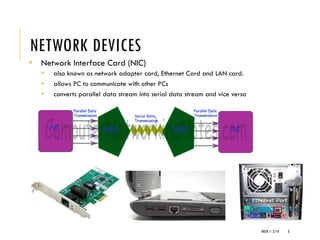
▪ Network Interface Card (NIC)
▪ also known as network adapter card, Ethernet Card and LAN card.
▪ allows PC to communicate with other PCs
▪ converts parallel data stream into serial data stream and vice versa
WEEK 1- 2/14 3
NETWORK DEVICES
▪ HUB
▪ a common connection point for devices in a network.
▪ connect segments of a LAN.
▪ contains multiple ports so when a packet arrives at one port, it is copied to the
other ports so that all segments of the LAN can see all packets
▪ Passive Hub - only forwards the data signal from all ports except the port on
which signal arrived. It doesn’t interfere in data signal.
▪ Active Hub (Repeater) – also forward data signal but before forwarding, it
improves the quality of data signal by amplifying it.
WEEK 1- 2/14 4
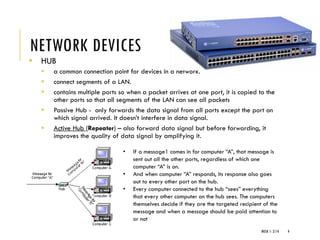
• If a message1 comes in for computer “A”, that message is
sent out all the other ports, regardless of which one
computer “A” is on.
• And when computer “A” responds, its response also goes
out to every other port on the hub.
• Every computer connected to the hub “sees” everything
that every other computer on the hub sees. The computers
themselves decide if they are the targeted recipient of the
message and when a message should be paid attention to
or not
NETWORK DEVICES
▪ SWITCH
▪ A switch does essentially what a hub does, but more efficiently. By paying
attention to the traffic that comes across it, it can “learn” where particular
addresses are.
▪ filters and forwards packets between LAN segments
WEEK 1- 2/14 5
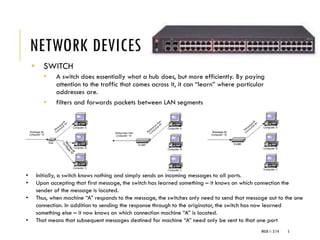
• Initially, a switch knows nothing and simply sends on incoming messages to all ports.
• Upon accepting that first message, the switch has learned something – it knows on which connection the
sender of the message is located.
• Thus, when machine “A” responds to the message, the switches only need to send that message out to the one
connection. In addition to sending the response through to the originator, the switch has now learned
something else – it now knows on which connection machine “A” is located.
• That means that subsequent messages destined for machine “A” need only be sent to that one port
NETWORK DEVICES
▪ ROUTER
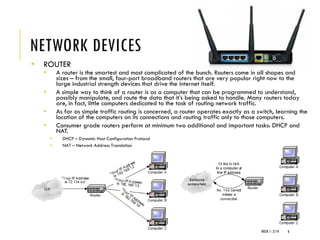
▪ A router is the smartest and most complicated of the bunch. Routers come in all shapes and
sizes – from the small, four-port broadband routers that are very popular right now to the
large industrial strength devices that drive the internet itself.
▪ A simple way to think of a router is as a computer that can be programmed to understand,
possibly manipulate, and route the data that it’s being asked to handle. Many routers today
are, in fact, little computers dedicated to the task of routing network traffic.
▪ As far as simple traffic routing is concerned, a router operates exactly as a switch, learning the
location of the computers on its connections and routing traffic only to those computers.
▪ Consumer grade routers perform at minimum two additional and important tasks: DHCP and
NAT.
▪ DHCP – Dynamic Host Configuration Protocol
▪ NAT – Network Address Translation
WEEK 1- 2/14 6
NETWORK DEVICES
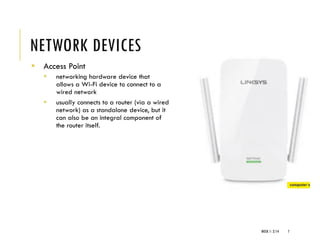
▪ Access Point
▪ networking hardware device that
allows a Wi-Fi device to connect to a
wired network
▪ usually connects to a router (via a wired
network) as a standalone device, but it
can also be an integral component of
the router itself.
WEEK 1- 2/14 7
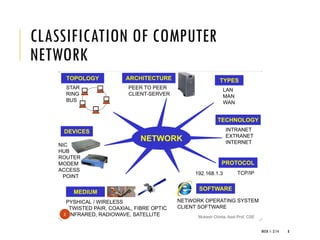
CLASSIFICATION OF COMPUTER
NETWORK
WEEK 1- 2/14 8
PEER-TO-PEER
▪ Network has no central server.
▪ Each computer on the network shares its files and resouces equally
with the others
▪ Any one computer can act as client or server at any instance
▪ There’s no central storage or authentication of users
▪ Lack of security
▪ Appropriate only for very small businesses or for home use
WEEK 1- 2/14 9
NETWORK TOPOLOGY
Network Topology refers to layout of a network: how different nodes
in a network are connected to each other and how they communicate
WEEK 1- 2/14 10
TYPES OF NETWORK TOPOLOGY
WEEK 1- 2/14 11
TYPES OF COMPUTER NETWORK BY
GEOGRAPHICAL SPAN
 Local Area Network (LAN)
 Wide Area Network (WAN)
 Metropolitan Area Network (MAN)
 Campus Area Network (CAN)
WEEK 1- 2/14 12
LOCAL AREA NETWORK (LAN)
computer network that user interconnects computers in a limited area
such as a home, school, computer laboratory, or office building using
network media
WEEK 1- 2/14 13
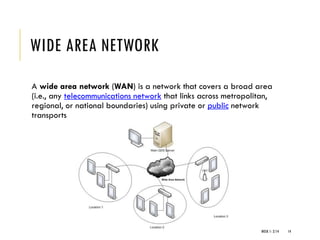
WIDE AREA NETWORK
A wide area network (WAN) is a network that covers a broad area
(i.e., any telecommunications network that links across metropolitan,
regional, or national boundaries) using private or public network
transports
WEEK 1- 2/14 14
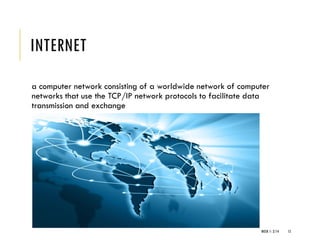
INTERNET
a computer network consisting of a worldwide network of computer
networks that use the TCP/IP network protocols to facilitate data
transmission and exchange
WEEK 1- 2/14 15
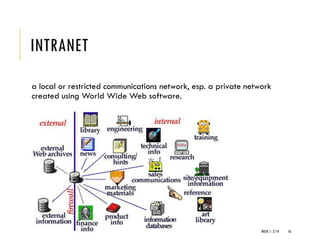
INTRANET
a local or restricted communications network, esp. a private network
created using World Wide Web software.
WEEK 1- 2/14 16
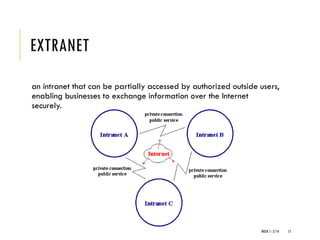
EXTRANET
an intranet that can be partially accessed by authorized outside users,
enabling businesses to exchange information over the Internet
securely.
WEEK 1- 2/14 17
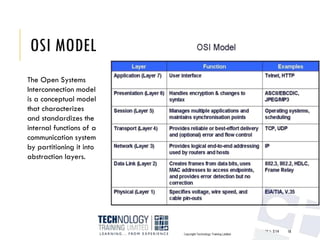
OSI MODEL
WEEK 1- 2/14 18
The Open Systems
Interconnection model
is a conceptual model
that characterizes
and standardizes the
internal functions of a
communication system
by partitioning it into
abstraction layers.
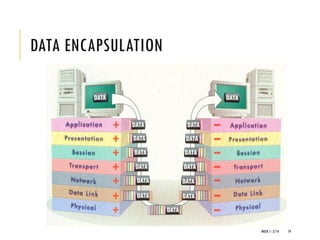
DATA ENCAPSULATION
WEEK 1- 2/14 19
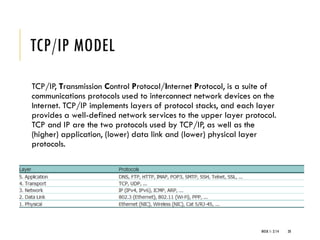
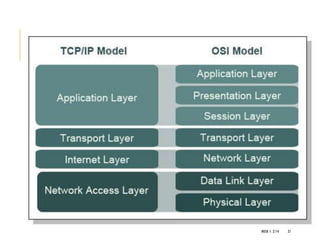
TCP/IP MODEL
TCP/IP, Transmission Control Protocol/Internet Protocol, is a suite of
communications protocols used to interconnect network devices on the
Internet. TCP/IP implements layers of protocol stacks, and each layer
provides a well-defined network services to the upper layer protocol.
TCP and IP are the two protocols used by TCP/IP, as well as the
(higher) application, (lower) data link and (lower) physical layer
protocols.
WEEK 1- 2/14 20
WEEK 1- 2/14 21
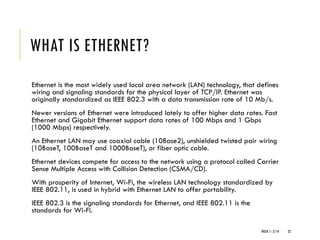
WHAT IS ETHERNET?
Ethernet is the most widely used local area network (LAN) technology, that defines
wiring and signaling standards for the physical layer of TCP/IP. Ethernet was
originally standardized as IEEE 802.3 with a data transmission rate of 10 Mb/s.
Newer versions of Ethernet were introduced lately to offer higher data rates. Fast
Ethernet and Gigabit Ethernet support data rates of 100 Mbps and 1 Gbps
(1000 Mbps) respectively.
An Ethernet LAN may use coaxial cable (10Base2), unshielded twisted pair wiring
(10BaseT, 100BaseT and 1000BaseT), or fiber optic cable.
Ethernet devices compete for access to the network using a protocol called Carrier
Sense Multiple Access with Collision Detection (CSMA/CD).
With prosperity of Internet, Wi-Fi, the wireless LAN technology standardized by
IEEE 802.11, is used in hybrid with Ethernet LAN to offer portability.
IEEE 802.3 is the signaling standards for Ethernet, and IEEE 802.11 is the
standards for Wi-Fi.
WEEK 1- 2/14 22
CSMA/CD
Carrier sense multiple access
 Carrier sense means that a transmitter uses feedback from a receiver to determine
whether another transmission is in progress before initiating a transmission. That is, it
tries to detect the presence of a carrier wave from another station before attempting
to transmit. If a carrier is sensed, the station waits for the transmission in progress to
finish before initiating its own transmission. In other words, CSMA is based on the
principle "sense before transmit" or "listen before talk".
Carrier sense multiple access/Collision Detection
 CSMA/CD is a modification of pure carrier sense multiple access (CSMA). CSMA/CD
is used to improve CSMA performance by terminating transmission as soon as a
collision is detected, thus shortening the time required before a retry can be
attempted.
WEEK 1- 2/14 23
WHAT IS IP ADDRESS?
Internet Protocol Address (or IP Address) is an unique address that
computing devices use to identify itself and communicate with other
devices in the Internet Protocol network. Any device connected to the
IP network must have an unique IP address within its network. An IP
address is analogous to a street address or telephone number in that
it is used to uniquely identify a network device to deliver mail
message, or call ("view") a website.
WEEK 1- 2/14 24
IPV4
The traditional IP Addresses (IPv4) uses a 32-bit number to represent
an IP address, and it defines both network and host address. Due to
IPv4 addresses running out, a new version of the IP protocol (IPv6) has
been invented to offer virtually limitless number of unique addresses.
An IP address is written in "dotted decimal" notation, which is 4 sets of
numbers separated by period each set representing 8-bit number
ranging from (0-255). An example of IPv4 address is 216.3.128.12,
which is the IP address assigned to topwebhosts.org.
An IPv4 address is divided into two parts: network and host address.
The network address determines how many of the 32 bits are used for
the network address, and remaining bits for the host address. The host
address can further divided into subnetwork and host number.
WEEK 1- 2/14 25
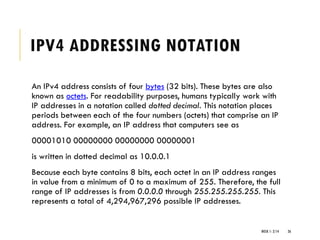
IPV4 ADDRESSING NOTATION
An IPv4 address consists of four bytes (32 bits). These bytes are also
known as octets. For readability purposes, humans typically work with
IP addresses in a notation called dotted decimal. This notation places
periods between each of the four numbers (octets) that comprise an IP
address. For example, an IP address that computers see as
00001010 00000000 00000000 00000001
is written in dotted decimal as 10.0.0.1
Because each byte contains 8 bits, each octet in an IP address ranges
in value from a minimum of 0 to a maximum of 255. Therefore, the full
range of IP addresses is from 0.0.0.0 through 255.255.255.255. This
represents a total of 4,294,967,296 possible IP addresses.
WEEK 1- 2/14 26
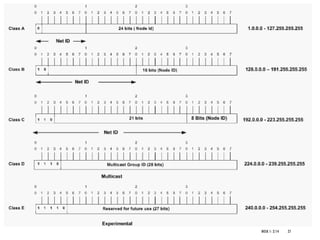
WEEK 1- 2/14 27
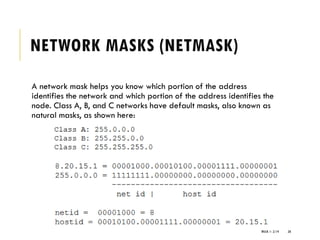
NETWORK MASKS (NETMASK)
A network mask helps you know which portion of the address
identifies the network and which portion of the address identifies the
node. Class A, B, and C networks have default masks, also known as
natural masks, as shown here:
WEEK 1- 2/14 28
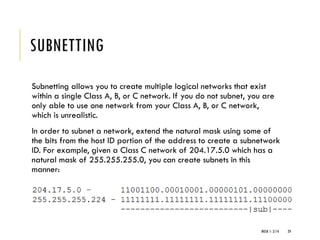
SUBNETTING
Subnetting allows you to create multiple logical networks that exist
within a single Class A, B, or C network. If you do not subnet, you are
only able to use one network from your Class A, B, or C network,
which is unrealistic.
In order to subnet a network, extend the natural mask using some of
the bits from the host ID portion of the address to create a subnetwork
ID. For example, given a Class C network of 204.17.5.0 which has a
natural mask of 255.255.255.0, you can create subnets in this
manner:
WEEK 1- 2/14 29
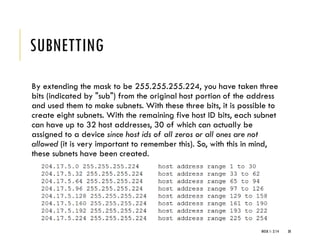
SUBNETTING
By extending the mask to be 255.255.255.224, you have taken three
bits (indicated by "sub") from the original host portion of the address
and used them to make subnets. With these three bits, it is possible to
create eight subnets. With the remaining five host ID bits, each subnet
can have up to 32 host addresses, 30 of which can actually be
assigned to a device since host ids of all zeros or all ones are not
allowed (it is very important to remember this). So, with this in mind,
these subnets have been created.
WEEK 1- 2/14 30
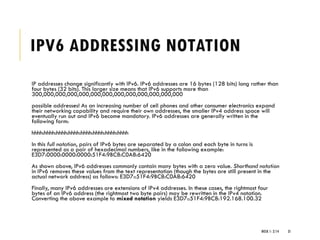
IPV6 ADDRESSING NOTATION
IP addresses change significantly with IPv6. IPv6 addresses are 16 bytes (128 bits) long rather than
four bytes (32 bits). This larger size means that IPv6 supports more than
300,000,000,000,000,000,000,000,000,000,000,000,000
possible addresses! As an increasing number of cell phones and other consumer electronics expand
their networking capability and require their own addresses, the smaller IPv4 address space will
eventually run out and IPv6 become mandatory. IPv6 addresses are generally written in the
following form:
hhhh:hhhh:hhhh:hhhh:hhhh:hhhh:hhhh:hhhh
In this full notation, pairs of IPv6 bytes are separated by a colon and each byte in turns is
represented as a pair of hexadecimal numbers, like in the following example:
E3D7:0000:0000:0000:51F4:9BC8:C0A8:6420
As shown above, IPv6 addresses commonly contain many bytes with a zero value. Shorthand notation
in IPv6 removes these values from the text representation (though the bytes are still present in the
actual network address) as follows: E3D7::51F4:9BC8:C0A8:6420
Finally, many IPv6 addresses are extensions of IPv4 addresses. In these cases, the rightmost four
bytes of an IPv6 address (the rightmost two byte pairs) may be rewritten in the IPv4 notation.
Converting the above example to mixed notation yields E3D7::51F4:9BC8:192.168.100.32
WEEK 1- 2/14 31
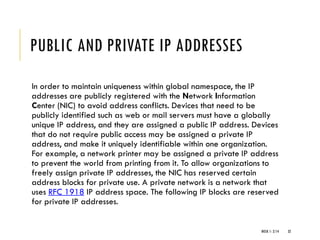
PUBLIC AND PRIVATE IP ADDRESSES
In order to maintain uniqueness within global namespace, the IP
addresses are publicly registered with the Network Information
Center (NIC) to avoid address conflicts. Devices that need to be
publicly identified such as web or mail servers must have a globally
unique IP address, and they are assigned a public IP address. Devices
that do not require public access may be assigned a private IP
address, and make it uniquely identifiable within one organization.
For example, a network printer may be assigned a private IP address
to prevent the world from printing from it. To allow organizations to
freely assign private IP addresses, the NIC has reserved certain
address blocks for private use. A private network is a network that
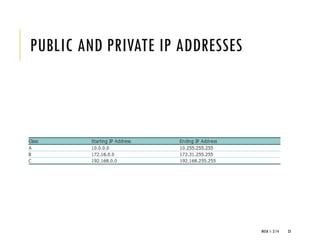
uses RFC 1918 IP address space. The following IP blocks are reserved
for private IP addresses.
WEEK 1- 2/14 32
PUBLIC AND PRIVATE IP ADDRESSES
WEEK 1- 2/14 33
WHAT IS LOOPBACK IP ADDRESS?
The loopback IP address is the address used to access itself. The IPv4
designated 127.0.0.1 as the loopback address with the 255.0.0.0
subnet mask. A loopback interface is also known as a virtual IP, which
does not associate with hardware interface. On Linux systems, the
loopback interface is commonly called lo or lo0. The corresponding
hostname for this interface is called localhost.
The loopback address is used to test network software without
physically installing a Network Interface Card (NIC), and without
having to physically connect the machine to a TCP/IP network. A good
example of this is to access the web server running on itself by using
http://127.0.0.1 or http://localhost.
WEEK 1- 2/14 34
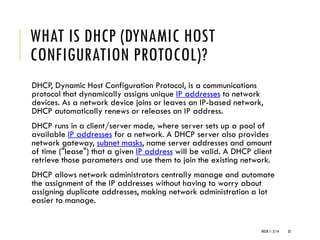
WHAT IS DHCP (DYNAMIC HOST
CONFIGURATION PROTOCOL)?
DHCP, Dynamic Host Configuration Protocol, is a communications
protocol that dynamically assigns unique IP addresses to network
devices. As a network device joins or leaves an IP-based network,
DHCP automatically renews or releases an IP address.
DHCP runs in a client/server mode, where server sets up a pool of
available IP addresses for a network. A DHCP server also provides
network gateway, subnet masks, name server addresses and amount
of time ("lease") that a given IP address will be valid. A DHCP client
retrieve those parameters and use them to join the existing network.
DHCP allows network administrators centrally manage and automate
the assignment of the IP addresses without having to worry about
assigning duplicate addresses, making network administration a lot
easier to manage.
WEEK 1- 2/14 35
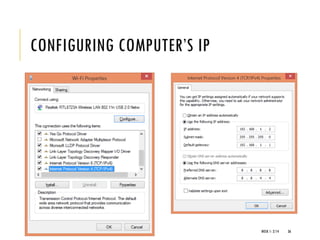
CONFIGURING COMPUTER’S IP
WEEK 1- 2/14 36
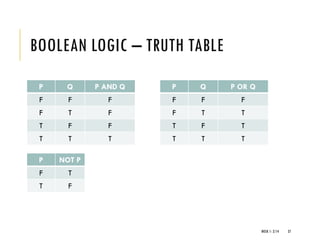
BOOLEAN LOGIC – TRUTH TABLE
P Q P AND Q
F F F
F T F
T F F
T T T
WEEK 1- 2/14 37
P Q P OR Q
F F F
F T T
T F T
T T T
P NOT P
F T
T F

EDT 4608 PART 1 - DATA COMMUNICATION AND COMPUTER NETWORKING

  • 1.
    EDT 4608 DATA COMMUNICATION& COMPUTER NETWORKING Introduction to Data Communication WEEK 3- 1-2/14 1
  • 2.
    COMPUTER NETWORK WEEK 1-2/14 2 ▪ A system of interconnected computers and computerized peripherals (such as printers) is called network. ▪ The first-ever computer-to-computer link was established on ARPANET (Advanced Research Projects Agency Network), the precursor to the Internet, on October 29, 1969.
  • 3.
    NETWORK DEVICES ▪ NetworkInterface Card (NIC) ▪ also known as network adapter card, Ethernet Card and LAN card. ▪ allows PC to communicate with other PCs ▪ converts parallel data stream into serial data stream and vice versa WEEK 1- 2/14 3
  • 4.
    NETWORK DEVICES ▪ HUB ▪a common connection point for devices in a network. ▪ connect segments of a LAN. ▪ contains multiple ports so when a packet arrives at one port, it is copied to the other ports so that all segments of the LAN can see all packets ▪ Passive Hub - only forwards the data signal from all ports except the port on which signal arrived. It doesn’t interfere in data signal. ▪ Active Hub (Repeater) – also forward data signal but before forwarding, it improves the quality of data signal by amplifying it. WEEK 1- 2/14 4 • If a message1 comes in for computer “A”, that message is sent out all the other ports, regardless of which one computer “A” is on. • And when computer “A” responds, its response also goes out to every other port on the hub. • Every computer connected to the hub “sees” everything that every other computer on the hub sees. The computers themselves decide if they are the targeted recipient of the message and when a message should be paid attention to or not
  • 5.
    NETWORK DEVICES ▪ SWITCH ▪A switch does essentially what a hub does, but more efficiently. By paying attention to the traffic that comes across it, it can “learn” where particular addresses are. ▪ filters and forwards packets between LAN segments WEEK 1- 2/14 5 • Initially, a switch knows nothing and simply sends on incoming messages to all ports. • Upon accepting that first message, the switch has learned something – it knows on which connection the sender of the message is located. • Thus, when machine “A” responds to the message, the switches only need to send that message out to the one connection. In addition to sending the response through to the originator, the switch has now learned something else – it now knows on which connection machine “A” is located. • That means that subsequent messages destined for machine “A” need only be sent to that one port
  • 6.
    NETWORK DEVICES ▪ ROUTER ▪A router is the smartest and most complicated of the bunch. Routers come in all shapes and sizes – from the small, four-port broadband routers that are very popular right now to the large industrial strength devices that drive the internet itself. ▪ A simple way to think of a router is as a computer that can be programmed to understand, possibly manipulate, and route the data that it’s being asked to handle. Many routers today are, in fact, little computers dedicated to the task of routing network traffic. ▪ As far as simple traffic routing is concerned, a router operates exactly as a switch, learning the location of the computers on its connections and routing traffic only to those computers. ▪ Consumer grade routers perform at minimum two additional and important tasks: DHCP and NAT. ▪ DHCP – Dynamic Host Configuration Protocol ▪ NAT – Network Address Translation WEEK 1- 2/14 6
  • 7.
    NETWORK DEVICES ▪ AccessPoint ▪ networking hardware device that allows a Wi-Fi device to connect to a wired network ▪ usually connects to a router (via a wired network) as a standalone device, but it can also be an integral component of the router itself. WEEK 1- 2/14 7
  • 8.
  • 9.
    PEER-TO-PEER ▪ Network hasno central server. ▪ Each computer on the network shares its files and resouces equally with the others ▪ Any one computer can act as client or server at any instance ▪ There’s no central storage or authentication of users ▪ Lack of security ▪ Appropriate only for very small businesses or for home use WEEK 1- 2/14 9
  • 10.
    NETWORK TOPOLOGY Network Topologyrefers to layout of a network: how different nodes in a network are connected to each other and how they communicate WEEK 1- 2/14 10
  • 11.
    TYPES OF NETWORKTOPOLOGY WEEK 1- 2/14 11
  • 12.
    TYPES OF COMPUTERNETWORK BY GEOGRAPHICAL SPAN  Local Area Network (LAN)  Wide Area Network (WAN)  Metropolitan Area Network (MAN)  Campus Area Network (CAN) WEEK 1- 2/14 12
  • 13.
    LOCAL AREA NETWORK(LAN) computer network that user interconnects computers in a limited area such as a home, school, computer laboratory, or office building using network media WEEK 1- 2/14 13
  • 14.
    WIDE AREA NETWORK Awide area network (WAN) is a network that covers a broad area (i.e., any telecommunications network that links across metropolitan, regional, or national boundaries) using private or public network transports WEEK 1- 2/14 14
  • 15.
    INTERNET a computer networkconsisting of a worldwide network of computer networks that use the TCP/IP network protocols to facilitate data transmission and exchange WEEK 1- 2/14 15
  • 16.
    INTRANET a local orrestricted communications network, esp. a private network created using World Wide Web software. WEEK 1- 2/14 16
  • 17.
    EXTRANET an intranet thatcan be partially accessed by authorized outside users, enabling businesses to exchange information over the Internet securely. WEEK 1- 2/14 17
  • 18.
    OSI MODEL WEEK 1-2/14 18 The Open Systems Interconnection model is a conceptual model that characterizes and standardizes the internal functions of a communication system by partitioning it into abstraction layers.
  • 19.
  • 20.
    TCP/IP MODEL TCP/IP, TransmissionControl Protocol/Internet Protocol, is a suite of communications protocols used to interconnect network devices on the Internet. TCP/IP implements layers of protocol stacks, and each layer provides a well-defined network services to the upper layer protocol. TCP and IP are the two protocols used by TCP/IP, as well as the (higher) application, (lower) data link and (lower) physical layer protocols. WEEK 1- 2/14 20
  • 21.
  • 22.
    WHAT IS ETHERNET? Ethernetis the most widely used local area network (LAN) technology, that defines wiring and signaling standards for the physical layer of TCP/IP. Ethernet was originally standardized as IEEE 802.3 with a data transmission rate of 10 Mb/s. Newer versions of Ethernet were introduced lately to offer higher data rates. Fast Ethernet and Gigabit Ethernet support data rates of 100 Mbps and 1 Gbps (1000 Mbps) respectively. An Ethernet LAN may use coaxial cable (10Base2), unshielded twisted pair wiring (10BaseT, 100BaseT and 1000BaseT), or fiber optic cable. Ethernet devices compete for access to the network using a protocol called Carrier Sense Multiple Access with Collision Detection (CSMA/CD). With prosperity of Internet, Wi-Fi, the wireless LAN technology standardized by IEEE 802.11, is used in hybrid with Ethernet LAN to offer portability. IEEE 802.3 is the signaling standards for Ethernet, and IEEE 802.11 is the standards for Wi-Fi. WEEK 1- 2/14 22
  • 23.
    CSMA/CD Carrier sense multipleaccess  Carrier sense means that a transmitter uses feedback from a receiver to determine whether another transmission is in progress before initiating a transmission. That is, it tries to detect the presence of a carrier wave from another station before attempting to transmit. If a carrier is sensed, the station waits for the transmission in progress to finish before initiating its own transmission. In other words, CSMA is based on the principle "sense before transmit" or "listen before talk". Carrier sense multiple access/Collision Detection  CSMA/CD is a modification of pure carrier sense multiple access (CSMA). CSMA/CD is used to improve CSMA performance by terminating transmission as soon as a collision is detected, thus shortening the time required before a retry can be attempted. WEEK 1- 2/14 23
  • 24.
    WHAT IS IPADDRESS? Internet Protocol Address (or IP Address) is an unique address that computing devices use to identify itself and communicate with other devices in the Internet Protocol network. Any device connected to the IP network must have an unique IP address within its network. An IP address is analogous to a street address or telephone number in that it is used to uniquely identify a network device to deliver mail message, or call ("view") a website. WEEK 1- 2/14 24
  • 25.
    IPV4 The traditional IPAddresses (IPv4) uses a 32-bit number to represent an IP address, and it defines both network and host address. Due to IPv4 addresses running out, a new version of the IP protocol (IPv6) has been invented to offer virtually limitless number of unique addresses. An IP address is written in "dotted decimal" notation, which is 4 sets of numbers separated by period each set representing 8-bit number ranging from (0-255). An example of IPv4 address is 216.3.128.12, which is the IP address assigned to topwebhosts.org. An IPv4 address is divided into two parts: network and host address. The network address determines how many of the 32 bits are used for the network address, and remaining bits for the host address. The host address can further divided into subnetwork and host number. WEEK 1- 2/14 25
  • 26.
    IPV4 ADDRESSING NOTATION AnIPv4 address consists of four bytes (32 bits). These bytes are also known as octets. For readability purposes, humans typically work with IP addresses in a notation called dotted decimal. This notation places periods between each of the four numbers (octets) that comprise an IP address. For example, an IP address that computers see as 00001010 00000000 00000000 00000001 is written in dotted decimal as 10.0.0.1 Because each byte contains 8 bits, each octet in an IP address ranges in value from a minimum of 0 to a maximum of 255. Therefore, the full range of IP addresses is from 0.0.0.0 through 255.255.255.255. This represents a total of 4,294,967,296 possible IP addresses. WEEK 1- 2/14 26
  • 27.
  • 28.
    NETWORK MASKS (NETMASK) Anetwork mask helps you know which portion of the address identifies the network and which portion of the address identifies the node. Class A, B, and C networks have default masks, also known as natural masks, as shown here: WEEK 1- 2/14 28
  • 29.
    SUBNETTING Subnetting allows youto create multiple logical networks that exist within a single Class A, B, or C network. If you do not subnet, you are only able to use one network from your Class A, B, or C network, which is unrealistic. In order to subnet a network, extend the natural mask using some of the bits from the host ID portion of the address to create a subnetwork ID. For example, given a Class C network of 204.17.5.0 which has a natural mask of 255.255.255.0, you can create subnets in this manner: WEEK 1- 2/14 29
  • 30.
    SUBNETTING By extending themask to be 255.255.255.224, you have taken three bits (indicated by "sub") from the original host portion of the address and used them to make subnets. With these three bits, it is possible to create eight subnets. With the remaining five host ID bits, each subnet can have up to 32 host addresses, 30 of which can actually be assigned to a device since host ids of all zeros or all ones are not allowed (it is very important to remember this). So, with this in mind, these subnets have been created. WEEK 1- 2/14 30
  • 31.
    IPV6 ADDRESSING NOTATION IPaddresses change significantly with IPv6. IPv6 addresses are 16 bytes (128 bits) long rather than four bytes (32 bits). This larger size means that IPv6 supports more than 300,000,000,000,000,000,000,000,000,000,000,000,000 possible addresses! As an increasing number of cell phones and other consumer electronics expand their networking capability and require their own addresses, the smaller IPv4 address space will eventually run out and IPv6 become mandatory. IPv6 addresses are generally written in the following form: hhhh:hhhh:hhhh:hhhh:hhhh:hhhh:hhhh:hhhh In this full notation, pairs of IPv6 bytes are separated by a colon and each byte in turns is represented as a pair of hexadecimal numbers, like in the following example: E3D7:0000:0000:0000:51F4:9BC8:C0A8:6420 As shown above, IPv6 addresses commonly contain many bytes with a zero value. Shorthand notation in IPv6 removes these values from the text representation (though the bytes are still present in the actual network address) as follows: E3D7::51F4:9BC8:C0A8:6420 Finally, many IPv6 addresses are extensions of IPv4 addresses. In these cases, the rightmost four bytes of an IPv6 address (the rightmost two byte pairs) may be rewritten in the IPv4 notation. Converting the above example to mixed notation yields E3D7::51F4:9BC8:192.168.100.32 WEEK 1- 2/14 31
  • 32.
    PUBLIC AND PRIVATEIP ADDRESSES In order to maintain uniqueness within global namespace, the IP addresses are publicly registered with the Network Information Center (NIC) to avoid address conflicts. Devices that need to be publicly identified such as web or mail servers must have a globally unique IP address, and they are assigned a public IP address. Devices that do not require public access may be assigned a private IP address, and make it uniquely identifiable within one organization. For example, a network printer may be assigned a private IP address to prevent the world from printing from it. To allow organizations to freely assign private IP addresses, the NIC has reserved certain address blocks for private use. A private network is a network that uses RFC 1918 IP address space. The following IP blocks are reserved for private IP addresses. WEEK 1- 2/14 32
  • 33.
    PUBLIC AND PRIVATEIP ADDRESSES WEEK 1- 2/14 33
  • 34.
    WHAT IS LOOPBACKIP ADDRESS? The loopback IP address is the address used to access itself. The IPv4 designated 127.0.0.1 as the loopback address with the 255.0.0.0 subnet mask. A loopback interface is also known as a virtual IP, which does not associate with hardware interface. On Linux systems, the loopback interface is commonly called lo or lo0. The corresponding hostname for this interface is called localhost. The loopback address is used to test network software without physically installing a Network Interface Card (NIC), and without having to physically connect the machine to a TCP/IP network. A good example of this is to access the web server running on itself by using http://127.0.0.1 or http://localhost. WEEK 1- 2/14 34
  • 35.
    WHAT IS DHCP(DYNAMIC HOST CONFIGURATION PROTOCOL)? DHCP, Dynamic Host Configuration Protocol, is a communications protocol that dynamically assigns unique IP addresses to network devices. As a network device joins or leaves an IP-based network, DHCP automatically renews or releases an IP address. DHCP runs in a client/server mode, where server sets up a pool of available IP addresses for a network. A DHCP server also provides network gateway, subnet masks, name server addresses and amount of time ("lease") that a given IP address will be valid. A DHCP client retrieve those parameters and use them to join the existing network. DHCP allows network administrators centrally manage and automate the assignment of the IP addresses without having to worry about assigning duplicate addresses, making network administration a lot easier to manage. WEEK 1- 2/14 35
  • 36.
  • 37.
    BOOLEAN LOGIC –TRUTH TABLE P Q P AND Q F F F F T F T F F T T T WEEK 1- 2/14 37 P Q P OR Q F F F F T T T F T T T T P NOT P F T T F