8/17/13

Editor Buttons

Ngee Ann Alumni Malaysia
Persatuan Bekas Pelajar Ngee Ann Kuala Lumpur

( reg.no. 2176 / 95 )

search...

HomeGo back home
About UsWho we are
BlogNews & Events
MemberThat's us
Join UsBecome a member
MediaOur memories
ContactGet connected
Ngee Ann PolytechnicOur Alma Mater
Editor Buttons
Tuesday, 29 May 2012 22:54

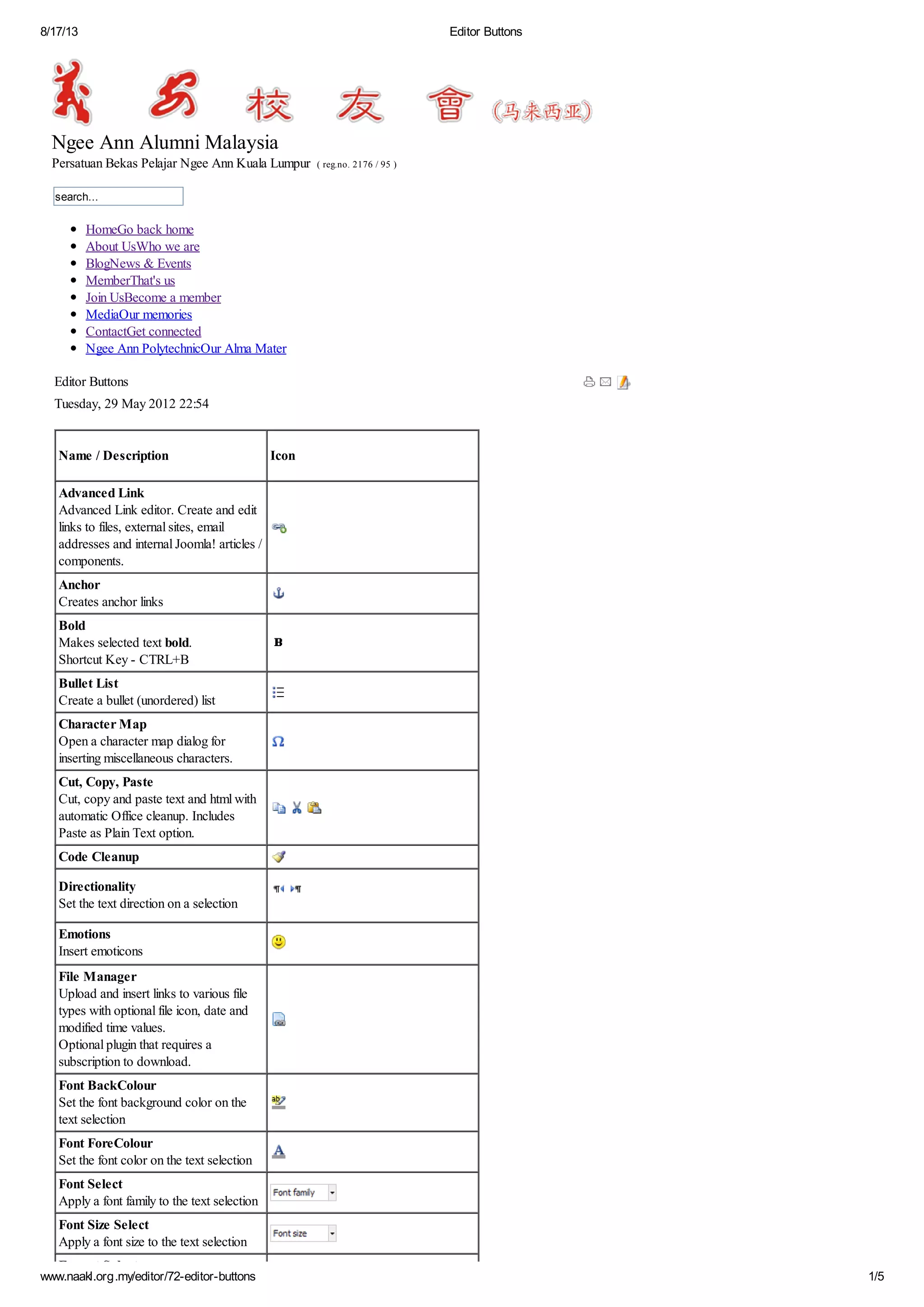
Name / Description

Icon

Advanced Link
Advanced Link editor. Create and edit
links to files, external sites, email
addresses and internal Joomla! articles /
components.
Anchor
Creates anchor links
Bold
Makes selected text bold.
Shortcut Key - CTRL+B
Bullet List
Create a bullet (unordered) list
Character Map
Open a character map dialog for
inserting miscellaneous characters.
Cut, Copy, Paste
Cut, copy and paste text and html with
automatic Office cleanup. Includes
Paste as Plain Text option.
Code Cleanup
Directionality
Set the text direction on a selection
Emotions
Insert emoticons
File Manager
Upload and insert links to various file
types with optional file icon, date and
modified time values.
Optional plugin that requires a
subscription to download.
Font BackColour
Set the font background color on the
text selection
Font ForeColour
Set the font color on the text selection
Font Select
Apply a font family to the text selection
Font Size Select
Apply a font size to the text selection
Format Select

www.naakl.org.my/editor/72-editor-buttons

1/5
8/17/13

Editor Buttons

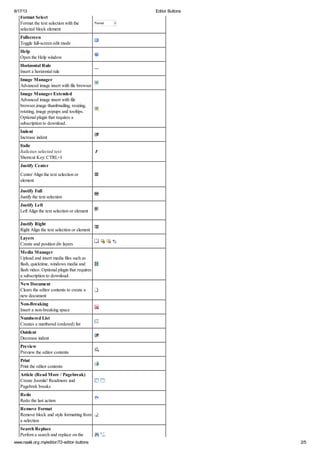
Format Select
Format the text selection with the
selected block element
Fullscreen
Toggle full-screen edit mode
Help
Open the Help window
Horizontal Rule
Insert a horizontal rule
Image Manager
Advanced image insert with file browser
Image Manager Extended
Advanced image insert with file
browser,image thumbnailing, resizing,
rotating, image popups and tooltips.
Optional plugin that requires a
subscription to download.
Indent
Increase indent
Italic
Italicises selected text
Shortcut Key: CTRL+I
Justify Center
Center Align the text selection or
element
Justify Full
Justify the text selection
Justify Left
Left Align the text selection or element
Justify Right
Right Align the text selection or element
Layers
Create and position div layers
Media Manager
Upload and insert media files such as
flash, quicktime, windows media and
flash video. Optional plugin that requires
a subscription to download.
New Document
Clears the editor contents to create a
new document
Non-Breaking
Insert a non-breaking space
Numbered List
Creates a numbered (ordered) list
Outdent
Decrease indent
Preview
Preview the editor contents
Print
Print the editor contents
Article (Read More / Pagebreak)
Create Joomla! Readmore and
Pagebrek breaks
Redo
Redo the last action
Remove Format
Remove block and style formatting from
a selection
Search Replace
Perforn a search and replace on the
www.naakl.org.my/editor/72-editor-buttons

2/5
8/17/13

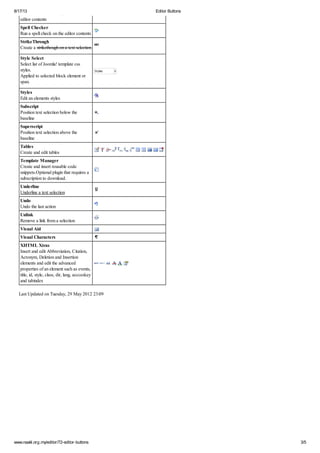
Perforn a search and replace on the
editor contents

Editor Buttons

Spell Checker
Run a spell check on the editor contents
StrikeThrough
Create a strikethough on a text selection
Style Select
Select list of Joomla! template css
styles.
Applied to selected block element or
span.
Styles
Edit an elements styles
Subscript
Position text selection below the
baseline
Superscript
Position text selection above the
baseline
Tables
Create and edit tables
Template Manager
Create and insert reusable code
snippets.Optional plugin that requires a
subscription to download.
Underline
Underline a text selection
Undo
Undo the last action
Unlink
Remove a link from a selection
Visual Aid
Visual Characters
XHTML Xtras
Insert and edit Abbreviation, Citation,
Acronym, Deletion and Insertion
elements and edit the advanced
properties of an element such as events,
title, id, style, class, dir, lang, accceskey
and tabindex
Last Updated on Tuesday, 29 May 2012 23:09

www.naakl.org.my/editor/72-editor-buttons

3/5
8/17/13

Editor Buttons

Become a Member
Current Members
News & Events
Contact
Privacy Policy
www.naakl.org.my/editor/72-editor-buttons

4/5
8/17/13

Editor Buttons

Term of Use
Copyright © 2011. NAAKL. Powered by iWeb Technology

www.naakl.org.my/editor/72-editor-buttons

5/5

Editor buttons

  • 1.
    8/17/13 Editor Buttons Ngee AnnAlumni Malaysia Persatuan Bekas Pelajar Ngee Ann Kuala Lumpur ( reg.no. 2176 / 95 ) search... HomeGo back home About UsWho we are BlogNews & Events MemberThat's us Join UsBecome a member MediaOur memories ContactGet connected Ngee Ann PolytechnicOur Alma Mater Editor Buttons Tuesday, 29 May 2012 22:54 Name / Description Icon Advanced Link Advanced Link editor. Create and edit links to files, external sites, email addresses and internal Joomla! articles / components. Anchor Creates anchor links Bold Makes selected text bold. Shortcut Key - CTRL+B Bullet List Create a bullet (unordered) list Character Map Open a character map dialog for inserting miscellaneous characters. Cut, Copy, Paste Cut, copy and paste text and html with automatic Office cleanup. Includes Paste as Plain Text option. Code Cleanup Directionality Set the text direction on a selection Emotions Insert emoticons File Manager Upload and insert links to various file types with optional file icon, date and modified time values. Optional plugin that requires a subscription to download. Font BackColour Set the font background color on the text selection Font ForeColour Set the font color on the text selection Font Select Apply a font family to the text selection Font Size Select Apply a font size to the text selection Format Select www.naakl.org.my/editor/72-editor-buttons 1/5
  • 2.
    8/17/13 Editor Buttons Format Select Formatthe text selection with the selected block element Fullscreen Toggle full-screen edit mode Help Open the Help window Horizontal Rule Insert a horizontal rule Image Manager Advanced image insert with file browser Image Manager Extended Advanced image insert with file browser,image thumbnailing, resizing, rotating, image popups and tooltips. Optional plugin that requires a subscription to download. Indent Increase indent Italic Italicises selected text Shortcut Key: CTRL+I Justify Center Center Align the text selection or element Justify Full Justify the text selection Justify Left Left Align the text selection or element Justify Right Right Align the text selection or element Layers Create and position div layers Media Manager Upload and insert media files such as flash, quicktime, windows media and flash video. Optional plugin that requires a subscription to download. New Document Clears the editor contents to create a new document Non-Breaking Insert a non-breaking space Numbered List Creates a numbered (ordered) list Outdent Decrease indent Preview Preview the editor contents Print Print the editor contents Article (Read More / Pagebreak) Create Joomla! Readmore and Pagebrek breaks Redo Redo the last action Remove Format Remove block and style formatting from a selection Search Replace Perforn a search and replace on the www.naakl.org.my/editor/72-editor-buttons 2/5
  • 3.
    8/17/13 Perforn a searchand replace on the editor contents Editor Buttons Spell Checker Run a spell check on the editor contents StrikeThrough Create a strikethough on a text selection Style Select Select list of Joomla! template css styles. Applied to selected block element or span. Styles Edit an elements styles Subscript Position text selection below the baseline Superscript Position text selection above the baseline Tables Create and edit tables Template Manager Create and insert reusable code snippets.Optional plugin that requires a subscription to download. Underline Underline a text selection Undo Undo the last action Unlink Remove a link from a selection Visual Aid Visual Characters XHTML Xtras Insert and edit Abbreviation, Citation, Acronym, Deletion and Insertion elements and edit the advanced properties of an element such as events, title, id, style, class, dir, lang, accceskey and tabindex Last Updated on Tuesday, 29 May 2012 23:09 www.naakl.org.my/editor/72-editor-buttons 3/5
  • 4.
    8/17/13 Editor Buttons Become aMember Current Members News & Events Contact Privacy Policy www.naakl.org.my/editor/72-editor-buttons 4/5
  • 5.
    8/17/13 Editor Buttons Term ofUse Copyright © 2011. NAAKL. Powered by iWeb Technology www.naakl.org.my/editor/72-editor-buttons 5/5