E D I T I N G :
L A S T F E W D A Y S
B Y N A H I D A Y A S M I N A L I
T U E S D A Y 2 N D
D E C E M B E R 2 0 1 4
W O R K I N G O N F E E D B A C K
• We decided not to use the red tint on our clips so we removed it from the
clip that had it.
• We got rid of the clip which had the leg acting as a barrier and that
looked very unflattering to our artist. We replaced it with another shot
instead.
• I tried my best to get rid off all the out of focus shots. Although I liked the
effect they brought, I understood the necessity of removing them. I used
other footage which we could edit around instead of going out to refilm.
• We made use of the lamp post shots in the chorus both in correct order
and in reverse.
• Made sure all the shots were in sync - however this did move some of
the sequence which meant extra editing but it was fine in the end.
• The shot with the hair flick did not work in slow motion so i decided to
make it work on a beat instead.
C H A N G I N G T H E C H O R U S
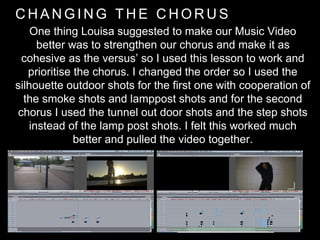
One thing Louisa suggested to make our Music Video
better was to strengthen our chorus and make it as
cohesive as the versus’ so I used this lesson to work and
prioritise the chorus. I changed the order so I used the
silhouette outdoor shots for the first one with cooperation of
the smoke shots and lamppost shots and for the second
chorus I used the tunnel out door shots and the step shots
instead of the lamp post shots. I felt this worked much
better and pulled the video together.
W I D E S C R E E N
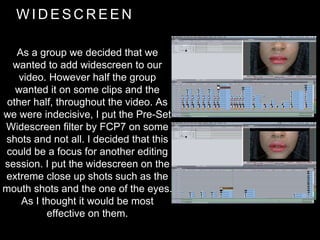
As a group we decided that we
wanted to add widescreen to our
video. However half the group
wanted it on some clips and the
other half, throughout the video. As
we were indecisive, I put the Pre-Set
Widescreen filter by FCP7 on some
shots and not all. I decided that this
could be a focus for another editing
session. I put the widescreen on the
extreme close up shots such as the
mouth shots and the one of the eyes.
As I thought it would be most
effective on them.
T H U R S D A Y 4 T H
D E C E M B E R 2 0 1 4
E D I T I N G F R O M H O M E
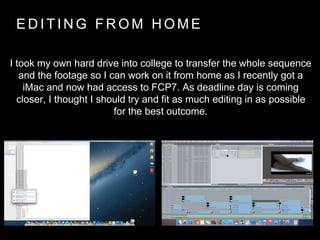
I took my own hard drive into college to transfer the whole sequence
and the footage so I can work on it from home as I recently got a
iMac and now had access to FCP7. As deadline day is coming
closer, I thought I should try and fit as much editing in as possible
for the best outcome.
W I D E S C R E E N
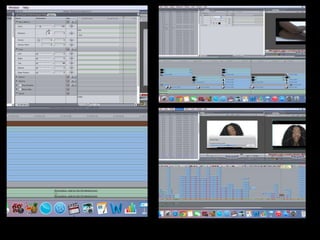
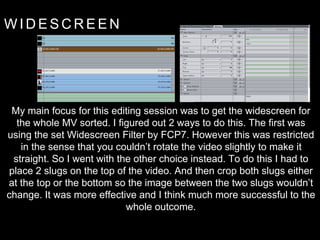
My main focus for this editing session was to get the widescreen for
the whole MV sorted. I figured out 2 ways to do this. The first was
using the set Widescreen Filter by FCP7. However this was restricted
in the sense that you couldn’t rotate the video slightly to make it
straight. So I went with the other choice instead. To do this I had to
place 2 slugs on the top of the video. And then crop both slugs either
at the top or the bottom so the image between the two slugs wouldn’t
change. It was more effective and I think much more successful to the
whole outcome.
T H E ‘ R E N D E R I N G ’ I S S U E
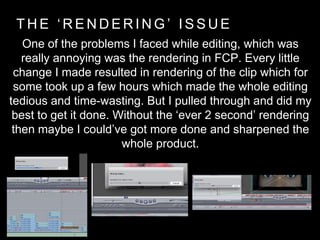
One of the problems I faced while editing, which was
really annoying was the rendering in FCP. Every little
change I made resulted in rendering of the clip which for
some took up a few hours which made the whole editing
tedious and time-wasting. But I pulled through and did my
best to get it done. Without the ‘ever 2 second’ rendering
then maybe I could’ve got more done and sharpened the
whole product.
F R I D A Y 5 T H D E C E M B E R
2 0 1 4
D E A D L I N E D A Y !
S M O K E S H O T S
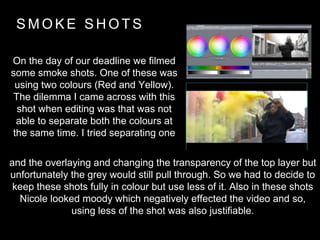
On the day of our deadline we filmed
some smoke shots. One of these was
using two colours (Red and Yellow).
The dilemma I came across with this
shot when editing was that was not
able to separate both the colours at
the same time. I tried separating one
and the overlaying and changing the transparency of the top layer but
unfortunately the grey would still pull through. So we had to decide to
keep these shots fully in colour but use less of it. Also in these shots
Nicole looked moody which negatively effected the video and so,
using less of the shot was also justifiable.
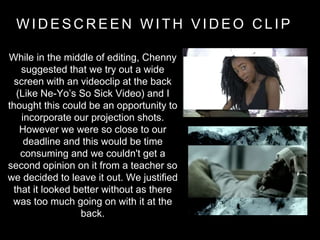
W I D E S C R E E N W I T H V I D E O C L I P
While in the middle of editing, Chenny
suggested that we try out a wide
screen with an videoclip at the back
(Like Ne-Yo’s So Sick Video) and I
thought this could be an opportunity to
incorporate our projection shots.
However we were so close to our
deadline and this would be time
consuming and we couldn't get a
second opinion on it from a teacher so
we decided to leave it out. We justified
that it looked better without as there
was too much going on with it at the
back.
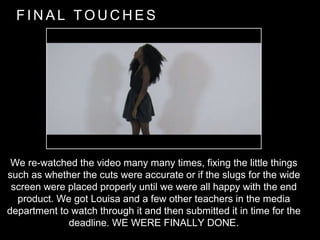
F I N A L T O U C H E S
We re-watched the video many many times, fixing the little things
such as whether the cuts were accurate or if the slugs for the wide
screen were placed properly until we were all happy with the end
product. We got Louisa and a few other teachers in the media
department to watch through it and then submitted it in time for the
deadline. WE WERE FINALLY DONE.

Editing last few days

  • 1.
    E D IT I N G : L A S T F E W D A Y S B Y N A H I D A Y A S M I N A L I
  • 2.
    T U ES D A Y 2 N D D E C E M B E R 2 0 1 4
  • 3.
    W O RK I N G O N F E E D B A C K • We decided not to use the red tint on our clips so we removed it from the clip that had it. • We got rid of the clip which had the leg acting as a barrier and that looked very unflattering to our artist. We replaced it with another shot instead. • I tried my best to get rid off all the out of focus shots. Although I liked the effect they brought, I understood the necessity of removing them. I used other footage which we could edit around instead of going out to refilm. • We made use of the lamp post shots in the chorus both in correct order and in reverse. • Made sure all the shots were in sync - however this did move some of the sequence which meant extra editing but it was fine in the end. • The shot with the hair flick did not work in slow motion so i decided to make it work on a beat instead.
  • 4.
    C H AN G I N G T H E C H O R U S One thing Louisa suggested to make our Music Video better was to strengthen our chorus and make it as cohesive as the versus’ so I used this lesson to work and prioritise the chorus. I changed the order so I used the silhouette outdoor shots for the first one with cooperation of the smoke shots and lamppost shots and for the second chorus I used the tunnel out door shots and the step shots instead of the lamp post shots. I felt this worked much better and pulled the video together.
  • 5.
    W I DE S C R E E N As a group we decided that we wanted to add widescreen to our video. However half the group wanted it on some clips and the other half, throughout the video. As we were indecisive, I put the Pre-Set Widescreen filter by FCP7 on some shots and not all. I decided that this could be a focus for another editing session. I put the widescreen on the extreme close up shots such as the mouth shots and the one of the eyes. As I thought it would be most effective on them.
  • 6.
    T H UR S D A Y 4 T H D E C E M B E R 2 0 1 4
  • 8.
    E D IT I N G F R O M H O M E I took my own hard drive into college to transfer the whole sequence and the footage so I can work on it from home as I recently got a iMac and now had access to FCP7. As deadline day is coming closer, I thought I should try and fit as much editing in as possible for the best outcome.
  • 9.
    W I DE S C R E E N My main focus for this editing session was to get the widescreen for the whole MV sorted. I figured out 2 ways to do this. The first was using the set Widescreen Filter by FCP7. However this was restricted in the sense that you couldn’t rotate the video slightly to make it straight. So I went with the other choice instead. To do this I had to place 2 slugs on the top of the video. And then crop both slugs either at the top or the bottom so the image between the two slugs wouldn’t change. It was more effective and I think much more successful to the whole outcome.
  • 10.
    T H E‘ R E N D E R I N G ’ I S S U E One of the problems I faced while editing, which was really annoying was the rendering in FCP. Every little change I made resulted in rendering of the clip which for some took up a few hours which made the whole editing tedious and time-wasting. But I pulled through and did my best to get it done. Without the ‘ever 2 second’ rendering then maybe I could’ve got more done and sharpened the whole product.
  • 11.
    F R ID A Y 5 T H D E C E M B E R 2 0 1 4 D E A D L I N E D A Y !
  • 12.
    S M OK E S H O T S On the day of our deadline we filmed some smoke shots. One of these was using two colours (Red and Yellow). The dilemma I came across with this shot when editing was that was not able to separate both the colours at the same time. I tried separating one and the overlaying and changing the transparency of the top layer but unfortunately the grey would still pull through. So we had to decide to keep these shots fully in colour but use less of it. Also in these shots Nicole looked moody which negatively effected the video and so, using less of the shot was also justifiable.
  • 13.
    W I DE S C R E E N W I T H V I D E O C L I P While in the middle of editing, Chenny suggested that we try out a wide screen with an videoclip at the back (Like Ne-Yo’s So Sick Video) and I thought this could be an opportunity to incorporate our projection shots. However we were so close to our deadline and this would be time consuming and we couldn't get a second opinion on it from a teacher so we decided to leave it out. We justified that it looked better without as there was too much going on with it at the back.
  • 14.
    F I NA L T O U C H E S We re-watched the video many many times, fixing the little things such as whether the cuts were accurate or if the slugs for the wide screen were placed properly until we were all happy with the end product. We got Louisa and a few other teachers in the media department to watch through it and then submitted it in time for the deadline. WE WERE FINALLY DONE.