Editing images
Image 1
• Using the screengrabs
shown on this
document I can explain
that while editing the
images I added more
vibrancy to bring out
the colours in the
picture, I also resized
the image multiple
times to make the
poster look better, I
also photo shopped the
Alder Hey logo onto the
picture as it is my
chosen charity and I
typed my slogan onto
the image which is
“Affordable, quality
clothing”
Image 2
• The screengrabs
shown on this
document are what I
can use so that I can
explain what I did
whilst editing the
images. I added
more vibrancy to
bring out the
colours in the
picture and heighten
the brightness, I also
resized the image
multiple times to
make the poster
look better and
seem different, I
also photo shopped
the Alder Hey logo
onto the picture as
it is my chosen
charity and I typed
my slogan onto the
image which is
“Affordable, quality
clothing”
Image 3
• These
screengrabs are
the explanation
for what I did to
create the final
images through
the editing
process. I
heightened the
vibrancy to bring
out the colours
in the picture, as
you can see, the
green was a lot
darker to begin
with but I
brightened all
the green hues, I
also resized the
image multiple
times to make
the poster look
better, I also
photo shopped
the Alder Hey
logo onto the
picture as it is my
chosen charity
and I typed my
slogan onto the
image which is
“Affordable,
quality clothing”

Editing images 1

  • 1.
  • 2.
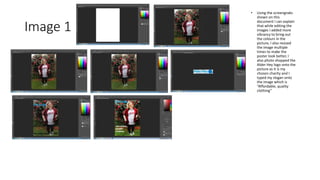
    Image 1 • Usingthe screengrabs shown on this document I can explain that while editing the images I added more vibrancy to bring out the colours in the picture, I also resized the image multiple times to make the poster look better, I also photo shopped the Alder Hey logo onto the picture as it is my chosen charity and I typed my slogan onto the image which is “Affordable, quality clothing”
  • 3.
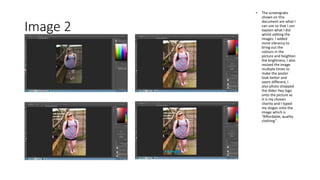
    Image 2 • Thescreengrabs shown on this document are what I can use so that I can explain what I did whilst editing the images. I added more vibrancy to bring out the colours in the picture and heighten the brightness, I also resized the image multiple times to make the poster look better and seem different, I also photo shopped the Alder Hey logo onto the picture as it is my chosen charity and I typed my slogan onto the image which is “Affordable, quality clothing”
  • 4.
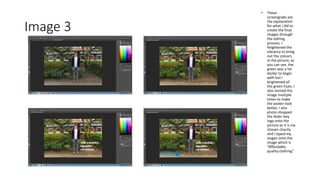
    Image 3 • These screengrabsare the explanation for what I did to create the final images through the editing process. I heightened the vibrancy to bring out the colours in the picture, as you can see, the green was a lot darker to begin with but I brightened all the green hues, I also resized the image multiple times to make the poster look better, I also photo shopped the Alder Hey logo onto the picture as it is my chosen charity and I typed my slogan onto the image which is “Affordable, quality clothing”