Web Site Design for E-
Commerce
Bebo White
Stanford Linear Accelerator Center
bebo@stanford.edu
E-Business and E-Commerce
 E-Business: “the conduct of
business with the assistance of
telecommunications and
telecommunications-based tools”
 E-Commerce: “the conduct of
commerce in goods and services,
with the assistance of
telecommunications and
telecommunications-based tools”
(Ref:: Roger Clarke)
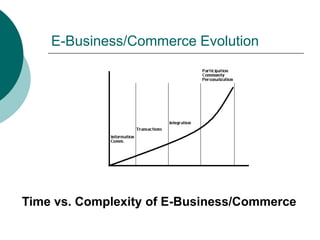
E-Business/Commerce Evolution
Time vs. Complexity of E-Business/Commerce
Usability
 “the ease with which a user can
learn to operate, prepare inputs for,
and interpret outputs of a system or
component” - IEEE Standard
Computer Dictionary
 A key component in Human-
Computer Interaction (HCI)
 A primary focus in the design of
Web sites
 A “usability subculture” has evolved
as a result of Web technology
Usability Variations
 Usefulness, and user experience
 Usability engineering and usability
method
 User-centered design
Web Usability Experts
 Analyze and critique
 Conceptual models
 Web site navigation schemes
 Web site widgets
 Web page sizes, colors, vocabulary
 Each other
 Blah, blah, blah…
 “Church of Usability” -
http://builder.com.com/5100-6371-
1044594.html
Why Is Usability Important for E-
Commerce Web Sites?
 Primary interface to customers
 Users expect instant gratification
 Users experience usability before they are
committed to buying
 Expectations arise from best site across
industries
 Competitors are “just a mouse click away”
 Value of usability for the time-constrained
information seeker
 Usability as the critical success factor for
Web projects
Why Is Usability Important for E-
Commerce Web Sites? (cont)
 E-Commerce Web site = electronic
storefront
 Web site user interface = electronic clerk
 Online shoppers can afford to be less tolerant
with an inept electronic clerk
 E-Commerce Web site = electronic
catalog for direct sales
 Catalogs are convenient for mail-ordering and
large inventory
 Too much focus on display and publicity
 Web site user interface = “read-
ability/usefulness” of catalog
 How many paper catalogs get thrown away?
Return On Investment (ROI)
 External ROI
 Increased sales
 Decreased customer support costs
 Savings gained from making changes
earlier in the design life cycle
 Reduced cost of providing training
ROI (cont)
 Internal ROI
 Increased user productivity
 Decreased user errors
 Decreased training costs
 Savings from making changes earlier in
design life cycle
 Decreased user support
Myths of Usability ROI
 Analog comparisons are not required
 “Cost of bad Web design: Loss of
approximately 50% of potential sales from the
site as people can’t find stuff” (Jakob Neilsen,
Alert Box, 1998, cited by Forrester)
 Executives will believe “voodoo
economics”
 “There are one billion users on the Internet,
and half of them could come to your site. If the
average cost of an abandoned shopping cart is
$20, then you will lose $10 billion a year in
sales of your designer pet food” (Rosenburg,
2003, parody of J. Neilsen)
(Daniel Rosenberg, Oracle)
Conversion Rates
 A conversion rate is loosely defined as the
percentage of Web site visitors who complete a
desired action
 This action can take many forms:
 Clicks beyond home page
 Purchases
 Membership registrations
 Newsletter subscriptions
 Sample downloads
 Sales inquiries, etc.
(“Using Conversion Rates to Measure Web Site Effectiveness and Improve ROI”
http://www.websiteprofitdoctor.com/MC_BP_articles.asp?article=03_11_03_01.txt)
Conversion Rates (cont)
 A high conversion rate depends on
several factors
 The interest level of the visitor
 The attractiveness of the offer
 The ease of the process
 The interest level of the visitor is
maximized by matching the right visitor,
the right place, and the right time
(“The #1 Internet Marketing Metric”
http://www.marketingterms.com/dictionary/conversion_rate)
Conversion Rates (cont)
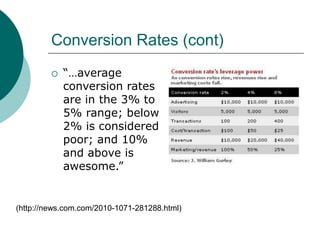
 “…average
conversion rates
are in the 3% to
5% range; below
2% is considered
poor; and 10%
and above is
awesome.”
(http://news.com.com/2010-1071-281288.html)
Conversion Rates – Elements That
Affect It
 User Interface
 Convenience
 Performance
 Effective advertising
 “Word of Mouth”
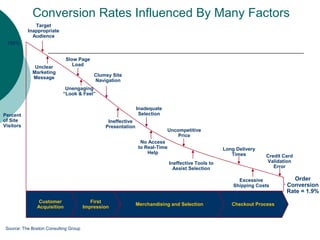
Conversion Rates Influenced By Many Factors
Customer
Acquisition
First
Impression
Merchandising and Selection Checkout Process
Target
Inappropriate
Audience
Unclear
Marketing
Message
Slow Page
Load
Unengaging
“Look & Feel”
Clumsy Site
Navigation
Ineffective
Presentation
No Access
to Real-Time
Help
Ineffective Tools to
Assist Selection
Inadequate
Selection
Uncompetitive
Price
Excessive
Shipping Costs
Long Delivery
Times Credit Card
Validation
Error
Order
Conversion
Rate = 1.9%
100%
Percent
of Site
Visitors
Source: The Boston Consulting Group
Conversion Rates Influenced By Many
Factors (cont)
1. Target inappropriate audience (marketing and
UCD)
2. Unclear marketing message (marketing)
3. Slow page load (usability)
4. Un-engaging look and feel (usability)
5. Clumsy site navigation (usability)
6. Ineffective presentation (usability)
7. Inadequate selection (usability)
8. No access to real time help (usability)
9. Uncompetitive price
10. Ineffective tools to assist selection (usability)
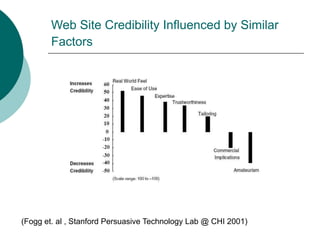
Web Site Credibility Influenced by Similar
Factors
(Fogg et. al , Stanford Persuasive Technology Lab @ CHI 2001)
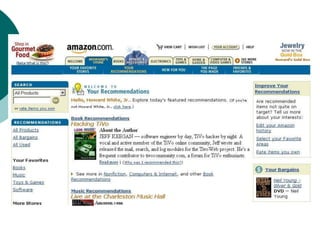
E-Commerce Web Sites Must Be User-
Centered
 Design should focus on
 User experience – familiar needs and mental
models
 User expectations
 User ease and comfort
 User-centered design templates can help
 Simplicity
 User control
 Consistent navigation
 Search
 Shopping carts
 Personalization
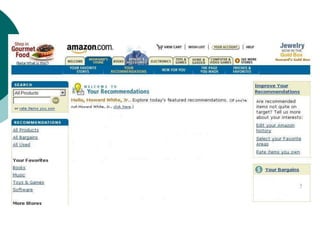
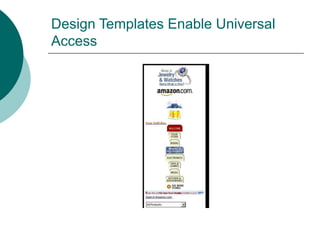
Design Templates Enable Universal
Access
Ten Most Violated Homepage Design
Guidelines
1. Emphasize what your site offers that's of value to users and how
your services differ from those of key competitors
2. Use a liquid layout that lets users adjust the homepage size
3. Use color to distinguish visited and unvisited links
4. Use graphics to show real content, not just to decorate your
homepage
5. Include a tag line that explicitly summarizes what the site or
company does
6. Make it easy to access anything recently featured on your
homepage
7. Include a short site description in the window title
8. Don't use a heading to label the search area; instead use a
"Search" button
9. With stock quotes, give the percentage of change, not just the
points gained lost
10. Don't include an active link to the homepage on the homepage
(Jakob Nielsen's Alertbox, November 10, 2003)
What’s Wrong With These Guidelines?
 Represent a misconception of important
elements of E-Commerce/corporate Web
site design (my opinion)
 They emphasize design not functionality
 They focus on elements not consistency
 Usability becomes blurred with marketing
The Future of E-Commerce Web Site
Design
 User-centered design will become
more important in an increasingly
competitive market
 E-Commerce Web site design must
be prepared to accommodate
universal access

ecom.ppt

  • 1.
    Web Site Designfor E- Commerce Bebo White Stanford Linear Accelerator Center bebo@stanford.edu
  • 2.
    E-Business and E-Commerce E-Business: “the conduct of business with the assistance of telecommunications and telecommunications-based tools”  E-Commerce: “the conduct of commerce in goods and services, with the assistance of telecommunications and telecommunications-based tools” (Ref:: Roger Clarke)
  • 3.
    E-Business/Commerce Evolution Time vs.Complexity of E-Business/Commerce
  • 4.
    Usability  “the easewith which a user can learn to operate, prepare inputs for, and interpret outputs of a system or component” - IEEE Standard Computer Dictionary  A key component in Human- Computer Interaction (HCI)  A primary focus in the design of Web sites  A “usability subculture” has evolved as a result of Web technology
  • 5.
    Usability Variations  Usefulness,and user experience  Usability engineering and usability method  User-centered design
  • 7.
    Web Usability Experts Analyze and critique  Conceptual models  Web site navigation schemes  Web site widgets  Web page sizes, colors, vocabulary  Each other  Blah, blah, blah…  “Church of Usability” - http://builder.com.com/5100-6371- 1044594.html
  • 8.
    Why Is UsabilityImportant for E- Commerce Web Sites?  Primary interface to customers  Users expect instant gratification  Users experience usability before they are committed to buying  Expectations arise from best site across industries  Competitors are “just a mouse click away”  Value of usability for the time-constrained information seeker  Usability as the critical success factor for Web projects
  • 9.
    Why Is UsabilityImportant for E- Commerce Web Sites? (cont)  E-Commerce Web site = electronic storefront  Web site user interface = electronic clerk  Online shoppers can afford to be less tolerant with an inept electronic clerk  E-Commerce Web site = electronic catalog for direct sales  Catalogs are convenient for mail-ordering and large inventory  Too much focus on display and publicity  Web site user interface = “read- ability/usefulness” of catalog  How many paper catalogs get thrown away?
  • 10.
    Return On Investment(ROI)  External ROI  Increased sales  Decreased customer support costs  Savings gained from making changes earlier in the design life cycle  Reduced cost of providing training
  • 11.
    ROI (cont)  InternalROI  Increased user productivity  Decreased user errors  Decreased training costs  Savings from making changes earlier in design life cycle  Decreased user support
  • 12.
    Myths of UsabilityROI  Analog comparisons are not required  “Cost of bad Web design: Loss of approximately 50% of potential sales from the site as people can’t find stuff” (Jakob Neilsen, Alert Box, 1998, cited by Forrester)  Executives will believe “voodoo economics”  “There are one billion users on the Internet, and half of them could come to your site. If the average cost of an abandoned shopping cart is $20, then you will lose $10 billion a year in sales of your designer pet food” (Rosenburg, 2003, parody of J. Neilsen) (Daniel Rosenberg, Oracle)
  • 13.
    Conversion Rates  Aconversion rate is loosely defined as the percentage of Web site visitors who complete a desired action  This action can take many forms:  Clicks beyond home page  Purchases  Membership registrations  Newsletter subscriptions  Sample downloads  Sales inquiries, etc. (“Using Conversion Rates to Measure Web Site Effectiveness and Improve ROI” http://www.websiteprofitdoctor.com/MC_BP_articles.asp?article=03_11_03_01.txt)
  • 14.
    Conversion Rates (cont) A high conversion rate depends on several factors  The interest level of the visitor  The attractiveness of the offer  The ease of the process  The interest level of the visitor is maximized by matching the right visitor, the right place, and the right time (“The #1 Internet Marketing Metric” http://www.marketingterms.com/dictionary/conversion_rate)
  • 15.
    Conversion Rates (cont) “…average conversion rates are in the 3% to 5% range; below 2% is considered poor; and 10% and above is awesome.” (http://news.com.com/2010-1071-281288.html)
  • 16.
    Conversion Rates –Elements That Affect It  User Interface  Convenience  Performance  Effective advertising  “Word of Mouth”
  • 17.
    Conversion Rates InfluencedBy Many Factors Customer Acquisition First Impression Merchandising and Selection Checkout Process Target Inappropriate Audience Unclear Marketing Message Slow Page Load Unengaging “Look & Feel” Clumsy Site Navigation Ineffective Presentation No Access to Real-Time Help Ineffective Tools to Assist Selection Inadequate Selection Uncompetitive Price Excessive Shipping Costs Long Delivery Times Credit Card Validation Error Order Conversion Rate = 1.9% 100% Percent of Site Visitors Source: The Boston Consulting Group
  • 18.
    Conversion Rates InfluencedBy Many Factors (cont) 1. Target inappropriate audience (marketing and UCD) 2. Unclear marketing message (marketing) 3. Slow page load (usability) 4. Un-engaging look and feel (usability) 5. Clumsy site navigation (usability) 6. Ineffective presentation (usability) 7. Inadequate selection (usability) 8. No access to real time help (usability) 9. Uncompetitive price 10. Ineffective tools to assist selection (usability)
  • 19.
    Web Site CredibilityInfluenced by Similar Factors (Fogg et. al , Stanford Persuasive Technology Lab @ CHI 2001)
  • 20.
    E-Commerce Web SitesMust Be User- Centered  Design should focus on  User experience – familiar needs and mental models  User expectations  User ease and comfort  User-centered design templates can help  Simplicity  User control  Consistent navigation  Search  Shopping carts  Personalization
  • 23.
    Design Templates EnableUniversal Access
  • 24.
    Ten Most ViolatedHomepage Design Guidelines 1. Emphasize what your site offers that's of value to users and how your services differ from those of key competitors 2. Use a liquid layout that lets users adjust the homepage size 3. Use color to distinguish visited and unvisited links 4. Use graphics to show real content, not just to decorate your homepage 5. Include a tag line that explicitly summarizes what the site or company does 6. Make it easy to access anything recently featured on your homepage 7. Include a short site description in the window title 8. Don't use a heading to label the search area; instead use a "Search" button 9. With stock quotes, give the percentage of change, not just the points gained lost 10. Don't include an active link to the homepage on the homepage (Jakob Nielsen's Alertbox, November 10, 2003)
  • 25.
    What’s Wrong WithThese Guidelines?  Represent a misconception of important elements of E-Commerce/corporate Web site design (my opinion)  They emphasize design not functionality  They focus on elements not consistency  Usability becomes blurred with marketing
  • 26.
    The Future ofE-Commerce Web Site Design  User-centered design will become more important in an increasingly competitive market  E-Commerce Web site design must be prepared to accommodate universal access