FZIFORSCHUNGSZENTRUM
INFORMATIK
LIM App: Reflecting on Audience Feedback for
Improving Presentation Skills
V. Rivera-Pelayo, E. Lacic, V. Zacharias, and R. Studer
FZI Research Center for Information Technology, Karlsruhe, Germany
EC-TEL Conference 2013 – Paphos, Cyprus
20th September 2013
 Learn by observing others and from experiences
 Support learning-on-the-job and experience sharing
 Learning by reflection on observed practices and collected data
 Focus on acquisition of tacit knowledge
2
Reflective Learning at Work
http://mirror-project.eu
Use Case and Motivation
09.07.2014 © FZI Forschungszentrum Informatik 3
Holding a good
presentation is hard!
Use Case and Motivation
09.07.2014 © FZI Forschungszentrum Informatik 4
How to get better at it?
• With practice
• Get feedback
• Learn from the feedback!
Holding a good
presentation is hard!
Use Case and Motivation
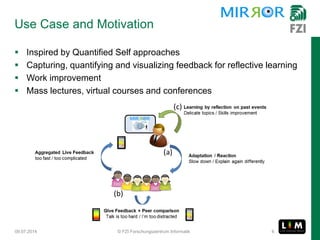
 Inspired by Quantified Self approaches
 Capturing, quantifying and visualizing feedback for reflective learning
 Work improvement
 Mass lectures, virtual courses and conferences
09.07.2014 © FZI Forschungszentrum Informatik 5
Use Case and Motivation
 Inspired by Quantified Self approaches
 Capturing, quantifying and visualizing feedback for reflective learning
 Work improvement
 Mass lectures, virtual courses and conferences
09.07.2014 © FZI Forschungszentrum Informatik 6
Use Case and Motivation
 Inspired by Quantified Self approaches
 Capturing, quantifying and visualizing feedback for reflective learning
 Work improvement
 Mass lectures, virtual courses and conferences
09.07.2014 © FZI Forschungszentrum Informatik 7
Use Case and Motivation
 Inspired by Quantified Self approaches
 Capturing, quantifying and visualizing feedback for reflective learning
 Work improvement
 Mass lectures, virtual courses and conferences
09.07.2014 © FZI Forschungszentrum Informatik 8
Use Case and Motivation
 Inspired by Quantified Self approaches
 Capturing, quantifying and visualizing feedback for reflective learning
 Work improvement
 Mass lectures, virtual courses and conferences
09.07.2014 © FZI Forschungszentrum Informatik 9
Use Case and Motivation
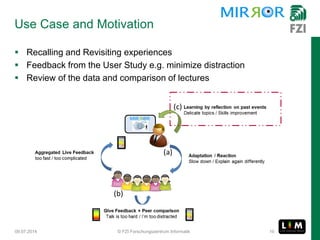
 Recalling and Revisiting experiences
 Feedback from the User Study e.g. minimize distraction
 Review of the data and comparison of lectures
09.07.2014 © FZI Forschungszentrum Informatik 10
7/9/2014 © FZI Forschungszentrum Informatik 11
Hands-on
1. Go to: http://mirror-dev.fzi.de/limgwt
2. Log in with your account “LTXXLT”
3. Group name is “ectel2013” and click “Join group”
7/9/2014 © FZI Forschungszentrum Informatik 12
Hands-on
1. Go to: http://mirror-dev.fzi.de/limgwt
2. Log in with your account “LTXXLT”
3. Group name is “ectel2013” and click “Join group”
LIM: Live Interest Meter
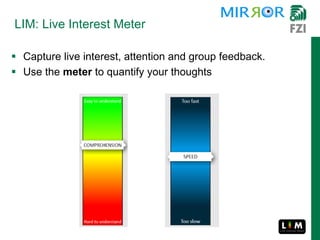
 Capture live interest, attention and group feedback.
 Use the meter to quantify your thoughts
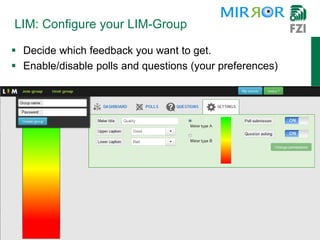
LIM: Configure your LIM-Group
 Decide which feedback you want to get.
 Enable/disable polls and questions (your preferences)
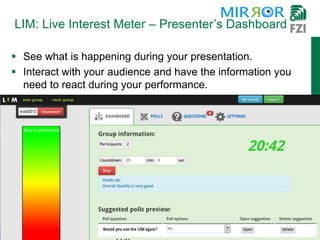
LIM: Live Interest Meter – Presenter’s Dashboard
 See what is happening during your presentation.
 Interact with your audience and have the information you
need to react during your performance.
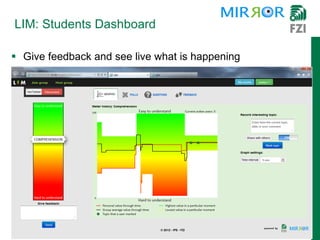
 Give feedback and see live what is happening
LIM: Students Dashboard
LIM: Live Interest Meter – Questions and Polls
 Suggest polls and send questions to the presenter
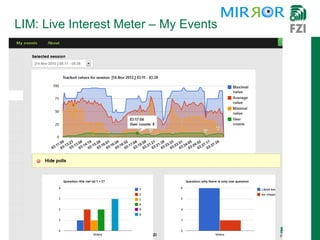
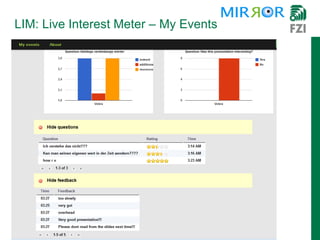
LIM: Live Interest Meter – My Events
LIM: Live Interest Meter - History
 Review what happened in the meeting.
 And learn from your progress
 Features of the LIM App
 Level of participation
 Thoughts about learning by reflection
 Outcomes and work assessment using the LIM App
Evaluation
G Sessions Participants* Degree Field Tracked
aspects
S 1 11/13 Masters Mathematics Speed
M 3 18/19 Bachelor Computer Science
Speed,
comprehension
L 1 15/50 Bachelor
Mgmt. &
Economics
Quality
09.07.2014 © FZI Forschungszentrum Informatik 21
Results
 Main goal: important to improve their presentation skills (3)
 Information was relevant for the decision to reflect (2)
 Reconstruct and remember work experiences (2)
 Reflection on experiences from work (1)
 Regular use:
 high interaction of the group
 comparison of different teaching strategies
09.07.2014 © FZI Forschungszentrum Informatik 22
83 minutes
Group M
Polling used
Group L
17 in Group L
 The LIM App is fun
 Better than the usual way of giving feedback
 Provides a possibility to participate personally in the lecture
 Allows anonymous questions and feedback
 The lecturer is able to adapt to the needs of the students
Feedback from the students
09.07.2014 © FZI Forschungszentrum Informatik 23
Conclusion
 Short period
 Engagement of students and integration in own practices - training
 Large audience number & little interaction
 Observed: context given when others also did
 Ongoing: Further contextualization
09.07.2014 © FZI Forschungszentrum Informatik 24
Usage of the tool
During & After
Reflective Learning
Applying Quantified Self approaches to informal workplace learning
and feedback gathered during the learning process
FUTURE WORK: Evaluation in further lectures
and presentation training
THANK YOU!
Verónica Rivera-Pelayo
@veronicarp rivera@fzi.de

LIM App: Reflecting on Audience Feedback for Improving Presentation Skills

  • 1.
    FZIFORSCHUNGSZENTRUM INFORMATIK LIM App: Reflectingon Audience Feedback for Improving Presentation Skills V. Rivera-Pelayo, E. Lacic, V. Zacharias, and R. Studer FZI Research Center for Information Technology, Karlsruhe, Germany EC-TEL Conference 2013 – Paphos, Cyprus 20th September 2013
  • 2.
     Learn byobserving others and from experiences  Support learning-on-the-job and experience sharing  Learning by reflection on observed practices and collected data  Focus on acquisition of tacit knowledge 2 Reflective Learning at Work http://mirror-project.eu
  • 3.
    Use Case andMotivation 09.07.2014 © FZI Forschungszentrum Informatik 3 Holding a good presentation is hard!
  • 4.
    Use Case andMotivation 09.07.2014 © FZI Forschungszentrum Informatik 4 How to get better at it? • With practice • Get feedback • Learn from the feedback! Holding a good presentation is hard!
  • 5.
    Use Case andMotivation  Inspired by Quantified Self approaches  Capturing, quantifying and visualizing feedback for reflective learning  Work improvement  Mass lectures, virtual courses and conferences 09.07.2014 © FZI Forschungszentrum Informatik 5
  • 6.
    Use Case andMotivation  Inspired by Quantified Self approaches  Capturing, quantifying and visualizing feedback for reflective learning  Work improvement  Mass lectures, virtual courses and conferences 09.07.2014 © FZI Forschungszentrum Informatik 6
  • 7.
    Use Case andMotivation  Inspired by Quantified Self approaches  Capturing, quantifying and visualizing feedback for reflective learning  Work improvement  Mass lectures, virtual courses and conferences 09.07.2014 © FZI Forschungszentrum Informatik 7
  • 8.
    Use Case andMotivation  Inspired by Quantified Self approaches  Capturing, quantifying and visualizing feedback for reflective learning  Work improvement  Mass lectures, virtual courses and conferences 09.07.2014 © FZI Forschungszentrum Informatik 8
  • 9.
    Use Case andMotivation  Inspired by Quantified Self approaches  Capturing, quantifying and visualizing feedback for reflective learning  Work improvement  Mass lectures, virtual courses and conferences 09.07.2014 © FZI Forschungszentrum Informatik 9
  • 10.
    Use Case andMotivation  Recalling and Revisiting experiences  Feedback from the User Study e.g. minimize distraction  Review of the data and comparison of lectures 09.07.2014 © FZI Forschungszentrum Informatik 10
  • 11.
    7/9/2014 © FZIForschungszentrum Informatik 11 Hands-on 1. Go to: http://mirror-dev.fzi.de/limgwt 2. Log in with your account “LTXXLT” 3. Group name is “ectel2013” and click “Join group”
  • 12.
    7/9/2014 © FZIForschungszentrum Informatik 12 Hands-on 1. Go to: http://mirror-dev.fzi.de/limgwt 2. Log in with your account “LTXXLT” 3. Group name is “ectel2013” and click “Join group”
  • 13.
    LIM: Live InterestMeter  Capture live interest, attention and group feedback.  Use the meter to quantify your thoughts
  • 14.
    LIM: Configure yourLIM-Group  Decide which feedback you want to get.  Enable/disable polls and questions (your preferences)
  • 15.
    LIM: Live InterestMeter – Presenter’s Dashboard  See what is happening during your presentation.  Interact with your audience and have the information you need to react during your performance.
  • 16.
     Give feedbackand see live what is happening LIM: Students Dashboard
  • 17.
    LIM: Live InterestMeter – Questions and Polls  Suggest polls and send questions to the presenter
  • 18.
    LIM: Live InterestMeter – My Events
  • 19.
    LIM: Live InterestMeter – My Events
  • 20.
    LIM: Live InterestMeter - History  Review what happened in the meeting.  And learn from your progress
  • 21.
     Features ofthe LIM App  Level of participation  Thoughts about learning by reflection  Outcomes and work assessment using the LIM App Evaluation G Sessions Participants* Degree Field Tracked aspects S 1 11/13 Masters Mathematics Speed M 3 18/19 Bachelor Computer Science Speed, comprehension L 1 15/50 Bachelor Mgmt. & Economics Quality 09.07.2014 © FZI Forschungszentrum Informatik 21
  • 22.
    Results  Main goal:important to improve their presentation skills (3)  Information was relevant for the decision to reflect (2)  Reconstruct and remember work experiences (2)  Reflection on experiences from work (1)  Regular use:  high interaction of the group  comparison of different teaching strategies 09.07.2014 © FZI Forschungszentrum Informatik 22 83 minutes Group M Polling used Group L 17 in Group L
  • 23.
     The LIMApp is fun  Better than the usual way of giving feedback  Provides a possibility to participate personally in the lecture  Allows anonymous questions and feedback  The lecturer is able to adapt to the needs of the students Feedback from the students 09.07.2014 © FZI Forschungszentrum Informatik 23
  • 24.
    Conclusion  Short period Engagement of students and integration in own practices - training  Large audience number & little interaction  Observed: context given when others also did  Ongoing: Further contextualization 09.07.2014 © FZI Forschungszentrum Informatik 24 Usage of the tool During & After Reflective Learning Applying Quantified Self approaches to informal workplace learning and feedback gathered during the learning process FUTURE WORK: Evaluation in further lectures and presentation training
  • 25.