ePortfolios for professional practice Gwyn Owen (oweng@csp.org.uk) Professional Adviser CSP Practice & Development Function
Context CSP: educational, professional & trade union body for 50 000  physiotherapy students, support workers & chartered physiotherapists  HPC & CSP expectations - outcomes-based approach to CPD Members’ access to/confidence in using ICT? Pebble ePortfolio piloted with a group of members during 2007 & launched as a member benefit in 2008
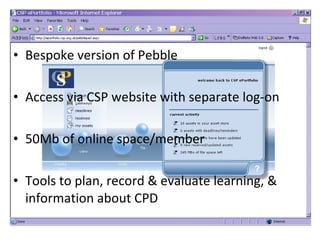
Bespoke version of Pebble Access via CSP website with separate log-on 50Mb of online space/member Tools to plan, record & evaluate learning, & information about CPD
Promoting members’ engagement with ePortfolio  Articles & a supplement in Frontline Physical demonstrations & advice via CSP Congress Work-based seminars/workshops Online support & advice (technical & practical) Personalised support & advice via telephone/email
Getting to know my ePortfolio (2008) Loved the strong visual interface (that I could personalise), intuitive navigation & freedom to ‘do whatever’ Frustrated by  step-wise presentation of the ‘forms’ & limited reflective models available  Alienated by ‘tags’ & examples that CSP had embedded into the ePortfolio Wary of visiting – separate URL, but could  CSP track my usage? Alignment with expectations? (employers & registration body’s processes were paper-based)
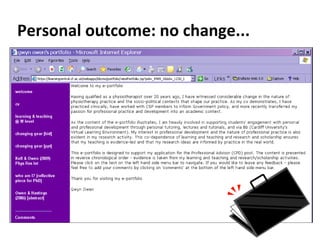
Personal outcome: no change...
ePORTFOLIO – MEMBER USE & FEEDBACK
ePortfolio uptake & use 17293 users registered (April 2011)  [34.5% of all CSP members] ULF-funded member CPD survey (2010) Response rate: 4658 [4287 qualified; 371 associate] How do you currently record  non-mandatory CPD? Qualified  Associates paper 85% 80% CSP ePortfolio 16% 0% other ePortfolio 9% 12%
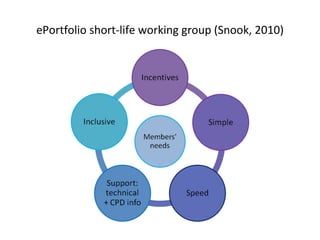
ePortfolio short-life working group (Snook, 2010)
Reflection: ePortfolio in practice Constructive alignment with requirements of professional practice/CSP’s approach to CPD Provision of information & support – informed choices & personalisation of CPD Staged support: - technical elements of ePortfolio use - application of ePortfolio to CPD Integration with other resources (CSP & beyond)  Content management
ePORTFOLIO DEVELOPMENT: ACTION RESEARCH & ONLINE LEARNING
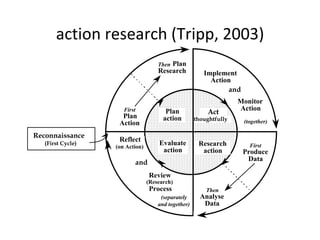
action research (Tripp, 2003) First Plan  Action Then Plan  Research First Produce  Data Then Analyse  Data and Implement  Action Monitor Action and (separately  and together) (together) Reflect  (on Action) Review (Research) Process Plan  action Research  action Evaluate  action Act  thoughtfully Reconnaissance  (First Cycle)
Process map current CPD information/resources – removal of duplicate/out-dated information  establish a virtual group (Pebble gateway) to inform development of CPD resources create a one-stop e-shop [ webfolio ] of information, tools & resources that supports members’ CPD (regularly maintained & updated – informed by user feedback & developments in practice) develop ePortfolio content  (e.g. forms, profiles, & learning activities, links to other CSP CPD resources) to create a personalised learning space that supports members’ CPD
Issues Addressing emotions associated with CPD Critical engagement with pedagogy & software to design resources that are meaningful & accessible to members Creating resources to address diversity of members’ learning needs that can be presented/used on a variety of devices (e.g. paper, DVD/CD-ROM, PC/laptop, mobile)  Ensuring that resources support the development of a learner who’s fit for practice (current & future)

E portfolios physiotherapists

  • 1.
    ePortfolios for professionalpractice Gwyn Owen (oweng@csp.org.uk) Professional Adviser CSP Practice & Development Function
  • 2.
    Context CSP: educational,professional & trade union body for 50 000 physiotherapy students, support workers & chartered physiotherapists HPC & CSP expectations - outcomes-based approach to CPD Members’ access to/confidence in using ICT? Pebble ePortfolio piloted with a group of members during 2007 & launched as a member benefit in 2008
  • 3.
    Bespoke version ofPebble Access via CSP website with separate log-on 50Mb of online space/member Tools to plan, record & evaluate learning, & information about CPD
  • 4.
    Promoting members’ engagementwith ePortfolio Articles & a supplement in Frontline Physical demonstrations & advice via CSP Congress Work-based seminars/workshops Online support & advice (technical & practical) Personalised support & advice via telephone/email
  • 5.
    Getting to knowmy ePortfolio (2008) Loved the strong visual interface (that I could personalise), intuitive navigation & freedom to ‘do whatever’ Frustrated by step-wise presentation of the ‘forms’ & limited reflective models available Alienated by ‘tags’ & examples that CSP had embedded into the ePortfolio Wary of visiting – separate URL, but could CSP track my usage? Alignment with expectations? (employers & registration body’s processes were paper-based)
  • 6.
  • 7.
    ePORTFOLIO – MEMBERUSE & FEEDBACK
  • 8.
    ePortfolio uptake &use 17293 users registered (April 2011) [34.5% of all CSP members] ULF-funded member CPD survey (2010) Response rate: 4658 [4287 qualified; 371 associate] How do you currently record non-mandatory CPD? Qualified Associates paper 85% 80% CSP ePortfolio 16% 0% other ePortfolio 9% 12%
  • 9.
    ePortfolio short-life workinggroup (Snook, 2010)
  • 10.
    Reflection: ePortfolio inpractice Constructive alignment with requirements of professional practice/CSP’s approach to CPD Provision of information & support – informed choices & personalisation of CPD Staged support: - technical elements of ePortfolio use - application of ePortfolio to CPD Integration with other resources (CSP & beyond) Content management
  • 11.
    ePORTFOLIO DEVELOPMENT: ACTIONRESEARCH & ONLINE LEARNING
  • 12.
    action research (Tripp,2003) First Plan Action Then Plan Research First Produce Data Then Analyse Data and Implement Action Monitor Action and (separately and together) (together) Reflect (on Action) Review (Research) Process Plan action Research action Evaluate action Act thoughtfully Reconnaissance (First Cycle)
  • 13.
    Process map currentCPD information/resources – removal of duplicate/out-dated information establish a virtual group (Pebble gateway) to inform development of CPD resources create a one-stop e-shop [ webfolio ] of information, tools & resources that supports members’ CPD (regularly maintained & updated – informed by user feedback & developments in practice) develop ePortfolio content (e.g. forms, profiles, & learning activities, links to other CSP CPD resources) to create a personalised learning space that supports members’ CPD
  • 14.
    Issues Addressing emotionsassociated with CPD Critical engagement with pedagogy & software to design resources that are meaningful & accessible to members Creating resources to address diversity of members’ learning needs that can be presented/used on a variety of devices (e.g. paper, DVD/CD-ROM, PC/laptop, mobile) Ensuring that resources support the development of a learner who’s fit for practice (current & future)