Easy programing with the AppInventor and MySQL
In this paper I intend to teach to easy form to program the App Inventor. All text that sought
are very difficult and I decided to write this article easy to understand.
This article shows how to use the app inventor along with MySQL.
The program sends information such as key, data and get the result.
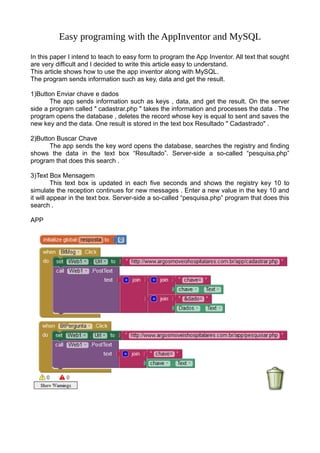
1)Button Enviar chave e dados
The app sends information such as keys , data, and get the result. On the server
side a program called " cadastrar.php " takes the information and processes the data . The
program opens the database , deletes the record whose key is equal to sent and saves the
new key and the data. One result is stored in the text box Resultado " Cadastrado" .
2)Button Buscar Chave
The app sends the key word opens the database, searches the registry and finding
shows the data in the text box “Resultado”. Server-side a so-called “pesquisa.php”
program that does this search .
3)Text Box Mensagem
This text box is updated in each five seconds and shows the registry key 10 to
simulate the reception continues for new messages . Enter a new value in the key 10 and
it will appear in the text box. Server-side a so-called “pesquisa.php” program that does this
search .
APP
PHP program
Cadastrar
<?php
include "config.php";
$chave = trim($_POST['chave']);
$dado = trim($_POST['dado']);
$query = "DELETE FROM App where Chave='$chave'" or die($msg[1]);
$resultado = mysql_query($query);
$sql = mysql_query(
"INSERT INTO App
(Chave, Dado)
VALUES
('$chave', '$dado')")
or die( mysql_error()
);
if ($sql=='1'){
echo 'Cadastrado';
}
else{
echo $sql;
}
?>
Config.php
<?php
define('BD_USER', 'argosmov_app');
define('BD_PASS', '*******');
define('BD_NAME', 'argosmov_loja');
mysql_connect('localhost', BD_USER, BD_PASS);
mysql_select_db(BD_NAME) or die('Erro conexao');
?>
Pesquisar.php
<?php
include "config.php";
$chave = trim($_POST['chave']);
$dado=trim($_POST['dado']);
$query = "SELECT Dado FROM App where Chave='$chave'" or die(mysql_error());
$resultado = mysql_query($query);
$linha = mysql_fetch_array($resultado);
$dado=$linha['Dado'];
echo $dado;
?>
Database

Easy Program with AppInventor and MySQL

  • 1.
    Easy programing withthe AppInventor and MySQL In this paper I intend to teach to easy form to program the App Inventor. All text that sought are very difficult and I decided to write this article easy to understand. This article shows how to use the app inventor along with MySQL. The program sends information such as key, data and get the result. 1)Button Enviar chave e dados The app sends information such as keys , data, and get the result. On the server side a program called " cadastrar.php " takes the information and processes the data . The program opens the database , deletes the record whose key is equal to sent and saves the new key and the data. One result is stored in the text box Resultado " Cadastrado" . 2)Button Buscar Chave The app sends the key word opens the database, searches the registry and finding shows the data in the text box “Resultado”. Server-side a so-called “pesquisa.php” program that does this search . 3)Text Box Mensagem This text box is updated in each five seconds and shows the registry key 10 to simulate the reception continues for new messages . Enter a new value in the key 10 and it will appear in the text box. Server-side a so-called “pesquisa.php” program that does this search . APP
  • 3.
    PHP program Cadastrar <?php include "config.php"; $chave= trim($_POST['chave']); $dado = trim($_POST['dado']); $query = "DELETE FROM App where Chave='$chave'" or die($msg[1]); $resultado = mysql_query($query); $sql = mysql_query( "INSERT INTO App (Chave, Dado) VALUES ('$chave', '$dado')") or die( mysql_error() ); if ($sql=='1'){ echo 'Cadastrado'; } else{ echo $sql; } ?> Config.php <?php define('BD_USER', 'argosmov_app'); define('BD_PASS', '*******'); define('BD_NAME', 'argosmov_loja'); mysql_connect('localhost', BD_USER, BD_PASS); mysql_select_db(BD_NAME) or die('Erro conexao'); ?>
  • 4.
    Pesquisar.php <?php include "config.php"; $chave =trim($_POST['chave']); $dado=trim($_POST['dado']); $query = "SELECT Dado FROM App where Chave='$chave'" or die(mysql_error()); $resultado = mysql_query($query); $linha = mysql_fetch_array($resultado); $dado=$linha['Dado']; echo $dado; ?> Database