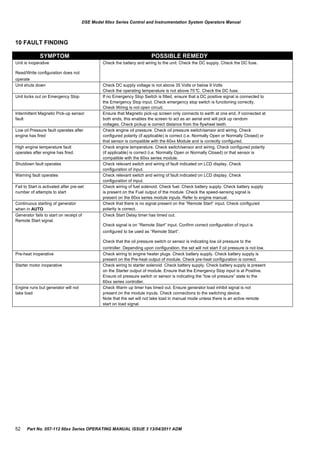
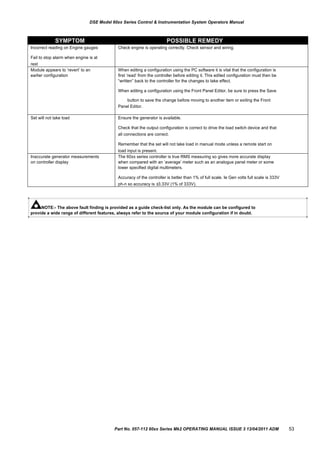
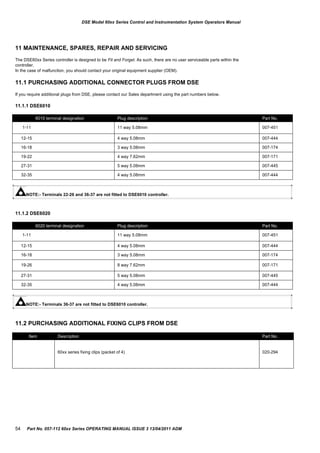
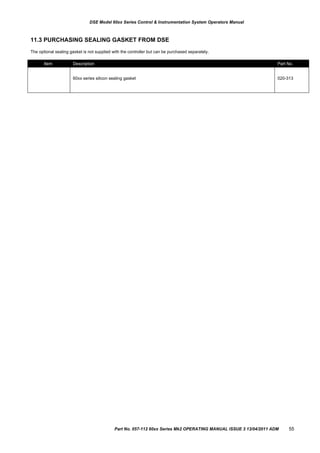
DEEP SEA ELECTRONICS PLC
DSE60xx Series Control Module
Document Number 057-112
Author : Anthony Manton
Amd. No. Comments
Issue 1 First release
Issue 2 Added fast loading and changes to flexible sensor alarms in the front panel configuration table.
Issue 3 Added Power pages front panel Watts / kVA / kVAr
DSE Model 60xx Series Control and Instrumentation System Operators Manual
Deep Sea Electronics Plc
Highfield House
Hunmanby
North Yorkshire
YO14 0PH
ENGLAND
Sales Tel: +44 (0) 1723 890099
Sales Fax: +44 (0) 1723 893303
E-mail: sales@deepseaplc.com
Website: www.deepseaplc.com
DSE Model 60xx series Control and Instrumentation System Operators Manual
© Deep Sea Electronics Plc
All rights reserved. No part of this publication may be reproduced in any material form (including photocopying or storing in any medium by
electronic means or other) without the written permission of the copyright holder except in accordance with the provisions of the Copyright,
Designs and Patents Act 1988.
Applications for the copyright holder‟s written permission to reproduce any part of this publication should be addressed to Deep Sea Electronics
Plc at the address above.
The DSE logo and the names are UK registered trademarks of Deep Sea Electronics PLC.
Any reference to trademarked product names used within this publication is owned by their respective companies.
Deep Sea Electronics Plc reserves the right to change the contents of this document without prior notice.
Amendments since last publication
Clarification of notatio n used within this publication.
Highlights an essential element of a procedure to ensure correctness.
NOTE:
Indicates a procedure or practice, which, if not strictly observed, could result in damage or destruction
CAUTION!
WARNING!
of equipment.
Indicates a procedure or practice, which could result in injury to personnel or loss of life if not followed
correctly.
2 Part No. 057-112 60xx Series OPERATING MANUAL ISSUE 3 13/04/2011 ADM
DSE Model 60xx Series Control & Instrumentation System Operators Manual
TABLE OF CONTENTS
Section Page
1 BIBLIOGRAPHY .............................................................................................. 5
1.1
1.2
INSTALLATION INSTRUCTIONS ....................................................................................... 5
MANUALS............................................................................................................................ 5
2
3
INTRODUCTION .............................................................................................. 5
SPECIFICATIONS ............................................................................................ 6
3.1 PART NUMBERING ............................................................................................................ 6
3.1.1 SHORT NAMES............................................................................................................ 6
3.1
3.2
3.3
3.4
POWER SUPPLY REQUIREMENTS .................................................................................. 7
TERMINAL SPECIFICATION .............................................................................................. 7
GENERATOR VOLTAGE / FREQUENCY SENSING ......................................................... 7
INPUTS ................................................................................................................................ 8
3.4.1
3.4.2
3.4.3
3.4.4
DIGITAL INPUTS .......................................................................................................... 8
ANALOGUE INPUTS .................................................................................................... 8
CHARGE FAIL INPUT .................................................................................................. 9
MAGNETIC PICKUP..................................................................................................... 9
3.5 OUTPUTS ............................................................................................................................ 9
3.5.1
3.5.2
OUTPUTS A & B (FUEL AND START)......................................................................... 9
CONFIGURABLE OUTPUTS C, D, E & F .................................................................... 9
3.6
3.7
3.8
COMMUNICATION PORTS ................................................................................................ 9
ACCUMULATED INSTRUMENTATION.............................................................................. 9
DIMENSIONS AND MOUNTING ....................................................................................... 10
3.8.1
3.8.2
3.8.3
3.8.4
3.8.5
DIMENSIONS ............................................................................................................. 10
PANEL CUTOUT ........................................................................................................ 10
WEIGHT...................................................................................................................... 10
FIXING CLIPS............................................................................................................. 10
OPTIONAL SILICON SEALING GASKET .................................................................. 10
3.9 APPLICABLE STANDARDS ............................................................................................. 11
4 INSTALLATION.............................................................................................. 12
4.1 TERMINAL DESCRIPTION ............................................................................................... 12
4.1.1
4.1.2
4.1.3
4.1.4
4.1.5
4.1.6
4.1.7
4.1.8
DC SUPPLY, FUEL AND START OUTPUTS............................................................. 12
ANALOGUE SENSORS.............................................................................................. 13
MAGNETIC PICKUP................................................................................................... 13
CAN............................................................................................................................. 14
GENERATOR / MAINS VOLTAGE SENSING............................................................ 14
GENERATOR CURRENT TRANSFORMERS ........................................................... 15
DIGITAL INPUTS ........................................................................................................ 16
PC CONFIGURATION INTERFACE CONNECTOR .................................................. 16
4.2 TYPICAL WIRING DIAGRAMS ......................................................................................... 17
4.2.1
4.2.2
DSE 6010 MK2 AUTOSTART MODULE .................................................................... 17
DSE 6020 MK2 AUTO MAINS FAILURE MODULE ................................................... 18
5 DESCRIPTION OF CONTROLS .................................................................... 19
5.1 QUICKSTART GUIDE ....................................................................................................... 20
5.1.1
5.1.2
STARTING THE ENGINE........................................................................................... 20
STOPPING THE ENGINE .......................................................................................... 20
5.2
5.3
5.4
5.5
GRAPHICAL DISPLAY...................................................................................................... 21
VIEWING THE INSTRUMENTS ........................................................................................ 21
EVENT LOG....................................................................................................................... 22
CONTROLS ....................................................................................................................... 23
6 OPERATION................................................................................................... 24
6.1 AUTOMATIC MODE OF OPERATION.............................................................................. 24
6.1.1
6.1.2
6.1.3
6.1.4
WAITING IN AUTO MODE ......................................................................................... 24
STARTING SEQUENCE............................................................................................. 24
ENGINE RUNNING..................................................................................................... 25
STOPPING SEQUENCE ............................................................................................ 25
Part No. 057-112 60xx Series Mk2 OPERATING MANUAL ISSUE 3 13/04/2011 ADM 3
DSE Model 60xx Series Control and Instrumentation System Operators Manual
6.2 MANUAL OPERATION ......................................................................................................26
6.2.1
6.2.2
6.2.3
6.2.4
WAITING IN MANUAL MODE ....................................................................................26
STARTING SEQUENCE .............................................................................................26
ENGINE RUNNING .....................................................................................................27
STOPPING SEQUENCE.............................................................................................27
6.3 TEST MODE.......................................................................................................................28
6.3.1
6.3.2
6.3.3
WAITING IN TEST MODE ..........................................................................................28
STARTING SEQUENCE .............................................................................................28
ENGINE RUNNING .....................................................................................................29
7 MODULE DISPLAY ....................................................................................... 30
7.1
7.2
BACKLIGHT.......................................................................................................................30
GRAPHICAL DISPLAY ......................................................................................................30
7.2.1
7.2.2
7.2.3
7.2.4
7.2.5
DISPLAY EXAMPLE ...................................................................................................30
MODE ICON................................................................................................................30
AUTO RUN ICON........................................................................................................31
INSTRUMENTATION ICONS .....................................................................................31
ACTIVE CONFIGURATION ........................................................................................32
7.3
7.4
7.5
7.6
PROTECTIONS..................................................................................................................33
WARNINGS ........................................................................................................................34
SHUTDOWN ALARMS ......................................................................................................35
ELECTRICAL TRIP ALARMS ...........................................................................................37
8 FRONT PANEL CONFIGURATION ............................................................... 38
8.1
8.2
8.3
ACCESSING THE FRONT PANEL EDITOR (FPE) ..........................................................38
EDITING A PARAMETER ..................................................................................................38
ADJUSTABLE PARAMETERS..........................................................................................39
9 COMMISSIONING ......................................................................................... 51
9.1.1 PRE-COMMISSIONING ..............................................................................................51
10
11
11.1
FAULT FINDING ......................................................................................... 52
MAINTENANCE, SPARES, REPAIR AND SERVICING............................. 54
PURCHASING ADDITIONAL CONNECTOR PLUGS FROM DSE ...............................54
11.1.1
11.1.2
11.2
11.3
DSE6010 .....................................................................................................................54
DSE6020 .....................................................................................................................54
PURCHASING ADDITIONAL FIXING CLIPS FROM DSE ............................................54
PURCHASING SEALING GASKET FROM DSE ...........................................................55
12
13
13.1
13.2
14
14.1
14.2
WARRANTY................................................................................................ 56
DISPOSAL .................................................................................................. 56
WEEE (WASTE ELECTRICAL AND ELECTRONIC EQUIPMENT)..............................56
ROHS (RESTRICTION OF HAZARDOUS SUBSTANCES) ..........................................56
APPENDIX .................................................................................................. 57
CAN INTERFACE ..........................................................................................................57
COMMUNICATIONS OPTION CONNECTIONS ...........................................................58
14.2.1
14.2.2
14.3
DESCRIPTION ............................................................................................................58
PC TO CONTROLLER (DIRECT) CONNECTION .....................................................58
ENCLOSURE CLASSIFICATIONS ................................................................................59
4 Part No. 057-112 60xx Series OPERATING MANUAL ISSUE 3 13/04/2011 ADM
DSE PART DESCRIPTION
053-076 6010 installation instructions
053-077 6020 installation instructions
DSE PART DESCRIPTION
057-004 Electronic Engines and DSE wiring
057-114 DSE60xx Config Suite Manual
DSE Model 60xx Series Control & Instrumentation System Operators Manual
1
1.1
1.2
2
BIBLIOGRAPHY
INSTALLATION INSTRUCTIONS
MANUALS
INTRODUCTION
This document details the installation and operation requirements of the DSE60xx, part of the DSEUltra® range of products.
DSE6100 series modules are not covered in this document.
The manual forms part of the product and should be kept for the entire life of the product. If the product is passed or supplied to
another party, ensure that this document is passed to them for reference purposes.
This is not a controlled document. You will not be automatically informed of updates. Any future updates of this document will
be included on the DSE website at www.deepseaplc.com
The DSE 60xx series module has been designed to allow the operator to start and stop the engine/generator, and if required,
transfer the load.
The user also has the facility to view the system operating parameters via the LCD display.
The DSE 60xx module monitors the engine, indicating the operational status and fault conditions, automatically shutting down
the engine and giving a true first up fault condition of an engine failure. The LCD display indicates the fault.
The powerful microprocessor contained within the module allows for incorporation of a range of enhanced features:






Text based LCD display
True RMS Voltage monitoring with 3 phase generator sensing (Mk2 models only)
Engine parameter monitoring.
Fully configurable inputs for use as alarms or a range of different functions.
Engine ECU interface to electronic engines (specify on ordering)
Magnetic pickup interface for engine only applications (specify on ordering)
Using a PC and the 60xx series configuration software allows alteration of selected operational sequences, timers and alarm
trips.
Additionally, the module‟s integral fascia configuration editor allows full adjustment of all this information.
A robust plastic case designed for front panel mounting houses the module. Connections are via locking plug and sockets.
Part No. 057-112 60xx Series Mk2 OPERATING MANUAL ISSUE 3 13/04/2011 ADM 5
Short name Description
60xx DSE 60xx series control module
60x0-xxx-01 6010 or 6020 MPU version module
60x0-xxx-02 6010 or 6020 CAN version module
DSE Model 60xx Series Control and Instrumentation System Operators Manual
3
3.1
SPECIFICATIONS
PART NUMBERING
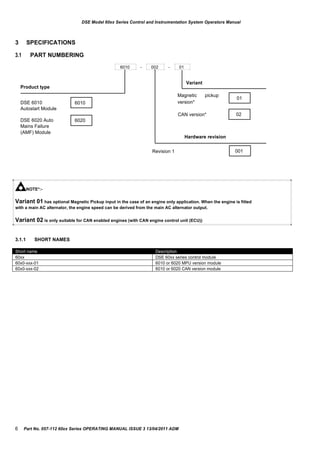
6010 - 002 - 01
Product type
Variant
DSE 6010 6010
Magnetic
version*
pickup
01
Autostart Module
CAN version* 02
DSE 6020 Auto
Mains Failure
6020
(AMF) Module
Revision 1
Hardware revision
001
NOTE*:-
Variant 01 has optional Magnetic Pickup input in the case of an engine only application. When the engine is fitted
with a main AC alternator, the engine speed can be derived from the main AC alternator output.
Variant 02 is only suitable for CAN enabled engines (with CAN engine control unit (ECU))
3.1.1 SHORT NAMES
6 Part No. 057-112 60xx Series OPERATING MANUAL ISSUE 3 13/04/2011 ADM
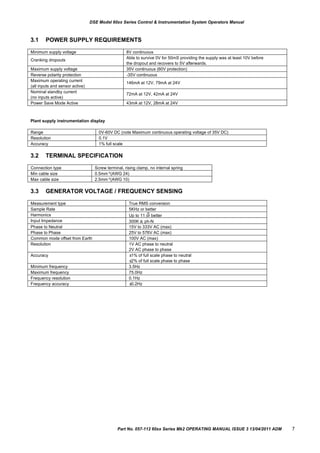
Measurement type True RMS conversion
Sample Rate 5KHz or better
Harmonics
th
Up to 11 or better
Input Impedance 300K ph-N
Phase to Neutral 15V to 333V AC (max)
Phase to Phase 25V to 576V AC (max)
Common mode offset from Earth 100V AC (max)
Resolution 1V AC phase to neutral
2V AC phase to phase
Accuracy ±1% of full scale phase to neutral
±2% of full scale phase to phase
Minimum frequency 3.5Hz
Maximum frequency 75.0Hz
Frequency resolution 0.1Hz
Frequency accuracy ±0.2Hz
Minimum supply voltage 8V continuous
Cranking dropouts
Able to survive 0V for 50mS providing the supply was at least 10V before
the dropout and recovers to 5V afterwards.
Maximum supply voltage 35V continuous (60V protection)
Reverse polarity protection -35V continuous
Maximum operating current
(all inputs and sensor active)
146mA at 12V, 79mA at 24V
Nominal standby current
(no inputs active)
72mA at 12V, 42mA at 24V
Power Save Mode Active 43mA at 12V, 28mA at 24V
Range 0V-60V DC (note Maximum continuous operating voltage of 35V DC)
Resolution 0.1V
Accuracy 1% full scale
Connection type Screw terminal, rising clamp, no internal spring
Min cable size 0.5mm²(AWG 24)
Max cable size 2.5mm²(AWG 10)
DSE Model 60xx Series Control & Instrumentation System Operators Manual
3.1 POWER SUPPLY REQUIREMENTS
Plant supply instrumentation display
3.2
3.3
TERMINAL SPECIFICATION
GENERATOR VOLTAGE / FREQUENCY SENSING
Part No. 057-112 60xx Series Mk2 OPERATING MANUAL ISSUE 3 13/04/2011 ADM 7
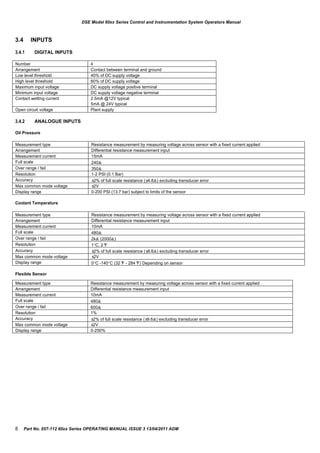
Measurement type Resistance measurement by measuring voltage across sensor with a fixed current applied
Arrangement Differential resistance measurement input
Measurement current 10mA
Full scale 480
Over range / fail 2k (2000)
Resolution 1C, 2°F
Accuracy ±2% of full scale resistance (±9.6) excluding transducer error
Max common mode voltage ±2V
Display range 0C -140C (32°F - 284°F) Depending on sensor
Measurement type Resistance measurement by measuring voltage across sensor with a fixed current applied
Arrangement Differential resistance measurement input
Measurement current 15mA
Full scale 240
Over range / fail 350
Resolution 1-2 PSI (0.1 Bar)
Accuracy ±2% of full scale resistance (±4.8) excluding transducer error
Max common mode voltage ±2V
Display range 0-200 PSI (13.7 bar) subject to limits of the sensor
Measurement type Resistance measurement by measuring voltage across sensor with a fixed current applied
Arrangement Differential resistance measurement input
Measurement current 10mA
Full scale 480
Over range / fail 600
Resolution 1%
Accuracy ±2% of full scale resistance (±9.6) excluding transducer error
Max common mode voltage ±2V
Display range 0-250%
Number 4
Arrangement Contact between terminal and ground
Low level threshold 40% of DC supply voltage
High level threshold 60% of DC supply voltage
Maximum input voltage DC supply voltage positive terminal
Minimum input voltage DC supply voltage negative terminal
Contact wetting current 2.5mA @12V typical
5mA @ 24V typical
Open circuit voltage Plant supply
DSE Model 60xx Series Control and Instrumentation System Operators Manual
3.4
3.4.1
3.4.2
INPUTS
DIGITAL INPUTS
ANALOGUE INPUTS
Oil Pressure
Coolant Temperature
Flexible Sensor
8 Part No. 057-112 60xx Series OPERATING MANUAL ISSUE 3 13/04/2011 ADM
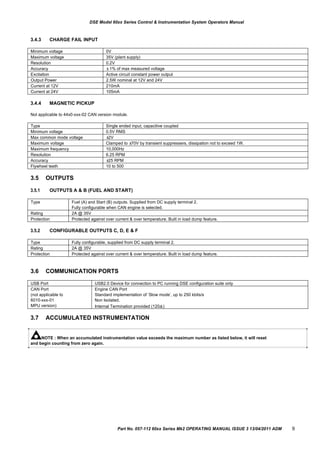
Minimum voltage 0V
Maximum voltage 35V (plant supply)
Resolution 0.2V
Accuracy ±1% of max measured voltage
Excitation Active circuit constant power output
Output Power 2.5W nominal at 12V and 24V
Current at 12V 210mA
Current at 24V 105mA
Type Single ended input, capacitive coupled
Minimum voltage 0.5V RMS
Max common mode voltage ±2V
Maximum voltage Clamped to ±70V by transient suppressers, dissipation not to exceed 1W.
Maximum frequency 10,000Hz
Resolution 6.25 RPM
Accuracy ±25 RPM
Flywheel teeth 10 to 500
USB Port USB2.0 Device for connection to PC running DSE configuration suite only
CAN Port
(not applicable to
6010-xxx-01
MPU version)
Engine CAN Port
Standard implementation of „Slow mode‟, up to 250 kbits/s
Non Isolated.
Internal Termination provided (120)
Type Fuel (A) and Start (B) outputs. Supplied from DC supply terminal 2.
Fully configurable when CAN engine is selected.
Rating 2A @ 35V
Protection Protected against over current & over temperature. Built in load dump feature.
Type Fully configurable, supplied from DC supply terminal 2.
Rating 2A @ 35V
Protection Protected against over current & over temperature. Built in load dump feature.
DSE Model 60xx Series Control & Instrumentation System Operators Manual
3.4.3
3.4.4
CHARGE FAIL INPUT
MAGNETIC PICKUP
Not applicable to 44x0-xxx-02 CAN version module.
3.5
3.5.1
3.5.2
3.6
3.7
OUTPUTS
OUTPUTS A & B (FUEL AND START)
CONFIGURABLE OUTPUTS C, D, E & F
COMMUNICATION PORTS
ACCUMULATED INSTRUMENTATION
NOTE : When an accumulated instrumentation value exceeds the maximum number as listed below, it will reset
and begin counting from zero again.
Part No. 057-112 60xx Series Mk2 OPERATING MANUAL ISSUE 3 13/04/2011 ADM 9
Engine hours run Maximum 99999 hrs 59 minutes (approximately 11yrs 4months)
Number of starts 1,000,000 (1 million)
DSE Model 60xx Series Control and Instrumentation System Operators Manual
3.8
3.8.1
DIMENSIONS AND MOUNTING
DIMENSIONS
216mm x 158mm x 42mm
(8.5” x 6.2” x 1.6”)
3.8.2 PANEL CUTOUT
182mm x 137mm
(7.2” x 5.4”)
3.8.3 WEIGHT
400g (0.4kg)
3.8.4 FIXING CLIPS
The module is held into the panel fascia using the supplied fixing clips.
 Withdraw the fixing clip screw (turn anticlockwise) until only the pointed end is protruding from the clip.
 Insert the three „prongs‟ of the fixing clip into the slots in the side of the 60xx series module case.
 Pull the fixing clip backwards (towards the back of the module) ensuring all three prongs of the clip are inside their


allotted slots.
Turn the fixing clip screws clockwise until they make contact with the panel fascia.
Turn the screws a little more to secure the module into the panel fascia. Care should be taken not to over tighten the
fixing clip screws.
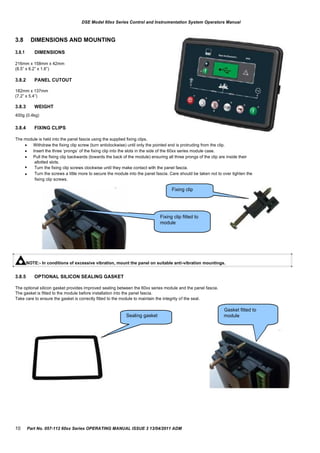
Fixing clip
Fixing clip fitted to
module
NOTE:- In conditions of excessive vibration, mount the panel on suitable anti-vibration mountings.
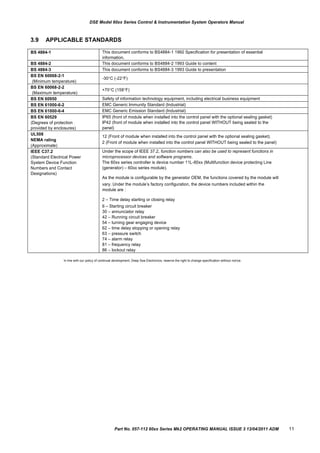
3.8.5 OPTIONAL SILICON SEALING GASKET
The optional silicon gasket provides improved sealing between the 60xx series module and the panel fascia.
The gasket is fitted to the module before installation into the panel fascia.
Take care to ensure the gasket is correctly fitted to the module to maintain the integrity of the seal.
Gasket fitted to
Sealing gasket module
10 Part No. 057-112 60xx Series OPERATING MANUAL ISSUE 3 13/04/2011 ADM
BS 4884-1 This document conforms to BS4884-1 1992 Specification for presentation of essential
information.
BS 4884-2 This document conforms to BS4884-2 1993 Guide to content
BS 4884-3 This document conforms to BS4884-3 1993 Guide to presentation
BS EN 60068-2-1
(Minimum temperature)
-30C (-22F)
BS EN 60068-2-2
(Maximum temperature)
+70C (158F)
BS EN 60950 Safety of information technology equipment, including electrical business equipment
BS EN 61000-6-2 EMC Generic Immunity Standard (Industrial)
BS EN 61000-6-4 EMC Generic Emission Standard (Industrial)
BS EN 60529
(Degrees of protection
provided by enclosures)
IP65 (front of module when installed into the control panel with the optional sealing gasket)
IP42 (front of module when installed into the control panel WITHOUT being sealed to the
panel)
UL508
NEMA rating
(Approximate)
12 (Front of module when installed into the control panel with the optional sealing gasket).
2 (Front of module when installed into the control panel WITHOUT being sealed to the panel)
IEEE C37.2
(Standard Electrical Power
System Device Function
Numbers and Contact
Designations)
Under the scope of IEEE 37.2, function numbers can also be used to represent functions in
microprocessor devices and software programs.
The 60xx series controller is device number 11L-60xx (Multifunction device protecting Line
(generator) – 60xx series module).
As the module is configurable by the generator OEM, the functions covered by the module will
vary. Under the module‟s factory configuration, the device numbers included within the
module are :
2 – Time delay starting or closing relay
6 – Starting circuit breaker
30 – annunciator relay
42 – Running circuit breaker
54 – turning gear engaging device
62 – time delay stopping or opening relay
63 – pressure switch
74 – alarm relay
81 – frequency relay
86 – lockout relay
DSE Model 60xx Series Control & Instrumentation System Operators Manual
3.9 APPLICABLE STANDARDS
In line with our policy of continual development, Deep Sea Electronics, reserve the right to change specification without notice.
Part No. 057-112 60xx Series Mk2 OPERATING MANUAL ISSUE 3 13/04/2011 ADM 11
PIN No DESCRIPTION CABLE NOTES
SIZE
1 DC Plant Supply Input
(Negative)
2.5mm²
AWG 13
2 DC Plant Supply Input
(Positive)
2.5 mm²
AWG 13
(Recommended Maximum Fuse 15A anti-surge)
Supplies the module (2A anti-surge requirement) and all
output relays
3 Emergency Stop 1.0mm²
AWG 18
Plant Supply Positive from terminal 2. 3 Amp rated.
4 Output A 1.0mm²
AWG 18
Plant Supply Positive from terminal 2. 3 Amp rated.
Normally used for FUEL control.
5 Output B 1.0mm²
AWG 18
Plant Supply Positive from terminal 2. 3 Amp rated.
Normally used for START control.
6 Charge fail / excite 2.5mm²
AWG 13
Do not connect to ground (battery negative).
If charge alternator is not fitted, leave this terminal
disconnected.
7 System Eartth 1.0mm²
AWG 18
8 Output C 1.0mm²
AWG 18
Plant Supply Positive from terminal 2. 3 Amp rated.
Normally used for Generator load switch control.
9 Output D 1.0mm²
AWG 18
Plant Supply Positive from terminal 2. 3 Amp rated.
Normally used for Mains load switch control (DSE6020)
10 Output E 1.0mm²
AWG 18
Plant Supply Positive from terminal 2. 3 Amp rated.
11 Output F 1.0mm²
AWG 18
Plant Supply Positive from terminal 2. 3 Amp rated.
DSE Model 60xx Series Control and Instrumentation System Operators Manual
4 INSTALLATION
The DSE60xx Series module is designed to be mounted on the panel fascia. For dimension and mounting details, see the
section entitled Specification, Dimension and mounting elsewhere in this document.
NOTE:- Note that these connection details are for Mk2 controllers. Connection details for Mk1 controllers are
included in DSE publication 057-092
4.1
4.1.1
TERMINAL DESCRIPTION
DC SUPPLY, FUEL AND START OUTPUTS
NOTE:- When the module is configured for operation with an electronic engine, FUEL and START
output requirements may be different. Refer to Electronic Engines and DSE Wiring for further information.
DSE Part No. 057-004.
12 Part No. 057-112 60xx Series OPERATING MANUAL ISSUE 3 13/04/2011 ADM
PIN No DESCRIPTION CABLE NOTES
SIZE
12 Sensor Common Return 0.5mm²
AWG 20
Return feed for sensors*
13 Oil Pressure Input 0.5mm²
AWG 20
Connect to Oil pressure sensor
14 Coolant Temperature Input 0.5mm²
AWG 20
Connect to Coolant Temperature sensor
15 Flexible Sensor Input 0.5mm²
AWG 20
Connect to sensor
PIN No DESCRIPTION CABLE NOTES
SIZE
16 Magnetic pickup Positive 0.5mm²
AWG 20
Connect to Magnetic Pickup device
17 Magnetic pickup Negative 0.5mm²
AWG 20
Connect to Magnetic Pickup device
18 Magnetic pickup screen 0.5mm²
AWG 20
Do not connect the other end to earth!
DSE Model 60xx Series Control & Instrumentation System Operators Manual
4.1.2 ANALOGUE SENSORS
NOTE:- . It is VERY important that terminal 12 (sensor common) is soundly connected to an earth
point on the ENGINE BLOCK, not within the control panel, and must be a sound electrical connection to
the sensor bodies. This connection MUST NOT be used to provide an earth connection for other
terminals or devices. The simplest way to achieve this is to run a SEPERATE earth connection from the
system earth star point, to terminal 12 directly, and not use this earth for other connections.
NOTE:- . If you use PTFE insulating tape on the sensor thread when using earth return sensors,
ensure you do not insulate the entire thread, as this will prevent the sensor body from being earthed via
the engine block.
4.1.3 MAGNETIC PICKUP
NOTE:- Magnetic Pickup interface is not fitted to the 6010-xx-00 module
NOTE:- Screened cable must be used for connecting the Magnetic Pickup, ensuring that the screen is
earthed at one end ONLY.
Part No. 057-112 60xx Series Mk2 OPERATING MANUAL ISSUE 3 13/04/2011 ADM 13
PIN No DESCRIPTION CABLE NOTES
SIZE
16 CAN port H 0.5mm²
AWG 20
Use only 120 CAN approved cable
17 CAN port L 0.5mm²
AWG 20
Use only 120 CAN approved cable
18 CAN port Common 0.5mm²
AWG 20
Use only 120 CAN approved cable
DSE Model 60xx Series Control and Instrumentation System Operators Manual
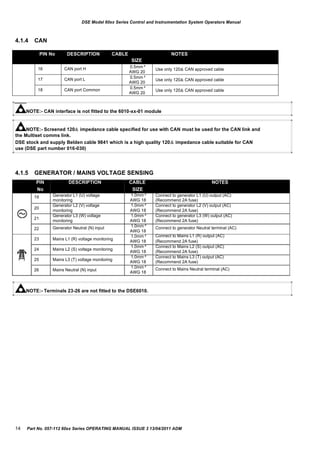
4.1.4 CAN
NOTE:- CAN interface is not fitted to the 6010-xx-01 module
NOTE:- Screened 120 impedance cable specified for use with CAN must be used for the CAN link and
the Multiset comms link.
DSE stock and supply Belden cable 9841 which is a high quality 120 impedance cable suitable for CAN
use (DSE part number 016-030)
4.1.5 GENERATOR / MAINS VOLTAGE SENSING
PIN
No
19
20
21
22
23
24
25
26
DESCRIPTION
Generator L1 (U) voltage
monitoring
Generator L2 (V) voltage
monitoring
Generator L3 (W) voltage
monitoring
Generator Neutral (N) input
Mains L1 (R) voltage monitoring
Mains L2 (S) voltage monitoring
Mains L3 (T) voltage monitoring
Mains Neutral (N) input
CABLE
SIZE
1.0mm²
AWG 18
1.0mm²
AWG 18
1.0mm²
AWG 18
1.0mm²
AWG 18
1.0mm²
AWG 18
1.0mm²
AWG 18
1.0mm²
AWG 18
1.0mm²
AWG 18
NOTES
Connect to generator L1 (U) output (AC)
(Recommend 2A fuse)
Connect to generator L2 (V) output (AC)
(Recommend 2A fuse)
Connect to generator L3 (W) output (AC)
(Recommend 2A fuse)
Connect to generator Neutral terminal (AC)
Connect to Mains L1 (R) output (AC)
(Recommend 2A fuse)
Connect to Mains L2 (S) output (AC)
(Recommend 2A fuse)
Connect to Mains L3 (T) output (AC)
(Recommend 2A fuse)
Connect to Mains Neutral terminal (AC)
NOTE:- Terminals 23-26 are not fitted to the DSE6010.
14 Part No. 057-112 60xx Series OPERATING MANUAL ISSUE 3 13/04/2011 ADM
27 Generator I1 Current Transformer 1.0mm²
AWG 18
Connect to generator CT 1 (s1)
28 Generator I2 Current Transformer 1.0mm²
AWG 18
Connect to generator CT 2 (s1)
29 Generator I3 Current Transformer 1.0mm²
AWG 18
Connect to generator CT 3 (s1)
30 Generator Current Transformer
common connection
1.0mm²
AWG 18
Connect to generator CT common (s2)
31
DSE Model 60xx Series Control & Instrumentation System Operators Manual
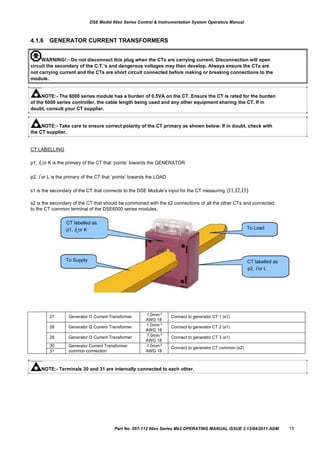
4.1.6 GENERATOR CURRENT TRANSFORMERS
WARNING!:- Do not disconnect this plug when the CTs are carrying current. Disconnection will open
circuit the secondary of the C.T.‟s and dangerous voltages may then develop. Always ensure the CTs are
not carrying current and the CTs are short circuit connected before making or breaking connections to the
module.
NOTE:- The 6000 series module has a burden of 0.5VA on the CT. Ensure the CT is rated for the burden
of the 6000 series controller, the cable length being used and any other equipment sharing the CT. If in
doubt, consult your CT supplier.
NOTE:- Take care to ensure correct polarity of the CT primary as shown below. If in doubt, check with
the CT supplier.
CT LABELLING
p1, k or K is the primary of the CT that „points‟ towards the GENERATOR
p2, l or L is the primary of the CT that „points‟ towards the LOAD
s1 is the secondary of the CT that connects to the DSE Module‟s input for the CT measuring (I1,I2,I3)
s2 is the secondary of the CT that should be commoned with the s2 connections of all the other CTs and connected
to the CT common terminal of the DSE6000 series modules.
CT labelled as
p1, k or K
To Supply
To Load
CT labelled as
p2, l or L
NOTE:- Terminals 30 and 31 are internally connected to each other.
Part No. 057-112 60xx Series Mk2 OPERATING MANUAL ISSUE 3 13/04/2011 ADM 15
PIN DESCRIPTION CABLE NOTES
No SIZE
32 Configurable digital input A 0.5mm²
AWG 20
Switch to negative
33 Configurable digital input B 0.5mm²
AWG 20
Switch to negative
34 Configurable digital input C 0.5mm²
AWG 20
Switch to negative
35 Configurable digital input D 0.5mm²
AWG 20
Switch to negative
DESCRIPTION CABLE NOTES
SIZE
Socket for connection to PC with DSE
Configuration Suite PC software.
0.5mm²
AWG 20
This is a standard USB type A to
type B cable.
DSE Model 60xx Series Control and Instrumentation System Operators Manual
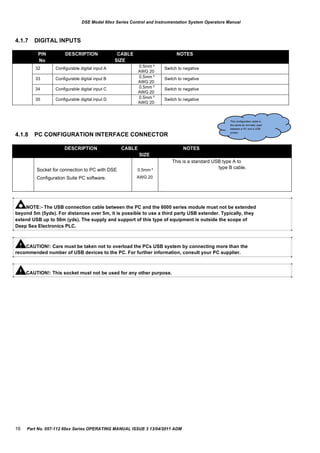
4.1.7 DIGITAL INPUTS
This configuration cable is
the same as normally used
between a PC and a USB
4.1.8 PC CONFIGURATION INTERFACE CONNECTOR printer.
NOTE:- The USB connection cable between the PC and the 6000 series module must not be extended
beyond 5m (5yds). For distances over 5m, it is possible to use a third party USB extender. Typically, they
extend USB up to 50m (yds). The supply and support of this type of equipment is outside the scope of
Deep Sea Electronics PLC.
CAUTION!: Care must be taken not to overload the PCs USB system by connecting more than the
recommended number of USB devices to the PC. For further information, consult your PC supplier.
CAUTION!: This socket must not be used for any other purpose.
16 Part No. 057-112 60xx Series OPERATING MANUAL ISSUE 3 13/04/2011 ADM
DSE Model 60xx Series Control & Instrumentation System Operators Manual
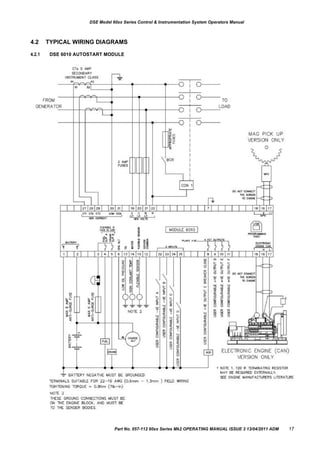
4.2
4.2.1
TYPICAL WIRING DIAGRAMS
DSE 6010 AUTOSTART MODULE
Part No. 057-112 60xx Series Mk2 OPERATING MANUAL ISSUE 3 13/04/2011 ADM 17
DSE Model 60xx Series Control and Instrumentation System Operators Manual
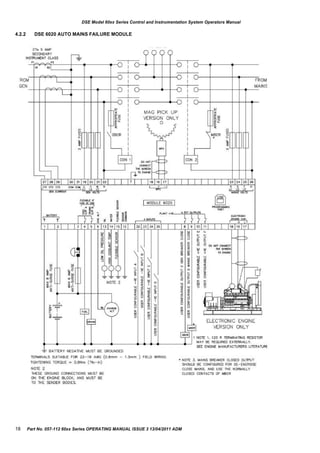
4.2.2 DSE 6020 AUTO MAINS FAILURE MODULE
18 Part No. 057-112 60xx Series OPERATING MANUAL ISSUE 3 13/04/2011 ADM
DSE Model 60xx Series Control & Instrumentation System Operators Manual
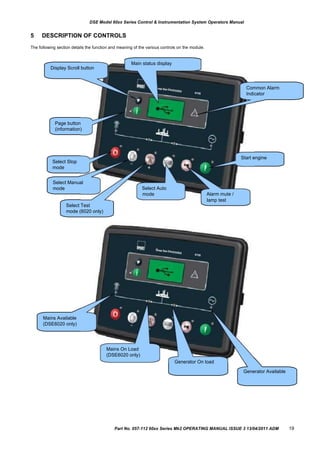
5 DESCRIPTION OF CONTROLS
The following section details the function and meaning of the various controls on the module.
Display Scroll button
Main status display
Common Alarm
Indicator
Page button
(information)
Select Stop
mode
Select Manual
mode Select Auto
Start engine
mode Alarm mute /
lamp test
Select Test
mode (6020 only)
Mains Available
(DSE6020 only)
Mains On Load
(DSE6020 only)
Generator On load
Generator Available
Part No. 057-112 60xx Series Mk2 OPERATING MANUAL ISSUE 3 13/04/2011 ADM 19
DSE Model 60xx Series Control and Instrumentation System Operators Manual
5.1 QUICKSTART GUIDE
This section provides a quick start guide to the module‟s operation.
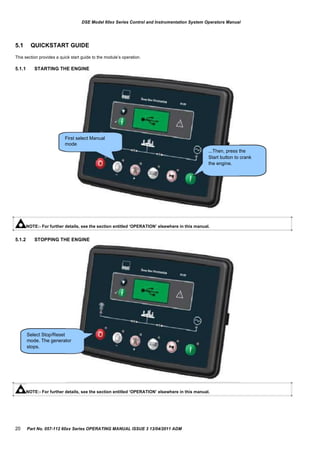
5.1.1 STARTING THE ENGINE
First select Manual
mode
...Then, press the
Start button to crank
the engine.
NOTE:- For further details, see the section entitled „OPERATION‟ elsewhere in this manual.
5.1.2 STOPPING THE ENGINE
Select Stop/Reset
mode. The generator
stops.
NOTE:- For further details, see the section entitled „OPERATION‟ elsewhere in this manual.
20 Part No. 057-112 60xx Series OPERATING MANUAL ISSUE 3 13/04/2011 ADM
DSE Model 60xx Series Control & Instrumentation System Operators Manual
5.2 GRAPHICAL DISPLAY
-
-
-
-
4- line, 64 x 132 small Graphic Display with LED Backlight
Icon and numeric display.
Software controlled contrast
Mimic of 4 x indicators via LCD
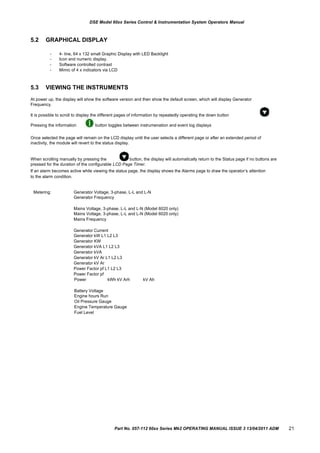
5.3 VIEWING THE INSTRUMENTS
At power up, the display will show the software version and then show the default screen, which will display Generator
Frequency.
It is possible to scroll to display the different pages of information by repeatedly operating the down button
Pressing the information button toggles between instrumenation and event log displays
Once selected the page will remain on the LCD display until the user selects a different page or after an extended period of
inactivity, the module will revert to the status display.
When scrolling manually by pressing the button, the display will automatically return to the Status page if no buttons are
pressed for the duration of the configurable LCD Page Timer.
If an alarm becomes active while viewing the status page, the display shows the Alarms page to draw the operator‟s attention
to the alarm condition.
Metering: Generator Voltage, 3-phase, L-L and L-N
Generator Frequency
Mains Voltage, 3-phase, L-L and L-N (Model 6020 only)
Mains Frequency
Generator Current
Generator kW L1 L2 L3
Generator KW
Generator kVA L1 L2 L3
Generator kVA
Generator kV Ar L1 L2 L3
Generator kV Ar
Power Factor pf L1 L2 L3
Power Factor pf
Power kWh kV Arh
Battery Voltage
Engine hours Run
Oil Pressure Gauge
Engine Temperature Gauge
Fuel Level
kV Ah
Part No. 057-112 60xx Series Mk2 OPERATING MANUAL ISSUE 3 13/04/2011 ADM 21
DSE Model 60xx Series Control and Instrumentation System Operators Manual
5.4 EVENT LOG
The info button toggles between the display of the instrumentation and the event log. Pressing the down button will
move to the previous event, the event log entry at position 1 being the most recent. On moving from the instrumentation value
to the event log the unit will display the most recent entry.
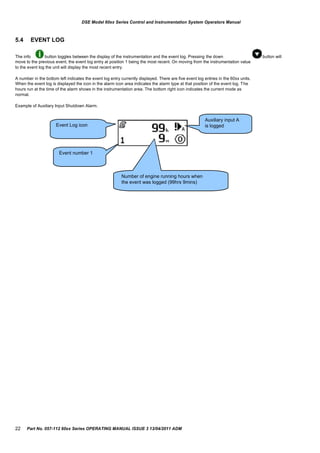
A number in the bottom left indicates the event log entry currently displayed. There are five event log entries in the 60xx units.
When the event log is displayed the icon in the alarm icon area indicates the alarm type at that position of the event log. The
hours run at the time of the alarm shows in the instrumentation area. The bottom right icon indicates the current mode as
normal.
Example of Auxiliary Input Shutdown Alarm.
Auxiliary input A
Event Log icon is logged
Event number 1
Number of engine running hours when
the event was logged (99hrs 9mins)
22 Part No. 057-112 60xx Series OPERATING MANUAL ISSUE 3 13/04/2011 ADM
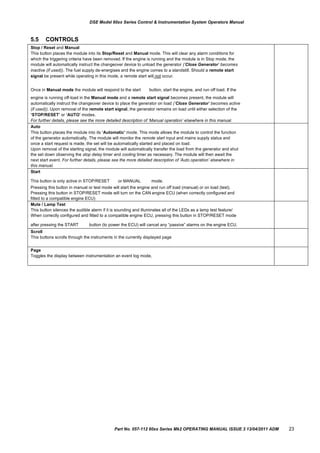
Stop / Reset and Manual
This button places the module into its Stop/Reset and Manual mode. This will clear any alarm conditions for
which the triggering criteria have been removed. If the engine is running and the module is in Stop mode, the
module will automatically instruct the changeover device to unload the generator (‘Close Generator’ becomes
inactive (if used)). The fuel supply de-energises and the engine comes to a standstill. Should a remote start
signal be present while operating in this mode, a remote start will not occur.
Once in Manual mode the module will respond to the start button, start the engine, and run off load. If the
engine is running off-load in the Manual mode and a remote start signal becomes present, the module will
automatically instruct the changeover device to place the generator on load (‘Close Generator’ becomes active
(if used)). Upon removal of the remote start signal, the generator remains on load until either selection of the
„STOP/RESET‟ or „AUTO‟ modes.
For further details, please see the more detailed description of ‘Manual operation’ elsewhere in this manual.
Auto
This button places the module into its „Automatic‟ mode. This mode allows the module to control the function
of the generator automatically. The module will monitor the remote start input and mains supply status and
once a start request is made, the set will be automatically started and placed on load.
Upon removal of the starting signal, the module will automatically transfer the load from the generator and shut
the set down observing the stop delay timer and cooling timer as necessary. The module will then await the
next start event. For further details, please see the more detailed description of ‘Auto operation’ elsewhere in
this manual.
Start
This button is only active in STOP/RESET or MANUAL mode.
Pressing this button in manual or test mode will start the engine and run off load (manual) or on load (test).
Pressing this button in STOP/RESET mode will turn on the CAN engine ECU (when correctly configured and
fitted to a compatible engine ECU)
Mute / Lamp Test
This button silences the audible alarm if it is sounding and illuminates all of the LEDs as a lamp test feature/
When correctly configured and fitted to a compatible engine ECU, pressing this button in STOP/RESET mode
after pressing the START button (to power the ECU) will cancel any “passive” alarms on the engine ECU.
Scroll
This buttons scrolls through the instruments in the currently displayed page
Page
Toggles the display between instrumentation an event log mode,
DSE Model 60xx Series Control & Instrumentation System Operators Manual
5.5 CONTROLS
Part No. 057-112 60xx Series Mk2 OPERATING MANUAL ISSUE 3 13/04/2011 ADM 23
Auto run reason Icon
Remote start input
Low battery run
Scheduled run
Mains failure (6020 only)
DSE Model 60xx Series Control and Instrumentation System Operators Manual
6
6.1
OPERATION
AUTOMATIC MODE OF OPERATION
NOTE:- If a digital input configured to panel lock is active, changing module modes will not be possible. Viewing
the instruments and event logs is NOT affected by panel lock.
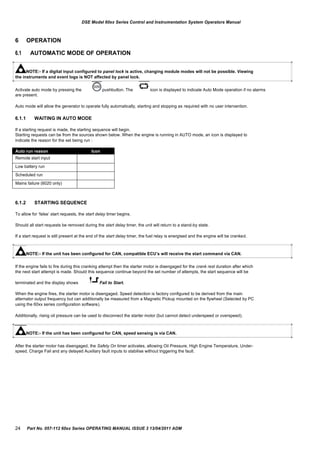
Activate auto mode by pressing the pushbutton. The icon is displayed to indicate Auto Mode operation if no alarms
are present.
Auto mode will allow the generator to operate fully automatically, starting and stopping as required with no user intervention.
6.1.1 WAITING IN AUTO MODE
If a starting request is made, the starting sequence will begin.
Starting requests can be from the sources shown below. When the engine is running in AUTO mode, an icon is displayed to
indicate the reason for the set being run :
6.1.2 STARTING SEQUENCE
To allow for „false‟ start requests, the start delay timer begins.
Should all start requests be removed during the start delay timer, the unit will return to a stand-by state.
If a start request is still present at the end of the start delay timer, the fuel relay is energised and the engine will be cranked.
NOTE:- If the unit has been configured for CAN, compatible ECU‟s will receive the start command via CAN.
If the engine fails to fire during this cranking attempt then the starter motor is disengaged for the crank rest duration after which
the next start attempt is made. Should this sequence continue beyond the set number of attempts, the start sequence will be
terminated and the display shows Fail to Start.
When the engine fires, the starter motor is disengaged. Speed detection is factory configured to be derived from the main
alternator output frequency but can additionally be measured from a Magnetic Pickup mounted on the flywheel (Selected by PC
using the 60xx series configuration software).
Additionally, rising oil pressure can be used to disconnect the starter motor (but cannot detect underspeed or overspeed).
NOTE:- If the unit has been configured for CAN, speed sensing is via CAN.
After the starter motor has disengaged, the Safety On timer activates, allowing Oil Pressure, High Engine Temperature, Under-
speed, Charge Fail and any delayed Auxiliary fault inputs to stabilise without triggering the fault.
24 Part No. 057-112 60xx Series OPERATING MANUAL ISSUE 3 13/04/2011 ADM
DSE Model 60xx Series Control & Instrumentation System Operators Manual
6.1.3 ENGINE RUNNING
Once the engine is running and all starting timers have expired, the animated icon is displayed.
The generator is placed on load if configured to do so.
NOTE:-The load transfer signal remains inactive until the Oil Pressure has risen. This prevents excessive wear on
the engine.
If all start requests are removed, the stopping sequence will begin.
6.1.4 STOPPING SEQUENCE
The return delay timer operates to ensure that the starting request has been permanently removed and isn‟t just a short term
removal. Should another start request be made during the cooling down period, the set will return on load.
If there are no starting requests at the end of the return delay timer, the load is removed from the generator to the mains supply
and the cooling timer is initiated.
The cooling timer allows the set to run off load and cool sufficiently before being stopped. This is particularly important where
turbo chargers are fitted to the engine.
After the cooling timer has expired, the set is stopped.
Part No. 057-112 60xx Series Mk2 OPERATING MANUAL ISSUE 3 13/04/2011 ADM 25
DSE Model 60xx Series Control and Instrumentation System Operators Manual
6.2 MANUAL OPERATION
Activate Manual mode by pressing the pushbutton. An LED indicator beside the button confirms this action.
Manual mode allows the operator to start and stop the set manually, and if required change the state of the load
switching devices.
6.2.1 WAITING IN MANUAL MODE
When in manual mode, the set will not start automatically.
To begin the starting sequence, press the button.
6.2.2 STARTING SEQUENCE
NOTE:- There is no start delay in this mode of operation.
The fuel relay is energised and the engine is cranked.
NOTE:- If the unit has been configured for CAN, compatible ECU‟s will receive the start command via CAN.
If the engine fails to fire during this cranking attempt then the starter motor is disengaged for the crank rest duration
after which the next start attempt is made. Should this sequence continue beyond the set number of attempts, the
start sequence will be terminated and the display shows Fail to Start.
When the engine fires, the starter motor is disengaged. Speed detection is factory configured to be derived from the
main alternator output frequency but can additionally be measured from a Magnetic Pickup mounted on the flywheel
(Selected by PC using the 60xx series configuration software).
Additionally, rising oil pressure can be used disconnect the starter motor (but cannot detect underspeed or
overspeed).
NOTE:- If the unit has been configured for CAN, speed sensing is via CAN.
After the starter motor has disengaged, the Safety On timer activates, allowing Oil Pressure, High Engine
Temperature, Under-speed, Charge Fail and any delayed Auxiliary fault inputs to stabilise without triggering the
fault.
26 Part No. 057-112 60xx Series OPERATING MANUAL ISSUE 3 13/04/2011 ADM
DSE Model 60xx Series Control & Instrumentation System Operators Manual
6.2.3 ENGINE RUNNING
In manual mode, the load is not transferred to the generator unless a „loading request‟ is made.
A loading request can come from a number of sources :




Remote start input
Low battery run
Scheduled run
Mains failure (6020 only)
NOTE:-The load transfer signal remains inactive until the Oil Pressure has risen. This prevents excessive wear on
the engine.
Once the load has been transferred to the generator, it will not be automatically removed. To manually transfer the
load back to the mains (DSE6020) or to remove the load from the generator (DSE6010) either:
 Press the auto mode button to return to automatic mode. The set will observe all auto mode start
requests and stopping timers before beginning the Auto mode stopping sequence.

6.2.4

Press the stop button
STOPPING SEQUENCE
In manual mode the set will continue to run until either :


The stop button
The auto button
is pressed – The set will immediately stop
is pressed. The set will observe all auto mode start requests and stopping timers
before beginning the Auto mode stopping sequence.
Part No. 057-112 60xx Series Mk2 OPERATING MANUAL ISSUE 3 13/04/2011 ADM 27
DSE Model 60xx Series Control and Instrumentation System Operators Manual
6.3 TEST MODE
NOTE:- Test Mode is only applicable to DSE6020.
Activate test mode be pressing the pushbutton. An LED indicator beside the button confirms this action.
Test mode will start the set and transfer the load to the generator to provide a Test on load function.
6.3.1 WAITING IN TEST MODE
When in test mode, the set will not start automatically.
To begin the starting sequence, press the button.
6.3.2 STARTING SEQUENCE
The set begins to crank.
NOTE:- If the unit has been configured for CAN, compatible ECU‟s will receive the start command via
CAN.
If the engine fails to fire during this cranking attempt then the starter motor is disengaged for the crank rest duration
after which the next start attempt is made. Should this sequence continue beyond the set number of attempts, the
start sequence will be terminated and the display shows Fail to Start.
When the engine fires, the starter motor is disengaged. Speed detection is factory configured to be derived from the
main alternator output frequency but can additionally be measured from a Magnetic Pickup mounted on the flywheel
(Selected by PC using the 6000 series configuration software).
Additionally, rising oil pressure can be used disconnect the starter motor (but cannot detect underspeed or
overspeed).
NOTE:- If the unit has been configured for CAN, speed sensing is via CAN.
After the starter motor has disengaged, the Safety On timer activates, allowing Oil Pressure, High Engine
Temperature, Under-speed, Charge Fail and any delayed Auxiliary fault inputs to stabilise without triggering the
fault.
28 Part No. 057-112 60xx Series OPERATING MANUAL ISSUE 3 13/04/2011 ADM
DSE Model 60xx Series Control & Instrumentation System Operators Manual
6.3.3 ENGINE RUNNING
Once the engine is running, the Warm Up timer, if selected, begins, allowing the engine to stabilise before accepting
the load.
Load will be automatically transferred from the mains supply to the generator.
NOTE:-The load transfer signal remains inactive until the Oil Pressure has risen. This prevents
excessive wear on the engine.
In test mode, the set will continue to run on load until either:


The stop button
The auto button
is pressed – The set will immediately stop
is pressed. The set will observe all auto mode start requests and stopping timers
before beginning the Auto mode stopping sequence.
Part No. 057-112 60xx Series Mk2 OPERATING MANUAL ISSUE 3 13/04/2011 ADM 29
Icon Graphic Details
Stopped Appears when the engine is at rest and the unit is in stop mode.
Auto Appears when the engine is at rest and the unit is in auto mode.
Manual Appears when the engine is at rest and the unit is in manual mode/
Timer animation Appears when a timer is active, for example cranking time, crank rest etc.
Running animation Appears when the engine is running, and all timers have expired, either on or off load. The animation
rate is reduced when running in idle mode.
Front panel editor Appears when the unit is in the front panel editor.
Inst.
Icon
Instrumentation Units
Alarm
Icon
Active
config
/FPE,
event
index
Instrumentation Units
Mode
IconInstrumentation Units
DSE Model 60xx Series Control and Instrumentation System Operators Manual
7
7.1
MODULE DISPLAY
BACKLIGHT
The backlight will be on if the unit has sufficient voltage on the power connection while the unit is turned on, unless the unit is in
Power Save mode, or if the engine is cranking for which the backlight will be turned off.
7.2 GRAPHICAL DISPLAY
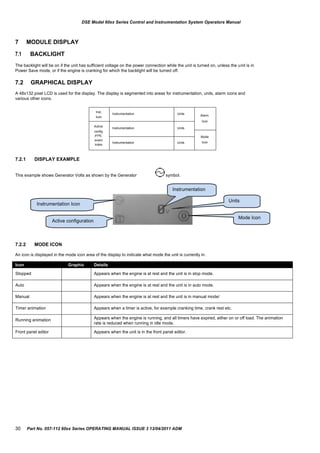
A 48x132 pixel LCD is used for the display. The display is segmented into areas for instrumentation, units, alarm icons and
various other icons.
7.2.1 DISPLAY EXAMPLE
This example shows Generator Volts as shown by the Generator
Instrumentation Icon
Active configuration
symbol.
Instrumentation
Units
Mode Icon
7.2.2 MODE ICON
An icon is displayed in the mode icon area of the display to indicate what mode the unit is currently in.
30 Part No. 057-112 60xx Series OPERATING MANUAL ISSUE 3 13/04/2011 ADM
Icon Graphic Details
Generator Used for generator voltage and generator frequency
Mains Used for mains voltages and mains frequency
Engine speed Engine speed instrumentation screen
Hours Run Hours run instrumentation screen
Battery voltage Battery voltage instrumentation screen
Engine temperature Coolant temperature instrumentation screen
Oil pressure Oil pressure instrumentation screen
Flexible sensor Flexible sensor instrumentation screen
Event log Appears when the event log is being displayed
Unit time Current time held in the unit
Scheduler setting The current value of the scheduler run time and duration
CAN DTC ECU diagnostic trouble codes
Auto run reason Icon
Remote start input
Low battery run
Scheduled run
Mains failure
DSE Model 60xx Series Control & Instrumentation System Operators Manual
7.2.3 AUTO RUN ICON
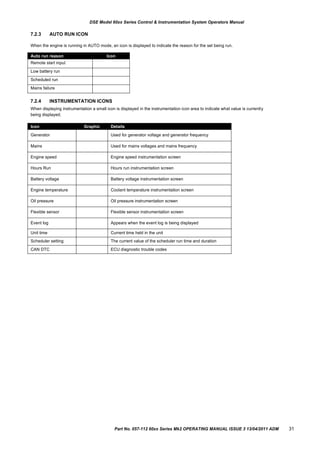
When the engine is running in AUTO mode, an icon is displayed to indicate the reason for the set being run.
7.2.4 INSTRUMENTATION ICONS
When displaying instrumentation a small icon is displayed in the instrumentation icon area to indicate what value is currently
being displayed.
Part No. 057-112 60xx Series Mk2 OPERATING MANUAL ISSUE 3 13/04/2011 ADM 31
Icon Graphic Details
Main config Appears when the main configuration is selected
Alternative config Appears when the alternative configuration is selected
DSE Model 60xx Series Control and Instrumentation System Operators Manual
7.2.5 ACTIVE CONFIGURATION
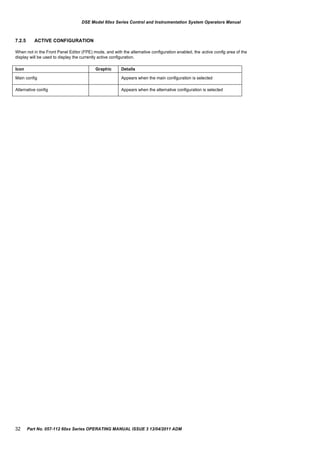
When not in the Front Panel Editor (FPE) mode, and with the alternative configuration enabled, the active config area of the
display will be used to display the currently active configuration.
32 Part No. 057-112 60xx Series OPERATING MANUAL ISSUE 3 13/04/2011 ADM
DSE Model 60xx Series Control & Instrumentation System Operators Manual
7.3 PROTECTIONS
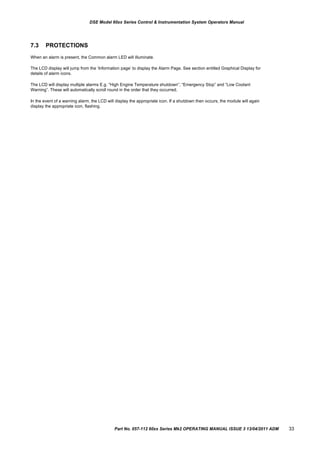
When an alarm is present, the Common alarm LED will illuminate.
The LCD display will jump from the „Information page‟ to display the Alarm Page. See section entitled Graphical Display for
details of alarm icons.
The LCD will display multiple alarms E.g. “High Engine Temperature shutdown”, “Emergency Stop” and “Low Coolant
Warning”. These will automatically scroll round in the order that they occurred;
In the event of a warning alarm, the LCD will display the appropriate icon. If a shutdown then occurs, the module will again
display the appropriate icon, flashing.
Part No. 057-112 60xx Series Mk2 OPERATING MANUAL ISSUE 3 13/04/2011 ADM 33
DSE Model 60xx Series Control and Instrumentation System Operators Manual
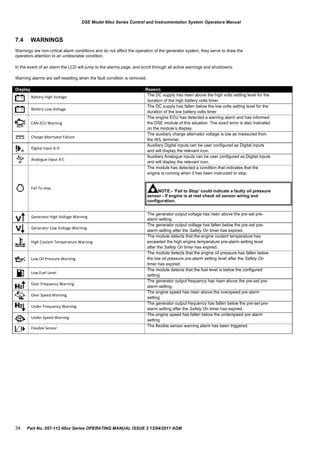
7.4 WARNINGS
Warnings are non-critical alarm conditions and do not affect the operation of the generator system, they serve to draw the
operators attention to an undesirable condition.
In the event of an alarm the LCD will jump to the alarms page, and scroll through all active warnings and shutdowns.
Warning alarms are self-resetting when the fault condition is removed.
Display
Battery High Voltage
Battery Low Voltage
CAN ECU Warning
Charge Alternator Failure
Digital Input A-D
Analogue Input A-C
Fail To stop
Generator High Voltage Warning
Generator Low Voltage Warning
High Coolant Temperature Warning
Low Oil Pressure Warning
Low Fuel Level
Over Frequency Warning
Over Speed Warning
Under Frequency Warning
Under Speed Warning
Flexible Sensor
Reason
The DC supply has risen above the high volts setting level for the
duration of the high battery volts timer
The DC supply has fallen below the low volts setting level for the
duration of the low battery volts timer
The engine ECU has detected a warning alarm and has informed
the DSE module of this situation. The exact error is also indicated
on the module‟s display.
The auxiliary charge alternator voltage is low as measured from
the W/L terminal.
Auxiliary Digital inputs can be user configured as Digital inputs
and will display the relevant icon.
Auxiliary Analogue inputs can be user configured as Digital inputs
and will display the relevant icon.
The module has detected a condition that indicates that the
engine is running when it has been instructed to stop.
NOTE:- ‘Fail to Stop’ could indicate a faulty oil pressure
sensor - If engine is at rest check oil sensor wiring and
configuration.
The generator output voltage has risen above the pre-set pre-
alarm setting.
The generator output voltage has fallen below the pre-set pre-
alarm setting after the Safety On timer has expired.
The module detects that the engine coolant temperature has
exceeded the high engine temperature pre-alarm setting level
after the Safety On timer has expired.
The module detects that the engine oil pressure has fallen below
the low oil pressure pre-alarm setting level after the Safety On
timer has expired.
The module detects that the fuel level is below the configured
setting
The generator output frequency has risen above the pre-set pre-
alarm setting.
The engine speed has risen above the overspeed pre alarm
setting
The generator output frequency has fallen below the pre-set pre-
alarm setting after the Safety On timer has expired.
The engine speed has fallen below the underspeed pre alarm
setting
The flexible sensor warning alarm has been triggered.
34 Part No. 057-112 60xx Series OPERATING MANUAL ISSUE 3 13/04/2011 ADM
Display Reason
CAN ECU Data Fail
The module is configured for CAN operation and does not detect data on the engine Can
datalink, the engine shuts down.
CAN ECU Shutdown
The engine ECU has detected a shutdown alarm and has informed the DSE module of this
situation. The exact error is also indicated on the module‟s display.
Digital Input A-D Auxiliary Digital inputs can be user configured as Digital inputs and will display the
relevant icon.
Analogue Input A-C Auxiliary Analogue inputs can be user configured as Digital inputs and will display the
relevant icon.
Emergency Stop The emergency stop button has been depressed. This is a failsafe (normally closed to
battery negative) input and will immediately stop the set should the signal be removed.
NOTE:- The Emergency Stop Negative signal must be present otherwise the
unit will shutdown.
Fail To Start
The engine has not fired after the preset number of start attempts
Generator High Voltage
Shutdown
The generator output voltage has risen above the preset level
Generator Low Voltage
Shutdown
The generator output voltage has fallen below the preset level
High Coolant Temperature
Shutdown
The module detects that the engine coolant temperature has exceeded the high engine
temperature shutdown setting after the Safety On timer has expired.
Loss of Mag. Pickup Signal
The speed signal from the magnetic pickup is not being received by the DSE controller.
Low Oil Pressure Shutdown
The engine oil pressure has fallen below the low oil pressure trip setting level after the
Safety On timer has expired.
Low Fuel Level
The module detects that the fuel level is below the configured setting
Over Frequency Shutdown
The generator output frequency has risen above the preset level
Over Speed Shutdown The engine speed has exceeded the pre-set trip
Under Frequency Shutdown
The generator output frequency has fallen below the preset level
Under Speed Shutdown
The engine speed has fallen below the pre-set trip after the Safety On timer has expired.
DSE Model 60xx Series Control & Instrumentation System Operators Manual
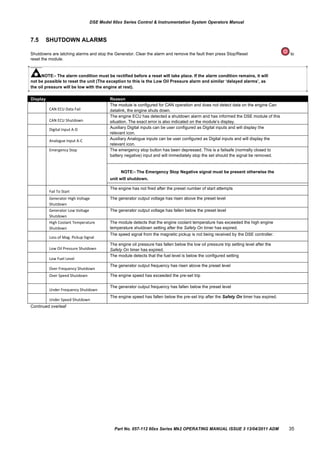
7.5 SHUTDOWN ALARMS
Shutdowns are latching alarms and stop the Generator. Clear the alarm and remove the fault then press Stop/Reset to
reset the module.
NOTE:- The alarm condition must be rectified before a reset will take place. If the alarm condition remains, it will
not be possible to reset the unit (The exception to this is the Low Oil Pressure alarm and similar „delayed alarms‟, as
the oil pressure will be low with the engine at rest).
Continued overleaf
Part No. 057-112 60xx Series Mk2 OPERATING MANUAL ISSUE 3 13/04/2011 ADM 35
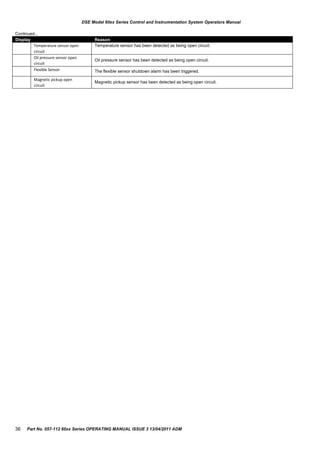
Display Reason
Temperature sensor open
circuit
Temperature sensor has been detected as being open circuit.
Oil pressure sensor open
circuit
Oil pressure sensor has been detected as being open circuit.
Flexible Sensor The flexible sensor shutdown alarm has been triggered.
Magnetic pickup open
circuit
Magnetic pickup sensor has been detected as being open circuit.
DSE Model 60xx Series Control and Instrumentation System Operators Manual
Continued...
36 Part No. 057-112 60xx Series OPERATING MANUAL ISSUE 3 13/04/2011 ADM
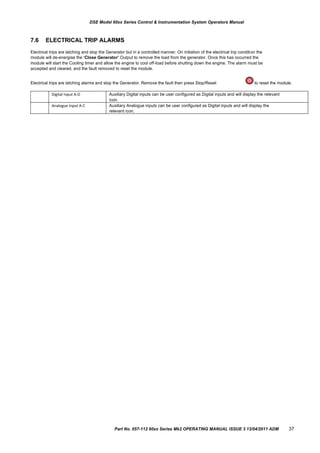
Digital Input A-D Auxiliary Digital inputs can be user configured as Digital inputs and will display the relevant
icon.
Analogue Input A-C Auxiliary Analogue inputs can be user configured as Digital inputs and will display the
relevant icon.
DSE Model 60xx Series Control & Instrumentation System Operators Manual
7.6 ELECTRICAL TRIP ALARMS
Electrical trips are latching and stop the Generator but in a controlled manner. On initiation of the electrical trip condition the
module will de-energise the „Close Generator‟ Output to remove the load from the generator. Once this has occurred the
module will start the Cooling timer and allow the engine to cool off-load before shutting down the engine. The alarm must be
accepted and cleared, and the fault removed to reset the module.
Electrical trips are latching alarms and stop the Generator. Remove the fault then press Stop/Reset to reset the module.
Part No. 057-112 60xx Series Mk2 OPERATING MANUAL ISSUE 3 13/04/2011 ADM 37
DSE Model 60xx Series Control and Instrumentation System Operators Manual
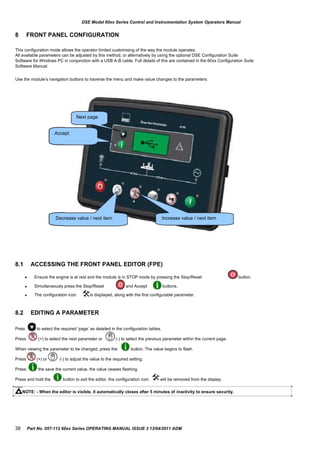
8 FRONT PANEL CONFIGURATION
This configuration mode allows the operator limited customising of the way the module operates.
All available parameters can be adjusted by this method, or alternatively by using the optional DSE Configuration Suite
Software for Windows PC in conjunction with a USB A-B cable. Full details of this are contained in the 60xx Configuration Suite
Software Manual.
Use the module‟s navigation buttons to traverse the menu and make value changes to the parameters:
Next page
Accept
Decrease value / next item Increase value / next item
8.1 ACCESSING THE FRONT PANEL EDITOR (FPE)
 Ensure the engine is at rest and the module is in STOP mode by pressing the Stop/Reset button.
 Simultaneously press the Stop/Reset and Accept buttons.
 The configuration icon is displayed, along with the first configurable parameter.
8.2
Press
EDITING A PARAMETER
to select the required „page‟ as detailed in the configuration tables.
Press (+) to select the next parameter or (-) to select the previous parameter within the current page.
When viewing the parameter to be changed, press the button. The value begins to flash.
Press (+) or (-) to adjust the value to the required setting.
Press the save the current value, the value ceases flashing.
Press and hold the button to exit the editor, the configuration icon will be removed from the display.
NOTE: - When the editor is visible, it automatically closes after 5 minutes of inactivity to ensure security.
38 Part No. 057-112 60xx Series OPERATING MANUAL ISSUE 3 13/04/2011 ADM
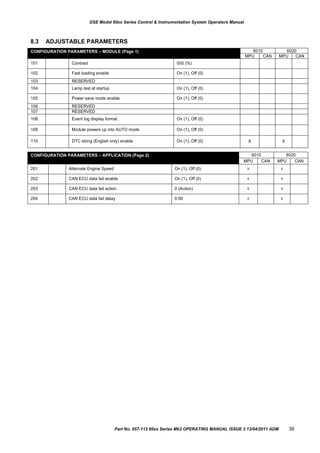
CONFIGURATION PARAMETERS – MODULE (Page 1) 6010 6020
MPU CAN MPU CAN
101 Contrast 000 (%)
102 Fast loading enable On (1), Off (0)
103 RESERVED
104 Lamp test at startup On (1), Off (0)
105 Power save mode enable On (1), Off (0)
106 RESERVED
107 RESERVED
108 Event log display format On (1), Off (0)
109 Module powers up into AUTO mode On (1), Off (0)
110 DTC string (English only) enable On (1), Off (0) X X
CONFIGURATION PARAMETERS – APPLICATION (Page 2) 6010 6020
MPU CAN MPU CAN
201 Alternate Engine Speed On (1), Off (0) X X
202 CAN ECU data fail enable On (1), Off (0) X X
203 CAN ECU data fail action 0 (Action) X X
204 CAN ECU data fail delay 0:00 X X
DSE Model 60xx Series Control & Instrumentation System Operators Manual
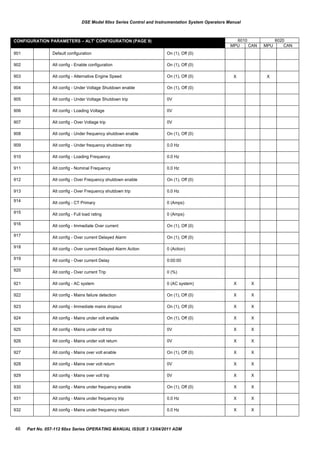
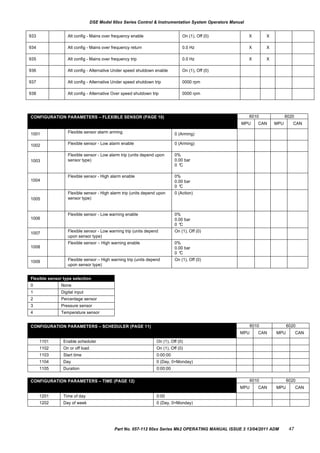
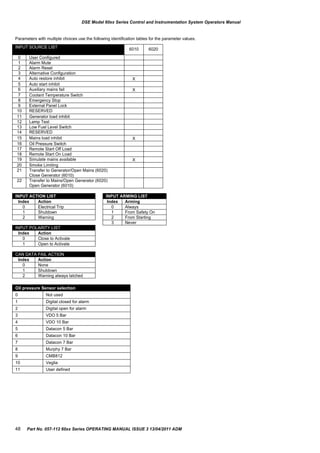
8.3 ADJUSTABLE PARAMETERS
Part No. 057-112 60xx Series Mk2 OPERATING MANUAL ISSUE 3 13/04/2011 ADM 39
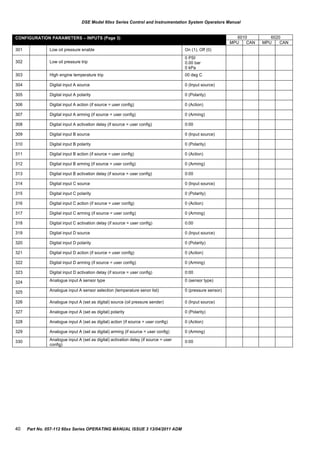
CONFIGURATION PARAMETERS – INPUTS (Page 3) 6010 6020
MPU CAN MPU CAN
301 Low oil pressure enable On (1), Off (0)
302 Low oil pressure trip
0 PSI
0.00 bar
0 kPa
303 High engine temperature trip 00 deg C
304 Digital input A source 0 (Input source)
305 Digital input A polarity 0 (Polarity)
306 Digital input A action (if source = user config) 0 (Action)
307 Digital input A arming (if source = user config) 0 (Arming)
308 Digital input A activation delay (if source = user config) 0:00
309 Digital input B source 0 (Input source)
310 Digital input B polarity 0 (Polarity)
311 Digital input B action (if source = user config) 0 (Action)
312 Digital input B arming (if source = user config) 0 (Arming)
313 Digital input B activation delay (if source = user config) 0:00
314 Digital input C source 0 (Input source)
315 Digital input C polarity 0 (Polarity)
316 Digital input C action (if source = user config) 0 (Action)
317 Digital input C arming (if source = user config) 0 (Arming)
318 Digital input C activation delay (if source = user config) 0:00
319 Digital input D source 0 (Input source)
320 Digital input D polarity 0 (Polarity)
321 Digital input D action (if source = user config) 0 (Action)
322 Digital input D arming (if source = user config) 0 (Arming)
323 Digital input D activation delay (if source = user config) 0:00
324 Analogue input A sensor type 0 (sensor type)
325 Analogue input A sensor selection (temperature senor list) 0 (pressure sensor)
326 Analogue input A (set as digital) source (oil pressure sender) 0 (Input source)
327 Analogue input A (set as digital) polarity 0 (Polarity)
328 Analogue input A (set as digital) action (if source = user config) 0 (Action)
329 Analogue input A (set as digital) arming (if source = user config) 0 (Arming)
330 Analogue input A (set as digital) activation delay (if source = user
config)
0:00
DSE Model 60xx Series Control and Instrumentation System Operators Manual
40 Part No. 057-112 60xx Series OPERATING MANUAL ISSUE 3 13/04/2011 ADM
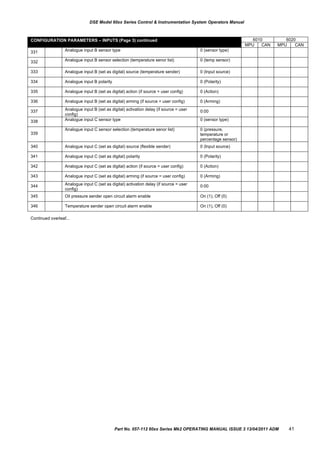
CONFIGURATION PARAMETERS – INPUTS (Page 3) continued 6010 6020
MPU CAN MPU CAN
331 Analogue input B sensor type 0 (sensor type)
332 Analogue input B sensor selection (temperature senor list) 0 (temp sensor)
333 Analogue input B (set as digital) source (temperature sender) 0 (Input source)
334 Analogue input B polarity 0 (Polarity)
335 Analogue input B (set as digital) action (if source = user config) 0 (Action)
336 Analogue input B (set as digital) arming (if source = user config) 0 (Arming)
337 Analogue input B (set as digital) activation delay (if source = user
config)
0:00
338 Analogue input C sensor type 0 (sensor type)
339
Analogue input C sensor selection (temperature senor list) 0 (pressure,
temperature or
percentage sensor)
340 Analogue input C (set as digital) source (flexible sender) 0 (Input source)
341 Analogue input C (set as digital) polarity 0 (Polarity)
342 Analogue input C (set as digital) action (if source = user config) 0 (Action)
343 Analogue input C (set as digital) arming (if source = user config) 0 (Arming)
344 Analogue input C (set as digital) activation delay (if source = user
config)
0:00
345 Oil pressure sender open circuit alarm enable On (1), Off (0)
346 Temperature sender open circuit alarm enable On (1), Off (0)
DSE Model 60xx Series Control & Instrumentation System Operators Manual
Continued overleaf...
Part No. 057-112 60xx Series Mk2 OPERATING MANUAL ISSUE 3 13/04/2011 ADM 41
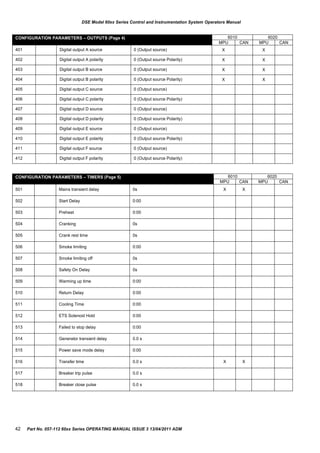
CONFIGURATION PARAMETERS – TIMERS (Page 5) 6010 6020
MPU CAN MPU CAN
501 Mains transient delay 0s X X
502 Start Delay 0:00
503 Preheat 0:00
504 Cranking 0s
505 Crank rest time 0s
506 Smoke limiting 0:00
507 Smoke limiting off 0s
508 Safety On Delay 0s
509 Warming up time 0:00
510 Return Delay 0:00
511 Cooling Time 0:00
512 ETS Solenoid Hold 0:00
513 Failed to stop delay 0:00
514 Generator transient delay 0.0 s
515 Power save mode delay 0:00
516 Transfer time 0.0 s X X
517 Breaker trip pulse 0.0 s
518 Breaker close pulse 0.0 s
CONFIGURATION PARAMETERS – OUTPUTS (Page 4) 6010 6020
MPU CAN MPU CAN
401 Digital output A source 0 (Output source) X X
402 Digital output A polarity 0 (Output source Polarity) X X
403 Digital output B source 0 (Output source) X X
404 Digital output B polarity 0 (Output source Polarity) X X
405 Digital output C source 0 (Output source)
406 Digital output C polarity 0 (Output source Polarity)
407 Digital output D source 0 (Output source)
408 Digital output D polarity 0 (Output source Polarity)
409 Digital output E source 0 (Output source)
410 Digital output E polarity 0 (Output source Polarity)
411 Digital output F source 0 (Output source)
412 Digital output F polarity 0 (Output source Polarity)
DSE Model 60xx Series Control and Instrumentation System Operators Manual
42 Part No. 057-112 60xx Series OPERATING MANUAL ISSUE 3 13/04/2011 ADM
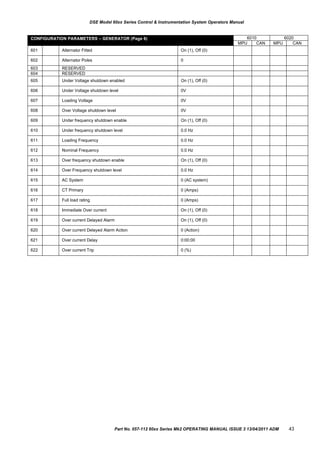
CONFIGURATION PARAMETERS – GENERATOR (Page 6) 6010 6020
MPU CAN MPU CAN
601 Alternator Fitted On (1), Off (0)
602 Alternator Poles 0
603 RESERVED
604 RESERVED
605 Under Voltage shutdown enabled On (1), Off (0)
606 Under Voltage shutdown level 0V
607 Loading Voltage 0V
608 Over Voltage shutdown level 0V
609 Under frequency shutdown enable On (1), Off (0)
610 Under frequency shutdown level 0.0 Hz
611 Loading Frequency 0.0 Hz
612 Nominal Frequency 0.0 Hz
613 Over frequency shutdown enable On (1), Off (0)
614 Over Frequency shutdown level 0.0 Hz
615 AC System 0 (AC system)
616 CT Primary 0 (Amps)
617 Full load rating 0 (Amps)
618 Immediate Over current On (1), Off (0)
619 Over current Delayed Alarm On (1), Off (0)
620 Over current Delayed Alarm Action 0 (Action)
621 Over current Delay 0:00:00
622 Over current Trip 0 (%)
DSE Model 60xx Series Control & Instrumentation System Operators Manual
Part No. 057-112 60xx Series Mk2 OPERATING MANUAL ISSUE 3 13/04/2011 ADM 43
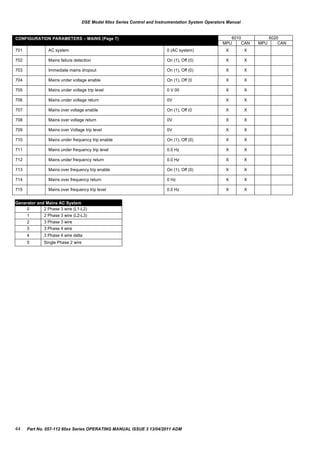
CONFIGURATION PARAMETERS – MAINS (Page 7) 6010 6020
MPU CAN MPU CAN
701 AC system 0 (AC system) X X
702 Mains failure detection On (1), Off (0) X X
703 Immediate mains dropout On (1), Off (0) X X
704 Mains under voltage enable On (1), Off (0 X X
705 Mains under voltage trip level 0 V 00 X X
706 Mains under voltage return 0V X X
707 Mains over voltage enable On (1), Off (0 X X
708 Mains over voltage return 0V X X
709 Mains over Voltage trip level 0V X X
710 Mains under frequency trip enable On (1), Off (0) X X
711 Mains under frequency trip level 0.0 Hz X X
712 Mains under frequency return 0.0 Hz X X
713 Mains over frequency trip enable On (1), Off (0) X X
714 Mains over frequency return 0 Hz X X
715 Mains over frequency trip level 0.0 Hz X X
Generator and Mains AC System
0 2 Phase 3 wire (L1-L2)
1 2 Phase 3 wire (L2-L3)
2 3 Phase 3 wire
3 3 Phase 4 wire
4 3 Phase 4 wire delta
5 Single Phase 2 wire
DSE Model 60xx Series Control and Instrumentation System Operators Manual
44 Part No. 057-112 60xx Series OPERATING MANUAL ISSUE 3 13/04/2011 ADM
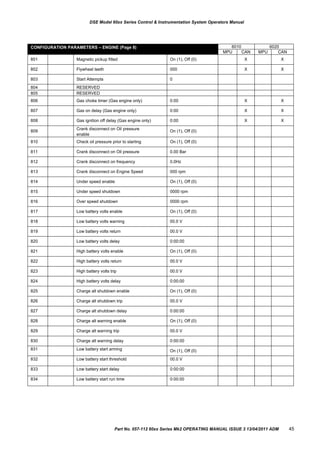
CONFIGURATION PARAMETERS – ENGINE (Page 8) 6010 6020
MPU CAN MPU CAN
801 Magnetic pickup fitted On (1), Off (0) X X
802 Flywheel teeth 000 X X
803 Start Attempts 0
804 RESERVED
805 RESERVED
806 Gas choke timer (Gas engine only) 0:00 X X
807 Gas on delay (Gas engine only) 0:00 X X
808 Gas ignition off delay (Gas engine only) 0:00 X X
809
Crank disconnect on Oil pressure
enable
On (1), Off (0)
810 Check oil pressure prior to starting On (1), Off (0)
811 Crank disconnect on Oil pressure 0.00 Bar
812 Crank disconnect on frequency 0.0Hz
813 Crank disconnect on Engine Speed 000 rpm
814 Under speed enable On (1), Off (0)
815 Under speed shutdown 0000 rpm
816 Over speed shutdown 0000 rpm
817 Low battery volts enable On (1), Off (0)
818 Low battery volts warning 00.0 V
819 Low battery volts return 00.0 V
820 Low battery volts delay 0:00:00
821 High battery volts enable On (1), Off (0)
822 High battery volts return 00.0 V
823 High battery volts trip 00.0 V
824 High battery volts delay 0:00:00
825 Charge alt shutdown enable On (1), Off (0)
826 Charge alt shutdown trip 00.0 V
827 Charge alt shutdown delay 0:00:00
828 Charge alt warning enable On (1), Off (0)
829 Charge alt warning trip 00.0 V
830 Charge alt warning delay 0:00:00
831 Low battery start arming On (1), Off (0)
832 Low battery start threshold 00.0 V
833 Low battery start delay 0:00:00
834 Low battery start run time 0:00:00
DSE Model 60xx Series Control & Instrumentation System Operators Manual
Part No. 057-112 60xx Series Mk2 OPERATING MANUAL ISSUE 3 13/04/2011 ADM 45
CONFIGURATION PARAMETERS – ALT‟ CONFIGURATION (PAGE 9) 6010 6020
MPU CAN MPU CAN
901 Default configuration On (1), Off (0)
902 Alt config - Enable configuration On (1), Off (0)
903 Alt config - Alternative Engine Speed On (1), Off (0) X X
904 Alt config - Under Voltage Shutdown enable On (1), Off (0)
905 Alt config - Under Voltage Shutdown trip 0V
906 Alt config - Loading Voltage 0V
907 Alt config - Over Voltage trip 0V
908 Alt config - Under frequency shutdown enable On (1), Off (0)
909 Alt config - Under frequency shutdown trip 0.0 Hz
910 Alt config - Loading Frequency 0.0 Hz
911 Alt config - Nominal Frequency 0.0 Hz
912 Alt config - Over Frequency shutdown enable On (1), Off (0)
913 Alt config - Over Frequency shutdown trip 0.0 Hz
914 Alt config - CT Primary 0 (Amps)
915 Alt config - Full load rating 0 (Amps)
916 Alt config - Immediate Over current On (1), Off (0)
917 Alt config - Over current Delayed Alarm On (1), Off (0)
918 Alt config - Over current Delayed Alarm Action 0 (Action)
919 Alt config - Over current Delay 0:00:00
920 Alt config - Over current Trip 0 (%)
921 Alt config - AC system 0 (AC system) X X
922 Alt config - Mains failure detection On (1), Off (0) X X
923 Alt config - Immediate mains dropout On (1), Off (0) X X
924 Alt config - Mains under volt enable On (1), Off (0) X X
925 Alt config - Mains under volt trip 0V X X
926 Alt config - Mains under volt return 0V X X
927 Alt config - Mains over volt enable On (1), Off (0) X X
928 Alt config - Mains over volt return 0V X X
929 Alt config - Mains over volt trip 0V X X
930 Alt config - Mains under frequency enable On (1), Off (0) X X
931 Alt config - Mains under frequency trip 0.0 Hz X X
932 Alt config - Mains under frequency return 0.0 Hz X X
DSE Model 60xx Series Control and Instrumentation System Operators Manual
46 Part No. 057-112 60xx Series OPERATING MANUAL ISSUE 3 13/04/2011 ADM
CONFIGURATION PARAMETERS – FLEXIBLE SENSOR (PAGE 10) 6010 6020
MPU CAN MPU CAN
1001 Flexible sensor alarm arming 0 (Arming)
1002 Flexible sensor - Low alarm enable 0 (Arming)
1003
Flexible sensor - Low alarm trip (units depend upon
sensor type)
0%
0.00 bar
0 °C
1004
Flexible sensor - High alarm enable 0%
0.00 bar
0 °C
1005
Flexible sensor - High alarm trip (units depend upon
sensor type)
0 (Action)
1006
Flexible sensor - Low warning enable 0%
0.00 bar
0 °C
1007 Flexible sensor - Low warning trip (units depend
upon sensor type)
On (1), Off (0)
1008
Flexible sensor – High warning enable 0%
0.00 bar
0 °C
1009 Flexible sensor – High warning trip (units depend
upon sensor type)
On (1), Off (0)
933 Alt config - Mains over frequency enable On (1), Off (0) X X
934 Alt config - Mains over frequency return 0.0 Hz X X
935 Alt config - Mains over frequency trip 0.0 Hz X X
936 Alt config - Alternative Under speed shutdown enable On (1), Off (0)
937 Alt config - Alternative Under speed shutdown trip 0000 rpm
938 Alt config - Alternative Over speed shutdown trip 0000 rpm
CONFIGURATION PARAMETERS – SCHEDULER (PAGE 11) 6010 6020
MPU CAN MPU CAN
1101 Enable scheduler On (1), Off (0)
1102 On or off load On (1), Off (0)
1103 Start time 0:00:00
1104 Day 0 (Day, 0=Monday)
1105 Duration 0:00:00
CONFIGURATION PARAMETERS – TIME (PAGE 12) 6010 6020
MPU CAN MPU CAN
1201 Time of day 0:00
1202 Day of week 0 (Day, 0=Monday)
Flexible sensor type selection
0 None
1 Digital input
2 Percentage sensor
3 Pressure sensor
4 Temperature sensor
DSE Model 60xx Series Control & Instrumentation System Operators Manual
Part No. 057-112 60xx Series Mk2 OPERATING MANUAL ISSUE 3 13/04/2011 ADM 47
INPUT SOURCE LIST 6010 6020
0 User Configured
1 Alarm Mute
2 Alarm Reset
3 Alternative Configuration
4 Auto restore inhibit X
5 Auto start inhibit
6 Auxiliary mains fail X
7 Coolant Temperature Switch
8 Emergency Stop
9 External Panel Lock
10 RESERVED
11 Generator load inhibit
12 Lamp Test
13 Low Fuel Level Switch
14 RESERVED
15 Mains load inhibit X
16 Oil Pressure Switch
17 Remote Start Off Load
18 Remote Start On Load
19 Simulate mains available X
20 Smoke Limiting
21 Transfer to Generator/Open Mains (6020)
Close Generator (6010)
22 Transfer to Mains/Open Generator (6020)
Open Generator (6010)
Oil pressure Sensor selection
0 Not used
1 Digital closed for alarm
2 Digital open for alarm
3 VDO 5 Bar
4 VDO 10 Bar
5 Datacon 5 Bar
6 Datacon 10 Bar
7 Datacon 7 Bar
8 Murphy 7 Bar
9 CMB812
10 Veglia
11 User defined
INPUT ACTION LIST
Index Action
0 Electrical Trip
1 Shutdown
2 Warning
CAN DATA FAIL ACTION
Index Action
0 None
1 Shutdown
2 Warning always latched
INPUT ARMING LIST
Index Arming
0 Always
1 From Safety On
2 From Starting
3 Never
INPUT POLARITY LIST
Index Action
0 Close to Activate
1 Open to Activate
DSE Model 60xx Series Control and Instrumentation System Operators Manual
Parameters with multiple choices use the following identification tables for the parameter values.
48 Part No. 057-112 60xx Series OPERATING MANUAL ISSUE 3 13/04/2011 ADM
OUTPUT POLARITY LIST
Index Arming
0 Energise
1 De-energise
CAN DATA FAIL ARMING
Index Arming
0 From Safety On
1 From Starting
Coolant temperature sensor selection
0 Not used
1 Digital closed for alarm
2 Digital open for alarm
3 VDO 120 °C
4 Datacon high
5 Datacon low
6 Murphy
7 Cummins
8 PT100
9 Veglia
10 Beru
11 User defined
Flexible sensor selections for Percentage type
0 Not used
1 Digital closed for alarm
2 Digital open for alarm
3 VDO Ohm range (10-180)
4 VDO Tube (90-0)
5 US Ohm range (240-33)
6 GM Ohm range (0-90)
7 GM Ohm range (0-30)
8 Ford (73-10)
9 User defined
DSE Model 60xx Series Control & Instrumentation System Operators Manual
Part No. 057-112 60xx Series Mk2 OPERATING MANUAL ISSUE 3 13/04/2011 ADM 49
OUTPUT SOURCE LIST 6010 6020
MPU CAN MPU CAN
0 Not used
1 Air Flap relay (1)
2 Arm safety on alarms
3 Audible Alarm
4 Battery over volts warning
5 Battery under volts warning
6 CAN ECU data fail X X
7 CAN ECU error X X
8 CAN ECU fail X X
9 CAN ECU power X X
10 CAN ECU stop X X
11 Charge alternator shutdown
12 Charge alternator warning
13 Close Gen output
14 Close Gen output pulse
15 Close Mains output X X
16 Close Mains output pulse X X
17 Combined mains failure X X
18 Common Alarm
19 Common Electrical Trip
20 Common Shutdown
21 Common Warning
22 Cooling down
23 Dig Input A
24 Dig Input B
25 Dig Input C
26 Dig Input D
27 Dig Input E
28 Dig Input F
29 Emergency stop
30 Energise to stop
31 Fail to come to rest
32 Fail to start
33 Fuel relay
34 Gas choke on X X
35 Gas ignition X X
36 Generator Available
37 Generator over voltage shutdown
38 RESERVED
39 RESERVED
40 Loss of magnetic pickup signal X X
41 Low fuel level
42 Low oil pressure (shutdown)
43 Mains high frequency X X
44 Mains high voltage X X
45 Mains low frequency X X
46 Mains low voltage X X
47 Open Gen Output
48 Open Gen Output pulse
49 Open Mains Output X X
50 Open Mains Output Pulse X X
51 Over Frequency shutdown
52 Over speed shutdown
53 Preheat During Preheat Timer
54 Preheat Until End of Crank
55 Preheat Until End of Safety Timer
56 Preheat Until End of Warming Timer
57 Smoke limiting
58 Start relay
59 Under frequency shutdown
60 Under speed shutdown
61 Waiting for manual restore X X
DSE Model 60xx Series Control and Instrumentation System Operators Manual
50 Part No. 057-112 60xx Series OPERATING MANUAL ISSUE 3 13/04/2011 ADM
DSE Model 60xx Series Control & Instrumentation System Operators Manual
9 COMMISSIONING
9.1.1 PRE-COMMISSIONING
Before the system is started, it is recommended that the following checks are made:-



The unit is adequately cooled and all the wiring to the module is of a standard and rating compatible with the system.
Check all mechanical parts are fitted correctly and that all electrical connections (including earths) are sound.
The unit DC supply is fused and connected to the battery and that it is of the correct polarity.
The Emergency Stop input is wired to an external normally closed switch connected to DC positive.
NOTE:- If Emergency Stop feature is not required, link this input to the DC Negative. The module will not operate
unless either the Emergency Stop is fitted correctly OR terminal 3 is connected to DC Positive.








To check the start cycle operation, take appropriate measures to prevent the engine from starting (disable the operation
of the fuel solenoid). After a visual inspection to ensure it is safe to proceed, connect the battery supply. Select
“MANUAL” and then press “START” the unit start sequence will commence.
The starter will engage and operate for the pre-set crank period. After the starter motor has attempted to start the engine
for the pre-set number of attempts, the LCD will display „Failed to start. Select the STOP/RESET position to reset the
unit.
Restore the engine to operational status (reconnect the fuel solenoid). Select “MANUAL” and then press “START”.
This time the engine should start and the starter motor should disengage automatically. If not then check that the engine
is fully operational (fuel available, etc.) and that the fuel solenoid is operating. The engine should now run up to
operating speed. If not, and an alarm is present, check the alarm condition for validity, then check input wiring. The
engine should continue to run for an indefinite period. It will be possible at this time to view the engine and alternator
parameters - refer to the „Description of Controls‟ section of this manual.
Select “AUTO” on the front panel, the engine will run for the pre-set cooling down period, then stop. The generator
should stay in the standby mode. If not, check that there is no signal present on the Remote start input.
Initiate an automatic start by supplying the remote start signal (if configured). The start sequence will commence and the
engine will run up to operational speed. Once the generator is available a load transfer will take place (if configured), the
Generator will accept the load. If not, check the wiring to the Generator Contactor Coil (if used). Check the Warming
timer has timed out.
Remove the remote start signal. The return sequence will begin. After the pre-set time, the generator is unloaded. The
generator will then run for the pre-set cooling down period, then shutdown into its standby mode.
Set the module internal clock/calendar to ensure correct operation of the scheduler and event logging functions. For
details of this procedure see section entitled Front Panel Configuration – Editing the date and time.
If, despite repeated checking of the connections between the 60xx series controller and the customer‟s system,
satisfactory operation cannot be achieved, then the customer is requested to contact the factory for further advice on:-
INTERNATIONAL TEL: +44 (0) 1723 890099
INTERNATIONAL FAX: +44 (0) 1723 893303
E-mail: Support@Deepseaplc.com
Website : www.deepseaplc.com
Part No. 057-112 60xx Series Mk2 OPERATING MANUAL ISSUE 3 13/04/2011 ADM 51
SYMPTOM POSSIBLE REMEDY
Unit is inoperative
Read/Write configuration does not
operate
Check the battery and wiring to the unit. Check the DC supply. Check the DC fuse.
Unit shuts down Check DC supply voltage is not above 35 Volts or below 9 Volts
Check the operating temperature is not above 70°C. Check the DC fuse.
Unit locks out on Emergency Stop If no Emergency Stop Switch is fitted, ensure that a DC positive signal is connected to
the Emergency Stop input. Check emergency stop switch is functioning correctly.
Check Wiring is not open circuit.
Intermittent Magnetic Pick-up sensor
fault
Ensure that Magnetic pick-up screen only connects to earth at one end, if connected at
both ends, this enables the screen to act as an aerial and will pick up random
voltages. Check pickup is correct distance from the flywheel teeth.
Low oil Pressure fault operates after
engine has fired
Check engine oil pressure. Check oil pressure switch/sensor and wiring. Check
configured polarity (if applicable) is correct (i.e. Normally Open or Normally Closed) or
that sensor is compatible with the 60xx Module and is correctly configured.
High engine temperature fault
operates after engine has fired.
Check engine temperature. Check switch/sensor and wiring. Check configured polarity
(if applicable) is correct (i.e. Normally Open or Normally Closed) or that sensor is
compatible with the 60xx series module.
Shutdown fault operates Check relevant switch and wiring of fault indicated on LCD display. Check
configuration of input.
Warning fault operates Check relevant switch and wiring of fault indicated on LCD display. Check
configuration of input.
Fail to Start is activated after pre-set
number of attempts to start
Check wiring of fuel solenoid. Check fuel. Check battery supply. Check battery supply
is present on the Fuel output of the module. Check the speed-sensing signal is
present on the 60xx series module inputs. Refer to engine manual.
Continuous starting of generator
when in AUTO
Check that there is no signal present on the “Remote Start” input. Check configured
polarity is correct.
Generator fails to start on receipt of
Remote Start signal.
Check Start Delay timer has timed out.
Check signal is on “Remote Start” input. Confirm correct configuration of input is
configured to be used as “Remote Start”.
Check that the oil pressure switch or sensor is indicating low oil pressure to the
controller. Depending upon configuration, the set will not start if oil pressure is not low.
Pre-heat inoperative Check wiring to engine heater plugs. Check battery supply. Check battery supply is
present on the Pre-heat output of module. Check pre-heat configuration is correct.
Starter motor inoperative Check wiring to starter solenoid. Check battery supply. Check battery supply is present
on the Starter output of module. Ensure that the Emergency Stop input is at Positive.
Ensure oil pressure switch or sensor is indicating the “low oil pressure” state to the
60xx series controller.
Engine runs but generator will not
take load
Check Warm up timer has timed out. Ensure generator load inhibit signal is not
present on the module inputs. Check connections to the switching device.
Note that the set will not take load in manual mode unless there is an active remote
start on load signal.
DSE Model 60xx Series Control and Instrumentation System Operators Manual
10 FAULT FINDING
52 Part No. 057-112 60xx Series OPERATING MANUAL ISSUE 3 13/04/2011 ADM
SYMPTOM POSSIBLE REMEDY
Incorrect reading on Engine gauges
Fail to stop alarm when engine is at
rest
Check engine is operating correctly. Check sensor and wiring.
Module appears to „revert‟ to an
earlier configuration
When editing a configuration using the PC software it is vital that the configuration is
first „read‟ from the controller before editing it. This edited configuration must then be
“written” back to the controller for the changes to take effect.
When editing a configuration using the Front Panel Editor, be sure to press the Save
button to save the change before moving to another item or exiting the Front
Panel Editor.
Set will not take load Ensure the generator is available.
Check that the output configuration is correct to drive the load switch device and that
all connections are correct.
Remember that the set will not take load in manual mode unless a remote start on
load input is present.
Inaccurate generator measurements
on controller display
The 60xx series controller is true RMS measuring so gives more accurate display
when compared with an „average‟ meter such as an analogue panel meter or some
lower specified digital multimeters.
Accuracy of the controller is better than 1% of full scale. Ie Gen volts full scale is 333V
ph-n so accuracy is ±3.33V (1% of 333V).
DSE Model 60xx Series Control & Instrumentation System Operators Manual
NOTE:- The above fault finding is provided as a guide check-list only. As the module can be configured to
provide a wide range of different features, always refer to the source of your module configuration if in doubt.
Part No. 057-112 60xx Series Mk2 OPERATING MANUAL ISSUE 3 13/04/2011 ADM 53
6020 terminal designation Plug description Part No.
1-11 11 way 5.08mm 007-451
12-15 4 way 5.08mm 007-444
16-18 3 way 5.08mm 007-174
19-26 8 way 7.62mm 007-171
27-31 5 way 5.08mm 007-445
32-35 4 way 5.08mm 007-444
6010 terminal designation Plug description Part No.
1-11 11 way 5.08mm 007-451
12-15 4 way 5.08mm 007-444
16-18 3 way 5.08mm 007-174
19-22 4 way 7.62mm 007-171
27-31 5 way 5.08mm 007-445
32-35 4 way 5.08mm 007-444
Item Description Part No.
60xx series fixing clips (packet of 4) 020-294
DSE Model 60xx Series Control and Instrumentation System Operators Manual
11 MAINTENANCE, SPARES, REPAIR AND SERVICING
The DSE60xx Series controller is designed to be Fit and Forget. As such, there are no user serviceable parts within the
controller.
In the case of malfunction, you should contact your original equipment supplier (OEM).
11.1 PURCHASING ADDITIONAL CONNECTOR PLUGS FROM DSE
If you require additional plugs from DSE, please contact our Sales department using the part numbers below.
11.1.1 DSE6010
NOTE:- Terminals 22-26 and 36-37 are not fitted to DSE6010 controller.
11.1.2 DSE6020
NOTE:- Terminals 36-37 are not fitted to DSE6010 controller.
11.2 PURCHASING ADDITIONAL FIXING CLIPS FROM DSE
54 Part No. 057-112 60xx Series OPERATING MANUAL ISSUE 3 13/04/2011 ADM
Item Description Part No.
60xx series silicon sealing gasket 020-313
DSE Model 60xx Series Control & Instrumentation System Operators Manual
11.3 PURCHASING SEALING GASKET FROM DSE
The optional sealing gasket is not supplied with the controller but can be purchased separately.
Part No. 057-112 60xx Series Mk2 OPERATING MANUAL ISSUE 3 13/04/2011 ADM 55
DSE Model 60xx Series Control and Instrumentation System Operators Manual
12 WARRANTY
DSE provides limited warranty to the equipment purchaser at the point of sale. For full details of any applicable warranty, you
are referred to your original equipment supplier (OEM).
13 DISPOSAL
13.1 WEEE (WASTE ELECTRICAL AND ELECTRONIC EQUIPMENT)
Directive 2002/96/EC
If you use electrical and electronic equipment you must store, collect, treat, recycle and dispose of WEEE
separately from your other waste.
13.2 ROHS (RESTRICTION OF HAZARDOUS SUBSTANCES)
Directive 2002/95/EC:2006
To remove specified hazardous substances (Lead, Mercury, Hexavalent Chromium, Cadmium, PBB & PBDE´s)
Exemption Note: Category 9. (Monitoring & Control Instruments) as defined in Annex 1B of the WEEE directive will be exempt
from the RoHS legislation. This was confirmed in the August 2005 UK´s Department of Trade and Industry RoHS
REGULATIONS Guide (Para 11).
Despite this exemption DSE has been carefully removing all non RoHS compliant components from our supply chain and
products.
When this is completed a Lead Free & RoHS compatible manufacturing process will be phased into DSE production.
This is a process that is almost complete and is being phased through different product groups.
56 Part No. 057-112 60xx Series OPERATING MANUAL ISSUE 3 13/04/2011 ADM
DSE Model 60xx Series Control & Instrumentation System Operators Manual
14 APPENDIX
14.1 CAN INTERFACE
44x0-xxx-02 Modules are fitted with the CAN interface and are capable of receiving engine data
from engine CAN controllers compliant with the CAN standard.
CAN enabled engine controllers monitor the engines operating parameters such as engine
speed, oil pressure, engine temperature (among others) in order to closely monitor and control
the engine. The industry standard communications interface (CAN) transports data gathered by
the engine controller interface (CAN). This allows generator controllers such as the DSE 60xx to
access these engine parameters with no physical connection to the sensor device.
NOTE:- For further details for connections to CAN enabled engines and the functions available with each engine
type, refer to the manual Electronic Engines and DSE Wiring. Part No. 057-004
Part No. 057-112 60xx Series Mk2 OPERATING MANUAL ISSUE 3 13/04/2011 ADM 57
DSE Model 60xx Series Control and Instrumentation System Operators Manual
14.2 COMMUNICATIONS OPTION CONNECTIONS
14.2.1 DESCRIPTION
The 60xx series configuration software allows the controller to communicate with a PC. The computer connects to the module
as shown below and allows easy adjustment of the operating parameters and firmware update of the controller.
14.2.2 PC TO CONTROLLER (DIRECT) CONNECTION
To connect a 60xx series module to a PC the following items are required: -



60xx series module
60xx series configuration software (Supplied on configuration suite software
CD or available from www.deepseaplc.com free of charge).
USB cable Type A to Type B.
NOTE:- The DC supply must be connected to the module for configuration by PC.
NOTE:- Refer to 60xx software Manual for further details on configuring the module by PC.
58 Part No. 057-112 60xx Series OPERATING MANUAL ISSUE 3 13/04/2011 ADM
First Digit
Protection against contact and ingress of solid objects
0 No protection
Second Digit
Protection against ingress of water
0 No protection
1 Protected against ingress solid objects with a diameter of
more than 50 mm. No protection against deliberate access,
e.g. with a hand, but large surfaces of the body are
prevented from approach.
1 Protection against dripping water falling vertically. No harmful
effect must be produced (vertically falling drops).
2 Protected against penetration by solid objects with a
diameter of more than 12 mm. Fingers or similar objects
prevented from approach.
2 Protection against dripping water falling vertically. There must be
no harmful effect when the equipment (enclosure) is tilted at an
angle up to 15°from its normal position (drops fal ling at an
angle).
3 Protected against ingress of solid objects with a diameter of
more than 2.5 mm. Tools, wires etc. with a thickness of more
than 2.5 mm are prevented from approach.
3 Protection against water falling at any angle up to 60°from the
vertical. There must be no harmful effect (spray water).
4 Protected against ingress of solid objects with a diameter of
more than 1 mm. Tools, wires etc. with a thickness of more
than 1 mm are prevented from approach.
4 Protection against water splashed against the equipment
(enclosure) from any direction. There must be no harmful effect
(splashing water).
5 Protected against harmful dust deposits. Ingress of dust is
not totally prevented but the dust must not enter in sufficient
quantity to interface with satisfactory operation of the
equipment. Complete protection against contact.
5 Protection against water projected from a nozzle against the
equipment (enclosure) from any direction. There must be no
harmful effect (water jet).
6 Protection against ingress of dust (dust tight). Complete
protection against contact.
6 Protection against heavy seas or powerful water jets. Water
must not enter the equipment (enclosure) in harmful quantities
(splashing over).
DSE Model 60xx Series Control & Instrumentation System Operators Manual
14.3 ENCLOSURE CLASSIFICATIONS
IP CLASSIFICATIONS
60xx series specification under BS EN 60529 Degrees of protection provided by enclosures
IP65 (Front of module when module is installed into the control panel with the supplied sealing gasket).
IP42 (front of module when module is installed into the control panel WITHOUT being sealed to the panel)
Part No. 057-112 60xx Series Mk2 OPERATING MANUAL ISSUE 3 13/04/2011 ADM 59
1
IP30
Provides a degree of protection against contact with the enclosure equipment and against a limited amount of falling dirt.
2
IP31
Provides a degree of protection against limited amounts of falling water and dirt.
3
IP64
Provides a degree of protection against windblown dust, rain and sleet; undamaged by the formation of ice on the enclosure.
3R
IP32
Provides a degree of protection against rain and sleet:; undamaged by the formation of ice on the enclosure.
4 (X)
IP66
Provides a degree of protection against splashing water, windblown dust and rain, hose directed water; undamaged by the formation of ice on the
enclosure. (Resist corrosion).
12/12K
IP65
Provides a degree of protection against dust, falling dirt and dripping non corrosive liquids.
13
IP65
Provides a degree of protection against dust and spraying of water, oil and non corrosive coolants.
DSE Model 60xx Series Control and Instrumentation System Operators Manual
NEMA CLASSIFICATIONS
60xx series NEMA Rating (Approximate)
12 (Front of module when module is installed into the control panel with the optional sealing gasket).
2 (front of module when module is installed into the control panel WITHOUT being sealed to the panel)
NOTE: - There is no direct equivalence between IP / NEMA ratings. IP figures shown are approximate only.
60 Part No. 057-112 60xx Series OPERATING MANUAL ISSUE 3 13/04/2011 ADM
DSE Model 60xx Series Control & Instrumentation System Operators Manual
This page is intentionally blank.
Part No. 057-112 60xx Series Mk2 OPERATING MANUAL ISSUE 3 13/04/2011 ADM 61
DSE Model 60xx Series Control and Instrumentation System Operators Manual
This page is blank intentionally.
62 Part No. 057-112 60xx Series OPERATING MANUAL ISSUE 3 13/04/2011 ADM

DSE 6010/20 - manual operation

  • 1.
    DEEP SEA ELECTRONICSPLC DSE60xx Series Control Module Document Number 057-112 Author : Anthony Manton
  • 2.
    Amd. No. Comments Issue1 First release Issue 2 Added fast loading and changes to flexible sensor alarms in the front panel configuration table. Issue 3 Added Power pages front panel Watts / kVA / kVAr DSE Model 60xx Series Control and Instrumentation System Operators Manual Deep Sea Electronics Plc Highfield House Hunmanby North Yorkshire YO14 0PH ENGLAND Sales Tel: +44 (0) 1723 890099 Sales Fax: +44 (0) 1723 893303 E-mail: sales@deepseaplc.com Website: www.deepseaplc.com DSE Model 60xx series Control and Instrumentation System Operators Manual © Deep Sea Electronics Plc All rights reserved. No part of this publication may be reproduced in any material form (including photocopying or storing in any medium by electronic means or other) without the written permission of the copyright holder except in accordance with the provisions of the Copyright, Designs and Patents Act 1988. Applications for the copyright holder‟s written permission to reproduce any part of this publication should be addressed to Deep Sea Electronics Plc at the address above. The DSE logo and the names are UK registered trademarks of Deep Sea Electronics PLC. Any reference to trademarked product names used within this publication is owned by their respective companies. Deep Sea Electronics Plc reserves the right to change the contents of this document without prior notice. Amendments since last publication Clarification of notatio n used within this publication. Highlights an essential element of a procedure to ensure correctness. NOTE: Indicates a procedure or practice, which, if not strictly observed, could result in damage or destruction CAUTION! WARNING! of equipment. Indicates a procedure or practice, which could result in injury to personnel or loss of life if not followed correctly. 2 Part No. 057-112 60xx Series OPERATING MANUAL ISSUE 3 13/04/2011 ADM
  • 3.
    DSE Model 60xxSeries Control & Instrumentation System Operators Manual TABLE OF CONTENTS Section Page 1 BIBLIOGRAPHY .............................................................................................. 5 1.1 1.2 INSTALLATION INSTRUCTIONS ....................................................................................... 5 MANUALS............................................................................................................................ 5 2 3 INTRODUCTION .............................................................................................. 5 SPECIFICATIONS ............................................................................................ 6 3.1 PART NUMBERING ............................................................................................................ 6 3.1.1 SHORT NAMES............................................................................................................ 6 3.1 3.2 3.3 3.4 POWER SUPPLY REQUIREMENTS .................................................................................. 7 TERMINAL SPECIFICATION .............................................................................................. 7 GENERATOR VOLTAGE / FREQUENCY SENSING ......................................................... 7 INPUTS ................................................................................................................................ 8 3.4.1 3.4.2 3.4.3 3.4.4 DIGITAL INPUTS .......................................................................................................... 8 ANALOGUE INPUTS .................................................................................................... 8 CHARGE FAIL INPUT .................................................................................................. 9 MAGNETIC PICKUP..................................................................................................... 9 3.5 OUTPUTS ............................................................................................................................ 9 3.5.1 3.5.2 OUTPUTS A & B (FUEL AND START)......................................................................... 9 CONFIGURABLE OUTPUTS C, D, E & F .................................................................... 9 3.6 3.7 3.8 COMMUNICATION PORTS ................................................................................................ 9 ACCUMULATED INSTRUMENTATION.............................................................................. 9 DIMENSIONS AND MOUNTING ....................................................................................... 10 3.8.1 3.8.2 3.8.3 3.8.4 3.8.5 DIMENSIONS ............................................................................................................. 10 PANEL CUTOUT ........................................................................................................ 10 WEIGHT...................................................................................................................... 10 FIXING CLIPS............................................................................................................. 10 OPTIONAL SILICON SEALING GASKET .................................................................. 10 3.9 APPLICABLE STANDARDS ............................................................................................. 11 4 INSTALLATION.............................................................................................. 12 4.1 TERMINAL DESCRIPTION ............................................................................................... 12 4.1.1 4.1.2 4.1.3 4.1.4 4.1.5 4.1.6 4.1.7 4.1.8 DC SUPPLY, FUEL AND START OUTPUTS............................................................. 12 ANALOGUE SENSORS.............................................................................................. 13 MAGNETIC PICKUP................................................................................................... 13 CAN............................................................................................................................. 14 GENERATOR / MAINS VOLTAGE SENSING............................................................ 14 GENERATOR CURRENT TRANSFORMERS ........................................................... 15 DIGITAL INPUTS ........................................................................................................ 16 PC CONFIGURATION INTERFACE CONNECTOR .................................................. 16 4.2 TYPICAL WIRING DIAGRAMS ......................................................................................... 17 4.2.1 4.2.2 DSE 6010 MK2 AUTOSTART MODULE .................................................................... 17 DSE 6020 MK2 AUTO MAINS FAILURE MODULE ................................................... 18 5 DESCRIPTION OF CONTROLS .................................................................... 19 5.1 QUICKSTART GUIDE ....................................................................................................... 20 5.1.1 5.1.2 STARTING THE ENGINE........................................................................................... 20 STOPPING THE ENGINE .......................................................................................... 20 5.2 5.3 5.4 5.5 GRAPHICAL DISPLAY...................................................................................................... 21 VIEWING THE INSTRUMENTS ........................................................................................ 21 EVENT LOG....................................................................................................................... 22 CONTROLS ....................................................................................................................... 23 6 OPERATION................................................................................................... 24 6.1 AUTOMATIC MODE OF OPERATION.............................................................................. 24 6.1.1 6.1.2 6.1.3 6.1.4 WAITING IN AUTO MODE ......................................................................................... 24 STARTING SEQUENCE............................................................................................. 24 ENGINE RUNNING..................................................................................................... 25 STOPPING SEQUENCE ............................................................................................ 25 Part No. 057-112 60xx Series Mk2 OPERATING MANUAL ISSUE 3 13/04/2011 ADM 3
  • 4.
    DSE Model 60xxSeries Control and Instrumentation System Operators Manual 6.2 MANUAL OPERATION ......................................................................................................26 6.2.1 6.2.2 6.2.3 6.2.4 WAITING IN MANUAL MODE ....................................................................................26 STARTING SEQUENCE .............................................................................................26 ENGINE RUNNING .....................................................................................................27 STOPPING SEQUENCE.............................................................................................27 6.3 TEST MODE.......................................................................................................................28 6.3.1 6.3.2 6.3.3 WAITING IN TEST MODE ..........................................................................................28 STARTING SEQUENCE .............................................................................................28 ENGINE RUNNING .....................................................................................................29 7 MODULE DISPLAY ....................................................................................... 30 7.1 7.2 BACKLIGHT.......................................................................................................................30 GRAPHICAL DISPLAY ......................................................................................................30 7.2.1 7.2.2 7.2.3 7.2.4 7.2.5 DISPLAY EXAMPLE ...................................................................................................30 MODE ICON................................................................................................................30 AUTO RUN ICON........................................................................................................31 INSTRUMENTATION ICONS .....................................................................................31 ACTIVE CONFIGURATION ........................................................................................32 7.3 7.4 7.5 7.6 PROTECTIONS..................................................................................................................33 WARNINGS ........................................................................................................................34 SHUTDOWN ALARMS ......................................................................................................35 ELECTRICAL TRIP ALARMS ...........................................................................................37 8 FRONT PANEL CONFIGURATION ............................................................... 38 8.1 8.2 8.3 ACCESSING THE FRONT PANEL EDITOR (FPE) ..........................................................38 EDITING A PARAMETER ..................................................................................................38 ADJUSTABLE PARAMETERS..........................................................................................39 9 COMMISSIONING ......................................................................................... 51 9.1.1 PRE-COMMISSIONING ..............................................................................................51 10 11 11.1 FAULT FINDING ......................................................................................... 52 MAINTENANCE, SPARES, REPAIR AND SERVICING............................. 54 PURCHASING ADDITIONAL CONNECTOR PLUGS FROM DSE ...............................54 11.1.1 11.1.2 11.2 11.3 DSE6010 .....................................................................................................................54 DSE6020 .....................................................................................................................54 PURCHASING ADDITIONAL FIXING CLIPS FROM DSE ............................................54 PURCHASING SEALING GASKET FROM DSE ...........................................................55 12 13 13.1 13.2 14 14.1 14.2 WARRANTY................................................................................................ 56 DISPOSAL .................................................................................................. 56 WEEE (WASTE ELECTRICAL AND ELECTRONIC EQUIPMENT)..............................56 ROHS (RESTRICTION OF HAZARDOUS SUBSTANCES) ..........................................56 APPENDIX .................................................................................................. 57 CAN INTERFACE ..........................................................................................................57 COMMUNICATIONS OPTION CONNECTIONS ...........................................................58 14.2.1 14.2.2 14.3 DESCRIPTION ............................................................................................................58 PC TO CONTROLLER (DIRECT) CONNECTION .....................................................58 ENCLOSURE CLASSIFICATIONS ................................................................................59 4 Part No. 057-112 60xx Series OPERATING MANUAL ISSUE 3 13/04/2011 ADM
  • 5.
    DSE PART DESCRIPTION 053-0766010 installation instructions 053-077 6020 installation instructions DSE PART DESCRIPTION 057-004 Electronic Engines and DSE wiring 057-114 DSE60xx Config Suite Manual DSE Model 60xx Series Control & Instrumentation System Operators Manual 1 1.1 1.2 2 BIBLIOGRAPHY INSTALLATION INSTRUCTIONS MANUALS INTRODUCTION This document details the installation and operation requirements of the DSE60xx, part of the DSEUltra® range of products. DSE6100 series modules are not covered in this document. The manual forms part of the product and should be kept for the entire life of the product. If the product is passed or supplied to another party, ensure that this document is passed to them for reference purposes. This is not a controlled document. You will not be automatically informed of updates. Any future updates of this document will be included on the DSE website at www.deepseaplc.com The DSE 60xx series module has been designed to allow the operator to start and stop the engine/generator, and if required, transfer the load. The user also has the facility to view the system operating parameters via the LCD display. The DSE 60xx module monitors the engine, indicating the operational status and fault conditions, automatically shutting down the engine and giving a true first up fault condition of an engine failure. The LCD display indicates the fault. The powerful microprocessor contained within the module allows for incorporation of a range of enhanced features:       Text based LCD display True RMS Voltage monitoring with 3 phase generator sensing (Mk2 models only) Engine parameter monitoring. Fully configurable inputs for use as alarms or a range of different functions. Engine ECU interface to electronic engines (specify on ordering) Magnetic pickup interface for engine only applications (specify on ordering) Using a PC and the 60xx series configuration software allows alteration of selected operational sequences, timers and alarm trips. Additionally, the module‟s integral fascia configuration editor allows full adjustment of all this information. A robust plastic case designed for front panel mounting houses the module. Connections are via locking plug and sockets. Part No. 057-112 60xx Series Mk2 OPERATING MANUAL ISSUE 3 13/04/2011 ADM 5
  • 6.
    Short name Description 60xxDSE 60xx series control module 60x0-xxx-01 6010 or 6020 MPU version module 60x0-xxx-02 6010 or 6020 CAN version module DSE Model 60xx Series Control and Instrumentation System Operators Manual 3 3.1 SPECIFICATIONS PART NUMBERING 6010 - 002 - 01 Product type Variant DSE 6010 6010 Magnetic version* pickup 01 Autostart Module CAN version* 02 DSE 6020 Auto Mains Failure 6020 (AMF) Module Revision 1 Hardware revision 001 NOTE*:- Variant 01 has optional Magnetic Pickup input in the case of an engine only application. When the engine is fitted with a main AC alternator, the engine speed can be derived from the main AC alternator output. Variant 02 is only suitable for CAN enabled engines (with CAN engine control unit (ECU)) 3.1.1 SHORT NAMES 6 Part No. 057-112 60xx Series OPERATING MANUAL ISSUE 3 13/04/2011 ADM
  • 7.
    Measurement type TrueRMS conversion Sample Rate 5KHz or better Harmonics th Up to 11 or better Input Impedance 300K ph-N Phase to Neutral 15V to 333V AC (max) Phase to Phase 25V to 576V AC (max) Common mode offset from Earth 100V AC (max) Resolution 1V AC phase to neutral 2V AC phase to phase Accuracy ±1% of full scale phase to neutral ±2% of full scale phase to phase Minimum frequency 3.5Hz Maximum frequency 75.0Hz Frequency resolution 0.1Hz Frequency accuracy ±0.2Hz Minimum supply voltage 8V continuous Cranking dropouts Able to survive 0V for 50mS providing the supply was at least 10V before the dropout and recovers to 5V afterwards. Maximum supply voltage 35V continuous (60V protection) Reverse polarity protection -35V continuous Maximum operating current (all inputs and sensor active) 146mA at 12V, 79mA at 24V Nominal standby current (no inputs active) 72mA at 12V, 42mA at 24V Power Save Mode Active 43mA at 12V, 28mA at 24V Range 0V-60V DC (note Maximum continuous operating voltage of 35V DC) Resolution 0.1V Accuracy 1% full scale Connection type Screw terminal, rising clamp, no internal spring Min cable size 0.5mm²(AWG 24) Max cable size 2.5mm²(AWG 10) DSE Model 60xx Series Control & Instrumentation System Operators Manual 3.1 POWER SUPPLY REQUIREMENTS Plant supply instrumentation display 3.2 3.3 TERMINAL SPECIFICATION GENERATOR VOLTAGE / FREQUENCY SENSING Part No. 057-112 60xx Series Mk2 OPERATING MANUAL ISSUE 3 13/04/2011 ADM 7
  • 8.
    Measurement type Resistancemeasurement by measuring voltage across sensor with a fixed current applied Arrangement Differential resistance measurement input Measurement current 10mA Full scale 480 Over range / fail 2k (2000) Resolution 1C, 2°F Accuracy ±2% of full scale resistance (±9.6) excluding transducer error Max common mode voltage ±2V Display range 0C -140C (32°F - 284°F) Depending on sensor Measurement type Resistance measurement by measuring voltage across sensor with a fixed current applied Arrangement Differential resistance measurement input Measurement current 15mA Full scale 240 Over range / fail 350 Resolution 1-2 PSI (0.1 Bar) Accuracy ±2% of full scale resistance (±4.8) excluding transducer error Max common mode voltage ±2V Display range 0-200 PSI (13.7 bar) subject to limits of the sensor Measurement type Resistance measurement by measuring voltage across sensor with a fixed current applied Arrangement Differential resistance measurement input Measurement current 10mA Full scale 480 Over range / fail 600 Resolution 1% Accuracy ±2% of full scale resistance (±9.6) excluding transducer error Max common mode voltage ±2V Display range 0-250% Number 4 Arrangement Contact between terminal and ground Low level threshold 40% of DC supply voltage High level threshold 60% of DC supply voltage Maximum input voltage DC supply voltage positive terminal Minimum input voltage DC supply voltage negative terminal Contact wetting current 2.5mA @12V typical 5mA @ 24V typical Open circuit voltage Plant supply DSE Model 60xx Series Control and Instrumentation System Operators Manual 3.4 3.4.1 3.4.2 INPUTS DIGITAL INPUTS ANALOGUE INPUTS Oil Pressure Coolant Temperature Flexible Sensor 8 Part No. 057-112 60xx Series OPERATING MANUAL ISSUE 3 13/04/2011 ADM
  • 9.
    Minimum voltage 0V Maximumvoltage 35V (plant supply) Resolution 0.2V Accuracy ±1% of max measured voltage Excitation Active circuit constant power output Output Power 2.5W nominal at 12V and 24V Current at 12V 210mA Current at 24V 105mA Type Single ended input, capacitive coupled Minimum voltage 0.5V RMS Max common mode voltage ±2V Maximum voltage Clamped to ±70V by transient suppressers, dissipation not to exceed 1W. Maximum frequency 10,000Hz Resolution 6.25 RPM Accuracy ±25 RPM Flywheel teeth 10 to 500 USB Port USB2.0 Device for connection to PC running DSE configuration suite only CAN Port (not applicable to 6010-xxx-01 MPU version) Engine CAN Port Standard implementation of „Slow mode‟, up to 250 kbits/s Non Isolated. Internal Termination provided (120) Type Fuel (A) and Start (B) outputs. Supplied from DC supply terminal 2. Fully configurable when CAN engine is selected. Rating 2A @ 35V Protection Protected against over current & over temperature. Built in load dump feature. Type Fully configurable, supplied from DC supply terminal 2. Rating 2A @ 35V Protection Protected against over current & over temperature. Built in load dump feature. DSE Model 60xx Series Control & Instrumentation System Operators Manual 3.4.3 3.4.4 CHARGE FAIL INPUT MAGNETIC PICKUP Not applicable to 44x0-xxx-02 CAN version module. 3.5 3.5.1 3.5.2 3.6 3.7 OUTPUTS OUTPUTS A & B (FUEL AND START) CONFIGURABLE OUTPUTS C, D, E & F COMMUNICATION PORTS ACCUMULATED INSTRUMENTATION NOTE : When an accumulated instrumentation value exceeds the maximum number as listed below, it will reset and begin counting from zero again. Part No. 057-112 60xx Series Mk2 OPERATING MANUAL ISSUE 3 13/04/2011 ADM 9
  • 10.
    Engine hours runMaximum 99999 hrs 59 minutes (approximately 11yrs 4months) Number of starts 1,000,000 (1 million)
  • 11.
    DSE Model 60xxSeries Control and Instrumentation System Operators Manual 3.8 3.8.1 DIMENSIONS AND MOUNTING DIMENSIONS 216mm x 158mm x 42mm (8.5” x 6.2” x 1.6”) 3.8.2 PANEL CUTOUT 182mm x 137mm (7.2” x 5.4”) 3.8.3 WEIGHT 400g (0.4kg) 3.8.4 FIXING CLIPS The module is held into the panel fascia using the supplied fixing clips.  Withdraw the fixing clip screw (turn anticlockwise) until only the pointed end is protruding from the clip.  Insert the three „prongs‟ of the fixing clip into the slots in the side of the 60xx series module case.  Pull the fixing clip backwards (towards the back of the module) ensuring all three prongs of the clip are inside their   allotted slots. Turn the fixing clip screws clockwise until they make contact with the panel fascia. Turn the screws a little more to secure the module into the panel fascia. Care should be taken not to over tighten the fixing clip screws. Fixing clip Fixing clip fitted to module NOTE:- In conditions of excessive vibration, mount the panel on suitable anti-vibration mountings. 3.8.5 OPTIONAL SILICON SEALING GASKET The optional silicon gasket provides improved sealing between the 60xx series module and the panel fascia. The gasket is fitted to the module before installation into the panel fascia. Take care to ensure the gasket is correctly fitted to the module to maintain the integrity of the seal. Gasket fitted to Sealing gasket module 10 Part No. 057-112 60xx Series OPERATING MANUAL ISSUE 3 13/04/2011 ADM
  • 12.
    BS 4884-1 Thisdocument conforms to BS4884-1 1992 Specification for presentation of essential information. BS 4884-2 This document conforms to BS4884-2 1993 Guide to content BS 4884-3 This document conforms to BS4884-3 1993 Guide to presentation BS EN 60068-2-1 (Minimum temperature) -30C (-22F) BS EN 60068-2-2 (Maximum temperature) +70C (158F) BS EN 60950 Safety of information technology equipment, including electrical business equipment BS EN 61000-6-2 EMC Generic Immunity Standard (Industrial) BS EN 61000-6-4 EMC Generic Emission Standard (Industrial) BS EN 60529 (Degrees of protection provided by enclosures) IP65 (front of module when installed into the control panel with the optional sealing gasket) IP42 (front of module when installed into the control panel WITHOUT being sealed to the panel) UL508 NEMA rating (Approximate) 12 (Front of module when installed into the control panel with the optional sealing gasket). 2 (Front of module when installed into the control panel WITHOUT being sealed to the panel) IEEE C37.2 (Standard Electrical Power System Device Function Numbers and Contact Designations) Under the scope of IEEE 37.2, function numbers can also be used to represent functions in microprocessor devices and software programs. The 60xx series controller is device number 11L-60xx (Multifunction device protecting Line (generator) – 60xx series module). As the module is configurable by the generator OEM, the functions covered by the module will vary. Under the module‟s factory configuration, the device numbers included within the module are : 2 – Time delay starting or closing relay 6 – Starting circuit breaker 30 – annunciator relay 42 – Running circuit breaker 54 – turning gear engaging device 62 – time delay stopping or opening relay 63 – pressure switch 74 – alarm relay 81 – frequency relay 86 – lockout relay DSE Model 60xx Series Control & Instrumentation System Operators Manual 3.9 APPLICABLE STANDARDS In line with our policy of continual development, Deep Sea Electronics, reserve the right to change specification without notice. Part No. 057-112 60xx Series Mk2 OPERATING MANUAL ISSUE 3 13/04/2011 ADM 11
  • 13.
    PIN No DESCRIPTIONCABLE NOTES SIZE 1 DC Plant Supply Input (Negative) 2.5mm² AWG 13 2 DC Plant Supply Input (Positive) 2.5 mm² AWG 13 (Recommended Maximum Fuse 15A anti-surge) Supplies the module (2A anti-surge requirement) and all output relays 3 Emergency Stop 1.0mm² AWG 18 Plant Supply Positive from terminal 2. 3 Amp rated. 4 Output A 1.0mm² AWG 18 Plant Supply Positive from terminal 2. 3 Amp rated. Normally used for FUEL control. 5 Output B 1.0mm² AWG 18 Plant Supply Positive from terminal 2. 3 Amp rated. Normally used for START control. 6 Charge fail / excite 2.5mm² AWG 13 Do not connect to ground (battery negative). If charge alternator is not fitted, leave this terminal disconnected. 7 System Eartth 1.0mm² AWG 18 8 Output C 1.0mm² AWG 18 Plant Supply Positive from terminal 2. 3 Amp rated. Normally used for Generator load switch control. 9 Output D 1.0mm² AWG 18 Plant Supply Positive from terminal 2. 3 Amp rated. Normally used for Mains load switch control (DSE6020) 10 Output E 1.0mm² AWG 18 Plant Supply Positive from terminal 2. 3 Amp rated. 11 Output F 1.0mm² AWG 18 Plant Supply Positive from terminal 2. 3 Amp rated. DSE Model 60xx Series Control and Instrumentation System Operators Manual 4 INSTALLATION The DSE60xx Series module is designed to be mounted on the panel fascia. For dimension and mounting details, see the section entitled Specification, Dimension and mounting elsewhere in this document. NOTE:- Note that these connection details are for Mk2 controllers. Connection details for Mk1 controllers are included in DSE publication 057-092 4.1 4.1.1 TERMINAL DESCRIPTION DC SUPPLY, FUEL AND START OUTPUTS NOTE:- When the module is configured for operation with an electronic engine, FUEL and START output requirements may be different. Refer to Electronic Engines and DSE Wiring for further information. DSE Part No. 057-004. 12 Part No. 057-112 60xx Series OPERATING MANUAL ISSUE 3 13/04/2011 ADM
  • 14.
    PIN No DESCRIPTIONCABLE NOTES SIZE 12 Sensor Common Return 0.5mm² AWG 20 Return feed for sensors* 13 Oil Pressure Input 0.5mm² AWG 20 Connect to Oil pressure sensor 14 Coolant Temperature Input 0.5mm² AWG 20 Connect to Coolant Temperature sensor 15 Flexible Sensor Input 0.5mm² AWG 20 Connect to sensor PIN No DESCRIPTION CABLE NOTES SIZE 16 Magnetic pickup Positive 0.5mm² AWG 20 Connect to Magnetic Pickup device 17 Magnetic pickup Negative 0.5mm² AWG 20 Connect to Magnetic Pickup device 18 Magnetic pickup screen 0.5mm² AWG 20 Do not connect the other end to earth! DSE Model 60xx Series Control & Instrumentation System Operators Manual 4.1.2 ANALOGUE SENSORS NOTE:- . It is VERY important that terminal 12 (sensor common) is soundly connected to an earth point on the ENGINE BLOCK, not within the control panel, and must be a sound electrical connection to the sensor bodies. This connection MUST NOT be used to provide an earth connection for other terminals or devices. The simplest way to achieve this is to run a SEPERATE earth connection from the system earth star point, to terminal 12 directly, and not use this earth for other connections. NOTE:- . If you use PTFE insulating tape on the sensor thread when using earth return sensors, ensure you do not insulate the entire thread, as this will prevent the sensor body from being earthed via the engine block. 4.1.3 MAGNETIC PICKUP NOTE:- Magnetic Pickup interface is not fitted to the 6010-xx-00 module NOTE:- Screened cable must be used for connecting the Magnetic Pickup, ensuring that the screen is earthed at one end ONLY. Part No. 057-112 60xx Series Mk2 OPERATING MANUAL ISSUE 3 13/04/2011 ADM 13
  • 15.
    PIN No DESCRIPTIONCABLE NOTES SIZE 16 CAN port H 0.5mm² AWG 20 Use only 120 CAN approved cable 17 CAN port L 0.5mm² AWG 20 Use only 120 CAN approved cable 18 CAN port Common 0.5mm² AWG 20 Use only 120 CAN approved cable DSE Model 60xx Series Control and Instrumentation System Operators Manual 4.1.4 CAN NOTE:- CAN interface is not fitted to the 6010-xx-01 module NOTE:- Screened 120 impedance cable specified for use with CAN must be used for the CAN link and the Multiset comms link. DSE stock and supply Belden cable 9841 which is a high quality 120 impedance cable suitable for CAN use (DSE part number 016-030) 4.1.5 GENERATOR / MAINS VOLTAGE SENSING PIN No 19 20 21 22 23 24 25 26 DESCRIPTION Generator L1 (U) voltage monitoring Generator L2 (V) voltage monitoring Generator L3 (W) voltage monitoring Generator Neutral (N) input Mains L1 (R) voltage monitoring Mains L2 (S) voltage monitoring Mains L3 (T) voltage monitoring Mains Neutral (N) input CABLE SIZE 1.0mm² AWG 18 1.0mm² AWG 18 1.0mm² AWG 18 1.0mm² AWG 18 1.0mm² AWG 18 1.0mm² AWG 18 1.0mm² AWG 18 1.0mm² AWG 18 NOTES Connect to generator L1 (U) output (AC) (Recommend 2A fuse) Connect to generator L2 (V) output (AC) (Recommend 2A fuse) Connect to generator L3 (W) output (AC) (Recommend 2A fuse) Connect to generator Neutral terminal (AC) Connect to Mains L1 (R) output (AC) (Recommend 2A fuse) Connect to Mains L2 (S) output (AC) (Recommend 2A fuse) Connect to Mains L3 (T) output (AC) (Recommend 2A fuse) Connect to Mains Neutral terminal (AC) NOTE:- Terminals 23-26 are not fitted to the DSE6010. 14 Part No. 057-112 60xx Series OPERATING MANUAL ISSUE 3 13/04/2011 ADM
  • 16.
    27 Generator I1Current Transformer 1.0mm² AWG 18 Connect to generator CT 1 (s1) 28 Generator I2 Current Transformer 1.0mm² AWG 18 Connect to generator CT 2 (s1) 29 Generator I3 Current Transformer 1.0mm² AWG 18 Connect to generator CT 3 (s1) 30 Generator Current Transformer common connection 1.0mm² AWG 18 Connect to generator CT common (s2) 31 DSE Model 60xx Series Control & Instrumentation System Operators Manual 4.1.6 GENERATOR CURRENT TRANSFORMERS WARNING!:- Do not disconnect this plug when the CTs are carrying current. Disconnection will open circuit the secondary of the C.T.‟s and dangerous voltages may then develop. Always ensure the CTs are not carrying current and the CTs are short circuit connected before making or breaking connections to the module. NOTE:- The 6000 series module has a burden of 0.5VA on the CT. Ensure the CT is rated for the burden of the 6000 series controller, the cable length being used and any other equipment sharing the CT. If in doubt, consult your CT supplier. NOTE:- Take care to ensure correct polarity of the CT primary as shown below. If in doubt, check with the CT supplier. CT LABELLING p1, k or K is the primary of the CT that „points‟ towards the GENERATOR p2, l or L is the primary of the CT that „points‟ towards the LOAD s1 is the secondary of the CT that connects to the DSE Module‟s input for the CT measuring (I1,I2,I3) s2 is the secondary of the CT that should be commoned with the s2 connections of all the other CTs and connected to the CT common terminal of the DSE6000 series modules. CT labelled as p1, k or K To Supply To Load CT labelled as p2, l or L NOTE:- Terminals 30 and 31 are internally connected to each other. Part No. 057-112 60xx Series Mk2 OPERATING MANUAL ISSUE 3 13/04/2011 ADM 15
  • 17.
    PIN DESCRIPTION CABLENOTES No SIZE 32 Configurable digital input A 0.5mm² AWG 20 Switch to negative 33 Configurable digital input B 0.5mm² AWG 20 Switch to negative 34 Configurable digital input C 0.5mm² AWG 20 Switch to negative 35 Configurable digital input D 0.5mm² AWG 20 Switch to negative DESCRIPTION CABLE NOTES SIZE Socket for connection to PC with DSE Configuration Suite PC software. 0.5mm² AWG 20 This is a standard USB type A to type B cable. DSE Model 60xx Series Control and Instrumentation System Operators Manual 4.1.7 DIGITAL INPUTS This configuration cable is the same as normally used between a PC and a USB 4.1.8 PC CONFIGURATION INTERFACE CONNECTOR printer. NOTE:- The USB connection cable between the PC and the 6000 series module must not be extended beyond 5m (5yds). For distances over 5m, it is possible to use a third party USB extender. Typically, they extend USB up to 50m (yds). The supply and support of this type of equipment is outside the scope of Deep Sea Electronics PLC. CAUTION!: Care must be taken not to overload the PCs USB system by connecting more than the recommended number of USB devices to the PC. For further information, consult your PC supplier. CAUTION!: This socket must not be used for any other purpose. 16 Part No. 057-112 60xx Series OPERATING MANUAL ISSUE 3 13/04/2011 ADM
  • 18.
    DSE Model 60xxSeries Control & Instrumentation System Operators Manual 4.2 4.2.1 TYPICAL WIRING DIAGRAMS DSE 6010 AUTOSTART MODULE Part No. 057-112 60xx Series Mk2 OPERATING MANUAL ISSUE 3 13/04/2011 ADM 17
  • 19.
    DSE Model 60xxSeries Control and Instrumentation System Operators Manual 4.2.2 DSE 6020 AUTO MAINS FAILURE MODULE 18 Part No. 057-112 60xx Series OPERATING MANUAL ISSUE 3 13/04/2011 ADM
  • 20.
    DSE Model 60xxSeries Control & Instrumentation System Operators Manual 5 DESCRIPTION OF CONTROLS The following section details the function and meaning of the various controls on the module. Display Scroll button Main status display Common Alarm Indicator Page button (information) Select Stop mode Select Manual mode Select Auto Start engine mode Alarm mute / lamp test Select Test mode (6020 only) Mains Available (DSE6020 only) Mains On Load (DSE6020 only) Generator On load Generator Available Part No. 057-112 60xx Series Mk2 OPERATING MANUAL ISSUE 3 13/04/2011 ADM 19
  • 21.
    DSE Model 60xxSeries Control and Instrumentation System Operators Manual 5.1 QUICKSTART GUIDE This section provides a quick start guide to the module‟s operation. 5.1.1 STARTING THE ENGINE First select Manual mode ...Then, press the Start button to crank the engine. NOTE:- For further details, see the section entitled „OPERATION‟ elsewhere in this manual. 5.1.2 STOPPING THE ENGINE Select Stop/Reset mode. The generator stops. NOTE:- For further details, see the section entitled „OPERATION‟ elsewhere in this manual. 20 Part No. 057-112 60xx Series OPERATING MANUAL ISSUE 3 13/04/2011 ADM
  • 22.
    DSE Model 60xxSeries Control & Instrumentation System Operators Manual 5.2 GRAPHICAL DISPLAY - - - - 4- line, 64 x 132 small Graphic Display with LED Backlight Icon and numeric display. Software controlled contrast Mimic of 4 x indicators via LCD 5.3 VIEWING THE INSTRUMENTS At power up, the display will show the software version and then show the default screen, which will display Generator Frequency. It is possible to scroll to display the different pages of information by repeatedly operating the down button Pressing the information button toggles between instrumenation and event log displays Once selected the page will remain on the LCD display until the user selects a different page or after an extended period of inactivity, the module will revert to the status display. When scrolling manually by pressing the button, the display will automatically return to the Status page if no buttons are pressed for the duration of the configurable LCD Page Timer. If an alarm becomes active while viewing the status page, the display shows the Alarms page to draw the operator‟s attention to the alarm condition. Metering: Generator Voltage, 3-phase, L-L and L-N Generator Frequency Mains Voltage, 3-phase, L-L and L-N (Model 6020 only) Mains Voltage, 3-phase, L-L and L-N (Model 6020 only) Mains Frequency Generator Current Generator kW L1 L2 L3 Generator KW Generator kVA L1 L2 L3 Generator kVA Generator kV Ar L1 L2 L3 Generator kV Ar Power Factor pf L1 L2 L3 Power Factor pf Power kWh kV Arh Battery Voltage Engine hours Run Oil Pressure Gauge Engine Temperature Gauge Fuel Level kV Ah Part No. 057-112 60xx Series Mk2 OPERATING MANUAL ISSUE 3 13/04/2011 ADM 21
  • 23.
    DSE Model 60xxSeries Control and Instrumentation System Operators Manual 5.4 EVENT LOG The info button toggles between the display of the instrumentation and the event log. Pressing the down button will move to the previous event, the event log entry at position 1 being the most recent. On moving from the instrumentation value to the event log the unit will display the most recent entry. A number in the bottom left indicates the event log entry currently displayed. There are five event log entries in the 60xx units. When the event log is displayed the icon in the alarm icon area indicates the alarm type at that position of the event log. The hours run at the time of the alarm shows in the instrumentation area. The bottom right icon indicates the current mode as normal. Example of Auxiliary Input Shutdown Alarm. Auxiliary input A Event Log icon is logged Event number 1 Number of engine running hours when the event was logged (99hrs 9mins) 22 Part No. 057-112 60xx Series OPERATING MANUAL ISSUE 3 13/04/2011 ADM
  • 24.
    Stop / Resetand Manual This button places the module into its Stop/Reset and Manual mode. This will clear any alarm conditions for which the triggering criteria have been removed. If the engine is running and the module is in Stop mode, the module will automatically instruct the changeover device to unload the generator (‘Close Generator’ becomes inactive (if used)). The fuel supply de-energises and the engine comes to a standstill. Should a remote start signal be present while operating in this mode, a remote start will not occur. Once in Manual mode the module will respond to the start button, start the engine, and run off load. If the engine is running off-load in the Manual mode and a remote start signal becomes present, the module will automatically instruct the changeover device to place the generator on load (‘Close Generator’ becomes active (if used)). Upon removal of the remote start signal, the generator remains on load until either selection of the „STOP/RESET‟ or „AUTO‟ modes. For further details, please see the more detailed description of ‘Manual operation’ elsewhere in this manual. Auto This button places the module into its „Automatic‟ mode. This mode allows the module to control the function of the generator automatically. The module will monitor the remote start input and mains supply status and once a start request is made, the set will be automatically started and placed on load. Upon removal of the starting signal, the module will automatically transfer the load from the generator and shut the set down observing the stop delay timer and cooling timer as necessary. The module will then await the next start event. For further details, please see the more detailed description of ‘Auto operation’ elsewhere in this manual. Start This button is only active in STOP/RESET or MANUAL mode. Pressing this button in manual or test mode will start the engine and run off load (manual) or on load (test). Pressing this button in STOP/RESET mode will turn on the CAN engine ECU (when correctly configured and fitted to a compatible engine ECU) Mute / Lamp Test This button silences the audible alarm if it is sounding and illuminates all of the LEDs as a lamp test feature/ When correctly configured and fitted to a compatible engine ECU, pressing this button in STOP/RESET mode after pressing the START button (to power the ECU) will cancel any “passive” alarms on the engine ECU. Scroll This buttons scrolls through the instruments in the currently displayed page Page Toggles the display between instrumentation an event log mode, DSE Model 60xx Series Control & Instrumentation System Operators Manual 5.5 CONTROLS Part No. 057-112 60xx Series Mk2 OPERATING MANUAL ISSUE 3 13/04/2011 ADM 23
  • 25.
    Auto run reasonIcon Remote start input Low battery run Scheduled run Mains failure (6020 only) DSE Model 60xx Series Control and Instrumentation System Operators Manual 6 6.1 OPERATION AUTOMATIC MODE OF OPERATION NOTE:- If a digital input configured to panel lock is active, changing module modes will not be possible. Viewing the instruments and event logs is NOT affected by panel lock. Activate auto mode by pressing the pushbutton. The icon is displayed to indicate Auto Mode operation if no alarms are present. Auto mode will allow the generator to operate fully automatically, starting and stopping as required with no user intervention. 6.1.1 WAITING IN AUTO MODE If a starting request is made, the starting sequence will begin. Starting requests can be from the sources shown below. When the engine is running in AUTO mode, an icon is displayed to indicate the reason for the set being run : 6.1.2 STARTING SEQUENCE To allow for „false‟ start requests, the start delay timer begins. Should all start requests be removed during the start delay timer, the unit will return to a stand-by state. If a start request is still present at the end of the start delay timer, the fuel relay is energised and the engine will be cranked. NOTE:- If the unit has been configured for CAN, compatible ECU‟s will receive the start command via CAN. If the engine fails to fire during this cranking attempt then the starter motor is disengaged for the crank rest duration after which the next start attempt is made. Should this sequence continue beyond the set number of attempts, the start sequence will be terminated and the display shows Fail to Start. When the engine fires, the starter motor is disengaged. Speed detection is factory configured to be derived from the main alternator output frequency but can additionally be measured from a Magnetic Pickup mounted on the flywheel (Selected by PC using the 60xx series configuration software). Additionally, rising oil pressure can be used to disconnect the starter motor (but cannot detect underspeed or overspeed). NOTE:- If the unit has been configured for CAN, speed sensing is via CAN. After the starter motor has disengaged, the Safety On timer activates, allowing Oil Pressure, High Engine Temperature, Under- speed, Charge Fail and any delayed Auxiliary fault inputs to stabilise without triggering the fault. 24 Part No. 057-112 60xx Series OPERATING MANUAL ISSUE 3 13/04/2011 ADM
  • 26.
    DSE Model 60xxSeries Control & Instrumentation System Operators Manual 6.1.3 ENGINE RUNNING Once the engine is running and all starting timers have expired, the animated icon is displayed. The generator is placed on load if configured to do so. NOTE:-The load transfer signal remains inactive until the Oil Pressure has risen. This prevents excessive wear on the engine. If all start requests are removed, the stopping sequence will begin. 6.1.4 STOPPING SEQUENCE The return delay timer operates to ensure that the starting request has been permanently removed and isn‟t just a short term removal. Should another start request be made during the cooling down period, the set will return on load. If there are no starting requests at the end of the return delay timer, the load is removed from the generator to the mains supply and the cooling timer is initiated. The cooling timer allows the set to run off load and cool sufficiently before being stopped. This is particularly important where turbo chargers are fitted to the engine. After the cooling timer has expired, the set is stopped. Part No. 057-112 60xx Series Mk2 OPERATING MANUAL ISSUE 3 13/04/2011 ADM 25
  • 27.
    DSE Model 60xxSeries Control and Instrumentation System Operators Manual 6.2 MANUAL OPERATION Activate Manual mode by pressing the pushbutton. An LED indicator beside the button confirms this action. Manual mode allows the operator to start and stop the set manually, and if required change the state of the load switching devices. 6.2.1 WAITING IN MANUAL MODE When in manual mode, the set will not start automatically. To begin the starting sequence, press the button. 6.2.2 STARTING SEQUENCE NOTE:- There is no start delay in this mode of operation. The fuel relay is energised and the engine is cranked. NOTE:- If the unit has been configured for CAN, compatible ECU‟s will receive the start command via CAN. If the engine fails to fire during this cranking attempt then the starter motor is disengaged for the crank rest duration after which the next start attempt is made. Should this sequence continue beyond the set number of attempts, the start sequence will be terminated and the display shows Fail to Start. When the engine fires, the starter motor is disengaged. Speed detection is factory configured to be derived from the main alternator output frequency but can additionally be measured from a Magnetic Pickup mounted on the flywheel (Selected by PC using the 60xx series configuration software). Additionally, rising oil pressure can be used disconnect the starter motor (but cannot detect underspeed or overspeed). NOTE:- If the unit has been configured for CAN, speed sensing is via CAN. After the starter motor has disengaged, the Safety On timer activates, allowing Oil Pressure, High Engine Temperature, Under-speed, Charge Fail and any delayed Auxiliary fault inputs to stabilise without triggering the fault. 26 Part No. 057-112 60xx Series OPERATING MANUAL ISSUE 3 13/04/2011 ADM
  • 28.
    DSE Model 60xxSeries Control & Instrumentation System Operators Manual 6.2.3 ENGINE RUNNING In manual mode, the load is not transferred to the generator unless a „loading request‟ is made. A loading request can come from a number of sources :     Remote start input Low battery run Scheduled run Mains failure (6020 only) NOTE:-The load transfer signal remains inactive until the Oil Pressure has risen. This prevents excessive wear on the engine. Once the load has been transferred to the generator, it will not be automatically removed. To manually transfer the load back to the mains (DSE6020) or to remove the load from the generator (DSE6010) either:  Press the auto mode button to return to automatic mode. The set will observe all auto mode start requests and stopping timers before beginning the Auto mode stopping sequence.  6.2.4  Press the stop button STOPPING SEQUENCE In manual mode the set will continue to run until either :   The stop button The auto button is pressed – The set will immediately stop is pressed. The set will observe all auto mode start requests and stopping timers before beginning the Auto mode stopping sequence. Part No. 057-112 60xx Series Mk2 OPERATING MANUAL ISSUE 3 13/04/2011 ADM 27
  • 29.
    DSE Model 60xxSeries Control and Instrumentation System Operators Manual 6.3 TEST MODE NOTE:- Test Mode is only applicable to DSE6020. Activate test mode be pressing the pushbutton. An LED indicator beside the button confirms this action. Test mode will start the set and transfer the load to the generator to provide a Test on load function. 6.3.1 WAITING IN TEST MODE When in test mode, the set will not start automatically. To begin the starting sequence, press the button. 6.3.2 STARTING SEQUENCE The set begins to crank. NOTE:- If the unit has been configured for CAN, compatible ECU‟s will receive the start command via CAN. If the engine fails to fire during this cranking attempt then the starter motor is disengaged for the crank rest duration after which the next start attempt is made. Should this sequence continue beyond the set number of attempts, the start sequence will be terminated and the display shows Fail to Start. When the engine fires, the starter motor is disengaged. Speed detection is factory configured to be derived from the main alternator output frequency but can additionally be measured from a Magnetic Pickup mounted on the flywheel (Selected by PC using the 6000 series configuration software). Additionally, rising oil pressure can be used disconnect the starter motor (but cannot detect underspeed or overspeed). NOTE:- If the unit has been configured for CAN, speed sensing is via CAN. After the starter motor has disengaged, the Safety On timer activates, allowing Oil Pressure, High Engine Temperature, Under-speed, Charge Fail and any delayed Auxiliary fault inputs to stabilise without triggering the fault. 28 Part No. 057-112 60xx Series OPERATING MANUAL ISSUE 3 13/04/2011 ADM
  • 30.
    DSE Model 60xxSeries Control & Instrumentation System Operators Manual 6.3.3 ENGINE RUNNING Once the engine is running, the Warm Up timer, if selected, begins, allowing the engine to stabilise before accepting the load. Load will be automatically transferred from the mains supply to the generator. NOTE:-The load transfer signal remains inactive until the Oil Pressure has risen. This prevents excessive wear on the engine. In test mode, the set will continue to run on load until either:   The stop button The auto button is pressed – The set will immediately stop is pressed. The set will observe all auto mode start requests and stopping timers before beginning the Auto mode stopping sequence. Part No. 057-112 60xx Series Mk2 OPERATING MANUAL ISSUE 3 13/04/2011 ADM 29
  • 31.
    Icon Graphic Details StoppedAppears when the engine is at rest and the unit is in stop mode. Auto Appears when the engine is at rest and the unit is in auto mode. Manual Appears when the engine is at rest and the unit is in manual mode/ Timer animation Appears when a timer is active, for example cranking time, crank rest etc. Running animation Appears when the engine is running, and all timers have expired, either on or off load. The animation rate is reduced when running in idle mode. Front panel editor Appears when the unit is in the front panel editor. Inst. Icon Instrumentation Units Alarm Icon Active config /FPE, event index Instrumentation Units Mode IconInstrumentation Units DSE Model 60xx Series Control and Instrumentation System Operators Manual 7 7.1 MODULE DISPLAY BACKLIGHT The backlight will be on if the unit has sufficient voltage on the power connection while the unit is turned on, unless the unit is in Power Save mode, or if the engine is cranking for which the backlight will be turned off. 7.2 GRAPHICAL DISPLAY A 48x132 pixel LCD is used for the display. The display is segmented into areas for instrumentation, units, alarm icons and various other icons. 7.2.1 DISPLAY EXAMPLE This example shows Generator Volts as shown by the Generator Instrumentation Icon Active configuration symbol. Instrumentation Units Mode Icon 7.2.2 MODE ICON An icon is displayed in the mode icon area of the display to indicate what mode the unit is currently in. 30 Part No. 057-112 60xx Series OPERATING MANUAL ISSUE 3 13/04/2011 ADM
  • 32.
    Icon Graphic Details GeneratorUsed for generator voltage and generator frequency Mains Used for mains voltages and mains frequency Engine speed Engine speed instrumentation screen Hours Run Hours run instrumentation screen Battery voltage Battery voltage instrumentation screen Engine temperature Coolant temperature instrumentation screen Oil pressure Oil pressure instrumentation screen Flexible sensor Flexible sensor instrumentation screen Event log Appears when the event log is being displayed Unit time Current time held in the unit Scheduler setting The current value of the scheduler run time and duration CAN DTC ECU diagnostic trouble codes Auto run reason Icon Remote start input Low battery run Scheduled run Mains failure DSE Model 60xx Series Control & Instrumentation System Operators Manual 7.2.3 AUTO RUN ICON When the engine is running in AUTO mode, an icon is displayed to indicate the reason for the set being run. 7.2.4 INSTRUMENTATION ICONS When displaying instrumentation a small icon is displayed in the instrumentation icon area to indicate what value is currently being displayed. Part No. 057-112 60xx Series Mk2 OPERATING MANUAL ISSUE 3 13/04/2011 ADM 31
  • 33.
    Icon Graphic Details Mainconfig Appears when the main configuration is selected Alternative config Appears when the alternative configuration is selected DSE Model 60xx Series Control and Instrumentation System Operators Manual 7.2.5 ACTIVE CONFIGURATION When not in the Front Panel Editor (FPE) mode, and with the alternative configuration enabled, the active config area of the display will be used to display the currently active configuration. 32 Part No. 057-112 60xx Series OPERATING MANUAL ISSUE 3 13/04/2011 ADM
  • 34.
    DSE Model 60xxSeries Control & Instrumentation System Operators Manual 7.3 PROTECTIONS When an alarm is present, the Common alarm LED will illuminate. The LCD display will jump from the „Information page‟ to display the Alarm Page. See section entitled Graphical Display for details of alarm icons. The LCD will display multiple alarms E.g. “High Engine Temperature shutdown”, “Emergency Stop” and “Low Coolant Warning”. These will automatically scroll round in the order that they occurred; In the event of a warning alarm, the LCD will display the appropriate icon. If a shutdown then occurs, the module will again display the appropriate icon, flashing. Part No. 057-112 60xx Series Mk2 OPERATING MANUAL ISSUE 3 13/04/2011 ADM 33
  • 35.
    DSE Model 60xxSeries Control and Instrumentation System Operators Manual 7.4 WARNINGS Warnings are non-critical alarm conditions and do not affect the operation of the generator system, they serve to draw the operators attention to an undesirable condition. In the event of an alarm the LCD will jump to the alarms page, and scroll through all active warnings and shutdowns. Warning alarms are self-resetting when the fault condition is removed. Display Battery High Voltage Battery Low Voltage CAN ECU Warning Charge Alternator Failure Digital Input A-D Analogue Input A-C Fail To stop Generator High Voltage Warning Generator Low Voltage Warning High Coolant Temperature Warning Low Oil Pressure Warning Low Fuel Level Over Frequency Warning Over Speed Warning Under Frequency Warning Under Speed Warning Flexible Sensor Reason The DC supply has risen above the high volts setting level for the duration of the high battery volts timer The DC supply has fallen below the low volts setting level for the duration of the low battery volts timer The engine ECU has detected a warning alarm and has informed the DSE module of this situation. The exact error is also indicated on the module‟s display. The auxiliary charge alternator voltage is low as measured from the W/L terminal. Auxiliary Digital inputs can be user configured as Digital inputs and will display the relevant icon. Auxiliary Analogue inputs can be user configured as Digital inputs and will display the relevant icon. The module has detected a condition that indicates that the engine is running when it has been instructed to stop. NOTE:- ‘Fail to Stop’ could indicate a faulty oil pressure sensor - If engine is at rest check oil sensor wiring and configuration. The generator output voltage has risen above the pre-set pre- alarm setting. The generator output voltage has fallen below the pre-set pre- alarm setting after the Safety On timer has expired. The module detects that the engine coolant temperature has exceeded the high engine temperature pre-alarm setting level after the Safety On timer has expired. The module detects that the engine oil pressure has fallen below the low oil pressure pre-alarm setting level after the Safety On timer has expired. The module detects that the fuel level is below the configured setting The generator output frequency has risen above the pre-set pre- alarm setting. The engine speed has risen above the overspeed pre alarm setting The generator output frequency has fallen below the pre-set pre- alarm setting after the Safety On timer has expired. The engine speed has fallen below the underspeed pre alarm setting The flexible sensor warning alarm has been triggered. 34 Part No. 057-112 60xx Series OPERATING MANUAL ISSUE 3 13/04/2011 ADM
  • 36.
    Display Reason CAN ECUData Fail The module is configured for CAN operation and does not detect data on the engine Can datalink, the engine shuts down. CAN ECU Shutdown The engine ECU has detected a shutdown alarm and has informed the DSE module of this situation. The exact error is also indicated on the module‟s display. Digital Input A-D Auxiliary Digital inputs can be user configured as Digital inputs and will display the relevant icon. Analogue Input A-C Auxiliary Analogue inputs can be user configured as Digital inputs and will display the relevant icon. Emergency Stop The emergency stop button has been depressed. This is a failsafe (normally closed to battery negative) input and will immediately stop the set should the signal be removed. NOTE:- The Emergency Stop Negative signal must be present otherwise the unit will shutdown. Fail To Start The engine has not fired after the preset number of start attempts Generator High Voltage Shutdown The generator output voltage has risen above the preset level Generator Low Voltage Shutdown The generator output voltage has fallen below the preset level High Coolant Temperature Shutdown The module detects that the engine coolant temperature has exceeded the high engine temperature shutdown setting after the Safety On timer has expired. Loss of Mag. Pickup Signal The speed signal from the magnetic pickup is not being received by the DSE controller. Low Oil Pressure Shutdown The engine oil pressure has fallen below the low oil pressure trip setting level after the Safety On timer has expired. Low Fuel Level The module detects that the fuel level is below the configured setting Over Frequency Shutdown The generator output frequency has risen above the preset level Over Speed Shutdown The engine speed has exceeded the pre-set trip Under Frequency Shutdown The generator output frequency has fallen below the preset level Under Speed Shutdown The engine speed has fallen below the pre-set trip after the Safety On timer has expired. DSE Model 60xx Series Control & Instrumentation System Operators Manual 7.5 SHUTDOWN ALARMS Shutdowns are latching alarms and stop the Generator. Clear the alarm and remove the fault then press Stop/Reset to reset the module. NOTE:- The alarm condition must be rectified before a reset will take place. If the alarm condition remains, it will not be possible to reset the unit (The exception to this is the Low Oil Pressure alarm and similar „delayed alarms‟, as the oil pressure will be low with the engine at rest). Continued overleaf Part No. 057-112 60xx Series Mk2 OPERATING MANUAL ISSUE 3 13/04/2011 ADM 35
  • 37.
    Display Reason Temperature sensoropen circuit Temperature sensor has been detected as being open circuit. Oil pressure sensor open circuit Oil pressure sensor has been detected as being open circuit. Flexible Sensor The flexible sensor shutdown alarm has been triggered. Magnetic pickup open circuit Magnetic pickup sensor has been detected as being open circuit. DSE Model 60xx Series Control and Instrumentation System Operators Manual Continued... 36 Part No. 057-112 60xx Series OPERATING MANUAL ISSUE 3 13/04/2011 ADM
  • 38.
    Digital Input A-DAuxiliary Digital inputs can be user configured as Digital inputs and will display the relevant icon. Analogue Input A-C Auxiliary Analogue inputs can be user configured as Digital inputs and will display the relevant icon. DSE Model 60xx Series Control & Instrumentation System Operators Manual 7.6 ELECTRICAL TRIP ALARMS Electrical trips are latching and stop the Generator but in a controlled manner. On initiation of the electrical trip condition the module will de-energise the „Close Generator‟ Output to remove the load from the generator. Once this has occurred the module will start the Cooling timer and allow the engine to cool off-load before shutting down the engine. The alarm must be accepted and cleared, and the fault removed to reset the module. Electrical trips are latching alarms and stop the Generator. Remove the fault then press Stop/Reset to reset the module. Part No. 057-112 60xx Series Mk2 OPERATING MANUAL ISSUE 3 13/04/2011 ADM 37
  • 39.
    DSE Model 60xxSeries Control and Instrumentation System Operators Manual 8 FRONT PANEL CONFIGURATION This configuration mode allows the operator limited customising of the way the module operates. All available parameters can be adjusted by this method, or alternatively by using the optional DSE Configuration Suite Software for Windows PC in conjunction with a USB A-B cable. Full details of this are contained in the 60xx Configuration Suite Software Manual. Use the module‟s navigation buttons to traverse the menu and make value changes to the parameters: Next page Accept Decrease value / next item Increase value / next item 8.1 ACCESSING THE FRONT PANEL EDITOR (FPE)  Ensure the engine is at rest and the module is in STOP mode by pressing the Stop/Reset button.  Simultaneously press the Stop/Reset and Accept buttons.  The configuration icon is displayed, along with the first configurable parameter. 8.2 Press EDITING A PARAMETER to select the required „page‟ as detailed in the configuration tables. Press (+) to select the next parameter or (-) to select the previous parameter within the current page. When viewing the parameter to be changed, press the button. The value begins to flash. Press (+) or (-) to adjust the value to the required setting. Press the save the current value, the value ceases flashing. Press and hold the button to exit the editor, the configuration icon will be removed from the display. NOTE: - When the editor is visible, it automatically closes after 5 minutes of inactivity to ensure security. 38 Part No. 057-112 60xx Series OPERATING MANUAL ISSUE 3 13/04/2011 ADM
  • 40.
    CONFIGURATION PARAMETERS –MODULE (Page 1) 6010 6020 MPU CAN MPU CAN 101 Contrast 000 (%) 102 Fast loading enable On (1), Off (0) 103 RESERVED 104 Lamp test at startup On (1), Off (0) 105 Power save mode enable On (1), Off (0) 106 RESERVED 107 RESERVED 108 Event log display format On (1), Off (0) 109 Module powers up into AUTO mode On (1), Off (0) 110 DTC string (English only) enable On (1), Off (0) X X CONFIGURATION PARAMETERS – APPLICATION (Page 2) 6010 6020 MPU CAN MPU CAN 201 Alternate Engine Speed On (1), Off (0) X X 202 CAN ECU data fail enable On (1), Off (0) X X 203 CAN ECU data fail action 0 (Action) X X 204 CAN ECU data fail delay 0:00 X X DSE Model 60xx Series Control & Instrumentation System Operators Manual 8.3 ADJUSTABLE PARAMETERS Part No. 057-112 60xx Series Mk2 OPERATING MANUAL ISSUE 3 13/04/2011 ADM 39
  • 41.
    CONFIGURATION PARAMETERS –INPUTS (Page 3) 6010 6020 MPU CAN MPU CAN 301 Low oil pressure enable On (1), Off (0) 302 Low oil pressure trip 0 PSI 0.00 bar 0 kPa 303 High engine temperature trip 00 deg C 304 Digital input A source 0 (Input source) 305 Digital input A polarity 0 (Polarity) 306 Digital input A action (if source = user config) 0 (Action) 307 Digital input A arming (if source = user config) 0 (Arming) 308 Digital input A activation delay (if source = user config) 0:00 309 Digital input B source 0 (Input source) 310 Digital input B polarity 0 (Polarity) 311 Digital input B action (if source = user config) 0 (Action) 312 Digital input B arming (if source = user config) 0 (Arming) 313 Digital input B activation delay (if source = user config) 0:00 314 Digital input C source 0 (Input source) 315 Digital input C polarity 0 (Polarity) 316 Digital input C action (if source = user config) 0 (Action) 317 Digital input C arming (if source = user config) 0 (Arming) 318 Digital input C activation delay (if source = user config) 0:00 319 Digital input D source 0 (Input source) 320 Digital input D polarity 0 (Polarity) 321 Digital input D action (if source = user config) 0 (Action) 322 Digital input D arming (if source = user config) 0 (Arming) 323 Digital input D activation delay (if source = user config) 0:00 324 Analogue input A sensor type 0 (sensor type) 325 Analogue input A sensor selection (temperature senor list) 0 (pressure sensor) 326 Analogue input A (set as digital) source (oil pressure sender) 0 (Input source) 327 Analogue input A (set as digital) polarity 0 (Polarity) 328 Analogue input A (set as digital) action (if source = user config) 0 (Action) 329 Analogue input A (set as digital) arming (if source = user config) 0 (Arming) 330 Analogue input A (set as digital) activation delay (if source = user config) 0:00 DSE Model 60xx Series Control and Instrumentation System Operators Manual 40 Part No. 057-112 60xx Series OPERATING MANUAL ISSUE 3 13/04/2011 ADM
  • 42.
    CONFIGURATION PARAMETERS –INPUTS (Page 3) continued 6010 6020 MPU CAN MPU CAN 331 Analogue input B sensor type 0 (sensor type) 332 Analogue input B sensor selection (temperature senor list) 0 (temp sensor) 333 Analogue input B (set as digital) source (temperature sender) 0 (Input source) 334 Analogue input B polarity 0 (Polarity) 335 Analogue input B (set as digital) action (if source = user config) 0 (Action) 336 Analogue input B (set as digital) arming (if source = user config) 0 (Arming) 337 Analogue input B (set as digital) activation delay (if source = user config) 0:00 338 Analogue input C sensor type 0 (sensor type) 339 Analogue input C sensor selection (temperature senor list) 0 (pressure, temperature or percentage sensor) 340 Analogue input C (set as digital) source (flexible sender) 0 (Input source) 341 Analogue input C (set as digital) polarity 0 (Polarity) 342 Analogue input C (set as digital) action (if source = user config) 0 (Action) 343 Analogue input C (set as digital) arming (if source = user config) 0 (Arming) 344 Analogue input C (set as digital) activation delay (if source = user config) 0:00 345 Oil pressure sender open circuit alarm enable On (1), Off (0) 346 Temperature sender open circuit alarm enable On (1), Off (0) DSE Model 60xx Series Control & Instrumentation System Operators Manual Continued overleaf... Part No. 057-112 60xx Series Mk2 OPERATING MANUAL ISSUE 3 13/04/2011 ADM 41
  • 43.
    CONFIGURATION PARAMETERS –TIMERS (Page 5) 6010 6020 MPU CAN MPU CAN 501 Mains transient delay 0s X X 502 Start Delay 0:00 503 Preheat 0:00 504 Cranking 0s 505 Crank rest time 0s 506 Smoke limiting 0:00 507 Smoke limiting off 0s 508 Safety On Delay 0s 509 Warming up time 0:00 510 Return Delay 0:00 511 Cooling Time 0:00 512 ETS Solenoid Hold 0:00 513 Failed to stop delay 0:00 514 Generator transient delay 0.0 s 515 Power save mode delay 0:00 516 Transfer time 0.0 s X X 517 Breaker trip pulse 0.0 s 518 Breaker close pulse 0.0 s CONFIGURATION PARAMETERS – OUTPUTS (Page 4) 6010 6020 MPU CAN MPU CAN 401 Digital output A source 0 (Output source) X X 402 Digital output A polarity 0 (Output source Polarity) X X 403 Digital output B source 0 (Output source) X X 404 Digital output B polarity 0 (Output source Polarity) X X 405 Digital output C source 0 (Output source) 406 Digital output C polarity 0 (Output source Polarity) 407 Digital output D source 0 (Output source) 408 Digital output D polarity 0 (Output source Polarity) 409 Digital output E source 0 (Output source) 410 Digital output E polarity 0 (Output source Polarity) 411 Digital output F source 0 (Output source) 412 Digital output F polarity 0 (Output source Polarity) DSE Model 60xx Series Control and Instrumentation System Operators Manual 42 Part No. 057-112 60xx Series OPERATING MANUAL ISSUE 3 13/04/2011 ADM
  • 44.
    CONFIGURATION PARAMETERS –GENERATOR (Page 6) 6010 6020 MPU CAN MPU CAN 601 Alternator Fitted On (1), Off (0) 602 Alternator Poles 0 603 RESERVED 604 RESERVED 605 Under Voltage shutdown enabled On (1), Off (0) 606 Under Voltage shutdown level 0V 607 Loading Voltage 0V 608 Over Voltage shutdown level 0V 609 Under frequency shutdown enable On (1), Off (0) 610 Under frequency shutdown level 0.0 Hz 611 Loading Frequency 0.0 Hz 612 Nominal Frequency 0.0 Hz 613 Over frequency shutdown enable On (1), Off (0) 614 Over Frequency shutdown level 0.0 Hz 615 AC System 0 (AC system) 616 CT Primary 0 (Amps) 617 Full load rating 0 (Amps) 618 Immediate Over current On (1), Off (0) 619 Over current Delayed Alarm On (1), Off (0) 620 Over current Delayed Alarm Action 0 (Action) 621 Over current Delay 0:00:00 622 Over current Trip 0 (%) DSE Model 60xx Series Control & Instrumentation System Operators Manual Part No. 057-112 60xx Series Mk2 OPERATING MANUAL ISSUE 3 13/04/2011 ADM 43
  • 45.
    CONFIGURATION PARAMETERS –MAINS (Page 7) 6010 6020 MPU CAN MPU CAN 701 AC system 0 (AC system) X X 702 Mains failure detection On (1), Off (0) X X 703 Immediate mains dropout On (1), Off (0) X X 704 Mains under voltage enable On (1), Off (0 X X 705 Mains under voltage trip level 0 V 00 X X 706 Mains under voltage return 0V X X 707 Mains over voltage enable On (1), Off (0 X X 708 Mains over voltage return 0V X X 709 Mains over Voltage trip level 0V X X 710 Mains under frequency trip enable On (1), Off (0) X X 711 Mains under frequency trip level 0.0 Hz X X 712 Mains under frequency return 0.0 Hz X X 713 Mains over frequency trip enable On (1), Off (0) X X 714 Mains over frequency return 0 Hz X X 715 Mains over frequency trip level 0.0 Hz X X Generator and Mains AC System 0 2 Phase 3 wire (L1-L2) 1 2 Phase 3 wire (L2-L3) 2 3 Phase 3 wire 3 3 Phase 4 wire 4 3 Phase 4 wire delta 5 Single Phase 2 wire DSE Model 60xx Series Control and Instrumentation System Operators Manual 44 Part No. 057-112 60xx Series OPERATING MANUAL ISSUE 3 13/04/2011 ADM
  • 46.
    CONFIGURATION PARAMETERS –ENGINE (Page 8) 6010 6020 MPU CAN MPU CAN 801 Magnetic pickup fitted On (1), Off (0) X X 802 Flywheel teeth 000 X X 803 Start Attempts 0 804 RESERVED 805 RESERVED 806 Gas choke timer (Gas engine only) 0:00 X X 807 Gas on delay (Gas engine only) 0:00 X X 808 Gas ignition off delay (Gas engine only) 0:00 X X 809 Crank disconnect on Oil pressure enable On (1), Off (0) 810 Check oil pressure prior to starting On (1), Off (0) 811 Crank disconnect on Oil pressure 0.00 Bar 812 Crank disconnect on frequency 0.0Hz 813 Crank disconnect on Engine Speed 000 rpm 814 Under speed enable On (1), Off (0) 815 Under speed shutdown 0000 rpm 816 Over speed shutdown 0000 rpm 817 Low battery volts enable On (1), Off (0) 818 Low battery volts warning 00.0 V 819 Low battery volts return 00.0 V 820 Low battery volts delay 0:00:00 821 High battery volts enable On (1), Off (0) 822 High battery volts return 00.0 V 823 High battery volts trip 00.0 V 824 High battery volts delay 0:00:00 825 Charge alt shutdown enable On (1), Off (0) 826 Charge alt shutdown trip 00.0 V 827 Charge alt shutdown delay 0:00:00 828 Charge alt warning enable On (1), Off (0) 829 Charge alt warning trip 00.0 V 830 Charge alt warning delay 0:00:00 831 Low battery start arming On (1), Off (0) 832 Low battery start threshold 00.0 V 833 Low battery start delay 0:00:00 834 Low battery start run time 0:00:00 DSE Model 60xx Series Control & Instrumentation System Operators Manual Part No. 057-112 60xx Series Mk2 OPERATING MANUAL ISSUE 3 13/04/2011 ADM 45
  • 47.
    CONFIGURATION PARAMETERS –ALT‟ CONFIGURATION (PAGE 9) 6010 6020 MPU CAN MPU CAN 901 Default configuration On (1), Off (0) 902 Alt config - Enable configuration On (1), Off (0) 903 Alt config - Alternative Engine Speed On (1), Off (0) X X 904 Alt config - Under Voltage Shutdown enable On (1), Off (0) 905 Alt config - Under Voltage Shutdown trip 0V 906 Alt config - Loading Voltage 0V 907 Alt config - Over Voltage trip 0V 908 Alt config - Under frequency shutdown enable On (1), Off (0) 909 Alt config - Under frequency shutdown trip 0.0 Hz 910 Alt config - Loading Frequency 0.0 Hz 911 Alt config - Nominal Frequency 0.0 Hz 912 Alt config - Over Frequency shutdown enable On (1), Off (0) 913 Alt config - Over Frequency shutdown trip 0.0 Hz 914 Alt config - CT Primary 0 (Amps) 915 Alt config - Full load rating 0 (Amps) 916 Alt config - Immediate Over current On (1), Off (0) 917 Alt config - Over current Delayed Alarm On (1), Off (0) 918 Alt config - Over current Delayed Alarm Action 0 (Action) 919 Alt config - Over current Delay 0:00:00 920 Alt config - Over current Trip 0 (%) 921 Alt config - AC system 0 (AC system) X X 922 Alt config - Mains failure detection On (1), Off (0) X X 923 Alt config - Immediate mains dropout On (1), Off (0) X X 924 Alt config - Mains under volt enable On (1), Off (0) X X 925 Alt config - Mains under volt trip 0V X X 926 Alt config - Mains under volt return 0V X X 927 Alt config - Mains over volt enable On (1), Off (0) X X 928 Alt config - Mains over volt return 0V X X 929 Alt config - Mains over volt trip 0V X X 930 Alt config - Mains under frequency enable On (1), Off (0) X X 931 Alt config - Mains under frequency trip 0.0 Hz X X 932 Alt config - Mains under frequency return 0.0 Hz X X DSE Model 60xx Series Control and Instrumentation System Operators Manual 46 Part No. 057-112 60xx Series OPERATING MANUAL ISSUE 3 13/04/2011 ADM
  • 48.
    CONFIGURATION PARAMETERS –FLEXIBLE SENSOR (PAGE 10) 6010 6020 MPU CAN MPU CAN 1001 Flexible sensor alarm arming 0 (Arming) 1002 Flexible sensor - Low alarm enable 0 (Arming) 1003 Flexible sensor - Low alarm trip (units depend upon sensor type) 0% 0.00 bar 0 °C 1004 Flexible sensor - High alarm enable 0% 0.00 bar 0 °C 1005 Flexible sensor - High alarm trip (units depend upon sensor type) 0 (Action) 1006 Flexible sensor - Low warning enable 0% 0.00 bar 0 °C 1007 Flexible sensor - Low warning trip (units depend upon sensor type) On (1), Off (0) 1008 Flexible sensor – High warning enable 0% 0.00 bar 0 °C 1009 Flexible sensor – High warning trip (units depend upon sensor type) On (1), Off (0) 933 Alt config - Mains over frequency enable On (1), Off (0) X X 934 Alt config - Mains over frequency return 0.0 Hz X X 935 Alt config - Mains over frequency trip 0.0 Hz X X 936 Alt config - Alternative Under speed shutdown enable On (1), Off (0) 937 Alt config - Alternative Under speed shutdown trip 0000 rpm 938 Alt config - Alternative Over speed shutdown trip 0000 rpm CONFIGURATION PARAMETERS – SCHEDULER (PAGE 11) 6010 6020 MPU CAN MPU CAN 1101 Enable scheduler On (1), Off (0) 1102 On or off load On (1), Off (0) 1103 Start time 0:00:00 1104 Day 0 (Day, 0=Monday) 1105 Duration 0:00:00 CONFIGURATION PARAMETERS – TIME (PAGE 12) 6010 6020 MPU CAN MPU CAN 1201 Time of day 0:00 1202 Day of week 0 (Day, 0=Monday) Flexible sensor type selection 0 None 1 Digital input 2 Percentage sensor 3 Pressure sensor 4 Temperature sensor DSE Model 60xx Series Control & Instrumentation System Operators Manual Part No. 057-112 60xx Series Mk2 OPERATING MANUAL ISSUE 3 13/04/2011 ADM 47
  • 49.
    INPUT SOURCE LIST6010 6020 0 User Configured 1 Alarm Mute 2 Alarm Reset 3 Alternative Configuration 4 Auto restore inhibit X 5 Auto start inhibit 6 Auxiliary mains fail X 7 Coolant Temperature Switch 8 Emergency Stop 9 External Panel Lock 10 RESERVED 11 Generator load inhibit 12 Lamp Test 13 Low Fuel Level Switch 14 RESERVED 15 Mains load inhibit X 16 Oil Pressure Switch 17 Remote Start Off Load 18 Remote Start On Load 19 Simulate mains available X 20 Smoke Limiting 21 Transfer to Generator/Open Mains (6020) Close Generator (6010) 22 Transfer to Mains/Open Generator (6020) Open Generator (6010) Oil pressure Sensor selection 0 Not used 1 Digital closed for alarm 2 Digital open for alarm 3 VDO 5 Bar 4 VDO 10 Bar 5 Datacon 5 Bar 6 Datacon 10 Bar 7 Datacon 7 Bar 8 Murphy 7 Bar 9 CMB812 10 Veglia 11 User defined INPUT ACTION LIST Index Action 0 Electrical Trip 1 Shutdown 2 Warning CAN DATA FAIL ACTION Index Action 0 None 1 Shutdown 2 Warning always latched INPUT ARMING LIST Index Arming 0 Always 1 From Safety On 2 From Starting 3 Never INPUT POLARITY LIST Index Action 0 Close to Activate 1 Open to Activate DSE Model 60xx Series Control and Instrumentation System Operators Manual Parameters with multiple choices use the following identification tables for the parameter values. 48 Part No. 057-112 60xx Series OPERATING MANUAL ISSUE 3 13/04/2011 ADM
  • 50.
    OUTPUT POLARITY LIST IndexArming 0 Energise 1 De-energise CAN DATA FAIL ARMING Index Arming 0 From Safety On 1 From Starting
  • 51.
    Coolant temperature sensorselection 0 Not used 1 Digital closed for alarm 2 Digital open for alarm 3 VDO 120 °C 4 Datacon high 5 Datacon low 6 Murphy 7 Cummins 8 PT100 9 Veglia 10 Beru 11 User defined Flexible sensor selections for Percentage type 0 Not used 1 Digital closed for alarm 2 Digital open for alarm 3 VDO Ohm range (10-180) 4 VDO Tube (90-0) 5 US Ohm range (240-33) 6 GM Ohm range (0-90) 7 GM Ohm range (0-30) 8 Ford (73-10) 9 User defined DSE Model 60xx Series Control & Instrumentation System Operators Manual Part No. 057-112 60xx Series Mk2 OPERATING MANUAL ISSUE 3 13/04/2011 ADM 49
  • 52.
    OUTPUT SOURCE LIST6010 6020 MPU CAN MPU CAN 0 Not used 1 Air Flap relay (1) 2 Arm safety on alarms 3 Audible Alarm 4 Battery over volts warning 5 Battery under volts warning 6 CAN ECU data fail X X 7 CAN ECU error X X 8 CAN ECU fail X X 9 CAN ECU power X X 10 CAN ECU stop X X 11 Charge alternator shutdown 12 Charge alternator warning 13 Close Gen output 14 Close Gen output pulse 15 Close Mains output X X 16 Close Mains output pulse X X 17 Combined mains failure X X 18 Common Alarm 19 Common Electrical Trip 20 Common Shutdown 21 Common Warning 22 Cooling down 23 Dig Input A 24 Dig Input B 25 Dig Input C 26 Dig Input D 27 Dig Input E 28 Dig Input F 29 Emergency stop 30 Energise to stop 31 Fail to come to rest 32 Fail to start 33 Fuel relay 34 Gas choke on X X 35 Gas ignition X X 36 Generator Available 37 Generator over voltage shutdown 38 RESERVED 39 RESERVED 40 Loss of magnetic pickup signal X X 41 Low fuel level 42 Low oil pressure (shutdown) 43 Mains high frequency X X 44 Mains high voltage X X 45 Mains low frequency X X 46 Mains low voltage X X 47 Open Gen Output 48 Open Gen Output pulse 49 Open Mains Output X X 50 Open Mains Output Pulse X X 51 Over Frequency shutdown 52 Over speed shutdown 53 Preheat During Preheat Timer 54 Preheat Until End of Crank 55 Preheat Until End of Safety Timer 56 Preheat Until End of Warming Timer 57 Smoke limiting 58 Start relay 59 Under frequency shutdown 60 Under speed shutdown 61 Waiting for manual restore X X DSE Model 60xx Series Control and Instrumentation System Operators Manual 50 Part No. 057-112 60xx Series OPERATING MANUAL ISSUE 3 13/04/2011 ADM
  • 53.
    DSE Model 60xxSeries Control & Instrumentation System Operators Manual 9 COMMISSIONING 9.1.1 PRE-COMMISSIONING Before the system is started, it is recommended that the following checks are made:-    The unit is adequately cooled and all the wiring to the module is of a standard and rating compatible with the system. Check all mechanical parts are fitted correctly and that all electrical connections (including earths) are sound. The unit DC supply is fused and connected to the battery and that it is of the correct polarity. The Emergency Stop input is wired to an external normally closed switch connected to DC positive. NOTE:- If Emergency Stop feature is not required, link this input to the DC Negative. The module will not operate unless either the Emergency Stop is fitted correctly OR terminal 3 is connected to DC Positive.         To check the start cycle operation, take appropriate measures to prevent the engine from starting (disable the operation of the fuel solenoid). After a visual inspection to ensure it is safe to proceed, connect the battery supply. Select “MANUAL” and then press “START” the unit start sequence will commence. The starter will engage and operate for the pre-set crank period. After the starter motor has attempted to start the engine for the pre-set number of attempts, the LCD will display „Failed to start. Select the STOP/RESET position to reset the unit. Restore the engine to operational status (reconnect the fuel solenoid). Select “MANUAL” and then press “START”. This time the engine should start and the starter motor should disengage automatically. If not then check that the engine is fully operational (fuel available, etc.) and that the fuel solenoid is operating. The engine should now run up to operating speed. If not, and an alarm is present, check the alarm condition for validity, then check input wiring. The engine should continue to run for an indefinite period. It will be possible at this time to view the engine and alternator parameters - refer to the „Description of Controls‟ section of this manual. Select “AUTO” on the front panel, the engine will run for the pre-set cooling down period, then stop. The generator should stay in the standby mode. If not, check that there is no signal present on the Remote start input. Initiate an automatic start by supplying the remote start signal (if configured). The start sequence will commence and the engine will run up to operational speed. Once the generator is available a load transfer will take place (if configured), the Generator will accept the load. If not, check the wiring to the Generator Contactor Coil (if used). Check the Warming timer has timed out. Remove the remote start signal. The return sequence will begin. After the pre-set time, the generator is unloaded. The generator will then run for the pre-set cooling down period, then shutdown into its standby mode. Set the module internal clock/calendar to ensure correct operation of the scheduler and event logging functions. For details of this procedure see section entitled Front Panel Configuration – Editing the date and time. If, despite repeated checking of the connections between the 60xx series controller and the customer‟s system, satisfactory operation cannot be achieved, then the customer is requested to contact the factory for further advice on:- INTERNATIONAL TEL: +44 (0) 1723 890099 INTERNATIONAL FAX: +44 (0) 1723 893303 E-mail: Support@Deepseaplc.com Website : www.deepseaplc.com Part No. 057-112 60xx Series Mk2 OPERATING MANUAL ISSUE 3 13/04/2011 ADM 51
  • 54.
    SYMPTOM POSSIBLE REMEDY Unitis inoperative Read/Write configuration does not operate Check the battery and wiring to the unit. Check the DC supply. Check the DC fuse. Unit shuts down Check DC supply voltage is not above 35 Volts or below 9 Volts Check the operating temperature is not above 70°C. Check the DC fuse. Unit locks out on Emergency Stop If no Emergency Stop Switch is fitted, ensure that a DC positive signal is connected to the Emergency Stop input. Check emergency stop switch is functioning correctly. Check Wiring is not open circuit. Intermittent Magnetic Pick-up sensor fault Ensure that Magnetic pick-up screen only connects to earth at one end, if connected at both ends, this enables the screen to act as an aerial and will pick up random voltages. Check pickup is correct distance from the flywheel teeth. Low oil Pressure fault operates after engine has fired Check engine oil pressure. Check oil pressure switch/sensor and wiring. Check configured polarity (if applicable) is correct (i.e. Normally Open or Normally Closed) or that sensor is compatible with the 60xx Module and is correctly configured. High engine temperature fault operates after engine has fired. Check engine temperature. Check switch/sensor and wiring. Check configured polarity (if applicable) is correct (i.e. Normally Open or Normally Closed) or that sensor is compatible with the 60xx series module. Shutdown fault operates Check relevant switch and wiring of fault indicated on LCD display. Check configuration of input. Warning fault operates Check relevant switch and wiring of fault indicated on LCD display. Check configuration of input. Fail to Start is activated after pre-set number of attempts to start Check wiring of fuel solenoid. Check fuel. Check battery supply. Check battery supply is present on the Fuel output of the module. Check the speed-sensing signal is present on the 60xx series module inputs. Refer to engine manual. Continuous starting of generator when in AUTO Check that there is no signal present on the “Remote Start” input. Check configured polarity is correct. Generator fails to start on receipt of Remote Start signal. Check Start Delay timer has timed out. Check signal is on “Remote Start” input. Confirm correct configuration of input is configured to be used as “Remote Start”. Check that the oil pressure switch or sensor is indicating low oil pressure to the controller. Depending upon configuration, the set will not start if oil pressure is not low. Pre-heat inoperative Check wiring to engine heater plugs. Check battery supply. Check battery supply is present on the Pre-heat output of module. Check pre-heat configuration is correct. Starter motor inoperative Check wiring to starter solenoid. Check battery supply. Check battery supply is present on the Starter output of module. Ensure that the Emergency Stop input is at Positive. Ensure oil pressure switch or sensor is indicating the “low oil pressure” state to the 60xx series controller. Engine runs but generator will not take load Check Warm up timer has timed out. Ensure generator load inhibit signal is not present on the module inputs. Check connections to the switching device. Note that the set will not take load in manual mode unless there is an active remote start on load signal. DSE Model 60xx Series Control and Instrumentation System Operators Manual 10 FAULT FINDING 52 Part No. 057-112 60xx Series OPERATING MANUAL ISSUE 3 13/04/2011 ADM
  • 55.
    SYMPTOM POSSIBLE REMEDY Incorrectreading on Engine gauges Fail to stop alarm when engine is at rest Check engine is operating correctly. Check sensor and wiring. Module appears to „revert‟ to an earlier configuration When editing a configuration using the PC software it is vital that the configuration is first „read‟ from the controller before editing it. This edited configuration must then be “written” back to the controller for the changes to take effect. When editing a configuration using the Front Panel Editor, be sure to press the Save button to save the change before moving to another item or exiting the Front Panel Editor. Set will not take load Ensure the generator is available. Check that the output configuration is correct to drive the load switch device and that all connections are correct. Remember that the set will not take load in manual mode unless a remote start on load input is present. Inaccurate generator measurements on controller display The 60xx series controller is true RMS measuring so gives more accurate display when compared with an „average‟ meter such as an analogue panel meter or some lower specified digital multimeters. Accuracy of the controller is better than 1% of full scale. Ie Gen volts full scale is 333V ph-n so accuracy is ±3.33V (1% of 333V). DSE Model 60xx Series Control & Instrumentation System Operators Manual NOTE:- The above fault finding is provided as a guide check-list only. As the module can be configured to provide a wide range of different features, always refer to the source of your module configuration if in doubt. Part No. 057-112 60xx Series Mk2 OPERATING MANUAL ISSUE 3 13/04/2011 ADM 53
  • 56.
    6020 terminal designationPlug description Part No. 1-11 11 way 5.08mm 007-451 12-15 4 way 5.08mm 007-444 16-18 3 way 5.08mm 007-174 19-26 8 way 7.62mm 007-171 27-31 5 way 5.08mm 007-445 32-35 4 way 5.08mm 007-444 6010 terminal designation Plug description Part No. 1-11 11 way 5.08mm 007-451 12-15 4 way 5.08mm 007-444 16-18 3 way 5.08mm 007-174 19-22 4 way 7.62mm 007-171 27-31 5 way 5.08mm 007-445 32-35 4 way 5.08mm 007-444 Item Description Part No. 60xx series fixing clips (packet of 4) 020-294 DSE Model 60xx Series Control and Instrumentation System Operators Manual 11 MAINTENANCE, SPARES, REPAIR AND SERVICING The DSE60xx Series controller is designed to be Fit and Forget. As such, there are no user serviceable parts within the controller. In the case of malfunction, you should contact your original equipment supplier (OEM). 11.1 PURCHASING ADDITIONAL CONNECTOR PLUGS FROM DSE If you require additional plugs from DSE, please contact our Sales department using the part numbers below. 11.1.1 DSE6010 NOTE:- Terminals 22-26 and 36-37 are not fitted to DSE6010 controller. 11.1.2 DSE6020 NOTE:- Terminals 36-37 are not fitted to DSE6010 controller. 11.2 PURCHASING ADDITIONAL FIXING CLIPS FROM DSE 54 Part No. 057-112 60xx Series OPERATING MANUAL ISSUE 3 13/04/2011 ADM
  • 57.
    Item Description PartNo. 60xx series silicon sealing gasket 020-313 DSE Model 60xx Series Control & Instrumentation System Operators Manual 11.3 PURCHASING SEALING GASKET FROM DSE The optional sealing gasket is not supplied with the controller but can be purchased separately. Part No. 057-112 60xx Series Mk2 OPERATING MANUAL ISSUE 3 13/04/2011 ADM 55
  • 58.
    DSE Model 60xxSeries Control and Instrumentation System Operators Manual 12 WARRANTY DSE provides limited warranty to the equipment purchaser at the point of sale. For full details of any applicable warranty, you are referred to your original equipment supplier (OEM). 13 DISPOSAL 13.1 WEEE (WASTE ELECTRICAL AND ELECTRONIC EQUIPMENT) Directive 2002/96/EC If you use electrical and electronic equipment you must store, collect, treat, recycle and dispose of WEEE separately from your other waste. 13.2 ROHS (RESTRICTION OF HAZARDOUS SUBSTANCES) Directive 2002/95/EC:2006 To remove specified hazardous substances (Lead, Mercury, Hexavalent Chromium, Cadmium, PBB & PBDE´s) Exemption Note: Category 9. (Monitoring & Control Instruments) as defined in Annex 1B of the WEEE directive will be exempt from the RoHS legislation. This was confirmed in the August 2005 UK´s Department of Trade and Industry RoHS REGULATIONS Guide (Para 11). Despite this exemption DSE has been carefully removing all non RoHS compliant components from our supply chain and products. When this is completed a Lead Free & RoHS compatible manufacturing process will be phased into DSE production. This is a process that is almost complete and is being phased through different product groups. 56 Part No. 057-112 60xx Series OPERATING MANUAL ISSUE 3 13/04/2011 ADM
  • 59.
    DSE Model 60xxSeries Control & Instrumentation System Operators Manual 14 APPENDIX 14.1 CAN INTERFACE 44x0-xxx-02 Modules are fitted with the CAN interface and are capable of receiving engine data from engine CAN controllers compliant with the CAN standard. CAN enabled engine controllers monitor the engines operating parameters such as engine speed, oil pressure, engine temperature (among others) in order to closely monitor and control the engine. The industry standard communications interface (CAN) transports data gathered by the engine controller interface (CAN). This allows generator controllers such as the DSE 60xx to access these engine parameters with no physical connection to the sensor device. NOTE:- For further details for connections to CAN enabled engines and the functions available with each engine type, refer to the manual Electronic Engines and DSE Wiring. Part No. 057-004 Part No. 057-112 60xx Series Mk2 OPERATING MANUAL ISSUE 3 13/04/2011 ADM 57
  • 60.
    DSE Model 60xxSeries Control and Instrumentation System Operators Manual 14.2 COMMUNICATIONS OPTION CONNECTIONS 14.2.1 DESCRIPTION The 60xx series configuration software allows the controller to communicate with a PC. The computer connects to the module as shown below and allows easy adjustment of the operating parameters and firmware update of the controller. 14.2.2 PC TO CONTROLLER (DIRECT) CONNECTION To connect a 60xx series module to a PC the following items are required: -    60xx series module 60xx series configuration software (Supplied on configuration suite software CD or available from www.deepseaplc.com free of charge). USB cable Type A to Type B. NOTE:- The DC supply must be connected to the module for configuration by PC. NOTE:- Refer to 60xx software Manual for further details on configuring the module by PC. 58 Part No. 057-112 60xx Series OPERATING MANUAL ISSUE 3 13/04/2011 ADM
  • 61.
    First Digit Protection againstcontact and ingress of solid objects 0 No protection Second Digit Protection against ingress of water 0 No protection 1 Protected against ingress solid objects with a diameter of more than 50 mm. No protection against deliberate access, e.g. with a hand, but large surfaces of the body are prevented from approach. 1 Protection against dripping water falling vertically. No harmful effect must be produced (vertically falling drops). 2 Protected against penetration by solid objects with a diameter of more than 12 mm. Fingers or similar objects prevented from approach. 2 Protection against dripping water falling vertically. There must be no harmful effect when the equipment (enclosure) is tilted at an angle up to 15°from its normal position (drops fal ling at an angle). 3 Protected against ingress of solid objects with a diameter of more than 2.5 mm. Tools, wires etc. with a thickness of more than 2.5 mm are prevented from approach. 3 Protection against water falling at any angle up to 60°from the vertical. There must be no harmful effect (spray water). 4 Protected against ingress of solid objects with a diameter of more than 1 mm. Tools, wires etc. with a thickness of more than 1 mm are prevented from approach. 4 Protection against water splashed against the equipment (enclosure) from any direction. There must be no harmful effect (splashing water). 5 Protected against harmful dust deposits. Ingress of dust is not totally prevented but the dust must not enter in sufficient quantity to interface with satisfactory operation of the equipment. Complete protection against contact. 5 Protection against water projected from a nozzle against the equipment (enclosure) from any direction. There must be no harmful effect (water jet). 6 Protection against ingress of dust (dust tight). Complete protection against contact. 6 Protection against heavy seas or powerful water jets. Water must not enter the equipment (enclosure) in harmful quantities (splashing over). DSE Model 60xx Series Control & Instrumentation System Operators Manual 14.3 ENCLOSURE CLASSIFICATIONS IP CLASSIFICATIONS 60xx series specification under BS EN 60529 Degrees of protection provided by enclosures IP65 (Front of module when module is installed into the control panel with the supplied sealing gasket). IP42 (front of module when module is installed into the control panel WITHOUT being sealed to the panel) Part No. 057-112 60xx Series Mk2 OPERATING MANUAL ISSUE 3 13/04/2011 ADM 59
  • 62.
    1 IP30 Provides a degreeof protection against contact with the enclosure equipment and against a limited amount of falling dirt. 2 IP31 Provides a degree of protection against limited amounts of falling water and dirt. 3 IP64 Provides a degree of protection against windblown dust, rain and sleet; undamaged by the formation of ice on the enclosure. 3R IP32 Provides a degree of protection against rain and sleet:; undamaged by the formation of ice on the enclosure. 4 (X) IP66 Provides a degree of protection against splashing water, windblown dust and rain, hose directed water; undamaged by the formation of ice on the enclosure. (Resist corrosion). 12/12K IP65 Provides a degree of protection against dust, falling dirt and dripping non corrosive liquids. 13 IP65 Provides a degree of protection against dust and spraying of water, oil and non corrosive coolants. DSE Model 60xx Series Control and Instrumentation System Operators Manual NEMA CLASSIFICATIONS 60xx series NEMA Rating (Approximate) 12 (Front of module when module is installed into the control panel with the optional sealing gasket). 2 (front of module when module is installed into the control panel WITHOUT being sealed to the panel) NOTE: - There is no direct equivalence between IP / NEMA ratings. IP figures shown are approximate only. 60 Part No. 057-112 60xx Series OPERATING MANUAL ISSUE 3 13/04/2011 ADM
  • 63.
    DSE Model 60xxSeries Control & Instrumentation System Operators Manual This page is intentionally blank. Part No. 057-112 60xx Series Mk2 OPERATING MANUAL ISSUE 3 13/04/2011 ADM 61
  • 64.
    DSE Model 60xxSeries Control and Instrumentation System Operators Manual This page is blank intentionally. 62 Part No. 057-112 60xx Series OPERATING MANUAL ISSUE 3 13/04/2011 ADM