Drupal Global Training Day 
Saturday Sep 13, 2014 
DrupalMumbai.org 
& 
TCS
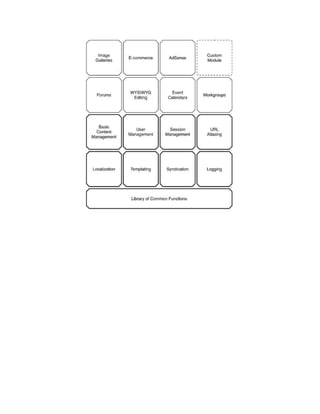
● Drupal Technology Stack 
● Drupal Core Overview
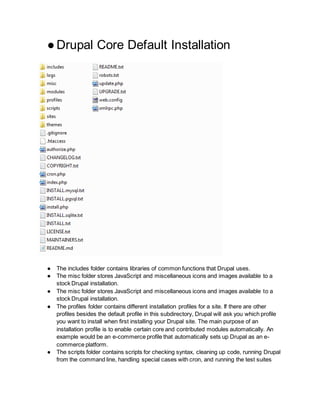
● Drupal Core Default Installation 
● The includes folder contains libraries of common functions that Drupal uses. 
● The misc folder stores JavaScript and miscellaneous icons and images available to a 
stock Drupal installation. 
● The misc folder stores JavaScript and miscellaneous icons and images available to a 
stock Drupal installation. 
● The profiles folder contains different installation profiles for a site. If there are other 
profiles besides the default profile in this subdirectory, Drupal will ask you which profile 
you want to install when first installing your Drupal site. The main purpose of an 
installation profile is to enable certain core and contributed modules automatically. An 
example would be an e-commerce profile that automatically sets up Drupal as an e-commerce 
platform. 
● The scripts folder contains scripts for checking syntax, cleaning up code, running Drupal 
from the command line, handling special cases with cron, and running the test suites
(new in Drupal 7). This folder is not used within the Drupal request life cycle; these are 
shell and Perl utility scripts. 
● The sites directory (see Figure 1-5) contains your modifications to Drupal in the form of 
settings, modules, and themes. When you add modules to Drupal from the contributed 
modules repository or by writing your own, they go into -sites/all/modules. This keeps all 
your Drupal modifications within a single folder. Inside the sites directory will be a 
subdirectory named default that holds the default configuration file for your Drupal site— 
default.settings.php. The Drupal installer will modify these original settings based on the 
information you provide and write a settings.php file for your site. 
● The sites/default/files folder is included in the base installation of Drupal by default. It is 
needed to store any files that are uploaded to your site and subsequently served out. 
Some examples are the use of a custom logo, enabling user avatars, or uploading other 
media associated with your new site. This subdirectory requires read and write 
permissions by the web server that Drupal is running behind. Drupal’s installer will create 
this subdirectory if it can and will check that the correct permissions have been set. In 
addition to sites/default/files, a sites/default/private directory may be created for storing 
files that are sensitive in nature and shouldn’t be displayed unless the site visitor has the 
proper credentials. You create the private files directory by navigating to Configuration > 
File System and entering the directory where you want private files to reside in the text 
field titled Private file system path. 
● The themes folder contains the template engines and default themes for Drupal. 
Additional themes you download or create should not go here; they go into 
sites/all/themes. 
● cron.php is used for executing periodic tasks, such as pruning database tables and 
calculating statistics. 
● index.php is the main entry point for serving requests. 
● install.php is the main entry point for the Drupal installer. 
● update.php updates the database schema after a Drupal version upgrade. 
● xmlrpc.php receives XML-RPC requests and may be safely deleted from deployments 
that do not intend to receive XML-RPC requests. 
● robots.txt is a default implementation of the robot exclusion standard. 
● authorize.php is an administrative script for running authorized file operations— for 
example, downloading an installing a new theme or module from Drupal.org.
● Drupal Bootstrap Process 
Drupal bootstraps itself on every request by going through a series of bootstrap phases. These 
phases are as follows: 
● Configuration : Sets global variables used throughout the bootstrap process. 
● Database : Initializes the database system and registers autoload functions. 
● Variables : Loads system variables and all enabled bootstrap modules. 
● Session : Initializes session handling. 
● Page Header : Invokes hook_boot(), initializes the locking system, and sends the default 
HTTP headers. 
● Language : Initializes all the defined language types. 
● Full : The final phase: Drupal is fully loaded by now. This phase validates and fixes the 
input data.

13th Sep - Drupal Global Training Day by TCS - Drupal core advanced overview

  • 1.
    Drupal Global TrainingDay Saturday Sep 13, 2014 DrupalMumbai.org & TCS
  • 2.
    ● Drupal TechnologyStack ● Drupal Core Overview
  • 4.
    ● Drupal CoreDefault Installation ● The includes folder contains libraries of common functions that Drupal uses. ● The misc folder stores JavaScript and miscellaneous icons and images available to a stock Drupal installation. ● The misc folder stores JavaScript and miscellaneous icons and images available to a stock Drupal installation. ● The profiles folder contains different installation profiles for a site. If there are other profiles besides the default profile in this subdirectory, Drupal will ask you which profile you want to install when first installing your Drupal site. The main purpose of an installation profile is to enable certain core and contributed modules automatically. An example would be an e-commerce profile that automatically sets up Drupal as an e-commerce platform. ● The scripts folder contains scripts for checking syntax, cleaning up code, running Drupal from the command line, handling special cases with cron, and running the test suites
  • 5.
    (new in Drupal7). This folder is not used within the Drupal request life cycle; these are shell and Perl utility scripts. ● The sites directory (see Figure 1-5) contains your modifications to Drupal in the form of settings, modules, and themes. When you add modules to Drupal from the contributed modules repository or by writing your own, they go into -sites/all/modules. This keeps all your Drupal modifications within a single folder. Inside the sites directory will be a subdirectory named default that holds the default configuration file for your Drupal site— default.settings.php. The Drupal installer will modify these original settings based on the information you provide and write a settings.php file for your site. ● The sites/default/files folder is included in the base installation of Drupal by default. It is needed to store any files that are uploaded to your site and subsequently served out. Some examples are the use of a custom logo, enabling user avatars, or uploading other media associated with your new site. This subdirectory requires read and write permissions by the web server that Drupal is running behind. Drupal’s installer will create this subdirectory if it can and will check that the correct permissions have been set. In addition to sites/default/files, a sites/default/private directory may be created for storing files that are sensitive in nature and shouldn’t be displayed unless the site visitor has the proper credentials. You create the private files directory by navigating to Configuration > File System and entering the directory where you want private files to reside in the text field titled Private file system path. ● The themes folder contains the template engines and default themes for Drupal. Additional themes you download or create should not go here; they go into sites/all/themes. ● cron.php is used for executing periodic tasks, such as pruning database tables and calculating statistics. ● index.php is the main entry point for serving requests. ● install.php is the main entry point for the Drupal installer. ● update.php updates the database schema after a Drupal version upgrade. ● xmlrpc.php receives XML-RPC requests and may be safely deleted from deployments that do not intend to receive XML-RPC requests. ● robots.txt is a default implementation of the robot exclusion standard. ● authorize.php is an administrative script for running authorized file operations— for example, downloading an installing a new theme or module from Drupal.org.
  • 6.
    ● Drupal BootstrapProcess Drupal bootstraps itself on every request by going through a series of bootstrap phases. These phases are as follows: ● Configuration : Sets global variables used throughout the bootstrap process. ● Database : Initializes the database system and registers autoload functions. ● Variables : Loads system variables and all enabled bootstrap modules. ● Session : Initializes session handling. ● Page Header : Invokes hook_boot(), initializes the locking system, and sends the default HTTP headers. ● Language : Initializes all the defined language types. ● Full : The final phase: Drupal is fully loaded by now. This phase validates and fixes the input data.