Harrison Chin
       Applications Engineer
harrison.chin@thisisant.com
Thank You!
What is ANT or ANT+?
• ANT is an ultra low power 2.4GHz wireless protocol
   – Shipped over 60+ Million devices so far
   – Can communicate for years using a single coin cell battery
   – Hundreds of transmitters can co-exist on the same RF
     channel without collision
   – Simple logical channels can be used separately or
     combined into complex topologies
   – Highly compact stack and common API across vendors
   – 8 byte Payload Broadcast and Acknowledged packets
      • Up to 24 byte Burst message packets
• ANT+ is a set of mutually agreed upon definitions for
  what the information sent over ANT represents
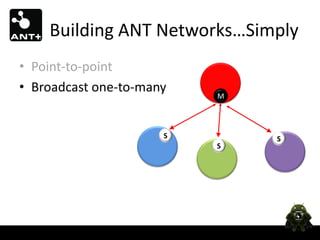
Building ANT Networks…Simply
• Point-to-point    M    S
Building ANT Networks…Simply
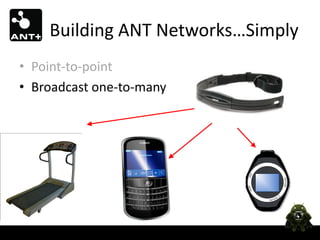
• Point-to-point
• Broadcast one-to-many
                          M


                      S       S
                          S
Building ANT Networks…Simply
• Point-to-point
• Broadcast one-to-many
Building ANT Networks…Simply
• Point-to-point
• Broadcast one-to-many
                                  S
• Star
                                  M

                              S       S


                          M               M
Building ANT Networks…Simply
• Point-to-point
• Broadcast one-to-many
• Star
Building ANT Networks…Simply
•   Point-to-point
•   Broadcast one-to-many
•   Star
•   Shared               S   S   S

                  M

                         S   S   S
Building ANT Networks…Simply
•   Point-to-point
•   Broadcast one-to-many
•   Star                                        …
•   Shared             M         M      M
                                                …
                                                               M


•   Asynchronous                     Over the Air


                      Scan                              Scan
                             M                      M
Building ANT Networks…Simply
•   Point-to-point
•   Broadcast one-to-many
•   Star
•   Shared
•   Asynchronous
                       1: Is   1: Is
                       that    that
                       fun?    fun?
                       2:No    2:No
                       idea…   idea…
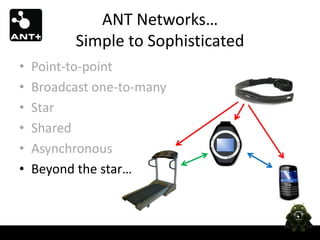
ANT Networks…
          Simple to Sophisticated
•   Point-to-point
•   Broadcast one-to-many
•   Star
•   Shared
•   Asynchronous
•   Beyond the star…
Co-existence Management –
        Time Domain
Background Scanning Channel
   • Background scanning channel is receive only
   • Allows independent channels to stay open on the same physical
     radio
   • Useful to create asynchronous topologies, monitor messages, RSSI
     pairing schemes, etc


MASTER_1


MASTER_2


Background
Scanning
Continuous Scanning Mode
    • ‘Always on’ receiver: high power                    M
                                                                     M

    • Fully Bi-directional Communication                      Scan

                                                                     M
           – Channels can be responded to on-demand   M
                                                              M
    • Masters can transmit intermittently
    • Potentially hundreds of transmitters to one center node

MASTER_1


MASTER_2


Scanning
Mode
ANT+ Device Profiles
• Open definitions for device-level
  interoperability
  – Channel configuration
  – Data format
  – Data exchange mechanisms
ANT+ Device Profiles
Control

          Bidirectional communication
          Sensor: status
          Display: control
Geocache
Hint
Next location
Visitor count
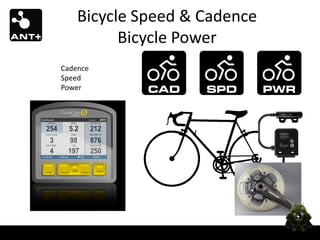
Bicycle Speed & Cadence
          Bicycle Power
Cadence
Speed
Power
Activity Monitor

     Access   Searching…
      Point
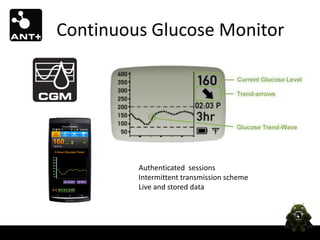
Continuous Glucose Monitor


         Authenticated sessions
         Intermittent transmission scheme
         Live and stored data
ANT+ Interoperability
Android ANT Layers
              App            App            App         App            App           App


Created by:                                     Profiles
                                            ANT Radio Service

                    For Connectivity Chip                       For ANT USB sticks

                     ANT HAL Service                            ANT USB Service
                                                                               Applications
                         ANT HAL
Created by:
                    ANT Transport Driver
 & Chip         Physical Transport Driver               Android USB Host Feature
 Vendor                Vendor Specific Library                               Android System   Android
                               Android System

                      ANT Firmware                               ANT Firmware
                    Combo Connectivity Device                                 ANT USB Stick
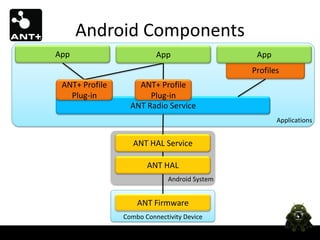
Android Components
App                       App                   App
                                               Profiles
 ANT+ Profile       ANT+ Profile
   Plug-in             Plug-in
                  ANT Radio Service
                                                      Applications


                   ANT HAL Service

                       ANT HAL
                              Android System


                    ANT Firmware
                Combo Connectivity Device
ANT+ Profile Plug-ins
       Make Implementing ANT+ Applications Easier


        App                                App
   Heart Rate PCC                 Remote Control PCC
                                                                 ANT+ API


 Heart Rate Plug-in                  Control Plug-in
                                                                  Plug-ins


ANT Channel Provider                  ANT Channel
                                             Channel API/ANT Radio Service
Plug-in Communicator Class
• A simple class which provides access to the
  ANT+ Plug-in
• Methods include…
   public static void requestAccess(…)
   public String getDeviceName()
   public int getAntDeviceID()
   public int getCurrentDeviceState()
   public void subscribeTo<EventName>(...)
   public void releaseAccess()
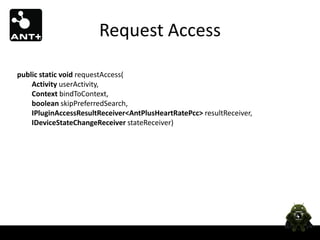
Request Access

public static void requestAccess(
    Activity userActivity,
    Context bindToContext,
    boolean skipPreferredSearch,
    IPluginAccessResultReceiver<AntPlusHeartRatePcc> resultReceiver,
    IDeviceStateChangeReceiver stateReceiver)
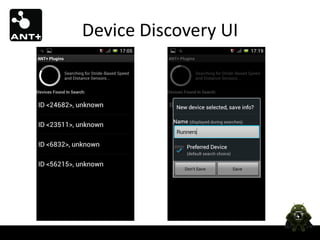
Device Discovery UI
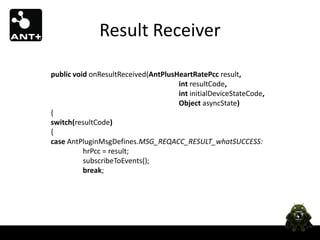
Result Receiver

public void onResultReceived(AntPlusHeartRatePcc result,
                                     int resultCode,
                                     int initialDeviceStateCode,
                                     Object asyncState)
{
switch(resultCode)
{
case AntPluginMsgDefines.MSG_REQACC_RESULT_whatSUCCESS:
          hrPcc = result;
          subscribeToEvents();
          break;
Result Receiver

case AntPluginMsgDefines.MSG_REQACC_RESULT_whatDEPENDENCYNOTINSTALLED:
           AlertDialog.Builder adlgBldr;
           adlgBldr = new AlertDialog.Builder(Activity_HeartRateSampler.this);
           adlgBldr.setTitle("Missing Dependency");
           adlgBldr.setMessage("The required applicationn"" +
           AntPlusHeartRatePcc.getMissingDependencyName() +
           “"n is not installed. Do you want to launch the Play Store to search for it?");
...
break;
Subscribing to Events
hrPcc.subscribeHeartRateDataEvent(
         new IHeartRateDataReceiver()
         {
                  public void onNewHeartRateData(
                            final int currentMessageCount,
                            final int computedHeartRate,
                            final int heartBeatCounter,
                            final int timestampOfLastBeat_1024s)
                  {
                            //Use data...
                  }
         } );
State Change Receiver

public void onDeviceStateChange(int newDeviceState)
{
          //Handle state change:
          //(TRACKING, SEARCHING, CLOSED, DEAD)
}
Release Access
 public static void releaseAccess()


• Releases the connection to the device (the plugin
  service will automatically shutdown when all apps
  have released access)
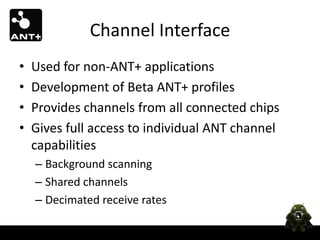
Channel Interface
•   Used for non-ANT+ applications
•   Development of Beta ANT+ profiles
•   Provides channels from all connected chips
•   Gives full access to individual ANT channel
    capabilities
    – Background scanning
    – Shared channels
    – Decimated receive rates
General Channel Flow
1.   Bind to the ANT Radio Service
2.   Get the ANT Channel Provider
3.   Acquire Channel(s)
4.   Configure Channel(s)
5.   Use Channel(s)
6.   Release the Channel(s) and Unbind
Bind to the ANT Radio Service
private AntService mAntRadioService = null;
private AntChannelProvider mAntChannelProvider = null;
private ServiceConnection mAntRadioServiceConnection =new ServiceConnection()
{
          @Override
          public void onServiceConnected(ComponentName name, IBinder service)
          {
                    mAntRadioService = new AntService(service);
                    mAntChannelProvider = mAntRadioService.getChannelProvider();
          }
          …
}
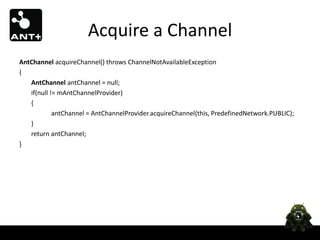
Acquire a Channel
AntChannel acquireChannel() throws ChannelNotAvailableException
{
   AntChannel antChannel = null;
   if(null != mAntChannelProvider)
   {
            antChannel = AntChannelProvider.acquireChannel(this, PredefinedNetwork.PUBLIC);
   }
   return antChannel;
}
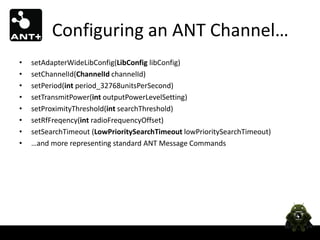
Configuring an ANT Channel…
•   setAdapterWideLibConfig(LibConfig libConfig)
•   setChannelId(ChannelId channelId)
•   setPeriod(int period_32768unitsPerSecond)
•   setTransmitPower(int outputPowerLevelSetting)
•   setProximityThreshold(int searchThreshold)
•   setRfFreqency(int radioFrequencyOffset)
•   setSearchTimeout (LowPrioritySearchTimeout lowPrioritySearchTimeout)
•   …and more representing standard ANT Message Commands
Handling the Channel
public class ChannelCallback implements AntChannelMessageHandler
{
             @Override
             public void handleMessage(AntMessageFromAnt antMessage)
             {
                          switch(antMessage.getMessageType())
                          {
                                     case BROADCAST_DATA:
                                     case ACKNOWLEDGED_DATA:
                                                // Rx Data
                                                DataMessage rxMessage = (DataMessage)antMessage;
                                                processData(rxMessage.getPayload());
                                                break;
                                     case CHANNEL_EVENT:
                                                …
                          }
             }
}
Releasing the Channel
public void close()
{
          if (null != mAntChannel)
          {
                      mAntChannel.release();
                      mAntChannel = null;
          }
}
What could you do with…
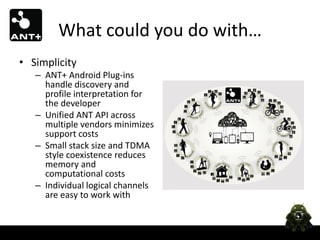
• Simplicity
   – ANT+ Android Plug-ins
     handle discovery and
     profile interpretation for
     the developer
   – Unified ANT API across
     multiple vendors minimizes
     support costs
   – Small stack size and TDMA
     style coexistence reduces
     memory and
     computational costs
   – Individual logical channels
     are easy to work with
What could you do with…
• Extreme network
  flexibility
  – Enables large scale
    networks for small, coin
    cell operated devices
                                  Over the
    running for years
                                    Air
  – Hubs, phones, access
    points, etc can gather data
    and communicate
    concurrently
  – Scatternets, meshes, trees,
    etc, can be dynamically
    created and closed
  – Simple channels are the
    building blocks
Thank You!
Have a Great Droidcon!

Droidcon 2013 ant+ chin

  • 1.
    Harrison Chin Applications Engineer harrison.chin@thisisant.com
  • 2.
  • 3.
    What is ANTor ANT+? • ANT is an ultra low power 2.4GHz wireless protocol – Shipped over 60+ Million devices so far – Can communicate for years using a single coin cell battery – Hundreds of transmitters can co-exist on the same RF channel without collision – Simple logical channels can be used separately or combined into complex topologies – Highly compact stack and common API across vendors – 8 byte Payload Broadcast and Acknowledged packets • Up to 24 byte Burst message packets • ANT+ is a set of mutually agreed upon definitions for what the information sent over ANT represents
  • 5.
  • 6.
    Building ANT Networks…Simply •Point-to-point • Broadcast one-to-many M S S S
  • 7.
    Building ANT Networks…Simply •Point-to-point • Broadcast one-to-many
  • 8.
    Building ANT Networks…Simply •Point-to-point • Broadcast one-to-many S • Star M S S M M
  • 9.
    Building ANT Networks…Simply •Point-to-point • Broadcast one-to-many • Star
  • 10.
    Building ANT Networks…Simply • Point-to-point • Broadcast one-to-many • Star • Shared S S S M S S S
  • 11.
    Building ANT Networks…Simply • Point-to-point • Broadcast one-to-many • Star … • Shared M M M … M • Asynchronous Over the Air Scan Scan M M
  • 12.
    Building ANT Networks…Simply • Point-to-point • Broadcast one-to-many • Star • Shared • Asynchronous 1: Is 1: Is that that fun? fun? 2:No 2:No idea… idea…
  • 13.
    ANT Networks… Simple to Sophisticated • Point-to-point • Broadcast one-to-many • Star • Shared • Asynchronous • Beyond the star…
  • 14.
  • 15.
    Background Scanning Channel • Background scanning channel is receive only • Allows independent channels to stay open on the same physical radio • Useful to create asynchronous topologies, monitor messages, RSSI pairing schemes, etc MASTER_1 MASTER_2 Background Scanning
  • 16.
    Continuous Scanning Mode • ‘Always on’ receiver: high power M M • Fully Bi-directional Communication Scan M – Channels can be responded to on-demand M M • Masters can transmit intermittently • Potentially hundreds of transmitters to one center node MASTER_1 MASTER_2 Scanning Mode
  • 17.
    ANT+ Device Profiles •Open definitions for device-level interoperability – Channel configuration – Data format – Data exchange mechanisms
  • 18.
  • 19.
    Control Bidirectional communication Sensor: status Display: control
  • 20.
  • 21.
    Bicycle Speed &Cadence Bicycle Power Cadence Speed Power
  • 22.
    Activity Monitor Access Searching… Point
  • 23.
    Continuous Glucose Monitor Authenticated sessions Intermittent transmission scheme Live and stored data
  • 24.
  • 25.
    Android ANT Layers App App App App App App Created by: Profiles ANT Radio Service For Connectivity Chip For ANT USB sticks ANT HAL Service ANT USB Service Applications ANT HAL Created by: ANT Transport Driver & Chip Physical Transport Driver Android USB Host Feature Vendor Vendor Specific Library Android System Android Android System ANT Firmware ANT Firmware Combo Connectivity Device ANT USB Stick
  • 26.
    Android Components App App App Profiles ANT+ Profile ANT+ Profile Plug-in Plug-in ANT Radio Service Applications ANT HAL Service ANT HAL Android System ANT Firmware Combo Connectivity Device
  • 27.
    ANT+ Profile Plug-ins Make Implementing ANT+ Applications Easier App App Heart Rate PCC Remote Control PCC ANT+ API Heart Rate Plug-in Control Plug-in Plug-ins ANT Channel Provider ANT Channel Channel API/ANT Radio Service
  • 28.
    Plug-in Communicator Class •A simple class which provides access to the ANT+ Plug-in • Methods include… public static void requestAccess(…) public String getDeviceName() public int getAntDeviceID() public int getCurrentDeviceState() public void subscribeTo<EventName>(...) public void releaseAccess()
  • 29.
    Request Access public staticvoid requestAccess( Activity userActivity, Context bindToContext, boolean skipPreferredSearch, IPluginAccessResultReceiver<AntPlusHeartRatePcc> resultReceiver, IDeviceStateChangeReceiver stateReceiver)
  • 30.
  • 31.
    Result Receiver public voidonResultReceived(AntPlusHeartRatePcc result, int resultCode, int initialDeviceStateCode, Object asyncState) { switch(resultCode) { case AntPluginMsgDefines.MSG_REQACC_RESULT_whatSUCCESS: hrPcc = result; subscribeToEvents(); break;
  • 32.
    Result Receiver case AntPluginMsgDefines.MSG_REQACC_RESULT_whatDEPENDENCYNOTINSTALLED: AlertDialog.Builder adlgBldr; adlgBldr = new AlertDialog.Builder(Activity_HeartRateSampler.this); adlgBldr.setTitle("Missing Dependency"); adlgBldr.setMessage("The required applicationn"" + AntPlusHeartRatePcc.getMissingDependencyName() + “"n is not installed. Do you want to launch the Play Store to search for it?"); ... break;
  • 33.
    Subscribing to Events hrPcc.subscribeHeartRateDataEvent( new IHeartRateDataReceiver() { public void onNewHeartRateData( final int currentMessageCount, final int computedHeartRate, final int heartBeatCounter, final int timestampOfLastBeat_1024s) { //Use data... } } );
  • 34.
    State Change Receiver publicvoid onDeviceStateChange(int newDeviceState) { //Handle state change: //(TRACKING, SEARCHING, CLOSED, DEAD) }
  • 35.
    Release Access publicstatic void releaseAccess() • Releases the connection to the device (the plugin service will automatically shutdown when all apps have released access)
  • 36.
    Channel Interface • Used for non-ANT+ applications • Development of Beta ANT+ profiles • Provides channels from all connected chips • Gives full access to individual ANT channel capabilities – Background scanning – Shared channels – Decimated receive rates
  • 37.
    General Channel Flow 1. Bind to the ANT Radio Service 2. Get the ANT Channel Provider 3. Acquire Channel(s) 4. Configure Channel(s) 5. Use Channel(s) 6. Release the Channel(s) and Unbind
  • 38.
    Bind to theANT Radio Service private AntService mAntRadioService = null; private AntChannelProvider mAntChannelProvider = null; private ServiceConnection mAntRadioServiceConnection =new ServiceConnection() { @Override public void onServiceConnected(ComponentName name, IBinder service) { mAntRadioService = new AntService(service); mAntChannelProvider = mAntRadioService.getChannelProvider(); } … }
  • 39.
    Acquire a Channel AntChannelacquireChannel() throws ChannelNotAvailableException { AntChannel antChannel = null; if(null != mAntChannelProvider) { antChannel = AntChannelProvider.acquireChannel(this, PredefinedNetwork.PUBLIC); } return antChannel; }
  • 40.
    Configuring an ANTChannel… • setAdapterWideLibConfig(LibConfig libConfig) • setChannelId(ChannelId channelId) • setPeriod(int period_32768unitsPerSecond) • setTransmitPower(int outputPowerLevelSetting) • setProximityThreshold(int searchThreshold) • setRfFreqency(int radioFrequencyOffset) • setSearchTimeout (LowPrioritySearchTimeout lowPrioritySearchTimeout) • …and more representing standard ANT Message Commands
  • 41.
    Handling the Channel publicclass ChannelCallback implements AntChannelMessageHandler { @Override public void handleMessage(AntMessageFromAnt antMessage) { switch(antMessage.getMessageType()) { case BROADCAST_DATA: case ACKNOWLEDGED_DATA: // Rx Data DataMessage rxMessage = (DataMessage)antMessage; processData(rxMessage.getPayload()); break; case CHANNEL_EVENT: … } } }
  • 42.
    Releasing the Channel publicvoid close() { if (null != mAntChannel) { mAntChannel.release(); mAntChannel = null; } }
  • 43.
    What could youdo with… • Simplicity – ANT+ Android Plug-ins handle discovery and profile interpretation for the developer – Unified ANT API across multiple vendors minimizes support costs – Small stack size and TDMA style coexistence reduces memory and computational costs – Individual logical channels are easy to work with
  • 44.
    What could youdo with… • Extreme network flexibility – Enables large scale networks for small, coin cell operated devices Over the running for years Air – Hubs, phones, access points, etc can gather data and communicate concurrently – Scatternets, meshes, trees, etc, can be dynamically created and closed – Simple channels are the building blocks
  • 45.
    Thank You! Have aGreat Droidcon!