
DOCKER
CONTAINER
MANAGEMENT
Karol Kreft
1.
BASICS
“Containers are an abstraction at the app layer that
packages code and dependencies together. Multiple
containers can run on the same machine and share the OS
kernel with other containers, each running as isolated
processes in user space.“
docker containers
“Containers are an abstraction at the app layer that
packages code and dependencies together. Multiple
containers can run on the same machine and share the OS
kernel with other containers, each running as isolated
processes in user space.“
docker containers
“To use a programming metaphor, if an image is a class,
then a container is an instance of a class—a runtime
object.”
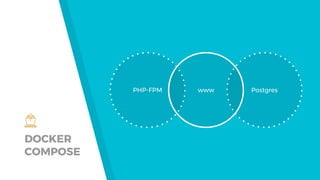
DOCKER
COMPOSE
PHP-FPM Postgreswww
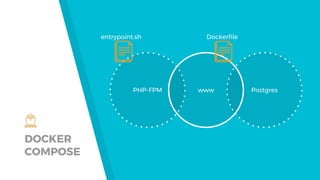
DOCKER
COMPOSE
PHP-FPM Postgreswww
Dockerfileentrypoint.sh
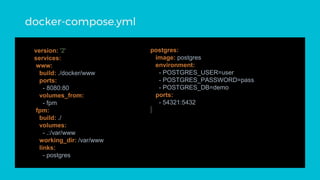
version: '2'
services:
www:
build: ./docker/www
ports:
- 8080:80
volumes_from:
- fpm
fpm:
build: ./
volumes:
- .:/var/www
working_dir: /var/www
links:
- postgres
postgres:
image: postgres
environment:
- POSTGRES_USER=user
- POSTGRES_PASSWORD=pass
- POSTGRES_DB=demo
ports:
- 54321:5432
docker-compose.yml
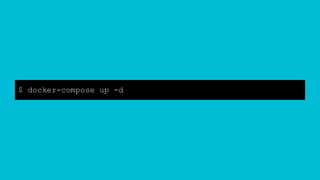
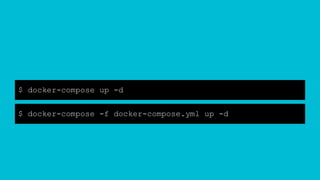
$ docker-compose up -d
$ docker-compose -f docker-compose.yml up -d
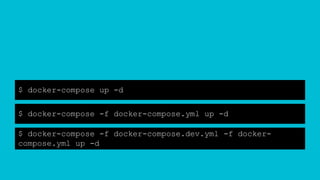
$ docker-compose up -d
$ docker-compose -f docker-compose.yml up -d
$ docker-compose -f docker-compose.dev.yml -f docker-
compose.yml up -d
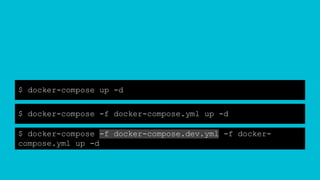
$ docker-compose up -d
$ docker-compose -f docker-compose.yml up -d
$ docker-compose -f docker-compose.dev.yml -f docker-
compose.yml up -d
$ dawajdoker
dup() {
if [ -f ./docker-compose.dev.yml ]; then
command docker-compose -f docker-compose.dev.yml -f
docker-compose.yml up -d
command docker-compose -f docker-compose.dev.yml -f
docker-compose.yml ps
else
command docker-compose up -d && docker-compose ps
fi
}
dup() {
if [ -f ./docker-compose.dev.yml ]; then
command docker-compose -f docker-compose.dev.yml -f
docker-compose.yml up -d
command docker-compose -f docker-compose.dev.yml -f
docker-compose.yml ps
else
command docker-compose up -d && docker-compose ps
fi
}
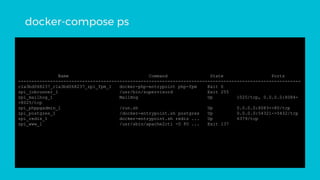
Name Command State Ports
----------------------------------------------------------------------------------------------------------
c1a3bd068237_c1a3bd068237_zpi_fpm_1 docker-php-entrypoint php-fpm Exit 0
zpi_jobrunner_1 /usr/bin/supervisord Exit 255
zpi_mailhog_1 MailHog Up 1025/tcp, 0.0.0.0:8084-
>8025/tcp
zpi_phppgadmin_1 /run.sh Up 0.0.0.0:8083->80/tcp
zpi_postgres_1 /docker-entrypoint.sh postgres Up 0.0.0.0:54321->5432/tcp
zpi_redis_1 docker-entrypoint.sh redis ... Up 6379/tcp
zpi_www_1 /usr/sbin/apache2ctl -D FO ... Exit 137
docker-compose ps
Name Command State Ports
----------------------------------------------------------------------------------------------------------
c1a3bd068237_c1a3bd068237_zpi_fpm_1 docker-php-entrypoint php-fpm Exit 0
zpi_jobrunner_1 /usr/bin/supervisord Exit 255
zpi_mailhog_1 MailHog Up 1025/tcp, 0.0.0.0:8084-
>8025/tcp
zpi_phppgadmin_1 /run.sh Up 0.0.0.0:8083->80/tcp
zpi_postgres_1 /docker-entrypoint.sh postgres Up 0.0.0.0:54321->5432/tcp
zpi_redis_1 docker-entrypoint.sh redis ... Up 6379/tcp
zpi_www_1 /usr/sbin/apache2ctl -D FO ... Exit 137
docker-compose ps
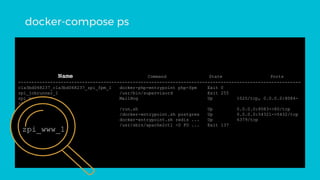
zpi_www_1
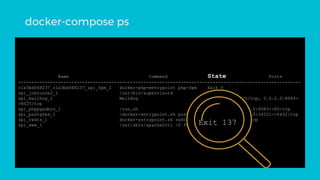
Name Command State Ports
----------------------------------------------------------------------------------------------------------
c1a3bd068237_c1a3bd068237_zpi_fpm_1 docker-php-entrypoint php-fpm Exit 0
zpi_jobrunner_1 /usr/bin/supervisord Exit 255
zpi_mailhog_1 MailHog Up 1025/tcp, 0.0.0.0:8084-
>8025/tcp
zpi_phppgadmin_1 /run.sh Up 0.0.0.0:8083->80/tcp
zpi_postgres_1 /docker-entrypoint.sh postgres Up 0.0.0.0:54321->5432/tcp
zpi_redis_1 docker-entrypoint.sh redis ... Up 6379/tcp
zpi_www_1 /usr/sbin/apache2ctl -D FO ... Exit 137
docker-compose ps
Exit 137
Attaching to zpi_www_1
www_1 | AH00112: Warning: DocumentRoot
[/var/www/html] does not exist
www_1 | AH00558: apache2: Could not reliably
determine the server's fully qualified domain name, using
172.18.0.7. Set the 'ServerName' directive globally to
suppress this message
www_1 | AH00112: Warning: DocumentRoot
[/var/www/html] does not exist
www_1 | AH00558: apache2: Could not reliably
determine the server's fully qualified domain name, using
172.18.0.2. Set the 'ServerName' directive globally to
suppress this message
docker-compose logs www
Attaching to zpi_www_1
www_1 | AH00112: Warning: DocumentRoot
[/var/www/html] does not exist
www_1 | AH00558: apache2: Could not reliably
determine the server's fully qualified domain name, using
172.18.0.7. Set the 'ServerName' directive globally to
suppress this message
www_1 | AH00112: Warning: DocumentRoot
[/var/www/html] does not exist
www_1 | AH00558: apache2: Could not reliably
determine the server's fully qualified domain name, using
172.18.0.2. Set the 'ServerName' directive globally to
suppress this message
docker-compose logs www
Attaching to zpi_www_1
www_1 | AH00112: Warning: DocumentRoot
[/var/www/html] does not exist
www_1 | AH00558: apache2: Could not reliably
determine the server's fully qualified domain name, using
172.18.0.7. Set the 'ServerName' directive globally to
suppress this message
www_1 | AH00112: Warning: DocumentRoot
[/var/www/html] does not exist
www_1 | AH00558: apache2: Could not reliably
determine the server's fully qualified domain name, using
172.18.0.2. Set the 'ServerName' directive globally to
suppress this message
docker-compose logs www
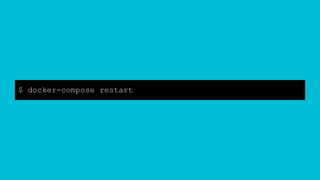
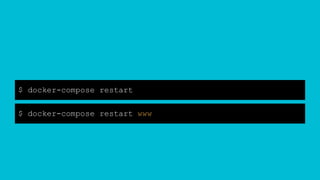
$ docker-compose restart
$ docker-compose restart www
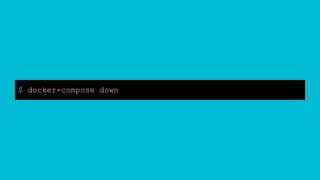
$ docker-compose down
Stops containers and removes containers, networks, volumes, and images created by up.
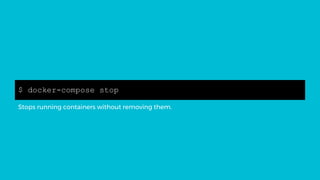
$ docker-compose stop
Stops running containers without removing them.
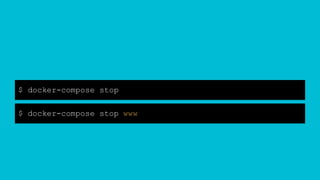
$ docker-compose stop
$ docker-compose stop www
$ docker-compose rm www
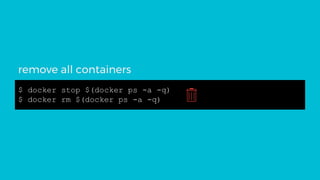
$ docker stop $(docker ps -a -q)
$ docker rm $(docker ps -a -q)
remove all containers
2.
portainer.io
“The easiest way to
manage docker”
BUT
WHY?
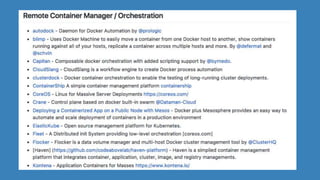
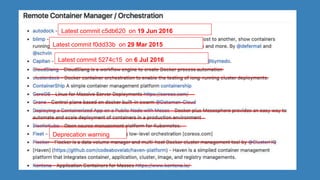
There is a lot of other solutions.
1. Appreciated by the community
2. Regularly developed
3. Promising Roadmap
awesome-docker
Latest commit c5db620 on 19 Jun 2016
Latest commit f0dd33b on 29 Mar 2015
Latest commit 5274c15 on 6 Jul 2016
Deprecation warning
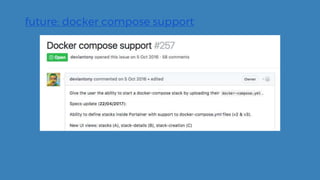
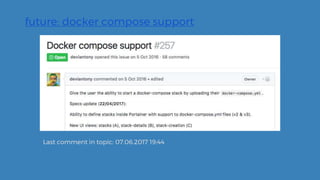
future: docker compose support
Last comment in topic: 07.06.2017 19:44
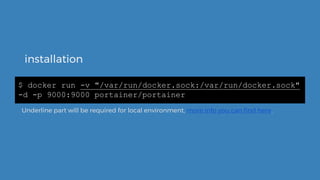
installation
$ docker run -v "/var/run/docker.sock:/var/run/docker.sock"
-d -p 9000:9000 portainer/portainer
Underline part will be required for local environment, more info you can find here.
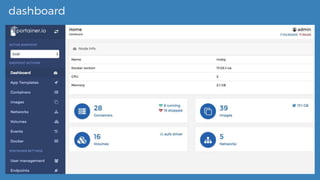
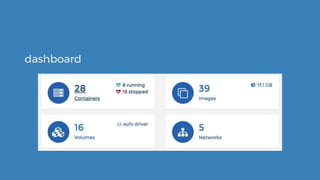
dashboard
dashboard
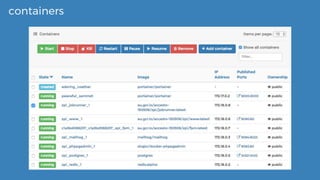
containers
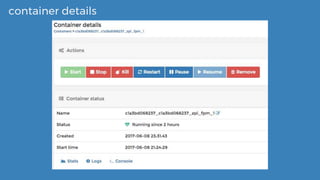
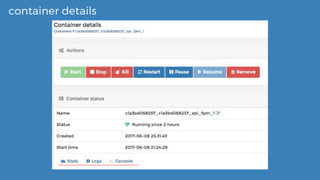
container details
container details
THANKS!
Any questions?
CREDITS
Sources:
▸ JDD 2016: Docker. Przewodnik dla początkujących (Marcin Stożek)
▸ docker-awesome
▸ Docker basic concepts
Presentation template by SlidesCarnival

Docker container management

  • 1.
  • 2.
  • 3.
    “Containers are anabstraction at the app layer that packages code and dependencies together. Multiple containers can run on the same machine and share the OS kernel with other containers, each running as isolated processes in user space.“ docker containers
  • 4.
    “Containers are anabstraction at the app layer that packages code and dependencies together. Multiple containers can run on the same machine and share the OS kernel with other containers, each running as isolated processes in user space.“ docker containers “To use a programming metaphor, if an image is a class, then a container is an instance of a class—a runtime object.”
  • 5.
  • 6.
  • 7.
    version: '2' services: www: build: ./docker/www ports: -8080:80 volumes_from: - fpm fpm: build: ./ volumes: - .:/var/www working_dir: /var/www links: - postgres postgres: image: postgres environment: - POSTGRES_USER=user - POSTGRES_PASSWORD=pass - POSTGRES_DB=demo ports: - 54321:5432 docker-compose.yml
  • 8.
  • 9.
    $ docker-compose up-d $ docker-compose -f docker-compose.yml up -d
  • 10.
    $ docker-compose up-d $ docker-compose -f docker-compose.yml up -d $ docker-compose -f docker-compose.dev.yml -f docker- compose.yml up -d
  • 11.
    $ docker-compose up-d $ docker-compose -f docker-compose.yml up -d $ docker-compose -f docker-compose.dev.yml -f docker- compose.yml up -d
  • 12.
  • 13.
    dup() { if [-f ./docker-compose.dev.yml ]; then command docker-compose -f docker-compose.dev.yml -f docker-compose.yml up -d command docker-compose -f docker-compose.dev.yml -f docker-compose.yml ps else command docker-compose up -d && docker-compose ps fi }
  • 14.
    dup() { if [-f ./docker-compose.dev.yml ]; then command docker-compose -f docker-compose.dev.yml -f docker-compose.yml up -d command docker-compose -f docker-compose.dev.yml -f docker-compose.yml ps else command docker-compose up -d && docker-compose ps fi }
  • 15.
    Name Command StatePorts ---------------------------------------------------------------------------------------------------------- c1a3bd068237_c1a3bd068237_zpi_fpm_1 docker-php-entrypoint php-fpm Exit 0 zpi_jobrunner_1 /usr/bin/supervisord Exit 255 zpi_mailhog_1 MailHog Up 1025/tcp, 0.0.0.0:8084- >8025/tcp zpi_phppgadmin_1 /run.sh Up 0.0.0.0:8083->80/tcp zpi_postgres_1 /docker-entrypoint.sh postgres Up 0.0.0.0:54321->5432/tcp zpi_redis_1 docker-entrypoint.sh redis ... Up 6379/tcp zpi_www_1 /usr/sbin/apache2ctl -D FO ... Exit 137 docker-compose ps
  • 16.
    Name Command StatePorts ---------------------------------------------------------------------------------------------------------- c1a3bd068237_c1a3bd068237_zpi_fpm_1 docker-php-entrypoint php-fpm Exit 0 zpi_jobrunner_1 /usr/bin/supervisord Exit 255 zpi_mailhog_1 MailHog Up 1025/tcp, 0.0.0.0:8084- >8025/tcp zpi_phppgadmin_1 /run.sh Up 0.0.0.0:8083->80/tcp zpi_postgres_1 /docker-entrypoint.sh postgres Up 0.0.0.0:54321->5432/tcp zpi_redis_1 docker-entrypoint.sh redis ... Up 6379/tcp zpi_www_1 /usr/sbin/apache2ctl -D FO ... Exit 137 docker-compose ps zpi_www_1
  • 17.
    Name Command StatePorts ---------------------------------------------------------------------------------------------------------- c1a3bd068237_c1a3bd068237_zpi_fpm_1 docker-php-entrypoint php-fpm Exit 0 zpi_jobrunner_1 /usr/bin/supervisord Exit 255 zpi_mailhog_1 MailHog Up 1025/tcp, 0.0.0.0:8084- >8025/tcp zpi_phppgadmin_1 /run.sh Up 0.0.0.0:8083->80/tcp zpi_postgres_1 /docker-entrypoint.sh postgres Up 0.0.0.0:54321->5432/tcp zpi_redis_1 docker-entrypoint.sh redis ... Up 6379/tcp zpi_www_1 /usr/sbin/apache2ctl -D FO ... Exit 137 docker-compose ps Exit 137
  • 18.
    Attaching to zpi_www_1 www_1| AH00112: Warning: DocumentRoot [/var/www/html] does not exist www_1 | AH00558: apache2: Could not reliably determine the server's fully qualified domain name, using 172.18.0.7. Set the 'ServerName' directive globally to suppress this message www_1 | AH00112: Warning: DocumentRoot [/var/www/html] does not exist www_1 | AH00558: apache2: Could not reliably determine the server's fully qualified domain name, using 172.18.0.2. Set the 'ServerName' directive globally to suppress this message docker-compose logs www
  • 19.
    Attaching to zpi_www_1 www_1| AH00112: Warning: DocumentRoot [/var/www/html] does not exist www_1 | AH00558: apache2: Could not reliably determine the server's fully qualified domain name, using 172.18.0.7. Set the 'ServerName' directive globally to suppress this message www_1 | AH00112: Warning: DocumentRoot [/var/www/html] does not exist www_1 | AH00558: apache2: Could not reliably determine the server's fully qualified domain name, using 172.18.0.2. Set the 'ServerName' directive globally to suppress this message docker-compose logs www
  • 20.
    Attaching to zpi_www_1 www_1| AH00112: Warning: DocumentRoot [/var/www/html] does not exist www_1 | AH00558: apache2: Could not reliably determine the server's fully qualified domain name, using 172.18.0.7. Set the 'ServerName' directive globally to suppress this message www_1 | AH00112: Warning: DocumentRoot [/var/www/html] does not exist www_1 | AH00558: apache2: Could not reliably determine the server's fully qualified domain name, using 172.18.0.2. Set the 'ServerName' directive globally to suppress this message docker-compose logs www
  • 21.
  • 22.
    $ docker-compose restart $docker-compose restart www
  • 23.
  • 24.
    $ docker-compose down Stopscontainers and removes containers, networks, volumes, and images created by up.
  • 25.
    $ docker-compose stop Stopsrunning containers without removing them.
  • 26.
    $ docker-compose stop $docker-compose stop www
  • 27.
  • 28.
    $ docker stop$(docker ps -a -q) $ docker rm $(docker ps -a -q) remove all containers
  • 29.
  • 30.
    BUT WHY? There is alot of other solutions.
  • 31.
    1. Appreciated bythe community 2. Regularly developed 3. Promising Roadmap
  • 32.
  • 34.
    Latest commit c5db620on 19 Jun 2016 Latest commit f0dd33b on 29 Mar 2015 Latest commit 5274c15 on 6 Jul 2016 Deprecation warning
  • 35.
  • 36.
    future: docker composesupport Last comment in topic: 07.06.2017 19:44
  • 37.
    installation $ docker run-v "/var/run/docker.sock:/var/run/docker.sock" -d -p 9000:9000 portainer/portainer Underline part will be required for local environment, more info you can find here.
  • 38.
  • 39.
  • 40.
  • 41.
  • 42.
  • 43.
  • 44.
    CREDITS Sources: ▸ JDD 2016:Docker. Przewodnik dla początkujących (Marcin Stożek) ▸ docker-awesome ▸ Docker basic concepts Presentation template by SlidesCarnival