DMS Reporting An Architecture Overview of Reporting for DMS.
Introduction To have a better understanding of  the DMS Reporting for DMS support. Kai Leung Liu, Sr. Oracle Architect Consultant, Kaitech, Inc.
DMS History DMS Reporting was born in 2002 because of Batch Report in Caus that DMS would need to replace. DMS Reporting need to be plug-n-play modules to work with DMS development.  DMS Reporting needed to be integrated into our On-Line DMS system.
Topics of Discussion DMS Components that make up the DMS Reporting. The DMS Reporting process as the engine.  How does Batch Reporting integrate into DMS Reporting. How does Reporting Criteria integrate into DMS Reporting. How does Email integrate into DMS Reporting.
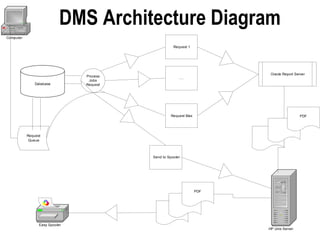
DMS Components A DMS Architecture Diagram. Database, Unix, and App Server. Shell, Java, PL/SQL and Cron. System Parameters The World According to DMS.
DMS Architecture Diagram
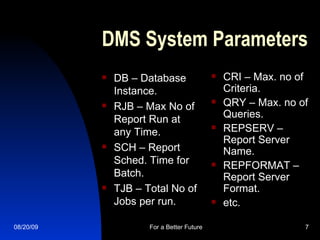
DMS System Parameters DB – Database Instance. RJB – Max No of Report Run at any Time. SCH – Report Sched. Time for Batch. TJB – Total No of Jobs per run. CRI – Max. no of Criteria. QRY – Max. no of Queries. REPSERV – Report Server Name. REPFORMAT – Report Server Format. etc.
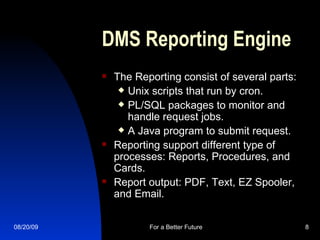
DMS Reporting Engine The Reporting consist of several parts:  Unix scripts that run by cron. PL/SQL packages to monitor and handle request jobs. A Java program to submit request. Reporting support different type of processes: Reports, Procedures, and Cards.  Report output: PDF, Text, EZ Spooler, and Email.
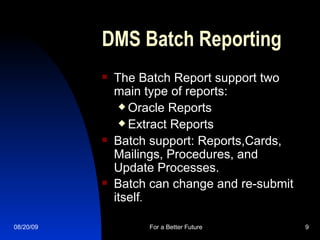
DMS Batch Reporting The Batch Report support two main type of reports:  Oracle Reports Extract Reports Batch support: Reports,Cards, Mailings, Procedures, and Update Processes. Batch can change and re-submit itself .
DMS Reporting Criteria Building Criteria for business needs. Building Queries for business needs. Purging and Clean up of Criteria and Queries. System Parameters: CRI and QRY Report E-R Diagram.
DMS Email  Available to All DMS Batch Reports. Email can be added even after it been submitted. Email sent is HTML text. Customizable for Email header and link message. Email is pdf and stored on server.
Real Life DMS Live running reports every day. User can request with their business criteria real time reporting with email. Operations can also handle Mail and Card jobs for their Events. We can develop and deployed new DMS Report using the DMS system.
What This Means We have a powerful and flexible reporting system to meet the requirements of DMS Live and future requirements. DMS Reporting can deliver: Reports Cards  Mailings and Special Mailing Emails Extracts
Next Steps  To be able to support and grow the reporting system in new directions. Improve Email Attach Extracts Notify operation of problems. Have more classes to have better understand of technology used to build DMS Reporting. See how Report fits into rewrite for the future to the new java world.
Q & A Review Documentation. Review Technical docs.

Dms Reporting Overview

  • 1.
    DMS Reporting AnArchitecture Overview of Reporting for DMS.
  • 2.
    Introduction To havea better understanding of the DMS Reporting for DMS support. Kai Leung Liu, Sr. Oracle Architect Consultant, Kaitech, Inc.
  • 3.
    DMS History DMSReporting was born in 2002 because of Batch Report in Caus that DMS would need to replace. DMS Reporting need to be plug-n-play modules to work with DMS development. DMS Reporting needed to be integrated into our On-Line DMS system.
  • 4.
    Topics of DiscussionDMS Components that make up the DMS Reporting. The DMS Reporting process as the engine. How does Batch Reporting integrate into DMS Reporting. How does Reporting Criteria integrate into DMS Reporting. How does Email integrate into DMS Reporting.
  • 5.
    DMS Components ADMS Architecture Diagram. Database, Unix, and App Server. Shell, Java, PL/SQL and Cron. System Parameters The World According to DMS.
  • 6.
  • 7.
    DMS System ParametersDB – Database Instance. RJB – Max No of Report Run at any Time. SCH – Report Sched. Time for Batch. TJB – Total No of Jobs per run. CRI – Max. no of Criteria. QRY – Max. no of Queries. REPSERV – Report Server Name. REPFORMAT – Report Server Format. etc.
  • 8.
    DMS Reporting EngineThe Reporting consist of several parts: Unix scripts that run by cron. PL/SQL packages to monitor and handle request jobs. A Java program to submit request. Reporting support different type of processes: Reports, Procedures, and Cards. Report output: PDF, Text, EZ Spooler, and Email.
  • 9.
    DMS Batch ReportingThe Batch Report support two main type of reports: Oracle Reports Extract Reports Batch support: Reports,Cards, Mailings, Procedures, and Update Processes. Batch can change and re-submit itself .
  • 10.
    DMS Reporting CriteriaBuilding Criteria for business needs. Building Queries for business needs. Purging and Clean up of Criteria and Queries. System Parameters: CRI and QRY Report E-R Diagram.
  • 11.
    DMS Email Available to All DMS Batch Reports. Email can be added even after it been submitted. Email sent is HTML text. Customizable for Email header and link message. Email is pdf and stored on server.
  • 12.
    Real Life DMSLive running reports every day. User can request with their business criteria real time reporting with email. Operations can also handle Mail and Card jobs for their Events. We can develop and deployed new DMS Report using the DMS system.
  • 13.
    What This MeansWe have a powerful and flexible reporting system to meet the requirements of DMS Live and future requirements. DMS Reporting can deliver: Reports Cards Mailings and Special Mailing Emails Extracts
  • 14.
    Next Steps To be able to support and grow the reporting system in new directions. Improve Email Attach Extracts Notify operation of problems. Have more classes to have better understand of technology used to build DMS Reporting. See how Report fits into rewrite for the future to the new java world.
  • 15.
    Q & AReview Documentation. Review Technical docs.