Yocto Project | The Linux Foundation
Activity Nine
Kernel Modules with eSDKs
Marco Cavallini
KOAN
http://koansoftware.com
Yocto Project Dev Day – Prague, 2017
2 Yocto Project | The Linux Foundation
Kernel modules with eSDKs – Overview
• The Extensible SDK (eSDK) is a portable and
standalone development environment , basically an
SDK with an added bitbake executive via devtool.
• The “devtool” is a collection of tools to help
development, in particular user space development.
• We can use devtool to manage a new kernel module:
• Like normal applications is possible to import and create a
wrapper recipe to manage the kernel module with eSDKs.
3 Yocto Project | The Linux Foundation
Kernel modules with eSDKs –
Compiling a kernel module
• We have two choices
• Out of the kernel tree
 When the code is in a different directory outside of the
kernel source tree
• Inside the kernel tree
 When the code is managed by a KConfig and a Makefile
into a kernel directory
4 Yocto Project | The Linux Foundation
Kernel modules with eSDKs –
Pro and Cons of a module outside the kernel tree
• When the code is outside of the kernel source tree in
a different directory
• Advantages
 Might be easier to handle modifications than modify it into
the kernel itself
• Drawbacks
 Not integrated to the kernel configuration/compilation
process
 Needs to be built separately
 The driver cannot be built statically
5 Yocto Project | The Linux Foundation
Kernel modules with eSDKs –
Pro and Cons of a module inside the kernel tree
• When the code is inside the same directory tree of the
kernel sources
• Advantages
 Well integrated into the kernel configuration and
compilation process
 The driver can be built statically if needed
• Drawbacks
 Bigger kernel size
 Slower boot time
6 Yocto Project | The Linux Foundation
Kernel modules with eSDKs – The source code
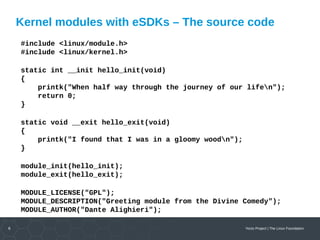
#include <linux/module.h>
#include <linux/kernel.h>
static int __init hello_init(void)
{
printk("When half way through the journey of our lifen");
return 0;
}
static void __exit hello_exit(void)
{
printk("I found that I was in a gloomy woodn");
}
module_init(hello_init);
module_exit(hello_exit);
MODULE_LICENSE("GPL");
MODULE_DESCRIPTION("Greeting module from the Divine Comedy");
MODULE_AUTHOR("Dante Alighieri");
7 Yocto Project | The Linux Foundation
Kernel modules with eSDKs – The Makefile
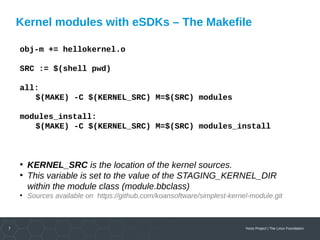
obj-m += hellokernel.o
SRC := $(shell pwd)
all:
$(MAKE) -C $(KERNEL_SRC) M=$(SRC) modules
modules_install:
$(MAKE) -C $(KERNEL_SRC) M=$(SRC) modules_install
●
KERNEL_SRC is the location of the kernel sources.
●
This variable is set to the value of the STAGING_KERNEL_DIR
within the module class (module.bbclass)
●
Sources available on https://github.com/koansoftware/simplest-kernel-module.git
8 Yocto Project | The Linux Foundation
Kernel modules with eSDKs – first installation
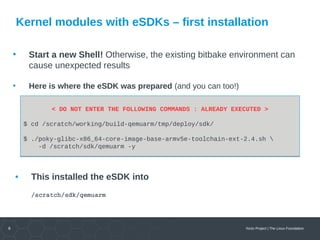
• Start a new Shell! Otherwise, the existing bitbake environment can
cause unexpected results
• Here is where the eSDK was prepared (and you can too!)
< DO NOT ENTER THE FOLLOWING COMMANDS : ALREADY EXECUTED >
$ cd /scratch/working/build-qemuarm/tmp/deploy/sdk/
$ ./poky-glibc-x86_64-core-image-base-armv5e-toolchain-ext-2.4.sh 
-d /scratch/sdk/qemuarm -y
< DO NOT ENTER THE FOLLOWING COMMANDS : ALREADY EXECUTED >
$ cd /scratch/working/build-qemuarm/tmp/deploy/sdk/
$ ./poky-glibc-x86_64-core-image-base-armv5e-toolchain-ext-2.4.sh 
-d /scratch/sdk/qemuarm -y
• This installed the eSDK into
/scratch/sdk/qemuarm
9 Yocto Project | The Linux Foundation
Kernel modules with eSDKs – overview
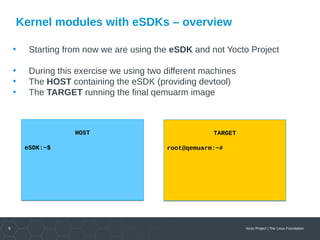
• Starting from now we are using the eSDK and not Yocto Project
• During this exercise we using two different machines
• The HOST containing the eSDK (providing devtool)
• The TARGET running the final qemuarm image
HOST
eSDK:~$
HOST
eSDK:~$
TARGET
root@qemuarm:~#
TARGET
root@qemuarm:~#
10 Yocto Project | The Linux Foundation
Kernel modules with eSDKs – global setup
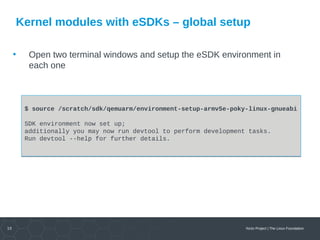
• Open two terminal windows and setup the eSDK environment in
each one
$ source /scratch/sdk/qemuarm/environment-setup-armv5e-poky-linux-gnueabi
SDK environment now set up;
additionally you may now run devtool to perform development tasks.
Run devtool --help for further details.
$ source /scratch/sdk/qemuarm/environment-setup-armv5e-poky-linux-gnueabi
SDK environment now set up;
additionally you may now run devtool to perform development tasks.
Run devtool --help for further details.
11 Yocto Project | The Linux Foundation
Kernel modules with eSDKs – build the target image
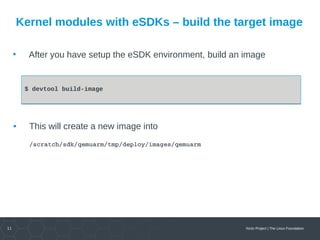
• After you have setup the eSDK environment, build an image
$ devtool build-image$ devtool build-image
• This will create a new image into
/scratch/sdk/qemuarm/tmp/deploy/images/qemuarm
12 Yocto Project | The Linux Foundation
Kernel modules with eSDKs – run the image
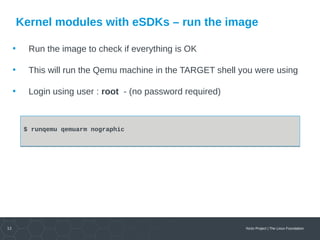
• Run the image to check if everything is OK
• This will run the Qemu machine in the TARGET shell you were using
• Login using user : root - (no password required)
$ runqemu qemuarm nographic$ runqemu qemuarm nographic
13 Yocto Project | The Linux Foundation
Kernel module with eSDKs –
Hooking a new module into the build
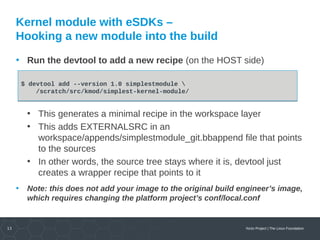
• Run the devtool to add a new recipe (on the HOST side)
• This generates a minimal recipe in the workspace layer
• This adds EXTERNALSRC in an
workspace/appends/simplestmodule_git.bbappend file that points
to the sources
• In other words, the source tree stays where it is, devtool just
creates a wrapper recipe that points to it
• Note: this does not add your image to the original build engineer’s image,
which requires changing the platform project’s conf/local.conf
$ devtool add --version 1.0 simplestmodule 
/scratch/src/kmod/simplest-kernel-module/
$ devtool add --version 1.0 simplestmodule 
/scratch/src/kmod/simplest-kernel-module/
14 Yocto Project | The Linux Foundation
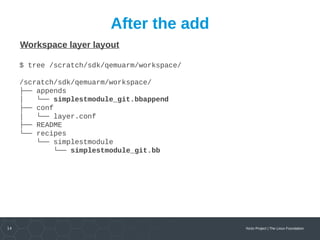
After the add
Workspace layer layout
$ tree /scratch/sdk/qemuarm/workspace/
/scratch/sdk/qemuarm/workspace/
├── appends
│ └── simplestmodule_git.bbappend
├── conf
│ └── layer.conf
├── README
└── recipes
└── simplestmodule
└── simplestmodule_git.bb
15 Yocto Project | The Linux Foundation
Kernel module with eSDKs – build the module
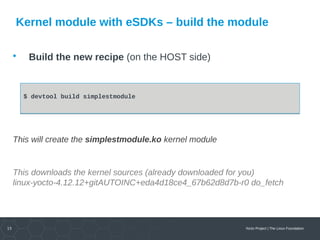
• Build the new recipe (on the HOST side)
This will create the simplestmodule.ko kernel module
This downloads the kernel sources (already downloaded for you)
linux-yocto-4.12.12+gitAUTOINC+eda4d18ce4_67b62d8d7b-r0 do_fetch
$ devtool build simplestmodule$ devtool build simplestmodule
16 Yocto Project | The Linux Foundation
Kernel module with eSDKs – deploy the module
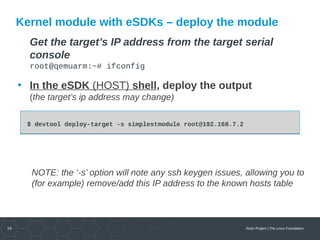
Get the target’s IP address from the target serial
console
root@qemuarm:~# ifconfig
• In the eSDK (HOST) shell, deploy the output
(the target’s ip address may change)
NOTE: the ‘-s’ option will note any ssh keygen issues, allowing you to
(for example) remove/add this IP address to the known hosts table
$ devtool deploy-target -s simplestmodule root@192.168.7.2$ devtool deploy-target -s simplestmodule root@192.168.7.2
17 Yocto Project | The Linux Foundation
Kernel module with eSDKs – deploy details
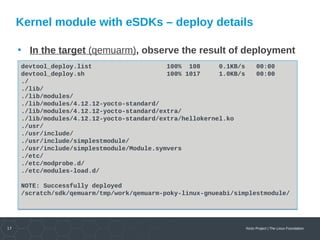
• In the target (qemuarm), observe the result of deployment
devtool_deploy.list 100% 108 0.1KB/s 00:00
devtool_deploy.sh 100% 1017 1.0KB/s 00:00
./
./lib/
./lib/modules/
./lib/modules/4.12.12-yocto-standard/
./lib/modules/4.12.12-yocto-standard/extra/
./lib/modules/4.12.12-yocto-standard/extra/hellokernel.ko
./usr/
./usr/include/
./usr/include/simplestmodule/
./usr/include/simplestmodule/Module.symvers
./etc/
./etc/modprobe.d/
./etc/modules-load.d/
NOTE: Successfully deployed
/scratch/sdk/qemuarm/tmp/work/qemuarm-poky-linux-gnueabi/simplestmodule/
devtool_deploy.list 100% 108 0.1KB/s 00:00
devtool_deploy.sh 100% 1017 1.0KB/s 00:00
./
./lib/
./lib/modules/
./lib/modules/4.12.12-yocto-standard/
./lib/modules/4.12.12-yocto-standard/extra/
./lib/modules/4.12.12-yocto-standard/extra/hellokernel.ko
./usr/
./usr/include/
./usr/include/simplestmodule/
./usr/include/simplestmodule/Module.symvers
./etc/
./etc/modprobe.d/
./etc/modules-load.d/
NOTE: Successfully deployed
/scratch/sdk/qemuarm/tmp/work/qemuarm-poky-linux-gnueabi/simplestmodule/
18 Yocto Project | The Linux Foundation
Kernel module with eSDKs – load the module
• In the target (qemuarm), load the module and observe
the results
root@qemuarm:~# depmod -a
root@qemuarm:~# modprobe hellokernel
[ 874.941880] hellokernel: loading out-of-tree module taints kernel.
[ 874.960165] When half way through the journey of our life
root@qemuarm:~# lsmod
Module Size Used by
hellokernel 929 0
nfsd 271348 11
root@qemuarm:~# depmod -a
root@qemuarm:~# modprobe hellokernel
[ 874.941880] hellokernel: loading out-of-tree module taints kernel.
[ 874.960165] When half way through the journey of our life
root@qemuarm:~# lsmod
Module Size Used by
hellokernel 929 0
nfsd 271348 11
19 Yocto Project | The Linux Foundation
Kernel module with eSDKs – unload the module
• In the target (qemuarm), unload the module
root@qemuarm:~# modprobe -r hellokernel
[ 36.005902] I found that I was in a gloomy wood
root@qemuarm:~# lsmod
Module Size Used by
nfsd 271348 11
root@qemuarm:~# modprobe -r hellokernel
[ 36.005902] I found that I was in a gloomy wood
root@qemuarm:~# lsmod
Module Size Used by
nfsd 271348 11
20 Yocto Project | The Linux Foundation
Kernel module with eSDKs –
automatic load of the module at boot
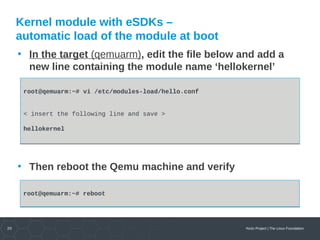
• In the target (qemuarm), edit the file below and add a
new line containing the module name ‘hellokernel’
• Then reboot the Qemu machine and verify
root@qemuarm:~# vi /etc/modules-load/hello.conf
< insert the following line and save >
hellokernel
root@qemuarm:~# vi /etc/modules-load/hello.conf
< insert the following line and save >
hellokernel
root@qemuarm:~# rebootroot@qemuarm:~# reboot
Yocto Project | The Linux Foundation
Custom Development
System integration
BSP creation fir new boards
System optimization
Linux kernel drivers
Application and interface development
KOAN services
Technical Support
Development tool and application support
Issue investigation and solution follow­up with 
mainstream developers
Help getting started
Embedded Linux Training
Unix and GNU/Linux basics
Linux kernel and drivers development
Real­time Linux
Yocto Project
Development and profiling tools
Lightweight tools for embedded systems
Root filesystem creation
Audio and multimedia
System optimization
Consulting
Help in decision making
System architecture
Identification of suitable technologies
Managing licensing requirements
System design and performance review
http://koansoftware.com

Yocto Project Dev Day Prague 2017 - Advanced class - Kernel modules with eSDK

  • 1.
    Yocto Project |The Linux Foundation Activity Nine Kernel Modules with eSDKs Marco Cavallini KOAN http://koansoftware.com Yocto Project Dev Day – Prague, 2017
  • 2.
    2 Yocto Project| The Linux Foundation Kernel modules with eSDKs – Overview • The Extensible SDK (eSDK) is a portable and standalone development environment , basically an SDK with an added bitbake executive via devtool. • The “devtool” is a collection of tools to help development, in particular user space development. • We can use devtool to manage a new kernel module: • Like normal applications is possible to import and create a wrapper recipe to manage the kernel module with eSDKs.
  • 3.
    3 Yocto Project| The Linux Foundation Kernel modules with eSDKs – Compiling a kernel module • We have two choices • Out of the kernel tree  When the code is in a different directory outside of the kernel source tree • Inside the kernel tree  When the code is managed by a KConfig and a Makefile into a kernel directory
  • 4.
    4 Yocto Project| The Linux Foundation Kernel modules with eSDKs – Pro and Cons of a module outside the kernel tree • When the code is outside of the kernel source tree in a different directory • Advantages  Might be easier to handle modifications than modify it into the kernel itself • Drawbacks  Not integrated to the kernel configuration/compilation process  Needs to be built separately  The driver cannot be built statically
  • 5.
    5 Yocto Project| The Linux Foundation Kernel modules with eSDKs – Pro and Cons of a module inside the kernel tree • When the code is inside the same directory tree of the kernel sources • Advantages  Well integrated into the kernel configuration and compilation process  The driver can be built statically if needed • Drawbacks  Bigger kernel size  Slower boot time
  • 6.
    6 Yocto Project| The Linux Foundation Kernel modules with eSDKs – The source code #include <linux/module.h> #include <linux/kernel.h> static int __init hello_init(void) { printk("When half way through the journey of our lifen"); return 0; } static void __exit hello_exit(void) { printk("I found that I was in a gloomy woodn"); } module_init(hello_init); module_exit(hello_exit); MODULE_LICENSE("GPL"); MODULE_DESCRIPTION("Greeting module from the Divine Comedy"); MODULE_AUTHOR("Dante Alighieri");
  • 7.
    7 Yocto Project| The Linux Foundation Kernel modules with eSDKs – The Makefile obj-m += hellokernel.o SRC := $(shell pwd) all: $(MAKE) -C $(KERNEL_SRC) M=$(SRC) modules modules_install: $(MAKE) -C $(KERNEL_SRC) M=$(SRC) modules_install ● KERNEL_SRC is the location of the kernel sources. ● This variable is set to the value of the STAGING_KERNEL_DIR within the module class (module.bbclass) ● Sources available on https://github.com/koansoftware/simplest-kernel-module.git
  • 8.
    8 Yocto Project| The Linux Foundation Kernel modules with eSDKs – first installation • Start a new Shell! Otherwise, the existing bitbake environment can cause unexpected results • Here is where the eSDK was prepared (and you can too!) < DO NOT ENTER THE FOLLOWING COMMANDS : ALREADY EXECUTED > $ cd /scratch/working/build-qemuarm/tmp/deploy/sdk/ $ ./poky-glibc-x86_64-core-image-base-armv5e-toolchain-ext-2.4.sh -d /scratch/sdk/qemuarm -y < DO NOT ENTER THE FOLLOWING COMMANDS : ALREADY EXECUTED > $ cd /scratch/working/build-qemuarm/tmp/deploy/sdk/ $ ./poky-glibc-x86_64-core-image-base-armv5e-toolchain-ext-2.4.sh -d /scratch/sdk/qemuarm -y • This installed the eSDK into /scratch/sdk/qemuarm
  • 9.
    9 Yocto Project| The Linux Foundation Kernel modules with eSDKs – overview • Starting from now we are using the eSDK and not Yocto Project • During this exercise we using two different machines • The HOST containing the eSDK (providing devtool) • The TARGET running the final qemuarm image HOST eSDK:~$ HOST eSDK:~$ TARGET root@qemuarm:~# TARGET root@qemuarm:~#
  • 10.
    10 Yocto Project| The Linux Foundation Kernel modules with eSDKs – global setup • Open two terminal windows and setup the eSDK environment in each one $ source /scratch/sdk/qemuarm/environment-setup-armv5e-poky-linux-gnueabi SDK environment now set up; additionally you may now run devtool to perform development tasks. Run devtool --help for further details. $ source /scratch/sdk/qemuarm/environment-setup-armv5e-poky-linux-gnueabi SDK environment now set up; additionally you may now run devtool to perform development tasks. Run devtool --help for further details.
  • 11.
    11 Yocto Project| The Linux Foundation Kernel modules with eSDKs – build the target image • After you have setup the eSDK environment, build an image $ devtool build-image$ devtool build-image • This will create a new image into /scratch/sdk/qemuarm/tmp/deploy/images/qemuarm
  • 12.
    12 Yocto Project| The Linux Foundation Kernel modules with eSDKs – run the image • Run the image to check if everything is OK • This will run the Qemu machine in the TARGET shell you were using • Login using user : root - (no password required) $ runqemu qemuarm nographic$ runqemu qemuarm nographic
  • 13.
    13 Yocto Project| The Linux Foundation Kernel module with eSDKs – Hooking a new module into the build • Run the devtool to add a new recipe (on the HOST side) • This generates a minimal recipe in the workspace layer • This adds EXTERNALSRC in an workspace/appends/simplestmodule_git.bbappend file that points to the sources • In other words, the source tree stays where it is, devtool just creates a wrapper recipe that points to it • Note: this does not add your image to the original build engineer’s image, which requires changing the platform project’s conf/local.conf $ devtool add --version 1.0 simplestmodule /scratch/src/kmod/simplest-kernel-module/ $ devtool add --version 1.0 simplestmodule /scratch/src/kmod/simplest-kernel-module/
  • 14.
    14 Yocto Project| The Linux Foundation After the add Workspace layer layout $ tree /scratch/sdk/qemuarm/workspace/ /scratch/sdk/qemuarm/workspace/ ├── appends │ └── simplestmodule_git.bbappend ├── conf │ └── layer.conf ├── README └── recipes └── simplestmodule └── simplestmodule_git.bb
  • 15.
    15 Yocto Project| The Linux Foundation Kernel module with eSDKs – build the module • Build the new recipe (on the HOST side) This will create the simplestmodule.ko kernel module This downloads the kernel sources (already downloaded for you) linux-yocto-4.12.12+gitAUTOINC+eda4d18ce4_67b62d8d7b-r0 do_fetch $ devtool build simplestmodule$ devtool build simplestmodule
  • 16.
    16 Yocto Project| The Linux Foundation Kernel module with eSDKs – deploy the module Get the target’s IP address from the target serial console root@qemuarm:~# ifconfig • In the eSDK (HOST) shell, deploy the output (the target’s ip address may change) NOTE: the ‘-s’ option will note any ssh keygen issues, allowing you to (for example) remove/add this IP address to the known hosts table $ devtool deploy-target -s simplestmodule root@192.168.7.2$ devtool deploy-target -s simplestmodule root@192.168.7.2
  • 17.
    17 Yocto Project| The Linux Foundation Kernel module with eSDKs – deploy details • In the target (qemuarm), observe the result of deployment devtool_deploy.list 100% 108 0.1KB/s 00:00 devtool_deploy.sh 100% 1017 1.0KB/s 00:00 ./ ./lib/ ./lib/modules/ ./lib/modules/4.12.12-yocto-standard/ ./lib/modules/4.12.12-yocto-standard/extra/ ./lib/modules/4.12.12-yocto-standard/extra/hellokernel.ko ./usr/ ./usr/include/ ./usr/include/simplestmodule/ ./usr/include/simplestmodule/Module.symvers ./etc/ ./etc/modprobe.d/ ./etc/modules-load.d/ NOTE: Successfully deployed /scratch/sdk/qemuarm/tmp/work/qemuarm-poky-linux-gnueabi/simplestmodule/ devtool_deploy.list 100% 108 0.1KB/s 00:00 devtool_deploy.sh 100% 1017 1.0KB/s 00:00 ./ ./lib/ ./lib/modules/ ./lib/modules/4.12.12-yocto-standard/ ./lib/modules/4.12.12-yocto-standard/extra/ ./lib/modules/4.12.12-yocto-standard/extra/hellokernel.ko ./usr/ ./usr/include/ ./usr/include/simplestmodule/ ./usr/include/simplestmodule/Module.symvers ./etc/ ./etc/modprobe.d/ ./etc/modules-load.d/ NOTE: Successfully deployed /scratch/sdk/qemuarm/tmp/work/qemuarm-poky-linux-gnueabi/simplestmodule/
  • 18.
    18 Yocto Project| The Linux Foundation Kernel module with eSDKs – load the module • In the target (qemuarm), load the module and observe the results root@qemuarm:~# depmod -a root@qemuarm:~# modprobe hellokernel [ 874.941880] hellokernel: loading out-of-tree module taints kernel. [ 874.960165] When half way through the journey of our life root@qemuarm:~# lsmod Module Size Used by hellokernel 929 0 nfsd 271348 11 root@qemuarm:~# depmod -a root@qemuarm:~# modprobe hellokernel [ 874.941880] hellokernel: loading out-of-tree module taints kernel. [ 874.960165] When half way through the journey of our life root@qemuarm:~# lsmod Module Size Used by hellokernel 929 0 nfsd 271348 11
  • 19.
    19 Yocto Project| The Linux Foundation Kernel module with eSDKs – unload the module • In the target (qemuarm), unload the module root@qemuarm:~# modprobe -r hellokernel [ 36.005902] I found that I was in a gloomy wood root@qemuarm:~# lsmod Module Size Used by nfsd 271348 11 root@qemuarm:~# modprobe -r hellokernel [ 36.005902] I found that I was in a gloomy wood root@qemuarm:~# lsmod Module Size Used by nfsd 271348 11
  • 20.
    20 Yocto Project| The Linux Foundation Kernel module with eSDKs – automatic load of the module at boot • In the target (qemuarm), edit the file below and add a new line containing the module name ‘hellokernel’ • Then reboot the Qemu machine and verify root@qemuarm:~# vi /etc/modules-load/hello.conf < insert the following line and save > hellokernel root@qemuarm:~# vi /etc/modules-load/hello.conf < insert the following line and save > hellokernel root@qemuarm:~# rebootroot@qemuarm:~# reboot
  • 21.
    Yocto Project |The Linux Foundation Custom Development System integration BSP creation fir new boards System optimization Linux kernel drivers Application and interface development KOAN services Technical Support Development tool and application support Issue investigation and solution follow­up with  mainstream developers Help getting started Embedded Linux Training Unix and GNU/Linux basics Linux kernel and drivers development Real­time Linux Yocto Project Development and profiling tools Lightweight tools for embedded systems Root filesystem creation Audio and multimedia System optimization Consulting Help in decision making System architecture Identification of suitable technologies Managing licensing requirements System design and performance review http://koansoftware.com