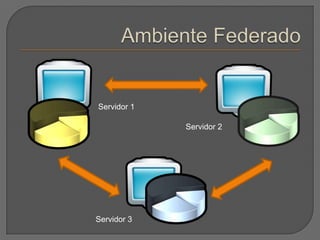
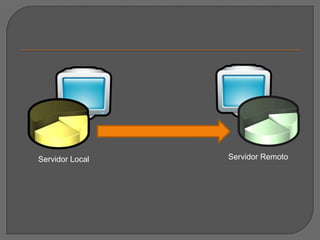
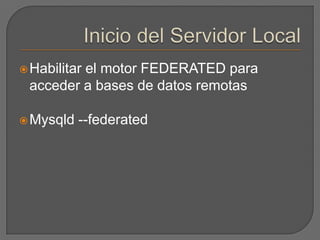
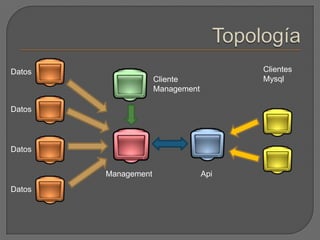
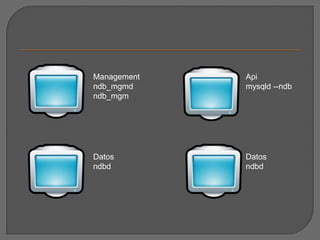
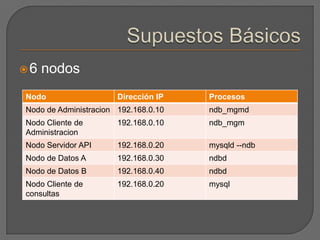
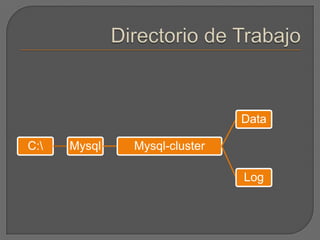
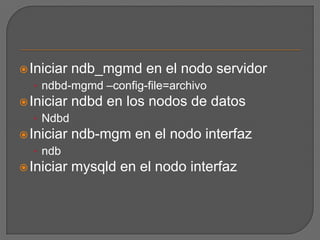
This document discusses configuring MySQL for federated and cluster environments. It covers setting up a federated server to access remote databases, creating identical tables on the local and remote servers, and the components and configuration of a MySQL cluster including the management node, data nodes, SQL nodes, and using ndb_mgmd, ndb_mgm and mysqld processes.

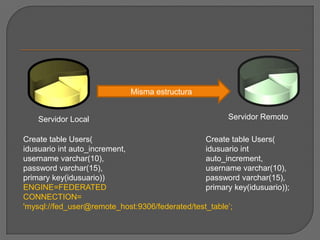
![Al crear la tablaFormato de la Cadena de Conexiónscheme://user_name[:password]@host_name[:port_num]/db_name/tbl_name ENGINE=FEDERATED CONNECTION='mysql://fed_user@remote_host:9306/federated/test_table'](https://image.slidesharecdn.com/distribuido-100709020114-phpapp01/85/Distribuido-6-320.jpg)
![Archivo my.ini de los nodos de datos# Optionsformysqldprocess:[mysqld] ndbcluster# run NDB storageenginendb-connectstring=192.168.0.10# Optionsforndbdprocess:[mysql_cluster] ndb-connectstring=192.168.0.10 Motor del management serverUbicación del management server](https://image.slidesharecdn.com/distribuido-100709020114-phpapp01/85/Distribuido-11-320.jpg)
![Archivo config.ini del nodo management# Options affecting ndbd processes on all data nodes:[ndbd default]NoOfReplicas=2 # Number of replicasDataMemory=80M # How much memory to allocate for data storage IndexMemory=18M # How much memory to allocate for index storage # For DataMemory and IndexMemory, we have used the # default values. Since the "world" database takes up # only about 500KB, this should be more than enough for # this example Cluster setup. # TCP/IP options: [tcp default] portnumber=2202](https://image.slidesharecdn.com/distribuido-100709020114-phpapp01/85/Distribuido-13-320.jpg)
![# This the default; however, you can use any port that is free # for all the hosts in the cluster # Note: It is recommended that you do not specify the port # number at all and allow the default value to be used instead# Management process options: [ndb_mgmd]hostname=192.168.0.10 # Hostname or IP address of management node datadir=/var/lib/mysql-cluster # Directory for management node log files # Options for data node "A": [ndbd] # (one [ndbd] section per data node) hostname=192.168.0.30 # Hostname or IP address datadir=/usr/local/mysql/data # Directory for this data node's data files](https://image.slidesharecdn.com/distribuido-100709020114-phpapp01/85/Distribuido-14-320.jpg)
![# Options for data node "B": [ndbd] hostname=192.168.0.40 # Hostname or IP address datadir=/usr/local/mysql/data # Directory for this data node's data files # SQL node options: [mysqld] hostname=192.168.0.20 # Hostname or IP address # (additional mysqld connections can be # specified for this node for various # purposes such as running ndb_restore)](https://image.slidesharecdn.com/distribuido-100709020114-phpapp01/85/Distribuido-15-320.jpg)


![Getting Started with Apache Spark: Big Data Made Simple [Free Meetup]](https://cdn.slidesharecdn.com/ss_thumbnails/apachesparkgettingstarted-260203175547-8361bcc3-thumbnail.jpg?width=640&height=640&fit=bounds)
