Distance Education & Training
Low Tech Solutions for High Tech Success
www.sesa.org
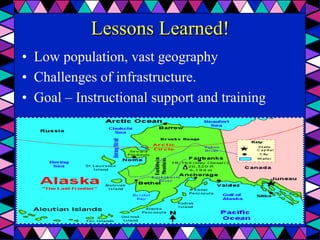
Lessons Learned!
•  Low population, vast geography
•  Challenges of infrastructure.
•  Goal – Instructional support and training
Technologies
•  SKYPE
•  Bridgit
•  Video Conferencing (Polycom)
•  WebEx
•  Audio conferencing
•  Google Hangouts
•  Dropcam Pro
Work with remote site staff!
•  Do not make assumptions
•  Build expertise in remote site staff
•  Provide support in small sequential steps
•  Consider light conditions, camera angle, etc.
Respect teacher’s time!
•  Teachers are busy
•  Keep support short and to the point
•  Provide clear directions
•  Offer an incentive to learn the technology
Playing it safe!
Maximizing Bandwidth!
•  Low bandwidth
•  Limiting use of unnecessary multimedia
•  Store video on desktop
•  E-mail video ahead of time
•  Time your connection
Organizing for efficiency
•  Identify your most efficient technology
•  Contact your internet provider
•  Organize your room and equipment
•  Get rid of clutter
•  Encourage staff to play with the technology
The fun element
•  Technology is useful when you know how it
works and you accept it will sometimes not
work when you most need it.
Thank you for your time today!

Distance Training: Low Tech Solutions for High Tech Success

  • 1.
    Distance Education &Training Low Tech Solutions for High Tech Success
  • 2.
  • 3.
    Lessons Learned! •  Lowpopulation, vast geography •  Challenges of infrastructure. •  Goal – Instructional support and training
  • 4.
    Technologies •  SKYPE •  Bridgit • Video Conferencing (Polycom) •  WebEx •  Audio conferencing •  Google Hangouts •  Dropcam Pro
  • 5.
    Work with remotesite staff! •  Do not make assumptions •  Build expertise in remote site staff •  Provide support in small sequential steps •  Consider light conditions, camera angle, etc.
  • 6.
    Respect teacher’s time! • Teachers are busy •  Keep support short and to the point •  Provide clear directions •  Offer an incentive to learn the technology
  • 7.
    Playing it safe! MaximizingBandwidth! •  Low bandwidth •  Limiting use of unnecessary multimedia •  Store video on desktop •  E-mail video ahead of time •  Time your connection
  • 8.
    Organizing for efficiency • Identify your most efficient technology •  Contact your internet provider •  Organize your room and equipment •  Get rid of clutter •  Encourage staff to play with the technology
  • 9.
    The fun element • Technology is useful when you know how it works and you accept it will sometimes not work when you most need it. Thank you for your time today!