DISPLAYING ,POSITIONING AND FLOATING AN
ELEMENT USING CASCADING STYLE SHEET
By the End of this Class you can understand
 Point 1:Controlling Display of an element
 Point 2: Positioning an element in html using
CSS
 Point 3:Floating an element using CSS
INTRODUCTION
 In HTML we are having various elements such as
headers, paragraphs, images , buttons , hyperlinks
 It is very important to place this elements in proper order
other wise the total web page will be unpleasant to user
 To achieve proper placement of an element we are using
the Cascading Style Sheets properties
CONTROLLING THE DISPLAY OF AN ELEMENT
USING CSS
 In HTML CSS will allows you to control the display
of an element using two properties
 1.Display property 2.visible property
 1.Display Property: To specify how to display an
element
 2.Visible Property: It specifies whether the element
must visible or hidden
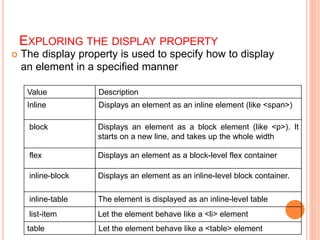
EXPLORING THE DISPLAY PROPERTY
 The display property is used to specify how to display
an element in a specified manner
Value Description
Inline Displays an element as an inline element (like <span>)
block Displays an element as a block element (like <p>). It
starts on a new line, and takes up the whole width
flex Displays an element as a block-level flex container
inline-block Displays an element as an inline-level block container.
inline-table The element is displayed as an inline-level table
list-item Let the element behave like a <li> element
table Let the element behave like a <table> element
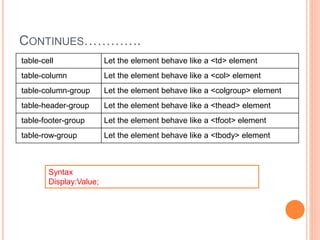
CONTINUES………….
table-cell Let the element behave like a <td> element
table-column Let the element behave like a <col> element
table-column-group Let the element behave like a <colgroup> element
table-header-group Let the element behave like a <thead> element
table-footer-group Let the element behave like a <tfoot> element
table-row-group Let the element behave like a <tbody> element
Syntax
Display:Value;
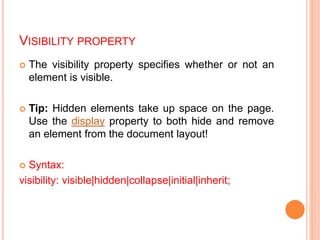
VISIBILITY PROPERTY
 The visibility property specifies whether or not an
element is visible.
 Tip: Hidden elements take up space on the page.
Use the display property to both hide and remove
an element from the document layout!
 Syntax:
visibility: visible|hidden|collapse|initial|inherit;
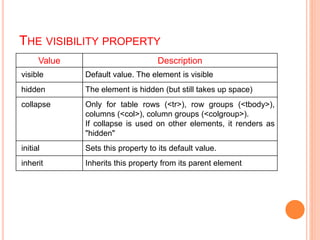
THE VISIBILITY PROPERTY
Value Description
visible Default value. The element is visible
hidden The element is hidden (but still takes up space)
collapse Only for table rows (<tr>), row groups (<tbody>),
columns (<col>), column groups (<colgroup>).
If collapse is used on other elements, it renders as
"hidden"
initial Sets this property to its default value.
inherit Inherits this property from its parent element
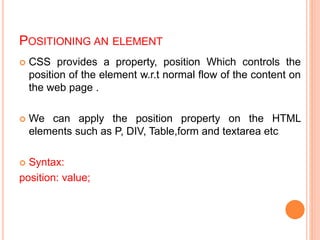
POSITIONING AN ELEMENT
 CSS provides a property, position Which controls the
position of the element w.r.t normal flow of the content on
the web page .
 We can apply the position property on the HTML
elements such as P, DIV, Table,form and textarea etc
 Syntax:
position: value;
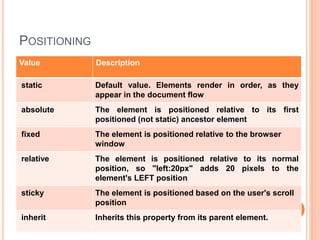
POSITIONING
Value Description
static Default value. Elements render in order, as they
appear in the document flow
absolute The element is positioned relative to its first
positioned (not static) ancestor element
fixed The element is positioned relative to the browser
window
relative The element is positioned relative to its normal
position, so "left:20px" adds 20 pixels to the
element's LEFT position
sticky The element is positioned based on the user's scroll
position
inherit Inherits this property from its parent element.
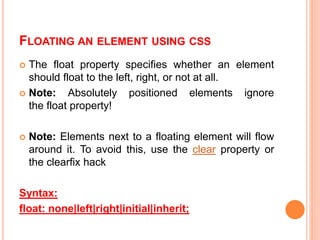
FLOATING AN ELEMENT USING CSS
 The float property specifies whether an element
should float to the left, right, or not at all.
 Note: Absolutely positioned elements ignore
the float property!
 Note: Elements next to a floating element will flow
around it. To avoid this, use the clear property or
the clearfix hack
Syntax:
float: none|left|right|initial|inherit;
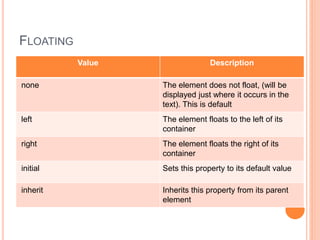
FLOATING
Value Description
none The element does not float, (will be
displayed just where it occurs in the
text). This is default
left The element floats to the left of its
container
right The element floats the right of its
container
initial Sets this property to its default value
inherit Inherits this property from its parent
element

Displaying.pptx

  • 1.
    DISPLAYING ,POSITIONING ANDFLOATING AN ELEMENT USING CASCADING STYLE SHEET By the End of this Class you can understand  Point 1:Controlling Display of an element  Point 2: Positioning an element in html using CSS  Point 3:Floating an element using CSS
  • 2.
    INTRODUCTION  In HTMLwe are having various elements such as headers, paragraphs, images , buttons , hyperlinks  It is very important to place this elements in proper order other wise the total web page will be unpleasant to user  To achieve proper placement of an element we are using the Cascading Style Sheets properties
  • 3.
    CONTROLLING THE DISPLAYOF AN ELEMENT USING CSS  In HTML CSS will allows you to control the display of an element using two properties  1.Display property 2.visible property  1.Display Property: To specify how to display an element  2.Visible Property: It specifies whether the element must visible or hidden
  • 4.
    EXPLORING THE DISPLAYPROPERTY  The display property is used to specify how to display an element in a specified manner Value Description Inline Displays an element as an inline element (like <span>) block Displays an element as a block element (like <p>). It starts on a new line, and takes up the whole width flex Displays an element as a block-level flex container inline-block Displays an element as an inline-level block container. inline-table The element is displayed as an inline-level table list-item Let the element behave like a <li> element table Let the element behave like a <table> element
  • 5.
    CONTINUES…………. table-cell Let theelement behave like a <td> element table-column Let the element behave like a <col> element table-column-group Let the element behave like a <colgroup> element table-header-group Let the element behave like a <thead> element table-footer-group Let the element behave like a <tfoot> element table-row-group Let the element behave like a <tbody> element Syntax Display:Value;
  • 6.
    VISIBILITY PROPERTY  Thevisibility property specifies whether or not an element is visible.  Tip: Hidden elements take up space on the page. Use the display property to both hide and remove an element from the document layout!  Syntax: visibility: visible|hidden|collapse|initial|inherit;
  • 7.
    THE VISIBILITY PROPERTY ValueDescription visible Default value. The element is visible hidden The element is hidden (but still takes up space) collapse Only for table rows (<tr>), row groups (<tbody>), columns (<col>), column groups (<colgroup>). If collapse is used on other elements, it renders as "hidden" initial Sets this property to its default value. inherit Inherits this property from its parent element
  • 8.
    POSITIONING AN ELEMENT CSS provides a property, position Which controls the position of the element w.r.t normal flow of the content on the web page .  We can apply the position property on the HTML elements such as P, DIV, Table,form and textarea etc  Syntax: position: value;
  • 9.
    POSITIONING Value Description static Defaultvalue. Elements render in order, as they appear in the document flow absolute The element is positioned relative to its first positioned (not static) ancestor element fixed The element is positioned relative to the browser window relative The element is positioned relative to its normal position, so "left:20px" adds 20 pixels to the element's LEFT position sticky The element is positioned based on the user's scroll position inherit Inherits this property from its parent element.
  • 10.
    FLOATING AN ELEMENTUSING CSS  The float property specifies whether an element should float to the left, right, or not at all.  Note: Absolutely positioned elements ignore the float property!  Note: Elements next to a floating element will flow around it. To avoid this, use the clear property or the clearfix hack Syntax: float: none|left|right|initial|inherit;
  • 11.
    FLOATING Value Description none Theelement does not float, (will be displayed just where it occurs in the text). This is default left The element floats to the left of its container right The element floats the right of its container initial Sets this property to its default value inherit Inherits this property from its parent element