Dr. D. Chinni Krishna. Int. Journal of Engineering Research and Application www.ijera.com
ISSN : 2248-9622, Vol. 7, Issue 2, ( Part -3) February 2017, pp.01-06
www.ijera.com DOI: 10.9790/9622- 0702030106 1 | P a g e
Displaying of Digital Clock through digital circuits and through
Assembly Language Programs of 8051 microcontroller
Dr. D. Chinni Krishna*
and U. Sridevi**
*Department of Physics, Bhavan’s New Science College, Narayanaguda, Hyderabad-500 029, Telangana State,
India.
**Department of Mathematics, Govt. City College, Nayapul, Hyderabad-500 001, Telangana State, India
ABSTRACT
With a view to display a Digital Clock through digital circuits using modulo-n (mod-n) counters, a
circuit diagram was designed and implemented it through multi simulation software. In the similar manner the
time digits were displayed on seven segment displays at 8255 programmable peripheral interface (PPI) ports
through 8051 microcontroller, the time digits (hours, minutes and seconds) were connected to the first 8255 PPI
and the date digits (Years, months and days) were connected to second 8255 PPI. The detailed circuit diagram
was given to understand the construction details of the circuit. The loop in a loop technique of assembly
language program was used to display date and time. After displaying a year, month and day on the date
displays through main program, it calls 1day subroutine to display time in 24 hours clock. The 1day subroutine
calls 1second delay subroutine to change the digits in seconds display. After completion of 24 hours time, the
digit will be changed in the days display to indicate the next date. After completion of 31 days in the first month,
the main program calls month subroutine to change the digit in the months display. Precautions were taken to
change the digits in months display for January 31 days, February 28 days, March 31 days, April 30 days, May
31 days, June 30 days, July 31 days, August 31 days, September 30 days, October 31 days, November 30 days
and December 31 days. After completion of a month, there will be a change in years digit and this process will
be repeated continuously.
Keywords: Digital Clock, Modulo-n Counters, Interfacing, Assembly Language program, Loop in Loop
technique, Binary Coded Decimal (BCD) number
I. INTRODUCTION
In the digital era, designing of a digital
clock and maintaining of its digits without any
error is one of the important tasks of the circuit
designer. The sequential circuits of digital
electronics were implemented to design the clock.
The modulo-n counters are used to give the
required data to display the digits of a digital clock
on 7 segment displays.
II. RESULTS AND DISCUSSIONS
The general circuit diagram of 24 hours Digital
Clock with digital circuits as given in a text book
[1] with clock input was designed by using mod-n
counters as shown in Fig. 1.
Fig. 1. Digital clock by using mod-n counter digital circuits
RESEARCH ARTICLE OPEN ACCESS
Dr. D. Chinni Krishna. Int. Journal of Engineering Research and Application www.ijera.com
ISSN : 2248-9622, Vol. 7, Issue 2, ( Part -3) February 2017, pp.01-06
www.ijera.com DOI: 10.9790/9622- 0702030106 2 | P a g e
The practical circuit diagram to design a 24 hours
digital clock by using mod-n counters on Multi-
simulation software [2] with execution results were
shown in Fig. 2.
Fig. 2. The 24 hours digital clock
It is observed from figure 2 that, each digit
in LSB reaches its required value may apply a
clock pulse to its next higher digit. When the clock
pulse reached to minutes place, it clears all digits in
seconds place. Similarly, when a clock pulse
reached to hours place, then all digits in minutes
and seconds place will be cleared. When it reaches
highest value all digits were cleared and it repeated
in incrementing mode. Change the clock position to
set or reset any of the digits in a digital clock.
The experimental diagram to display Time
and date through 8051 microcontroller as its ports
information given in a text book [3] was given in
Fig. 3. One 8255 ports are used to control the Time
digits and another 8255 PPI ports are used to
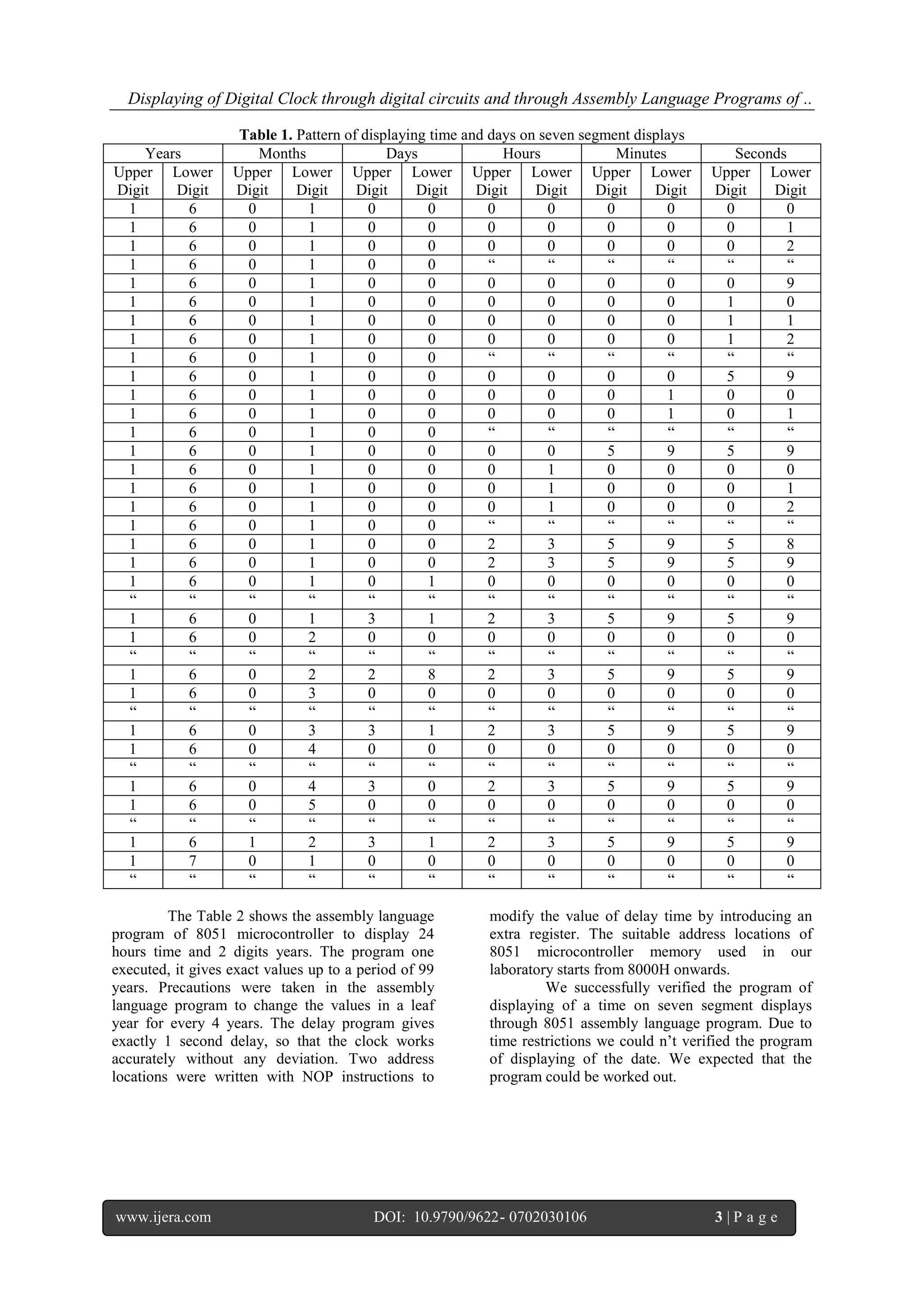
control the digits of the date. The Table 1 shows
the 8255 ports bit conditions to display time and
date in a systematic manner.
Fig. 3. Displaying of Time and Date through 8051 microcontroller and 8255 PPI ports
Displaying of Digital Clock through digital circuits and through Assembly Language Programs of ..
www.ijera.com DOI: 10.9790/9622- 0702030106 3 | P a g e
Table 1. Pattern of displaying time and days on seven segment displays
Years Months Days Hours Minutes Seconds
Upper
Digit
Lower
Digit
Upper
Digit
Lower
Digit
Upper
Digit
Lower
Digit
Upper
Digit
Lower
Digit
Upper
Digit
Lower
Digit
Upper
Digit
Lower
Digit
1 6 0 1 0 0 0 0 0 0 0 0
1 6 0 1 0 0 0 0 0 0 0 1
1 6 0 1 0 0 0 0 0 0 0 2
1 6 0 1 0 0 “ “ “ “ “ “
1 6 0 1 0 0 0 0 0 0 0 9
1 6 0 1 0 0 0 0 0 0 1 0
1 6 0 1 0 0 0 0 0 0 1 1
1 6 0 1 0 0 0 0 0 0 1 2
1 6 0 1 0 0 “ “ “ “ “ “
1 6 0 1 0 0 0 0 0 0 5 9
1 6 0 1 0 0 0 0 0 1 0 0
1 6 0 1 0 0 0 0 0 1 0 1
1 6 0 1 0 0 “ “ “ “ “ “
1 6 0 1 0 0 0 0 5 9 5 9
1 6 0 1 0 0 0 1 0 0 0 0
1 6 0 1 0 0 0 1 0 0 0 1
1 6 0 1 0 0 0 1 0 0 0 2
1 6 0 1 0 0 “ “ “ “ “ “
1 6 0 1 0 0 2 3 5 9 5 8
1 6 0 1 0 0 2 3 5 9 5 9
1 6 0 1 0 1 0 0 0 0 0 0
“ “ “ “ “ “ “ “ “ “ “ “
1 6 0 1 3 1 2 3 5 9 5 9
1 6 0 2 0 0 0 0 0 0 0 0
“ “ “ “ “ “ “ “ “ “ “ “
1 6 0 2 2 8 2 3 5 9 5 9
1 6 0 3 0 0 0 0 0 0 0 0
“ “ “ “ “ “ “ “ “ “ “ “
1 6 0 3 3 1 2 3 5 9 5 9
1 6 0 4 0 0 0 0 0 0 0 0
“ “ “ “ “ “ “ “ “ “ “ “
1 6 0 4 3 0 2 3 5 9 5 9
1 6 0 5 0 0 0 0 0 0 0 0
“ “ “ “ “ “ “ “ “ “ “ “
1 6 1 2 3 1 2 3 5 9 5 9
1 7 0 1 0 0 0 0 0 0 0 0
“ “ “ “ “ “ “ “ “ “ “ “
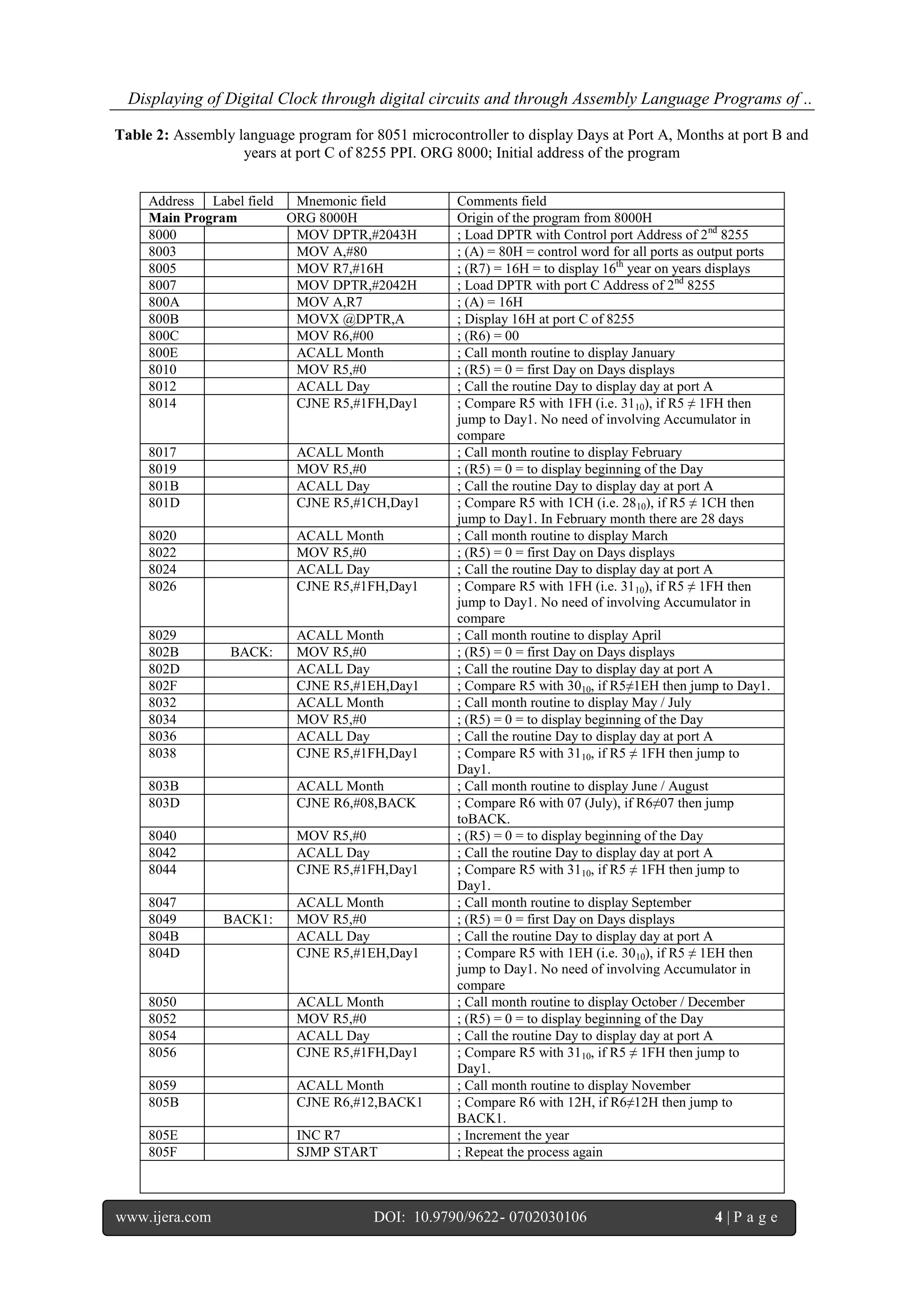
The Table 2 shows the assembly language
program of 8051 microcontroller to display 24
hours time and 2 digits years. The program one
executed, it gives exact values up to a period of 99
years. Precautions were taken in the assembly
language program to change the values in a leaf
year for every 4 years. The delay program gives
exactly 1 second delay, so that the clock works
accurately without any deviation. Two address
locations were written with NOP instructions to
modify the value of delay time by introducing an
extra register. The suitable address locations of
8051 microcontroller memory used in our
laboratory starts from 8000H onwards.
We successfully verified the program of
displaying of a time on seven segment displays
through 8051 assembly language program. Due to
time restrictions we could n’t verified the program
of displaying of the date. We expected that the
program could be worked out.
Displaying of Digital Clock through digital circuits and through Assembly Language Programs of ..
www.ijera.com DOI: 10.9790/9622- 0702030106 4 | P a g e
Table 2: Assembly language program for 8051 microcontroller to display Days at Port A, Months at port B and
years at port C of 8255 PPI. ORG 8000; Initial address of the program
Address Label field Mnemonic field Comments field
Main Program ORG 8000H Origin of the program from 8000H
8000 MOV DPTR,#2043H ; Load DPTR with Control port Address of 2nd
8255
8003 MOV A,#80 ; (A) = 80H = control word for all ports as output ports
8005 MOV R7,#16H ; (R7) = 16H = to display 16th
year on years displays
8007 MOV DPTR,#2042H ; Load DPTR with port C Address of 2nd
8255
800A MOV A,R7 ; (A) = 16H
800B MOVX @DPTR,A ; Display 16H at port C of 8255
800C MOV R6,#00 ; (R6) = 00
800E ACALL Month ; Call month routine to display January
8010 MOV R5,#0 ; (R5) = 0 = first Day on Days displays
8012 ACALL Day ; Call the routine Day to display day at port A
8014 CJNE R5,#1FH,Day1 ; Compare R5 with 1FH (i.e. 3110), if R5 ≠ 1FH then
jump to Day1. No need of involving Accumulator in
compare
8017 ACALL Month ; Call month routine to display February
8019 MOV R5,#0 ; (R5) = 0 = to display beginning of the Day
801B ACALL Day ; Call the routine Day to display day at port A
801D CJNE R5,#1CH,Day1 ; Compare R5 with 1CH (i.e. 2810), if R5 ≠ 1CH then
jump to Day1. In February month there are 28 days
8020 ACALL Month ; Call month routine to display March
8022 MOV R5,#0 ; (R5) = 0 = first Day on Days displays
8024 ACALL Day ; Call the routine Day to display day at port A
8026 CJNE R5,#1FH,Day1 ; Compare R5 with 1FH (i.e. 3110), if R5 ≠ 1FH then
jump to Day1. No need of involving Accumulator in
compare
8029 ACALL Month ; Call month routine to display April
802B BACK: MOV R5,#0 ; (R5) = 0 = first Day on Days displays
802D ACALL Day ; Call the routine Day to display day at port A
802F CJNE R5,#1EH,Day1 ; Compare R5 with 3010, if R5≠1EH then jump to Day1.
8032 ACALL Month ; Call month routine to display May / July
8034 MOV R5,#0 ; (R5) = 0 = to display beginning of the Day
8036 ACALL Day ; Call the routine Day to display day at port A
8038 CJNE R5,#1FH,Day1 ; Compare R5 with 3110, if R5 ≠ 1FH then jump to
Day1.
803B ACALL Month ; Call month routine to display June / August
803D CJNE R6,#08,BACK ; Compare R6 with 07 (July), if R6≠07 then jump
toBACK.
8040 MOV R5,#0 ; (R5) = 0 = to display beginning of the Day
8042 ACALL Day ; Call the routine Day to display day at port A
8044 CJNE R5,#1FH,Day1 ; Compare R5 with 3110, if R5 ≠ 1FH then jump to
Day1.
8047 ACALL Month ; Call month routine to display September
8049 BACK1: MOV R5,#0 ; (R5) = 0 = first Day on Days displays
804B ACALL Day ; Call the routine Day to display day at port A
804D CJNE R5,#1EH,Day1 ; Compare R5 with 1EH (i.e. 3010), if R5 ≠ 1EH then
jump to Day1. No need of involving Accumulator in
compare
8050 ACALL Month ; Call month routine to display October / December
8052 MOV R5,#0 ; (R5) = 0 = to display beginning of the Day
8054 ACALL Day ; Call the routine Day to display day at port A
8056 CJNE R5,#1FH,Day1 ; Compare R5 with 3110, if R5 ≠ 1FH then jump to
Day1.
8059 ACALL Month ; Call month routine to display November
805B CJNE R6,#12,BACK1 ; Compare R6 with 12H, if R6≠12H then jump to
BACK1.
805E INC R7 ; Increment the year
805F SJMP START ; Repeat the process again
Displaying of Digital Clock through digital circuits and through Assembly Language Programs of ..
www.ijera.com DOI: 10.9790/9622- 0702030106 5 | P a g e
Table 3: The Delay Routine
Address Label field Mnemonic field Comments field
FF00H DELAY: NOP ; No operation
FF01H NOP ; No operation
FF02H MOV R1,#0FF ; Load R1 register with FFH
FF04H LOOP2: MOV R2,#0FF ; Load R2 register with FFH
FF06H LOOP1: DJNZ R2,LOOP1 ; Decrement R2 by 1 and if it is not equal to 0
jump to LOOP1 (inner loop)
FF08H DJNZ R1,LOOP2 ; Decrement R1 by 1 and if it is not equal to 0
jump to LOOP2 (middle loop)
FF0AH NOP ; No operation
FF0BH NOP ; No operation
FF0CH RET ; Return to the main program
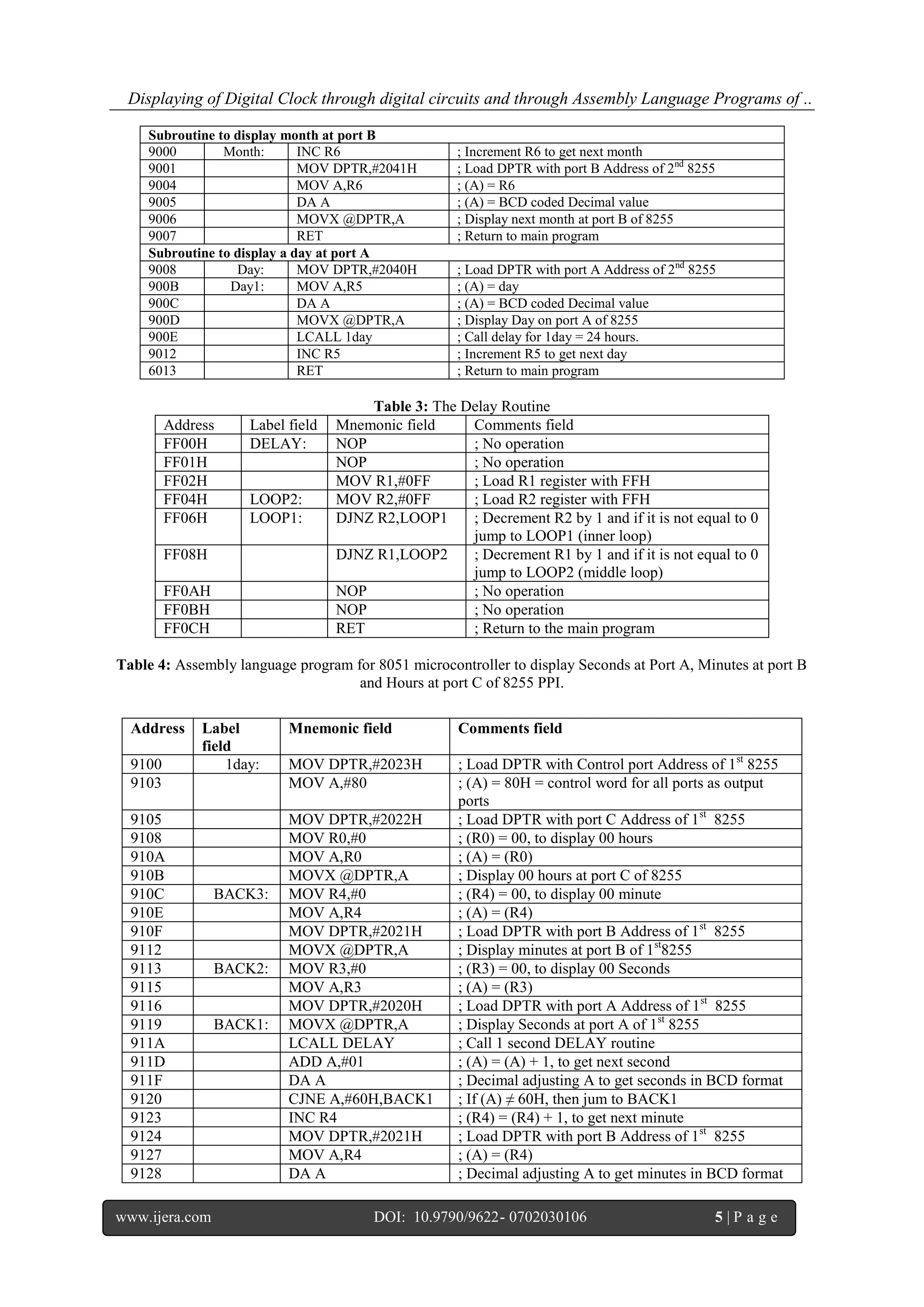
Table 4: Assembly language program for 8051 microcontroller to display Seconds at Port A, Minutes at port B
and Hours at port C of 8255 PPI.
Subroutine to display month at port B
9000 Month: INC R6 ; Increment R6 to get next month
9001 MOV DPTR,#2041H ; Load DPTR with port B Address of 2nd
8255
9004 MOV A,R6 ; (A) = R6
9005 DA A ; (A) = BCD coded Decimal value
9006 MOVX @DPTR,A ; Display next month at port B of 8255
9007 RET ; Return to main program
Subroutine to display a day at port A
9008 Day: MOV DPTR,#2040H ; Load DPTR with port A Address of 2nd
8255
900B Day1: MOV A,R5 ; (A) = day
900C DA A ; (A) = BCD coded Decimal value
900D MOVX @DPTR,A ; Display Day on port A of 8255
900E LCALL 1day ; Call delay for 1day = 24 hours.
9012 INC R5 ; Increment R5 to get next day
6013 RET ; Return to main program
Address Label
field
Mnemonic field Comments field
9100 1day: MOV DPTR,#2023H ; Load DPTR with Control port Address of 1st
8255
9103 MOV A,#80 ; (A) = 80H = control word for all ports as output
ports
9105 MOV DPTR,#2022H ; Load DPTR with port C Address of 1st
8255
9108 MOV R0,#0 ; (R0) = 00, to display 00 hours
910A MOV A,R0 ; (A) = (R0)
910B MOVX @DPTR,A ; Display 00 hours at port C of 8255
910C BACK3: MOV R4,#0 ; (R4) = 00, to display 00 minute
910E MOV A,R4 ; (A) = (R4)
910F MOV DPTR,#2021H ; Load DPTR with port B Address of 1st
8255
9112 MOVX @DPTR,A ; Display minutes at port B of 1st
8255
9113 BACK2: MOV R3,#0 ; (R3) = 00, to display 00 Seconds
9115 MOV A,R3 ; (A) = (R3)
9116 MOV DPTR,#2020H ; Load DPTR with port A Address of 1st
8255
9119 BACK1: MOVX @DPTR,A ; Display Seconds at port A of 1st
8255
911A LCALL DELAY ; Call 1 second DELAY routine
911D ADD A,#01 ; (A) = (A) + 1, to get next second
911F DA A ; Decimal adjusting A to get seconds in BCD format
9120 CJNE A,#60H,BACK1 ; If (A) ≠ 60H, then jum to BACK1
9123 INC R4 ; (R4) = (R4) + 1, to get next minute
9124 MOV DPTR,#2021H ; Load DPTR with port B Address of 1st
8255
9127 MOV A,R4 ; (A) = (R4)
9128 DA A ; Decimal adjusting A to get minutes in BCD format
Displaying of Digital Clock through digital circuits and through Assembly Language Programs of ..
www.ijera.com DOI: 10.9790/9622- 0702030106 6 | P a g e
III. CONCLUSIONS
1. The modulo-n counters were used to generate a
digital clock
2. Change the clock position to set or reset any of
the digits in the digital clock.
3. The lower digits reaches its maximum value, it
supplies a clock pulse to its higher digit.
4. When higher digits are resetting, they clears all
its lower positions.
5. Two separate 8255 PPIs required to display
time and date separately
6. The delay subroutine must give exactly 1
second delay to display time and date
accurately.
7. It is cheapest to design the digital clock with
digital circuits than with the microprocessors.
ACKNOWLEDGEMENT
The first & corresponding author would
like to express thanks to Dr. S. Jaikishan garu, the
Chairman, Secretary & Correspondent of Bhavan’s
New Science College for encouraging him to carry
out the research work and publish papers. He also
thanks the management for providing the facilities
in Department of Physics to carry out the above
project. He also likes to wishes his thanks to his
colleagues Dr. P. Indira, Dr. S. Laxmi Srinivasa
Rao (The In charge Principal of BNSC (Day)), Sri.
D. Sambasiva Rao, Dr. B.V. Prasad, Dr. RVGK
Mohan, Dr. S. Jagan Mohan, Mr. B. Anjaiah, Ms.
Shahenn Sk, Mr. N. Venkateswar Reddy and Ms.
Asiya for their encouragement and support. He
would also like to express his thanks to Mr. Balraj,
Mr. Suresh, Mr. Sriram, the Non teaching staff of
Dept. of Physics of BNSC for their support.
He also wishes his thanks to his family
members and friends for their support. He would
like to convey his best wishes to his small kid
Master Krishna Chaithanya, who makes the author
in a refreshing mind by his smile and kidding
actions. Finally he would like to express his thanks
to his M.Sc. Applied Electronics students for their
support.
REFERENCES
[1] R.P. Jain and M.M.S. Anand; Digital
Electronics Practice using Integrated
Circuits, Tata McGraw-Hill Publishing
Company Limited, New Delhi.
[2] Dr. D. Chinni Krishna, Volume 3,
Number 2, Gaussian Journal of Science &
Applications, July-December 2015. ISSN:
2348-0440
[3] Muhammad Ali Mazidi, Jainice Gillispie
Mazidi and Rolin D. McKinlay; The 8051
Microcontrollers and Embedded Systems
using Assembly and C, Second Edition,
Eastern Economy Edition-2006, Prentice
Hall of India Private Limited, New Delhi-
110001.
9129 MOVX @DPTR,A ; Display minutes at port B of 1st
8255
912A CJNE A,#60H,BACK2 ; If (A) ≠ 60H, then jump to BACK1
912D INC R0 ; (R0) = (R0) + 01, to get next hour
912E MOV A,R0 ; (A) = (R0)
912F DA A ; Decimal adjusting A to get hours in BCD format
9130 CJNE A,#24H,BACK2 ; If (A) ≠ 24H, then jump to BACK3
9133 RET ; Return to main program

Displaying of Digital Clock through digital circuits and through Assembly Language Programs of 8051 microcontroller

  • 1.
    Dr. D. ChinniKrishna. Int. Journal of Engineering Research and Application www.ijera.com ISSN : 2248-9622, Vol. 7, Issue 2, ( Part -3) February 2017, pp.01-06 www.ijera.com DOI: 10.9790/9622- 0702030106 1 | P a g e Displaying of Digital Clock through digital circuits and through Assembly Language Programs of 8051 microcontroller Dr. D. Chinni Krishna* and U. Sridevi** *Department of Physics, Bhavan’s New Science College, Narayanaguda, Hyderabad-500 029, Telangana State, India. **Department of Mathematics, Govt. City College, Nayapul, Hyderabad-500 001, Telangana State, India ABSTRACT With a view to display a Digital Clock through digital circuits using modulo-n (mod-n) counters, a circuit diagram was designed and implemented it through multi simulation software. In the similar manner the time digits were displayed on seven segment displays at 8255 programmable peripheral interface (PPI) ports through 8051 microcontroller, the time digits (hours, minutes and seconds) were connected to the first 8255 PPI and the date digits (Years, months and days) were connected to second 8255 PPI. The detailed circuit diagram was given to understand the construction details of the circuit. The loop in a loop technique of assembly language program was used to display date and time. After displaying a year, month and day on the date displays through main program, it calls 1day subroutine to display time in 24 hours clock. The 1day subroutine calls 1second delay subroutine to change the digits in seconds display. After completion of 24 hours time, the digit will be changed in the days display to indicate the next date. After completion of 31 days in the first month, the main program calls month subroutine to change the digit in the months display. Precautions were taken to change the digits in months display for January 31 days, February 28 days, March 31 days, April 30 days, May 31 days, June 30 days, July 31 days, August 31 days, September 30 days, October 31 days, November 30 days and December 31 days. After completion of a month, there will be a change in years digit and this process will be repeated continuously. Keywords: Digital Clock, Modulo-n Counters, Interfacing, Assembly Language program, Loop in Loop technique, Binary Coded Decimal (BCD) number I. INTRODUCTION In the digital era, designing of a digital clock and maintaining of its digits without any error is one of the important tasks of the circuit designer. The sequential circuits of digital electronics were implemented to design the clock. The modulo-n counters are used to give the required data to display the digits of a digital clock on 7 segment displays. II. RESULTS AND DISCUSSIONS The general circuit diagram of 24 hours Digital Clock with digital circuits as given in a text book [1] with clock input was designed by using mod-n counters as shown in Fig. 1. Fig. 1. Digital clock by using mod-n counter digital circuits RESEARCH ARTICLE OPEN ACCESS
  • 2.
    Dr. D. ChinniKrishna. Int. Journal of Engineering Research and Application www.ijera.com ISSN : 2248-9622, Vol. 7, Issue 2, ( Part -3) February 2017, pp.01-06 www.ijera.com DOI: 10.9790/9622- 0702030106 2 | P a g e The practical circuit diagram to design a 24 hours digital clock by using mod-n counters on Multi- simulation software [2] with execution results were shown in Fig. 2. Fig. 2. The 24 hours digital clock It is observed from figure 2 that, each digit in LSB reaches its required value may apply a clock pulse to its next higher digit. When the clock pulse reached to minutes place, it clears all digits in seconds place. Similarly, when a clock pulse reached to hours place, then all digits in minutes and seconds place will be cleared. When it reaches highest value all digits were cleared and it repeated in incrementing mode. Change the clock position to set or reset any of the digits in a digital clock. The experimental diagram to display Time and date through 8051 microcontroller as its ports information given in a text book [3] was given in Fig. 3. One 8255 ports are used to control the Time digits and another 8255 PPI ports are used to control the digits of the date. The Table 1 shows the 8255 ports bit conditions to display time and date in a systematic manner. Fig. 3. Displaying of Time and Date through 8051 microcontroller and 8255 PPI ports
  • 3.
    Displaying of DigitalClock through digital circuits and through Assembly Language Programs of .. www.ijera.com DOI: 10.9790/9622- 0702030106 3 | P a g e Table 1. Pattern of displaying time and days on seven segment displays Years Months Days Hours Minutes Seconds Upper Digit Lower Digit Upper Digit Lower Digit Upper Digit Lower Digit Upper Digit Lower Digit Upper Digit Lower Digit Upper Digit Lower Digit 1 6 0 1 0 0 0 0 0 0 0 0 1 6 0 1 0 0 0 0 0 0 0 1 1 6 0 1 0 0 0 0 0 0 0 2 1 6 0 1 0 0 “ “ “ “ “ “ 1 6 0 1 0 0 0 0 0 0 0 9 1 6 0 1 0 0 0 0 0 0 1 0 1 6 0 1 0 0 0 0 0 0 1 1 1 6 0 1 0 0 0 0 0 0 1 2 1 6 0 1 0 0 “ “ “ “ “ “ 1 6 0 1 0 0 0 0 0 0 5 9 1 6 0 1 0 0 0 0 0 1 0 0 1 6 0 1 0 0 0 0 0 1 0 1 1 6 0 1 0 0 “ “ “ “ “ “ 1 6 0 1 0 0 0 0 5 9 5 9 1 6 0 1 0 0 0 1 0 0 0 0 1 6 0 1 0 0 0 1 0 0 0 1 1 6 0 1 0 0 0 1 0 0 0 2 1 6 0 1 0 0 “ “ “ “ “ “ 1 6 0 1 0 0 2 3 5 9 5 8 1 6 0 1 0 0 2 3 5 9 5 9 1 6 0 1 0 1 0 0 0 0 0 0 “ “ “ “ “ “ “ “ “ “ “ “ 1 6 0 1 3 1 2 3 5 9 5 9 1 6 0 2 0 0 0 0 0 0 0 0 “ “ “ “ “ “ “ “ “ “ “ “ 1 6 0 2 2 8 2 3 5 9 5 9 1 6 0 3 0 0 0 0 0 0 0 0 “ “ “ “ “ “ “ “ “ “ “ “ 1 6 0 3 3 1 2 3 5 9 5 9 1 6 0 4 0 0 0 0 0 0 0 0 “ “ “ “ “ “ “ “ “ “ “ “ 1 6 0 4 3 0 2 3 5 9 5 9 1 6 0 5 0 0 0 0 0 0 0 0 “ “ “ “ “ “ “ “ “ “ “ “ 1 6 1 2 3 1 2 3 5 9 5 9 1 7 0 1 0 0 0 0 0 0 0 0 “ “ “ “ “ “ “ “ “ “ “ “ The Table 2 shows the assembly language program of 8051 microcontroller to display 24 hours time and 2 digits years. The program one executed, it gives exact values up to a period of 99 years. Precautions were taken in the assembly language program to change the values in a leaf year for every 4 years. The delay program gives exactly 1 second delay, so that the clock works accurately without any deviation. Two address locations were written with NOP instructions to modify the value of delay time by introducing an extra register. The suitable address locations of 8051 microcontroller memory used in our laboratory starts from 8000H onwards. We successfully verified the program of displaying of a time on seven segment displays through 8051 assembly language program. Due to time restrictions we could n’t verified the program of displaying of the date. We expected that the program could be worked out.
  • 4.
    Displaying of DigitalClock through digital circuits and through Assembly Language Programs of .. www.ijera.com DOI: 10.9790/9622- 0702030106 4 | P a g e Table 2: Assembly language program for 8051 microcontroller to display Days at Port A, Months at port B and years at port C of 8255 PPI. ORG 8000; Initial address of the program Address Label field Mnemonic field Comments field Main Program ORG 8000H Origin of the program from 8000H 8000 MOV DPTR,#2043H ; Load DPTR with Control port Address of 2nd 8255 8003 MOV A,#80 ; (A) = 80H = control word for all ports as output ports 8005 MOV R7,#16H ; (R7) = 16H = to display 16th year on years displays 8007 MOV DPTR,#2042H ; Load DPTR with port C Address of 2nd 8255 800A MOV A,R7 ; (A) = 16H 800B MOVX @DPTR,A ; Display 16H at port C of 8255 800C MOV R6,#00 ; (R6) = 00 800E ACALL Month ; Call month routine to display January 8010 MOV R5,#0 ; (R5) = 0 = first Day on Days displays 8012 ACALL Day ; Call the routine Day to display day at port A 8014 CJNE R5,#1FH,Day1 ; Compare R5 with 1FH (i.e. 3110), if R5 ≠ 1FH then jump to Day1. No need of involving Accumulator in compare 8017 ACALL Month ; Call month routine to display February 8019 MOV R5,#0 ; (R5) = 0 = to display beginning of the Day 801B ACALL Day ; Call the routine Day to display day at port A 801D CJNE R5,#1CH,Day1 ; Compare R5 with 1CH (i.e. 2810), if R5 ≠ 1CH then jump to Day1. In February month there are 28 days 8020 ACALL Month ; Call month routine to display March 8022 MOV R5,#0 ; (R5) = 0 = first Day on Days displays 8024 ACALL Day ; Call the routine Day to display day at port A 8026 CJNE R5,#1FH,Day1 ; Compare R5 with 1FH (i.e. 3110), if R5 ≠ 1FH then jump to Day1. No need of involving Accumulator in compare 8029 ACALL Month ; Call month routine to display April 802B BACK: MOV R5,#0 ; (R5) = 0 = first Day on Days displays 802D ACALL Day ; Call the routine Day to display day at port A 802F CJNE R5,#1EH,Day1 ; Compare R5 with 3010, if R5≠1EH then jump to Day1. 8032 ACALL Month ; Call month routine to display May / July 8034 MOV R5,#0 ; (R5) = 0 = to display beginning of the Day 8036 ACALL Day ; Call the routine Day to display day at port A 8038 CJNE R5,#1FH,Day1 ; Compare R5 with 3110, if R5 ≠ 1FH then jump to Day1. 803B ACALL Month ; Call month routine to display June / August 803D CJNE R6,#08,BACK ; Compare R6 with 07 (July), if R6≠07 then jump toBACK. 8040 MOV R5,#0 ; (R5) = 0 = to display beginning of the Day 8042 ACALL Day ; Call the routine Day to display day at port A 8044 CJNE R5,#1FH,Day1 ; Compare R5 with 3110, if R5 ≠ 1FH then jump to Day1. 8047 ACALL Month ; Call month routine to display September 8049 BACK1: MOV R5,#0 ; (R5) = 0 = first Day on Days displays 804B ACALL Day ; Call the routine Day to display day at port A 804D CJNE R5,#1EH,Day1 ; Compare R5 with 1EH (i.e. 3010), if R5 ≠ 1EH then jump to Day1. No need of involving Accumulator in compare 8050 ACALL Month ; Call month routine to display October / December 8052 MOV R5,#0 ; (R5) = 0 = to display beginning of the Day 8054 ACALL Day ; Call the routine Day to display day at port A 8056 CJNE R5,#1FH,Day1 ; Compare R5 with 3110, if R5 ≠ 1FH then jump to Day1. 8059 ACALL Month ; Call month routine to display November 805B CJNE R6,#12,BACK1 ; Compare R6 with 12H, if R6≠12H then jump to BACK1. 805E INC R7 ; Increment the year 805F SJMP START ; Repeat the process again
  • 5.
    Displaying of DigitalClock through digital circuits and through Assembly Language Programs of .. www.ijera.com DOI: 10.9790/9622- 0702030106 5 | P a g e Table 3: The Delay Routine Address Label field Mnemonic field Comments field FF00H DELAY: NOP ; No operation FF01H NOP ; No operation FF02H MOV R1,#0FF ; Load R1 register with FFH FF04H LOOP2: MOV R2,#0FF ; Load R2 register with FFH FF06H LOOP1: DJNZ R2,LOOP1 ; Decrement R2 by 1 and if it is not equal to 0 jump to LOOP1 (inner loop) FF08H DJNZ R1,LOOP2 ; Decrement R1 by 1 and if it is not equal to 0 jump to LOOP2 (middle loop) FF0AH NOP ; No operation FF0BH NOP ; No operation FF0CH RET ; Return to the main program Table 4: Assembly language program for 8051 microcontroller to display Seconds at Port A, Minutes at port B and Hours at port C of 8255 PPI. Subroutine to display month at port B 9000 Month: INC R6 ; Increment R6 to get next month 9001 MOV DPTR,#2041H ; Load DPTR with port B Address of 2nd 8255 9004 MOV A,R6 ; (A) = R6 9005 DA A ; (A) = BCD coded Decimal value 9006 MOVX @DPTR,A ; Display next month at port B of 8255 9007 RET ; Return to main program Subroutine to display a day at port A 9008 Day: MOV DPTR,#2040H ; Load DPTR with port A Address of 2nd 8255 900B Day1: MOV A,R5 ; (A) = day 900C DA A ; (A) = BCD coded Decimal value 900D MOVX @DPTR,A ; Display Day on port A of 8255 900E LCALL 1day ; Call delay for 1day = 24 hours. 9012 INC R5 ; Increment R5 to get next day 6013 RET ; Return to main program Address Label field Mnemonic field Comments field 9100 1day: MOV DPTR,#2023H ; Load DPTR with Control port Address of 1st 8255 9103 MOV A,#80 ; (A) = 80H = control word for all ports as output ports 9105 MOV DPTR,#2022H ; Load DPTR with port C Address of 1st 8255 9108 MOV R0,#0 ; (R0) = 00, to display 00 hours 910A MOV A,R0 ; (A) = (R0) 910B MOVX @DPTR,A ; Display 00 hours at port C of 8255 910C BACK3: MOV R4,#0 ; (R4) = 00, to display 00 minute 910E MOV A,R4 ; (A) = (R4) 910F MOV DPTR,#2021H ; Load DPTR with port B Address of 1st 8255 9112 MOVX @DPTR,A ; Display minutes at port B of 1st 8255 9113 BACK2: MOV R3,#0 ; (R3) = 00, to display 00 Seconds 9115 MOV A,R3 ; (A) = (R3) 9116 MOV DPTR,#2020H ; Load DPTR with port A Address of 1st 8255 9119 BACK1: MOVX @DPTR,A ; Display Seconds at port A of 1st 8255 911A LCALL DELAY ; Call 1 second DELAY routine 911D ADD A,#01 ; (A) = (A) + 1, to get next second 911F DA A ; Decimal adjusting A to get seconds in BCD format 9120 CJNE A,#60H,BACK1 ; If (A) ≠ 60H, then jum to BACK1 9123 INC R4 ; (R4) = (R4) + 1, to get next minute 9124 MOV DPTR,#2021H ; Load DPTR with port B Address of 1st 8255 9127 MOV A,R4 ; (A) = (R4) 9128 DA A ; Decimal adjusting A to get minutes in BCD format
  • 6.
    Displaying of DigitalClock through digital circuits and through Assembly Language Programs of .. www.ijera.com DOI: 10.9790/9622- 0702030106 6 | P a g e III. CONCLUSIONS 1. The modulo-n counters were used to generate a digital clock 2. Change the clock position to set or reset any of the digits in the digital clock. 3. The lower digits reaches its maximum value, it supplies a clock pulse to its higher digit. 4. When higher digits are resetting, they clears all its lower positions. 5. Two separate 8255 PPIs required to display time and date separately 6. The delay subroutine must give exactly 1 second delay to display time and date accurately. 7. It is cheapest to design the digital clock with digital circuits than with the microprocessors. ACKNOWLEDGEMENT The first & corresponding author would like to express thanks to Dr. S. Jaikishan garu, the Chairman, Secretary & Correspondent of Bhavan’s New Science College for encouraging him to carry out the research work and publish papers. He also thanks the management for providing the facilities in Department of Physics to carry out the above project. He also likes to wishes his thanks to his colleagues Dr. P. Indira, Dr. S. Laxmi Srinivasa Rao (The In charge Principal of BNSC (Day)), Sri. D. Sambasiva Rao, Dr. B.V. Prasad, Dr. RVGK Mohan, Dr. S. Jagan Mohan, Mr. B. Anjaiah, Ms. Shahenn Sk, Mr. N. Venkateswar Reddy and Ms. Asiya for their encouragement and support. He would also like to express his thanks to Mr. Balraj, Mr. Suresh, Mr. Sriram, the Non teaching staff of Dept. of Physics of BNSC for their support. He also wishes his thanks to his family members and friends for their support. He would like to convey his best wishes to his small kid Master Krishna Chaithanya, who makes the author in a refreshing mind by his smile and kidding actions. Finally he would like to express his thanks to his M.Sc. Applied Electronics students for their support. REFERENCES [1] R.P. Jain and M.M.S. Anand; Digital Electronics Practice using Integrated Circuits, Tata McGraw-Hill Publishing Company Limited, New Delhi. [2] Dr. D. Chinni Krishna, Volume 3, Number 2, Gaussian Journal of Science & Applications, July-December 2015. ISSN: 2348-0440 [3] Muhammad Ali Mazidi, Jainice Gillispie Mazidi and Rolin D. McKinlay; The 8051 Microcontrollers and Embedded Systems using Assembly and C, Second Edition, Eastern Economy Edition-2006, Prentice Hall of India Private Limited, New Delhi- 110001. 9129 MOVX @DPTR,A ; Display minutes at port B of 1st 8255 912A CJNE A,#60H,BACK2 ; If (A) ≠ 60H, then jump to BACK1 912D INC R0 ; (R0) = (R0) + 01, to get next hour 912E MOV A,R0 ; (A) = (R0) 912F DA A ; Decimal adjusting A to get hours in BCD format 9130 CJNE A,#24H,BACK2 ; If (A) ≠ 24H, then jump to BACK3 9133 RET ; Return to main program