Adding Audio to Story Design Uploading Audio Files and Using Digital Recorders
Uploading MP3 to Web Open the file you were playing with and “Export” as an MP3, saving file to your Desktop Go to Desktop, Web Folder Drag your mp3 to this folder=ftp Ta-Da! Once get it on “web host,” figure out the URL Something like:  http://students.otterbein.edu/yourname/audiofilename.mp3
In WP In post or page’s story editor,  Choose “link” Type in the URL. How will audience know it is audio? Explain with text: “To hear Dr. Kelly in her own words, click here” Or insert a clip art audio speaker icon Link that to the location on Otterbein server of audio file. (Icons might be good idea for “samples” page, too) See how to refine layout of images: Advanced Settings under “edit image”
Capturing Audio using DVR Check out from Diane Wootton during business hours or library (lending time is only a couple hours) Release “hold” button Check battery (see on screen) To help file management, note folder name (A, B, C, etc.) and when record Try test recording; by default, create new file # (01 or 20) When you stop and start again, will be file 02 or 21.
Capturing Audio using DVR If seems to be working, but you don’t hear anything, check volume level Hit + side of center button; will read out on screen. If you need to change any menu options, hold down OK button until menu appears.
Record and Downloading Everyone take turns recording something (can leave room) Get in habit of sliding “hold” button so don’t accidentally record over it! Done it! Rest of class work on WP site. When return, hit “release” button to expose USB jack. Will see several folders, so important to remember if yours in A or B, etc. Unfortunately, default file names NOT same as what you saw on screen, but odds are yours is the highest number.
File Formats What comes out of recorder: .WMA What Audacity can understand: .WAV The best way to save in Audactiy so you can come back to it later: .AUP What the web understands: .MP3 ITunes or another converter can take it from WMA to WAV before opening in Audacity Audacity can save both an .AUP and .WAV to an MP3 (as “save as”)
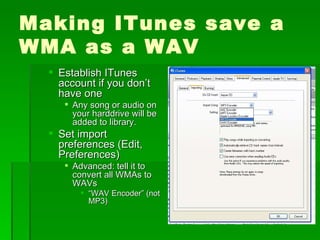
Making ITunes save a WMA as a WAV Establish ITunes account if you don’t have one Any song or audio on your harddrive will be added to library. Set import preferences (Edit, Preferences) Advanced: tell it to convert all WMAs to WAVs  “ WAV Encoder” (not MP3)
Another Cool App If you can upload to YouTube, it might embed in WP Even if not, it is still too cool.  Free and all that: Vuvox http://www.vuvox.com/collage/detail/01341d6333 http://www.vuvox.com/channels/10906

Digitalrecorders

  • 1.
    Adding Audio toStory Design Uploading Audio Files and Using Digital Recorders
  • 2.
    Uploading MP3 toWeb Open the file you were playing with and “Export” as an MP3, saving file to your Desktop Go to Desktop, Web Folder Drag your mp3 to this folder=ftp Ta-Da! Once get it on “web host,” figure out the URL Something like: http://students.otterbein.edu/yourname/audiofilename.mp3
  • 3.
    In WP Inpost or page’s story editor, Choose “link” Type in the URL. How will audience know it is audio? Explain with text: “To hear Dr. Kelly in her own words, click here” Or insert a clip art audio speaker icon Link that to the location on Otterbein server of audio file. (Icons might be good idea for “samples” page, too) See how to refine layout of images: Advanced Settings under “edit image”
  • 4.
    Capturing Audio usingDVR Check out from Diane Wootton during business hours or library (lending time is only a couple hours) Release “hold” button Check battery (see on screen) To help file management, note folder name (A, B, C, etc.) and when record Try test recording; by default, create new file # (01 or 20) When you stop and start again, will be file 02 or 21.
  • 5.
    Capturing Audio usingDVR If seems to be working, but you don’t hear anything, check volume level Hit + side of center button; will read out on screen. If you need to change any menu options, hold down OK button until menu appears.
  • 6.
    Record and DownloadingEveryone take turns recording something (can leave room) Get in habit of sliding “hold” button so don’t accidentally record over it! Done it! Rest of class work on WP site. When return, hit “release” button to expose USB jack. Will see several folders, so important to remember if yours in A or B, etc. Unfortunately, default file names NOT same as what you saw on screen, but odds are yours is the highest number.
  • 7.
    File Formats Whatcomes out of recorder: .WMA What Audacity can understand: .WAV The best way to save in Audactiy so you can come back to it later: .AUP What the web understands: .MP3 ITunes or another converter can take it from WMA to WAV before opening in Audacity Audacity can save both an .AUP and .WAV to an MP3 (as “save as”)
  • 8.
    Making ITunes savea WMA as a WAV Establish ITunes account if you don’t have one Any song or audio on your harddrive will be added to library. Set import preferences (Edit, Preferences) Advanced: tell it to convert all WMAs to WAVs “ WAV Encoder” (not MP3)
  • 9.
    Another Cool AppIf you can upload to YouTube, it might embed in WP Even if not, it is still too cool. Free and all that: Vuvox http://www.vuvox.com/collage/detail/01341d6333 http://www.vuvox.com/channels/10906

Editor's Notes

  • #3 Adjust levels using envelope Move tracks with fades.