Digital Forensics &
Incident Response
Fundamentals
Cado Security | 1
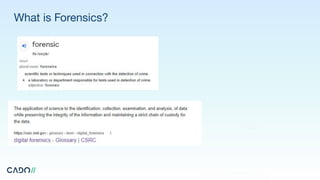
What is Forensics?
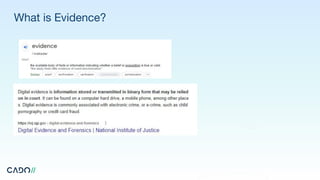
What is Evidence?
What is Volatile Data?
Two basic types of data are collected in computer forensics:
● Persistent data: Data stored on a local hard drive (or another medium) and is preserved
when the computer is turned off.
● Volatile data: Data that is stored in memory, or exists in transit, that will be lost when the
computer loses power or is turned off. Volatile data resides in registries, cache, and random
access memory (RAM). The investigation of this volatile data is called “live forensics”.
https://athenaforensics.co.uk/what-is-volatile-data/
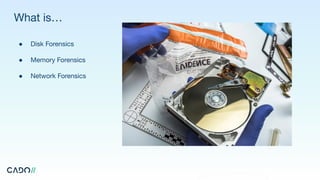
What is…
● Disk Forensics
● Memory Forensics
● Network Forensics
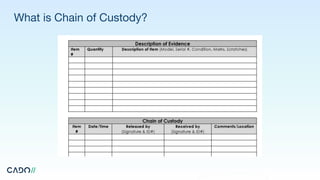
What is Chain of Custody?
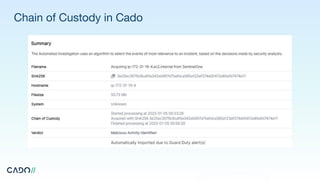
Chain of Custody in Cado
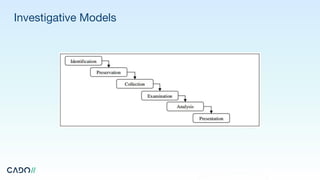
Investigative Models
Incident Response Planning - Be Prepared!
● Periodically run tabletop exercises to simulate incidents and build muscle memory across both executive and
operational teams
● Executives should be prepared to answer the following questions:
● Under what circumstances do you notify law enforcement, regulatory authorities, auditors and the
board?
● Will your organization pay a ransom? If so, how?
● If required, which outsourced incident response firm will you work with?
● If you lose access to core IT systems for an extended period of time? Do you have business continuity
and disaster recovery plans in place?
● If the primary communication methods are either unavailable or compromised, do you have backup or
out-of-band communications available?
● What working hours are incident responders expected to work in a high-severity incident?
● Do you have access to the data required to perform an investigation in all products and services?
Gather the Incident Response Team
The roles in an incident response team will vary depending on both the size of your team and the scale of the
incident. Most often, one person will take on a number of roles. A typical example of the roles in an incident
response team is:
● Leadership role - Commands the investigation and directs activities.
● Investigator role - Identifies incident root cause and the full scope of compromised systems and
data.
● Responder role - Works with internal teams and 3rd parties to recover and restore systems and
services and plan and coordinate remediation steps.
● Documentation role - Enables the investigation, remediation and potentially legal representation.
The legal representation may also be handled by inside or outside counsel (though only a small
number of incidents end up bringing in a legal representative).
Running an Investigation
First, identify the scope of the investigation by answering the following questions:
● Do you just need to recover services?
● Do you need to identify the root cause of the incident so it doesn’t happen again?
Most investigations start with a suspicious event - such as a detection for malware on a system. And then the
investigation progresses as you pivot based on timestamps or key findings and artifacts. For example:
● What other events happened just before or after the known bad event?
● Are there other suspect files in the same folder?
● Are other systems connected to known bad events or known compromised systems somehow?
Below we provide suggested investigative steps based on the Azure service involved, the type of incident, and
recommendations on tools that may be useful.
Containment & Remediation
During the containment phase of an incident, some questions that will be important to answer include:
● Can you limit the damage before it gets worse?
● Do you need to isolate virtual machines or services?
● Can you permanently bring the environment back to a safe state?
● If you have identified the root cause, can you fix the original issue? If not, can you mitigate the risk
with other preventative technology or additional monitoring to identify future use?
● Have you hunted for other potential compromises? For example, by importing key systems and
scanning for malware.
● Have you reviewed the best practices above and confirmed if any need to be implemented?
● Have you enabled additional monitoring where gaps have been identified?
● Have you documented all findings and actions taken?
● Do you need to publish an incident report?
● Have you identified lessons learned and conducted a wrap-up meeting?
Cado Platform
Free 14-day trial
Receive unlimited access to
the Cado Platform for 14 days.
www.cadosecurity.com/free-investigation/
Incident Response
at Cloud Speed.
www.cadosecurity.com

Digital Forensics & Incident Response Fundamentals.pdf

  • 1.
    Digital Forensics & IncidentResponse Fundamentals Cado Security | 1
  • 2.
  • 3.
  • 4.
    What is VolatileData? Two basic types of data are collected in computer forensics: ● Persistent data: Data stored on a local hard drive (or another medium) and is preserved when the computer is turned off. ● Volatile data: Data that is stored in memory, or exists in transit, that will be lost when the computer loses power or is turned off. Volatile data resides in registries, cache, and random access memory (RAM). The investigation of this volatile data is called “live forensics”. https://athenaforensics.co.uk/what-is-volatile-data/
  • 5.
    What is… ● DiskForensics ● Memory Forensics ● Network Forensics
  • 6.
    What is Chainof Custody?
  • 7.
  • 8.
  • 9.
    Incident Response Planning- Be Prepared! ● Periodically run tabletop exercises to simulate incidents and build muscle memory across both executive and operational teams ● Executives should be prepared to answer the following questions: ● Under what circumstances do you notify law enforcement, regulatory authorities, auditors and the board? ● Will your organization pay a ransom? If so, how? ● If required, which outsourced incident response firm will you work with? ● If you lose access to core IT systems for an extended period of time? Do you have business continuity and disaster recovery plans in place? ● If the primary communication methods are either unavailable or compromised, do you have backup or out-of-band communications available? ● What working hours are incident responders expected to work in a high-severity incident? ● Do you have access to the data required to perform an investigation in all products and services?
  • 10.
    Gather the IncidentResponse Team The roles in an incident response team will vary depending on both the size of your team and the scale of the incident. Most often, one person will take on a number of roles. A typical example of the roles in an incident response team is: ● Leadership role - Commands the investigation and directs activities. ● Investigator role - Identifies incident root cause and the full scope of compromised systems and data. ● Responder role - Works with internal teams and 3rd parties to recover and restore systems and services and plan and coordinate remediation steps. ● Documentation role - Enables the investigation, remediation and potentially legal representation. The legal representation may also be handled by inside or outside counsel (though only a small number of incidents end up bringing in a legal representative).
  • 11.
    Running an Investigation First,identify the scope of the investigation by answering the following questions: ● Do you just need to recover services? ● Do you need to identify the root cause of the incident so it doesn’t happen again? Most investigations start with a suspicious event - such as a detection for malware on a system. And then the investigation progresses as you pivot based on timestamps or key findings and artifacts. For example: ● What other events happened just before or after the known bad event? ● Are there other suspect files in the same folder? ● Are other systems connected to known bad events or known compromised systems somehow? Below we provide suggested investigative steps based on the Azure service involved, the type of incident, and recommendations on tools that may be useful.
  • 12.
    Containment & Remediation Duringthe containment phase of an incident, some questions that will be important to answer include: ● Can you limit the damage before it gets worse? ● Do you need to isolate virtual machines or services? ● Can you permanently bring the environment back to a safe state? ● If you have identified the root cause, can you fix the original issue? If not, can you mitigate the risk with other preventative technology or additional monitoring to identify future use? ● Have you hunted for other potential compromises? For example, by importing key systems and scanning for malware. ● Have you reviewed the best practices above and confirmed if any need to be implemented? ● Have you enabled additional monitoring where gaps have been identified? ● Have you documented all findings and actions taken? ● Do you need to publish an incident report? ● Have you identified lessons learned and conducted a wrap-up meeting?
  • 13.
    Cado Platform Free 14-daytrial Receive unlimited access to the Cado Platform for 14 days. www.cadosecurity.com/free-investigation/
  • 14.
    Incident Response at CloudSpeed. www.cadosecurity.com