Minimizing Permissions for
Cloud Forensics: A Practical
Guide for Tightening Access in
the Cloud
Chris Doman
CTO/Co-Founder
Cado Security
Introduction
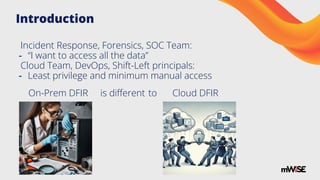
Incident Response, Forensics, SOC Team:
- “I want to access all the data”
Cloud Team, DevOps, Shift-Left principals:
- Least privilege and minimum manual access
On-Prem DFIR is different to Cloud DFIR
What to do?
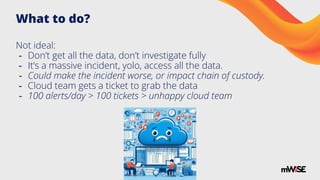
Not ideal:
- Don’t get all the data, don’t investigate fully
- It’s a massive incident, yolo, access all the data.
- Could make the incident worse, or impact chain of custody.
- Cloud team gets a ticket to grab the data
- 100 alerts/day > 100 tickets > unhappy cloud team
What to do?
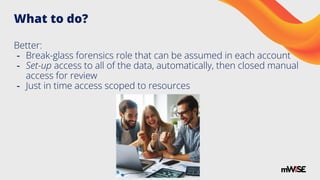
Better:
- Break-glass forensics role that can be assumed in each account
- Set-up access to all of the data, automatically, then closed manual
access for review
- Just in time access scoped to resources
Key Strategies
- Dedicated Forensics Account: Establish a separate cloud
account or subscription solely for forensics activities.
- Cross-Account Roles: Grant the forensics account access to
other accounts using cross-account IAM roles with the principle of
least privilege.
- Temporary Credentials: Use short-lived credentials, like STS
tokens, for just-in-time access during an investigation scoped to
specific resources.
- Tag-Based Access Control: Pre-deploy access, only to resources
with a tag for "Forensics".
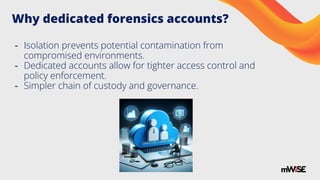
Why dedicated forensics accounts?
- Isolation prevents potential contamination from
compromised environments.
- Dedicated accounts allow for tighter access control and
policy enforcement.
- Simpler chain of custody and governance.
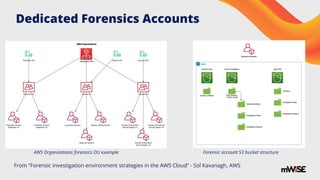
Dedicated Forensics Accounts
From “Forensic investigation environment strategies in the AWS Cloud” - Sol Kavanagh, AWS
Forensic account S3 bucket structure
AWS Organizations forensics OU example
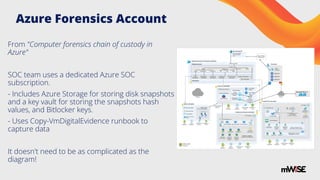
Azure Forensics Account
From "Computer forensics chain of custody in
Azure"
SOC team uses a dedicated Azure SOC
subscription.
- Includes Azure Storage for storing disk snapshots
and a key vault for storing the snapshots hash
values, and Bitlocker keys.
- Uses Copy-VmDigitalEvidence runbook to
capture data
It doesn't need to be as complicated as the
diagram!
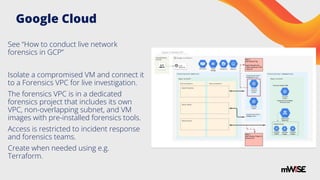
Google Cloud
See “How to conduct live network
forensics in GCP”
Isolate a compromised VM and connect it
to a Forensics VPC for live investigation.
The forensics VPC is in a dedicated
forensics project that includes its own
VPC, non-overlapping subnet, and VM
images with pre-installed forensics tools.
Access is restricted to incident response
and forensics teams.
Create when needed using e.g.
Terraform.
Cloud Chain of Custody Store
Container Forensics Challenges
- Ephemeral, dynamic
- Container Orchestration
- Managed vs unmanaged
- Private Clusters
- Distroless Containers
- IAM and Kubernetes RBAC
- Various Container Filesystems
- Various Container Runtimes
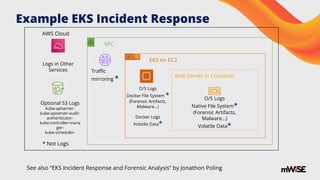
Example EKS Incident Response
AWS Cloud
VPC
EKS on EC2
Web Server in Container
Logs in Other
Services Traffic
mirroring *
O/S Logs
Docker File System *
(Forensic Artifacts,
Malware…)
Docker Logs
Volatile Data*
O/S Logs
Native File System*
(Forensic Artifacts,
Malware…)
Volatile Data*
* Not Logs
Optional S3 Logs
kube-apiserver-
kube-apiserver-audit-
authenticator-
kube-controller-mana
ger-
kube-scheduler-
See also “EKS Incident Response and Forensic Analysis” by Jonathon Poling
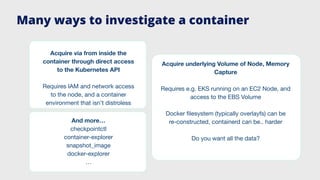
And more…
checkpointctl
container-explorer
snapshot_image
docker-explorer
…
Acquire via from inside the
container through direct access
to the Kubernetes API
Requires IAM and network access
to the node, and a container
environment that isn’t distroless
Acquire underlying Volume of Node, Memory
Capture
Requires e.g. EKS running on an EC2 Node, and
access to the EBS Volume
Docker filesystem (typically overlayfs) can be
re-constructed, containerd can be.. harder
Do you want all the data?
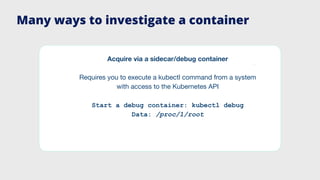
Many ways to investigate a container
Acquire via a sidecar/debug container
Requires you to execute a kubectl command from a system
with access to the Kubernetes API
Start a debug container: kubectl debug
Data: /proc/1/root
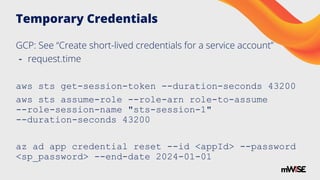
Temporary Credentials
GCP: See “Create short-lived credentials for a service account”
- request.time
aws sts get-session-token --duration-seconds 43200
aws sts assume-role --role-arn role-to-assume
--role-session-name "sts-session-1"
--duration-seconds 43200
az ad app credential reset --id <appId> --password
<sp_password> --end-date 2024-01-01
Controlling Access with Tags
GCP
expression: > resource.matchTag('tagKeys/ForensicsEnabled', '*')
AWS
Condition: StringLike: aws:ResourceTag/Name: ForensicsEnabled
Condition: StringLike: ssm:resourceTag/SSMEnabled: True
Azure
"Condition": "StringLike(Resource[Microsoft.Resources/tags.example_key], '*')"
Example: Pulling Live Data from EC2s
{
"Sid":"ScopedSsmForensicTriage",
"Effect":"Allow",
"Action":["ssm:SendCommand","ssm:DescribeInstanceInformation","ssm:S
tartSession","ssm:TerminateSession"],
"Resource":["arn:aws:ec2:*:*:instance/*"],
"Condition":{"StringLike":{"ssm:resourceTag/SSMEnabled":["True"]}}
}
Pre-deploy the role - this can take more time.
Then tag systems as needed - this is generally easier for the cloud team.
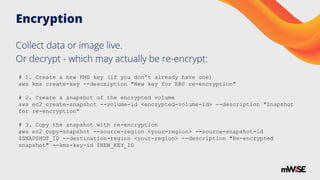
Encryption
Collect data or image live.
Or decrypt - which may actually be re-encrypt:
# 1. Create a new KMS key (if you don't already have one)
aws kms create-key --description "New key for EBS re-encryption"
# 2. Create a snapshot of the encrypted volume
aws ec2 create-snapshot --volume-id <encrypted-volume-id> --description "Snapshot
for re-encryption"
# 3. Copy the snapshot with re-encryption
aws ec2 copy-snapshot --source-region <your-region> --source-snapshot-id
$SNAPSHOT_ID --destination-region <your-region> --description "Re-encrypted
snapshot" --kms-key-id $NEW_KEY_ID
Service Control Policies
My role has access but.. I can’t access the data?
Often caused by an SCP policy somewhere with an explicit deny
Effect: Deny
Action: - ec2:CreateSnapshot
Resource: '*'
GCP: See Organization Policy Service
Azure: See Azure Policy
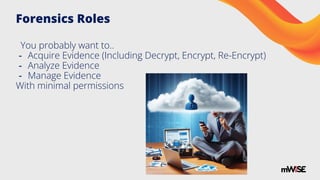
Forensics Roles
You probably want to..
- Acquire Evidence (Including Decrypt, Encrypt, Re-Encrypt)
- Analyze Evidence
- Manage Evidence
With minimal permissions
References
See also:
- Google Cloud Data incident response process
- AWS Security Incident Response Guide
- Azure Incident response overview
“A New Perspective on Resource-Level Cloud Forensics”, mWise 2023
All images generated by DALLE-3, or referenced authors.
Any questions?
Thank-you for listening!
@chrisdoman - cadosecurity.com

Minimizing Permissions for Cloud Forensics_ A Practical Guide for Tightening Access in the Cloud

  • 1.
    Minimizing Permissions for CloudForensics: A Practical Guide for Tightening Access in the Cloud Chris Doman CTO/Co-Founder Cado Security
  • 2.
    Introduction Incident Response, Forensics,SOC Team: - “I want to access all the data” Cloud Team, DevOps, Shift-Left principals: - Least privilege and minimum manual access On-Prem DFIR is different to Cloud DFIR
  • 3.
    What to do? Notideal: - Don’t get all the data, don’t investigate fully - It’s a massive incident, yolo, access all the data. - Could make the incident worse, or impact chain of custody. - Cloud team gets a ticket to grab the data - 100 alerts/day > 100 tickets > unhappy cloud team
  • 4.
    What to do? Better: -Break-glass forensics role that can be assumed in each account - Set-up access to all of the data, automatically, then closed manual access for review - Just in time access scoped to resources
  • 5.
    Key Strategies - DedicatedForensics Account: Establish a separate cloud account or subscription solely for forensics activities. - Cross-Account Roles: Grant the forensics account access to other accounts using cross-account IAM roles with the principle of least privilege. - Temporary Credentials: Use short-lived credentials, like STS tokens, for just-in-time access during an investigation scoped to specific resources. - Tag-Based Access Control: Pre-deploy access, only to resources with a tag for "Forensics".
  • 6.
    Why dedicated forensicsaccounts? - Isolation prevents potential contamination from compromised environments. - Dedicated accounts allow for tighter access control and policy enforcement. - Simpler chain of custody and governance.
  • 7.
    Dedicated Forensics Accounts From“Forensic investigation environment strategies in the AWS Cloud” - Sol Kavanagh, AWS Forensic account S3 bucket structure AWS Organizations forensics OU example
  • 8.
    Azure Forensics Account From"Computer forensics chain of custody in Azure" SOC team uses a dedicated Azure SOC subscription. - Includes Azure Storage for storing disk snapshots and a key vault for storing the snapshots hash values, and Bitlocker keys. - Uses Copy-VmDigitalEvidence runbook to capture data It doesn't need to be as complicated as the diagram!
  • 9.
    Google Cloud See “Howto conduct live network forensics in GCP” Isolate a compromised VM and connect it to a Forensics VPC for live investigation. The forensics VPC is in a dedicated forensics project that includes its own VPC, non-overlapping subnet, and VM images with pre-installed forensics tools. Access is restricted to incident response and forensics teams. Create when needed using e.g. Terraform.
  • 10.
    Cloud Chain ofCustody Store
  • 11.
    Container Forensics Challenges -Ephemeral, dynamic - Container Orchestration - Managed vs unmanaged - Private Clusters - Distroless Containers - IAM and Kubernetes RBAC - Various Container Filesystems - Various Container Runtimes
  • 12.
    Example EKS IncidentResponse AWS Cloud VPC EKS on EC2 Web Server in Container Logs in Other Services Traffic mirroring * O/S Logs Docker File System * (Forensic Artifacts, Malware…) Docker Logs Volatile Data* O/S Logs Native File System* (Forensic Artifacts, Malware…) Volatile Data* * Not Logs Optional S3 Logs kube-apiserver- kube-apiserver-audit- authenticator- kube-controller-mana ger- kube-scheduler- See also “EKS Incident Response and Forensic Analysis” by Jonathon Poling
  • 13.
    And more… checkpointctl container-explorer snapshot_image docker-explorer … Acquire viafrom inside the container through direct access to the Kubernetes API Requires IAM and network access to the node, and a container environment that isn’t distroless Acquire underlying Volume of Node, Memory Capture Requires e.g. EKS running on an EC2 Node, and access to the EBS Volume Docker filesystem (typically overlayfs) can be re-constructed, containerd can be.. harder Do you want all the data? Many ways to investigate a container
  • 14.
    Many ways toinvestigate a container Acquire via a sidecar/debug container Requires you to execute a kubectl command from a system with access to the Kubernetes API Start a debug container: kubectl debug Data: /proc/1/root
  • 15.
    Temporary Credentials GCP: See“Create short-lived credentials for a service account” - request.time aws sts get-session-token --duration-seconds 43200 aws sts assume-role --role-arn role-to-assume --role-session-name "sts-session-1" --duration-seconds 43200 az ad app credential reset --id <appId> --password <sp_password> --end-date 2024-01-01
  • 16.
    Controlling Access withTags GCP expression: > resource.matchTag('tagKeys/ForensicsEnabled', '*') AWS Condition: StringLike: aws:ResourceTag/Name: ForensicsEnabled Condition: StringLike: ssm:resourceTag/SSMEnabled: True Azure "Condition": "StringLike(Resource[Microsoft.Resources/tags.example_key], '*')"
  • 17.
    Example: Pulling LiveData from EC2s { "Sid":"ScopedSsmForensicTriage", "Effect":"Allow", "Action":["ssm:SendCommand","ssm:DescribeInstanceInformation","ssm:S tartSession","ssm:TerminateSession"], "Resource":["arn:aws:ec2:*:*:instance/*"], "Condition":{"StringLike":{"ssm:resourceTag/SSMEnabled":["True"]}} } Pre-deploy the role - this can take more time. Then tag systems as needed - this is generally easier for the cloud team.
  • 18.
    Encryption Collect data orimage live. Or decrypt - which may actually be re-encrypt: # 1. Create a new KMS key (if you don't already have one) aws kms create-key --description "New key for EBS re-encryption" # 2. Create a snapshot of the encrypted volume aws ec2 create-snapshot --volume-id <encrypted-volume-id> --description "Snapshot for re-encryption" # 3. Copy the snapshot with re-encryption aws ec2 copy-snapshot --source-region <your-region> --source-snapshot-id $SNAPSHOT_ID --destination-region <your-region> --description "Re-encrypted snapshot" --kms-key-id $NEW_KEY_ID
  • 19.
    Service Control Policies Myrole has access but.. I can’t access the data? Often caused by an SCP policy somewhere with an explicit deny Effect: Deny Action: - ec2:CreateSnapshot Resource: '*' GCP: See Organization Policy Service Azure: See Azure Policy
  • 20.
    Forensics Roles You probablywant to.. - Acquire Evidence (Including Decrypt, Encrypt, Re-Encrypt) - Analyze Evidence - Manage Evidence With minimal permissions
  • 21.
    References See also: - GoogleCloud Data incident response process - AWS Security Incident Response Guide - Azure Incident response overview “A New Perspective on Resource-Level Cloud Forensics”, mWise 2023 All images generated by DALLE-3, or referenced authors.
  • 22.
    Any questions? Thank-you forlistening! @chrisdoman - cadosecurity.com