Application Note: FORTÉ

                                             Diesel Sector Combustion Modeling with
                                             FORTÉ
                                             FORTÉ-APP-Diesel Sector (v1.0) April 4, 2011


Overview
          This applications note provides instructions for performing 3-D diesel-engine combustion simulations
          with advanced spray models and accurate detailed chemistry. The simulation uses advanced
          chemistry solution algorithms that include dynamic adaptive chemistry (DAC) and dynamic cell
          clustering (DCC). The simulation employs a multi-component diesel-fuel surrogate mechanism with 437
          species that was reduced for the conditions of interest from a comprehensive and well validated master
          mechanism. The results show prediction of ignition behavior for low-temperature combustion
          conditions, which provides good agreement with measured pressure and heat-release profiles. The
          results also demonstrate some advantages of using a multi-component surrogate to capture
          vaporization stratification within the engine cylinder.


Diesel Combustion Modeling Overview
          Diesel engines are the workhorse of the transportation industry. Focus on improving diesel-engine
          performance is therefore key to addressing regulatory objectives of reducing fuel consumption and
          global warming gases. Low-temperature combustion regimes are characteristic of the advanced
          combustion strategies being considered to improve performance. Such regimes promise greater
          efficiency and fuel consumption with lower emissions. Low-temperature combustion regimes,
          however, rely more critically on the kinetics of the fuel combustion than do more conventional operating
          conditions. Accurate simulation therefore requires a detailed kinetics description for the fuel
          combustion. The use of accurate in-cylinder combustion simulation offers the opportunity to reduce the
          overall costs of developing clean diesel technologies, while decreasing the time to market for novel
          designs.


FORTÉ Interface and Design Flow
          This application note describes the use of a sector-mesh model to simulate diesel-engine in-cylinder
          combustion, assuming axis symmetry based on the number of nozzle holes. The simulation uses a
          multi-component surrogate-fuel model to capture both the complex kinetics of low-temperature
          combustion and the vaporization and spray-break-up phenomena in the in-cylinder combustion
          process. Details of the spray model set up are provided in the Multi-Component Spray Modeling with
          FORTÉ Application Note.


©Reaction Design. All rights reserved. All Reaction Design trademarks, patents, and disclaimers are listed at www.reactiondesign.com.
   All other trademarks and registered trademarks are the property of their respective owners. All specifications are subject to change without notice.

FORTÉ-APP-Diesel Sector (v1.0) April 4, 2011                   www.reactiondesign.com                                                         1
                                                                  1-858-550-1920
Diesel Engine Modeling with FORTÉ

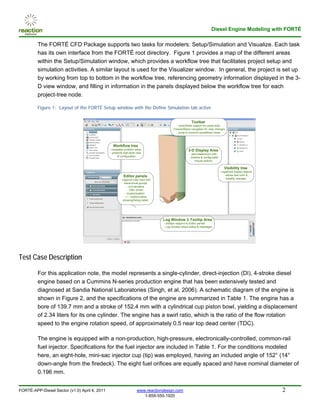
         The FORTÉ CFD Package supports two tasks for modelers: Setup/Simulation and Visualize. Each task
         has its own interface from the FORTÉ root directory. Figure 1 provides a map of the different areas
         within the Setup/Simulation window, which provides a workflow tree that facilitates project setup and
         simulation activities. A similar layout is used for the Visualizer window. In general, the project is set up
         by working from top to bottom in the workflow tree, referencing geometry information displayed in the 3-
         D view window, and filling in information in the panels displayed below the workflow tree for each
         project-tree node.

         Figure 1: Layout of the FORTÉ Setup window with the Define Simulation tab active

                                                                                                         Toolbar
                                                                                              - Undo/Redo support for panel edits
                                                                                          - Forward/Back navigation for view changes
                                                                                              - Jump to common predefined views


                                                 Workflow tree
                                               - navigates problem setup                               3-D Display Area
                                               - presents high-level view                               - pan/rotate/zoom with
                                                     of configuration                                    intuitive & configurable
                                                                                                             mouse actions

                                                                                                                                       Visibility tree
                                                                                                                                    - organizes display objects
                                                          Editor panels                                                                 - allows fast color &
                                                       - organize user input into                                                         visibility changes
                                                          hierarchical groups
                                                            - unit sensitive
                                                             - XML-driven
                                                            (customizable)
                                                           + / - buttons allow
                                                         showing/hiding detail


                                                                                    Log Window & Tooltip Area
                                                                                    - tooltips respond to Editor panels
                                                                                    - Log window relays status & messages


Test Case Description

         For this application note, the model represents a single-cylinder, direct-injection (DI), 4-stroke diesel
         engine based on a Cummins N-series production engine that has been extensively tested and
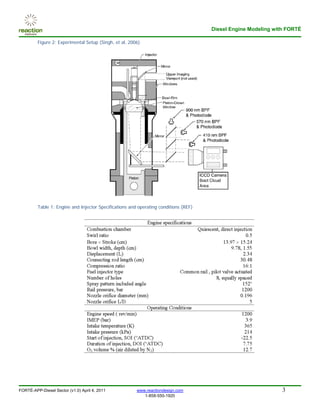
         diagnosed at Sandia National Laboratories (Singh, et al, 2006). A schematic diagram of the engine is
         shown in Figure 2, and the specifications of the engine are summarized in Table 1. The engine has a
         bore of 139.7 mm and a stroke of 152.4 mm with a cylindrical cup piston bowl, yielding a displacement
         of 2.34 liters for its one cylinder. The engine has a swirl ratio, which is the ratio of the flow rotation
         speed to the engine rotation speed, of approximately 0.5 near top dead center (TDC).

         The engine is equipped with a non-production, high-pressure, electronically-controlled, common-rail
         fuel injector. Specifications for the fuel injector are included in Table 1. For the conditions modeled
         here, an eight-hole, mini-sac injector cup (tip) was employed, having an included angle of 152° (14°
         down-angle from the firedeck). The eight fuel orifices are equally spaced and have nominal diameter of
         0.196 mm.


FORTÉ-APP-Diesel Sector (v1.0) April 4, 2011                         www.reactiondesign.com                                                                       2
                                                                        1-858-550-1920
Diesel Engine Modeling with FORTÉ

         Figure 2: Experimental Setup (Singh, et al, 2006)


         Table 1: Engine and Injector Specifications and operating conditions (REF)


FORTÉ-APP-Diesel Sector (v1.0) April 4, 2011            www.reactiondesign.com                                  3
                                                           1-858-550-1920
Diesel Engine Modeling with FORTÉ

Diesel Sector Model Setup in FORTÉ

         To setup the problem in FORTÉ, we begin by reading in an existing mesh file and fuel mechanism and
         then we will input the information required to setup and run the test case.

          1. In the Editor panel, select the IC Engine option and check both Use Injector Spray Model and
             Use Soot Model.

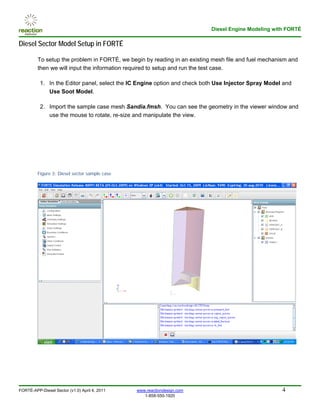
          2. Import the sample case mesh Sandia.fmsh. You can see the geometry in the viewer window and
             use the mouse to rotate, re-size and manipulate the view.


         Figure 3: Diesel sector sample case


FORTÉ-APP-Diesel Sector (v1.0) April 4, 2011   www.reactiondesign.com                                4
                                                  1-858-550-1920
Diesel Engine Modeling with FORTÉ

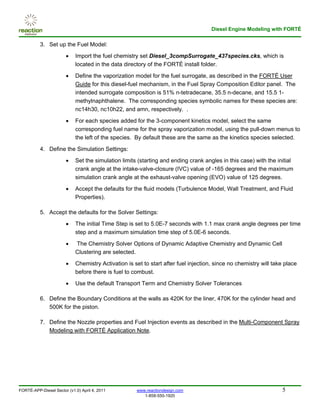
          3. Set up the Fuel Model:

                       •    Import the fuel chemistry set Diesel_3compSurrogate_437species.cks, which is
                            located in the data directory of the FORTÉ install folder.

                       •    Define the vaporization model for the fuel surrogate, as described in the FORTÉ User
                            Guide for this diesel-fuel mechanism, in the Fuel Spray Composition Editor panel. The
                            intended surrogate composition is 51% n-tetradecane, 35.5 n-decane, and 15.5 1-
                            methylnaphthalene. The corresponding species symbolic names for these species are:
                            nc14h30, nc10h22, and amn, respectively. .

                       •    For each species added for the 3-component kinetics model, select the same
                            corresponding fuel name for the spray vaporization model, using the pull-down menus to
                            the left of the species. By default these are the same as the kinetics species selected.

          4. Define the Simulation Settings:

                       •    Set the simulation limits (starting and ending crank angles in this case) with the initial
                            crank angle at the intake-valve-closure (IVC) value of -165 degrees and the maximum
                            simulation crank angle at the exhaust-valve opening (EVO) value of 125 degrees.

                       •    Accept the defaults for the fluid models (Turbulence Model, Wall Treatment, and Fluid
                            Properties).

          5. Accept the defaults for the Solver Settings:

                       •    The initial Time Step is set to 5.0E-7 seconds with 1.1 max crank angle degrees per time
                            step and a maximum simulation time step of 5.0E-6 seconds.

                       •    The Chemistry Solver Options of Dynamic Adaptive Chemistry and Dynamic Cell
                            Clustering are selected.

                       •    Chemistry Activation is set to start after fuel injection, since no chemistry will take place
                            before there is fuel to combust.

                       •    Use the default Transport Term and Chemistry Solver Tolerances

          6. Define the Boundary Conditions at the walls as 420K for the liner, 470K for the cylinder head and
             500K for the piston.

          7. Define the Nozzle properties and Fuel Injection events as described in the Multi-Component Spray
             Modeling with FORTÉ Application Note.


FORTÉ-APP-Diesel Sector (v1.0) April 4, 2011         www.reactiondesign.com                                       5
                                                        1-858-550-1920
Diesel Engine Modeling with FORTÉ

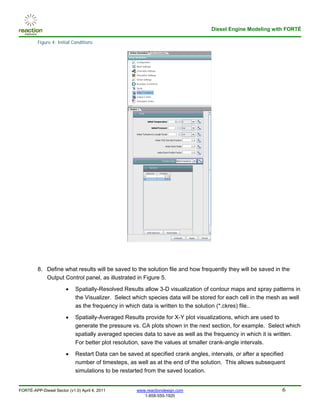
         Figure 4: Initial Conditions


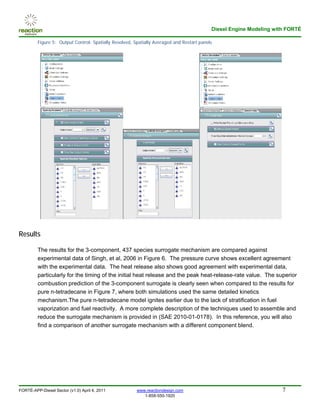
         8. Define what results will be saved to the solution file and how frequently they will be saved in the
            Output Control panel, as illustrated in Figure 5.
                       •    Spatially-Resolved Results allow 3-D visualization of contour maps and spray patterns in
                            the Visualizer. Select which species data will be stored for each cell in the mesh as well
                            as the frequency in which data is written to the solution (*.ckres) file..

                       •    Spatially-Averaged Results provide for X-Y plot visualizations, which are used to
                            generate the pressure vs. CA plots shown in the next section, for example. Select which
                            spatially averaged species data to save as well as the frequency in which it is written.
                            For better plot resolution, save the values at smaller crank-angle intervals.

                       •    Restart Data can be saved at specified crank angles, intervals, or after a specified
                            number of timesteps, as well as at the end of the solution. This allows subsequent
                            simulations to be restarted from the saved location.


FORTÉ-APP-Diesel Sector (v1.0) April 4, 2011        www.reactiondesign.com                                    6
                                                       1-858-550-1920
Diesel Engine Modeling with FORTÉ

         Figure 5: Output Control: Spatially Resolved, Spatially Averaged and Restart panels


Results

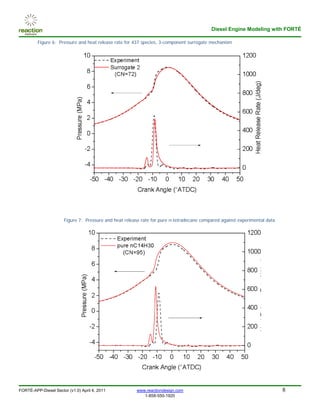
         The results for the 3-component, 437 species surrogate mechanism are compared against
         experimental data of Singh, et al, 2006 in Figure 6. The pressure curve shows excellent agreement
         with the experimental data. The heat release also shows good agreement with experimental data,
         particularly for the timing of the initial heat release and the peak heat-release-rate value. The superior
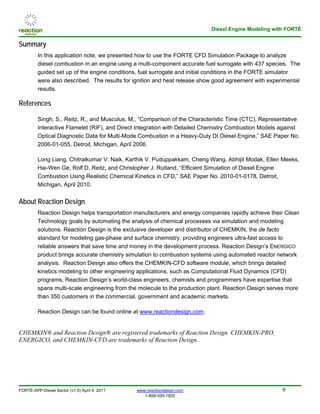
         combustion prediction of the 3-component surrogate is clearly seen when compared to the results for
         pure n-tetradecane in Figure 7, where both simulations used the same detailed kinetics
         mechanism.The pure n-tetradecane model ignites earlier due to the lack of stratification in fuel
         vaporization and fuel reactivity. A more complete description of the techniques used to assemble and
         reduce the surrogate mechanism is provided in (SAE 2010-01-0178). In this reference, you will also
         find a comparison of another surrogate mechanism with a different component blend.


FORTÉ-APP-Diesel Sector (v1.0) April 4, 2011            www.reactiondesign.com                                       7
                                                           1-858-550-1920
Diesel Engine Modeling with FORTÉ

         Figure 6: Pressure and heat release rate for 437 species, 3-component surrogate mechanism


                      Figure 7: Pressure and heat release rate for pure n-tetradecane compared against experimental data


FORTÉ-APP-Diesel Sector (v1.0) April 4, 2011           www.reactiondesign.com                                              8
                                                          1-858-550-1920
Diesel Engine Modeling with FORTÉ

Summary
         In this application note, we presented how to use the FORTE CFD Simulation Package to analyze
         diesel combustion in an engine using a multi-component accurate fuel surrogate with 437 species. The
         guided set up of the engine conditions, fuel surrogate and initial conditions in the FORTE simulator
         were also described. The results for ignition and heat release show good agreement with experimental
         results.

References

         Singh, S., Reitz, R., and Musculus, M., “Comparison of the Characteristic Time (CTC), Representative
         Interactive Flamelet (RIF), and Direct Integration with Detailed Chemistry Combustion Models against
         Optical Diagnostic Data for Multi-Mode Combustion in a Heavy-Duty DI Diesel Engine,” SAE Paper No.
         2006-01-055, Detroit, Michigan, April 2006.

         Long Liang, Chitralkumar V. Naik, Karthik V. Puduppakkam, Cheng Wang, Abhijit Modak, Ellen Meeks,
         Hai-Wen Ge, Rolf D. Reitz, and Christopher J. Rutland, “Efficient Simulation of Diesel Engine
         Combustion Using Realistic Chemical Kinetics in CFD,” SAE Paper No. 2010-01-0178, Detroit,
         Michigan, April 2010.


About Reaction Design
         Reaction Design helps transportation manufacturers and energy companies rapidly achieve their Clean
         Technology goals by automating the analysis of chemical processes via simulation and modeling
         solutions. Reaction Design is the exclusive developer and distributor of CHEMKIN, the de facto
         standard for modeling gas-phase and surface chemistry, providing engineers ultra-fast access to
         reliable answers that save time and money in the development process. Reaction Design’s ENERGICO
         product brings accurate chemistry simulation to combustion systems using automated reactor network
         analysis. Reaction Design also offers the CHEMKIN-CFD software module, which brings detailed
         kinetics modeling to other engineering applications, such as Computational Fluid Dynamics (CFD)
         programs. Reaction Design’s world-class engineers, chemists and programmers have expertise that
         spans multi-scale engineering from the molecule to the production plant. Reaction Design serves more
         than 350 customers in the commercial, government and academic markets.

         Reaction Design can be found online at www.reactiondesign.com.


CHEMKIN® and Reaction Design® are registered trademarks of Reaction Design. CHEMKIN-PRO,
ENERGICO, and CHEMKIN-CFD are trademarks of Reaction Design.


FORTÉ-APP-Diesel Sector (v1.0) April 4, 2011   www.reactiondesign.com                                 9
                                                  1-858-550-1920

Diesel Sector Combustion Modeling with FORTÉ

  • 1.
    Application Note: FORTÉ Diesel Sector Combustion Modeling with FORTÉ FORTÉ-APP-Diesel Sector (v1.0) April 4, 2011 Overview This applications note provides instructions for performing 3-D diesel-engine combustion simulations with advanced spray models and accurate detailed chemistry. The simulation uses advanced chemistry solution algorithms that include dynamic adaptive chemistry (DAC) and dynamic cell clustering (DCC). The simulation employs a multi-component diesel-fuel surrogate mechanism with 437 species that was reduced for the conditions of interest from a comprehensive and well validated master mechanism. The results show prediction of ignition behavior for low-temperature combustion conditions, which provides good agreement with measured pressure and heat-release profiles. The results also demonstrate some advantages of using a multi-component surrogate to capture vaporization stratification within the engine cylinder. Diesel Combustion Modeling Overview Diesel engines are the workhorse of the transportation industry. Focus on improving diesel-engine performance is therefore key to addressing regulatory objectives of reducing fuel consumption and global warming gases. Low-temperature combustion regimes are characteristic of the advanced combustion strategies being considered to improve performance. Such regimes promise greater efficiency and fuel consumption with lower emissions. Low-temperature combustion regimes, however, rely more critically on the kinetics of the fuel combustion than do more conventional operating conditions. Accurate simulation therefore requires a detailed kinetics description for the fuel combustion. The use of accurate in-cylinder combustion simulation offers the opportunity to reduce the overall costs of developing clean diesel technologies, while decreasing the time to market for novel designs. FORTÉ Interface and Design Flow This application note describes the use of a sector-mesh model to simulate diesel-engine in-cylinder combustion, assuming axis symmetry based on the number of nozzle holes. The simulation uses a multi-component surrogate-fuel model to capture both the complex kinetics of low-temperature combustion and the vaporization and spray-break-up phenomena in the in-cylinder combustion process. Details of the spray model set up are provided in the Multi-Component Spray Modeling with FORTÉ Application Note. ©Reaction Design. All rights reserved. All Reaction Design trademarks, patents, and disclaimers are listed at www.reactiondesign.com. All other trademarks and registered trademarks are the property of their respective owners. All specifications are subject to change without notice. FORTÉ-APP-Diesel Sector (v1.0) April 4, 2011 www.reactiondesign.com 1 1-858-550-1920
  • 2.
    Diesel Engine Modelingwith FORTÉ The FORTÉ CFD Package supports two tasks for modelers: Setup/Simulation and Visualize. Each task has its own interface from the FORTÉ root directory. Figure 1 provides a map of the different areas within the Setup/Simulation window, which provides a workflow tree that facilitates project setup and simulation activities. A similar layout is used for the Visualizer window. In general, the project is set up by working from top to bottom in the workflow tree, referencing geometry information displayed in the 3- D view window, and filling in information in the panels displayed below the workflow tree for each project-tree node. Figure 1: Layout of the FORTÉ Setup window with the Define Simulation tab active Toolbar - Undo/Redo support for panel edits - Forward/Back navigation for view changes - Jump to common predefined views Workflow tree - navigates problem setup 3-D Display Area - presents high-level view - pan/rotate/zoom with of configuration intuitive & configurable mouse actions Visibility tree - organizes display objects Editor panels - allows fast color & - organize user input into visibility changes hierarchical groups - unit sensitive - XML-driven (customizable) + / - buttons allow showing/hiding detail Log Window & Tooltip Area - tooltips respond to Editor panels - Log window relays status & messages Test Case Description For this application note, the model represents a single-cylinder, direct-injection (DI), 4-stroke diesel engine based on a Cummins N-series production engine that has been extensively tested and diagnosed at Sandia National Laboratories (Singh, et al, 2006). A schematic diagram of the engine is shown in Figure 2, and the specifications of the engine are summarized in Table 1. The engine has a bore of 139.7 mm and a stroke of 152.4 mm with a cylindrical cup piston bowl, yielding a displacement of 2.34 liters for its one cylinder. The engine has a swirl ratio, which is the ratio of the flow rotation speed to the engine rotation speed, of approximately 0.5 near top dead center (TDC). The engine is equipped with a non-production, high-pressure, electronically-controlled, common-rail fuel injector. Specifications for the fuel injector are included in Table 1. For the conditions modeled here, an eight-hole, mini-sac injector cup (tip) was employed, having an included angle of 152° (14° down-angle from the firedeck). The eight fuel orifices are equally spaced and have nominal diameter of 0.196 mm. FORTÉ-APP-Diesel Sector (v1.0) April 4, 2011 www.reactiondesign.com 2 1-858-550-1920
  • 3.
    Diesel Engine Modelingwith FORTÉ Figure 2: Experimental Setup (Singh, et al, 2006) Table 1: Engine and Injector Specifications and operating conditions (REF) FORTÉ-APP-Diesel Sector (v1.0) April 4, 2011 www.reactiondesign.com 3 1-858-550-1920
  • 4.
    Diesel Engine Modelingwith FORTÉ Diesel Sector Model Setup in FORTÉ To setup the problem in FORTÉ, we begin by reading in an existing mesh file and fuel mechanism and then we will input the information required to setup and run the test case. 1. In the Editor panel, select the IC Engine option and check both Use Injector Spray Model and Use Soot Model. 2. Import the sample case mesh Sandia.fmsh. You can see the geometry in the viewer window and use the mouse to rotate, re-size and manipulate the view. Figure 3: Diesel sector sample case FORTÉ-APP-Diesel Sector (v1.0) April 4, 2011 www.reactiondesign.com 4 1-858-550-1920
  • 5.
    Diesel Engine Modelingwith FORTÉ 3. Set up the Fuel Model: • Import the fuel chemistry set Diesel_3compSurrogate_437species.cks, which is located in the data directory of the FORTÉ install folder. • Define the vaporization model for the fuel surrogate, as described in the FORTÉ User Guide for this diesel-fuel mechanism, in the Fuel Spray Composition Editor panel. The intended surrogate composition is 51% n-tetradecane, 35.5 n-decane, and 15.5 1- methylnaphthalene. The corresponding species symbolic names for these species are: nc14h30, nc10h22, and amn, respectively. . • For each species added for the 3-component kinetics model, select the same corresponding fuel name for the spray vaporization model, using the pull-down menus to the left of the species. By default these are the same as the kinetics species selected. 4. Define the Simulation Settings: • Set the simulation limits (starting and ending crank angles in this case) with the initial crank angle at the intake-valve-closure (IVC) value of -165 degrees and the maximum simulation crank angle at the exhaust-valve opening (EVO) value of 125 degrees. • Accept the defaults for the fluid models (Turbulence Model, Wall Treatment, and Fluid Properties). 5. Accept the defaults for the Solver Settings: • The initial Time Step is set to 5.0E-7 seconds with 1.1 max crank angle degrees per time step and a maximum simulation time step of 5.0E-6 seconds. • The Chemistry Solver Options of Dynamic Adaptive Chemistry and Dynamic Cell Clustering are selected. • Chemistry Activation is set to start after fuel injection, since no chemistry will take place before there is fuel to combust. • Use the default Transport Term and Chemistry Solver Tolerances 6. Define the Boundary Conditions at the walls as 420K for the liner, 470K for the cylinder head and 500K for the piston. 7. Define the Nozzle properties and Fuel Injection events as described in the Multi-Component Spray Modeling with FORTÉ Application Note. FORTÉ-APP-Diesel Sector (v1.0) April 4, 2011 www.reactiondesign.com 5 1-858-550-1920
  • 6.
    Diesel Engine Modelingwith FORTÉ Figure 4: Initial Conditions 8. Define what results will be saved to the solution file and how frequently they will be saved in the Output Control panel, as illustrated in Figure 5. • Spatially-Resolved Results allow 3-D visualization of contour maps and spray patterns in the Visualizer. Select which species data will be stored for each cell in the mesh as well as the frequency in which data is written to the solution (*.ckres) file.. • Spatially-Averaged Results provide for X-Y plot visualizations, which are used to generate the pressure vs. CA plots shown in the next section, for example. Select which spatially averaged species data to save as well as the frequency in which it is written. For better plot resolution, save the values at smaller crank-angle intervals. • Restart Data can be saved at specified crank angles, intervals, or after a specified number of timesteps, as well as at the end of the solution. This allows subsequent simulations to be restarted from the saved location. FORTÉ-APP-Diesel Sector (v1.0) April 4, 2011 www.reactiondesign.com 6 1-858-550-1920
  • 7.
    Diesel Engine Modelingwith FORTÉ Figure 5: Output Control: Spatially Resolved, Spatially Averaged and Restart panels Results The results for the 3-component, 437 species surrogate mechanism are compared against experimental data of Singh, et al, 2006 in Figure 6. The pressure curve shows excellent agreement with the experimental data. The heat release also shows good agreement with experimental data, particularly for the timing of the initial heat release and the peak heat-release-rate value. The superior combustion prediction of the 3-component surrogate is clearly seen when compared to the results for pure n-tetradecane in Figure 7, where both simulations used the same detailed kinetics mechanism.The pure n-tetradecane model ignites earlier due to the lack of stratification in fuel vaporization and fuel reactivity. A more complete description of the techniques used to assemble and reduce the surrogate mechanism is provided in (SAE 2010-01-0178). In this reference, you will also find a comparison of another surrogate mechanism with a different component blend. FORTÉ-APP-Diesel Sector (v1.0) April 4, 2011 www.reactiondesign.com 7 1-858-550-1920
  • 8.
    Diesel Engine Modelingwith FORTÉ Figure 6: Pressure and heat release rate for 437 species, 3-component surrogate mechanism Figure 7: Pressure and heat release rate for pure n-tetradecane compared against experimental data FORTÉ-APP-Diesel Sector (v1.0) April 4, 2011 www.reactiondesign.com 8 1-858-550-1920
  • 9.
    Diesel Engine Modelingwith FORTÉ Summary In this application note, we presented how to use the FORTE CFD Simulation Package to analyze diesel combustion in an engine using a multi-component accurate fuel surrogate with 437 species. The guided set up of the engine conditions, fuel surrogate and initial conditions in the FORTE simulator were also described. The results for ignition and heat release show good agreement with experimental results. References Singh, S., Reitz, R., and Musculus, M., “Comparison of the Characteristic Time (CTC), Representative Interactive Flamelet (RIF), and Direct Integration with Detailed Chemistry Combustion Models against Optical Diagnostic Data for Multi-Mode Combustion in a Heavy-Duty DI Diesel Engine,” SAE Paper No. 2006-01-055, Detroit, Michigan, April 2006. Long Liang, Chitralkumar V. Naik, Karthik V. Puduppakkam, Cheng Wang, Abhijit Modak, Ellen Meeks, Hai-Wen Ge, Rolf D. Reitz, and Christopher J. Rutland, “Efficient Simulation of Diesel Engine Combustion Using Realistic Chemical Kinetics in CFD,” SAE Paper No. 2010-01-0178, Detroit, Michigan, April 2010. About Reaction Design Reaction Design helps transportation manufacturers and energy companies rapidly achieve their Clean Technology goals by automating the analysis of chemical processes via simulation and modeling solutions. Reaction Design is the exclusive developer and distributor of CHEMKIN, the de facto standard for modeling gas-phase and surface chemistry, providing engineers ultra-fast access to reliable answers that save time and money in the development process. Reaction Design’s ENERGICO product brings accurate chemistry simulation to combustion systems using automated reactor network analysis. Reaction Design also offers the CHEMKIN-CFD software module, which brings detailed kinetics modeling to other engineering applications, such as Computational Fluid Dynamics (CFD) programs. Reaction Design’s world-class engineers, chemists and programmers have expertise that spans multi-scale engineering from the molecule to the production plant. Reaction Design serves more than 350 customers in the commercial, government and academic markets. Reaction Design can be found online at www.reactiondesign.com. CHEMKIN® and Reaction Design® are registered trademarks of Reaction Design. CHEMKIN-PRO, ENERGICO, and CHEMKIN-CFD are trademarks of Reaction Design. FORTÉ-APP-Diesel Sector (v1.0) April 4, 2011 www.reactiondesign.com 9 1-858-550-1920