TEST REPORT                    Professional Integrated Receiver and Decoder


     Desing
     NDS3975


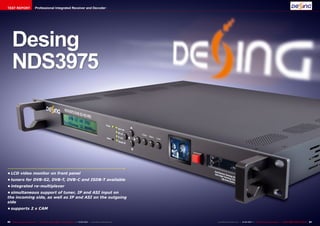
•	LCD video monitor on front panel
•	tuners for DVB-S2, DVB-T, DVB-C and ISDB-T available
•	integrated re-multiplexer
•	simultaneous support of tuner, IP and ASI input on
the incoming side, as well as IP and ASI on the outgoing
side
•	supports 2 x CAM


80 TELE-audiovision International — The World‘s Largest Digital TV Trade Magazine — 01-02/2013 — www.TELE-audiovision.com   www.TELE-audiovision.com — 01-02/2013 — TELE-audiovision International — 全球发行量最大的数字电视杂志   81
TEST REPORT                    Professional Integrated Receiver and Decoder


IRD with                                                                                                                              0.61
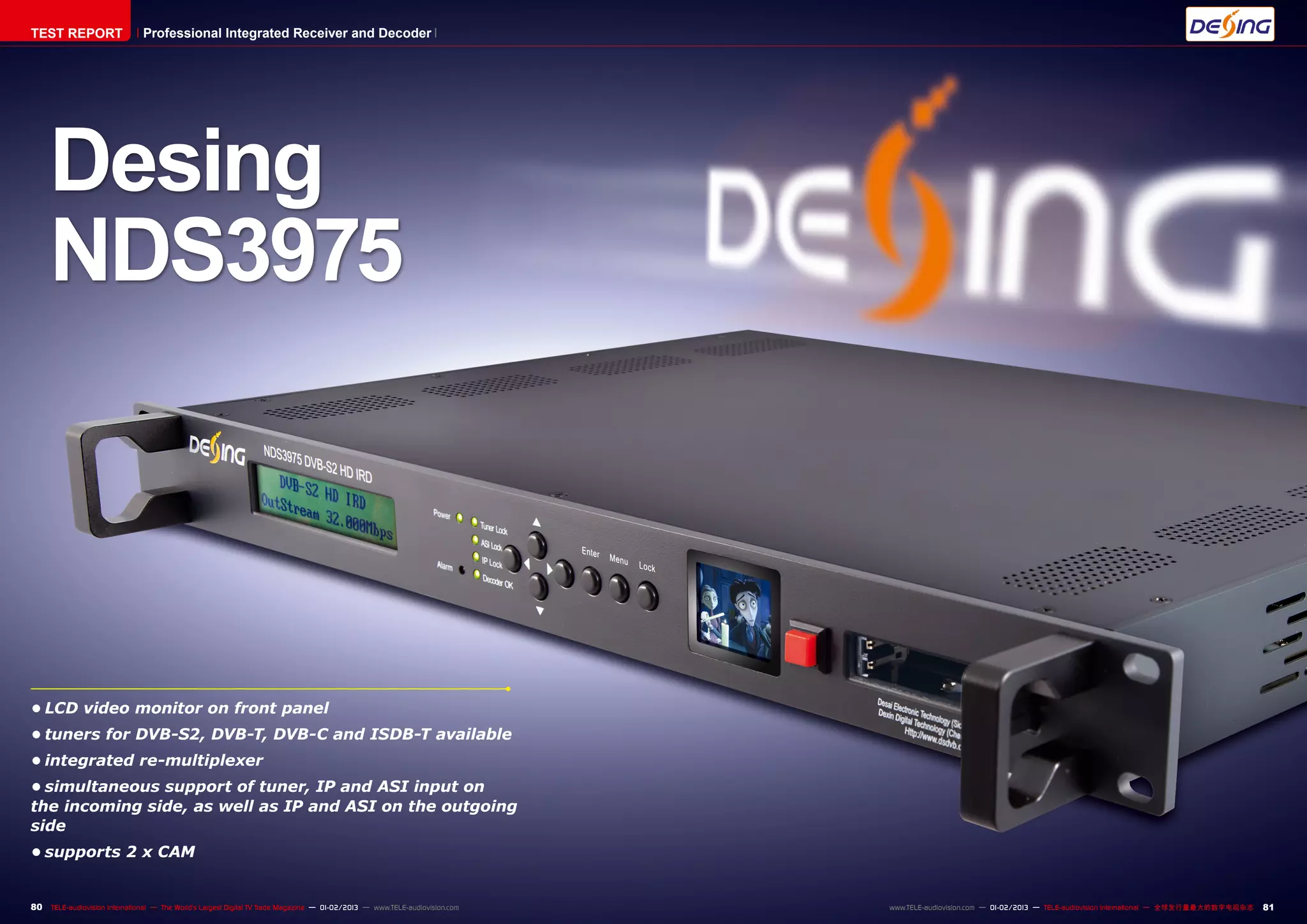
three different inputs                                                                                                                                                                                                                                                   ■ Illustration 1: Versatility
                                                                                                                                                                                                                                                                         of IRDs


  The NDS3975 is shipped                    - 1 ASI input                          nal monitor for most pur-                  - signal output with very
in a rather plain-looking                   - 4 ASI outputs                        poses. There’s even a small              good quality
cardboard box, yet as soon                  - 1 tuner input (DVB-S2/               switch to turn it on or off, so            - low maintenance costs
                                                                                                                                                               Of course the NDS3795
as you open the packaging                 C/T as selected, our test                that it stays dark whenever                The NDS3975 receives
                                                                                                                                                             features a re-multiplexer
you learn that looks can be               unit was equipped with a                 it isn’t required.                       high scores for each of these
                                                                                                                                                             which can be set up to re-
deceiving: Out comes a top-               DVB-S2 tuner)                               In addition, the front panel          demands, and yet it offers
                                                                                                                                                             bundle channels of the three
notch product that is pro-                  - 1 HDMI port                          is characterised by six sta-             so much more. It’s best to
                                                                                                                                                             received transport stream
tected by foamed material                   - 1 composite video output             tus LEDs (Power, Tuner Lock,             have a look at illustration 1
                                                                                                                                                             into a new transport stream
on all sides, plus all cables               - 1 audio output (L+R)                 ASI Lock, IP Lock, Decoder               to get an impression of its
                                                                                                                                                             without     any    limitations   grated MPEG-2/MPEG-4 de-          sports an integrated BISS          tions like PowerVu, for ex-
that are required to get go-                - 1 YbPbR component out-               OK and Alarm), plus two CI               versatility.
                                                                                                                                                             whatsoever (‘muxing’). The       coder can even provide the        decoder goes to show that          ample, which would cause
ing in a flash. You’ll find               put                                      slots on the right side, which             The main difference be-
                                                                                                                                                             newly multiplexed stream is      selected channel as HDMI,         the manufacturer Dexing            incompatibilities   on   too
the power cable as well as                  What truly set our hearts              turned out to be compat-                 tween the NDS3975 and
                                                                                                                                                             then made available via the      SDI or CVBS. This is also the     has tried to really meet all       many levels. BISS is an open
cables for ASI, YbPbR and                 ablaze, however, was a sec-              ible with all our CAMs except            standard IRDs can be found
                                                                                                                                                             two ASI outputs as well as       channel that can be viewed        customer demands. BISS is          platform which can easily
composite video.                          ond look at the front panel:             those working with the CI+               right at the beginning of this
                                                                                                                                                             through the network inter-       on the built-in mini moni-        short for Basic Interoper-         be implemented by manu-
  The IRD (integrated re-                 Apart from the two-line LCD              standard.                                report: It features three
                                                                                                                                                             face for further processing.     tor, which means the NDS          able Scrambling System and         facturers without any has-
ceiver decoder) NDS3975 is                display, which is extremely                 When we think of integrat-            usable inputs, instead of
                                                                                                                                                               Illustration 2 gives an ex-    can at the same time pro-         was defined by the European        sles. As far as broadcasting
designed with the standard                easy to reads thanks to its              ed receiver decoders (IRD),              one tuner only. While the
                                                                                                                                                             ample of how a typical cable     vide analog video signals for     Broadcasting Union in order        companies are concerned,
19-inch rack width in mind                blue backlighting, two arrow             we usually have in mind pro-             tuner itself is exchangeable
                                                                                                                                                             head-end could look like.        CATV, for example.                to allow encryption for occa-      BISS offers the benefit of
and sports spotless build                 keys and three additional                fessional reception devices              – which means you can ei-
                                                                                                                                                               Simultaneously, the trans-       The fact that the NDS3975       sional transmissions (feeds,       adding encryption to sports
quality that seems to sug-                buttons for Enter, Menu and              for head-ends. Contrary to               ther choose DVB-S2, DVB-C
                                                                                                                                                             port stream of the tuner is      does not only come with           etc.) without having to deal       feeds without incurring ad-
gest ‘I’m made to last!’. In              Lock we discovered a small               conventional consumer re-                or DVB-T – there is an ASI
                                                                                                                                                             available via two additional     two CI slots for conditional      with all the obligations im-       ditional costs. The transmit-
addition, a look at the rear              screen. Could it be true?                ceivers, IRDs are designed               input as well as an option
                                                                                                                                                             ASI outputs, and the inte-       access modules but also           posed by proprietary solu-         ting and the receiving end
panel puts us in for another              Does this new IRD come                   for permanent use. This                  to receive a transponder
surprise, as there are more               with a small monitor right on            means, the ultimate bench-               stream via a dedicated net-
connection options available              the front that can show live             mark is not convenience and              work interface.                                                                                                                              ■ Illustration 2: Example
than most of us would think               TV with its 38mm diagonal?               fast zapping, but receiving a              This means that it is pos-                                                                                                                 for using the NDS3975 in
                                                                                                                                                                                                                                                                         a network
possible:                                                                          channel or transponder for               sible to receive a satellite
  - power input                             There was only one way                 any length of time up to sev-            transponder through the
  - 3 x RJ-45 (IPTV input –               to find out – quickly connect            eral years and making that               built-in DVB-S2 tuner and
„FE“, IPTV output – „GE“,                 and set up the device! Yes,              signal available for further             at the same time feed in a
as an option and not avail-               this small monitor has a sur-            processing and distribution.             second transponder from
able on our test unit, NMS –              prisingly high resolution and               The major specifications              another IRD via ASI.
maintenance)                              can easily replace an exter-             for IRDs are:                              Still looking for some ic-
                                                                                      - high reliability                    ing on your cake? There you
                                                                                      - 19-inch rack format                 are: A third transponder can
                                                                                      - high usability                      be integrated via IP at the
                                                                                      - excellent reception quality         very same time.
                                                              01-02/2013
                                         Dexing NDS3975
                                      Most powerful and versatile
                                     IRD ever - its built-in monitor
                                           is a unique plus.

                 www.TELE-audiovision.com/13/01/dexing


82 TELE-audiovision International — The World‘s Largest Digital TV Trade Magazine — 01-02/2013 — www.TELE-audiovision.com                                                                              www.TELE-audiovision.com — 01-02/2013 — TELE-audiovision International — 全球发行量最大的数字电视杂志     83
merely have to agree on a                accessed when status dis-
                                                                                   key for reliable and cost-               play is active.
                                                                                   efficient encryption. Dexing                Once the configuration
                                                                                   definitely deserves special              menu is called up you can
                                                                                   praise for implementing this             use the Up/Down buttons to
                                                                                   encryption method in its                 navigate between different
                                                                                   NDS3975 as well.                         menus.
                                                                                      To make sure we can look                 The menu option that is
                                                                                   at all features and functions            shown in the first line can
                                                                                   of the NDS3975 we set up a               be activated with the Enter
                                                                                   small head-end in our test               button, and the Menu but-
                                                                                   center. A second IRD with                ton brings you up one menu
                                                                                   ASI output was added to                  level. A highlighted option
                                                                                   provide a complete trans-                in a sub-menu can be acti-
                                                                                   port stream from ASTRA                   vated with the Enter button
                                                                                   19.2° East, and with the help            and edited with the four ar-
                                                                                   of the TSReader software                 row buttons. This way edit-
                                                                                   (see test report in TELE-                ing frequencies or symbol
                                                                                   audiovision 09-10/2012) we               rates becomes a surprisingly
                                                                                   also provided the locally                straightforward affair.
                                                                                   available DVB-T transpond-                  When you’re done editing
                                                                                   er. The NDS3975 itself was               a touch of the Menu button
                                                                                   set up to receive a second               confirms all parameters. Il-
                                                                                   transponder of the ASTRA                 lustration 3 shows the menu
                                                                                   19.2° East satellite.                    structure of the NDS3975.
                                                                                      We then verified all results             Before we went about
                                                                                   using a professional meter               configuring the NDS3975 we
                                                                                   with ASI input, while at the             first defined which channels
                                                                                   same time distributing the               should be included in the fi-
                                                                                   transport stream generated               nal transport stream:
                                                                                   by the NDS3975 to our PC                    - ARD (from the tuner of
                                                                                   using UDP Unicast. The Dek-              the NDS3975)
                                                                                   tec DTS-215 Gold (see test                  - ZDF (from the ASI input)
                                                                                   report in TELE-audiovision                  - RTP-1 (from the IP input)
                                                                                   12-02/2012) was installed                   - RTP-2 (from the IP input)
                                                                                   in our PC to re-modulate the                - SIC (from the IP input)
                                                                                   signal into the DVB-C and                   - TVI (from the IP input)
                                                                                   DVB-T standards. Once that                  This channel list is based
                                                                                   was achieved the final signal            on three different transport
                                                                                   could easily be tested on any            streams, which should be
                                                                                   standard DVB-C or DVB-T                  fed to the NDS3975 using
                                                                                   receiver.                                the following scenario:
                                                                                      When you go about setting                1) Tuner: Using the built-in
                                                                                   up the NDS3975 you can fol-              DVB-S2 tuner transponder
                                                                                   low two different routes:                19 from ASTRA 19.2° East
                                                                                   You may choose to do all                 (11494 H 22000-2/3 8PSK)
                                                                                   the configuration right on               is received. This transpond-
                                                                                   the device itself (frontend              er carries the German public
                                                                                   operation) thanks to the                 broadcaster ‘Das Erste’ in
                                                                                   LCD screen and the seven                 high definition, among other
                                                                                   control buttons, or you can              channels.
                                                                                   download the Network Man-                   2) ASI: Using the ASI input
                                                                                   agement Software (NMS                    transponder 77 from ASTRA
                                                                                   operation) from the Dexing               19.2° East (11954 H 27500-
                                                                                   website at www.dsdvb.com                 3/4 QPSK) is fed to the IRD.
                                                                                   free of charge.                          It is entirely on purpose that
                                                                                      We embarked on route 1                we set up the second trans-
                                                                                   first, which is self-explana-            port stream with a standard
                                                                                   tory once you have grasped               definition transponder, so
                                                                                   the meanings and functions               that we could check out how
                                                                                   of the Enter, Menu and Lock              capable the multiplexer of
                                                                                   buttons. Lock, for instance,             the NDS3975 is.
                                                                                   switches between status                     3) IP: The IP input should
                                                                                   display and menu, so one                 receive its signal from a PC
                                                                                   could argue that Lock in this            with TSReader Pro. To that
                                                                                   context means that the con-              end, we installed a BDA com-
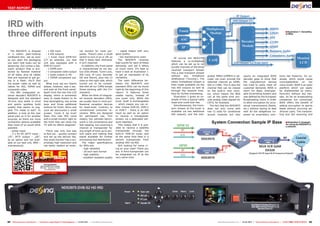
■ Illustration 3: Menu structure of the NDS3975                                    figuration menu cannot be                patible DVB-T USB receiver


84 TELE-audiovision International — The World‘s Largest Digital TV Trade Magazine — 01-02/2013 — www.TELE-audiovision.com
1                                                                                                  2


   3                                                                                                                           5


   4


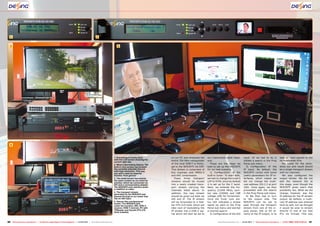
                                                                                                                            1. Everything is hunky-dory,         on our PC and streamed the      our improvised cable head-        input: All we had to do is         lead all input signals to the
                                                                                                                            with the LCD screen showing the      entire 754 MHz transponder      end.                              initiate a search in the Prog      re-multiplexer first.
                                                                                                                            current data rate.
                                                                                                                                                                 of the local DVB-T in Portu-       These are the steps we         Parse sub-menu.                       We opted for the latter,
                                                                                                                            2. What a fascinating feature: The
                                                                                                                            built in mini-screen can present     gal to the NDS3975 via UDP.     took to set up the NDS3975          3) Configuration of the          since our end result should
                                                                                                                            the currently selected channel       This stream is comprised of     for our test scenario:            IP input: By default, the          be a single transport stream
                                                                                                                            with high resolution. This way
                                                                                                                            you won’t need an external           five channels with MPEG-4          1) Configuration of the        NDS3975 comes with some            with six channels.
                                                                                                                            monitor. Pure genius!                and AAC compression.            built-in tuner: To start with,    useful parameters for IP in-          We also configured the
                                                                                                                            3. The small screen has exactly         These   three    transport   we had to change the tuner’s      terfaces, which meant we           output bitrate. We did not
                                                                                                                            the same content as our external     streams should be muxed         LOF to 9750, since by default     did not change the multi-          edit the network IDs at
                                                                                                                            monitor, which we connected via
                                                                                                                            DVI and a corresponding adapter.     into a newly created trans-     it is set up for the C band.      cast address 224.2.2 at port       this stage, even though the
                                                                                                                            The NDS3975 even delivers audio      port stream carrying the        Next, we entered the fre-         1001. Once again, we then          NDS3975 gives users that
                                                                                                                            in addition to video.                                                quency (11494 MHz), sym-          proceeded with the search          possibility too. What we did
                                                                                                                                                                 channels listed above. In
                                                                                                                            4. The transport stream
                                                                                                                            generated by the NDS3975 was
                                                                                                                                                                 addition, the new stream        bol rate (22000) and LNB          in the Prog Parse sub-menu.        change, however, was the
                                                                                                                            passed through to our meter that     should be given out both via    voltage (18V for horizontal).       4) We then had to turn           IP address for the IP stream
                                                                                                                            has an ASI input.                    ASI and IP. The IP stream       Once the Tuner Lock sta-          to the output side. The            output. By default, a multi-
                                                                                                                            5. Almost like a professional        will be forwarded to a Dek-     tus LED indicated a locked        NDS3975 can be set to              cast IP address was entered
                                                                                                                            studio: The NDS3975 (left,
                                                                                                                            under the monitor), IRD, DVB-C       tec DTU-215 Gold, which will    signal we went to the Prog        pass through the transport         here as well, but we thought
                                                                                                                            receiver, DVB-T receiver, PC with    take care of modulating the     Parse sub-menu and started        stream from one of the in-         it would be wise to stream
                                                                                                                            TSReader and Dectek DTU-215          IP stream into a DVB-C sig-     a channel search.                 puts (tuner, ASI or IP) di-        directly to one of our test
                                                                                                                            Gold installed.
                                                                                                                                                                 nal which will then be led to      2) Configuration of the ASI    rectly to the IP output, or to     PCs via Unicast. This way


86 TELE-audiovision International — The World‘s Largest Digital TV Trade Magazine — 01-02/2013 — www.TELE-audiovision.com                                                                                 www.TELE-audiovision.com — 01-02/2013 — TELE-audiovision International — 全球发行量最大的数字电视杂志   87
4

                                                                                                                            happy about that, since it is                                                                                                                 could then be received and
                                                                                                                    1       labelled Alarm.                                                                                                                               processed with any stand-
                                                                                                                               In step 4 just above we                                                                                                                    ard DVB-C receiver. Even all
                                                                                                                            had    activated   Multiplex,                                                                                                                 additional features and ser-
                                                                                                                            which meant we needed to                                                                                                                      vices such as teletext were
                                                                                                                            define which channels from                                                                                                                    available without a glitch.
                                                                                                                            the three inputs should be                                                                                                                      The conclusion we drew
                                                                                                                            taken over.                                                                                                                                   from building our own lit-
                                                                                                                               As mentioned in the begin-
                                                                                                                            ning, the NDS3975 can also
                                                                                                                            be set up with great ease                                                                                                                                                   5
                                                                                                                            using the Network Manage-
                                                                                                                            ment Software (NMS) right
                                                                                                                            on the PC. For the Multiplex
                                                                                                                            setup we opted for that very
                                                                                                                                                                                                                              6
                                                                                                                            convenient option.
                                                                                                                               The software is not de-
                                                                                                                            signed specifically for the
                                                                                                                            NDS3975 but works with all
                                                                                                                            Dexing products. This way
                                                                                                                            a head-end equipped with
                                                                                                                            different Dexing products
                                                                     2                                                      can be set up and controlled
                                                                                                                            with a single software solu-
                                                                                                                            tion.
                                                                                                                               The tree structure of the
                                                                                                                            software allows defining


                                                                                                                                                            3


                                                                                                                                                                                                                                        NDS3975 our meter with            tle head-end station was
                                                                                                                                                                                                                                        ASI input detected the in-        that this was not only an
                                                                                                                                                                                                                                        coming transport stream.          interesting and worthwhile
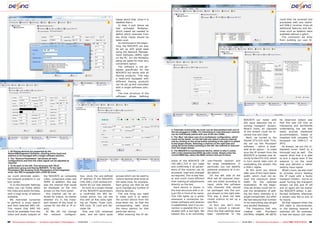
                                                                                                                                                                4. Channels received by the tuner can be descrambled with one of
                                                                                                                                                                                                                                        What’s more, all channels         undertaking, but can also
                                                                                                                                                                the two plugged in CAMs. It’s interesting to note that each channel     of the stream could be re-        easily provide residential
                                                                                                                                                                can be individually paired with one of the two CAMs.                    ceived nice and clear.            accommodation, hotels or
                                                                                                                                                                5. The ‘Mux’ tab takes care of re-multiplexer configuration, which        Next, we turned to the          hospitals with complete TV
                                                                                                                                                                could not be easier: on the left side you select a source channel
                                                                                                                                                                and by clicking on the arrow button pointing to the right it is added   Dectek DTU-215 Gold. First,       bouquets via DVB-C/T or
                                                                                                                                                                to the target stream. Selecting a channel on the right side and         we set up the MuxXpert            IPTV.
                                                                                                                                                                using the arrow button pointing to the left, the channel is removed     software – which is avail-           As always, we put the in-
                                                                                                                                                                from the target stream.
                                                                                                                                                                                                                                        able as an option – to make       tegrated tuner itself to a
1. All Dexing devices are supported by the                                                                                                                      6. The NDS3975 is a professional device, which is why it comes
NetworkManagement Software, allowing entire head-end                                                                                                            with a fully implemented BISS decoder inside. Simply enter the          sure the IP stream from the       thorough test as well. The
stations to be managed with a single software solution.                                                                                                         current BISS key, select the BISS version and you’re done.              NDS3975 is handed over di-        results show that it is able
2. The “General Parameters” tab shows all main                                                                                                                                                                                          rectly to the DTU-215, which      to lock a signal even if the
configurations and here the video signal can be adjusted as                                                                                                     dress of the NDS3975 (IP            user-friendly solution and          in turn would take care of        antenna is on the small
required.                                                                                                                                                       192.168.1.210 in our case)          for large installations, in         modulating the stream into        side and delivers a rather
3. To be seen on the left: Tree structure with TELE-                                                                                                            and confirming it all param-        particular, you can identify
audiovision group and Dexing NDS3975. To the right:                                                                                                                                                                                     a DVB-C signal.                   sketchy input signal.
Parameters Tab showing Tuner Parameters of the integrated                                                                                                       eters of the receiver can be        potential problems at a sin-          At this point you should           What’s more, we also tried
tuner. Our IRD is equipped with a DVB-S2 tuner.                                                                                                                 accessed, read and changed          gle glance.                         take care of the input band-      to provoke errors feeding
we could eliminate poten-                the NDS3975 as composite                  tion, since the pre-defined              groups which can be used to         as required. This is way fast-         On the left side of the          width, which must not ex-         the IP input with a faulty
tial network problems in our             video, component video and                IP address of the NDS3975                control several head-ends at        er and much more efficient          MUX tab all received chan-          ceed the maximum band-            transport stream – but to no
test center.                             HDMI. In addition, this was               (192.168.1.210) worked bril-             the same time, for example.         than making all adjustments         nels are listed according to        width for the selected            avail! Turning the transport
   5) In the Decoder Settings            also the channel that would               liantly for our test network.            Each group can then be set          directly on the box.                input, while the software           modulation. At the begin-         stream via ASI and IP off
menu you can freely select               be displayed on the mini                     As soon as a single change            up to manage any number of             Each device is shown in          lists channels that should          ning we simply could not re-      and on again did not bother
the video and audio formats,             screen on the front panel.                of the NDS3975 parameters                Dexing devices.                     the tree structure with a vir-      be packaged into the out-           sist the temptation of add-       the NDS3975 either, it per-
with a huge array of options               Any channel can be se-                  is confirmed the IRD be-                   The one thing you need            tual LED in front of its name.      put stream on the right side.       ing too many channels to a        formed brilliantly whenever
available.                               lected for output, no matter              comes active. You can see                to make sure is to select           This LED lights up in green         This way it does not take           single transponder, but after     a stream was fed to one of
   We restricted ourselves               whether it’s in the trans-                this with all five LEDs light-           the correct device from the         whenever a connection be-           rocket science to set up a          we had reduced that number        its inputs.
to perform a tuner search                port stream of the tuner or               ing up: Power, Tuner Lock,               drop-down list, so that the         tween software and receiver         new Mux.                            to six everything was alright        All that happens when the
and then selected ARD HD.                comes for the ASI or IP in-               ASI Lock, IP Lock and De-                corresponding tabs show             is established, and if no con-         In fact, you don’t even          and worked flawlessly.            ASI cable is disconnected,
This meant that ARD HD                   puts.                                     coder OK.                                the menu options for that           nection is possible this is in-     have to consult a manual.             The frequency that was          or the feeding receiver is
would be available from the                6) We did not change                       Only one LED remained                 particular device.                  dicated with a red light. We        Once the final settings have        created     with   MuxXpert       switched off, for example,
video and audio outputs of               the    network     configura-             dark, and we were quite                    After entering the IP ad-         believe this is an extremely        been transferred to the             (447MHz, 64QAM, SR 6875)          is that the status LED ceas-


88 TELE-audiovision International — The World‘s Largest Digital TV Trade Magazine — 01-02/2013 — www.TELE-audiovision.com                                                                                     www.TELE-audiovision.com — 01-02/2013 — TELE-audiovision International — 全球发行量最大的数字电视杂志   89
es to light up. No troubles              then again, we found out                  product. The IRD NDS3975                 these days many people are
caused, no tricks required               right away how to use the                 is top-notch product in a                worried their purchase may
– that’s what we like about              IRD and hardly ever noticed               league of its own. Not only              turn into a waste of money
this IRD.                                that the manual was miss-                 is it a professional receiver,           as soon as some framework
   There’s one more thing                ing. This in itself speaks                but an integrated device                 conditions change. Owners
that deserves special praise:            volumes about the user con-               combining tuner, ASI and                 of the MNDS3975 need not
Whenever video cannot be                 cept of the NDS3975, which                IP into an excellent pack-               have such worries, since all
put out due to faulty recep-             is self-explanatory like only             age complete with re-mul-                their product will require is
tion, for instance, there is             few other products we had                 tiplexer. Add to that a high-            an updated configuration
only a short alert message               tested before. And in case                performance       demodulator            to stay ahead of the pack.
indicating the signal failure.           you didn’t know: The iP-                  capable of giving out video              Conventional tuners, on the
After that, the screen simply            hone doesn’t come with a                  as HDMI, component video                 other hand, more often than
remains dark. We believe                 manual either. We had a to-               or composite video and you               not must be replaced by a
this is a very smart solution,           tal of three weeks to check               end up with a state-of-the-              new model.
since end users do not need              out every nook and cranny                 art offering. With the option              In our final verdict we
to know the precise cause of             of the NDS3975 while it was               of re-multiplexing the trans-            can whole-heartedly rec-
a problem. After all, would              running without interrup-                 port streams right within the            ommend the IRD NDS3975
you want “Bad reception –                tion. Were we faced with                  system it can do away with               without any restrictions.
please tune your dish” to                any technical problems or                 or at least reduce the num-              Never before has a similarly
pop up on the TV sets of your            malfunctions?                             ber of required standalone               robust, versatile and fasci-
cable TV customers? A blank                 Far from it! This is all the           multiplexers, depending on               nating professional receiver
screen is much less embar-               more impressive, since our                the field of application.                made its way to one of our
rassing, don’t you think?                tests place the highest of de-               Thanks to its wide range              test centers. The icing on
   So does all this mean                 mands on all devices and we               of features and functions the            the cake is provided by the
we could not even find the               usually don’t give up until we            NDS3975 is fit for the future            mini screen on the front
slightest fault with this prod-          detect a flaw. The NDS3975                as it can always be adapted              panel, which had us wonder
uct? Well, the receiver we               got the better of us, which               to new or enhanced require-              why something useful like
were sent for testing came               means we can only congrat-                ments. When they go out to               this has not been available
without a user manual. But               ulate Dexing on a top-quality             buy a professional receiver              before.


90 TELE-audiovision International — The World‘s Largest Digital TV Trade Magazine — 01-02/2013 — www.TELE-audiovision.com
1                                                                                  9                                                                           12
                                                                                                                                                                                                                                                                         Expert Opinion
                                                                                                                                                                                                                                                      Very robust and sensitive Tuner
                                                                                                                                                                                                                                                      Multiple reception (Tuner, ASI and IP)
                                                                                                                                                                                                                                                      Integrated Re-Multiplexer
                                                                                                                                                                                                                                                  +   Many output options (ASI, IP, HDMI, Compo-
                                                                                                                                                                                                                                                      nent, Composite)
2                                                                                 10                                                                           13                                                                                     Simultaneous tuner pass-through to ASI
                                                                                                                                                                                                                                                                                                                   Vitor Martins Augusto

                                                                                                                                                                                                                                                  –   None
                                                                                                                                                                                                                                                                                                                   TELE-audiovision
                                                                                                                                                                                                                                                                                                                        Test Center
                                                                                                                                                                                                                                                                                                                           Portugal


                                                                                                                                                                                                                                                                             TECHNICAL
                                                                                                                                                                                                                                                                                       DATA
3                                                                                 11                                                                           14                                                                                 Manufacturer	              Dexin Digital Technology Co. Ltd.
                                                                                                                                                                                                                                                  Email	sunyu@dsdvb.com
                                                                                                                                                                                                                                                  Website	www.dsdvb.com/english
                                                                                                                                                                                                                                                  Model	NDS3975
                                                                                                                                                                                                                                                  Function	                  Professional Integrated Receiver Decorder
                                                                                                                                                                                                                                                  Input
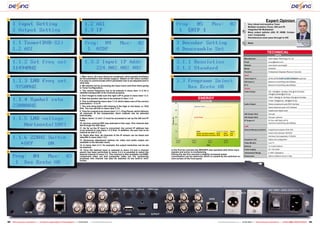
4                                                                                  1. Main menu: All menu items are numbered, which greatly facilitates        15
                                                                                   all documentation and remote support. Based on the menu number                                                                                                 Tuner Input x1	QPSK,QPSK                        (        /   /       optional)
                                                                                   it is easy to communicate which parameter has to be adjusted and in                                                                                            ASI Input x1	              Maximum transmitting rate 90Mbps
                                                                                   what way.
                                                                                   2. We started out by accessing the Input menu and from there going                                                                                             IP x1	                     Maximum transmitting rate 80Mbps
                                                                                   to Tuner Configuration.                                                                                                                                        Output
                                                                                   3. The correct frequency has to be entered in menu item 1.1.2 for a                                                                                            Video Output	              SDI: 1080i@25 ,29.94fps,720p @ 50 59.94fps,
                                                                                   satellite transponder to be received properly.
                                                                                                                                                                                                                                                  	                          576i@25 fps480i@29.94 fps
5                                                                                  4. Don’t forget to make sure the right LOF is given in menu item 1.1.3.
                                                                                   5. Now the symbol rate has to be entered in item 1.1.4.                                                ENERGY                                                  	                          YPbPr:1080i@ 25 ,29.94fps,720p @ 50 59.94fps

                                                                                   6. This is followed by menu item 1.1.5, which takes care of the correct                                   DIAGRAM                                              	                          CVBS: 576i@25 fps, 480i@29.94 fps
                                                                                   polarisation – V or H.                                                                                                                                         Audio Output	              Stereo unbalanced audio BNC interface
                                                                                   7. The only thing that’s still missing is the high or low band, i.e. 0/22                         Apparent Power
                                                                                                                                                                                                                                                  	                          Stereo balanced audio XLR interface
                                                                                   KHz. You can set this in menu item 1.1.6.
                                                                                   8. Time for a signal scan (menu item 1.1.1 – Prog Parse), which delivers                                                                                       	                          Digital audio digital audio

6                                                                                  all channels of the transponder. Each channel can be selected                                                                                                  ASI Output 1#x2	           One pair
                                                                                   individually.
                                                                                                                                                                                     Active Power                                                 ASI Output 2#x2	           One pair, optional
                                                                                   9. Menu items 1.2 and 1.3 must be accessed to set up the ASI and IP
                                                                                   input.                                                                                                                                                         IP Output x1	              FE Port: MPTS&10 SPTS,
                                                                                   10. German channel ZDF was selected in this case. This channel was                                                                                             	                          maximum transmitting rate 90Mbps
                                                                                   fed through the ASI input.                                                                                                                                     CAM
                                                                                   11. As far as the IP input is concerned, the correct IP address has
                                                                                   to be entered in sub-menu 1.3.2 first. In addition, the port has to be                                                                                         Descrambling procession	   Supporting European DVB-CSA
                                                                                                                                                                                        Mode                           Apparent Active   Factor
7                                                                                  entered as well (1.3.3).                                                                             Active, no built-in monitort   45 W     28 W     0.62     	                          Smart Card interface: ISO7816
                                                                                   12. Right after that, all channels of the IP stream can be listed and                                Active, with built-in monitort 46 W     28.5 W   0.61
                                                                                                                                                                                                                                                  	                          Interface Card separation: PCMCIA
                                                                                   selected in menu item 1.3.1.
                                                                                   13. Numerous adjustment options for video and audio output are                                                                                                 Graphical LCD	             Status and configuration
                                                                                   available in the decoder menu.                                                                                                                                 Video Monitor	             Live TV
                                                                                   14. In menu item 3.1.1, for example, the output resolution can be set                                                                                          Buttons	                   7x Control buttons
                                                                                   as required.
                                                                                   15. Once the desired input is selected in menu 3.5 and a channel            In the first ten minutes the NDS3975 was operated with three input                 Power Supply	              AC 110V-240V
8                                                                                  search has been performed in menu 3.4 it is possible to select the          signals and active re-multiplexing.                                                Temperature Range	         0-450C (Operation)
                                                                                   desired channel in menu 3.3. This channel is then available via HDMI,       During the last five minutes a slightly increased power
                                                                                   component video out and composite video out. For monitoring                 consumption can be observed, which is caused by the switched on                    Dimensions	                482mm×360mm×44mm 3.2Kg
                                                                                   purposes this channel can also be watched on the built-in mini-             mini-screen of the front panel.
                                                                                   screen.


92 TELE-audiovision International — The World‘s Largest Digital TV Trade Magazine — 01-02/2013 — www.TELE-audiovision.com                                                                                             www.TELE-audiovision.com — 01-02/2013 — TELE-audiovision International — 全球发行量最大的数字电视杂志                          93

Dexing

  • 1.
    TEST REPORT Professional Integrated Receiver and Decoder Desing NDS3975 • LCD video monitor on front panel • tuners for DVB-S2, DVB-T, DVB-C and ISDB-T available • integrated re-multiplexer • simultaneous support of tuner, IP and ASI input on the incoming side, as well as IP and ASI on the outgoing side • supports 2 x CAM 80 TELE-audiovision International — The World‘s Largest Digital TV Trade Magazine — 01-02/2013 — www.TELE-audiovision.com www.TELE-audiovision.com — 01-02/2013 — TELE-audiovision International — 全球发行量最大的数字电视杂志 81
  • 2.
    TEST REPORT Professional Integrated Receiver and Decoder IRD with 0.61 three different inputs ■ Illustration 1: Versatility of IRDs The NDS3975 is shipped - 1 ASI input nal monitor for most pur- - signal output with very in a rather plain-looking - 4 ASI outputs poses. There’s even a small good quality cardboard box, yet as soon - 1 tuner input (DVB-S2/ switch to turn it on or off, so - low maintenance costs Of course the NDS3795 as you open the packaging C/T as selected, our test that it stays dark whenever The NDS3975 receives features a re-multiplexer you learn that looks can be unit was equipped with a it isn’t required. high scores for each of these which can be set up to re- deceiving: Out comes a top- DVB-S2 tuner) In addition, the front panel demands, and yet it offers bundle channels of the three notch product that is pro- - 1 HDMI port is characterised by six sta- so much more. It’s best to received transport stream tected by foamed material - 1 composite video output tus LEDs (Power, Tuner Lock, have a look at illustration 1 into a new transport stream on all sides, plus all cables - 1 audio output (L+R) ASI Lock, IP Lock, Decoder to get an impression of its without any limitations grated MPEG-2/MPEG-4 de- sports an integrated BISS tions like PowerVu, for ex- that are required to get go- - 1 YbPbR component out- OK and Alarm), plus two CI versatility. whatsoever (‘muxing’). The coder can even provide the decoder goes to show that ample, which would cause ing in a flash. You’ll find put slots on the right side, which The main difference be- newly multiplexed stream is selected channel as HDMI, the manufacturer Dexing incompatibilities on too the power cable as well as What truly set our hearts turned out to be compat- tween the NDS3975 and then made available via the SDI or CVBS. This is also the has tried to really meet all many levels. BISS is an open cables for ASI, YbPbR and ablaze, however, was a sec- ible with all our CAMs except standard IRDs can be found two ASI outputs as well as channel that can be viewed customer demands. BISS is platform which can easily composite video. ond look at the front panel: those working with the CI+ right at the beginning of this through the network inter- on the built-in mini moni- short for Basic Interoper- be implemented by manu- The IRD (integrated re- Apart from the two-line LCD standard. report: It features three face for further processing. tor, which means the NDS able Scrambling System and facturers without any has- ceiver decoder) NDS3975 is display, which is extremely When we think of integrat- usable inputs, instead of Illustration 2 gives an ex- can at the same time pro- was defined by the European sles. As far as broadcasting designed with the standard easy to reads thanks to its ed receiver decoders (IRD), one tuner only. While the ample of how a typical cable vide analog video signals for Broadcasting Union in order companies are concerned, 19-inch rack width in mind blue backlighting, two arrow we usually have in mind pro- tuner itself is exchangeable head-end could look like. CATV, for example. to allow encryption for occa- BISS offers the benefit of and sports spotless build keys and three additional fessional reception devices – which means you can ei- Simultaneously, the trans- The fact that the NDS3975 sional transmissions (feeds, adding encryption to sports quality that seems to sug- buttons for Enter, Menu and for head-ends. Contrary to ther choose DVB-S2, DVB-C port stream of the tuner is does not only come with etc.) without having to deal feeds without incurring ad- gest ‘I’m made to last!’. In Lock we discovered a small conventional consumer re- or DVB-T – there is an ASI available via two additional two CI slots for conditional with all the obligations im- ditional costs. The transmit- addition, a look at the rear screen. Could it be true? ceivers, IRDs are designed input as well as an option ASI outputs, and the inte- access modules but also posed by proprietary solu- ting and the receiving end panel puts us in for another Does this new IRD come for permanent use. This to receive a transponder surprise, as there are more with a small monitor right on means, the ultimate bench- stream via a dedicated net- connection options available the front that can show live mark is not convenience and work interface. ■ Illustration 2: Example than most of us would think TV with its 38mm diagonal? fast zapping, but receiving a This means that it is pos- for using the NDS3975 in a network possible: channel or transponder for sible to receive a satellite - power input There was only one way any length of time up to sev- transponder through the - 3 x RJ-45 (IPTV input – to find out – quickly connect eral years and making that built-in DVB-S2 tuner and „FE“, IPTV output – „GE“, and set up the device! Yes, signal available for further at the same time feed in a as an option and not avail- this small monitor has a sur- processing and distribution. second transponder from able on our test unit, NMS – prisingly high resolution and The major specifications another IRD via ASI. maintenance) can easily replace an exter- for IRDs are: Still looking for some ic- - high reliability ing on your cake? There you - 19-inch rack format are: A third transponder can - high usability be integrated via IP at the - excellent reception quality very same time. 01-02/2013 Dexing NDS3975 Most powerful and versatile IRD ever - its built-in monitor is a unique plus. www.TELE-audiovision.com/13/01/dexing 82 TELE-audiovision International — The World‘s Largest Digital TV Trade Magazine — 01-02/2013 — www.TELE-audiovision.com www.TELE-audiovision.com — 01-02/2013 — TELE-audiovision International — 全球发行量最大的数字电视杂志 83
  • 3.
    merely have toagree on a accessed when status dis- key for reliable and cost- play is active. efficient encryption. Dexing Once the configuration definitely deserves special menu is called up you can praise for implementing this use the Up/Down buttons to encryption method in its navigate between different NDS3975 as well. menus. To make sure we can look The menu option that is at all features and functions shown in the first line can of the NDS3975 we set up a be activated with the Enter small head-end in our test button, and the Menu but- center. A second IRD with ton brings you up one menu ASI output was added to level. A highlighted option provide a complete trans- in a sub-menu can be acti- port stream from ASTRA vated with the Enter button 19.2° East, and with the help and edited with the four ar- of the TSReader software row buttons. This way edit- (see test report in TELE- ing frequencies or symbol audiovision 09-10/2012) we rates becomes a surprisingly also provided the locally straightforward affair. available DVB-T transpond- When you’re done editing er. The NDS3975 itself was a touch of the Menu button set up to receive a second confirms all parameters. Il- transponder of the ASTRA lustration 3 shows the menu 19.2° East satellite. structure of the NDS3975. We then verified all results Before we went about using a professional meter configuring the NDS3975 we with ASI input, while at the first defined which channels same time distributing the should be included in the fi- transport stream generated nal transport stream: by the NDS3975 to our PC - ARD (from the tuner of using UDP Unicast. The Dek- the NDS3975) tec DTS-215 Gold (see test - ZDF (from the ASI input) report in TELE-audiovision - RTP-1 (from the IP input) 12-02/2012) was installed - RTP-2 (from the IP input) in our PC to re-modulate the - SIC (from the IP input) signal into the DVB-C and - TVI (from the IP input) DVB-T standards. Once that This channel list is based was achieved the final signal on three different transport could easily be tested on any streams, which should be standard DVB-C or DVB-T fed to the NDS3975 using receiver. the following scenario: When you go about setting 1) Tuner: Using the built-in up the NDS3975 you can fol- DVB-S2 tuner transponder low two different routes: 19 from ASTRA 19.2° East You may choose to do all (11494 H 22000-2/3 8PSK) the configuration right on is received. This transpond- the device itself (frontend er carries the German public operation) thanks to the broadcaster ‘Das Erste’ in LCD screen and the seven high definition, among other control buttons, or you can channels. download the Network Man- 2) ASI: Using the ASI input agement Software (NMS transponder 77 from ASTRA operation) from the Dexing 19.2° East (11954 H 27500- website at www.dsdvb.com 3/4 QPSK) is fed to the IRD. free of charge. It is entirely on purpose that We embarked on route 1 we set up the second trans- first, which is self-explana- port stream with a standard tory once you have grasped definition transponder, so the meanings and functions that we could check out how of the Enter, Menu and Lock capable the multiplexer of buttons. Lock, for instance, the NDS3975 is. switches between status 3) IP: The IP input should display and menu, so one receive its signal from a PC could argue that Lock in this with TSReader Pro. To that context means that the con- end, we installed a BDA com- ■ Illustration 3: Menu structure of the NDS3975 figuration menu cannot be patible DVB-T USB receiver 84 TELE-audiovision International — The World‘s Largest Digital TV Trade Magazine — 01-02/2013 — www.TELE-audiovision.com
  • 4.
    1 2 3 5 4 1. Everything is hunky-dory, on our PC and streamed the our improvised cable head- input: All we had to do is lead all input signals to the with the LCD screen showing the entire 754 MHz transponder end. initiate a search in the Prog re-multiplexer first. current data rate. of the local DVB-T in Portu- These are the steps we Parse sub-menu. We opted for the latter, 2. What a fascinating feature: The built in mini-screen can present gal to the NDS3975 via UDP. took to set up the NDS3975 3) Configuration of the since our end result should the currently selected channel This stream is comprised of for our test scenario: IP input: By default, the be a single transport stream with high resolution. This way you won’t need an external five channels with MPEG-4 1) Configuration of the NDS3975 comes with some with six channels. monitor. Pure genius! and AAC compression. built-in tuner: To start with, useful parameters for IP in- We also configured the 3. The small screen has exactly These three transport we had to change the tuner’s terfaces, which meant we output bitrate. We did not the same content as our external streams should be muxed LOF to 9750, since by default did not change the multi- edit the network IDs at monitor, which we connected via DVI and a corresponding adapter. into a newly created trans- it is set up for the C band. cast address 224.2.2 at port this stage, even though the The NDS3975 even delivers audio port stream carrying the Next, we entered the fre- 1001. Once again, we then NDS3975 gives users that in addition to video. quency (11494 MHz), sym- proceeded with the search possibility too. What we did channels listed above. In 4. The transport stream generated by the NDS3975 was addition, the new stream bol rate (22000) and LNB in the Prog Parse sub-menu. change, however, was the passed through to our meter that should be given out both via voltage (18V for horizontal). 4) We then had to turn IP address for the IP stream has an ASI input. ASI and IP. The IP stream Once the Tuner Lock sta- to the output side. The output. By default, a multi- 5. Almost like a professional will be forwarded to a Dek- tus LED indicated a locked NDS3975 can be set to cast IP address was entered studio: The NDS3975 (left, under the monitor), IRD, DVB-C tec DTU-215 Gold, which will signal we went to the Prog pass through the transport here as well, but we thought receiver, DVB-T receiver, PC with take care of modulating the Parse sub-menu and started stream from one of the in- it would be wise to stream TSReader and Dectek DTU-215 IP stream into a DVB-C sig- a channel search. puts (tuner, ASI or IP) di- directly to one of our test Gold installed. nal which will then be led to 2) Configuration of the ASI rectly to the IP output, or to PCs via Unicast. This way 86 TELE-audiovision International — The World‘s Largest Digital TV Trade Magazine — 01-02/2013 — www.TELE-audiovision.com www.TELE-audiovision.com — 01-02/2013 — TELE-audiovision International — 全球发行量最大的数字电视杂志 87
  • 5.
    4 happy about that, since it is could then be received and 1 labelled Alarm. processed with any stand- In step 4 just above we ard DVB-C receiver. Even all had activated Multiplex, additional features and ser- which meant we needed to vices such as teletext were define which channels from available without a glitch. the three inputs should be The conclusion we drew taken over. from building our own lit- As mentioned in the begin- ning, the NDS3975 can also be set up with great ease 5 using the Network Manage- ment Software (NMS) right on the PC. For the Multiplex setup we opted for that very 6 convenient option. The software is not de- signed specifically for the NDS3975 but works with all Dexing products. This way a head-end equipped with different Dexing products 2 can be set up and controlled with a single software solu- tion. The tree structure of the software allows defining 3 NDS3975 our meter with tle head-end station was ASI input detected the in- that this was not only an coming transport stream. interesting and worthwhile 4. Channels received by the tuner can be descrambled with one of What’s more, all channels undertaking, but can also the two plugged in CAMs. It’s interesting to note that each channel of the stream could be re- easily provide residential can be individually paired with one of the two CAMs. ceived nice and clear. accommodation, hotels or 5. The ‘Mux’ tab takes care of re-multiplexer configuration, which Next, we turned to the hospitals with complete TV could not be easier: on the left side you select a source channel and by clicking on the arrow button pointing to the right it is added Dectek DTU-215 Gold. First, bouquets via DVB-C/T or to the target stream. Selecting a channel on the right side and we set up the MuxXpert IPTV. using the arrow button pointing to the left, the channel is removed software – which is avail- As always, we put the in- from the target stream. able as an option – to make tegrated tuner itself to a 1. All Dexing devices are supported by the 6. The NDS3975 is a professional device, which is why it comes NetworkManagement Software, allowing entire head-end with a fully implemented BISS decoder inside. Simply enter the sure the IP stream from the thorough test as well. The stations to be managed with a single software solution. current BISS key, select the BISS version and you’re done. NDS3975 is handed over di- results show that it is able 2. The “General Parameters” tab shows all main rectly to the DTU-215, which to lock a signal even if the configurations and here the video signal can be adjusted as dress of the NDS3975 (IP user-friendly solution and in turn would take care of antenna is on the small required. 192.168.1.210 in our case) for large installations, in modulating the stream into side and delivers a rather 3. To be seen on the left: Tree structure with TELE- and confirming it all param- particular, you can identify audiovision group and Dexing NDS3975. To the right: a DVB-C signal. sketchy input signal. Parameters Tab showing Tuner Parameters of the integrated eters of the receiver can be potential problems at a sin- At this point you should What’s more, we also tried tuner. Our IRD is equipped with a DVB-S2 tuner. accessed, read and changed gle glance. take care of the input band- to provoke errors feeding we could eliminate poten- the NDS3975 as composite tion, since the pre-defined groups which can be used to as required. This is way fast- On the left side of the width, which must not ex- the IP input with a faulty tial network problems in our video, component video and IP address of the NDS3975 control several head-ends at er and much more efficient MUX tab all received chan- ceed the maximum band- transport stream – but to no test center. HDMI. In addition, this was (192.168.1.210) worked bril- the same time, for example. than making all adjustments nels are listed according to width for the selected avail! Turning the transport 5) In the Decoder Settings also the channel that would liantly for our test network. Each group can then be set directly on the box. input, while the software modulation. At the begin- stream via ASI and IP off menu you can freely select be displayed on the mini As soon as a single change up to manage any number of Each device is shown in lists channels that should ning we simply could not re- and on again did not bother the video and audio formats, screen on the front panel. of the NDS3975 parameters Dexing devices. the tree structure with a vir- be packaged into the out- sist the temptation of add- the NDS3975 either, it per- with a huge array of options Any channel can be se- is confirmed the IRD be- The one thing you need tual LED in front of its name. put stream on the right side. ing too many channels to a formed brilliantly whenever available. lected for output, no matter comes active. You can see to make sure is to select This LED lights up in green This way it does not take single transponder, but after a stream was fed to one of We restricted ourselves whether it’s in the trans- this with all five LEDs light- the correct device from the whenever a connection be- rocket science to set up a we had reduced that number its inputs. to perform a tuner search port stream of the tuner or ing up: Power, Tuner Lock, drop-down list, so that the tween software and receiver new Mux. to six everything was alright All that happens when the and then selected ARD HD. comes for the ASI or IP in- ASI Lock, IP Lock and De- corresponding tabs show is established, and if no con- In fact, you don’t even and worked flawlessly. ASI cable is disconnected, This meant that ARD HD puts. coder OK. the menu options for that nection is possible this is in- have to consult a manual. The frequency that was or the feeding receiver is would be available from the 6) We did not change Only one LED remained particular device. dicated with a red light. We Once the final settings have created with MuxXpert switched off, for example, video and audio outputs of the network configura- dark, and we were quite After entering the IP ad- believe this is an extremely been transferred to the (447MHz, 64QAM, SR 6875) is that the status LED ceas- 88 TELE-audiovision International — The World‘s Largest Digital TV Trade Magazine — 01-02/2013 — www.TELE-audiovision.com www.TELE-audiovision.com — 01-02/2013 — TELE-audiovision International — 全球发行量最大的数字电视杂志 89
  • 6.
    es to lightup. No troubles then again, we found out product. The IRD NDS3975 these days many people are caused, no tricks required right away how to use the is top-notch product in a worried their purchase may – that’s what we like about IRD and hardly ever noticed league of its own. Not only turn into a waste of money this IRD. that the manual was miss- is it a professional receiver, as soon as some framework There’s one more thing ing. This in itself speaks but an integrated device conditions change. Owners that deserves special praise: volumes about the user con- combining tuner, ASI and of the MNDS3975 need not Whenever video cannot be cept of the NDS3975, which IP into an excellent pack- have such worries, since all put out due to faulty recep- is self-explanatory like only age complete with re-mul- their product will require is tion, for instance, there is few other products we had tiplexer. Add to that a high- an updated configuration only a short alert message tested before. And in case performance demodulator to stay ahead of the pack. indicating the signal failure. you didn’t know: The iP- capable of giving out video Conventional tuners, on the After that, the screen simply hone doesn’t come with a as HDMI, component video other hand, more often than remains dark. We believe manual either. We had a to- or composite video and you not must be replaced by a this is a very smart solution, tal of three weeks to check end up with a state-of-the- new model. since end users do not need out every nook and cranny art offering. With the option In our final verdict we to know the precise cause of of the NDS3975 while it was of re-multiplexing the trans- can whole-heartedly rec- a problem. After all, would running without interrup- port streams right within the ommend the IRD NDS3975 you want “Bad reception – tion. Were we faced with system it can do away with without any restrictions. please tune your dish” to any technical problems or or at least reduce the num- Never before has a similarly pop up on the TV sets of your malfunctions? ber of required standalone robust, versatile and fasci- cable TV customers? A blank Far from it! This is all the multiplexers, depending on nating professional receiver screen is much less embar- more impressive, since our the field of application. made its way to one of our rassing, don’t you think? tests place the highest of de- Thanks to its wide range test centers. The icing on So does all this mean mands on all devices and we of features and functions the the cake is provided by the we could not even find the usually don’t give up until we NDS3975 is fit for the future mini screen on the front slightest fault with this prod- detect a flaw. The NDS3975 as it can always be adapted panel, which had us wonder uct? Well, the receiver we got the better of us, which to new or enhanced require- why something useful like were sent for testing came means we can only congrat- ments. When they go out to this has not been available without a user manual. But ulate Dexing on a top-quality buy a professional receiver before. 90 TELE-audiovision International — The World‘s Largest Digital TV Trade Magazine — 01-02/2013 — www.TELE-audiovision.com
  • 7.
    1 9 12 Expert Opinion Very robust and sensitive Tuner Multiple reception (Tuner, ASI and IP) Integrated Re-Multiplexer + Many output options (ASI, IP, HDMI, Compo- nent, Composite) 2 10 13 Simultaneous tuner pass-through to ASI Vitor Martins Augusto – None TELE-audiovision Test Center Portugal TECHNICAL DATA 3 11 14 Manufacturer Dexin Digital Technology Co. Ltd. Email sunyu@dsdvb.com Website www.dsdvb.com/english Model NDS3975 Function Professional Integrated Receiver Decorder Input 4 1. Main menu: All menu items are numbered, which greatly facilitates 15 all documentation and remote support. Based on the menu number Tuner Input x1 QPSK,QPSK ( / / optional) it is easy to communicate which parameter has to be adjusted and in ASI Input x1 Maximum transmitting rate 90Mbps what way. 2. We started out by accessing the Input menu and from there going IP x1 Maximum transmitting rate 80Mbps to Tuner Configuration. Output 3. The correct frequency has to be entered in menu item 1.1.2 for a Video Output SDI: 1080i@25 ,29.94fps,720p @ 50 59.94fps, satellite transponder to be received properly. 576i@25 fps480i@29.94 fps 5 4. Don’t forget to make sure the right LOF is given in menu item 1.1.3. 5. Now the symbol rate has to be entered in item 1.1.4. ENERGY YPbPr:1080i@ 25 ,29.94fps,720p @ 50 59.94fps 6. This is followed by menu item 1.1.5, which takes care of the correct DIAGRAM CVBS: 576i@25 fps, 480i@29.94 fps polarisation – V or H. Audio Output Stereo unbalanced audio BNC interface 7. The only thing that’s still missing is the high or low band, i.e. 0/22 Apparent Power Stereo balanced audio XLR interface KHz. You can set this in menu item 1.1.6. 8. Time for a signal scan (menu item 1.1.1 – Prog Parse), which delivers Digital audio digital audio 6 all channels of the transponder. Each channel can be selected ASI Output 1#x2 One pair individually. Active Power ASI Output 2#x2 One pair, optional 9. Menu items 1.2 and 1.3 must be accessed to set up the ASI and IP input. IP Output x1 FE Port: MPTS&10 SPTS, 10. German channel ZDF was selected in this case. This channel was maximum transmitting rate 90Mbps fed through the ASI input. CAM 11. As far as the IP input is concerned, the correct IP address has to be entered in sub-menu 1.3.2 first. In addition, the port has to be Descrambling procession Supporting European DVB-CSA Mode Apparent Active Factor 7 entered as well (1.3.3). Active, no built-in monitort 45 W 28 W 0.62 Smart Card interface: ISO7816 12. Right after that, all channels of the IP stream can be listed and Active, with built-in monitort 46 W 28.5 W 0.61 Interface Card separation: PCMCIA selected in menu item 1.3.1. 13. Numerous adjustment options for video and audio output are Graphical LCD Status and configuration available in the decoder menu. Video Monitor Live TV 14. In menu item 3.1.1, for example, the output resolution can be set Buttons 7x Control buttons as required. 15. Once the desired input is selected in menu 3.5 and a channel In the first ten minutes the NDS3975 was operated with three input Power Supply AC 110V-240V 8 search has been performed in menu 3.4 it is possible to select the signals and active re-multiplexing. Temperature Range 0-450C (Operation) desired channel in menu 3.3. This channel is then available via HDMI, During the last five minutes a slightly increased power component video out and composite video out. For monitoring consumption can be observed, which is caused by the switched on Dimensions 482mm×360mm×44mm 3.2Kg purposes this channel can also be watched on the built-in mini- mini-screen of the front panel. screen. 92 TELE-audiovision International — The World‘s Largest Digital TV Trade Magazine — 01-02/2013 — www.TELE-audiovision.com www.TELE-audiovision.com — 01-02/2013 — TELE-audiovision International — 全球发行量最大的数字电视杂志 93