76 77TELE-audiovision International — The World‘s Leading Digital TV Industry Publication — 05-06/2015 — www.TELE-audiovision.com www.TELE-audiovision.com — 05-06/2015 — TELE-audiovision International — 全球发行量最大的数字电视杂志
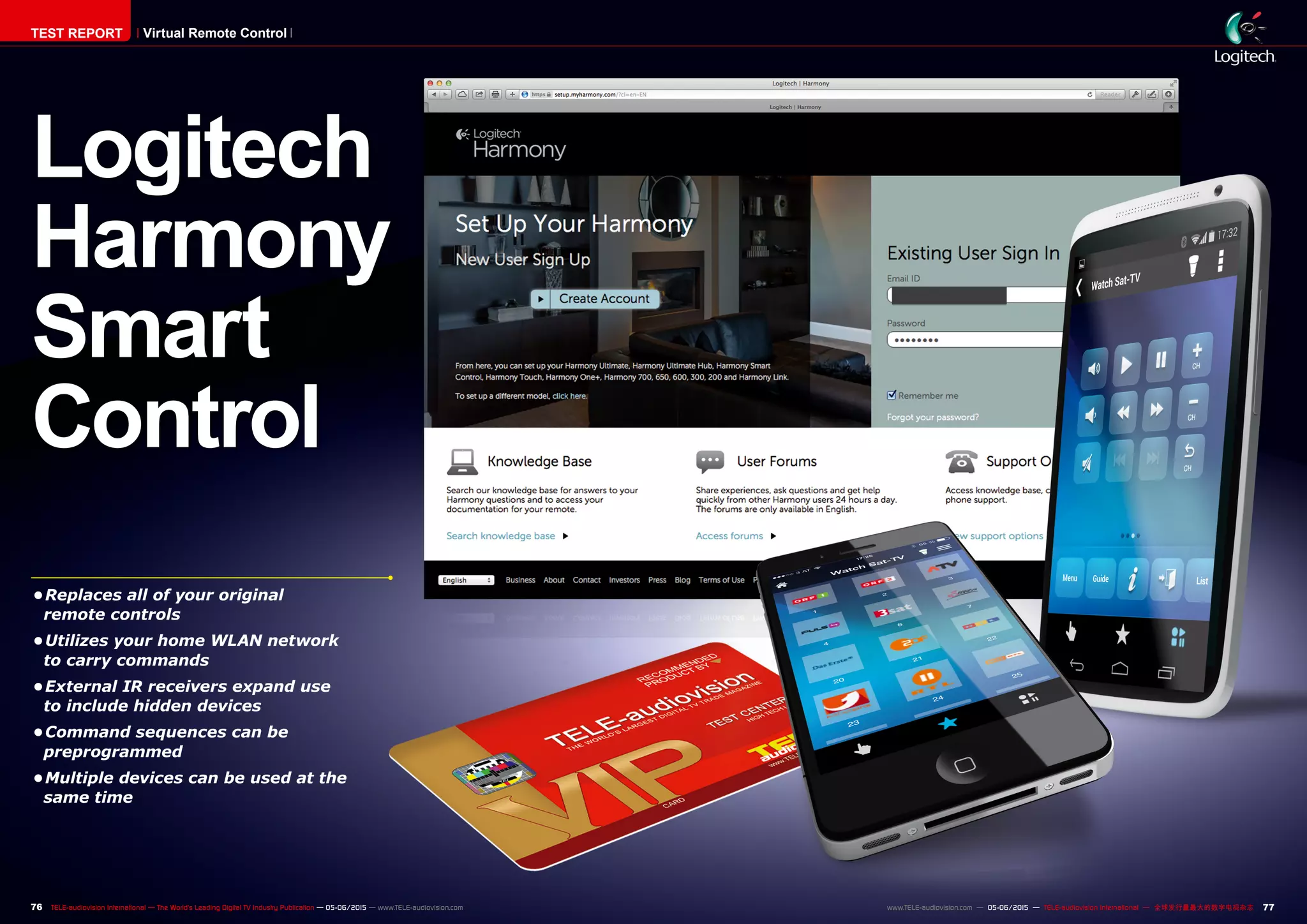
Logitech
Harmony
Smart
Control
•	Replaces all of your original
remote controls
•	Utilizes your home WLAN network
to carry commands
•	External IR receivers expand use
to include hidden devices
•	Command sequences can be
preprogrammed
•	Multiple devices can be used at the
same time
TEST REPORT Virtual Remote Control
1
2
3
78 TELE-audiovision International — The World‘s Leading Digital TV Industry Publication — 05-06/2015 — www.TELE-audiovision.com
TEST REPORT Virtual Remote Control
Trying to store all of your
remote controls on your liv-
ing room coffee table isn‘t
one of those problems that
just happens with us tech-
savvy editors here at TELE-
audiovision. Wouldn‘t it be
nice if you could make all of
those remote controls disap-
pear? Logitech‘s new Har-
mony Smart Control System
makes this possible by uti-
lizing the already-available
Smartphone or Tablet as a
fully functional replacement
for all of the original remote
controls. We like this idea
Universal Remote Control
in the Form of a Smartphone App
Thomas Haring
Configuration
with PC
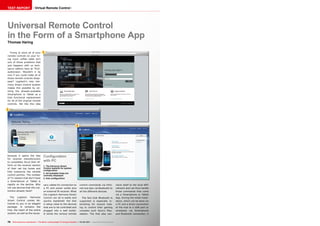
1. The Harmony Smart
Control website for system
configuration
2. All available Hubs are
centrally displayed
3. Hub configuration
because it opens the way
for receiver manufacturers
to completely focus their ef-
forts on the receiver section
of their set top boxes and
fully outsource the remote
control portion. The number
of TV viewers that don‘t have
a Smartphone or Tablet is
rapidly on the decline. Why
not use devices that the cus-
tomers already have?
The Logitech Harmony
Smart Control comes de-
livered to you in an elegant
package. It contains the
Hub, the heart of the entire
system, as well as the neces-
sary cables for connection to
a PC and power outlet plus
an external IR receiver. What
the Logitech Harmony Smart
Control can do is easily and
quickly explained: the Hub
is setup close to the devices
that are to be controlled and
plugged into a wall outlet.
It sends the various remote
control commands via infra-
red and also via Bluetooth to
all the different devices.
The fact that Bluetooth is
supported is especially in-
teresting for anyone look-
ing to control their gaming
consoles such Sony‘s Play-
station. The Hub also con-
nects itself to the local WiFi
network and can thus handle
those commands that come
via a Smartphone or Tablet
App. During the initial instal-
lation, which can be done via
a PC and a direct connection
of the Hub to a USB port or
wirelessly via Smartphone
and Bluetooth connection, it
4
5
6
7
80 TELE-audiovision International — The World‘s Leading Digital TV Industry Publication — 05-06/2015 — www.TELE-audiovision.com
is therefore essential to con-
figure the Hub‘s WiFi func-
tion. Thanks to the support
of WiFi 802.11 b/g/n with
WPA, WPA2 AES and 64/128
bit WEP encryption, it should
be compatible with all stand-
ard WiFi routers and not give
you any problems when set-
ting up the connection. In
our tests, we had no trouble
setting it up; in just a few
seconds the Hub connected
to our office WiFi network.
The initial installation can
follow two different paths:
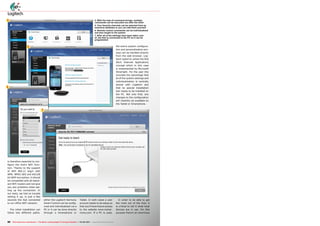
4. With the help of command strings, multiple
commands can be executed one after the other
5. Your favorite channels can be selected from an
extensive database or you can add them yourself
6. Remote control commands can be individualized
and also taught to the system
7. After all of the settings have been taken care
of, the Hub is connected to the PC so it can be
programmed
either the Logitech Harmony
Smart Control can be config-
ured and individualized via a
PC or it can be done directly
through a Smartphone or
Tablet. In both cases a user
account needs to be setup so
that you‘ll have future access
to the website www.myhar-
mony.com. If a PC is used,
the entire system configura-
tion and personalization pro-
cess can be handled directly
from the web browser. Log-
itech opted to utilize the RIA
(Rich Internet Application)
concept which in this case
is implemented by Microsoft
Silverlight. For the user this
provides the advantage that
all of the system settings and
individualization is centrally
stored with Logitech and
that no special installation
tool needs to be installed on
the PC. Not only that, any
changes to the configuration
will instantly be available on
the Tablet or Smartphone.
In order to be able to get
the most out of the Hub, it
is critical to tell it what local
devices are in use. For this
purpose there‘s an enormous
8
9 10 11 12
13 14 15 16
17 18 19 20
21 22 23 24
82 83TELE-audiovision International — The World‘s Leading Digital TV Industry Publication — 05-06/2015 — www.TELE-audiovision.com www.TELE-audiovision.com — 05-06/2015 — TELE-audiovision International — 全球发行量最大的数字电视杂志
trol. Once all of the available
devices are set up in the
Hub, the next step involves
creating the command se-
quences. If, for example,
you want to enjoy watching a
movie on a DVD, then the TV
would have to be turned on
and at the same time switch
over to the proper A/V input.
This task can be handled by
the Logitech Harmony Smart
Control. You merely need to
create the proper command
path, namely, TV on, DVD
player on, switch to correct
A/V input. More experienced
users can use this feature to
create more extensive com-
mand sequences. Here in
our test center we set up a
string of commands for each
receiver that goes so far as
to move our satellite dish an-
tenna on the roof. From now
on, all we need is the push
of a single button to not only
turn on the TV and receiver
automatically but to also
switch to the proper menu to
move the antenna where it
needs to be.
The App for the Logitech
Harmony Smart Control is
called „Harmony“ and is
available for free from both
the Android Google Play
store and the Apple iTunes
store. They support instal-
lation in both Smartphones
and Tablets in up to five de-
vices. It should be noted that
the App can work with multi-
ple Hubs at the same time so
that, for example, a Hub in
the kids room and a Hub in
the Livingroom can both be
controlled by the App inde-
pendently from each other.
As long as the App on the
Smartphone or Tablet is ac-
tive, it can be set to prevent
the screen from locking as
well as prevent the screen
for automatically shutting
off to save battery power.
Our measurements revealed
that an iPhone lost about
2-3% battery power every
hour with an open Harmony
App. For Android (we used a
Google Nexus 5) the battery
loss was about the same at
3%.
As soon as the App was
started and the desired Hub
was selected, all of the pre-
configured command se-
quences were available at
our fingertips. In our case
it was Watch Sat-TV, Watch
DVD/Blu-Ray, Move Satellite
Dish Control and Watch Ap-
ple TV. A quick push of one of
the buttons is all it takes for
it to turn on all of the corre-
sponding devices: it turned
the TV on and automatically
switched to the proper A/V
input. Right after that, the
App blends in the more criti-
cal remote control buttons
in a scrolling bar across the
bottom of the screen while
the rest of the remote con-
trol commands are distribut-
ed across multiple screens.
Thanks to the practi-
cal gesture control feature,
functions like volume con-
trol, channel switching or
fast-forward/rewind can be
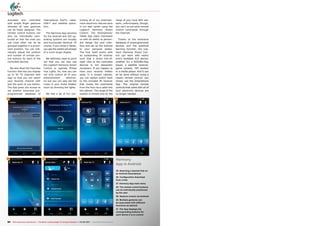
Harmony
App with iOS
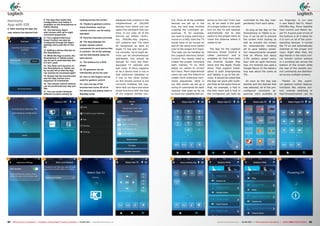
8. After starting the App, the
user selects the desired Hub
9. The App then loads that
configuration and makes it
available on the Smartphone or
Tablet display
10. The Harmony App's
start screen with up to eight
command sequences
11. The Logitech Harmony
Smart Control can also be
configured through the App's
settings menu just like on the
PC
12. Editing a device directly on
the Smartphone
13. While the App is active, the
Smartphone or Tablet screen
can be set to automatically dim
if it isn't used
14. The Auto-lock function of
the Smartphone or Tablet can
be turned off so that the App
can quickly be accessed again
15. Simply tap the touchscreen
and the App carries out a
sequence of commands
16. The remote control buttons
can be positioned any way you
like
17. You can switch between
different screens simply by
swiping across the screen
18. Thanks to gesture control,
many functions, such as
volume control, can be easily
operated
19. Favorite channels overview
20. The App displays the
proper remote control
commands for each device that
it controls. All of the settings
can be individually setup for
each device
21. The buttons for a DVD
player
22. All gestures can be
individually set by the user
23. One or two fingers can be
used for gesture control
24. Just one tap of the
touchscreen turns off all of
the devices and places them in
Standby mode
database that contains in the
neighborhood of 250,000
devices from which you can
select the hardware that you
have. In our case, all of the
devices we tested, receiv-
ers, DVD/Blu-Ray players,
HiFi systems and TVs were
all recognized, as were an
Apple TV box and two gam-
ing consoles. Up to eight de-
vices can be simultaneously
addressed; this should be
enough for even the best-
equipped TV cabinets and
wall units. If there happens
to be a device that is not in
that extensive database or
if one or the other button
on the remote control is not
correctly imitated, the Log-
itech Hub can learn and store
those functions with the help
of the original remote con-
25 26 27 28
29 30 31
84 TELE-audiovision International — The World‘s Leading Digital TV Industry Publication — 05-06/2015 — www.TELE-audiovision.com
activated and controlled
with simple finger gestures
whereby all user gestures
can be freely assigned. The
remote control buttons can
also be individually posi-
tioned so that the ones you
use most often can all be
grouped together in a promi-
nent position. You can indi-
vidually adjust the position
and number of remote con-
trol buttons for each of the
controlled devices.
We also liked the Favorites
function that lets you display
up to 50 TV channels with
logo so that you can watch
your favorite channel with
just the push of one button.
The App gives you access to
yet another extensive pre-
programmed database of
international PayTV, cable,
DVB-T and satellite opera-
tors.
The Harmony App versions
for the Android and iOS op-
erating systems are visually
and functionally identical. Of
course, if you utilize a Tablet,
you get the added advantage
of a much larger display.
We definitely need to point
out that you can also use
the Logitech Harmony Smart
Control to operate Philips
Hue Lights. So, now you can
not only control all of your
entertainment electron-
ics but you can also set the
mood in your home theater
room by dimming the lights.
We had a lot of fun con-
trolling all of our entertain-
ment electronic devices here
in our test center using the
Logitech Harmony Smart
Control. The Smartphone/
Tablet App really impressed
us with its ability to person-
ally design the user inter-
face and set up the buttons
to your personal tastes.
The Hub itself works with
an outstanding IR receiver
such that a direct line-of-
sight view to the controlled
devices is not absolutely
necessary. If you happen to
have your receiver hidden
away in a locked cabinet,
you can always switch back
to the included IR receiver
that routes the commands
from the Hub via a cable into
the cabinet. The range of the
system is limited only by the
range of your local WiFi net-
work; unfortunately, though,
you can‘t as yet send remote
control commands through
the Internet.
Thanks to the extensive
database of preprogrammed
devices and the practical
learning function, the Log-
itech Harmony Smart Con-
trol can work with nearly
every available A/V device;
whether it‘s a DVD/Blu-Ray
player, a satellite receiver,
game console, HiFi system
or a media player. And it can
all be done without using a
classic remote control, you
simply use the Smartphone
App. The original remote
controls that came with all of
your electronic devices are
no longer needed.
Harmony
App in Android
25. Selecting a desired Hub on
an Android Smartphone
26. Configuration download
from a Hub
27. Harmony App main menu
28. The remote control buttons
can be individually positioned
by the user
29. Gesture control via Android
30. Multiple gestures can
be associated with different
functions as desired
31. The App displays the
corresponding buttons for
each device it is to control

Logitech

  • 1.
    76 77TELE-audiovision International— The World‘s Leading Digital TV Industry Publication — 05-06/2015 — www.TELE-audiovision.com www.TELE-audiovision.com — 05-06/2015 — TELE-audiovision International — 全球发行量最大的数字电视杂志 Logitech Harmony Smart Control • Replaces all of your original remote controls • Utilizes your home WLAN network to carry commands • External IR receivers expand use to include hidden devices • Command sequences can be preprogrammed • Multiple devices can be used at the same time TEST REPORT Virtual Remote Control
  • 2.
    1 2 3 78 TELE-audiovision International— The World‘s Leading Digital TV Industry Publication — 05-06/2015 — www.TELE-audiovision.com TEST REPORT Virtual Remote Control Trying to store all of your remote controls on your liv- ing room coffee table isn‘t one of those problems that just happens with us tech- savvy editors here at TELE- audiovision. Wouldn‘t it be nice if you could make all of those remote controls disap- pear? Logitech‘s new Har- mony Smart Control System makes this possible by uti- lizing the already-available Smartphone or Tablet as a fully functional replacement for all of the original remote controls. We like this idea Universal Remote Control in the Form of a Smartphone App Thomas Haring Configuration with PC 1. The Harmony Smart Control website for system configuration 2. All available Hubs are centrally displayed 3. Hub configuration because it opens the way for receiver manufacturers to completely focus their ef- forts on the receiver section of their set top boxes and fully outsource the remote control portion. The number of TV viewers that don‘t have a Smartphone or Tablet is rapidly on the decline. Why not use devices that the cus- tomers already have? The Logitech Harmony Smart Control comes de- livered to you in an elegant package. It contains the Hub, the heart of the entire system, as well as the neces- sary cables for connection to a PC and power outlet plus an external IR receiver. What the Logitech Harmony Smart Control can do is easily and quickly explained: the Hub is setup close to the devices that are to be controlled and plugged into a wall outlet. It sends the various remote control commands via infra- red and also via Bluetooth to all the different devices. The fact that Bluetooth is supported is especially in- teresting for anyone look- ing to control their gaming consoles such Sony‘s Play- station. The Hub also con- nects itself to the local WiFi network and can thus handle those commands that come via a Smartphone or Tablet App. During the initial instal- lation, which can be done via a PC and a direct connection of the Hub to a USB port or wirelessly via Smartphone and Bluetooth connection, it
  • 3.
    4 5 6 7 80 TELE-audiovision International— The World‘s Leading Digital TV Industry Publication — 05-06/2015 — www.TELE-audiovision.com is therefore essential to con- figure the Hub‘s WiFi func- tion. Thanks to the support of WiFi 802.11 b/g/n with WPA, WPA2 AES and 64/128 bit WEP encryption, it should be compatible with all stand- ard WiFi routers and not give you any problems when set- ting up the connection. In our tests, we had no trouble setting it up; in just a few seconds the Hub connected to our office WiFi network. The initial installation can follow two different paths: 4. With the help of command strings, multiple commands can be executed one after the other 5. Your favorite channels can be selected from an extensive database or you can add them yourself 6. Remote control commands can be individualized and also taught to the system 7. After all of the settings have been taken care of, the Hub is connected to the PC so it can be programmed either the Logitech Harmony Smart Control can be config- ured and individualized via a PC or it can be done directly through a Smartphone or Tablet. In both cases a user account needs to be setup so that you‘ll have future access to the website www.myhar- mony.com. If a PC is used, the entire system configura- tion and personalization pro- cess can be handled directly from the web browser. Log- itech opted to utilize the RIA (Rich Internet Application) concept which in this case is implemented by Microsoft Silverlight. For the user this provides the advantage that all of the system settings and individualization is centrally stored with Logitech and that no special installation tool needs to be installed on the PC. Not only that, any changes to the configuration will instantly be available on the Tablet or Smartphone. In order to be able to get the most out of the Hub, it is critical to tell it what local devices are in use. For this purpose there‘s an enormous
  • 4.
    8 9 10 1112 13 14 15 16 17 18 19 20 21 22 23 24 82 83TELE-audiovision International — The World‘s Leading Digital TV Industry Publication — 05-06/2015 — www.TELE-audiovision.com www.TELE-audiovision.com — 05-06/2015 — TELE-audiovision International — 全球发行量最大的数字电视杂志 trol. Once all of the available devices are set up in the Hub, the next step involves creating the command se- quences. If, for example, you want to enjoy watching a movie on a DVD, then the TV would have to be turned on and at the same time switch over to the proper A/V input. This task can be handled by the Logitech Harmony Smart Control. You merely need to create the proper command path, namely, TV on, DVD player on, switch to correct A/V input. More experienced users can use this feature to create more extensive com- mand sequences. Here in our test center we set up a string of commands for each receiver that goes so far as to move our satellite dish an- tenna on the roof. From now on, all we need is the push of a single button to not only turn on the TV and receiver automatically but to also switch to the proper menu to move the antenna where it needs to be. The App for the Logitech Harmony Smart Control is called „Harmony“ and is available for free from both the Android Google Play store and the Apple iTunes store. They support instal- lation in both Smartphones and Tablets in up to five de- vices. It should be noted that the App can work with multi- ple Hubs at the same time so that, for example, a Hub in the kids room and a Hub in the Livingroom can both be controlled by the App inde- pendently from each other. As long as the App on the Smartphone or Tablet is ac- tive, it can be set to prevent the screen from locking as well as prevent the screen for automatically shutting off to save battery power. Our measurements revealed that an iPhone lost about 2-3% battery power every hour with an open Harmony App. For Android (we used a Google Nexus 5) the battery loss was about the same at 3%. As soon as the App was started and the desired Hub was selected, all of the pre- configured command se- quences were available at our fingertips. In our case it was Watch Sat-TV, Watch DVD/Blu-Ray, Move Satellite Dish Control and Watch Ap- ple TV. A quick push of one of the buttons is all it takes for it to turn on all of the corre- sponding devices: it turned the TV on and automatically switched to the proper A/V input. Right after that, the App blends in the more criti- cal remote control buttons in a scrolling bar across the bottom of the screen while the rest of the remote con- trol commands are distribut- ed across multiple screens. Thanks to the practi- cal gesture control feature, functions like volume con- trol, channel switching or fast-forward/rewind can be Harmony App with iOS 8. After starting the App, the user selects the desired Hub 9. The App then loads that configuration and makes it available on the Smartphone or Tablet display 10. The Harmony App's start screen with up to eight command sequences 11. The Logitech Harmony Smart Control can also be configured through the App's settings menu just like on the PC 12. Editing a device directly on the Smartphone 13. While the App is active, the Smartphone or Tablet screen can be set to automatically dim if it isn't used 14. The Auto-lock function of the Smartphone or Tablet can be turned off so that the App can quickly be accessed again 15. Simply tap the touchscreen and the App carries out a sequence of commands 16. The remote control buttons can be positioned any way you like 17. You can switch between different screens simply by swiping across the screen 18. Thanks to gesture control, many functions, such as volume control, can be easily operated 19. Favorite channels overview 20. The App displays the proper remote control commands for each device that it controls. All of the settings can be individually setup for each device 21. The buttons for a DVD player 22. All gestures can be individually set by the user 23. One or two fingers can be used for gesture control 24. Just one tap of the touchscreen turns off all of the devices and places them in Standby mode database that contains in the neighborhood of 250,000 devices from which you can select the hardware that you have. In our case, all of the devices we tested, receiv- ers, DVD/Blu-Ray players, HiFi systems and TVs were all recognized, as were an Apple TV box and two gam- ing consoles. Up to eight de- vices can be simultaneously addressed; this should be enough for even the best- equipped TV cabinets and wall units. If there happens to be a device that is not in that extensive database or if one or the other button on the remote control is not correctly imitated, the Log- itech Hub can learn and store those functions with the help of the original remote con-
  • 5.
    25 26 2728 29 30 31 84 TELE-audiovision International — The World‘s Leading Digital TV Industry Publication — 05-06/2015 — www.TELE-audiovision.com activated and controlled with simple finger gestures whereby all user gestures can be freely assigned. The remote control buttons can also be individually posi- tioned so that the ones you use most often can all be grouped together in a promi- nent position. You can indi- vidually adjust the position and number of remote con- trol buttons for each of the controlled devices. We also liked the Favorites function that lets you display up to 50 TV channels with logo so that you can watch your favorite channel with just the push of one button. The App gives you access to yet another extensive pre- programmed database of international PayTV, cable, DVB-T and satellite opera- tors. The Harmony App versions for the Android and iOS op- erating systems are visually and functionally identical. Of course, if you utilize a Tablet, you get the added advantage of a much larger display. We definitely need to point out that you can also use the Logitech Harmony Smart Control to operate Philips Hue Lights. So, now you can not only control all of your entertainment electron- ics but you can also set the mood in your home theater room by dimming the lights. We had a lot of fun con- trolling all of our entertain- ment electronic devices here in our test center using the Logitech Harmony Smart Control. The Smartphone/ Tablet App really impressed us with its ability to person- ally design the user inter- face and set up the buttons to your personal tastes. The Hub itself works with an outstanding IR receiver such that a direct line-of- sight view to the controlled devices is not absolutely necessary. If you happen to have your receiver hidden away in a locked cabinet, you can always switch back to the included IR receiver that routes the commands from the Hub via a cable into the cabinet. The range of the system is limited only by the range of your local WiFi net- work; unfortunately, though, you can‘t as yet send remote control commands through the Internet. Thanks to the extensive database of preprogrammed devices and the practical learning function, the Log- itech Harmony Smart Con- trol can work with nearly every available A/V device; whether it‘s a DVD/Blu-Ray player, a satellite receiver, game console, HiFi system or a media player. And it can all be done without using a classic remote control, you simply use the Smartphone App. The original remote controls that came with all of your electronic devices are no longer needed. Harmony App in Android 25. Selecting a desired Hub on an Android Smartphone 26. Configuration download from a Hub 27. Harmony App main menu 28. The remote control buttons can be individually positioned by the user 29. Gesture control via Android 30. Multiple gestures can be associated with different functions as desired 31. The App displays the corresponding buttons for each device it is to control