TEST REPORT                  HDTV Satellite Receiver


Dizipia DS4H-9160
                                                                                                            about all the connection
                                                                                                            options we could need. The
                                                                                                            antenna input for each of the


Bigger and Better
                                                                                                            two tuners has a correspond-
                                                                                                            ing loop-through output, and
                                                                                                            the first tuner can be looped
                                                                                                            into the second if only one
                                                                                                            antenna feed is available. A
                                                                                                            little loop-through cable is
                                                                                                            included in the box to do just
It might not have the most catchy name, but the                                                             this. HDMI and S/PDIF are
DS4H-9160 from Korean manufacturer Dizipia makes an                                                         available for digital video and
                                                                                                            audio along with the more tra-
imposing statement with its size and looks. The sleek black                                                 ditional two Scarts, component
metal-cased receiver is bigger than most at 43cm wide, 28cm                                                 and composite video and RCA
deep and 6cm high and the sturdy metal case means it’s quite                                                stereo audio. There’s another
                                                                                                            USB connector here as well
heavy too. The shiny front panel contains a nice and clear                                                  as RS232 and even an Ether-
channel information display.                                                                                net port, although there is no
                                                                                                            information in the manual to
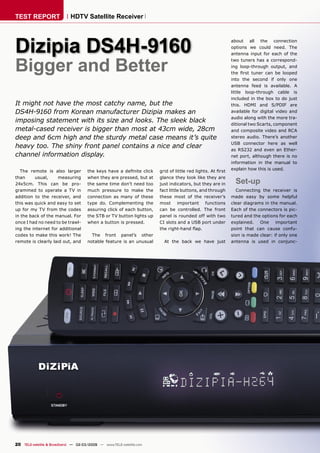
  The remote is also larger           the keys have a definite click    grid of little red lights. At first   explain how this is used.
than     usual,     measuring         when they are pressed, but at    glance they look like they are
24x5cm. This can be pro-              the same time don’t need too     just indicators, but they are in       Set-up
grammed to operate a TV in            much pressure to make the        fact little buttons, and through       Connecting the receiver is
addition to the receiver, and         connection as many of these      these most of the receiver’s         made easy by some helpful
this was quick and easy to set        type do. Complementing the       most important functions             clear diagrams in the manual.
up for my TV from the codes           assuring click of each button,   can be controlled. The front         Each of the connectors is pic-
in the back of the manual. For        the STB or TV button lights up   panel is rounded off with two        tured and the options for each
once I had no need to be trawl-       when a button is pressed.        CI slots and a USB port under        explained. One important
ing the internet for additional                                        the right-hand flap.                  point that can cause confu-
codes to make this work! The            The front panel’s other                                             sion is made clear: if only one
remote is clearly laid out, and       notable feature is an unusual      At the back we have just           antenna is used in conjunc-


20 TELE-satellite & Broadband — 02-03/2009 — www.TELE-satellite.com
tion with the loop-through           and messages just English,                       telling the receiver it’s loca-          in the sky in the future, sat-
cable, switching channels            German and Russian are                           tion by latitude and longitude           ellites can be edited, added
while recording is limited to        available. Strangely, the list                   so that it can calculate the             and removed as needed. The
the channels on the same             of languages for audio and                       positions of the satellites you          transponder frequencies for
transponder only. The two            subtitle defaults are different.                 wish to receive.                         the satellites appear to be
LNB inputs can also be set           The choice here is between                                                                nicely up-to-date too.
to different satellites, so two      English, German or French.                          The list of satellites pre-
independent fixed dishes are                                                           programmed into the receiver               Scanning     for   channels
also an option, this too would         Then it’s off to the chan-                     is very impressive – there are           themselves is nice and fast
limit what can be watched and        nel search screen where our                      around 170 of them! I’d chal-            with a full scan over ASTRA
recorded at the same time.           chosen satellites are set up                     lenge you to find one that’s              2 taking just eight minutes.
                                     and searched for the first time.                  not already there, but in case           Once the channels are in
   The first time we switch on,       Motorised DiSEqC dishes and                      there is or a new satellite              memory, a good selection of
we go straight to the instal-        USALS are supported. It’s                                            appears              functions are present to allow
lation wizard where the local        a simple job                                                                              further editing and sorting.
time, time zone and preferred        o f
languages are. There are lim-                                                                                                                         The full chan-
ited language options                                                                                                                                   nel list is
here – for the on-
screen menus


                                                                                                                                     0.55


                        TELE-satelliteother languageswww.TELE-satellite.com/...
                        Download this report in
                                                World from the Internet:
                        Arabic            ‫ﺍﻟﻌﺮﺑﻴﺔ‬           www.TELE-satellite.com/TELE-satellite-0903/ara/dizipia.pdf
                        Indonesian        Indonesia         www.TELE-satellite.com/TELE-satellite-0903/bid/dizipia.pdf
                        Bulgarian         Български         www.TELE-satellite.com/TELE-satellite-0903/bul/dizipia.pdf
                        Czech             Česky             www.TELE-satellite.com/TELE-satellite-0903/ces/dizipia.pdf
                        German            Deutsch           www.TELE-satellite.com/TELE-satellite-0903/deu/dizipia.pdf
                        English           English           www.TELE-satellite.com/TELE-satellite-0903/eng/dizipia.pdf
                        Spanish           Español           www.TELE-satellite.com/TELE-satellite-0903/esp/dizipia.pdf
                        Farsi             ‫ﻓﺎﺭﺳﻲ‬             www.TELE-satellite.com/TELE-satellite-0903/far/dizipia.pdf                               02-03/2009
                        French            Français          www.TELE-satellite.com/TELE-satellite-0903/fra/dizipia.pdf
                        Greek             Ελληνικά          www.TELE-satellite.com/TELE-satellite-0903/hel/dizipia.pdf               DIZIPIA DS4H-9160
                        Croatian          Hrvatski          www.TELE-satellite.com/TELE-satellite-0903/hrv/dizipia.pdf          A competent receiver with lots of
                        Italian           Italiano          www.TELE-satellite.com/TELE-satellite-0903/ita/dizipia.pdf              connection options and
                        Hungarian         Magyar            www.TELE-satellite.com/TELE-satellite-0903/mag/dizipia.pdf               powerful capabilities
                        Mandarin          中文                www.TELE-satellite.com/TELE-satellite-0903/man/dizipia.pdf
                        Dutch             Nederlands        www.TELE-satellite.com/TELE-satellite-0903/ned/dizipia.pdf
                        Polish            Polski            www.TELE-satellite.com/TELE-satellite-0903/pol/dizipia.pdf
                        Portuguese        Português         www.TELE-satellite.com/TELE-satellite-0903/por/dizipia.pdf
                        Russian           Русский           www.TELE-satellite.com/TELE-satellite-0903/rus/dizipia.pdf
                        Swedish           Svenska           www.TELE-satellite.com/TELE-satellite-0903/sve/dizipia.pdf
                        Turkish           Türkçe            www.TELE-satellite.com/TELE-satellite-0903/tur/dizipia.pdf
                                                    Available online starting from 30 January 2009


                                                                                             www.TELE-satellite.com — 02-03/2009 — TELE-satellite & Broadband       21
receiver instead of the tra-      tion can be used to delete
                                                                       ditional IDE. Our test model      the oldest recordings when
                                                                       was unfortunately supplied        space runs out. With this kind
                                                                       without an drive installed        of system, the unwanted loss
                                                                       internally, so this at least      of an important recording is
                                                                       gave me an excuse to fully        always a worry. Thankfully
                                                                       test connecting a hard drive      there is a helpful option to
                                                                       to the USB ports.                 protect individual recordings
     Main menu
                                                                                                         so that they are not deleted
                                                                         I was not very confident,        accidentally or by the auto-
                                                                       but even a fairly old USB         delete   function.   Parental
                                                                       drive connected to the rear       control of recordings is also
                                                                       USB port proved me wrong          supplied via password pro-
                                                                       by working almost faultlessly,    tection.
                                                                       including recording HD chan-
                                                                       nels. There were however a           Timeshifting is also availa-
                                                                       few times where the picture       ble for live TV. A simple press
                                                                       became a little jerky as you’d    of the pause button is all that
                                                                       expect. But even watching         is needed, after this the usual
                                                                       an HD channel and recording       rewind and fast-forward con-
                                                                       another onto the USB drive        trols become available. A wel-
     Channel info                                                      was possible, if not 100%         come extra function divides
accessed by simply hitting the        A final option exists to limit    perfect.                          the recorded programme into
“OK” key when watching TV.            the allowed programmes by                                          segments like chapters of a
This list can be quickly sorted       their age rating, although         External drives use a stand-    DVD, making navigation much
into alphabetical order, by           this depends completely on       ard FAT32 file system, so          easier than having to wind
scrambled/FTA status, or left         the broadcaster transmitting     backup and retrieval to a com-    through a long timeshifted
in its original state of sorting      the correct age classification    puter is simple and straight-     programme. The standard
by channel number. A nice             information.                     forward. The file manager          amount of programme that is
touch is the “zoom” function,                                          on the receiver will be easy      temporarily recorded defaults
where the channel list can be           Hard drive                     to navigate for anyone used
                                                                       to using computers, with the
                                                                                                         to 30 minutes, but this can be
                                                                                                         changed in the settings up to
switched between filling the
whole screen or just a part of
                                        functions                      familiar structure of files and    a maximum of two hours.
the left-hand side, so that the         As HD broadcasts use a         folders and even the “..” to go
TV picture can be seen at the         lot of data and high speed       back to the parent directory.       A source of disappoint-
same time.                            data transfer is essential, an                                     ment might be the lack of any
                                      SATA interface is used in the      An automatic delete func-       editing functions. It’s always
  All of the editing and organi-
sation functions are accessed
from here too which is easier
than having to go to a dedi-
cated editing menu. Channels
can be moved up and down
the list as required. As many
favourites lists can be set up
as required, and adding to and
editing them is easy to do.

   For those with children,
two options exist for parental
control – the traditional pass-
word approach or the ability
to completely hide certain
channels until the password
is entered. In addition to this,
you can limit the viewable
channels to a single favourites
list or set an amount of time
before the receiver switches
itself off – to stop the kids sit-
ting in front of the TV all day!


22 TELE-satellite & Broadband — 02-03/2009 — www.TELE-satellite.com
helpful to have even some             to quickly switch resolution.
basic edit controls to take out       Added to this is an idea taken
commercials in a recording            from the world of comput-
and it’s a pity there is no pro-      ers. After the resolution is
vision to do anything like this.      changed, a box appears on
As a sports fan, I also missed        screen for you to confirm that
a slow-motion playback option         you can see the picture. The
which I often use.                    default is “no”, so if you end up       TV setup menu
                                      with an unwatchable image,
  Everyday use                        just press the OK button and
                                      it reverts to the previous res-
  Navigating     around     satel-
                                      olution. Both progressive and
lites, channels and the receiv-
                                      interlaced modes are availa-
er’s menus is fairly easy,
                                      ble, ranging from 480 to 1080
although perhaps not quite
                                      scan lines.
as intuitive as some other
receivers    we’ve    seen.   For
                                         Widescreen broadcasts are
example, even after quite a
                                      commonplace these days and
lot of time using the receiver
                                      it’s good to see that all options
I am confused by there being
                                      here are catered for. For view-
a “back” button that doesn’t
                                      ing widescreen broadcasts on
actually move the menus back                                                  EPG
                                      a 4:3 screen, letterbox and
to the last level! The “menu”         pan/scan modes are avail-           used to zoom the EPG display      access to subtitles and addi-
key doesn’t do this either as I       able. In reverse, a 4:3 broad-      between the full screen or        tional audio tracks.
might have expected. Instead          cast on a 16:9 screen can be        just a part of it. Programmes
the “exit” button does this,          untouched with black bars           set to be recorded can have a        There’s a novel feature for
at least sometimes – at other         at the sides, or zoomed as          parental control put on them      users of pay-TV systems. As
times it does what it says and        required. There’s even a spe-       at reservation time. Tradi-       usual, if a scrambled pro-
exits the menu system com-            cial button on the remote for       tional timer-mode recording       gramme is recorded, a valid
pletely.                              this too, to switch between         is also available.                card is needed to be used to
                                      16:9 and 4:3 mode.                                                    watch the recording at a later
  Picture quality is a big issue                                            Everyday channel-surfing is      date. However, there’s a spe-
for HD receivers and thank-              I had difficulty making the       fast, and thanks to the good      cial “descrambling” function.
fully the HD quality out from         EPG work, most likely because       widescreen implementation,        At a preset time of your choos-
the Dizipia lives up to expecta-      it requires an internal hard        mostly painless. Once sorted      ing, for example while you
tions. Standard definition pic-        drive to store its data on.         into the desired order, or into   are asleep, the receiver will
tures are also upscaled when          Assuming it will work prop-         favourites lists, navigating      get to work on the recorded
viewing in a HD resolution            erly in a production model,         around the channels is easy.      file and remove the encryp-
and this too adds a little extra      it contains all the usual func-     The “back” key finally finds a      tion. A valid viewing card is
quality to the picture when           tions we’d need and expect.         use here, a quick press takes     still needed to descramble the
compared with RGB Scart.              Programmes in the future can        us back to the last chan-         pictures of course.
                                      be set to record, or just to        nel viewed. Inbuilt Teletext
  There’s a very helpful dedi-        be watched. Like the channel        is available, and dedicated          As there are two USB ports,
cated button on the remote            list, the blue button can be        buttons on the remote give        it’s easy to have one con-


24 TELE-satellite & Broadband — 02-03/2009 — www.TELE-satellite.com
nected to a hard drive as I               software inside isn’t as fully
had to, plus still access other           developed as it could be. Nav-
USB devices from the other.               igating the menus sometimes
MP3 audio files can be played,             feels a little tiring as they do
and pictures look great on a              not feel as intuitive as those
large HD screen.                          on some of the other PVRs
                                          available.
  Overall                                                                              Recorded files list

  This is a competent receiver              On the plus side however,
with lots of connection options           good     picture    performance,
and       powerful       capabilities.    ease of picture size and shape
After using it for a while how-           adjustment      with      dedicated
ever, it does start to feel like          buttons and CI slots, for an
it’s a sports car with a speed            everyday PVR it should do the
limiter in the engine, that the           job just fine.


                            Expert Opinion
      +
   Twin tuners with a comprehensive range of dish
 and connection options, descrambling control, full
 support of widescreen and HD resolutions                                              Recorded file playback
   SW upgrade and recording to PC via Ethernet
   2 channels recording and 1 recorded file playback
   Immediate Timeshifting
                                                                                                                 TECHNIC
   32-bit true-color OSD                                      Andy Middleton                                            DATA
                                                                TELE-satellite
   User-friendly operational menu                                 Test Center    Manufacturer               Dizipia, Inc., 2nd Floor, Shinhan Bldg., 147-9 Garak-dong,
   Linux Operating System                                                 UK                                Songpa-Gu, Seoul 138160, Korea
   1080p video resolution support                                                Tel                        +82 (0)2 21 52 32 00

      -                                                                          Fax
                                                                                 www
                                                                                                            +82 (0)2 407 34 05
                                                                                                            www.dizipia.com
      Not the most intuitive of menu systems
                                                                                 email                      info@dizipia.com
      No editing of recordings
                                                                                 Model                      DS4H-9160
                                                                                 Type                       HDTV-Receiver with Scaler
                                    ENERGY                                       Satellites                 170+
                                      DIAGRAM
                                                                                 SCPC compatible            Yes
                                                                                 USALS                      Yes
                                            Mode        Apparent Active Factor
                                            StandBy     12 W     3W     0.25     DiSEqC                     1.0/1.2/1.3
                     Apparent Power
                                            Reception   45 W     25 W   0.55
                                                                                 Scart connectors           2
                                                                                 Symbol rates               DVB-S: 1000-45000
                                                                                 DVB-S2                     20000-30000 (QPSK)
                                                                                 DVB-S2                     10000-30000 (8PSK)
                     Active Power                                                Audio outputs              2 (left & right)
                                                                                 Video outputs              Composite, Component, HDMI
                                                                                 UHF output                 No
                                                                                 0/12 volt output           No
                                                                                 Digital audio output       S/PDIF
                                                                                 EPG                        Yes
                                                                                 C/Ku-band compatible       Yes
                                                                                 Power supply               100-250V AC, 50/60Hz


                                                                                        www.TELE-satellite.com — 02-03/2009 — TELE-satellite & Broadband             25

Dizipia

  • 1.
    TEST REPORT HDTV Satellite Receiver Dizipia DS4H-9160 about all the connection options we could need. The antenna input for each of the Bigger and Better two tuners has a correspond- ing loop-through output, and the first tuner can be looped into the second if only one antenna feed is available. A little loop-through cable is included in the box to do just It might not have the most catchy name, but the this. HDMI and S/PDIF are DS4H-9160 from Korean manufacturer Dizipia makes an available for digital video and audio along with the more tra- imposing statement with its size and looks. The sleek black ditional two Scarts, component metal-cased receiver is bigger than most at 43cm wide, 28cm and composite video and RCA deep and 6cm high and the sturdy metal case means it’s quite stereo audio. There’s another USB connector here as well heavy too. The shiny front panel contains a nice and clear as RS232 and even an Ether- channel information display. net port, although there is no information in the manual to The remote is also larger the keys have a definite click grid of little red lights. At first explain how this is used. than usual, measuring when they are pressed, but at glance they look like they are 24x5cm. This can be pro- the same time don’t need too just indicators, but they are in Set-up grammed to operate a TV in much pressure to make the fact little buttons, and through Connecting the receiver is addition to the receiver, and connection as many of these these most of the receiver’s made easy by some helpful this was quick and easy to set type do. Complementing the most important functions clear diagrams in the manual. up for my TV from the codes assuring click of each button, can be controlled. The front Each of the connectors is pic- in the back of the manual. For the STB or TV button lights up panel is rounded off with two tured and the options for each once I had no need to be trawl- when a button is pressed. CI slots and a USB port under explained. One important ing the internet for additional the right-hand flap. point that can cause confu- codes to make this work! The The front panel’s other sion is made clear: if only one remote is clearly laid out, and notable feature is an unusual At the back we have just antenna is used in conjunc- 20 TELE-satellite & Broadband — 02-03/2009 — www.TELE-satellite.com
  • 2.
    tion with theloop-through and messages just English, telling the receiver it’s loca- in the sky in the future, sat- cable, switching channels German and Russian are tion by latitude and longitude ellites can be edited, added while recording is limited to available. Strangely, the list so that it can calculate the and removed as needed. The the channels on the same of languages for audio and positions of the satellites you transponder frequencies for transponder only. The two subtitle defaults are different. wish to receive. the satellites appear to be LNB inputs can also be set The choice here is between nicely up-to-date too. to different satellites, so two English, German or French. The list of satellites pre- independent fixed dishes are programmed into the receiver Scanning for channels also an option, this too would Then it’s off to the chan- is very impressive – there are themselves is nice and fast limit what can be watched and nel search screen where our around 170 of them! I’d chal- with a full scan over ASTRA recorded at the same time. chosen satellites are set up lenge you to find one that’s 2 taking just eight minutes. and searched for the first time. not already there, but in case Once the channels are in The first time we switch on, Motorised DiSEqC dishes and there is or a new satellite memory, a good selection of we go straight to the instal- USALS are supported. It’s appears functions are present to allow lation wizard where the local a simple job further editing and sorting. time, time zone and preferred o f languages are. There are lim- The full chan- ited language options nel list is here – for the on- screen menus 0.55 TELE-satelliteother languageswww.TELE-satellite.com/... Download this report in World from the Internet: Arabic ‫ﺍﻟﻌﺮﺑﻴﺔ‬ www.TELE-satellite.com/TELE-satellite-0903/ara/dizipia.pdf Indonesian Indonesia www.TELE-satellite.com/TELE-satellite-0903/bid/dizipia.pdf Bulgarian Български www.TELE-satellite.com/TELE-satellite-0903/bul/dizipia.pdf Czech Česky www.TELE-satellite.com/TELE-satellite-0903/ces/dizipia.pdf German Deutsch www.TELE-satellite.com/TELE-satellite-0903/deu/dizipia.pdf English English www.TELE-satellite.com/TELE-satellite-0903/eng/dizipia.pdf Spanish Español www.TELE-satellite.com/TELE-satellite-0903/esp/dizipia.pdf Farsi ‫ﻓﺎﺭﺳﻲ‬ www.TELE-satellite.com/TELE-satellite-0903/far/dizipia.pdf 02-03/2009 French Français www.TELE-satellite.com/TELE-satellite-0903/fra/dizipia.pdf Greek Ελληνικά www.TELE-satellite.com/TELE-satellite-0903/hel/dizipia.pdf DIZIPIA DS4H-9160 Croatian Hrvatski www.TELE-satellite.com/TELE-satellite-0903/hrv/dizipia.pdf A competent receiver with lots of Italian Italiano www.TELE-satellite.com/TELE-satellite-0903/ita/dizipia.pdf connection options and Hungarian Magyar www.TELE-satellite.com/TELE-satellite-0903/mag/dizipia.pdf powerful capabilities Mandarin 中文 www.TELE-satellite.com/TELE-satellite-0903/man/dizipia.pdf Dutch Nederlands www.TELE-satellite.com/TELE-satellite-0903/ned/dizipia.pdf Polish Polski www.TELE-satellite.com/TELE-satellite-0903/pol/dizipia.pdf Portuguese Português www.TELE-satellite.com/TELE-satellite-0903/por/dizipia.pdf Russian Русский www.TELE-satellite.com/TELE-satellite-0903/rus/dizipia.pdf Swedish Svenska www.TELE-satellite.com/TELE-satellite-0903/sve/dizipia.pdf Turkish Türkçe www.TELE-satellite.com/TELE-satellite-0903/tur/dizipia.pdf Available online starting from 30 January 2009 www.TELE-satellite.com — 02-03/2009 — TELE-satellite & Broadband 21
  • 3.
    receiver instead ofthe tra- tion can be used to delete ditional IDE. Our test model the oldest recordings when was unfortunately supplied space runs out. With this kind without an drive installed of system, the unwanted loss internally, so this at least of an important recording is gave me an excuse to fully always a worry. Thankfully test connecting a hard drive there is a helpful option to to the USB ports. protect individual recordings Main menu so that they are not deleted I was not very confident, accidentally or by the auto- but even a fairly old USB delete function. Parental drive connected to the rear control of recordings is also USB port proved me wrong supplied via password pro- by working almost faultlessly, tection. including recording HD chan- nels. There were however a Timeshifting is also availa- few times where the picture ble for live TV. A simple press became a little jerky as you’d of the pause button is all that expect. But even watching is needed, after this the usual an HD channel and recording rewind and fast-forward con- another onto the USB drive trols become available. A wel- Channel info was possible, if not 100% come extra function divides accessed by simply hitting the A final option exists to limit perfect. the recorded programme into “OK” key when watching TV. the allowed programmes by segments like chapters of a This list can be quickly sorted their age rating, although External drives use a stand- DVD, making navigation much into alphabetical order, by this depends completely on ard FAT32 file system, so easier than having to wind scrambled/FTA status, or left the broadcaster transmitting backup and retrieval to a com- through a long timeshifted in its original state of sorting the correct age classification puter is simple and straight- programme. The standard by channel number. A nice information. forward. The file manager amount of programme that is touch is the “zoom” function, on the receiver will be easy temporarily recorded defaults where the channel list can be Hard drive to navigate for anyone used to using computers, with the to 30 minutes, but this can be changed in the settings up to switched between filling the whole screen or just a part of functions familiar structure of files and a maximum of two hours. the left-hand side, so that the As HD broadcasts use a folders and even the “..” to go TV picture can be seen at the lot of data and high speed back to the parent directory. A source of disappoint- same time. data transfer is essential, an ment might be the lack of any SATA interface is used in the An automatic delete func- editing functions. It’s always All of the editing and organi- sation functions are accessed from here too which is easier than having to go to a dedi- cated editing menu. Channels can be moved up and down the list as required. As many favourites lists can be set up as required, and adding to and editing them is easy to do. For those with children, two options exist for parental control – the traditional pass- word approach or the ability to completely hide certain channels until the password is entered. In addition to this, you can limit the viewable channels to a single favourites list or set an amount of time before the receiver switches itself off – to stop the kids sit- ting in front of the TV all day! 22 TELE-satellite & Broadband — 02-03/2009 — www.TELE-satellite.com
  • 4.
    helpful to haveeven some to quickly switch resolution. basic edit controls to take out Added to this is an idea taken commercials in a recording from the world of comput- and it’s a pity there is no pro- ers. After the resolution is vision to do anything like this. changed, a box appears on As a sports fan, I also missed screen for you to confirm that a slow-motion playback option you can see the picture. The which I often use. default is “no”, so if you end up TV setup menu with an unwatchable image, Everyday use just press the OK button and it reverts to the previous res- Navigating around satel- olution. Both progressive and lites, channels and the receiv- interlaced modes are availa- er’s menus is fairly easy, ble, ranging from 480 to 1080 although perhaps not quite scan lines. as intuitive as some other receivers we’ve seen. For Widescreen broadcasts are example, even after quite a commonplace these days and lot of time using the receiver it’s good to see that all options I am confused by there being here are catered for. For view- a “back” button that doesn’t ing widescreen broadcasts on actually move the menus back EPG a 4:3 screen, letterbox and to the last level! The “menu” pan/scan modes are avail- used to zoom the EPG display access to subtitles and addi- key doesn’t do this either as I able. In reverse, a 4:3 broad- between the full screen or tional audio tracks. might have expected. Instead cast on a 16:9 screen can be just a part of it. Programmes the “exit” button does this, untouched with black bars set to be recorded can have a There’s a novel feature for at least sometimes – at other at the sides, or zoomed as parental control put on them users of pay-TV systems. As times it does what it says and required. There’s even a spe- at reservation time. Tradi- usual, if a scrambled pro- exits the menu system com- cial button on the remote for tional timer-mode recording gramme is recorded, a valid pletely. this too, to switch between is also available. card is needed to be used to 16:9 and 4:3 mode. watch the recording at a later Picture quality is a big issue Everyday channel-surfing is date. However, there’s a spe- for HD receivers and thank- I had difficulty making the fast, and thanks to the good cial “descrambling” function. fully the HD quality out from EPG work, most likely because widescreen implementation, At a preset time of your choos- the Dizipia lives up to expecta- it requires an internal hard mostly painless. Once sorted ing, for example while you tions. Standard definition pic- drive to store its data on. into the desired order, or into are asleep, the receiver will tures are also upscaled when Assuming it will work prop- favourites lists, navigating get to work on the recorded viewing in a HD resolution erly in a production model, around the channels is easy. file and remove the encryp- and this too adds a little extra it contains all the usual func- The “back” key finally finds a tion. A valid viewing card is quality to the picture when tions we’d need and expect. use here, a quick press takes still needed to descramble the compared with RGB Scart. Programmes in the future can us back to the last chan- pictures of course. be set to record, or just to nel viewed. Inbuilt Teletext There’s a very helpful dedi- be watched. Like the channel is available, and dedicated As there are two USB ports, cated button on the remote list, the blue button can be buttons on the remote give it’s easy to have one con- 24 TELE-satellite & Broadband — 02-03/2009 — www.TELE-satellite.com
  • 5.
    nected to ahard drive as I software inside isn’t as fully had to, plus still access other developed as it could be. Nav- USB devices from the other. igating the menus sometimes MP3 audio files can be played, feels a little tiring as they do and pictures look great on a not feel as intuitive as those large HD screen. on some of the other PVRs available. Overall Recorded files list This is a competent receiver On the plus side however, with lots of connection options good picture performance, and powerful capabilities. ease of picture size and shape After using it for a while how- adjustment with dedicated ever, it does start to feel like buttons and CI slots, for an it’s a sports car with a speed everyday PVR it should do the limiter in the engine, that the job just fine. Expert Opinion + Twin tuners with a comprehensive range of dish and connection options, descrambling control, full support of widescreen and HD resolutions Recorded file playback SW upgrade and recording to PC via Ethernet 2 channels recording and 1 recorded file playback Immediate Timeshifting TECHNIC 32-bit true-color OSD Andy Middleton DATA TELE-satellite User-friendly operational menu Test Center Manufacturer Dizipia, Inc., 2nd Floor, Shinhan Bldg., 147-9 Garak-dong, Linux Operating System UK Songpa-Gu, Seoul 138160, Korea 1080p video resolution support Tel +82 (0)2 21 52 32 00 - Fax www +82 (0)2 407 34 05 www.dizipia.com Not the most intuitive of menu systems email info@dizipia.com No editing of recordings Model DS4H-9160 Type HDTV-Receiver with Scaler ENERGY Satellites 170+ DIAGRAM SCPC compatible Yes USALS Yes Mode Apparent Active Factor StandBy 12 W 3W 0.25 DiSEqC 1.0/1.2/1.3 Apparent Power Reception 45 W 25 W 0.55 Scart connectors 2 Symbol rates DVB-S: 1000-45000 DVB-S2 20000-30000 (QPSK) DVB-S2 10000-30000 (8PSK) Active Power Audio outputs 2 (left & right) Video outputs Composite, Component, HDMI UHF output No 0/12 volt output No Digital audio output S/PDIF EPG Yes C/Ku-band compatible Yes Power supply 100-250V AC, 50/60Hz www.TELE-satellite.com — 02-03/2009 — TELE-satellite & Broadband 25