
Copyright	©	2016	Splunk	Inc.
DevOps	Hands-On	Session	+	
Docker
Domnick	Eger
Major	Accounts	/	Southwest	SME	for	DevOps
Bill	Emmett
Director,	Solution	Marketing,	Application	
Management
2
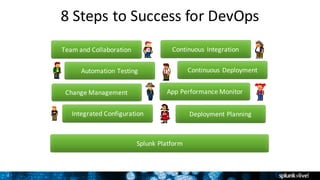
8	Steps	to	Success	for	DevOps
Team	and	Collaboration
Automation	Testing
Integrated	Configuration
Change	Management
Continuous	Integration
Deployment	Planning
Continuous	Deployment
App	Performance	Monitor
Splunk	Platform
3
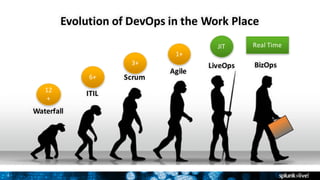
Evolution	of	DevOps	in	the	Work	Place
Waterfall
ITIL
Scrum
Agile
LiveOps BizOps
12
+
6+
3+
1+
JIT Real	Time
4
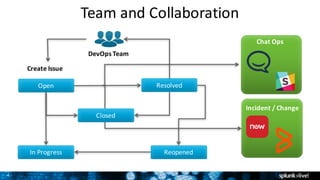
Team	and	Collaboration
Open Resolved
In	Progress Reopened
DevOps	Team
Create	Issue
Chat	Ops
Incident	/	Change
Closed
5
MACHINE	DATA
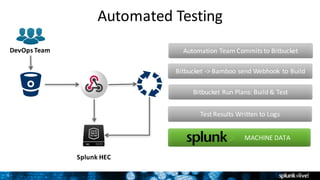
Automated	Testing
DevOps	Team
Splunk	HEC
Automation	Team	Commits	to	Bitbucket
Bitbucket ->	Bamboo	send	Webhook to	Build
Bitbucket Run	Plans:	Build	&	Test
Test	Results	Written	to	Logs
6
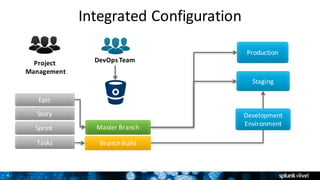
Integrated	Configuration
DevOps	Team
Master	Branch
Branch	Build
Sprint	
Epic
Tasks
Story
Production
Staging	
Development
Environment
Project	
Management
7
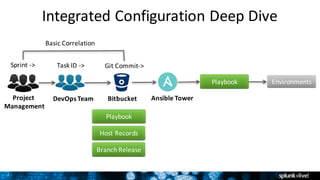
Integrated	Configuration	Deep	Dive
DevOps	Team Bitbucket Ansible	Tower
Playbook
Host	Records
Branch	Release
Playbook
Project	
Management
Environments
Sprint	->	 Task	ID	->	 Git	Commit->
Basic	Correlation
8
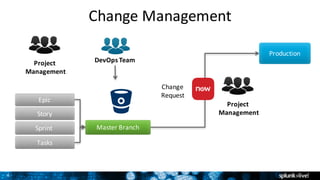
Change	Management
DevOps	Team
Master	BranchSprint	
Epic
Tasks
Story
Production
Project	
Management
Project	
Management
Change
Request
9
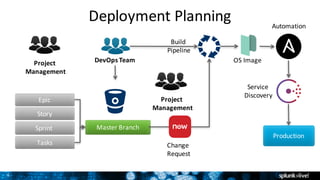
Deployment	Planning
DevOps	Team
Master	BranchSprint	
Epic
Tasks
Story
Production
Project	
Management
Project	
Management
OS	Image
Automation
Service	
Discovery
Change	
Request
Build	
Pipeline
10
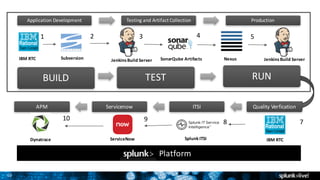
Application	Development Testing	and	Artifact	Collection Production
APM Servicenow ITSI Quality	Verfication
IBM	RTC Subversion Jenkins	Build	Server NexusSonarQube	Artifacts
BUILD TEST RUN
1 2 3 4 5
y
Dynatrace ServiceNow Splunk	ITSI IBM	RTC
78910
Platform
Jenkins	Build	Server
11
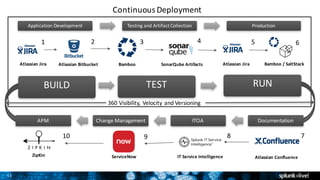
Application	Development Testing	and	Artifact	Collection Production
APM Change	Management ITOA Documentation
Atlassian	Jira Atlassian	Bitbucket Bamboo Bamboo	/	SaltStackSonarQube	Artifacts
BUILD TEST RUN
1 2 3 4 5 6
ZipKin ServiceNow
78910
IT	Service	Intelligence Atlassian	Confluence
Continuous	Deployment
Atlassian	Jira
360	Visibility,	Velocity	and	Versioning
12
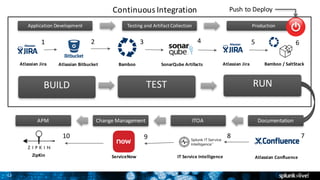
Application	Development Testing	and	Artifact	Collection Production
APM Change	Management ITOA Documentation
Atlassian	Jira Atlassian	Bitbucket Bamboo Bamboo	/	SaltStackSonarQube	Artifacts
BUILD TEST RUN
1 2 3 4 5 6
ZipKin ServiceNow
78910
IT	Service	Intelligence Atlassian	Confluence
Continuous	Integration
Atlassian	Jira
Push	to	Deploy
13
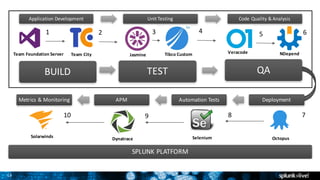
Application	Development Unit	Testing	 Code	Quality	&	Analysis
Metrics	&	Monitoring APM Automation	Tests Deployment
Team	Foundation	Server Team	City
BUILD TEST QA
1 4 5 6
Solarwinds Selenium Octopus
78910
Example	Use	Case
2 3
Dynatrace
SPLUNK	PLATFORM
Jasmine Tibco Custom Veracode NDepend
14
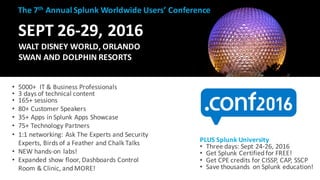
SEPT	26-29,	2016
WALT	DISNEY	WORLD,	ORLANDO
SWAN	AND	DOLPHIN	RESORTS
• 5000+		IT	&	Business	Professionals
• 3	days	of	technical	content
• 165+	sessions	
• 80+	Customer	Speakers
• 35+	Apps	in	Splunk	Apps	Showcase
• 75+	Technology	Partners
• 1:1	networking:	Ask	The	Experts	and	Security	
Experts,	Birds	of	a	Feather	and	Chalk	Talks
• NEW	hands-on	labs!	
• Expanded	show	floor,	Dashboards	Control	
Room	&	Clinic,	and	MORE!	
The	7th Annual	Splunk	Worldwide	Users’	Conference
PLUS	Splunk	University
• Three	days:	Sept	24-26,	2016
• Get	Splunk	Certified	for	FREE!
• Get	CPE	credits	for	CISSP,	CAP,	SSCP
• Save	thousands	 on	Splunk	education!
Copyright	©	2016	Splunk	Inc.
Splunk	and	Containers
16
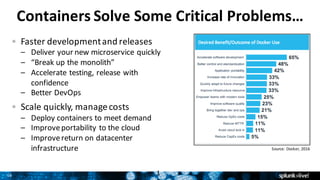
Containers	Solve	Some	Critical	Problems…
Faster	development	and	releases
– Deliver	your	new	microservice	quickly
– “Break	up	the	monolith”
– Accelerate	testing,	release	with	
confidence
– Better	DevOps
Scale	quickly,	manage	costs
– Deploy	containers	to	meet	demand
– Improve	portability	to	the	cloud
– Improve	return	on	datacenter	
infrastructure
1
Source:	Docker,	2016
17
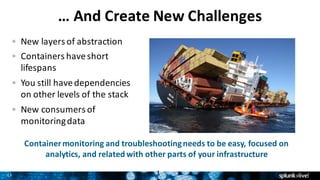
…	And	Create	New	Challenges
New	layers	of	abstraction
Containers	have	short	
lifespans
You	still	have	dependencies	
on	other	levels	of	the	stack
New	consumers	of	
monitoring	data
1
Container	monitoring	and	troubleshooting	needs	to	be	easy,	focused	on	
analytics,	and	related	with	other	parts	of	your	infrastructure
18
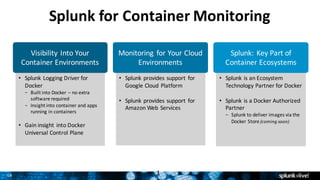
• Splunk	Logging	Driver	for	
Docker
– Built	into	Docker	– no	extra	
software	required
– Insight	into	container	and	apps	
running	in	containers
• Gain	insight	into	Docker	
Universal	Control	Plane
• Splunk	is	an	Ecosystem	
Technology	Partner	for	Docker
• Splunk is	a	Docker	Authorized	
Partner	
– Splunk	to	deliver	images	via	the	
Docker	Store	(coming	soon)
• Splunk	provides	support	for	
Google	Cloud	Platform
• Splunk provides	support	for	
Amazon	Web	Services
Splunk	for	Container	Monitoring
1
Visibility	Into	Your	
Container	Environments	
Splunk:	Key	Part	of	
Container	Ecosystems
Monitoring	 for	Your	Cloud	
Environments
19
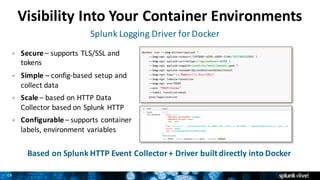
Visibility	Into	Your	Container	Environments
Based	on	Splunk	HTTP	Event	Collector	+	Driver	built	directly	into	Docker
Splunk	Logging	Driver	for	Docker
Secure	– supports	TLS/SSL	and	
tokens
Simple – config-based	setup	and	
collect	data
Scale – based	on	HTTP	Data	
Collector	based	on	Splunk	HTTP
Configurable – supports	container	
labels,	environment	variables
20
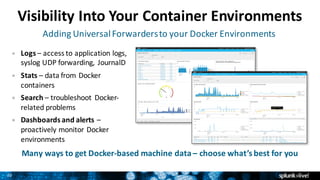
Visibility	Into	Your	Container	Environments
Many	ways	to	get	Docker-based	machine	data	– choose	what’s	best	for	you
Adding	Universal	Forwarders	to	your	Docker	Environments
Logs – access	to	application	logs,	
syslog	UDP	forwarding,	 JournalD	
Stats – data	from	Docker	
containers
Search – troubleshoot	 Docker-
related	problems
Dashboards	and	alerts	–
proactively	monitor	Docker	
environments
21
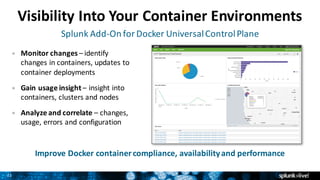
Visibility	Into	Your	Container	Environments
Improve	Docker	container	compliance,	availability	and	performance		
Splunk	Add-On	for	Docker	Universal	Control	Plane
Monitor	changes	– identify	
changes	in	containers,	updates	to	
container	deployments
Gain	usage	insight	– insight	into	
containers,	clusters	and	nodes
Analyze	and	correlate	– changes,	
usage,	errors	and	configuration
22
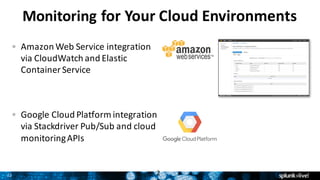
Monitoring for	Your	Cloud	Environments
Amazon	Web	Service	integration	
via	CloudWatch	and	Elastic	
Container	Service		
Google	Cloud	Platform	integration	
via	Stackdriver	Pub/Sub	and	cloud	
monitoring	APIs	
2
23
Splunk:	Key	Part	of	Container	Ecosystems
Docker	Ecosystem	Technology	Partner	(ETP)
– Visibility	for	Splunk	as	an	ecosystem	partner	
– Ecosystem	Technology	Partner	in	logging	and	
monitoring	categories
2
24
Setting	Splunk	Apart
Splunk takes	an	analytics-based	approach	to	container	management
With	Splunk	software,	you	can…	
– Find	and	fix	container-monitoring-related	problems	faster
– Monitor	applications	across	the	entire	stack
– Quickly	get	insight	on	Docker	with	the	Splunk	Logging	Driver	for	Docker
Splunk	is	different	than	other	offerings
– Focus	on	analytics—ask	questions	of	your	container-related	data
– Monitor	AND	Troubleshoot—review	historical	data	in	granular	detail
– Get	visibility	across	entire	stack—to	both	container- and	non-container-related	
applications
2
Try	Splunk	for	Free
Industry-leading	products	that	fit	your	budget,	use	cases	and	delivery	requirements
Full-featured	platform	for	real-time	Operational	Intelligence
Splunk	Enterprise	as	a	cloud	service
The	power	of	Splunk	for	small	IT	environments
Learn	more	about	Splunk	for	container	monitoring	and	troubleshooting
www.splunk.com/containers
Copyright	©	2016	Splunk	Inc.
Thank	You

DevOps Powered by Splunk Hands-On