MarcMüller
PrincipalConsultant
marc.mueller@4tecture.ch
@muellermarc
www.4tecture.ch
DOCKER - WHY THE FUTURE TAKES
PLACE IN CONTAINERS
Marc Müller
Principal Consultant
@muellermarc
Agenda
Intro
Container Basics
Build a Docker Container
Docker for CLI
Docker in DevOps Workflows
Intro
Docker
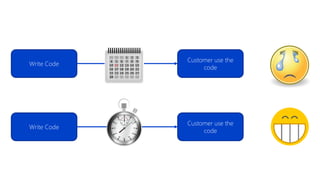
Write Code
Customer use the
code
Write Code
Customer use the
code
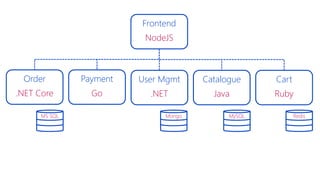
Frontend
NodeJS
Order
.NET Core
Payment
Go
User Mgmt
.NET
Catalogue
Java
Cart
Ruby
MS SQL Mongo MySQL Redis
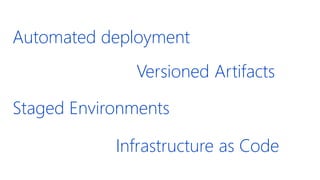
Automated deployment
Infrastructure as Code
Versioned Artifacts
Staged Environments
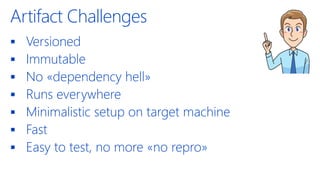
Artifact Challenges
▪ Versioned
▪ Immutable
▪ No «dependency hell»
▪ Runs everywhere
▪ Minimalistic setup on target machine
▪ Fast
▪ Easy to test, no more «no repro»
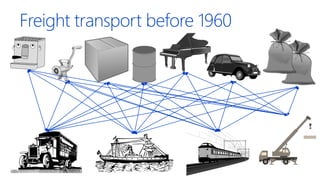
Freight transport before 1960
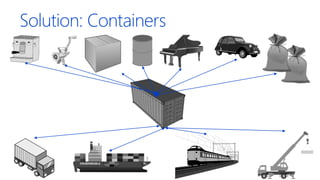
Solution: Containers
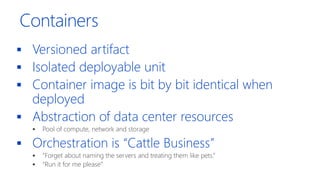
Containers
▪ Versioned artifact
▪ Isolated deployable unit
▪ Container image is bit by bit identical when
deployed
▪ Abstraction of data center resources
▪ Pool of compute, network and storage
▪ Orchestration is “Cattle Business”
▪ “Forget about naming the servers and treating them like pets.”
▪ “Run it for me please”
Container Basics
Docker
Demo
Hello World Web Application with Docker
Server
Host OS
Hypervisor
Server
Host OS
Docker Engine
Guest
OS
Guest
OS
Guest
OS
Bins/Libs Bins/Libs
App A App A’ App B
Bins/Libs Bins/Libs
AppA
AppA’
AppB
AppB’
AppB
AppB’
AppB
AppB’
Containers are isolated, but
share OS and, where
appropriate, bins/librariesBins/Libs
Image Source: https://sec.ch9.ms/sessions/build/2016/B822.pptx
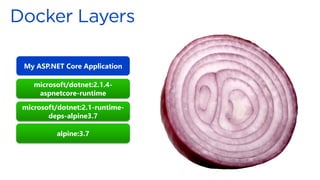
My ASP.NET Core Application
microsoft/dotnet:2.1.4-
aspnetcore-runtime
microsoft/dotnet:2.1-runtime-
deps-alpine3.7
alpine:3.7
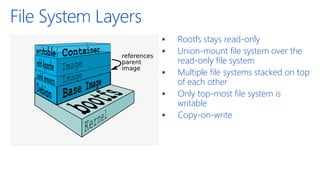
File System Layers
▪ Rootfs stays read-only
▪ Union-mount file system over the
read-only file system
▪ Multiple file systems stacked on top
of each other
▪ Only top-most file system is
writable
▪ Copy-on-write
Dockerfile
FROM microsoft/dotnet:2.1-aspnetcore-
runtime
WORKDIR /app
COPY output/app .
ENTRYPOINT ["dotnet", "HelloWorld.dll"]
FROM microsoft/dotnet:2.1-aspnetcore-runtime AS base
WORKDIR /app
EXPOSE 80
FROM microsoft/dotnet:2.1-sdk AS build
WORKDIR /src
COPY ["HelloWorld/HelloWorld.csproj", "HelloWorld/"]
RUN dotnet restore "HelloWorld/HelloWorld.csproj"
COPY . .
WORKDIR "/src/HelloWorld"
RUN dotnet build "HelloWorld.csproj" -c Release -o /app
FROM build AS publish
RUN dotnet publish "HelloWorld.csproj" -c Release -o /app
FROM base AS final
WORKDIR /app
COPY --from=publish /app .
ENTRYPOINT ["dotnet", "HelloWorld.dll"]
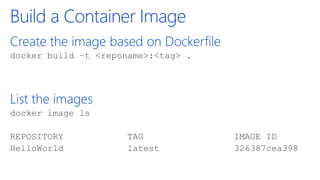
Build a Container Image
Create the image based on Dockerfile
docker build –t <reponame>:<tag> .
List the images
docker image ls
REPOSITORY TAG IMAGE ID
HelloWorld latest 326387cea398
Definitions
▪ Container
A container defines a software application and its
dependencies wrapped in a complete filesystem
including code, runtime, system tools, and libraries.
▪ Image
An image is a read-only snapshot of a Docker
container.
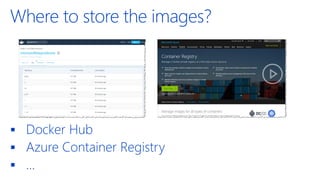
Where to store the images?
▪ Docker Hub
▪ Azure Container Registry
▪ …
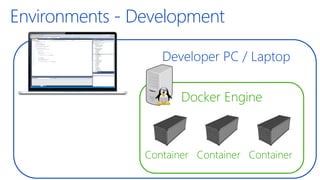
Developer PC / Laptop
Environments - Development
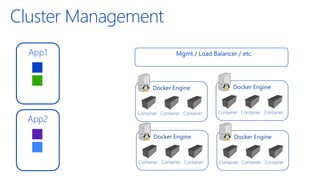
Docker Engine
Container Container Container
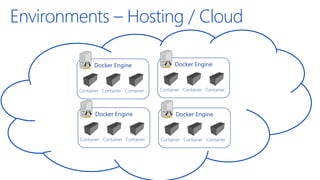
Environments – Hosting / Cloud
Cluster Management
App1
App2
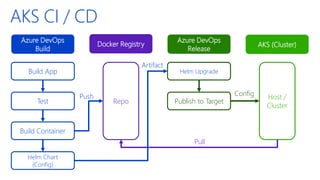
AKS CI / CD
Azure DevOps
Build
Azure DevOps
Release
Docker Registry
Build App
Test
Build Container
Repo
Helm Upgrade
Publish to Target
AKS (Cluster)
Helm Chart
(Config)
Push Host /
Cluster
Pull
Config
Artifact
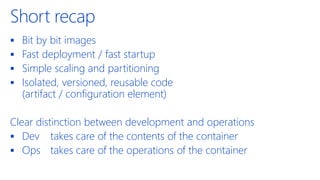
Short recap
▪ Bit by bit images
▪ Fast deployment / fast startup
▪ Simple scaling and partitioning
▪ Isolated, versioned, reusable code
(artifact / configuration element)
Clear distinction between development and operations
▪ Dev takes care of the contents of the container
▪ Ops takes care of the operations of the container
Docker for CLI
Docker
Use Docker for CLI Tooling
Tools installation can pollute the system.
Why not using Docker Containers on the CLI?
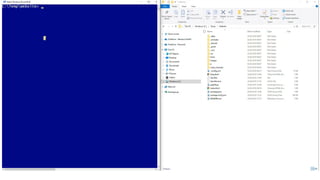
Demo
Jekyll Website Development
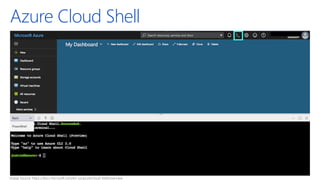
Azure Cloud Shell
Image Source: https://docs.microsoft.com/en-us/azure/cloud-shell/overview
Recap
Recap
Container – a perfect artifact
▪ Bit by bit images
▪ Simple scaling and partitioning
▪ Isolated, versioned, reusable code (artifact / configuration element)
Fast and low footprint
▪ Fast deployment
▪ Fast startup
▪ Ease of deployment
Orchestration
▪ Enterprise Grade Hosting Environments
▪ Simple Scaling and Failover
▪ Abstraction at Container Level
Thank you for your attention!
If you have any questions do not hesitate to contact us:
4tecture GmbH Marc Müller
Aathalstrasse 84 Principal Consultant
CH-8610 Uster
+41 44 508 37 00 marc.mueller@4tecture.ch
info@4tecture.ch @muellermarc
www.4tecture.ch
Q & A
We are looking for
great talents to join
our team!
Apply to job@4tecture.ch
www.4tecture.ch/jobs
DevOps Fusion 2019: Docker - Why the future takes place in containers

DevOps Fusion 2019: Docker - Why the future takes place in containers