2
© 2018 Brent Laster@BrentCLaster
2
Containers in Depth (in 30 minutes):
Understanding how containers work to work
better with containers
Brent Laster
3
© 2018 Brent Laster@BrentCLaster
3
@BrentCLaster
About me
▪ R&D Director
▪ Global trainer – training (Git, Jenkins, Gradle, Gerrit,
Continuous Pipelines, Containers, Kubernetes, Helm,
Istio)
▪ Author -
▪ OpenSource.com
▪ Professional Git book
▪ Jenkins 2 – Up and Running book
▪ Continuous Integration vs. Continuous Delivery vs.
Continuous Deployment mini-book on Safari
▪ https://www.linkedin.com/in/brentlaster
▪ @BrentCLaster
4
© 2018 Brent Laster@BrentCLaster
4
@BrentCLaster
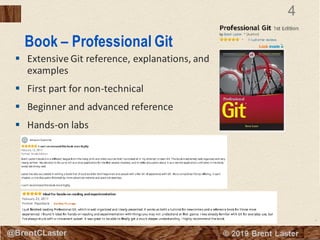
Book – Professional Git
▪ Extensive Git reference, explanations, and
examples
▪ First part for non-technical
▪ Beginner and advanced reference
▪ Hands-on labs
5
© 2018 Brent Laster@BrentCLaster
5
@BrentCLaster
Jenkins 2 Book
▪ Jenkins 2 – Up and Running
▪ “It’s an ideal book for those who are new to
CI/CD, as well as those who have been
using Jenkins for many years. This book will
help you discover and rediscover Jenkins.”
By Kohsuke Kawaguchi, Creator of Jenkins
6
© 2018 Brent Laster@BrentCLaster
6
@BrentCLaster
Agenda
▪ What containers are and the benefits they provide
▪ How containers are constructed
▪ The differences between layers, images, and containers
▪ What does immutability really mean
▪ The core Linux functionalities that containers are based on
▪ How containers reuse code
▪ The differences between containers and VMs
▪ What Docker really does
▪ The Open Container Initiative
▪ A good analogy for understanding all of this
7
© 2018 Brent Laster@BrentCLaster
7
What’s in a container?
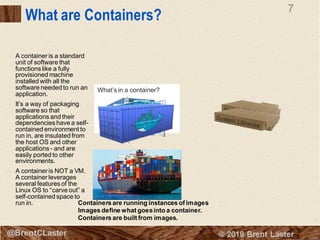
• A container is a standard
unit of software that
functions like a fully
provisioned machine
installed with all the
software needed to run an
application.
• It’s a way of packaging
software so that
applications and their
dependencies have a self-
contained environment to
run in, are insulated from
the host OS and other
applications - and are
easily ported to other
environments.
• A container is NOT a VM.
A container leverages
several features of the
Linux OS to “carve out” a
self-contained space to
run in. Containers are running instances of images.
Images define what goesinto a container.
Containers are built from images.
What are Containers?
8
© 2018 Brent Laster@BrentCLaster
Benefits of Containers
▪ Easy to create and deploy once image is defined.
▪ Best practices of continuous development, integration, and deployment allow for
frequent and reliable builds and deployments.
▪ Quick/easy rollbacks due to image immutability.
▪ Createdat build/release time instead of at deployment time – so applications are
decoupled from the infrastructure.
▪ Provide observability through application health and signals – not just from the
OS.
▪ Because environment is self-contained, runs the same on all infrastructure –
laptop, desktop, cloud, etc.
▪ Portable across any OS or cloud that supports containers.
▪ Manage application instead of infrastructure
▪ Allows applications such as microservices to be loosely coupled, distributed, and
managed and deployed dynamically. Removes the need for monolithic stacks.
▪ Resourceisolation and (hopefully) effective utilization.
(Paraphrasedfrom: https://kubernetes.io/docs/concepts/overview/what-is-
kubernetes/)
9
© 2018 Brent Laster@BrentCLaster
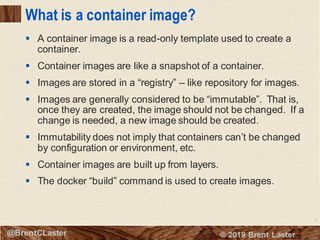
What is a container image?
▪ A container image is a read-only template used to create a
container.
▪ Container images are like a snapshot of a container.
▪ Images are stored in a “registry” – like repository for images.
▪ Images are generally considered to be “immutable”. That is,
once they are created, the image should not be changed. If a
change is needed, a new image should be created.
▪ Immutability does not imply that containers can’t be changed
by configuration or environment, etc.
▪ Container images are built up from layers.
▪ The docker “build” command is used to create images.
10
© 2018 Brent Laster@BrentCLaster
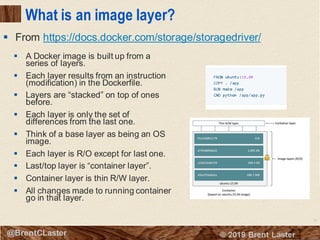
What is an image layer?
▪ A Docker image is built up from a
series of layers.
▪ Each layer results from an instruction
(modification) in the Dockerfile.
▪ Layers are “stacked” on top of ones
before.
▪ Each layer is only the set of
differences from the last one.
▪ Think of a base layer as being an OS
image.
▪ Each layer is R/O except for last one.
▪ Last/top layer is “container layer”.
▪ Container layer is thin R/W layer.
▪ All changes made to running container
go in that layer.
▪ From https://docs.docker.com/storage/storagedriver/
11
© 2018 Brent Laster@BrentCLaster
Creating and tracking layers to images
3f00bed1e02a | COPY dir:6a0…
ba16edb35eb9 | mysql:5.5.45
24f4da862742 | ENTRYPOINT ["/ent……
19e729dca1ee| CMD ["mysqld"]
12
© 2018 Brent Laster@BrentCLaster
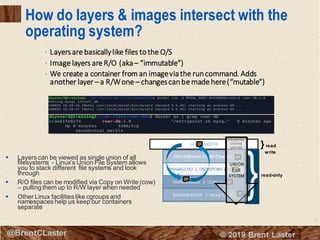
How do layers & images intersect with the
operating system?
▪ Layers can be viewed as single union of all
filesystems - Linux’s Union File System allows
you to stack different file systems and look
through
▪ R/O files can be modified via Copy on Write (cow)
– pulling them up to R/W layer when needed
▪ Other Linux facilities like cgroups and
namespaces help us keep our containers
separate
ccae61fe0274
read-only
}read
write
UNION FILE
SYSTEM
SERVICE
UNION
FILE
SYSTEM
• Layersare basicallylike files tothe O/S
• Image layers are R/O (aka– “immutable”)
• We create a container from an imageviathe runcommand. Adds
another layer – a R/Wone – changescanbe made here(“mutable”)
13
© 2018 Brent Laster@BrentCLaster
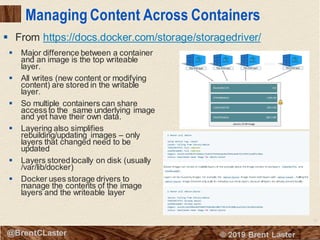
Managing Content Across Containers
▪ Major difference between a container
and an image is the top writeable
layer.
▪ All writes (new content or modifying
content) are stored in the writable
layer.
▪ So multiple containers can share
access to the same underlying image
and yet have their own data.
▪ Layering also simplifies
rebuilding/updating images – only
layers that changed need to be
updated
▪ Layers storedlocally on disk (usually
/var/lib/docker)
▪ Docker uses storage drivers to
manage the contents of the image
layers and the writeable layer
▪ From https://docs.docker.com/storage/storagedriver/
14
© 2018 Brent Laster@BrentCLaster
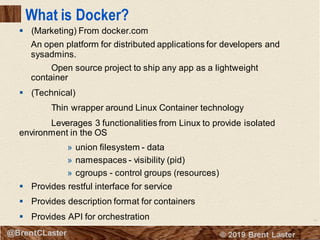
What is Docker?
▪ (Marketing) From docker.com
An open platform for distributed applications for developers and
sysadmins.
Open source project to ship any app as a lightweight
container
▪ (Technical)
Thin wrapper around Linux Container technology
Leverages 3 functionalities from Linux to provide isolated
environment in the OS
» union filesystem - data
» namespaces - visibility (pid)
» cgroups - control groups (resources)
▪ Provides restful interface for service
▪ Provides description format for containers
▪ Provides API for orchestration
15
© 2018 Brent Laster@BrentCLaster
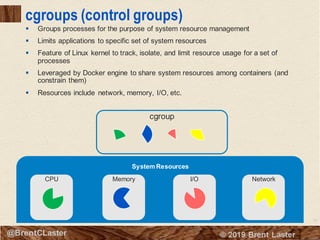
cgroup
cgroups (control groups)
▪ Groups processes for the purpose of system resource management
▪ Limits applications to specific set of system resources
▪ Feature of Linux kernel to track, isolate, and limit resource usage for a set of
processes
▪ Leveraged by Docker engine to share system resources among containers (and
constrain them)
▪ Resources include network, memory, I/O, etc.
System Resources
CPU Memory I/O Network
16
© 2018 Brent Laster@BrentCLaster
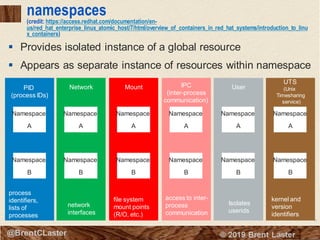
namespaces
(credit: https://access.redhat.com/documentation/en-
us/red_hat_enterprise_linux_atomic_host/7/html/overview_of_containers_in_red_hat_systems/introduction_to_linu
x_containers)
▪ Provides isolated instance of a global resource
▪ Appears as separate instance of resources within namespace
PID
(process IDs)
process
identifiers,
lists of
processes
Namespace
A
Namespace
B
Network
network
interfaces
Namespace
A
Namespace
B
Mount
file system
mount points
(R/O, etc.)
Namespace
A
Namespace
B
IPC
(inter-process
communication)
access to inter-
process
communication
Namespace
A
Namespace
B
User
Isolates
userids
Namespace
A
Namespace
B
UTS
(Unix
Timesharing
service)
kernel and
version
identifiers
Namespace
A
Namespace
B
17
© 2018 Brent Laster@BrentCLaster
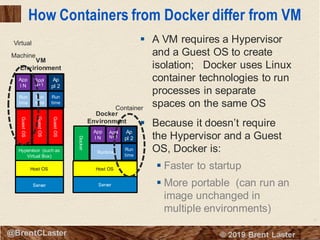
How Containers from Docker differ from VM
▪ A VM requires a Hypervisor
and a Guest OS to create
isolation; Docker uses Linux
container technologies to run
processes in separate
spaces on the same OS
▪ Because it doesn’t require
the Hypervisor and a Guest
OS, Docker is:
▪ Faster to startup
▪ More portable (can run an
image unchanged in
multiple environments)
Server
Host OS
Docker
Run
time
Runtime
App
l N
Appl
N+1
Ap
pl 2
App
l N
Appl
N+1
Ap
pl 2
Server
Host OS
Hypervisor (such as
Virtual Box)
GuestOS
GuestOS
GuestOS
Run
time
Run
time
Run
time
VM
Envirionment
Docker
Environment
Virtual
Machine
Container
18
© 2018 Brent Laster@BrentCLaster
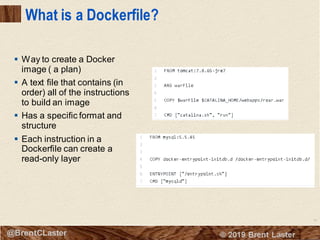
What is a Dockerfile?
▪ Way to create a Docker
image ( a plan)
▪ A text file that contains (in
order) all of the instructions
to build an image
▪ Has a specific format and
structure
▪ Each instruction in a
Dockerfile can create a
read-only layer
19
© 2018 Brent Laster@BrentCLaster
19
@BrentCLaster
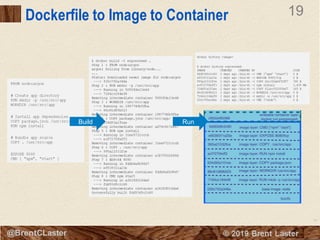
Dockerfile to Image to Container
Build Run
20
© 2018 Brent Laster@BrentCLaster
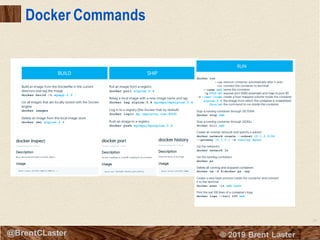
Docker Commands
21
© 2018 Brent Laster@BrentCLaster
21
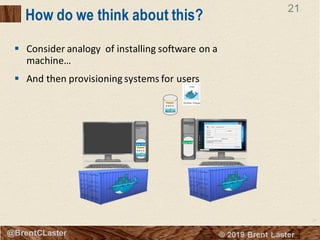
How do we think about this?
▪ Consider analogy of installing software on a
machine…
▪ And then provisioning systems for users
User R/W
User R/W
22
© 2018 Brent Laster@BrentCLaster
22
Diving Deeper into Layers
23
© 2018 Brent Laster@BrentCLaster
Containers can reuse layers
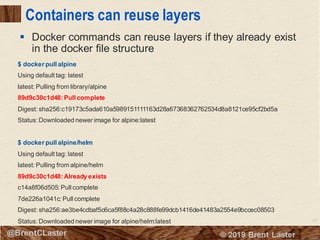
▪ Docker commands can reuse layers if they already exist
in the docker file structure
$ docker pull alpine
Using default tag: latest
latest: Pulling from library/alpine
89d9c30c1d48: Pull complete
Digest: sha256:c19173c5ada610a5989151111163d28a67368362762534d8a8121ce95cf2bd5a
Status: Downloaded newer image for alpine:latest
$ docker pull alpine/helm
Using default tag: latest
latest: Pulling from alpine/helm
89d9c30c1d48: Already exists
c14a8f06d505: Pull complete
7de226a1041c: Pull complete
Digest: sha256:ae3be4cdbaf5c6ca5f88c4a28c888fe99dcb1416de41483a2554e9bccec08503
Status: Downloaded newer image for alpine/helm:latest
24
© 2018 Brent Laster@BrentCLaster
Mapping layers to the file system (before 1.10)
(credit: winsock.io/explaining docker-image-ids/)
▪ Layer – alternative definition
▪ A layer is a delta or “diff” that results when commandsare run during the
image build process that produce new or changed files/directories
▪ The new or changed files and directories are stored or ‘committed’ as a
new layer
▪ Prior to Docker 1.10, images and layers were synonymous
ID: fdf9d70e7ba7
Parent: dc89c90bfea
Name: alpine/helm:latest
ID: dc89c90bfea
Parent: ead53b4e9ff
Name: “ ”
ID: ead53b4e9ff
Parent: “ “
Name: “ ”
/var/lib/docker/aufs/diff
fdf9d70e7ba7 …
dc89c90bfea …
ead53b4e9ff …
Image Layers
$ docker inspectalpine/helm:latest
[
{
“Id”: “fdf9d70e7ba72e3a74b
“Parent”: “dc89c90bfea235
…
…
}
]
Inspect
25
© 2018 Brent Laster@BrentCLaster
Mapping layers to the file system (1.10+)
▪ Layers equal to image had challenges
▪ Security – how to tell if image tampered with during
push/pull, etc.
▪ New approach – “Content Addressable IDs”
▪ Layers have no affiliation or notion of any image
» Just collections of directories and files
▪ Layers identified by digest of the form “algorithm:hex-
value”
» Algorithm is method for computing hex value from
layer’s contents (hashing method)
» Hex-value is string computed from applying
algorithm to layer’s contents (hash)
» Example:
sha256:77cae8ab23bf486355d1b31912597053…
▪ Docker image has
» Configuration object – includes ordered list of layer
digests (used to assemble filesystem in container
instead of series of parent images)
» Image ID is digest – computed hash of
configuration object
▪ Diff directories have a name that is a randomly
generated ‘cache ID’
» Docker maintains link from layer to cache id
$ docker inspect alpine/helm:latest
[
{
"Id": "sha256:fdf9d70e7ba76a6af25843
…
"Layers": [
"sha256:77cae8ab23bf486355d1b3
"sha256:fad447c6845e910b04e9391
"sha256:fcaa7782b133863c3ed0f68
]
…
}
]
Inspect
/var/lib/docker/aufs/diff
cc7da7c355e8 …
e4f6b9cf2669…
ecc5d637f8c0 …
Layers
26
© 2018 Brent Laster@BrentCLaster
About the aufs driver
(credit: https://docs.docker.com/storage/storagedriver/aufs-driver/
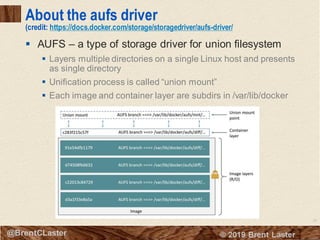
▪ AUFS – a type of storage driver for union filesystem
▪ Layers multiple directories on a single Linux host and presents
as single directory
▪ Unification process is called “union mount”
▪ Each image and container layer are subdirs in /var/lib/docker
27
© 2018 Brent Laster@BrentCLaster
Images in filesystem
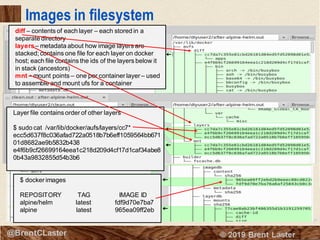
diff – contents of each layer – each stored in a
separate directory
layers– metadata about how image layers are
stacked; contains one file for each layer on docker
host; each file contains the ids of the layers below it
in stack (ancestors)
mnt – mount points – one per container layer – used
to assemble and mount ufs for a container
Layer file contains order of other layers
$ sudo cat /var/lib/docker/aufs/layers/cc7*
ecc5d637f8c036afad722a0518b7b6eff1059564bb671
01d8682ae9b5832b438
e4f6b9cf26699164eea1c218d209d4cf17d1caf34abe8
0b43a9832855d54b3b6
$ docker images
REPOSITORY TAG IMAGE ID
alpine/helm latest fdf9d70e7ba7
alpine latest 965ea09ff2eb
28
© 2018 Brent Laster@BrentCLaster
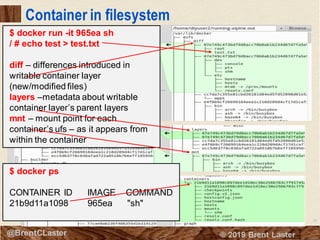
Container in filesystem
$ docker run -it 965ea sh
/ # echo test > test.txt
diff – differences introduced in
writable container layer
(new/modified files)
layers –metadata about writable
container layer’s parent layers
mnt – mount point for each
container’s ufs – as it appears from
within the container
$ docker ps
CONTAINER ID IMAGE COMMAND
21b9d11a1098 965ea "sh"
29
© 2018 Brent Laster@BrentCLaster
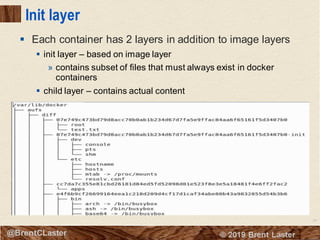
Init layer
▪ Each container has 2 layers in addition to image layers
▪ init layer – based on image layer
» contains subset of files that must always exist in docker
containers
▪ child layer – contains actual content
30
© 2018 Brent Laster@BrentCLaster
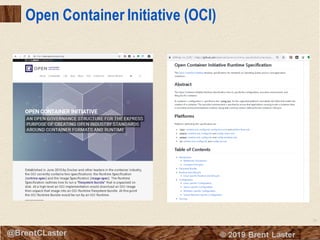
Open Container Initiative (OCI)
31
© 2018 Brent Laster@BrentCLaster
Other Players in the Container Space
32
© 2018 Brent Laster@BrentCLaster
32
That’s all - thanks!

Containers in depth – understanding how containers work to better work with containers

  • 1.
    2 © 2018 BrentLaster@BrentCLaster 2 Containers in Depth (in 30 minutes): Understanding how containers work to work better with containers Brent Laster
  • 2.
    3 © 2018 BrentLaster@BrentCLaster 3 @BrentCLaster About me ▪ R&D Director ▪ Global trainer – training (Git, Jenkins, Gradle, Gerrit, Continuous Pipelines, Containers, Kubernetes, Helm, Istio) ▪ Author - ▪ OpenSource.com ▪ Professional Git book ▪ Jenkins 2 – Up and Running book ▪ Continuous Integration vs. Continuous Delivery vs. Continuous Deployment mini-book on Safari ▪ https://www.linkedin.com/in/brentlaster ▪ @BrentCLaster
  • 3.
    4 © 2018 BrentLaster@BrentCLaster 4 @BrentCLaster Book – Professional Git ▪ Extensive Git reference, explanations, and examples ▪ First part for non-technical ▪ Beginner and advanced reference ▪ Hands-on labs
  • 4.
    5 © 2018 BrentLaster@BrentCLaster 5 @BrentCLaster Jenkins 2 Book ▪ Jenkins 2 – Up and Running ▪ “It’s an ideal book for those who are new to CI/CD, as well as those who have been using Jenkins for many years. This book will help you discover and rediscover Jenkins.” By Kohsuke Kawaguchi, Creator of Jenkins
  • 5.
    6 © 2018 BrentLaster@BrentCLaster 6 @BrentCLaster Agenda ▪ What containers are and the benefits they provide ▪ How containers are constructed ▪ The differences between layers, images, and containers ▪ What does immutability really mean ▪ The core Linux functionalities that containers are based on ▪ How containers reuse code ▪ The differences between containers and VMs ▪ What Docker really does ▪ The Open Container Initiative ▪ A good analogy for understanding all of this
  • 6.
    7 © 2018 BrentLaster@BrentCLaster 7 What’s in a container? • A container is a standard unit of software that functions like a fully provisioned machine installed with all the software needed to run an application. • It’s a way of packaging software so that applications and their dependencies have a self- contained environment to run in, are insulated from the host OS and other applications - and are easily ported to other environments. • A container is NOT a VM. A container leverages several features of the Linux OS to “carve out” a self-contained space to run in. Containers are running instances of images. Images define what goesinto a container. Containers are built from images. What are Containers?
  • 7.
    8 © 2018 BrentLaster@BrentCLaster Benefits of Containers ▪ Easy to create and deploy once image is defined. ▪ Best practices of continuous development, integration, and deployment allow for frequent and reliable builds and deployments. ▪ Quick/easy rollbacks due to image immutability. ▪ Createdat build/release time instead of at deployment time – so applications are decoupled from the infrastructure. ▪ Provide observability through application health and signals – not just from the OS. ▪ Because environment is self-contained, runs the same on all infrastructure – laptop, desktop, cloud, etc. ▪ Portable across any OS or cloud that supports containers. ▪ Manage application instead of infrastructure ▪ Allows applications such as microservices to be loosely coupled, distributed, and managed and deployed dynamically. Removes the need for monolithic stacks. ▪ Resourceisolation and (hopefully) effective utilization. (Paraphrasedfrom: https://kubernetes.io/docs/concepts/overview/what-is- kubernetes/)
  • 8.
    9 © 2018 BrentLaster@BrentCLaster What is a container image? ▪ A container image is a read-only template used to create a container. ▪ Container images are like a snapshot of a container. ▪ Images are stored in a “registry” – like repository for images. ▪ Images are generally considered to be “immutable”. That is, once they are created, the image should not be changed. If a change is needed, a new image should be created. ▪ Immutability does not imply that containers can’t be changed by configuration or environment, etc. ▪ Container images are built up from layers. ▪ The docker “build” command is used to create images.
  • 9.
    10 © 2018 BrentLaster@BrentCLaster What is an image layer? ▪ A Docker image is built up from a series of layers. ▪ Each layer results from an instruction (modification) in the Dockerfile. ▪ Layers are “stacked” on top of ones before. ▪ Each layer is only the set of differences from the last one. ▪ Think of a base layer as being an OS image. ▪ Each layer is R/O except for last one. ▪ Last/top layer is “container layer”. ▪ Container layer is thin R/W layer. ▪ All changes made to running container go in that layer. ▪ From https://docs.docker.com/storage/storagedriver/
  • 10.
    11 © 2018 BrentLaster@BrentCLaster Creating and tracking layers to images 3f00bed1e02a | COPY dir:6a0… ba16edb35eb9 | mysql:5.5.45 24f4da862742 | ENTRYPOINT ["/ent…… 19e729dca1ee| CMD ["mysqld"]
  • 11.
    12 © 2018 BrentLaster@BrentCLaster How do layers & images intersect with the operating system? ▪ Layers can be viewed as single union of all filesystems - Linux’s Union File System allows you to stack different file systems and look through ▪ R/O files can be modified via Copy on Write (cow) – pulling them up to R/W layer when needed ▪ Other Linux facilities like cgroups and namespaces help us keep our containers separate ccae61fe0274 read-only }read write UNION FILE SYSTEM SERVICE UNION FILE SYSTEM • Layersare basicallylike files tothe O/S • Image layers are R/O (aka– “immutable”) • We create a container from an imageviathe runcommand. Adds another layer – a R/Wone – changescanbe made here(“mutable”)
  • 12.
    13 © 2018 BrentLaster@BrentCLaster Managing Content Across Containers ▪ Major difference between a container and an image is the top writeable layer. ▪ All writes (new content or modifying content) are stored in the writable layer. ▪ So multiple containers can share access to the same underlying image and yet have their own data. ▪ Layering also simplifies rebuilding/updating images – only layers that changed need to be updated ▪ Layers storedlocally on disk (usually /var/lib/docker) ▪ Docker uses storage drivers to manage the contents of the image layers and the writeable layer ▪ From https://docs.docker.com/storage/storagedriver/
  • 13.
    14 © 2018 BrentLaster@BrentCLaster What is Docker? ▪ (Marketing) From docker.com An open platform for distributed applications for developers and sysadmins. Open source project to ship any app as a lightweight container ▪ (Technical) Thin wrapper around Linux Container technology Leverages 3 functionalities from Linux to provide isolated environment in the OS » union filesystem - data » namespaces - visibility (pid) » cgroups - control groups (resources) ▪ Provides restful interface for service ▪ Provides description format for containers ▪ Provides API for orchestration
  • 14.
    15 © 2018 BrentLaster@BrentCLaster cgroup cgroups (control groups) ▪ Groups processes for the purpose of system resource management ▪ Limits applications to specific set of system resources ▪ Feature of Linux kernel to track, isolate, and limit resource usage for a set of processes ▪ Leveraged by Docker engine to share system resources among containers (and constrain them) ▪ Resources include network, memory, I/O, etc. System Resources CPU Memory I/O Network
  • 15.
    16 © 2018 BrentLaster@BrentCLaster namespaces (credit: https://access.redhat.com/documentation/en- us/red_hat_enterprise_linux_atomic_host/7/html/overview_of_containers_in_red_hat_systems/introduction_to_linu x_containers) ▪ Provides isolated instance of a global resource ▪ Appears as separate instance of resources within namespace PID (process IDs) process identifiers, lists of processes Namespace A Namespace B Network network interfaces Namespace A Namespace B Mount file system mount points (R/O, etc.) Namespace A Namespace B IPC (inter-process communication) access to inter- process communication Namespace A Namespace B User Isolates userids Namespace A Namespace B UTS (Unix Timesharing service) kernel and version identifiers Namespace A Namespace B
  • 16.
    17 © 2018 BrentLaster@BrentCLaster How Containers from Docker differ from VM ▪ A VM requires a Hypervisor and a Guest OS to create isolation; Docker uses Linux container technologies to run processes in separate spaces on the same OS ▪ Because it doesn’t require the Hypervisor and a Guest OS, Docker is: ▪ Faster to startup ▪ More portable (can run an image unchanged in multiple environments) Server Host OS Docker Run time Runtime App l N Appl N+1 Ap pl 2 App l N Appl N+1 Ap pl 2 Server Host OS Hypervisor (such as Virtual Box) GuestOS GuestOS GuestOS Run time Run time Run time VM Envirionment Docker Environment Virtual Machine Container
  • 17.
    18 © 2018 BrentLaster@BrentCLaster What is a Dockerfile? ▪ Way to create a Docker image ( a plan) ▪ A text file that contains (in order) all of the instructions to build an image ▪ Has a specific format and structure ▪ Each instruction in a Dockerfile can create a read-only layer
  • 18.
    19 © 2018 BrentLaster@BrentCLaster 19 @BrentCLaster Dockerfile to Image to Container Build Run
  • 19.
    20 © 2018 BrentLaster@BrentCLaster Docker Commands
  • 20.
    21 © 2018 BrentLaster@BrentCLaster 21 How do we think about this? ▪ Consider analogy of installing software on a machine… ▪ And then provisioning systems for users User R/W User R/W
  • 21.
    22 © 2018 BrentLaster@BrentCLaster 22 Diving Deeper into Layers
  • 22.
    23 © 2018 BrentLaster@BrentCLaster Containers can reuse layers ▪ Docker commands can reuse layers if they already exist in the docker file structure $ docker pull alpine Using default tag: latest latest: Pulling from library/alpine 89d9c30c1d48: Pull complete Digest: sha256:c19173c5ada610a5989151111163d28a67368362762534d8a8121ce95cf2bd5a Status: Downloaded newer image for alpine:latest $ docker pull alpine/helm Using default tag: latest latest: Pulling from alpine/helm 89d9c30c1d48: Already exists c14a8f06d505: Pull complete 7de226a1041c: Pull complete Digest: sha256:ae3be4cdbaf5c6ca5f88c4a28c888fe99dcb1416de41483a2554e9bccec08503 Status: Downloaded newer image for alpine/helm:latest
  • 23.
    24 © 2018 BrentLaster@BrentCLaster Mapping layers to the file system (before 1.10) (credit: winsock.io/explaining docker-image-ids/) ▪ Layer – alternative definition ▪ A layer is a delta or “diff” that results when commandsare run during the image build process that produce new or changed files/directories ▪ The new or changed files and directories are stored or ‘committed’ as a new layer ▪ Prior to Docker 1.10, images and layers were synonymous ID: fdf9d70e7ba7 Parent: dc89c90bfea Name: alpine/helm:latest ID: dc89c90bfea Parent: ead53b4e9ff Name: “ ” ID: ead53b4e9ff Parent: “ “ Name: “ ” /var/lib/docker/aufs/diff fdf9d70e7ba7 … dc89c90bfea … ead53b4e9ff … Image Layers $ docker inspectalpine/helm:latest [ { “Id”: “fdf9d70e7ba72e3a74b “Parent”: “dc89c90bfea235 … … } ] Inspect
  • 24.
    25 © 2018 BrentLaster@BrentCLaster Mapping layers to the file system (1.10+) ▪ Layers equal to image had challenges ▪ Security – how to tell if image tampered with during push/pull, etc. ▪ New approach – “Content Addressable IDs” ▪ Layers have no affiliation or notion of any image » Just collections of directories and files ▪ Layers identified by digest of the form “algorithm:hex- value” » Algorithm is method for computing hex value from layer’s contents (hashing method) » Hex-value is string computed from applying algorithm to layer’s contents (hash) » Example: sha256:77cae8ab23bf486355d1b31912597053… ▪ Docker image has » Configuration object – includes ordered list of layer digests (used to assemble filesystem in container instead of series of parent images) » Image ID is digest – computed hash of configuration object ▪ Diff directories have a name that is a randomly generated ‘cache ID’ » Docker maintains link from layer to cache id $ docker inspect alpine/helm:latest [ { "Id": "sha256:fdf9d70e7ba76a6af25843 … "Layers": [ "sha256:77cae8ab23bf486355d1b3 "sha256:fad447c6845e910b04e9391 "sha256:fcaa7782b133863c3ed0f68 ] … } ] Inspect /var/lib/docker/aufs/diff cc7da7c355e8 … e4f6b9cf2669… ecc5d637f8c0 … Layers
  • 25.
    26 © 2018 BrentLaster@BrentCLaster About the aufs driver (credit: https://docs.docker.com/storage/storagedriver/aufs-driver/ ▪ AUFS – a type of storage driver for union filesystem ▪ Layers multiple directories on a single Linux host and presents as single directory ▪ Unification process is called “union mount” ▪ Each image and container layer are subdirs in /var/lib/docker
  • 26.
    27 © 2018 BrentLaster@BrentCLaster Images in filesystem diff – contents of each layer – each stored in a separate directory layers– metadata about how image layers are stacked; contains one file for each layer on docker host; each file contains the ids of the layers below it in stack (ancestors) mnt – mount points – one per container layer – used to assemble and mount ufs for a container Layer file contains order of other layers $ sudo cat /var/lib/docker/aufs/layers/cc7* ecc5d637f8c036afad722a0518b7b6eff1059564bb671 01d8682ae9b5832b438 e4f6b9cf26699164eea1c218d209d4cf17d1caf34abe8 0b43a9832855d54b3b6 $ docker images REPOSITORY TAG IMAGE ID alpine/helm latest fdf9d70e7ba7 alpine latest 965ea09ff2eb
  • 27.
    28 © 2018 BrentLaster@BrentCLaster Container in filesystem $ docker run -it 965ea sh / # echo test > test.txt diff – differences introduced in writable container layer (new/modified files) layers –metadata about writable container layer’s parent layers mnt – mount point for each container’s ufs – as it appears from within the container $ docker ps CONTAINER ID IMAGE COMMAND 21b9d11a1098 965ea "sh"
  • 28.
    29 © 2018 BrentLaster@BrentCLaster Init layer ▪ Each container has 2 layers in addition to image layers ▪ init layer – based on image layer » contains subset of files that must always exist in docker containers ▪ child layer – contains actual content
  • 29.
    30 © 2018 BrentLaster@BrentCLaster Open Container Initiative (OCI)
  • 30.
    31 © 2018 BrentLaster@BrentCLaster Other Players in the Container Space
  • 31.
    32 © 2018 BrentLaster@BrentCLaster 32 That’s all - thanks!