



Developing on Windows 8


       Power point template by
          Colin Eberhardt
Agenda

WinRT Platform Basics

Best practices

Pickers

Contracts

Tiles

Notifications
Who am I


                           Einar Ingebrigtsen


       @einari           einar@dolittle.com


                        http://blog.dolittle.com
                 http://www.ingebrigtsen.info
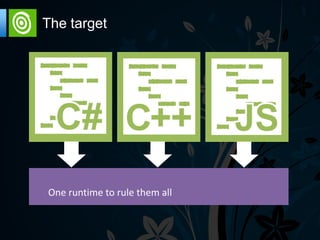
The target
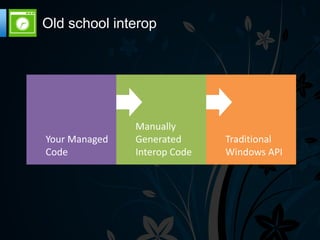
Old school interop
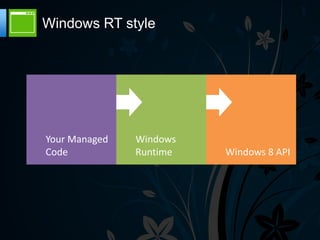
Windows RT style
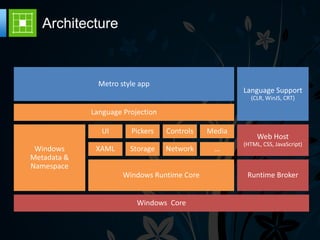
Architecture
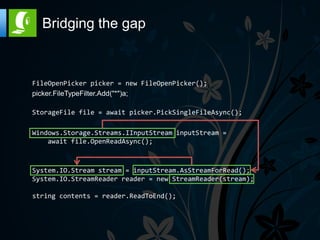
Bridging the gap


FileOpenPicker picker = new FileOpenPicker();
picker.FileTypeFilter.Add("*")a;

StorageFile file = await picker.PickSingleFileAsync();

Windows.Storage.Streams.IInputStream inputStream =
    await file.OpenReadAsync();


System.IO.Stream stream = inputStream.AsStreamForRead();
System.IO.StreamReader reader = new StreamReader(stream);

string contents = reader.ReadToEnd();
Missing things


Reflection API changed
 Type details through GetTypeInfo() – extension
 method
 Emit namespace practically empty - security
XAML


Originally developed for Windows Vista and
exposed as WPF

Defines what you see

Layout is by default not flowing, as in HTML

Can observe changes (Active View)
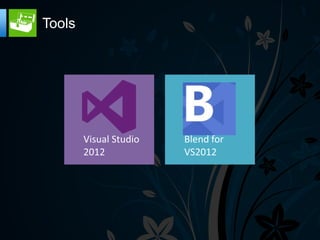
Tools
Binding

Source
 Defaults to DataContext
 Can use StaticResource as source


Mode
 OneWay, TwoWay, OneTime – OneWay default


Validation
 ValidatesOnException
 ValidatesOnNotifyDataErrors
   INotifyDataErrorInfo
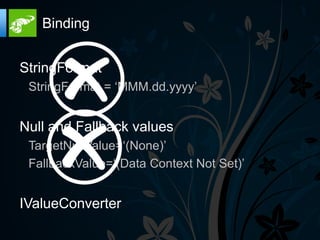
Binding


StringFormat
 StringFormat = „MMM.dd.yyyy‟


Null and Fallback values
 TargetNullValue=„(None)‟
 FallbackValue=„(Data Context Not Set)‟


IValueConverter
Element to Element


Can bind directly to other elements
properties

Binds by name of element
Events


You still have events as before – buttons can
be clicked and raise an event

RoutedEvents – bubbles through the UI
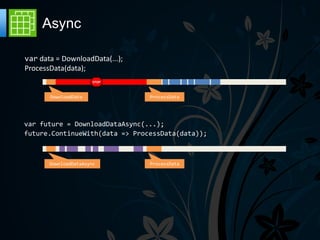
Async

var data = DownloadData(...);
ProcessData(data);
                       STOP


       DownloadData             ProcessData


var future = DownloadDataAsync(...);
future.ContinueWith(data => ProcessData(data));


       DownloadDataAsync        ProcessData
Async Models


Windows Runtime : IAsyncOperation<T>

.NET Framework : Task<T>

C# 5.0 – async / await
Async – C# style


Marked with “async” modifier

Must return void or Task<T>

Use “await” operator to cooperatively yield
control – remember to mark with “async”

Feels just like good old synchronous code
Patterns & Practices

MVVM
 Inspired by PresentationModel by Martin Fowler
 Good for decoupling – promotes testability


Compositioning

Commands

Actions / Triggers / Behaviors
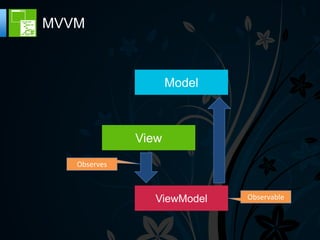
MVVM


                     Model


              View
   Observes


                 ViewModel   Observable
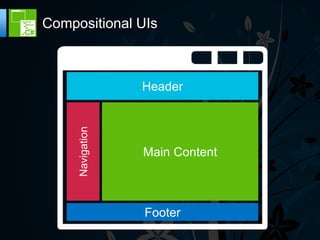
Compositional UIs


     Navigation   Header


                  Main Content


                  Footer
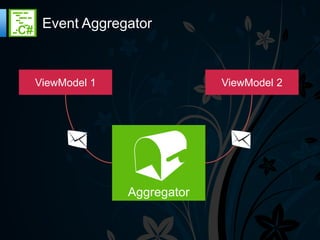
Event Aggregator


ViewModel 1                ViewModel 2


              Aggregator
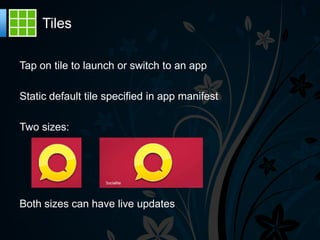
Tiles

Tap on tile to launch or switch to an app

Static default tile specified in app manifest

Two sizes:


Both sizes can have live updates
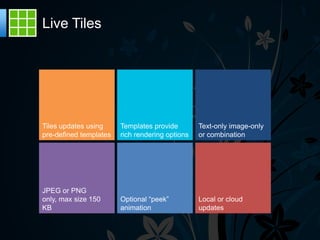
Live Tiles


Tiles updates using     Templates provide        Text-only image-only
pre-defined templates   rich rendering options   or combination


JPEG or PNG
only, max size 150      Optional “peek”          Local or cloud
KB                      animation                updates
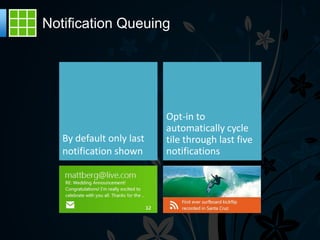
Notification Queuing
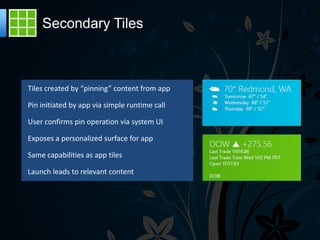
Secondary Tiles
Windows Notification Service

Enables delivery of tile and toast notification over the
internet

Tile updates and notifications shown to the user even if
your app is not running

WNS handles communication with your app

Scales to millions of users

WNS is a free service for your app to use
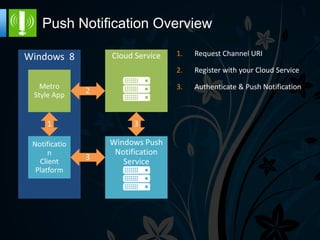
Push Notification Overview
                    1.   Request Channel URI

                    2.   Register with your Cloud Service

                    3.   Authenticate & Push Notification
Toast Notifications

Toast notifications deliver transient messages outside the context of the
app

Use toast notifications to get user‟s attention immediately

User is in control and can permanently turn off toast notifications from
your app

Allows quick navigation to a contextually relevant location in your app

Toast notifications are easy to invoke from your app or from the cloud
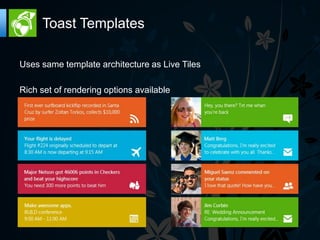
Toast Templates

Uses same template architecture as Live Tiles

Rich set of rendering options available
Contracts


Contracts enable integrating the Windows 8
         experience into your app

    Yields a consistent UI for all apps
Search


Enables your app to interact and respond to
 Suggestions
 Search Query
Settings


Consistently given one place to get search
 Context sensitive to the front facing app
Share


Your app can share anything (text, images, binaries)
  Automatically filters available applications to share to


Your app can be a share target – receive sharing from others
  Add sharing target as a capability and you can receive share requests
Play To


Ability to stream media to compatible devices
Summarized


Windows RT is a huge leap, both in faith but also technically

Consistent API that feels mature from day one

Well architected solutions putting the user first

Makes us as developers focus on adding the business value
Resources

The samples of today
  http://github.com/einari/toodeloo


Yggdrasil – IoC Container
  http://github.com/dolittlestudios/yggdrasil
  https://nuget.org/packages/Yggdrasil


INPC Weaver
  http://github.com/SimonCropp/NotifyPropertyWeaver


WinRT Toolkit
  http://jupitertoolkit.codeplex.com


Tiny IoC container - WinRT Compatible
  http://microsliver.codeplex.com/
Resources

MVVM Light
  http://mvvmlight.codeplex.com/


Setting up push notifications – registering your app
  https://manage.dev.live.com/build


WAT for Windows 8 + WnsRecipe
  http://watwindows8.codeplex.com/releases/view/73334


Calisto – UI Framework for WinRT
  https://github.com/timheuer/callisto


Get into the store – register as a deveveloper
  http://msdn.microsoft.com/en-us/windows/apps/
Thanks for your
   attention
Developing on Windows 8

Developing on Windows 8

  • 2.
    Developing on Windows8 Power point template by Colin Eberhardt
  • 3.
    Agenda WinRT Platform Basics Bestpractices Pickers Contracts Tiles Notifications
  • 4.
    Who am I Einar Ingebrigtsen @einari einar@dolittle.com http://blog.dolittle.com http://www.ingebrigtsen.info
  • 5.
  • 6.
  • 7.
  • 8.
  • 9.
    Bridging the gap FileOpenPickerpicker = new FileOpenPicker(); picker.FileTypeFilter.Add("*")a; StorageFile file = await picker.PickSingleFileAsync(); Windows.Storage.Streams.IInputStream inputStream = await file.OpenReadAsync(); System.IO.Stream stream = inputStream.AsStreamForRead(); System.IO.StreamReader reader = new StreamReader(stream); string contents = reader.ReadToEnd();
  • 10.
    Missing things Reflection APIchanged Type details through GetTypeInfo() – extension method Emit namespace practically empty - security
  • 11.
    XAML Originally developed forWindows Vista and exposed as WPF Defines what you see Layout is by default not flowing, as in HTML Can observe changes (Active View)
  • 12.
  • 13.
    Binding Source Defaults toDataContext Can use StaticResource as source Mode OneWay, TwoWay, OneTime – OneWay default Validation ValidatesOnException ValidatesOnNotifyDataErrors INotifyDataErrorInfo
  • 14.
    Binding StringFormat StringFormat =„MMM.dd.yyyy‟ Null and Fallback values TargetNullValue=„(None)‟ FallbackValue=„(Data Context Not Set)‟ IValueConverter
  • 15.
    Element to Element Canbind directly to other elements properties Binds by name of element
  • 16.
    Events You still haveevents as before – buttons can be clicked and raise an event RoutedEvents – bubbles through the UI
  • 17.
    Async var data =DownloadData(...); ProcessData(data); STOP DownloadData ProcessData var future = DownloadDataAsync(...); future.ContinueWith(data => ProcessData(data)); DownloadDataAsync ProcessData
  • 18.
    Async Models Windows Runtime: IAsyncOperation<T> .NET Framework : Task<T> C# 5.0 – async / await
  • 19.
    Async – C#style Marked with “async” modifier Must return void or Task<T> Use “await” operator to cooperatively yield control – remember to mark with “async” Feels just like good old synchronous code
  • 20.
    Patterns & Practices MVVM Inspired by PresentationModel by Martin Fowler Good for decoupling – promotes testability Compositioning Commands Actions / Triggers / Behaviors
  • 21.
    MVVM Model View Observes ViewModel Observable
  • 22.
    Compositional UIs Navigation Header Main Content Footer
  • 23.
    Event Aggregator ViewModel 1 ViewModel 2 Aggregator
  • 24.
    Tiles Tap on tileto launch or switch to an app Static default tile specified in app manifest Two sizes: Both sizes can have live updates
  • 25.
    Live Tiles Tiles updatesusing Templates provide Text-only image-only pre-defined templates rich rendering options or combination JPEG or PNG only, max size 150 Optional “peek” Local or cloud KB animation updates
  • 26.
  • 27.
  • 28.
    Windows Notification Service Enablesdelivery of tile and toast notification over the internet Tile updates and notifications shown to the user even if your app is not running WNS handles communication with your app Scales to millions of users WNS is a free service for your app to use
  • 29.
    Push Notification Overview 1. Request Channel URI 2. Register with your Cloud Service 3. Authenticate & Push Notification
  • 30.
    Toast Notifications Toast notificationsdeliver transient messages outside the context of the app Use toast notifications to get user‟s attention immediately User is in control and can permanently turn off toast notifications from your app Allows quick navigation to a contextually relevant location in your app Toast notifications are easy to invoke from your app or from the cloud
  • 31.
    Toast Templates Uses sametemplate architecture as Live Tiles Rich set of rendering options available
  • 32.
    Contracts Contracts enable integratingthe Windows 8 experience into your app Yields a consistent UI for all apps
  • 33.
    Search Enables your appto interact and respond to Suggestions Search Query
  • 34.
    Settings Consistently given oneplace to get search Context sensitive to the front facing app
  • 35.
    Share Your app canshare anything (text, images, binaries) Automatically filters available applications to share to Your app can be a share target – receive sharing from others Add sharing target as a capability and you can receive share requests
  • 36.
    Play To Ability tostream media to compatible devices
  • 38.
    Summarized Windows RT isa huge leap, both in faith but also technically Consistent API that feels mature from day one Well architected solutions putting the user first Makes us as developers focus on adding the business value
  • 39.
    Resources The samples oftoday http://github.com/einari/toodeloo Yggdrasil – IoC Container http://github.com/dolittlestudios/yggdrasil https://nuget.org/packages/Yggdrasil INPC Weaver http://github.com/SimonCropp/NotifyPropertyWeaver WinRT Toolkit http://jupitertoolkit.codeplex.com Tiny IoC container - WinRT Compatible http://microsliver.codeplex.com/
  • 40.
    Resources MVVM Light http://mvvmlight.codeplex.com/ Setting up push notifications – registering your app https://manage.dev.live.com/build WAT for Windows 8 + WnsRecipe http://watwindows8.codeplex.com/releases/view/73334 Calisto – UI Framework for WinRT https://github.com/timheuer/callisto Get into the store – register as a deveveloper http://msdn.microsoft.com/en-us/windows/apps/
  • 41.

Editor's Notes

  • #13 Visual Studio : Code editor w/ IntellisenseUI Designer DebuggersSimulator Platform window Blend : Code editor WYSIGYG designer Animation Better properties window SimulatorPlatform window
  • #25 Metro App = one foreground full screen window that allows the user to work more efficientlyThe other Metro Apps are quickly suspended to preserve battery lifeAs a developer, you have to know how Windows manages your App lifetime and how to be a good citizenApps are suspended 5 seconds after leaving foreground.However, you get 10 seconds instead when you switch from one App to another.You can check it if you launch an App in Snap view and keep the Task Manager in the Filled view (I’m not able to find a workflow that ends up to the 5 seconds…)
  • #26 Metro App = one foreground full screen window that allows the user to work more efficientlyThe other Metro Apps are quickly suspended to preserve battery lifeAs a developer, you have to know how Windows manages your App lifetime and how to be a good citizenApps are suspended 5 seconds after leaving foreground.However, you get 10 seconds instead when you switch from one App to another.You can check it if you launch an App in Snap view and keep the Task Manager in the Filled view (I’m not able to find a workflow that ends up to the 5 seconds…)